Riverbed Technology
199 Fremont Street
San Francisco, CA 94105 USA
AppResponse Xpert
8.6.8 Release Notes
AppResponse Xpert/Release 8.6 3
Copyright and Contacts
Document Copyright
Document Title: AppResponse Xpert 8.6.8 Release Notes Version: 8.6.8
Part number: 712-00193-02 Revised: 11/21/13
Trademarks
Riverbed and any Riverbed product or service name or logo used herein are trademarks of Riverbed Technology. All other trademarks used herein belong to their respective owners. The trademarks and logos displayed herein may not be used without the prior written consent of Riverbed Technology or their
respective owners.
PATENTS
Protected by U.S. Patents 7,277,843; 7,337,206; 7,443,870; 7,519,700; 7,593,351; and 7,885,206.
COPYRIGHTS
(C) Copyright 2013 Riverbed Technology. All rights reserved.
Contacts
Riverbed Technology. 199 Fremont St.,
San Francisco CA 94105, USA
General Telephone: 415.247.8800 E-mail: [email protected] Web: http://www.riverbed.com Technical Support Telephone: 240.497.1200 Fax: 240.497.1064 E-mail: [email protected]
This Documentation and Riverbed
This document and the accompanying product documentation describes the functions of the Riverbed software product(s) (“SOFTWARE”) identified above (this document and the product documentation are collectively referred to as “DOCUMENTATION”). Riverbed Technology, 199 Fremont St., San Francisco, California 94105 is the sole owner of all rights, title, and interest to the DOCUMENTATION and SOFTWARE. Nothing herein shall grant or imply a license to the DOCUMENTATION or SOFTWARE. The right to use the DOCUMENTATION and SOFTWARE shall result only from entering into a Master Software License Agreement and a Software Usage Agreement, and paying the applicable license fees.
Terms and Conditions of Use
Eligible Users
This document is subject to restrictions on use and distribution is intended solely for persons who are subject to the terms and conditions of Riverbed’s Software Master License Agreement or persons authorized by Riverbed (“Eligible Users”). As a condition of being granted access to and use of this document, each User represents that: i) the User is an Eligible User of a Licensee under a valid Riverbed Software Master License Agreement or the User is authorized by Riverbed and ii) the User accepts the terms and conditions of Riverbed’s Software Master License Agreement and the terms and conditions governing the use of this document.
Confidential Information
The User agrees that the DOCUMENTATION, including this document, are the proprietary property of Riverbed and constitutes a trade secret of Riverbed. The User agrees that access to and use of this document does not grant any title or rights of ownership. The User shall not copy or reproduce, in whole or in part, disclose or permit third parties access to this document without the prior written consent of Riverbed. This document may not be stored, in whole or in part, in any media without the prior written consent of Riverbed. Any unauthorized use of this document will be subject to legal action that may result in criminal and/or civil penalties against the User.
Intellectual Property and Proprietary Notices
Alteration, removal, obscuring, or destruction of any proprietary legend, copyright, trademark, patent, or intellectual property notice contained in this document is prohibited.
All trademarks and service marks in this document are the property of their respective owners.
Restricted Rights Legend
The DOCUMENTATION and SOFTWARE are subject to the restrictions on use and distribution in the Riverbed Software Master License Agreement (for Agencies of the U.S. Government). Any use of the DOCUMENTATION or any SOFTWARE by an agency of the U.S. Government or a direct contractor of an agency of the U.S. Government requires a valid Riverbed Software Master License Agreement and Riverbed Software Usage Agreement.
For all users, this Software and Documentation are subject to the restrictions (including those on use and distribution) in Riverbed's Master License Agreement. Use of this Software or Documentation requires a current Riverbed license and shall be governed solely by the terms of that license. All other use is prohibited. For the U.S. Government and its contractors, the Software is restricted computer software in accordance with Federal Acquisition Regulations as applied to civilian agencies and the Defense Federal Acquisition Regulation Supplement as applied to military agencies. The Software and Documentation qualify as “commercial items,” “commercial computer software,” and “commercial computer software documentation.”
No Warranty and Limitation of Liability
ALL INFORMATION PROVIDED IN THIS USER MANUAL IS PROVIDED “AS IS” WITHOUT WARRANTY OF ANY KIND EITHER EXPRESS OR IMPLIED INCLUDING BUT NOT LIMITED TO THE IMPLIED WARRANTIES OF MERCHANTABILITY, FITNESS FOR A PARTICULAR PURPOSE, OR
NON-INFRINGEMENT. No representations by Riverbed, such as statements of capability, suitability for use, accuracy or performance, shall be a warranty by Riverbed, or bind Riverbed or vary any term or condition of any Software Master License Agreement, unless contained in written agreement and signed by Riverbed and any other party or parties to such Software Master License Agreement.
In no event shall Riverbed be liable for any incidental, indirect, special, or consequential damages whatsoever (including but not limited to lost profits arising out of or relating to this document or the information contained herein) even if Riverbed has been advised, knew, or should have known of the possibility of such damages.
AppResponse Xpert/Release 8.6 5 THE USER UNDERSTANDS AND ACCEPTS THAT RIVERBED SHALL NOT BE LIABLE FOR DAMAGES WHICH ARE: (i) INCIDENTAL, INDIRECT, SPECIAL, PUNITIVE, OR CONSEQUENTIAL, OR (ii) THE RESULT FROM LOSS OF USE, DATA, OR PROFITS, OR (iii) FROM THE USE OF THE SOFTWARE AND DOCUMENTATION, WHETHER BROUGHT IN AN ACTION OF CONTRACT, TORT, OR OTHERWISE, EVEN IF Riverbed WAS ADVISED OF THE POSSIBILITY OF SUCH DAMAGES.
Export Controls
Any User of the DOCUMENTATION including this document shall comply with the laws of the United States, including the provisions of the U.S. Department of Commerce, Bureau of Industry Security (“BIS”), Export Administration Regulations (EAR), the U.S. Department of State, International Traffic in Arms Regulations, and the U.S. Treasure Department, Office of Foreign Assets Control, regarding the export, re-export and disclosure of the DOCUMENTATION or the SOFTWARE. Any export, re-export or disclosure of the DOCUMENTATION or the SOFTWARE shall be subject to the prior written consent of Riverbed. Users shall not remove any Destination Control Notices provided by Riverbed from the DOCUMENTATION or the SOFTWARE.
Destination Control Statement
The DOCUMENTATION and the SOFTWARE were manufactured in the United States by Riverbed. The initial export of the DOCUMENTATION and the SOFTWARE from the United States, and any subsequent relocation or re-export to another country shall comply with the laws of the United States relating to the export of technical data, equipment, software, and know-how. Any diversion contrary to the laws of the United States is prohibited.
AppResponse Xpert 7
Contents
Copyright and Contacts . . . 3
1 8.6.8 Release Notes 9 8.6.8 Includes All 8.6 Features . . . 9
Installing the 8.6.8 Software . . . 9
WARNING: Check for Patch Before You Connect an Expansion Chassis 300 to a 4300, 5100, or 6000 Appliance . . . 9
Serial Number Sticker in New Location . . . 10
ASA Boost on 6000, 5100, and 5000 Appliances . . . 10
Running ASA Boost . . . 10
2 8.6.6 Release Notes 13 Important Notes . . . 13
Release 8.6.6 is for ARX-6000 Appliances (and Connected Directors) Only . . . 13
Installing the 8.6.8 Software . . . 13
ASA Boost . . . 13
3 8.6.2 Release Notes 15 Installing the 8.6.2 Software . . . 15
Important Notes and Warnings . . . 15
WARNING: Check for Patch Before You Update a Director 100 . . . 16
WARNING: Check for Patch Before You Update an Appliance with VoIP Monitoring Module . . 16
VLAN-Based Deduplication has been Removed from Web UI . . . 16
NetFlow Data Collection Module Enhancements . . . 16
J-Flow Data Collection . . . 16
sFlow Data Collection . . . 17
Tunnel Filtering . . . 18
Traffic Monitoring Enhancement: Layer-2 Encapsulation Support . . . 20
Web Transaction Analysis Enhancements . . . 21
Faster Request Processing . . . 21
“Individual Page View” Insight Enhancements . . . 21
VoIP Monitoring Module Enhancement: SIP/TLS Decryption . . . 24
4 8.6.2 Advanced Features 27 Enhanced NetFlow Performance . . . 27
Web Transaction Analysis: Faster SSL Decryption . . . 28
9
1
8.6.8 Release Notes
These release notes give an overview of the differences between Riverbed AppResponse Xpert Release 8.6.8 and the previous releases. These release notes also include warnings and important notes that you should review before you update from a previous release.
Note—The contents in these Release Notes were last updated on November 21, 2013. Because release notes are sometimes updated after the product documentation is distributed, visit the Riverbed website often to check for the latest version of these release notes. Go to support.riverbed.com, then navigate to the Product Updates page for AppResponse Xpert.
This section discusses the following: • 8.6.8 Includes All 8.6 Features
• Installing the 8.6.8 Software
• WARNING: Check for Patch Before You Connect an Expansion Chassis 300 to a 4300, 5100, or 6000 Appliance
• Serial Number Sticker in New Location
• ASA Boost on 6000, 5100, and 5000 Appliances
8.6.8 Includes All 8.6 Features
This 8.6.8 software release includes all 8.6 features and enhancements (see 8.6.2 Release Notes and 8.6.6 Release Notes) and some bug fixes. 8.6.8 is pre-installed on 1200, 2200, 3300, 3800, 4300, or 5100 appliances
manufactured on or after October 1, 2013.
Installing the 8.6.8 Software
For detailed Update and Upgrade instructions, see the AppResponse Xpert 8.6.8 Software Install Guide. To download the PDF, go to support.riverbed.com and navigate to SOFTWARE & DOCUMENTATION > OPNET >
AppResponse Xpert Appliance > 8.6.8.
WARNING: Check for Patch Before You Connect an Expansion Chassis 300
to a 4300, 5100, or 6000 Appliance
Before you connect an Expansion Chassis 300 to a 4300, 5100, or 6000 appliance running 8.6.8, you must do the following:
2) Check for the following patch and install it if it appears:
support.opnet.com/ace_live/insights/support/ Patches
patchA-s210-R868-EXP300-[version]
Note—When you run the exenroll CLI command for a new EXP-300 on ARX-4300 and ARX-5100 appliances, the CLI output includes the message
touch: not found. You can ignore the message. This a known issue that will be removed in future software releases.
Serial Number Sticker in New Location
The appliance serial number label has moved from a large sticker on the side of the appliances to a smaller sticker on the back of the appliance labeled S/N.
ASA Boost on 6000, 5100, and 5000 Appliances
The 8.6.2 release introduced an Application Stream Analysis Boost (ASA Boost) mode that is useful for monitoring traffic in high-throughput environments such as server farms or data centers.
Note—ASA Boost requires an ARX-5000 or higher appliance with the s210 JAR class installed. This feature is not supported on any other appliance model.
Without ASA Boost, the maximum possible throughput on a 5000, 5100, or 6000 appliance is ~1 million packets or ~6 gigabits per second (assuming an average packet size of 750 bytes). When ASA Boost Mode is enabled:
• An ARX-5000 or ARX-5100 appliance can process up to ~1.6 million packets or ~10 gigabits per second.
• An ARX-6000 appliance can process up to ~2 million packets or ~12 gigabits per second.
Note—These numbers are the maximum possible processing speeds; actual processing speeds in production environments can vary.
Running ASA Boost
Note the following:
• If packet captures and ASA Boost are both enabled, the appliance sets the packet capture size (that is, the maximum number of bytes saved per packet) to 128 bytes per packet.
11 When ASA Boost mode is turned off, the appliance reverts back to the previous Packet Size Limit (web UI > System > Capture >
Packet Size Limit).
• You cannot use ASA Boost if any of the following features are enabled: — Web Transaction Analysis
— NetFlow Monitoring Module — Database Performance Module — VoIP Monitoring Module
— CX-Tracer for AppResponse Xpert
Procedure 1-1 To enable ASA Boost on a 5000 (or higher) appliance:
1 Update the appliance to 8.6.
2 Install the ASA Boost patch:
2.1 In the console > Insights > Update Center, click Manage Servers and add the following URL:
support.opnet.com/ace_live/insights/support/ASABoost
2.2 When you return to the Update Center, install the following patch under this URL:
patchA5000-s210-R860_861-ASAboost-[version]
3 Make sure that all of the following options on the appliance are disabled:
• Web UI > System > Pages > Enable Page Analysis
• Web UI > System > Advanced > Collect Netflow Data
• Web UI > System > Advanced > Collect VoIP Data for Business Groups
• Web UI > System > Advanced > Collect VoIP Data for Business Groups > Connected Groups
• Database Performance Module Management Console
(http://<appresponse-xpert-appliance-ip>:2780) > “Manage software instances” page: For the asx instance, set Run Status to Stop and "Autostart at reboot" to No.
• Citrix insights (console > Insights > Citrix): Riverbed recommends that you delete these insights in the Insight Manager before you enable ASA Boost.
4 Open a CLI window, connect to the appliance, and enter the following command: ASAmode boost
ASAmode default
13
2
8.6.6 Release Notes
These release notes give an overview of the differences between Riverbed AppResponse Xpert release 8.6.6 and the previous release. These release notes also include warnings and important notes that you should review before you update from a previous release.
—
— Installing the 8.6.8 Software on page -13
Important Notes
This section includes the following notes:
• Release 8.6.6 is for ARX-6000 Appliances (and Connected Directors) Only
• Installing the 8.6.8 Software
Release 8.6.6 is for ARX-6000 Appliances (and Connected Directors) Only
The 8.6.6 software release is intended only for ARX-6000 hardware appliances, and directors with 6000 appliances in their domains. All new 6000 appliances are pre-installed with 8.6.6 or higher.
If you have a pre-8.6.6 director and you need to add a 6000 appliance to that director's domain, the recommended workflow is to update both the director and the 6000 appliance to 8.6.8.
Installing the 8.6.8 Software
See the AppResponse Xpert 8.6.8 Software Install Guide. To download the PDF, go to support.riverbed.com and navigate to
SOFTWARE & DOCUMENTATION > OPNET > AppResponse Xpert Appliance > 8.6.8.
ASA Boost
The 8.6.2 release introduced an Application Stream Analysis Boost (ASA Boost) mode that is useful for monitoring traffic in high-throughput environments such as server farms or data centers.
For more information, see ASA Boost on 6000, 5100, and 5000 Appliances on page -10.
15
3
8.6.2 Release Notes
AppResponse Xpert 8.6.2 is a software update to AppResponse Xpert 8.5. This release consists of fixes to issues found in previous releases and includes new features and enhancements.
This section discusses the following topics: • Installing the 8.6.2 Software on page -15
• Important Notes and Warnings on page -15
— WARNING: Check for Patch Before You Update a Director 100 on page -16
— WARNING: Check for Patch Before You Update an Appliance with VoIP Monitoring Module on page -16
— VLAN-Based Deduplication has been Removed from Web UI on page -16
• NetFlow Data Collection Module Enhancements on page -16 — J-Flow Data Collection on page -16
— sFlow Data Collection on page -17 — Tunnel Filtering on page -18
• Traffic Monitoring Enhancement: Layer-2 Encapsulation Support on page -20
• Web Transaction Analysis Enhancements on page -21 — Faster Request Processing on page -21
— “Individual Page View” Insight Enhancements on page -21
• VoIP Monitoring Module Enhancement: SIP/TLS Decryption on page -24
Installing the 8.6.2 Software
See the AppResponse Xpert 8.6.8 Software Install Guide. To download the PDF, go to support.riverbed.com and navigate to
SOFTWARE & DOCUMENTATION > OPNET > AppResponse Xpert Appliance > 8.6.2.
Important Notes and Warnings
This section includes the following notes and warnings:
• WARNING: Check for Patch Before You Update an Appliance with VoIP Monitoring Module on page -16
• VLAN-Based Deduplication has been Removed from Web UI on page -16
WARNING:
Check for Patch Before You Update a Director 100
Before you install 8.6.2 on a Director 100, you must check for the following patch and remove it if it is installed:
patchD-s100-R855-DataCollector-[version]
To remove this patch, go to the Java Console > Insights > Insights Manager. Then select this patch (if it is present in the table) and click Delete.
WARNING:
Check for Patch Before You Update an Appliance with VoIP Monitoring
Module
Before you install 8.6.2 on an 8.5.5 appliance with a VoIP Monitoring Module license, you must check for the following patch and remove it if it is installed:
patchA-R855-appl-voip100
To remove this patch, go to the Java Console > Insights > Insights Manager. Then select this patch (if it is present in the table) and click Delete.
VLAN-Based Deduplication has been Removed from Web UI
AppResponse Xpert 8.6 includes new functionality to automatically handle firewalls and other devices that change TCP sequence numbers for packets that travel through the device. In previous releases, the web UI included an option to handle these types of devices (web UI > System > Advanced >
Enable VLAN-based deduplication (on/off)). This option has been removed from the web UI because it is no longer necessary.
NetFlow Data Collection Module Enhancements
This release includes the following enhancements: • J-Flow Data Collection
• sFlow Data Collection
• Tunnel Filtering
J-Flow Data Collection
AppResponse Xpert can now collect J-Flow data. J-Flow support in
AppResponse Xpert is essentially identical to Netflow support: an appliance can collect ToS data, sampled/unsampled data, v5 and v9 data formats, and so on.
17 Note the following:
• You must configure Juniper devices to generate J-Flow data at one-minute intervals.
• J-Flow data is often sampled. If any of your devices are sending sampled data to the appliance, note the following:
— You must enable sampling correction on the appliance (web UI > System > Advanced > NetFlow Data Collection Options >
Correct for Sampled Data).
— Sampled data is not an exact measurement. Therefore, it is good practice to configure your devices to sample as frequently as possible.
• The following section of the documentation describes how to enable NetFlow for various combinations of QoS and sampling correction:
Modules User Guide >
NetFlow Data Collection Module > Collecting NetFlow Data >
Configuring NetFlow on Network Devices NetFlow Configuration Options (table) These configuration options also apply to J-Flow.
• The following section of the documentation describes the options for configuring NetFlow data collection on an appliance:
Modules User Guide >
NetFlow Data Collection Module > Collecting NetFlow Data >
Configuring NetFlow Collection on an AppResponse Xpert Appliance >
NetFlow Data Collection Options in Web UI (table)
These configuration options also apply to J-Flow. There are no options specific to configuring J-Flow collection; an appliance collects J-Flow data on the same port as NetFlow and processes it in exactly the same way.
For specific information about configuring J-Flow data collection and forwarding on Juniper appliances, refer to the Juniper documentation.
sFlow Data Collection
AppResponse Xpert can now collect sFlow data. The workflow and best practices for collecting sFlow is similar to NetFlow, with the following exceptions:
• sFlow support in this release is limited to sFlow version 5 with Regular Flow Samples of type Header. You must configure your devices to export data in this format.
• The following are not supported in this release: any sFlow version earlier than version 5, Expanded Flow Samples, and Counter Samples (either Regular or Expanded)
• You must configure devices to generate sFlow data at one-minute intervals. • AppResponse Xpert cannot process sFlow and NetFlow data received over the same port. You must configure your devices to send sFlow and NetFlow data to different ports on the appliance. To view and edit these ports, go to web UI > System > Advanced > NetFlow Data Collection Options.
• sFlow data is always sampled. Therefore, note the following:
— You must enable sampling correction on the appliance (web UI > System > Advanced > NetFlow Data Collection Options >
Correct for Sampled Data).
— Sampled data is not an exact measurement. Therefore, it is good practice to configure your devices to sample as frequently as possible.
• The following section of the documentation describes the options for configuring NetFlow data collection on an appliance:
Modules User Guide >
NetFlow Data Collection Module > Collecting NetFlow Data >
Configuring NetFlow Collection on an AppResponse Xpert Appliance >
NetFlow Data Collection Options in Web UI (table)
Aside from the separate fields for sFlow and NetFlow ports, all NetFlow data collection options in the web UI apply to sFlow as well. An appliance collects and processes sFlow data in exactly the same way as NetFlow.
Tunnel Filtering
AppResponse Xpert now supports filtering of tunnel-encapsulated flow data. A device can be an origination/termination for tunnel-encapsulated flows; this can result in double-counting of the same traffic for NetFlow data collected on that device.
To eliminate this possible double-counting, filter out the tunnel traffic as follows: 1) Log in to the web UI and go to the System > Advanced page.
19 2) Under NetFlow Data Collection Options, select "Collect NetFlow data
(on/off)" and then select "Enable tunnel interface protocol filters (on/off)." One default tunnel filter is already defined: exclude all traffic for the following protocols, to and from all interfaces whose names start with "Tunnel:”
— GRE (Generic Routing Encapsulation) — ESP (Encapsulation Security Protocol) — IPEIP (IP-within-IP Encapsulation Protocol) — ETHERIP (Ethernet-within-IP Encapsulation) — ENCAP (Encapsulation Header)
— APES (Any Private Encapsulation Scheme)
3) To define a new filter, click Add New Filter and specify the following: — Device name
— Interface name
— Tunnel Protocols (click '+' and Ctrl-click to add multiple protocols
AppResponse Xpert will filter out any traffic for the listed protocols reported in the ingress or egress direction of interfaces whose names match the configured patterns.
Traffic Monitoring Enhancement: Layer-2 Encapsulation Support
AppResponse Xpert can now decode packets that are encapsulated using any of the following protocols:
• MPLS • Cisco ISL • 802.3 LLC
• 802.1ad (also known as provider bridging, Stacked VLANs, QinQ, or Q-in-Q) By default, AppResponse Xpert uses the inner VLAN tag for grouping and deduplication. The following CLI commands allow you to change the tag used.
To use the outer tag (closer to the ethernet frame):
setNgfestats USE_OUTER_VLAN_TAG=1
To use the inner tag (closer to the application payload):
setNgfestats USE_OUTER_VLAN_TAG=0
Previously, packets that were encapsulated using any of these protocols were ignored.
21
Web Transaction Analysis Enhancements
This release includes the following enhancements: • Faster Request Processing
• “Individual Page View” Insight Enhancements
Faster Request Processing
The maximum possible processing rate for HTTP and HTTPS requests is 20-30% higher than in previous releases.
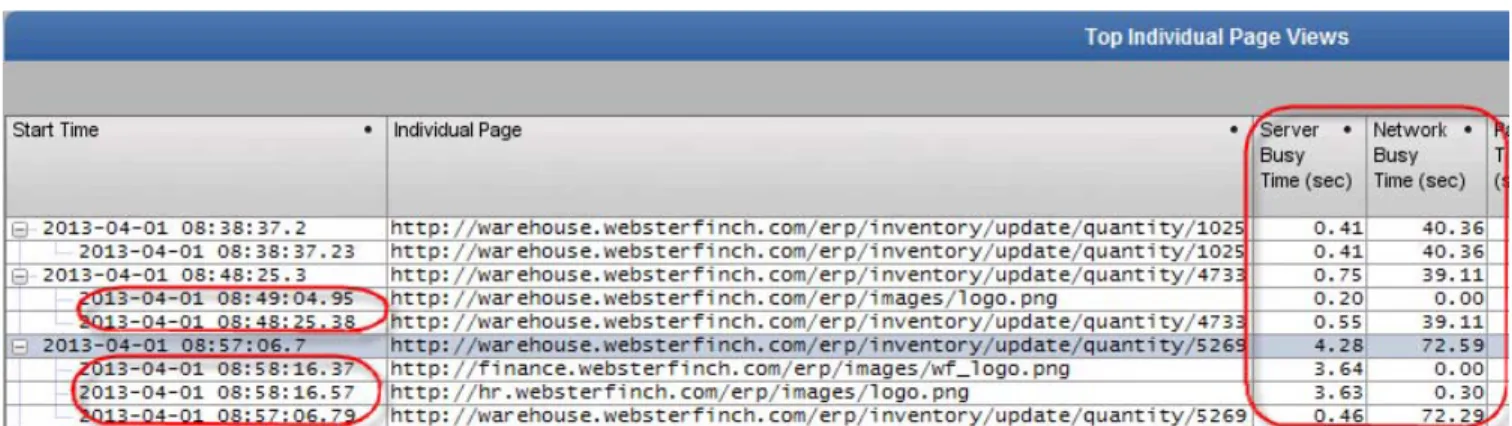
The Individual Page Views can now break down an individual view into its individual resources. This insight includes the following functionality:
“Individual Page View” Insight Enhancements
The enhanced Individual Page Views insight is available for 8.6 at the Update Center. The new version of this insight has the following enhancements: • The Top Individual Page Views table (bottom) includes drill-downs from
individual page views to the component resources in each view.
If the appliance did not see the full response to a resource request, the string
[partial] appears at the end of the resource URL.
• The Page Views table also has the following new metrics for page views and resources:
— Server Busy Time (per resource)
The time that the HTTP server spent processing an individual resource request. This time is measured from the resource request (last observed packet of HTTP request) to the initial response (first observed packet). — Server Busy Time (per page)
The total time that the HTTP server spent processing all resource requests in a page. Because the server might have processed multiple requests in parallel, the total-page-view busy time might be less than the sum of the busy times for all resources in the view.
— Network Busy Time (per resource)
Network transfer time for the full payload of an individual request or response, from the first observed packet to the last.
— Network Busy Time (per page)
Network transfer time for all resources in a page. Because the server might have processed multiple requests in parallel, the total-page-view busy time might be less than the sum of the busy times for all resources in the view.
Figure 3-1 New Metrics and Page-Resource Drilldowns in “Top Individual Page Views” Table
• A new Waterfall graph that shows the Server Busy Time for individual resources and for the entire page. This view is useful when you want to identify when server processing delays contribute significantly slow page times.
To open a Waterfall graph, right-click on a page view in the Individual Page Views table (bottom) and choose View Waterfall (Resource Timeline). As illustrated in Figure 3-2, a Waterfall graph enables you to see clearly the server processing delays (pink) for individual resources, as well as the intervals when the server processes multiple requests in parallel. The string [partial] indicates that the appliance did not see the full request/response (due to a connection reset, packet loss, or some other cause).
23
Note—This enhanced insight is not included in the 8.6 software JAR. To install this insight, go to the 8.6 Java console > Insights > Update Center and navigate to support.opnet.com/ace_live/insights >
VoIP Monitoring Module Enhancement: SIP/TLS Decryption
This release can now decrypt VoIP traffic that uses Session Initiation Protocol (SIP) signaling. To enable this functionality, do the following:
Procedure 3-1 SIP/TLS Decryption: Setup and Configuration
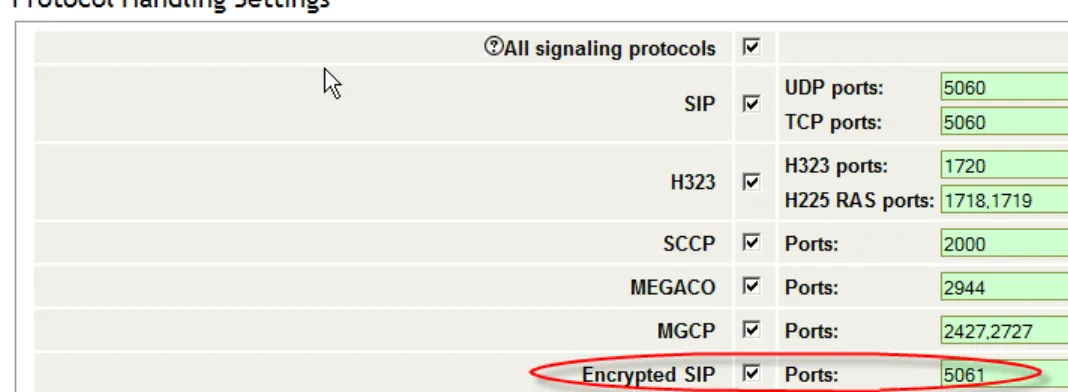
1 Log in to the 8.6 VoIP web UI (https://[appliance_name]:8443/voip) and go to the Administration Tools > Protocol Settings page.
2 Under Protocol Handling Settings > Encrypted SIP (Ports), enter the port(s) used to handle encrypted SIP traffic.
Figure 3-3 “Encrypted SIP” Setting in the VoIP Web UI
3 Click Apply at the bottom of this page to save your settings.
4 Log in to the main web UI (https://[appliance]:8443) and go to System > Pages.
5 Under Page Analysis Configuration, do the following:
5.1 Under Data Collection > Enable Page Analysis, verify that the Port(s) field does not include ports that overlap with those you specified for Encrypted SIP.
Note—It is good practice to include only the ports that handle HTTPS traffic under Enable Page Analysis. Do not include any ports that handle SIP traffic on this page.
SIP traffic on a port will not get decrypted if Enable Page Analysis is enabled for that port (HTTPS traffic will take precedence and SIP traffic will get ignored).
5.2 Under Page Analysis Configuration Parameters, verify that Enable SSL Decoding is enabled.
5.3 Under Private Key Configuration, add the private keys needed to decrypt the SIP traffic, as described in the following section of the AppResponse Xpert documentation:
25
5.4 Click Apply (at the bottom of the page).
6 Using an SSL client such as putty, log in to the appliance as a user with administrator privileges. Then enter the following from the command line: setNgfestats PCE_FLOW_TIMEOUT=300
Note—Although SIP/TLS decryption is now enabled, the appliance cannot decrypt traffic between a specific Lync client and server until it sees the initial handshake. Therefore, you will not see decrypted traffic for a Lync client until it logs out of the server and then logs back in.
27
4
8.6.2 Advanced Features
The 8.6.2 release includes the following advanced features: • Enhanced NetFlow Performance
• Web Transaction Analysis: Faster SSL Decryption
• ASA Boost
Note—These advanced features are supported only on appliances that already have the s210 Jar Class installed. To determine the Jar Class installed on your appliance, log in to the web UI and go to the System > Update page. If this page has no information about a Jar Class, or if the “Required Jar Class” is anything other than s210, these features are not supported.
Figure 4-1 “Required Jar Class” Field in Web UI > System > Updates Page
Enhanced NetFlow Performance
NetFlow performance has been enhanced in this release. On 3700 and higher appliances, NetFlow collection has been enhanced as follows:
• The appliance can collect data for up to 4,000 interfaces (increased from a maximum of 2,000 interfaces)
• The appliance can process up to 4 million traffic flows per minute (increased from 2 million flows per minute)
For 3170 and 3200 appliances, NetFlow collection has been enhanced as follows:
• The appliance can process ~50% more traffic flows than previously. (The collection threshold for interfaces is unchanged.)
Note—These numbers refer to appliances that are entirely dedicated to collecting NetFlow data, with all other data collection processes disabled.
Web Transaction Analysis: Faster SSL Decryption
SSL decryption is considerably faster than in previous releases, especially for web traffic that uses 2048-bit RSA keys. The overall increase in WTA
processing speed depends on the ratio of SSL to plain HTTP traffic, as well as the proportion of RSA key-exchange handshakes to SSL pages or requests.
ASA Boost
The 8.6.2 release introduced an ASA (Application Stream Analysis) Boost mode. This option is useful for monitoring traffic in high-throughput
environments such as server farms or data centers.
For more information, see ASA Boost on 6000, 5100, and 5000 Appliances on page -10.