An Examination of the Hybrid Implementation of
Customized Smartphone and Tablet Applications with
Traditional Classroom Instruction
Shawn Bulloch
Department of Mass Media Arts Clark Atlanta University
Atlanta, GA 30314
ABSTRACT
This paper discusses the use of customized smartphone applications in a classroom setting that enhance pedagogical strategies for instructional and educational technology. An analysis of how mobile devices can become virtual mobile classrooms will be explored in an effort to substantiate the efficacy of using smartphone/tablet applications as supplemental instructional tools. This paper will also examine technologies that improve and foster interpersonal skills between students and faculty members within a finite network environment. The Role of social media in the classroom and the convergence of social media and pedagogy in a virtual academic community will be analyzed through a synthesis of theory and praxis using the system‟s approach. In this study, the client side and security side issues of the customized smartphone/tablet application will be addressed as they pertain to networking considerations.
General Terms
Remote Learning, Smartphone Application, HTML5, Pedagogy, Constructivism, E-learning, Distance Learning
1.
INTRODUCTION
The method by which teachers deliver classroom instruction has changed over the years due to the implementation of technology and the integration of advanced instructional models. Teachers can no longer instruct students the way they themselves were instructed. In today‟s academic setting, classroom instruction is less concrete and more abstract; less paperwork oriented and more computer-based; less mechanical and more technically directed. Because of this change in the educational process, teachers must engage students with more cutting edge methods of instruction and move away from the antiquated modes of academic service delivery.
Electronic technology has had a major impact on the academic world in the past 25 years. Computers have exponentially grown more powerful each year and are continuing to be a major force in the educational system. Even more impressive are the plethora of different software programs and platforms such as the Internet that have combined to provide more opportunities for learning. Smartphones are far from novel in the academic world, as they have become the new media nexus for sending and receiving information conveniently. The hybrid of graphical user interfaces and software are extremely supplemental to the academic growth of today‟s learner and has limitless capabilities. Several years ago, teachers and students had to methodically search for information. Now, because of the Internet and smartphone technology, educators and learners
have more convenient access to many different types of information. Flexible access to information and resources is the key attribute of online educational technologies, and learner choice is at the heart of the concept of flexible access [1]. Convenient accessibility makes the search for knowledge less rigorous and also affords the researcher with access to an abundance of information. The process thus becomes significantly efficient and proficient collectively. The research process in the online domain and remote environment constitutes efficiency and productivity.
There is a tremendous difference between web-based teaching and traditional instruction. With web-based instruction, there are strong demands for sturdy infrastructure. Smartphones have saturated society in a dominant manner but still serve as an ancillary source for web-based utilization in the classroom. The communication infrastructure that involves web-based instruction and smartphones relies upon some form of network connection, be it wireless or landline. Traditional course instruction does not require such a demand. Basically, a smartphone application is a webpage operating on a mobile device. The same functionalities that apply to a conventional webpage also adhere to smartphone applications. The same basic pages that typically exist on a webpage also exist within a smartphone application. Pages such as Home, About, and Contact are frequently used regardless of the platform. Because of the evolution of HTML5 and the use of JQuery in web environments, smartphone capabilities are becoming limited only to the imagination.
students in an effective and efficient manner, thereby making the service delivery of academics more accessible.
There are several benefits to Web-based and smartphone teaching that should be acknowledged to truly understand its value. Web-based teaching affords students with accessibility at a time, place, and pace that are convenient to them [4]. In a remote learning environment, students are not faced with all of the time constraints that are typical of a classroom environment. Because web-based and mobile learning is a self-directed environment, students have to be self-motivated and responsible enough to complete assignments in a due and timely manner. Having a Web-based or mobile system is ideal to linking and integrating university communities, thereby strengthening interpersonal communication.
The cohesiveness of Web-based and mobile teaching bridges gaps that exist between certain units on a campus. Web-based instruction opens the door for several forms of multimedia tools to be used in the educational process. Animations, graphics, and audio can be incorporated to stimulate a presentation. “The Web is capable of delivering multimedia components (e.g., graphics, sound, video, etc.), which provide a visually richer environment” [3]. Driscoll [5] acknowledges that graphics, videos, images, hypertext, and audio help learners understand concepts more easily and that multimedia provides learners with alternative ways to examine problems and learn new skills. Videos visually stimulate learners with attractive graphic interfaces while affording learners with the convenience of absorbing the materials at their leisure.
E-Mail is an important Web-based tool because it enhances communication between educator and student. According to Lewis and Hedegaard [6], students at the University of Phoenix addressed timely feedback from faculty as a concern. E-Mail is a prompt, adequate means of communicating in an academic environment without the cumbersome effects of hardcopy documentation. Maier and Warren [7] acknowledge that e-mail makes it easy to distribute information such as timetable changes, assignments or reminders to groups of students and that email also allows for the punctual completion of task without clerical assistance. Chat rooms are taking the place of email due to the synchronous nature of the communication exchange. Chat rooms can be secured and accessible only to the students taking a particular course.
Because teachers are no longer confined to sending information from one desktop workstation, the convenience of working interoffice or at home becomes the choice of the educator. This is particularly important in higher education where teachers and students are in constant motion and usually use laptop computers to keep track of classroom activity. Perhaps the most pervasive use of technology in higher education is using e-mail to supplement regular classroom instruction [8]. Students are either able to communicate to one student at a time or to an entire class by way of the list server. According to Bates [8], several faculty members are replacing office hours, which require a set time and place for students to be able to reach them, with a bulletin board or e-mail service. Assignments are given and submitted by email, which makes for quicker response time to students and easier accessibility to instructors. This academic system combines the prowess of power in terms of the quantity of individuals that can be reached at one time with the elegance of speed, which allows for fast communication in an environment without tangibility.
The systems perspective provides the instructor with a clear understanding of how pedagogy, technology, and the learners relate to each other and to the instructor in a Web-based instruction environment [9]. The systems approach to web-based instruction involves the linking and bridging of mechanical practice, philosophical models, and academic strategies to form a unit designed to facilitate learning in a virtual environment. Systems approaches to solving educational problems originated in military and industrial training and traveled to K-12 schools by way of university research and development. Roblyer, Edwards, and Havriluk [10] state that these approaches were based on the idea that both human and non-human resources (teachers and media) could be part of a system for addressing an instructional need. In a way, the teacher and the media used by the teacher develop a symbiotic relationship.
Non-human resources serve as supplemental tools and should not be considered as primary instructional instruments. Roblyer, Edwards, and Havriluk [10] further state that educational technology was seen as a systemic approach to designing, developing, and delivering instruction matched to carefully identified needs. This particular viewpoint was important for the survival of educational technology as a system because it did not need to be established as a template. Educational technology needed to have the flexibility of catering to the diverse needs of students. From the 1960‟s to the 1980‟s, applications of systems approaches to instruction were influenced and shaped by learning theories from educational psychology. These learning theories served as concrete principles and guidelines to build upon for the future survival and effectiveness of educational technology. Once a system is in place, instructional technology can be implemented into the fabric of classroom instruction to better supplement the needs of the instructor.
2.
LITERATURE REVIEW
According to Chao [11], as learning becomes more active and less authority-dependent, network technology creates environments that encourage students to function independently and think critically. Network environments promote independence because students are in a setting where they essentially work autonomously from other students but under supervision. This type of learning atmosphere encourages students to analyze subject matter in a detailed manner and from a more critical but liberal standpoint due to the nature of the autonomous learning environment. Students do not have the time constraint issues associated with the traditional classroom environments.
From a technological standpoint, computer technology has provided ways for huge quantities of information to be disseminated to multiple individuals simultaneously within seconds. Computer technology has presented the opportunity for virtual classroom environments around the world to be connected by a cabling and wireless communication system. Online classrooms connect a wide variety of students together through various nodes of communication while at the same time preserving independence and autonomy for students while they work at their individual stations.
long as each student is disciplined enough to assert themselves to fulfill their required individual responsibility. The learner primarily controls the tempo at which content is absorbed in an online environment. The pressures associated with time constraints are not major issues in online environments because students are able to complete assignments at their discretion as long as they finish work on time.
According to Zhang [13], the constructivist learning model is the most commonly adopted in online environments. The constructivist learning model is founded on the principle of learner centered instruction. Zhang [13] asserts that constructivism emphasizes active participation and reflection by learners, who should control the pace of instruction and construct knowledge by themselves. Interactive tasks play a major and beneficial role in constructing knowledge. One of the values to interactive learning, particularly learning in an e-learning environment, is the ability for learners to be able to control the pace at which they learn. In an e-learning environment, students can have random access to learning materials and virtual classroom notes without the pressure of missing vital lecture content, content that if not grasped in the classroom setting, would more than likely not be repeated. If there is content in the curriculum that is not easily comprehended when it is initially introduced to the student, the student has the flexibility of going back over notes until an understanding is gained.
Students are able to control the flow of content that they are exposed to in an online/remote environment. Interaction in an online/remote environment is not limited to just computer-oriented transactions but peer to peer and student-instructor interactions are also important in online environments. According to Moore [14], there are three types of interactions in learning. Those are learner-instructor, learner-learner, and learner-content. Instructor-learner interaction involves the relationship and rapport established between the instructor and the student. Communication is an integral component of learner-instructor interaction. Usually there is a huge geographic distance between instructor and student so a solid bilateral flow of communication should be in place to ensure that the instructor and student are on the same page. Instructors should communicate assignment due dates, times for conference calls, appropriate places to find resources for research and study materials, and any other miscellaneous items that can be considered the responsibility of the instructor.
According to Berge [15], instructors also have pedagogical, managerial, social, and technical roles in e-learning environments. The pedagogical role involves activities done to cultivate the cognitive development of individual students or groups of students. The instructor is responsible for disseminating instruction, providing feedback, and recommending supplemental sources for information. The managerial role refers to the manner in which the course operates from an administrative standpoint. The coordinating of assignments, discussion, and course operations are the primary emphasis of this stage. The social role entails an established rapport between teacher and student, interpersonal relationships, and a consistent dialogue about issues that are other than academic so that the instructor shows concern for students‟ livelihood as well as their academic well being. The technical role involves selecting the right supplemental tools such as software programs, hard and other learning utilities that assist students in accomplishing specific learning goals. Instructors should be competent enough to make use of any communication tools needed to facilitate learning.
Learner-learner environments are quite similar to peer-to-peer environments. Learner-learner environments promote collaborative learning behaviors among peers. According to Vygotsky [16], students who perform academic tasks under adult supervision or who collaborate with more competent learners were more likely to reach greater levels of achievement than those who perform tasks autonomously. Students who work collaboratively in e-learning environments supplement each other academically through discussion groups, group research projects, and critical assessment exercises where students critically analyze each other‟s work before submission to the instructor. Students learn from one another through the synthesis of ideas and comparing and contrasting viewpoints.
3.
THE PROPOSED APPLICATION
The interface for the mobile classroom application is a simple design that can be modified depending on which ever style the educator prefers to use. The mobile classroom application can be created using two different methods. The first method is using a web-based software such as Adobe Dreamweaver to design the interface and build the code. Dreamweaver is the more preferable tool to use because of the way the software handles HTML5 and other scripts. Actually the customized mobile classrooms can be designed with little coding. The software comes with templates that provide expert and novice users with the foundation to create the application‟s interface and style sheets.
[image:3.595.322.534.523.717.2]The second method to creating mobile classroom applications is using a cloud-based utility such as Conduit mobile to design the application. Conduit mobile uses very little coding to design the application‟s interface. One advantage of using Conduit mobile is that a developer‟s license is not needed to distribute the application to a cohort of students. Once the developer creates the app, a QR code is generated and students can scan the code directly into their mobile device. A disadvantage to using Conduit mobile is the inability to modify coding for advanced features. The chat room feature for the mobile classroom application could only be executed using the Dreamweaver software.
Fig. 2. Cloud-based utility diagram
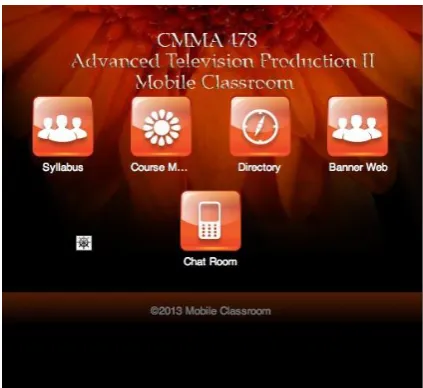
[image:4.595.315.551.73.272.2]The opening interface of the app offers the user with the ability to access the course syllabus, course materials, class directory of all students and faculty, banner web access for periodic grade monitoring, and a chat room for synchronous communication between all students and the professor.
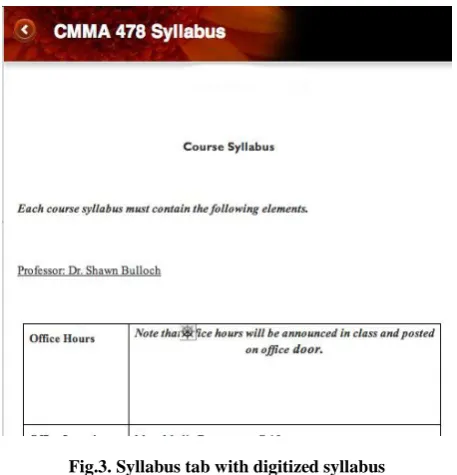
Fig.3. Syllabus tab with digitized syllabus
3.1
SYLLABUS
The tab for the syllabus includes all content that would be included within a hard copy document. The digital version within the application includes instructor‟s name and office hours, course description, prerequisites, learning objectives, class policies, and other relevant content as prescribed by the university. Digitizing the syllabus within the app makes the syllabus accessible at all times.
3.2
COURSE MATERIALS
The course materials tab provides students with access to any course work that the professor digitizes. Typically if a course is a semester long, the professor can put biweekly course materials that students can revisit and study leisurely at any given time of the day. This process eliminates cumbersome hard copies while enhancing the accessibility of the materials.
Fig. 4. Course materials sample
<h1>Course Materials</h1>
<a href="services/service_01.html" role="button" data-icon="arrow-r" data-iconpos="right">Fundamentals of
Staging</a>
<a href="services/service_02.html" role="button" data-icon="arrow-r" data-iconpos="right">Breaking down the Script</a>
<a href="services/service_03.html" role="button" data-icon="arrow-r" data-iconpos="right">Advanced Shot Design</a>
<a href="services/service_04.html" role="button" data-icon="arrow-r" data-iconpos="right">Producing Fundamentals</a>
<a href="services/service_05.html" role="button" data-icon="arrow-r" data-iconpos="right">Music Video Conventions</a>
<a href="services/service_06.html" role="button" data-icon="arrow-r" data-iconpos="right">Documentary Production</a>
Fig. 5. Course material code for HTML hyperlinks
3.3
CLASS DIRECTORY
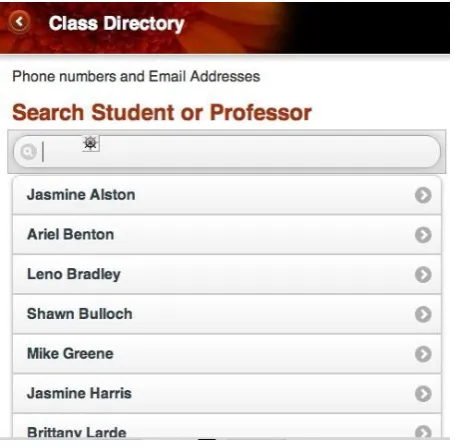
[image:4.595.53.282.307.545.2]Fig. 6. Class directory tab with search box
3.4
BANNER WEB ACCESS
The banner web tab provides students with access to their midterm grades, final grades, financial aid status, unofficial transcripts, and other important university information. The banner web tab basically serves as a hyperlink to the actual banner web page hosted by the university. The security side of this feature is leveraged on the university‟s host server. The app just provides the access to the information once the correct user name and password are input.
3.5
CHAT ROOM
The chat room serves as a synchronous discussion board for the students and faculty to engage one another. The only individuals that can access the chat room are the students taking the course and the faculty member who teaches the course. The faculty member primarily serves as a moderator for the discussions. There are no private discussions taking place. Everyone in the course views all discussions and anyone can respond to a post at any given time.
3.6
COMPARATIVE ANALYSIS
Because this technology is fairly new to the academic world, the mobile classroom application can be compared to online learning counterparts such as Web-CT and Moodle. Tools like Web-CT and Moodle, also known as Learning Management Systems, are more powerful than the mobile classroom application in regard to their ability to be able to manage more than one class at a time. However, Web-CT and Moodle have a general user interface that is used for all courses managed within the software and also provide general software learning tools that are invariable regardless of which course the student is taking. The mobile classroom application was not designed to manage several classes at once. The application is only designed to manage one course at a time, which maximizes the efficiency of the application. Web-CT and Moodle lack the efficiency of the mobile classroom application because the two utilities manage several different courses at once. There is no distinct identity between how courses are managed when using the Learning Management Systems. Web-CT and Moodle are also limited in that the interfaces are not customizable. The instructor is limited to the features that
come with the software, whereas with the mobile classroom application, features for courses can be modified every semester and with every course. The proficiency of the mobile classroom application is maximized with its ability to be fully customizable.
4.
RESEARCH METHODOLOGY
A questionnaire was conducted to evaluate how students are using their smartphone/tablet devices diurnally and also to analyze whether smartphone/tablet apps would be welcomed in an academic setting. Students have on average 30 apps on their phones. A little more than 70% of students are never away from their device. A need for the academic smartphone/tablet device was determined when 100% of participants replied that they would use their device as an academic tool. It is thus determined that students invite this technology into the classroom setting as a supplemental learning tool.
Table 1. Questionnaire with students’ responses
Question Options Responses (%)
Do you own a smartphone?
Yes No
98% 2% Do you use apps for
utilities other than entertainment?
Yes No
88% 12%
How many apps do you have on your phone?
10 15 20 25+
25% 20% 23% 32%
How many times a day are you without your
smartphone/tablet?
1 Hour 2 Hours 3 Hours 4 Hours + Never
3% 5% 2% 20% 70% What is the most
dominant purpose of your
smartphone/tablet?
Entertainment Education Social media Other
3% 15% 32% 50%
What is the least used utility of your smartphone/tablet?
Entertainment Education Social Media Other
43% 33% 0% 24%
What is your age?
18 and under 19 to 25 26 to 32 33 to 40 41 and older
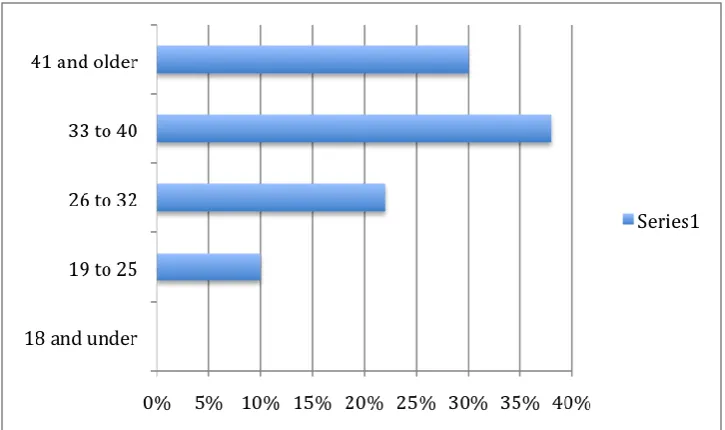
0% 10% 22% 38% 30%
What is your race?
Black/African American White Asian Hispanic Other
85% 10% 0% 0% 5%
Would you use your smartphone/tablet as an educational tool?
Yes No
100% 0%
Would you
recommend a smartphone/tablet utility for academic use?
Yes No
[image:5.595.304.554.281.733.2]Fig 7: Age range of participants
5.
SYSTEM’S APPROACH
From a system‟s standpoint, educational technology is a complex integrated process involving people, procedures, ideas, devices, and organizations for analyzing problems and devising, implementing, evaluating, and managing solutions to those problems. Educational technology is basically a problem solving system. Educational technology makes use of different learning resources in order to accomplish its purpose. These resources include messages, people, materials, devices, techniques, and settings. Each of these resources can be used by the learner in isolation or in combination.
According to Chao [11], the systems model for distance education consists of the following components: sources, design, delivery, interaction, and learning environment. Sources refer to the source of knowledge or skills to be taught or learned in a distance learning environment. One key advantage to distance education is the flexible access it provides to learners. Next, the production of distance education courses should involve at least two kinds of design expertise. One concerning content and the other concerning instructional principles and technological techniques. Distance education is delivered through various forms of mass communication and technology, so the materials employed in the process must be designed intricately so that the learner takes full advantage of media and technology necessary to activate learning. The manner in which individuals communicate in a distance learning environment is important and usually takes place in a variety of different forms. The way technology is used to transmit information from instructor to learner is what makes distance learning so appealing to most individuals. The delivery of education through technology should continue to be enhanced in order for the concrete, pictorial, and abstract levels of learning to be fully attained. An important goal for participants in distance education environments is to achieve solid, concrete interaction with instructors.
In distance education, the manner in which the immediate exchange of ideas, information, and subject matter is executed can serve as a cohesive bond or detrimental relationship. According to Diaz and Carnal [17], if there are
no differences in learning styles, then the learning activities used in traditional classroom settings may be just as effective for the online course. Factors such as feedback, rapport, interaction and group participation, and discussion methods need to have the same impact in a distance learning class that they would have in a traditional classroom setting. If students are able to receive immediate feedback regarding assignment issues or even regarding curriculum changes, they should be able to adjust to those changes efficiently. In any academic setting, the learning environment plays an essential role in how the learner performs. In distance learning environments, the participants are usually situated in several different places geographically.
Educational technology functions within the larger context of society. As a profession it has taken stands in support of intellectual freedom, affirmative action, against stereotyping in materials, and in support of enlisting technology in favor of humane and life fulfilling ends. Educational technology has three different categories by which it operates. Educational technology one is a hardware approach that stresses the importance of aids for teaching. This particular technology assumes that a technology of machines is intimately related to a technology of teaching and that progression in education is related to possessing the latest projector, language lab or computer.
further online courses. It is my belief that because education has continued to evolve over the years, the use of software as instructional supplements has served as a key component in the system of educational technology. Today‟s students are much more visual learners and are stimulated by the belief of a quick fix education. Today‟s students are adamant about completing four-year degree programs in two or three years. Students view software as a mobile educator that provides them with infinite accessibility to the supplemental instructional tools found on multimedia and software applications. Although software should only be used as a supplement, students who use academic software are attracted to the ability to recall information leisurely and in large volumes. Software provides students with the opportunity of grasping academic content at whatever pace the student t chooses to absorb the subject matter.
Good [20] asserts that universities are increasing their learning efforts with an abundance of authoring tools that create digital content and learning management systems. Teachers can basically use technology two as a means of improving their own teaching. Inexperienced teachers can gain guidelines and procedures from technology two while experienced teachers can further develop their craftsmanship. Educational technology three combines the hardware and software approaches used in the other technologies. The processes as well as the products of teaching and learning are the focal points of this particular technology. Educational technology three applies system analysis concepts to education by combining two autonomous components together to create a working unit. In summation, technology one deals with transmission-reception problems, technology two with meaningful shaping of performance, and technology three‟s emphasis is on a range of contrasting skills.
6.
CONCLUSION
The mobile classroom application is an effective form of supplemental instruction that transforms the smartphone/tablet from a distraction in the classroom into an academic tool of extreme proportion. The mobile classroom application creates networks for students and faculty that enhances the social rapport between both entities while still maintaining an academic foundation. The collaborative nature of the environment created by the smartphone/tablet application stimulates learning for the users by allowing students to have limitless access to course materials whenever they want and wherever they want. Through the research it was determinded that although the primary use of smartphone/tablet applications are entertainment based, several students would gravitate towards using the applications for academic purposes.
7.
REFERENCES
[1] Rodgers, Patricia, L. 2002. Designing Instruction for Technology-Enhanced Learning. Reasoning about London: Idea Group Publishing.
[2] Bates, A. W. 1997. The future of Educational Technology. Learning Quarterly 2 (1): 7-16.
[3] Lloyd, Les. 2000. Teaching with Technology: Rethinking Tradition. New Jersey: Information Today, Inc. [4] Pea, R. D. 1994. Seeing What We build Together:
Distributed Multimedia Learning Environments for Transformative Communications. The Journal of the Learning Sciences, 3(3), 285-299.
[5] Driscoll, Margaret. 1998. Web-Based Training: Using Technology to Design Adult Learning Experiences. San Francisco: Jossey-Bass.
[6] Lewis, C.T. & Hedegaard, T. 1993. Online Education: Issues and Some Answers. T.H.E. Journal, 68-71.
[7] Maier, P., & Warren, A. 2000. Integrating Technology in Learning and Teaching: A Practical Guide for Educators London: Kogan Page Limited.
[8] Bates, A. W. 2000. Managing Technological Change. San Francisco: Jossey-Bass.
[9] Lau, Linda. 2000. Distance Learning Technologies: Issues, Trends, and Opportunities. London: Idea Group Publishing.
[10]Roblyer, M. D., Edwards, J., Havriluk, M. A. 1997. Integrating Educational Technology into Teachiing. New Jersey: Prentice Hall.
[11] Chao, Mei-Sheng. 1999. The Impact of a systems Approach on Interactive Distance Teaching: The Development of the ATM Video Network System at National Chung Cheng University. Educational Technology, Research and Development; 1999; 47, 2; ProQuest Educational Journals pg. 112.
[12]Warschauer, M. 1997. Computer-mediated collaborative learning: Theory and practice. The Modern Language Journal, 81(4), 470-481.
[13]Zhang, Dongsong. 2005. Interactive Multimedia-Based E-Learning: A study of Effectiveness. The American Journal of Distance Education, 19(3), 149-162.
[14]Moore, M.G. 1989. Three types of interaction. The American Journal of Distance Education, 3(2),pp.1-6.
[15]Berge, Z.L. 1996. Example caase studies in post-secondary, online teaching. In G. Heart & J. Mason (Eds.), Proceedings of „The Virtual University‟ Symposium (pp. 99-105). Melbourn, Australia, November 21-22.
[16]Vygotsky, L. S. 1978. Mind in Society. Cambridge, MA: Harvard University Press.
[17]Diaz, D., and R. Cartnal. 1999. Students‟ Learning styles in Two Classes: Online Distance Learning and Equivalent on-campus. College Teaching 47 (4): 130-135.
[18]Jonassen, D. H., & Reeves, T. C. 1996. Learning with technology: Using computers as cognitive tools. In D. H. Jonassen (Ed.), Handbook of research for educational communication and technology. Pp. 693-719. New York: Simon and Schuster.
[19]Atkinson, M., and Kydd. 1997. Individual characteristics associated with the World Wide Web use: An empirical study of playfulness and motivation. The DATA BASE for Advances in Information Systems 28 (2): 53-62 [20]Good, E. 2001. GM Drives E-Learning: Automaker