Interviews With College Students:
Evaluating Computer Programming
Environments For Introductory Courses
Murat Pasa Uysal, Turkish Military Academy, Turkey
ABSTRACT
Different methods, strategies, or tools have been proposed for teaching Object Oriented Programming (OOP). However, it is still difficult to introduce OOP to novice learners. The problem may be not only adopting a method or language, but also use of an appropriate integrated development environment (IDE). Therefore, the focus should be on the needs of learners when selecting an IDE and the evaluations for instructional purposes may allow making objective decisions for an introductory course design. There are different methods or frameworks for evaluating IDEs and the majority focuses on the experts’ needs. Unfortunately, studies done on instructional appropriateness of IDEs are insufficient. In this study, an evaluation framework is initially proposed, then the candidate IDEs are evaluated, and finally, the perceptions of college students are explored by conducting semi-structured interviews. The data are analyzed by the Verbal Analysis technique, and the results are discussed in view of the evaluation criteria. The results imply that the learners view one of the criteria relatively more supportive for learning.
Keywords: Evaluation; Computer Programming; Integrated Development Environment
INTRODUCTION
bject-Oriented Programming (OOP) has been a common mode of teaching introductory computer programming in first-year college education (Xinogalos, 2010). Different studies continually evolve in the hope of finding better tools, methods, or strategies to support learning OOP (Eckerdal, 2006). Advances in technologies have also greatly contributed to its pedagogy. However, it is still difficult to introduce the OOP paradigm to learners, specifically to the beginners (Fleury, 1999). It is believed that the problem may be not only adopting an instructional method or language, but also using an appropriate integrated development environment (IDE). Courses today can directly start with teaching complex programming skills, such as, testing, debugging, and code reusing. Learners can have high interactions with IDEs and they may use multiple interfaces, many of which are not tailored for pedagogical requirements. Thus, learning context has become more challenging for beginners. Therefore, the main focus should be on the needs of novice learners when selecting an appropriate IDE (Kordaki, 2010). Instructional evaluations of IDEs can allow making effective decisions for an introductory course design. However, the review of related literature reveals that evaluation frameworks or methods are mostly designed for commercial tools; they are either very general or focused on the particular aspects of IDEs. Although this is very relevant to OOP education, studies done on instructional appropriateness are insufficient (Moons & Backer, 2013). Therefore, it is apparent that there is a need to evaluate IDEs designed for use in an educational environment; new studies can fill this research gap.
BACKGROUND THEORY
An IDE is a software application that provides computer programmers with comprehensive facilities for software development. It normally consists of a source code editor, build automation tools, and a debugger (Payne & Myrers, 1996). A version control system may be included, and various tools may be integrated to simplify the construction of graphical user interfaces. While they may include intelligent code completion features, many IDEs also have class and object browsers and different types of diagrams for use in OOP.
Evaluation Methods
The literature review reveals the methods and frameworks for evaluating OOP IDEs (McIver, 2002). However, the majority focuses on the experts’ needs or development processes and examines specific characteristics of IDEs (Whittle & Cumming, 2000). The evaluations are usually standalone, though they may be comparative. The standalone evaluation provides the information about a particular environment. However, it is valid in its own context, and more often used for the improvement of the environment. Comparative evaluation of multiple environments is difficult because there are interacting variables, such as course design and different instructors. This type of evaluation is suggested for studies with a small sample in a well-controlled environment. According to Miller, Pane, Meter, & Vorthmann (1994), during evaluation, it is usually explored how an IDE: (a) simplifies the programming process (e.g., language, typing code); (b) provides support for learners (e.g., structuring the code, visualization); and (c) motivates students for learning programming (e.g., problem solving, social learning). Evaluations are made by collecting the data on usability, performances, user preferences, or responses to the environments.
Evaluation Criteria
In terms of software engineering, there may be various criteria to be considered for an evaluation. However, the pedagogical aspects of IDEs are considered, and therefore, the criteria should be restricted to those attributes, by which learning process can be most effectively supported. Although Kiper, Howard, and Ames (1997) proposed the criteria for visual programming languages, they are also applicable to the evaluations of IDEs. These criteria are: visual nature, functionality, ease of comprehension, and paradigm support respectively, and they form the evaluation framework (see Appendix 1). For the visual nature criterion; information can be presented in graphical forms such as diagrams or graphs. It is suggested that core concepts, such as inheritance and polymorphism, can be in visual formats. The functionality criterion is defined as general applicability of an IDE to different application domains rather than restricting it to a specific field. Therefore, an IDE is expected to provide the facilities for creating and modifying different types of applications. The ease of comprehension criterion is simplicity, by which the programs in an environment can be understood. Thus, a programming tool should be easy to use so that students can mainly focus on learning. An IDE should also have an understandable execution model to avoid erroneous programs (Kolling, 1999). Finally, the paradigm support criterion is regarded as the degree to which an environment supports the OOP paradigm. This is important because conceptualization and internalization of OOP skills and knowledge take longer than other programming paradigms.
METHOD
This was a two-phase study. The first phase included the establishment of evaluation framework, selection of the evaluation criteria, and IDEs, and then the second phase covered the procedures for interviews. 20 college students voluntarily participated in the research before attending the “Introductory OOP with Java” course. The research purpose was to evaluate the candidate Java IDEs, and then to explore how two IDEs were perceived by the students depending on the evaluation criteria. The following steps were taken within this study:
1. A list of instructional IDEs was formed.
2. The evaluation criteria were applied to these IDEs, and then two IDEs were determined for interviews. 3. Students were randomly assigned to one of two groups, and they used and tested the corresponding IDE. 4. Semi-structured interviews were conducted to explore how two IDEs were perceived by the students. 5. The Verbal Analysis technique was used to quantify the results of the interviews.
Step 1: Listing Instructional IDEs for OOP
Step 2: Applying Evaluation Criteria to Determine Appropriate IDEs for Interviews
Table 1 presents the results of the evaluation process conducted by the researcher using the metrics in Appendix 1. The differences in ratings indicate the areas of possible strength or weakness of the IDEs. For example, BlueJ includes graphical interfaces for design and implementation (4 points) while JGrasp and JCreator LE have limited graphical features (3 points). DrJava and Geany are mostly textual IDEs (1 point). When regarding the functionality criterion, JCreator LE may be more functional (4 points) than the others because it is used in different types of application domains. In terms of ease of comprehension criterion, BlueJ may be accepted as the easiest IDE (5 points) because it allows novice learners to start OOP from the very beginning. The other IDEs can be regarded as equally easy (3 or 4 points) because they have similar components and user interfaces. As to the support for OOP paradigm criterion (inheritance, polymorphism, etc.), BlueJ received the highest rating (5 points). As a result, BlueJ (17 points) and JCreator LE (15 points) were determined for the interviews.
Table 1: Evaluation of the Candidate IDEs
Criteria Attributes to be assessed DrJava BlueJ Geany JGrasp JCreater LE
Visual Nature Use of graphics 1 4 1 3 3
Functionality Functional completeness 2 3 2 2 4
Ease of Comprehension Ease for programming 4 5 3 4 4
Paradigm Support Support for paradigm 4 5 3 2 4
Totals 11 17 9 11 15
BlueJ (Appendix 2), is a Java IDE for introductory teaching OOP (Kölling, 1999). It places a special emphasis on interaction and visualization techniques to create an interactive environment that encourages exploration and experimentation with objects (Kölling, Quig, Patterson, & Rosenberg, 2003). Its wizards help learners create classes and implement interfaces. The unique nature of this environment may be its components supporting a much greater degree of visual interaction than the other text-based environments. Its UML-like interfaces help learners apply complex OOP concepts, such as inheritance, polymorphism, and encapsulation, to their programs before talking about the detailed Java syntax. The fundamental characteristic of BlueJ is that learners can execute a complete application without writing a “main” method. Students can directly interact with single objects of any class and execute public methods using interfaces. Objects can be instantiated directly from the classes without writing code, and their states can be inspected. During the development process, learners can individually test the classes and objects as soon as they have been created.
JCreator LE (2013) (Appendix 3) is the other IDE for Java programmers of every level, and it focuses on programming rather than rapid application development. It is designed to provide learners with an easy to use and powerful environment for creating applications. One of its strengths may be the ability to meet some of the expert developers’ needs and easing the transition to the commercial IDEs. JCraetor LE provides the necessary tools for editing and makes code writing easy. Code snippets, keyword completion, and automatic suggestions can improve coding speed. While the Check-Out Wizard allows exporting a project, the Class Wizard enables creating new classes and implementing interfaces. Learners can manage breakpoints and debug a file or entire project. It is possible to view variables and monitor the threads to ensure that the code is working as it should. The customizable user interfaces and its low system requirements can make JCreator LE one of the most preferred teaching IDEs in college education.
Step 3: Testing and Using the Selected IDEs
Step 4: Conducting Semi-Structured Interviews
The evaluation criteria for the IDE have also constituted the framework of the interview themes, which were visual nature, functionality, ease of comprehension, and OOP paradigm support criterion. During interviews, follow-up and ad-hoc questions were directed to the students to encourage for talking about their experiences with the IDEs. It was also important to have a good data collection method to be able to record, retrieve, and analyze the data later (Appendix 4). Therefore, the unique identifiers; e.g., “respondent id” and “response code,” were allocated. The responses were entered to a text file according to the themes along with the related information. At the end of interviews, the data were reviewed by another expert in the faculty, and then the information were confirmed or discarded depending on their relevancy to the interview themes.
Step 5: Verbal Analysis of Interviews
The analyses of the interviews and the validation of data were based on the interview transcripts. We used the “Verbal Data Analysis” technique to analyze the qualitative data in an objective and quantifiable way (Chi, 1997). With this technique, subjectiveness could be reduced by tabulating, counting, or drawing relations between the occurrences of different kinds of utterances. The volume of the interviews was manageable, and therefore, reducing or sampling the data was not needed. The analysis procedures were as follow:
Segmenting the Data
Each theme in the interviews comprised the subsets of data to be coded, and formed the topics of discussion. Segmentation was based on the themes and their semantic features. The responses were coded according to the corresponding questions. The number of propositions and distinct pieces of knowledge in the responses were specifically explored. However, if the interviewee implicitly changed the topic of discussion during the interview, then the segmenting rule was applied. For example, when this interview question of visual nature theme was asked: “Could you benefit from any visual component when you were programming?” If the response was like; “Umm… the visual interface for designing the classes…Well…Because, it was really helpful for applying the OOP concepts.” Although the discussion topic was visual nature, this argument involved a proposition or reference belonging to the OOP paradigm support theme. Therefore, this situation signaled a topic change, and then the response was entered as a cross-reference to the paradigm support segment.
Developing a Coding Scheme
At this step, the verbal data of the segments were coded according to the taxonomic categorical scheme (Chi, 1997). The concepts: “visual nature,” “functionality,” “ease of comprehension,” and “OOP paradigm support” formed the set of categories. When answering the interview questions, the students’ explanations and elaborations were recorded according to these categories.
Mapping to the Coding Scheme
This step determined what utterances in the interview data would be the evidences belonging to a scheme, or how they could be translated into a specific code. However, it is generally difficult to define what constitutes good evidence. Therefore, the two measures, (a) the semantic comparisons, and (b) the syntactic connectives (so, because, etc.) were accepted as the indicators of conscious comments of the interviewees (Chi, 1997). The former suggested that conscious learners were able to use their knowledge to compare concepts, or they tend to change discussion topics frequently. The latter indicates the structure of cohesive knowledge of an interviewee for reasoning or interpretation of the discussion topic.
RESULTS
Table 2: The Verbal Analysis of Semi-Structured Interviews Groups n
Visual Nature Functionality Ease of Comprehension
Paradigm
Support Grand Total IQ SR CR
Sub-total IQ SR CR
Sub-total IQ SR CR
Sub-total IQ SR CR Sub-total BlueJ 10 2 30 12 42 2 22 6 28 2 24 8 32 2 16 0 16 118
JCreator LE 10 2 26 2 28 2 20 1 21 2 22 6 28 2 13 0 13 90
n: Number of interviewees, IQ: Number of interview questions, SR: Number of self-reference to current theme, CR: Number of cross reference to another theme.
The responses are grouped into the four categories presented in the main columns of Table 2. There are four sub-columns under each main column. The IQ symbolizes the number of questions of each theme directed to an interviewee. The SR value is the number of self-references to the current discussion topic, which is to be determined by sum of the number of semantic comparisons and connecting words in the utterances. The CR value represented the interviewees’ cross references to another theme during discussion of the current topic. For an example of an interview with a BlueJ user:
Question: “Could you benefit any visual component when you were programming? If your answer is YES, then explain how?”
Answer: “Yes… Well… UML like diagrams, I liked them. Because, I could design the classes visually. Regarding the other tools I know, it is cool!”
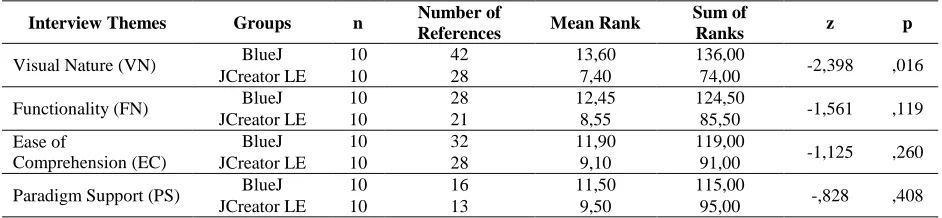
This specific example included two semantic comparisons (“The UML like diagrams…” and “…the other tools I know”), and 1 connecting word (“because”). Because this participant only referred to the current discussion topic, the utterances were recorded as 3 (2+1) self-references (SR) to the “visual nature” segment. The subtotal value of each segment was obtained by sum of the SR and CR values. Finally, the grand total column of Table 2 gave the number of total references, which were also the result of the verbal analysis of the interviewees’ perceptions pertaining to the IDEs. At the end of the verbal analysis, all data were imported to the SPSS software version 15.0. The sample size was relatively small, so the Mann-Whitney test was used for the statistical analysis (Table 3).
Table 3: The Mann-Whitney Test Results of References to the Interview Themes Interview Themes Groups n Number of
References Mean Rank
Sum of
Ranks z p
Visual Nature (VN) BlueJ 10 42 13,60 136,00 -2,398 ,016
JCreator LE 10 28 7,40 74,00
Functionality (FN) BlueJ 10 28 12,45 124,50 -1,561 ,119
JCreator LE 10 21 8,55 85,50
Ease of
Comprehension (EC)
BlueJ 10 32 11,90 119,00
-1,125 ,260
JCreator LE 10 28 9,10 91,00
Paradigm Support (PS) BlueJ 10 16 11,50 115,00 -,828 ,408
JCreator LE 10 13 9,50 95,00
As can be seen from Table 3, only for the visual nature theme is there enough evidence to conclude a difference in the means at the α = 0.05 level of significance (z = -2.398, p = ,016). Although the BlueJ interviewers’ mean ranks of other themes (functionality, ease of comprehension, and paradigm support) are also higher than the JCreator LE interviewers’ mean ranks, the differences are not statistically significant (FN: z = -1,561; p = ,119), (EC: z = -1,125; p = ,260), (PS: z = -,828; p = ,408). That is, the results can imply that the learners considered the visual nature criterion as more supportive for learning.
DISCUSSION
Visual Nature
In general, the main objective of using visualization is to promote an understanding of complex concepts being taught. Therefore, this is also one of BlueJ’s greatest strengths and is integral to its support learning (Kölling et al., 2003). Its UML notations showed the relationships between classes. The participants were able to identify the cause and effect relationship between class design and its implementation to source code during program development. However, except for debugging, JCreator’s LE visual support helped the participants only for creation, modification or configuration of the files. Its users attended to the text-based materials, and they were not provided with any opportunity to build connections between graphical and text representations of core OOP design concepts.
Functionality
The two IDEs are generally viewed as satisfactory for providing the basic functionalities for creating, modifying, executing, and testing the code. It is suggested that an IDE should be easy to install, stable, and customizable. In terms of these criteria, the students’ responses may be interpreted as they view JCreator LE and BlueJ acceptable for the basic functionalities. For example, when the students were asked how useful they found the ability to customize JCreator LE or BlueJ IDE, their responses indicated that they could adapt and experiment with IDEs. However, BlueJ users seemed initially confused with the new interfaces for object experiment, state inspection, and dynamic call, though they found the UML like class design and guidance very helpful. Therefore, only a couple of BlueJ users attempted to use these novel functions during application development. This is not surprising to us, of course. Because only a three-hour lecture was given for the introduction of BlueJ, this situation may be regarded as one of the limitations in this study.
Ease of Comprehension
The participants perceived JCreator and BlueJ environments easy to use. They were mainly able to focus on the environment itself, and the students were not distracted with unnecessary menu options. On the other hand, without writing any source code at all, BlueJ users could create visual representations of classes, instantiate them, and inspect their methods. However, we observed that JCreator LE users often deviated from their programming plans, and they went back and forward between the design and implementation phases. All of the participants considered the error messaging mechanism of the IDEs as informative.
Paradigm Support
The participants’ responses to the questions of support for the OOP paradigm were generally superficial, and also gathered around classical definitions of the concepts; e.g., class, object, and inheritance. However, OOP paradigm suggests that a new way of thinking is required for finding a solution to a programming problem. That is, programmers must think in such a manner that their preconceptions or previous experiences on Structured Programming should not interfere with Object-Oriented Thinking. As a result, both the BlueJ and JCreator LE users could not bring in-depth explanations to the interview questions of paradigm support. This may be attributed to their lack of experience in OOP.
Limitations of the Study
CONCLUSION
In this two-phase study, first we established an evaluation framework for candidate IDEs, and then explored the perceptions of the students by conducting semi-structured interviews. The college students voluntarily participated to the research in two different study groups and used and tested either BlueJ or JCreator LE environment. The Verbal Analysis technique quantified the data, and the results were discussed in view of the criteria: visual nature, functionality, ease of comprehension, and paradigm support respectively. The results of this study implied that learners viewed the visual nature criterion relatively more supportive for learning. The findings should not be interpreted to mean that one IDE may be preferred over the other, and so the limitations of this study should be considered for future works, as well. Therefore, the paper concludes with an invitation for more studies to be conducted on the research area of instructional IDEs. It is also hoped that this study may extend the previous knowledge both by the tools it has utilized and by the approaches adopted for the evaluation of learning environments for OOP.
AUTHOR INFORMATION
Dr. Murat Pasa Uysal is an assistant professor at the Learning and Research Center in Turkish Military Academy. He holds a B.S degree from TMA, a M.S degree in computer engineering from Cankaya University, a Ph.D. degree in technology of education from Gazi University. He completed his post doctoral studies at Rochester Institute of Technology in New York, which was on the integration of IT governance models with e-learning. He currently directs or serves as an advisor for e-learning, distance learning and IT related projects, and he conducts studies addressing the problems of TMA and Army, which are in the research areas of educational technology and IT. He has been teaching a variety of IT and computer related courses. E-learning and its improvement, computer-based instruction, methods and tools for the improvement of teaching computer science topics are in his research interest. E-mail: [email protected] or [email protected]
REFERENCES
1. Allen, E., Cartwright, R., & Stoler, B. (2002, March). DrJava: A lightweight pedagogic environment for Java. Paper presented at the 33rd Technical Symposium on Computer Science Education, NY, USA. 2. Chi, M. T. H. (1997). Quantifying qualitative analyses of verbal data: A practical guide. The Journal of
Learning Sciences,6(3), 271-315.
3. Eckerdal, A. (2006). Novice students’ learning of object-oriented programming. (Unpublished doctoral dissertation). The Uppsala University, Sweden.
4. Fleury, A. E. (1999). Student conceptions of object-oriented programming in Java. Journal of Computing in Small Colleges, 15(1), 69-78.
5. Geany (2013). A small and lightweight integrated development environment. Retrieved from http://www.geany.org/main/homePage
6. Green, T. R. G., & Petre, M. (1996). Usability analysis of visual programming environments: A “cognitive dimensions” framework. Journal of Visual Languages and Computing, 7, 131-174.
7. JCreator LE (2013). Java integrated development environment for every programmer. Retrieved from http://www.jcreator.org/download.htm
8. jGRASP (2013). A lightweight development environment, created specifically to provide automatic generation of software visualizations. Retrieved from http://www.jgrasp.org/index.html
9. Kelleher, C., & Pausch, R. (2005). Lowering the barriers to programming: Taxonomy of programming environments and languages for novice programmers. ACM Computing Survey, 37(2), 83-137.
10. Kiper, J. D., Howard, E., & Ames, C. (1997). Criteria for evaluation of visual programming languages. Journal of Visual Languages and Computing, 8(2), 175-192.
11. Kordaki, M. (2010). A drawing and multi-representational computer environment for beginners’ learning of programming using C: Design and pilot formative evaluation. Computers & Education, 54, 69-87.
12. Kölling, M. (1999). The problem of teaching object-oriented programming, Part 2: Environments. Journal of Object-Oriented Programming, 11(9), 6-12.
14. McIver, L. (2002, June). Evaluating languages and environments for novice programmers. Paper presented at PPIG, London, UK.
15. Miller, P., Pane, J., Meter, G., & Vorthmann, S. (1994). Evolution of novice programming environments: The structure editors of Carnegie Mellon University. Journal of Interactive Learning Environments, 4(2), 140-158.
16. Moons, J., & Backer, C. D. (2013). The design and pilot evaluation of an interactive learning environment for introductory programming influenced by cognitive load theory and constructivism. Computers & Education, 60, 368-384.
17. Pane, J., & Myers, B. (1996). Usability issues in the design of novice programming environments.
(Technical report CMU-CS-96-132). School of Computer Science -Carnegie Mellon University. Retrieved from http://www.cs.cmu.edu/~pane/ftp/ CMU-CS-96-132.pdf
18. Xinogalos, S. (2010). Guidelines for designing and teaching an effective object-oriented design and programming course. Advance Learning, 10, 397-422.
Appendix 1: The Evaluation Criteria and Scale for Candidate Ides
Criteria Scale
5 4 3 2 1
Visual Nature Entirely graphic Primarily graphic Limited graphic with text annotation
Text with graphic decorations
Mostly textual
Functionality General purpose functionality
Missing a few capabilities
Applicable to many, but not all areas
Applicable to several areas
Special purpose
Ease of Comprehension Very easy Easy Moderately easy Difficult Very difficult
Appendix 4: The Semi-Structured Interview Questions and a Sample Data Collection Template for an Interviewee
Interview Questions Respondent Id Response Code* Text of Responses Visual Nature
Q-1. What is your opinion about the visual nature of the environment you used? Briefly explain it.
Q-2. Could you benefit any visual component when you were programming? If your answer is YES, then explain how?
R-1 V-1-1 V-1-2 ….. ….. 1)…. 2)….. Functionality
Q-3. Did your environment provide the functionalities you needed? Was it helpful for executing, reading, or modifying the code?
Q-4. Dou you think that you can develop different types of applications by using your environment? If your answer is YES, then give us some examples. R-1 F-1-1 F-1-2 ….. ….. 1)…. 2)….
Ease of Comprehension
Q-5. Do you think that your IDE has an understandable execution model and it is easy to use?
Q-6. Did your IDE ease the application of programming steps? If your answer is YES, then explain how?
R-1 E-1-1 E-1-2 ….. ….. 1)…. 2)…. Paradigm Support
Q-7. Tell us something about Object Oriented Programming and Structured Programming paradigms?
Q-8. Which of the aspects of your IDE can be regarded as supportive for the OOP paradigm?
R-1 P-1-1 P-1-2 ….. ….. 1)…. 2)….