Lecture 2: C#
Programming Basic syntax
Creating, Compiling, and Running
Your First C# Program
using System; class Example {
static void Main() {
Console.WriteLine("C# gives you programming power."); }
Comments
C# supports three types of comments,
⚫ // single line comment
⚫ /* multiple line comments */
⚫ The third type of comment supported by C# is a
Using System
⚫ Program is using the System namespace.
⚫ A namespace defines a declarative region.
⚫ A namespace provides a way to keep one set of names
separate from another.
⚫ Names declared in one namespace will not conflict with
Static void Main
⚫ All C# applications begin execution by calling Main( ).
⚫ A method that is modified by static can be called before
an object of its class has been created.
⚫ This is necessary because Main( ) is called at program
startup.
⚫ The keyword void indicates that Main( ) does not return a
WriteLine( )
⚫ WriteLine( ) displays the string that is passed to it.
⚫ Information that is passed to a method is called an argument.
⚫ In addition to strings, WriteLine( ) can be used to display other types of information, such as numeric data.
⚫ The Write( ) method is just like WriteLine( ), except that it does not output a new line after each call.
⚫ The line begins with Console, which is the name of a predefined class that supports console I/O.
Algorithm For Calculating Area of a
Rectangle
:
⚫ Create a class “UseVars” or any name.(ﻢﺳا يأ)
⚫ Declare (ﻦﻠﻋأ) the variable – length , width.
⚫ Initialize (ﺔﺌﯿﮭﺗ) the variable – length,width.
⚫ Print the variable – length ,width.
⚫ Calculate (بﺎﺴﺣ) area of rectangle (ﻞﯿﻄﺘﺴﻤﻟا) .
⚫ Print the variable area.
LENGTH
Variables
⚫ Variable is a named memory location that can be assigned a value. class UseVars {
static void Main() {
int length; // this declares a variable
int width; // this declares another variable int area; // this is a third variable
length = 9;
Console.WriteLine("length contains " + length);
width = 7;
Console.WriteLine("width contains " + width);
area = length * width;
Console.Write("area contains length * width: "); Console.WriteLine(area);
} }
Output :
⚫ Length contains 9
⚫ Width contains 7
The double Data Type
⚫ To allow numbers with fractional components, C#
defines two floating-point types: float and double, which represent single- and double-precision
values, respectively.
⚫ To declare a variable of type double, use a statement
similar to that shown here:
double result;
Dynamic Initialization
⚫ C# allows variables to be initialized dynamically, using any expression valid at the point at which the variable is declared.
⚫ using System;
⚫ class DynInit {
⚫ static void Main() {
⚫ double radius = 4, height = 5;
⚫ // Dynamically initialize volume.
⚫ double volume = 3.1416 * radius * radius * height;
⚫ Console.WriteLine("Volume is " + volume);
⚫ }
Operators
⚫ Arithmetic operators.
⚫ Relational Operators.
⚫ Bitwise Operators.
Arithmetic Operators
Operator Operation
+ Addition
– Subtraction (also unary minus)
* Multiplication
/ Division
% Modulus
++ Increment
% Operator
⚫ using System;⚫ class ModDemo {
⚫ static void Main() {
⚫ int iresult, irem;
⚫ double dresult, drem;
⚫ iresult = 10 / 3;
⚫ irem = 10 % 3;
⚫ dresult = 10.0 / 3.0;
⚫ drem = 10.0 % 3.0;
⚫ Console.WriteLine("Result and remainder of 10 / 3: " +
⚫ iresult + " " + irem);
⚫ Console.WriteLine("Result and remainder of 10.0 / 3.0: " +
⚫ dresult + " " + drem);
⚫ }
⚫ 3 (quotient)
⚫ 3 | 10
⚫ 9
⚫ 1 (remainder)
⚫ The output from the program is shown here:
⚫ Result and remainder of 10 / 3: 3 1
⚫ Result and remainder of 10.0 / 3.0: 3.33333333333333 1
⚫ As you can see, the % yields a remainder of 1 for both
Increment and Decrement
⚫ X = x + 1 is same as x++ ⚫ X= x – 1 is same as --X ⚫ x = 10; ⚫ y = ++x; ans : y =? ⚫ X = 10;⚫ y = x++; ans : y=? and x = ?
⚫ x = 10; y = 2;
⚫ z = x++ - (x * y);
Relational Operators
⚫ < Less than
⚫ <= Less than or equal to
⚫ > Greater than
⚫ >= Greater than or equal to
⚫ = = Equal to
Bitwise Operator
⚫ & - AND
⚫ | - OR
⚫ ^ - XOR (exclusive OR)
⚫ || - Short-circuit OR
⚫ && - Short-circuit AND
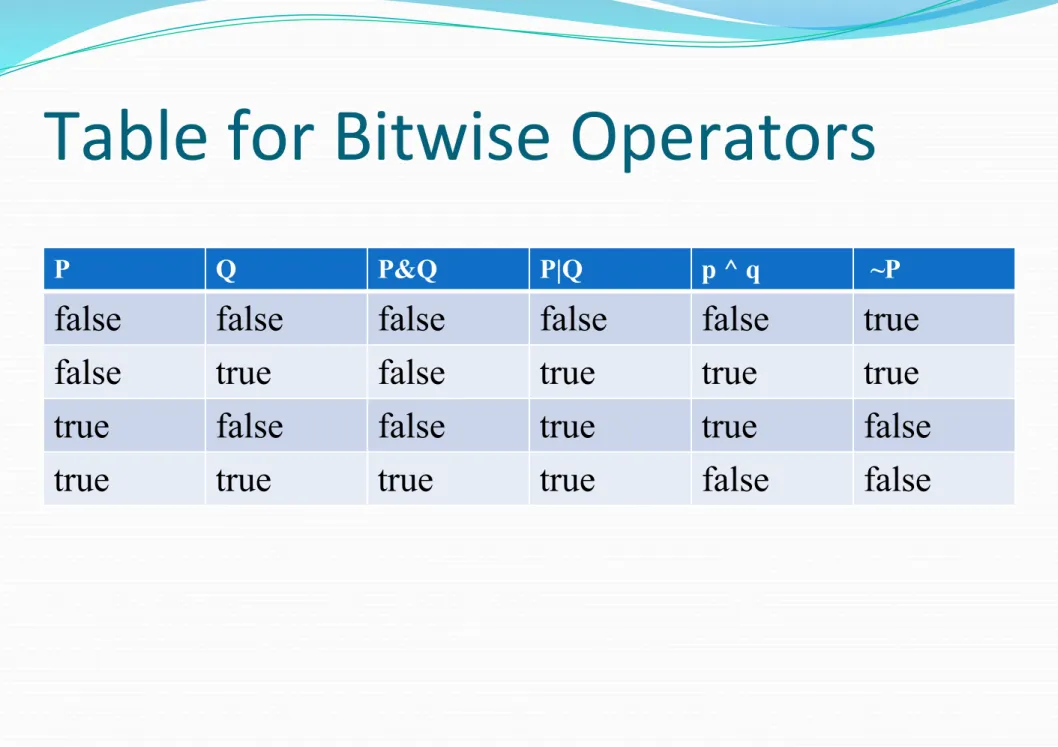
Table for Bitwise Operators
P Q P&Q P|Q p ^ q ~P
false false false false false true false true false true true true true false false true true false true true true true false false
Assignment Operator
⚫ Variable op = expression
⚫ The operator pair += tells the compiler to assign to x the
value of x plus 10.
⚫ += –= *= /=
⚫ %= &= |= ^=
⚫ X += 10; is same as x=x+10;
The if Statement
⚫ it is syntactically similar to the if statements in C, C++,
and Java. Its simplest form is shown
⚫ here:
⚫ if(condition) statement;
For Example
⚫ if(10 < 11) Console.WriteLine("10 is less than 11");
⚫ In this case, since 10 is less than 11, the conditional
The for Loop
for(initialization; condition; iteration)
statement;
⚫ using System;
⚫ class ForDemo {
⚫ static void Main() {
⚫ int count;
⚫ Console.WriteLine("Counting from 0 to 4:");
⚫ for(count = 0; count < 5; count = count+1)
⚫ Console.WriteLine(" count is " + count);
⚫ Console.WriteLine("Done!"); ⚫ } ⚫ } Output Counting from 0 to 4: count is 0 count is 1 count is 2 count is 3 count is 4 Done!
While Loops
⚫ Condition is tested at the top of the Loop : If condition not satisfied then the loop will not be executed even once.
⚫ using System;
⚫ class WhileDemo {
⚫ static void Main() {
⚫ char ch;
⚫ // Print the alphabet using a while loop.
⚫ ch = 'a'; ⚫ while(ch <= 'z') { ⚫ Console.Write(ch); ⚫ ch++; ⚫ } ⚫ } ⚫ }
Do while Loops
⚫ Condition is tested at the bottom of the Loop –Do while will always execute atleast once.
⚫ using System;
⚫ class DWDemo {
⚫ static void Main() {
⚫ char ch;
⚫ do {
⚫ Console.Write("Press a key followed by ENTER: ");
⚫ ch = (char) Console.Read(); // read a keypress
⚫ } while(ch != 'q');
⚫ }
Usage of Break Statement
⚫ using System;
⚫ class Break2 {
⚫ static void Main() {
⚫ char ch; ⚫ for( ; ; ) { ⚫ ch = (char) Console.Read(); ⚫ if(ch == 'q') break; ⚫ } ⚫ Console.WriteLine("You pressed q!"); ⚫ } ⚫ }
Break – Comes out of Inner Loop
⚫ using System;
⚫ class Break3 {
⚫ static void Main() {
⚫ for(int i=0; i<3; i++) {
⚫ Console.WriteLine("Outer loop count: " + i);
⚫ Console.Write(" Inner loop count: ");
⚫ int t = 0; ⚫ while(t < 100) { ⚫ if(t == 10) break; ⚫ Console.Write(t + " "); ⚫ t++; ⚫ } ⚫ Console.WriteLine(); ⚫ } ⚫ Console.WriteLine("Loops complete."); ⚫ } ⚫ }
⚫ Outer loop count: 0
⚫ Inner loop count: 0 1 2 3 4 5 6 7 8 9
⚫ Outer loop count: 1
⚫ Inner loop count: 0 1 2 3 4 5 6 7 8 9
⚫ Outer loop count: 2
⚫ Inner loop count: 0 1 2 3 4 5 6 7 8 9
Use continue
⚫ using System;
⚫ class ContDemo {
⚫ static void Main() {
⚫ int i;
⚫ // Print even numbers between 0 and 100.
⚫ for(i = 0; i<=100; i++) {
⚫ // Iterate if i is odd. ⚫ if((i%2) != 0) continue; ⚫ Console.WriteLine(i); ⚫ } ⚫ } ⚫ }
The C# Keywords
⚫ The reserved keywords cannot be used as names for variables, classes, or methods.
Data Types
⚫ Integers
⚫ C# defines nine integer types:
The Scope and Lifetime of
Variables
Difference between Scope and Lifetime?
⚫ Scope: It defines the visibility/accessibility of the variable
in a program.
⚫ Local variable - the scope is local to that function.
⚫ Static global variable - scope is limited to that file only.
Lifetime of a Variable :
⚫ It is the duration of time for which the variable holds the
value during the execution of a program.
⚫ Local variable - the lifetime is within the functional block
in which it is declared. The memory allocated when function starts and deallocated when it terminates.
⚫ static variable - the life time will be the entire execution of
the program. value persists even between function calls.
⚫ Global variable - the life time will be the entire execution
Operators
An operator is a symbol that tells the compiler
to perform a specific mathematical or logical manipulation. C# has four general classes of
Logical Operators
Relational Operators
Operator Precedence
R -> L
R -> L R-> L
Inputting Characters from the
Keyboard
To read a character from the keyboard, call Console.Read( ). using System;
class KbIn {
static void Main() { char ch;
Console.Write("Press a key followed by ENTER: "); // Read a key from the keyboard.
ch = (char) Console.Read();
Console.WriteLine("Your key is: " + ch); }
}
output
Here is a sample run:
Press a key followed by ENTER: t Your key is: t
To check if the character is same as
assigned character.
⚫ Create a class .
⚫ Declare the variable answer of type char .
⚫ Initialise the variable answer= ‘K’.
⚫ Print message “ Guess a letter between A and Z”
⚫ Read a character from user . Store it in ch.
⚫ If (answer = ch) then print “Right”
The switch Statement
The general form of the switch statement is switch(expression) { case constant1: statement sequence break; case constant2: statement sequence break; case constant3: statement sequence break; . . . default: statement sequence break; }
Example
using System;
class VowelsAndConsonants { static void Main() {
char ch; Console.Write("Enter a letter: "); ch = (char) Console.Read(); switch(ch) { case 'a': case 'e': case 'i': case 'o': case 'u': case 'y': Console.WriteLine("Letter is a vowel."); break; default: Console.WriteLine("Letter is a consonant."); break; } } }