Secure Bluetooth for Trusted m-Commerce
Pasquale Stirparo1,2, Jan Löschner1 1
Institute for the Protection and Security of the Citizen Joint Research Centre (JRC), European Commission, Ispra (VA), Italy
2
Royal Institute of Technology (KTH), Stockholm, Sweden Email: [email protected], [email protected]
Received April 18, 2013; revised May 20, 2013; accepted June 14, 2013
Copyright © 2013 Pasquale Stirparo, Jan Löschner. This is an open access article distributed under the Creative Commons Attribu-tion License, which permits unrestricted use, distribuAttribu-tion, and reproducAttribu-tion in any medium, provided the original work is properly cited.
ABSTRACT
Our today’s world is becoming digital and mobile. Exploiting the advantages of wireless communication protocols is not only for telecommunication purposes, but also for payments, interaction with intelligent vehicles, etc. One of the most widespread wireless capabilities is the Bluetooth protocol. Just in 2010, 906 million mobile Bluetooth enabled phones had been sold, and in 2011, there were more than 40 million Bluetooth enabled health and medical devices on the market. Still in 2011, one third of all new vehicles produced worldwide included Bluetooth technology. Security and privacy protection is key in the digital world of today. There are security and privacy risks such as device tracking, communication eavesdropping, etc., which may come from improper Bluetooth implementation with very severe conse- quences for the users. The objective of this paper is to analyze the usage of Bluetooth in m-commerce and m-payment fields. The steps undertaken in this paper in order to come to a proposal for a secure architecture are the analysis of the state of the art of the relevant specifications, the existing risks and the known vulnerabilities the related known attacks. Therefore, we give first an overview of the general characteristics of Bluetooth technology today, going deeper in the analysis of Bluetooth stack’s layers and the security features offered by the specifications. After this analysis of the specifications, we study how known vulnerabilities have been exploited with a comprehensive list of known attacks, which poses serious threats for the users. With all these elements as background, we conclude the paper proposing a design for Secure Architecture for Bluetooth-Enhanced Mobile “Smart” Commerce Environments.
Keywords: Bluetooth; Mobile Security; Mobile Commerce; Privacy
1. Introduction
The Bluetooth wireless technology is a short-range com- munication system (see Table1) intended to replace the cable(s) connecting portable and/or fixed electronic de- vices. The key features of Bluetooth wireless technology are robustness, low cost and device discovery support. Many features of the core specification are optional, al- lowing product differentiation [1].
Created by telecom vendor Ericsson in 1994, it was originally conceived as a wireless alternative to RS-232 data cables. In 1998, Ericsson, IBM, Intel, Nokia, and
Table1.Bluetooth Classes.
Class Power (mW)
Power (dbM)
Distance
(m) Sample Devices
1 100 20 ~100 BT Access Point, dongles
2 2.5 4 ~10 Keyboards, mice
3 1 0 ~1 Mobile phone headset
Toshiba formed a trade association known as Bluetooth SIG (Special Interest Group) to publish and promote the Bluetooth standard. From the first Bluetooth enabled device in 1999 to 2008, more than 2 billion devices were using the Bluetooth technology (according to a press release from Bluetooth SIG dated May 2008). It is there- fore clear the high level of pervasiveness and ubiquity of this technology, which justify the need of a deep analysis related to the State of The Art of its security and privacy features as well as possible threats and vulnerabilities. Still according to Bluetooth SIG [2], listed below there are numbers of Bluetooth products worldwide that give a clearer picture of the dimension of this technology:
906 million mobile phones sold in 2010, almost 100 percent with Bluetooth technology.
171 million laptops shipped in 2010, including 77 percent with Bluetooth technology.
More than 50 million game consoles shipped in 2010, including 62 percent with Bluetooth technology.
medical devices were already in the market in early 2011.
One third of all new vehicles produced worldwide in 2011 include Bluetooth technology, growing to 70 percent by 2016, according to Strategy Analytics. Having stated that, it is immediately clear the high level of pervasiveness and ubiquity of Bluetooth tech- nology, which justify the need of a deep analysis related to the State of The Art of its security and privacy features as well as possible threats and vulnerabilities.
This paper is structured in the following way: Section 2 will give an overview on the general characteristics of the Bluetooth technology. Section 3 will go a deeper in the analysis of Bluetooth stack’s main layers. In Section 4, known vulnerabilities and potential threats are pre- sented, while in Section 5 is presented a list of known attacks. Section 6 is the security features offered by Bluetooth specifications introduced. Section 7 presents the design of the Secure Architecture for Bluetooth-En- hanced Mobile “Smart” Commerce Environments. Sec- tion 8 concludes the document with security recommend- dations.
2. Bluetooth Protocol: State of the Art
The Bluetooth technology operates in the frequency band 2400 - 2800 MHz, called ISM (Industrial Scientific Medi- cal) license free of any use. According to the standard, information is sent using a technology called FHSS ra- dios (Frequency-hopping spread spectrum), which allows sending pieces of information using 79 different bands (1 MHz, 2402 - 2480 MHz in the range) included in fre- quency band used.
The Bluetooth protocol uses a packet-based paradigm
with a Master/Slave structure (different from clientserver protocols used by others). A device in master mode can communicate with up to seven devices in slave mode thus forming a piconet, a network of computers con- nected in ad-hoc mode. Each device connected to a pi- conet is synchronized with the master clock, which de- termines how packets are exchanged between devices of the piconet. Figure 1 shows an example of Bluetooth
piconet topology.
There are two forms of Bluetooth wireless technology systems: Basic Rate (BR) and Low Energy (LE). Both systems include device discovery, connection establish- ment and connection mechanisms. The Basic Rate sys- tem includes optional Enhanced Data Rate (EDR), alter- nate Media Access Control (MAC) and Physical layers extensions (PHY). The LE system includes features de- signed to enable products that require lower current con- sumption, lower complexity and lower cost than BR/ EDR. LE is primarily designed to bring Bluetooth tech- nology to coin cell battery-powered devices such as medi- cal devices and sensors.
The key technology goals of Bluetooth LE (compared with Bluetooth BR/EDR, see Table 2) include lower power consumption, reduced memory requirements, efficient dis- covery and connection procedures, short packet lengths, and simple protocols and services. Four main versions of the Bluetooth protocol have been released until now [4- 7].
3. The Bluetooth Stack
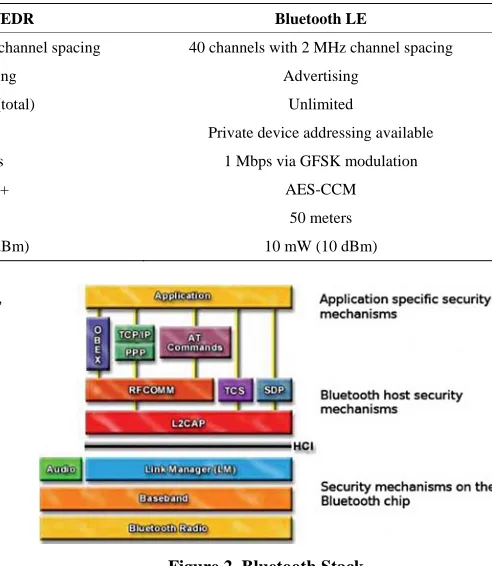
[image:2.595.97.497.490.721.2]Bluetooth is defined as a layer protocol architecture con- sisting of core protocols, cable replacement protocols, telephony control protocols, and adopted protocols [9].
Table 2. Key differences between Bluetooth BR/EDR and LE [8].
Characteristic Bluetooth BR/EDR Bluetooth LE
RF Physical Channels 79 channels with 1 MHz channel spacing 40 channels with 2 MHz channel spacing
Discovery/Connect Inquiry/Paging Advertising
Number of Piconet Slaves 7 (active)/255 (total) Unlimited
Device Address Privacy None Private device addressing available
Max Data Rate 1 - 3 Mbps 1 Mbps via GFSK modulation
Encryption Algorithm E0/SAFER+ AES-CCM
Typical Range 30 meters 50 meters
Max Output Power 100 mW (20 dBm) 10 mW (10 dBm)
Mandatory protocols for all Bluetooth stacks are: LMP, L2CAP and SDP (Figure 2). Additionally, these other two protocols are almost universally supported: HCI and RFCOMM. The lower layer is the physical layer and it handles the radio signal. The second layer is the Base- band, which is in charge of formatting the packets before they are sent out; specifically it builds the header, com- putes the checksum, data encryption and decryption, etc. The Link Controller manages the implementation of the Baseband protocol, while the Link Manager manages the Bluetooth connections via Link Manager Protocol.
Bluetooth uses a 48-bit identifier, for device identifi- cation. This identifier is referred to as the Bluetooth de- vice address (BD_ADDR). The first three bytes of the BD_ADDR are specific to the manufacturer of the Blue- tooth radio, with identification assignments controlled by the IEEE Registration Authority [3].
3.1. Link Manager Protocol
The Link Manager Protocol (LMP) is used to control and negotiate all aspects of the Bluetooth connection between two devices. This includes the set-up and control of logical transports and logical links, and for control of physical links.
3.2. Logical Link Control & Adaptation Protocol
The Logical Link Control & Adaptation Protocol (L2CAP) is used to multiplex multiple logical connections between two devices using different higher-level protocols. It pro- vides segmentation and reassembly of packets, as well as quality of service (QoS) related features.
3.3. Service Discovery Protocol
[image:3.595.289.535.100.383.2]Service Discovery Protocol (SDP) allows a device to discover services supported by other devices, and their associated parameters. A Universally Unique Identifier (UUID) identifies each services, with official services (Bluetooth profiles) assigned a short form UUID (16 bits rather than the full 128). There are two different ways to perform service discovery:
Figure 2. Bluetooth Stack.
Searching: it refers to a specific service and it can be performed only knowing one or more attributes of the service;
Browsing: it is performed by sending a request for the root browse group UUID. The inquired device reply with the list of all UUID related to the services avail- able. At this point the inquiring device can perform the searching as described before, one for each ser- vice/UUID.
3.4. Serial Port Emulation
Radio frequency communications (RFCOMM) is a cable replacement protocol used to create a virtual serial data stream. RFCOMM provides a simple reliable data stream to the user, similar to TCP. It is used directly by many telephony related profiles as a carrier for AT commands, as well as being a transport layer for OBEX (Object Ex- change) over Bluetooth.
3.5. Profiles
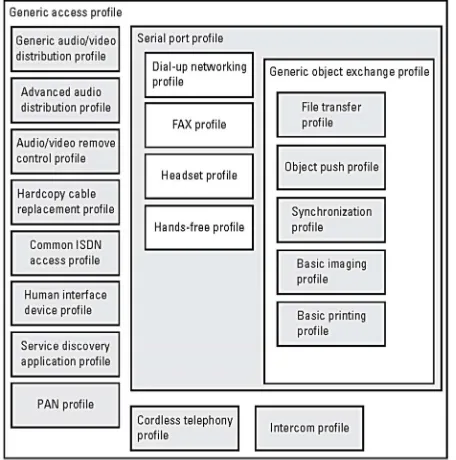
structure as outlined in Figure 3. The most fundamental definitions, recommendations, and requirements related to modes of operation and connection and channel setup are given in the generic access profile (GAP). Profiles are linked to the services a given device offers/supports. Therefore from a security point of view, since Bluetooth enabled devices broadcast the list of supported services list upon request, each profile that is “advertised” could be seen as another potential door opened, more or less like tcp/upd ports for PCs.
4. Bluetooth Threats and Vulnerabilities
Due to its wireless nature, the Bluetooth communication channel is already subject to several threats like eaves- dropping, impersonation, denial of service and man-in- the-middle. Other than the general wireless protocols’ issues, there are the following threats specific to the Blue- tooth enabled devices:
Location tracking: Bluetooth devices broadcast their unique address, being therefore subject to location- tracking threats [10].
Key management: Like many technologies that use cryptography for features such as authentication and encryption, Bluetooth devices are subject to threats related to key management, including key disclosure or tampering.
[image:4.595.59.287.488.718.2] Bluejacking: It involves the sending of unsolicited messages to a victim’s Bluetooth device. This can be leveraged as a social-engineering attack that is en- abled by susceptible Bluetooth devices. It can be also exploited for malware propagation, as demonstrated in [11].
Figure 3. Bluetooth profiles.
Incorrect protocol implementation: The quality of security on Bluetooth devices is determined to some degree by product-specific implementations. When a product manufacturer incorrectly implements the Bluetooth specification on its device, it makes the de- vice or communications subject to security issues that would not exist if the specifications were imple- mented correctly. Implementation flaws have been at the root of many well-known Bluetooth securities at- tacks (see Section 6).
Here follows a summary of well-known security vul- nerabilities associated with Bluetooth. Some of them are version specific while others common to all versions. For a more comprehensive list refer to [8]:
Bluetooth Versions Prior to v1.2
o The unit key is reusable and becomes public when used. The unit key is a type of link key generated during device pairing, and has been deprecated since Bluetooth v1.2. This issue allows arbitrary eaves- dropping by devices that have access to the unit key.
Bluetooth Versions Prior to v2.1
o Short PINs are permitted. Because PINs are used to generate encryption keys and users may tend to select short PINs, this issue can lower the security assur- ances provided by Bluetooth’s encryption mechanisms. o The encryption keystream repeats. In Bluetooth ver-
sions prior to v2.1, the keystream repeats after 23.3 hours of use. Therefore, a keystream is generated identical to that used earlier in the communication.
Common to all Bluetooth versions:
o Unknown random number generator (RNG) strength for challenge-response. The strength of the RNG used to create challenge-response values for Bluetooth au- thentication is unknown. Weaknesses in this RNG could compromise the effectiveness of Bluetooth au- thentication and overall security.
o Negotiable encryption key length. The Bluetooth speci- fication allows the negotiation of the encryption key down to a size as small as one byte.
o Shared master key. The encryption key used to key encrypted broadcast communications in a Bluetooth piconet is shared among all piconet members.
o Weak E0 stream cipher. A theoretical known-plain- text attack has been discovered that may allow recov- ery of an encryption key much faster than a brute- force attack.
5. Known Attacks
5.1. Blueprinting
Blueprinting is a method to remotely find out details about Bluetooth-enabled devices. Blueprinting can be used for generating statistics about manufacturers and models and to find out whether there are devices in range that have issues with Bluetooth security [13].
5.2. BlueBug
BlueBug is a security loophole on some Bluetooth-en- abled cell phones. Exploiting this loophole allows the unauthorized downloading of the phone books and the calls list, the sending and reading of SMS messages from the attacked phone and many more things.
5.3. BT Audit
BT Audit is a scanner for L2CAP and RFCOMM in or- der to find open ports and possible vulnerable applica- tions bound to them.
5.4. BlueSmack
BlueSmack is a Bluetooth attack that knocks immedi- ately out some Bluetooth-enabled devices from the pi- conet they are connected. This Denial of Service attack can be conducted using standard tools that are shiped with the official Linux Bluez utility package.
5.5. BlueSnarf
This attack allows access to a victim Bluetooth device because of a flaw in device firmware. In order to perform a BlueSnarf attack, the attacker needs to connect to the OBEX Push Profile (OPP), which has been specified for the easy exchange of business cards and other objects. In most of the cases, this service does not require authenti- cation. Missing authentication is not a problem for OBEX Push, as long as everything is implemented correctly. The BlueSnarf attack connects to an OBEX Push target and performs an OBEX GET request for known filenames such as “telecom/pb.vcf” for the devices phone book or “telecom/cal.vcs” for the devices calendar file. In case of improper implementation of the device firmware, an at- tacker is able to retrieve all files where the name is either known or guessed correctly.
5.6. BlueSnarf++
BlueSnarf++ gives the attacker full read/write access when connecting to the OBEX Push Profile. Instead of a less functional OBEX Push daemon, these devices run an OBEX FTP server that can be connected as the OBEX Push service without pairing. Here the attacker can see all files in the file system (ls command) and can also de-lete them (rm command). The file system includes even-
tual memory extensions like memory sticks or SD cards.
5.7. HeloMoto
The HeloMoto attack takes advantage of the incorrect implementation of the “trusted device” handling on some Motorola devices. The attacker initiates a connection to the unauthenticated OBEX Push Profile pretending to send a vCard. The attacker interrupts the sending process and without interaction the attacker’s device is stored in the “list of trusted devices” on the victim’s phone. With an entry in that list, the attacker is able to connect to the headset profile without authentication. Once connected to this service, the attacker is able to take control of the device by means of AT-commands.
5.8. BlueChop
BlueChop is an attack that disrupts any established Blue- tooth piconet by means of a device that is not participat- ing the piconet. A precondition for this attack is that the master of the piconet supports multiple connections (a feature that is necessary for building up scatternets). In order to BlueChop a piconet, a device that is not partici- pating to the targeted piconet spoofs a random slave out of the piconet and contacts the master. This leads to con- fusion of the master’s internal state and disrupts the pi- conet. This attack is not specific to any device manufac- turer and seems to have general validity.
5.9. BlueZ Arbitrary Command Execution Vulnerability
Hcid utility spawns a helper program to request a PIN from the user when it receives a pairing request from a remote device. One of the arguments for calling the PIN helper application is the name of the remote device. However, when doing this, hcid does not escape shell characters. Thus an attacker can give a device a name containing commands to execute enclosed within char- acters. In addition, it is possible for an attacker to cause the PIN helper application to automatically pair with the remote device by adding “>/dev/null&echo PIN:<PIN code>“ to the device name.
5.10. Redfang
the process, Redfang supports the user of multiple Blue- tooth adapters to scan the supplied address range. Each adapter then scans disjoint portions of the address range. This tool is at a proof-of-concept development stage.
5.11. Bluetooth Stack Smasher
Bluetooth Stack Smasher (BSS) is a L2CAP protocol fuzzer designed to identify implementation weaknesses in Bluetooth devices. BSS is designed to transmit mal- formed L2CAP frames with a standard Bluetooth dongle on Linux systems. The malformed frames are designed to trigger and identify vulnerabilities in Bluetooth stack implementations, often resulting in denial of service con- ditions. Through the use of BSS, several L2CAP imple- mentation weaknesses have been discovered in common devices.
5.12. Nokia N70 Malformed L2CAP Frame DoS
The Nokia N70 is vulnerable to a Denial of Service in- volving malformed L2CAP frames with unknown prop- erties. The Nokia N70 contains a vulnerability that causes a DoS condition when a malformed L2CAP frame is received by the device’s Bluetooth interface. This can cause the device to become unresponsive and to display a “System Error” message.
6. Security Features and Architectures
Bluetooth wireless technology provides peer-to-peer com- munications over short distances. In order to provide usage protection and information confidentiality, the sys- tem provides security measures both at the application layer and the link layer. These measures are designed to be appropriate for a peer environment. This means that in each device, the authentication and encryption routines are implemented in the same way. The encryption key is entirely different from the authentication key. A new encryption key shall be generated each time encryption is activated. Thus, the lifetime of the encryption key does not necessarily correspond to the lifetime of the authen- tication key. The authentication key will be more static in its nature than the encryption key: once established, the particular application running on the device decides when, or if, to change it. To underline the fundamental impor- tance of the authentication key to a specific link, it is often referred to as the link key. Three basic security services are specified in the Bluetooth standard:
Authentication: verifying the identity of communi- cating devices based on their Bluetooth device ad- dress. Bluetooth does not provide native user authen- tication.
Confidentiality: preventing information compromise caused by eavesdropping by ensuring that only au-
thorized devices can access and view transmitted data.
Authorization: allowing the control of resources by ensuring that a device is authorized to use a service before permitting it to do so.
The security policies of a device determine when and how to use security mechanisms. The Bluetooth standard provides some basic principles for enforcing link-level security and building more advanced security polices through four defined security modes:
Security Mode 1: A Bluetooth unit in security mode 1 never initiates any security procedures; that is, it never demands authentication or encryption of the Blue- tooth link.
Security Mode 2: When a Bluetooth unit is operating in security mode 2, it shall not initiate any security procedures, that is, demand authentication or encrypt- tion of the Bluetooth link, at link establishment. In- stead, security is enforced at channel (L2CAP) or connection (e.g., SDP, RFCOMM, TCS) establish- ment.
Security Mode 3: When a Bluetooth unit is in security mode 3, it shall initiate security procedures before the link setup is completed. Two different security poli- cies are possible: always demand authentication or always demand both authentication and encryption.
Security Mode 4: it was defined in the v2.1 + EDR specification. It requires encryption for all services except Service Discovery, and it’s compulsory be- tween v2.1 + EDR devices (essentially making Modes 1 through 3 legacy modes once v2.1 + EDR becomes widespread). Like Security Mode 2, security in Secu- rity Mode 4 is implemented after link setup, at service level, and it uses Secure Simple Pairing (SSP), in which Elliptic Curve Diffie-Hellman (ECDH) replaces legacy key agreement for link key generation. How- ever, the device authentication and encryption algo- rithms are identical to the algorithms in Bluetooth v2.0 + EDR and earlier versions. Under Security Mode 4, service security requirements must be identi- fied as one of the following: a) authenticated link key required, b) unauthenticated link key required or c) no security required.
Table 3 contains a summary of the different security mode options for Master respective Slave, and the re- sulting security mechanism(s).
6.1. Pairing
Table3. Different security mode options and resulting configurations.
Slave Security Mode
Master Security Mode
1 2 3
1 No Authentication, no encryption.
If the master application demands authentication (and encryption), then the link will be authenticated (and encrypted).
The link will be authenticated. If the master policy demands it, the link will be encrypted.
2 If the slave application demands it, the link will be authenticated (and encrypted). If the master or slave application demands it, the link will be authenticated (and encrypted).
The link will be authenticated. If the master policy demands it, or if the slave application demands it, the link will be encrypted.
3 The link will be authenticated. If the slave policy demands it, the link will be encrypted.
The link will be authenticated. If the slave policy demands it, or the master application demands it, the link will be encrypted.
The link will be authenticated. If the slave or the master policy demands it, the link will be encrypted.
useful for Bluetooth devices to automatically establish a connection without user intervention as soon as they are in range. To resolve this conflict, Bluetooth uses a proc- ess called pairing, which is generally manually started by a device user, making that device’s Bluetooth link visible to other devices. Two devices need to be paired to com- municate with each other; the pairing process is typically triggered automatically the first time a device receives a connection request from a device with which it is not yet paired. Once a pairing has been established, it is remem- bered by the devices, which can then connect to each other without user intervention. When desired, the user can later remove the pairing relationship.
During the pairing process, the two devices involved establish a relationship by creating a shared secret known as link key. If both devices store a link key, they are be paired or bonded. A device that wants to communicate only with a bonded device can cryptographically authen- ticate the identity of the other device, and so be sure that it is the same device it previously paired with. Once a link key has been generated, an authenticated (ACL) link between the devices may be encrypted so that the data that they exchange over the airwaves is protected against eavesdropping. Link keys can be deleted at any time by either device.
Pairing mechanisms have changed significantly with the introduction of Secure Simple Pairing in Bluetooth v2.1. The following summarizes the pairing mechanisms:
Legacy pairing: This is the only method available in Bluetooth v2.0 and before. Each device must enter a PIN code; pairing is only successful if both devices enter the same PIN code. Any 16-byte UTF-8 string may be used as a PIN code, however not all devices may be capable of entering all possible PIN codes.
Limited input devices: The obvious example of this class of device is a Bluetooth Hands-free headset, which generally has few inputs. These devices usually have a fixed PIN, for example “0000” or “1234”, that are hard-coded into the device.
Numeric input devices: Mobile phones are classic examples of these devices. They allow a user to enter a numeric value up to 16 digits in length.
Alphanumeric input devices: PCs and smartphones are examples of these devices. They allow a user to enter full UTF-8 text as a PIN code. If pairing with a less capable device the user needs to be aware of the input limitations on the other device, there is no mecha- nism available for a capable device to determine how it should limit the available input a user may use.
6.1.1. PIN Pairing
In versions prior to Bluetooth v2.1 + EDR pairing be- tween devices is accomplished through the entry of a PIN or passkey with a maximum length of 128 bits.
For PIN pairing, two Bluetooth devices simultaneously derive link keys when the user(s) enter an identical secret PIN into one or both devices, depending on the configu- ration and device type. There are two types of such pass- keys: variable passkeys, which can be chosen at the time of pairing via some input mechanism, and fixed passkeys, which are predetermined [3]. The type of passkey used is typically determined by a device’s input and display ca- pabilities (for example, a Bluetooth-enabled phone with keyboard input and visual display may use a variable passkey, whereas a Bluetooth-enabled mouse may use a fixed passkey because it has neither input nor display capabilities to enter or verify a passkey).
6.1.2. Secure Simple Pairing (SSP)
This is required from Bluetooth v2.1 + EDR. A Blue- tooth v2.1 device may only use legacy pairing to inter- operate with a v2.0 or earlier device. Secure Simple Pairing uses a form of public key cryptography, and has the following association models [3,8,14]:
should compare the numbers to ensure they are iden- tical. If the comparison succeeds, the user(s) should confirm pairing on the device(s) that can accept an input. This method provides MitM protection, assume- ing the user confirms on both devices and actually performs the comparison properly.
Passkey Entry: This association model may be used between a device with a display and a device with numeric keypad entry (such as a keyboard), or two devices with numeric keypad entry. In the first case, the display is used to show a 6-digits numeric code to the user, who then enters the code on the keypad. In the second case, the user of each device enters the same 6-digit number. Both cases provide MitM pro- tection.
Just Works: It was primarily designed for scenarios where at least one of the devices does not have a dis- play nor does it have a keyboard to enter six decimal digits. A good example of this model is the cell phone /mono headset scenario where most headsets do not have a display. The Just Works association model uses the Numeric Comparison protocol, but the user is never shown a number and the application may simply ask the user to accept the connection (exact implementation is up to the end product manufac- turer). When compared against today’s experience of a headset with a fixed PIN, the security level of the Just Works association model is considerably higher since a high degree of protection against passive eaves- dropping is realized. This method provides no Man in the Middle (MitM) protection.
Out of Band (OOB): The Out of Band (OOB) asso- ciation model was designed for devices that support a common additional wireless/wired technology (e.g., Near Field Communication or NFC) for the purposes of device discovery and cryptographic value exchange. In the case of NFC, the OOB model allows devices to pair by simply “tapping” one device against the other, followed by the user accepting the pairing via a single button push. It is important to note that to keep the pairing process as secure as possible, the OOB tech- nology should be designed and configured to mitigate eavesdropping and MitM attacks. If it is not, security may be compromised during authentication. The user’s experience differs a bit depending on the Out of Band mechanism. The OOB association model does not sup- port a solution where the user has activated a Blue- tooth connection and would like to use OOB for au- thentication only.
6.2. Authentication
Authentication uses a challenge-response scheme in which a claimant’s knowledge of a secret key is checked through a 2-move protocol using symmetric secret keys. The lat-
ter implies that a correct claimant/verifier pair shares the same secret key, for example K. The verifier is not re- quired to be the master. The application indicates which device has to be authenticated. Some applications only require a one-way authentication. However, some peer- to-peer communications should use a mutual authentica- tion in which each device is subsequently the challenger (verifier) in two authentication procedures [8]. When the authentication attempt fails, a waiting interval shall pass before the verifier will initiate a new authentication at- tempt to the same claimant, or before it will respond to an authentication attempt initiated by a device claiming the same identity as the failed device.
6.3. Authorization
Bluetooth allows two different level of trust related to the devices, and three levels of service security. A device is considered trusted if it has previously been paired with the device, and will have full access to services on the Bluetooth device. On the other hand, untrusted devices are those that have not previously been paired with the device (or the relationship has been otherwise removed), and will have restricted access to services. The Bluetooth specification specifies also three levels of security for Bluetooth services:
Service Level 1: These services require device au- thentication and authorization. Trusted devices will be granted automatic access to these services. Manual authentication and authorization will be required be- fore untrusted devices are granted access to these ser- vices.
Service Level 2: These services require authentication, but do not require authorization.
Service Level 3: These services have no security and are open to all devices.
6.4. Confidentiality
Bluetooth uses E0, a stream cipher, as the basis for the encryption processing associated with these encryption modes. The defined modes include:
Encryption Mode 1: No encryption. All traffic is un- encrypted when this mode is used.
Encryption Mode 2: Traffic between individual end- points (non-broadcast) is encrypted with individual link keys. Broadcast traffic is unencrypted.
Mode 2 and 3 uses the same encryption mechanism. Of importance to note is that when encryption is used in Bluetooth, not all parts of the Bluetooth packet are en- crypted. Because all members of a piconet must be able to determine whether the packet is meant for them, the header of the message must be unencrypted.
CBC-MAC (AES-CCM). LE also introduces new cryp- tographic keys called the Identity Resolving Key (IRK) and Connection Signature Resolving Key (CSRK). The IRK is used to resolve public to private device address mapping. This allows a trusted device to determine an- other device’s private device address from a public (ran- dom) device address. This new feature provides privacy for a particular device meaning that, if the device re- mains discoverable, an adversary cannot track its loca- tion over the time.
6.5. Security of Bluetooth LE
This is required by Bluetooth v4. Bluetooth LE has some differences in security aspects with respect to BR/EDR security features such as Secure Simple Pairing. The as- sociation models are similar to Secure Simple Pairing from the user perspective and have the same names, but have differences in the quality of the protection provided. One difference is that LE pairing results in the generation of a Long-Term Key (LTK) rather than a Link Key, which is determined by one device and sent over to the other device during pairing, instead of both devices gen- erating the same key individually. Due to its very limited resources, the encryption through Elliptic Curves Dif- fie-Hellman could not be used here, thus passive eaves- dropping protection is not present in LE. Therefore, if an attacker can capture the LE pairing frames, he/she may be able to determine the resulting LTK.
The CSRK is used to verify cryptographically signed data frames from a particular device. This allows a Blue- tooth connection to use data signing (providing integrity and authentication) to protect the connection instead of data encryption (which, in the case of AES-CCM, pro- vides confidentiality, integrity, and authentication) [8].
There is no separate authentication challenge/response step as with BR/EDR/HS to verify that they both have the same LTK or CSRK. Because the LTK is used as input for the encryption key, successful encryption setup provides implicit authentication. Similarly, successful data signing provides implicit authentication that the remote device holds the correct CSRK, although confidentiality is not provided. Key generation and distribution is sum- marized in Figure 4.
[image:9.595.67.530.402.717.2]LE uses Advanced Encryption Standard-Counter with
7. Secure Architecture for a Bluetooth
Enhanced Mobile “Smart” Commerce
Environment
This section will introduce a design for a secure mobile commerce solution using Bluetooth as “enhancing” tech- nology for mobile commerce environments [15], where the mobile device is not (only) used directly to perform m-commerce but rather as mean to enhance the customer user experience inside a shop. The system components are the following:
A “Start Counter”, a Near Field Communication (NFC) point at the entrance of the shop.
Bluetooth (version 2.1 + EDR or higher) and NFC enabled mobile device. This will be the customer’s smart phone that will have the m-commerce applica- tion installed.
A UICC (Universal Integrated Circuit Card) SIM, where credit card information are stored;
NFC Tags, which are used in the shop to label each individual item on sale.
A Bluetooth (BT) Server with BT interface via hot- spot/antennas located all over inside the shop, to pro- vide full coverage within the shop.
A “Secure Information Server”, which will be send- ing the information required by the smart phones via secure Bluetooth connection.
A “Secure Transaction Server”, which will be in charge of the payment transactions via secure Blue- tooth connection.
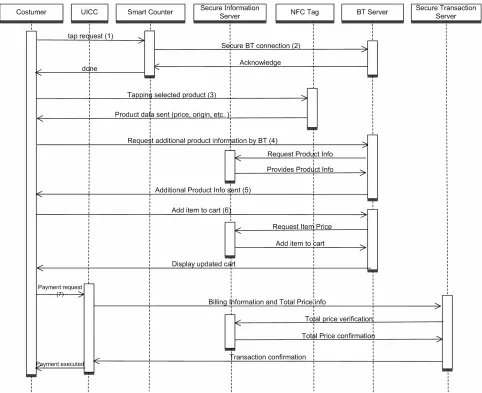
Using the described system components the customer entering into the shop can experience the following proc- ess. The process was developed based on the methodol- ogy for developing secure mobile applications.
1) The customer enters in the shop and taps the smart- phone with the “Start Counter”.
2) The “tapping” will initiate a secure Bluetooth con- nection between the customer’s device and the system. All the Bluetooth profiles/services not needed are “switched off”.
3) Every time the customer chooses a product to put in his cart, he will tap the smartphone with the product.
4) At this point, some basic information about the product (i.e. price, expiration date, origin, etc.) present on the NFC tag will be showed on the smartphone screen.
5) If the customer wants more information, by just clicking on the device’s screen he will inquire the shop Bluetooth secure server that will send the additional in- formation required via the Bluetooth connection estab- lished at the entrance.
6) Every time the customer will finally add the item in his cart, a “current total” will always appear on the screen, so that the customer is able at any moment to keep track of how much he is spending.
7) Once the customer has finished his shopping, he can then pay the “final total” directly with a simple click. The application will interact with the UICC via Secure Mid- dleware [16], making the payment a secure transaction. In this way the customer will avoid queuing at the cash, making the shopping a more pleasant experience.
8) Once the customer has paid, the application switches off automatically both Bluetooth and NFC chips before closing itself.
The following figure shows the purchase process. The numbers of the transactions correspond to the numbering of the steps described above.
The customer will find the “Start Counter” immedi- ately at the shop entrance, where he can tap his own smart phone. By entering into the working range of the counters NFC-Tag a secure Bluetooth connection using the Out of Band (OOB) association model will be initi- ated. The OOB, as stated in Section 4 will be used in the process. It will be used in NFC mode for the purposes of device discovery and cryptographic value exchange. In the NFC case the OOB model allows devices to pair by simply “tapping” one device against the other, followed by the user accepting the pairing via a single button push. To maximize the security of the pairing process the OOB technology should be designed and configured to miti- gate eavesdropping and MitM attacks. These potential risks are also referred to by GSMA in [17]. The activa- tion of Bluetooth via NFC is one of the general issues regarding the “mobile to reader interface”.
As Figure 5 shows NFC is used to trigger the pur- chase process by launching the smart mobile commerce application. Information needed as part of the SSP OOB pairing process (Hash C and Randomizer R) is exchanged via NFC link [18]. After tapping, the smart phone will have the Bluetooth activated and a secure link estab- lished with the secure servers of the commerce system of the shop. To guarantee the security, the application will interact with the system of the shop to generate an en- cryption keys that will be used to further encrypt all the future messages and the payment information. For this a PKI and a Key Exchange protocol will be used. This measure will prevent, at application level, from MitM attacks. Moreover, the application will launch the Blue- tooth but locking it down by closing all the services, leaving as available only the one needed for this purpose.
Finally from a user/customer experience point of view, all this will be done while the customer is walking in the shop doing his shopping in a transparent way and without the need for interaction but with the possibility to get product and purchase information.
Figure 5. Purchase and payment process.
over a secure Bluetooth channel.
Legacy will not be accepted, therefore insecure con- nection will not be started to avoid any possible risk for the customer.
8. Conclusions and Recommendations
Bluetooth specifications offer several mechanisms to pro- tect security and privacy to a certain extend. The major issues are caused by erroneous implementation of the protocol stack by vendors/manufacturers. This is proven by the fact that most of the vulnerabilities discovered are “vendor-related” and not general for a certain core ver- sion of the Bluetooth standard.
Most of the vulnerabilities and attacks presented in this paper go back to several years ago, to the core speci- fication number 2 (which is still the most widespread). Since then, the new versions have (almost) not introduced new security features (except for v4) and also not any new vulnerabilities have been discovered. In the mean
time, vendors have often patched those published. However, Bluetooth security is critical and as such it should still be considered not strong enough for sensitive and privacy invasive applications. It is important that mobile application developers provide appropriate secu- rity controls that offer identity-level security features, such as user authentication and user authorization for ap- plications that require security above and beyond what Bluetooth natively offers.
The NIST “Guide to Bluetooth Security” [8] provides a comprehensive checklist with additional recommenda- tions concerning Bluetooth security:
Use complex PINs for Bluetooth devices.
In sensitive and high-security environments, config- ure Bluetooth devices to limit the power used by the Bluetooth radio.
Avoid using the “Just Works” association model for v2.1 + EDR devices.
devices to only those required.
Configure Bluetooth devices as non-discoverable ex- cept during pairing.
Avoid use of Security Mode 1.
Enable mutual authentication for all Bluetooth com- munications.
Configure the maximum allowable size for encryption keys.
In sensitive and high-security environments, perform pairing in secure areas to limit the possibility of PIN disclosure.
Unpair devices that had previously paired with a de- vice if a Bluetooth device is lost or stolen.
An effort has to be made to assess complete electronic commerce systems for security and privacy to identify the weak point of the current implementation.
REFERENCES
[1] Bluetooth SIG, “Bluetooth Specification.”
http://www.bluetooth.org/Technical/Specifications/adopte d.htm
[2] Bluetooth SIG, “Bluetooth Special Interest Group.” http://www.bluetooth.com/Pages/network-effect.aspx [3] H. Dwivedi, C. Clarck and D. Thiel, “Mobile Application
Security,” McGraw Hill, 2010.
[4] Bluetooth SIG, “Bluetooth Specification: Core Versione 2.0 + EDR,” 2004.
http://www.bluetooth.org/docman/handlers/DownloadDo c.ashx?doc_id=40560
[5] Bluetooth SIG, “Bluetooth Specification: Core Versione 2.1 + EDR,” 2007.
http://www.bluetooth.org/docman/handlers/downloaddoc. ashx?doc_id=241363
[6] Bluetooth SIG, “Bluetooth Specification: Core Versione 3.0 + HS,” 2009.
http://www.bluetooth.org/DocMan/handlers/DownloadDo
c.ashx?doc_id=174214
[7] Bluetooth SIG, “Bluetooth Specification: Core Versione 4.0,” 2010.
http://www.bluetooth.org/docman/handlers/downloaddoc. ashx?doc_id=229737
[8] NIST, “Guide to Bluetooth Security (Draft), Special Pub-blication 800-121, Rev. 1,” NIST, 2011.
[9] W. Stallings, “Wireless Communications and Networks,” 2nd Edition, Prentice Hall, 2004.
[10] S. Hay and R. Harle, “Bluetooth Tracking without Dis- coverability,” 4th International Symposium onLocation
andContextAwareness, Tokyo, 7-8 May 2009, pp. 120-
137.doi:10.1007/978-3-642-01721-6_8
[11] L. Carettoni, C. Merloni and S. Zanero, “Studying Blue- tooth Malware Propagation: The Bluebag Project,” IEEE
Security&Privacy, Vol. 5, No. 2, 2007, pp. 17-25.
doi:10.1109/MSP.2007.43
[12] “Trifinite Group.” http://www.trifinite.org
[13] M. Herfurt and C. Mulliner, “Remote Device Identifi- cation Based on Bluetooth Fingerprinting Techniques,” Trifinite Group, White Paper, 2004.
[14] C. Gehrmann, J. Persson and B. Smeets, “Bluetooth Secu- rity,” Artech House, Inc., 2004.
[15] I. Kounelis, J. Loschner, D. Shaw and S. Scheer, “Secu- rity of Service Requests for Cloud Based m-Commerce,” 2012 Proceedings of the 35th International Convention
MIPRO, Opatija/Abbazia, 21-25 May 2012, pp. 1479-
1483.
[16] I. Kounelis, H. Zhao and S. Muftic, “Secure Middleware for Mobile Phones and UICC Applications,” Mobile Wire-
less Middleware, Operating Systems, and Applications,
Berlin, 13-14 November 2012, pp. 143-152.
[17] GSMA, “Mobile NFC Technical Guidelines, Version 2.0,” 2007.
![Figure 1. Example of Bluetooth piconet topology [3].](https://thumb-us.123doks.com/thumbv2/123dok_us/7779006.720626/2.595.97.497.490.721/figure-example-of-bluetooth-piconet-topology.webp)
![Figure 4. LE Pairing and Key Distribution scheme [8].](https://thumb-us.123doks.com/thumbv2/123dok_us/7779006.720626/9.595.67.530.402.717/figure-le-pairing-key-distribution-scheme.webp)