Smart Blind Stick
Anuj Dubey1, Ayan Yaduwanshi2, Prof. Priyanka Kedar3 1, 2BE Student, 3Assistant Professor, Computer, D.P.C.O.E., Pune, India
Abstract: Term blindness can be used for people having complete or on the verge of vision loss. Blind people always need help while travelling around to their destination. In this paper, we have developed a smart stick which helps the blind person to move around confidently without any hesitation. This smart stick is cheap and fast. The stick consists of 2 ultrasonic sensors for obstacle detection and pothole detection. The android application is linked with the smart stick through Bluetooth adapter. The application also consists of real time navigation system with speech recognized destination, calling and text message sending with speech recognition etc.
Keywords: Blind person, GPS (Global Positioning System) navigation, Ultrasonic sensor, Arduino.
I. INTRODUCTION
As of 2012, there were nearly 285 million people who were visually impaired of which 246 million had low vision and nearly 39 million were blind. Blind people often have problems while moving around in an environment where they are not familiar. They use the traditional white cane. This cane detects obstacle only when they touch it and hence prior detection of obstacle is problem. The cane also cannot properly detect obstacle which are at certain height. Thus, blind people will feel confident to move around only when obstacles are known from far distance. This can be done with help of Ultrasonic sensors. There are various types of technologies and sensors available but ultrasonic sensors are chosen because they are cheap and light weight and can detect obstacle up to 400cm. There is also a possibility that blind person might not know the route or might have some emergency. These problems can be taken care with real time navigation and also speech input enabled calling or text message feature.
A. Abbreviations and Acronyms
GPS- Global Positioning System, ETA- Electronic Travel Aid
II. PROBLEMS WITH EXISTING SYSTEM
An Electronic Travel Aid is form of assistive technology for enhancing mobility of blind person. The research problem of designing a better ETA is tough one. Blind people find traveling difficult because they cannot determine where obstacles are. This process is also called as spatial sensing. There are various problems with existing system. First, the rangefinder technology is unreliable in detecting steps. Second, blind people find various sound pitches and vibrations difficult to understand. Third, these systems are quite expensive and since blind person have to depend financially on someone, they don’t feel worth to invest in such expensive things. Problems and various existing systems are as follows:
1) Walkmate: Developed in 1993. It had detection only upto 1.83m.
2) Miniguide US: Developed in 2004. The price was $545 which is quite expensive.
3) Laser Cane: The latest one is named as „N2000‟. It provides 3 beams straight, overhead and for downward drops. It is still available and is priced at $2650. The developed smart stick has range of 400 cm and it costs less than 35$.
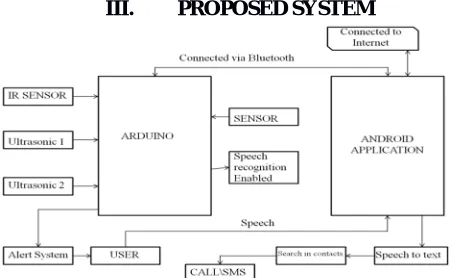
[image:1.612.193.419.577.716.2]III. PROPOSED SYSTEM
The above figure shows the architectural diagram of the system. Here we are having 2 ultrasonic sensors for obstacle and pothole detection. The stick and android phone are being connected through the Bluetooth. For emergency purpose the stick is having a button. Using that button the blind person can speak for whether he/she wants to call or send text message to the specific person. Using gesture they can start the real time navigation feature too.
A.The Entire Project Is Divided Into Following Parts 1) Obstacle Detection
2) Pothole Detection
3) Android Application
IV. METHODOLOGY
A. Obstacle Detection
The algorithm used for obstacle detection is as follows:
1) Step 1: Dist_front = distance received from sensor 2 or front sensor
2) Step 2: If (dist_front>=100 && dist_front<=200) alert that obstacle is ahead. Go to step 5
3) Step 3: Calculate dist_right and dist_left i.e. distance from right and left sensor respectively.
4) Step 4: If dist_right<100 && dist_left>100 alert Turn left
else if dist_left<100 && dist_right>100 alert Turn right
else if dist_left<100 && dist_right<100 alert Path is blocked
else alert Turn anywhere go to step 1
5) Step 5: check dist_front again for closeness
6) Step 6: if (dist_front<100) alert obstacle is very close in front go to step 3
B.Pothole Detection
1) The pothole sensor attached at the bottom of the stick, facing towards ground, sends reading of the time required for the ultrasonic waves to reflect back from the ground; which is then converted to distance using the distance formula.
2) Speed of sound in air =340 m/s
3) Distance= (speed*time)/2
4) Distance is divided by 2 is done because initial distance received is for sending signal plus receiving signal.
5) Initially values are used to calculate the threshold value and later each distance value calculated is compared with the threshold to check for pothole. Pothole detection detects a pothole on user‟s path by comparing each new value with the calculated
threshold value. Pothole detection calculates a threshold value by measuring the stick user‟s patterns of using the stick (since
each person‟s height is different and stick‟s holding point is also different), which is then used for detecting a pothole on the user‟s path. Initial ten values are used for calibration of the threshold value for pothole detection. The value within certain limit is considered for calibration as user‟s misjudgments might lead to ambiguous results. The valid results are then summed to
calculate their average value and the largest value in the set is also recorded. The average value is an indicator of the height to which the user generally lifts the stick while commuting, whereas the highest value is the maximum deviation from the average during the calibration. The difference between average and the maximum value gives a maximum fluctuation value, which then is doubled and added to the average to calculate threshold i.e. error is also considered. This approach increases the accuracy of the threshold and provides the arduino with a value indicating the maximum possible distance from the ground.
6) avg_value= (sum of 10 values)/10
7) max_value= maximum of initial 10 values.
8) fluct_value= max_value-avg_value.
9) Threshold= 2*fluct_value+avg
C.Android Application
The android application is connected with the stick through the Bluetooth adapter. There is one button placed on the stick. If the user feels that he/she is in emergency then they can press the button and then using speech they can tell the android application to either call or send text message to the desired person. They can even send location to their relatives using this feature.
One more feature over here is that the user can use gesture feature of double tapping on screen to start the real time navigation feature. They will use speech to text feature to take the destination value from user so that they can give the shortest path to the end user.
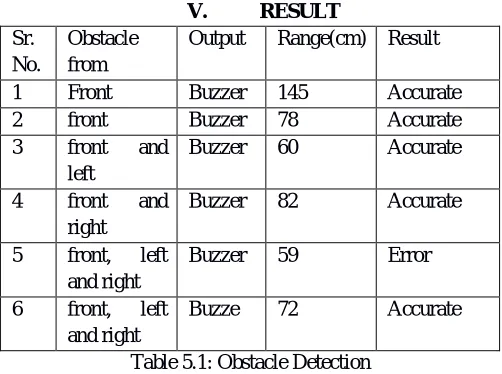
V. RESULT
Sr. No.
Obstacle from
Output Range(cm) Result 1 Front Buzzer 145 Accurate 2 front Buzzer 78 Accurate 3 front and
left
Buzzer 60 Accurate 4 front and
right
Buzzer 82 Accurate 5 front, left
and right
Buzzer 59 Error 6 front, left
and right
Buzze 72 Accurate Table 5.1: Obstacle Detection
Here there are some test results for the different obstacles in front of the stick. Using these sensors we have seen the results being recorded at different situations.
Sr. No.
Destination Voice Text Navigation
[image:3.612.181.432.170.357.2]1 Swargate Swargate Swargate Started 2 FC Road FC Road FC Road Started 3 Kothrud Kothrud Katakir Not started
Table 5.2: Navigation Here are some test cases for navigation feature being used in our application.
Figure 3: Showing the navigation feature being used by the blind person
VI. CONCLUSION
In this paper, solution was proposed to help blind people so that they can walk with confidence by detecting obstacles and potholes in their path. Solution consisted of arrangement of sensors. The upper sensor is for obstacle detection and the lower one is for pothole detection. Calling and text message feature is being added for during emergency situation according to the blind person. Navigation feature is being added to the application with the help of gesture. When the user will double tap on the screen they will speak their destination location and due to which they can reach their place in a very easy and fast way.
VII. ACKNOWLEDGMENT
The preferred spelling of the word “acknowledgment” in America is without an “e” after the “g”. Avoid the stilted expression, “One of us (R. B. G.) thanks . . .” Instead, try “R. B. G. thanks”. Put applicable sponsor acknowledgments here; DO NOT place them on the first page of your paper or as a footnote.
REFERENCES
[1] M. Varghese, S. S. Manohar, K. Rodrigues, V. Kodkani and S. Pendse, "The smart guide cane: An enhanced walking cane for assisting the visually challenged," 2015 International Conference on Technologies for Sustainable Development (ICTSD), Mumbai, 2015, pp. 1-5. doi: 10.1109/ ICTSD. 2015.7095907
[2] D. S. Raghuvanshi, I. Dutta and R. J. Vaidya, "Design and analysis of a novel sonar-based obstacle-avoidance system for the visually impaired and unmanned systems," 2014 International Conference on Embedded Systems (ICES), Coimbatore, 2014, pp. 238-243. doi: 10.1109/ Embedded Sys.2014.6953165. [3] S. Gupta, I. Sharma, A. Tiwari and G. Chitranshi, "Advanced guide cane for the visually impaired people," 2015 1st International Conference on Next