The Ideal Voting Interface: Classifying Usability
Damien MacNamara
Department of Information Technology, Dundalk Institute of Technology, Dundalk, Ireland, [email protected]
Paul Gibson
Le département Logiciels-Réseaux (LOR) Telecom Sud Paris, 9 rue Charles Fourier, 91011 Évry cedex, France, [email protected].
Ken Oakley
Department of Information Technology, Limerick Institute of Technology, Limerick, Ireland,[email protected]
Abstract: This work presents a feature-oriented taxonomy for commercial electronic voting machines, which focuses on usability aspects. Based on this analysis, we propose a ‘Just-Like-Paper’(JLP) classification method which identifies five broad categories of eVoting interface. We extend the classification to investigate its application as an indicator of voting efficiency and identify a universal ten-step process encompassing all possible voting steps spanning the twenty-six machines studied. Our analysis concludes that multi-functional and progressive interfaces are likely to be more efficient versus multi-modal voter-activated machines.
Keywords: ICT, Classification, eVoting, Usability, Interface
Acknowledgement:The authors would like to acknowledge the funding support of Enterprise Ireland. The authors would also like to thank Ted Scully and Francis Carmody for their valuable input.
his paper is based on previous work on the DualVote system (MacNamara et al., 2010,
MacNamara et al., 2011; Gibson et al., 2011). It extends and completes the work that was previously reported as ongoing (MacNamara et al., 2013). The main novelty of DualVote is that a voter's preference is simultaneously recorded on both electronic and paper media. Whilst the user casts a vote using a pen and paper interface the system interface simultaneously records the vote electronically using an optical sensor array. This duality is made possible by a capacitive-based electronic pen whose operation is identical (from the users’ point of view) to a traditional non-electronic pen. This novel user interface (UI) addresses the crucial issue of how to achieve both usability and verifiability, which is recognized as one of the most difficult challenges in the development of modern e-voting systems (Benaloh, 2008).
(JLP) classification. From the resulting JLP classification, we understood that providing such functionality (feedback, confirmation etc.) was important for instilling confidence in the system amongst the electorate, however we discovered that various sub-types of functionality existed within each category. We realised that applying functionality in a particular category was not done in broad strokes but rather in a progressive or incremental way.
Our motivation for this work was threefold: Firstly, to examine how to apply additional functionality to our system without weakening our ‘just-like-paper’ requirement. Secondly, to develop a straightforward numeric classification for commercial eVoting systems which could ultimately be reused by eVoting system developers and procurers. Thirdly, to examine the classification as an indicator of voting efficiency. The next section describes related work, Section 2 describes the JLP classification, Section 3 defines the system interface features and categorises each system in terms of its similarity to our pen and paper baseline, Section 4 outlines the particular design decisions relating to each interface feature, Section 5 discusses metrics of usability in the context of our classification, Section 6 presents a discussion and Section 7 presents the conclusion.
1.
Related Work
Usability is a major concern for electronic voting, with a number of interdependent issues. It is beyond the scope of this paper to review all the research published in this area, so in the following we review the contributions that have had the most influence on the development and evaluation of DualVote. We note that our work focuses on the usability of the voting process. An election also incorporates other processes (such as registration and configuration). These raise further usability issues. For example, Prosser, Schiessl & Fleischhacker (2007) report on problems of usability that arise from the typical 2-stage voting procedure (registration and voting).
Many of the main issues, for the voting process, were addressed by Bederson, Lee, Sherman, Herrnson, & Niemi (2003), and their analysis shows that the system interfaces 'have several problems, and a significant minority of voters have concerns about them' (p. 145). They report on particular concerns regards accessibility, age, technical experience, bias, accountability and verifiability. Similar observations were made by Herrnson et al. (2005), where their early study of e-voting machines identify 'shortcomings in terms of voter usability' (p. 275).
More constructive approaches to addressing HCI issues include a proposal from Laskowski, Autry, Cugini, Killam & Yen (2004) for usability standards, and requirements specification for e-voting machine interfaces. In a complementary paper, Fairweather, & Rogerson (2005) make key recommendations with regards to e-voting interface usability, including – keeping it simple, and offering alternative input and output devices. Although recommendations and standards are a step towards better quality voting interfaces, Winckler, et al. (2009) report that the lack of widely agreed quality models is a big barrier for comparing the different e-voting systems with respect to usability. Such quality models can be implemented only through a comprehensive testing program; and Herrnson et al. (2006) discuss the importance of usability testing of voting systems. As well as testing for usability there must be some assurance that the interface is functionally correct. Cansell, Gibson & Méry (2007) report on the importance of being able to verify (formally) that an e-voting interface works as required.
One of the arguments put forward in support of e-voting is that it will encourage more electors to participate in the election. However, Van Den Besselaar, Oostveen, De Cindio & Ferrazzi (2003) used experiments with e-voting technology to show that poor usability will most likely have a negative impact on voter participation. Further, Roseman Jr & Stephenson (2005) wrote that usability issues may discourage voters who would have fear of the technology, with the elderly being a particular concern.
universal access in e-voting for the blind. Smith, Laskowski & Lowry (2009) examine the 'Implications of Graphics on Usability and Accessibility for the Voter'. Cross et al. (2007) report on a prototype machine interface which permits voting by voice or touch (or both). Such a multimodal interface is the preferred solution for addressing accessibility issues: 2 or more user input modes are combined in a coherent manner in order to provide a more expressive and flexible interface. Proebstel et al. (2007) analyse the Hart Intercivic DAU eSlate which is an extendable multi-modal e-voting interface, that is specifically designed to address accessibility issues (using audio feedback, eg). Lee, Xiong, Yilin & Sanford (2012) propose a multi-modal interface for voting 'to provide the same simple and intuitive voting experience for all voters, regardless of ability or input/output (I/O) device used' (p. 215).
Another argument put forward in favour of an e-voting interface is that it should make the voting process more effective, efficient and satisfactory. However, Ansolabehere & Stewart (2005) report on a strong link between interface technology and percentage of residual votes (where voters wish to record a valid vote, but are unable to do so because they fail to correctly use the voting machine interface). Furthermore, through studies of different voting interfaces, Conrad et al. (2009, p. 111) wrote that 'e-voting systems are sufficiently hard to use that voting accuracy and satisfaction are compromised'.
DualVote is a hybrid machine that integrates different technologies in a single coherent interface. Evolution of The DualVote technology has been previously reported in MacNamara, et al. (2010); Mac Namara et al. (2012); and MacNamara et al. (2013). The use of an electronic pen is not unique to DualVote - Arzt-Mergemeier, Beiss & Steffens (2007) report on the first use of a digital voting pen at the Hamburg elections. Other hybrid interfaces exist which do not use pen technology. For example, Fisher, Carback & Sherman (2006) propose Punchscan as a unique hybrid paper/electronic voting system concept which incorporates the notion of a voter marking (punching a hole in) a ballot where the candidate names have been permutated in a random manner. Then, the ballot is cut (shredded) into two parts so that the original permutation is hidden. Finally, the ballot is scanned and an electronic procedure counts the vote by decrypting the encrypted permutation information. More recently, Culnane (2012) reports on a hybrid interface for the Pret-a-voter e-voting system. It is similar to DualVote, but uses an interactive touchscreen tablet and prints a paper receipt. This is intended to improve accessibility and feedback.
Where electronic systems produce a paper trail, there is always a hybrid nature to the interaction between the machine and the voter. Mercuri (2002) suggested ''A Better Ballot Box'' would incorporate an electronic touchscreen DRE combined with a printed paper ballot that needs to be checked by the voter. However, Goggin & Byrne (2007) identify the problem with auditability of paper audit ballots from a usability perspective. More recently, Budurushi, Woide & Volkamer (2014) discuss the problems of getting voters to actually verify the paper vote that is produced for the audit, and that the interaction required between the user and the voting machine can be too complicated for most voters.
Touch screen technology is becoming more common (with smart phones and tablets) and it is not surprising that this technology has been proposed for use in e-voting system interfaces. Card & Moretti (2007) show that touch-screens can introduce usability problems that may impact on an election result.
captured using an eye scanner. This work is extended –in Karayumak, Olembo, Kauer & Volkamer (2011) –where they use a cognitive walkthrough to show that security mechanisms complicate the user interaction and make interface design more difficult.
The problem of ballot and interface impartiality is equally important for traditional and electronic voting mechanisms: the voter should not be influenced in any way by the design of either of these. King Roth (1998) discusses how voters can be disenfranchised by poorly designed voting systems and election processes. Mebane (2004) showed that poor ballot design and poor instruction design can lead to residual (uncounted) votes. Greene, Byrne & Goggin (2013) show that the power of the electronic interface can complicate ballot design and lead to manipulation of elections.
2.
JLP Classification
The JLP classification arises from a feature-oriented analysis of e-voting interface design and usability requirements. We analysed the interface features of twenty-six commercial systems and ordered them within a feature based classification. Each system was then ranked in accordance with the number of interface features that it had in common with a pen and paper baseline. The baseline system that we chose is that of the current, completely non-electronic, pen and paper system used in the Republic of Ireland where the voter uses a pen and paper to cast their vote before depositing the paper ballot in the ballot box. (We chose this baseline as this was the system that DualVote was hoping to be able to replace, or demonstrate its superiority against). Ultimately, our goal is to develop our DualVote system to the extent where the usability of pen and paper –as demonstrated in the baseline - is preserved while having some of the extended functionality of electronic voting. The JLP classification thus starts with systems which are closest to our baseline. To rank the systems, we use the postfix JSN (JLP System Number) followed by the appropriate ranking. Our baseline system is therefore JSN1. The next classification - JSN2, builds on the functionality of JSN1 while sharing some of its features and so on. The higher the system classification the less the system has in common with the baseline but the more functionality that it offers. For each system, our classification employs the following steps: (i) Specification of Interface Features and (ii) Specification of Design Decisions.
3.
Specification of Interface Features
The first step in our classification was to analyse the commercial eVoting systems in terms of their interface features. We identified five broad categories of interface features: Error-Feedback, Ballot-Confirmation, Machine-Activation, Duality Generation and Interface Modality.
1. Error-Feedback. This is the ability of the eVoting system to provide feedback to the voter in
the case of a detected voter error. We have identified two subcategories of error-feedback:
a. Basic Feedback. Basic feedback occurs when the vote is only accepted or rejected
by the voting machine. No further information is given to the voter. For example, the ES&S Accuvote – as reported by Aviv et al. (2008) -– will return the ballot paper via the optical scanner interface if an error is detected on the ballot but no further information is given to the voter.
b. Detailed Feedback. Detailed feedback occurs when the voter is told why their vote
was rejected by the voting machine. For example, the ES&S Inkavote Verified Voting – as reported by Los Angeles County (2010) - will print out a detailed report of the errors made by the voter on the ballot paper.
2. Ballot Confirmation. This interface feature category refers to all aspects of the interface
which allow the voter to confirm the electronic interpretation of their vote before it is cast.
a. Progressive Confirmation. Some optical scan systems will only ask the voter to
b. Always Confirmation. Some eVoting machines will always require the voter to
confirm their vote and this is often coupled with detailed feedback which gives an explanation for the ballot rejection or a summary of their vote.
3. Machine Activation. An activation interface activates the voting machine. This is done by
either the voter or the poll-worker. On most optical scan systems, the ballot paper activates the voting machine once it is inserted into the scanner. Therefore the scanner is multi-functional but only requires one voter action to perform both functions: firstly it activates the machine and simultaneously it is used by the voter to cast their vote. We can therefore define a subcategory of machine activation:
a. Dedicated Machine Activation. This is when the voter performs an action on the
voting machine for the sole purpose of activating the machine or when the voter interacts with an interface whose single function is to activate the machine. In this latter case, the voter will not perform any other task on this interface. For example, voters using the MicroVote Infinity are required to insert an ‘activation token’ into a specific port or slot on the voting machine in order to activate it. This port/slot is not used for any other purpose and is therefore a ‘dedicated’ activation interface. On the Unisys Diebold UE96-06, the keypad is used to activate the machine via an activation code and is also used in the vote casting process. The interface in this case is multifunctional but requires two voter actions (the activation and vote casting is not simultaneous).
4. Duality Generation. This is the ability of the eVoting system to generate another copy of the
vote (from paper to electronic or from electronic to paper). Duality Generation is further broken down into two subcategories:
a. Simultaneous Generation. This refers to the generation of a paper vote and
electronic vote at the same time. This is a somewhat rare flavour of functionality and has so far only been achieved by digital pen based systems such as DualVote or Anotto PenVote.
b. Multiple Generation. This refers to the generation of an electronic vote or paper
copy through multiple user actions (for example; touch-screen then printing or writing and then scanning).
5. Interface Modality. This refers to the number of interfaces that a voter must interact with in
order to generate their vote. Most systems require a single user interface and are ‘uni-modal’ however a few systems (SEAS 40001, ELECTronic 12422 and the iVOTRONIC3) are
‘multi-modal’ requiring the voter to interact with more than one interface– for example selecting candidates on a push-button interface while confirming them on a touch-screen. One further distinction for interface modality is the use of non-standard interfaces which are classified as follows:
a. Standard and Non-Standard Interfaces. We define a standard interface as one
the following: Touch-screen, Push-button, Pen and Paper. We have encountered some interfaces which we describe as ‘un-common’ or non-standard in eVoting systems. For example: Navigation-dial (eSlate), Vote-recorder apparatus (InkaVote), Pen-stylus for touch screen (Populex). We highlight the distinction between common and uncommon interfaces because voting electronically should not require high
1Smartmatic Inc. (n.d.). How To Vote. Retrieved 1 10, 2012, from Smartmatic Corporate Home:
http://www.smartmatic.com/fileadmin/users/videos/Boton.wmv
2State of Delaware. (n.d.). How To Use Delaware's Voting Machine. Retrieved 1 15, 2012, from State of Delaware:
http://electionsncc.delaware.gov/use_vm/index.shtml
3Jefferson County. (n.d.). Jefferson County. Retrieved 1 10, 2012, from Jefferson County iVotronic Demo:
levels of learnability on the voters part. We suggest interfaces that are unfamiliar to the voter, can worsen the learnability of the machine. We also position such interfaces ‘further‘ from our baseline.
From our review of the eVoting systems we found fourteen distinct interface features of eVoting interfaces which fall under the various five broad categories. We use the prefix ‘IF’ followed by a number to index the interface features.
Error-Feedback
IF1: No feedback interface features. The voter will receive no feedback if an error is detected on the ballot;
IF2: Basic feedback interface features. The voter will be informed that an error has occurred without any information concerning the type of error;
IF3: Detailed feedback interface features. The voter will be informed that an error has occurred and is provided with additional information concerning the type of error;
Ballot-Confirmation
IF4: No ballot confirmation interface features. The voter is never required to confirm their vote; IF5: Progressive confirmation interface features. The voter is required to confirm their vote only when an error is detected on the ballot;
IF6: Compulsory confirmation interface features. The voter is always required to confirm their vote;
Machine Activation
IF7: No dedicated-activation interface is present or the poll-worker activates the voting machine; IF8: A dedicated-activation interface is present.
Duality Generation
IF9 No duality generation interface features are present; IF10: Interface features support simultaneous vote generation;
IF11 Interface features support duality generation with multiple voter actions;
Interface Modality
IF12: The vote creation interface is uni-modal; IF13: The vote creation interface is multi-modal;
IF14: The interface features consist of a non-standard interface technology or apparatus.
3.1. Ordering of Features
Features within each category are ordered in terms of their commonality with our baseline. Our baseline does not have any error feedback, ballot confirmation, activation interface or duality generation features. Furthermore the vote creation interface is uni-modal. The ordering of interface features is described as follows:
Error Feedback. Our baseline has no error-feedback interface features. The next functionality
increment is ‘basic’ error feedback, offering some feedback functionality. This is followed by the ‘detailed’feedback, which offers more functionality than both ‘basic feedback’and ‘no feedback’.
Ballot Confirmation: Our baseline has no ballot confirmation. The next functionality increment
is ‘progressive confirmation’ (in the case of a detected error) followed by ‘always confirmation’ where the voter must always confirm their vote.
Activation: This is a binary choice between ‘dedicated activation interface‘and ‘multi-functional
Duality Generation: Our baseline has no simultaneous vote generation features. The next
functionality increment is simultaneous duality generation - where the voter can generate both an electronic and paper vote with one action. This is followed by duality generation with multiple voter actions.
Interface Modality: Our baseline is uni-modal offering one vote creation interface. The next
functionality increment is multi-modal offering two vote creation interfaces followed by systems offering non-standard interfaces.
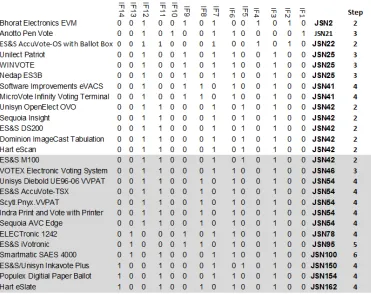
Because the baseline offers little in terms of functionality, the ordering of the features can also give an indication of the functionality and interface modality of the system. The features are ordered in terms of functionality - no functionality, some functionality and full functionality. For interface modality, the ordering is in terms of modality (one interface, two or more interfaces, non-standard interface). The ordering of the features in this way also allows us to further differentiate between systems. In Figure 1, we show the first twenty-five classifications. If a classification of machine contains a particular feature, that feature column contains a ‘1’ otherwise it contains a ‘0’. Our baseline is first in the list and is numbered JSN1. In total there are one-hundred and sixty-two possible classifications. We calculated this figure by documenting every possible combination of features. The entire list is not presented here for readability purposes. In addition, not all of the possible classifications are mapped to a commercial system.
From the table we can see that there are two extra columns next to the classification number. The first column labelled ‘Diff. Mag’refers to the Difference Magnitude or by how many features the system is different from our baseline. The column next to this is called ‘Common Feat.’or Common Features; referring to how many features this system has in common with our baseline. We add these columns in to make clearer distinctions between classifications so the JSN will more closely represent the differences in functionality between systems. As an example, Figure 2.0 shows the JLP Table entry for the ES&S Accuvote (JSN22).
Figure 2: ES&S Accuvote JLP Table Entry
From the table, we see that the system has three features in common with our baseline (IF4, IF7 and IF12). Therefore the Common Features equal to three. The Difference Magnitude is calculated by subtracting the unmapped feature number from the corresponding baseline feature number. For the ES&S Accuvote, this is (IF2-IF1) which is equal to 2-1, which is 1 and then (IF11-IF9) which is equal to 11-9, which is 2. We then add the 1 and 2 together to get a difference magnitude of 3. Because the features are ordered in terms of functionality, a higher difference magnitude represents higher functionality or a more complex modality and subsequent difference to pen and paper.
4.
Specification of Design Decisions
To get a better understanding of how the differences in functionality or modality are implemented across the systems, we categorized what we term ‘design decisions’. A design decision represents the selection of a particular hardware or software option and determines how the interface feature is implemented The specification also allows us to separate the abstract interface features from specific hardware, allowing the classification more robustness with regards to future technological developments.
D_X_0: Feature not installed / applicable;
Decisions relating Voter Feedback Features:
D_F_1: The voter receives feedback via an electronic visual display;
D_F_2: The voter receives feedback via an optical scanner / optical scanner information panel; D_F_3: The voter receives feedback via a push-button interface;
D_F_4: The voter receives feedback via a printed receipt.
Decisions relating to Vote Confirmation Features:
D_C_1: The voter confirms their vote using a touch-screen; D_C_2: The voter confirms their vote using a push-button;
D_C_3: The voter confirms their vote on the optical scanner / optical scanner information panel. D_C_4: The voter confirms their vote using a pen with an attached push-button;
Decisions relating to Machine Activation Features:
D_A_2: The voting machine activates using the ballot paper;
D_A_3: The voting machine activates using a poll worker interface or is permanently activated;
Decisions relating to Duality Generation Features:
D_P_1: The paper audit trail interface consists of a ballot box; D_P_2: The paper audit trail interface consists of a printer;
D_P_3: The paper audit trail interface consists of a printer and ballot box;
D_P_4: The paper audit trail consists of an optical scanner with attached ballot box;
Decisions relating to Interface Modality Features:
D_I_1: The vote creation interface consists of a touch-screen; D_I_2: The vote creation interface consists of a push-button D_I_3: The vote creation interface consists of a pen and paper;
D_I_4: The vote creation interface consists of a touch-screen and push-button D_I_6: The vote creation interface consists of a push-button and pen and paper;
D_I_7: The vote creation interface consists of a pen and paper and non-standard technology; D_I_8: The vote creation interface consists of a touch-screen and non-standard technology; D_I_9: The vote creation interface consists of a push-button and non-standard technology. D_I_10: The vote creation interface consists of a hybrid electronic pen and paper.
From our analysis of the eVoting systems we discovered twenty-five distinct design decisions which allow for the interface features to be implemented. The decisions are split into six categories represented by the prefix D and followed by the category prefix. We believe that this list can continue to expand with developments in technology without adversely affecting the classification.
5.
JLP Classification and Metrics of Usability
As part of our previous usability studies, we measured our DualVote system under three metrics of usability: effectiveness, efficiency and satisfaction. In this paper we map our classified machines against perceived machine efficiency. It would have been ideal to report on potential correlations between our classification and effectiveness and/or satisfaction but that is beyond the scope of our current work. We do hope to report on any such correlations in the future.
We define efficiency in terms of steps to vote; in other words, the number of steps that the voter must take in order to vote. We conducted a thought experiment whereby a voter would cast a vote in one race and that the process is error-free. We realise that this is a somewhat idealised and unrealistic scenario, however we did not have the capability to physically test the machines in the classification. Again, this is an aspiration for future work.
We found that there are ten distinct steps that the voter could possibly take when voting on any of the machines. These are as follows:
1. Voter places mark in a selection box on ballot paper; 2. Voter presses button on DRE machine;
3. Voter places a paper ballot / printed confirmation in the ballot box; 4. Voter feeds the ballot into scanning machine;
6. Voter activates the voting machine using a an action that is for the sole purpose of activating the machine;
7. Voter reviews feedback;
8. Voter takes printed confirmation from a voting machine;
9. Voter interacts with a secondary vote creation interface (multi modal system); 10. Voter returns to poll worker during voting.
We found that the minimum number of steps required to vote on any machine is at least two. The maximum number of steps is six.
The machines that score lowest in terms of our thought-step scenario are optical scan machines. Included in this category is the Bhorat EVM which is a relatively straightforward DRE offering little in terms of Feedback or confirmation. Indeed, the EVM almost received just one step but we decided that the LED that lights after the voter presses the button for their candidate constituted a form of voter feedback. Also included in this list is DualVote which is technically an optical scan machine but with a passive scanning mechanism which scans as the voter is making their mark on the ballot paper. So, we ask, just what are the characteristics of these machines that only require two steps in order to complete our somewhat ideal voting scenario? Firstly, the machines do not require the voter to do anything in order to be activated. This is because the act of either creating or casting their vote also activates the machine. In the case of the EVM and DualVote, the poll worker activates the machine. Secondly, the optical scan machines and DualVote offer feedback or require confirmation only if there is a problem with the ballot (progressive confirmation). The EVM has very basic feedback and no confirmation. Whether or not to implement an ‘always’approach to providing both confirmation and feedback features is a matter of testing. Voter error rates would suggest that such features are not required. Thirdly, the machines in this category are not multi-modal; at least not in electronic terms. For the optical scan machines, the voter interacts with pen and paper then feeds this ballot into the scanner. DualVote has even less electronic interaction but the voter must deposit their ballot into the ballot box after voting. The EVM consists of a push-button grid only.
The machines with the most steps require extra actions from the voter in terms of machine activation and interaction with more than one electronic interface. In the case of the SEAS 4000, the machine with the most number of steps (six), the voter is also required to take a printed receipt generated by the machine and deposit this in a ballot box. This process offers the voter some of the extra steps associated with both electronic and optical voting but without the true transparency benefits of the latter. Manufacturers who implement multi-modal and voter activated voting interfaces may need to address the reason behind such design decisions.
Figure 3: Completed JLP with Voting Steps
6.
Discussion: Applying JLP Lessons to DualVote Functionality
From our analysis of the twenty-six commercial systems, we found that these mapped to fifteen distinct classifications which are shown in Figure 3.0. We first looked at the lowest and highest classification numbers to get an understanding of the extremities of current commercial systems. The lowest classified system is the Bhorat Electronics EVM4, (JSN2) which originated in India. This is a rudimentary eVoting system which offers little in terms of functionality. It is the baseline in terms of eVoting machines, offering only basic feedback to the voter via a push-button LED panel (D_F_3). The system with the highest classification is the HART eSlate which has nothing at all in common with our baseline in terms of functionality or modality. It features detailed feedback, always confirmation, machine activation, duality with multiple actions and a non-standard vote creation interface implemented by a navigation wheel (D_I_9).
The basic functionality of the Bhorat EVM appealed to us as it gave the voter at least some feedback that their vote was correctly interpreted. Although the EVM’s basic feedback was passive, the LED did not give rise to the spoiled/unspoiled nature of the vote. We knew that to implement basic feedback with a spoiled/unspoiled indicator, we needed to use additional LEDs. The HART eSlate was on the opposite end of the spectrum, and interestingly it mapped to the highest possible classification – JSN162. Unlike the EVM, the eSlate offered detailed feedback via an LCD screen (D_F_1). We could also consider detailed feedback which was passive in nature for the DualVote machine but we didn’t want to introduce an LCD as we believed it may complicate the voting process. With regards to other functionality, the Bhorat EVM had nothing to suggest, however the HART eSlate included confirmation of the vote via D_C_2, activation of the machine via D_A_1, in
4Chief Electoral Officer Delhi. (n.d.). A Guide For Voters. Retrieved 1 10, 2012, from Cheif Electoral Officer Delhi:
terms of duality generation it offered nothing new over DualVote as multiple user actions were required in order to vote (unlike the simultaneous generation of DualVote). Finally, the eSlate had a non-standard interface (D_I_9). Neither D_C_2, D_A_1 or D_I_9 were appealing to us as they all weakened our ‘just like paper requirement’. As expected, nothing could be taken in terms of interface features from a commercial system that was in essence ‘least like paper’.
Our next step in our efforts to expand the functionality of DualVote was to find some middle-ground between JSN2 and JSN162. We next looked at JSN21 which was the only other digital/hybrid pen-based voting system on the list. In the Clackmannanshire trail election of 2006, the Anotto5 pen provided confirmation to the voters via a push-button interface (D_C_4) on the pen itself. We knew from a subsequent report from Clackmannanshire Town Council that most voters forgot to push the button after voting6. No other functionality was offered on this particular Anotto-pen system.
We had an intuition at this stage that without introducing a full LCD screen to provide voter feedback – detailed feedback would weaken our most fundamental requirement beyond what was acceptable to us. We began to look at other classifications which offered basic feedback, namely – JSN22, the ES&S Accuvote with ballot box. The obvious problem here of course was the Accuvote was an optical scan system that gave binary feedback via D_F_2. The ballot was either accepted or rejected by the scanner. This was not applicable to the passive scanning nature of DualVote.
Regarding vote confirmation, we knew from our analysis that this would require the addition of an LCD screen (or at the very least the implementation of D_C_4 which did not appear successful to date). We came to the conclusion that more in-house usability testing could give a clearer indication of how this would work for DualVote.
Finally, machine activation, duality generation and interface modality were an easy call. Considering that DualVote had a high usability score with little extended functionality (in particular vote confirmation and feedback), implementing activation or a multi-modal interface would likely lessen the usability score without providing extra functionality. As far as we were concerned, DualVote already offered simultaneous duality generation which we considered advantageous as it (ideally) required less user actions and there was no current scope of improvement in this regard.
We did however extend the functionality of DualVote to include passive voter feedback via a three-color LED panel, we have reported extensively on this protocol in other work (Gibson et al., 2011).
7.
Conclusion
The JLP classification shows how twenty-six commercial systems incrementally differ from each other in terms of functionality and subsequently how each system differs from our baseline. Naturally, this list of commercial systems is not intended to represent every commercial eVoting system, but it is presented as a representation of the most common systems found in use at the time of writing. Whereas many other commercial and experimental systems exist, it was beyond the constraints of this work to facilitate each design into this classification. The JLP facilitated understanding of how we could build on the usable but less functional DualVote system. It helped us to further classify voter feedback, confirmation, activation, paper audit trail technologies and the vote creation interface in itself. Analysis showed our system was lacking feedback and confirmation features, but rich in terms of duality generation, activation and interface modality.
The JLP classification is an initial attempt to classify systems in terms of interface features and functionality. Further improvements on the JLP may give another perspective on usability - the well-established Systems Usability Scale (Brooke et al., 1996) is somewhat suitable in terms of
5Anoto. (2007, November 23). Archives. Retrieved from Anoto: http://www.anoto.com
measuring subjective satisfaction but we must also consider other metrics of usability. Our attempt in this paper was to investigate if the JLP classification could act as an indicator for efficiency. Our results are somewhat reflective of our hypothesis, in that machines classified in the lower tier are more likely to have fewer voting steps than those in the upper tier. The result however is not universal for all machines. The explanation lies in the nature of the JLP: that the machines are ranked in order of the likeness to pen and paper. This results in certain DRE machines receiving a lower classification than optical machines because their number of implemented features is lower (even though no paper trail is present). Likewise, optical machines that have a paper trail may also have a high number of features implemented thus distancing them from the baseline.
From our thought experiment, we are able to uncover the design decisions that offer a quicker voting experience. Machines that do not require the voter to perform an extra step in order to activate them or indeed do not require any activation at the voter end; perform better from an efficiency perspective. Additionally, machines that are uni-modal in electronic terms also appear to be more efficient. The optical scan machines that only require voter intervention when an error occurs (progressive confirmation) also offer a quicker voting experience in contrast to those that require the voter to always confirm their vote. The authors in some earlier work (Gibson et al., 2012) proposed the use of a passive three-color feedback system whereby the voter was warned if their vote was spoiled or in an inconclusive state while the voter was voting. Such a passive (and progressive) feedback system works for DualVote because the voter is writing their vote while the machine is scanning it. The interface is therefore multi-functional but does not require any additional steps from the voter. By multifunctional, we mean that one interface is attempting to do two or more things and in the case of DualVote, this is scanning while the voter is writing. The multifunctional paradigm also applies to machine activation, because we see that machines whose activation interface is also doubling up as the vote casting interface usually require less voter actions. In the case of optical machines, feeding the ballot into the scanner also activates the machine and so the interface is multi-functional and requires no additional voter steps. We suggest that the application of interfaces classified thusly will likely have a positive effect on voting efficiency. In future studies we hope to gauge whether there is a correlation between machines which have fewer steps and the satisfaction metric.
Regarding the ranking of systems within the classification; the answer to the ‘ideal‘ voting interface likely lies somewhere between both ends of the scale. Manufacturers and procurers who want the transparency of paper mixed with the functionality of a DRE should perhaps look toward the current middle-ground (JSN42-JSN54). Eventually, we may see a machine that can be classified towards the top end of the scale, offering blends of progressive confirmation and feedback over a uni-modal interface, providing simultaneous duality and no voter activation. Features such as multi-modal interfaces, dedicated activation interfaces and non-standard interface technology should be applied with careful consideration.
Finally, it should be noted that the abstract nature of our interface features, hides the lower hardware level (in contrast to the EVCS developed by Franklin and colleagues). We believe that this abstraction is a more robust classification that is less likely to become obsolete due to the fast moving technological innovation in electronic voting system and user interface design.
References
Ansolabehere, S., & Stewart, C. S. (2005). Residual votes attributable to technology. Journal of Politics, 67(2), 365-389. Arzt-Mergemeier, J., Beiss, W., & Steffens, T. (2007). The digital voting pen at the hamburg elections 2008: Electronic
voting closest to conventional voting. In E-Voting and Identity (pp. 88-98). Springer Berlin Heidelberg.
Aviv, A., Černy, P., Clark, S., Cronin, E., Shah, G., Sherr, M., & Blaze, M. (2008, July). Security evaluation of ES&S voting machines and election management system. In Proceedings of the conference on Electronic voting technology (p. 11). USENIX Association.
Budurushi, J., Woide, M., & Volkamer, M. (2014). Introducing Precautionary Behavior by Temporal Diversion of Voter Attention from Casting to Verifying their Vote. In Workshop on Usable Security (USEC).
Brooke, J. (1996). SUS: A quick and dirty usability scale, In P. W. Jordan, B. Thomas, B. A. Weerdmeester & A. L. McClelland (eds.) Usability Evaluation in Industry. London: Taylor and Francis.
Byrne, M. D., Greene, K. K., & Everett, S. P. (2007, April). Usability of voting systems: Baseline data for paper, punch cards, and lever machines. In Proceedings of the SIGCHI conference on Human factors in computing systems (pp. 171-180). ACM.
Cansell, D., Gibson, J. P., & Méry, D. (2007). Refinement: a constructive approach to formal software design for a secure e-voting interface. Electronic Notes in Theoretical Computer Science, 183, 39-55.
Card, D., & Moretti, E. (2007). Does voting technology affect election outcomes? Touch-screen voting and the 2004 presidential election. The Review of Economics and Statistics, 89(4), 660-673.
Conrad, F. G., Bederson, B. B., Lewis, B., Peytcheva, E., Traugott, M. W., Hanmer, M. J., ... & Niemi, R. G. (2009). Electronic voting eliminates hanging chads but introduces new usability challenges. International Journal of Human-Computer Studies, 67(1), 111-124.
Cross, E. V., Rogers, G., McClendon, J., Mitchell, W., Rouse, K., Gupta, P., ... & Gilbert, J. E. (2007). Prime III: one machine, one vote for everyone. On-Line Proceedings of VoComp.
Culnane, C. (2012, August). A Hybrid Touch Interface for Prêta Voter. In Electronic Voting Technology Workshop/Workshop on Trustworthy Elections (EVT/WOTE), Bellevue, WA, USA.
Everett, S. P., Byrne, M. D., & Greene, K. K. (2006, October). Measuring the usability of paper ballots: Efficiency, effectiveness, and satisfaction. In Proceedings of the Human Factors and Ergonomics Society Annual Meeting (Vol. 50, No. 24, pp. 2547-2551). SAGE Publications.
Everett, S. P., Greene, K. K., Byrne, M. D., Wallach, D. S., Derr, K., Sandler, D., & Torous, T. (2008, April). Electronic voting machines versus traditional methods: Improved preference, similar performance. In Proceedings of the SIGCHI Conference on Human Factors in Computing Systems (pp. 883-892). ACM.
Fairweather, B., & Rogerson, S. (2005). Interfaces for electronic voting: focus group evidence. Electronic Government, an International Journal, 2(4), 369-383.
Fisher, K., Carback, R., & Sherman, A. T. (2006, June). Punchscan: Introduction and system definition of a high-integrity election system. In Proceedings of Workshop on Trustworthy Elections.
Franklin, Joshua, and Jessica C. Myers. "Interpreting Babel: Classifying Electronic Voting Systems." (2012). 5th
International Conference on Electronic Voting. Bregenz, Austria.
Gibson, J. P., MacNamara, D., & Oakley, K. (2011). Just like paper and the 3-colour protocol : A voting interface requirements engineering case study. REVOTE '11 : International Workshop on Requirements Engineering for Electronic Voting Systems (pp. 66-75). Trento, Italy: IEEE.
Gilbert, J. E., McMillian, Y., Rouse, K., Williams, P., Rogers, G., McClendon, J., ... & Cross II, E. V. (2010). Universal access in e-voting for the blind. Universal Access in the Information Society, 9(4), 357-365.
Greene, K. K., Byrne, M. D., & Goggin, S. N. (2013). How To Build an Undervoting Machine: Lessons from an Alternative Ballot Design. USENIX Journal of Election Technology and Systems (JETS), 1(1), 38-52.
Herrnson, P. S., Bederson, B. B., Lee, B., Francia, P. L., Sherman, R. M., Conrad, F. G., ... & Niemi, R. G. (2005). Early appraisals of electronic voting. Social Science Computer Review, 23(3), 274-292.
Herrnson, P. S., Niemi, R. G., Hanmer, M. J., Bederson, B. B., Conrad, F. G., & Traugott, M. (2006, August). The importance of usability testing of voting systems. In Proceedings of the 2006 USENIX/ACCURATE Electronic Voting Technology Workshop.
Benaloh, J., (2008). Administrative and public verifiability: Can we have both? In IAVoSS Workshop On Trustworthy Elections (WOTE 2008), KU Leuven, Belgium.
Karayumak, F., Kauer, M., Olembo, M. M., Volk, T., & Volkamer, M. (2011, September). User study of the improved Helios voting system interfaces. In Socio-Technical Aspects in Security and Trust (STAST), 2011 1st Workshop on (pp. 37-44). IEEE.
Karayumak, F., Olembo, M. M., Kauer, M., & Volkamer, M. (2011, August). Usability analysis of helios-an open source verifiable remote electronic voting system. In Proceedings of the 2011 USENIX Electronic Voting Technology Workshop/Workshop on Trustworthy Elections. USENIX.
King Roth, S. (1998). Disenfranchised by design: voting systems and the election process. Information Design Journal, 9(1), 29-38.
Laskowski, S. J., Autry, M., Cugini, J., Killam, W. & Yen, J. (2004). Improving the usability and accessibility of voting systems and products. US Department of Commerce, National Institute of Standards and Technology, 2004. Los Angeles County. (2010). Registrar Recorder/County Clerk InkaVote Video Demo. Retrieved 1 9, 2012, from Los
Angeles County : http://www.lavote.net/Voter/VIDEOS/Default.cfm?VideoID=3
MacNamara, D., Carmody, F., Scully, T., Oakley, K., Quane, E., & Gibson, J. P. (2010). DualVote: A novel user interface for e-voting systems. In Proceedings of the IADIS International Conference on Interfaces and Human Computer Interaction (pp. 129-138).
Mac Namara, D., Scully, T., Gibson, J. P., Carmody, F., Oakley, K., & Quane, E. (2011). DualVote: Addressing usability and verifiability issues in electronic voting systems. Conference for E-Democracy and Open Government (CeDEM11).
(pp. 313-322). Krems, Austria: Edition Danube University.
Mac Namara, D., Gibson, J. P., & Oakley, K. (2012). A preliminary study on a DualVote and Prêt àVoter hybrid system. In
CeDEM 12 Conference for E-Democracy and Open Government 3-4 May 2012 Danube-University Krems, Austria (p. 77). Edition-Donau-Univ. Krems.
Mac Namara, D., Gibson, J. P., & Oakley, K. (2013, May). Just Like Paper: A classification system for eVoting Machines. In Conference for E-Democracy and Open Governement (p. 351).
Mebane, W. R. (2004). The wrong man is president! Overvotes in the 2000 presidential election in Florida. Perspectives on Politics, 2(03), 525-535.
Mercuri, R. (2002). A better ballot box?. Spectrum, IEEE, 39(10), 46-50.
Proebstel, E., Riddle, S., Hsu, F., Cummins, J., Oakley, F., Stanionis, T., & Bishop, M. (2007, August). An analysis of the Hart Intercivic DAU eSlate. In Proceedings of the USENIX/ACCURATE Electronic Voting Technology Workshop. Prosser, A., Schiessl, K., & Fleischhacker, M. (2007). E-voting: Usability and acceptance of two-stage voting procedures. In
Electronic Government (pp. 378-387). Springer Berlin Heidelberg.
Roseman Jr, G. H., & Stephenson, E. F. (2005). The effect of voting technology on voter turnout: Do computers scare the elderly?. Public Choice, 123(1-2), 39-47.
Sampigethaya, K and Poovendran, R. (2006) A framework and taxonomy for comparison of electronic voting schemes.
Computers Security, 25, issue 2:137–153, March 2006.
Smith, B., Laskowski, S., & Lowry, S. (2009). Implications of Graphics on Usability and Accessibility for the Voter. In E-Voting and Identity (pp. 54-74). Springer Berlin Heidelberg.
Van Den Besselaar, P., Oostveen, A. M., De Cindio, F., & Ferrazzi, D. (2003). Experiments with e-voting technology: experiences and lessons. www. social-informatics. net/OostveenJavnost2004. Pdf, 722-724.
Winckler, M., Bernhaupt, R., Palanque, P., Lundin, D., Leach, K., Ryan, P., ... & Strigini, L. (2009). Assessing the usability of open verifiable e-voting systems: a trial with the system Prêt àVoter. Proc. of ICE-GOV, 281-296.
Yee, K. P., Wagner, D., Hearst, M., & Bellovin, S. M. (2006, August). Prerendered user interfaces for higher-assurance electronic voting. In USENIX/ACCURATE Electronic Voting Technology Workshop
About the Authors
Damien MacNamara
Dr. Damien Ma Namara is currently lecturing in computer science at Dundalk Institute of Technology Ireland and lectures in usability at the National College of Ireland. Damien is the Principal Investigator of the DualVote project.
Paul Gibson
Dr. J Paul Gibson is a Maître de conferences at TSP, Evry, France. He has been carrying out research into all aspects of e-voting for the last 7 years.
Ken Oakley