Integrating usability and accessibility into the interactive media and communication curriculum Norman E. Youngblood
Auburn University, Auburn AL
Abstract
One of the challenges of developing an interactive media curriculum is the need to balance production skills, such as coding and using development tools, with visual design and design best practices, such as usability and accessibility. Usability, or how easy it is to use a site, is critical because if a site is difficult to use, users will go elsewhere for the information or service. In addition, poor usability has been demonstrated to undermine overall site credibility. Accessibility is essentially how usable a site is by users with disabilities such as impairments in vision, hearing, cognition, and motor skills. While students need to understand accessibility on a legal level, particularly given the number of lawsuits related to website accessibility, they also need to understand the issue on an ethical level. This article discusses the importance of usability and accessibility and how to integrate these ideas into both interactive media creative classes as well as lecture courses such as media and society and media law courses, and it includes a discussion of sample exercises, sample assignments, and recommended resources.
Integrating usability and accessibility into the interactive media curriculum
The Internet, and particularly the web, have become critical communication channels and have fundamentally changed communication on both a one-to-one and a one-to-many level. Teaching students how to design effective online communication tools, such as webpages, is more than a matter of teaching them how to write code or use a WYSIWG editor. Faculty need to balance teaching students the basic building blocks, such as HTML and CSS, with teaching students visual design and design best practices, particularly usability and accessibility. Usability, or how easy it is to use a site, is critical. If a site is difficult to use, users will go elsewhere for the information or service. In addition, poor usability has been demonstrated to undermine overall site credibility (Wang & Emurian, 2005), and a loss of site credibility poses a potentially critical problem for companies in fields that rely heavily on user trust, such as e-government, e-commerce, e-health, and e-banking. Website accessibility is the usability of a site for users with disabilities such as impairments in vision, hearing, cognition, and motor skills (W3C, 2008). When web sites are not accessible, disabled users are at a disadvantage in an arena that should serve as an equalizer rather than a barrier. Tim Berners-Lee, the inventor of the World Wide Web and founder of the World Web Consortium (W3C), argues that “the power of the Web is in its universality. Access by everyone is an essential aspect” (W3C, 1997). Thus, there is an ethical imperative for designers to take accessibility into account when designing a website or other interactive product. There are also legal reasons for designers to take
accessibility laws may be more broadly applied, and the federal government is consider applying the Americans with Disabilities Act (ADA) to the web, particularly for commerce and local e-government sites (Department of Justice, 2010). This change will mirror how accessibility is applied in the brick-and-mortar world, where most public buildings are required to have wheelchair ramps and other accessibility features.
Given the importance of website usability and accessibility, it should not surprising that scholars involved in teaching web design, have called on faculty to integrate usability and accessibility into the curriculum. These calls have encouraged faculty to move beyond simply addressing the cognitive objective of students learning guidelines, but to set affective objectives as well. For example, Hayes (2002) argues for teaching students to take the role of the user advocate when designing interactive material. Rosmaita (2006) calls for faculty to take “an accessibility first” (p. 270) approach when teaching web design, requiring students to engage in accessible design practices from the very beginning, noting that “it’s no fun writing accessible web pages if you have to go back and unlearn everything in order to make your pages accessible. If you keep accessibility in mind from the beginning, it’s much easier to implement” (p. 274). In addition, Rosmaita argues that having students engage the material from an accessibility
perspective early on may mean more designers moving into the workforce who not only understand how to make an accessible website, but also believe that accessibility is important and “a good idea” (p. 274). Scholars from diverse fields have been calls for teaching accessibility as part of the web design process, including scholars in information systems (Lazar, 2002),
problems Lazar, et al. (2004) identified in a survey of 175 web managers, addressing the challenges designers faced in making websites accessible. Among the problems the web managers identified were a lack of training and resistance by management. In several instance, web managers expressed an active hostility toward modifying their designs to make their sites more accessible. Incorporating accessibility throughout the teaching process gives educators an opportunity to help students address these potential problems. The problems the study identifies suggest that faculty should approach accessibility using both cognitive objectives, such as having students understand how to build an accessible website, and affective learning objectives, such as understanding why accessibility is important. In addressing these objective, students need to understand usability and accessibility issues at a variety of levels including technical, legal and ethical levels.
That said, it is also important that faculty talk about these issues in other classes. Faculty need to address accessibility in media law classes so that students understand what the laws are and the changing nature of how these laws are being applied, particularly the issue of the ADA and the web discussed above. Faculty should also be talking about usability and accessibility in media and society classes. For instance, usability can play a role in the success or failure of a web-based technology or site, a particularly important issue in areas such as e-government. Usability can also play a major role in bridging or widening the digital divide, particularly as mobile devices have come to be seen as the great equalizer in the divide. Similarly, promoting accessibility is a critical element of bridging the digital divide, as taking accessibility into account during the design process helps prevents the marginalization of users with a disability.
communication or communication literature and take a more interdisciplinary approach. Faculty teaching web design should not see use usability and accessibility as areas that are only in the domain of specific disciplines, such as technical communication, computer science or
information architecture. All design students need to be familiar with these issues, particularly as they move into the workforce. This article addresses these issues by outlining what usability and accessibility are, identifying courses that these issues might be taught in, and suggesting how to integrate these concepts into both interactive media creative classes and lecture classes, including a discussion of recommended readings, exercises, and assignments.
Background Usability
Usability is a measure of quality, essentially assessing how easy something is to use (Nielsen, 2012b). In the case of interactive media, usability experts usually look at quality in terms of the interface. As Nielsen (2012) points out, usability has also come to mean the part of the development process that focuses on making the interface easier to use. Nielsen breaks the components of usability quality into five areas:
• Learnability: How easy is it for users to accomplish basic tasks the first time they encounter the design?
• Efficiency: Once users have learned the design, how quickly can they perform tasks?
• Memorability: When users return to the design after a period of not using it, how easily can they reestablish proficiency?
• Satisfaction: How pleasant is it to use the design?
Each of these areas represents an opportunity for a website to succeed or fail. Users unable to easily navigate a website or easily complete a needed task are likely to leave the site. In addition, usability problems may also lead to credibility problems for the website’s organization (Wang & Emurian, 2005).
Why usability is important. When a website has usability issues, it presents several problems. The first, and perhaps most obvious, is that poor usability keeps users from easily completing the tasks that they came to the website to complete, which impedes communication. Assuming the user can go elsewhere for the information or services, he or she likely will. This is not, however, the end of the problem. Poor usability also undermines credibility. Wang & Emurian (2005) argue that interface design, including usability, plays a significant role in building trust, a “dimension of credibility” (p. 114). Credibility is a critical issue for sites that require trust such as commercial sites (Chen & Dibb, 2009), corporate sites (Fogg et al., 2003), and e-government sites (Huang, Brooks & Chen, 2009). Without trust in a site, users will likely avoid it if possible, particularly in areas such as e-government (Teo et al., 2008; Warkentin et al., 2002).
Usability problems can also undermine attempts to bridge the digital divide. Smith (2011a) found that 35% of American adults own a smartphone and that 87% use their
divide—non-Hispanic Blacks (56%) and divide—non-Hispanics (51%)—when compared to non-divide—non-Hispanic Whites (39%). These figures suggest that if designers do not pay attention to site usability on mobile devices, they will tend to further disadvantage groups that lean more heavily on mobile devices as their entry point for the Internet.
The need to pay attention to usability of websites on mobile devices underscores the need to teach usability as more than just design standards. Design standards, such as the former
standard of using a house icon to indicate the home link, change. Usability principles, such as those outlined by Nielsen, are less mutable, though, and can be applied to new communication tools and changing trends as they develop. Understanding these principles and being able to apply them to new technologies helps set students up to be able to play multiple roles in the workplace. Students not destined to be designers come away with the ability to communicate effectively with designers, putting them in the position to work on development teams, to be able to evaluate designs, and to be an advocate for the user.
Accessibility
challenges of a user (Chisholm & May, 2010). This trend is by no means limited to websites and applications, but extends beyond the computer and into architecture in the real world (Goldsmith, 2001). The current W3C accessibility standards, WCAG 2.0, call for website designs to meet four basic accessibility principles that designers can use to help evaluate their websites. The remember using the acronym
POUR (W3C, 2008).
• Principle 1: Perceivable - Information and user interface components must be presentable to users in ways they can perceive.
• Principle 2: Operable - User interface components and navigation must be operable. • Principle 3: Understandable - Information and the operation of user interface must be
understandable.
• Principle 4: Robust - Content must be robust enough that it can be interpreted reliably by a wide variety of user agents, including assistive technologies.
WCAG 2.0 standards also spell out specific guidelines based on these principles, such as providing text alternatives for any non-text content (i.e., images) “so that it can be changed into other forms people need, such as large print, braille, speech, symbols or simpler language”; making sure the site can be operated with just a keyboard; keeping navigation relatively the same between pages and designing sites to maximize compatibility with future accessibility
technologies and software, such as browsers (W3C 2008).
a disability is substantially lower (54%) than abled Americans (81%), and 2% of American adults report having a disability or illness that limits their use of the Internet (Zickuhr & Smith, 2012). Internationally, over 600 million people have disabilities (Loiacono & Djamasbi, 2013). W3C Director Tim Berners-Lee, who is also the chief architect of the web, argued early on that there is an ethical imperative for making the web accessible and empowering users with a disability, pointing out, “The power of the Web is in its universality. Access by everyone is an essential aspect” (W3C, 1997). This call has been championed by both national and international governments and non-governmental organizations. W3C accessibility standards and the premise of equal access have formed the basis of national level accessibility laws in a number of
countries, including the United States (Donker-Kuijer, de Jong & Lentz, 2010; U.S. Access Board, 2011) and Australia (Conway, 2011), as well as Japan, New Zealand, and members of the European Union (Shi, 2007). The United Nations has also expressed its support for equal access through the widely supported Convention on the Rights of Persons with Disabilities, which calls for countries signing the convention to “promote access for persons with disabilities to new information and communications technologies and systems, including the Internet” (United Nations, 2006; United Nations, 2007).
Despite these regulations, there are long-standing problems with website accessibility. This includes not only e-commerce sites (e.g., Isa et al, 2011; Lazar et al., 2012), but also
al., 2012), obtain government information (e.g., Olalere & Lazar, 2011; Youngblood &
Mackiewicz, 2012; Yu & Parmanto, 2011), accessing e-learning information (e.g., Fichten, et al, 2009), and conduct e-commerce tasks (e.g., Kim & Lehto, 2012).
companies making sites more accessible, which brings with it advantages as “the market share you gain is more than the costs of making your site accessible” (Palazzolo, 2013).
Although students need to understand accessibility from ethical and legal perspective, they also need to understand that universal design has added benefits, and that these benefits can help them make the case for pushing accessibility in the workplace, particularly during the development process, where accessibility is easy and inexpensive to implement, in contrast to having to retrofit an existing site, which can be time consuming and expensive (Loiacono, E. T., & Djamasbi, S., 2013). First, making a site accessible opens it up to new clients. In the case of Netflix, providing closed captioning opens the door to the 7.8 % of Americans with a
Teaching Usability and Accessibility
Having examined why it is important for students to know about usability and accessibility, the article will now shift to pedagogical techniques for teaching students about these issues. These techniques were developed with an eye toward creating low-to-no-cost exercises. The exercises include both commercial and e-government sites. E-government sites are particularly useful as looking at them can help attune students to the importance of usability and accessibility because e-government sites fulfill an important role in providing information to the public. These assignments, of course, could easily be adapted to other types of websites, opening the door to classes that might deal with other types of critical public information, particular those looking at health communication.
Usability
Usability testing can incorporate a wide range of techniques. Usability.gov, a U.S. government website designed to be a “primary government source for information on usability and user-centered design” (Usability.gov, n.d.a), lists a range of usability methods that can be adapted to in-class exercises.
Card Sorting. Card sorting is an inexpensive, quick, and easy method for gathering user input for designing the information architecture (essentially the outline) of a website. This
categories. Card sorting can help identify how users group information; determine which information should go together; as well as identify information labels that are confusing. It can also help define site navigation structure by giving a designer better understand how users think about information (Kaufman, 2006). As an example, a card sort might reveal that home
improvement store customers have two different approaches to organizing information. One group may think about information in terms of strict categories, such as tools, power tools, drills. A second group may be more task-oriented and think about items in terms of what room the user might be working on. This finding might lead a designer to offer users two ways to find
information, through a categorical navigation system and a task/room-based navigation system. Kaufmann (2006) offers a thorough and easily understandable discussion of setting up a paper-based card sort, and the work is good option for a class reading assignment.
Web-based virtual card sorts offer an alternative to paper-based tests and have the advantage of allowing designers to conduct multiple tests at the same time. It should be noted, however, that Petrie, et al. (2011) caution that some users may find virtual card sorts more cumbersome than paper-based ones. That said, they found little difference in the reliability of the two methods. Readers interested in a comparison of virtual card sorts should look at Chaparro, et al. (2008).
sample study is prebuilt and asks participants to sort a list of 42 items into categories using a drag-and-drop interface. Some of the advantages of WebSort are that it runs in a web browser, is platform independent, and does not require administrative privileges to run. The website can be introduced as being a list of items for a hotel/resort website. This scenario is particularly useful if you are using Felke-Morris’s (2013) web development textbook in class, which includes a case study series based around a resort. Kaufaman’s (2006) and Usability.gov’s (n.d.b) discussion of card sorting are good readings to pair with the in-class exercise.
Before getting students started on the exercise, it is useful to introduce it in much the way one would when conducting a real world usability test, discussing the goals of the exercise, its benefits to developers who might look at the results, and emphasizing that they are not being tested. As with most in-class exercises, it is helpful to monitor how students are doing and, when needed, remind them how the card sort works. The idea behind this approach is to model
facilitator behavior to help them prepare to run their own tests. It may be useful to base the script for class on the recommendations from Kaufman (2006). Of note, while a faculty member might not want to go through the consenting process with the students, it may be worth discussing what the consenting process is and why it is important.
Setting up the exercise. A possible script might begin as follows:
“I’m working with a team to design a Website for a new resort on the southern California coast. In order to make the site easy to use, we’re gathering input from people from some of our target audiences. To do this, we’re going to run a simple card sorting exercise that will help us understand how you think about the different pieces of content and
Next, have students open the WebSort page (http://uxpunk.com/websort). Underneath “Check it out,” have them select “Be a participant.” The faculty member should also open this screen on his or her own computer, particularly if the computer can be projected on a screen. Once the sample study is open, return to the script:
“On the left side of the screen is a list of terms that represent different pieces of content and features of the site. I’d like you to group these terms into your own categories. You’ll do this by dragging an item from the list on the left into the window on the right. You can stack terms on top of each other to create categories. The names of the categories are up to you. Let me know if you have any questions. You can begin when you are ready.”
It may be helpful for the faculty member to demonstrate how the system works by creating one or two categories on screen and show students where the green “I’m Done!” button is in the bottom right corner of the screen. Plan to allot at least 10-15 minutes for this part of the activity.
Looking at the results. Once students have completed the demo study, the faculty
done by clicking on the first user in the list and then shift-clicking on the last user in the list. Next, go over the information in Category Summaries, Categories x Items, and Items x Items, and discuss what might learn be learned from the data and why students made some of the decisions they did. Typically, Category Summaries help identify how participants are thinking about the information and what category names might be used in a navigation system, something that is particularly helpful when working with dropdown menus. Categories x Items shows how many times an item was placed in a specific category and helps when deciding which labels should go with which page title or content heading. It may also help indicate that links to certain menu items need be in more than one group. Items x Items shows the percentage of times each item was grouped with another item, also helping with identifying items that might need to be in more than one location.
When conducting the discussion on the results, faculty should consider encouraging students to arrive at their own conclusions and to share their conclusions with the class, rather than just explaining what conclusions the faculty member has drawn from the data.
usability testing in general. This exercise is a good first introduction to user-based usability testing as it provides a clear demonstration of the power of usability testing in identifying problems in a website.
Usability.gov (Usability.gov, n.d.c) offers a great example of a facilitator’s guide and serves as the basis for the script described below. One of the goals of teaching students about usability is for them to understand how it affects user access to information, and having them participate and conduct a task-based study using an e-government site is a good way to drive home the implications of website usability. In this exercise, students administer the test to each other. It is helpful to give them two warnings at the beginning. First, it might get loud as people begin talking. Second, while it may take a bit for users to get comfortable talking through their actions, it is even harder for the facilitator to learn not intervene when a user has a problem.
Setting up the exercise. Before starting the exercise with the class as a whole, consider
Instructions for the facilitator:
• Before starting, clear the browser history to prevent visited links from previous studies from showing up.
• Don’t be afraid to let the user get stuck. This is part of the testing process. Wait until they are completely stuck before offering assistance or moving on to the next task. Be sure to note the problem.
Read the following instructions to the user:
Thank you for agreeing to participate in this website evaluation. Today we are asking you to serve as an evaluator of this website and to complete a set of tasks. Our goal is to see how easy or difficult you find the site to use. We will make notes on your reactions and opinions; so, we may ask you to clarify statements that you make from time to time. We may also ask you to explain why you said or did something.
Here are some things that you should know about your participation:
• This is not a test of you; you’re testing the site. So don’t worry about making mistakes.
• There is no right or wrong answer. We really just want to know if we designed the site well for you.
• Finally, as you use the site, please do so as you would at home or your office. I do ask that when looking for information, you do so as quickly and as accurately as you can.
Open up one following municipal Websites as directed:
• http://www.leeco.us
• http://www.mobilecountyal.gov
Ask the user to complete the following tasks while talking through his/her decision making process. Be sure to take notes on a separate piece of paper for the discussion.
1. Find out how to register to vote.
2. Locate information about what properties the following companies own and what their property tax was last year.
Lee County: McDonalds Corp. Mobile: Smith & Bar-Stool Inc.
3. Find out how to pay your property tax and whether or not you can pay it online. 4. Find out when the most recent county commission meeting was and locate a copy
of the minutes.
5. You are thinking about adding on to your house. Locate the basic information on when you need a building permit.
At the end of the exercise, ask the user to classify each task and record the appropriate number:
1. I thought it would be easy but it was difficult 2. I thought it would be easy and it was easy
Looking at the results. Once the class completes the tasks, which may take up to 30
minutes depending on how many of the tasks they are asked to complete, have the students discuss what they found. Students are often surprised if they have problems finding information on the sites, and this is an excellent opportunity to talk about credibility and trust issues. Another issue that often comes up in the discussion is surprise that so much information is available online. Many students are unaware that one can find out, at least to some extent, who owns what property through a county website. Some counties will also let users check car registrations. This opens up the opportunity to discuss privacy issues and the importance of privacy policies and statements.
Accessibility. Introducing students to basic accessibility principles and guidelines such as those found in Section 508 of the US Rehabilitation Act and WCAG 2.0 are good starting points for teaching about accessibility. Knowing these basics does not, however, get students to really grasp how important accessibility is. One approach to help get them to think about the issues is to draw a direct comparison between accessibility in the physical and virtual worlds early on, noting that much like it is expected that public buildings have wheelchair ramps, braille signage, and accessible bathrooms, it should be expected that public virtual spaces should also be
accessible. It is also important to point out that it is much easier to design a site to be accessible from the very beginning rather than going back and refitting it, much like it easier to design a new building to be accessible rather than trying to retrofit it once you have built it. Usability.gov and the non-profit Web Accessibility in Mind (webaim.org) are both great resources for
WAVE and Accessible University. Visuals can be quite useful in helping students
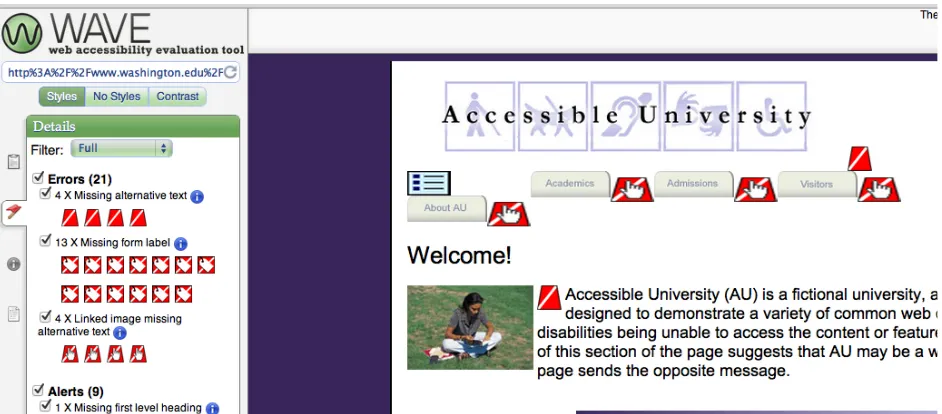
understand usability. WebAIM’s online Web Accessibility Evaluation Tool (WAVE) does a great job showing students the extent of HTML-based accessibility problems on a web page. It allows designers to test a webpage for accessibility: the user enters the page’s address, and then WAVE analyzes the code. In addition to providing a list of errors and warnings, it also shows users a visual map of where the errors are (see Fig. 1). WAVE will also let the user select which standards to use, including WCAG 2.0 and Section 508. Combining a demonstration of WAVE (http://wave.webaim.org) with the University of Washington’s Accessible University 2.0 website (http://www.washington.edu/accesscomputing/AU/) can be a particularly effective way to
demonstrate how easy it is to miss accessibility problems without looking at the code. Accessible University provides two versions of the website of a fictitious university, one that has severe accessibility problems and one with the accessibility problems fixed. It is important to show the students that despite the changes, the two sites look the same. Accessible University offers a chance to send students on a scavenger hunt to find problems as well as the opportunity for them to see what problems a user unable to use a mouse might encounter on a website. The site is also a good opportunity to introduce WAVE by testing the problematic version of Accessible
Figure 1. Screenshot of a WAVE analysis of Accessible University.
In Figure 1, WAVE has found 21 errors, including linked images with missing ALT attributes and missing form labels. One of the nice things about the current version of WAVE is that it allows the user to click on the error and pull up the code so that the user can get a better feel for what caused the error. As useful as WAVE and similar tools are, it is critical that
students understand that automated testing tools are not a panacea. The software cannot identify all accessibility problems. For example, if a designer set the ALT attribute for an image-based home button to “sample image” rather than “home,” WAVE would not identify that section of code as having a problem. The ALT attribute “sample image” is, of course, useless to someone with a text reader. Faculty can reinforce the importance of accessibility to students by requiring students to turn in WAVE reports for webpages they create.
posed by both structural and code-based problems. He notes that one of the challenges blind users face is that, unlike sited users, they do not have a visual overview of the page as a starting point. Ewers presents Greg Vanderheiden’s analogy of this lack of an overview to reading
through a drinking straw. The video not only offers students an opportunity to build empathy and to more fully appreciate the challenges blind users face, but it also helps students develop a greater appreciation of the skills blind users develop. When Ewers sets his text reader on the speed he usually has it on, it speaks so quickly that most people, including myself, are unable to differentiate the words. The video does a wonderful job sparking class discussions and can also be used as an out of class viewing assignment to set up a reading response.
user. Readers interested in a more detailed discussion of teaching accessibility for users with a vision disability should read Youngblood (2013).
Figure 2. Accessible University as rendered by Fangs. Discussion
what services are available in a county building might express confusion as to what the term “probate” means, suggesting that the site designers may need to be clearer about what that service is. Health and Human Services (2006) has several chapters that work well with this assignment and explain why particular types of formatting, such as lists, help users scan material more easily. Faculty might also consider having students conduct a usability/design analysis of existing web sites using heuristics. A number of good heuristics are available including in Felke-Morris (2012). This makes a great starter assignment for a web class at the beginning of the semester as it helps introduce students to the idea of best practices as they are learning to write code. Faculty should also consider requiring that students incorporate usability and accessibility testing into web design projects. One option is to require students to write out a testing plan early on in the development process and then have them document these processes in an end of project report. Faculty might also consider bringing in a speaker from their campus students with
disabilities office. In most cases, this office will have someone knowledgeable about
accessibility as it applies to education, particularly Internet-based education. Faculty should also keep an eye on court decisions and comments on web accessibility cases as well as Department of Justice rulings on accessibility. As mentioned earlier, the Department of Justice is likely going to adjust how ADA is applied to the Internet. These court cases and changes to ADA are fertile discussion topics not only in production classes, but also in media law and media and society classes.
Conclusion
involved in these course not learn how to implement an accessible and usable website, but why it is important to do so. In teaching this, educators need rely on both cognitive and affective goals so that future web managers not only use best practices, but have internalized why these concepts are valuable and can be an advocate for all users. There are a number of good resources to draw on for teaching students about usability and accessibility. One the keys to teaching students about these issues is to use a textbook that incorporates usability and accessibility, preferably one such as Felke-Morris (2012) that deals with the issues throughout the book rather than in
individual chapters. The advantage in this approach is that the students learn the skills as they go, which may make them more likely to incorporate them into their workflow. It also stresses the importance of the issues rather than treating them as an afterthought. This approach should help with some of the concerns raised by the web managers in Lazar, et. al (2004), particularly their concerns about lack of training. Health and Human Services’ (2006) research-based book on usability is a good supplementary textbook and is available for free as a PDF through
Usability.gov. And students do love free textbooks. Here are some other sites that readers may find helpful. Some of these sites are in the reference section, some of them are not. Most are free.
• Usability.gov. This is the US governments website on usability. (http://wwww.usability.gov)
• Nielsen Norman Group Articles (http://www.nngroup.com/articles/) • Pew Internet & American Life Project (http://pewinternet.org)
• W3C’s accessibility training modules. These have detailed discussions of how to plan accessibility training (http://www.w3.org/WAI/training/)
• AccessibleTech.org. Provides information on a range of issues on information technology and accessibility. (http://www.accessibletech.org)
• AccessibleTech.org’s page on web accessibility court cases (http://accessibletech.org/access_articles/legal/courtCases.php)
References
Agrawal, Y., Platz, E. A., & Niparko, J. K. (2008). Prevalence of hearing loss and differences by demographic characteristics among US adults: data from the National Health and
Nutrition Examination Survey, 1999-2004. Archives of Internal Medicine, 168(14), 1522. Anderson, A., & Ewers, N. (Producers). (2001). Introduction to the screen reader [video].
Madison, WI: Instructional Media Development Center. Retrieved June 5, 2013 from Brown, A., Yesilada, Y., Jay, C., & Harper, S. (2010). The Blind Leading the Blind: Web
Accessibility Research Leading Mobile Web Usability. Mobile Web 2.0: Developing and Delivering Services to Mobile Devices, 71-93.
Chaparro, B. S., Hinkle, V. D., & Riley, S. K. (2008). The usability of computerized card sorting: a comparison of three applications by researchers and end users. Journal of Usability Studies, 4(1), 31-48.
Chen, J., & Dibb, S. (2010). Consumer trust in the online retail context: exploring the antecedents and consequences. Psychology & Marketing, 27(4), 323-346.
Chisholm, W., & May, M. (2009). Universal design for web applications: Web applications that reach everyone. Sebastopol, CA: O'Reilly Media.
Conway, V. L. (2011, March). Website accessibility in Australia and the Australian
Government's National Transition Strategy. In Proceedings of the International Cross-Disciplinary Conference on Web Accessibility (p. 15). ACM.
Felke-Morris, T. (2012). Web development and design foundations HTML 5 (6th ed.). Boston: Pearson/Addison Wesley.
Fichten, C. S., Ferraro, V., Asuncion, J. V., Chwojka, C., Barile, M., Nguyen, M. N., ... & Wolforth, J. (2009). Disabilities and e-learning problems and solutions: An exploratory study. Educational Technology & Society, 12(4), 241-256.
Cleary, Y., & Flammia, M. (2012). Preparing technical communication students to function as user advocates in a self-service society. Journal of Technical Writing and
Communication, 42(3), 305-322.
Fogg, B. J., Soohoo, C., Danielson, D. R., Marable, L., Stanford, J., & Tauber, E. R. (2003, June 5–7). How do users evaluate the credibility of Web sites? Proceedings of DUX2003, Designing for User Experiences (pp. 1–15). San Francisco, CA: ACM.
doi:10.1145/997078.997097
Gilbert, T., & Urquhart, B. (2011, July). Universal design in the classroom. Lecture presented at Pulse Pen Project and I, Auburn, AL.
Gilbertson, T. D. & Machin, C. H. C. (2012). Guidelines, icons and marketable skills: an
accessibility evaluation of 100 web development company homepages. In Proceedings of the International Cross-Disciplinary Conference on Web Accessibility (W4A '12). ACM, New York, NY, USA, Article 17 , 4 pages. doi:10.1145/2207016.2207024
http://doi.acm.org/10.1145/2207016.2207024
Goette, T., Collier, C. & White, J. D. (2006). An exploratory study of the accessibility of state government Web sites. Universal Access in the Information Society, 5(1), 41-50. doi:10.1007/s10209-006-0023-2
Goodwin, M., Susar, D., Nietzio, A., Snaprud, M., & Jensen, C. S. (2011). Global web
accessibility analysis of national government portals and ministry web sites. Journal of Information Technology & Politics, 8(1), 41-67.
Gutierrez, C. F., Loucopoulos, C., & Reinsch, R. W. (2005). Disability-accessibility of airlines’ Web sites for US reservations online. Journal of Air Transport Management, 11(4), 239-247.
Head, A. J. (1999). Web Redemption and the Promise of Usability. Online,23(6), 20-23. Health and Human Services. (2006). Research-based web design and usability guidelines.
Washington D.C.: GSA. Retrieved June 1, 2013 from http://www.usability.gov/guidelines/guidelines_book.pdf
Huffman Hayes, J. (2002). Energizing software engineering education through real-world projects as experimental studies. In Software Engineering Education and Training, 2002.(CSEE&T 2002). Proceedings. 15th Conference on (pp. 192-206). IEEE.
Huang, Z., Brooks, L., & Chen, S. (2009). The assessment of credibility of e-government: Users’ perspective. In G. Salvendy & M. J. Smith (Eds.): Human interface and the management of information. Information and interaction (Vol. 5618, pp. 26–35). Berlin, Heidelberg: Springer Berlin Heidelberg. Retrieved November 10, 2011, from
http://www.springerlink.com/content/1741260x54246247/
Kaufman, J. (2006). Card sorting: An inexpensive and practical usability technique. Intercom, 11, 17-19.
Kim, S. E., & Lehto, X. Y. (2012). The voice of tourists with mobility disabilities: insights from online customer complaint websites. International Journal of Contemporary Hospitality Management, 24(3), 451-476.
Krantz, P. (2010). Fangs the screen reader emulator. Retrieved June 5, 2013 from http://www.standards-schmandards.com/projects/fangs/
Lazar, J. (2002). Integrating accessibility into the information systems curriculum. Proceedings of the International Association for Computer Information Systems, 373-379.
Lazar, J., Dudley-Sponaugle, A., & Greenidge, K. D. (2004). Improving web accessibility: A study of webmaster perceptions. Computers in Human Behavior, 20(2), 269-288 Lazar, J., Olalere, A., & Wentz, B. (2012). Investigating the accessibility and usability of job
application Web sites for blind users. Journal of Usability Studies, 7(2), 68-87. Loiacono, E. T., & Djamasbi, S. (2013). Corporate website accessibility: Does legislation
matter?. Universal Access in the Information Society, 12(1), 115-124.
Loiacono E, Romano N, McCoy S (2009) The state of corporate website accessibility. Communications of the ACM, 52(9): 128-132.
Maswera, T., Dawson, R., & Edwards, J. (2008). E-commerce adoption of travel and tourism organisations in South Africa, Kenya, Zimbabwe and Uganda. Telematics and
Informatics, 25(3), 187-200.
National Federation of the Blind v. Target Corp., Class Settlement Agreement & Release (N.D. Cal. 2008). Retrieved June 5, 2013 from
National Federation of the Blind v. Target Corp., 452 F. Supp. 2d 946 (N.D. Cal. 2006). Retrieved June 5, 2013 from
http://www.internetlibrary.com/pdf/National%20Federation%20Of%20The%20Blind.pdf National Association of the Deaf v. Netflix, Inc., No. 11-CV-30168-MAP (D. Mass. June 19,
2012). Retrieved June 5, 2013 from http://dredf.org/captioning/MJP-DENIED-JUDGE-PONSOR-ORDER-6-19-12.pdf
Nielsen, J. (2004). Card sorting: How many users to test. Retrieved June 1, 2013 from http://www.nngroup.com/articles/card-sorting-how-many-users-to-test/
Nielsen, J. (2012a). How Many Test Users in a Usability Study? Retrieved June 1, 2013 from http://www.nngroup.com/articles/how-many-test-users/
Nielsen, J. (2012b). Usability 101: Introduction to usability. Retrieved May 4, 2013 from http://www.nngroup.com/articles/usability-101-introduction-to-usability/
Olalere, A. & Lazar, J. (2011). Accessibility of U.S. federal government home pages: Section 508 compliance and site accessibility statements, Government Information Quarterly, 28(3), 303-309. doi:10.1016/j.giq.2011.02.002
Palazzolo, J. (2013, Mar 22). Disabled sue over web shopping --- advocates for blind, deaf say netflix, target are legally obligated to make sites easier to navigate. Wall Street Journal. Retrieved from http://search.proquest.com/docview/1318674888?accountid=8421 Palmeri, J. (2006). Disability studies, cultural analysis, and the critical practice of technical
communication pedagogy. Technical Communication Quarterly, 15, 49–65. Petrie, H., Power, C., Cairns, P., & Seneler, C. (2011). Using card sorts for understanding
Heidelberg.
Rosmaita, B. J. (2006, March). Accessibility first!: A new approach to web design. In ACM SIGCSE Bulletin (Vol. 38, No. 1, pp. 270-274). ACM.
Royal, C. (2004). Teaching web design in journalism and mass communications programs: Integration, judgment, and perspective. Journalism & Mass Communication
Educator, 59(4), 399-414.
Section 508 of the Rehabilitation Act, 29 U.S.C. § 794d.
Shi, Y. (2007). The accessibility of Chinese local government web sites: An exploratory study. Government Information Quarterly, 24(2), 377-403.
Smith, A. (2011a). 35% of American adults own a smartphone. Pew Internet and American Life Project (pp. 1-19). Retrieved May 20, 2013, from
http://www.pewinternet.org/~/media//Files/Reports/2011/Cell%20Phones%202011.pdf Smith, A. (2011b). Americans and their cell phones: Mobile devices help people solve problems
and stave off boredom, but create some new challenges and annoyances. Pew Internet and American Life Project (pp. 1–19). Washington D.C.: Pew Research Center. Retrieved
November 12, 2012, from
http://www.pewinternet.org/~/media//Files/Reports/2011/Cell%20Phones%202011.pdf Teo, T. S. H., Srivastava, S. C., & Jiang, L. (2008). Trust and electronic government success: An
empirical study. Journal of Management Information Systems, 25(3), 99–132. doi:10.2753/MIS0742-1222250303.
United Nations (2006). Convention on the rights of persons with disabilities and optional protocol. Retrieved from June 14, 2012, from
United Nations (2007). UN Enable—Convention on the rights of persons with disabilities. Retrieved from June 14, 2012, from
http://www.un.org/disabilities/default.asp?navid=12&pid=150
U.S. Access Board (n.d.). About the United States Access Board. Retrieved August 8, 2012 from http://access-board.gov/about.htm
U.S. Access Board (2011). 2011 ANPRM Draft. Retrieved August 8, 2012 from http://access-board.gov/sec508/refresh/draft-rule.htm
U.S. Census Bureau (n.d.). American Community Survey, 2008. Retrieved June 10, 2012 from http://factfinder2.census.gov
Usability.gov. (n.d.a). About Us. Retrieved June 1, 2013 from http://www.usability.gov/about/index.html
Usability.gov. (n.d.b). Card Sorting. Retrieved June 1, 2013 from http://www.usability.gov/methods/design_site/cardsort.html Usability.gov (n.d.c.. Test Facilitator Guide. Retrieved June 3, 2013 from
http://www.usability.gov/templates/docs/test_fac_guide.doc
Vanderheiden, G. C. (1995). Design of HTML (Mosaic) Pages to Increase their Accessibility to Users with Disabilities Strategies for Today and Tomorrow. Retrieved June 18, 2012, from http://trace.wisc.edu/archive/html_guidelines/version1.html
Vanderheiden, G. C. (1997). Nomadicity, disability access, and the every-citizen interface. More than screen deep: Toward every-citizen interfaces to the nation's information
infrastructure, 297-306.
diversity, Berlin: Springer-Verlang, p. 636-642. doi: 10.1007/978-3-642-02707-9_72 Vanderheiden, G. C. & Chisholm, W. A. (1998). Central Reference Document - Version 8.
Unified Web Site Accessibility Guidelines. Retrieved June 18, 2012, from
http://www.w3.org/WAI/GL/central.htm
W3C (1999b). Web Content Accessibility Guidelines 1.0. Retrieved July 5, 2012, from http://www.w3.org/TR/WCAG10/
W3C (1997). World Wide Web Consortium Launches International Program Office for Web Accessibility Initiative. Retrieved May 15, 2013, from
http://www.w3.org/Press/IPO-announce.html
W3C (2008). Web Content Accessibility Guidelines (WCAG) 2.0. Retrieved June 13, 2012, from http://www.w3.org/TR/WCAG
W3C (2010a). Accessibility – W3C. Retrieved June 12, 2012, from http://www.w3.org/standards/webdesign/accessibility
Wang, Y. D., & Emurian, H. H. (2005). An overview of online trust: Concepts, elements, and implications. Computers in human behavior, 21(1), 105-125.
Warkentin, M., Gefen, D., Pavlou, P. A., & Rose, G. M. (2002). Encouraging citizen adoption of e-government by building trust. Electronic Markets, 12(3), 157–162.
doi:10.1080/101967802320245929.
Wentz, B., & Lazar, J. (2011, February). Are separate interfaces inherently unequal?: An evaluation with blind users of the usability of two interfaces for a social networking platform. In Proceedings of the 2011 iConference (pp. 91-97). ACM.
2009 (pp. 273-284). Springer Vienna.
Youngblood, S. A. (2013). Communicating web accessibility to the novice developer from user experience to application. Journal of Business and Technical Communication, 27(2), 209-232.
Youngblood, N. E. & Mackiewicz, J. (2012). A usability analysis of municipal government website home pages in Alabama. Government Information Quarterly 29(4), 582-588. http://dx.doi.org/10.1016/j.giq.2011.12.010
Yu, D. X. & Parmanto, B. (2011). U.S. state government websites demonstrate better in terms of accessibility compared to federal government and commercial websites. Government
Information Quarterly, 28(2011), 484-490. doi:10.1016/j.giq.2011.04.001
Zickuhr, K. & Smith, A. (2012). Digital Differences. Pew Internet & American Life Project (pp. 1-41). Retrieved May 20, 2013, from
http://www.pewinternet.org/~/media//Files/Reports/2012/PIP_Digital_differences_04131 2.pdf
Biography
Norman E. Youngblood is an assistant professor in the School of Communication and Journalism at Auburn University. He teaches courses in online media production, media technology history, and media and society. He is the co-founder and co-director of Auburn’s Laboratory for
Usability, Communication, Interaction, and Accessibility (LUCIA), and his research focuses on usability and accessibility, particularly as it relates to e-government. His peer-reviewed