AthenaCloud: A Cloud-based Platform for Multi-device
Educational Software Generation
Raquel Vásquez-Ramírez1, Maritza Bustos-Lopez1, Giner Alor-Hernández 1, Cuauhtémoc Sanchez-Ramírez1, and Jorge Luis García-Alcaraz2
1 Division of Research and Postgraduate Studies, Instituto Tecnológico de Orizaba, Avenida Oriente 9 No. 852 Col. Emiliano Zapata
Orizaba, Veracruz, Mexico, Orizaba
2Department of Industrial Engineering, Universidad Autónoma de Ciudad Juárez, Avenida del
Charro, No. 450 Norte Colonia Partido Romero, Código Postal 32310 Ciudad Juárez, Chihuahua, Mexico
{vz.rmz.raquel, maritbustos}@gmail.com, {galor, csanchez}@itorizaba.edu.mx, [email protected]
Abstract. Nowadays, information technologies play an important role in education. In education, mobile and TV applications can be considered a support tool in the teaching - learning process, however, relevant and appropriate mobile and TV applications are not always available; teachers can only judge applications by reviews or anecdotes instead of testing them. These reasons lead to the needs and benefits for creating one’s own mobile application for teaching and learning. In this work, we present a cloud-based platform for multi-device educational software generation (smartphones, tablets, Web, Android-based TV boxes, and smart TV devices) called AthenaCloud. It is important to mention that an open cloud-based platform allows teachers to create their own multi-device software by using a personal computer with Internet access. The goal of this platform is to provide a software tool to help educators upload their electronic contents – or use existing contents in an open repository – and package them in the desired setup file for one of the supported devices and operating systems.
Keywords: education, multi-device software, cloud-based platform, software generation.
1.
Introduction
Information and communication technologies (ICTs) produce meaningful changes in any society. They are able to bring a great amount of information to the remotest places and represent a powerful tool to reach autonomous, meaningful, and quality learning [1]. The fast growth of ICTs has increased the development of Desktop-based, Web-based, Mobile, and TV-based applications. These kind of applications represent new alternatives to be used as teaching materials. Taking this into consideration, in the last years, information technologies have emerged as a valuable resource to support the teaching-learning process across all educational levels.
the most significant example of how information technologies can be useful and suitable for students. However, two issues mainly appear. First, some educational contents are not suitable due to their copyright constraints [2]. Second, the development of multi-device applications requires an integrative approach involving the support of several education specialists who provide the guidelines needed to build high quality contents, as well as application designers and developers who are able to deliver the educational applications demanded by students. Thus, the success of applications is related to the organization of the team and the assigned responsibilities [3].
Taking into account these issues, we propose AthenaCloud system in order to provide the following features: 1) An repository that allows searching and finding educational resources for software customization, 2) A multi-device software generation tool for educational applications (for smartphones, tablets, Web, Android-based TV box and smart TVs), 3) An easy way of accessing from cloud-based platform, and 4) Usage of User Interface Design Patterns (UIDP) for educational applications.
It is noteworthy mention that, several approaches are oriented to study UI patterns and can be applied in the development of desktop, Web and mobile applications. AthenaCloud uses different and previously identified mobile UIDP [4, 5] for mobile applications development. Also, it uses the concepts of several proposals on the use of digital interactive TV for software development. Moreover, one of the most important aspects of our approach is the use of TV Android-based interface design patterns for software development. The cloud-based platform allows for the development of user interfaces following the 10-foot UI specification that provides the needed criteria for developing a digital-TV interface. This specification was adopted by Google as a set of design patterns to generate TV applications.
This paper is organized as follows: Section 2 describes a review of previous works on cloud computing. Section 3 presents the platform architectural design. The case study that demonstrates the platform functionality is included in section 4. Section 5 describes the design evaluation for AthenaCloud. Finally, future work and conclusions are presented in section 6.
2.
State of the Art
There are several research works in the literature that reports findings related to cloud computing services, e-learning applications, and software generation to mention but a few. In this section, a brief review of both relevant and related proposals is presented. These proposals were selected according to the following criteria: 1) the proposal has used cloud services to meet different needs of infrastructure, platform and applications or 2) The proposals has reported a system for generating cloud computing-based applications.
them [6]. On the other hand, the second criteria it is about software generation, due to this, we classified the domain of application of all research works in order to get a comparison about their aim and scope. Next, we describe some of the most significant research works related to the two aforementioned criteria.
Due to proliferation of mobile devices, which have lead to ubiquitous mobile applications (i.e., applications that can be accessed at any time and from anywhere over the Internet), cloud computing has taken advantage of mobile computing. This is evidenced by the recent incursion of mobile operators such as Vodafone, Verizon, and Orange on the cloud computing market. According to Fernando et al. [7], the Mobile Cloud Computing (MCC) is still in its infancy; however, it could become the dominant model for mobile applications in the near future.
From a similar perspective, March et al. [8] proposed a framework that merged mobile and cloud computing concepts for the development of rich mobile applications, a new generation of distributed mobile applications that provides rich functionalities. Similarly, Mishra et al. [9] proposed a mobile-based cloud-computing framework for the integration of mobile applications with cloud services aimed at processing and store data.
Also, as regards platforms for software applications generation, Srirama et al. [10] developed a MCC middleware for mobile mash-up applications (i.e. applications that combine data from diverse cloud services), while Dukhanov, Karpova, and Bochenina [11] presented an approach for the design and implementation of a virtual learning laboratory (VLL) by using cloud computing technologies within the model of AaaS (Application as a Service). From a similar perspective, Ercan [12] presented a survey to collect the required data for the use of cloud computing in universities and other governmental and private institutions in Turkey. Note that this survey will help know the current status and probable considerations to adopt the cloud technology. Results were shown as a pie chart, and the labels on each different slice represented the different industrial sectors and services surveyed.
Authors Ozdamli and Bicen [13] presented a quantitative method to identify the conditions that affect student’s perception and competences towards mobile learning using mainly cloud computing services. The authors selected Dropbox, since in Bicen and Ozdamli [13] study results showed that most of students preferred Dropbox cloud computing services. Likewise, Saad and Selamat [14] presented an UPSI Learning Management System called MyGuru2 that offers a robust set of teaching and learning tools, functions, and features. They proposed cloud computing as a solution where MyGuru2 is put on convenient, on demand network access to a shared pool of configurable computing resources that can be maintained and provisioned with minimal management effort.
Likewise, Sultan [17] presented several examples of cloud users through a case study from the University of Westminster in order to demonstrate the emerging popularity of cloud computing in educational and business establishments. Similarly, Shakil, Sethi, and Alam [18] proposed an effective framework for managing university data by using a cloud-based environment. The framework consisted of a cloud developed for processing a database including staff and students from different universities.
Also, Juracz and Howard [19] presented a HTML-based diagramming tool for the creation of free body diagrams (FBD). This tool has two different work modes: 1) author mode and 2) edit mode. The first mode enables to create problems through the editor interface. Meanwhile, in the second mode, students work on the diagrams solution. Also Doukas, Pliakas, and Maglogiannis [20] proposed an Android mobile application called @healthcloud to manage healthcare information by using cloud computing. @healthcloud provides management features for patient health records and medical images.
In the science context, Hiden, Woodman, Watson, and Cala [21] described a cloud data processing system called e-Science Central (e-SC). The e-SC system gives science application developers a high-level platform on which to build their applications. From a similar perspective, Othman, Khan, Abid, and Madani [22] presented a mobile cloud application development model called MobiByte. The aim of MobiByte was to enhance mobile device applications performance such as energy, efficiency, and execution support.
Nguyen et al. [23] introduced a framework called RmCRC MEAP. The framework is based on the Apache Cordova platform. RmCRC MEAP helps developing mobile applications for several operating systems, such as Android, iOS, and Windows Phone, while, Calixto, Angeluci, Costa, de Deus Lopes, and Zuffo [24] proposed a model for both interactive and hybrid digital TV, focused on global services and applications framework. The proposed model sought to achieve five goals: 1) run applications via the Internet; 2) implement scenarios involving interactive second screens; 3) develop applications using a global standard; 4) execute applications based on others standards; 5) develop a PaaS model.
Authors Tao et al. [25] presented a generic framework that allows the user to access the diverse Clouds in a unified way. The framework provides an interface for requesting and invoking the services. Lai et al. [26] introduced a cloud-based program recommendation system (CPRS) for digital TV platforms using the K-means and kNN algorithms. The aim of the CPRS is to process large numbers of user records in a short period of time. Finally, Pocatilu et al [27] presented the benefits and the impact of employing cloud computing architectures in the field of e-learning software systems development. The authors stressed the need for a system to measure the efficiency of cloud computing-based e-learning solutions.
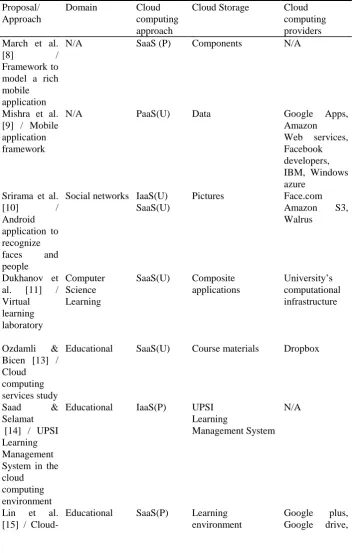
Table 1. Comparison of the most related works on the use of cloud computing
Proposal/ Approach
Domain Cloud
computing approach
Cloud Storage Cloud
computing providers March et al.
[8] /
Framework to model a rich mobile application
N/A SaaS (P) Components N/A
Mishra et al. [9] / Mobile application framework
N/A PaaS(U) Data Google Apps,
Amazon Web services, Facebook developers, IBM, Windows azure
Srirama et al.
[10] /
Android application to recognize
faces and
people
Social networks IaaS(U) SaaS(U)
Pictures Face.com
Amazon S3,
Walrus
Dukhanov et al. [11] / Virtual learning laboratory Computer Science Learning
SaaS(U) Composite applications
University’s computational infrastructure
Ozdamli & Bicen [13] / Cloud computing services study
Educational SaaS(U) Course materials Dropbox
Saad & Selamat [14] / UPSI Learning Management System in the cloud
computing environment
Educational IaaS(P) UPSI
Learning
Management System N/A
Lin et al. [15] /
Cloud-Educational SaaS(P) Learning environment
Proposal/ Approach
Domain Cloud
computing approach
Cloud Storage Cloud
computing providers based reflective learning environment Google sites
Ivanova & Ivanov [16] / Cloud computing for authoring process automation
N/A - N/A Twitter, Flickr
Sultan [17] / Discover the benefits of cloud
computing
Educational SaaS(U) Emails, documents Google Apps
Shakil et al.
[18] /
Applicability and usage of cloud
computing in the education sector
Educational PaaS(U) University data University cloud simulator
Juracz and Howard [19] / HTML-based diagramming tool
Engineering, education
PaaS(P) N/A N/A
Doukas et al. [20] / Mobile application for healthcare information management
Healthcare PaaS(U)
SaaS(P)
Patient health
records and medical images
Amazon Simple Storage Service (S3)
Hiden [21] / Cloud data processing system
Multidomain IaaS(U) PaaS(P) SaaS(P)
Applications and data
Amazon Web
Services (AWS), Windows Azure Othman et al.
[22] / Mobile cloud
Multidomain PaaS(U) SaaS(P)
Proposal/ Approach
Domain Cloud
computing approach
Cloud Storage Cloud
computing providers application
development model Nguyen [23] / Framework to develop mobile application
N/A IaaS(U) Platform OpenStack
Calixto et al. [24] / Model for interactive and hybrid digital TV
N/A - Platform N/A
As can be inferred from table 1, several approaches have a limited scope, due to they are designed to solve a particular problem, and their contributions are focused on a particular domain. However, the AthenaCloud system aims at solving the necessity of a wide range tool for software generation that uses and provide cloud services, for the educational domain. In this regard, one of the main differences with other approaches relies on their capability to generate education software applications, with multi-device support, over a cloud computing infrastructure.
3.
Software Architecture Description
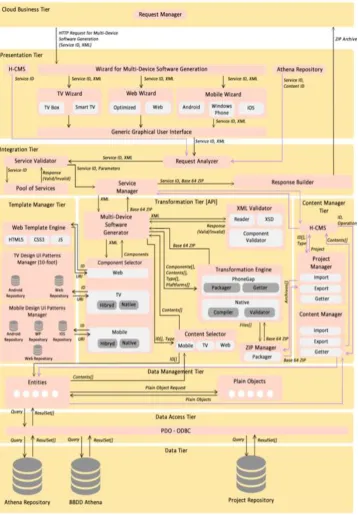
The AthenaCloud architecture is shown in Fig. 1. This architecture is composed of nine tiers. Each tier fulfills a specific function by using a set of components whose tasks are described as follows.
Cloud Business Tier. This tier is addressed by the Web-based platform (i.e. teachers through a Web browser). Applications built using the tools in the lower tier are executed at this level. The entry point is the Request Handler component, which acts as a gateway receiving all the requests for user interactions.
Presentation Tier. In this tier, AthenaCloud determines the best way to display the educational content by using XHTML when HTML5 is not supported. The Presenta- tion Tier does not know what events are taking place inside AthenaCloud and how the services are provided, it only uses them to show the end-user interface. Additionally, this tier provides a graphical user interface (web client) in order to facilitate the access to the services offered by the Integration Tier.
covers almost all the phases of the typical development life-cycle – namely, design, development, publishing (or deployment), and maintenance.
Template manager tier. AthenaCloud allows for the generation of multi-device applications through the use of templates that are based on graphical UIDPs (for the educational context). In this sense, this tier stores native or HTML5 templates that represent graphical UIDPs. Template Manager tier has some of the main modules for multi-device applications generation, such as Web Template Engine, TV Template Manager (10-foot UI design patters), and Mobile User Interface Design Patterns Manager.
Transformation Tier. This tier is responsible for transforming an XML-based document that contains transformation directives for each platform supported by the architecture. Due to the directives in the XML-based document, AthenaCloud has the possibility of generating native applications or hybrid applications through PhoneGap.
Content Management Tier. Because AthenaCloud is also a hybrid content management system (H-CMS) of educational assets, there is a tier that allows for using the repository and content management that are linked to an application (e.g. a chemistry course).
Data Management Tier. Following the MVC design pattern (Model View Controller), Athena Cloud has a Data Management Tier where data from the lower tiers are transformed into objects that are easily manipulated by the upper tiers.
Data Access Tier. This tier is responsible for executing SQL queries requested by the Data Management Tier through the PDO - ODBC component, which is responsible for executing SQL queries (insert, update, delete, and query operations) for each class in the Entities component.
Data Tier. This tier mainly aims at storing XML-based documents by means of a set of repositories, which represent the core of the source code generation process. Additionally, it contains all the configuration tables allowing the operation of the modules and services offered by Athena. There is also information about each template (pages, sections, and the distribution of content in each section of a page).
Each tier of the AthenaCloud’s architecture contains a set of components. The functionalities of these components are explained in the following paragraphs.
Request manager. This component it is responsible to handle all the request send by the user, and manage them through the components in the low levels of the architecture.
H-CMS (Hybrid Content Management System). It is responsible for content, projects and user’s management through a graphical user interface. This module depends on the Content Management Tier.
Generic graphical user interface. It standardizes a request generation of multi-device software, regardless of which module wizard the request comes. This module aims to be an integrator of individual requests for each attendee to facilitate simultaneous generation of device-independent software.
Athena repository. It is responsible for managing the educational content, providing a search interface and content retrieval, with the ability to manage copyright for each content.
Request Analyzer. It analyzes requests from the Presentation Tier, regardless of the type of service requested and the issuer of the request. Once the petition has been analyzed, and considering it is a valid request for a service, this component uses the Service Validator to assess an existing service.
Service Validator. This component is responsible for validating whether a service exists, and if the parameters received through the Presentation Tier are required to carry out the requested petition.
Pool of Services. This component is responsible for storing the information of active services, and analyze what are their requirements for invocation. Additionally, this component works with the Service Validator to see whether a service can be invoked.
Service Manager. This component is responsible for orchestrating all service requests that arrive at the Integration Tier. Once a request has been validated, this component is redirected to the corresponding lower tier for execution.
Response Builder. This component receives the responses coming from the Transformation tier. This component processes two kinds of responses: 1) direct information from the database; or 2) a packaged file containing a setup file of the application generated for a television, mobile device or web-based modality. In the three cases, the component is responsible for processing information and sending it to the user.
Web Template Engine. This component is responsible for generating templates to represent desktop and Web applications optimized for mobile devices through HTML5, CSS3, and JavaScript.
Mobile Design User Interface Patterns Manager. It manages templates that meet graphical UIDPs for mobile devices. These design patterns are available in native language for Android platform, and optimized for Web applications (HTML5, CSS3, and JavaScript), in order to generate hybrid PhoneGap applications.
TV Design User Interface Patterns Manager (10-foot). It manages templates that meet the 10-foot specification for graphical UIDPs. These patterns are available in native language of the Android platform and optimized Web application format (HTML5, CSS3, and JavaScript) to generate hybrid applications with PhoneGap.
XML Validator. It uses the Reader component to validate, through the XSD component, the structure and the definitions of an XML-based document of AthenaCloud. Additionally, the Validator Component verifies availability of components included by the AthenaCloud XML directives in the corresponding repository at Template Manager Tier. Once the structure and components have been verified, AthenaCloud is ready to generate the multi-device application.
Component Selector. It is responsible for implementing the directives for components recovery (templates) specified in the XML-based document of AthenaCloud. The Component Selector uses its Web, Television, and Mobile components to determine the type of design patterns (visual components) required to extract from the several repositories into the Template Manager Tier.
Content Selector. It requests all the contents required in the XML-based document of AthenaCloud by using the Entities component into the Data Management Tier.
Transformation Engine. It uses the components, content, and AthenaCloud XML directives in order to transform the XML into a multi-device application. When it comes to a hybrid application, the component is responsible for generating the PhoneGap multi-device application through its sub-components: Packager (creates a PhoneGap project) and the Retriever (sends to compile the project generated by the Packager). About regaining the compiled by PhoneGap application, the installation files of each platform are sent to the ZIP Manager through its Packager sub-component, which returns a ZIP file with all the installation files (e.g. an APK file). In the case of a native application (e.g. if an Android application is generated in Java language), the Native component assembles the components (templates) and the required resources (content), and sets the navigation between different sections of the application that is to be generated.
ZIP Manager. It is responsible for packing and compressing into ZIP all files that are provided as invocation parameters.
H-CMS. This component contains a subcomponent that handles content management, projects, and users. Basically, this module is responsible for the CRUD operations platform.
Project Management. It is responsible for importing, exporting, and retrieving the projects from the repository that have been generated with AthenaCloud.
Content Manager. This component carries out the CRUD operations on the content repository and provides the mechanism to search and retrieve from the Athena Cloud repository when the Presentation Tier makes a request.
Entities. This component has a set of classes that encapsulate the operations of the database entities. Each class needs to generate CRUD operations associated with SQL queries functions. In order to transform the entities into objects for programmatic manipulation, the Plain Objects component has a set of classes that represent entities from the database.
Athena repository. This repository stores all educational content that users have uploaded to the platform to generate applications.
BBDD Athena.stores all the data about user information, projects and applications, to mention but a few.
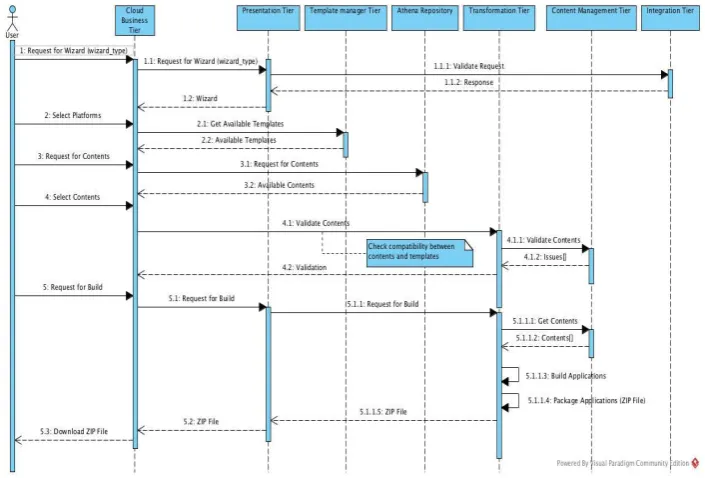
In order to understand the software generation process, in Fig. 2 a UML sequence diagram is depicted. This process it is composed of 5 main steps managed by the Cloud Business Tier:
1. a request from the user (for example a teacher) to the Presentation Tier of AthenaCloud it is performed and a Wizard it is displayed,
2. user select the desired platforms, and according to these platforms choose the available templates,
3. user makes a request for contents from the Athena Repository,
4. the user select the contents that will be included in the generated applications and distribute them in the sections provided by the templates, and
5. the user makes a request to build the application for every platform selected in step 3, and gets a ZIP file that contains all setup files.
Fig. 2. UML sequence diagram of the software generation process
4.
Case Study: Generation of an educational cloud-based
Chemistry course
To explain AthenaCloud functionality, this section presents a case study where a TV educational application is generated.
computers (HTML5 Web-based applications), and TVs (Android TX Box and Smart TV) by following a set of steps. By using this authoring tool, educators can build their own educational application to be displayed on all the previously mentioned devices using only the contents that they need, or if they want, they can search for existing content within an open repository.
The main functionality of the AthenaCloud platform is to provide the author with an intuitive and easy to use Web-based tool to develop educational applications for multiple devices and platforms, which can reinforce academic subjects inside the classroom. A case study to understand the AthenaCloud platform functionality is presented below. The case study describes the generation of a TV-based application for chemistry courses.
Let us suppose that a high school chemistry teacher wants to create a set of videos to support his/her lessons. In this context, the teacher knows what type of information is required for a chemistry course. However, this information is not available, so he/she needs to use the Internet to search these contents. When the user finally accesses the contents, he/she would have a set of videos to be used separately or would need to carry out several activities to create his/her own set of videos. Under this scenario, there are some limitations, such as: 1) the teacher’s lack of experience for searching and creating learning material from the Web, and 2) the teacher’s unawareness of the standards for the development of educational applications. As a solution to these problems, our cloud-based platform proposes 1) a set of educational contents stored in a repository that can be freely used, and 2) a Web-based system to generate a multi-device educational application, following a set of steps and a set of guidelines for the development of TV and mobile interfaces. From this perspective, the teacher only needs to follow a set of steps described as follows:
1. The teacher (user) accesses the platform through an authentication mechanism. 2. If the teacher is successfully authenticated, the platform will display the available
menu on the main Web page. In this section the teacher selects the option to generate a multi-device application. Then, a wizard will be launched to generate a multi-device application.
3. Once the wizard has been launched, the user must select the content types to be included in the application. These content types can be audio, video, image, or text files. This step is depicted in Fig. 3.
4. Once the content types are selected, the user chooses the main view or menu to include in the application according to his/her preferences. To do this, the cloud-based platform includes different design menus for an application.
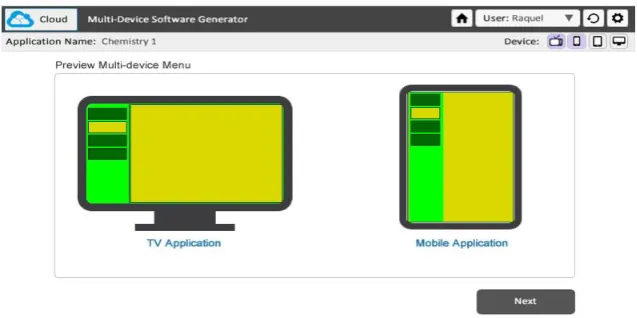
5. Once the user has chosen the type of menu, the next step is to add the content types. We have developed a series of templates for each one of the content types. Each template has been designed following the10-foot UI design scheme. In Fig. 4 a preview of the multi-device menu is presented in order to show both the location and distribution of contents. It is noteworthy mention that this menu follow the guidelines for the “Extended details” UI pattern. This design UI pattern allow display the content on the right side of the screen.
template from the available set. Next, he/she clicks on the “upload content” button. In this step, the user either chooses the location of an audio file on his/her computer, or he/she looks up for content within the platform repository. This process is depicted in Fig. 5. If the user wants to upload other contents, he/she can continue selecting templates and uploading contents. Otherwise, he/she clicks on the “Ready” button to upload the following content type. This process is the same for uploading image, text, and video contents. It is important to mention that some available templates allow for integrating more than one content type. When the user has finished adding the content types, he/she clicks on the “Finish” button.
Fig. 3. Showing the Selection of Content Types for a TV Application
Fig. 5. Content Search and Selection
7. The last step to generate the application is adding the links to each one of the chosen templates. To perform this, the platform presents a list with the templates, and the user must select the one to be linked. At the end of this step, the user must click on the “Finish” button, so that the cloud-based platform starts compiling the application.
8. While the application is being compiled, a progress bar is displayed to indicate the percentage of completion. Then, when the application has been successfully compiled, a confirmation dialog window appears on the screen. This window asks the user if he/she wants to export the generated application. If the user clicks the “Yes” button, the file will be downloaded into a ZIP format.
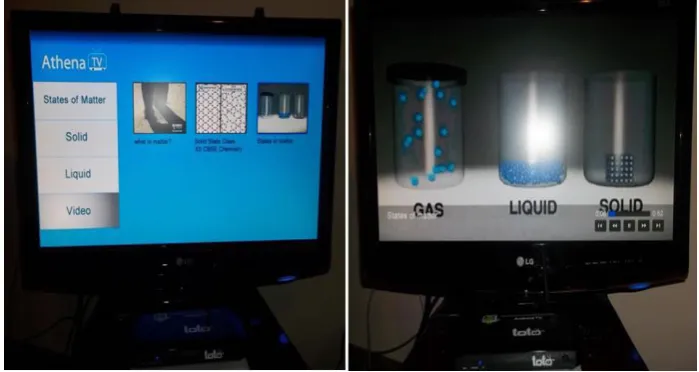
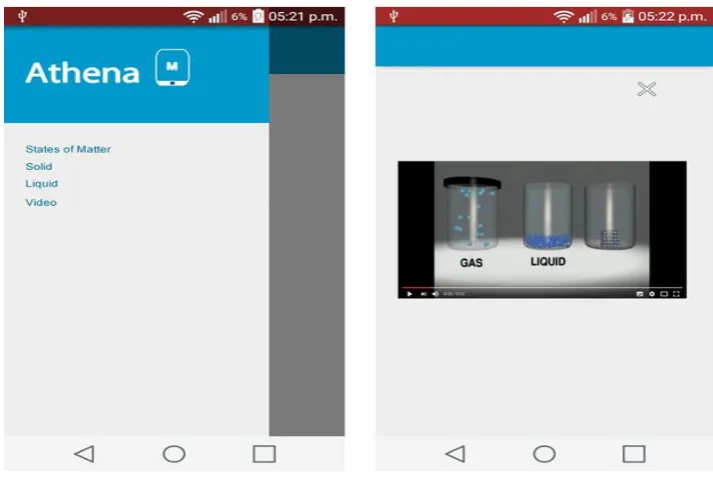
9. When the user has downloaded and decompressed the ZIP file, an .APK extension file is located, which contains the multi-device application. The next step will be therefore to install the application to be displayed on the devices. In this case study, the application is installed using a USB drive. Once the application is installed, the user can access the content through the menu. This process is depicted in Fig. 6 and Fig. 7.
Fig. 7. Mobile Application
Fig. 8. Time used for developing a multi-device application
5.
Design Evaluation
The quality of a system can improve or impact the user experience. In this sense, some works have proposed several methods to evaluate usability of software applications and their interfaces, in order to determine the quality of services provided by the application. In this sense, the literature has produced several methods aimed at assessing the quality of software tools related with the e-learning domain. For instance, some research works evaluate CMS [28] or LMS [29-32]; however, these methods do not offer in depth insight into the suitability of the design for the domain that AthenaCloud represents. Apart from these approaches, Kitchenham and his team [33] proposed several quantitative, qualitative, and hybrid evaluation methods to evaluate software. Unfortunately, these methods cannot be always useful for software generation tools like AthenaCloud.
Due to a lack of a suitable evaluation method, some authors use their own customized qualitative assessments. For example, Boeykens and Neuckermans [28] presented a qualitative assessment of some CMS and LMS. This assessment was based on generic requirements (know how license, database language development). Also, Shee and Wang [29] proposed a multi-criteria methodology from the perspective of learner satisfaction, and Wang [32] proposed the development of an instrument to measure the satisfaction level of learning systems.
the accuracy of the solution provided. Therefore, in the case of AthenaCloud, the authors have decided to use a qualitative evaluation in order to measure the main aspects of its design.
It it noteworthy mention that in the research work presented in Vásquez-Ramírez et al. [36], we describe a heuristic evaluation of TV educational applications generated with the AthenaTV System in order to address the first problem. In this regard, AthenaCloud system is an extension of AthenaTV.
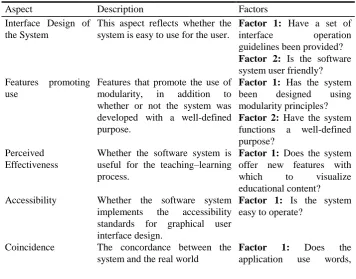
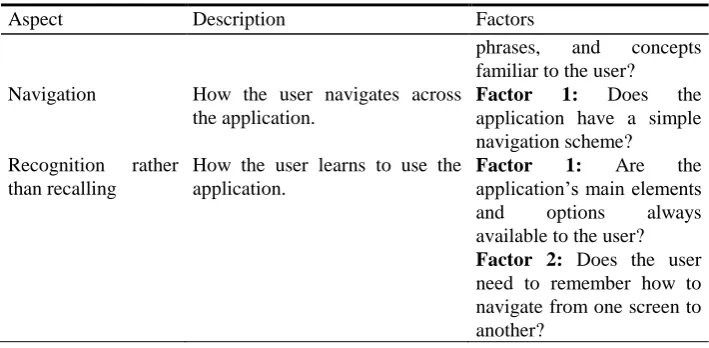
This paper presents a qualitative evaluation to demonstrate that AthenaCloud ensures a suitable user experience and is useful for teachers. We have selected three systems for multiplatform applications development: Moodle, RmCRC MEAP, and @healthcloud. Moodle is a open-source course management system used by many educators around the world, including universities, schools, and independent teachers [37]. Likewise, RmCRC MEAP is a framework based on Mobile Enterprise Application Platform (MEAP) to develop cross-platform mobile applications [23]. Finally, @healthcloud is a mobile Android-based application to manage Healthcare information by using Cloud Computing [20]. These three systems have been selected because they are the most popular platforms. Information presented is based on data collected from technical reports and the official websites of these systems. Authors wish to note that this evaluation has been carried out in order to propose a form of quantifying the proposed design. The comparison with other systems is only presented to illustrate the benefits of the AthenaCloud platform. Table 2 presents the features selected for the qualitative evaluation.
Table 2. Features for qualitative evaluation
Aspect Description Factors
Interface Design of the System
This aspect reflects whether the system is easy to use for the user.
Factor 1: Have a set of
interface operation
guidelines been provided? Factor 2: Is the software system user friendly? Features promoting
use
Features that promote the use of modularity, in addition to whether or not the system was developed with a well-defined purpose.
Factor 1: Has the system been designed using modularity principles? Factor 2: Have the system functions a well-defined purpose?
Perceived Effectiveness
Whether the software system is useful for the teaching–learning process.
Factor 1: Does the system offer new features with
which to visualize
educational content? Accessibility Whether the software system
implements the accessibility standards for graphical user interface design.
Factor 1: Is the system easy to operate?
Coincidence The concordance between the system and the real world
Factor 1: Does the
Aspect Description Factors
phrases, and concepts familiar to the user?
Navigation How the user navigates across the application.
Factor 1: Does the
application have a simple navigation scheme?
Recognition rather than recalling
How the user learns to use the application.
Factor 1: Are the
application’s main elements
and options always
available to the user? Factor 2: Does the user need to remember how to navigate from one screen to another?
The scales used to rate the aforementioned aspects are as follows: Y (Yes): +2 points, P (Partial): +1 point. N (No): 0 points. Table 3 shows results obtained in the qualitative evaluation of AthenaCloud and the other proposals.
Table 3. Results obtained in the qualitative evaluation
Aspect
AthenaCloud Moodle RmCRC
MEAP
@healthcloud
Results Points Results Points Results Points Results Points Aspect 1: Interface Design of the System
Factor 1: Have a set of interface operation guidelines been provided?
Y 2 Y 2 N 0 P 1
Factor 2: Is the software system user friendly?
Y 2 Y 2 P 1 P 1
Aspect 2: Features promoting use Factor 1: Has
the system been designed using modularity principles?
Y 2 Y 2 N 0 Y 2
Factor 2: Have
the system
functions a well-defined
purpose?
Y 2 Y 2 Y 2 Y 2
Aspect 3: Perceived Effectiveness
Aspect
AthenaCloud Moodle RmCRC
MEAP
@healthcloud
Results Points Results Points Results Points Results Points the system offer
new features with which to visualize educational content?
Aspect 4: Accessibility Factor 1: Is the system easy to operate?
Y 2 P 1 P 1 P 1
Aspect 5: Coincidence Factor 1: Does the application
use words,
phrases, and concepts familiar to the user?
Y 2 Y 2 P 1 P 1
Aspect 6: Navigation Factor 1: Does the application have a simple navigation scheme?
Y 2 Y 2 P 1 P 1
Aspect 7: Recognition rather than recalling Factor 1: Are
the application’s main elements and options always available to the user?
Y 2 P 1 P 1 P 1
Factor 2: Does the user need to remember how to navigate from one screen to another?
Y 2 p 1 N 0 P 1
Total 20 17 8 12
scores in terms of usability. In the aspect "Interface Design of the System", Factor 1 and Factor 2 show that AthenaCloud and Moodle provide a set of guidelines for user interface operation through user manuals and contextual help. Also, AthenaCloud and Moodle ensure a friendly environment for the user. Nevertheless, @healthcloud guidelines presented in the literature are reduced, while RmCRC MEAP does not provide guidelines. In both cases, @healthcloud and RmCRC MEAP systems must improve their design interfaces.
Regarding the aspect "Features promoting use," Factor 1 shows whether the systems follow the principles of modularity. Modularity ensures that the software system continues evolving and offers improved user experience. In this sense, systems AthenaCloud, Moodle, and @healthcloud follow modularity principles. Therefore, new and improved features can be easily added through the insertion of modules. Finally, the literature review does not specify whether RmCRC MEAP follows these principles.
As regards "Features promoting use," Factor 2 shows that the four systems are designed with a well-defined purpose. In the aspect "Perceived Effectiveness," Factor 1 evaluates the use of new content visualization features. In this case, AthenaCloud allows for the use of tablets, smartphones, and digital televisions. These devices facilitate appropriate content distribution and enable the user to better manipulate the application. Moodle is very similar to AthenaCloud in this regard, as it offers content visualization through PCs and some mobile adaptations. Also, recent literature has described a Moodle-based t-learning system [38]. However, note that both @healthcloud and RmCRC MEAP offer content visualization only through mobile devices.
As for "Accessibility," Factor 1 evaluates how easy the system is for the end user. In this sense, AthenaCloud offers intuitive navigation via a keyboard and other devices, such as a mouse. Meanwhile, Moodle, @healthcloud, and RmCRC MEAP offer adequate navigation, but they are complex and difficult systems for users who are not familiar with them. Also, regarding the "Coincidence" aspect, Factor 1 shows that both AthenaCloud and Moodle interfaces use familiar words, phrases, and concepts in order to make users feel comfortable and help them understand the concepts and messages sent by the application. Both @healthcloud and RmCRC interfaces are for specialized users.
The concept named "Navigation" is related to traceability and sequence among the user interface sections. In particular, Factor 1 reflects that AthenaCloud and Moodle graphical user interfaces are very intuitive, and they allow for easy navigation across the software. Nevertheless, @healthcloud and RmCRC MEAP should improve their navigation schemes. Finally, regarding "Recognition rather than recalling," factor 1 and factor 2 evaluate learnability of the systems. In this sense, AthenaCloud options are easy to recognize, whereas Moodle, @healthcloud, and RmCRC MEAP users must use the systems several times to learn how to use them.
6.
Conclusions and Future Work
This work presents AthenaCloud, a cloud-based platform to generate educational applications for TV, mobile devices, and desktop devices by using User Interface Design Patterns. The software architecture provides the necessary modules for interfaces design based on 10-foot UI design scheme and UI design patterns with the aims of bringing an appropriate user experience and facilitating usability of the educational contents presented on the devices.
It is important to mention that even though the cloud-based platform has been designed to address a need in an educational context, the system presented is not limited to educational applications. Any type of multimedia application for content presentation can be generated with the cloud-based platform by incorporating the appropriate content. In addition, we propose a scalable architecture design, which can be subject to new features, such as content recommendation.
As future work, we are considering to scale the software architecture. New components and modules will be added to develop TV educational applications using Interactive Digital TV technology combined with MHP standard, which supports several types of interactive applications. Moreover, since recommender systems are being used in diverse contexts, such as e-commerce, e-marketing, music, books, movies, and news filtering, among others, we have also considered incorporating collaborative filtering techniques. This could reinforce students’ acquired knowledge and facilitate the comprehension of certain topics with the visualization of other contents that were useful to other users.
Acknowledgments. The authors thank the National Technological Institute of Mexico for supporting this work. Also, this research paper was sponsored by the National Council of Science and Technology (CONACYT) and the Secretariat of Public Education (SEP) through PRODEP.
References
1. Dees, W., Shrubsole, P.: Web4CE: accessing web-based applications on consumer devices. In: Proceedings of the 16th international conference on World Wide Web, pp. 1303-1304. ACM, (2007)
2. Caswell, T., Henson, S., Jensen, M., Wiley, D.: Open content and open educational resources: Enabling universal education. The International Review of Research in Open and Distributed Learning 9, (2008)
3. Salinas, J.: La integración de las TIC en las instituciones de educación superior como proyectos de innovación educativa. España. En soporte digital (2002)
4. Neil, T.: Mobile Design Pattern Gallery: UI Patterns for Smartphone Apps. " O'Reilly Media, Inc." (2014)
5. Tidwell, J.: Designing interfaces. " O'Reilly Media, Inc." (2010)
6. Colombo-Mendoza, L.O., Alor-Hernández, G., Rodríguez-González, A., Valencia-García, R.: MobiCloUP!: a PaaS for cloud services-based mobile applications. Automated Software Engineering 21, 391-437 (2014)
8. March, V., Gu, Y., Leonardi, E., Goh, G., Kirchberg, M., Lee, B.S.: μcloud: towards a new paradigm of rich mobile applications. Procedia Computer Science 5, 618-624 (2011) 9. Mishra, J., Dash, S.K., Dash, S.: Mobile-cloud: A framework of cloud computing for mobile
application. Advances in computer science and information technology. Computer science and information technology, pp. 347-356. Springer (2012)
10. Srirama, S.N., Paniagua, C., Flores, H.: Croudstag: Social group formation with facial recognition and mobile cloud services. Procedia Computer Science 5, 633-640 (2011) 11. Dukhanov, A., Karpova, M., Bochenina, K.: Design Virtual Learning Labs for Courses in
Computational Science with Use of Cloud Computing Technologies. Procedia Computer Science 29, 2472-2482 (2014)
12. Ercan, T.: Effective use of cloud computing in educational institutions. Procedia-Social and Behavioral Sciences 2, 938-942 (2010)
13. Ozdamli, F., Bicen, H.: Effects of training on cloud computing services on M-learning perceptions and adequacies. Procedia-Social and Behavioral Sciences 116, 5115-5119 (2014)
14. Saad, M.N.M., Selamat, A.W.: UPSI Learning Management System (MyGuru2) in the cloud computing environment. Procedia-Social and Behavioral Sciences 67, 322-334 (2012) 15. Lin, Y.-T., Wen, M.-L., Jou, M., Wu, D.-W.: A cloud-based learning environment for
developing student reflection abilities. Computers in Human Behavior 32, 244-252 (2014) 16. Ivanova, M., Ivanov, G.: Cloud computing for authoring process automation.
Procedia-Social and Behavioral Sciences 2, 3646-3651 (2010)
17. Sultan, N.: Cloud computing for education: A new dawn? International Journal of Information Management 30, 109-116 (2010)
18. Shakil, K.A., Sethi, S., Alam, M.: An Effective Framework for Managing University Data using a Cloud based Environment. arXiv preprint arXiv:1501.07056 (2015)
19. Juracz, L., Howard, L.: Architectural Framework for Generic Modeling and Diagramming in the Cloud. International Journal of Digital Information and Wireless Communications (IJDIWC) 1, 455-465 (2011)
20. Doukas, C., Pliakas, T., Maglogiannis, I.: Mobile healthcare information management utilizing Cloud Computing and Android OS. In: 2010 Annual International Conference of the IEEE Engineering in Medicine and Biology, pp. 1037-1040. IEEE, (2010)
21. Hiden, H., Woodman, S., Watson, P., Cala, J.: Developing cloud applications using the e-science central platform. Phil. Trans. R. Soc. A 371, 20120085 (2013)
22. Othman, M., Khan, A.N., Abid, S.A., Madani, S.A.: MobiByte: an application development model for mobile cloud computing. Journal of Grid Computing 13, 605-628 (2015)
23. Nguyen, H.-Q., Nguyen, T.-D., Pham, P.-H., Pham, X.-Q., Alsaffar, A.A., Huh, E.-N.: An efficient platform for mobile application development on cloud environments. In: International Conference on Computer Applications and Information Processing Technology. (2015)
24. Calixto, G.M., Angeluci, A.C., Costa, L.C., de Deus Lopes, R., Zuffo, M.K.: Cloud computing applied to the development of global hybrid services and applications for interactive TV. In: 2013 IEEE International Symposium on Consumer Electronics (ISCE), pp. 283-284. IEEE, (2013)
25. Tao, J., Marten, H., Kramer, D., & Karl, W. (2011). An intuitive framework for accessing computing clouds. Procedia Computer Science, 4, 2049-2057
26. Lai, C.-F., Chang, J.-H., Hu, C.-C., Huang, Y.-M., & Chao, H.-C. (2011). CPRS: A cloud-based program recommendation system for digital TV platforms. Future Generation Computer Systems, 27(6), 823-835.
28. Boeykens, S., Neuckermans, H.: Content management systems versus learning environments. In: Proceedings of the 14th International Conference on Computer Aided Architectural Design Research in Asia/Yunlin (Taiwan), pp. 285-294. (2009)
29. Shee, D.Y., Wang, Y.-S.: Multi-criteria evaluation of the web-based e-learning system: A methodology based on learner satisfaction and its applications. Computers & Education 50, 894-905 (2008)
30. Barney, L.S.: Developing hybrid applications for the iPhone: using HTML, CSS, and JavaScript to build dynamic apps for the iPhone. Addison-Wesley Professional (2009) 31. Ali, M., Ghoneim, A., Irani, Z., Ozkan, S., Koseler, R., Baykal, N.: Evaluating learning
management systems: Adoption of hexagonal e-learning assessment model in higher education. Transforming Government: People, Process and Policy 3, 111-130 (2009) 32. Wang, Y.-S.: Assessment of learner satisfaction with asynchronous electronic learning
systems. Information & Management 41, 75-86 (2003)
33. Kitchenham, B., Linkman, S., Law, D.: DESMET: a methodology for evaluating software engineering methods and tools. Computing & Control Engineering Journal 8, 120-126 (1997)
34. Pemberton, L., Griffiths, R.: Usability evaluation techniques for interactive television. In: Proceedings of HCI International, pp. 882-886. (2003)
35. Chorianopoulos, K., Spinellis, D.: User interface evaluation of interactive TV: a media studies perspective. Universal Access in the Information Society 5, 209-218 (2006)
36. Vásquez-Ramírez, Raquel, et al. "AthenaTV: an authoring tool of educational applications for TV using android-based interface design patterns." New Review of Hypermedia and Multimedia 20.3 (2014): 251-280.
37. Dougiamas, M., Taylor, P.: Moodle: Using learning communities to create an open source course management system. (2003)
38. Costa, C.R., Carballa, M.A.G., Anido-Rifón, L.E.: T-Learning para Personas con Discapacidad. IEEE-RITA 7, 70-77 (2012)
Raquel Vásquez-Ramírez is a Ph.D. student at Orizaba Institute of Technology. She obtained Bachelor and Master degrees in Computer Science at Orizaba Institute of Technology. Her research interests include Content Management Systems, Learning Management Systems, Web 2.0, Multidevice Educational Content and Cloud Computing.
Maritza Bustos-López is a Ph.D. student at Instituto Tecnologico de Orizaba. She obtained his Bachelor's Degree in Computer Systems at Simón Bolívar University in Cúcuta, Colombia and a Master Degree in Computer Science at Instituto Tecnologico de Orizaba. Her research interests include Recommender Systems, Affective Computing, Web 2.0 and Multi-device Educational Content.
ACM Member. He is a National Researcher recognized by the National Council of Science & Technology of Mexico (CONACYT). ORCID: http://orcid.org/0000-0003-3296-0981 , Scopus Author ID: 17433252100.
Cuauhtémoc Sánchez Ramírez is a full-time researcher of the Division of Research and Postgraduate Studies of the Orizaba Technology Institute. He received a PhD in Industrial Engineering from COMIMSA, center of research of National Council of Science & Technology of Mexico (CONACYT). His research projects have been granted by CONACYT and PRODEP. Dr. Sánchez is member founding of Industrial Process Optimization Network (ROPRIN) and member of the National Researcher System by CONACYT level 1. His research interests are modeling and simulation of logistics process and supply chain from a system dynamics approach. He is author/coauthor around 30 journal and conference papers in logistics and supply chain management. ORCID Number: orcid.org/0000-0002-0344-1966. Scopus Author ID: 50361872500.
Jorge Luis Garcia-Alcaraz is a full time researcher at the Autonomous University of Ciudad Juarez. He received a PhD in Industrial Engineering from Ciudad Juarez Technology Institute (Mexico) and a Postdoc from University of La Rioja (Spain). His main research areas are related to Multicriteria decision making applied to manufacturing, production process modeling and statistical inference. He is founding member of the Mexican Society of Operation Research and active member in the Mexican Academy of Industrial Engineering. Currently, Dr. Garcia is a National Researcher Level II recognized by the National Council of Science & Technology of Mexico (CONACYT). Actually. Dr. Garcia is author/coauthor in around 120 journals, international conferences and congress. ORCID number: orcid.org/0000-0002-7092-6963, Scopus Author ID: 55616966800