iTP Secure WebServer System
Administrator’s Guide
HP Part Number: 629959-006 Published: February 2014
© Copyright 2014 Hewlett-Packard Development Company, L.P. Legal Notice
Confidential computer software. Valid license from HP required for possession, use or copying. Consistent with FAR 12.211 and 12.212, Commercial Computer Software, Computer Software Documentation, and Technical Data for Commercial Items are licensed to the U.S. Government under vendor’s standard commercial license.
The information contained herein is subject to change without notice. The only warranties for HP products and services are set forth in the express warranty statements accompanying such products and services. Nothing herein should be construed as constituting an additional warranty. HP shall not be liable for technical or editorial errors or omissions contained herein.
Export of the information contained in this publication may require authorization from the U.S. Department of Commerce. Microsoft, Windows, and Windows NT are U.S. registered trademarks of Microsoft Corporation.
Intel, Pentium, and Celeron are trademarks or registered trademarks of Intel Corporation or its subsidiaries in the United States and other countries. Java and all Java based trademarks and logos are trademarks or registered trademarks of Oracle and/or its affiliates.
Motif, OSF/1, UNIX, X/Open, and the "X" device are registered trademarks, and IT DialTone and The Open Group are trademarks of The Open Group in the U.S. and other countries.
Open Software Foundation, OSF, the OSF logo, OSF/1, OSF/Motif, and Motif are trademarks of the Open Software Foundation, Inc. OSF MAKES NO WARRANTY OF ANY KIND WITH REGARD TO THE OSF MATERIAL PROVIDED HEREIN, INCLUDING, BUT NOT LIMITED TO, THE IMPLIED WARRANTIES OF MERCHANTABILITY AND FITNESS FOR A PARTICULAR PURPOSE. OSF shall not be liable for errors contained herein or for incidental consequential damages in connection with the furnishing, performance, or use of this material.
© 1990, 1991, 1992, 1993 Open Software Foundation, Inc. The OSF documentation and the OSF software to which it relates are derived in part from materials supplied by the following:© 1987, 1988, 1989 Carnegie-Mellon University. © 1989, 1990, 1991 Digital Equipment Corporation. © 1985, 1988, 1989, 1990 Encore Computer Corporation. © 1988 Free Software Foundation, Inc. © 1987, 1988, 1989, 1990, 1991
Hewlett-Packard Company. © 1985, 1987, 1988, 1989, 1990, 1991, 1992 International Business Machines Corporation. © 1988, 1989 Massachusetts Institute of Technology. © 1988, 1989, 1990 Mentat Inc. © 1988 Microsoft Corporation. © 1987, 1988, 1989, 1990, 1991, 1992 SecureWare, Inc. © 1990, 1991 Siemens Nixdorf Informationssysteme AG. © 1986, 1989, 1996, 1997 Sun Microsystems, Inc. © 1989, 1990, 1991 Transarc Corporation.OSF software and documentation are based in part on the Fourth Berkeley Software Distribution under license from The Regents of the University of California. OSF acknowledges the following individuals and institutions for their role in its development: Kenneth C.R.C. Arnold, Gregory S. Couch, Conrad C. Huang, Ed James, Symmetric Computer Systems, Robert Elz. © 1980, 1981, 1982, 1983, 1985, 1986, 1987, 1988, 1989 Regents of the University of California.
Contents
About This Document...15
Supported Release Version Updates (RVUs)...15
Intended Audience...15
New and Changed Information in This Edition...15
Document Organization...17
Notation Conventions...18
General Syntax Notation...18
Notation for Messages...20
Notation for Management Programming Interfaces...21
General Syntax Notation...22
Related Information...23
TCP/IP Manuals...23
Open System Services (OSS) Manuals...24
NonStop TS/MP Manuals...24
NonStop Java Manuals...24
Other Related Manuals...24
Publishing History...25
HP Encourages Your Comments...25
1 Introduction to the iTP Secure WebServer...26
Features and Standards Supported by iTP Secure WebServer...27
iTP Secure WebServer Architecture...29
Web Clients...30
TCP/IP Subsystem...30
IP CIP...31
iTP Secure WebServer httpd...31
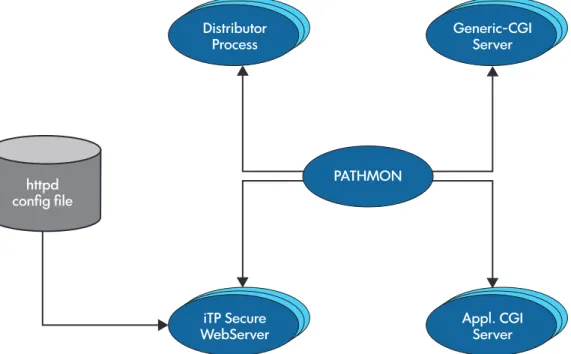
PATHMON Process...31
Active Transaction Pages (ATP)...32
Pathway CGI Server...32
Generic Common Gateway Interface (CGI) Server...32
Servlet Server Class (SSC)...32
Resource Locator Service (RLS)...32
iTP Secure WebServer Admin httpd...32
Administration Server...32
iTP Secure WebServer Encryption...32
2 Installing the iTP Secure WebServer...34
iTP Secure WebServer System Requirements...34
Supported NonStop Systems...34
Required and Optional Software...34
Required Hardware...35
Preparing Your System for the iTP Secure WebServer...35
Event Management Service (EMS) Template Installation...37
Installing and Configuring the iTP Secure WebServer...38
Before You Begin the Installation...38
Beginning the Installation...38
Using DSM/SCM...39
Running the IPSetup Program...39
Copying the iTP Secure WebServer Software from the Distribution Medium...40
Running the Setup Script...40
Setup for TCP/IPv6 support...42
Generate Diffie-Hellman Parameters...43
Setup for IP CIP Support...43
Installing the Resource Locator...44
Installation Considerations...44
Verifying the Configuration...44
Upgrading iTP Secure WebServer online...44
The Ninety-Day Test Certificate...45
Test-starting the Administration Server and the iTP Secure WebServer...46
If You Plan to Use TLS or SSL Encryption...46
If You Are Using the Nonsecure Version...46
3 Planning the iTP Secure WebServer PATHMON Environment...47
Conventional TCP/IP: The Distributor Process...47
TCP/IPv6 and IP CIP:The Auto Accept Feature...47
Migration Considerations For TCP/IPv6 and IP CIP Support...48
Configuring the PATHMON Environment...49
Threading Considerations for the httpd Server...49
Security for the Server's Pathway Environment...50
Who Can Modify the Configuration Files?...50
Who Can Start/Stop the iTP Secure WebServer?...50
What TCP/IP Port Is the Distributor Process Monitoring?...50
Common Gateway Interface (CGI) Application Security Considerations...51
Pathway CGI Server Class Considerations...51
Other Security Considerations...51
Protecting the Key Database File...51
Protecting the Server Password...52
Protecting Core Dumps...52
Protecting Transmission of Key Database Files and Core Dumps...52
4 Configuring for Secure Transport...53
Using the Administration Server Securely...53
Overview of Server Configuration...54
Keyadmin Utility Configuration...54
Server Configuration...54
Managing Certificates...55
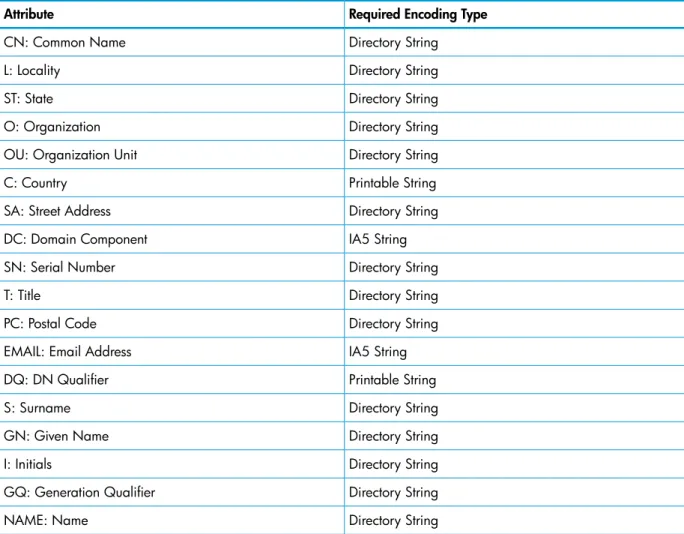
Formatting Distinguished Names (DNs)...55
Using the Keyadmin Utility to Manage Keys and Certificates...56
Using Server Certificate Chains With the iTP Secure WebServer...72
Managing Client Authentication...72
Using the -requireauth Option...73
Using the -requestauth Option...73
Updating TLS and SSL Configuration...74
Controlling Access and Privacy...74
Specifying Content Access Using the Region Command...75
Using TLS and SSL Environment Variables in CGI Programs...75
Controlling Encryption and Integrity Checking...75
Using Ciphers With the AcceptSecureTransport Directive...76
Hashing Ciphers Used by iTP Secure WebServer Ciphers...76
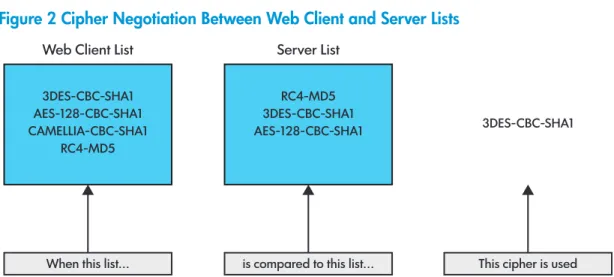
Negotiating Selection Among Available Ciphers...76
Migrating the key database from iTP Secure WebServer 7.0 to 7.2 and later...76
Configuring Trusted Client Root Certificate Database...79
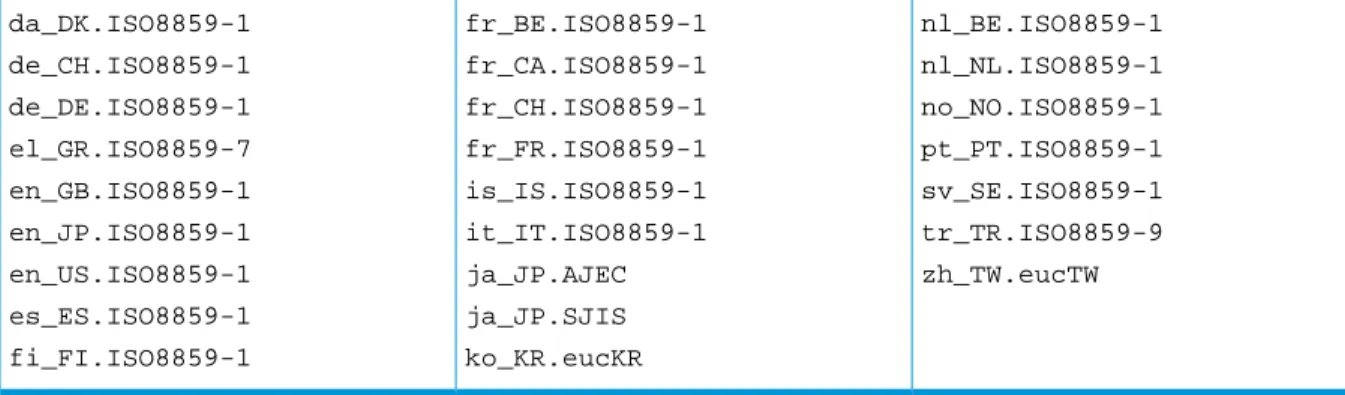
Configuring Support For Certificates with Non-English Characters...79
5 Managing the iTP Secure WebServer Using Scripts...82
The httpd Command...82
Starting the iTP Secure WebServer Using the start Script...83
Stopping the iTP Secure WebServer Using the stop Script...83
Restarting the iTP Secure WebServer Using the restarth Script...83
For TCP/IPv6 and IP CIP Support...83
For Classical TCP/IP Support...84
Restarting the iTP Secure WebServer Using the restart Script...84
Updating the serverclasses Using the updatesc Script...84
Using the httpd Command...85
Syntax...85
Description...87
PATHMON Environment's Autorestart for the iTP Secure WebServer and Related Processes...88
Collecting httpd Statistics Using statscom...88
statscom Command...88
Collecting Webserver Statistics Using timestat script...92
6 Configuring the iTP Secure WebServer...94
Configuring Your Server...94
The httpd Configuration File...94
Configuring Your Server for Use With TCP/IPv6 or IP CIP...97
The Secure Transport Configuration File (httpd.stl.config)...97
Configuring Global Session Key Caching...97
Other Configuration Files...99
Managing Server Contents...99
Understanding How URLs Work...99
Mapping Requests to Contents...99
Establishing User Directories...104
Using Guardian Files...104
Controlling File Caching...105
FileStatsCheckTime...106
CacheTime...106
MaxFileCacheEntries...107
MaxFileCacheContentSize...107
NoCache Region Command...108
Managing Log Files...108
Choosing a Log Format...108
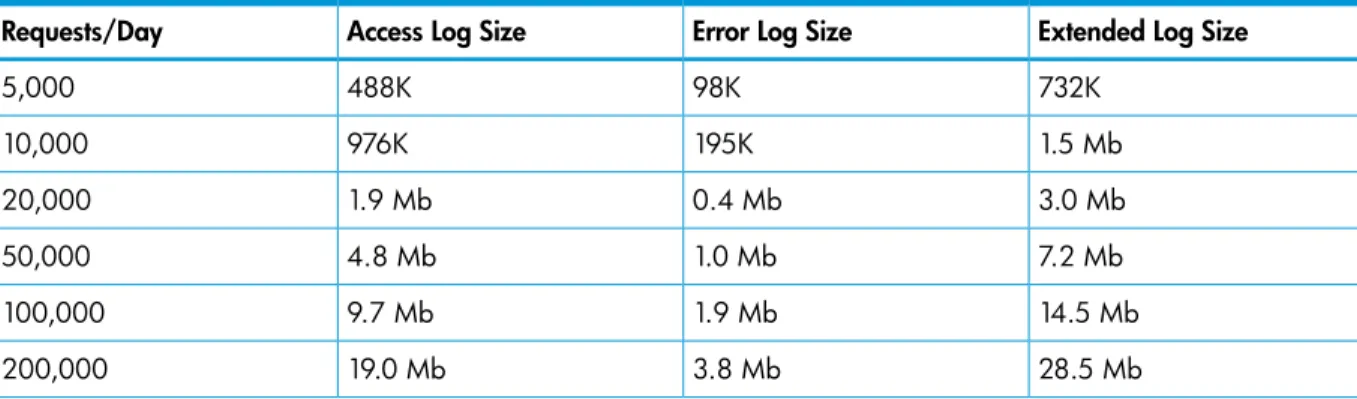
Planning Space for Logs...109
Rotating Log Files...110
Setting Up Server Aliases...111
How Aliases Work...111
Why Aliases Are Useful...111
Setting Up an Alias...112
Controlling Access to the Server...112
Using Region Directives...112
Granting Access by Host Name/IP Address...113
Denying Access by Host Name/IP Address...114
Requiring Client Authentication...114
Administering Passwords...115
Redirecting Access...116
Enabling Automatic Directory Indexing...117
Disabling Logging...118
Using Multiple Region Commands...118
Using Pattern Variables (Lists)...119
Using Conditional Commands...120
Using Tcl Variables...120
Allowing Byte Ranges...122
Implementing Multiple-Host Support...123
Customizing Server Error Messages...126
Setting Up Clickable Images...127
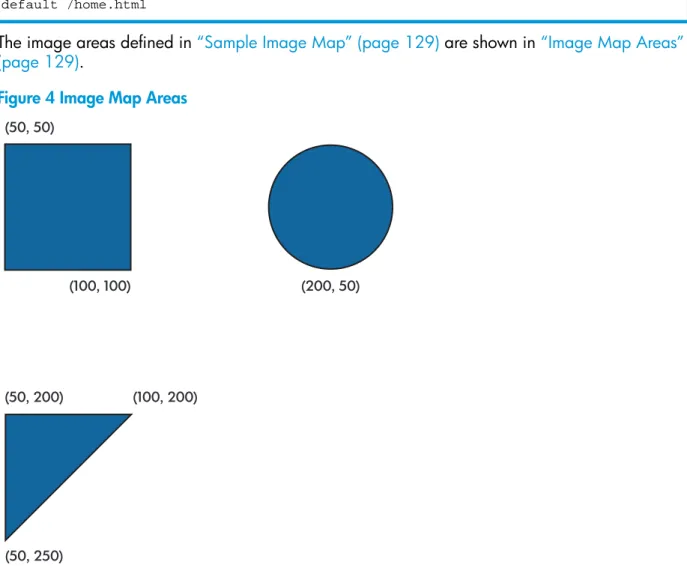
Creating an Image Map File...127
Adding a Hypertext Anchor...128
Testing the Image Setup...129
Setting Up a Server-Side Include (SSI)...130
Evaluating Performance...133
Configuring Multiple Daemons Under Same Pathmon with Alternate Names...135
Specifications for Different Configuration Files...135
Script to Configure Multiple httpds and their Configuration Files...136
7 Using Common Gateway Interface (CGI) Programs...138
CGI Support in the iTP Secure WebServer Environment...139
Generic-CGI Server Class...139
Pathway CGI Server Classes...140
Servlet Server Class (SSC)...141
CGI Configuration and Programming...141
Configuring for CGI Programs...142
MIME Types...142
Mapping MIME Types to Server Classes...143
Server Class Configuration...145
Program Access Restrictions...146
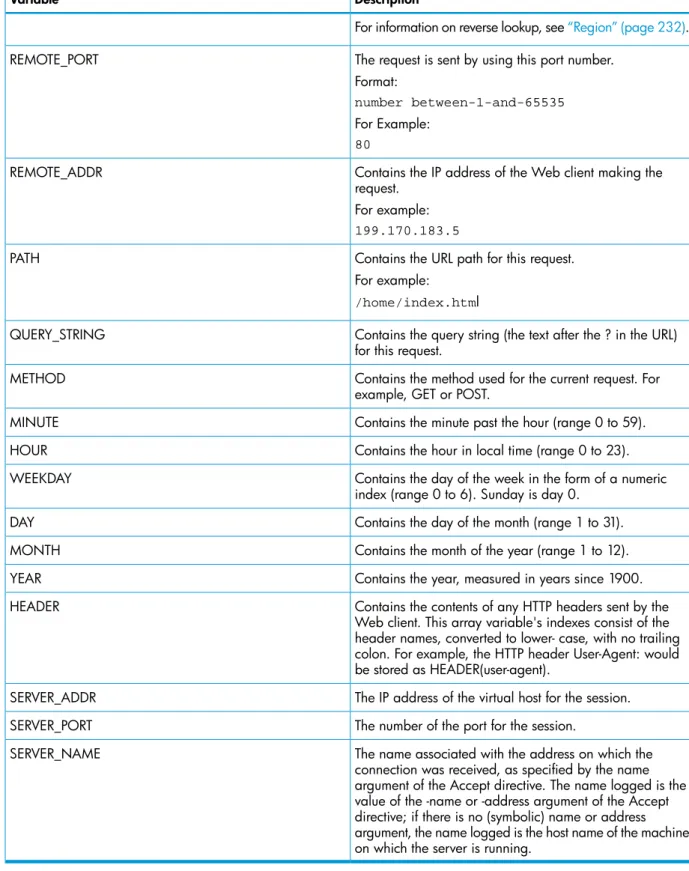
Passing CGI Environment Variables...146
HTTP Header Variables...153
Passing Input...155
Command Line...155
Query Strings...155
Extra Path Information...155
HTML Forms...156
Returning Output...156
Response Headers...157
Server Headers...158
Nonparsed Headers...158
Logging Error Information...158
CGIStandard File Environment...159
Standard Input...159
Standard Output...159
Standard Error...159
Customizing the Standard File Environment...159
CGI Library...159
Pathway CGI Coding Considerations...161
Including the CGI Library...161
Design Guidelines...162
Examples of a Pathway CGI Implementation...162
8 Using NonStop Servlets for JavaServer Pages (NSJSP)...165
9 Using the Resource Locator Service (RLS)...166
Resource Locator Service (RLS) Architecture...166
Configuring the Resource Locator Service (RLS)...166
Defining the Server Class...167
Creating the Database...167
Modifying the Database...169
Building and Installing the Resource Locator Service (RLS)...169
10 Administering Session Identifiers for Anonymous Sessions...170
Anonymous Ticketing...170
Tracking...170
Ticketing and Tracking Example...171
Configuring for Anonymous Ticketing...172
Enabling Session Identifiers...172
Advanced Configuration Options...174
Ticketing Strategies...177
Using Session Identifiers for Reporting...180
Using Tcl Variables for Anonymous Sessions...180
11 Managing the iTP Secure WebServer From Your Browser...182
Administration Server Architecture...182
Installing the Administration Server...183
Invoking the Administration Server...183
Configuring the Administration Server...183
Defining the admin Server Class...184
Defining the admin httpd Server Class...184
Defining the stats-form Server Class...185
Administration ServerScreens...185
Welcome...185
Current Server Information...186
Server Control: Start...187
Server Control: Restart...187
Server Control: Stop...188
View Configuration Files...189
Server Control: Add...189
Server Control: Delete...190
Edit Configuration File...190
View EMS Logs...191
View Server Logs...193
Search Configuration Files...193
OSSCommands...194
iTP WebServer Statistics...194
A Configuration Directives...198
Accept...198 Syntax...198 Description...198 SCF TCP/IP Configuration...199 Default...199 Examples...200 AcceptSecureTransport...200 Syntax...200 Description...200 SCF TCP/IP Configuration...203 Default...203 Examples...204Examples of Secure Transport Protocol Support (Port 4430)...205
Examples of Cipher Support...205
Examples of hashAlgorithm Support...205
AccessLog...206 Syntax...206 Description...206 Default...206 Example...206 AutomatedLogRolloverSize...206 Syntax...206 Description...206 Contents 7
Default...206 Example...207 BigInBufSize...207 Syntax...207 Description...207 Default...207 Example...207 Browser...207 Syntax...207 Description...207 Default...208 Example...208 CacheTime...208 Syntax...208 Description...208 Default...208 Example...208 ClientCADatabase...208 Syntax...208 Description...208 Default...208 Example...209 CombinedLogFormat...209 Syntax...209 Description...209 Default...209 Example...209 DefaultType...209 Syntax...209 Description...209 Default...209 Example...209 DNSCacheSize...209 Syntax...209 Description...209 Default...210 Example...210 DNSExpiration...210 Syntax...210 Description...210 Default...210 Example...210 EncodingType...210 Syntax...210 Description...210 Default...211 Example...211 ErrorLog...211 Syntax...211 Description...211 Default...211 Example...211 ExtendedLog...211 Syntax...211 Description...211 8 Contents
Default...212 Example...212 Filemap...212 Syntax...212 Description...212 Default...213 Example...213 FileStatsCheckTime...213 Syntax...213 Description...213 Default...213 Example...213 HTTPTraceMethodEnable...213 Syntax...213 Description...213 Default...214 Example...214 HeaderFieldSize...214 Syntax...214 Description...214 Default...214 Example...214 IndexFile...214 Syntax...214 Description...214 Default...215 Example...215 InputBufferScale...215 Syntax...215 Description...215 Default...215 Example...215 InputTimeout...215 Syntax...215 Description...215 Default...215 Example...215 KeepAliveHeader...215 Syntax...215 Description...215 Default...216 Example...216 KeepAliveTimeout...216 Syntax...216 Description...216 Default...216 Example...216 KeepAliveMaxRequest...216 Syntax...216 Description...216 Default...217 Example...217 KeyDatabase...217 Syntax...217 Description...217 Contents 9
Default...217 Example...217 LanguagePreference...218 Syntax...218 Description...218 Default...218 Example...218 LanguageSuffix...218 Syntax...218 Description...218 Default...218 Example...219 LoggingServerClass...219 Syntax...219 Description...219 Default...219 Example...219 MaxConnections...219 Syntax...219 Description...219 Default...219 Examples...220 MaxFileCacheContentSize...220 Syntax...220 Description...220 Default...220 Example...220 MaxFileCacheEntries...220 Syntax...220 Description...220 Default...221 Example...221 MaxPostRequestSize...221 Syntax...221 Description...221 Default...221 Example...221 MaxRequestBody...221 Syntax...221 Description...221 Default...222 Example...222 Message...222 Syntax...222 Description...222 Default...223 Example...224 MimeType...224 Syntax...224 Description...224 Default...224 Negotiation...224 Syntax...224 Description...225 Default...225 10 Contents
Example...225 NewEmsMessageFormat...226 Syntax...226 Description...226 Default...226 Examples...226 OutputTimeout...226 Syntax...226 Description...227 Default...227 Example...227 PasswordValidity...227 Syntax...227 Description...227 Default...227 Example...227 Pathmon...227 Syntax...227 Description...227 Examples...230 PathwayMimeMap...230 Syntax...230 Description...230 Examples...230 Pidfile...231 Syntax...231 Description...231 Default...231 Example...231 PutScript...231 Syntax...231 Description...231 RecvBufferScale...232 Syntax...232 Description...232 Default...232 Example...232 Region...232 Syntax...232 Description...233 Region Commands...234
Anonymous Ticket Attributes...242
RegionSet...245 Syntax...245 Description...245 Default...245 Example...245 ReverseLookup...245 Syntax...245 Description...245 Default...245 Example...245 RmtServer...245 Syntax...245 Description...246 Contents 11
Default...246 Example...246 ScriptTimeout...246 Syntax...246 Description...246 Default...246 Example...246 SendBufferScale...246 Syntax...246 Description...246 Default...246 Example...246 Server...247 Syntax...247 Description...247 Server Commands...247 ServerAdmin...252 Syntax...252 Description...252 Default...252 Example...252 ServerPassword...252 Syntax...252 Description...252 Default...253 Example...253 ServerRoot...253 Syntax...253 Description...253 Default...253 Example...253 ServerTokens...253 Syntax...253 Description...253 Default...254 Examples...254 set...254 Syntax...254 Description...254 Default...254 Example...254 SI_Default...254 Syntax...254 Description...254 Default...254 Example...254 SI_Department...254 Syntax...254 Description...255 Default...255 Example...255 SI_Enable...255 Syntax...255 Description...255 Default...255 12 Contents
Example...255 SK_CacheExpiration...255 Syntax...255 Description...255 Default...256 Example...256 SK_CacheSize...256 Syntax...256 Description...256 Default...256 Example...256 SK_GlobalCache...256 Syntax...256 Description...256 Default...256 Example...256 SK_GlobalCacheTimeout...257 Syntax...257 Description...257 Default...257 Example...257 TCPNoDelay...257 Syntax...257 Description...257 Default...257 Examples...257 User...258 Syntax...258 Description...258 Default...258 Example...258 UserDir...258 Syntax...258 Description...258 Default...259 Example...259
B Error Messages...260
C Server Log File Formats...261
Access Log Format...261
Access Log Entry Format...261
Example...262
Error Log Format...262
Hypertext Transfer Protocol (HTTP) Status Codes...262
Extended Log Format...264
Extended Log Entry Format...264
Example...266
Logging through an External ServerClass...266
D Security Concepts...269
Open Network Security...269
Encryption...269
Authentication...270
Cryptographic Techniques...270
Secret Key Systems...270
Public Key Systems...270
Managing Key Certificates...272
Using Certificates...272
Obtaining Certificates...273
Transport Layer Security (TLS)...273
TLS Record Protocol...273
TLS Handshake Protocol...273
Secure Sockets Layer (SSL)...274
What SSL Does...274
SSL 3.0 Protocol Enhancements Over SSL 2.0...274
Deploying TLS and SSL...274
Comparing TLS and SSL...275
Design Goals...275
Relative Advantages...275
E Tool Command Language (Tcl) Basics...276
Tcl Syntax Rules...277 Tcl Commands...277 Script Commands...279
F HTTP/1.1 Feature List...282
G Bibliography...285
Bibliography...285Online Reference Information...285
Glossary...286
Index...290
About This Document
This guide describes the installation, configuration, and management of the Internet Transaction Processing (iTP) Secure WebServer. It covers the nonsecure version (iTP WebServer) and secure version (iTP Secure WebServer). For simplicity, both versions are referred to as iTP Secure WebServer throughout the guide.
This guide provides an overview of the iTP Secure WebServer environment and World Wide Web concepts. It describes how to set up the iTP Secure WebServer, create and modify configuration files, and start the required processes. It also describes the Common Gateway Interface (CGI), HP NonStop™ Servlets for JavaServer Pages (NSJSP), and Servlets 2.5 support for the iTP Secure WebServer environment.
NOTE: This product uses WebServer technology from Open Market, Inc. and secure software technology from the open source community.
Supported Release Version Updates (RVUs)
This publication supports J06.10 and all subsequent J-series RVUs and H06.21 and all subsequent H-series RVUs, until otherwise indicated by its replacement publications.
Intended Audience
The iTP Secure WebServer System Administrator’s Guide is intended for experienced NonStop system administrators and operators who must install, configure, and manage the iTP Secure WebServer on a NonStop system.
The intended user of this guide includes persons who:
• Are an experienced user of NonStop software products and are specifically familiar with the HP NonStop Open System Services (OSS) environment and the PATHCOM interface of HP NonStop TS/MP.
• Have access to and are familiar with the World Wide Web.
• Are familiar with the Common Gateway Interface (CGI/1.1) standard and the Hypertext Transfer Protocol (HTTP/1.0).
• Are familiar with the Java language and tools (if you plan to use Java servlets). • Are familiar with writing and using configuration scripts.
• Are familiar with the TCP/IP family of protocols.
• Are familiar with network security and authentication techniques.
• Can operate a secure computing system. For an introduction to basic network security concepts, see“Security Concepts” (page 269).
If you need more information about NonStop systems, consult these publications before reading this guide:
• H06.nn Release Version Update Compendium and NonStop Systems Introduction for H-Series RVUs if you use an operating system RVU starting with H, for example, H06.
• J06.nn Release Version Update Compendium if you use an operating system RVU starting
with J, for example, J06.
New and Changed Information in This Edition
All the newly added features in this version are supported in J06.17 and all subsequent J-series RVUs and H06.28 and all subsequent H-series RVUs, until otherwise indicated by its replacement publication.
Modified the following sections for the various enhancements in this release: Options for specifying encoding and encryption format for a private key • Exporting a Private Key to a User-defined Disk File (page 69)
• Importing a Private Key into iTP Secure WebServer's Key Database File (page 68) • Migrating the key database from iTP Secure WebServer 7.0 to 7.2 and later (page 76) Start individual serverclasses
• Using the httpd Command (page 85)
• Updating the serverclasses Using the updatesc Script (page 84) • Server Control: Restart (page 187)
Support for new hashing algorithms
• Hashing Ciphers Used by iTP Secure WebServer Ciphers (page 76) • AcceptSecureTransport (page 200)
Differentiate the certificates
• ClientCADatabase (page 208)
• Configuring Trusted Client Root Certificate Database (page 79) • KeyDatabase (page 217)
Limit the POST request size
• MaxPostRequestSize (page 221) • Region (page 232)
Changes for 629959-004 include:
NOTE: All the newly added features in this version are supported in J06.15 and all subsequent J-series RVUs and H06.26 and all subsequent H-series RVUs, until otherwise indicated by its replacement publication.
• Added the section forGenerating Diffie-Hellman Parameters (page 71).
• Updated thehttpdcommand syntax with add and delete options inUsing the httpd Command (page 85).
• Added syntax forvcacheshell entry in Controlling File Caching (page 105).
• Updated the sectionImplementing Virtual Hosts for iTP Secure WebServer (page 125). • Added the section forConfiguring Multiple Daemons Under Same Pathmon with Alternate
Names (page 135).
• Added the section forSpecifications for Different Configuration Files (page 135). • Added the section forScript to Configure Multiple httpds and their Configuration Files
(page 136).
• Added the section forServer Control: Add (page 189). • Added the section forServer Control: Delete (page 190).
• Added a new error message forWhat You Do: EnterPATHMON/Domain Name (page 194).
• Updated two parameters forAcceptSecureTransport (page 200). • Updated Supported Cipher Pairs (by Protocol)Table 30 (page 202). • Added a note forAccessLog (page 206).
• Added the section forHeaderFieldSize (page 214) directive. • Updated the sectionExtendedLog (page 211)directive. Changes for 629959-002 include:
• Added the section for“Implementing Virtual Hosts for iTP Secure WebServer” (page 125) • Updated the section name to“Implementing Virtual Hosts for iTP Secure WebServer” (page 124) • Updated the sections“Configuration Directives” (page 198)and“Logging through an External
ServerClass” (page 266).
• Updated the support for additional mime-types in theTable 15 (page 143), information about the new type of CGI library—Tandem floating-point (libcgi_tandem.a), and various minor corrections.
• Removed the/Enamespace from the“Using Guardian Files” (page 104)Using Guardian Files section, as it is not supported.
Document Organization
Description Section
Describes the iTP Secure WebServer in relation to the NonStop operating system and other HP data communication subsystems.
Chapter 1: Introduction to the iTP Secure WebServer
Describes basic installation steps for iTP Secure WebServer and lists the software and hardware requirements.
Chapter 2: Installing the iTP Secure WebServer
Describes the configuration steps for the Pathway environment.
Chapter 3: Planning the iTP Secure WebServer PATHMON Environment
Describes the configuration steps for Secure Sockets Layer (SSL) within the iTP Secure WebServer environment.
Chapter 4: Configuring for Secure Transport
Describes how to manage the iTP Secure WebServer using scripts provided with the product. It also describes httpd, the command to manage the iTP Secure WebServer.
Chapter 5: Managing the iTP Secure WebServer Using Scripts
Describes configuration steps for the iTP Secure WebServer.
Chapter 6: Configuring the iTP Secure WebServer
Explains how to use the existing Common Gateway Interface (CGI) programs with the iTP Secure WebServer.
Chapter 7: Using Common Gateway Interface (CGI) Programs
It also discusses how to develop CGI applications for better scalability and performance than the conventional CGI. References NonStop Servlets for JavaServer Pages (NSJSP)
System Administrator’s Guide, which describes how to Chapter 8: Using NonStop Servlets for JavaServer Pages
(NSJSP)
develop NSJSP and use them with the iTP Secure WebServer.
Describes how to use RLS to implement the replicated webserver.
Chapter 9: Using the Resource Locator Service (RLS)
Describes how to use the ticketing services of the iTP Secure WebServer.
Chapter 10: Administering Session Identifiers for Anonymous Sessions
Describes how to use the iTP Secure WebServer Administration Server to establish and modify
Chapter 11: Managing the iTP Secure WebServer From Your Browser
configurations, monitor errors and other events, start and stop the iTP Secure WebServer environment, and perform other administrative tasks.
Describes the syntax of each configuration directive and the associated commands and arguments that you can specify in the iTP Secure WebServer configuration files.
Appendix A: Configuration Directives
Description Section
Provides general information about iTP Secure WebServer error reporting. The messages are described in the iTP
Secure WebServer Operator Messages Manual. Appendix B: Error Messages
Describes the formats used in the log files generated by the server.
Appendix C: Server Log File Formats
Introduces the basic concepts relevant to setting up and administering a secure Web server.
Appendix D: Security Concepts
Describes the basic Tcl concepts and language elements.
Appendix E: Tool Command Language (Tcl) Basics
Lists the HTTP/1.1 features that the iTP Secure WebServer supports.
Appendix F: HTTP/1.1 Feature List
List the Bibilography and online reference details.
Appendix G: Bibliography
Notation Conventions
General Syntax Notation
This list summarizes the notation conventions for syntax presentation in this manual. UPPERCASE LETTERS
Uppercase letters indicate keywords and reserved words. Type these items exactly as shown. Items not enclosed in brackets are required. For example:
MAXATTACH
Italic Letters
Italic letters, regardless of font, indicate variable items that you supply. Items not enclosed in brackets are required. For example:
file-name
Computer Type
Computer type letters indicate:
• C and Open System Services (OSS) keywords, commands, and reserved words. Type these items exactly as shown. Items not enclosed in brackets are required. For example: Use the cextdecs.hheader file.
• Text displayed by the computer. For example: Last Logon: 14 May 2006, 08:02:23 • A listing of computer code. For example
if (listen(sock, 1) < 0) { perror("Listen Error"); exit(-1); } Bold Text
Bold text in an example indicates user input typed at the terminal. For example: ENTER RUN CODE
?123
CODE RECEIVED: 123.00
The user must press the Return key after typing the input. [ ] Brackets
Brackets enclose optional syntax items. For example:
TERM [\system-name.]$terminal-name INT[ERRUPTS]
A group of items enclosed in brackets is a list from which you can choose one item or none. The items in the list can be arranged either vertically, with aligned brackets on each side of the list, or horizontally, enclosed in a pair of brackets and separated by vertical lines. For example: FC [ num ] [ -num ] [ text ] K [ X | D ] address { } Braces
A group of items enclosed in braces is a list from which you are required to choose one item. The items in the list can be arranged either vertically, with aligned braces on each side of the list, or horizontally, enclosed in a pair of braces and separated by vertical lines. For example: LISTOPENS PROCESS { $appl-mgr-name }
{ $process-name } ALLOWSU { ON | OFF }
| Vertical Line
A vertical line separates alternatives in a horizontal list that is enclosed in brackets or braces. For example:
INSPECT { OFF | ON | SAVEABEND } … Ellipsis
An ellipsis immediately following a pair of brackets or braces indicates that you can repeat the enclosed sequence of syntax items any number of times. For example:
M address [ , new-value ]… - ] {0|1|2|3|4|5|6|7|8|9}…
An ellipsis immediately following a single syntax item indicates that you can repeat that syntax item any number of times. For example:
"s-char…" Punctuation
Parentheses, commas, semicolons, and other symbols not previously described must be typed as shown. For example:
error := NEXTFILENAME ( file-name ) ; LISTOPENS SU $process-name.#su-name
Quotation marks around a symbol such as a bracket or brace indicate the symbol is a required character that you must type as shown. For example:
"[" repetition-constant-list "]" Item Spacing
Spaces shown between items are required unless one of the items is a punctuation symbol such as a parenthesis or a comma. For example:
CALL STEPMOM ( process-id ) ;
If there is no space between two items, spaces are not permitted. In this example, no spaces are permitted between the period and any other items:
$process-name.#su-name
Line Spacing
If the syntax of a command is too long to fit on a single line, each continuation line is indented three spaces and is separated from the preceding line by a blank line. This spacing distinguishes items in a continuation line from items in a vertical list of selections. For example:
ALTER [ / OUT file-spec / ] LINE [ , attribute-spec ]…
!i and !o
In procedure calls, the !i notation follows an input parameter (one that passes data to the called procedure); the !o notation follows an output parameter (one that returns data to the calling program). For example:
CALL CHECKRESIZESEGMENT ( segment-id !i , error ) ; !o !i,o
In procedure calls, the !i,o notation follows an input/output parameter (one that both passes data to the called procedure and returns data to the calling program). For example:
error := COMPRESSEDIT ( filenum ) ; !i,o !i:i
In procedure calls, the !i:i notation follows an input string parameter that has a corresponding parameter specifying the length of the string in bytes. For example:
error := FILENAME_COMPARE_ ( filename1:length !i:i , filename2:length ) ; !i:i !o:i
In procedure calls, the !o:i notation follows an output buffer parameter that has a corresponding input parameter specifying the maximum length of the output buffer in bytes. For example: error := FILE_GETINFO_ ( filenum !i
, [ filename:maxlen ] ) ; !o:i
Notation for Messages
This list summarizes the notation conventions for the presentation of displayed messages in this manual.
Bold Text
Bold text in an example indicates user input typed at the terminal. For example: ENTER RUN CODE
?123
CODE RECEIVED: 123.00
The user must press the Return key after typing the input. Nonitalic Text
Nonitalic letters, numbers, and punctuation indicate text that is displayed or returned exactly as shown. For example:
Backup Up.
Italic Text
Italic text indicates variable items whose values are displayed or returned. For example: p-register
process-name [ ] Brackets
Brackets enclose items that are sometimes, but not always, displayed. For example: Event number = number [ Subject = first-subject-value ]
A group of items enclosed in brackets is a list of all possible items that can be displayed, of which one or none might actually be displayed. The items in the list can be arranged either vertically, with aligned brackets on each side of the list, or horizontally, enclosed in a pair of brackets and separated by vertical lines. For example:
proc-name trapped [ in SQL | in SQL file system ] { } Braces
A group of items enclosed in braces is a list of all possible items that can be displayed, of which one is actually displayed. The items in the list can be arranged either vertically, with aligned braces on each side of the list, or horizontally, enclosed in a pair of braces and separated by vertical lines. For example:
obj-type obj-name state changed to state, caused by { Object | Operator | Service }
process-name State changed from old-objstate to objstate { Operator Request. }
{ Unknown. } | Vertical Line
A vertical line separates alternatives in a horizontal list that is enclosed in brackets or braces. For example:
Transfer status: { OK | Failed } % Percent Sign
A percent sign precedes a number that is not in decimal notation. The % notation precedes an octal number. The %B notation precedes a binary number. The %H notation precedes a hexadecimal number. For example:
%005400 %B101111 %H2F
P=%p-register E=%e-register
Notation for Management Programming Interfaces
This list summarizes the notation conventions used in the boxed descriptions of programmatic commands, event messages, and error lists in this manual.
UPPERCASE LETTERS
Uppercase letters indicate names from definition files. Type these names exactly as shown. For example:
ZCOM-TKN-SUBJ-SERV lowercase letters
Words in lowercase letters are words that are part of the notation, including Data Definition Language (DDL) keywords. For example:
token-type !r
The !r notation following a token or field name indicates that the token or field is required. For example:
ZCOM-TKN-OBJNAME token-type ZSPI-TYP-STRING. !r !o
The !o notation following a token or field name indicates that the token or field is optional. For example:
ZSPI-TKN-MANAGER token-type ZSPI-TYP-FNAME32. !o
General Syntax Notation
This list summarizes the notation conventions for syntax presentation in this manual. UPPERCASE LETTERS
Uppercase letters indicate keywords and reserved words. Type these items exactly as shown. Items not enclosed in brackets are required. For example:
SELECT
Italic Letters
Italic letters, regardless of font, indicate variable items that you supply. Items not enclosed in brackets are required. For example:
file-name
Computer Type
Computer type letters within text indicate case-sensitive keywords and reserved words. Type these items exactly as shown. Items not enclosed in brackets are required. For example: myfile.sh
Bold Text
Bold text in an example indicates user input typed at the terminal. For example: ENTER RUN CODE
?123
CODE RECEIVED: 123.00
The user must press the Return key after typing the input. [ ] Brackets
Brackets enclose optional syntax items. For example: DATETIME [start-field TO] end-field
A group of items enclosed in brackets is a list from which you can choose one item or none. The items in the list can be arranged either vertically, with aligned brackets on each side of the list, or horizontally, enclosed in a pair of brackets and separated by vertical lines. For example:
DROP SCHEMA schema [CASCADE] [RESTRICT]
DROP SCHEMA schema [ CASCADE | RESTRICT ] { } Braces
Braces enclose required syntax items. For example: FROM { grantee[, grantee]...}
A group of items enclosed in braces is a list from which you are required to choose one item. The items in the list can be arranged either vertically, with aligned braces on each side of the list, or horizontally, enclosed in a pair of braces and separated by vertical lines. For example: INTERVAL { start-field TO end-field }
{ single-field }
INTERVAL { start-field TO end-field | single-field } | Vertical Line
A vertical line separates alternatives in a horizontal list that is enclosed in brackets or braces. For example:
{expression | NULL} … Ellipsis
An ellipsis immediately following a pair of brackets or braces indicates that you can repeat the enclosed sequence of syntax items any number of times. For example:
ATTRIBUTE[S] attribute [, attribute]...
{, sql-expression}...
An ellipsis immediately following a single syntax item indicates that you can repeat that syntax item any number of times. For example:
expression-n…
Punctuation
Parentheses, commas, semicolons, and other symbols not previously described must be typed as shown. For example:
DAY (datetime-expression) @script-file
Quotation marks around a symbol such as a bracket or brace indicate the symbol is a required character that you must type as shown. For example:
"{" module-name [, module-name]... "}" Item Spacing
Spaces shown between items are required unless one of the items is a punctuation symbol such as a parenthesis or a comma. For example:
DAY (datetime-expression) DAY(datetime-expression)
If there is no space between two items, spaces are not permitted. In this example, no spaces are permitted between the period and any other items:
myfile.sh Line Spacing
If the syntax of a command is too long to fit on a single line, each continuation line is indented three spaces and is separated from the preceding line by a blank line. This spacing distinguishes items in a continuation line from items in a vertical list of selections. For example:
match-value [NOT] LIKE pattern [ESCAPE esc-char-expression]
Related Information
TCP/IP Manuals
For information specific to managing the TCP/IP subsystem, see the following documents:
• TCP/IP Configuration and Management Manual describes the installation, configuration, and
management of the NonStop TCP/IP subsystem. This manual is designed for system managers, operators, and others who require a basic understanding of the HP TCP/IP implementation. • TCP/IPv6 Configuration and Management Manual describes the installation, configuration,
and management of the NonStop TCP/IPv6 subsystem. This manual is designed for system managers, operators, and others who require a basic understanding of the HP TCP/IPv6 implementation.
• Cluster I/O Protocols (CIP) Configuration and Management Manual describes HP NonStop
Cluster I/O Protocols (CIP) subsystem as well as procedures for configuring, managing, and migrating to CIP. This manual is designed for system managers, operators, and others who require a basic understanding of the HP NonStop CIP implementation.
Open System Services (OSS) Manuals
For information specific to the OSS environment, see the following documents:
• Open System Services User’s Guide describes the Open System Services (OSS) environment:
the shell, file-system, and user commands.
• Open System Services Installation Guide describes how to install and configure the NonStop
OSS environment.
• Open System Services Management and Operations Guide describes how to manage and
operate the NonStop OSS environment.
NonStop TS/MP Manuals
For information specific to managingPATHMONenvironments, see the following documents: • TS/MP System Management Manual discusses the PATHCOM and TACL commands used to
configure and managePATHMON environments. This manual also includes manageability guidelines, information about monitoring and tuning a PATHMON environment to optimize performance, and methods for diagnosing and correcting problems.
• TS/MP Management Programming Manual describes how to start, configure, and manage
PATHMONenvironments programmatically and describes the event messages that report errors and other occurrences of interest to operators.
NonStop Java Manuals
For information about the features of the NonStop Server for Java, see the following documents: • NonStop Server for Java (NSJ) Programmer’s Reference
And the following Java manuals:
• Java Development Kit Documentation
• Java Language Specification Documentation
If you plan to use NonStop Server for Java with NonStop SQL/MP, see the current NonStop SQL/MP manual set.
Other Related Manuals
The following manuals contain additional information about NonStop systems:
• HP Integrity NonStop NS-Series Planning Guide describes how to plan and configure a
NonStop NS-series server. This guide describes the ServerNet system area network (ServerNet SAN) and the modular Integrity NonStop NS-series system hardware, and it shows example configurations of the modular hardware. The guide introduces the control, configuration, and maintenance tools used in Integrity NonStop NS-series systems, and it gives an overview of the installation planning. The guide intended for the personnel responsible for planning the installation, configuration, and maintenance of the server and the software environment. • H06.nn Release Version Update Compendium provides a summary of the products that have
major changes in the H06.nn RVU, including the products’ new features, migration issues, and fallback considerations. This document explains how to migrate to an H-series RVU affects installation, configuration, operations, system management, maintenance, applications, networks, and databases.
• HP Integrity NonStop BladeSystem Planning Guide describes how to plan and configure a
HP Integrity NonStop BladeSystem server. This guide describes the ServerNet system area network (ServerNet SAN) and the modular Integrity NonStop BladeSystem hardware, and provides examples of system configurations to assist you in planning for installation of a new HP Integrity BladeSystem server. The guide introduces the control, configuration, and
maintenance tools used in HP Integrity NonStop BladeSystem servers, and gives an overview
of the installation planning. The guide is for the personnel responsible for planning the installation.
• J06.nn Release Version Update Compendium provides a summary of the products that have
major changes in the J06.nn RVU, including the products' new features, migration issues, and fallback considerations. This document is for system managers or anyone who needs to understand how migrating to a J-series RVU affects installation, configuration, operations, system management, maintenance, applications, networks, and databases.
• iTP Active Transaction Pages (iTP ATP) Programmer’s Guide describes how to use iTP Active
Transaction Pages (iTP ATP), a server-side JavaScript environment for NonStop Servers. The manual includes instructions for installing iTP ATP and for using ATP objects to provide Web-based interfaces to existing NonStop TS/MP, NonStop TUXEDO, NonStop SQL/MP, and sockets applications.
Publishing History
Publication Date Product Version
Part Number
August 2010 iTP Secure WebServer (Release 7.2)
629959-001
February 2011 iTP Secure WebServer (Release 7.3)
629959-002
February 2013 iTP Secure WebServer (Release 7.4)
629959-003
May 2013 iTP Secure WebServer (Release 7.4)
629959-004
May 2013 iTP Secure WebServer (Release 7.4)
629959-005
February 2014 iTP Secure WebServer (Release 7.5)
629959-006
HP Encourages Your Comments
HP encourages your comments concerning this document. We are committed to providing documentation that meets your needs. Send any errors found, suggestions for improvement, or compliments [email protected].
Include the document title, part number, and any comment, error found, or suggestion for improvement you have concerning this document.
1 Introduction to the iTP Secure WebServer
The iTP Secure WebServer provides a full range of services for running an online commercial or informational enterprise on the Web. In addition to basic Web-related services, the iTP Secure WebServer provides other important services including access control, enhanced logging, customized error messaging, and automatic directory indexing.
NOTE: All references to the iTP Secure WebServer in this manual indicate 7.2 and later versions. Topics discussed in this section include:
• “Features and Standards Supported by iTP Secure WebServer” (page 27) • “iTP Secure WebServer Architecture” (page 29)
• “iTP Secure WebServer Encryption” (page 32) The iTP Secure WebServer key features include: • High performance
The iTP Secure WebServer's high-performance, multithreaded architecture provides low-latency response to multiple clients simultaneously. Persistent connections can provide significant performance gains in comparison with a separate connection for each request.
• Caching at several levels
To improve performance, the iTP Secure WebServer caches files it accesses. Disk file access is one of the most common and expensive operations in a Web server. Therefore keeping these files in memory can save processor utilization, and improve overall performance. In addition to file opens that are already cached, the file information, as well as the actual file content, can also be cached.
• Encryption and authentication flexibility
The iTP Secure WebServer supports the use of HTTP, TLS, and SSL. Secure HTTP supports the simultaneous use of both the SSL/TLS and HTTP protocols. These options give you maximum flexibility in protecting the privacy and integrity of your server's Einteractions with clients. The iTP Secure WebServer implements both encryption and digital signatures.
• Flexible access control
You can control access to the iTP Secure WebServer on the basis of such factors as host name, time of day, user name, browser type and version, and authentication method.
• High availability
The iTP Secure WebServer uses HP NonStop TS/MP to ensure high availability. NonStop TS/MP enables you to run, as a server class, several instances of the same process. You can configure NonStop TS/MP to create new processes as workload increases and to restart any process that fails.
• Extensibility
You can enrich your WebServer environment by creating applications that use CGI, Java Servlets, and JavaServer Pages. The iTP Secure WebServer supports both conventional CGI applications andpersistent applications by using the parallel processing benefits of NonStop TS/MP. You can write applications in any of several popular programming languages, including Java. With the companion product iTP Active Transaction Pages (ATP), you can also use server-side JavaScript to developWeb-based interfaces for NonStop TS/MP (Pathway), NonStop SQL/MP, NonStop TUXEDO, and TCP/IP sockets applications.
• Enhanced logging facilities
The iTP Secure WebServer provides an extended log format (ELF) that includes the access, error, and security information of each request. ELF also provides fields for logging the Web client type, the referring URL, and the request begin and end times. The fields are all labeled, making the fields easy to parse and new fields easy to add. The server also supports the Common Log Format (CLF) widely used by other Web servers.
The iTP Secure WebServer does not support the PTrace utility. • Enhanced event reporting
The iTP Secure WebServer and many related components report events to the Event
Management Service (EMS). Messages identify the iTP Secure WebServer subsystem,PATHMON name, and the type of event that occurred.
• Resource Locator Service (RLS)
This service enables you to define multiple Web servers to be used interchangeably for access to the same URLs. The requester need not know which server handled a request.
• Online-Upgrade
iTP Secure Webserver can be upgraded to a newer version with zero downtime. The
online-upgrade utility enables you to upgrade the iTP Secure WebServer without bringing the Web server down. This is achieved by bringing one Pathmon down and upgrading webserver objects with those of the newer version, while the other Pathmon serves the requests with older Web server objects. This process is repeated to upgrade the other PATHMON.
Features and Standards Supported by iTP Secure WebServer
• Standards compliance
The iTP Secure WebServer complies fully with:
◦
Common Gateway Interface (CGI/1.1)◦
Java Servlets 2.5 and JavaServer Pages 2.1 APIs◦
Hypertext Transfer Protocol (HTTP/1.0 and required features of HTTP/1.1)◦
The Secure Hypertext Transfer Protocol (Secure HTTP)◦
Transport Layer Security (TLS 1.0, TLS 1.1, and TLS 1.2)◦
Secure Sockets Layer (SSL 3.0)NOTE: Support for the TLS/SSL Secure Transport Protocols include support for user-specified combinations of encryption. Webmasters can specify the security algorithms (ciphers) that they want the iTP Secure WebServer to use.
The set of protocols that can be supported by a single instance of the iTP Secure WebServer now consists of HTTP, TLS, and SSL.
• Caching of session keys, encompassing all the secure transport protocols, including SSL 3.0, TLS 1.0, TLS 1.1, and TLS 1.2.
• Global session key caching provides increased overall SSL performance by allowing a cache of TLS/SSL session keys to be shared amongst all instances of the httpd serverclass, thereby maximizing the cache hits and minimizing the processor and network resources required for establishing TLS/SSL connections to the NonStop platform.
• X509 version 3.0 certificates
• Client authentication in SSL 3.0, TLS 1.0, TLS 1.1, and TLS 1.2.
The server can request or require a Web client to authenticate itself and can restrict access based on client-authentication information by using region commands or CGI variables. • Digest access authentication
Provides a challenge/response authentication mechanism for additional security; the user's password is not sent over the network.
• Certificate chains
The iTP Secure WebServer uses the SSL 3.0 and TLS protocol to enable you to send certificate chains to and from clients. By using certificate chains, you can establish a certificate hierarchy that is more than two certificates deep.
• Support for security certificates with non-English characters
iTP Secure WebServer supports security certificates with UTF8 encoded DN (Distinguished Name) strings. With this feature customers can use security certificates, which contain non-English characters in the DN.
• Session tracking and authentication
The iTP Secure WebServer includes built-in support for ticketing, a technique for user-session tracking. The iTP Secure WebServer issues anonymous tickets.
• Virtual hosts
The iTP Secure WebServer supports multiple domains within a single instance of the iTP Secure WebServer, including the ability to return customized content based on the destination domain name. Several configuration directives and configuration directives options (for example, Region) are provided to support this capability (for example, Accept).
• Built-in clickable images
You can create image maps for clickable images, enabling users to easily navigate to other pages.
• National Center for Supercomputing Applications (NCSA) format in image maps
The iTP Secure WebServer supports NCSA-formatted image-map files in addition to the CERN format. The iTP Secure WebServer also provides support for the point directive in
NCSA-formatted image maps. • Byte-range protocol
The iTP Secure WebServer supports the proposed Byte Range Retrieval Extension to HTTP. This means, for example, that the iTP Secure WebServer can send Adobe Portable Document Format (PDF) documents one page at a time, rather than an entire document at once, to users of the Adobe Acrobat Reader version 3.0 or later. This method permits high-quality PDF documents to be displayed like HTML documents.
• Content encoding (compression) types
This feature enables the iTP Secure WebServer to return the proper encoding type for compressed files.
• Administration server
The iTP Secure WebServer Administration Server provides a Web-browser interface for defining the iTP Secure WebServer configuration, starting and stopping the iTP Secure WebServer, and monitoring noteworthy events such as errors.
• Statistics collection through command-line
iTP Secure WebServer provides a command-line utility,statscom, to collect httpd statistics. This utility is run using the command line and can be run by both administrators and normal users. For more information, see“Collecting httpd Statistics Usingstatscom” (page 88). • PUT, OPTIONS, and TRACE request methods
A browser or Web client (using HTTP/1.1) uses the PUT request method to replace or create the content at a specified location. The iTP Secure WebServer accepts PUT requests and enables you to specify a script to perform validation before permitting an update. A browser or Web client uses the OPTIONS request method to determine the options or requirements associated with a resource, or the capabilities of a server, without necessarily retrieving or acting on the resource.
A browser or Web client uses the TRACE method to see the data that is being received at the other end of the request chain. The data can then be used for testing or diagnostic information. • Persistent connections
Rather than establish a new TCP/IP connection for each URL (for instance a new connection to retrieve an embedded graphic) the iTP Secure WebServer allows the establishment of a persistent connection for a set of related requests; you can set a timeout or specify the maximum number of requests per connection.
• Chunked-transfer encoding
When a browser or Web client cannot anticipate the length of a request, it can transmit the data in chunks to the iTP Secure WebServer. The iTP Secure WebServer reassembles the request and processes it.
The iTP Secure WebServer supports chunked-transfer encoding. • Content negotiation
When a page is available in multiple representations (for example, if the text is available in multiple languages, or a file is available in different character sets or compression formats), the iTP Secure WebServer can select among those representations on the basis of information transmitted with each request or specified in the iTP Secure WebServer configuration.
iTP Secure WebServer Architecture
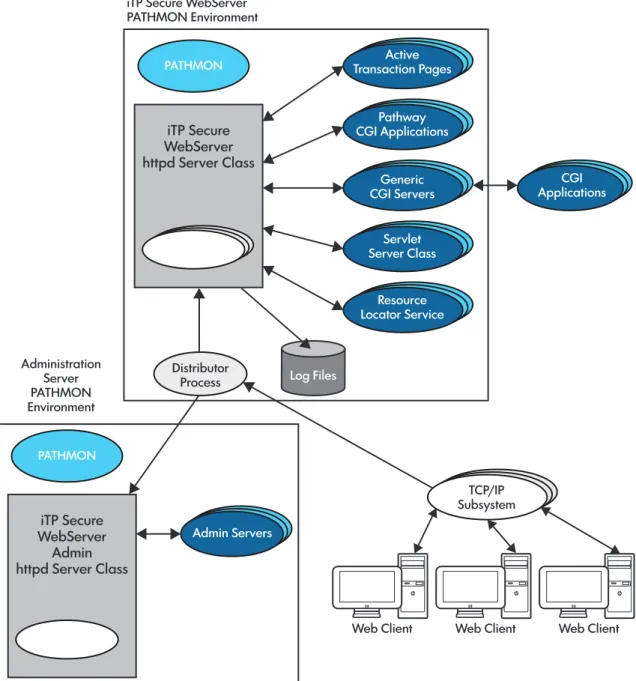
Figure“iTP Secure WebServer Architecture” (page 30)shows the architecture for a conventional TCP/IP environment. For information about other products, you can use in the iTP Secure WebServer environment, see“iTP Secure WebServer Encryption” (page 32).
If you use the new TCP/IPv6 or IP CLIM TCP/IP product, the architectural environment changes slightly. Running with the Auto-Accept feature, an iTP Secure WebServer no longer needs the Distributor component. The httpd servers assumes the listening in addition to the distributing functions of the Distributor. The Distributor server class will be completely removed from the PATHWAY environment. All the necessary process hops will be removed, resulting in improved performance.
Figure 1 iTP Secure WebServer Architecture PATHMON Log Files Distributor Process Administration Server PATHMON Environment
iTP Secure WebServer PATHMON Environment Active Transaction Pages Pathway CGI Applications Generic
CGI Servers ApplicationsCGI
Admin Servers TCP/IP Subsystem Servlet Server Class Resource Locator Service
Web Client Web Client Web Client
iTP Secure WebServer httpd Server Class PATHMON iTP Secure WebServer Admin httpd Server Class
Web Clients
Web clients, such as browsers, are programs that provide a graphical user interface (GUI) to Web servers such as the iTP Secure WebServer.
TCP/IP Subsystem
The HP NonStop TCP/IP subsystem enables processes on a NonStop System to communicate using the TCP/IP protocol. There are three versions of TCP/IP support available: conventional TCP/IP, TCP/IPv6, and IP CLIM.
Conventional TCP/IP
Conventional TCP/IP has one listening process on each port. The conventional TCP/IP connections are managed by the Distributor process. The Distributor receives all incoming requests for new connections from the TCP/IP processes and used to previously distribute them to the iTP Secure WebServer, using the NonStop TS/MP Pathsend facility. Beginning iTP WebServer 4.1, the Pathsend facility were removed.
TCP/IPv6
TCP/IPv6 has multiple listener sockets on the same port. TCP/IPv6 allows the server direct access to the communication environment from their own processors instead of having to communicate via the processor that contains the HP TCP/IP process. This is done by linking to a system library containing the TCP/IP procedures and allowing the server to call the functions that are performing TCP/IP-related processing in its own context.
Running with the Auto-Accept feature, an iTP Secure WebServer no longer requires its Distributor component. The httpd servers assumes the listening in addition to the distributing functions of the Distributor. The Distributor server class is completely removed from the PATHWAY environment. Running the iTP Secure WebServer relies on the properly configured TCP/IPv6 environment. Every processor specified in the Server CPUS command (in the httpd.config configuration file) must be enabled to run TCP/IPv6. The TCP6MAN must be properly configured and running. As a result, a TCP6MON (the monitor process) runs on every processor specified in the Server's processor command.
Unlike the conventional TCP/IP subsystem, the TCP/IPv6 enables iTP Secure WebServer to create a listening socket on each of these processors. By creating a listening socket on each of these processors, the httpd servers provide the listening capability for themselves. Therefore, mixing TCP/IPv6 with conventional TCP/IP subsystems is not permissible. If both, TCP6SAM process and conventional TCP/IP process are specified as the transport service providers, the Auto-Accept feature will not be enabled. The iTP Secure WebServer will be running as a conventional TCP/IP configuration.
IP CIP
The iTP Secure WebServer works the same way with IP CIP as it does with TCP/IPv6. However, IP CIP enables all the httpd servers to assume the listening role (as opposed to one per processor in TCP/IPv6).
iTP Secure WebServer httpd
The iTP Secure WebServer httpd has two main functions:
• A file server. The httpd process transfers and stores files, such as HTML documents. • A message-switching facility. The httpd process forwards messages from Web clients to
application programs.
The httpd process is implemented as a server class in NonStop TS/MP. Therefore multiple httpd processes can execute in parallel; the number of processes fluctuates automatically in response to changes in workload. NonStop TS/MP can also restart a server process that fails. (The iTP Secure WebServer uses the default value of the PATHCOM AUTORESTART parameter.)
PATHMON
Process
ThePATHMONprocess provides centralized monitoring and control of aPATHMONenvironment consisting of server classes and other types of objects. You establish the operational parameters for thePATHMONenvironment, including the characteristics of individual server classes, by creating aPATHMONconfiguration file. Thereafter, you can use the PATHCOM utility to make configuration changes and obtain information from thePATHMONprocess.
MultiplePATHMONenvironments can run on the same NonStop system. For example, the iTP Secure WebServer Administration Server has its ownPATHMONenvironment, separate from the iTP Secure WebServers environments it manages. (If you have multiple iTP Secure WebServer environments on the same system, you still need only onePATHMONenvironment for the Administration Server.) EachPATHMONenvironment has a separate, uniquely named PATHMONprocess.
Active Transaction Pages (ATP)
Active Transaction Pages (ATP) provides a server-side JavaScript environment for HP NonStop Systems. You can use ATP objects to provide Web-based interfaces to existing NonStop TS/MP, NonStop TUXEDO, NonStop SQL/MP, and sockets applications.
For further information, see the iTP Active Transaction Pages (iTP ATP) Programmer's Guide.
NOTE: The iTP Secure WebServer does not support Microsoft Active Server Pages or ADO.
Pathway CGI Server
The Pathway CGI extensions are a set of utility procedures that let you develop CGI applications as NonStop TS/MP server classes or integrate existing NonStop TS/MP applications into the iTP Secure WebServer environment.
Generic Common Gateway Interface (CGI) Server
CGI is a standard for applications that interface with Web servers. CGI applications can be written in a variety of computer languages (or scripts) including C, Korn Shell, and others. The iTP Secure WebServer provides a generic CGI interface that fully conforms to the NCSA CGI/1.1 standard. For more information, see“Using Common Gateway Interface (CGI) Programs” (page 138).
Servlet Server Class (SSC)
The Servlet Server Class (SSC), also known as the Web Container, enables you to write CGI applications as Java servlets. The servlets execute in SSC processes, which are scalable and persistent because they run under NonStop TS/MP.
Resource Locator Service (RLS)
RLS enables you to implement replicated Web servers, to be used interchangeably and transparently for access to the same content and services. The Web servers run on the same or different platforms; RLS chooses the best-performing server to satisfy each request.
iTP Secure WebServer Admin httpd
The admin httpd process provides the interface between your Web client and the iTP Secure WebServer Administration Server. It is the same program as the iTP Secure WebServer httpd but runs in the iTP Secure WebServer AdministrationPATHMONenvironment.
Administration Server
The Administration Server enables you to establish and modify configurations, and control and monitor one or more iTP Secure WebServer environments, from a Web client.
iTP Secure WebServer Encryption
The iTP Secure WebServer uses the following types of encryption: • Transport Layer Security (TLS)
• Secure Socket Layer (SSL)
Because the iTP Secure WebServer is compliant with the TLS 1.0, TLS 1.1, TLS 1.2 and SSL 3.0 standards, you do not have any additional software or hardware to use the TLS and SSL encryption. The TLS and SSL protocols enable a Web client and server to authenticate each other and enable both partners to protect exchanged data using private encryption keys that are used for a single session, and then discarded. A Web client or server can be authenticated only by presenting a certificate obtained from a recognized Certificate Authority (CA).
You can use the TLS or SSL encryption by generating a key pair for the server, obtaining a certificate from a CA, and installing and configuring the key pair. For more information, see“Using the Keyadmin Utility to Manage Keys and Certificates” (page 56).
2 Installing the iTP Secure WebServer
This section describes the perquisites you must have for your NonStop system to run the iTP Secure WebServer and explains how to install and configure it. This section also provides a test procedure that you can use to verify configuration and to perform server testing.
Topics discussed in this section include:
• “iTP Secure WebServer System Requirements” (page 34)
• “Preparing Your System for the iTP Secure WebServer” (page 35) • “Event Management Service (EMS) Template Installation” (page 37) • “Installing and Configuring the iTP Secure WebServer” (page 38) • “Verifying the Configuration” (page 44)
• “The Ninety-Day Test Certificate” (page 45)
• “Test-starting the Administration Server and the iTP Secure WebServer” (page 46) • “If You Plan to Use TLS or SSL Encryption” (page 46)
• “If You Are Using the Nonsecure Version” (page 46)
iTP Secure WebServer System Requirements
The iTP Secure WebServer runs on a variety of NonStop systems and is supported by standard NonStop subsystems and local area network (LAN) controllers.
Supported NonStop Systems
The iTP Secure WebServersupports NS-series (Integrity servers and BladeSystem servers).
Required and Optional Software
These HP NonStop product versions are required for using the iTP Secure WebServer:
• NonStop operating system version J06.10 or later J-series RVUs and H06.21 or later H-series RVUs. For information about installing the NonStop operating system, see the INSTALL User's
Guide or the DSM/SCM User's Guide.
• Open System Services (OSS) file system. For information on creating an OSS environment, see the Open System Services Installation Guide.
• TCP/IP, including the Sockets library and SCF. The IP addresses of both the iTP Secure WebServer and the NonStop system must be registered on the Domain Name Server (DNS) of your LAN.
For information about installing and configuring TCP/IP and DNS, see the TCP/IP Configuration
and Management Manual.
For information about installing and configuring TCP/IPv6, see the TCP/IPv6 Configuration
and Management Manual.
For information about installing and configuring IP CIP, see the Cluster I/O Protocols (CIP)
Configuration and Management Manual.
• NonStop TS/MP subsystem, withPATHMONand Pathsend features. For information on installing and configuring this subsystem, see the TS/MP System Management Manual.
• NonStop SQL/MP H01, including TSQLEXE, TSQLCAT, TSQLUTI, TSQLFIL, and TSQLMSG. This product is required only if you will be using the Resource Locator Service (RLS).