arXiv:1102.1523v1 [cs.MS] 8 Feb 2011
The NumPy array: a structure for efficient
numerical computation
Stéfan van der Walt, Stellenbosch University South Africa
S. Chris Colbert, Enthought USA
Gael Varoquaux, INRIA Saclay France
This article is published inIEEE Computing in Science and Engineering. Please refer to the published version if accessible, as it contains editor’s improvements. (c) 2011 IEEE.∗
In the Python world, NumPy arrays are the stan-dard representation for numerical data. Here, we show how these arrays enable efficient implemen-tation of numerical compuimplemen-tations in a high-level language. Overall, three techniques are applied to improve performance: vectorizing calculations, avoiding copying data in memory, and minimizing operation counts.
We first present the NumPy array structure, then show how to use it for efficient computation, and finally how to share array data with other li-braries.
Introduction
The Python programming language provides a rich set of high-level data structures: lists for enu-merating a collection of objects, dictionaries to build hash tables, etc. However, these structures are not ideally suited to high-performance numer-ical computation.
In the mid-90s, an international team of volun-teers started to develop a data-structure for effi-cient array computation. This structure evolved into what is now known as the N-dimensional NumPy array.
The NumPy package, which comprises the NumPy array as well as a set of accompanying mathematical functions, has found wide-spread adoption in academia, national laboratories, and industry, with applications ranging from gaming to space exploration.
∗Personal use of this material is permitted. Permission
from IEEE must be obtained for all other users, includ-ing reprintinclud-ing/ republishinclud-ing this material for advertisinclud-ing or promotional purposes, creating new collective works for resale or redistribution to servers or lists, or reuse of any copyrighted components of this work in other works.
A NumPy array is a multidimensional, uniform collection of elements. An array is character-ized by the type of elements it contains and by its shape. For example, a matrix may be repre-sented as an array of shape (M×N) that contains
numbers, e.g., floating point or complex numbers. Unlike matrices, NumPy arrays can have any dimensionality. Furthermore, they may contain other kinds of elements (or even combinations of elements), such as booleans or dates.
Underneath the hood, a NumPy array is really just a convenient way of describing one or more blocks of computer memory, so that the numbers represented may be easily manipulated.
Basic usage
Throughout the code examples in the article, we assume that NumPy is imported as follows:
import numpy as np
Code snippets are shown as they appear inside an [IPython] prompt, such as this:
In [3]: np.__version__
Out [3]: ’1.4.1’
Elements contained in an array can be indexed us-ing the[]operator. In addition, parts of an array may be retrieved using standard Python slicing of the form start:stop:step. For instance, the first two rows of an arrayxare given byx[:2, :] or columns 1 through 3 by x[:, 1:4]. Similarly, every second row is given by x[::2, :]. Note that Python uses zero-based indexing.
The structure of a NumPy array: a view on memory
A NumPy array (also called an “ndarray”, short for N-dimensional array) describes memory, using the following attributes:
Data pointer the memory address of the first byte in the array.
Data type description the kind of elements con-tained in the array, for example floating point numbers or integers.
Shape the shape of the array, for example (10, 10)for a ten-by-ten array, or(5, 5, 5) for a block of data describing a mesh grid of x-, y-and z-coordinates.
Strides the number of bytes to skip in memory to proceed to the next element. For a (10, 10) array of bytes, for example, the strides may be (10, 1), in other words: proceed one byte to get to the next column and ten bytes to locate the next row.
Flags which define whether we are allowed to modify the array, whether memory layout is C- or Fortran-contiguous1
, and so forth. NumPy’s strided memory model deserves particular attention, as it provides a pow-erful way of viewing the same memory in different ways without copying data. For example, consider the following integer array:
# Generate the integers from zero to eight and # re pack them into a 3x3 array
In [1]: x = np.arange(9).reshape((3, 3)) In [2]: x Out[2]: array([[0, 1, 2], [3, 4, 5], [6, 7, 8]]) In [3]: x.strides Out[3]: (24, 8)
On our 64-bit system, the default integer data-type occupies 64-bits, or 8 bytes, in mem-ory. The strides therefore describe skipping 3 integers in memory to get to the next row and one to get to the next column. We can
1
In C, memory is laid out in “row major” order, i.e., rows are stored one after another in memory. In Fortran,
columnsare stored successively.
now generate a view on the same memory where we only examine every second element.
In [4]: y = x[::2, ::2] In [5]: y Out[5]: array([[0, 2], [6, 8]]) In [6]: y.strides Out[6]: (48, 16)
The arrays x and y point to the same memory (i.e., if we modify the values in ywe also modify those in x), but the strides for y have been changed so that only every second element is seen along either axis. yis said to be aviewonx:
In [7]: y[0, 0] = 100 In [8]: x Out[8]: array([[100, 1, 2], [ 3, 4, 5], [ 6, 7, 8]])
Views need not be created using slicing only. By modifying strides, for example, an array can be transposed or reshaped at zero cost (no memory needs to be copied). Moreover, the strides, shape and dtype attributes of an array may be specified manually by the user (provided they are all compatible), enabling a plethora of ways in which to interpret the underlying data.
# Transpose the array, using the shorthand "T" In [9]: xT = x.T In [10]: xT Out[10]: array([[100, 3, 6], [ 1, 4, 7], [ 2, 5, 8]]) In [11]: xT.strides Out[11]: (8, 24)
# Change the shape of the array In [12]: z = x.reshape((1, 9)) In [13]: z
Out[13]: array([[100, 1, 2, 3, 4, 5, 6, 7, 8]]) In [14]: z.strides
Out[14]: (72, 8)
# i.e., for the two-dimensional z, 9 * 8 bytes # to skip over a row of 9 uint8 elements, # 8 bytes to skip a single element
# View data as bytes in memory rather than # 64bit integers In [15]: z.dtype = np.dtype(’uint8’) In [16]: z Out[17]: array([[100, 0, 0, ..., 0, 0, 0, 0, 0, 0]], dtype=uint8) In [18]: z.shape Out[19]: (1, 72) In [20]: z.strides Out[20]: (72, 1)
In each of these cases, the resulting array points to the same memory. The difference lies in the way the data is interpreted, based on shape, strides and data-type. Since no data is copied in memory, these operations are extremely efficient.
Numerical operations on arrays: vectoriza-tion
In any scripting language, unjudicious use of for-loops may lead to poor performance, particularly in the case where a simple computation is applied to each element of a large data-set.
Grouping these element-wise operations together, a process known as vectorisation, allows NumPy to perform such computations much more rapidly. Suppose we have a vector a and wish to multiply its magnitude by 3. A traditional for-loop approach would look as follows:
In [21]: a = [1, 3, 5]
In [22]: b = [3*x for x in a] In [23]: b
Out[23]: [3, 9, 15]
The vectorized approach applies this operation to all elements of an array:
In [24]: a = np.array([1, 3, 5]) In [25]: b = 3 * a
In [26]: b
Out[26]: array([ 3, 9, 15])
Vectorized operations in NumPy are implemented in C, resulting in a significant speed improvement. Operations are not restricted to interactions be-tween scalars and arrays. For example, here
NumPy performs a fast element-wise subtraction of two arrays:
In [27]: b - a
Out [27]: array([2, 6, 10])
When the shapes of the two arguments are not the same, but share a common shape di-mension, the operation is broadcast across the array. In other words, NumPy expands the arrays such that the operation becomes viable:
In [28]: m = np.arange(6).reshape((2,3)) In [29]:m Out [29]: array([[0, 1, 2], [3, 4, 5]]) In [30]: b + m Out[30]: array([[ 3, 10, 17], [ 6, 13, 20]])
Refer to “Broadcasting Rules” to see when these operations are viable.
To save memory, the broadcasted arrays are never physically constructed; NumPy simply uses the appropriate array elements during computation2 Broadcasting Rules
Before broadcasting two arrays, NumPy verifies that all dimensions are suitably matched. Dimen-sions match when they are equal, or when either is 1 or None. In the latter case, the dimension of the output array is expanded to the larger of the two.
For example, consider arraysxandywith shapes (2, 4, 3)and(4, 1)respectively. These arrays are to be combined in a broadcasting operation such as z = x + y. We match their dimensions as follows:
x (2, 4, 3)
y ( 4, 1)
z (2, 4, 3)
Therefore, the dimensions of these arrays are com-patible, and yield and output of shape(2, 4, 3). Vectorization and broadcasting examples Evaluating Functions
Suppose we wish to evaluate a function f over a large set of numbers, x, stored as an array.
2
Under the hood, this is achieved by using strides of zero.
Using a for-loop, the result is produced as follows: In [31]: def f(x): ...: return x**2 - 3*x + 4 ...: In [32]: x = np.arange(1e5) In [33]: y = [f(i) for i in x]
On our machine, this loop executes in approxi-mately 500 miliseconds. Applying the function f on the NumPy array x engages the fast, vector-ized loop, which operates on each element indi-vidually:
In [34]: y = f(x) In [35]: y
Out[35]:
array([ 4.0000e+0, 2.0000e+0, 2.0000e+0, ...,
9.9991e+9, 9.9993e+9, 9.9995e+9])
The vectorized computation executes in 1 milisec-ond.
As the length of the input array x grows, however, execution speed decreases due to the construction of large temporary arrays. For ex-ample, the operation above roughly translates to
a = x**2 b = 3*x c = a - b fx = c + 4
Most array-based systems do not provide a way to circumvent the creation of these tempo-raries. With NumPy, the user may choose to perform operations “in-place”—in other words, in such a way that no new memory is allocated and all results are stored in the current array.
def g(x):
# Allocate the output array with x-squared fx = x**2
# In-place operations: no new memory allocated fx -= 3*x
fx += 4 return fx
Applying g to x takes 600 microseconds; almost twice as fast as the naive vectorization. Note that we did not compute3*xin-place, as it would mod-ify the original data inx.
This example illustrates the ease with which NumPy handles vectorized array operations, without relinquishing control over performance-critical aspects such as memory allocation. Note that performance may be boosted even
fur-ther by using tools such as [Cython], [Theano] or [numexpr], which lessen the load on the mem-ory bus. Cython, a Python to C compiler dis-cussed later in this issue, is especially useful in cases where code cannot be vectorized easily.
Finite Differencing
The derivative on a discrete sequence is often computed using finite differencing. Slicing makes this operation trivial.
Suppose we have an n + 1 length vector and per-form a forward divided difference.
In [36]: x = np.arange(0, 10, 2) In [37]: x Out[37]: array([ 0, 2, 4, 6, 8]) In [38]: y = x**2 In [39]: y Out[39]: array([ 0, 4, 16, 36, 64]) In [40]: dy_dx = (y[1:]-y[:-1])/(x[1:]-x[:-1]) In [41]: dy_dx Out[41]: array([ 2, 6, 10, 14, 18])
In this example, y[1:] takes a slice of the y ar-ray starting at index 1 and continuing to the end of the array. y[:-1]takes a slice which starts at index 0 and continues to one index short of the end of the array. Thusy[1:] - y[:-1]has the effect of subtracting, from each element in the ar-ray, the element directly preceding it. Performing the same differencing on thexarray and dividing the two resulting arrays yields the forward divided difference.
If we assume that the vectors are length n + 2, then calculating the central divided differ-ence is simply a matter of modifying the slices:
In [42]: dy_dx_c = (y[2:]-y[:-2])/(x[2:]-x[:-2]) In [43]: dy_dx_c
Out[43]: array([ 4, 8, 12, 16])
In Pure Python, these operation would be written using a for loop. For xcontaining 1000 elements, the NumPy implementation is 100 times faster.
Creating a grid using broadcasting
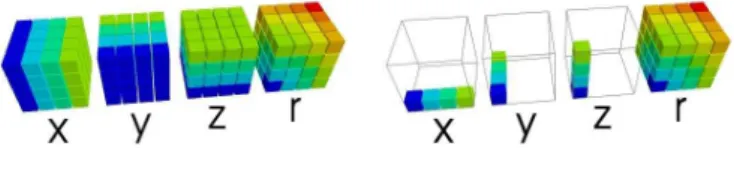
Suppose we want to produce a three-dimensional grid of distances Rijk =
p
i2+j2+k2
Figure 1: Computing dense grid values without and with broadcasting. Note how, with broadcasting, much less memory is used.
k = −100. . .99. In most vectorized
program-ming languages, this would require forprogram-ming three intermediate 200×200 arrays, i, j, and k as in:
In [44]: i, j, k = np.mgrid[-100:100, -100:100, ...: -100:100]
In [45]: print i.shape, j.shape, k.shape
(200, 200, 200) (200, 200, 200) (200, 200, 200) In [46]: R = np.sqrt(i**2 + j**2 + k**2)
In [47]: R.shape
Out[47]: (200, 200, 200)
Note the use of the special mgrid object, which produces a meshgrid when sliced.
In this case we have allocated 4 named arrays, i, j, k, R and an additional 5 temporary arrays over the course of the operation. Each of these arrays contains roughly 64MB of data resulting in a total memory allocation of ~576MB. In total, 48 million operations are performed: 2003
to square each array and 2003
per addition.
In a non-vectorized language, no temporary arrays need to be allocated when the output val-ues are calculated in a nested for-loop, e.g. (in C):
int R[200][200][200]; int i, j, k; for (i = -100; i < 100; i++) for (j = -100; j < 100; j++) for (k = -100; k < 100; k++) R[i][j][k] = sqrt(i*i + j*j + k*k);
We can achieve a similar effect using NumPy’s broadcasting facilities. Instead of constructing large temporary arrays, we instruct NumPy to combine three one-dimensional vectors (a row-vector, a column-vector and a depth-vector) to form the three-dimensional result. Broadcasting does not require large intermediate arrays. First, construct the three coordinate vectors (i for the x-axis,jfor the y-axis andkfor the z-axis):
# Construct the row vector: from -100 to +100 i = np.arange(-100, 100).reshape(200, 1, 1) # Construct the column vector
j = np.reshape(i, (1, 200, 1)) # Construct the depth vector k = np.reshape(i, (1, 1, 200))
NumPy also provides a short-hand for the above construction, namely
i, j, k = np.ogrid[-100:100, -100:100, -100:100]
Note how the arrays contain the same number of elements, but that they have different orienta-tions. We now let NumPy broadcast i, j and k to form the three-dimensional result, as shown in Fig. 1.:
In [48]: R = np.sqrt(i**2 + j**2 + k**2) In [49]: R.shape
Out[49]: (200, 200, 200)
Here, the total memory allocation is only 128MB: 4 named arrays totalling ~64Mb (1.6KB * 3 + 64MB) and 5 temporary arrays of ~64MB (1.6KB * 3 + 320KB + 64MB). A total of approxi-mately 16 million operations are performed: 200 to square each array, 2002
for the first addition, and 2003
each for the second addition as well as for the square root.
When using naive vectorization, calculating R re-quires 410ms to compute. Broadcasting reduces this time to 182ms–a factor 2 speed-up along with a significant reduction in memory use.
Computer Vision
Consider an n×3 array of three dimensional
points and a 3×3 camera matrix:
points = np.random.random((100000, 3))
camera = np.array([[500., 0., 320.],
[ 0., 500., 240.],
[ 0., 0., 1.]])
Often, we want to transform the 3D coordinates into their 2D pixel locations on the image, as viewed by the camera. This operation involves taking the matrix dot product of each point with the camera matrix, and then dividing the result-ing vector by its third component. With NumPy, it is written as:
# Perform the matrix product on the coordinates vecs = camera.dot(points.T).T
# Divide resulting coordinates by their z-value pixel_coords = vecs/vecs[:, 2, np.newaxis]
The dot function3
implements the matrix prod-uct, in contrast to the element-wise product*. It can be applied to one- or two-dimensional arrays. This code executes in 9 miliseconds–a 70x speedup over a Python for-loop version.
Aside from the optimized NumPy dot prod-uct, we make use of NumPy’s array opera-tions with element-by-element division and the broadcasting machinery. The code new_vecs / new_vecs[:, 2, np.newaxis] divides each col-umn of new_vecs by its third column (in other words, each row is divided by its third ele-ment). Thenp.newaxis index is used to change new_vecs[:, 2] into a column-vector so that broadcasting may take place.
The above examples show how vectorization pro-vides a powerful and efficient means of operating on large arrays, without compromising clear and concise code or relinquishing control over aspects such as memory allocation.
It should be noted that vectorization and broad-casting is no panacea; for example, when repeated operations take place on very large chunks of memory, it may be better to use an outer for-loop combined with a vectorised inner loop to make optimal use of the system cache.
Sharing data
As shown above, performance is often improved by preventing repeated copying of data in mem-ory. In this section, we show how NumPy may make use of foreign memory–in other words, mem-ory that is not allocated or controlled by NumPy– without copying data.
Efficient I/O with memory mapping
An array stored on disk may be addressed directly without copying it to memory in its entirety. This technique, known as memory mapping, is useful for addressing only a small portion of a very large array. NumPy supports
3
Thedotfunction leverages accelerated BLAS
imple-mentations, if available.
memory mapped arrays with the same inter-face as any other NumPy array. First, let us construct such an array and fill it with some data:
In [50]: a = np.memmap(’/tmp/myarray.memmap’, ...: mode=’write’, shape=(300, 300), ...: dtype=np.int)
# Pretend "a" is a one-dimensional, 300*300 # array and assign values into it
In [51]: a.flat = np.arange(300* 300) In [52]: a Out[52]: memmap([[ 0, 1, ..., 298, 299], [ 300, 301, ..., 598, 599], [ 600, 601, ..., 898, 899], ..., [89100, 89101, ..., 89398, 89399], [89400, 89401, ..., 89698, 89699], [89700, 89701, ..., 89998, 89999]])
When the “flush” method is called, its data is written to disk:
In [53]: a.flush()
The array can now be loaded and parts of it ma-nipulated; calling “flush” writes the altered data back to disk:
# Load the memory mapped array
In [54]: b = np.memmap(’/tmp/myarray.memmap’, ...: mode=’r+’, shape=(300, 300),
...: dtype=np.int)
# Perform some operation on the elements of b In [55]: b[100, :] *= 2
# Store the modifications to disk In [56]: b.flush()
Thearray interfacefor foreign blocks of memory
Often, NumPy arrays have to be created from memory constructed and populated by foreign code, e.g., a result produced by an external C++ or Fortran library.
To facilitate such exchanges without copying the already allocated memory, NumPy defines an array interface that specifies how a given object exposes a block of memory. NumPy knows how to view any object with a valid __array_interface__dictionary attribute as an array. Its most important values are data (ad-dress of the data in memory),shapeandtypestr (the kind of elements stored).
The following example defines a MutableString class that allocates a string _s. The Muta-bleString represents a foreign block of memory, now made made available to NumPy by defining the__array_interface__dictionary.
Note the use of the ctypes library, which allows Python to execute code directly from dynamic C libraries. In this instance, we use its utility func-tion,create_string_buffer, to allocate a string in memory and addressof to establish its posi-tion in memory.
import ctypes
class MutableString(object): def __init__(self, s):
# Allocate string memory
self._s = ctypes.create_string_buffer(s) self.__array_interface__ = {
# Shape of the array ’shape’: (len(s),), # Address of data,
# the memory is not read-only
’data’: (ctypes.addressof(self._s), False), # Stores 1-byte unsigned integers.
# "|" indicates that Endianess is # irrelevant for this data-type. ’typestr’: ’|u1’,
}
def __str__(self):
"Convert to a string for printing." return str(buffer(self._s))
The above class is instantiated, after which NumPy is asked to interpret it as an array, which is possible because of its __array_interface__ attribute.
# Create an instance of our mutable string class In [57]: m = MutableString(’abcde’)
# View the character byte values as an array In [58]: am = np.asarray(m)
In [59]: am
Out[59]: array([ 97, 98, 99, 100, 101],
dtype=uint8)
# Modify the values of the array In [60]: am += 2
In [61]: am
Out[61]: array([ 99, 100, 101, 102, 103], dtype=uint8)
# Since the underlying memory was updated, # the string now has a different value. In [62]: print m
cdefg
This example illustrates how NumPy is able to interpret any block of memory, as long as the necessary information is provided via an __array_interface__dictionary.
Structured data-types to expose complex data
NumPy arrays are homogeneous, in other words, each element of the array has the same data-type. Traditionally, we think of the fundamental data-types: integers, floats, etc. However, NumPy ar-rays may also store compound elements, such as the combination(1, 0.5)– an arrayanda float. Arrays that store such compound elements are known as structured arrays.
Imagine an experiment in which measurements of the following fields are recorded:
• Timestamp in nanoseconds (a 64-bit
un-signed integer)
• Position (x- and y-coordinates, stored as
floating point numbers)
We can describe these fields using a single data-type:
In [63]: dt = np.dtype([(’time’, np.uint64),
...: (’pos’, [(’x’, float),
...: (’y’, float)])])
An array of measurements can then be con-structed using this data-type as
In [64]: x = np.array([(1, (0, 0.5)),
...: (2, (0, 10.3)),
...: (3, (5.5, 1.1))],
...: dtype=dt)
The individual fields of such a structured array can be queried:
# Display all time-stamps In [65]: x[’time’]
Out[65]: array([1, 2, 3], dtype=uint64)
# Display x-coordinates for all timestamps >= 2 In [66]: times = (x[’time’] >= 2)
In [67]: print times
[False True True]
In [68]: x[times][’pos’][’x’]
Structured arrays are useful for reading complex binary files. Suppose we have a file “foo.dat” that contains binary data structured according to the data-type ’dt’ introduced above: for each record, the first 8 bytes are a 64-bit unsigned integer time stamp and the next 16 bytes a position comprised of a 64-bit floating point ’x’ position and a floating point ’y’ position.
Loading such data manually is cumbersome: for each field in the record, bytes are read from file and converted to the appropriate data-type, tak-ing into consideration factors such as endianess. In contrast, using a structured data-type simpli-fies this operation to a single line of code:
In [69]: data = np.fromfile("foo.dat", dtype=dt)
Conclusion
We show that the N-dimensional array introduced by NumPy is a high-level data structure that facil-itates vectorization of for-loops. Its sophisticated memory description allows a wide variety of oper-ations to be performed without copying any data in memory, bringing significant performance gains as data-sets grow large. Arrays of multiple dimen-sions may be combined using broadcastingto re-duce the number of operations performed during numerical computation.
When NumPy is skillfully applied, most compu-tation time is spent on vectorized array opera-tions, instead of in Python for-loops (which are often a bottleneck). Further speed improvements are achieved by optimizing compilers, such as Cython, which better exploit cache effects. NumPy and similar projects foster an environ-ment in which numerical problems may by de-scribed using high-level code, thereby opening the door to scientific code that is both transparent and easy to maintain.
References
[IPython] Fernando Perez, Brian E. Granger. IPython: A System for Interactive Scientific Computing, Computing in Science and Engi-neering, vol. 9, no. 3, pp. 21-29, May/June 2007, doi:10.1109/MCSE.2007.53.
[cython] S. Behnel, R. Bradshaw, D. S Seljebotn, G. Ewing et al. C-Extensions for Python. http://www.cython.org.
[theano] J. Bergstra. Optimized Symbolic Ex-pressions and GPU Metaprogramming with Theano, Proceedings of the 9th Python in Sci-ence ConferSci-ence (SciPy2010), Austin, Texas, June 2010.
[numexpr] D. Cooke, F. Alted, T.
Hochberg, G. Thalhammer, numexpr
http://code.google.com/p/numexpr/
NumPy’s documentation is maintained us-ing a WikiPedia-like community forum, available at http://docs.scipy.org/. Dis-cussions take place on the project mailing list (http://www.scipy.org/Mailing_Lists). NumPy is a volunteer effort.