Gary Marchionini
This paper describes the design and initial implementation of a web-based financial information system, intended to replace a Microsoft Access financial database in support of a federally funded, international health project. This system is being reimplemented for the web in order to provide stakeholders across the country (and potentially around the world) access to the project's financial information.
Headings:
Information storage and retrieval systems - Design Web databases
by Justin C Watt
A Master’s paper submitted to the faculty of the School of Information and Library Science of the University of North Carolina at Chapel Hill
in partial fulfillment of the requirements for the degree of Master of Science in
Information Science.
Chapel Hill, North Carolina April 2004
Approved by
Table of Contents
Table of Contents... 1
Introduction... 2
Background ... 3
Design ... 11
Implementation ... 25
Reflections ... 38
Appendix A: Entity Descriptions ... 40
Appendix B: Interfaces Under Development... 60
Introduction
This paper describes the design and initial implementation of a web-based financial information system, intended to replace a Microsoft Access financial database in support of a federally funded, international health project. This system is being reimplemented for the web in order to provide stakeholders across the country (and potentially around the world) access to the project's financial information.
This project explores the challenge of implementing an information system in a new paradigm, and the distinction between design and implementation in that effort. The scope was intentionally limited to avoid major system restructuring with emphasis on developing the same or similar user- interfaces for the web. The eventual development process was very iterative in na ture. Every minor advance into implementation prompted a substantial rethinking of the system’s underlying structure and design.
Furthermore, external system requirements rapidly evolved during the course of development, posing additional challenges for successfully completing a reasonable subset of the planned components within the project’s compressed time constraints. The system will continue to be actively developed as it evolves into a larger management information system, with plans for active maintenance and usage over the next five years. Thus this paper serves to capture a snapshot of a real life information system in
Background
"The U.S. Agency for International Development (USAID), [established in 1961 by President John F. Kennedy], is an independent federal agency that provides economic, development, and humanitarian assistance around the world in support of the foreign policy goals of the United States." USAID Website
In 1997, USAID created the MEASURE Program (Monitoring and Eva luation to Assess and Use Results) to facilitate the collection, analysis, dissemination, and use of
population, health, and nutrition data. The MEASURE Program consisted of five
competitively bid projects, one of which was awarded to the Carolina Population Center (CPC) at the University of North Carolina at Chapel Hill (UNC). MEASURE Evaluation (hereafter referred to as "Measure" or "the project") began on October 1, 1997 as a $22 million, 5 year cooperative agreement providing research and technical assistance towards the monitoring and evaluation of USAID's population and health programs worldwide.
allow a myriad of fluctuating, user-defined, subject-specific activities. Each FRS account is strictly defined by UNC based on the type of funds in the account and the department or subcontractor authorized to charge to the account.
The inflexibility of FRS is so great that UNC has invested considerable resources in the development of a new accounting product known as InDEPTh to operate on top of and eventually replace FRS. InDEPTh adds the ability to track FRS expenses using
customizable cost codes through a graphical user- interface (GUI), but it is still under active development and is only partially deployed across campus. InDEPTh would seem to eventually provide Measure with a viable financial tracking solution, except that it does not have a mechanism to track the 70+ funds USAID obligates to Measure in a given year, each of which can be budgeted to multiple activities. All of these funds appear as a single lump sum in FRS and InDEPTh, making it impossible for Measure to inform USAID at a moment's notice of a given fund's balance with either of those systems alone.
activities, which would allow the database to be queried for an activity's total
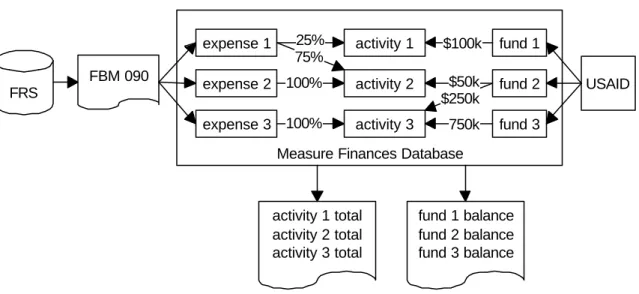
expenditures (Figure 1). This was then manually subtracted from the activity's budgeted fund(s) to provide USAID with regular and ad hoc financial updates.
Figure 1 Original Microsoft Access Finances Database in context
FRS
FBM 090
Measure Finances Database expense 1 expense 3 expense 2 activity 1 activity 3 activity 2 25% 75% 100% 100%
activity 1 total activity 2 total activity 3 total
In the spring of 2000, Measure hired a database administrator and developer to take over the task of maintaining and further developing the finances database. Between April 2000 and September 2003, USAID increased project's expenditure ceiling from $22 to 47 million, the project was extended for a sixth year, and the database was expanded to include the complex task of tracking revenue (Figure 2).
Figure 2 Current Microsoft Access Finances Database in context
Measure Finances Database FRS FBM 090 expense 1 expense 3 expense 2 activity 1 activity 3 activity 2 25% 75% 100% 100%
activity 1 total activity 2 total activity 3 total
fund 1 fund 3 fund 2 $50k $250k 750k USAID
fund 1 balance fund 2 balance fund 3 balance
Measure would have officially ended on September 30, 2003, were it not for two
developments. First, Measure's cooperative agreement was modified to include a no-cost extension (NCE) through July 31, 2004 for incomplete publications and activities with remaining funds. Secondly, during the summer of 2003, CPC submitted a bid in response to USAID's MEASURE Evaluation Phase II Request for Assistance (RFA). In September of 2003, CPC was awarded the 5 year MEASURE Evaluation Phase II cooperative agreement set to begin the following month on October 1, 2003, with funding starting at $70 million and expected to climb above $100 million by Phase II's end.
International, Inc. (TFGI) in Phase II, as well as USAID, all of whom were located off-site.
As a result, the finance officer operated as a human interface to the database. People would contact him when they had financial information needs, and he would use the database to provide the information they requested, which further cemented the
established order of database interaction. Though there are some quality control benefits to his acting as a filter on the information he received and disseminated, more often that not the information requests were standard and repeatable, suggesting that a more decentralized approach to financial information dissemination would free him from answering requests and allow more time for financial planning.
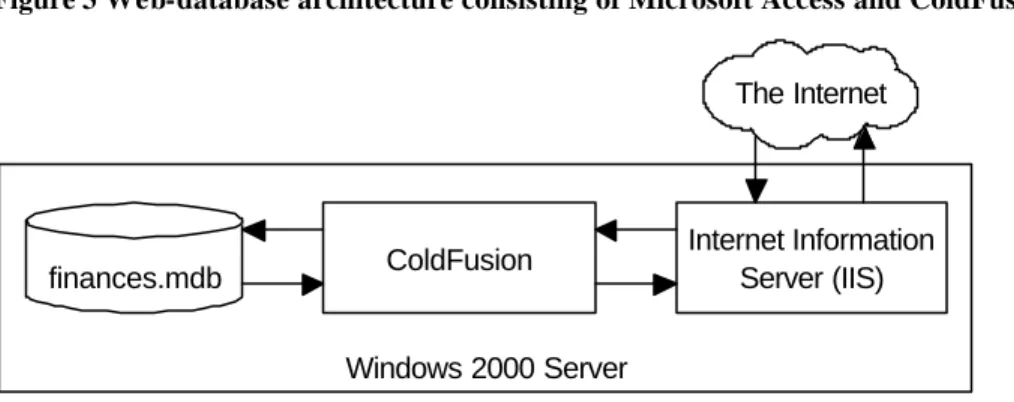
Figure 3 Web-database architecture consisting of Microsoft Access and ColdFusion
Windows 2000 Server finances.mdb ColdFusion
Internet Information Server (IIS) The Internet
Alternatively the financial data could be moved to a web-accessible database server such as MySQL while using Microsoft Access solely for its legacy graphical user-interfaces, and the two could be linked via an Open Database Connectivity (ODBC) driver (Figure 4). This solution is often used to take advantage of Access's native user- interfaces to view and update simple MySQL tables. Tests of this architecture with the existing Phase I system proved disappointing, as the ODBC connection exacted a harsh toll on the performance of the financial database's custom built user- interfaces, even with Access and MySQL running on the same machine. User interfaces that loaded in 2 seconds with the data in Microsoft Access required over 2 minutes with the data in MySQL.
Figure 4 Web-database architecture consisting of Linux, Apache, MySQL, and PHP with ODBC link to Microsoft Access
Linux MySQL
finances Access
ODBC
Apache HTTP Server PHP
Another impediment was strictly cultural. The project had not used its website in an interactive or innovative way, particularly because it was maintained on the side by a project member who was primarily responsible for the design and layout of Measure's publications. Thus the site, whose design and organization had not significantly changed over the life of the project, consisted mostly of publications available in the Portable Document Format (PDF). It was not until this individual left the project in August 2003 that the interim responsibility of maintaining the website was reassigned to the database administrator. This created an opportunity to begin actively thinking about bringing the website and the database together, which eventually prompted a re-evaluation of the relationship between CPC and Measure.
redundancies. Taken together, these two propositions, created a conflict regarding who between CPC and Measure would be responsible for doing what.
In the end, necessity forced the issue. By January 2004, 3 months into Phase II, Measure was not yet tracking its new finances, which was tolerable only because Measure wasn't spending much on Phase II. But mid-April was fast approaching, at which point USAID would expect detailed reports on the state of the project's finances. The more the project administration explored their desires for the future website and now "intranet,"
Design
The design of the web-based financial information system requires a structural and functional analysis of its predecessor, the Microsoft Access finances database. This analysis will include an evaluation of the existing system in terms of the unique capabilities and constraints on user- interaction inherent in the web, providing a foundation and initial blueprint for subsequent implementation.
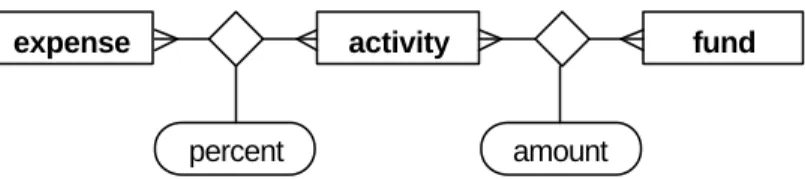
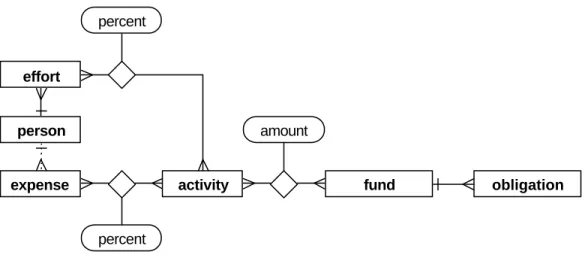
At a basic conceptual level the Phase I Microsoft Access finances database tracks the relationships between three entities: expense, activity, and fund. An expense must be allocated to one or more activities by a percent breakdown, and an activity can incur multiple expenses. An activity can also be budgeted multiple funds, and a fund can be budgeted to one or more activities. Altogether this yields the entity-relationship fragment in Figure 5.
Figure 5 Core entity-relationship diagram of finances database
expense activity fund
percent amount
Measure requests that they submit monthly cost reports broken down by activity to be entered into the database as real expenses—though they are actually encumbrances.
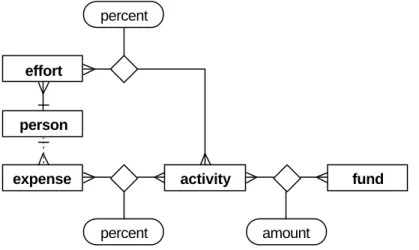
Figure 5 suggests that every expense is allocated to activities independently from every other expense. Personnel expenses, however, are an exception. All of a person's salary and benefits over a specified timeframe should be allocated to the same activity or activities. Though this could be enforced manually, there is the chance that someone could go back and change an allocation for a person's salary but forget to make the same change to their benefits. For this reason, it is important for the database to capture the relationship among related personnel expenses. Figure 6 includes the effort entity which relates to a single person and has start and end date attributes (not pictured). Once the effort has been manually allocated, the database application must maintain the
relationship between the personnel expenses within that effort (based on the person related to the expense and the date of the expense) and the specified activity or activities to which the effort was allocated.
Figure 6 Core entity-relationship diagram of finances database with effort entity
expense activity fund
percent amount
person effort
The fund entity represents the class of all possible USAID funds, which are characterized by three attributes, fund type (Core, Field Support, MAARD), strategic objective
(Population, Maternal Health, Child Health, HIV/AIDS, Infectious Diseases), and regional source (a USAID country or regional mission). The fund entity in Figure 5 and Figure 6 is an oversimplification because it does not capture the distinction between received funds (known as obligations in USAID-speak) and budgeted funds which may be projected. Thus Figure 7 includes the obligation entity to capture received funds. With the inclusion of the obligation entity in Figure 7, the resulting entity-relationship
fragment represents the core underlying entity structure of the Phase I finances database.
Figure 7 Core entity-relationship diagram of finances database with obligation entity
expense activity obligation
percent
fund
amount
person effort
percent
Database Administrator Tasks
1. creates new activity, account, object, and person records (as needed)
2. downloads minor subaccount transactions for the previous month as a text file, imports into database using Excel (monthly), allocates any transactions without default activities (based on instructions from finance officer)
3. downloads primary account transactions for the previous month as a text file, imports personnel expenses into database using Excel (monthly)
4. prints out primary account's reconciled, non-personnel transactions for the previous month from a spreadsheet maintained by CPC's accounting staff, gives to finance officer to allocate to activities on paper, enters activity codes into spreadsheet and imports into database (monthly)
5. receives direct and indirect costs for the previous month for each activity from the major subcontractors (JSI, Macro, Tulane), imports into database (monthly)
Finance Officer Tasks
6. receives modifications from USAID, creates new obligations, reviews obligation totals by fund type, objective, mission, year
7. emails staff for percent of effort spent on various activities during the previous month, creates/updates effort allocations (monthly)
9. determines each fund's total amount budgeted, expended, and remaining, compares with total amount obligated for a given fund (requires switching between two user interfaces) to determine if funds received have been maximally budgeted (not under- or over-budgeted)
10.reviews expenditures filtered by account, activity, date range, optionally summed by activity or account, reports financial information to requesting stakeholders
The web-based nature of the proposed Phase II Financial Information System (FIS) is intended to simplify or eliminate a number of the tasks above, explicitly or implicitly. For instance, the database administrator performs a number of manual tasks in order to get the FRS transaction data into Access. By locating the FIS data in a more accessible database for the purpose of getting it on the web, it becomes possible to automatically import FRS's transaction data via InDEPTh's Oracle-based Departmental Accounting System (DAS), replacing tasks 2, 3, and most of 4 with a computer program. By allowing the major subcontractors to update their monthly expense reports via the web, the
responsibility of task 5 can be shifted off of the database administrator and onto the individual subcontractors. By allowing the finance officer to allocate Measure's UNC expenses online, tasks 2 and 4 become more efficient.
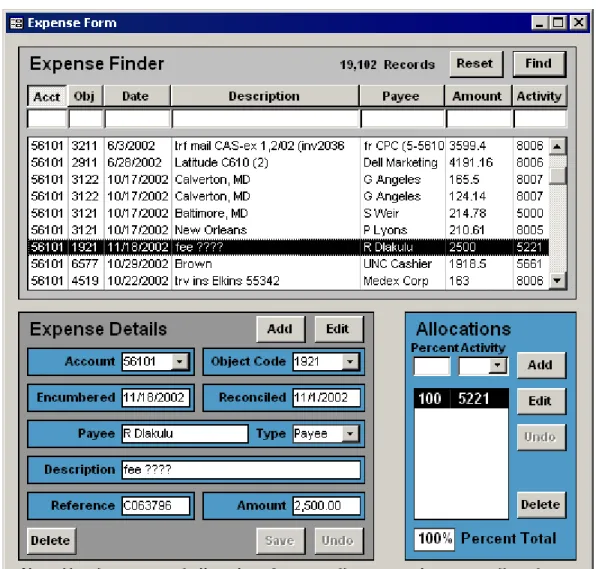
description, payee, amount, and/or activity. The label at the top of the screenshot informs the user that the filterable listbox contains 19,102 records, hinting at a major difference between Microsoft Access and a webpage. Implementing the same interface for the web would require downloading all those records, which would be prohibitively time and bandwidth expensive. Any similar interfaces in the Phase II FIS will have to employ strategies to avoid transferring excessive data to the web browser, such as splitting long result sets over multiple pages.
Figure 9 is a screenshot of the Obligation Form used by the finance officer to create new obligations, find and update existing obligations, and dele te erroneous obligations (task 6). The various checkboxes used for filtering the obligation list allowed for more permutations than were useful and thus could have been consolidated into a single drop down box. The modification number column, labeled "Mod," connected an obligation to a modification, but was not as widely used to identify obligations as was the year in which they were received. More critically, there were no columns indicating how much of the given obligation remained to be budgeted or expended.
Figure 10 is a screenshot of the Effort Allocation Form used by the finance officer to update effort allocations (task 7). The list of people in the leftmost pane could be filtered to show only those with unallocated personnel expenses, but it does not detail what months need to be allocated. The middle pane lists the effort's date ranges for the selected person, each of which have to be manually created. Efforts encompass either a single month, or several months, yet the user interface does nothing to inform the user that efforts might be overlapping. The right most panels provide the interfaces for modifying the effort allocations, the most useful function being the "Extend" button which extended the selected effort by an additional month, after the "Edit" button was pressed.
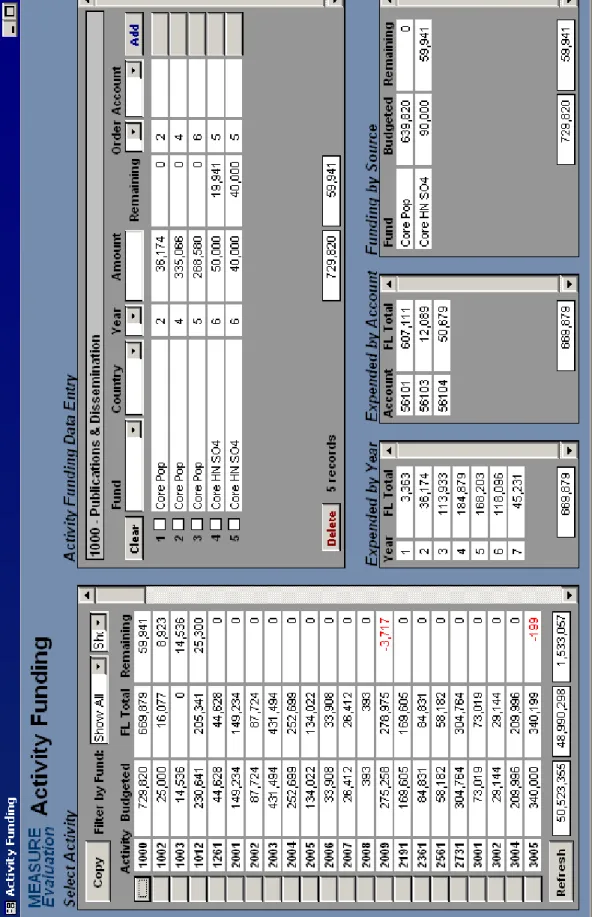
Figure 11 is a screenshot of the Activity Funding Form which accomplishes tasks 8 and 9 and has received more development and use than any other interface. At a glance, this interface provides both a customizable birds eye view of the project's finances (in the left panel) as well as an extremely detailed view of a single activity's finances in the top right, bringing together nearly all the information necessary to make funding decisions.
The left most panel provides a summary of each activity's bottom line, with the problem areas—negative numbers—showing up in red. The drop down boxes at the top filter the list by fund and/or year to display just those activities receiving a certain type of funding. Totals at the bottom summarize the amount budgeted, spent, and remaining for all
activities in the list. One oversight: the interface does not indicate the total amount obligated for a given fund which is very useful in determining whether any obligations have been under- or over-budgeted. This has to be accomplished manually by looking up the obligated amount in the Obligation Form in order to compare it with the appropriate budgeted amount in the Activity Funding Form.
After selecting an individual activity from the leftmost panel, a detailed view of that activity's budget shows up in the top right, and summary views of that activity's
From a project-wide budgeting perspective, this interface makes it exceedingly easy to see which activities have money and which do not, so that funding can be moved between activities, a frequent meta-task performed by the finance officer. That said, the interface does not provide an easy way to move all or part of a budget item from one activity to another. This has to be done manually with some mental math, post-it notes, and two record updates.
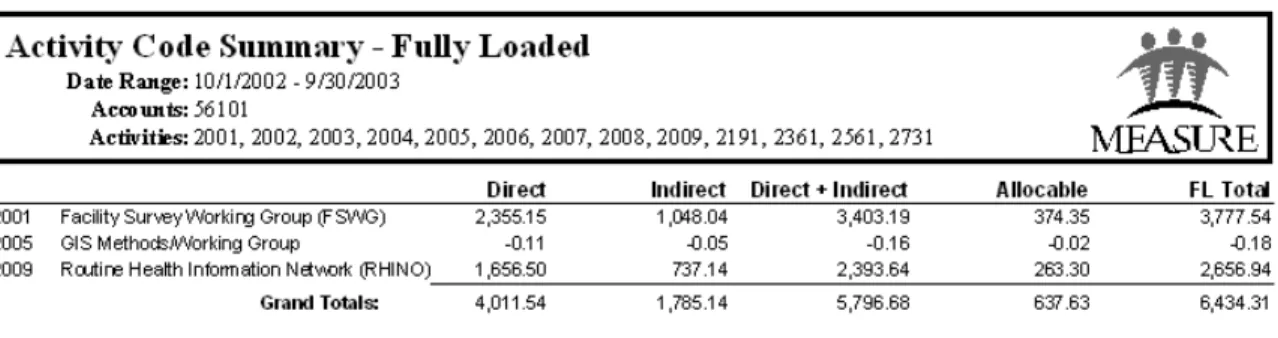
Before revenue was tracked in the Phase I finances database, the primary interface for reviewing information was in the form of printable reports (Figure 12) which could be custom generated using the Report Generator interface (Figure 13). This interface
provides several standard reports that summarize the project's expenditures by activity or account, optionally grouping the expenses by activity or account, and allowing data in the reports to be filtered by multiple activities, accounts, and date ranges. The development of this user- interface was never extended to include funding data, particularly because the Activity Funding Form obsoleted the need for paper reports dealing with fund allocations and obligations.
For the novice user, Microsoft Access's built in wizards and what-you-see-is-what-you-get (WYSIWYG) tools for monolithic user- interface design are biased towards data entry and rudimentary one-record-at-a-time browsing. To support browsing and analyzing broader, summarized views of the data or detailed views within context, Access provides WYSIWYG tools for generating paged, printer-ready reports, viewable on-screen, but with interactivity limited to zooming and flipping pages.
The Expense Form (Figure 8) and the sample report (Figure 12) demonstrate this dichotomy, the former providing no real analysis of the data but high interactivity, and the latter (albeit facilitated by the highly developed and interactive Report Generator) providing high browsing and data analysis potential and lower real time interactivity. The Microsoft Access paradigm is steeped in the 1960s-era information processing culture, in which a clear separation of effort existed between the teletype machines and the
landscape fanfold printouts. Only after significant development, programming, and creativity, as exemplified by the Activity Funding Form (Figure 11), is a database developer able to close the gap between Access's user- interfaces and reports. Even then, the inability to programmatically generate a user- interface at run time limits its
interactive design possibilities.
latency may be unnoticeable even with a 56k dial- up connection to the Internet, but it precludes the types of real time interactions characteristic of many database systems, such as the ability to immediately fill- in the city and state after a zip code is entered. Here Microsoft Access has an edge, as long as real time, data- intensive interactivity is of critical importance.
The web architecture, in particular the web-database architecture of dynamically
Implementation
The design section treated the existing system and its user- interfaces as a rough blueprint for the future system, which makes sense, why reinvent the wheel? Instead, forge ahead and start implementing the best replica possible, tweaking it along the way to take
advantage of the web's special capabilities. In hindsight, the focus on implementation was somewhat premature, as initial programming forays raised system and design questions that had yet to be answered or described in detail, even though the Access database had been in development for over 4 years. Hindsight being 20/20, the initial attempts at implementation were nevertheless important in provoking those significant design questions along the way.
Figure 14 Measure Phase II Financial Information System architectural diagram Linux MySQL measure Web Browser
Apache HTTP Server PHP
The Internet
Figure 15 Measure Phase II Financial Information System workflow diagram
As much as UNC's InDEPTh team wants departments and projects to use InDEPTh, they acknowledge that it may not be a perfect fit for all organizations. As an interim solution, they ha ve opened up several specialized views of their Oracle database, which sits on top of FRS, to the Kenan-Flagler Business School and the Carolina Population Center, two of the more complex departments accounting-wise. Even in the age of open standards, interoperability, and XML, FRS and DAS are both incredibly complex and poorly documented. For instance, no standard data dictionary exists for the transaction table which is composed of the indecipherable field names as shown in Figure 16.
Figure 16 Transaction table field names from InDEPTh's DAS
OBJ_ID LEG_SUBCODE_CODE
OBJ_TITLE LEG_SUB_SUBCD_CD
DB_TRANS_SIDE OBJ_TITLE_SUB
TRANS_RCN_FL OBJ_CLASS_ACCT
TRANS_RCN_DT OBJ_TITLE_ACCT
TRANS_CLASS TDOC_ITEM_DESC
TRANS_AMT TDOC_ITEM_LEG_DESC
TRANS_LEGACY_FY OBJ_CLASS_SUB
DB_ACCT_LEG_ACCT TRANS_DOC_OBJ_CLASS
DB_SUBCD_LEG_SUBCODE_CODE TRANS_LEGACY_PROC_MONTH
CR_ACCT_LEG_ACCT LEG_TRAN_RECON_KEY
CR_SUBCD_LEG_SUBCODE_CODE LEG_TRAN_SUBCODE
LEG_TRAN_TRAN_CODE LEG_ACCT
LEG_TRAN_REF_1 TDOC_ITEM_REF_2
LEG_TRAN_DT RES_OBJ_ID
INDEPTH_PROCESSED_DT LEG_TRAN_LEG_PROC_DT
LEG_TRAN_DESC LEG_TRAN_ID
LEG_TRAN_REF_2 TRANS_KEY
LEG_TRAN_LEG_LIQ_AMT DEPT_NAME
LEG_SUB_ACCT_CD VEND_NAME
DOC_OBJ_TITLE PAYEE_NAME
TRANS_TYPE TE_TRAVELER
DOC_ID TR_TRAVELER
After several emails, meetings, and a painstaking analysis of the data in the those columns, it was possible to map the relevant DAS field names onto the FIS's planned field names (Figure 17). So far initial attempts at writing a perl script to select the transaction records from DAS and insert them into Measure's MySQL database have been successful.
Figure 17 DAS to FIS field mappings
DAS field name FIS fieldname Comments
DB_ACCT_LEG_ACCT CR_ACCT_LEG_ACCT
account_id via
account.account_code DB_SUBCD_LEG_SUBCODE_CODE
CR_SUBCD_LEG_SUBCODE_CODE
object_id via object.object_code
LEG_TRAN_LEG_PROC_DT expense_date mm/dd/yyyy hh:mm
LEG_TRAN_DESC expense_description
LEG_TRAN_REF_1 expense_reference
LEG_TRAN_REF_2 is reference 2 needed?
TRANS_AMT expense_amount
EMP_ID (proposed) person_id UNC PID
OBJ_ID = 127640 (Measure)
LEG_TRAN_TRAN_CODE = 03X or 04X or 06X
person identifier (like a social security number or a UNC PID) related to every personnel expense record would appear to be a promising way around this current kludge.
However, none of the fields listed in Figure 16 provide that data. The InDEPTh team on a hunch realized that an auspiciously named "ID" column in another UNC financial
application with access to FRS was indeed UNC's 7-digit, unique PID which showed up only for personnel expense records. As a tribute to the complexity of FRS and DAS, it has taken over a month to figure out how to integrate that column into the data they have made available to CPC and Measure.
Entity-relationship (ER) diagrams come in many flavors and can be used in different contexts to varying ends. Measure Phase II's FIS is diagrammed using the Information Engineering variety (Figure 18) which is characterized by the inclusion of attributes inside the entities, making for a much cleaner and easier to maintain diagram. An ER diagram should not replace a data dictionary in terms of expressive metadata, but it also should not be out of touch with the planned implementation if only to facilitate writing SQL during development. Therefore the diagram is a fairly accurate representation of the underlying database implementation.
An ER diagram for a system of this size does not nearly provide the exhaustive
information necessary to create a relational database. The extensive Appendix A includes a detailed description of every entity, describing its relationships to other entities,
constraints, outstanding questions or issues, and a detailed data dictio nary with a description, data type, and constraint for every field. Though lengthy, these entity
descriptions represent the documentation of the underlying database as a reference for the constraints placed upon the overarching web application. In many cases accounting concepts or system design decisions are described there in more detail under the relevant entities.
Given the delays in getting access to the DAS financial data in the best format possible, the most developed and functional system components are the obligation and fund allocation interfaces. Other interfaces still under development are included and described in Appendix B.
- light and dark green entities are fiscal only - pink entities have non-fiscal purposes - dark green entities are dynamically generated - "many" line endings are optional
- "one or many" line endings are mandatory - "one" line endings are mandatory
- "one" line endings on a dashed line are optional
das_id description reference date amount notes expense code, name activity code, name parent_code region amount modification notes obligation code, name short_name account code, name object name unc_pid person start_date end_date effort name region_type amount order notes fund_allocation code, name fund_type code, name objective code, name start_date end_date allocable_percent project_year transaction amount amount commitment fund effort_ allocation percent
is parent of
Figure 19 shows a screenshot of the Obligation page, a listing much improved over the Obligation Form in the Phase I system. This page shows at a glance which obligations are over-committed, which are under-committed, and which have no funds left to commit. Once the expense side of the database is operational, the Expended and Remaining columns will detail how much of any obligation remains.
Figure 19 Obligation page
The screen real estate at a resolution of 1024x768 left little room to allow for a short notes column. In order to get around the space limitations, the rightmost column uses tool-tips to display notes when the cursor hovers over a cell with an asterisk. (Figure 20).
Instead of eating up additional screen real estate for widgets to filter the obligation list, the obligation identifiers themselves, for instance "Y1 C4" which refers to "year 1 core HIV funding, " are rendered as hyperlinks (see blue and purple text in Figure 19) in order to filter the list for obligations for the same fund from the same year. This filtered view shown in Figure 21 not only summarizes the two obligations, but also shows the list of activities to which the obligations have been budgeted, and in this case over-budgeted by $640,500. This combined view is possible due to the flexibility of PHP and HTML, which would have been impossible with a single Microsoft Access user- interface. Notice that the activity codes (e.g. AFR-2, GLB-7, etc.) in the Fund Allocations detail view are also hyperlinks, which allows the user to jump to the fund allocation page for that activity, in Figure 22.
Figure 21 Obligation page filtered for a specific activity, with related fund allocations
they have left. There is a need for a summary table on this page by account, especially since an activity may eventually have 10 or more budget items.
Figure 22 Fund Allocation page filtered for a specific activity
Clicking the "Add Fund Allocation" button opens an HTML user- interface (Figure 23) which is the same when editing an fund allocation, except that the values would be filled in. The PHP script validates the submitted form and may send it back to the user with descriptive error messages if something was not filled in correctly. The form for
modifying an obligation looks the same, except that it does not have activity and account drop down boxes.
In the event that an obligation or fund allocation needs to be deleted, delete buttons are available for each record causing a JavaScript alert box to confirm the deletion (Figure 24). This has yet to be tested on a browser with JavaScript turned off. Not being able to delete a record wouldn't be such a bad thing. Deleting a record by accident without some form of delete confirmation would be. Given that only two users will be responsible for modifying obligations in this way, it is a relatively minor issue at this juncture. An alternative paradigm to prevent accidental deletion would be the use of a checkbox on every row that a user could check to select one or more records for deletion, with a single delete button at the top committing the action.
Figure 24 JavaScript alert box confirming record deletion
One of the most useful and browsing- friendly features of the Phase I Activity Funding Form was the leftmost pane that summarized the total amount budgeted, expended, and remaining for each activity and could be filtered by fund and year. In the Phase II FIS, that appears as the main Fund Allocations page (Figure 25), providing a list of
Figure 25 Fund Allocation page
fund_allocation
update_fund_allocation update_obligation
obligation
delete_obligation
click activity
click show all
click add click edit
click edit click add
click fund
click show all
click save click cancel
validate?
obligation (filtered)
click edit click add
click add click edit click delete delete_fund_allocation fund_allocations (filtered) click delete from obligation?
click save click cancel
validate? filtered? click delete click delete click activity click fund No Yes Yes No Yes No Yes No activity_id fund_allocation_id fund_allocation_id project_year_id fund_id fund_allocation_id project_year_id fund_id fund_allocation_id project_year_id fund_id project_year_id fund_id obligation_id project_year_id fund_id obligation_id project_year_id fund_id obligation_id obligation_id project_year_id fund_id project_year_id fund_id activity_id project_year_id fund_id activity_id project_year_id fund_id activity_id
click show all
Reflections
Finishing the Financial Information System is the highest priority. Getting the expenses into the system required coordination with other groups on campus whose schedules were beyond my control. However, all of my interactions with the InDEPTh team have been very positive, and they appear to be working hard to provide CPC and Measure with access to the financial data we need. The Phase I finances database required a lot of upkeep each month, so I'm looking forward to seeing the Phase II system perform with less manual intervention.
Not only is this financial system crucial to the administration of the project's finances, but it also represents the project's first big leap into the domain of web applications. In that sense this is also partly a feasibility study to determine whether the project should build other custom management information system components with the web as the primary method of delivery. Some candidates that have been proposed already (once the finances system is humming) include a program management system centered around Measure's activities, a publications request system functionally equivalent to Amazon.com but without any money changing hands, and a trainer/trainee tracking system for Measure's training programs around the world.
regard to the FIS, the only security I've employed is a simple login that gives us both complete access and prevents anyone else from having any access. I have not begun to design a tiered system that allows gradations of access depending the type of user. As the task list for the Phase II system indicated, there should really only be four user groups, one with full read/write access for the finance officer and database administrator, one with full read access for other UNC staff, one with partial read/partial write access for major the subcontractors' administrators, and one with partial read access for USAID. This has major system architecture implications so it will probably appear in version 2.
Appendix A: Entity Descriptions
Entity: account
Description
"An account is the basic building block of the Financial Records System (FRS)." UNC has currently reserved 120 accounts for MEASURE Phase II, from 5-35500 to 5-35619. 5-35500 is used for internal purposes and does not incur expenses. Expenses that
originate at UNC are charged to account 5-35501. Measure’s major subcontractors each have accounts to which they invoice their expenses on a monthly basis:
• 5-35502 is John Snow, Inc.
• 5-35503 is ORC Macro, Inc.
• 5-35504 is Tulane University
• 5-35505 is The Futures Group International
Accounts greater than 5-35505 are activated upon the execution of a contract between Measure and a subcontractor. In most cases these accounts are created to support a single activity, which means that all expenses that hit a given account greater that 5-35505 can be automatically allocated to a specified activity.
Accounts are primarily used by UNC to capture overhead charges. UNC levies a 46% overhead "tax" on most expenses that are charged to 5-35501 (some expenses related to certain objects are exempt from overhead). All other accounts are classified as
For information about FRS's accounts, see: http://www.ais.unc.edu/busman/act/actpol2.html
Relationships and Constraints
• An account relates to zero, one, or more expenses. Accounts with zero expenses
are presumed to be not yet activated.
• An account relates to zero or one activity. In most cases, accounts greater than
5-35505 have a default activity to which every expense charged to that account will be automatically allocated.
• An account relates to zero, one, or more fund_allocations.
Data Dictionary
Field Name Description Type Constraints
account_id primary key INT(11)
account_code account code assigned by UNC
VARCHAR(6) unique, >=535501, <=535619 account_short_name abbreviated version or
acronym of account_name
VARCHAR(10) account_name name/description of the
subcontractor
VARCHAR(255) activity_id foreign key, activity to which
all expenses related to this account should be allocated
Entity: activity
Description
The activity is the functional center of Measure project management. Each activity represents a sub-project of Measure, defined in the annual workplan for USAID, or defined by the project administration for the purpose of tracking administrative costs. Activities form the bridge between expenses and obligations (revenue) so that project administrators can determine how much of a given USAID fund has been expended on an activity by activity and aggregate basis —something UNC's FRS system is not able to track.
Relationships and Constraints
• An activity relates to zero, one, or more effort_allocations.
• An activity relates to zero, one, or more expense_allocations.
• An activity relates to zero, one, or more fund_allocations.
• An activity relates to zero, one, or more accounts.
Data Dictionary
Field Name Description Type Constraints
activity_id primary key INT(11)
region_id foreign key, specifies the primary country benefited, first part of canonical "activity code"
INT(11)
activity_number sequentially assigned for activity related to a given region_id, second part of "activity code"
INT(11) unique
activity_name official name of the activity VARCHAR(255) activity_notes notes (more fields will be added to
this table for non- fiscal purposes)
Entity: commitment
Description
The commitment entity (new in Phase II), is generated automatically to relate
fund_allocations with obligations based on the criteria that both relate to the same fund and project_year. If a given fund_allocation has no "related" obligation (or vice versa), no commitment rows will be generated.
The sum of the commitment_amount for all commitment rows of a given fund_allocation should always equal the fund_allocation_amount. If a series of fund_allocations have overcommitted an obligation (or obligations), the commitment_available_amount field will keep track of how much of an obligation is actually available to support the fund_allocation. Assuming an obligation has not been overcommitted, the commitment_amount and commitment_available_amount will be equal.
Relationships and Constraints
• A commitment relates to one fund_allocation.
• A commitment relates to one obligation.
Data Dictionary
Field Name Description Type Constraints
fund_allocation_id foreign key INT(11)
obligation_id foreign key INT(11) unique
commitment_amount amount commited to fund_allocation
DOUBLE commitment_available_amount amount actually available
to fund_allocation
Entity: earmark
Description
The earmark entity allows for the flexible tagging of funds according to fluctuating reporting demands from USAID without having to redesign the fund, fund_type, and objective entities. At present, 5 earmarks exists, 2 that modify the Core fund_type (Bureau-wide and Mangement) and 2 that modify the SO4 objective (PAI 1.5, PAI 2.0, and PAI 2.5).
Relationships and Constraints
• An earmark relates to zero, one, or more funds.
Data Dictionary
Field Name Description Type Constraints
earmark_id primary key INT(11)
earmark_code code of earmark VARCHAR(25)
Entity: effort
Description
The concept of "effort" is used to capture a period of time over which an employee of Measure works on one or more activities. An employee who only contributes to a single activity (such as certain members of the project's administration) would only have a single effort record with a start_date and end_date that encompasses the entire span of time that they have worked for Phase II. A Measure employee who works on one or more different activities every month would have many effort records, each of which with a start_date and end_date that encompasses only a single month.
Relationships and Constraints
• An effort relates to one person.
• An effort relates to one or more effort_allocations.
Data Dictionary
Field Name Description Type Constraints
effort_id primary key INT(11)
effort_start_date beginning of effort DATE must fall on first day of month effort_end_date end of effort DATE must fall on last day
of month
Entity: effort_allocation
Description
The effort allocation captures the percent that an employee's effort should be allocated to a specific activity. An employee's effort (for a single month or more) may encompass many salary and benefits expenses, all of which must be allocated to the same activity or activities.
Whenever an effort_allocation is created or updated, expense_allocations must be created or updated for all the applicable personnel expenses within that effort.
Relationships and Constraints
• An effort_allocation relates to one effort.
• An effort_allocation relates to one activity.
Data Dictionary
Field Name Description Type Constraints
effort_allocation_id primary key INT(11) effort_allocation_percent percent of
effort allocated to activity
UNSIGNED DOUBLE
all
effort_allocation_percents for a given effort must sum to 100%
effort_id foreign key INT(11) unique
Entity: expense
Description
An expense is a discrete record of money flowing through UNC’s accounting system. Examples of expenses include monthly salaries, travel advances, office supply purchases, etc. An expense can be negative, such as when a purchase is refunded or an accounting error is corrected. UNC’s Financial Records System (FRS) tracks expenses by account and object.
All of Measure's expense records will be imported on a nightly basis directly from AIS's Departmental Accounting System (DAS). In the future CPC may import expense records for the entire center, at which point Measure would begin importing records from CPC's accounting system.
The major subcontractors will submit monthly cost reports with direct and indirect totals for every activity that incurred expenses during the previous month. These encumbrances will be entered into the database and treated as actually expenses.
Relationships and Constraints
• An expense relates to one object.
• An expense relates to one account.
• An expense relates to zero, one, or more expense_allocations. As some
officer should be alerted to the existence of unallocated expenses on at least a monthly basis.
• An expense relates to zero or one person. Most every personnel expense record
should come from DAS with a UNC PID, which is a unique seven digit number assigned to all UNC staff. This number, also tracked in the person table, will allow the database to relate personnel expenses with persons. Some personnel (such as temporary employees) may not have a UNC PID, thus human
intervention would be required to relate their personnel expenses with their person record (which may require creating a new person record).
Data Dictionary
Field Name Description Type Constraints
expense_id primary key INT(11)
expense_das_id primary key from DAS (trans_key)
INT(11) unique
expense_description description of expense, from DAS
VARCHAR(100) expense_reference expense reference
code, from DAS
VARCHAR(7) optional
expense_date do we need a
reconciled date?
DATE
expense_amount expense amount SIGNED DOUBLE
expense_notes description manually entered by Measure
VARCHAR(255) optional
account_id foreign key INT(11)
object_id foreign key INT(11)
Entity: expense_allocation
Description
An expense_allocation captures the relationship between an expense and an activity. As an expense may be divided among one or more activities, an expense_allocation requires the percentage (or amount) which the expense is to be allocated to an activity. If an amount has been specified, the percent can be left blank. If a percent has been specified, the database should automatically calculate and store the amount. If the percent or the expense_amount ever changes, the expense_allocation_amount must be recalculated.
expense_allocation records are automatically generated for expenses related to accounts with a default activity. expense_allocations are automatically generated for personnel expenses based on the effort and effort allocation records. Automatically generated expense_allocation records should not be modified by end users. expense_allocation records must be manually created for expenses that hit the major accounts (UNC, JSI, Macro, Tulane, TFGI) and for any minor account that does not have a default activity.
Relationships and Constraints
• An expense_allocation relates to one expense.
• An expense_allocation relates to one activity.
• An expense_allocation relates to zero, one, or more transactions.
Data Dictionary
Field Name Description Type Constraints
expense_allocation_id primary key INT(11) expense_allocation_percent percent of
expense allocated to activity
UNSIGNED DOUBLE
optional if amount is specified
expense_allocation_amount amount of
expense allocated to activity
SIGNED DOUBLE
must be calculated if percent is specified (or expense_amount is updated)
expense_id foreign key INT(11)
activity_id foreign key INT(11) unique
Entity: fund
Description
Relationships and Constraints
• A fund relates to one fund_type (Core, Field Support, MAARD, Allocable).
• If the fund_type is "Core" or "Allocable", the region must be set to zero. If the
fund_type is "Field Support" or "MAARD", the region must not be zero.
• A fund relates to zero or one objective. An objective is mandatory for all
fund_types except "Allocable",
• A fund relates to zero or one region. A region is mandatory for a fund_type of
"Field Support" or "MAARD".
• A fund relates to zero or one earmark. An earmark of "Bureau-wide" or
"Management" can only co-occur with a fund_type of "Core". An earmark or "PAI 1.5", "PAI 2.0", "PAI 2.5" can only co-occur with an objective of "SO4".
• A fund relates to zero, one, or more obligations.
• A fund relates to zero, one, or more fund_allocations.
• A fund relates to (one or more obligations) or (one or more fund_allocations).
Data Dictionary
Field Name Description Type Constraints
fund_id primary key INT(11)
fund_type_id foreign key INT(11)
objective_id foreign key INT(11)
region_ id foreign key INT(11)
earmark_id foreign key INT(11)
Entity: fund_allocation
Description
Phase II, the fund_allocation also segregates an activity's funding by account. The fund_allocation_amount should be greater than zero.
fund_allocations operate independently of obligations, allowing budget projections to be made based on the assumed receipt of an obligation. This also means that if an
fund_allocation is entered which is based on an erroneous obligation, and that obligation is updated, the fund_allocation must be manually corrected. A fund_allocation with no supporting obligations should be indicated as such to allow detection of similar errors.
Relationships and Constraints
• A fund_allocation relates to one fund.
• A fund_allocation relates to one project_year.
• A fund_allocation relates to one activity.
• A fund_allocation relates to one account.
• A fund_allocation relates to zero, one, or more commitments.
Data Dictionary
Field Name Description Type Constraints
fund_allocation_id primary key INT(11)
fund_allocation_amount amount allocated UNSIGNED DOUBLE >0 fund_allocation_order order to be
expended
UNSIGNED INT
activity_id foreign key INT(11)
account_id foreign key INT(11)
project_year_id foreign key INT(11)
Entity: fund_type
Description
A fund type describes the fund according to USAID’s macro reporting categories. All funds are either Core (meaning they come from USAID/Washington), Field Support (meaning they come from a regional or country USAID missions), or MAARD (a special type of off-cycle funding also from regional and country missions).
A fund of fund_type Core can be optionally modified by the earmarks "Bureau-wide" (intended for specific bureau-wide activities) and "Management" (intended to fund Measure’s management costs).
As the Core Management funds may not sufficiently cover the project’s administrative overhead, there is a fourth fund_type known as "Allocable" with is levied against every incoming obligatio n (not earmarked at Bureau-wide or Management) according to a percent agreed upon each year (5% in project_year 1).
Relationships and Constraints
• A fund_type relates to zero, one, or more funds.
Data Dictionary
Field Name Description Type Constraints
fund_type_id primary key INT(11)
fund_type_code two character code CHAR(2) unique
Entity: object
Description
An object record categorizes an expense record, and determines whether UNC can charge overhead on a given expense. All object records come from a list published by UNC: http://www.ais.unc.edu/busman/act/actapp2.html
Relationships and Constraints
• An object relates to zero, one, or more expenses.
Data Dictionary
Field Name Description Type Constraints
object_id primary key INT(11)
object_code code assigned by UNC CHAR(4) unique
object_name descriptive text about object VARCHAR(100)
Entity: objective
Description
USAID defines its funding in terms of numbered strategic objectives, five of which are important to Measure: SO1 Population, SO2 Maternal Health, SO3 Child Health, SO4 HIV/AIDS, SO5 Infectious diseases. A fund of objective SO4 can be optionally modified by the earmarks "PAI 1.5", "PAI 2.0", or PAI 2.5".
Relationships and Constraints
• An objective relates to zero, one, or more funds.
Data Dictionary
Field Name Description Type Constraints
objective_id primary key INT(11)
objective_code code assigned by USAID CHAR(3) unique objective_name descriptive text about strategic
objective
Entity: obligation
Description
An obligation is a fancy word for "a pot of money with an intended purpose." By obligating a pot of money to Measure, USAID is contractually obligated to provide the project with that money, and Measure is contractually obligated to perform certain services related to that pot of money.
Measure’s cooperative agreement with USAID is modified periodically to redefine Measure’s funding obligations. A typical "modification" includes multiple obligations, each differentiated by a fund type, strategic objective and a regional source.
Obligations not earmarked as "Bureau-wide" or "Management" are levied an overhead charge known as "Allocable" based on a percent determined each year (5% in
project_year 1).
Relationships and Constraints
• An obligation relates to one fund.
• An obligation relates to one project_year.
• An obligation relates to zero or one obligation (the optional allocable child
record).
• An obligation relates to zero, one, or more commitments.
Data Dictionary
Field Name Description Type Constraints
obligation_id primary key INT(11)
obligation_amount amount of
obligation
UNSIGNED DOUBLE
>0,
<100,000,000 obligation_modification_number assigned by
USAID, groups obligations
UNSIGNED INT >=0, <=99 obligation_notes descriptive text
about obligation
VARCHAR(255) allocable_obligation_id self-join foreign
key relating to allocable child
optional
fund_id foreign key INT(11)
project_year_id foreign key INT(11)
Entity: person
Description
The person entity, which has functions beyond the financial system, tracks information about every person who is paid a salary or benefit by Measure.
Relationships and Constraints
• A person record relates to zero, one, or more expenses.
• A person record relates to zero, one, or more efforts.
Data Dictionary
Field Name Description Type Constraints
person_id primary key INT(11)
person_first_name first name of person VARCHAR(50) person_last_name last name of person VARCHAR(30)
person_middle_name middle name of person VARCHAR(100) optional person_unc_pid PIDs assigned by UNC to staff
(more fields will be added for non- fiscal purposes)
Entity: project_year
Description
The project_year is different from the calendar year, beginning on October 1 and ending on September 30. This entity connects the relative Y1, Y2, Y3 notation with actual start and end dates. Each project year also has an allocable_percent used to determine the allocable overhead applied to obligations for that year.
Relationships and Constraints
• A project_year relates to zero, one, or more fund_allocations.
• A project_year relates to zero, one, or more obligations.
Data Dictionary
Field Name Description Type Constraints
project_year_id primary key INT(11)
project_year_code short code (Y1, Y2…) CHAR(2) unique project_year_name description of project
year’s start/end dates
CHAR(100) project_year_start_date date project year starts
(Oct 1…)
DATE project_year_end_date date project year ends
(Sep 30…)
DATE project_year_allocable_percent percent that applicable
obligations should be levied allocable
Entity: region
Description
All USAID funding originates from either USAID/Washington (United States) or a from a regional or country mission. The region entity includes all countries currently
recognized by the ISO, including Kosovo and West Bank/Gaza, the regions that correspond to USAID’s regional missions, and a "Global" designation.
Relationships and Constraints
• A region relates to one region_type.
• A region relates to zero, one, or more funds.
Data Dictionary
Field Name Description Type Constraints
region_id primary key INT(11)
region_code 2 digit ISO county code or 3 digit Measure region code
CHAR(3) unique
region_name name of country or region VARCHAR(255) unique
region_type_id foreign key INT(11)
region_parent_id foreign key (self- join) INT(11)
Entity: region_type
Description
The region_type defines whether a region is a USAID bureau, a region, or a country.
Relationships and Constraints
• A region_types relates to zero, one, or more regions.
Data Dictionary
Field Name Description Type Constraints
region_type_id primary key INT(11)
region_type_name name of region types (global, bureau, subregion, country)
Entity: transaction
Description
The transaction entity is new in Phase II, algorithmically generated to relate
expense_allocations with obligations for the purpose of determining how much of a given obligation has been expended.
The logic for generating the transaction records will be triggered by changes made to the expense_allocations (which are triggered by changes made to the effort allocation and expense entities) as well as changes made to the fund_allocation, commitment, and obligation entities.
Relationships and Constraints
• A transaction relates to one obligation.
• A transaction relates to one expense_allocation.
Questions
• What to do about expenses without expense_allocations?
• What to do about activity and accounts without fund_allocations?
• How to treat negative expenses?
Data Dictionary
Field Name Description Type Constraints
expense_allocation_id foreign key INT(11)
fund_allocation_id foreign key INT(11) unique
transaction_amount amount of expense being applied to a fund
Appendix B: Interfaces Under Development
Figure 27 shows a screenshot of the user- interface for allocating expenses to activities and annotating them with relevant notes.
Figure 28 shows a screenshot of a user-interface for reviewing effort allocations.
Figure 29 shows a screenshot of an interface for updating effort allocations.
Appendix C: Database Naming Convention
Style
1. always use lowercase characters
o eliminates errors related to case-sensitivity o speeds typing rate and accuracy
o differentiates table and field names from uppercase SQL syntax 2. always separate words and prefixes with underlines, never use spaces
o promotes readability, ex: book_name vs. bookname
o avoid having to bracket names, ex: [book name] or `book name` o offers greater platform independence
3. avoid using numbers
Table Names
1. choose short, unambiguous names, using no more than one or two words
o distinguish tables easily
o facilitates the naming of unique field names and lookup and linking tables 2. never give tables plural names
o promotes consistency with lookup tables and primary key naming o avoid English pluralization mangling, ex: activity becomes activities, box
becomes boxes, data remains data, etc.
3. avoid abbreviated, concatenated, or acronymic names
o promotes self-documenting design
o easier for developer and non-developer to understand 4. prefix lookup tables with the name of the table they relate to
o groups related tables together, ex: activity_status, activity_type, etc. o prevents conflicts between generic lookup tables for different entities 5. name linking tables as the concatenation of the names of the two tables it links
Field/column Names
1. the primary key should be the table name suffixed with "_id"
o allows primary key to be deduced/recalled from the table name alone o allows foreign keys to be easily traced back to the table they come from o makes database programming easier
2. prefix the name of every field with the table name (excluding foreign keys) o prevents using "name", "order", "percent", etc. as field names and clashing
with SQL/RDBMS reserved words
o creates near unique field names, ex: product_name, product_code,
product_description, etc., often simplifying query design and SQL coding
o makes the field names consistent with the primary key
o can be waived for databases with many tables (30+), tables with many fields (30+), long and obvio usly unique field names, or if your database programming always refers to fields in the form tablename.fieldname 3. foreign key fields should have the same name as the primary key they refer to
o makes the table they completely obvious
4. prefix fields of type date with "date_" and type boolean with "is_"