TS400 & TS410
Intruder Alarm Control Panels
Installation & Programming
Instructions
HOME0
AWAY7
8
9
5
6
4
1
2
3
1 2 3 4 5Contents
Overview
Introduction . . . 3 TS400 Features . . . 3 TS410 Features . . . 3 Specifications . . . 3 TS400 Control Panel . . . 3 TS410 Control Panel . . . 3 Remote Keypad . . . 3Planning The Installation
General . . . 4 Cable Routing . . . 4 TS400 Control Panel . . . 4 TS410 Control Panel . . . 4 External Sounder. . . 4 Remote Keypad. . . 4 Detection Devices . . . 5Passive Infra-Red (PIR) . . . 5
Magnetic Contacts . . . 5
Personal Attack (PA) Button . . . 5
Vibration Detectors . . . 5 Smoke/Heat Detectors . . . 5 Final Exit . . . 5 Auxiliary Tamper . . . 5 Keyswitch . . . 5
System Installation
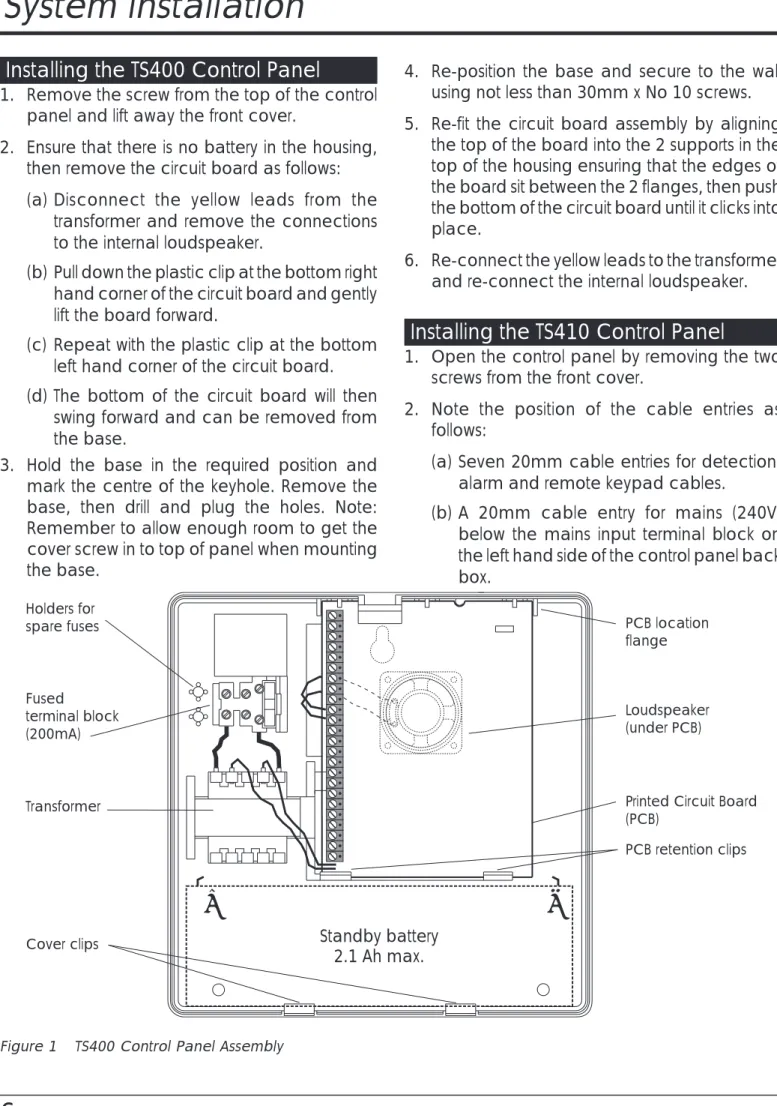
Installing the TS400 Control Panel . . . 6Installing the TS410 Control Panel . . . 6
Mains Connection . . . 7
Battery Connection . . . 7
PCB Layout . . . 8
Multiple Detectors on the same Zone . . . 9
Door Contacts . . . 9
Passive Infra-Red. . . 9
Auxiliary Tamper . . . 9
Wiring Example. . . 10
Installing a Remote Keypad . . . 11
External Sounder Connections . . . 11
Extension Loudspeakers . . . 12 ALM- Terminal . . . 12 RST- Terminal. . . 12 Detector Reset (DTR RST) . . . 12 Switched 12V (SW12V). . . 12 Aux 12V Power . . . 12 SD1(Optional) . . . 12 Initial Power-Up . . . 13
Programming
Programming Menus . . . 14 Program Zones . . . 15 Alarm . . . 15 Access . . . 15 Keyswitch . . . 15 Fire . . . 15 P.A. . . 15View Event Log . . . 15
Walk Test. . . 15
Exit Time . . . 16
Entry Time . . . 16
Bell Duration Time . . . 16
Change Engineer’s Passcode . . . 16
Remote Reset Number. . . 17
System Options. . . 17 Bell Output . . . 17 Setting Mode . . . 17 Reset Authority . . . 17 System Re-arms . . . 17 Keyswitch Operation. . . 18 RST- Output . . . 18
Returning to the Unset Mode . . . 18
Full Setting the System (AWAY) . . . 18
Part-Setting the System (HOME) . . . 18
Unsetting the System . . . 18
Testing & Fault Finding
Testing the System . . . 19Fault Finding . . . 19
Chart 1 - Zone Faults . . . 20
Chart 2 - System Will Not Set. . . 21
Chart 3 - External Sounder Faults . . . 22
Installation Records
System Programming Record. . . 23Overview
Introduction
The TS400 and TS410 are 6 zone microprocessor based intruder alarm control panels with 5 programmable zones and a dedicated Final Exit zone. The ease of operation for setting and unsetting lends itself ideally to domestic and smaller commercial installations.
TS400 Features
l 5 Programmable zones Night, Access, Fire, PA & Keyswitch (plus common tamper)
l Dedicated Final Exit zone
l On board keypad and LED indicators l Up to 4 remote keypads
l Facilities to connect to an SD1 Speech Dialler l 4 event log
l Programmable output for vibration detectors or latching PIRs
l Dual user codes l Remote Reset facility l 2.1 Ah battery capacity
l All data stored in Non-Volatile Memory (NVM)
TS410 Features
l 5 Programmable zones Night, Access, Fire, PA & Keyswitch (plus common tamper)
l Dedicated Final Exit zone
l Blind control panel supplied with 1 remote keypad with the option to support up to 4. l Facilities to connect to an SD1 Speech Dialler l 4 event log
l Programmable output for vibration detectors or latching PIRs
l Dual user codes l Remote Reset facility l 7.0 Ah battery capacity
l All data stored in Non-Volatile Memory (NVM)
Specifications
TS400 Control Panel
Input Voltage: 240V±10% 50Hz
Current: 40mA (normal) 85mA (alarm) Power Supply: 750mA
Standby Battery: 2.1Ah
Dimensions: 205 (W) x 205 (H) x 64 (D) mm Material: 3mm polycarbonate Weight: 1.2 Kg Environment: 0 - 55°C
TS410 Control Panel
Input Voltage: 240V±10% 50HzCurrent: 40mA (normal) 85mA (alarm) Power Supply: 750mA
Standby Battery: 7.0Ah
Dimensions: 242 (W) x 237 (H) x 86 (D) mm Material: 1.2mm mild steel
Weight: 2.6 Kg
Environment: 0 - 55°C
Remote Keypad
Current: 35mA (normal) 50mA (alarm) Dimensions: 130 (W) x 130 (H) x 30 (D) mm Material: 3mm Polycarbonate
Weight: 415g
Planning The Installation
General
The TS400 and TS410 are flexible systems, but care must be taken in planning the installation to provide maximum protection with minimum effort.
Survey the household and determine where each security device is to be fitted. Wherever possible, try to conceal wiring (e.g., in the loft, under carpets or floorboards and inside cupboards). Commit the system design to paper for future reference.
Cable Routing
When installing cables, the following should be noted:
l Ensure that all cables are kept clear of mains supply cables, telephone cables, cables supplying bells or sounders and any cables likely to induce electrical noise (R.F.) into the system.
l Screened cable may prove necessary if cables are run adjacent to cables which carry R.F. (electrical noise) or are switching high current loads.
l The mains power supply cable to the system must be connected to an un-switched fused spur that cannot be accidentally switched off. The mains cable must enter the control panel housing via its own cable entry point.
TS400 Control Panel
The TS400 control panel should be located in a position where it has easy access for the users to set and unset the system. It should by mounted at a level where it is easy to operate the keypad and read the indicator LEDs. The provision for connecting to a permanent mains supply must also be considered.
When operating the system it should be possible to hear the exit and entry tones throughout the entry & exit route and outside the final exit door. If the control panel is positioned a long way from the final exit door, it may be necessary to fit an extension loudspeaker.
TS410 Control Panel
The TS410 control panel is blind panel and as such it can positioned out of view, normally in a cupboard under the stairs. The provision for connecting to a permanent mains supply must also be considered.
When operating the system it should be possible to hear the exit and entry tones throughout the entry & exit route and outside the final exit door. If the remote keypad is located a long way from the final exit door, it may be necessary to fit an extension loudspeaker.
External Sounder
The external sounder should be mounted as high as possible so that it is visible and out of reach to potential intruders. A six-core cable is required for connection to the sounder which should enter directly through the wall and into the sounder via the cable entries in the back plate. However, if the cable is run over the surface to the sounder then it should be protected (e.g., the cable may be run in aluminium conduit).
Remote Keypad
If required, up to four remote keypads may be connected to the system to allow remote operation of the system. The remote keypad has 8 LED indicators and an internal sounder to indicate all system tones. Remote keypads require a six-core cable for connection.
Detection Devices
There are several types of detection devices available which are suitable for domestic installations as follows:
Passive Infra-Red (PIR)
A detector which detects movement of an intruder by the change in infra-red body heat. When fitting PIRs, refer to the installation instructions supplied with the unit. In general there are two types of PIR "Standard" and "Latching". Normally the standard type is used where one detector per zone is fitted and a six-core cable is required for connection. The latching type is used when more than one detector is fitted to a zone, the latch facility allows the user to identify the triggered detector by means of the indicator LED on the detector "latching" on. If latching detectors are used an eight-core cable is required for connection.
Magnetic Contacts
Magnetic contacts consist of an electrical switch which is operated by a magnet. They come in two versions, the "Flush" type is designed to be fitted into the top or side of the door/window. The " S u r f a c e " t y p e i s d e s i g n e d t o f i t t e d t o doors/windows where it is not possible to use flush contacts e.g. garage doors, UPVC windows etc. Both types of contacts require a four-core cable for connections.
Personal Attack (PA) Button
Normally PA buttons are located by the front door or adjacent to the bed, and preferably out of reach to small children. Pressing the button at any time will generate a full alarm. Some PA buttons auto reset and some require a key to reset them. In both cases the control panel must be reset. PA buttons require a four-core cable for connections.
Vibration Detectors
Vibration detectors are normally fitted to windows or door frames. They are triggered when the device senses a shock attack. Vibration detectors require a six-core cable for connections.
Smoke/Heat Detectors
12V Smoke or heat detectors may be connected to the system to provide additional protection against fire. When activated a distinctive internal sounder tone is generated and the external sounder is pulsed. Smoke detectors require a four-core cable for connections.
Final Exit
This is the point at which the user leaves and enters the premises (normally the front door). When setting the system the user must leave the protected area via the exit route and through the Final Exit zone. When re-entering the premises the user must activate the Final Exit zone to start the entry timer which allows the user time to gain access to the control panel to unset the system. If the user enters the premises through any other point and triggers a detection device a full alarm w i l l b e g e n e r a t e d . T h e s y s t e m m a y b e programmed to set after the exit timer has expired or by the operation of the Final Exit detection device.
Auxiliary Tamper
The tamper protection for all zones and any auxiliary devices such as the speech dialler must be wired in a continuous loop and then be connected to the auxiliary tamper terminals.
Keyswitch
An optional keyswitch may be fitted to the system to allow the user to set and unset (or part-set and unset) the system using a physical key rather than a four digit passcode.
System Installation
Installing the TS400 Control Panel
1. Remove the screw from the top of the control panel and lift away the front cover.
2. Ensure that there is no battery in the housing, then remove the circuit board as follows: (a) Disconnect the yellow leads from the
transformer and remove the connections to the internal loudspeaker.
(b) Pull down the plastic clip at the bottom right hand corner of the circuit board and gently lift the board forward.
(c) Repeat with the plastic clip at the bottom left hand corner of the circuit board. (d) The bottom of the circuit board will then
swing forward and can be removed from the base.
3. Hold the base in the required position and mark the centre of the keyhole. Remove the base, then drill and plug the holes. Note: Remember to allow enough room to get the cover screw in to top of panel when mounting the base.
4. Re-position the base and secure to the wall using not less than 30mm x No 10 screws. 5. Re-fit the circuit board assembly by aligning
the top of the board into the 2 supports in the top of the housing ensuring that the edges of the board sit between the 2 flanges, then push the bottom of the circuit board until it clicks into place.
6. Re-connect the yellow leads to the transformer and re-connect the internal loudspeaker.
Installing the TS410 Control Panel
1. Open the control panel by removing the two screws from the front cover.
2. Note the position of the cable entries as follows:
(a) Seven 20mm cable entries for detection, alarm and remote keypad cables.
(b) A 20mm cable entry for mains (240V) below the mains input terminal block on the left hand side of the control panel back box.
+
-Holders for spare fuses Fused terminal block (200mA) Transformer Cover clips PCB retention clips Printed Circuit Board (PCB) Loudspeaker (under PCB) Standby battery 2.1 Ah max. PCB location flange+
The mains cable must enter the control panel through its own cable entry and must not be mixed with other cables.3. Hold the control panel back box in the required position (keyhole to the top) and mark the centre of the keyhole position. Remove the back box, drill and plug the hole.
4. Screw a No 10 screw into the plugged hole. Re-position the back box and mark the remaining securing holes. Remove the back box, drill and plug the holes.
5. Re-position the back box and pass all cables into the base via cable entries, grommeting as appropriate.
6. Secure the back box using not less than 30mm x No 10 screws.
+
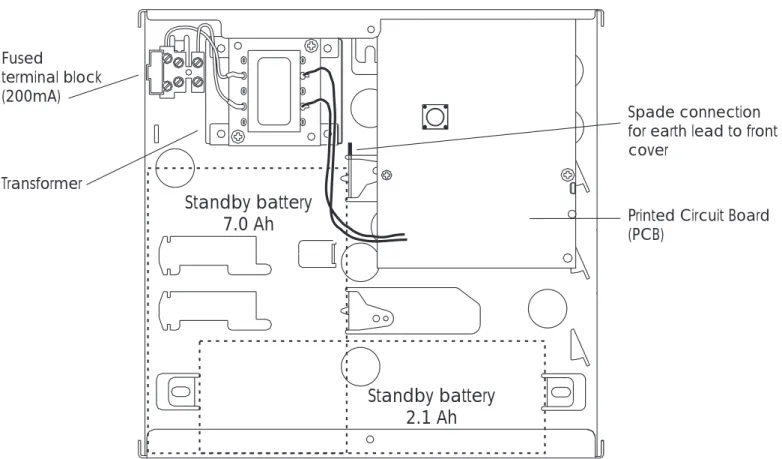
When replacing the cover, alwaysensure that the earth bonding lead is connected to the spade connection inside the control panel.
Mains Connection
The mains supply is connected to a 3 way "Euro Type" fused terminal block, which is fitted with a 200mA fuse. All electrical connections should be carried out by a qualified electrician and must comply with the current IEE regulations.
+
To comply with european regulations thesupply should be fed from a readily accessible disconnect device, e.g. un-switched fused spur fitted.
+
When making mains connections it shouldbe ensured that if the cable slips in such a way as to place a strain on the conductors, the protective earthing conductor will be the last to take the strain.
Battery Connection
A suitable standby battery must be fitted to the system to allow it to function during a mains fail condition. The TS400 and TS410 are equipped with a "Battery Protection" circuit so that if a battery is accidentally reverse connected or its voltage is below 4V, a tamper alarm is generated. To clear the fault simply reconnect or replace the battery as appropriate. Fused terminal block (200mA) Transformer Spade connection for earth lead to front cover
Printed Circuit Board (PCB)
Standby battery 7.0 Ah
Standby battery 2.1 Ah
PCB Layout
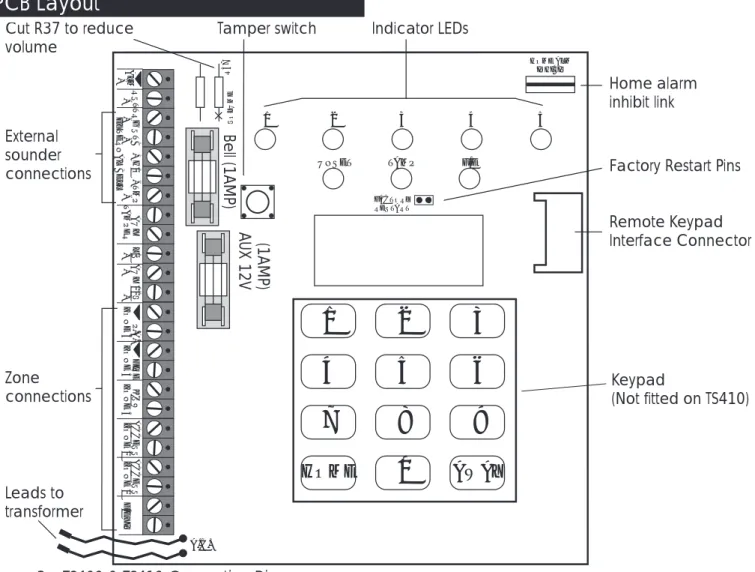
Bell Fuse
This 1 Amp fuse protects the supply to the external sounder/bell.
Aux Fuse
This 1 Amp fuse protects the supply to devices power from the auxiliary 12V terminals.
Speaker Volume R37
Cut R37 to reduce the volume of the extension loudspeakers.
Factory Restart Pins
If these pins are shorted during power-up all system programming data is restored to the factory default values, see page 13 for defaults. Home Inhibit Link
When the link is open the [ALM-] terminal activates when an alarm occurs during a full or part set condition. When the link is closed the [ALM-] terminal activates only if an alarm occurs during a full set condition.
1 - 5 Indicator LEDs
These red indicator LEDs indicate the alarm status of zone 1 - 5. Note these are not fitted on the TS410.
Unset Indicator LED
This green indicator LED is used to indicate the status of the system set or unset. It also flashes when the mains power is removed or when the user selects the user program mode
Tamp Indicator LED
This red LED is used to indicate a system tamper alarm, it also flashes when the engineer program mode is selected. Note this is not fitted on the TS410.
F/E Indicator LED
This red LED is used to indicate the status of the final exit zone. Note this is not fitted on the TS410.
A.C. ALM -RST -TRG -ST B -+H /O -TMP -AUX T A MPER L/S -AUX 12V +-P. A . ZONE 5 FIRE ZONE 4 K'SW ZONE 3 ACCESS ZONE 2 ACCESS ZONE 1 F/E X IT Remote Keypad Interface Connector Keypad (Not fitted on TS410) Factory Restart Pins Indicator LEDs Home alarm inhibit link Cut R37 to reduce volume (1AMP) AUX 12V Leads to transformer Tamper switch Zone connections External sounder connections Bell (1AMP)
1
2
3
4
5
6
7
8
9
HOME0
AWAY FACTORY RESTART VO LU ME R37 HOME ALM INHIBIT 1 2UNSET TAMP F/E
3 4 5 EX T E RNAL BELL
Multiple Detectors on the same Zone
Door Contacts
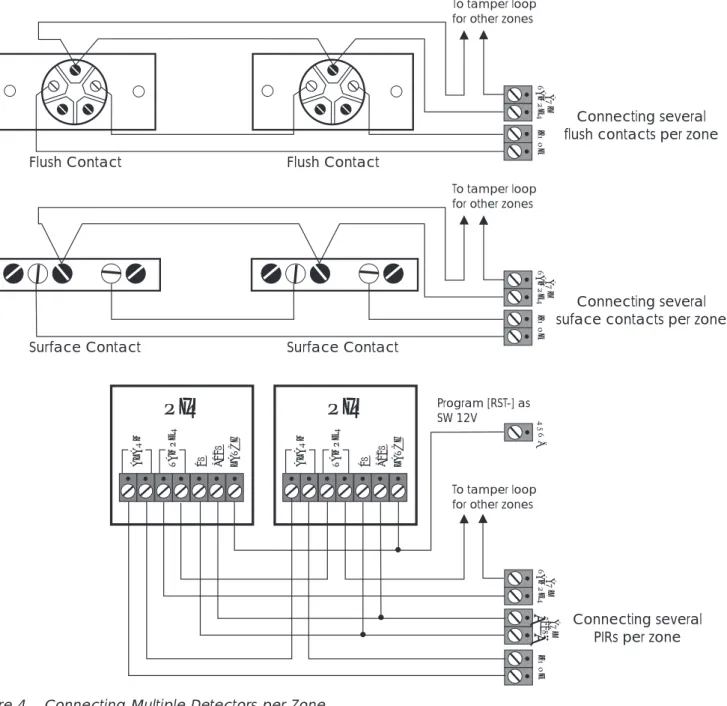
When connecting more than one door contact to a zone, the alarm contacts must be connected in series. The switch inside the contact is connected between the two plated screws (shown in white in the above figure).
Passive Infra-Red
When connecting more than one PIR to a zone it is recommended that you use "Latching" type PIRs. The latch terminal on the PIR is connected to the [RST-] output which must then be programmed as SW 12V.
Auxiliary Tamper
The tamper wires for each detector must be connected in series using a terminal strip or similar and then connect to the AUX TAMPER terminals.
AUX T A MPER ZONE To tamper loop for other zones
Flush Contact Flush Contact AUX T A MPER ZONE Surface Contact Surface Contact Connecting several flush contacts per zone
Connecting several suface contacts per zone
AUX T A MPER AUX 12V Connecting several PIRs per zone
Program [RST-] as SW 12V
PIR
0V +12V ALARM TA M PER LA T C H ZONE +-PIR
0V +12V ALARM TA M PER LA T C H RST -To tamper loop for other zonesTo tamper loop for other zones
Figure 4 Connecting Multiple Detectors per Zone
AUX TAMPER
Terminal Strip (Not Supplied) Tamper Loop
Tamper Loop Tamper Loop Tamper Loop
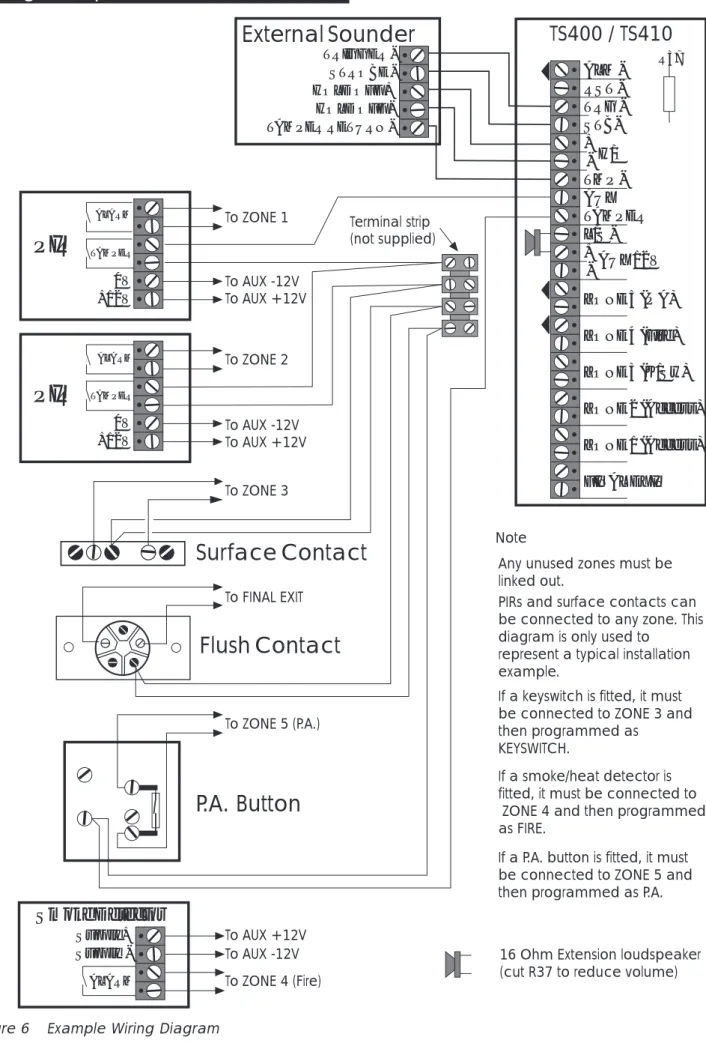
Wiring Example
ALM RST TRG - STB-+ TMP -AUX TAMPER L/S -+ -ZONE 5 (P A) H/O AUX 12V ZONE 4 (Fire) ZONE 3 (K/Sw) ZONE 2 (Access) ZONE 1 (Access) FINAL EXITPIR
+12V 0V TAMPER ALARMPIR
+12V 0V TAMPER ALARMFlush Contact
Surface Contact
ALARM Supply -Supply + Smoke Detector TRIGGER STROBE -HOLD OFF + HOLD OFF TAMPER RETURN-External Sounder
R37 NoteAny unused zones must be linked out.
PIRs and surface contacts can be connected to any zone. This diagram is only used to
represent a typical installation example.
If a keyswitch is fitted, it must be connected to ZONE 3 and then programmed as
KEYSWITCH.
If a smoke/heat detector is fitted, it must be connected to
ZONE 4 and then programmed as FIRE.
If a P.A. button is fitted, it must be connected to ZONE 5 and then programmed as P.A.
16 Ohm Extension loudspeaker (cut R37 to reduce volume)
TS400 / TS410
Terminal strip (not supplied) To ZONE 1 To ZONE 2 To ZONE 3 To FINAL EXIT To ZONE 5 (P.A.) To AUX +12V To AUX -12V To ZONE 4 (Fire) To AUX -12V To AUX -12V To AUX +12V To AUX +12VP.A. Button
Installing a Remote Keypad
Ensure that the mains and battery power has been disconnected and proceed as follows:
1. Connect each core of the 6-core cable to the interface terminals "L E D C B A" (make a note of the colours used for each connection). 2. Pass the yellow flying-lead behind the PCB and
connect it to the [L/S-] terminal.
3. Plug the Interface board into the interface socket as shown below.
4. Separate the remote keypad cover and base by using a screwdriver to push two of the clips (top or bottom) inwards from the cover retaining slots. Then lift the cover assembly, noting that the circuit board is connected to the under side of the cover.
5. Hold the remote keypad base in position (keyhole to the top) and mark the three securing holes, drill and plug the wall as required. Pass the 6-core cable into the base via the cable entry points as appropriate and secure the base to the wall.
6. Connect each core of the 6-core cable to the remote keypad terminals "L A B C D E", ensuring that the connections through to the control panel are A to A, B to B, etc. If more remote keypads are to be fitted, they may be c o n n e c t e d i n a s t a r o r d a i s y c h a i n configuration (providing the cable length to
the last or furthest remote keypad does not exceed 50 metres).
7. Carefully reattach the front cover assembly to the remote keypad base ensuring that all cables are clear of the tamper switch spring and the cover is securely clipped to the base.
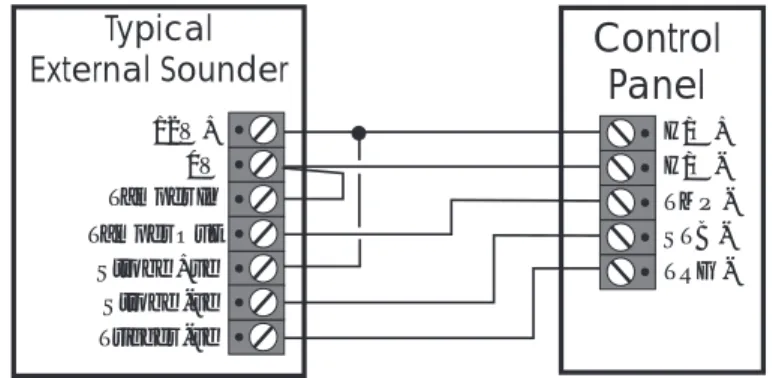
External Sounder Connections
The following terminals have been provided to allow connections to an external sounder:
H/O - This is used to provide a permanent -ve hold off to external sounders, strobes etc. H/O + This is used to provide a permanent +ve
hold off to external sounders, strobes etc. It is protected by a 1 Amp fuse (Bell 12V). TMP - This is the negative tamper return
connection from the external sounder. If an external sounder is not fitted this input must be linked to [H/O -].
STB - This is the strobe output which switches to 0V on alarm. The output is rated at 500mA and should be connected to -ve strobe trigger input on the external sounder. TRG - This is the external sounder trigger output
which is rated at 500mA. This output can b e p r o g r a m m e d f o r S A B o r S C B operation, as follows:
SAB: TRG - will switch to 0V on alarm and will provide a maximum of 500mA. SCB: TRG - will provide a negative hold off (500mA), which is removed on alarm.
Interface PCB Flying-lead
connected to L/S
-Flying-lead
L/S
Figure 7 Remote Interface Connections
Typical
External Sounder
Control
Panel
H/O + 12V + H/O -0V Tamper In TMP STB -Tamper Out TRG -Strobe +ve Strobe -ve Trigger -ve
Extension Loudspeakers
A 16Ohm extension loudspeaker can be connected between the [L/S-] and [AUX 12V+] terminals. R37 (located in the top left hand corner of the PCB) can be cut to reduce the volume of the internal sounders (alarm is always full volume).
ALM- Terminal
This terminal is switched negative (100mA) on alarm and is removed when the system is reset. If the Link marked "HOME ALARM INHIBIT" on the main PCB is closed, the [ALM-] output is disabled when the system is part-set (Home). Normally this output is used to trigger a speech dialler or similar.
RST- Terminal
This terminal may be programmed as:
Detector Reset (DTR RST)
When programmed as Detector Reset the output may be used for detectors which latch their alarm condition, and must be de-powered to reset (e.g., smoke detectors, vibration detectors etc.). Power for such detectors must be connected between [AUX 12V] and [RST-].
Switched 12V (SW12V)
When programmed as Switched 12V the output may be connected to the latch input terminal on latching detectors (e.g., PIRs etc.). This feature is normally used when more than one detector is connected to a single zone. It allows the user to identify the alarm source by latching the indicator LED on the detector that caused the alarm activation. The latched LED will clear when the system is reset.
Aux 12V Power
The auxiliary 12V terminals provide a permanent 12V supply for detectors which require a low voltage supply e.g., PIRs, vibration detectors, smoke detectors etc. The output is protected by a 1 Amp fuse (Aux 12V).
The maximum available current from the control panel power supply is 750mA. The following is a typical example showing how to calculate the available auxiliary current.
Control Panel = 85mA External Sounder = 250mA External Strobe = 115mA
Total =450mA
Auxiliary Available =300mA(750 - 450)
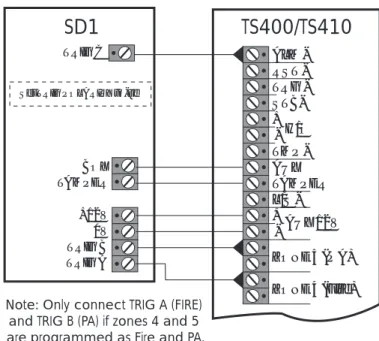
SD1(Optional)
The SD1 is a customer programmable speech dialler which dials pre-programmed numbers to inform neighbours etc. of the alarm. It is capable of transmitting up to 3 messages linked to inputs A, B and C.
16 Ohm Loudspeaker L/S
-AUX +12V
Figure 9 Speaker Connections
ALM RST TRG - STB-+ TMP -AUX TAMPER L/S -+ -ZONE 5 (P A) H/O AUX 12V ZONE 4 (Fire) TRIG A TRIG B 0V +12V TAMPER BOX TRIG C
Set TRIG POLARITY to -ve
Note:Only connect TRIG A (FIRE) and TRIG B (PA) if zones 4 and 5 are programmed as Fire and PA.
TS400/TS410
SD1
Initial Power-Up
1. Place a small screwdriver blade between the pins on the control panel PCB, marked FACTORY RESTART (located just below the LEDs). This will ensure the factory defaults are loaded as shown below: Engineer Code 1234 User Code 1 5678 Zone 1 Alarm Zone 2 Access Zone 3 Alarm Zone 4 Alarm Zone 5 Alarm
Exit Time 30 Seconds
Entry Time 30 Seconds
Bell Duration 20 Minutes Bell Output SAB (-ve applied) Remote Reset Number 004
Setting Mode Timed Set
Reset Authority User Reset Number Of Rearms 3
Operation Of Keyswitch Away Set (Full) RST- Output Detector Reset HOME Set Configuration Zone 1 Omitted
Factory Default Settings
2. Switch on the 240V mains supply, when the green UNSET LED is lit remove the screwdriver blade. The internal alarm will sound and the TAMPER LED will light.
3. Enter the engineer’s passcode (default 1 2 3 4), the alarm will silence. Enter the engineers passcode again and the TAMPER LED will flash (engineer programming menu selected). 4. Connect the standby battery. If the TAMPER
LED lights permanently and the internal alarm sounds when the battery is connected, then it may be incorrectly connected or it may be totally discharged. Disconnect the battery immediately and reconnect or replace as appropriate.
5. Push the battery into place at the bottom of the housing and re-fit the front cover.
+
On the TS410 you MUST connect the earthbonding cable from the front cover to the spade connection point, see figure 2.
6. Fit the battery link in the external sounder and replace cover.
Programming
Programming Menus
There are two programming menus within the system. The engineer’s programming menu and the user programming menu. The figure below shows the structure of both programming menus, however the engineers programming menu is only covered in full detail within this manual. For full details on the user optionssee "User Operating Instructions".
1 2 3 4 5
TAMPER
UNSET FINAL EXIT
1 2 3 4 5
TAMPER
UNSET FINAL EXIT
Tamper LED Flashes Unset LED Flashes 1 1 1 2 3 4 2 2 3 4 4 6 5 7 6 0 7 8 9 0 AWAY HOME HOME HOME
= Program Zones = Bell Test
Enter the engineer's passcode
(default = )
= View Event Log = Walk Test
= Walk Test = Change Passcode 1
= Exit Time = Change Passcode 2
= Entry Time = Home Set Configuration
= Bell Duration = Return to unset mode
Press twice when the system is in the unset mode to select
"Chime" zones. = Engineer's Passcode
= Remote Reset No. = System Options = Return to unset mode = Full set the system = Part set the system
1 2 3 4 5
TAMPER
UNSET FINAL EXIT
1 2 3 4 5
TAMPER
UNSET FINAL EXIT HOME
5 6 7
Enter first 3 digits of passcode then
(e.g., )
Program Zones
The TS400 zones may be programmed so that they perform different functions. The zones types are as follows:
Alarm
Zones 1- 5 can be programmed as alarm zones, this type of zone will only generate a full alarm when activated during a set condition.
Access
Zones 1 and 2 can be programmed as access zones, this type of zone is automatically isolated during the entry/exit procedure to allow a walk through route for the user. Once the system is full set the access zones respond as alarm zones. If an access zone is armed during the part set (Home) condition it will start the entry timer if activated.
Keyswitch
Zone 3 can be programmed as a keyswitch zone, this type of zone will set the system when active (zone open) and unset the system when healthy (zone closed). The keyswitch zone functionality can be further programmed to either full set (Away) or part set (Home) the system,see "System Options" on page 17.
Fire
Zone 4 can be programmed as a fire zone, this type of zone is monitored at all times, when activated a distinctive internal sounder tone is generated and the external sounder is pulsed on and off. The internal and external sounders will operate for 20 minutes, irrespective of the bell duration setting.
P.A.
Zone 5 can be programmed as a Panic Alarm (P.A.) zone, this type of zone is monitored at all times, when activated a full alarm is generated. The internal and external sounders will operate for 20 minutes, irrespective of the bell duration setting.
➤ To program zones proceed as follows: 1. Ensure that the engineer’s menu is selected,
then press[1]to select program zones. 2. Press keys[1]to[5]to toggle between the two
options for each zone as shown below.
Zone LED LED On LED Off
Zone 1 Access Alarm
Zone 2 Access Alarm
Zone 3 Keyswitch Alarm
Zone 4 Fire Alarm
Zone 5 PA Alarm
3. When completed, press[0]to accept, a high pitched acceptance tone will be heard and the system returns to the engineer’s menu.
View Event Log
The TS400 will store up to 4 alarm activation events within the memory log. This option allows the events to be viewed.
➤ To view the event log proceed as follows: 1. Ensure that the engineer’s menu is selected,
then press[2]to select view event log.
2. Press[1] to view the newest event,[4]to view the oldest event etc.
3. When completed, press[0]to accept, a high pitched acceptance tone will be heard and the system returns to the engineer’s menu.
Walk Test
The Walk Test option allows the engineer to test the function of all detection zones without causing an alarm. As each zone is activated its zone indicator LED will light and the internal sounder generates a two-tone sound. When the zone is deactivated the sounder stops and the zone LED goes out.
➤ To perform a walk test proceed as follows: 1. Ensure that the engineer’s menu is selected,
then press[3]to select walk test.
2. Activate each zone in turn by opening doors fitted with alarm contacts and walking in front of movement detectors.
3. When completed, press[0]to accept, a high pitched acceptance tone will be heard and the system returns to the engineer’s menu.
Exit Time
This timer sets the delay between the user initiating the setting procedure and the system actually setting. This only applies when the system is programmed to set by "Timed Exit", see "System Options" on page 17.
➤ To program the exit time proceed as follows: 1. Ensure that the engineer’s menu is selected,
then press[4]to select Exit Time.
2. Select the required exit time by using keys[1]to
[4]to light the appropriate zone LED. When the LED is lit the exit time will be as shown below:
Zone LED LED On
Zone 1 10 Seconds
Zone 2 30 Seconds
Zone 3 1 Minute
Zone 4 2 Minutes
3. When completed, press[0]to accept, a high pitched acceptance tone will be heard and the system returns to the engineer’s menu.
Entry Time
When the entry procedure is initiated, the Entry Timer is started. If a valid user passcode is not entered when the timer reaches zero, a full alarm tone is generated from the internal sounders only and the timer is restarted. If a valid user passcode is not entered when the timer reaches zero for the second time the external sounder is activated.
➤ To program the entry time proceed as follows: 1. Ensure that the engineer’s menu is selected,
then press[5]to select entry time.
2. Select the required exit time by using keys[1]to
[4]to light the appropriate zone LED. When the LED is lit the entry time will be as shown below:
Zone LED LED On
Zone 1 10 Seconds
Zone 2 30 Seconds
Zone 3 1 Minute
Zone 4 2 Minutes
3. When completed, press[0]to accept, a high pitched acceptance tone will be heard and the system returns to the engineer’s menu.
Bell Duration Time
This timer controls the duration of the external sounder when the system is triggered into a full alarm condition.
➤ To program the bell duration time proceed as follows:
1. Ensure that the engineer’s menu is selected, then press[6]to select the bell duration time. 2. Select the required bell duration time by using
keys [1] to [4] to light the appropriate zone LED. When the LED is lit the bell duration time will be as shown below:
Zone LED LED On
Zone 1 90 Seconds
Zone 2 3 Minutes
Zone 3 10 Minute
Zone 4 20 Minutes
Zone 5 Continuous
3. When completed, press[0]to accept, a high pitched acceptance tone will be heard and the system returns to the engineer’s menu.
Change Engineer’s Passcode
The factory default engineer’s passcode is set to [1] [2] [3] [4], but the installation engineer should change this to their own personal 4 digit passcode as follows:
➤ To change the engineer's passcode proceed as follows:
1. Ensure that the engineer’s menu is selected, then press [7] to select change engineer’s passcode.
2. Zone LEDs 1 to 4 will now light.
3. As the new passcode is entered each LED will go out one by one. When all 4 digits have been entered, LEDs 1 to 4 will light again and the new passcode must be re-entered for confirmation.
4. A high pitched tone indicates the new passcode was accepted, a low pitched tone indicates the passcode was not accepted. If the passcode was not accepted repeat the procedure again, using a different passcode.
Remote Reset Number
The "Engineer Reset" option can be overridden by the user, operating the "Remote Reset" facility. If an alarm is generated the system will respond with a four digit "seed" code which the user quotes to the alarm company. The "seed" code is then entered into a decoder and a unique "Remote Reset" code is generated. This is passed back to the user and, on entering the "Remote Reset" code, the system will reset.
The "Remote Reset" code is generated using an algorithm identified by a 3 digit number. Alternative algorithms may be selected but these must correspond to that used by the alarm company otherwise the "Remote Reset" code will be incorrect. The "Remote Reset" feature may be disabled altogether by setting the number to "000".
➤ To program the remote reset number proceed as follows:
1. Ensure that the engineer’s menu is selected, then press[8]to select remote reset number. 2. Zone LEDs 1 to 3 will now light.
3. As the new remote reset number is entered each LED will go out one by one. When all 3 digits have been entered, LEDs 1 to 3 will light a g a i n a n d t h e n e w n u m b e r m u s t b e re-entered for confirmation.
4. A high pitched tone indicates the new number was excepted, a low pitched tone indicates the number was incorrectly entered and the procedure must be repeated.
System Options
There are six system options which change the functionality of the alarm system. The options are as follows:
Bell Output
The bell trigger output [TRG-] can be programmed as either:
SAB: When programmed as SAB the output will switch to 0V on alarm.
SCB: When programmed as SCB the output provides a 0V hold off, which is removed on alarm.
Setting Mode
The system can be programmed to set using ether:
Timed Exit: The system will set when the exit timer has expired.
Final Exit: The system will set when the last detector or door contact is activated during the exit procedure.Note: When the system is part set (HOME) the system will always set by timed exit and is silent.
Reset Authority
The person responsible for resetting full alarms can be programmed as either:
User: Following a full alarm the system can be reset by the user.
Engineer: Following a full alarm the system can only be reset by the engineer or Remote Reset (If enabled).
System Re-arms
The system can be programmed to re-arm after an alarm. The re-arm options are:
1 re-arm: When an alarm occurs, the internal and external sounders are operated for the length of the bell duration. At the end of this time the alarm is silenced and the all zones are re-armed. Any zones that are active will be automatically isolated until they return to their healthy state. If an alarm occurs from the same zone it will cause the internal and external sounders to operate again, at the end of the alarm the zone is "Locked-out" and prevented from generating another alarm. All other healthy zones will re-arm and will only be ‘Locked-out’ when they have caused another alarm.
3 Re-arms: Operates as above, but zones are only "Locked-out" after the system has re-armed 3 times.
Keyswitch Operation
The operation of the keyswitch (zone 3) can be programmed as either:
AWAY: When keyswitch zone is opened the exit procedure for AWAY set will start and the system will attempt to full set. When the zone is closed the system will unset.
HOME: When the key switch zone is opened the exit timer will start and when the timer has expired the system will be part set. When the zone is closed the system will unset.
RST- Output
The operation of the [RST-] output can be programmed as either:
SW 12V: This can be connected to the "Latch" input on latching detection devices.
Detector Reset: This can be used as the 0V connection to detectors that require the power to be removed to reset them (such as smoke detectors and vibration sensors).
➤ To program the system options proceed as follows:
1. Ensure that the engineer’s menu is selected, then press[9]to select system options.
2. Press keys[1]to[6]to toggle the zone LEDs on or off. The system options will be set according to the status of the relevant zone LED as shown below:
Zone LED LED On LED Off
Zone 1 Bell output is an SAB
Bell output is an SCB Zone 2 System is set by
Final Exit
System is set by Timed exit Zone 3 System is reset
by the Engineer
System is reset by the User Zone 4 System re-arms
three times System re-arms once Zone 5 Keyswitch = Home set Keyswitch = Away set Final Exit RST output is
SW12V
RST output is Detector Reset 3. When completed, press[0]to accept, a high
pitched acceptance tone will be heard.
Returning to the Unset Mode
Once all the engineer programming is completed the system can be returned to the unset mode by pressing the [0] key. The user passcodes and " H O M E " s e t c o n f i g u r a t i o n m u s t a l s o b e programmed,see the "User Guide" for full details.
Full Setting the System (AWAY)
The engineer can use his passcode to full set the system as follows:
1. Ensure that the engineer’s menu is selected, then press[AWAY]to full set the system. 2. The exit tone will start and the Final Exit LED will
flash.
3. When the exit tone stops, the system is full set.
Part-Setting the System (HOME)
The engineer can use his passcode to part set the system as follows:
1. Ensure that the engineer’s menu is selected, then press[HOME]to part set the system. 2. The Final Exit LED will flash (HOME set is always
silent and timed).
3. When the high pitched tone is heard the system is part set.
Unsetting the System
The engineer can only use his passcode to unset the system when the system is set or part set using the engineer passcode (i.e., if the system is set by the user the engineer passcode will NOT unset the system).
1. Enter via the prescribed entry route.
2. The entry tone will start and the Final Exit LED will flash.
3. Enter the engineer’s passcode (e.g., 1 2 3 4 ). 4. The entry tone will stop and the unset LED will
Testing & Fault Finding
Testing the System
Once the system has been installed and fully programmed it can be tested. Before performing any tests it is advisable to warn your neighbours of any tests that involve using the external sounder. 1. Perform a WALK TEST to ensure that all zones are
operating correctly.
2. Perform a BELL TEST to ensure that the external sounder and strobe is operating correctly (See "User Operating Instructions" for details on BELL TEST).
3. Set the alarm system. Open a door or activate a detector to create an alarm.
4. Unset the system to silence the internal and external sounder.
5. Ensure the correct zone LED is lit, then enter the passcode again to clear the indications. Installation and checks are now complete, if there are any problems in your installation refer to the section on Fault Finding.
Fault Finding
If you have carefully followed the installation and wiring instructions and carried out the various checks correctly, your security system will now be fully operational.
However if the system is not operating correctly when you have completed the installation, or it has developed a fault after a period of trouble free operation, the Fault Finding Charts will help you identify and clear the fault.
Before using the fault finding charts refer to the following notes:
l When removing covers from the control panel, external sounder or detectors you must remember to first enter the four digit engineer code into the control panel.
l When all tests are complete, remember to replace all covers etc.
l A battery operated circuit tester available from most hardware and DIY stores, or a simple battery bulb and length of wire, will assist in checking the continuity of circuit wiring, if necessary.
Chart 1 - Zone Faults
Enter 4 digit engineer code and then press 3 to select
walk test mode
Relevant zone LED on and pulsed
sounder
Remove wiring from faulty zone and link with a piece of wire.
Remove link from faulty zone and re-fit
zone wiring.
Remove zone wiring from detector and
twist together
If the control panel sounder remains silent, the fault is in
the detector
If the control panel sounder is puled,
there is an open circuit in the wiring.
No zone LED's on and sounder is off. Relevant zone LED
still on and pulsed sounder.
Control Panel Faulty.
Relevant zone LED light's and sounder changes to a pulsed
tone.
Control panel and detector are OK. Enable case tamper
and re-fit cover. No change in
control panel indecations.
Remove the wiring from the faulty zone.
Relevant zone led light and sounder changes to a pulsed
tone
Re-fit zone wiring at control panel. remove zone wiring
from detector No zone LEDs on
and sounder is off.
Control Panel Faulty
If the control panel sounder remains
silent, there is a short in the wiring.
Activate the relevant detector No zone LED's on and sounder is off. Remove control
panel front cover and disable the case
tamper switch
If the control panel sounder is pulsed, the fault is in the
detector
Permanent Zone
Fault
Detectors Fail To
Operate
Chart 2 - System Will Not Set
Enter 4 digit engineer code and then press 3 to select
walk test mode
Zone LED on and Pulse Sounder.
No zone LED's on and sounder is off.
Press to exit Walk Test.
[0]
Press or
to part set or full set the system.
[HOME] [AWAY]
Remove control panel cover and disable the case
tamper.
Remove wiring from AUX TAMPER terminals and link with a piece of wire
If the Tamper LED remains lit, fit link between TMP- and
H/O
-If Tamper LED goes out there is an open
circuit within the AUX TAMPER wiring.
If the Tamper LED remains lit , disconnect the
battery.
If tamper LED goes out the tamper on the external siren is
open.
If the Tamper LED remains lit, the control panel is
faulty.
If the Tamper LED goes out the battery is faulty Tamper LED on.
See Chart 1 on Zone Faults
Deactivate all detectors & contacts
(e.g. close doors etc.)
Chart 3 - External Sounder Faults
Check PA buttons are not depressed.
External Siren sounds continuously.
Enter 4 digit engineer code and
remove the control panel cover.
Remove the wire from the
TRG-terminal..
If zone 5 LED is on, the fault is within the PA circuit.
(see chart 1)
Enter 4 digit engineer code and
remove the control panel cover.
Using a voltmeter check this is 13 - 14V between
H/O+ & H/O-.
Check TRG- is programmed for correct type (SAB or
SCB).
Remove the wire from the
TRG-terminal.
If there is no reading check the Bell Fuse
hasn't blown.
Activate the relevant detector
Place the removed wire on the H/O-terminal. The siren
should sound.
If voltage reads OK, the fault is likely to be within the siren
External siren will not trigger when performing a Bell
Test.
external siren sounds continiously.
If the siren did not sound check connections at the
siren
If the connections are OK the fault is likely to be within the
siren. External siren stops.
If the siren triggered OK the fault is likely
to be within the control panel. Ensure that the
system is in the unset mode.
Installation Records
Zone Programming
Zone Type Location Chime Home Config.
1 Alarm / Access On / Off Armed / Omitted
2 Alarm / Access On / Off Armed / Omitted
3 Alarm / Keyswitch On / Off Armed / Omitted
4 Alarm / Fire On / Off Armed / Omitted
5 Alarm / PA On / Off Armed / Omitted
Final Exit On / Off Always Armed
Timers
Exit Time 10 seconds 30 seconds 1 minute 2 minutes
Entry Time 10 seconds 30 seconds 1 minute 2 minutes
Bell Duration 90 seconds 3 minutes 10 minutes 20 minutes Continuous
System Options
Bell Output Setting Mode Reset By Re-arms Keyswitch RST Output
SCB Timed User 1 re-arm Away set Detector Reset
SAB Final Exit Engineer 3 re-arms Home set SW12V
Installer Information
Remote Reset No.
For Remote Reset Telephone: Company Name:
Address:
Telephone No.: Date Installed:
18014 Drg. No. 33:1939:00 Issue 01 Doc 01 April 97 1 Zone Types Press [1] - [5] to toggle LEDs on/off. Press [0] to end 1 2 3 4 5 Z1 = Access Z2 =Access Z3 = Keyswitch Z4 = Fire Z5 = PA Z1 =Alarm Z2 = Alarm Z3 =Alarm Z4 =Alarm Z5 =Alarm 2 View Log Press [1] for newest event
Press [4] for oldest event Zone LEDs that light have caused an alarm
3 Walk Test Activate detectors. Press [0] to end
When the zone is in alarm the panel will sound and the relevant zone LED will light.
4 Exit Time Press [1] to [4]. Press [0] to end 1 2 3 4 10 seconds 30 seconds 1 minute 2 minutes
5 Entry Time Press [1] to [4]. Press [0] to end 1 2 3 4 10 seconds 30 seconds 1 minute 2 minutes
6 Bell Duration Press [1] - [5]. Press [0] to end 1 2 3 4 5 90 seconds 3 minutes 10 minutes 20 minutes Continuous 7 Change Engineer's Passcode
Enter new passcode twice
Zone LEDs 1 - 4 will light, as code is entered each LED will go out one by one.
8 Remote Reset No. Enter reset number twice Zone LEDs 1 - 3 will light, as code is entered each LED will go out one by one.
9 System Options Press [1] - [6] to toggle LEDs on/off Press [0] to end 1 2 3 4 5 F.Exit
Bell output = SAB
Set by Final Exit Reset by Engineer
3 re-arms
Key = Home set RST = SW12V
Bell output = SCB
Set by Timed Exit Reset by User
1 re-arm
Key = Away set RST = Det. Reset HOME Part set the system Leave via exit route
AWAY Full set the system Leave via exit route
0 Return to unset
Engineer's Quick Reference Programming Chart Cooper Security Ltd, Security House,
Vantage Point Business Village, Mitcheldean, Gloucestershire, GL17 0SZ. England
Product Support Tel: +44 (0)1594 545556 Available between;
08:15 and 17:00, Monday to Thursday. 08:15 and 12:45 Friday. Emergency service only between 12:45 and 17:00 Friday.
Product Support Fax: +44 (0)1594 545401. www.coopersecurity.co.uk