Agilent Technologies
Agilent High Sensitivity
DNA Kit Guide
Agilent High Sensitivity DNA
Notices
© Agilent Technologies, Inc. 2009, 2013 No part of this manual may be reproduced in any form or by any means (including elec-tronic storage and retrieval or translation into a foreign language) without prior agree-ment and written consent from Agilent Technologies, Inc. as governed by United States and international copyright laws.
Manual Part Number
G2938-90321 Rev. BEdition
11/2013 Printed in Germany Agilent Technologies Hewlett-Packard-Strasse 8 76337 WaldbronnResarch Use Only
Not for use in Diagnostic Procedures.
Warranty
The material contained in this docu-ment is provided “as is,” and is sub-ject to being changed, without notice, in future editions. Further, to the max-imum extent permitted by applicable law, Agilent disclaims all warranties, either express or implied, with regard to this manual and any information contained herein, including but not limited to the implied warranties of merchantability and fitness for a par-ticular purpose. Agilent shall not be liable for errors or for incidental or consequential damages in connection with the furnishing, use, or perfor-mance of this document or of any information contained herein. Should Agilent and the user have a separate written agreement with warranty terms covering the material in this document that conflict with these terms, the warranty terms in the sep-arate agreement shall control.
Technology Licenses
The hardware and/or software described in this document are furnished under a license and may be used or copied only in accor-dance with the terms of such license.
Restricted Rights Legend
If software is for use in the performance of a U.S. Government prime contract or subcon-tract, Software is delivered and licensed as “Commercial computer software” as defined in DFAR 252.227-7014 (June 1995), or as a “commercial item” as defined in FAR 2.101(a) or as “Restricted computer soft-ware” as defined in FAR 52.227-19 (June 1987) or any equivalent agency regulation or contract clause. Use, duplication or dis-closure of Software is subject to Agilent Technologies’ standard commercial license terms, and non-DOD Departments and Agencies of the U.S. Government willreceive no greater than Restricted Rights as defined in FAR 52.227-19(c)(1-2) (June 1987). U.S. Government users will receive no greater than Limited Rights as defined in FAR 52.227-14 (June 1987) or DFAR 252.227-7015 (b)(2) (November 1995), as applicable in any technical data.
Safety Notices
C A U T I O N
A CAUTION notice denotes a hazard. It calls attention to an operating procedure, practice, or the like that, if not correctly per-formed or adhered to, could result in damage to the product or loss of important data. Do not proceed beyond a CAUTION notice until the indicated condi-tions are fully understood and met.
WA R N I N G
A WARNING notice denotes a hazard. It calls attention to an operating procedure, practice, or the like that, if not correctly performed or adhered to, could result in personal injury or death. Do not proceed beyond a WARNING notice until the indi-cated conditions are fully under-stood and met.
Caliper®, LabChip® and the Lab-Chip logo are registered trademarks of Caliper Technologies Corp. in the U.S. and other countries.
Adobe and Acrobat are U.S. registered trademarks of Adobe Systems Incorporated. Microsoft® is a U.S. registered trademark of Microsoft Corporation.
Software Revision
This guide is valid for 2100 expert B.02.07 revision and higher of the Agilent expert software, where 07 refers to minor revisions of the software that do not affect the technical accuracy of this guide.
Agilent High Sensitivity DNA 3 Contents
Contents
1 Agilent High Sensitivity DNA Kit
4
2 Equipment Required for a High Sensitivity DNA Assay
6
3 Setting up the Assay Equipment and Bioanalyzer
7
Setting up the Assay Equipment and Bioanalyzer
7
Setting up the Chip Priming Station
8
Setting up the Bioanalyzer
9
Vortex Mixer
9
Starting the 2100 Expert Software
10
4 Essential Measurement Practices
11
5 Agilent High Sensitivity DNA Assay Protocol
12
Preparing the Gel-Dye Mix
12
Loading the Gel-Dye Mix
14
Loading the Marker
15
Loading the Ladder and the Samples
16
Inserting a Chip in the Agilent 2100 Bioanalyzer
17
Starting the Chip Run
18
Cleaning Electrodes after a High Sensitivity DNA Chip Run
20
6 Checking Your Agilent High Sensitivity DNA Assay Results
21
High Sensitivity DNA Ladder Well Results
21
4
Agilent High Sensitivity DNA
Agilent Technologies
Agilent High Sensitivity DNA Kit
1
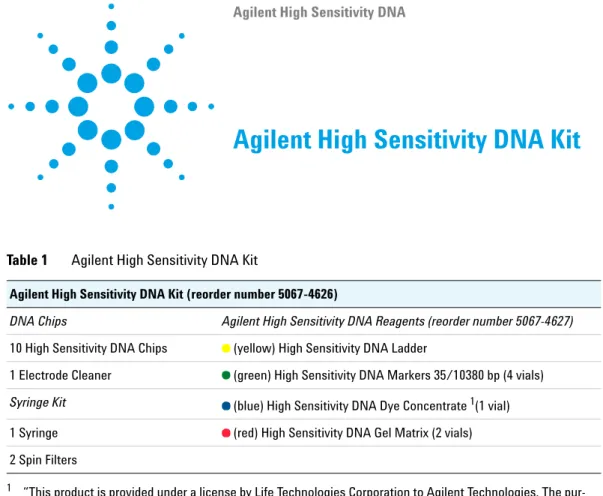
Table 1 Agilent High Sensitivity DNA Kit
Agilent High Sensitivity DNA Kit (reorder number 5067-4626)
DNA Chips Agilent High Sensitivity DNA Reagents (reorder number 5067-4627)
10 High Sensitivity DNA Chips (yellow) High Sensitivity DNA Ladder
1 Electrode Cleaner (green) High Sensitivity DNA Markers 35/10380 bp (4 vials)
Syringe Kit (blue) High Sensitivity DNA Dye Concentrate 1(1 vial)
1 “This product is provided under a license by Life Technologies Corporation to Agilent Technologies. The
pur-chase of this product conveys to the buyer the non-transferable right to use the purpur-chased amount of the prod-uct and components of the prodprod-uct only as described in accompanying prodprod-uct literature. The sale of this product is expressly conditioned on the buyer not using the product or its components (1) in manufacturing; (2) to provide a service, information, or data to an unaffiliated third party for payment; (3) for therapeutic, diagnos-tic or prophylacdiagnos-tic purposes; (4) to resell, sell or otherwise transfer this product or its components to any third party, or use for any use other than use in the subfields of research and development, quality control, forensics, environmental analysis, biodefense or food safety testing. For information on purchasing a license to this prod-uct for purposes other than described above contact Life Technologies Corporation, Cell Analysis Business Unit, Business Development, 29851 Willow Creek Road, Eugene, OR 97402, Tel: (541) 465-8300. Fax: (541) 335-0354"
1 Syringe (red) High Sensitivity DNA Gel Matrix (2 vials) 2 Spin Filters
Agilent High Sensitivity DNA 5 Agilent High Sensitivity DNA Kit
1
Table 2 Physical Specifications
Type Specification
Analysis run time 45 minutes Number of samples 11 samples/chip Sample volume 1 µl
Kit stability 4 months (Storage temp. see individual box!)
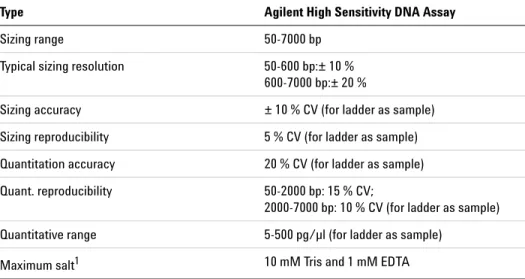
Table 3 Analytical Specifications
Type Agilent High Sensitivity DNA Assay
Sizing range 50-7000 bp Typical sizing resolution 50-600 bp:± 10 %
600-7000 bp:± 20 %
Sizing accuracy ± 10 % CV (for ladder as sample) Sizing reproducibility 5 % CV (for ladder as sample) Quantitation accuracy 20 % CV (for ladder as sample) Quant. reproducibility 50-2000 bp: 15 % CV;
2000-7000 bp: 10 % CV (for ladder as sample) Quantitative range 5-500 pg/µl (for ladder as sample)
Maximum salt1
1 Due to the high sensitivity of the assay, different ions and higher salt concentrations might
influ-ence the performance of the assay.
6
Agilent High Sensitivity DNA
Agilent Technologies
Equipment Required for a High
Sensitivity DNA Assay
2
Equipment Supplied with the Agilent 2100 Bioanalyzer
• Chip priming station (reorder number 5065- 4401)
• IKA vortex mixer
Additional Material Required (Not Supplied)
• Pipettes (10 µl, 100 µl and 1000 µl) with compatible tips
• 0.5 ml low- binding microcentrifuge tubes for sample preparation
• Microcentrifuge
Check the Agilent Lab- on- a- Chip webpage for details on assays:
7
Agilent High Sensitivity DNA
Agilent Technologies
Setting up the Assay Equipment and
Bioanalyzer
3
Setting up the Assay Equipment and Bioanalyzer
Before beginning the chip preparation protocol, ensure that the chip priming station and the bioanalyzer are set up and ready to use. You have to
• replace the syringe at the chip priming station with each new kit
• adjust the base plate of the chip priming station
• adjust the syringe clip at the chip priming station
• adjust the bioanalyzer’s chip selector
• set up the vortex mixer
• finally, make sure that you start the software before you load the chip.
N O T E
The Agilent High Sensitivity DNA assay is a high sensitivity assay. Please read this guide carefully and strictly follow all instructions to guarantee satisfactory results.8 Agilent High Sensitivity DNA
3
Setting up the Assay Equipment and Bioanalyzer Setting up the Chip Priming StationSetting up the Chip Priming Station
1 Replace the syringe:
a Unscrew the old syringe from the lid of the chip priming station.
b Release the old syringe from the clip. Discard the old syringe.
c Remove the plastic cap of the new syringe and insert it into the clip.
d Slide it into the hole of the luer lock adapter and screw it tightly to the chip priming station.
2 Adjust the base plate:
a Open the chip priming station by pulling the latch.
b Using a screwdriver, open the screw at the underside of the base plate.
c Lift the base plate and insert it again in position C. Retighten the screw.
3 Adjust the syringe clip:
a Release the lever of the clip and slide it down to the lowest position.
Agilent High Sensitivity DNA 9 Setting up the Assay Equipment and Bioanalyzer
3
Setting up the Bioanalyzer
Setting up the Bioanalyzer
Adjust the chip selector:
1 Open the lid of the bioanalyzer and make sure that the electrode cartridge is inserted in the instrument. If not, open the latch, remove the pressure cartridge and insert the electrode cartridge.
2 Remove any remaining chip and adjust the chip selector to position (1).
Vortex Mixer
IKA - Model MS3
1 To set up the vortex mixer, adjust the speed knob to 2400 rpm.
10 Agilent High Sensitivity DNA
3
Setting up the Assay Equipment and Bioanalyzer Starting the 2100 Expert SoftwareStarting the 2100 Expert Software
To start the software:
1 Go to your desktop and double- click the following icon.
The screen of the software appears in the Instrument context. The icon in the upper part of the screen represents the current instrument- PC communication status:
2 If more than one instrument is connected to your PC, select the instrument you want to use in the tree view.
Lid closed, no chip or chip empty
Lid open
Dimmed icon: no communication
Lid closed, chip inserted, DNA or demo assay selected
11
Agilent High Sensitivity DNA
Agilent Technologies
Essential Measurement Practices
4
• Handle and store all reagents according to the instructions on the label of the individual box.
• Avoid sources of dust or other contaminants. Foreign matter in reagents and samples or in the wells of the chip will interfere with assay results.
• Keep all reagents and reagent mixes refrigerated at 4 °C when not in use.
• Allow all reagents and samples to equilibrate to room temperature for 30 min before use.
• Protect dye and dye mixtures from light. Remove light covers only when pipetting. The dye decomposes when exposed to light and this reduces the signal intensity.
• Always insert the pipette tip to the bottom of the well when dispensing the liquid. Placing the pipette at the edge of the well may lead to poor results.
• Use a new syringe and electrode cleaners with each new kit.
• Use loaded chips within 5 min after preparation. Reagents might evaporate, leading to poor results.
• Do not touch the Agilent 2100 Bioanalyzer during analysis and never place it on a vibrating surface.
12
Agilent High Sensitivity DNA
Agilent Technologies
Agilent High Sensitivity DNA Assay
Protocol
5
After completing the initial steps in “Setting up the Assay Equipment and Bioanalyzer” on page 7, you can prepare the assay, load the chip, and run the assay, as described in the following procedures.
Preparing the Gel-Dye Mix
1 Allow the blue- capped High Sensitivity DNA dye concentrate (blue ) and red- capped High Sensitivity DNA gel matrix (red ) to equilibrate to room temperature for 30 minutes.
WA R N I N G
Handling DMSOKit components contain DMSO. Because the dye binds to nucleic acids, it should be treated as a potential mutagen and used with appropriate care.
➔Wear hand and eye protection and follow good laboratory practices when preparing and handling reagents and samples.
➔Handle solutions with particular caution as DMSO is known to facilitate the entry of organic molecules into tissues.
N O T E
It is important that all the reagents have room temperature before starting the next step. Protect the dye concentrate from light.Agilent High Sensitivity DNA 13 Agilent High Sensitivity DNA Assay Protocol
5
Preparing the Gel-Dye Mix
2 Vortex the blue- capped vial with High Sensitivity DNA dye concentrate (blue ) for 10 seconds and spin down. Make sure the DMSO is completely thawed.
3 Pipette 15 µl of the blue capped dye concentrate (blue ) into a red- capped High Sensitivity DNA gel matrix vial (red ). Store the dye concentrate at 4 °C in the dark again.
4 Cap the tube, vortex for 10 seconds. Visually inspect proper mixing of gel and dye.
5 Transfer the complete gel- dye mix to the top receptacle of a spin filter.
6 Place the spin filter in a microcentrifuge and spin for 10 minutes at room temperature at 2240 g ± 20 % (for Eppendorf microcentrifuge, this corresponds to 6000 rpm).
7 Discard the filter according to good laboratory practices. Label the tube and include the date of preparation.
¥
&* aYnZ
\Za"YnZb^m
N O T E
Always use the volumes indicated. Using different volumes in the same ratio will produce inaccurate results.N O T E
The prepared gel-dye mix is sufficient for 5 chips. Use the gel-dye within 6 weeks of preparation.Protect the gel-dye mix from light. Store the gel-dye mix at 4 °C when not in use for more than 1 hour.
14 Agilent High Sensitivity DNA
5
Agilent High Sensitivity DNA Assay Protocol Loading the Gel-Dye MixLoading the Gel-Dye Mix
1 Allow the gel- dye mix to equilibrate to room temperature for 30 minutes before use. Protect the gel- dye mix from light during this time.
2 Take a new High Sensitivity DNA chip out of its sealed bag and place the chip on the chip priming station.
3 Pipette 9.0 µl of the gel- dye mix at the bottom of the well marked and dispense the gel- dye mix.
4 Set the timer to 60 seconds, make sure that the plunger is positioned at 1 ml and then close the chip priming station. The lock of the latch will click when the Priming Station is closed correctly.
5 Press the plunger of the syringe down until it is held by the clip.
6 Wait for exactly 60 seconds and then release the plunger with the clip release mechanism.
7 Visually inspect that the plunger moves back at least to the 0.3 ml mark.
8 Wait for 5 s, then slowly pull back the plunger to the 1 mL position.
N O T E
Before loading the gel-dye mix, make sure that the base plate of the chip priming station is in position (C) and the adjustable clip is set to the lowest position. Refer to “Setting up the Chip Priming Station”on page 8 for details..¥a\Za"YnZ
N O T E
When pipetting the gel-dye mix, make sure not to draw up particles that may sit at the bottom of the gel-dye mix vial. Insert the tip of the pipette to the bottom of the chip well when dispensing. This prevents a large air bubble forming under the gel-dye mix. Placing the pipette at the edge of the well may lead to poor results.Agilent High Sensitivity DNA 15 Agilent High Sensitivity DNA Assay Protocol
5
Loading the Marker
9 Open the chip priming station.
10Pipette 9.0 µL of the gel- dye mix in each of the wells marked .
Loading the Marker
1 Pipette 5 µL of green- capped High Sensitivity DNA marker (green ) into the well marked with the ladder symbol and into each of the 11 sample wells.
.¥a\Za"YnZ
N O T E
Protect the gel-dye mix from light. Store the gel-dye mix at 4 °C when not in use for more than 1 h.*¥abVg`Zg
16 Agilent High Sensitivity DNA
5
Agilent High Sensitivity DNA Assay Protocol Loading the Ladder and the SamplesLoading the Ladder and the Samples
1 Pipette 1 µl of the yellow- capped High Sensitivity DNA ladder vial (yellow ) in the well marked with the ladder symbol .
2 In each of the 11 sample wells pipette 1 µL of sample (used wells) or 1 µL of marker (unused wells).
3 Place the chip horizontally in the adapter of the IKA vortex mixer and make sure not to damage the buldge that fixes the chip during
vortexing.
4 Vortex for 60 seconds at 2400 rpm.
5 Refer to the next topic on how to insert the chip in the Agilent 2100 Bioanalyzer. Make sure that the run is started within 5 minutes.
&¥aaVYYZg
&¥ahVbeaZ
N O T E
For optimal results, samples should be dissolved in 10 mM Tris and 1 mM EDTA.C A U T I O N
Wrong vortexing speedIf the vortexing speed is too high, liquid spill that disturbs the analysis may occur for samples generated with detergent containing buffers.
Agilent High Sensitivity DNA 17 Agilent High Sensitivity DNA Assay Protocol
5
Inserting a Chip in the Agilent 2100 Bioanalyzer
Inserting a Chip in the Agilent 2100 Bioanalyzer
1 Open the lid of the Agilent 2100 Bioanalyzer.2 Check that the electrode cartridge is inserted properly and the chip selector is in position (1). Refer to “Setting up the Bioanalyzer” on page 9 for details.
3 Place the chip carefully into the receptacle. The chip fits only one way.
4 Carefully close the lid. The electrodes in the cartridge fit into the wells of the chip.
5 The 2100 Expert software screen shows that you have inserted a chip and closed the lid by displaying the chip icon at the top left of the
Instrument context.
C A U T I O N
Sensitive electrodes and liquid spillsForced closing of the lid may damage the electrodes and dropping the lid may cause liquid spills resulting in bad results.
18 Agilent High Sensitivity DNA
5
Agilent High Sensitivity DNA Assay Protocol Starting the Chip RunStarting the Chip Run
1 In the Instrument context, select the appropriate assay from the Assay menu.
2 Accept the current File Prefix or modify it.
Data will be saved automatically to a file with a name using the prefix you have just entered. At this time you can also customize the file storage location and the number of samples that will be analyzed.
N O T E
Please note that the order of executing the chip run may change if the Agilent Security Pack software (only applicable for Agilent 2100 expert software Revision B.02.02 and higher) is installed. For more details please read the 'User's Guide' which is part of the Online Help of your 2100 expert software.Agilent High Sensitivity DNA 19 Agilent High Sensitivity DNA Assay Protocol
5
Starting the Chip Run
3 To enter sample information like sample names and comments, complete the sample name table.
4 Click the Start button in the upper right of the window to start the chip run. The incoming raw signals are displayed in the Instrument context.
5 After the chip run is finished, remove the chip from the receptacle of the bioanalyzer and dispose it according to good laboratory practices.
C A U T I O N
Contamination of electrodesLeaving the chip for a period longer than 1 hour (e.g. over night) in the Bioanalyzer may cause contamination of the electrodes.
20 Agilent High Sensitivity DNA
5
Agilent High Sensitivity DNA Assay ProtocolCleaning Electrodes after a High Sensitivity DNA Chip Run
Cleaning Electrodes after a High Sensitivity DNA Chip Run
When the assay is complete, immediately remove the used chip from the Agilent 2100 Bioanalyzer and dispose it according to good laboratory practice. After a chip run, perform the following procedure to ensure that the electrodes are clean (no residues are left over from the previous assay).
1 Slowly fill one of the wells of the electrode cleaner with 350 µl deionized analysis- grade water.
2 Open the lid and place the electrode cleaner in the Agilent 2100 Bioanalyzer.
3 Close the lid and leave it closed for about 10 seconds.
4 Open the lid and remove the electrode cleaner.
5 Wait another 10 seconds to allow the water on the electrodes to evaporate before closing the lid.
N O T E
Use a new electrode cleaner with each new kit.C A U T I O N
Leak currents between electrodesLiquid spill may cause leak currents between the electrodes.
➔Never fill too much water in the electrode cleaner.
N O T E
Replace the used electrode cleaner with each new kit.N O T E
When switching between different assays, a more thorough cleaning may be required. For more details please refer to the "Maintenance and Troubleshooting Guide" which is part of the Online Help of the 2100 Expert software.21
Agilent High Sensitivity DNA
Agilent Technologies
Checking Your Agilent High Sensitivity
DNA Assay Results
6
High Sensitivity DNA Ladder Well Results
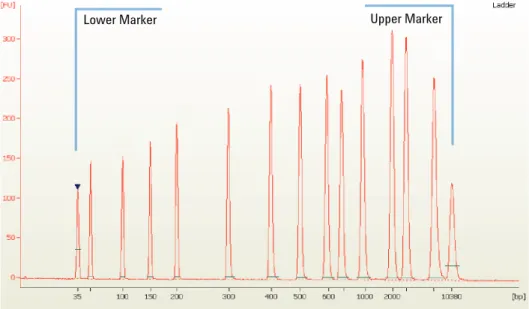
To check the results of your run, select the Gel or Electropherogram tab in the Data context. The electropherogram of the ladder well window should resemble to those shown below.
Figure 1 High Sensitivity DNA ladder
22 Agilent High Sensitivity DNA
6
Checking Your Agilent High Sensitivity DNA Assay Results High Sensitivity DNA Ladder Well ResultsMajor features of a successful ladder run are:
• 15 peaks for High Sensitivity DNA ladder (including markers)
• All peaks are well resolved
• Flat baseline
• Correct identification of both markers
If the electropherogram of the ladder well window does not resemble the one shown above, refer to the 2100 Expert Maintenance and
Agilent High Sensitivity DNA 23 Checking Your Agilent High Sensitivity DNA Assay Results
6
High Sensitivity DNA Sample Well Results
High Sensitivity DNA Sample Well Results
To review the results of a specific sample, select the sample name in the tree view and highlight the Results sub- tab. The electropherogram of the sample well window should resemble the one shown here.
Figure 2 DNA peaks of a successful sample run
Major features for a successful High Sensitivity DNA sample run are:
• All sample peaks appear between the lower and upper marker peaks. If some sample peaks are outside the marker bracket, adjust the upper or lower marker. Please refer to the 2100 Expert User’s Guide or Online Help for details.
• Flat baseline
• Baseline readings at least 5 fluorescence units (see Zero Baseline in the User's guide or Online Help for details of how to see the baseline readings).
• Marker readings at least 3 fluorescence units higher than baseline readings.
• Both marker peaks well resolved from sample peaks (depends on sample).
©
Agilent Technologies 2009, 2013 Printed in Germany11/2013
*G2938-90321*
*G2938-90321*
G2938- 90321 Rev. B
www.agilent.com
Agilent Technologies
In This Book
This manual contains the procedures to analyze DNA samples with the Agilent High Sensitivity DNA reagent kit and the Agilent 2100 Bioanalyzer instrument.