The BBC micro:bit – from the UK to the World
Jonny Austin
Micro:bit Ed. Foundation
Howard Baker
Micro:bit Ed. Foundation
Microsoft Research
Thomas Ball
James Devine
Lancaster University, UK
Lancaster University, UK
Joe Finney
Microsoft Research
Peli de Halleux
Steve Hodges
Microsoft Research
Michal Moskal
Microsoft Research
Micro:bit Ed. Foundation
Gareth Stockdale
1.
INTRODUCTION
In 2015 the BBC launched theMake It Digitalinitiative, aiming to encourage a new era of creativity in the young using programming and digital technology as its medium. Simultaneously, the initiative also would support the UK’s mandate to teach computer science concepts at all grade levels [13].
The micro:bit is a small programmable and embeddable computer designed, developed, and deployed by the BBC and 29 project partners to approximately 800,000 UK Year 7 (11/12 year old) school children in 2015-2016. Referring back to its work with the BBC Micro [4], the BBC described the micro:bit as its “most ambitious education initiative in 30 years, with an ambition to inspire digital creativity and develop a new generation of tech pioneers” [1].
Embracing a constructionist approach to computing ed-ucation [11], the micro:bit has moved from a local educa-tional experiment in the UK to a global effort driven by the Micro:bit Educational Foundation (microbit.org), a non-profit organization established in September 2016. There are now over two million micro:bits in the market in over 50 countries with many hardware, content, and education part-ners participating. The BBC and its partpart-ners developed the micro:bit as an inexpensive, powerful and easy-to-use learn-ing tool.
From the outset, the design goals of the micro:bit were clear. To succeed it must:
1. Have a Low Barrier to Entry. Financial cost and simplicity are important considerations for any technology, but in an educational setting, even more so. The micro:bit needed to be affordable, easy to deploy, intuitive to use, sim-ple to program, and integrate well with existing school IT infrastructure.
2. Be Fun & Creative. The micro:bit itself needed to offer an exciting, engaging, inclusive introduction to coding and making. Inspired by Arduino and the Maker movement [7], the project sought to turn teachers and students fromdigital consumers, into digital creatorsby integrating the micro:bit into their own real-world,physical creations.
Permission to make digital or hard copies of all or part of this work for personal or classroom use is granted without fee provided that copies are not made or distributed for profit or commercial advantage and that copies bear this notice and the full citation on the first page. To copy otherwise, to republish, to post on servers or to redistribute to lists, requires prior specific permission and/or a fee.
Copyright 2008 ACM 0001-0782/08/0X00 ...$5.00.
(a) (b)
Figure 1: The BBC micro:bit: (a) front, with two buttons, 5x5 LED display, and edge connector (bot-tom); (b) back, with processor, accelerometer, com-pass, Bluetooth, USB and battery connectors.
3. Have a Low Floor, High Ceiling and Wide Walls. When designing the micro:bit, providing good educational value to students and teachers was the prime consideration. It needed to be easy for inexperienced learners to get started (low floor); enable rich learning opportunities that grow with user expertise, providing progression in both programming language and application complexity (high ceiling); and en-able students to reach the ceiling via multiple pathways to embrace a diverse audience (wide walls) [15, 11].
4. Open a Window into the Future. Computing tech-nology is becoming ever more ubiquitous, connected, and embedded. In the 1980s, the BBC micro [4] captured the essence of the devices that were to come over the next 30 years: the desktop PC. The micro:bit was designed as a modern day equivalent, capturing the connected, embedded nature of devices that are to come for thenext 30 years.
5. Be Applicable Beyond Computer Science. Cross-curricular activities can offer diverse and inclusive learning [3, 12, 16]. This is important when we consider the gender disparity in computing today. The micro:bit project aimed to stimu-late curiosity about how computing can be applied across a variety of disciplines, ranging from science and technolo-gy/engineering to the arts and mathematics (STEAM).
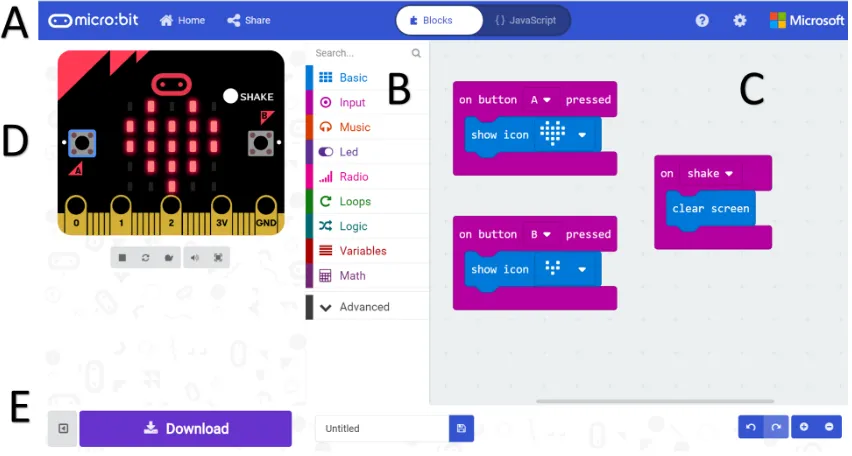
Figure 2: The MakeCode web app for the micro:bit (https://makecode.microbit.org).
2.
THE BBC MICRO:BIT
When the project was conceived, the BBC spent two years investigating previous work and new ideas to get more chil-dren coding and to improve digital literacy. Research shows that physical computing – combining software and hard-ware to build interactive physical systems that sense and respond to the real world – can engage a diverse range of students [10]. The simultaneous global interest in the maker movement also suggests an appealing way to engage chil-dren: incorporate making, creating, and inventing as part of the software development process [7, 9].
However, the BBC observed there was no prior technology on the market that suited the complete novice and that had been designed as an educational tool from the outset. For example, Arduino [19] set a new standard in the field, but requires wiring for virtually all of its projects, and requires a custom IDE and device driver to be installed to operate. The Raspberry Pi is a highly capable device that runs a full operating system, but also has a reliance on additional pe-ripherals to enable physical computing. Its associated high power consumption and complexity also means it cannot be easily run from battery power and embedded into children’s projects. There are also cost implications for children, par-ents, and schools wanting to start making: devices and ac-cessories need to be affordable enough to be accessible by children and parents from a variety of backgrounds.
2.1
Engaging, Capable, Hardware
Figure 1 shows (a) the front and (b) the back of the mi-cro:bit, which measures 4cm x 5cm. Like many “develop-ment boards”, the micro:bit is an exposed printed circuit board with all its components visible (in fact, explicitly la-belled as a learning opportunity). The micro:bit is designed to be engaging and interactive from the start: the front is designed to resemble a face with colored streaks of hair (up-per left) and eyes as the logo (up(up-per middle).
This playful design should not be mistaken for a lack of capability. The board is based around a modern 32-bit ARM Cortex-M processor (16Kb RAM; 256Kb non-volatile flash) and hosts an array of input/output capabilities including a 5x5 LED matrix, two programmable buttons, the ability to sense motion, gestures, magnetic fields, temperature and light. The device also includes a USB interface and edge con-nector with touch sensitive, digital/analog pins that allow external sensors and actuators to be connected via crocodile clips or banana plugs. Finally, the device can communi-cate with phones, tablets and computers via Bluetooth Low Energy (BLE) or directly with other micro:bits using a low-level 2.4GHz radio protocol. The ability to run on battery power and an ecosystem of micro:bit hardware peripherals that plug into the micro:bit’s edge connector further expands its capabilities.
2.2
Engaging, Simple, Software
The design of the micro:bit coding tools are oriented to-wards a simple and inclusive starting experience with room for progression. In-school trials with a micro:bit prototype validated the BBC’s approach of: (a) using a web app based on the popular Blockly framework [8] for students to create scripts via the block-based visual programming paradigm pioneered by Scratch [14]; (b) providing a simulator for stu-dents to execute and debug their programs, all inside a web-browser.
In addition to block-based visual coding, support for text-based coding via scripting languages was identified as an important feature. As the micro:bit would be incorporated into standalone projects, it is essential for the user’s program to be stored on the device for future untethered execution via battery power. This allows a student to unplug their mi-cro:bit from a computer and show their creation to a teacher, parent or friend wherever or whenever they want.
apps. Figure 2 shows a screen snapshot of Microsoft’s Make-Code (https://makecode.com) web app for the micro:bit, which supports programming via both Blockly and JavaScript. The web app has five main sections: (A) menu bar with ac-cess to projects and examples, and switching between Blockly and JavaScript editors. To support progression, the editor also supports conversion of programs between Blocky and JavaScript - users can round-trip programs to see their code in visual or text based representations; (B) Blockly toolbox of micro:bit API categories, representing the hardware capa-bilities on the micro:bit. This toolbox is extensible through third party extensions; (C) Blockly programming canvas showing a simple reactive program. MakeCode enables event based programming through a lightweight scheduler in the underlying micro:bit runtime. This eases transition from other visual programming languages, such as Scratch; (D) micro:bit simulator for execution of the user’s program in browser; (E) download button, which invokes an in-browser compiler/linker to produce a binary executable (a “hex file”). The Python solution for the micro:bit is based on Mi-cropython (https://micropython.org), an implementation of Python 3.0 for microcontrollers. It includes a full Python compiler and runtime that runs on the micro:bit and sup-ports a read-eval-print loop to execute commands sent via a terminal, for interactive use. This solution also allows a Python script to be embedded alongside the compiler/run-time and downloaded as a hex file from the Python web app for the micro:bit (https://python.microbit.org).
2.3
A Low-friction End-to-end Experience
Figure 2C illustrates a simple coding example for the mi-cro:bit, which displays a large heart when button A is pressed, a small heart when button B is pressed, and clears the dis-play when the user shakes the micro:bit (shake detection is implemented using the accelerometer). The interactive micro:bit simulator (Figure 2D) models all functions of the micro:bit, and allows the user to test that the program works as expected. The shake event can be fired using a virtual button (white circle labelled “SHAKE”), or by moving the mouse back and forth rapidly over the simulator.To generate a binary executable for the micro:bit, the user simply presses the “Download” button (Figure 2E), which invokes an in-browser compiler tool chain that translates the Blockly program to JavaScript and then to machine code, linking the user’s compiled code against a pre-compiled C++ runtime [6]. This means that no C++ compiler is required for compiling the user’s program into an executable binary; the same is true of the Micropython solution.
When plugged into a host computer via USB, the mi-cro:bit appears as a ‘memory stick’ storage device. A com-piled program can be transferred (flashed) to the micro:bit by a simple file copy operation, installing the executable bi-nary into the micro:bit’s non-volatile flash memory. This makes it compatible out-of-the-box with almost all school computers and eliminates the complexity of installing de-vice drivers - something that teachers and children rarely have permission to do. Once flashed, the micro:bit then can be embedded into projects where it runs on battery power.
2.4
Design Summary
We conclude this section with a reflection of the micro:bit against the five design goals stated earlier.
The micro:bit’s inexpensive hardware lowers the
finan-(a) (b)
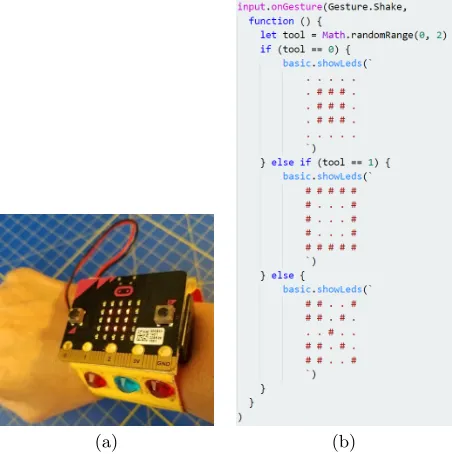
Figure 3: (a) A micro:bit watch form-factor wear-able for playing the rock/paper/scissors game. (b) The JavaScript of the game.
cial barrier to entry for students, parents and teachers. Its drag and drop programming approach and open web based software requires no-installation, greatly lowering technical barriers to adoption in schools and homes. The micro:bit’s integrated sensors and actuators allow students to explore a range of lessons and projects without requiring external electronics to be added (1). The look and feel of the device prompt fun and creativity, alongside colourful and extensible blocks that allow for complete control over the device and its peripherals, backed up by a playful simulator, and a range of creative learning materials and projects (2). Multi-paradigm programming spanning Blockly and JavaScript provides a clear progression path when combined with project based learning. Radio and Bluetooth networking allow further pro-gression to more complex projects with other micro:bits (3), smartphones and other Internet connected devices, opening a window to the future (4). Finally, the ability to run on bat-tery power combined with the internal sensors, non-volatile storage and edge connector allows for the integration of the micro:bit into many other areas of the curriculum benefit-ting from physical experiments and data collection. The creative nature of the technology encourages diversity into more artistic subjects such as design and music (5).
3.
PROJECTS
A wide array of curriculum-aligned lessons are available for the micro:bit. However, physical computing devices also lend themselves to creative (and often collaborative) projects that promote deep problem-based learning. Here we provide some examples of such educational projects for with the mi-cro:bit, grouped into four broad classifications of use, each showing many of our design goals in action.
3.1
Wearables and Interactive Play
[image:3.612.323.549.54.281.2]interac-(a) (b)
[image:4.612.60.547.54.376.2](c) (d)
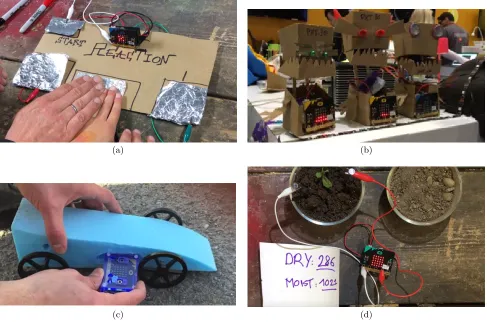
Figure 4: Example projects - (a) the reaction game; (b) light-reactive cardboard robots; (c) a Bloodhound model rocket car instrumented with a micro:bit; (d) measuring soil moisture via micro:bit pins.
tive mobile device - either as a handheld or wearable. Fig-ure 3 shows a simple but highly popular micro:bit project: a micro:bit ‘watch’ that plays the rock/paper/scissors game by randomly displaying a rock (3x3 square), paper (5x5 square with center empty) or scissor icon on the 5x5 LED display when the device is shaken. Other popular exam-ples include name and emoji badges, a graphical compass that points North based on magnetometer data, and gesture-based games such as ‘Snake’ which use the tilt of the device to control the behavior of objects shown on the LED display.
3.2
Digital Crafting
Other popular projects augment a micro:bit with simple classroom supplies, allowing students to quickly create low cost, playful and practical digital artifacts. For example, Figure 4(a) shows how cardboard and aluminum foil can be used to build a competitive game known as ‘Reaction’. Crocodile clips are used to connect pins P0, P1, P2 and GND of the micro:bit to conductive aluminum foil pads glued to a cardboard gameboard. Users are challenged to be the first to complete a circuit by touching the GND pad and one of other pads when the micro:bit display lights up. Note the blending of form and function evident in this design, includ-ing the positioninclud-ing of the interface for multiuser access and the additional touch pad labelled “START”, used for consis-tency even though more traditional buttons are available on the micro:bit.
Actuation adds a further dimension: the micro:bit can
control servos and motors via its edge connector. This has resulted in the creation of inexpensive, cardboard based cre-ations that can react to their environment, such as those shown in Figure 4(b): these simple robots open and close their mouths in response to light stimulus. Other similar examples include musical instruments such as a ‘guitar’ that changes pitch based on its physical orientation, and goal line technology for tabletop football games.
3.3
Science and Measurement
The micro:bit’s small size and built-in sensors make it well suited to being embedded into science and technology projects for undertaking data measurement. A great exam-ple of this is provided by the Bloodhound project (http:// www.bloodhoundssc.com), a UK initiative to set a new world land speed record. As part of their remit to inspire students about STEM subjects, the ‘Race to the Line’ project was launched across the UK. In this project, students design, build and race model rocket cars in competition, learning about physics, aerodynamics, engineering and measurement. A micro:bit is integrated into the car’s design, as shown in Figure 4(c). The micro:bit captures 3-axis accelerometer data of the rocket car during its race. After the race, stu-dents upload the data from the micro:bit and analyze the performance of their cars.
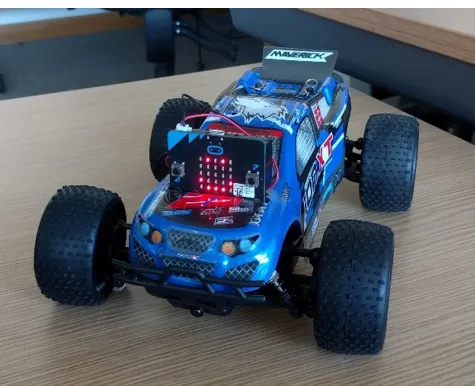
Figure 5: A micro:bit-based vehicle controlled wire-lessly by a second micro:bit.
the more water, the greater the conductivity. This can be di-rectly measured using metallic probes (note the use of inex-pensive nails as probes in this example) and the micro:bit’s integrated analog voltage sensor. Then, the micro:bit is pro-grammed to periodically take a moisture reading and record the results into the device’s internal flash file system for later analysis.
3.4
Interconnected Devices
Our final class of projects are those that make use of multi-ple, wirelessly interconnected devices. The micro:bit has an inbuilt Bluetooth Low Energy (BLE) compatible 2.4GHz ra-dio. BLE provides a private and secure mechanism through which the micro:bit can be programmed over-the-air from mobile phones and tablets, and also provides an API through which the micro:bit can be paired and its sensors and actua-tors made available to applications running on such devices through a well-defined Bluetooth profile. MIT’s Scratch 3.0 includes micro:bit support through this API, for example.
However, we observed that the greatest level of innovation emerged from a simpler, custom built packet radio protocol running on the same 2.4GHz hardware. With the micro:bit radio API, micro:bits can form low level peer-to-peer multi-cast groups. Any data sent from one micro:bit is seen by all members of their group - thus enabling a simple yet pow-erful basis for projects involving group collaboration in a way not feasible with BLE. Examples here include remote control vehicles, such as that illustrated in Figure 5. This example uses two micro:bits sharing data over radio: one in-tegrated into the vehicle to control steering and speed, and a second integrated into a handheld steering wheel that is used as a remote control. A second popular example is illus-trated in Figure 6, which mimics how fireflies synchronize their blinking over time, as described in the polling-based Python program at the bottom of Figure 6.
4.
FROM THE UK TO THE WORLD
This section details the history of the project, the ap-proach taken to deliver 800,000 devices to students and their teachers in the U.K., and how the micro:bit Educational
clock = 0 flash = []
for i in range(9, -1, -1)]:
flash.append(Image().invert()*(i/9))
while True:
incoming = radio.receive() while incoming == ’0’:
clock = clock + 1
incoming = radio.receive() if clock >= 8:
radio.send(’0’)
display.show(flash, delay=100, wait=False) sleep(200)
clock = 0 else:
[image:5.612.315.556.54.212.2]sleep(100) clock = clock + 1
Figure 6: Fireflies example: a visual representation of emergent behaviour from a distributed algorithm, implemented in Python.
Foundation is taking the micro:bit worldwide.
4.1
BBC micro:bit Partnership
The BBC invited twenty-nine partners to contribute hard-ware, software services, teaching materials, packing/distri-bution, logistics, events and funding. These partners were not directly funded with public money by the BBC for their work on the project. Rather, partners contributed their own resources to make the micro:bit vision a reality.
The BBC looked for three types of partners for the orig-inal project. Those who could help on (1) the technical development and (2) the manufacturing/distribution of the micro:bit and, very importantly, (3) those who could help with education—both of the child and the teacher. A large proportion of the 29 partners played a role in creating teach-ing resources, deliverteach-ing teacher trainteach-ing and on-the-ground support in collaboration with grass roots organizations such as the UK Computing At School (CAS) network [5] — a group of over 30,000 computing teachers, supporters and enthusiasts. These partners used such networks of practice to engage with over 90% of the 8000 secondary schools in the UK even before the micro:bit was manufactured.
BBC team dedicated to raising awareness of the project. This essential activity ensured that the teachers and stu-dents understood the aims and potential of the micro:bit ahead of the devices being available in schools. This team developed focused broadcast TV and media content with BBC talent like Peter Capaldi, will.i.am and Paloma Faith, and major BBC brands including Doctor Who, The Voice, Robot Wars and Wolfblood. They also organized nation-wide public engagement activities including Make It Digital Roadshows that took place in ten cities around the UK that had a combined footfall of approximately 100,000 people in the summer of 2015.
Once product manufacturing, testing and certification was complete, 800,000 micro:bit devices were delivered into UK Schools in March 2016 — one device for every Year 7 (11/12 year old) child in the UK. The micro:bit was well received by UK teachers and children, with high levels of engagement. In the first six months, there were approximately 13 million visits to the website, 10 million runs of the online micro:bit simulator and 2 million programs downloaded to a micro:bit.
4.2
Expanding the Scope
The UK micro:bit deployment sparked interest from around the world. In October 2016 the Micro:bit Educational Foun-dation was formed — a UK-based not-for-profit organization that now serves as the custodian of the micro:bit legacy. Its vision is to inspire every child to create their best digital future, with focus on widening participation around gender and disadvantaged groups across the globe. It is funded through a small royalty on every micro:bit sold and projects funded by corporate sponsorship.
The foundation strives toward its vision by coordinating work across a broad partnership of educators, technologists, enthusiasts, and governments to bring about global change. Partnership has proven to be the vital heart of all the foun-dation’s activities. More specifically, the foundation main-tains partnerships with over 132 global organizations. These can be grouped into:
Hardware partnershipswith manufacturers, suppliers and resellers ensure that a pipeline of micro:bits are available in 50 countries to date. Also essential are partnerships with accessory makers who create kits that enable projects such as those described in Section 3. Hundreds of third party accessories have been created for the micro:bit. The most common examples include additional sensors (sound level, moisture, particulate and ultrasonic ranging sensors), actu-ators (motor drivers, audio speakers, addressable LED light strips), hardware prototyping kits that interface to bread-boards and finally application specific peripherals such as wheeled robots, remote controlled vehicles and games.
Software partnershipswith organizations including Lan-caster University, Microsoft, and the Python Software Foun-dation to ensure a diverse offering of programming languages and highly reliable, state-of-the-art editors for the micro:bit.
Countrywide partnerships with governments, chari-table organizations and regional companies to enable trials and rollouts to schools around the world. To date this has resulted in national scale deployment in Canada, Croatia, Denmark, Iceland and Singapore in addition to the UK, with the British Council planning similar activity in the Western Balkan states in 2019.
Community partnershipsthat provide essential ‘on the ground’ support. Examples here include the generation and sharing of learning resources and experiences between teach-ers, crowdsourced translation of teaching materials into lan-guages other than English, social media activists who reach out to hard-to-reach demographics and volunteers that pro-vide technical support.
5.
LESSONS LEARNED
In this section, we review a number of lessons we learned through the micro:bit project that might be helpful to others working in the space of education and physical computing.
Community-centered design. User-centered design was a key part of the BBC’s approach to the micro:bit, consider-ing a broad range of stakeholders includconsider-ing children, teach-ers, product developteach-ers, manufacturteach-ers, enthusiasts and sup-port organisations. This process identified physical comput-ing as the main focus area, and pointed the way to the key design decisions including the integrated board design (in-spired by Arduino), and the need for block-based and script-ing languages rather than the C-based sketches used by Ar-duino. Yet, as the project developed it became something greater - a process by which a community of practice was designed, consisting of those individual stakeholders. This enabled the strong and sustained ecosystem around the mi-cro:bit, long after the initial UK project was completed.
Depth is just as important as ease of use. Although providing multiple layers of abstraction was central to realis-ing the “low-floor, high-ceilrealis-ing” concept, we did not sacrifice the opportunity to dig deeper, learn key computing concepts underneath, and learn from the realities of the computing world. Take the packet-based broadcast radio interface for example. This interface is entirely lossy (even at the Block-level) incorporating a simple checksum and providing no re-liability guarantees. A user could send numbers using the radio to indicate states within a distributed application, but would need to include device identifiers as it scales, and if needed, algorithms for reliability. Before long the user has implemented their own networking protocol with real-world applicability.
An always connected experience is restricting. In the BBC prototype for the micro:bit, the text of a user’s program was submitted to a compile service in the cloud that returned a final executable to be copied onto a micro:bit. We originally adopted this architecture for the micro:bit, but in trials across many schools in the UK found that the assumption of “always connected” was not a good one. As a result, we eliminated the need for a cloud service by writing a compiler and linker in JavaScript that would produce the needed binary directly in the web app. Once the web app loads, no further connectivity is needed in order to edit, compile and flash the program.
entirely through donations from industry and charities; Ice-land’s rollout was funded by its government; and Croatia’s rollout stemmed from a crowdsourced fund set up by a mo-tivated regional entrepreneur. Likewise, teaching materials designed for the UK do not readily translate to other coun-tries which have lessons of a different length. Moreover, school projects are often based around local cultural events. We have learned that a combination of local and global part-nership is the key to embracing diversity.
Compromises must always be made. To make the micro:bit hardware available to as many people as possible, it was critical to keep the cost low. This influenced the choice of components and capabilities of the hardware, which in-evitably means trade-offs and limitations. For example, the micro:bit’s 16KB of RAM is quickly consumed, especially true when the full Bluetooth stack is loaded, which can be frustrating for those who want to build larger applications. The 5x5 LED display is optimized to display a single ASCII character, but falls short when non-Latin character sets are considered, creating challenges for international adoption. The design of the micro:bit edge connector makes it easy to plug the micro:bit into another board, but is inherently non-compositional, compared to the approach of Arduino which allows stacking of boards via its headers. Yet, without these difficult choices being made, the micro:bit would not have become a reality.
Timing is critical. As with any complex endeavor, luck favors the prepared. The UK was the first country to man-date computing education for K-12, there was a large group of volunteer computing organizations in the UK to call upon, and Moore’s law had brought microcontroller and network-ing technology (such as Bluetooth) down in cost so as to enable delivery at scale economically.
6.
OUTCOMES
Since the initial distribution of micro:bits in 2016 we have observed a great deal of interest and enthusiasm. The BBC micro:bit is now available in 50 countries and 17 languages, and in excess of two million devices have been delivered to end users globally with an increasing demand year over year. The online editors have hundreds of thousands of indepen-dent sessions every month. Activity on social media and support networks also indicate high levels of use for mi-cro:bit resources in schools, particularly those related to the constructionist pedagogy.
Independent research undertaken in the UK (seehttps:// microbit.org/ta/2017-07-07-bbc-stats, undertaken by Dis-covery Research) supports these observations [18, 17]. An independent survey [2] of 405 UK school children and their teachers also concluded that:
• 86% of students said the micro:bit made Computer Science more interesting.
• 70% more girls said they would choose Computing as a school subject after using the micro:bit,
• 85% of teachers agree it has made ICT/Computer Sci-ence more enjoyable for their students.
• Half of teachers who have used the micro:bit say they now feel more confident as a teacher, particularly those
who say they are not very confident in teaching Com-puting.
Although preliminary studies are encouraging, and guide our thinking, they are small compared to the scale of the BBC microbit project. It will take more time to determine the full impact of the micro:bit. We look forward to fur-ther research studies that will investigate the advantages and challenges of using the micro:bit in supporting teaching and learning, both within computing and in wider cross-curricular ways.
7.
ACKNOWLEDGMENTS
The BBC micro:bit project’s 29 partners were Arm, Bar-clays, Bluetooth Special Interest Group, Cannybots, Cre-ative Digital Solutions, Cisco, Code Club, Code Kingdoms, CoderDojo, CultureTECH, element14, the Institute of En-gineering and Technology, Kitronik, Lancaster University, London Connected Learning Centre, Microsoft, MyMiniFac-tory, National STEM Centre, Nordic Semiconductor, NXP, the Python Software Foundation (PSF), Samsung, ScienceScope, STEMNET, Tangent Design, Technology Will Save Us, Teen Tech, the Tinder Foundation, and the Wellcome Trust.
The authors would also like to recognize the contributions of the Computing At School organization and its members, Damien George and Nicholas Tollervey at the PSF, Clare Ri-ley, Jonathan Protzenko, Michael Braun and the MakeCode team at Microsoft, Jeannette Wing (then at Microsoft, who sponsored Microsoft Research’s work on the micro:bit), Mar-tin Wooley at the Bluetooth SIG, Mike Powell and Jonathan Smith at Premier Farnell, Jo Claessens, Cerys Griffiths and the many other colleagues across the BBC who supported this initiative. Without the tireless contributions from all these organizations and individuals the micro:bit project would not have been a success.
8.
MICRO:BIT ARTIFACTS
The BBC micro:bit hardware and software assets are open source athttps://github.com, at the following locations:
• /bbcmicrobitfor the micro:bit hardware design, the micro:bit software prototype and the MicroPython port for the micro:bit;
• /microsoft/pxt-microbitfor MakeCode for the mi-cro:bit;
• /lancaster-university/microbit-dalfor the micro:bit C++ runtime.
A wide variety of educational resources for the micro:bit can be found athttps://microbit.org. Resellers of the mi-cro:bit and accessory manufacturers can be found athttps: //microbit.org/resellers.
9.
REFERENCES
[1] BBC. The bbc micro:bit.
http://www.bbc.co.uk/programmes/articles/ 4hVG2Br1W1LKCmw8nSm9WnQ/the-bbc-micro-bit, 2015.
[2] BBC. Bbc micro:bit celebrates huge impact in first year, with 90% of students saying it helped show that anyone can code.
[3] P. Blikstein. Digital fabrication and ˆa ˘A¨Ymakingˆa ˘A´Zin education: The democratization of invention.FabLabs: Of machines, makers and inventors, 4:1–21, 2013. [4] T. Blyth. The legacy of the BBC micro: effecting
change in the uk’s cultures of computing.
https://media.nesta.org.uk/documents/the_ legacy_of_bbc_micro.pdf, May 2012.
[5] T. Crick and S. Sentance. Computing at school: stimulating computing education in the uk. In Proceedings of the 11th Koli Calling International Conference on Computing Education Research, pages 122–123. ACM, 2011.
[6] J. Devine, J. Finney, P. de Halleux, M. Moskal, T. Ball, and S. Hodges. Makecode and codal: Intuitive and efficient embedded systems programming for education. InProceedings of the 19th ACM SIGPLAN/SIGBED International Conference on Languages, Compilers, and Tools for Embedded Systems, LCTES 2018, pages 19–30. ACM, 2018. [7] D. Dougherty. The maker movement.Innovations:
Technology, Governance, Globalization, 7(3):11–14, 2012.
[8] N. Fraser. Ten things we’ve learned from blockly. In Proceedings of the 2015 IEEE Blocks and Beyond Workshop (Blocks and Beyond), BLOCKS AND BEYOND ’15, pages 49–50, 2015.
[9] E. R. Halverson and K. Sheridan. The maker movement in education.Harvard Educational Review, 84(4):495–504, 2014.
[10] S. Hodges, J. Scott, S. Sentance, C. Miller, N. Villar, S. Schwiderski-Grosche, K. Hammil, and S. Johnston. .net gadgeteer: A new platform for k-12 computer science education. InProceeding of the 44th ACM Technical Symposium on Computer Science Education, SIGCSE ’13, pages 391–396, New York, NY, USA, 2013. ACM.
[11] S. Papert.Mindstorms: Children, Computers and Powerful Ideas. Basic Books, 1993.
[12] K. Peppler. Steam-powered computing education: Using e-textiles to integrate the arts and stem. Computer, page 1, 2013.
[13] S. Peyton Jones. Computer science as a school subject. InProceedings of the 18th ACM SIGPLAN International Conference on Functional Programming, ICFP ’13, pages 159–160. ACM, 2013.
[14] M. Resnick, J. Maloney, A. Monroy-Hern´andez, N. Rusk, E. Eastmond, K. Brennan, A. Millner, E. Rosenbaum, J. S. Silver, B. Silverman, and Y. B. Kafai. Scratch: programming for all.Commun. ACM, 52(11):60–67, 2009.
[15] M. Resnick and B. Silverman. Some reflections on designing construction kits for kids. InProceedings of the 2005 conference on Interaction design and children, pages 117–122. ACM, 2005.
[16] E. W. Robelen. Steam: Experts make case for adding arts to stem.Education week, 31(13):8, 2011.
[17] S. Sentance, J. Waite, S. Hodges, E. MacLeod, and L. Yeomans. ”creating cool stuff”: Pupils’ experience of the bbc micro:bit. InProceedings of the 2017 ACM SIGCSE Technical Symposium on Computer Science Education, SIGCSE ’17, pages 531–536. ACM, 2017. [18] S. Sentance, J. Waite, L. Yeomans, and E. MacLeod.
Teaching with physical computing devices: The bbc micro:bit initiative. InProceedings of the 12th Workshop on Primary and Secondary Computing Education, pages 87–96. ACM, 2017.