Performance and User Experience of Touchscreen and
Gesture Keyboards in a Lab Setting and in the Wild
Shyam Reyal
1 1School of Computer ScienceUniversity of St Andrews, UK [email protected]
Shumin Zhai
2 2Google IncMountain View, California, USA [email protected]
Per Ola Kristensson
1,3 3Department of EngineeringUniversity of Cambridge, UK [email protected]
ABSTRACT
We study the performance and user experience of two popular mainstream mobile text entry methods: the Smart Touch Keyboard (STK) and the Smart Gesture Keyboard (SGK). Our first study is a lab-based ten-session text entry experiment. In our second study we use a new text entry evaluation methodology based on the experience sampling method (ESM). In the ESM study, participants installed an Android app on their own mobile phones that periodically sampled their text entry performance and user experience amid their everyday activities for four weeks. The studies show that text can be entered at an average speed of 28 to 39 WPM, depending on the method and the user's experience, with 1.0% to 3.6% character error rates remaining. Error rates of touchscreen input, particularly with SGK, are a major challenge; and reducing out-of-vocabulary errors is particularly important. Both SGK and STK have strengths, weaknesses, and different individual awareness and preferences. Two-thumb touch typing in a focused setting is particularly effective on STK, whereas one-handed SGK typing with the thumb is particularly effective in more mobile situations. When exposed to both, users tend to migrate from STK to SGK. We also conclude that studies in the lab and in the wild can both be informative to reveal different aspects of keyboard experience, but used in conjunction is more reliable in comprehensively assessing input technologies of current and future generations.
Author Keywords
Mobile text entry; gesture keyboard; experience sampling ACM Classification Keywords
H.5.2: User Interfaces—Input devices and strategies. INTRODUCTION
Mobile text entry has been a topic of intense research for over two decades (see [6, 12, 13, 19, 20, 27] for surveys and overviews). Text entry on touchscreen mobile devices is typically carried out using one of two intelligent text
entry methods [12]. The first involves typing using a single finger or two thumbs on a touch tapping QWERTY keyboard. In this paper we will call this method Smart Touch Keyboard (STK). Modern STKs perform automatic typing correction (e.g. [10, 16]) and allow users to choose among word predictions. In the research literature, STKs automatic typing correction algorithms have been further refined by considering users’ posture [9], whether users are walking or standing still [8], finger pressure and Gaussian Process regression of touch locations [24], and by simultaneously supporting both word completions and automatic typing correction [2].
An alternative dominant text entry method is the Smart Gesture Keyboard (SGK) [15, 25, 26]. To write on a SGK a user slides a finger across the touchscreen keyboard. For example, to write the word “the” the user may land on the T key, slide to the H key, continue to the E key, and then lift up the finger. This produces a gesture that is recognized by the system and is pattern matched to find the word whose trace on the keyboard most resembles the user entered gesture. This gesture keyboard paradigm has appeared in products such as ShapeWriter, Swype, T9 Trace, Flext9, SlideIT, TouchPal and Google Keyboard on Android or iOS. The SGK paradigm has also been expanded into applications such as command entry (for example, Cut, Copy) [17], SGK layout designs [22], an algorithm for combining SGK input and speech recognition [14], and a bi-manual SGK [1].
Empirical studies of the performance, or experience, of writing using the SGK are generally difficult to conduct because text entry is a complex form of interaction involving motor skills, memory, learning and other cognitive aspects of human behavior. These factors may change from the laboratory to real world everyday use environments. For STKs the topic is even more complicated because inevitably the empirical results are to a large degree dependent on the algorithms, parameters, and the sizes of the keyboard vocabulary, and product design in general at the time of the study. Nonetheless, not having any in-depth empirical studies is not acceptable for the HCI field. Continued progress and innovation in the text entry field cannot have a solid empirical footing if we do not even know how well current technologies work for users. In this paper we first report the results of a multi-session empirical experiment that investigates STK and SGK
Permission to make digital or hard copies of part or all of this work for personal or classroom use is granted without fee provided that copies are not made or distributed for profit or commercial advantage and that copies bear this notice and the full citation on the first page. Copyrights for third-party components of this work must be honored. For all other uses, contact the Owner/Author. Copyright is held by the owner/author(s).
CHI 2015, Apr 18-23, 2015, Seoul, Republic of Korea
ACM 978-1-4503-3145-6/15/04.
performance in the lab. Thereafter we introduce our Experience Sampling Method (ESM)-based text entry evaluation tool and methodology and present the results of a STK and SGK study in the wild in which we sampled participants’ STK and a SGK performance and user experience for four weeks. We provide a comprehensive analysis of entry and error rates, out-of-vocabulary (OOV) issues, users’ preferred hand postures, users’ preferences and open comments, and contrast and compare both the relative performance of STK and SGK and the effect of the study design on the collected data.
RELATED WORK
Despite the prevalence of STKs and SGKs there is a lack of in-depth studies about their text entry performance, in particular outside a lab environment.
Goel et al. [8] evaluated their WalkType system with 16 participants in sitting and walking conditions in a single 45-minute session. The entry rate for STK was 31.1 WPM in the walking condition and 28.3 WPM in the sitting condition. Goel et al. [9] also evaluated their ContextType STK with 16 participants in a single one-hour session. The entry rate for the ContextType STK was 27.5 WPM and the corrected error rate was 4.86%. The baseline condition was a standard (non-correcting) touchscreen keyboard which resulted in a corrected error rate of 6.49%. Weir et al., [24] evaluated their pressure-sensitive STK with 16 participants in a single session and reported an average entry rate of 19.23 WPM. Dunlop and Levine [5] evaluated two touchscreen keyboards based on Pareto optimization techniques, with 10 participants and four 45 minute trial sessions each. The entry rate on the regular QWERTY STK was 21.3 WPM.
A previous evaluation compared the performance of an SGK running on a pen-based computer with a physical two-thumb keyboard [11]. It found that the SGK resulted in 25 WPM average speed after 25 minutes of writing. In a second study, participants wrote text at 40 WPM on average, although it is important to note that in that study participants were repeatedly writing the same phrases in order to accelerate motor memory [11]. A brief SGK study was also included in conjunction with the presentation of a text entry experiment tool for Android devices [3]. This study involved six participants using an SGK for 20 minutes. The final entry rate for SGK was 20 WPM. Finally, another small SGK study involved 14 participants writing using the SGK for five minutes on a Windows 7 tablet [21]. The entry rate for the SGK was 12 WPM. EXPERIMENT 1: LAB EXPERIMENT
This was a multi-session within-subjects experiment, in which we compared the performance of STK and SGK using the transcription task in a lab environment. The primary dependent variables were entry rate (WPM) and error rate, measured as character error rate (CER).
Method Participants
We recruited 12 volunteers from the University of St Andrews campus, an equal number of males and females. Their ages ranged from 21–34 (mean = 25, SD = 4). Four of them were native English speakers while the rest spoke English as their second language. Five were Android smartphone or tablet users, three were iPhone or iPod users, one was a Nokia Lumia Windows Phone user, two were BlackBerry users, and two did not use a smartphone. Ten had used an STK before and three had used an SGK before. Each participant was required to attend ten sessions lasting just under an hour. They received a £5 Amazon voucher per session.
Apparatus and Material
We used two identical LG Nexus 4 mobile devices running Android 4.3. The 4.7" Corning Gorilla Glass 2 touch screen had a resolution of 1280 × 768 pixels at 320 pixels per inch. The physical devices measured 133.9 × 68.7 × 9.1 mm. We used the Google keyboard, which was shipped with the device, with all default settings. The Google keyboard has a state-of-the-art STK and a state-of-the-art SGK built in.
Procedure
The experiment consisted of ten sessions split into five sessions for STK and five sessions for SGK. We divided the participants into two equal groups. Participants in the first group completed their first five sessions using the STK and the last five sessions using the SGK. The other group had the opposite order.
Before commencing the first and the sixth sessions, participants were given time to familiarize themselves with the new text entry method if they hadn’t used it in the past. The sessions were spaced at least four hours apart and were maximally separated by two days. Each session consisted of five 10-minute-long typing runs followed by two-minute-long breaks.
The experiment used a transcription task where participants were shown a phrase from the dataset and asked to copy it. We encouraged participants to focus on both speed and accuracy by providing an additional £15 Amazon voucher as an incentive to the fastest and the most accurate participants. Whilst being encouraged to use the Google keyboard’s suggested words for correction, we discouraged participants to use the backspace and to correct words that were already entered. Participants were seated during the experiment, with no distractions from the environment. Our experiment app recorded the stimulus (test) phrases and the response text using millisecond timestamps when the user entered the first character and when the user pressed NEXT. Participants rated their previous experience with software keyboards (STK and SGK) on mobile devices, and self-rated themselves on how fast and accurate they thought they were. During each two-minute break, they were asked to rate the speed, accuracy, preference, and ease of use of the currently used text entry method. Answers were recorded on a 1–7 Likert scale.
We intentionally did not control hand posture. Instead we asked participants to use their preferred posture and report it at the end of each session. The choices were single thumb, single finger and two thumbs.
At the end, participants were asked to write descriptive and open comments about what they liked and/or disliked about each text entry method.
Results
In total we collected 100 hours of data (50 minutes of writing per session (excluding breaks) × 120 sessions). Using STK, participants entered an average of 1393 sentences (SD = 275) during each session totaling 13,927 data points. 211 of these were filtered out as outliers since they were determined to be more than three standard deviations away from the mean. Using SGK, participants entered an average of 1,282 sentences per session (SD = 225), which totaled 12,816 data points; out of which 278 points were discarded as outliers.
All statistical analyses were done using repeated-measures analysis of variance at significance level = 0.05. Bonferroni corrections were used to adjust the significance levels for post-hoc analyses. We report the majority of the statistical results in tables. In the tables m is the sample mean, S1 is the first session in a condition, S5 is the 5th (last) session in a condition, 95% CI means the 95% confidence interval (Z-scores).
Entry Rate
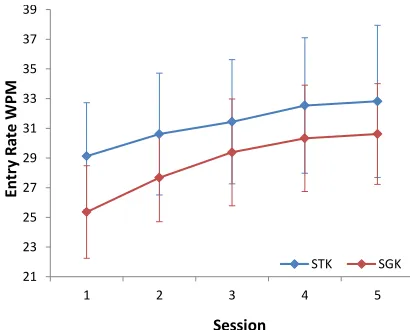
Entry rate was measured in words-per-minute (WPM), with a word defined as five consecutive characters including spaces. STK was significantly faster than SGK (Figure 1 and Table 1). Also participants improved significantly with practice (Figure 1).
Character Error Rate
[image:3.612.331.536.167.332.2]Character Error Rate (CER) was calculated as the minimum edit distance between the stimulus phrase and the response text, divided by the number of characters in the stimulus phrase. Error rates were “corrected error rates” as the error rates are measured after either the user or autocorrect had corrected the response text. SGK resulted in a significantly higher error rate (2.04–2.34% CER) than STK (1.09–1.11% CER); see Table 2.
Figure 1. Mean entry rate (wpm) and 95% confidence intervals as a function of session in the lab study.
WPM m S1 95% CI S1 m S5 95% CI S5
STK 29.1 25.5 – 32.7 32.8 27.7 – 37.9 SGK 25.4 22.2 – 28.5 30.6 27.2 – 34.0
ANOVA
Input Type 5.406 1,11 .330 .040*
Session 22.036 4,44 .667 .000*
[image:3.612.317.556.339.580.2]Input × Session 0.818 4,44 .069 .521
Table 1. Entry rate analysis in the lab study
CER m S1 95% CI S1 m S5 95% CI S5
STK 1.09 0.38 – 1.79 1.11 0.25 – 1.97 SGK 2.34 1.49 – 3.18 2.04 0.89 – 3.18
ANOVA
Input Type 17.267 1,11 .611 .002*
Session 0.397 4,44 .035 .810
Input × Session 0.669 4,44 .057 .617
Table 2. Error rate analysis in the lab study
Word Error Rate
Word error rate or WER is analogous to CER, but using whole words instead of characters. The word error rate followed a very similar pattern to the CER. Thus we do not include it in subsequent analyses.
Excluding Sentences with OOV Words
We identified 1,131 data points containing OOV sentences (4.31% of 26,254). Recall that all the OOVs in the study affect both STK and SGK. Excluding OOV sentences results in a narrowing of the entry rate of STK and SGK
21 23 25 27 29 31 33 35 37 39
1 2 3 4 5
En
tr
y
Ra
te
WPM
Session
and the difference is no longer significant (Table 3). CER also dropped slightly but the difference between STK and SGK is less marked (Table 4).
WPM m S1 95% CI S1 m S5 95% CI S5
STK 29.4 25.7 – 33 33.1 27.9 – 38.3 SGK 25.8 22.7 – 28.9 31.2 27.8 – 34.6
ANOVA
Input Type 3.946 1,11 .264 .072
Session 22.376 4,44 .670 .000*
Input × Session 1.071 4,44 .089 .382
Table 3. Entry rate analysis in the lab study excluding sentences with OOV words
CER m S1 95% CI S1 m S5 95% CI S5
STK 1.05 0.35 – 1.76 1.09 0.2 – 1.98 SGK 2.18 1.32 – 3.03 1.90 0.76 – 3.04
ANOVA
Input Type 12.429 1,11 .530 .030*
Session 0.343 4,44 .030 .848
Input × Session 0.572 4,44 .049 .685
Table 4. Error rate analysis in the lab study excluding sentences with OOV words
Only Investigating Sentences with OOV Words
We investigated the previously excluded 1,131 data points,
which consisted only of OOV sentences. The STK was
significantly faster than SGK when participants entered sentences with OOVs (Table 5). While both conditions have been affected by OOVs, SGK was penalized more. As expected, very high error rates are reported in both conditions, but they are significantly higher in SGK (Table 6). Overall OOVs present more challenges to SGK than STK. We will return to this point later in the discussion.
WPM m S1 95% CI S1 m S5 95% CI S5
STK 25.2 21.7 – 28.7 28.9 24.6 – 33.2 SGK 18.8 15.5 – 22.2 22.6 18.6 – 26.7
ANOVA
Input Type 35.929 1,11 .766 .000*
Session 6.132 4,44 .358 .001*
[image:4.612.323.548.237.366.2]Input × Session 0.303 4,44 .027 .874
Table 5. Entry rate analysis for the lab study: only sentences with OOV words.
CER m S1 95% CI S1 m S5 95% CI S5
STK 1.68 0.78 – 2.57 1.41 0.7 – 2.13 SGK 5.80 4.23 – 7.36 4.86 3.14 – 6.57
ANOVA
Input Type 48.2 1,11 .814 .000*
Session 0.955 4,44 .080 .441
Input × Session 1.055 4,44 .087 .390
Table 6. Error rate analysis for the lab study – only sentences with OOV words
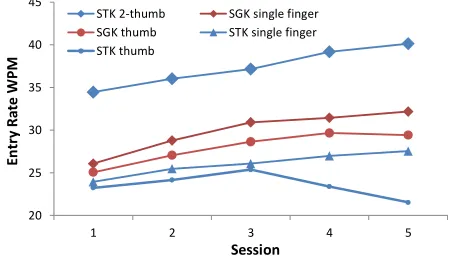
[image:4.612.329.545.407.536.2]Figure 2 indicates that two-thumb STK was the fastest, closely followed by single finger SGK. The difference in error rate between the different hand postures within STK was complex (Figure 3). Within SGK, single finger SGK produced lower error rates than single-thumb SGK (Figure 3). These results are indicative only, as a) hand postures were not controlled in the experiment, b) hand postures were self-reported by the participants, and c) some participants varied their hand postures across sessions. For these reasons, we do not report results of statistical analyses for hand postures. However, the data suggest hand posture might be an important factor for complete understanding of STK and SGK performance. Moreover, our data indicates that hand postures might have different effects on STK and SGK.
[image:4.612.54.294.476.570.2]Figure 2. Mean entry rate as a function of session in the lab study, for different hand postures.
Figure 3. Mean character error rate as a function of session in the lab study, for different hand postures.
User Ratings
We calculated the median Likert-scale ratings from the participants’ subjective ratings provided during their two-minute breaks between typing runs.
User Rating STK SGK
χ2 4 χ2 4
Input Speed 2.069 .723 15.584 .004*
Accuracy 7.948 .093 13.083 .011*
Ease of use 6.450 .168 14.530 .007*
[image:4.612.55.294.599.695.2]Preference 6.996 .136 14.231 .006*
Table 7. Friedman’s test results for session in the lab study
20
25 30 35 40 45
1 2 3 4 5
En
tr
y
Ra
te
WPM
Session STK 2‐thumb SGK single finger SGK thumb STK single finger STK thumb
0
0.5 1 1.5 2 2.5 3 3.5
1 2 3 4 5
CE
R%
Session
[image:4.612.312.566.624.695.2]Friedman’s test revealed that across sessions participants felt their text entry experience became faster, more accurate, easier and more preferable with SGK over the sessions (Figure 4, Table 7). This was not the case with STK, whose plots were more flat. Users rated STK as significantly faster, easier to use and more preferred over SGK. However, they didn’t find it significantly more accurate (Table 8).
Figure 4. Users’ subjective ratings during the lab study.
x-axis: session; y-axis: Likert scale rating (1–7).
User Rating Median Friedman’s Test Statistics
STK SGK χ2 1
Input Speed 5.5 5 6.231 .013*
Accuracy 5 4.75 2.200 .138
Ease of use 6 5 5.453 .020*
Preference 5.5 5 7.681 .006*
Table 8. Statistics for user ratings in the lab study
Open Comments
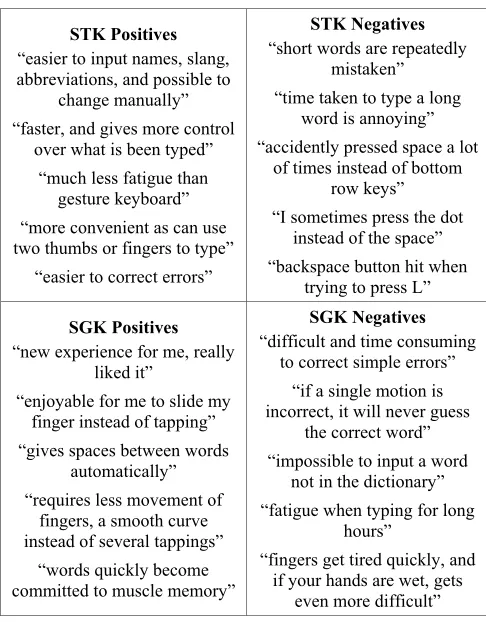
Participants also contributed open comments on what they liked and disliked about each input method. Five representative comments for and against each text entry method are as shown in Table 9. A few participants added general comments such as: “Speed and accuracy depends upon how tired you are and your mental state” and “Started to use gesture input on a daily basis”.
EXPERIMENT 2: AN ESM TEXT ENTRY STUDY
While a lab experiment is the de-facto standard text entry evaluation methodology, we were curious to see how people use STK and SGK on their own mobile devices outside the lab amid their everyday activities. We therefore set out to conduct a text entry evaluation based on the Experience Sampling Method (ESM), in particular the way it has been used in ubiquitous computing [4]. To the best of our knowledge, ESM has not been used to compare two text entry methods before. We decided to compare the text entry performance and perceived user experience of STK and SGK “in the wild” in a study in which participants performed transcription tasks whilst attending to their daily tasks. As in our previous study, the primary dependent variables were entry rate, and the character and word error
rates. For this purpose we developed a new Android app that enables researchers to carry out ESM text entry experiments in the wild. The app is open source and can be obtained by contacting the authors.
STK Positives
“easier to input names, slang, abbreviations, and possible to
change manually” “faster, and gives more control
over what is been typed” “much less fatigue than
gesture keyboard” “more convenient as can use two thumbs or fingers to type”
“easier to correct errors”
STK Negatives
“short words are repeatedly mistaken” “time taken to type a long
word is annoying” “accidently pressed space a lot
of times instead of bottom row keys” “I sometimes press the dot
instead of the space” “backspace button hit when
trying to press L”
SGK Positives
“new experience for me, really liked it”
“enjoyable for me to slide my finger instead of tapping” “gives spaces between words
automatically” “requires less movement of
fingers, a smooth curve instead of several tappings”
“words quickly become committed to muscle memory”
SGK Negatives
“difficult and time consuming to correct simple errors”
“if a single motion is incorrect, it will never guess
the correct word” “impossible to input a word
not in the dictionary” “fatigue when typing for long
hours”
“fingers get tired quickly, and if your hands are wet, gets
even more difficult”
Table 9. Open comments by users in the lab study
Participants
We recruited 12 volunteers from the university campus. These too were a broad sample as they came from various schools and departments. 7 were male ages were 21–42 (mean = 27, SD = 6). Three had English as their first language and the others spoke English as their second language. None of the participants in the ESM study had participated in the lab-based study.
Method
Participants installed our custom ESM-inspired app on their own Android mobile devices and use it for 4 weeks. They were compensated with a £50 Amazon voucher. We encouraged participants to focus on both speed and accuracy by providing an additional £15 Amazon voucher as an incentive to the fastest and the most accurate participants. The only prerequisite of participation was that they used an Android device that they could download Google keyboard and install the ESM app on it.
Apparatus and Material
[image:5.612.53.298.163.387.2](4.3"), one Nexus 4 (4.7"), one Lenovo S720 (4.5"), one HTC Desire (3.7"), and HTC One S (4.3"). All the devices ran Android 4.0 or later and supported the Google Keyboard. Each participant downloaded Google keyboard from the Google Play Store and set it as their default input method on their mobile device before starting the study.
Procedure
The app was configured to give each participant 300 tasks over the full duration of the experiment, which was about 10 tasks per day, evenly spread during times the participants could be expected to be awake (the exact times were determined specifically for each individual study participant). Each sample required users to transcribe three phrases, thus collecting around 900 data points from each participant. We used the same Enron mobile phrase set as in the previous study.
The goals were to capture text input performance in a variety of everyday environments and mobility settings. The participants could defer a sampling prompt if it were inopportune. In practice they accepted prompts when they were standing, walking, using the computer, during lectures, while cooking, while travelling in moving vehicles and whilst lying on the bed.
Half of the participants used STK for the first two weeks and half of them used SGK. After two weeks the participants switched to the other text entry method.
Results
Each participant entered an average of 469 (SD = 13) phrases on STK, and 447 (SD = 45) phrases on SGK. This resulted in 5,623 and 5,363 data points for STK and SGK respectively. We discarded 97 and 120 data points as outliers based on the same filtering criteria as in the previous lab study. After filtering we ended up with 5,526 and 5,243 valid data points for STK and SGK. We split these data points into nine blocks, such that each block contained around 50 ordered data points.
Entry Rate
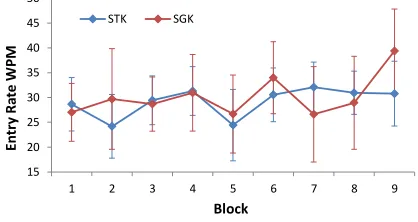
[image:6.612.317.559.100.196.2]SGK was significantly faster than STK, and participants improved more with SGK than with STK with practice (Figure 5 and Table 10).
Figure 5. Mean entry rate and 95% confidence intervals as a function of block in the ESM study.
There is a striking difference in speed patterns between Experiment 1 and Experiment 2 (cf. Table 1 and Table 10).
While the STK results are quite similar, the SGK results in the ESM experiment started much faster and grew even higher in speed as the study progressed (Figure 5).
WPM m S1 95% CI S1 m S9 95% CI S9
STK 30.1 25.9 – 34.4 31.1 26.1 – 36
SGK 33.6 27.2 – 40 39.1 33.3 – 45
ANOVA
Input Type 5.965 1,11 .352 .033*
Session 3.818 4,44 .258 .001*
[image:6.612.322.540.269.388.2]Input × Session 1.094 4,44 .090 .375
Table 10. Entry rate statistics in the ESM study.
Character Error Rate
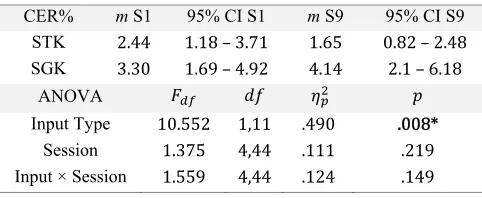
[image:6.612.317.558.419.518.2]SGK produced significantly higher CER than STK, which was similar to the lab study, but with higher values in both conditions (Figure 6, and Table 11).
Figure 6. Mean error rate and 95% confidence intervals as a function of session number in the ESM study.
CER% m S1 95% CI S1 m S9 95% CI S9
STK 2.44 1.18 – 3.71 1.65 0.82 – 2.48 SGK 3.30 1.69 – 4.92 4.14 2.1 – 6.18
ANOVA
Input Type 10.552 1,11 .490 .008*
Session 1.375 4,44 .111 .219
Input × Session 1.559 4,44 .124 .149
Table 11. CER statistics in the ESM study
Exclusion of Sentences with OOV words
As in the lab study, we excluded 465 (4.31% of 10,769) data points which contained the identified OOV sentences. SGK was still significantly faster, produced significantly more errors, and participants improved over the sessions.
WPM m S1 95% CI S1 m S9 95% CI S9
STK 30.3 26 – 34.7 31.3 26.4 – 36.1
SGK 34.3 27.7 – 40.8 39.3 33.5 – 45
ANOVA
Input Type 7.015 1,11 .389 .023*
Session 3.376 4,44 .235 .002*
Input × Session 1.083 4,44 .090 .382
[image:6.612.65.280.559.666.2] [image:6.612.317.557.597.691.2]CER m S1 95% CI S1 m S9 95% CI S9 STK 2.40 1.15 – 3.66 1.64 0.78 – 2.49 SGK 3.29 1.69 – 4.88 3.93 1.89 – 5.96
ANOVA
Input Type 8.298 1,11 .430 .015*
Session 1.329 4,44 .108 .240
[image:7.612.55.296.60.158.2]Input × Session 1.403 4,44 .113 .206
Table 13. Error rate analysis in the ESM study, excluding OOVs.
Sentences with OOV words
[image:7.612.324.544.219.340.2] [image:7.612.70.279.292.403.2]As in the lab study, we investigated those sentences containing OOV words. This was particularly interesting as the entry rate for SGK dropped so low that it was no longer faster than STK as before (cf. Figure 7 and Table 14 with Figure 5 and Table 10). This is also similar to what we noted in the lab study; OOV’s greatly impact the entry rate of SGK.
Figure 7. Mean entry rate and 95% confidence intervals as a function of session number in the ESM study: only sentences
with OOV words.
WPM m S1 95% CI S1 m S9 95% CI S9
STK 28.6 23.3 – 34 30.8 24.3 – 37.3 SGK 27.0 21.2 – 32.8 39.4 30.9 – 47.8
ANOVA
Input Type 0.135 1,11 .012 .720
Session 2.822 4,44 .205 .008*
Input × Session 1.588 4,44 .126 .140
Table 14. Entry rate analysis in the ESM study with OOVs.
SGK produced much higher CER than STK and there was a significant change in the error rates across the blocks (Table 15).
CER m S1 95% CI S1 m S9 95% CI S9
STK 3.39 1.48 – 5.31 2.11 0.67 – 3.55 SGK 3.46 1.42 – 5.51 7.98 4.43 – 11.54
ANOVA
Input Type 51.018 1,11 .831 .000*
Session 2.718 4,44 .198 .010*
[image:7.612.329.545.380.506.2]Input × Session 1.635 4,44 .129 .126
Table 15. CER statistics in the ESM study with OOVs
Hand Posture
When using STK, eight participants mostly used two thumbs to type (3,686 data points) and four participants mostly used a single finger (1,843 data points). When using SGK, nine participants used single finger (4,057 data points) while three users used single thumb (1,186 data points). No participants opted for neither bi-manual gesture input on SGK or single thumb on STK. The number of participants who used the same hand posture is quite similar in both the studies; therefore we can quantitatively compare the results. In the ESM study, single thumb SGK was the fastest, followed by single finger SGK and two-thumb STK (Figure 8).
[image:7.612.53.296.444.540.2]Figure 8. Mean entry rate (wpm) as a function of block in the ESM study for each hand posture.
Figure 9. Mean character rate as a function of block in the ESM study for each hand posture.
Compared to Experiment 1 (Figure 2) it can be seen immediately that the entry rate is lower for STK and higher for SGK. Two-thumb STK is not the fastest text entry method/posture in Experiment 2, a position taken over by single-thumb-SGK. Also, while the single finger input was faster in SGK in Experiment 1, single thumb is faster in Experiment 2. However, within STK, the two-thumb posture still outperforms STK with a single finger. Two-thumb STK produced the lowest CER, followed by single thumb SGK (Figure 9). As in Experiment 1, the hand posture results should be interpreted as indicative.
When comparing error rates across the two experiments, the ESM study has higher values. The two-thumb STK produces the lowest error rate across both studies. In 15
20 25 30 35 40 45 50
1 2 3 4 5 6 7 8 9
En
try
Ra
te
WP
M
Block
STK SGK
20
22 24 26 28 30 32 34 36 38 40
1 2 3 4 5 6 7 8 9
En
tr
y
Ra
te
WPM
Block
SGK single finger SGK thumb STK 2 thumb STK single finger
0
1 2 3 4
1 2 3 4 5 6 7 8 9
CE
R%
Block
[image:7.612.55.295.595.694.2]Experiment 1, within SGK, single finger input resulted in a lower error rate, but in Experiment 2 this position is taken over by single thumb. Also, in Experiment 1, all STK hand postures had lower error rates than SGK hand postures, but in Experiment 2 the ranking is more mixed.
Subjective Ratings
[image:8.612.63.285.204.300.2]The participants provided ratings on how the study affected their regular text input practices. At the beginning and end of the study, we collected ratings about the users’ SGK usage level outside the experiment; with 1 meaning they only used STK, and 7 meaning they only used SGK.
Figure 10. Level of SGK usage of participants outside the experiment, before and after the ESM study. 1 = no use (only
STK), 7 = full use (only SGK).
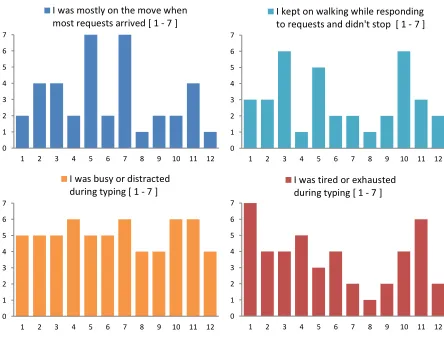
Figure 11. Movement, distraction and tiredness level of participants while typing in the ESM Study. x-axis: participant, y-axis: Likert Scale rating (1-7).
Figure 10 shows that at the beginning of the study eight participants were not using SGK outside the experiment at all. But at the end of the study, three participants within that set of eight participants had completely converted to using SGK as their main text entry method outside the experiment, with the other five participants reaching at least a halfway point (50/50 usage of STK and SGK). Two users have always used SGK, and the study had not affected their preference. Two other users had used both STK and SGK at the beginning of the experiment, and towards the end they had also shown a shift towards using the SGK more. It is remarkable that all users who only used STK prior to participating in the experiment were affected by this study.
Figure 11 shows the users’ subjective ratings on their experience during the random times they were requested to participate in the study. The top two plots show that some participants were on the move when the ESM app requested them to type on their phones, and some of them continued to walk while typing instead of stopping. The bottom two plots show how busy, distracted or tired they were when actually typing texts. This is particularly useful in understanding how different the environment was when compared to the lab based Experiment 1, where the users were seated in a quiet environment, rested, and fully focused on the experiment task.
Open Comments
Five representative comments for and against each text entry method are as shown in Table 16. Participants in the ESM study also provided general comments, such as:
“I learned to use Gesture Keyboard and I'm currently using it. I also learnt about Google keyboard and it is now my default method of input”
“I will use gesture as much as I can for typing and also will introduce it to my friends”
“I will continue to use Google keyboard, both its tapping and gesture functions feel more user friendly than the Samsung keyboard”
“It’s the first time I learnt this method and will definitely continue using it over tapping for my everyday use” – here “this method” refers to SGK
(a) STK Positives
“not restricted by the words suggested by autocorrect” “ability to correct mistakes
instantly”
“haptic feedback is also useful as a way of confirming you typed the correct number of
letters”
“could use two thumbs instead of one so one hand doesn't get
tired”
“More flexibility over what I type”
(c) SGK Positives
“easier to use with one hand” “feels natural and takes less
effort”
“automatically adds a space to my words”
“you don't have to be very accurate as it can recognize the
intended word” “can learn and get used to it
easily”
(b) STK Negatives
“difficult to have both speed and accuracy” “difficult to type while in motion, moving or walking” “keys are quite small and very
easy to make mistakes” “never could type as fast as the
QWERTY on blackberry” “boring”
(d) SGK Negatives
“thumb gets tired quickly” “limited to words provided by the dictionary, have to go back and tap to get the required
words”
“sometimes breaks a single word into two” “cannot correct one or two letters, have to start from the
beginning” “when typing a really long word, I sometimes get confused
[image:8.612.62.284.343.512.2]and move in the wrong direction”
Table 16. Open comments for and against each input method.
1 2 3 4 5 6 7
1 2 3 4 5 6 7 8 9 10 11 12
Li ke rt Sc ale Ra ti n g Participant SGK Usage Before Exp SGK Usage after Exp
0 1 2 3 4 5 6 7
1 2 3 4 5 6 7 8 9 10 11 12
I was mostly on the move when most requests arrived [ 1 ‐ 7 ]
0 1 2 3 4 5 6 7
1 2 3 4 5 6 7 8 9 10 11 12
I kept on walking while responding to requests and didn't stop [ 1 ‐ 7 ]
0 1 2 3 4 5 6 7
1 2 3 4 5 6 7 8 9 10 11 12
I was busy or distracted during typing [ 1 ‐ 7 ]
0 1 2 3 4 5 6 7
1 2 3 4 5 6 7 8 9 10 11 12
[image:8.612.310.558.375.694.2]DISCUSSION
The lab study revealed that STK, in the two thumb tapping condition, was significantly faster than SGK (of both finger and thumb conditions, Figure 2). The ESM-study in Experiment 2 showed that SGK (of both finger and thumb conditions) was significantly faster than STK. Three factors might explain this discrepancy. First, in the ESM study participants used their own mobile devices, which they were already familiar with. It is possible this would benefit SGK more, particularly for the unique one handed thumb gesturing condition which required a good grasp of the device and making gestures with the same hand. Second, the lab-based test environment might have benefitted STK. In the lab study, participants were seated, fully focused on the task, and not distracted by any other simultaneous task. This situation benefitted participants using an STK with two thumbs, which was the only posture in which participants in Experiment 1 were faster with STK than SGK. In the ESM-study, when randomly requested to sample their text input performance, the participants were most likely busy with other activities, such as being on the move. Here the STK with two thumbs performed similar to SGK initially, but became less fast than SGK when the users gained more experience (Figure 8). Third, perhaps most importantly, SGK is a more novel typing method than STK. The ESM-study exposed such a novel method to the participants and enabled them to use it outside of the study (Figure 10) on their own device and hence realized SGK’s greater potential in later sessions (Figure 8).
The experiments revealed that the SGK results in significantly higher error rates than STK. Participants’ open comments provided for each input method included remarks such as stating instances where they could enter non-dictionary words in STK, while using the SGK the option wasn’t available. This problem of OOV errors is shared among some other intelligent text entry methods that operate on word units, such as speech recognition [12]. Overall we find error is still a major challenge for text input and SGK suffers higher error rates than STK. A particular source of error is OOV. Our post-hoc analyses show that having to type sentences with OOVs impacts the entry rate in general, but the effect is stronger for SGK. As has been previously observed [18], there are two categories of errors in word-recognizers: confusion errors and OOV errors. An SGK user must know or infer whether a word is in the SGK vocabulary in order to be able to distinguish between these two error categories. If the user cannot accurately categorize the error, the user risks repeatedly trying to articulate the gesture for a word that is OOV. We propose mitigating this problem by either using generative OOV models that can predict words not in the vocabulary, such as the joint multigram models used in speech recognition, or by employing an interactive lexicon technique with active and passive words [18].
Our lab-study and ESM-study used different methodologies and it is therefore unsurprising they yielded different results. The discrepancies in the results suggest that future text entry studies need to carefully consider both internal and external validity. The ESM-methodology for text entry we introduced in this paper tests user performance of different text entry methods in situations that are more representative of everyday mobile phone use. Its results may therefore better support external validity.
Finally, our studies also revealed how users’ preferences changed over time. We found that the participants demonstrated a definite trend towards moving to SGK, a still relatively novel method to many mobile users (as is illustrated in Figure 10). This is perhaps the strongest empirical finding in favor of the SGK method to date— when exposed to this new method (to many of them for the first time) the participants “voted with their feet” by using it more often. Importantly such a shift was based on the entire experience including (and beyond) speed and accuracy. To paraphrase the feedback from one of the participants: this experiment may have changed a few lives.
LIMITATIONS AND FUTURE WORK
We found that hand posture is a potentially important factor on STK and SGK performance, but hand posture was not explicitly controlled in our experiments and therefore our conclusions on hand posture’s role are limited. A follow-up study which controls for hand posture would be able to state more definitive conclusions. We also did not control for device type in the ESM-study and we did not record participants’ typing outside the sampling points in the ESM-study (in order to protect participants’ privacy). Finally, in both our studies we used the standard transcription task. Complementary data might be gained by also using a composition task [23], which is able to more accurately model actual text entry activities.
CONCLUSIONS
STK both have strengths, weaknesses, and different individual awareness and preferences. Two-thumb touch typing in a focused setting seems particularly effective on STK, whereas one handed SGK typing with the thumb seems particularly effective in more mobile situations. This research shows that when exposed to SGK, users tend to migrate from STK to SGK. This constitutes perhaps the strongest empirical evidence of SGK's strength. Fourth, research methodology matters; studies in the lab and in the wild both can be informative to different aspects of keyboard experience, but used in conjunction is more reliable in comprehensively assessing input technologies of current and future generations.
REFERENCES
1. Bi, X., Chelba, C., Ouyang, T., Partridge, K. and Zhai, S. 2012. Bimanual gesture keyboard. In Proc. UIST 2012. ACM Press: 137–146.
2. Bi, X., Ouyang, T., and Zhai, S. Both complete and correct?: multi-objective optimization of touchscreen keyboard. In Proc. CHI (2014), 2297–2306.
3. Castellucci, S.J. and MacKenzie, S. 2011. Gathering text entry metrics on android devices. In Extended Abstracts CHI 2011. ACM Press: 1507–1512. 4. Consolvo, S. and Walker, M. 2003. Using the
Experience Sampling Method to Evaluate Ubicomp Applications, IEEE Pervasive Computing 2(2): 24–31. 5. Dunlop, M.D. and Levine, J. 2012. Multidimensional
pareto optimization of touchscreen keyboards for speed, familiarity and improved spell checking. In Proc. CHI 2012. ACM Press: 2669–2678. 6. Dunlop, M.D. and Masters, M.M. 2009. Pickup
usability dominates: a brief history of mobile text entry research and adoption. International Journal of Mobile Human Computer Interaction 1(1): 42-59.
7. Enron Mobile Email Dataset
http://keithv.com/software/enronmobile/
8. Goel, M., Findlater, L., and Wobbrock, J. WalkType: using accelerometer data to accomodate situational impairments in mobile touch screen text entry. In Proc. CHI (2012), 2687–2696.
9. Goel, M., Jansen, A., Mandel, T., Patel, S. N., and Wobbrock, J. O. ContextType: using hand posture information to improve mobile touch screen text entry. In Proc. CHI (2013), 2795–2798.
10. Goodman, J., Venolia, G., Steury, K. and Parker, C. 2002. Language Models for Soft Keyboards. In Proc. The Eighteenth National Conference on Artificial Intelligence, 419–424.
11. Kristensson, P.O. 2007. Discrete and Continuous Shape Writing for Text Entry and Control. Doctoral dissertation, Linköping University, Sweden.
12. Kristensson, P.O. 2009. Five challenges for intelligent text entry methods. AI Magazine 30(4): 85–94.
13. Kristensson, P.O. 2014. From wax tablets to touchscreens: an introduction to text entry research.
ACM XRDS21(1): 28–33.
14. Kristensson, P.O. and Vertanen, K. 2011.
Asynchronous multimodal text entry using speech and gesture keyboards. In Proc. Interspeech 2011. ISCA: 581–584.
15. Kristensson, P.O. and Zhai, S. 2004. SHARK2: a large vocabulary shorthand writing system for pen-based computers. In Proc. UIST 2004. ACM Press: 43–52 16. Kristensson, P.O. and Zhai, S. 2005. Relaxing stylus
typing precision by geometric pattern matching. In Proc. IUI 2005. ACM Press: 151–158.
17. Kristensson, P.O. and Zhai, S. 2007. Command strokes with and without preview: using pen gestures on keyboard for command selection. In Proc. CHI 2007. ACM Press: 1137–1146.
18. Kristensson, P.O. and Zhai, S. 2008. Improving word-recognizers using an interactive lexicon with active and passive words. In Proc. IUI 2008. 353–356.
19. MacKenzie, I.S. and Soukoreff, R.W. 2002. Text entry for mobile computing: models and methods, theory and practice. Human-Computer Interaction 17(2): 147–198. 20. MacKenzie, I.S. and Tanaka-Ishii, K. (Eds.). 2007.
Text Entry Systems. San Francisco: Morgan Kauffman, 139-158.
21. Nguyen, H. and Bartha, M.C. 2012. Shape Writing on Tablets: Better Performance or Better Experience? In Proc. The Human Factors and Ergonomics Society Annual Meeting 2012. SAGE: 1591–1593.
22. Rick, J. 2010. Performance optimizations of virtual keyboards for stroke-based text entry on a touch-based tabletop. In Proc. UIST 2010. ACM Press: 77–86. 23. Vertanen, K. and Kristensson, P.O. 2014.
Complementing text entry evaluations with a composition task. ACM Transactions on Computer-Human Interaction 21(2): Article No. 8.
24. Weir, D., Pohl, H., Rogers, S., Vertanen, K., and Kristensson, P. O. Uncertain text entry on mobile devices. In Proc. CHI (2014), 2307–2316.
25. Zhai, S. and Kristensson, P.O. 2003. Shorthand writing on stylus keyboard. In Proc. CHI 2003. ACM Press: 97–104.
26. Zhai, S. and Kristensson, P.O. 2012. The word-gesture keyboard: reimagining keyboard interaction.
Communications of the ACM 55(9): 91–101. 27. Zhai, S., Kristensson, P.O. and Smith, B.A. 2005. In