Virtual Exhibitions
Yue Li1(B), Paul Tennent2, and Sue Cobb3 1 International Doctoral Innovation Centre, University of Nottingham Ningbo China, Ningbo, China
2 Mixed Reality Lab, School of Computer Science, University of Nottingham, Nottingham, UK
3 Human Factors Research Group, Faculty of Engineering, University of Nottingham, Nottingham, UK
Abstract. It is becoming popular to render art exhibitions in Virtual Reality (VR). Many of these are used to deliver at-home experiences on peoples’ own mobile devices, however, control options on mobile VR sys-tems are necessarily less flexible than those of situated VR fixtures. In this paper, we present a study that explores aspects of control in such VR exhibitions - specifically comparing ‘on rails’ movement with ‘free’ movement. We also expand the concept of museum audio guides to better suit the VR medium, exploring the possibility of embodied character-guides. We compare these controllable guides with a more traditional audio-guide. The study uses interviews to explore users’ experience qual-itatively, as well as questionnaires addressing both user experience and simulator sickness. The results suggest that users generally prefer to have control over both their movement and the guide, however, if relinquish-ing movement control, they prefer the uncontrolled guide. The paper presents three key findings: (1) users prefer to be able to directly control their movement; (2) this does not make a notable difference to simula-tor sickness; (3) embodied guides are potentially a good way to deliver additional information in VR exhibition settings.
Keywords: Virtual Reality
·
Virtual exhibitions·
Guide systems Mobile control1
Introduction
The term ‘Virtual Reality’ (VR) was coined by Jaron Lanier in the late 1980s, defined as a three-dimensional, computer-generated environment, in which peo-ple can immerse, explore and interact [32]. Emphasising users’ dynamic control of viewpoint, Brooks defines a VR experience as “any in which the user is effectively immersed in a responsive virtual world” [2]. VR has recently gained widespread
c
The Author(s) 2019
attention for research and applications with affordable headsets, such as the Oculus Rift and the HTC Vive. Both are tethered to high-end PCs with cables, with a wide 110-degree field of view and high-resolution displays. At the same time, several mobile VR devices have been well-received. Two typical examples are the Samsung Gear VR and the Google Cardboard. These are wireless, light-weight and low-cost options, but are essentially cases with lens arrangements for mobile phones. Therefore they suffer from two key challenges: first, the refresh rates and resolutions are restricted by the mobile phone platforms on which they are delivered - and while we can assume this issue will go away as the technol-ogy miniaturises, the second issue is more likely to persist: limited options are available to control the device. While equipment like the Gear or the Google Daydream offers handheld controls, the same does not apply to systems like Google Cardboard. As the cheapest and most available form of VR, it is worth considering how we might interact with and control experiences in this limited context.
Meanwhile, museum and cultural heritage exhibitions are shifting from being collection-based and communicating history with labels, to activity-oriented, engaging visitors to offer captivating experiences [12]. They are exploring the use of digital technology to attract visitors and to provide interactive experi-ences which are otherwise impossible with conventional museum technologies. Museums such as the Natural History Museum in London and the Acropolis Museum in Athens [16] are adopting VR technologies to create virtual exhibi-tion experiences and apply AR technologies to develop augmented guide systems. In addition, Brown introduced a mixed reality system that enables a collabo-ration between onsite and online visitors [3]. The use of VR in an exhibition context essentially comes in two forms: (1) situated experiences where the VR equipment is set up in the gallery and visitors use that equipment to explore a curated exhibition. (2) At home experiences - often delivered on mobile phones allowing a user to either ‘visit’ an existing exhibition remotely or recreate a historical environment.
2
Related Work
Museums and cultural heritage exhibitions have traditionally been based on physical collections, providing static labels to communicate history and the story behind them. However, they are adopting activity-oriented presentations to engage visitors and offer more captivating experiences [12]. The deployment of digital technologies in the cultural heritage sector has significantly increased in the last few years, promoting the diffusion of culture by developing creative narratives to support education and recreation [34].
Researchers have investigated and exploited the immersive, interactive and imaginative nature of VR [5] to disseminate and present arts and humanities [7,8,11,14,25]. This includes the emergence of ‘Virtual Museums’, of which there are two main types [4]: one is the replication of an existing museum, which allows remote access to its digitalised exhibits; the other is the reconstruction of a lost archaeological site and activities that enables users to navigate and observe virtual objects, such as the Rome Reborn project [10]. Thanks to the recent advances in rendering techniques, the immersive systems could provide high-fidelity visualisations and simulate a virtual construction that is both physically correct and perceptually equivalent [15].
When immersed in a virtual environment, users need some navigation capa-bility to be able to move around and explore the environment, just like they could walk around in the real world. Aside from ‘walking’ in VR by specifying a direction of movement, users can also teleport in VR, which could help reduce motion sickness by eliminating visible translational motion [1]. However, as tele-porting is only afforded in the digital world, it could make the experience less natural. Synchronising real-world movements to VR is also feasible with external tracking sensors. This feature is usually supported by desktop VR equipment, however, becomes less feasible with mobile phone-based VR. Additionally, such systems also depend on the availability of a significant open physical space, which may be impractical for at-home use.
drives a compelling sense of self motion [19]. In addition, studies have shown that simulator sickness symptoms were reported at higher levels of passive viewing compared to active control over movement in the virtual environment [27].
Most guide information in virtual museums was presented in the form of 2D text and audio clips. They either stayed there as part of the scene or could be triggered by a button. Chittaro et al. [6] presented an embodied guide that assisting users with exhibit information in a virtual museum tour. Although the guide was programmed to give a tour that encompass objects in a certain sequence, which restricted users’ control over the information, it has been shown that an embodied guide could contribute in drawing user’s attention by providing visual cues [26], and help bring users more motivation and engagement [22].
Virtual museums used to adopt different control techniques for movement and guide information, yet the effect of different control methods on user experience has not been well studied. In addition, while complex systems with high com-putation efficiency allow more control capabilities with joysticks and tracking sensors, there is less control available on mobile systems and low-cost equip-ment. The control on these devices is supported by the buttons or touchpads that are embedded on the headset. In this paper, we propose that the applica-tion of AR object and marker recogniapplica-tion techniques could be used as an efficient supplementary control method that allows a mobile computing device to detect and track the augmented object. This may allow for interaction without the need for joysticks or controllers, which may work well for applications delivered on self-contained mobile VR platforms, where the headset is used as the sole input and interaction method. Meanwhile, using marker recognition is similar to hand gesture control, which could support more intuitive interactions than using controllers. As indicated in [21], incorporating movements and gestures in the real-world environment could be a more intuitive interaction approach for mobile VR scenes. In this paper, we describe an experiment using AR-inspired marker recognition as a stand-in for gesture control, without introducing extra sensors on the headset or users’ hands. Using marker recognition could be a cheap alter-native to allow certain control in the absence of external control devices, such as joysticks, particularly for mobile VR experience.
3
Experimental Virtual Museum
Fig. 1. Control matrix of different guide approaches
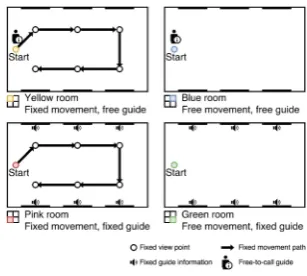
Fig. 2. Top-down room view with movement and guide controls settings (Color figure online)
experience in museums is free movement around the site with guide information provided by in-situ placards and externally-triggering audio guides. In Fig.1we have categorised these options asfree movement andfree guide, denoting options for allowing users to freely move around in a physical space and read or listen to guide information at will. As indicated in the matrix, tour guide and audio guide systems limit users’ freedom of movement and guide control while more flexible options such as labels are usually less interactive.
In order to explore user preferences for these control options, we developed a very simple virtual museum as a low fidelity experimental set up, displaying famous paintings with a series of rooms - each of which offered a different com-bination of controls of both the users’ movement and access to additional guide information. The experience was built in Unity and presented using a Samsung Galaxy S6 mobile phone in a Gear VR headset. The experience with different combinations of movement and guide controls was configured in four different rooms mapping to the control matrix (see Fig.1), which we distinguished visually by four different colours (see Fig.2).
3.1 Guide Design
card held in the user’s hand and augmented the virtual guide onto the card (see Fig.3). Several designs for the guide presentation in the VE were explored. The initial implementation mapped the character exactly to the card, including both its position and orientation. This makes sense when one can see a virtual representation of one’s hands. However, without that visual cue, it was difficult for users to relate the movement of their hand to the movement of the virtual guide, especially with the limited tracking rate of the phone’s relatively slow processor. We also considered placing the guide at a fixed position within the world space, such as the left bottom corner of an exhibit. This could reduce the visual distraction as users’ visual attention could then be more focussed on the exhibit located in the centre of the view. However, this option disassociated the virtual guide from the AR card - making it harder for users to have a clear mental model of how the guide works.
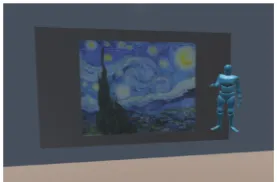
[image:6.439.234.373.303.394.2]Ultimately we settled on mapping the guide to the position of the card but orienting it consistently vertically to the user’s viewpoint, regardless of card orientation. A low-pass filter was applied to smooth its movement and avoid flickering that could be caused by a sudden change of the code card position and the hand. The character was further embodied with some natural movement animations, such as idling, looking/turning around and talking.
Fig. 3. Use code card to control virtual guide
Fig. 4.Virtual guide introducingStarry Night (https://www.mixamo.com)
3.2 Control Design
[image:6.439.43.210.313.395.2]have to hold the card all the time to keep the guide talking. It could also help prevent accidental stop of the audio information while wandering around in the room. In rooms with no guide control, the audio information is instead triggered automatically when users reached an exhibit and looked closely at it.
[image:7.439.221.398.274.335.2]Movement Control. For the control of the movement around the VE, users were either moved on a fixed path (so-called ‘on rails’ movement) or had their own control of the movements by interacting with the touchpad on the headset as follows: a single tap to move forwards; swipe backwards to move backwards; single tap (again) to stop moving (see Fig.5). However, the speed of movement was kept consistent at a walking pace that is slow enough to eliminate simulator sickness caused by fast-moving and ensure a clear focus at all times. For the experiment, the speed was set to 5.0f in Unity. The direction of movement is consistent with their head orientation, which is approximately their gaze direc-tion. Using head movement for input has been shown to be an effective way as it is easy to learn and does not tire participants [13].
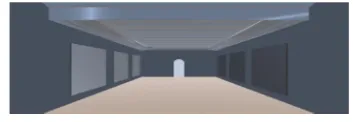
Fig. 5.Movement control Fig. 6.Virtual room layout
3.3 Room Settings
The virtual art gallery developed for this study comprised a tutorial room and four exhibition rooms. The tutorial room and the exhibition rooms had the same virtual room layout. 24 paintings were randomly distributed in the exhibition rooms and each exhibition room had six paintings on the walls (see Fig.6).
In the pink room, users were moved on a fixed path and audio information was automatically played when the user reached each exhibit. The system moved the user to the next exhibit once the previous audio information finished. The experience ended after the user had been taken to all of the exhibits in the room. Users could turn their head freely to look at the exhibits on the wall.
In the yellow room, users were moved on a fixed path. Users had control over the audio guide using the AR code card. The system auto-moved the user to the next exhibit after a fixed amount of time (5 s plus the audio length) at the previous exhibit. The experience ended after the user had been taken to all of the exhibits in the room.
currently playing audio ceased when they moved close to another exhibit. Users were free to stay in the room for as long as they wanted and so they could finish the experience at any time.
In the blue room, users were able to navigate themselves using the headset touchpad. They also had control over the audio information in the same way as in the yellow room. Users were free to stay in this room for as long as they wanted and finish the experience at any time.
3.4 Technology Setup
The system was developed in Unity with the Vuforia AR platform. In this study, it ran on a Samsung Galaxy S7 and Samsung Gear VR headset (SM-R322). The graphics were displayed at a 60 Hz refresh rate and a 96-degree field of view.
A VuforiaImageTarget was created for the camera to recognise and apply a 3D character on top of it. The virtual guide character followed the position of the code card in the real world while the rotation of the character was disabled. The movement was smoothed to avoid character flickering caused by sudden changes of card position. An idle animation was played by default; a turning back and talking animation were played when it detected an exhibit and started to introduce it. The triggering of the audio was implemented using aRaycastfired from the character’s eyes. When the ray hit an exhibit, the character ‘recognised’ it and began talking.
The movement control was achieved by getting the inputs from the headset touchpad and updating the position of the main first perspective camera in accordance with input from the touchpad. With forward input, the system moved the user towards the direction that they were facing. The opposite direction was applied to the backward inputs. The moving speed was set to a constant at approximately walking pace.
The exhibits displayed in the virtual rooms were 24 paintings. 24 audio clips were recorded to describe the paintings and each audio clip lasted around 60s. In addition, four instructional audio clips were recorded to be played at the beginning of each exhibition room to remind the users of the controls that were available to them.
4
Methodology
4.1 Participants
4.2 Study Design
The aim of the study was to investigate users’ preferences for the control of their movement and the control of the guide information in the virtual exhibition. The independent variables were the control of movement and the control of the guide information. The dependent variables were the user experience (measured by the user experience questionnaire), simulator sickness (measured by the simulator sickness questionnaire), and users’ attitude towards the controls in the systems (discussed in a post-experience interview). The configuration of user control over movement and guide in each room were presented in Fig.2. The sequence of room visiting order followed a pattern of increasing control for users in Group A and decreasing control for users in the Group B. Two pilot studies, one with an expert user and one with a naive user, were conducted to finalise system design details and questionnaire settings before recruiting participants.
Two questionnaires were used to measure users’ experience and the simu-lator sickness. The User Experience Questionnaire (UEQ) [18] uses 26 pairs of contrasting attributes with a 7-point Likert scale to measure the attractiveness, perspicuity, efficiency, dependability, simulation and novelty of the system. The Simulator Sickness Questionnaire (SSQ) [17] has 16 items that allow users to report possible symptoms related to nausea, oculomotor and disorientation and evaluate the severity on four scales: none, slight, moderate and severe. A semi-structured interview was conducted to discuss users’ preferences of controls and attitudes towards system interactions.
Considering the potential risk of motion sickness when being in the virtual environment, users were informed that they could remove the headset at any time during the study if they felt uncomfortable. No user made this request. In any case, users were required to take off the headset at the end of each experimental task and so they spent no longer than ten minutes wearing the headset at one time.
4.3 Procedure
to rank the rooms based on their preferences. A semi-structured interview was conducted to discuss their rankings.
4.4 Data Collection and Analysis
Quantitative data included the two questionnaire responses collected from the users after visiting each room, as well as the gaze data captured during their exhibition visits.
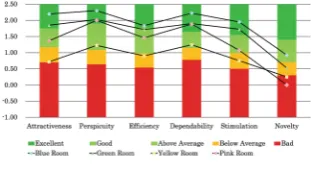
The original UEQ used a 7-point Likert scale evaluation for each item, where the middle value does not indicate any preferences. In addition, some items such as ‘secure/not secure’ did not apply to the context of this system. Therefore, we adapted the questionnaire to use a 6-point Likert scale and an additional ‘Not applicable’ option. Data collected from this questionnaire was analysed using Laugwitz et al. analysis toolkit [18]. The analysis transformed the 26 items and scores for the six evaluation scales were derived and compared with the bench-mark, which contains data from 246 product evaluations with 9905 participant evaluations in total. For each scale, the benchmark classified a product into five categories: Excellent (10%), Good (10% to 25%), Above average (20% to 50%), Below Average (50% to 75%) and Bad (75% to 100%).
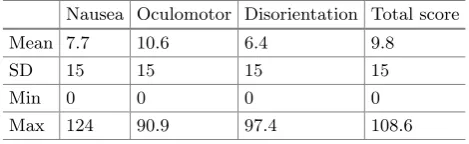
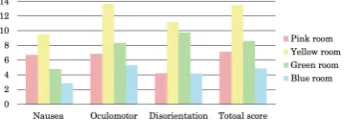
[image:10.439.95.330.415.487.2]The SSQ results were analysed following Kennedy et al. scoring procedure [17]. The scores for each symptom are quantified as none (0), slight (1), moderate (2) and severe (3). The Total Severity (TS) score plus separate scores for three sub-scales: nausea, oculomotor and disorientation were derived by adding the corresponding symptom scores and applying a constant weight. The score values do not have particular interpretive meanings, but were used in comparison with scales based on the 1,100+ calibration samples provided by Kennedy et al. [17] (see Table1).
Table 1.Descriptive statistics for SSQ scale provided by Kennedy et al.
Nausea Oculomotor Disorientation Total score
Mean 7.7 10.6 6.4 9.8
SD 15 15 15 15
Min 0 0 0 0
Max 124 90.9 97.4 108.6
In the interview, users were asked to comment on their preferences for the different control methods in the rooms. A theme-based content analysis method was applied to analyse the interview transcripts [23], with top-level categorisation divided into two groups: (1) movement control and (2) guide control.
5
Results
[image:11.439.241.397.260.349.2]After experiencing the four rooms, users were asked to rank the rooms from 1 to 4 based on their preferences, where 1 indicates the room that they enjoyed the most. The responses are shown in Fig.7. It can be seen that most users preferred the blue room, where they had control of both movement and the audio guide information. The second preferred room was the green room, where they were allowed to move freely but the guide information was automatically triggered. The pink room with no control was ranked third and the yellow room, in which they had control of the audio guide but no movement control, was ranked last.
[image:11.439.54.402.260.349.2]Fig. 7.Users’ preference for room control (Color figure online)
Fig. 8. User experience results (Color figure online)
[image:11.439.56.223.280.342.2]Fig. 9.Simulator sickness scores
Table 2. Correlations between the preference, UEQ and SSQ
Rank UEQ SSQ
Rank 1
UEQ −0.994 1
SSQ 0.861 −0.889 1
Figure10showed the average time users spent looking at an exhibit in relation to the length of its audio information. In the pink room and the yellow room, although users could look around freely and look at other places while situating in front of one painting, they were moved around by the system on a fixed path. Therefore, the time users spent in front of each painting was roughly the same as the audio length. While the time users spent looking at the exhibits was less predictable in rooms with free control over movement because they could linger longer in front of the paintings they were interested in and skip those they were less concerned about. However, it was worth noting that the average time users spent in front of each painting in the green room were shorter than the length of the audio clips. Leaving the exhibits half way through the audio due to a loss of interest could account for this. A more convincing reason was that users did not observe the exhibits they were not interested in, or may have accidentally triggered it for several seconds which they did not intend to view. Nevertheless, it was included when deriving the average viewing time. These cases were significantly reduced in the blue room and false positive results were avoided because it required intentional triggering of the audio. The audio was triggered when the system detected the user facing an exhibit. Therefore the audio would start again if the user remained in front of it - something users commented on and they disliked. When this happened, they would usually leave and move to another exhibit. Being unable to stop the audio information did not permit them to appreciate the exhibits without listening to anything. It was one of the reasons given in the interview to explain why they preferred the blue room (with a control of the audio guide information) over the green room.
Users suggested in the interview that they preferred to have control of their movement because they would like to move freely in the exhibitions, decide the order of visit and take their time. When they were moved on a fixed path, they felt that they were forced to look at the exhibits and listen to them.
“The last one (blue room) was my favourite. I could take my time. Some pictures I wasn’t very interested in but I want to look at it without having to hear it.”
“Once the audio starts, I feel like I have to stay.”
Users considered the guide as a vivid embodiment of the audio information. They preferred to take control of the audio guide information and decide when to start or stop it, rather than having the audio triggered automatically.
Fig. 10.Average time spent in front of each painting compared with the audio length (Color figure online)
“I wasn’t a fan of the audio starting straight away.”
In general, no significant sickness symptoms were reported and users enjoyed the VR experience. Some slight discomforts were raised regarding the movement directions and potential discomfort can result from the time of use and the headset design.
“(I) felt pretty comfortable in the headset, that’s definitely fine. Didn’t feel nausea or any of the stuff.”
“When I was faced to the picture, it moves me from the left to the right and I don’t feel very well.”
“The headset generally was good and convenient because the time of view-ing each room was not too long, it was just about right. Because if it’s more than that you may feel discomfort even if you have too many excit-ing stuff.”
6
Discussion
In this section, user preferences for the exhibition rooms and their attitudes towards the control over movement and guide are discussed. Comments on sim-ulator sickness that could be caused by the interaction design are also presented with a view to supporting future system designs for virtual exhibitions. The quantitative data from UEQ and SSQ indicated that rooms with both movement control and audio guide control provided better user experience and caused less sickness or discomfort.
6.1 Movement Control
In general, most users said that they preferred the control of their own movement, allowing them to choose their order of viewing and take their time.
between the direction of movement on the touchpad and in the virtual room. It was observed that other users also tried to control movement in this way, especially after they did a backwards move and would like to go forwards. The reason for selection of ‘Tapping’ to trigger forward movement was because the directions on the touchpad were not visible to the users. However, this com-ment and observed behaviour suggested that a more intuitive system based on direction may be preferable. From an ergonomics point of view, the design of the movement control should consider the natural mappings and the conceptual model user might have in mind [20,24], but at the same time, the affordance, visibility of control and the learning cost should be taken into consideration [33]. Some restrictions on the types of movement made available with a touchpad control were discussed in the interview. For example, in a real-world exhibition, users may look at an exhibit and navigate from one side of it to the other - and it happens quite often. The direction we are looking at is not always consistent with the direction we are walking towards. However, the movement direction in the virtual world is dominated by the user’s head direction, which is roughly the gaze direction. Therefore one cannot move from side to side in this system. One possible implementation of this feature could be to use a gyroscope to adjust positions through head tilting. However, the effect of this needs to be explored as a disconnection between the movement direction and the facing direction could be an inducer of simulator sickness [19]. Another issue raised was about the distance between the user and the exhibit. In the real world, a guardrail or at least a warning sign would prevent users from going too close to an exhibit. However, there is no concern of the exhibits being damaged or stained in the virtual world, users are allowed to go as close as they like. One user commented that the downside of this is “it is unnatural to go too close to the painting, we are like in search of pixels in there”. It was also suggested to slow down the movements when one becomes close to the exhibits. Given the lack of resolution in VR environments, it is arguably desirable to be able to move close to the object than one might in the real world.
Meanwhile, as a digital representation, the virtual world could offer more possibilities than the real world [28]. Users identified some features that the system could possibly have, such as having a zoom-in function to allow observing the paintings in even more detail. In addition, it was asked if the navigation could be designed in a way that looking at a painting for several seconds would automatically move the user position close to that exhibit. This is currently the most widely used approach for menu selection in VR systems. A dot in the virtual world indicates the object to be selected and a loading bar is usually presented along with it to provide an instant visual feedback. The users may have proposed these interaction approaches deriving from their experience of picture viewing and game navigations, which indicates these interaction approaches could be accepted if adapted to the virtual world.
compared to the movements in the real world, it offers many possibilities of interaction approach as a digital representation, and it is known that there is a relationship between methods of movement and simulator sickness in VR set-tings [19]. In the rooms with no movement control (pink and yellow), users were moved on a fixed path, on part of which users were moved from left to right. It was reported that this caused some instances of discomfort. This is entirely understandable as the moving direction was inconsistent with the direction they were looking and sensory disconnect is a well-known cause of simulator sickness [29]. Additionally, some users commented that after they finished the sessions, they did not know the orientation with respect to the room they were sitting in. Of course, room-scale movement provided by systems such as the HTC Vive sidestep many of these issues, however many current VR systems, especially those delivered on mobile phone platforms are unlikely to provide such facility in the near future.
In this study there does not appear to be a difference reported levels of simulator sickness symptoms between rooms where the user is moved (fixed path) and rooms in which the user controls their own movement (free path), possibly because the movement is fundamentally similar in both cases - being a smooth translation of position. It would be interesting to compare between full ‘on rails’ movement, controlled free movement, and the so-called ‘room scale’ movement as epitomised by the HTC Vive system.
6.2 Guide Control
The guide acted as an embodied controller of the audio information for the exhibits. Generally, users would like to have their own control of an audio guide because there were cases where they found it annoying that they could not stop the audio information or the audio started straight away. When being asked about their real-world museum and gallery visiting behaviour, some considered the museums and galleries places for knowledge and they would like to acquire information where possible; while many suggested they would like to take their time looking at the exhibits and may only look for information when they are interested in them. In particular, some deemed art appreciation to be a personal experience and would feel bothered when people keep talking and introducing exhibits to them. Therefore, they preferred to take their own control of the audio guide and decide when to trigger and stop the audio information.
actually intelligent agent-based guides, which could converse more dynamically with the user, such as those virtual humans described in [30].
When listening to the audio information, some users preferred to dismiss the guide character while the audio is playing. They found the character distracting because when it was in the view and animated, they were more inclined to look at it. Similar situations could occur with the real-world tour guide or expert as well - but of course, this does not offer the option of dismissing them as easily! When a person is talking to you, a natural social interaction is to look at his eyes to show attention. Providing users with the flexibility of keeping or excluding the guide character in the view could suit for different requirements and enhance the user experience in general.
In addition, the embodied interaction in the guide control was shown to have a positive impact on the user experience. Dourish introduced tangible and social computing in [9]. Tangible computing is concerned with physical interaction in an augmented environment and it uses computation as part of the physical world; while social computing uses social understandings of interaction to enhance the interaction with computation. Dourish argued that both exploit the sense of familiarity to smooth the interaction and are founded on the same idea based on the embodiment. In this study, the audio information was presented to the users through the animated guide character, which involved users’ proactive interaction with the physical marker and fit with users’ mental models about the guide’s activities in an exhibition. The embodied interaction that users are familiar with could enhance their user experience and contribute to the engaged participation and comprehension of the digital content.
7
Conclusion
In this paper, we have presented a simple study to look at aspects of user control related to movement and audio-guides in VR exhibitions. An indication of the results suggested that users prefer to have control over both movement and the audio guide. However, an increase of control does not necessarily result in an enhancement of user experience or a decrease in simulator sickness symptoms. When users were moved on a fixed path, they would prefer to have everything automatically controlled, instead of them taking control of the audio information alone. From the interviews, we surmise that users would prefer to walk freely and decide their own order of visit in an exhibition. They would ask for information about an exhibit when they are interested in it and they find it overwhelming and annoying when being automatically provided with all information about every exhibit. When they take a second visit, they would like to look at the exhibits without having to hear about anything. Therefore, having control of both the movements and the audio guide is preferred.
The key contributions of this paper are as follows:
– Experimental evidence that users prefer the direct control of movement in VR exhibitions, but there is no notable difference in simulator sickness between these conditions.
– An example of the use of an embodied virtual guide, which suggests that this may be a good alternative way of providing users with information in VR exhibitions, different to traditional audio guides or labels.
– Experimental evidence that users would prefer the option to dismiss support-ing information at will.
Acknowledgements. This work was carried out at the Mixed Reality Lab (MRL). The authors acknowledge the financial support from Ningbo Education Bureau, Ningbo Science and Technology Bureau, China’s MOST and The University of Nottingham. The work is also partially supported by EPSRC grant no EP/L015463/1.
References
1. Bozgeyikli, E., Raij, A., Katkoori, S., Dubey, R.: Point & teleport locomotion technique for virtual reality. In: Proceedings of the 2016 Annual Symposium on Computer-Human Interaction in Play - CHI PLAY 2016, pp. 205–216 (2016). http://dl.acm.org/citation.cfm?doid=2967934.2968105
2. Brooks, F.P.: What’s real about virtual reality? IEEE Comput. Graph. Appl. 19(6), 16–27 (1999).https://doi.org/10.1109/38.799723
3. Brown, B., MacColl, I., Chalmers, M., Galani, A., Randell, C., Steed, A.: Lessons from the lighthouse: collaboration in a shared mixed reality system. In: Proceedings of the SIGCHI Conference on Human Factors in Computing Systems, pp. 577–584. ACM (2003)
4. Bruno, F., Bruno, S., De Sensi, G., Luchi, M.L., Mancuso, S., Muzzupappa, M.: From 3D reconstruction to virtual reality: a complete methodology for digital archaeological exhibition. J. Cult. Heritage11(1), 42–49 (2010).https://doi.org/ 10.1016/j.culher.2009.02.006
5. Burdea, G.C., Coiffet, P.: Virtual Reality Technology, vol. 1. Wiley, Hoboken (2003) 6. Chittaro, L., Ieronutti, L., Ranon, R.: Navigating 3D virtual environments by following embodied agents: a proposal and its informal evaluation on a virtual museum application. PsychNology J.2(1), 24–42 (2004). 10.1.1.98.137
7. Ch’ng, E., Gaffney, V., Chapman, H.: From product to process: new directions in digital heritage. In: Digital Heritage and Culture: Strategy and Implementation, pp. 219–243 (2014)
8. Ch’ng, E., Stone, R.J.: Enhancing virtual reality with artificial life: reconstructing a flooded European mesolithic landscape. Presence Teleop. Virt. Environments 15(3), 341–352 (2006)
9. Dourish, P.: Where the Action Is: The Foundations of Embodied Interaction. MIT Press, Cambridge (2004)
11. Gaucci, A., Garagnani, S., Manferdini, A.M.: Reconstructing the lost reality archaeological analysis and Transmedial Technologies for a perspective of Vir-tual Reality in the Etruscan city of Kainua. In: 2015 Digital Heritage, pp. 227–234. IEEE, September 2015. https://doi.org/10.1109/DigitalHeritage.2015.
7419502,http://ieeexplore.ieee.org/document/7419502/
12. Ghose, S.: Rethinking Museums: the emerging face of story-telling museums. Uni-versity of Victory Legacy Art Galleries, pp. 1–4 (2014). http://www.maltwood. uvic.ca/cam/publications/other publications/Text of Rethinking Museums.pdf 13. Giannopoulos, I., Komninos, A., Garofalakis, J.: Natural interaction with large map
interfaces in VR. In: Proceedings of the 21st Pan-Hellenic Conference on Informat-ics - PCI 2017, vol. Part F1325, pp. 1–6. ACM Press, New York (2017).https://
doi.org/10.1145/3139367.3139424, http://dl.acm.org/citation.cfm?doid=3139367.
3139424
14. Giloth, C.F., Tanant, J.: User experiences in three approaches to a visit to a 3D Labyrinthe of Versailles. In: 2015 Digital Heritage, vol. 1, pp. 403–404 (2015). https://doi.org/10.1109/DigitalHeritage.2015.7413914
15. Gutierrez, D., Sundstedt, V., Gomez, F., Chalmers, A.: Dust and light: predictive virtual archaeology. J. Cult. Heritage 8(2), 209–214 (2007). https://doi.org/10. 1016/j.culher.2006.12.003
16. Keil, J., et al.: A digital look at physical museum exhibits, pp. 685–688 (2013) 17. Kennedy, R.S., Lane, N.E., Berbaum, K.S., Lilienthal, M.G.: Simulator sickness
questionnaire: an enhanced method for quantifying simulator sickness. Int. J. Aviat. Psychol.3(3), 203–220 (1993)
18. Laugwitz, B., Held, T., Schrepp, M.: Construction and evaluation of a user experi-ence questionnaire. In: Holzinger, A. (ed.) USAB 2008. LNCS, vol. 5298, pp. 63–76. Springer, Heidelberg (2008).https://doi.org/10.1007/978-3-540-89350-9 6 19. LaViola, J.J.: A discussion of cybersickness in virtual environments. ACM
SIGCHI Bulletin 32(1), 47–56 (2000). https://doi.org/10.1145/333329.333344. http://portal.acm.org/citation.cfm?doid=333329.333344
20. Mayhew, D.J.: Principles and Guidelines in Software User Interface Design. Prentice-Hall Inc., Upper Saddle River (1992)
21. Mountain, D., Liarokapis, F.: Interacting with virtual reality scenes on mobile devices. In: Proceedings of the 7th International Conference on Human Com-puter Interaction with Mobile Devices & Services - MobileHCI 2005, p. 331 (2005). https://doi.org/10.1145/1085777.1085851, https://www.researchgate. net/publication/250425912 Interacting with Virtual Reality models on mobile devices
22. Mulken, S.V., Andr´e, E., M¨uller, J.: The Persona Effect: How Substantial Is It? In: Johnson, H., Nigay, L., Roast, C. (eds.) People and Computers XIII, pp. 53–66. Springer, London (1998).https://doi.org/10.1007/978-1-4471-3605-7
23. Neale, H., Nichols, S.: Theme-based content analysis. Int. J. Hum.-Comput. Stud. 55(2), 167–189 (2001).https://doi.org/10.1006/ijhc.2001.0475
24. Norman, D.A.: The psychology of everyday things. In: Basic Books (1988) 25. Reunanen, M., D´ıaz, L., Horttana, T.: A holistic user-centered approach to
immer-sive digital cultural heritage installations. J. Comput. Cult. Heritage 7(4), 1–16 (2015).http://dl.acm.org/citation.cfm?doid=2669619.2637485
27. Sharples, S., Cobb, S., Moody, A., Wilson, J.R.: Virtual reality induced symptoms and effects (VRISE): comparison of head mounted display (HMD), desktop and projection display systems. Displays29(2), 58–69 (2008).https://doi.org/10.1016/ j.displa.2007.09.005
28. Sutherland, I.E.: The ultimate display. In: Proceedings of the Congress of the International Federation of Information Processing (IFIP), pp. 506– 508 (1965). https://doi.org/10.1109/MC.2005.274, http://citeseer.ist.psu.edu/ viewdoc/summary?doi=10.1.1.136.3720
29. Tennent, P., Marshall, J., Walker, B., Brundell, P., Benford, S.: The challenges of visualkinaesthetic experience. In: Proceedings of the 2017 Conference on Designing Interactive Systems, pp. 1265–1276. ACM (2017)
30. Valstar, M., et al.: Ask alice: an artificial retrieval of information agent. In: Pro-ceedings of the 18th ACM International Conference on Multimodal Interaction, pp. 419–420. ACM (2016)
31. Vinson, N.: Design guidelines for landmarks to support Navigatiion in virtual environments. In: Proceedings of the SIGCHI Conference on Human Factors in Computing Systems (May), pp. 278–285 (1999).https://doi.org/10.1145/302979.
303062,http://dl.acm.org/citation.cfm?id=303062
32. Virtual Reality Society: Who coined the term “virtual reality”?https://www.vrs. org.uk/virtual-reality/who-coined-the-term.html. Accessed 4 Apr 2017
33. Wickens, C.D., Hollands, J.G., Banbury, S., Parasuraman, R.: Engineering Psy-chology & Human Performance. PsyPsy-chology Press, New York (2015)
34. Wyman, B., Smith, S., Meyers, D., Godfrey, M.: Digital Storytelling in Muse-ums: Observations and Best Practices. Curator Mus. J.54(4), 461–468 (2011). http://doi.wiley.com/10.1111/j.2151-6952.2011.00110.x
Open Access This chapter is licensed under the terms of the Creative Commons Attribution 4.0 International License (http://creativecommons.org/licenses/by/4.0/), which permits use, sharing, adaptation, distribution and reproduction in any medium or format, as long as you give appropriate credit to the original author(s) and the source, provide a link to the Creative Commons licence and indicate if changes were made.