IBM WebSphere Performance Pack:
Caching and Filtering with
IBM Web Traffic Express
Marco Pistoia, Poh Yee Tiong
International Technical Support Organization
International Technical Support Organization
SG24-5859-00IBM WebSphere Performance Pack:
Caching and Filtering with
IBM Web Traffic Express
First Edition (October 1999)
This edition applies to IBM Web Traffic Express, the Caching and Filtering component of WebSphere Performance Pack Version 2, for use with the AIX, Solaris, and Windows NT operating systems.
Comments may be addressed to:
IBM Corporation, International Technical Support Organization Dept. HZ8A Building 678
P.O. Box 12195
Research Triangle Park, NC 27709-2195
When you send information to IBM, you grant IBM a non-exclusive right to use or distribute the information in any way it believes appropriate without incurring any obligation to you.
Before using this information and the product it supports, be sure to read the general information in Appendix A, “Special Notices” on page 311.
Contents
Preface . . . ix
The Team That Wrote This Redbook . . . ix
Comments Welcome . . . x
Part 1. Web Traffic Express Usage and Administration . . . .1
Chapter 1. IBM WebSphere Performance Pack Concepts . . . .3
1.1 AFS Enterprise File System in Distributed Computing Environments. . . .4
1.2 Caching and Filtering to Manage Internet Traffic and Bandwidth Demand . .5 1.3 Load Balancing and Server Monitoring Capabilities . . . .6
1.4 Building Record-Breaking Web Sites. . . .7
1.5 What Is New in Version 2 . . . .9
1.5.1 Quality of Service Enhancements . . . .10
1.5.2 New ND Functions . . . .10
1.5.3 New WTE Functions . . . .11
1.5.4 New AFS Enterprise File System Function . . . .15
1.5.5 New Functions Available by Combining Components . . . .15
1.6 Who Can Benefit . . . .17
1.6.1 Content Hosting Internet Service Providers . . . .17
1.6.2 Corporate Web Sites and Content Aggregators . . . .18
1.6.3 Corporate Headquarters Buildings or Large Campuses . . . .21
1.6.4 Backbone Internet Service Providers. . . .21
1.6.5 Access Internet Service Providers . . . .22
1.6.6 Access ISPs with Subscriber Home Page Hosting. . . .23
1.7 Other IBM WebSphere Offerings . . . .23
1.7.1 IBM WebSphere Application Server . . . .23
1.7.2 IBM WebSphere Studio . . . .25
Chapter 2. IBM Web Traffic Express Concepts . . . .27
2.1 Why Do I Need IBM Web Traffic Express? . . . .28
2.1.1 Proxy Function . . . .28
2.1.2 Caching Function . . . .28
2.1.3 Filtering Function . . . .28
2.2 What Is New in Web Traffic Express Version 2 . . . .28
2.2.1 Transparent Proxy. . . .29
2.2.2 Web Proxy Auto Discovery Support. . . .29
2.2.3 FTP Proxy Enhancements . . . .30
2.2.4 Proxy Autoconfiguration Support . . . .30
2.2.5 Remote Cache Access . . . .31
2.2.6 Tivoli Ready . . . .31
2.2.7 SNMP Subagent and MIB Support . . . .31
2.2.8 Performance Improvements . . . .31
2.2.9 Customization Exits (ICAPI Extensions) . . . .31
2.2.10 HTTP 1.1 Compliance . . . .32
2.2.11 Variant Caching. . . .32
2.2.12 Cancel Control . . . .33
2.2.13 Peak Load Management . . . .33
2.2.14 Content Based Routing . . . .33
2.2.15 Integrated Configuration Assistance . . . .33
2.3.1 Caching Proxy Function . . . 34
2.3.2 Filtering Function . . . 35
2.4 Increasing Hit Bytes and Hit Rates . . . 35
2.5 Cache Content Management . . . 36
2.5.1 Controlling Which Documents Are Kept in the Cache. . . 36
2.5.2 Cache Freshness. . . 37
2.5.3 Cache Size and Garbage Collection . . . 37
2.5.4 Cache Indexing . . . 38
2.5.5 Automatic Cache Refreshing . . . 38
2.5.6 Remote Cache Access. . . 39
2.6 Flexible-Client SOCKS . . . 41
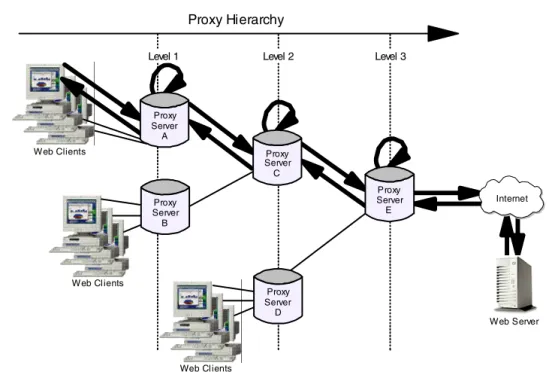
2.7 Proxy Chaining . . . 41
2.8 PICS Filtering at the Proxy Server Level . . . 43
2.9 Reverse Proxy . . . 45
2.10 Proxy Activity Monitor . . . 46
2.11 WTE Proxy Server Access Protection . . . 46
2.12 Handling Header Information . . . 47
2.13 SSL Tunneling . . . 47
Chapter 3. WTE Installation . . . 49
3.1 System Requirements . . . 49
3.1.1 Browser Requirements on the WTE Configuration Client . . . 49
3.2 Installation on AIX . . . 52
3.2.1 Installation Preparation . . . 54
3.2.2 Installing WTE on AIX . . . 54
3.3 Installation on Solaris . . . 59
3.3.1 Installation Preparation . . . 60
3.3.2 Installing WTE on Solaris . . . 61
3.4 Installation on Windows NT . . . 61
3.4.1 Installing WTE on Windows NT . . . 62
3.5 Starting and Stopping WTE . . . 70
3.5.1 Starting and Stopping WTE on AIX . . . 70
3.5.2 Starting and Stopping WTE on Solaris . . . 71
3.5.3 Starting and Stopping WTE on Windows NT . . . 72
3.6 Deinstallation of WTE on AIX, Solaris and Windows NT . . . 75
Chapter 4. WTE Basic Configuration . . . 77
4.1 Connecting to the WTE Server . . . 77
4.2 WTE Administration Settings . . . 78
4.2.1 Administrator User ID and Password on AIX . . . 79
4.2.2 Administrator User ID and Password on Solaris . . . 80
4.2.3 Administrator User ID and Password on Windows NT . . . 80
4.3 Basic Configuration . . . 81
4.3.1 The WTE Configuration File . . . 81
4.3.2 Using the Configuration and Administration Forms. . . 83
4.3.3 Directives not Changed on Restart . . . 89
4.3.4 Enabling Proxy Function . . . 89
4.3.5 Enabling the Pure Proxy Function . . . 92
4.3.6 Enabling Basic Caching . . . 93
4.3.7 Garbage Collection . . . 95
Chapter 5. WTE Performance and Status . . . 99
5.1 WTE Server Activity Monitor . . . 99
5.1.2 Network Statistics . . . .100
5.1.3 Access Statistics . . . .101
5.1.4 Proxy Access Statistics . . . .102
5.1.5 Cache Statistics . . . .103
5.1.6 Garbage Collection Summary . . . .104
5.1.7 Cache Refresh Summary . . . .105
5.2 Configuration for Performance Improvements . . . .106
5.2.1 Understanding Performance Settings . . . .106
5.2.2 Timeouts – Closing Connections Automatically . . . .108
5.2.3 Configuring for Proxy Performance . . . .109
5.3 Using the Server Activity Monitor to Tune WTE . . . .111
5.3.1 Activity Statistics . . . .111
5.3.2 Network Statistics . . . .111
5.3.3 Access Statistics . . . .112
5.3.4 Proxy Access Statistics . . . .112
5.3.5 Cache Statistics . . . .113
5.3.6 Garbage Collection Summary . . . .113
5.3.7 Cache Refresh Summary . . . .114
5.4 Customizing Logs . . . .115
5.4.1 WTE Logging . . . .117
5.4.2 Log Archiving . . . .118
5.4.3 Access Log Exclusions . . . .118
Chapter 6. Handling Header Information with WTE . . . .123
6.1 Configuring Header Options . . . .124
Chapter 7. Using WTE as a Transparent Proxy Server . . . .131
7.1 How Transparent Proxy Works . . . .131
7.2 WTE Transparent Proxy Scenario . . . .132
7.2.1 How Client Machines Must Be Set Up for Transparent Proxy . . . . .133
7.2.2 Setting Up the IBM 2210 Router for Transparent Proxy . . . .134
7.2.3 How to Set Up WTE Transparent Proxy . . . .142
7.2.4 Transparent Proxy Experience . . . .143
Chapter 8. WTE Proxy Autoconfiguration . . . .147
8.1 How Proxy Autoconfiguration Works . . . .147
8.2 How to Set Up Automatic Proxy . . . .149
8.3 Automatic Proxy Configuration Experience . . . .151
8.3.1 Access the Proxies . . . .152
Chapter 9. WTE Flexible-Client SOCKS Support . . . .155
9.1 WTE vs Traditional Proxy Servers. . . .155
9.2 Flexible-Client SOCKS Scenario . . . .156
9.2.1 How to Set Up Flexible-Client SOCKS. . . .157
9.2.2 Flexible-Client SOCKS Experience . . . .160
Chapter 10. WTE Proxy Chaining . . . .163
10.1 How WTE Proxy Chaining Works . . . .163
10.2 Proxy Chaining Scenario . . . .165
10.2.1 How to Set Up Proxy Chaining with WTE . . . .166
10.2.2 Proxy Chaining Experiences . . . .168
Chapter 11. WTE Proxy Server Protection Scenario . . . .175
11.2 Directives to Protect Access to the Proxy . . . 177
11.3 Managing Password Files . . . 179
11.3.1 Using the htadm Command . . . 179
11.3.2 Using the Configuration and Administration Forms. . . 180
11.4 Testing the Configuration . . . 181
11.5 Proxy Server Protection in a Hierarchy of Proxies . . . 182
Chapter 12. Proxying FTP URLs with WTE . . . 183
12.1 A Note on the HTTP Methods . . . 183
12.2 Caching of FTP Files . . . 185
12.2.1 Date and Time . . . 185
12.3 How to Set Up FTP Proxy . . . 186
12.4 Identifying the User ID and Password for FTP Server Access . . . 188
12.5 Specifying the Directory Path Mode for FTP URLs. . . 189
12.6 Protecting a WTE FTP Proxy Server . . . 190
12.7 Proxy Chaining FTP Requests . . . 191
Chapter 13. Using WTE as a Reverse Proxy Server . . . 193
13.1 How Reverse Proxy Works . . . 193
13.2 How to Set Up Reverse Proxy . . . 194
13.3 Reverse Proxy Scenario . . . 194
13.4 Protecting a Reverse Proxy Server . . . 196
Chapter 14. WTE PICS Support . . . 201
14.1 What Is the PICS Protocol? . . . 201
14.1.1 PICS Content Labels . . . 202
14.1.2 Rating Systems . . . 202
14.1.3 Rating Services . . . 203
14.2 PICS Filtering at the Proxy Server Level . . . 205
14.3 PICS Scenario . . . 207
14.3.1 Components and Network for the PICS Scenario . . . 207
14.3.2 Configuration of the Web Server . . . 208
14.3.3 Configuration of the Rating Service . . . 209
14.3.4 Configuration of the Label Bureau . . . 214
14.3.5 WTE Proxy Server Configuration . . . 218
14.3.6 Working with PICS Filtering at the Proxy Server Level . . . 232
14.3.7 Embedding the PICS Labels in the Web Documents . . . 234
Chapter 15. WTE Cancel Control . . . 237
15.1 How to Configure Cancel Control . . . 237
15.2 Cancel Control Pros and Cons. . . 237
15.3 Cancel Control Scenario . . . 238
Chapter 16. WTE SSL Tunneling Support . . . 243
16.1 How to Set Up SSL Tunneling in WTE . . . 243
16.2 SSL Tunneling Scenario . . . 244
16.2.1 Configuration of the Web Server Machine . . . 245
16.2.2 Configuration of the Client Machine . . . 251
16.2.3 SSL Tunneling Experience . . . 252
Part 2. WebSphere Performance Pack Component Integration . . . 255
Chapter 17. Content Based Routing . . . 257
17.1.1 Installation Locations. . . .258
17.2 Configuration of the CBR Function . . . .259
17.3 CBR Scenario . . . .260
17.3.1 WTE Configuration Overview . . . .260
17.3.2 WTE Configuration File CBR Modifications . . . .261
17.3.3 CBR Configuration . . . .263
17.3.4 CBR Manager and Advisors . . . .271
17.3.5 Saving the Configuration . . . .272
17.3.6 Scenario Results . . . .273
17.4 WTE CacheByIncomingUrl Directive . . . .277
Chapter 18. Remote Cache Access . . . .279
18.1 How RCA Works . . . .279
18.2 Planning for RCA . . . .281
18.3 RCA Scenario . . . .281
18.3.1 Scenario Implementation . . . .282
Chapter 19. Peak Load Management . . . .285
19.1 How Peak Load Management Works. . . .285
19.2 Peak Load Management Scenario. . . .285
19.2.1 Dispatcher Configuration . . . .287
19.2.2 Configuration of the WTE Proxy Servers . . . .288
19.2.3 Testing the Peak Load Management Scenario . . . .288
Chapter 20. Common Configuration . . . .293
20.1 Installation . . . .293
20.1.1 Planning for the Installation . . . .293
20.1.2 Installing the Common Configuration Utility . . . .294
20.1.3 Remaining Installation Steps . . . .301
20.2 Preparing for the Common Configuration Utility. . . .304
20.3 Launching the Common Configuration Utility . . . .305
Appendix A. Special Notices . . . 311
Appendix B. Related Publications . . . 313
B.1 International Technical Support Organization Publications. . . 313
B.2 Redbooks on CD-ROMs . . . 313
B.3 Other Publications . . . 313
B.4 Referenced Web Sites . . . 314
How to Get ITSO Redbooks . . . .317
How IBM Employees Can Get ITSO Redbooks . . . 317
How Customers Can Get ITSO Redbooks . . . 318
IBM Redbook Order Form . . . 319
List of Abbreviations . . . .321
Index . . . .323
Preface
IBM WebSphere Performance Pack is Web infrastructure software that addresses the scalability, reliability and performance needs of e-business applications in both local and geographically distributed environments. Its functions incorporate leading-edge and robust caching, file management and load balancing, that together compensate for the inherent weakness of the Internet to support critical business applications and expectations.
This redbook will give you a clear understanding of the features of IBM Web Traffic Express, the Caching and Filtering component of IBM WebSphere Performance Pack. It shows how to plan for, install, configure, use, tune and troubleshoot each component and offers specific implementation examples. Moreover, it helps explain how to build complex scenarios that involve all the components of IBM WebSphere Performance Pack, to give you a better understanding of the technologies involved.
Note that this publication was written in conjunction with two other volumes about WebSphere: IBM WebSphere Performance Pack: Web Content Management with
IBM AFS Enterprise File System, SG24-5857, and IBM WebSphere Performance Pack: Load Balancing with IBM SecureWay Network Dispatcher, SG24-5858. To
realize the most benefit, all three volumes should be obtained.
The Team That Wrote This Redbook
This redbook was produced by a team of specialists from around the world working at the International Technical Support Organization, Raleigh Center. The leader of this project was Marco Pistoia.
Marco Pistoia is an Advisory Software Engineer, working as a project leader at the International Technical Support Organization Raleigh Center. He writes extensively and teaches IBM classes worldwide on all areas of the e-business Application Framework, WebSphere, Java and Internet security. Marco holds a Master of Science degree with honors in Pure Mathematics from the University of Rome. Before joining the ITSO, he was a System Engineer in IBM Italy. He received an Outstanding Technical Achievement Award in 1996.
Poh Yee Tiong is an Advisory IT Specialist in IBM Singapore. He joined IBM in 1990. He is responsible for RS/6000 AIX Services and Support for the ASEAN countries. He is an IBM-certified HACMP and RS/6000 SP specialist. He is also an Advanced Technical Expert for AIX.
Thanks to the following people for their invaluable contributions to this project: Rick Schenck, Jerry Gschwind, Susan Hanis, Martin Presler-Marshall, Barbara Kemper
IBM Research Triangle Park, North Carolina Catherine Milligan
IBM Transarc Laboratory, Pittsburgh Corinne Letilley
Shawn Walsh, Jorge Ferrari, Tim Kearby, Margaret Ticknor, Pat Donleycott, Tate Renner, Linda Robinson, Gail Christensen
International Technical Support Organization, Raleigh Center Vincenzo Iovine, Stefano Pischedda
IBM SEMEA Sud, Italy Karen Gelveles IBM Boca Raton
Comments Welcome
Your comments are important to us!
We want our redbooks to be as helpful as possible. Please send us your comments about this or other redbooks in one of the following ways:
• Fax the evaluation form found in “ITSO Redbook Evaluation” on page 327 to the fax number shown on the form.
• Use the online evaluation form found at http://www.redbooks.ibm.com/ Send your comments in an Internet note [email protected]
Chapter 1. IBM WebSphere Performance Pack Concepts
IBM WebSphere Performance Pack is Web infrastructure software that addresses the scalability, reliability and performance needs of e-business applications in both local and geographically distributed environments. Its functions incorporate leading-edge and robust caching, file management and load balancing, that together compensate for the inherent weakness of the Internet to support critical business applications and expectations.
IBM WebSphere Performance Pack has been developed using IBM’s extensive experience with very demanding Web sites.
IBM WebSphere Performance Pack is composed of three main components, which permit you to reduce Web server congestion, increase content availability and improve Web server performance:
1. File sharing
The file-sharing component, known as IBM AFS Enterprise File System (AFS), is an enterprise file system that enables cooperating hosts (clients and servers) to efficiently share file system resources across both local area networks (LANs) and wide area networks (WANs). It provides non-disruptive real-time replication of information across multiple servers, which guarantees data consistency, availability, global stability and administrative efficiency, necessary by large distributed Web sites or by Web sites with volatile content requiring considerable administrative effort to maintain content links and URLs to file I/O mapping.
2. Caching and filtering
The caching and filtering component, known as IBM Web Traffic Express (WTE), is a caching proxy server that provides highly scalable caching and filtering functions associated with receiving requests and serving URLs. With tunable caching capable of supporting high cache hit rates, this component can reduce bandwidth costs and provide more consistent rapid customer response times.
3. Load balancing
The load balancing component, known as IBM SecureWay Network
Dispatcher (ND), is a server that is able to dynamically monitor and balance TCP servers and applications in real time. The main advantage of the load balancing component is that it allows heavily accessed Web sites to increase capacity, since multiple TCP servers can be dynamically linked in a single entity that appears in the network as a single logical server.
WebSphere Performance Pack V2 offers a fourth component named Common Configuration. This new feature allows for centralized configuration of the main components and can be run remotely on a separate machine connected to the network.
The WebSphere Performance Pack components, which were previously unavailable in a single Internet software offering, can increase the scalability, availability and reliability of your Web site while reducing infrastructure costs. Installation procedures permit selection of which components to install, and specification of on which machine(s) the selected component(s) should be
located. Subject to installation needs and operating platforms, components can coexist on a single machine or can be distributed over multiple machines. IBM WebSphere Performance Pack Version 2 is supported on the following platforms:
• Any IBM RISC/6000-based machine running IBM AIX 4.2.1 or later and Java Runtime Environment (JRE)11.1.6 or later
• Any SPARC workstation running Sun Solaris 2.6 or later and JRE 1.1.6 or later – JRE 1.1.7B or later is required to use ND
• Any Intel x86 PC running Microsoft Windows NT24.0 and JRE 1.1.6 or later – JRE 1.1.7B is required to use ND
If you are planning to use the Common Configuration, then you need the Java Development Kit (JDK)31.1.6 or higher and a Java 1.1-enabled Web browser, such as:
• Netscape Communicator V4.08 or higher
• Microsoft Internet Explorer V4.01 with the fix pack, or higher • Sun HotJava V1.1 or higher
1.1 AFS Enterprise File System in Distributed Computing Environments
AFS has provided scalable file administration and file sharing for largeenterprises for many years, based upon its use of a virtual name space to make naming and logical directory structures of files independent of their physical location. AFS clients and AFS servers are used to establish this virtual name space capability. In typical local area network (LAN) file systems, this is achieved by installing AFS clients on user workstations, communicating with an AFS server that manages the I/O operations associated with the actual files. In a Web site, the AFS clients can be installed on HTTP servers to reduce the administrative effort associated with maintaining URL to file I/O mapping relationships. In addition, HTTP servers that are simultaneously AFS clients can significantly increase the connectivity capacity to Web server content and can provide local and geographically distributed access efficiency.
AFS is a central and scalable file system:
• It is central because AFS brings together all of the files within the file system into a single name space. Every AFS user shares this same name space, making all AFS files easily available from any AFS machines. With AFS, the name of a file is independent of both the file’s and the user’s physical location, contributing to ease of file sharing and resource management.
• It is scalable because AFS is able to manage a very large number of files, spread across many geographical locations. When remote files, residing on AFS servers, are accessed by remote AFS clients, they are cached on the client machines to improve performance. This makes remote working across global distances feasible, since it is possible to access your own files from sites many thousands of miles away as if they were local.
1 You can download the JRE from http://www.javasoft.com.
2 IBM WebSphere Performance Pack can be installed on either Windows NT Server or Workstation V4.0. However, Windows NT Server is required for PCs running the ND functions Interactive Session Support (ISS) Nameserver and Observers.
Both small and large-scale distributed environments benefit from AFS mechanisms to reduce server and network load:
• AFS caches data on client machines to reduce subsequent data requests directed at file servers, substantially reducing network and server loads. Servers keep track of data given to clients through callbacks, guaranteeing cache consistency without constant queries to the server to see if the file has changed. It is important to underline that AFS also allows disk cache, not just memory cache. This is a key advantage of AFS over other shared file
systems.
• The AFS remote procedure call (RPC) reads and writes data to an RPC stream, further improving the efficiency of data transfer across a local or wide area network.
Extended security is guaranteed through Kerberos authentication and access control lists (ACLs). AFS Kerberos-based authentication requires that users prove their identities before accessing network services. Once authenticated, AFS access control lists give individual users or groups of users varying levels of permission to perform operations on the files in a directory.
The AFS component also offers replication techniques for file system reliability. Multiple copies of frequently accessed (but infrequently changed) data are replicated on multiple file servers within a cell. When accessing this information, a client will choose among the available servers that house replicas. If one server is unavailable or unreachable, the client will go to another server. Replication also reduces the load on any particular server by placing frequently accessed
information on multiple servers.
Moreover, management utilities are provided to ease the load of system administrators in growing environments. Backup, reconfiguration and routine maintenance are all done without any system down time. Files remain available to users during these operations. This is done by creating online clones of volumes.
AFS commands are RPC-based. Administrative commands can be issued by any authenticated administrator from any client workstation. System databases track data location information, authentication information and protection groups. These databases are replicated on multiple servers, and are dynamically updated as information changes. Server processes accomplish many tasks automatically, such as restarting servers, tracking file locations and updating file servers with new binaries and configuration files.
1.2 Caching and Filtering to Manage Internet Traffic and Bandwidth Demand
WTE, the caching and filtering component of IBM WebSphere Performance Pack, is both a caching proxy server and a content filter. The advanced caching of this component minimizes network bandwidth and ensures that end users spend less time when retrieving the same content multiple times.This component acts as a gateway for multiple clients and performs basic Web server duties, such as receiving requests and serving URLs.
A traditional proxy server receives a request for a URL from a client and it forwards the request to the destination content server. WTE does something
more; it can save or cache the Web documents it retrieves, and serve subsequent requests for those documents from its local cache. The client gets the requested information faster and network bandwidth is reduced.
This component of IBM WebSphere Performance Pack also offers other key features of advanced caching, such as:
• The ability to handle very large caches
• An option to automatically refresh the cache with the most frequently accessed pages
• The possibility to cache even those pages where the header information says to fetch them every time
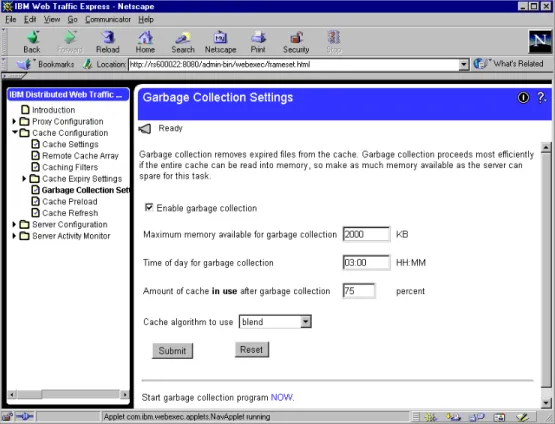
• Configurable daily garbage collection, to improve server performance and ensure cache maintenance
• Remote Cache Access (RCA), a new function – available for the first time with IBM WebSphere Performance Pack V2 – that allows multiple WTE machines to share the same cache by using a distributed file system, such as AFS, therefore reducing redundancy of cached content
Moreover, WTE allows you to set content filtering at the proxy server level, rather than or in addition to the browser level, where content filtering could be easily compromised or over-ridden. This way, offensive contents will not be displayed on the client’s browser, depending on the parameters used in the configuration. Content filtering in WTE can use:
• Platform for Internet Content Selection (PICS) rules guiding use of rating labels - such as Recreational Software Advisory Council on the Internet (RSACi) criteria for inappropriate language, nudity or violence - placed in HTML or HTTP headers or third-party content rating label distributions • Lists of URLs/sites for which access is to be blocked
• APIs for filtering applications
1.3 Load Balancing and Server Monitoring Capabilities
The Internet has grown so rapidly over the last few years, that you are probably looking for a way to handle your company's share of that traffic. If this growth is not properly handled, users get slow response or refused connections, creating an unsatisfactory user experience which may cause the user never to visit your site again. Internet sites can become unstable or even fail under critical load conditions. What is needed is a solution that balances the load effectively and protects the user from these bad experiences.
ND, the load balancing component of IBM WebSphere Performance Pack, has been developed to address these limitations and provide customers with advanced functions to meet their site’s scalability and availability needs. It consists of three functions: the Dispatcher, Interactive Session Support (ISS) and the new Content Based Routing (CBR) function, available for the first time with IBM WebSphere Performance Pack V2. These three functions can be deployed separately or together in various configurations to suit a wide variety of customer application requirements:
• You can use the Dispatcher function to balance the load on the server within a local area network or wide area network using a number of weights and measurements that are set dynamically.
• ISS is a DNS-based load monitoring component (daemon) that can be installed on each of your servers. This group of daemons is called an ISS cell. One of the members of the cell becomes a spokesman for the load monitoring service.
You can use the ISS function to balance the load on servers within a local area network or wide area network using a domain name server round-robin approach or a more advanced user-specified approach. ISS periodically monitors the level of activity on a group of servers and detects which server is the least heavily loaded.
ISS provides an observer interface to enable other applications to use the load monitoring service. Observers watch the cell and initiate actions based on the load. Application servers with the ISS load monitor daemon installed can pass periodic load reports to the Dispatcher using the Dispatcher observer. The results of these reports can be factored into the load-balancing performed by Dispatcher.
• You can use the CBR function (which must be installed and configured to work together with WTE) to load balance traffic based on the content of a client’s URL request. CBR also offers a Cookie Affinity feature that allows requests from a particular HTTP client session to be load balanced to the same server for a specified time period. The client session will maintain affinity for a particular server without relying on the IP address of the client.
These three components offer a high availability feature:
• The Dispatcher high availability feature involves the use of a secondary machine that monitors the main, or primary, machine and stands by to take over the task of load balancing, should the primary machine fail at any time. This feature is available on all the platforms where IBM WebSphere
Performance Pack is supported, without using High Availability Cluster Multi-Processing (HACMP).
• In ISS high availability, all the nodes in a site work together to eliminate any single point of failure.
• Multiple CBR machines can be load balanced in turn using ND, therefore granting CBR high availability.
The high availability feature provided by the Dispatcher function can be
successfully used even in other configurations, for example to guarantee firewall high availability.
1.4 Building Record-Breaking Web Sites
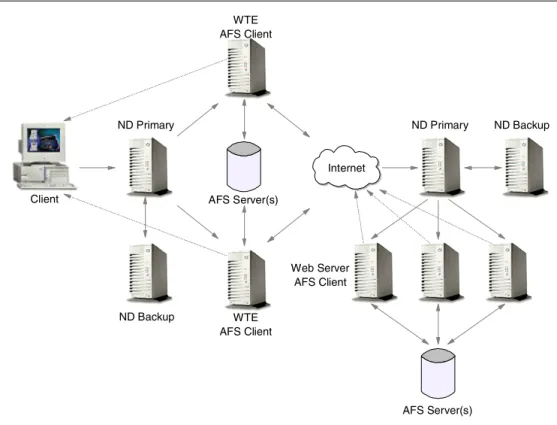
IBM WebSphere Performance Pack allows you to design several architectures to enhance the performance of your Web site. Figure 1 on page 8 offers an idea of the multiple configurations that can be obtained combining the WebSphere Performance Pack components:
Figure 1. How to Implement a WebSphere Performance Pack Environment
• The WTE component minimizes response time and network bandwidth utilization by providing Web content caching. It also ensures reliable content filtering at the proxy server level. Multiple WTE servers can be load balanced. • The ND component distributes the load between multiple clustered Web
servers and WTE servers. As soon as a client request arrives, the load balancing machine uses sophisticated monitoring tools and then forwards the request to the least loaded server. High availability is provided by a backup Dispatcher machine, which monitors the state of the primary machine and takes over the primary machine if it fails.
• The clustered Web servers can share the same content by using AFS. This ensures scalability, high availability, reliable access to replicated data and an efficient security model for access and group management.
AFS can also be integrated with RCA, so that clustered WTE servers can share the same Web cache therefore eliminating the need to fetch the same Web pages multiple times.
• The server selected by the ND machine can then respond directly to the client without any further involvement of the ND machine. Since there is no need for the server response to go back through the same physical path, a separate high-bandwidth connection can be used.
IBM used the WebSphere Performance Pack technology to create a scalable and reliable system that efficiently handled unprecedented traffic volumes. On February 17th, 1998, at 12:41 (Japan Standard Time), the official Web site of the Olympic Winter Games in Nagano made Internet history by logging a staggering 98,226 hits per minute. Less than a week later, a new all-time record was established with a peak load of more than 103,400 hits per minute, while still
Client ND Primary Web Server AFS Client Internet AFS Server(s) ND Backup ND Primary ND Backup WTE AFS Client WTE AFS Client AFS Server(s)
providing normal response time. The Internet site of the 1998 Nagano Olympic Winter Games is recognized by the Guinness Book of World Records.
In addition to the Winter Olympics site, IBM has built some of the largest Web sites in the world. For example, IBM hosted the Deep Blue chess match, the 1996 Olympic Games, the U.S. Open tennis tournament, Wimbledon, the Masters golf tournament, and the official Web site of the 1998 French Open tennis
championship.
By using WebSphere Performance Pack on your Web site, you will have an efficient Web site, capable of providing fast responses. Your Web site will be able to handle very large amounts of simultaneous requests, without any major delay. Furthermore, the high availability features built into WebSphere Performance Pack will make the Web services available even when one or more of your server machines should unexpectedly fail.
The following figure shows an example of what your Web customers would not see if your Web site uses WebSphere Performance Pack:
Figure 2. Don’t Let This Happen to You!
1.5 What Is New in Version 2
In addition to the functions already available in Version 1.0, described in the IBM redbook IBM WebSphere Performance Pack Usage and Administration,
SG24-5233, IBM WebSphere Performance Pack enhancements in Version 2 include:
• Quality of service enhancements • New ND functions
• New WTE functions • New AFS functions
• New functions available by combining components • Integrated configuration assistance
1.5.1 Quality of Service Enhancements
WebSphere Performance Pack now provides support for differentiated quality of service, as discussed in the following sections.
1.5.1.1 User Classes
User classes give you the ability to change the level of service depending on the identity of the user. Preferred customers would expect to get better service. In Version 1.0, ND provided this capability by allowing rules-based load-balancing based on the client IP address, and WTE allowed PICS filtering based on the client IP address or the user and group. In Version 2, ND and WTE add the ability for rules-based load-balancing based on HTTP headers includingCookie,Referer, and User-Agent.
Differentiated service based on user identity lets you determine what level of service should be provided. For example, a frequent buyer can be routed to a higher capacity server or given access to additional content (for example, sale information) not made available to an unknown customer. The information used to identify the user comes from cookies or header information in the HTTP request. 1.5.1.2 Service Classes
Server classes give you the ability to change the level of service depending on the information or application requested by the client. Services involving a purchase would get better service than requests for information. In Version 1.0, WTE provided this capability through its reverse proxy function by allowing requests to be redirected to different servers based on the contents of the URL. In Version 2, ND and WTE add the ability for rules-based load-balancing based on the protocol, host, and path portion of the URL.
Differentiated service based on the service requested lets you give preferential service to some requests. For example, you may want to give preferential service to a proceed to checkout request over a search request.
1.5.2 New ND Functions
ND has been enhanced to include several new features. These are discussed in the following sections.
1.5.2.1 Server Directed Affinity API
In previous releases, administrators could define a particular port to be configured as sticky, meaning all requests to that port remain with a particular physical server for a short period of time. When a client connects to a sticky port, an entry for that client’s IP address is made in the affinity table, and a time stamp is set. If a new connection from the same client arrives, and the time stamp has not expired, then the new connection is sent to the same server as before. This function is still available in Version 2, but it is no longer the only option.
Customers can now write their own software using the Server Directed Affinity (SDA) Application Programming Interface (API) to implement an SDA agent, which communicates with a listener in the Dispatcher. This software can then manipulate the Dispatcher affinity tables to:
• Query the contents • Insert new records
• Remove records
1.5.2.2 Binary Logging and Statistics
Dispatcher now provides a log in binary format. The command line and the GUI have been enhanced to provide access to the binary log information. A sample Java program is provided to allow customers to access and manipulate the log. 1.5.2.3 Remote Administration
In the previous release, the Dispatcher administration GUI could only be run on the same machine where Dispatcher was installed. Now remote administration is possible, since the Dispatcher administration GUI can be run on a separate machine.
1.5.2.4 Authenticated Administration
Authentication is provided to make remote administration more secure. The communication between the ND server and an ND administration client is authenticated using a key pair.4These keys are generated when the ND server is started for the first time.
1.5.2.5 Wildcard Cluster
Wildcard cluster is the capability to define a cluster which will receive traffic which
is not destined for this particular machine, or which is destined for this machine, but for an address which is not defined as a cluster. The traffic will be intercepted and routed to a default cluster. This feature also makes it easier to configure multiple aliases on the same Dispatcher machine to use the same port and server configuration.
1.5.2.6 Wildcard Port
Wildcard port is the capability to define default actions when no port matches a
particular request. You can use this to create a load balancing configuration for traffic to any port that has not been explicitly defined in your Dispatcher
configuration, for example in a firewall load balancing environment, or to discard requests for ports that have not been configured.
1.5.2.7 ISS GUI
The GUI for ISS is essentially anisscontrolcommand generator much like the Dispatcher GUI. In other words, the user makes a change in the GUI, and an isscontrol command is generated and issued. Asynchronously, the issd daemon tells the GUI that the configuration has changed and the GUI refreshes itself. 1.5.3 New WTE Functions
The enhancements to the WTE component of WebSphere Performance Pack are described in the following sections.
1.5.3.1 Transparent Proxy
Transparent proxying means that the client software is totally unaware of the
existence of the intermediate proxy server. Normally, if a client browser uses a proxy server, then the browser must be configured to specify the address and port of the proxy server. This is no longer necessary with transparent proxy, in fact the client is unaware that an intermediate proxy is in the network.
To use transparent proxy, the router, which may be a Dispatcher machine, is programmed to redirect requests to the WTE transparent proxy. WTE then intercepts all HTTP requests on port 80 that are targeted at some server out in the Internet. The request is parsed and processed, and may be satisfied from the transparent proxy’s cache.
Note that in WebSphere Performance Pack V2, transparent proxy is only supported on the AIX platform and works for HTTP requests only. 1.5.3.2 Proxy Autoconfiguration Suppor t
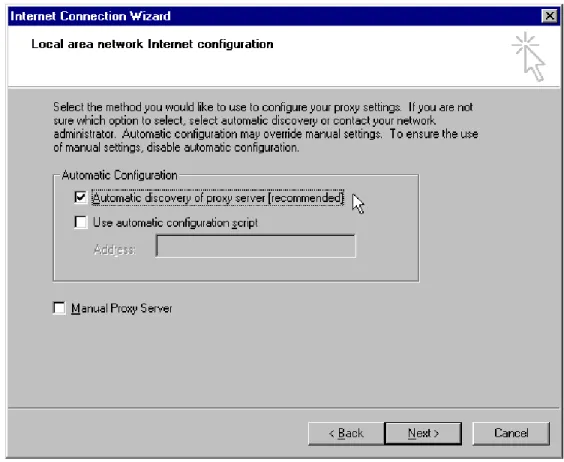
WTE now supports automatic proxy configuration, a feature of Netscape Navigator 2.0 (and later) and Microsoft Internet Explorer V 4.0 (and later). This feature provides a form of transparency, in that clients do not have to configure their browser to point to a specific proxy or SOCKS server, but to an automatic configuration file, as shown in the following figure:
Figure 3. Automatic Proxy Configuration in Netscape Navigator
This lets the system administrator modify the configuration with little impact to the clients, who update their automatic configuration files and are automatically directed to the new configuration. Server administrators can use this to reroute requests when servers are down, to balance workload, to send requests for specific URLs to specific proxies, or other reasons specific to their installation. 1.5.3.3 FTP Proxy Enhancements
The WTE FTP proxy code now includes FTP PUT capability, improved
the URL), and a configuration directive to allow the user to specify whether FTP URLs will be treated as relative URLs or absolute URLs.
1.5.3.4 SNMP Subagent and MIB Support
WTE provides a Simple Network Management Protocol (SNMP) management information base (MIB) and SNMP subagent so you can use any SNMP-capable network management system, such as Tivoli NetView or Tivoli Distributed Monitoring to monitor your proxy server’s health, throughput, and activity. The MIB data describes the proxy server being managed, reflects current and recent server status, and provides server statistics.
1.5.3.5 Performance Improvements
The cache architecture has been restructured to map URLs onto the cache file system more efficiently. This speeds retrieval of cached objects, uses disk space more efficiently within the cache, and speeds cache garbage collection. The cache also uses write-behind techniques for greater throughput.
Additionally, WTE now includes caching of Domain Name System (DNS) server lookup results, which can improve response time and reduce network load. 1.5.3.6 HTTP 1.1-Compliant Proxy Server
WTE is now an HTTP 1.1-compliant proxy server. WTE identifies itself as an HTTP 1.1 server and sends HTTP 1.1 in the outbound flows to origin servers. Persistent connections are supported from the client to the proxy, and from the proxy to the origin server. HTTP 1.1 cache control headers are processed and used to determine if a Web document is able to be cached. WTE receives and processes chunked data sent by HTTP 1.1 origin servers; WTE will unchunk data before giving control to a data filter or transmogrifier plug-in.
WTE provides new directives that allow the administrator to override certain HTTP 1.1 cache control headers. For example, query strings – URLs with a question mark (?) in them – are not considered cacheable by the HTTP 1.1 protocol, but WTE provides a directive that allows the administrator to specify which query strings should be cached.
WTE also provides an aggressive caching directive that allows the administrator to override theCache-Control: no-cacheheader in Web documents.
1.5.3.7 Customization Exits
Several enhancements have been made to the WTE API to simplify writing an application plug-in. New request steps (exit points) have been added:
transmogrifier and garbage collection (GC) advisor.
The transmogrifier gives the application write access to the outgoing data stream while the GC advisor allows the plug-in to influence garbage collection decisions:
• The transmogrifier step is intended to be used by applications that wish to perform transformations on the HTTP response data stream. Examples include converting Adobe PDF files to HTML, converting high resolution images to lower resolution quality, or translating pages from one language to another. The transmogrifier step is an extension of the data filter step. The WTE enhancements allow the application to specify multiple
transmogrifiers, thus allowing the application to have multiple plug-ins, each of them performing different transformations on the data.
WTE introduces a correlator mechanism that eases state maintenance in the plug-in; WTE now automatically determines the content length of the response data, and the application no longer has to buffer the data to determine the content length. WTE also makes HTTP header processing easier; the response headers can now be extracted and set using API variables. • The GC Advisor step is called for each file in the cache during the garbage
collection process and allows the application to influence which files are kept and which are discarded.
1.5.3.8 Tivoli Ready
WTE is Tivoli Ready, which means it can be managed through either the Tivoli Enterprise Console (TEC), or through Tivoli Global Enterprise Manager (GEM). Supported Tivoli configurations include managing IBM applications that are installed on Tivoli-managed nodes, PC-managed nodes and endpoints in a distributed environment.
With the purchase of an IBM software product that carries the Tivoli Ready logo, you have the ability to manage your IBM software products through the Tivoli Enterprise management products, allowing you to automatically discover, monitor, and inventory one or more Tivoli Ready applications.
This Tivoli Ready instrumentation, when configured, provides you with the ability to:
• Graphically view the health of WTE through Tivoli GEM 2.2, TEC 3.1 or higher consoles
• Inventory WTE using Tivoli Inventory Version 3.2 1.5.3.9 Variant Caching
Variant caching extends the capabilities of the transmogrifier and allows WTE
applications to request that WTE cache another version (variant) of the original document retrieved from the Web. This need arises when a plug-in performs a transformation on the original page retrieved from the Web. For example, if a plug-in translates a page from English to Italian, it would be advantageous to be able to cache not only the original document but the variant, as well. In fact, transformations of Web data are very CPU-intensive and degrade the performance of the proxy server.
By caching the variant, the number of transformations required is decreased, which improves overall proxy caching performance. The WTE API provides new predefined functions, HTTPD_variant_lookup() and HTTPD_variant_insert(), to allow the application to find a variant that has already been cached, and to insert a new variant into the cache.
1.5.3.10 Enhanced Log Maintenance
To effectively manage the space requirements for the four logs (error, access, proxy access, and cache access) generated by WTE, two improved functions have been implemented. They are compression and purging:
• Compression can be specified for the logs by date. The logs are compressed and stored with no regard for storage constraints.
• Purging is done by date and size of each file. The maximum size for each log is set during configuration of WTE. When the logs are purged by date, if the
maximum size for a log is still exceeded, daily logs are removed until the maximum size is no longer exceeded.
1.5.3.11 Error Message Personalization
The error messages sent to the client’s browser are kept in HTML pages, which lets you change or alter the message. You can use this to give additional information, give additional instructions, or include things such as logos. 1.5.3.12 Secure Request Filtering
Filtering for Secure Sockets Layer (SSL) requests is done by using PICS filtering on the non-secure home page of the URL and applying the receive or block decision to the secure request.
1.5.3.13 Configuration Enhancements
Configuring the server using the browser, local or remote, is improved and more user friendly. The configuration screen is divided into three areas: navigation, workspace, and header. Navigation between different areas of the configuration process is always available in the navigation portion of the screen with a click of the mouse. The forms to be filled in are displayed in the workspace. The header portion contains a Help button and a Restart Server button. The server can be restarted anytime with the Restart Server button. When the Help button is clicked, another instance of the browser that does not interfere with the form being used displays the help information. The help information is divided into three types: field definition of the form being viewed, task oriented, and server general help. 1.5.4 New AFS Enterprise File System Function
The AFS component of WebSphere Performance Pack now provides some new features.
1.5.4.1 AFS Server for Windows NT
WebSphere Performance Pack Version 1.0 included AFS client and server for AIX and Solaris, but only the client was included for Windows NT. WebSphere Performance Pack V2 includes AFS Version 3.5 for Windows NT, which offers AFS server for Windows NT. With this component, you can store AFS files and directories, and run processes that provide servers on a Windows NT machine. 1.5.4.2 AFS Control Center
The AFS Control Center is a set of Windows NT-based tools for managing AFS cells. The AFS Control Center includes a User Administration graphical user interface (GUI) for account management and a Server Manager GUI for volume management. The Control Center helps simplify AFS server and account
administration by letting administrators manage entire environments from a single Windows NT workstation, for example, monitoring file server utilization,
transferring collections of files across servers, performing load balancing, or managing AFS accounts.
1.5.5 New Functions Available by Combining Components
As we said, WebSphere Performance Pack is composed of three main
components: ND, WTE and AFS. Although these components can be installed separately, they are not different products; especially in this new version of WebSphere Performance Pack, new functions have been provided to integrate
these components together and supply services that were not previously available.
1.5.5.1 Content Based Routing
Content Based Routing (CBR) is a new ND function that provides load balancing enhancements to the reverse proxy capabilities of WTE. CBR works in
conjunction with WTE, which must be installed on the same machine. The same rules used for Dispatcher can be used with CBR to load-balance requests over different sets of servers based on the client IP address, the entire URL, the protocol portion of the URL, the host portion of the URL, the path portion of the URL, the Referer HTTP header, or the User-Agent HTTP header. 1.5.5.2 Peak Load Management
Peak load management is the ability to detect and react to sudden increases in
activity. In Version 1.0, ND allowed rules-based routing to alter the load-balancing algorithm based on the current connection rate, the number of active
connections, and the time of day. In Version 2, an advisor for Dispatcher
enhances load management on WTE by preventing Dispatcher from sending new requests to a WTE node that is engaged in garbage collection or cache refresh. 1.5.5.3 Remote Cache Access
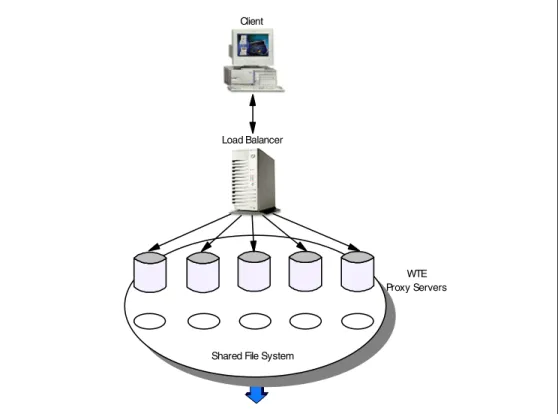
RCA provides a way to share cache content among proxies. In many scenarios, multiple proxies are deployed near (in network terms) each other. Typically, they will have a load balancer in front of them for load balancing and high availability reasons. Each proxy has its own cache, and if the cached data cannot be shared, this results in cache space being wasted as multiple copies of the same
document are stored. Also, since each cache is smaller than the sum of all the disks, the cache hit rate is lower (due to the smaller cache size).
RCA is a new, powerful feature implemented in WTE, and not available in the previous release of IBM WebSphere Performance Pack. RCA allows multiple proxy servers to cooperate to form cache arrays. Using RCA, multiple proxy servers can distribute the cache contents across their combined, logical cache to improve hit rates and reduce redundancy of cached content.
WTE uses new caching algorithms and information-sharing technologies to enable an Internet service provider (ISP) to manage its servers more efficiently by storing information where it is more likely to be needed and delivering it more efficiently to customers. These enhancements reduce transmission costs and eliminate the need for ISPs to replicate information in redundant proxy servers. Although RCA is a new feature of WTE, it is best used in conjunction with the other components of WebSphere Performance Pack. In fact, RCA enables multiple peer WTE proxy servers, load balanced by one ND machine, to share the contents of their caches utilizing a shared file system, such as AFS, DFS, NFS, or Windows NT file sharing. We recommend the use of AFS, since it offers
nondisruptive real-time replication of information across multiple servers, data consistency, availability, global stability and data consistency.
1.5.5.4 Integrated Configuration Assistance
To facilitate proxy caching, the install program automatically sets up caching with WTE. WebSphere Performance Pack also provides wizards to make
WebSphere Performance Pack scenarios that involve all of the WebSphere Performance Pack components.
1.6 Who Can Benefit
IBM WebSphere Performance Pack allows you to design and use multiple architectures. The scenarios described in this section provide specific examples of how various ISP implementations can benefit from the use of IBM WebSphere Performance Pack.
1.6.1 Content Hosting Internet Service Providers
Content hosting ISPs can use WebSphere Performance Pack to more efficiently support and distribute the content from their own Web sites, and to provide more response- and cost-effective access to other sites.
Figure 4. Content Hosting Internet Service Providers
Within a content hosting server farm, the WebSphere Performance Pack components can be configured to provide high availability and accessibility as follows:
• Content for hosted Web sites can be distributed over multiple volumes using the AFS virtual name space to simplify administration of page content. Because all of the Web servers need to have equal access to the Web content, a shared file system is an obvious choice for manageability of the Web content. AFS is a superior file system in this environment because of its replication capabilities, which provide improved availability and scalability. The disk caching capability of the AFS client ensures that network accesses to the file server are minimized.
AFS File Server for Replicated Web Content
AFS File Server for Replicated Web Content
Web Client Gatewayor Firewall Network Dispatcher Load-Balancing Primary HTTP Server A AFS Client HTTP Server B AFS Client HTTP Server C AFS Client Network Dispatcher Load-Balancing Backup
• Scalability of access to the content can be achieved by adding multiple HTTP servers that are simultaneously AFS clients to access AFS server content, and by using efficient load balancing to dispatch requests to the HTTP server with the best capacity to handle the requests. ND, the load balancing
component of IBM WebSphere Performance Pack guarantees improved availability and scalability by allowing a farm of Web servers to provide a single Web site image to clients.
• High availability can be maintained by using AFS file replication capabilities, and by configuring a hot standby ND component.
• Proxy caching can be used to provide more responsive access to content from other sites, as well as to optimize backbone network traffic capacity.
• Both availability and performance may be further enhanced by geographically distributing HTTP servers with AFS clients, together with proxy caching for other Internet content closer to user access points, such as points of presence (POPs) and network access points (NAPs).
Thus, content hosting service providers or corporate webmasters can benefit from the non-disruptive replication and distribution capabilities of the file sharing functions, local and wide area load balancing, and proxy caching. Flexible configuration of these components can ensure that requests are directed to the most appropriate local or remote location, and can enable location outages or routine maintenance schedules to be handled without disrupting customers. The IBM WebSphere Performance Pack components can be used in conjunction with firewalls and authentication gateways to provide secure access where desired, and the load balancing function of WebSphere Performance Pack can also be used to scale these capabilities.
1.6.2 Corporate Web Sites and Content Aggregators
Use of IBM WebSphere Performance Pack by corporate Web sites and content aggregators is similar to that of content hosting ISPs.
Figure 5. Corporate Web Sites and Content Aggregators
In many cases, corporate Web sites and content aggregators need to maintain a demilitarized zone (DMZ) to ensure that access to Web content by employees, business partners, or customers does not expose internal computer resources to unauthorized users or hackers. However, firewalls cannot be deployed between AFS clients and their servers. In such instances, AFS replication can be used to establish read-only AFS servers within the DMZ. Here multiple AFS clients and the load balancing ND function can be used to provide the degree of scalability necessary to satisfy users. In addition, WTE caching and filtering proxy servers may be deployed on the same machines or on separate systems to filter or optimize access from within the corporation to external Web sites.
Many corporate Web sites are located at head office or regional locations, while branch offices or business partners may need frequent access to the content. Most offices of this type have relatively low line speed (somewhat less than 1.5 Mbps) network access to the regional or corporate sites. Relatively few users can, with concurrent usage, use all the available bandwidth with resulting erratic response times. At these locations HTTP servers with AFS clients combined with general purpose caching can provide more consistent user response time.
Network Dispatcher Load-Balancing Primary HTTP Server A AFS Client HTTP Server D AFS Client Web Client Gateway or Firewall HTTP Server B AFS Client HTTP Server C AFS Client Web Traffic Express
Caching Reverse Proxy Network Dispatcher Load-Balancing Backup AFS File Server B for Web Content AFS
File Server A for Web Content
Web Traffic Express Caching Reverse Proxy Internet
Figure 6. Head Office - Branch Office
Some industries also have small branch offices in addition to larger branch or regional offices. A simple deployment of WTE caching and filtering on a single platform, eventually combined with a firewall, is probably sufficient to provide more consistent response time for employees in the small branch offices.5In the larger branches or regional offices, it may be desirable to have more than one WTE proxy server and to use the load balancing ND functionality to provide better resource management.
Two approaches can be used to reduce redundant page storage and to address the effectiveness of caching in these locations:
1. Hierarchical caching
Optimize a primary (initial) cache for higher page hit rate by favoring more files of a smaller size, and a hierarchical cache for higher hit byte rate by favoring fewer files of a larger size.
2. RCA
Configure RCA together with the load balancing function of ND and with AFS shared file storage to reduce the index size of each proxy and to increase the scalability of the caching storage.
5 IBM has recently released a new product in the WebSphere family, called WebSphere Performance Pack WebSphere Cache Manager. This product is a caching and filtering proxy server obtained by the same code base as WTE. Cache Manager is available on Windows NT and Linux. Only a subset of the functions available in WTE are implemented in Cache Manager. For this reason, Cache Manager is particularly indicated for small companies or for small branch offices of large industries.
Network Dispatcher Load-Balancing Backup Network Dispatcher Load-Balancing Primary Web Client
AFS File Server for Replicated Web
Content AFS File Server for Replicated Web
Content Gateway or Firewall HTTP Server A AFS Client Internet or Intranet Gateway or Firewall HTTP Server AFS Client Web Traffic Express
Caching & Filtering Proxy
Gateway or Firewall
Corporate Head Office
Branch Office HTTP Server B AFS Client HTTP Server C AFS Client Network Dispatcher Load-Balancing Primary Network Dispatcher Load-Balancing Backup
Web Traffic Express Caching & Filtering
Proxy Web
1.6.3 Corporate Headquarters Buildings or Large Campuses
On large campuses or in corporate headquarter buildings, the size of the campus or number of personnel frequently lead to the creation of smaller local area networks (LANs) interconnected by routers and a backbone LAN. Busy LAN servers combined with increasing use of Web server applications can result in congestion on the backbone LAN segments. This can be reduced by installing AFS client-enabled HTTP servers and general proxy caching on user LAN segments. The AFS clients can provide caching for corporate Web content, while the WTE proxy server can provide caching and filtering for external Internet access.
Design considerations for the smaller LAN segments are similar to those for small branch offices discussed earlier.
1.6.4 Backbone Internet Service Providers
Backbone ISPs typically provide co-location and/or peering services for other ISPs in addition to content hosting for large national or international corporations. In many cases they may provide virtual ISP services for other service providers such as content hosting ISPs. Backbone ISP customers are increasingly
demanding both high availability and differentiated service levels, and backbone ISPs are responding by enhancing their Internet infrastructures. Features demanded by backbone ISPs include:
• Load balancing for a variety of traffic (for example, mail and FTP in addition to Web traffic)
In addition, requests are made for traffic balancing management and high availability for authentication servers and management systems.
• Proxy caching
To minimize the effects of hot potato routing and Web traffic surges, backbone ISPs are typically installing highly scalable caches at major peering points and network interconnections points such as network access points (NAPs).
Figure 7. Hierarchical Caching
Gateway or Firewall
Web Traffic Express Caching & Filtering
Proxy
Web Traffic Express Caching & Filtering
Proxy Web Client Internet Web Servers Gateway or Firewall
Web Traffic Express Caching & Filtering
Proxy Network Dispatcher
International ISPs in particular need caching to reduce the costs associated with trans-oceanic links. Such installations can make very effective use of the RCA feature of WTE, a variation of the traditional caching function that when used together with load balancing and shared file storage can dramatically reduce redundancy of page storage.
Typical configurations for backbone ISPs would include load balancing for authentication gateways (such as authentication servers and subscriber management application servers) as well as for WTE caching proxy servers. Because of the amount of traffic and the desire for high availability, such caching servers would likely use the RCA feature and would thus also be configured as AFS clients. Therefore, there would also be an AFS server with the file content. 1.6.5 Access Internet Service Providers
Access ISPs need to provide both more consistent response time to their customers and to conserve their backbone network link and access charges. Thus caching at POPs would address these needs. These configurations would be similar to those for backbone ISP solutions.
Because access service providers target many of the small- to medium-size business customers, there is also an opportunity for them to create revenue producing services, by deploying smaller caching devices on customer premises but configuring and managing them as an ISP service. For this scenario, the caching would look much as it does for corporate branch offices.
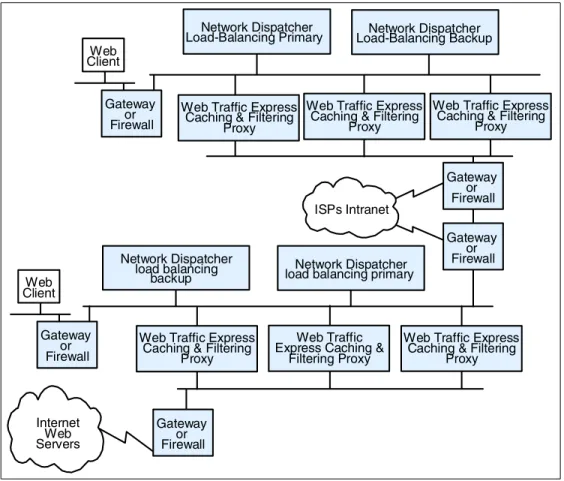
Figure 8. Access Internet Service Providers
Internet Web Servers ISPs Intranet Web Client Gateway or Firewall Gateway or Firewall Web Traffic Express
Caching & Filtering Proxy
Web Traffic Express Caching & Filtering
Proxy Web Traffic Express
Caching & Filtering Proxy Network Dispatcher
Load-Balancing Primary Load-Balancing BackupNetwork Dispatcher
Web Traffic Express Caching & Filtering
Proxy
Web Traffic Express Caching &
Filtering Proxy
Web Traffic Express Caching & Filtering
Proxy Network Dispatcher
load balancing primary Network Dispatcher load balancing backup Gateway or Firewall Gateway or Firewall Web Client Gateway or Firewall
1.6.6 Access ISPs with Subscriber Home Page Hosting
Access ISPs providing subscriber home page hosting typically do so on multi-homed servers, allowing subscribers to have their own domains. Such servers may have frequent changes, requiring the ISP to dedicate considerable time to administering the servers from a directory and backup perspective. For example, if the ISP is successful in recruiting new users, therefore having to expand the server capacity, it may involve reorganizing the various servers to spread the load and to allow room for individual sites to expand. The file management services provided by IBM WebSphere Performance Pack enable the ISP to reduce this maintenance workload, and to provide high availability replication for subscribers willing to pay for continuous availability. They also allow the ISP to scale up the site capacity with additional AFS clients, without the need to reorganize the underlying Web servers. ND load balancing can ensure that despite the growth users get rapid response time. In addition, when
combined with subscriber management routings, to intelligently assign DHCP IP addresses, it becomes possible to offer differentiated classes of services for customers paying a premium.
1.7 Other IBM WebSphere Offerings
This section describes the other IBM WebSphere products that can interact with IBM WebSphere Performance Pack in an e-business Application Framework environment: IBM WebSphere Application Server and IBM WebSphere Studio. Notice that IBM WebSphere Performance Pack can be integrated with a number of other IBM e-business products, such as IBM eNetwork Firewall, IBM HTTP Server and Lotus Domino Go Webserver. In this redbook, there are several examples and scenarios where all these e-business products are used together to create a powerful and secure Web site.
1.7.1 IBM WebSphere Application Server
IBM WebSphere Application Server lets you achieve your Write Once, Run
Anywhere goal for Java servlet development. The product consists of a
Java-based servlet engine that is independent of both your Web server and its underlying operating system.
WebSphere Application Server offers a choice of server plug-ins that are compatible with the most popular server APIs. The supported Web servers are:
• IBM HTTP Server • Apache Server • Domino
• Lotus Domino Go Webserver • Netscape Enterprise Server • Netscape FastTrack Server
• Microsoft Internet Information Server
IBM WebSphere Application Server V2.0 is available in Standard Edition and Advanced Edition.6In addition to the servlet engine and plug-ins, WebSphere Application Server Standard Edition provides:
• Implementation of the JavaSoft Java Servlet API, plus extensions of and additions to the API
• Sample applications demonstrating the basic classes and the extensions • The IBM WebSphere Application Server Manager, a graphical interface
making it easy to:
• Set options for loading local and remote servlets • Set initialization parameters
• Manage servlets • Specify servlet aliases
• Create servlet chains and filters
• Administer and monitor Enterprise Java Services (EJS) components • Enable Lightweight Directory Access Protocol (LDAP) directory support • Log servlet messages
• Enable JVM debugging
• Monitor resources used by Application Server
• Monitor loaded servlets, active servlet sessions, and JDBC connections • Monitor errors, events, exceptions, and log output
• Create dumps and data snapshots • Dynamically enable and disable tracing
• A connection management feature that caches and reuses connections to your JDBC-compliant databases
When a servlet needs a database connection, it can get one from the pool of available connections, eliminating the overhead required to open a new connection for each request.
• Additional Java classes, coded to the JavaBeans specification, that allow programmers to access JDBC-compliant databases
These data access beans provide enhanced function while hiding the
complexity of using relational databases. They can be used in a visual manner in an integrated development environment.
• Support for dynamic page content called JavaServer Pages (JSP) JSP technology lets you produce dynamic Web pages with server-side scripting. The result is to separate your presentation logic (for example, the HTML code that defines your Web site structure and appearance) from your business logic (for example, the Java code that accesses a database for information to display on the Web site). For flexibility, JSP files can include any combination of inline Java,<SERVLET>tags, National Center for
Supercomputing Applications (NCSA) tags, and JavaBeans. • Enablement for LDAP supported directory services
• Modules and a command line interface for integrating Application Server and Apache Server into the Tivoli environment for distributed monitoring and operations
• eXtensible Markup Language (XML) Document Structure Services WebSphere Application Server Advanced Edition provides all the features of Standard Edition, plus:
• Enterprise Java Services
This function is provided to run and manage applications coded to Sun's Enterprise JavaBeans (EJB) specification.
• Common Object Request Broker Architecture (CORBA) support, enhanced to provide both bean-managed and container-managed persistence.
IBM WebSphere Application Server will also be available in an Enterprise Edition, which will include the same features as the Advanced Edition, plus:
• TXSeries support, IBM's world-class transactional application environment • Component Broker (CB) support, with its fully distributed object and business
process integration capabilities 1.7.2 IBM WebSphere Studio
IBM WebSphere Studio is a suite of tools that can be used by people involved in creating and maintaining Web sites. It allows your team to:
• Easily create Java beans, database queries, and Java servlets using the Studio wizards
• Group your Web site files into projects and folders • Edit and update the files with your preferred tools
• Publish all or part of the Web site on any of your WebSphere Application Server systems
• Maintain the files locally on individual workstations, or in a central location using a source control system
IBM WebSphere Studio is the tool complement of IBM WebSphere Application Server. This suite of tools makes it easier to design, develop and maintain dynamic, interactive Web sites.
The tools provided by IBM WebSphere Studio are: • Studio workbench
The workbench helps you manage and maintain your Web site applications and files. It uses projects and folders to group and organize the files and lets you perform all other functions from this central location. The Studio supports all file types. You can create files, open them, edit them, copy them, move them around, delete them, publish them. And, you can do all this right from the workbench using the workbench menu functions, the wizards, and your preferred Web development software.
• Studio wizards
The wizards are the fastest way to add dynamic content to your Web pages. They help you retrieve information from common databases, use server-side JavaBeans, capture information about your customers, and register Web visitors. You don't have to be expert at SQL syntax or Java programming. The wizards walk you through step-by-step and then generate sophisticated servlet code for you.