System tested and certified by NSF International against NSF/ANSI Standard 44
for hardness reduction and efficiency. Este sistema ha sido probado y certificado
por NSF International de acuerdo a Norma NSF/ANSI 44
para la reducción de la dureza y eficiencia.
Use & Care Guide
Manual de Uso y Cuidado
English / Español
Model / Modelo No. 625.383000
Kenmore
®Water Softener
with High Flow Valve
Ablandador de Agua
con válvula de alto flujo
Sears Brands Management Corporation 3333 Beverly Road
Hoffman Estates, IL 60179 U.S.A. www.kenmorewater.com
www.kenmore.com www.sears.com
Warranty
WARRANTY ON KENMORE WATER SOFTENER
ONE YEAR LIMITED WARRANTY ON WATER SOFTENERWhen installed, operated and maintained according to all instructions supplied with the product, if this Kenmore appliance fails due to a defect in material and workmanship within one year from the date of pur-chase, call 1-800-4-MY-HOME®to arrange for free repair.
TEN YEAR LIMITED WARRANTY AGAINST LEAKS
When installed, operated and maintained according to all instructions supplied with the product, if the water softener tank or salt storage drum develops a leak within ten years from the date of purchase,
call 1-800-4-MY-HOME®to arrange for free tank or drum replacement. After the first year you must pay an
initial trip charge.
All warranty coverage does not include water softener resin, which is an expendable item.
If this appliance is used for other than private family purposes, this warranty applies for only 90 days from the date of purchase.
This warranty covers only defects in material and workmanship. Sears will NOT pay for: 1. A service technician to instruct the user in correct product installation, operation or maintenance. 2. A service technician to clean or maintain this product.
3. Damage to or failure of this product if it is not installed, operated or maintained according to the all instructions supplied with the product.
4. Damage to or failure of this product resulting from accident, abuse, misuse or use for other than its intend-ed purpose.
5. Damage to or failure of this product caused by the use of detergents, cleaners, chemicals or utensils other than those recommended in all instructions supplied with the product.
6. Damage to or failure of parts or systems resulting from unauthorized modifications made to this product. Disclaimer of implied warranties; limitation of remedies
Customer’s sole and exclusive remedy under this limited warranty shall be product repair as provided herein. Implied warranties, including warranties of merchantability or fitness for a particular purpose, are limited to one year or the shortest period allowed by law. Sears shall not be liable for incidental or consequential ages. Some states and provinces do not allow the exclusion or limitation of incidental or consequential dam-ages, or limitation on the duration of implied warranties of merchantability or fitness, so these exclusions or limitations may not apply to you.
This warranty applies only while this appliance is used in the United States or Canada.
This warranty gives you specific legal rights, and you may also have other rights which vary from state to state.
Table of Contents
Safety Guides
Warranty . . . 2
Safety Guides . . . 3
Specifications & Dimensions . . . 4
Packing List . . . 5
Plan Your Installation . . . 5-7 Installation . . . 7-11 Programming the Softener . . . 12-13 Sanitizing the Water Softener . . . 14
Adding Salt to the Storage Tank . . . 14
Controller Features . . . 15-16 Care of Your Water Softener . . . 17 Service Information . . . 17-20 Exploded View & Parts List . . . 22-25
European Directive 2002/96/EC requires all electrical and electronic equipment to be disposed of according to Waste Electrical and Electronic Equipment (WEEE) requirements. This directive or similar laws are in place nationally and can vary from region to region. Please refer to your state and local laws for proper disposal of this equipment.
pRead all steps and guides carefully before installing and using your new water softener. Follow all steps exactly to correctly install. Failure to follow them could cause personal injury or property damage. Reading this manual will also help you to get all the benefits from your water softener.
pYour Kenmore water softener will remove hardness minerals from water. This is measured in grains per gallon (gpg). It will also remove some clear water iron*. This is measured in parts per million (ppm). See the specifications page for the maximum limits of hardness and iron removal.
pA water softener will not improve other water prob-lems such as acidity, tastes and odors, or iron other than clear water iron.
pDo not attempt to use this product to make safe drinking water from non-potable water sources. Do not use the system on microbiologically unsafe water, or water of unknown quality without adequate disin-fection before or after the system.
pCheck with your local public works department for plumbing and sanitation codes. You must follow their guides as you install the system. Follow your local codes if they differ with guides in this manual. In Massachusetts, plumbing code 248-CMR 3.00 and 10.00 shall be adhered to. Consult with a licensed plumber.
pUse only lead-free solder and flux for all sweat-solder connections, as required by federal codes, when installing soldered copper plumbing.
pUse care when handling the water softener. Do not turn upside down or drop.
pAvoid installing in direct sunlight. Excessive heat may cause distortion or other damage to non-metallic parts.
pThis water softener works on water pressures of 20 psi (minimum) to 125 psi (maximum). If your house water pressure is over the maximum, install a pressure reduc-ing valve in the water supply pipe to the softener.
pTemperature of the water supply to the softener must be between 40°F and 120°F. Do not install on hot water.
pIf installing the water softener outdoors, do not locate where it will be exposed to wet weather, direct sunlight or extreme hot or cold temperatures.
pThis softener works on 24 volt, 60 Hz electrical power only, supplied by a direct plug-in transformer (includ-ed). Be sure to use the included transformer and plug it into a nominal 120V, 60 cycle household outlet that is properly protected by an overcurrent device such as a circuit breaker or fuse. If transformer is replaced, use only the authorized service, Class II, 24V 10VA transformer.
* The capacity to reduce clear water iron is substantiated by Water Quality Association test data.
Specifications & Dimensions
OUT IN 3-3/8" 16-1/2" 46" 41-1/2" IN - OUT 19-3/4" 40-1/4"FRONT VIEW SIDE VIEW
IN - OUT 41-1/2” 46” 40-1/4” 19-3/4” 16-1/2” 3-3/8” OUT IN
FRONT VIEW SIDE VIEW
Figure 1
Model No. 625.383000
Model Code 300
Rated Softening Capacity (Grains @ Salt Dose) 20,400 @ 6.5 lbs.8,300 @ 1.7 lbs. 24,400 @ 11.0 lbs. Rated Efficiency (Grains/Pound of Salt @ Minimum Salt Dose) 4,880 @ 1.7 lbs.
Rated Service Flow Rate 7.3 gpm
Amount of High Capacity Ion Exchange Resin 0.68 cu. ft.
Pressure Drop at Rated Service Flow 15 psig
Water Supply Max. Hardness 70 gpg
Water Supply Max. Clear Water Iron 5 ppm*
Water Pressure Limits (minimum / maximum) 20 - 125 psi
Water Temperature Limits (minimum / maximum) 40 - 120 °F
Minimum Water Supply Flow Rate 3 gpm
Maximum Drain Flow Rate 0.9 gpm
*Capacity to reduce clear water iron is substantiated by WQA test data. State of Wisconsin requires additional treatment if water supply contains clear water iron exceeding 5 ppm. These systems conform to NSF/ANSI 44 for the specific performance claims as verified and substantiated by test data.
The efficiency rating is only valid at the stated salt dose. These softeners were efficiency rated according to NSF/ANSI Standard 44.
Variable Salt Dose:The salt dose is selected by the electronic controls at regeneration time based on the amount needed.
Packing List
Ground Clamp
Kit Bypass Valve 20 ft. Drain Hose
Adaptor Elbow
Installation Adaptors
Hose Clamps Grommet
The parts required to assemble and install the water softener are included with the unit. Thoroughly check the water softener for possible shipping damage and parts loss. Also inspect and note any damage to the shipping carton.
Remove and discard (or recycle) all packing materials. To avoid loss of small parts, we suggest you keep the small parts in the parts bag until you are ready to use them.
Small Parts
Clips (including 1 spare)
Figure 2
Plan Your Installation
THE PROPER ORDER TO INSTALL WATER TREATMENT EQUIPMENT
(Shows sequence of equipment only - not all items are needed in all applications)Central Water Filtration System Sediment Cartridge Filter Water
Heater SoftenerWater
Untreated Water to Outside Faucets Hot Water to House Cold Water to House Iron Filter Pressure Tank
City Water Supply
Well Water Supply Well
Pump
OR
Figure 3
=Always locate an Iron Filter UPSTREAM of the water softener.
=Locate a Central Water Filtration System UPSTREAM of the water softener on a chlorinated
Plan Your Installation
TYPICAL INSTALLATION
5. Do not install in a place where the softener could freeze. Damage caused by freezing voids the war-ranty by Sears Brands Management Corporation. 6.Put the softener in a place where water damage is
least likely to occur if it develops a leak. Sears or the manufacturer will not repair or pay for water damage.
7. A grounded, 120V, 60 Hz. electrical outlet is needed within 10 feet of the softener to plug in the former (See Fig. 4). Be sure the outlet and trans-former are in an inside location, protected from wet weather. Use a continuously “live” outlet, which can-not be accidentally switched off.
8.When installing in an outside location, you must take the steps necessary to assure the softener, installation plumbing, and wiring, are protected from the ele-ments, direct sunlight, contamination, vandalism, etc. Water
Heater
Water Softener Outside Faucet
(hard water) Outside Faucet
(hard water) Soft, cold water)
Soft, hot water
Hard Water Line
Figure 4
WHERE TO INSTALL THE WATER SOFTENER
Review the following points before you choose a place to put your softener:1.Place as close as possible to, but always downstream from, the pressure tank (well water) or water meter (city water).
2.Place as close as possible to a water drain such as a floor drain, laundry tub, sump or standpipe (See Fig. 4).
3.Connect to the house main water pipe UPSTREAM OF THE WATER HEATER (See Fig. 3). The tempera-ture of water going through the softener must not be more than 120°F (49°C). Hot water will damage inner softener parts. To reduce the risk of hot water backup, piping between the softener and water heater should be as long as possible.
4. Keep outside faucets on hard water to save soft water and salt. See Fig. 4.
Soft Water Line
Shutoff Valve 120V, 60 Hz to R.O. Faucet 1-1/2” Air Gap Floor Drain Main Shutoff Valve R.O. Storage Tank Reverse Osmosis System Hard Water to House R.O. Drain Soft Water to R.O. System Water Meter
Plan Your Installation
psi, buy and install a pressure reducing valve in the pipe supplying water to the softener’s inlet.
NOTE:If water pressure during the day is 100 psi or more, pressure during the night may go above 125 psi.
Installation
For your water softener to work properly, incoming water pressure in your house pipes must be no lower than 20 pounds per square inch (psi). The highest allowable pressure is 125 psi. If pressure is above 125
CHECK YOUR WATER PRESSURE BEFORE INSTALLING
5.Visually check and remove any foreign mate-rials from the valve inlet and outlet ports (see Fig. 6). Carefully remove the two large plastic clips (you will use them). Check to be sure the turbine and support are firmly in place (see Fig. 7).
NOTE:If you will not install the included bypass valve because you will have a 3-valve bypass in your plumbing, skip step 6, but perform step 7.
Complete the following steps to assemble the adaptors and/or the included single bypass valve.
1.Close the shutoff valve on the house main water pipe, near the water meter or pressure tank, to turn off the water.
2.Shut off the gas or electric supply to the water heater.
3.Open the highest and lowest water faucets in your house. This will let water drain from the pipes. Close faucets after water has drained.
4.Remove the top cover. Remove the salt lid first and then pull outward on the two tabs to release top cover (see Fig. 5). Set both covers aside so they will not get scratched or broken.
INSTALL SINGLE BYPASS VALVE AND/OR THREADED INSTALLATION ADAPTORS
SINGLE BYPASS VALVE:
6.Push the bypass valve into the softener valve’s inlet and outlet ports as far as it will go. Snap the two large holding clips into place, from the top down as shown (see Fig. 8).
CAUTION:Be sure the clips snap firmly into place so the bypass valve will not pull out.
INLET AND OUTLET THREADED ADAPTORS: 7.Push the adaptors into the valve inlet and outlet
ports, or bypass valve ports, as far as they will go. Both adaptors are the same and fit either port. Snap the two large holding clips into place, as shown (see Fig. 8).
CAUTION:Be sure the clips snap firmly into place so the adaptors will not pull out.
Salt Lid Top Cover
Single Bypass Valve
Figure 5
Figure 6
Clips Threaded Installation Adaptors Valve Outlet Valve Inlet Clip ClipInstallation
INSTALL SINGLE BYPASS VALVE (cont.)
Before installing the bypass valve and/or installation adaptors, make sure that the turbine and support are firmly in place inside the softener valve’s outlet port.Figure 7
Figure 8
Figure 9
TurbineSupport
Valve Outlet Turbine
INSTALL HOLDING CLIPS
Bypass Valve orInstallation Adaptor Plastic Clip
O-Ring Valve Inlet or Outlet
Plastic clip snaps into groove in bypass or adaptor
If connecting to floor level plumbing, install the bypass valve turned downward, as shown. IN OUT
ALTERNATE BYPASS VALVE INSTALLATION
ASSEMBLE INLET AND OUTLET PLUMBING
Measure, cut (thread if needed) and put together all pipe and fittings up to the main water pipe. Make sure that the incoming water supply pipe goes to the valve inlet side.CAUTION:Never solder fittings while connected to nonmetallic parts. Wait until soldered pipe has cooled before connection. See Fig. 10. CAUTION:Be careful when putting pipe fittings
togeth-er. Do not cross thread, and do not over-tighten.
Figure 10
Incoming Hard WaterMain Water Pipe
1.Cut pipe to correct length 2.Solder. When cool, do step 3. 3.Put threaded adaptor into bypass valve port. 4.Solder. NOTE: To be certain that heat will not travel down the pipe and into the bypass valve or installation adaptors, wrap the bottom of the pipe and the bypass valve with a wet rag.
Installation
CONNECT THE VALVE DRAIN HOSE
Take a length of 3/8” inside diameter drain tubing (supplied) and attach one end to the drain fitting (see Fig. 11). Use a tube clamp from the parts bag to hold it in place. Put the other end of the tubing over a floor drain, into a laundry tub, standpipe, or other suitable drain. Check your local codes.Leave an air gap of about 1-1/ 2'' between the end of the hose and the drain. This gap is needed so you don’t get a backflow of sewer water into the softener. Do not put the end of the hose into the drain or con-nect without the air gap.
Locate and support the hose so it does not kink or have sharp bends. Secure the hose end so water pressure does not cause the hose to “whip”. Tie or wire it in place. Do not pinch the hose shut. The softener will not work if this drain hose is pinched, plugged, closed or restricted in any way. Direct drain flow down into drain from drain line as flow could possibly overshoot the drain cover.
Keep the hose lower than the drain fitting. In some homes, to get to a drain you must raise the hose and run it overhead. Do not raise the hose more than 8 feet above the floor.
COPPER DRAIN TUBE:Local plumbing codes may require the use a copper valve drain tube. A copper tube is also best to use if running a drain line overhead. To adapt a copper drain tube to the softener, purchase a compression fitting (1/4'' female pipe threads x 1/2'' O.D. tube) and tubing from your local hardware store.
CONNECT SALT TANK OVERFLOW HOSE
1.Locate the rubber grommet, adaptor elbow and tube clamp (see Fig. 11) that are in the parts bag.
2.Push the grommet into the hole in the salt tank wall so that half is inside and half is outside.
3.Push the larger end of the adaptor into the grommet. 4.Push one end of a length of 3/8'' I.D. tubing
(sup-plied) onto the tube adaptor, using a tube clamp from the parts bag to hold it in place.
5.Put the other end of the tubing over the floor drain. IMPORTANT:Overflow water must run down by gravity
through the tubing. Do not raise the tub-ing higher than the adaptor (see Fig. 11). IMPORTANT:Do not connect this hose to the valve
drain hose you just installed (see above). Both drains must have a separate hose.
Figure 11
ValveDrain Hose
Salt Tank
Overflow Hose FLOOR DRAIN LAUNDRY TUB
STANDPIPE 1-1/2” Air Gap 1-1/2” Air Gap 1-1/2” Air Gap Tie or wire tubing in place To drain point other than floor drain. Support tub-ing in place as needed. Tube Clamp Tube Adaptor Grommet Tube Clamp Drain
Fitting ClipCut barbs from
drain fitting (pull clip and remove
fitting from valve) Compression Fitting,1/4 NPT x 1/2” O.D. Tube (not supplied)
1/2” Outside Diameter Copper Tube (not supplied) Barbs
1/4 NPT
Threads SUBSTITUTING RIGID DRAIN LINE
NOTE:Drain Hose (20 ft.) is included. See also parts list.
Installation
LEAK TEST
To check for leaks, complete the following steps: CAUTION:To avoid water or air pressure damage to
soft ener inner parts, and to flush pipe chips or other residue from the water pipes, be sure to do the following steps exactly as instructed.
1.Fully open two nearby cold water faucets down-stream from the softener.
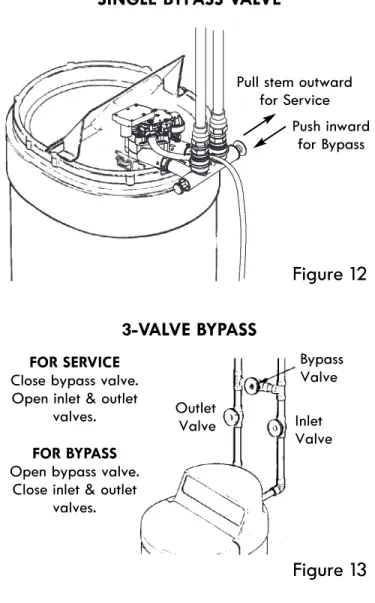
2.Place bypass valve(s) in “bypass” position (see Figures 12 & 13). On a single valve, slide the stem inward to bypass. On a 3-valve bypass, close the inlet and outlet valves and open the bypass valve. 3.Fully open the house main water pipe shutoff valve.
Observe steady water flow from both open faucets. 4.Place bypass valve(s) in SERVICE, EXACTLY as
fol-lows: Keep soft water faucets open.
a.Single Bypass Valve: Slowly, slide pull the valve stem outward toward service, pausing several times to allow the softener to pressurize gradually. b.3-Valve Bypass: Fully close the bypass valve and open the outlet valve. Slowly open the inlet valve, pausing several times to allow the softener to pres-surize gradually.
5.After about three minutes, open a hot water faucet for about one minute, or until all air is expelled, then close.
6.Close both cold water faucets.
7.Check your plumbing work for leaks, and fix right away if any are found. Be sure to observe previous caution notes.
NOTE:If this procedure is performed on a new softener, water coming from the taps may initially be dis-colored. This normally occurs the first time water runs through the resin bed. The discol-ored water is not harmful, and the discoloration will not last more than a few minutes.
Figure 12
SINGLE BYPASS VALVE
Figure 13
3-VALVE BYPASS
Pull stem outward for Service Push inward for Bypass Bypass Valve Inlet Valve Outlet Valve FOR SERVICE
Close bypass valve. Open inlet & outlet
valves. FOR BYPASS Open bypass valve.
Close inlet & outlet valves.
Installation
INSTALL GROUNDING CLAMP
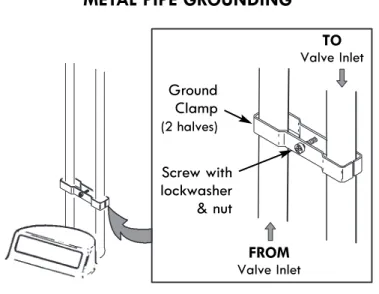
The house cold water pipe (iron or copper) is often used to ground all electrical outlets in the home. To maintain this ground, use the ground clamp kit included in the parts bag. Install the ground clamp across the inlet and outlet metal pipes (see Fig. 14). Make sure good contact is made between the pipe and the clamps.
INSTALL COVERS
After installing your water softener, put the covers on. Angle the covers so the top cover clips onto the back first, then bring down in front and clip on the tabs inside the rim and lower the salt lid closed (See Fig. 5).
CONNECT TO ELECTRICAL POWER
The softener works on 24 volt, 60 Hz electrical power. The included transformer changes standard 120 volt AC house power to 24 volts. You must plug the water soft-ener’s transformer into a grounded, 120 volt outlet only. Be sure the outlet is always “live” so it cannot be switched off by mistake.
NOTE:The electrical outlet you plug the transformer into must be indoors, protected from weather.
RESTART THE WATER HEATER
Turn on the gas (or electric) supply to the water heater and light the pilot.
YOUR PLUMBING INSTALLATION AND
ELECTRICAL WORK ARE NOW COMPLETE.
Figure 14
METAL PIPE GROUNDING
TO Valve Inlet FROM Valve Inlet Ground Clamp (2 halves) Screw with lockwasher & nut
Programming the Softener
hold for immediate
Low Salt
Select
press for tonight
Figure 15
REGENERATION button SELECT button
LOW SALT indicator
Display UP button
DOWN button
PROGRAM THE SOFTENER
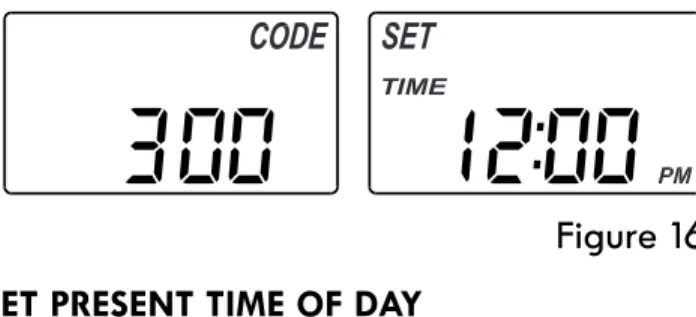
When the transformer is plugged into the electrical out-let, the model code (300) and a test number (example: J3.0, are briefly shown in the display. Then the words “SET TIME” appear and 12:00 PM begins to flash.
Figure 17
Figure 18
Figure 16
SET PRESENT TIME OF DAY
If the words “SET TIME" do not show in the display, press the SELECT button a few times until they do.
1. Press the rUP or sDOWN buttons to set the present time. Up moves the display ahead; down sets the time back. Be sure AM or PM is correct. NOTE:Press buttons and quickly release to slowly
advance the display. Hold the buttons down for fast advance.
2. When the correct time is displayed, press the SELECT button, and the display will change to show the “Hardness” screen.
SET WATER HARDNESS NUMBER
If you completed the previous step, the words “SET HARD NESS" should show in the display. Otherwise, press the SELECT button several times until they do.
1. Press the rUP or sDOWN buttons to set the hardness of your water supply, in grains per gallon. The default is 25.
NOTE: If your water supply contains iron, compensate for it by adding to the water hardness number. For example, assume your water is 20 gpg hard and contains 2 ppm iron. Add 5 to the hardness number for each 1 ppm of iron. In this example, you would use 30 for your hardness number.
20 gpg hardness 2 ppm iron x 5 = 10 +10
(times) 30 HARDNESS NUMBER
If your water supply contains iron, it is recom-mended that you clean your water softener resin bed at least every 6 months. Your local Sears store has Water Softener Cleaner (Part Number 34427) available.
2. When finished setting your water’s hardness number, press the SELECT button, and the display will change to show the “Set Recharge Time” screen.
Programming the Softener
Figure 19
If you completed the previous step, the words “SET RE -CHARGE TIME" should show in the display. Otherwise, press the SELECT button several times until they do.1. The softener’s default recharge start time is 2:00 AM. This is normally a time of day when water is not being used in the household. Hard water bypasses the softener if the household draws water during the recharge cycle. If a different recharge start time is desired, press the rUP or sDOWN buttons to change the time, in 1-hour increments. Be sure AM or PM is correct.
2. When the desired recharge start time is displayed, press the SELECT button, and the display will change to show the “Set Salt Level” screen.
SET RECHARGE (REGENERATION) START TIME
Figure 21
SET SALT LEVEL
The water softener has a salt monitor indicator light to remind you to add salt to the storage tank.
NOTE: You must set salt level each time salt is added to the water softener.
NOTE:The salt monitor system estimates salt levels, and accuracy will vary with different salts.
To set this monitor system:
If you completed the previous step, the words “SET SALT LEVEL" should show in the display. Otherwise, press the SELECT button several times until they do. 1.Lift the salt lid and level the salt in the storage tank. 2.The yellow salt level decal, on the brinewell inside
the tank, has numbers from 0 to 8 (see Fig. 20). Observe the highest number the leveled salt is at, or closest to.
3. Press the rUP or sDOWN buttons to set the salt level to match to the number on the decal. At level 2 or below, the “Low Salt" indicator will flash. If you want to turn the salt monitor off, press the s
DOWN button past 0, until “SALT LEVEL OFF” shows in the display.
4.When the correct salt level is displayed, press the SELECT button, and the display will return to the nor-mal run (time of day) screen.
Figure 20
LEVELSALT Salt Level Decal Brine-wellSanitizing the Softener
SANITIZE THE WATER SOFTENER
1.Open salt lid, remove the brinewell cover and pour about 3 oz. (6 tablespoons) of household bleach into the softener brinewell. Replace the brinewell cover. 2.Make sure the bypass valve(s) is in the “service”
(open) position.
3. Start a recharge:Press the REGENERATION button and hold for 3 seconds, until “RECHARGE NOW” begins to flash in the display. This recharge draws the sanitizing bleach into and through the water sof-tener. Any air remaining in the unit is purged to the drain.
4.After the recharge has completed, fully open a cold water faucet, downstream from the softener, and
allow 50 gallons of water to pass through the sys-tem. This should take at least 20 minutes. Close the faucet.
Your new Sears softener is now softening the water for your household needs. However, your WATER HEATER is filled with hard water. To have fully soft water right away, you can drain the water heater so it refills with soft water. If you don’t drain the water heater, it will take a few days before you have fully soft water. NOTE:If this procedure is performed on a new softener,
water coming from the taps may initially be dis-colored. This normally occurs the first time water runs through the resin bed. The discol-ored water is not harmful, and the discoloration will not last more than a few minutes.
Adding Salt to the Storage Tank
ADDING SALT TO THE STORAGE TANK
You must keep salt in the tank, but it is not necessary to fill it full. Especially in humid areas, it is best to fill the storage tank no more than half full, and to add salt more often. Salt “bridging” occurs more often when conditions are humid.Use NUGGET or PELLET water softener salt. DO NOT use rock salts, as they have dirt and sediments that will stop the softener from working. To maintain optimum performance of your water softener, the salt tank should be cleaned out every 2 to 3 years.
POTASSIUM CHLORIDE (KCl) SALT
If you choose Potassium Chloride (KCl) as a regenerant, following these suggestions will help give you years of maintenance free service.
1.Place only one bag of KCl in your softener at a time (the salt storage tank should contain no more than 60 pounds of KCl at any one time).
2.A softener using KCl should not be placed in areas with temperature fluctuations and high humidity (KCl will harden in these environments and may make the softener inoperable).
3.Check the brine tank and brinewell (black tube in salt storage tank) monthly. If hardening is present, pour small amounts of warm water onto hardened areas until they loosen.
4.If your softener does not have a KCl salt setting, you must increase your hardness setting by 25% to ensure continuous soft water. See table at right.
Persons who are on sodium restricted diets should con-sider the added sodium as part of their overall sodium intake. For example, if your water supply is 15 grains hard, and you drank 3 quarts of softened water you would consume 335 milligrams of sodium. That is equivalent to eating 2-1/2 slices of white bread.
WATER SOFTENING SALT WITH IRON
REMOVING ADDITIVES
Some salts have an additive to help the softener handle iron in the water supply. These salts may be used if your water supply has a high iron con tent. It is recom-mended to use Sears Water Softener Clean er (refer to the parts list in back of manual for part number) for periodic treatments to keep your resin bed clean. This is available at your local Sears store.
Persons who are concerned about their drinking water should consider a Kenmore reverse osmosis drinking water system that will remove in excess of 90% of the sodium and other drinking water contaminants.
Untreated Water Hardness
(grains per gallon) using KCl salt (add 25%)Softener Setting when
5 gpg 7 gpg 10 gpg 13 gpg 15 gpg 19 gpg 20 gpg 25 gpg 25 gpg 35 gpg 30 gpg 40 gpg 35 gpg 45 gpg 40 gpg 50 gpg
Controller Features
EXTRA RECHARGE
Sometimes, a manually initiated recharge (regeneration) may be desired, or needed. Two examples are:
=You have used more water than usual (guests visiting)
and you may run out of soft water before the next automatic regeneration.
=You did not add salt to the softener before it ran out.
Add salt to the softener before regenerating. You can start a regeneration immediately, or you can set the controller to regenerate at the next preset recharge time (2:00 AM, or as set).
RECHARGE NOW
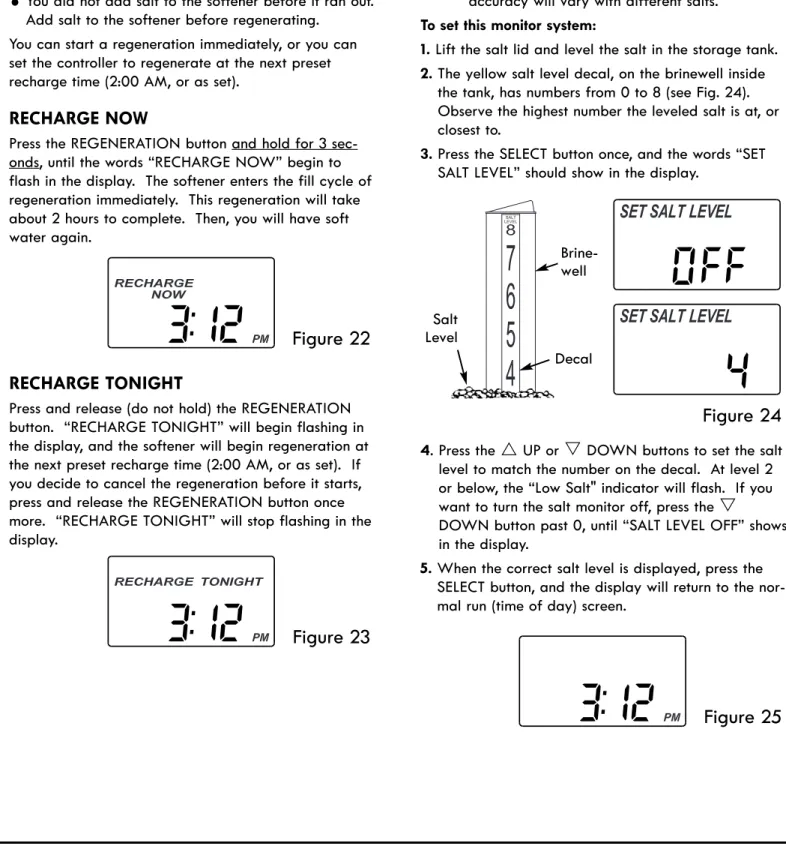
Press the REGENERATION button and hold for 3 sec-onds, until the words “RECHARGE NOW” begin to flash in the display. The softener enters the fill cycle of regeneration immediately. This regeneration will take about 2 hours to complete. Then, you will have soft water again.
RECHARGE TONIGHT
Press and release (do not hold) the REGENERATION button. “RECHARGE TONIGHT” will begin flashing in the display, and the softener will begin regeneration at the next preset recharge time (2:00 AM, or as set). If you decide to cancel the regeneration before it starts, press and release the REGENERATION button once more. “RECHARGE TONIGHT” will stop flashing in the display.
Figure 25
Figure 23
4. Press the rUP or sDOWN buttons to set the salt level to match the number on the decal. At level 2 or below, the “Low Salt" indicator will flash. If you want to turn the salt monitor off, press the s
DOWN button past 0, until “SALT LEVEL OFF” shows in the display.
5.When the correct salt level is displayed, press the SELECT button, and the display will return to the nor-mal run (time of day) screen.
SALT MONITOR SYSTEM
The water softener has a salt monitor indicator light to remind you to add salt to the storage tank.
NOTE: You must set salt level each time salt is added to the water softener.
NOTE:The salt monitor system estimates salt levels, and accuracy will vary with different salts.
To set this monitor system:
1.Lift the salt lid and level the salt in the storage tank. 2.The yellow salt level decal, on the brinewell inside
the tank, has numbers from 0 to 8 (see Fig. 24). Observe the highest number the leveled salt is at, or closest to.
3.Press the SELECT button once, and the words “SET SALT LEVEL” should show in the display.
Figure 22
Figure 24
LEVELSALT Salt Level Decal Brine-well2.Then press (do not hold) the SELECT button again. Use the rUP button to turn “ON”.
3.Press SELECT several times to return to the normal run (time of day) screen. The efficiency icon will only be displayed when this feature is ON.
Controller Features
California Efficiency Requirement
Your Kenmore Water Softener has a “High Efficiency” feature that can be set ON or OFF. This softener is shipped with the efficiency feature set OFF, which will utilize the maximum rated capacity while most often achieving maximum salt efficiencies. When installing this unit in the State of California, you MUST turn the efficiency feature ON. The softener may initiate more frequent recharges, but it will operate at 4000 grains per pound of salt or higher.EFFICIENCY MODE
When this feature is ON, the water softener will oper-ate at salt efficiencies of 4000 grains of hardness per pound of salt or higher. The softener may recharge more often using smaller salt dosage and less water. This softener is shipped with the efficiency feature set OFF. Installations in the state of California require this setting to be turned ON.
To turn this feature ON:
1.Press and hold the SELECT button until the display shows “000 - -”.
Figure 26
Figure 27
Figure 28
Efficiency IconFigure 29
Figure 30
BACKWASH & FAST RINSE TIMES
If you experience salty tasting water after regeneration, you may need to increase the backwash and fast rinse times. The cycle times during regenerations are deter-mined by the softener’s electronic controller. However, you may increase the backwash and fast rinse times, in 1 minute increments, as follows:
1.Press and hold the SELECT button until the display shows “000 - -” (see Fig. 26).
2.Then press (do not hold) the SELECT button twice to display the alternating screens shown in Figure 29.
3.Use the rUP button to add up to 15 minutes to the backwash time.
4.Press SELECT to display the alternating screens shown in Figure 30.
PROGRAM MEMORY
If electrical power to the softener goes off, the time dis-play is blank but the electronic controller keeps the cor-rect time for several hours. When electrical power comes on again, you will have to reset the present time only if the display is flashing. The HARDNESS,
RECHARGE TIME and SALT LEVEL never require reset-ting unless a change is desired. Even if the clock is incorrect after a long power outage, the softener works as it should to keep your water soft, however, regenera-tions may occur at the wrong time of day until you reset the clock to the correct time of day.
5.Use the rUP button to add up to 15 minutes to the fast rinse time.
6.Press SELECT to return to the normal run (time of day) screen.
Care of Your Water Softener
SALT BRIDGE
Sometimes, a hard crust or salt “bridge” forms in the brine tank. It is usually caused by high humidity or the wrong kind of salt. When the salt “bridges,” an empty space forms between the water and the salt. Then, salt will not dissolve in the water to make brine. Without brine, the resin bed is not recharged and hard water will result.
If the storage tank is full of salt, it is difficult to tell if you have a salt bridge. A bridge may be underneath loose salt. Take a broom handle, or like tool, and hold it next to the water softener. Measure the distance from the floor to the rim of the water softener. Then, gently push the broom handle straight down into the salt. If a hard object is felt before the pencil mark is even with the top, it is most likely a salt bridge. Gently push into the bridge in several places to break it. Do not use any sharp or pointed objects as you may punc-ture the brine tank. Do not try to break the salt bridge by pounding on the outside of the salt tank. You may
damage the tank.
Figure 31
Salt Bridge Salt Empty Space Water Level 1” - 2” Pencil Mark Broom Handle Push tool into
salt bridge to break
Service Information
ALWAYS MAKE THESE INITIAL CHECKS FIRST
1.Does the time display show the correct time of day?
=If display is blank, check power source to the sof-tener.
=If time is flashing, power was off for a long peri-od. The softener resumes normal operation but regenerations occur at the wrong time.
=If an error code (example: “Err03”) shows in the display, go to “Troubleshooting”.
2.Are bypass valve(s) fully in service position? 3.Are the inlet and outlet pipes connected to the
sof-tener inlet and outlet respectively?
4.Is the softener’s transformer plugged into a “live”, grounded wall outlet, and the power cable fastened securely to the controller?
5.Is the valve drain hose free of kinks and sharp bends, and not elevated more than 8 ft. above the floor? 6.Is there salt in the storage tank?
7.Is the brine tubing connected? Brine tubing connects to nozzle/venturi and brine valve assembly.
8.Press the SELECT button three times to display the hardness setting. Make sure it is correct for the household’s water supply. Perform a hardness test of the untreated incoming water and compare with the hardness setting. Also test a soft water sample to verify if a problem exists. Press the SELECT button twice more to return to present time display.
Service Information
TROUBLESHOOTING
If your water softener does not work properly, make the following easy checks. Often, you will find what is wrong yourself and you won’t have to call and wait for service. If you do not find anything wrong while making the checks, and your softener still does not work properly, call your Sears Service Department.
PROBLEM
CAUSE
CORRECTION
No soft water No salt in the storage tank. Add salt and then use RECHARGE NOW feature.
No soft water &
dis-play is blank Transformer unplugged at wall outlet, orpower cable disconnected from back of electronic board or transformer malfunction.
Check for loss of power and correct. Reprogram electronic control and then use RECHARGE NOW feature.
Fuse blown, circuit breaker tripped, or cir-cuit switched off (see “Power Outage Memory”).
Replace fuse, reset circuit breaker, or switch circuit on, and then use RECHARGE NOW feature.
No soft water & salt
level not dropping Salt storage tank “bridged”.Bypass valve(s) in “bypass” position. Refer to “Breaking a Salt Bridge”.Move bypass valve(s) to “service” position. No soft water & salt
storage tank full of water
Dirty, plugged or damaged nozzle &
ven-turi assembly Take apart, clean and inspect nozzle & ven-turi (see instruction decal under salt lid). Valve drain hose is plugged or restricted. Hose must not have any kinks, sharp bends or
any water flow blockage (See “Valve Drain Requirements”).
Intermittent hard
water Incorrect time set.Incorrect water hardness set. Check and change time setting.Refer to “Set Water Hardness Number” to set correctly.
Hot water being used when softener is
regenerating. Avoid using hot water while the softener isregenerating, as the water heater will fill with hard water.
Possible increase in water hardness. Test untreated water for hardness and iron. Program the water softener accordingly (see “Set Water Hardness Number”).
Brine tank flooded Valve drain hose is plugged or restricted. Hose must not have any kinks, sharp bends or any water flow blockage (See “Valve Drain Requirements”).
Dirty, plugged or damaged nozzle &
ven-turi assembly. Take apart, clean and inspect nozzle & ven-turi (see “Cleaning the Nozzle & Venturi”). Salty tasting water
immediately after regeneration
Backwash and fast rinse cycle times are not
long enough. Increase backwash & fast rinse times (see“Back Wash & Fast Rinse Times”). Valve drain hose is plugged or restricted. Hose must not have any kinks, sharp bends or
any water flow blockage (see “Valve Drain Requirements”).
Error code appears
(example: “Err03”) Fault in electronic controller or wiring har-ness connections to position switch, position switch inoperable or motor inoperable.
Unplug power cord. Check all wiring con-nections to be sure they are secure. Plug in power cord and wait 6 minutes. If error code returns, call Kenmore Water Line.
Service Information
Figure 32
Figure 33
Figure 34
Motor Turbine Support & Shaft PositionSwitch SensorHousing
Turbine
Valve Outlet 1.To enter diagnostics, press and hold the SELECT
but-ton until “000 - -” shows in the display.
MANUALLY INITIATED ELECTRONIC DIAGNOSTICS
TURBINE OPERATION:If no water is flowing through the softener, the turbine indicator displays three zeros. When water is flowing, a 000 to 199 count repeats for each gallon of water passing through the turbine. To check for positive operation of the turbine if zeros are shown, open a nearby soft water faucet and observe the turbine count. If you don’t get a reading in the dis-play with faucet open, pull the sensor housing from the valve outlet port (see Fig. 34). Pass a small magnet back and forth in front of the sensor. You should get a reading in the display. If you get a reading, unhook the inlet and outlet plumbing and check the turbine for binding.
POSITION SWITCH STATUS:With the valve in service, or any of the recharge cycle positions, the position switch indicator will show two dashes (switch open). While the valve is rotating from one position to another, the position switch indicator will show the letter “P” (switch closed). There is likely a problem if indications vary from this pattern.
OTHER INFORMATION:While in the diagnostics screen, the following information is available and may be beneficial for various reasons. This information is retained by the electronic controller from the first time electrical power is applied to the unit.
=Press and hold the rUP button to display the num-ber of days this controller has had electrical power applied.
=Press and hold the sDOWN button to display the number of regenerations initiated by this controller since the model code number was entered.
NOTE:If the electronic controller is left in the diagnos-tic display (or a flashing display when setting times or hardness), the normal time of day dis-play automatically returns if a button has not been pressed for 4 minutes. To return to the diagnostic display, repeat step 1, above.
RESETTING TO FACTORY DEFAULTS:
To reset the electronic controller to its factory default for all settings (time, hardness, etc.):
1.Press the SELECT button and hold it until the display changes twice to show “SET CODE” and the flashing model code.
2.Press the rUP button to display a flashing “SoS”.
3.Press the SELECT button, and the electronic controller will restart.
4.Set the present time, hardness, etc., as described on pages 12 & 13.
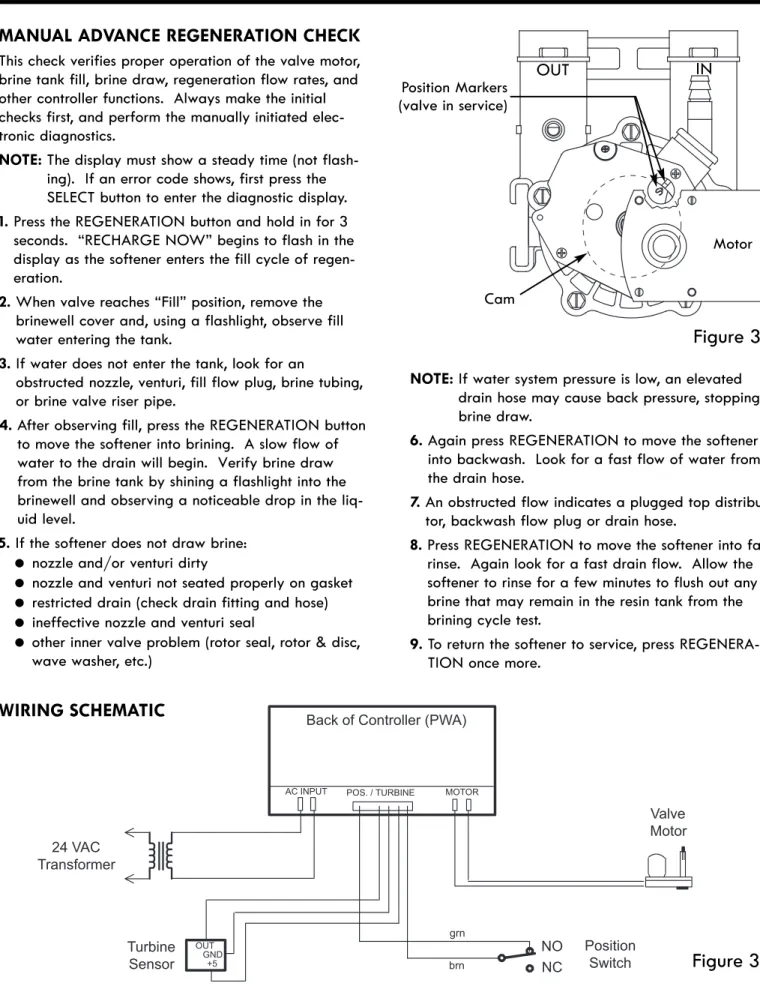
24 VAC Transformer Turbine Sensor OUT GND +5 Position Switch NO NC grn brn Valve Motor Back of Controller (PWA)
AC INPUT POS. / TURBINE MOTOR
Figure 37
WIRING SCHEMATIC
Service Information
MANUAL ADVANCE REGENERATION CHECK
This check verifies proper operation of the valve motor, brine tank fill, brine draw, regeneration flow rates, and other controller functions. Always make the initial checks first, and perform the manually initiated elec-tronic diagnostics.NOTE:The display must show a steady time (not flash-ing). If an error code shows, first press the SELECT button to enter the diagnostic display. 1.Press the REGENERATION button and hold in for 3 seconds. “RECHARGE NOW” begins to flash in the display as the softener enters the fill cycle of regen-eration.
2.When valve reaches “Fill” position, remove the brinewell cover and, using a flashlight, observe fill water entering the tank.
3.If water does not enter the tank, look for an
obstructed nozzle, venturi, fill flow plug, brine tubing, or brine valve riser pipe.
4.After observing fill, press the REGENERATION button to move the softener into brining. A slow flow of water to the drain will begin. Verify brine draw from the brine tank by shining a flashlight into the brinewell and observing a noticeable drop in the liq-uid level.
5.If the softener does not draw brine:
= nozzle and/or venturi dirty
= nozzle and venturi not seated properly on gasket
= restricted drain (check drain fitting and hose)
= ineffective nozzle and venturi seal
=other inner valve problem (rotor seal, rotor & disc, wave washer, etc.)
Figure 36
Position Markers(valve in service)
OUT IN
Motor
NOTE:If water system pressure is low, an elevated drain hose may cause back pressure, stopping brine draw.
6.Again press REGENERATION to move the softener into backwash. Look for a fast flow of water from the drain hose.
7.An obstructed flow indicates a plugged top distribu-tor, backwash flow plug or drain hose.
8.Press REGENERATION to move the softener into fast rinse. Again look for a fast drain flow. Allow the softener to rinse for a few minutes to flush out any brine that may remain in the resin tank from the brining cycle test.
9.To return the softener to service, press REGENERA-TION once more.
Water Softener Exploded View
Valve Assembly
See Pages 24 & 25 for parts
Kenmore
Model No.
625.383000
1 2 3 4 5 6 Rating Decal Location 21 20 22 19 18 23 28 26 24 25 7 8 9 11 12 13 10 57 1415 16 17 29 27Softener Parts List
Key
No. Part No. Description
1 7275907 Transformer, 24V, 10VA 2 7324926 Top Cover
3 7324934 Salt Lid (order decal below) ¢ 7325029 Instruction Decal, English7325061 Instruction Decal, Spanish
4 7327819 Repl. Electronic Controller (PWA) 5 7324918 Faceplate (order decal below) ¢ 7324950 Faceplate Decal
6 7324895 Rim
7 7219888 Brinewell Cover
¢ 7327576 Brinewell Mounting Hardware Kit(includes Key Nos. 8-10)
8 á Wing Nut, 1/4”
9 á O-Ring, 1/4” x 1/2”
10 á Plastic Screw, 1/4-20 x 5/8” ¢ 7214375 Brinewell Assembly(includes Key Nos. 11 & 12)
11 á Brinewell
12 á Decal, Salt Level
13 7324879 Salt Storage Tank 14 1103200 Adaptor Elbow 15 9003500 Grommet
Key
No. Part No. Description
16 7327584 Repl. Bottom Distributor 17 0502272 Resin
18 7327607 Repl. Resin Tank, 7” x 40” ¢ 7112963 Distributor O-Ring Kit(includes Key Nos. 19-21)
19 á O-Ring, 2-3/4” x 3”
20 á O-Ring, 13/16” x 1-1/16” 21 á O-Ring, 2-7/8” x 3-1/4” 22 7077870 Top Distributor
23 7141001 Vapor Barrier
24 7176292 Clamp Section (2 req.) 25 7088033 Retainer Clip (2 req.) 26 7248706 Grounding Kit 27 7171349 Cone Screen
28 7310202 Brine Valve Assembly
29 7327568 Float, Guide & Stem Assembly Ù ¢ 3442707 Water Softener Cleaner Ù
¢ 7278573
Parts Bag (includes 5 ea. of Key No. 69, 2 ea. of Key Nos. 57 & 70, 1 ea. of Key Nos. 14, 15, 26 & 97) ¢ 7324976 Owner’s Manual
¢ Not illustrated.
Valve Assembly Exploded View
50 51 52 52 53 54 55 56 96 57 58 59 60 61 62 67 68 63 Seal Wear Strip Cross-Section View 69 70 71 72 73 74 75 64 65 66 76 77 78 79 80 81 82 83 84 85 86 87 88 89 90 91 92 93 94 95Valve Parts List
Key
No. Part No. Description
50 7224087 Screw, #8-32 x 1” (2 req.) 51 7286039 Motor (incl. 2 ea. of Key No. 50) 52 0900857 Screw, #6-20 x 3/8” (2 req.) 53 7231385 Motor Plate
54 0503288 Bearing 55 7284964 Cam & Gear 56 7142942 Clip, Drain
57 0900431 Tubing Clamp (2 provided) 58 7024160 Adaptor, Drain Hose 59 7170327 O-Ring, 5/8” x 13/16” 60 0501226 Flow Plug, 0.9 gpm
¢ 7129716 Seal Kit, (includes Key Nos. 61-66)
61 á O-Ring, 7/16” x 5/8”
62 á O-Ring, 3/4” x 15/16”
63 á O-Ring, 3-3/8” x 3-5/8”
64 á Rotor Seal
65 á O-Ring, 3/8” x 9/16”
66 á Seal, Nozzle & Venturi 67 7082087 Bearing, Wave Washer 68 7199232 Rotor & Disc
69 7116713 Clip (4 req.)
70 7278442 Installation Adaptor, 1” NPT (2 req.,includes 2 ea. of Key No. 71) 71 7170288 O-Ring 15/16” x 1-3/16” (2 req.) 72 7092642 Plug, Drain Seal
73 7129889 Spring
¢ 7113040 Turbine & Support Assembly(includes 1 ea. of Key Nos. 74, 75 & 2 ea. of Key No. 71)
74 á Turbine Support & Shaft
75 á Turbine
¢ Not illustrated.
Ù Not included with water softener. Key
No. Part No. Description
76 7082053 Valve Body
77 7081201 Retainer, Nozzle & Venturi 78 7170319 O-Ring, 1/4” x 3/8” (2 req.) 79 7081104 Housing, Nozzle & Venturi 80 1202600 Nut - Ferrule
81 7095030 Cone Screen 82 1148800 Flow plug, 0.3 gpm
83 7187772 Nozzle & Venturi Gasket Kit7204362 Gasket (only) 84 0521829 Flow Plug, 0.1 gpm
85 7146043 Screen
86 7167659 Screen Support
87 7170262 O-Ring, 1-1/8” x 1-3/8”
88 7199729 Cap
89 7309803 Wire Harness (Sensor) 90 7085263 Valve Cover
91 7074123 Screw, #10-14 x 2” (5 req.) 92 7077472 Expansion Pin
93 7030713 Switch 94 7117816 Spacer
95 7070412 Screw, #4-24 x 1-1/8”, Flat Head 96 7254260 Installation Adaptor Kit,(includes 2 ea. copper tubes, nuts,
clips & washers) Ù
97 7278434 Bypass Valve Assembly(includes 2 ea. of Key No. 71) ¢ 7187065 Nozzle & Venturi Assembly(includes Key Nos. 79 & 81-88) ¢ 7139999 Drain Tubing, 3/8” I.D. x 20 ft. ¢ 7123613 Silicone Grease (for O-Rings) Ù ¢ 42-34405 Flexible Connectors, 3/4” Ù ¢ 42-34407 Flexible Connectors, 1” Ù
97 71
For repair –
in your home
– of
all
major brand appliances,
lawn and garden equipment, or heating and cooling systems,
no matter who made it, no matter who sold it!
For the replacement parts, accessories and
owner’s manuals that you need to do-it-yourself.
For Sears professional installation of home appliances
and items like garage door openers and water heaters.
1-800-4-MY-HOME
® (1-800-469-4663)Call anytime, day or night (U.S.A. and Canada) www.sears.com www.sears.ca
Our Home
For repair of carry-in items like vacuums, lawn equipment,
and electronics, call anytime for the location of your nearest
Sears Parts & Repair Service Center
1-800-488-1222
(U.S.A.)1-800-469-4663
(Canada)www.sears.com www.sears.ca
To purchase a protection agreement on a product serviced by Sears:
1-800-827-6655
(U.S.A.)1-800-361-6665
(Canada)Get it fixed, at your home or ours!
Au Canada pour service en français:
1-800-LE-FOYER
MC(1-800-533-6937) www.sears.ca
Para pedir servicio de reparación a domicilio, y para ordenar piezas:
1-888-SU-HOGAR
®(1-888-784-6427) www.sears.com