Representing Our Information
Structures for Research and for
Everyday Use
Abstract
We argue for a methodology and supporting
infrastructure to promote a cross-study investigation of information structure to advance the science of personal information management. Moreover, we observe that the infrastructure to support a methodology of scientific inquiry may have direct application to users as they struggle to manage their information. Research on information structure reaches towards a new age in information management wherein organizing information structures grow and change over time based on the internal needs of their owners and not the external demands of tools.
Keywords
Personal information management (PIM), group information management (GIM); information structure, application integration, open hypermedia, structural computing.
ACM Classification Keywords
H5.m. Information systems: Information interfaces and presentation (e.g., HCI): Miscellaneous.
Permission to make digital or hard copies of all or part of this work for personal or classroom use is granted without fee provided that copies are not made or distributed for profit or commercial advantage and that copies bear this notice and the full citation on the first page. To copy otherwise, or republish, to post on servers or to redistribute to lists, requires prior specific permission and/or a fee.
CHI’12, May 5–10, 2012, Austin, Texas, USA.
Copyright 2012 ACM 978-1-4503-1016-1/12/05...$10.00. William Jones University of Washington Seattle, WA 98195 USA [email protected] Kenneth M. Anderson Department of Computer Science University of Colorado Boulder, CO 803090430 USA [email protected] Steve Whittaker Human-Computer Interaction University of California Santa Cruz, CA 95064 USA [email protected]
General Terms
Design, Experimentation,Human Factors Introduction
A great many tools we use for managing our
information come with their own constructs for creating and using information structure: Folders, tags, sections, tabs, “pages”, “projects”, “albums” and so on. The information structures realized by these tools and their constructs bring many benefits. Structures provide a basis for navigating (browsing) to information—either as a complement to search, or as a primary method of information access [1,4,29]. The very act of
structuring may help people to make sense of their information [26]. Tagging a document, for example, can be regarded as an act of categorization causing people to process more deeply the item’s contents or its intended purpose [8].
But structures and structuring bring costs as well as benefits. Structures may be duplicated, or created and never used [34]. Structures persist long after their usefulness has passed [20]. Old, unused structures add to clutter, making filing and refinding difficult.
Creating effective structures is a difficult cognitive problem because it requires users to predict the future contexts in which information will be needed
[21,22,28,33]. Maintaining structures is also onerous [2]. And the effort of creating structures may not always pay off. For example, in studies of web refinding, a user’s organization of bookmarks is often not used in retrieval [17]. Likewise, studies of email refinding show that people who use email folders for retrieval are less efficient than those who use search [35].
Another major set of structural problems relate to fragmentation. People persistently express a desire for greater integration [7]. Instead, people end up duplicating and maintaining related structures across different tools [3,6].
Most of the structures people use lie buried in their tools and cannot readily be re-used or even easily examined. With the emergence of Web/mobile applications and new social media applications, tools are proliferating, problems of fragmentation are increased and we may be approaching a structural crisis [16].
So far we have talked about individual users, but fragmentation problems are replicated and exacerbated within collaborating teams which struggle to create and maintain shared structures [24]. How to share organizational structures? How to classify information accordingly such that everyone can find it [5,27]? What about structures that appear to be old and no longer in use? Lacking more information concerning use history, members of a team may opt to leave these structures (“just in case”) even though their presence adds to overall clutter and impedes, rather than facilitates, information access [14,27].
In practice group problems with the management of structure often prove so difficult that current collaboration practices avoid these tools -- relying instead on distributing shared documents via email
attachments, requiring each collaborator to maintain and manage personal versions of shared documents in their own file system [13,32]. For example, Voida et al. [32] found that almost 50% of sharing instances involve email attachments rather than collaborative repositories. Berlin et al.[5] identified reasons for the failures of shared repositories, including the inability to agree on shared labels [11], and the need for detailed metadata to promote findability by someone who was not the submitter of the information.
Research Needs
Researchers, as we seek to understand better and improve support for information structures, are bedeviled by versions of these same problems. We seek answers to basic questions:
1. What is structure used for? How is a person’s ability to work effectively on a project compromised when project information is fragmented across separate, unconnected structures? How much does it matter?
2. How do structures changeover time? Most research has looked at static structures captured as simple snapshots. We know little about change: when and why do structures change? What is the nature and scale of structural change?
3. How are information structures shared?
How do members of a small workgroup share structure or do they operate with largely separate individual systems?
Answers to these questions are needed in order to address a more practical question:
4. How do we support better integration of information between tools? How do we integrate the structures and tools people already have for managing their information—allowing them to repurpose Figure 1. Users struggle with the fragmentation of their
successful structures when they come to use new tools? Can we inform people when they create maladaptive structures? Tools might allow users to create more effective structures by identifying potentially extraneous structures, such as tags that were created long ago but never used.
The research into these questions of information structure has tended to fragment along lines similar to the information structures under study. While there are initial studies addressing these questions
[2,5,6,7,18,31,32,33,34], they have tended to be small scale, qualitative and often tool-specific. Despite the ubiquity of fragmentation, few studies have looked at how structures are shared across multiple tools [3,6,7]. Cross-tool studies have also involved relatively small numbers of participants and largely qualitative data. So while we know that people are concerned about fragmentation, we do not have systematic data about the scale of this problem, about the extent to which people try to directly mirror structures across tools or about the effort expended in trying to replicate structure. Rarer still are longitudinal cross-form studies that look at how information structures change over time [6]. There are also few studies that examine how structures are used collaboratively by small groups for GIM [24]. A few studies have looked specifically at sharing across peer to peer systems [12] or sharing of music [30]. However, the majority of these studies are qualitative and none of these studies has looked at how shared structures evolve over time.
An obvious reason for these limitations in research (i.e., focusing on a single tool, a single point in time, and a smaller set of participants) is the cost. Cross-form, longitudinal studies are expensive to conduct.
More seriously, results from different studies are difficult to compare directly and are not easily assembled to yield a bigger picture of challenges (and successes) in the personal and small-group
management of information structures.
Studies inevitably vary with respect to method and the many small details of observation and data collection. But a more serious roadblock to a more fruitful, coherent assembly of inter-study results may be representational.
How can we, as researchers, represent the essential structures underneath the many variations in observed organizations of information? How can information structures be represented to allow meaningful cross-study comparisons and integrations of cross-study results? Representing Structure
Our efforts to represent information structure begin with a simple notion: the use of the web’s URIs to give an address to “anything of interest” [23]. This is a fundamental notion of hypertext. Engelbart [9,10] argued that anything in one of his structured hyperdocuments could be the source or destination of a hypermedia link. Thus every item, down to individual characters, had an address and this address was preserved across editing operations, including cut-and-paste. Through an address, we gain access to a packaging of information such as a file, Web page, email or, more generally, an information item.
Some items are mostly about structure. We refer to these items as grouping items. Grouping items are an obvious initial focus of efforts to represent structure. Grouping items are supported by nearly every end-user
tool: A file manager such as the Finder (Mac) or the MS Windows Explorer supports folders; MS OneNote provides section and page tabs; the task management tool, “Remember the Milk”, supports lists and tags; the “remember everything” tool, Evernote, supports the creation of a tagging hierarchy and provides the notion of “notebooks”; Facebook provides more content-specific grouping items such as “Groups”, “Albums” and “Friend lists”.
In previous work [15], we pursued a schema for metadata representation of grouping items that: 1. Is modular – one “fragment” of metadata per
grouping item;
2. Abstracts common attributes and a basic structure of links
3. Allows for representation of tool-specific attributes that may also influence a user’s perception of structure.
4. Provides for “growing room” for persistence of tool-specific settings as attributes for any number of tools without risk of confusion or collision between the attributes used by different tools
Constraints are met through a use of XML in which tool-specific attributes are bundled into special tool-tool-specific sub-elements. A given sub-element and each of its attributes can then be uniquely specified by the tool-specific URI of its namespace declaration.1 The use of elements to bundle attributes happens at two levels: Fragment (node) level. For any given information item, the schema defines the structure of an associated fragment of metadata. As depicted in Figure 2, a
1 E.g., xmlns=http://kftf.ischool.washington.edu/xmlns/planz. To aid in readability, a tool might still include a tool-appropriate prefix in its namespace declarations and then prepend this prefix to its attributes. But doing so is optional.
fragment is a bundling of fragment-level “common” (tool-independent) attributes (which support the third requirement above) followed by zero or more bundles of tool-specific attributes (fragmentToolAttributes) followed by zero or more elements of type association.
Figure 2. A fragment is a bundling of “common” (tool-independent) attributes followed by zero or more bundles of tool-specific attributes (fragmentToolAttributes) followed by zero or more associations.
Association (link) level. This pattern of bundling is partially repeated for each association element within a fragment. As depicted in Figure 3, an association is a bundling of common (tool-independent attributes) followed by zero or more bundles of tool-specific attributes.
Figure 3. An association is a bundling of common (tool-independent attributes) followed by zero or more bundles of tool-specific attributes.
Steve Whittaker 9/25/12 1:17 PM
We call the schema XooML2. XooML defines the structure of a fragment of metadata, which can be placed in association with any information item that is addressable by a URI. A fragment can have zero or more associations that, in turn, can point to other fragments representing other information items. Fragments are a bundling of attributes: Some bundles apply to the fragment as a whole; some bundles apply to individual associations. Bundles at each level can be classified as tool-independent or tool-specific depending on how they are used.
The design of XooML is guided by a now classic hypermedia separation of data, structure and behavior [25]. Data, i.e., information items addressed by URIs might live on the desktop or in the cloud. Structure too, as extracted from these items and represented explicitly in XooML fragments, might persist on the desktop (e.g., as XML files stored in the folders they modify) or on the Web (e.g., in a service like S33 or in storage structured through a tool like SQLite4). XooML supports a diversity of behaviors for the same structure through a provision for tool-specific attributes— persisted both at the level of a fragment and each of its associations. This schema enables our grand vision: multiple tools all supporting a single unifying structure.
2 XooML(pronounced “zoom’l”) stands for Cross (X) Tool M ark-up Language. For a complete definition see
kftf.ischool.washington.edu/XMLschema/0.41/XooML.xsd.
3http://aws.amazon.com/s3/.
4http://sqlite.org/.
Everyday Uses of Tool-Independent Structure
The schema is currently being actively used in three separate tools:
Planz provides document-like overlays to a personal file system (Figure 4) in support of a project-based organization of documents and other forms of information including email messages, web references and informal notes.5 A Planz view can be edited to show all of a person’s projects and tasks in a single,
scrollable view. Headings often represent high-level projects (“Plan family vacation for summer”); subheadings then represent component tasks (“Make plane reservations”). Planz has the affordances of a basic word processor and outliner [19].
QuickCapture6 – a tool used to capture a link to an item (document, email message, web page) that appears in the user’s active window. The link appears by default as a shortcut in a “Notes” folder and as an association under the corresponding heading in Planz. FreeMindX – a tool to create mind maps created by “wrapping” the open-source FreeMind7 with schema support
5 The version of Planz (8.2) described here is a desktop application based on .NET 3.0. Planz works under Microsoft Windows and integrates with Microsoft Outlook, Microsoft Word, and other Microsoft Office applications. However, the Planz approach readily extends to other operating systems and other applications.
6 QuickCapture comes with the installation of Planz and can also be installed separately.
7http://freemind.sourceforge.net/wiki/index.php/Main_Page
Steve Whittaker 9/25/12 1:17 PM
Figure 4. Planz generates a document-like view (in this example, of information relating to a home re-model) through an on-demand assembly of XML fragments.
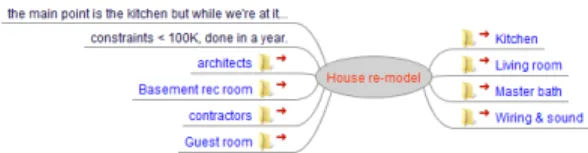
FreeMindX, directed to the same “House re-model” project depicted in Figure 4, yields the mind-map view shown in Figure 5.
Metadata fragments are plain text (XML) and can be easily inspected to see how their shared use works in practice.8
8 Currently, each fragment is stored in a file named “xooml.xml”.
Figure 5. The house re-model of Figure 4 rendered as a mind map in FreeMindX.
It is straightforward to integrate support for this schema into additional tools, as illustrated in Table 1. Tools will all work with bundles of “common attributes” at both the level of a fragment and each of its associations. Each tool can then name and persist values for its own tool-specific attributes at both the fragment level and for each of a fragment’s
associations. Planz, for example, in order to support an “in-place” archival feature, maintains an isVisible attribute for each association. A mind-mapping tool might maintain attributes of “radius” and “polarAngle” per association in order to persist the angle of an outgoing link and the offset of the node to which it points.
The metadata module, then, is a start towards a representation of information structure in support of structural comparisons of grouping items, which may differ widely in external form (e.g., a folder vs. a tag) Table 1. The attribute bundles of fragment can be grouped by level (fragment-level or association-level) and scope (common or tool-specific). Steve Whittaker 9/25/12 1:17 PM Steve Whittaker 9/25/12 1:17 PM Steve Whittaker 9/25/12 1:17 PM Steve Whittaker 9/25/12 1:17 PM Deleted: 5 Deleted: 4 Deleted: Figure 4 Deleted: Figure 5
Fragment Association Common9 schemaVersion relatedItem defaultApplication levelOfSynchronizatio n … ID associatedItem associatedIcon associatedFragme nt openWithDefault, … Tool-specific (Planz) toolVersion toolName showAssocsMarkedDo ne showAssocsMarkedDef er, … isVisible is Heading isCollapsed, … Tool-specific (FreeMind ) toolVersion toolName, … radius polarAngle, … Another tool... … …
We have explored scenarios wherein the same grouping item (e.g., a folder) might appear very differently in different tools through the metadata of a module [15]. A grouping item for “travel through Scotland”, for example, might appear first as the node in a mind map to support brainstorming concerning possibilities for a summer vacation. Later this grouping item might appear as a heading in a document describing “what we
9 Other common attributes include createdBy (URI), createdOn
(time/date), lastModifiedBy and lastModifiedOn.
did for our summer vacation”. All the while, the grouping item persists in storage as a folder maintained through the user’s file system.
Conclusion
PIM desperately needs an infrastructure and method to support scientific inquiry. However this same
infrastructure may, with small extension, have direct application to end users as they struggle to manage their information. For example, as researchers we seek tools to identify structures that are duplicated or are no longer in use. These tools may also have application to end-users in their efforts to understand and “de-clutter” their information spaces. Beyond specific tools is an observed need for a representation of information structure that exists independently of specific tools but that allows for an expression of tool-specific attributes. Such a representation has utility for researchers and end users alike. Such a representation is a step towards a vision of personal and group information management – that many tools with many affordances might be used in support of a tool-independent structure that grows organically “with the user” to realize an oft-requested integration of personal information.
Acknowledgements References
1. Barreau, D. and Nardi, B.A. Finding and reminding: file organization from the desktop. SIGCHI Bull. 27, 3 (1995), 39-43.
2. Bellotti, V., Ducheneaut, N., Howard, M., Smith, I., and Grinter, R. Quality vs. quantity: Email-centric task-management and its relationship with
overload. Human-Computer Interaction 20, 1-2 (2005), 89-138.
3. Bergman, O., Beyth-Marom, R., and Nachmias, R. The project fragmentation problem in personal information management. Proceedings of the SIGCHI conference on Human Factors in computing systems, ACM (2006), 271-274.
4. Bergman, O., Beyth-Marom, R., Nachmias, R., Gradovitch, N., and Whittaker, S. Improved search engines and navigation preference in personal information management. ACM Trans. Inf. Syst. 26, 4 (2008), 1-24.
5. Berlin, L.M., Jeffries, R., O’Day, V.L., Paepcke, A., and Wharton, C. Where did you put it? : issues in the design and use of group memory. Conference on Human Factors and Computing Systems, INTERACT ’93 AND CHI ’93, ACM (1993), 23-30. 6. Boardman, R. and Sasse, M.A. “Stuff goes into the
computer and doesn’t come out” A cross-tool study of personal information management. ACM SIGCHI Conference on Human Factors in Computing Systems (CHI 2004), (2004).
7. Bruce, H., Wenning, A., Jones, E., Vinson, J., and Jones, W. Seeking an ideal solution to the management of personal information collections. Information Seeking in Context Conference -(ISIC) 2010, (2010).
8. Craik, F.I.M. and Lockhart, R.S. Levels of processing: A framework for memory research. Journal of Verbal Learning and Verbal Behavior 11, 6 (1972), 671-684.
9. Engelbart, D.C. Special considerations of the individual as a user, generator and retriever of information. American Documentation 12, 2 (1961), 121-125.
10. Engelbart, D.C. A conceptual framework for the augmentation of man’s intellect. In Vistas in information handling. VI Spartan Books, London, 1963.
11. Furnas, G.W., Landauer, T.K., Gomez, L.M., and Dumais, S.T. The vocabulary problem in human-system communication. Commun. ACM 30, 11 (1987).
12. Good, N.S. and Krekelberg, A. Usability and privacy: a study of Kazaa P2P file-sharing. Proceedings of the SIGCHI conference on Human factors in computing systems, ACM (2003), 137-144.
13. Hicks, B.J., Dong, A., Palmer, R., and Mcalpine, H.C. Organizing and managing personal electronic files: A mechanical engineer’s perspective. ACM Trans. Inf. Syst. 26, 4 (2008), 1-40.
14. Jones, E., Bruce, H., Klasnja, P., and Jones, W. “I Give Up!" Five Factors that Contribute to the Abandonment of Information Management Strategies. (2008).
15. Jones, W. and Anderson, K.M. Many Vews, Many Modes, Many Tools... One Structure: Towards a Non-disruptive Integration of Personal Information. Proceedings of the 22nd ACM conference on Hypertext and hypermedia, ACM (2011), 113-122. 16. Jones, W. and Maier, D. Report from the session on
personal information management. Workshop of the information and data management program. National Science Foundation Information, Seattle, WA, 2003.
17. Jones, W., Bruce, H., and Dumais, S. How do people get back to information on the web? How can they do it better? 9th IFIP TC13 International Conference on Human-Computer Interaction (INTERACT 2003), (2003).
18. Jones, W., Dumais, S., and Bruce, H. Once found, what then? : A study of “keeping” behaviors in the personal use of web information. (2002).
19. Jones, W., Hou, D., Sethanandha, B.D., Bi, S., and Gemmell, J. Planz to put our digital information in its place. Proceedings of the 28th of the
international conference extended abstracts on Human factors in computing systems, ACM (2010), 2803-2812.
20. Jones, W., Phuwanartnurak, A.J., Gill, R., and Bruce, H. Don’t take my folders away! Organizing personal information to get things done. ACM SIGCHI Conference on Human Factors in Computing Systems (CHI 2005), ACM Press (2005), 1505-1508.
21. Jones, W. Finders, keepers? The present and future perfect in support of personal information
management. First Monday,
http://www.firstmonday.dk/issues/issue9_3/jones/ index.html, (2004).
22. Jones, W. Keeping Found Things Found: The Study and Practice of Personal Information Management. Morgan Kaufmann Publishers, San Francisco, CA, 2007.
23. Karger, D.R., Bakshi, K., Huynh, D., Quan, D., and Sinha, V. Haystack: A general purpose information management tool for end users of semistructured data. Second Biennial Conference on Innovative Data Systems Research (CIDR 2005), (2005). 24. Lutters, W.G., Ackerman, M.S., and Zhou, X.
Group Information Management. In Personal Information Management: Challenges and Opportunities. University of Washington Press, Seattle, WA, 2007.
25. Nürnberg, P.J., Leggett, J.J., Schneider, E.R., and Schnase, J.L. Hypermedia operating systems: a
new paradigm for computing. Proceedings of the the seventh ACM conference on Hypertext, ACM (1996), 194-202.
26. Qu, Y. and Furnas, G.W. Sources of structure in sensemaking. (2005).
27. Rader, E. Yours, mine and (not) ours: social influences on group information repositories. Proceedings of the 27th international conference on Human factors in computing systems, ACM (2009), 2095-2098.
28. Sellen, A.J., Louie, G., Harris, J.E., and Wilkins, A.J. What brings intentions to mind? An in situ study of prospective memory. Memory & Cognition 5, 4 (1996), 483-507.
29. Teevan, J., Alvarado, C., Ackerman, M.S., and Karger, D.R. The perfect search engine Is not enough: A study of orienteering behavior in directed search. ACM SIGCHI Conference on Human Factors in Computing Systems (CHI 2004), (2004), 415-422.
30. Voida, A., Grinter, R.E., Ducheneaut, N., Edwards, W.K., and Newman, M.W. Listening in: practices surrounding iTunes music sharing. Proceedings of the SIGCHI conference on Human factors in computing systems, ACM (2005), 191-200. 31. Voida, A., Harmon, E., and Al-Ani, B. Homebrew
databases: complexities of everyday information management in nonprofit organizations. Proceedings of the 2011 annual conference on Human factors in computing systems, ACM (2011), 915-924.
32. Voida, S., Edwards, W.K., Newman, M.W., Grinter, R.E., and Ducheneaut, N. Share and share alike: exploring the user interface affordances of file sharing. Proceedings of the SIGCHI conference on
Human Factors in computing systems, ACM (2006), 221-230.
33. Whittaker, S. and Hirschberg, J. The character, value and management of personal paper archives. ACM Transactions on Computer-Human Interaction 8, 2 (2001), 150-170.
34. Whittaker, S. and Sidner, C. Email overload: exploring personal information management of email. (1996).
35. Whittaker, S., Matthews, T., Cerruti, J., Badenes, H., and Tang, J. Am I wasting my time organizing email?: a study of email refinding. PART 5 --- Proceedings of the 2011 annual conference on Human factors in computing systems, ACM (2011), 3449-3458.