Developing Multi Player Shooting Game using Unity
3D Engine
Dr.K.Prasanth
1, K.Manimuthuraman
2,
M.Navamanimaran
2, A.Ruban Prakash
2.1 Associate Professor, Information Technology, K.S.Rangasamy College of Technology, Tiruchengode
2 UG Student, Information Technology, K.S.Rangasamy College Of Technology,Tiruchengode
ABSTRACT
The Multiplayer Battle Arena games are currently one of the most popular video game genres and this paper
aims to bring a new feature to players in the gaming field. It contains computer controlled players along with
the human players. It contains single player game as well as multi-player game. The environment of the game is
developed using the Unity 3D Engine. It bring-forth the new customized gaming at a minimal size than other
games. This work gives simplicity to new gaming players and also easily able to play for the children. In this
game, players should complete a goal in the game. The setup of this game is developed in the cross platform
with variant environment. The game environment consists of rugged terrain, hilly areas and clear grounds. The
main goal is to rescue the human beings from the aliens. Each player will have multiple characters that are able
to modulate according to their wish. This work brings real time scenario into the gaming environment. The
multiplayer level in this game can be connected using the wireless LAN networks. In LAN network, both the
single player and the multiplayer mode are available. This paper makes the gamers to wait eagerly for the next
level.
Keywords: Multiplayer game, Unity 3D Engine, Blender 3D, Rescue from Aliens
1.
INTRODUCTION
This game Rescue Earth from Aliens (REA) is developed using recent technologies such as Unity 3D
that is quite familiar with everyone. The characters of this game are developed using the Blender 3D. The
coding part of this game is written using C# language in the Monodevelop platform. The game begins with the
story mode which explains about the game in a detailed manner. The main goal of the players is to rescue the
earth from the aliens. There are several weapons available to the players in the battle area. Each character has a
separate playing strategy in the game that can be changed as per the player’s wish. The players should compete
with the other players to rescue the earth. This game also contains multi player battles in which the players can
play as a single player or a team with other players.
This game consists of several levels. Each level consists of unique strategy to fight against the aliens. The
players should play at a different peak of tactics to compete with the aliens. Medals will be awarded for the
players who perform well in the battle zone.
2.
LITERATURE REVIEW
Recent years have seen the rise of mobile users with PDAs, laptops and particularly mobile phones.
Worldwide there are over 2 billion mobile phone users, roughly one third of the world’s population. This
pervasiveness of mobile devices has created a substantial market for mobile applications and games that
continues to grow very rapidly.
Games can be divided into genres, and certain genres are better suited to mobile devices than others. De
Boer et al. (2015) categories games into various genres and describe their suitability for mobile devices,
specifically with Flash Lite in mind.
De Boer et al. found that strategy and logic games, such as Minesweeper, work well on mobile devices,
as well as role-playing, sport strategy and management games. Games that fall into the first-person shooter
genre, were found to be “almost impossible” to create in Flash Lite. Action games and 2D racing games were
said to be technically possible with Flash Lite, but the processing power required to achieve the desired speed
was the limiting factor in these types of games.
D. Polanco et al. (2017) developed MOBA (Multiplayer Online Battle Arena) which is one of the current
online mobile video games genres. It was developed using Unity 5 game engine. It is based on multiplayer game
in which each player competes with other team players. This game actually contains FPS (First Person Shooter)
which actually heightens the strategy of the game.
Kaixu LIU et al. (2017) proposed a 2D and 3D mapping approach for virtual reality gaming. It uses
two-dimensional vector graphic format for the mini-maps in the games. These mini-maps were helpful for the
players to play the game easily.
Gwendal Simon et al.(2014) explain about environmental set-up, back ground and the foreground process
of the Unity 3D game engine. They used Artificial Intelligence, general physics and rendering technologies to
create a game.
Hamstra et al. (2014) refers to this as “functional task alignment” and suggests that the choice of physical
visualization for maximum training effectiveness depends more on the human functional factors including
context, task, stage of learning, learner ability, capabilities, task difficulty, and instructional features, and less on
the simulator itself.
3.
SOFTWARE ENGINEERING
3.1.
Requirements Specification
system. The elicitation process was given to us at the conception of the work by our advisor as well as other
stakeholders that had a hand in the project.
3.1.1 Functional Specification
MainMenu: A user shall be able to use a menu to interact with the application and navigate through various settings.
GameEnvironment: The system shall have an environment for the user to interact during the game.
PlayerMovement: A user shall be able to move within the environment through the use of teleportation.
ShootingFunctionality: A user shall be able to shoot a gun to defend themselves from on coming enemies.
Enemy Spawning : The system shall spawn enemies randomly throughout the environment for the user to interact with.
Player Heads Up Display (HUD): A user shall have an interactive HUD available, allowing them to keep track of ammo capacity,reserve ammo,total health,the current enemy wave, and their score.
Enemy Waves and Increased Difficulty: The system shall implement enemy waves that increase in number and difficulty as the game progresses.
Weapon Accuracy: A user shall experience realistic weapon accuracy through out the game,implementing functionality such as bullet drop creating a more realistic experience.
ItemCollection: A user shall be able to collect items that randomly drop from enemies. These items will give the user additional health, ammo, or power-ups that give the user a temporary advantage.
Networking Functionality: The system shall implement multiplayer functionality,allowing users to interact and play the game with others.
3.1.2 Non-Functional Specification
Unity Game Engine: The system uses Unity, as the entire project was built using this engine.
Performance Requirements: The system shall operate using Lenovo Ideapad. The Users will need an Android mobile with version Marshmallow or above, RAM with 2GB or above, etc.
Platform Constraints: The system shall operate on Unity in conjunction with the Steam platform.
Reliability: The system shall operate such that the hardware and software that the user interacts with must be robust and intuitive throughout the entire experience.
Security: The system shall operate such that the user does not come into any physical harm while playing the game. This is ensured by limiting user actions and creating visuals in the game to prevent any
3.2
Use Cases
The Use Cases explains about the interaction between the users and the system. The further role and
functions are given as follows.
ChooseRole: The player will be able to choose an in-game role that will provide bonuses to the player.
Choose Mode: The player has different choices on how the game can be initiated. Once the choices have been made, the main portion of the Lets VR application begins.
Single or Multiplayer Mode: A player has the choice of initiating the game through a local instance or by playing over a network.
Manage Game: This gives the player options to configure the game correctly to their system for a streamlined experience.
Start Game: This allows the player to resume playing the game if it has been paused or in another state.
Figure1: Usecase diagram for REA demon
End Game: When a player is done playing the single player or multiplayer game,the player can select this option to return to the main menu.
PlayGame: This allows the player to start the game after finalizing all options. All player interactions shift from the menu to the main game.
ShootEnemies : The player is able to defend themselves from oncoming enemies in the game.The player will have limited ammo.
CollectItems : As enemies are eliminated by the player,they drop items that can be collected by the player at the end of the enemy wave.
CreateObjects: During intermediate rounds, the player will be able to create objects that obstructs enemypathing.
4.
IMPLEMENTATION
At the initial stages of the project’s development , we utilized the documentation outlined in Section3 to create
an agile development process that would adapt to future development hurdles as well as reinforce team oriented
coding practices.
To ensure these goals, software components that needed to be developed were assigned to individuals based of
interest, rather than programming skill. In regards to project and team understanding, we utilized weekly
meetings that involved all team members to analyze progress and possible roadblocks of the project. Lastly, pair
programming was utilized as much as possible to ensure the project’s modules worked in a cohesive manner and
to ensure each team member understanding of the developed system.
Once team dynamics were outlined and addressed, we began developing a single player environment. This
direction would allow us to ensure all functionalities would be implemented and perfected before multiplayer
functionality was incorporated.
4.1
Unity Integration
4.1.1. Game Menu
To navigate the game efficiently, we created a main menu for the game that contains start menu, settings, high
scores, and a tutorial. In addition, the menu button in the game screen to pause, start and end game.is shown in
Figure 2: Main menu loaded for player usability 4.1.2 Game Environment
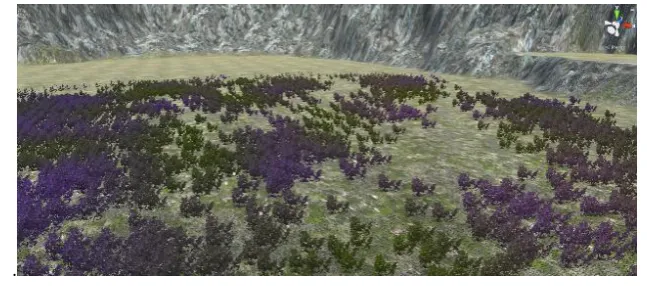
To gain an impressive experience in the game, we initiated many features to look alike the real-world scenarios.
Here, small details play a big role in the game and it is shown in fig.3.
4.1.3 Networking Interface
When implementing networking in Unity, we utilized C# scripts as well as multiple game object settings that
interacted with the Unity’s development environment. Additionally, we utilized a Peer-to-peer networking
architecture when implementing the multiplayer framework. This architecture was chosen due to the resources
we had as well as our architecture analysis.
4.2 Assets used
The assets that are used in this game add to the aesthetic of the game. It makes the overall product look nicer,
and made development of the game easier. This allowed us to set the majority of our focus on game
.
Figure 3: The Nature Environment and the grass models in the game.
Skybox: With the game taking place in an outdoors setting, ask ybox was used to represent an outdoor theme.
Nature Environment: To ensure a consistent outdoors theme,nature assets were used provide a diverse and organic environment for players.
Grass Models: This asset was used due to the original grass game object not fitting the theme the game was trying to achieve
Game Sounds: To provide an immersive experience, a wide range of sounds was used to ensure actions that occurred in the environment or by players would be representative of real-world interactions.
5.
CONCLUSION
This work is based upon the gaming strategy that is more convenient to the players. The Unity 3D game engine
gives a full-time support to emerging game developers. This project has distinguished graphical designs and
well-defined characters. The multiplayer battle mode can be played using wireless connection such as Wi-Fi,
Internet, etc. Working with new game engine gives us a new experience in gaming technology. It gives more
creativity while creating the animations and terrain in the game.
REFERENCES
[1] Lehui Huang, Bin Gui, Research on the Application of Products based on Unity3D, Proceedings on
International Symposium on Computers and Informatics, Netherland, 2015, 23-29.
[2] Pratik P. Patil, Ronald Alvares, Cross-Platform Application Development using Unity Game Engine,
International Journal for Advance Research in Computer Science and Management Studies,13(5), 2015,
87-93.
[3] Peng Xia, 3D Game Development with Unity: A Case Study: A First-Person Shooter (FPS) Game,
Thesis, Helsenki Metropolia University of Applied Sciences, Finland, 2014.
[4] Gwendal Simon, Farouk Messaoudi, Adlen Ksentini, Dissecting Games Engines: The Case of Unity3D,
Proceedings on 14th International Workshop on Network and Systems Support for Game, Zagreb, 2015,
112-120.
[5] Zhigang Shen, Landu Jiang, Kevin Grosskopf, Charles Berryman, Creating 3D web-based game
environment using BIM models for virtual on-site visiting of building HVAC systems, Proceedings on
Construction Research Congress, 2012, 823-829.
[6] Aswin Indraprastha, Michikho Shinozaki, The Investigation on Unity3D Game Engine in Urban Design
Study, ITB Journal of Information and Communication Technology, 3(1), 2009, 1-18.
[8] Ali Emre Soylucicek, Erkan Bostanci, Aykut Burak Safak, A Fuzzy Logic Based Attack Strategy Design
for Enemy Drones in Meteor Escape Game, International Journal of Computer Theory and Engineering,
9(3), 2017, 37-43.
[9] Sebastian Friston, Carmen Fan, Jozef Doboš, 3DRepo4Unity: Dynamic Loading of Version Controlled
3D Assets into the Unity Game Engine, Proceedings on 22nd International conference on communication
systems, London, 2017, 129-138.
[10] Julius Aderis, Virtual Game Museum: Gamified E-learning Environment for Learning Digital Games