I
NTEGRI
K
EY
: Integrity Protection of User Input
for Remote Configuration of Safety-Critical Devices
Aritra Dhar
ETH Z¨urich
[email protected]
Der-Yeuan Yu
ABB Corporate Research
[email protected]
Kari Kostiainen
ETH Z¨urich
[email protected]
Srdjan ˇ
Capkun
ETH Z¨urich
[email protected]
Abstract
Various safety-critical devices, such as industrial control systems, medical devices, and home automation systems, are configured through web interfaces from remote hosts that are standard PCs. The communication link from the host to the safety-critical device is typically easy to protect, but if the host gets compromised, the adversary can manipulate any user-provided configuration settings with severe consequences including safety violations.
In this paper, we propose INTEGRIKEY, a novel system for user input integrity protection in compromised host. The user installs a simple plug-and-play device between the input peripheral and the host. This device observes user input events and sends a trace of them to the server that compares the trace to the application payload received from the untrusted host. To prevent subtle attacks where the adversary exchanges values from interchangeable input fields, we propose a labeling scheme where the user annotates input values. We built a prototype of INTEGRIKEY, using an embedded USB bridge, and our experiments show that such integrity protection adds only minor delay. We also developed a UI analysis tool that helps developers to protect their services and evaluated it on commercial safety-critical systems.
1
Introduction
Many safety-critical devices are configured over network connections from host machines that are standard PCs. Examples of such devices include Programmable Logic Controllers (PLCs) used in manufacturing plants, medical devices, and home automation systems. Usually, the remote configuration is implemented as a simple web ser-vice [5–7, 23], as illustrated in Figure 1 that shows a con-figuration web form for a commercial PLC system [10] that we use as a running example throughout the paper.
In such remote configuration, the communication between the host and the safety-critical device (or its
Figure 1: Example configuration page. Screenshot from the ControlByWeb x600m [10] I/O server configuration page.
programmer device) is easy to protect through standard means such as a TLS connection [12]. However, if the host platform gets compromised—as standard PC platforms so often do—the adversary can manipulate any user-provided configuration settings. Such user input manipulation attacksare difficult to detect (before it is too late!) and can have serious consequences, including safety violations that can put human lives in danger.
More generally, trusted input through an untrusted host platform to a remote server remains an open problem despite of various research efforts [17, 20, 30, 31, 33, 34]. Indeed, all known approaches fortrusted inputhave their limitations. For example, transaction confirmation from the display of a separate trusted device, like a USB don-gle, is prone to user habituation and requires expensive additional hardware [30]. Secure input systems based on a trusted hypervisor have a large TCB and do not tolerate complete host compromise [31]. We review such prior solutions and their limitations further in Section 2.
Our goals and approach. In this paper, we focus on
risk of user habituation, small TCB) and easy adoption (e.g., minimal changes to the existing systems and user experience, low deployment cost).
We propose a new user input integrity protection ap-proach that we callinput trace matching. The basic idea behind our approach is straightforward. The user installs a trusted embedded device between the user input periph-eral and the host platform. This device intercepts user input events, passes them through to the host, and sends a trace of them (over a secure channel) to the server that compares the trace to the configuration settings received from the host to detect input manipulation. This approach can be seen as a second-factor for user input integrity protection. If the primary protection mechanism (i.e., the integrity of the host platform itself) fails, the secondary protection provided by input trace matching ensures that the target safety-critical device cannot be misconfigured.
Secure and easy adoption of this idea involves over-coming some technical challenges. The first is related to security, as an adversary that fully controls the host can execute restricted forms user input manipulation attacks, where he exchanges input values from interchangeable UI elements (e.g., two integers with overlapping ranges). Suchswapping attackscannot be detected by the server relying on the input trace alone. Another challenge is related to deployment. Our trusted device needs to com-municate with the server, but we want to avoid building an (expensive) separate communication channel into it. We further want to avoid the need to install additional soft-ware on the host that could assist in such communication. System and tool. Based on this idea, we design and implement a user input integrity protection system, called INTEGRIKEY, that is tailored forkeyboardinput, as such input is sufficient for configuration of many exist-ing safety-critical devices. Our system realizes the trusted embedded device as a simple USB bridge (for short BRIDGE) that is accompanied by a server-side user input matching library. To prevent wapping attacks, our solu-tion includes a simpleuser labelingscheme, where the user is asked to annotate interchangeable input elements. For easy adoption, we leverage the recently introduced WebUSB browser APIs to enable communication be-tween BRIDGEand the server in a plug-and-play manner. We also develop a user interface analysis tool, called INTEGRITOOL, that helps developers to protect their web services and minimizes the added effort of users. In particular, the tool detects input fields in web forms that require labeling and annotates the UI accordingly.
We implemented a prototype of BRIDGEusing an Ar-duino board and evaluated INTEGRITOOLusing a range of existing web-based configuration UIs supported by x600m, a commercial PLC server [10]. Our results show that the tool can correctly process the configuration UIs of many existing safety-critical systems. Our BRIDGE
implementation adds a delay of 50 ms on the processing of keyboard events and its TCB is 2.5 KLOC.
We also conducted a preliminary user study where we simulated a swapping attack on 15 study participants. Labeling prevented the attack in 14 cases.
Contributions. To summarize, in this paper we make the following contributions:
• New approach for integrity protection. We propose input trace matching as a novel approach for integrity protection of user input on untrusted host platforms.
• INTEGRIKEY. We design and implement a user input integrity protection system, tailored for keyboards, that consists of a USB bridge and a server-side library.
• INTEGRITOOL. We develop a user interface analysis and webpage annotation tool that helps developers to protect their web services and minimizes user effort.
• Evaluation. We verified that our tool can process UIs of existing safety-critical systems correctly. Our experiments show that the performance delay of INTEGRIKEYuser input integrity protection is low.
The rest of the paper is organized as follows. We ex-plain our problem in Section 2. Section 3 introduces our approach, Section 4 describes our system and Section 5 the UI analysis tool. We provide security analysis in Section 6. Sections 7 and 8 explain our implementation and evaluation. Section 9 provides discussion, Section 10 reviews related work, and Section 11 concludes the paper.
2
Problem Statement
In this paper, we focus on the problem of user input manipulation by a compromised host PC in scenarios such as web-based remote configuration of safety-critical devices. Attacks that compromise safety-critical systems directly are discussed in the literature. A survey of such works can be found in [14].
2.1
System model
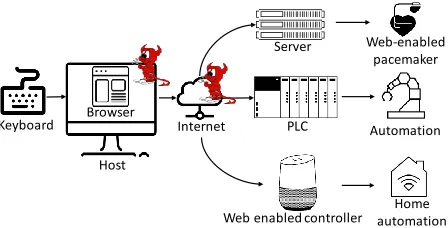
Our system model is illustrated in Figure 2. We consider a common setting, where the user configures a safety-critical device or a cyber-physical system (e.g., medical device, industrial robot, home automation system) over the Internet. The user provides configuration input through an input device (in our case keyboard) to a web browser running on thehostmachine that is a standard PC. The browser sends the configuration input to aserver
that configures (or is) the safety-critical device.
Keyboard PLC Automation Web-enabled
pacemaker Server
Internet
Home automation Web enabled controller
Host Browser
Figure 2:System model.We consider a setting where the user configures a safety-critical device through a web service from an untrusted local host. The user input device (keyboard) and the target safety-critical device are trusted. The host platform and the network connection can be controlled by the adversary.
safety-critical devices [5–7, 10, 23]. Later in the paper (see Section 9) we discuss extending our solution to other types of input devices, such as mouse input.
Adversary model. We consider the user input device (keyboard) trusted and the target safety-critical device, and the server that receives the user input, also trusted. We assume that the adversary may have remotely com-promised the host platform completely, i.e., the adversary controls the operating system, the browser, and any other software running on the host. We consider that even the host hardware can be exploitable. We assume that the ad-versary does not have physical access to the host platform. We consider such strong adversary realistic, since OS vulnerabilities in PC platforms are well-known, browser compromise is increasingly common (see, e.g., [13, 27] for recent attack vectors) and hardware exploits are possible, e.g., through fabrication-time attacks [22, 32].
2.2
Limitations of Known Solutions
The problem of trusted user input to a remote server through an untrusted host has been studied in a few different contexts. Here we review limitations of known approaches. Section 10 provides a more extensive review of related work.
Transaction confirmation.One common approach is transaction confirmation using a separate trusted device. For example, in the ZTIC system [30], a USB device with a small display and limited user input capabilities is used to confirm transactions such as payments. The USB device shows a summary of the transaction performed on the untrusted host and the user is expected to review the summary from the USB device display before confirming it. This approach is prone touser habituation, i.e., the risk that users confirm transactions without carefully examining them to be able to proceed with their main task, such as completing the payment, similar to systems that rely on security indicators [15, 16, 29]. Another
limitation of this approach is that it breaks the normal workflow, as the user has to focus his attention to the USB device screen in addition to the user interface of the host. Finally, such trusted devices with displays and input interfaces can be expensive to deploy.
Trusted hypervisor. Another common approach is secure user input using a trusted hypervisor. Gyrus [20] and Not-a-Bot (NAB) [18] are systems where a trusted hypervisor (or a trusted VM) captures user input events and compares them to application payload that is sent to the server. SGXIO [31] assumes a trusted hypervisor through which the user can provide input securely to a protected application implemented as an Intel SGX enclave [4] which in turn can securely communicate with the server. The main limitation of such solutions is that even minimal hypervisors have large TCBs and vulnerabilities are often found in them [19, 26].
Dynamic root of trust. The third common approach is trusted user input usingdynamic root of trust[25]. In the UTP system [17], the normal execution of the OS is suspended and a smallprotected applicationis loaded for execution. The protected application includes a minimal display and keyboard drivers, and is, therefore, able to re-ceive input from the user and send it to the server together with a remote attestation that proves the integrity of the application handling the user input. The main drawback of this approach is that it changes the user experience of the web-based configuration application significantly, as small protected applications cannot implement complete web UIs. For example, the UTP system implements only a minimal VGA driver for text-based user interfaces.
2.3
Design Goals
Given these limitations of previous approaches, our solution has the following main design goals:
• Strong integrity protection. Our solution should provide strong user input integrity protection even if the input host and the network are compromised. In particular, the solution should have a small TCB and not rely on tasks like transaction confirmation that are prone to user habituation.
• Easy deployment. Our solution should be easy to adopt in practice. In particular, we want to avoid sig-nificant changes to existing safety-critical systems, input devices, host platforms, or the web-based remote configuration user experience. We also want to avoid deployment of expensive hardware.
3
Our Approach
Remote server Compromised host
Keyboard
Trusted embedded device
Application level payload Keystroke
Input trace match
Figure 3: Approach overview. The user connects a trusted embedded device between the host and the keyboard. This device relays received keystroke events to the host and sends a trace of them over a secure channel to the remote server. The server compares the trace to the application payload received from the host to detect user input manipulation.
3.1
Input Trace Matching
We propose a simple but novel approach for the protection of user input integrity that we callinput trace matching. Our approach is tailored for keyboard input that is delivered to a remote server through a web application running on an untrusted host, as illustrated in Figure 3.
The main component of the solution is a trusted embedded device that the user connects between the keyboard and the host. The connection from the keyboard to the embedded device and from the embedded device to the host can be wired (e.g., USB) or wireless (e.g., Bluetooth). We consider the embedded device trusted, because it performs only very limited functionality and therefore it has significantly smaller software TCB and hardware complexity compared to the host.
The trusted embedded device performs two types functionality. The first functionality is that it forwards received keystroke events from the keyboard to the host. The application running on the host (e.g., a web browser) receives the user input events and constructs an application-level payload (e.g., an HTTP response) that it sends to the server. Our approach imposes no changes to the host platform or the application software running on it. The second functionality of the embedded device is that it sends a trace of the intercepted keystrokes to the remote server over a secure channel when the user either changes the text field (by pressing tab key) or submits the form (by pressing an enter key).
The server parses the application payload received from the host and extracts the user input values from it. Then it compares input values to the received traces to detect any possible any discrepancies. If the input values and keystroke events in the traces match, the user input can be safely accepted.
Group 1
Group 2
Group 3
Groups of swappable fields
Group 4
User Interface
HTTP Response packet POST / HTTP/1.1 Content-Type: form-data Relay temp 1=65 & …
Relay temp 2=20 Value
Swapped
sw
ap
p
ed
Figure 4:Swapping attack and interchangeable inputs.This screenshot shows our running example UI (PLC configuration web form), where the ‘Relay temp 1’ and ‘Relay temp 2’ user input field descriptions in the UI are swapped by the adversary. The corresponding HTTP response packet shows the swapped value of these two fields. Additionally, the figures shows groups of input fields that are swappable.
3.2
Challenges
Realizing the above idea involves both security and deployment challenges that we discuss next.
Swapping attacks. Input trace matching, as outlined above, prevents most user input manipulations by the untrusted host. For example, if the user types in one value, but the application payload contains another, the server can detect the mismatch and abort the operation.
However, the adversary may still perform more subtle andrestricted forms of user input manipulation. The problem is exemplified by our running example UI, shown in Figure 4. Input trace matching allows the server to ver-ify that all values received from the host were indeed typed in by the user, but since the some values may interchange-able(i.e., they can have the same format and overlapping acceptable ranges), the untrusted host can perform a user input manipulation that we callswapping attack.
Network WebUSB/WebBT
Remote server + INTEGRIKEY
server-side component Host system/ Browser
BRIDGE
1 Open web app 2 Setup 𝑇𝐿𝑆1 5 Setup 𝑇𝐿𝑆2
3 JavaScript
6 Input
(labeling) 8 App payload
9 BRIDGEtrace
Match data 10
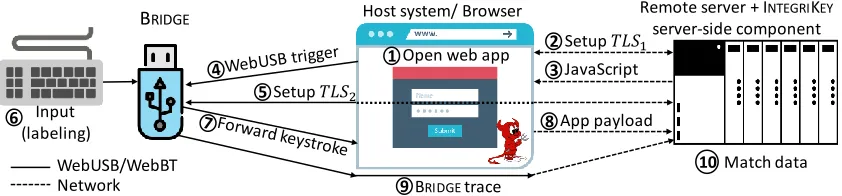
Figure 5:INTEGRIKEYoperation. The browser on the host opens a standard TLS connection (T LS1) to the server which replies
with a web page and JavaScript code. Using the WebUSB API, the JavaScript code invokes the BRIDGEthat will establish another TLS connection (T LS2) to the server. The BRIDGEforwards received keystroke events to the host and periodically sends a trace of
them to the server that performs matching between the traces and received application payload.
the user input in the received trace matches the HTTP response, the server cannot detect such manipulation from the input order. Assuming that the entered values are in the overlapping region of acceptable values for the respective input fields, the server cannot detect such manipulation based on the received values either.
Similarly, the adversary can swap any interchangeable user input fields (overlapping format and range) in the UI. Figure 4 shows a grouping for all interchangeable values in our example web form.
Adoption challenges.Input trace matching requires a secure communication channel from the trusted embed-ded device to the server. Our goal is to keep the device simple (small TCB) and inexpensive, and thus we avoid designs where the embedded device has its own com-munication capabilities (e.g., dedicated cellular radio). Host-assisted communication requires installation of new software on the host which can complicate adoption and in some cases may not even be possible for the user. Ideally, connecting the trusted embedded device to the host should be all the user has to do.
Another adoption challenge is that a single device should be able to provide user input integrity protection for multiple web services. The device can be configured with keys and addresses of all supported servers, but during usage we want to avoid additional user tasks, such as manually indicating which of the pre-configured servers should be used.
4
I
NTEGRIK
EY: Input Protection System
In this section we present INTEGRIKEY, our system for user input integrity protection for remotely configurable safety-critical systems. Our system includes two main components: (1) the embedded trusted device realized as a simple USB bridge that we call for short BRIDGEand (2) a server-side user input matching library. To enable easy deployment, we use WebUSB [9], a recently intro-duced browser API standard supported by the Chrome browser. This API allows JavaScript code, served from
an HTTPS website, to communicate with a USB device, such as our BRIDGE. To prevent swapping attacks, we propose a simpleuser labelingscheme where the user is instructed to annotate swappable input values.
4.1
Initialization
Our system requires a secure (authenticated, encrypted and replay-protected) channel from the embedded device (BRIDGE) to the remote server. In our system we leverage standard TLS and existing PKIs for this. To enable server authentication, the public key of the used root CA is pre-configured to BRIDGE. To enable client authenti-cation, we use TLS client certificates. Each BRIDGE device is pre-configured with a client certificate before its deployment to the user and the server is configured to accept such client certificates.
Besides input integrity protection, user authentication to the remote server without revealing the user’s credential to the compromised host is also important. Our current implementation does not implement such user authenti-cation, but in Section 9 we dicuss how this can be enabled.
4.2
System Operation
Next we describe the operation of the INTEGRIKEY system that is illustrated in Figure 5.
1. The user starts the browser on the host and opens the web page for remote configuration of the target safety-critical device.
2. The browser establishes a server-authenticated TLS connection (T LS1) to the server.
3. The server sends the web configuration form to the browser together with JavaScript code. The web form includes instructions for user labeling, as described below in Section 4.3.
Figure 6: User labeling example. All input fields that need protection against swapping attacks are marked with labeling instructions. For example, to enter a value 20 to the input field ‘Relay temp 1’the user should type in‘reltem1:20’as indicated in the web form next to the input field.
WebUSB API to communicate with BRIDGE. The browser passes the server URL to BRIDGE.
5. Based on the received URL and the pre-configured trust root and client certificate, BRIDGEestablishes a mutually-authenticated TLS connection (T LS2) to the server through the host using the WebUSB API.
6. The user completes the web form, as explained in Section 4.3.
7. BRIDGEcaptures keystrokes and forwards them to the browser.
8. Once the user has completed the web form, the browser constructs a payload (HTTP response) and sends this to the server over theT LS1connection.
9. BRIDGEcollects intercepted keystrokes and period-ically (e.g., when receiving a tab or return key press, or on every keyboard event) sends a trace of them to the server through theT LS2connection.
10. The server compares the received application pay-load and traces (input trace matching), as explained in Section 4.4. If no mismatch is detected, the server accepts the received user input.
4.3
User Labeling
To prevent swapping attacks (recall Section 3.2), we introduce a simple user labeling scheme. In this scheme, the user is instructed to annotate each interchangeable input with a textual label that addssemanticsto the input
Application level payload INTERGIKEYBridge trace
r 1 : r 1
POST / HTTP/1.1 Content-Type: form-data Relay1=rel1:r1 & Type=typ1:float & Decimal places 1=dp1:2& Relay temp 1=tem1:20& Relay2=rel2:r2 & Type=type2:float & Decimal places 2=dp2:4& Relay temp 2=tem2:65& Units=deg
t y 1 : f l o a t
tab e l
p
. . .
Figure 7: Input trace matching. The server compares user input values (and their labels) in the application payload (e.g., HTTP POST data) against the user input in the received traces.
event traces and thus allows the server to detect user input manipulation like swapping attacks.
An example of the user labeling process is illustrated in Figure 6. When the server constructs the web form, it adds labeling instructions to it. These instructions indicate the textual label, such as‘rel1:’for input field‘Relay 1’, that the user should type in. The server adds such label-ing instructions to each input field that needs protection against swapping attacks. In Section 5 we explain an auto-mated UI analysis tool that helps the developer to securely find all such input fields and update the UI accordingly.
For each such field, the user types in the label followed by the actual input value. For example, to enter value ’r1’ to the input field ‘Relay 1’, the user types in ‘rel1:r1’. Some input fields may not require labeling. For example, the ‘Units’ field in our example user interface (Figure 6) does not have to be labeled by the user as it is not swappable with any other field.
We consider trained professionals that configure indus-trial control systems, medical devices etc. as the primary users of our solution. Such users can receive prior or pe-riodic training for the above described labeling process. The secondary target group is people such as home au-tomation system owners. In this case, no prior training can be assumed, but the UI can provide labeling instructions.
4.4
Server Verification
To verify the integrity of the received user input, the server performs a matching operation shown in Figure 7.
𝑓1 𝑓2
Configuration webpage
INTEGRIKEYtool
Specifications
𝑓1
𝑓3
Label
Transformed webpage
𝑓3
𝑓2 Label
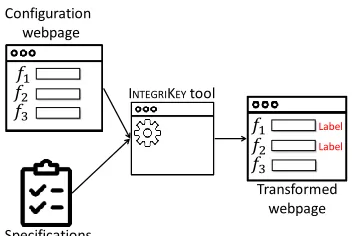
Figure 8: INTEGRITOOL overview. INTEGRITOOL takes a web page (HTML file) and a web page specification with input fieldsf1,f2,f3. In this examplef1andf2are swappable.
The final output is a transformed webpage with labelling information (f1 and f2 requires labelling) for the users and
converted mouse based UIs (drop-down menus, radio buttons, sliders etc.) to text fields.
also the opposite order in the trace would be acceptable. Such a case might happen, if the user would fill in the web form values in an order that differs from the default top-to-bottom form filling.
Unlabeled inputs.Next, the server parses through the application payload again, and for every user input field that does not require labeling it performs the following checks: the server verifies that (i) the input appears in the expected position in the payload and (ii) one of the input traces contains the matching value. Also unlabeled input values can appear in any order the in traces.
5
I
NTEGRIT
OOL: UI Analysis Tool
Our labeling scheme helps web service developers to prevent swapping attacks. An obvious approach for de-velopers is to require that users label all inputs. However, as labeling increases user effort, a better approach is to ask the user to label only those input fields that are interchangeable and thus susceptible to swapping. In this section, we describe a UI analysis tool, called INTEGRI -TOOL, that helps developers to identify input fields that should be protected. When developers request labeling for those fields only, our tool also reduces user effort.
Figure 8 illustrates an overview of the tool that takes two inputs. The first input is the HTML code of the web form. The second input is a user interface specification that contains definitions for all input fields in the page. INTEGRITOOLprocesses the provided inputs and outputs a generated webpage which is annotated with labeling instructions for the user. For example, for a user interface with input fields f1,f2,f3 where f1 and f2 are inter-changeable, the tool outputs a webpage with the labelling instruction for f1and f2. An example screenshot of a webpage generated using our tool is shown in Figure 6.
Specification 1: Specification example. This web page specification corresponds to our running user interface example that is illustrated in Figure 4.
<InputSchema> <Input>
<ID>Relay 1</ID>
<Format>s[a-zA-Z0-9]+[min=1,max>min]</Format> </Input>
<Input>
<ID>Decimal places 1</ID>
<Format>i[0-9]*[min=0,max=5]</Format></Input> <Input>
<ID>Type 1</ID>
<Format>m[{int, float, bool}]</Format></Input> <Input>
<ID>Relay temp 1</ID>
<Format>i[0-9]*[min=-20,max=150]</Format></Input> <Input>
<ID>Relay 2</ID>
<Format>s[a-zA-Z0-9]+[min=1,max>min]</Format> </Input>
<Input>
<ID>Decimal places 2</ID>
<Format>i[0-9]*[min=0,max=5]</Format></Input> <Input>
<ID>Type 2</ID>
<Format>m[{int, float, bool}]</Format></Input> <Input>
<ID>Relay temp 2</ID>
<Format>i[0-9]*[min=-10,max=100]</Format></Input> <Input>
<ID>Unit</ID>
<Format>s[unit][min=1, max=5]</Format></Input> </InputSchema>
5.1
UI Specification
The UI specification needs to be manually written by the developer. The specification captures the fact whether two user input fields in the UI are interchangeable. One such example is a home automation system, where the user can set the temperature of a specific room by providing the input to the web application. The attacker can swap input fields for temperatures of two rooms. Another and more interesting example is a UI where two fields are semantically different but share similar format. Consider, for example, the configuration of a medical device, where the doctor can set blood pressure and heart rate limit. As the range of these two fields is overlapping, the attacker can swap the two fields even though they are semantically very different.
integer). More precisely, we define the input format as:
type[regx][min=x,max=y][{elements}]∗
wheretype denotes the input field data type such as string(s),integer(i),float(f),date(d),time(t), menu(m) andradio button(r).[regx]defines the regu-lar expression for acceptable values.minandmaxdefine possible minimum and maximumstringlength or mini-mum and maximini-mum values if the type isinteger,float, dateortime. The optional[{elements}]is only applica-ble to UI objects such asmenu(such as drop down menus) andradio button.{elements}represents all the objects in the given UI element that can be chosen by the user.
We note that INTEGRITOOL requires a tight spec-ification to provide a precise output. If the developer provides a coarse-grained specification, that leads to an over-approximation of swappable fields by the tool that increases user effort but will not impose security risk.
5.2
Tool Processing
INTEGRITOOLprocesses all input fields from the speci-fication by evaluating them based on their specispeci-fication. For numeric input fields (integer,float,time,date) the test checks for overlapping acceptable values, i.e., a boundary condition test. Forstringfields, our tool tests if the format constraints of two input fields can be met at the same time. For example, consider the following expressions:
RE1=s[a−zA−Z]+[min=x,max=y]
RE2=s[a−zA−Z0−9]+[min=x,max=y]
=⇒ RE1(RE2
where RE1 represents a string containing uppercase or lowercase alphabetic characters andRE2represents a stringcontaining uppercase or lowercase alphabetic or numerical characters. In this case,RE1is a subset ofRE2 as all strings fromRE1are also members ofRE2but there are strings inRE2that are not inRE1. This can be verified by checking ifRE1∩(RE2)c=φ =⇒ RE1⊂RE2, where φ denotes empty set. In general, two fields fi (corre-sponding regular expressionREi) and fj(corresponding regular expression REj) can be swapped if and only if REi∩REj6=φand, fi& fjshares at least two elements. A short proof for this can be found in Appendix A.
Based on such tests, we design Algorithm 1 that gen-erates a group of overlapping input fields. The algorithm works bycomparing every user input field to all the other fieldsin the specification.
If one of the two compared fields is string and another is or number (integer,float,dateandtime) type, we check if their regular expression if overlapping
Algorithm 1:This algorithm finds swappable user input fields based on user interface specification.
Input:SpecificationSwith input fieldsF.
Output:Set of subset of fieldsG={g1, . . . ,gn}
where all the fields in agi∈Gare swappable.
1 G←Initialize empty group
2 for∀f∈Fdo
3 for∀fin∈Fdo
4 f.regEx,fin.regEx←read fromS
5 iff.type=stringthen
6 iff.regEx⊂fin.regExthenaddField←true
7 iffin.type= (menu∨radio button)then
8 iffin.elements∈f.regEx thenaddField←true
9 iff.type= (integer∨float∨time∨date)then
10 iffin.type= (menu∨radio button)then
11 finmin←min(fin.elements)
12 finmax←max(fin.elements)
13 if¬(fmax<fmin
in ∨fmin>finmax) thenaddField←true
14 iff.type=(menu∨radio button) ∧fin.type=(menu∨radio button)then
15 iff.elements∩fin.elements6=φ
thenaddField←true
16 ifaddField=truethen
17 g←empty set of fields
18 g.add(f,fin)
19 G.add(g)
20 addField←f alse
21 returnG
(line 6). If one of the field isstringand another is either menuorradio button, then we check if an element of themenu(orradio button) is a member of thestring regular expression (line 8). If both of the compared fields are of numeric type, then we check for the boundary condition (line 13). The boundary check is also done for the elements ofmenuandradio buttonas the members could be number type (line 10). If both fields aremenuor radio buttontype, then we check if the intersection of two fields is empty (line 14).
Evaluating if a regular expression is a subset of another requires conversion of the regular expression to a deterministic finite automaton (DFA). The algorithm requires computing pairwise swappable tests over all the fields in the specification and returns groups of swappable fields. We analyze the complexity and performance of this algorithm in Section 8.
On Off Radio
Radio
Instruction
Available On, off Menu
A B C
Menu InstructionAvailable A,B,C
Slider
Slider InstructionRange 0-100
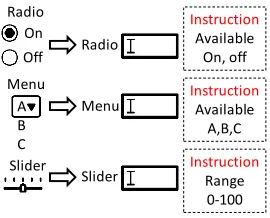
Figure 9: UI conversion. Conversion of radio button, drop-down menu and slider to an equivalent text field with added instructions.
where the user is asked to type in either valueonoroff, correspondingly. Similarly, drop-down menus and slider elements are converted to a text input fields.
5.3
Web Page Annotation
The second output of INTEGRITOOLis an annotated user interface. Our tool generates labeling instructions for users and embeds them into the web form, i.e., our tool instruments the HTML code. The instruction includes what label the user should add before each input value.
For choosing label names, we implement a simple approach, where INTEGRITOOL takes the first three characters from each of the words. For example’Relay temp 1’converts to’reltem1’. Other label generation approaches are, of course, possible as well. In case of collision of generated labels, INTEGRITOOLappends an incremented counter at the end of the label. Additionally, if there are multiple configuration pages (web forms) on the remote server that are identical, INTEGRITOOLalso appends an incremented counter. This ensures that no two text fields have identical labels.
An example of the tool’s output is shown in Figure 6 which was produced using our running example UI and the specification listed in Specification 1 as inputs.
6
Security Analysis
In this section we provide an informal security analysis of our system. The goal of the adversary is to cause a misconfiguration of a safety-critical device against the intention of the user.
Given our adversary model, the adversary has the following options to mount misconfiguration attacks. First, the adversary can modify the user interface that is shown to the user. Second, the adversary can control the communication channel from the host to the server (T LS1). Given our system design, the adversary cannot inject any messages into the channel from BRIDGEto the server (T LS2), i.e., all user keyboard events received by the server were generated by the user.
Arbitrary modifications. The simplest adversarial strategy is to manipulate only the application payload that is sent to the server. The adversary can, e.g., change one input value provided by the user to another arbitrary value in the HTTP response. Such attacks are detected by the server, because the configuration data received over
T LS1does not match the traces received overT LS2. Swapping attacks. More sophisticated adversarial strategy is to manipulate both the application payload and the user interface. More specifically, the adversary can change the descriptions and the order of the user input fields and modify any instructions that are part of the user interface, such as the labeling instructions. Figure 4 shows one such example of the attack where the fields ‘Relay temp 1’ and ‘Relay temp 2’ are swapped.
The goal of a swapping attack is that the server interprets received input values with different semantics than the user intended. Assuming that the user interface contains interchangeable fields, the adversary can con-struct an HTTP response where all input values are listed in the correct order and their values match to the input events. Two variants of such attacks are possible.
In the first variant, the adversary does not manipulate the labeling instructions that are part of the user interface. In such a case, the user interface that is shown to the user has aninconsistency, because the input fields and labeling instructions do not correspond to each other. The user may react in different ways that we enumerate below:
• Case 1: Abort. The user may notice the inconsistency in the UI and abort the process.
• Case 2: Correct labeling. The user may perform the labeling correctly. That is, he may prefix each entered input value with the matching label. The target device is configured correctly, despite the user interface manipulation.
• Case 3: Incomplete labeling. The user may fail to complete the required labels. The server will abort the process.
• Case 4: Incorrect labeling. Finally, the user may perform the labeling incorrectly. That is, he may associate one of the asked input values with incorrect (and swappable) label prefix. The server cannot detect this case and the target device will be misconfigured.
In Section 8.3 we report results of a small-scale user study that provides preliminary evidence on how common these cases are, and especially how many people would fall for the attack (Case 4).
instructions correspond to the modified UI, in which case the label reordering essentially nullifies the effect of UI reordering and the UI is consistent again (no risk of misconfiguration).
Trace dropping. Since all communication from BRIDGEto the server is mediated by the untrusted host, the adversary may also attempt to manipulate the traces by selectively dropping packets (e.g., remove certain user input). However, such attacks are prevented by the use of a standard TLS connection.
Cross-device attacks. An additional attack strategy is to trick the user to provide input for the configuration of one safety-critical device, but use this user input for the configuration of another device. In such cross-device attacks, the host presents to the user the configuration user interface from server A but tricks BRIDGEto establish a connection with server B.
Cross-device attacks are only possible, if (i) the same BRIDGEis pre-configured for both servers A and B, (ii) every user input field in the configuration web pages of servers A and B is interchangeable, and (iii) both configuration pages have exactly the same labels. We consider such cases rare. To protect against cross-device attacks, both configuration user interfaces A and B can be processed with the same instance of INTEGRITOOL which can annotate the pages with unique labels.
7
Implementation
We implemented a complete INTEGRIKEYsystem. Our implementation consists of three parts: (1) BRIDGE device prototype, (2) SERVER input trace matching library and (3) INTEGRITOOLUI analysis tool.
BRIDGE. Our BRIDGEprototype consists of two
Ar-duino boards and one USB switch, as shown in Figure 10. We used two separate boards, and an additional switch, because of the limited USB interfaces and computational power in the used Arduino boards, but we emphasize that a production device could be realized as a single embedded device. In more detail, our BRIDGEprototype consists of an Arduino Leonardo board, a 16 MHz AVR micro-controller, which communicates with the host using WebUSB, and an Arduino Due, a 84 MHz ARM Cortex-M3 micro-controller, to execute computationally more expensive cryptographic operations needed for TLS. The two boards are connected using theI2C proto-col [3] in the master-slave configuration. The prototype can be connected to the keyboard via a custom-made USB switch (see 4 in Figure 10). We use two boards as the WebUSB library we used only supported AVR boards such as Arduino Leonardo which is not powerful enough to execute cryptographic operations required by the TLS that we implement on the Arduino Due board.
Arduino
Leonardo
Arduino
Due
USB
switch
Host systemKeyboard
Pass-through to Host system
Figure 10: BRIDGEprototype. BRIDGEprototype consists of the following: 1) Arduino Due board is connected with the keyboard and executes cryptographic operations in TLS, 2) Arduino Leonardo board communicates with the browser using WebUSB, 3)USB connection from the BRIDGEto the host system, 4) USB switch to switch between the secure and insecure mode (pass-through), 5) the connection between the BRIDGEand the USB switch, 6) the keyboard connection, 7) the host pass-through connection for the insecure mode.
As the currently available version of the WebUSB library [9] allows only one USB interface, our prototype cannot emulate a keyboard (interrupt transfer) and a persistent data (bulk transfer) device required for the TLS channel at the same time. Therefore, our prototype sends keyboard signals to the JavaScript code running in the browser. The JavaScript code interprets these signals and translates them to keyboard input on the web page.
We use the Arduino cryptographic library for the TLS. The limited set of cipher suites in our TLS implementation uses 128-bit AES (CTR mode), Ed25519 & Curve25519 for signatures, Diffie-Hellman for key exchange and
SHA256 hashes. Our prototype implementation is
approximately 2.5K lines of code.
SERVER. Our server implementation for input trace
matching is a Java EE Servlet hosted on an Apache Tom-cat web server. We tested this implementation on a stan-dard server platform, but the same code could be installed on a PLC server, such as [5–7,10], as well. If a legacy PLC server does not allow installation of new code, our system could be deployed via a proxy, as discussed in Section 9.
implementation is approximately 500 lines of code.
INTEGRITOOL. We implemented the UI analysis
tool in Java based on the JAVA AWT graphics library. The tool is around 1.5K lines of code and uses the Java native XML interpreter library to read the specification, DK.BRICS.AUTOMATON [1] for regular expression and
JsoupHTML parser to parse web pages.
8
Evaluation
In this section we provide an evaluation of the INTE -GRIKEYsystem and the INTEGRITOOLUI analysis tool. We also report results from a small-scale user study, where we simulated a swapping attack on 15 study participants. Experiment setup. All experiments were performed on a laptop with a 3.2 GHz quad-core Intel i5 CPU and 16 GB memory running Ubuntu 16.10 64-bit. We used Google Chrome version 61 and JDK v1.8.
8.1
I
NTEGRIK
EYPerformance
We evaluated the performance of our BRIDGEprototype using the following two metrics:
(1) Page loading latency: The elapsed time between the web page load and when the BRIDGE is ready to take input from the user. The JavaScript code served by the remote server communicates with the BRIDGE and establishes a TLS using the WebUSB API. The additional TLS messages and the BRIDGEprocessing introduce this delay only at the initial loading of the page. We measure the difference between the time when the JavaScript code gets loaded on the browser and the time when the final TLS handshake message is sent.
(2) Keystroke latency: The added processing delay when the user presses a key. This time is due to the inter-nal processing of the BRIDGE. We place the measurement at program point the USBHost library starts capturing the keyboard event and at the program point the device sends the data via the WebUSB interface to the browser.
We measured the page loading latency as 800 ms and the keystroke latency as 50 ms (both averaged over 500K iterations). These latencies are specific to the implemen-tation architecture and the used boards, and that they can be reduced significantly using newer prototyping boards.1 We also tested the performance overhead of the server-side processing. The server has to maintain an additional TLS connection (T LS2) which has a small cost and match the parsed HTTP response with the received
1TheI2Cchannel between the master and the slave device is limited to 1 kHz. We have started development on a standalone Arduino Genuino Zero, supported by the new version of the WebUSB driver. This implementation eliminates the need for theI2Cchannel and can potentially reduce the latencies significantly.
Table 1: User interface processing time. We tested the processing time of our UI analysis tool on the web pages from the x600m PLC server and the home automation system.
Web page #Fields Processing time (ms.) SD
x600m Web PLC
Register configuration 6 1.654 0.0131 Counter configuration 7 0.771 0.0089 Event configuration 8 0.622 0.0085 Action configuration 5 1.241 0.0111 Supply voltage 4 0.673 0.0099 Calender configuration 11 0.713 0.0105
Home automation
Home configuration 6 0.016 0.0018 Room configuration 5 0.012 0.0015
user input events which takes less than a microsecond. From bandwidth point of view, the overhead of the second TLS channel is also small (this channel is only used to send the characters typed in by the user).
8.2
I
NTEGRIT
OOLEvaluation
We evaluated our UI analysis tool implementation using two existing systems: PLC and home automation controller. The PLC system we used was ControlBy-Webx600m[10] I/O server and we tested six separate configuration web pages for it. The home automation system we used is called home-assistant [2] and we tested two different configuration pages for it. We wrote UI specifications these pages and the fed the specifications to our tool implementation. The tool produced groups of interchangeable user input fields that we the manually verified to be correct. Table 2 in Appendix provides the details of this evaluation, including specifications of for tested UIs and reported swappable elements. Based on this evaluation, we make two conclusions. The first is that our tool is able to process configuration UIs of existing, commercially-available safety-critical systems. The sec-ond is that many such UIs have swappable user input fields that need protection provided by our labeling scheme.
Additionally, we tested our UI analysis tool on user interfaces of other PLC controllers, home automation systems, medical device control, personal data manage-ment and online banking. Again, we wrote specifications for these user interfaces and processed them through our tool that founds swappable input elements in many of the tested user interfaces. We mined around 35 different text fields from 4 different application types. Table 3 in Appendix lists our findings.
We measured the processing time of our tool. Table 1 shows our results: the processing time of one web page varies from 0.01 ms to 1.65 ms. The processing time depends on the number of states in the DFA constructed from the regular expression of the specification and the number of input fields.
of states S in the non-deterministic finite automaton (NFA) that is derived from the regular expression that is quadraticO(|F|2) with respect to the number of input fields|F|. In practice, the analysis of tested UIs was very fast as i) the number of input fields is usually 6 or less and ii) the DFAs from the specifications contain 2-3 states for most of the input fields.
8.3
Preliminary User Study
We also conducted a small-scale user study to understand if the users can perform the proposed labeling correctly.
Recruitment. We recruited 15 study participants, aged 26-34, and all having a master’s degree in computer science or related field.
Procedure. We prepared a web page extracted from the ControlByWeb x600m I/O server. We passed this page through our INTEGRITOOLthat annotated the page with the labeling instruction and converted drop-down menus to equivalent text fields. To simulate a swapping attack, we modified the page such that the description for the‘Relay temp 1’and‘Relay temp 2’fields were exchanged. The labeling instructions were unmodified.
We provided each study participant with an informa-tion sheet that provided brief background informainforma-tion on labeling and explained that the task is to configure a PLC device based on the provided instructions. We observed the study participants while they performed this task. Figure 11 in Appendix shows the study UI and the information sheet.
Results.Out of 15 participants, 7 noticed the inconsis-tency between the fields and labeling instructions in the UI, stopped the task, and report it to the study supervisor (Case 1 in Section 6). Another 7 participants did not detect the UI inconsistency, but filled the input with cor-rectly associated labels, resulting in corcor-rectly configured device (Case 2). One study participants completed the labeling incorrectly and fell for the attack (Case 4).
Ethical considerations.We did not collect any private information, such as email addresses or password. The study only involves the participants completing a web form with values that we provided to them.
Study discussion. In our user study, we provided brief instructions the participants (see the information sheet in Appendix). This is inline with the primary usage of our system, where INTEGRIKEYis used by trained professionals, who configure medical devices, industrial PLC systems and similar safety-critical devices. The secondary user group of our system is people like home automation system owners who have not received training for the task. Our study was not tailored for this scenario.
9
Discussion
Deployment. Assuming a browser that supports the WebUSB standard, our solution can be deployed without any changes to the host. The server-side component of our solution introduces small changes to the server. In case of legacy systems that are difficult to modify, the required server-side functionality could be implemented by a proxy server. BRIDGEcould be configured to send the user input events to the proxy that could perform the input trace matching before passing the response to the unmodified legacy server.
Bluetooth. WebBluetooth [8] is another recent web API standard by Google Chrome that allows a JavaScript code to communicate with devices that are connected with the host. Our approach could be realized using WebBluetooth as well.
Mouse input. Our current implementation is limited to keyboard input. To enable usage with various UIs with keyboard only, our tool converts elements, such as drop-down menus, sliders, and radio buttons, to text inputs. Our approach could be extended to pointer devices, such as the mouse. However, in such system, several aspects, such as mouse sensitivity and acceleration, and behavior of the mouse at the screen border would have to be con-sidered. The fact that such mouse settings are controlled by the host OS would complicate the implementation.
User authentication. An adversary that controls the host is able to eavesdrop any user authentication creden-tials, such as passwords, entered to the host. To prevent such credential stealing, the trusted embedded device could be configured to act as an authentication token in addition to its main purpose of input integrity protection. For example, an administrator could configure the device with client certificates that could be used to authenticate the user during establishment ofT LS1connection to the server without revealing the authentication credentials to the untrusted host.
Automated specifications. Our current implemen-tation of INTEGRITOOL requires that the developers specify the web page specification manually. An interest-ing direction for future work would be development of a tool that parses the web page HTML and JavaScript code to generate the specification automatically.
Other channels. In our design, the connection from the trusted embedded device to the server shares the same physical channel as the browser, i.e., the Internet connectivity of the host. However, INTEGRITOOLcan be configured in such a way that this channel remains sepa-rated physically from the host. This can be achieved, for example, by using a smartphone application in the role of the trusted device. The drawback is increased TCB size.
alternative trust model (similar to [18, 20]) would be one where the host OS trusted, but the browser, or one of its extensions, is compromised. Under such trust model, the OS could take the role of the trusted embedded device.
Other use cases. Our solution could be used also in other use cases such as the authenticated logging of user input in the context of intrusion detection. The trusted embedded device can record user input to be presented as a proof later if needed.
10
Related Work
The problem of protecting integrity of user input that is delivered to a remote server via an untrusted host has been studied previously in a few different contexts. Here we review the most related prior works.
User intention monitoring. The first set of related solutions focus on userintention. These systems attempt to ensure that the data received by the remote server is constructed as the user intended.
Gyrus [20] records user intentions, in the form of text input typed by the user, and later tallies it with the application payload that is sent to the server. On the host, Gyrus assumes an untrusted guest VM (dom-U) that can manipulate user input and a trusted VM (dom-0) that draws a secure overlay and captures the user input. The overlay is application-specific and covers critical input fields such as the website address bar, mail compose window etc. When the application sends a message to the server, dom-0 matches the captured user input data with the application payload.
Not-A-Bot (NAB) [18] attempts to ensure that data received from the host was generated by the user and not by a malicious software. Also NAB relies on a trusted hypervisor that loads a simpleattesterapplication whose software configuration can be verified through remote attestation. The attester records user input events and provides a signed statement of them to the server. Binder [11] is another similar system where a trusted OS correlates outbound network connections with the recorded user inputs events.
The main difference between these solutions and our work is that we assume a fully compromised host.
Trusted path. User input integrity has been studies also in the context of hardware-based trusted execution environments (TEEs). The termtrusted pathrefers to a secure communication channel between the user and a protected application running on an untrusted platform.
UTP [17] describes a unidirectional trusted path from the user to a remote server using dynamic root of trust based on Intel’s TXT technology [24, 25]. The system suspends the execution of the OS and loads a minimal pro-tected application for execution. This loading is measured and stored to a TPM and proved to a remote verifier using
remote attestation. The protected application creates a se-cure channel, records user input and sends them sese-curely to the server. The main drawback of this approach is that such minimal protected applications cannot implement complex (web) user interfaces. For example, UTP is limited to VGA-based text UIs to keep the TCB small.
SGXIO [31] assumes a trusted hypervisor and trusted device drivers and uses them to create a secure channel from the user to an SGX enclave. Intel’s Software Guard Extensions (SGX) [4] is a trusted execution environment (TEE) implemented as a specific execution mode in the processor. SGX allows isolated execution of small pro-tected applications (enclaves) and protects their secrets and execution integrity from any untrusted software running on the same platform. The main difference to our work is the need for a trusted hypervisor.
Zhou et al. [33] realize a trusted path for TXT-based TEEs, again relying on a small trusted hypervisor. In this solution, also device drivers are included in the TCB. Wimpy kernel [34] is a small trusted kernel that manages device drivers for secure user input. We, in contrast, assume a completely compromised host.
Confirmation devices. The third set of known solutions use a separate trusted device to confirm user input for transactions like online payments. ZTIC [30] is a small USB device with a display and user input capa-bilities. This device shows a summary of the transaction performed on the untrusted host and the user is expected to review the summary from the USB device display before confirming it. Kiljan et al. [21] propose a similar transaction confirmation device.
Such solutions have three main drawbacks. First, they are prone to user habituation, i.e., the user will not always carefully review the transaction. Second, they break the normal workflow, as the user has to focus his attention to the USB device screen in addition to the normal UI on the host. Third, such devices can be expensive to deploy. Our solution is cheap to deploy and the user experience remains mostly unchanged.
11
Conclusion
References
[1] dk.brics.automaton - finite-state automata and regular ex-pression for java.http://www.brics.dk/automaton/.
[2] Home assistant demo.https://home-assistant.io/ demo/.
[3] I2c. https://learn.sparkfun.com/tutorials/ i2c.
[4] Intel sgx homepage. https://software.intel.com/ en-us/sgx.
[5] Modicon momentum. https://www. schneider-electric.us/en/product-range/ 535-modicon-momentum.
[6] Simatic s7-1200. https://www.siemens.com/ global/en/home/products/automation/systems/ industrial/plc/s7-1200.html.
[7] Sitraffic smartguard. https://www.siemens. com/global/en/home/products/mobility/ road-solutions/traffic-management/ strategic-management-and-coordination/ centrals/smartguard.html.
[8] Web bluetooth. https://webbluetoothcg.github. io/web-bluetooth/.
[9] Webusb api.https://wicg.github.io/webusb/.
[10] X-600m — web enabled i/o controller. https: //www.controlbyweb.com/x600m.
[11] CUI, W., KATZ, R. H.,AND TIANTAN, W. Design and implementation of an extrusion-based break-in detector for personal computers. In21st Annual Computer Security Applications Conference (ACSAC’05).
[12] DIERKS, T. The transport layer security (tls) protocol version 1.2.
[13] DOUGAN, T.,AND CURRAN, K. Man in the browser attacks.International Journal of Ambient Computing and Intelligence (IJACI)(2012).
[14] FACHKHA, C., BOU-HARB, E., KELIRIS, A., MEMON, N., ANDAHAMAD, M. Internet-scale probing of cps: Inference, characterization and orchestration analysis. In
Proceedings of NDSS(2017).
[15] FELT, A. P., REEDER, R. W., AINSLIE, A., HARRIS, H., WALKER, M., THOMPSON, C., ACER, M. E., MORANT, E.,ANDCONSOLVO, S. Rethinking connection security indicators. InTwelfth Symposium on Usable Privacy and Security (SOUPS 2016)(Denver, CO, 2016), USENIX Association, pp. 1–14.
[16] FELT, A. P., REEDER, R. W., ALMUHIMEDI, H., AND
CONSOLVO, S. Experimenting at scale with google chrome’s ssl warning. InACM CHI Conference on Human Factors in Computing Systems(2014).
[17] FILYANOV, A., MCCUNEY, J. M., SADEGHIZ, A. R.,
ANDWINANDY, M. Uni-directional trusted path: Trans-action confirmation on just one device. In2011 IEEE/IFIP 41st International Conference on Dependable Systems Networks (DSN).
[18] GUMMADI, R., BALAKRISHNAN, H., MANIATIS, P.,
AND RATNASAMY, S. Not-a-bot: Improving service availability in the face of botnet attacks. InProceedings of the 6th USENIX Symposium on Networked Systems Design and Implementation 2009.
[19] HASHIZUME, K., ROSADO, D. G., FERNANDEZ´ -MEDINA, E.,ANDFERNANDEZ, E. B. An analysis of security issues for cloud computing. Journal of internet services and applications(2013).
[20] JANG, Y., CHUNG, S. P., PAYNE, B. D., AND LEE, W. Gyrus: A framework for user-intent monitoring of text-based networked applications. InNDSS(2014).
[21] KILJAN, S., VRANKEN, H., AND EEKELEN, M. V. What you enter is what you sign: Input integrity in an online banking environment. In 2014 Workshop on Socio-Technical Aspects in Security and Trust.
[22] LIN, L., KASPER, M., G ¨UNEYSU, T., PAAR, C.,AND
BURLESON, W. Trojan Side-Channels: Lightweight Hardware Trojans through Side-Channel Engineering.
[23] MAHATO, B., MAITY, T.,ANDANTONY, J. Embedded web plc: A new advances in industrial control and automation. In2015 Second International Conference on Advances in Computing and Communication Engineering.
[24] MCCUNE, J. M., PARNO, B. J., PERRIG, A., REITER, M. K.,ANDISOZAKI, H. Flicker: An execution infras-tructure for tcb minimization. InACM SIGOPS Operating Systems Review(2008).
[25] NIE, C. Dynamic root of trust in trusted computing. In
TKK T1105290 Seminar on Network Security (2007), Citeseer.
[26] PEREZ-BOTERO, D., SZEFER, J., AND LEE, R. B. Characterizing hypervisor vulnerabilities in cloud com-puting servers. InProceedings of the 2013 international workshop on Security in cloud computing, ACM.
[27] PROVOS, N., MCNAMEE, D., MAVROMMATIS, P., WANG, K., MODADUGU, N., ET AL. The ghost in the browser: Analysis of web-based malware. HotBots
(2007).
[28] SALOMAA, K.,ANDYU, S.NFA to DFA transformation for finite languages. Springer Berlin Heidelberg, 1997.
[29] SCHECHTER, S. E., DHAMIJA, R., OZMENT, A.,AND
FISCHER, I. The emperor’s new security indicators. In
Security and Privacy, 2007. SP’07. IEEE Symposium on, IEEE.
[30] WEIGOLD, T.,ANDHILTGEN, A. Secure confirmation of sensitive transaction data in modern internet banking services. InInternet Security (WorldCIS), 2011 World Congress on(2011), IEEE, pp. 125–132.
[31] WEISER, S.,ANDWERNER, M. Sgxio: Generic trusted i/o path for intel sgx. InProceedings of the Seventh ACM on Conference on Data and Application Security and Privacy, CODASPY ’17.
[32] YANG, K., HICKS, M., DONG, Q., AUSTIN, T., AND
SYLVESTER, D. A2: Analog malicious hardware. In
[33] ZHOU, Z., GLIGOR, V. D., NEWSOME, J., AND
MCCUNE, J. M. Building verifiable trusted path on commodity x86 computers. In2012 IEEE Symposium on Security and Privacy.
[34] ZHOU, Z., YU, M.,ANDGLIGOR, V. D. Dancing with giants: Wimpy kernels for on-demand isolated i/o. In
2014 IEEE Symposium on Security and Privacy.
A
Swappable Fields: Proof
Proof. LetFxandFybe two input fields and their corre-sponding regular expressions areRExandREy. IfFxand Fyare swappable fields, thenRExandREy have at least two overlapping accepted input.
IfFxandFyare swappable, then
∃xi∈REx:xi∈REyand∃yj∈REy:yj∈REx
This was the input values xi and yj can be swapped. Hence,{xi,yj} ∈REx∩REy⇒ |REx∩REy| ≥2
B
I
NTEGRIT
OOL: Evaluation Details
This section provides further details of the INTEGRITOOL evaluation.
INTEGRITOOL evaluation. We ran our INTEGRI
-TOOLprototype over several existing configuration web pages from both the PLC server and the home automation system that are listed in Table 2. We enumerate the user input fields in each page, their specifications that we manually created (including types and constraints) and the output of the tool that is grouping of swappable fields. We verified each output of the tool manually. We observe that in some cases the tool outputs as “swappable” input fields that can, in fact, be easily detected at the server. For example ‘start date’ and ‘end date’ are not swappable as the former has to be less than the later. This is an example of a case, where both fields are specified correctly, but their relationship imposes additional constraints that can be checked by the server. For such type of fields, the developers can exclude them from the input specification. Example input fields. Table 3 provides provides a listing of additional web UIs that we analyzed using the tool. The list includes web pages for online banking page, medical programmer device, PLC server and home automation system. The main purpose of this table is to provide examples (or templates) for the developer for the fields which they are likely encounter while analyzing with INTEGRITOOL. The table provides the names of the input fields along with their specifications, such as the regular expression and the length/value constraints, and whether some of the fields are mutually swappable or not. We notice that some user input fields are strictly swappable only with another identical field. Such as an
arbitrary field is not swappable with bank account number such asIBAN number due to the specific format (e.g., [ISO3166−1 IBAN code][0−9A−Z]+with minimum
and maximum length of 20 and 30 respectively).
C
User Study: Instructions Sheet
Table 2:INTEGRITOOLevaluation. We tested our implementation of the UI analysis tool on ‘ControlByWeb x600m’ industrial I/O server and ‘home-assistant’ home automation systems. Web pages column shows the configuration pages that we tested. We list types and formats for each user input field in the tested pages, and also list those input fields that are swappable.
Web pages Fields Type Length/value constraint Swappable fields
Web PLC configuration forms
Register configuration
Name string [min=1,max=20] Name
Description string [min=0,max=60] Description
Type integer [min=1,max=5] Units
Units string [min=1,max=5] Decimal place
Decimal places integer [min=0,max=5] Initial Initial Value integer [min=0,max=999999] Type
Counter configuration
Device radio button {on,off} Name
Device counter number integer [min=0,max=50] Description
Name string [min=1,max=20] Device counter number Description string [min=0,max=60] Decimal places
Decimal places integer [min=0,max=5] Debounce
Debounce integer [min=0,max=9999] Edge
Edge integer [min=0,max=6]
Event configuration
Name string [min=1,max=20] Name
Description string [min=0,max=60] Description
Type menu {int,float,boolean,constant}
I/O menu {available IO}
Event group menu {available Groups}
Condition menu {On,Off,Equals,Change state} Eval on powerup radio button {yes,no}
Duration integer [min=0,max=9999]
Action configuration
Name string [min=1,max=20] Name
Description string [min=0,max=60] Description
Event source menu {available events}
Type menu {On,Off,Toggle,. . .}
Relay menu {Available relays}
Supply voltage
Name string [min=1,max=20] Name
Description string [min=0,max=60] Description
Decimal places integer [min=0,max=5]
Device menu {Available devices}
Calendar configuration
Name string [min=1,max=20] Name
Description string [min=0,max=60] Description
Event group integer [min=0,max=5] Start date
Start date date [min=01/01/2007,max=31/12/2029] Stop date Stop date date [min=01/01/2007,max=31/12/2029] Start time Start time time [min=00 : 00,max=23 : 59] Stop time Stop time time [min=00 : 00,max=23 : 59] Occurrence
All day radio button {on,off} Repeat val
Repeat type menu {None, Secondly, Minutely, . . .} Repeat val integer [min=10,max=9999]
Occurrences integer [min=0,max=999999] Web Home automation configuration forms
Home configuration
Room door lock radio button
{on,off}
Room door lock
Alarm radio button Alarm
Water lawn radio button Water lawn
Alarm time time [min=00 : 00,max=23 : 59]
Nest (thermostat) integer [min=16,max=25]
Sound selection menu {Available sounds}
Room configuration
Table lamp radio button
{on,off}
Table lamp
TV back light radio button TV back light
Celling lights radio button Celling lights
AC integer [min=16,max=25]
Table 3:Example input fields. This table lists example specifications (type, regular expression, length/value constraints) that we created in the process of analyzing various web pages (banking, medical, PLC, home automation). The swappable column denotes that the group of input fields withXmark can be swapped with each other. Such as the current can be swapped with the frequency field.
Name Type Regular expression Length/value constraints Swappable
Personal information
Email
string
(∗)+(@)[a−zA−Z0−9]+(.)[a−z]+ [min=5,max=∗]
Name [a−zA−Z.]+ [min=1,max=∗]
Address [a−zA−Z0−9]+ [min=5,max=∗]
Financial transaction
IBAN account no. string (ISO3166−1 IBAN code)[0−9A−Z]+ [min=20,max=30] Transaction amount. float (ISO4217 currency code)[0−9]+((.)[0−9])∗ [min=0,max=∗]
Medical parameters
Heartbeat
integer
[0−9]+
[min=55,max=210] X
Blood pressure [min=80,max=150]
Blood sugar (Fasting) [min<108,max>126]
Body temperature float [0−9]+((.)[0−9])∗ [min=94,max=108]
Web-based PLC form
Analog Input(voltage)
float
[0−9]+((.)[0−9])∗ [min=0,max=12]
X
Current [min=300(mA),max=2(A)]
Thermocouple integer
[0−9]+
[min=−15,max=150]
Frequency [min=0,max=500(Hz)]
Logic repetition [min=0,max=9999]
Event duration [min=0,max=9999999999]
Decimal places [min=0,max=5]
Initial value [min=0,max=999999]
Relay status
radio button
{On,Off}
[min=0,max=1]
X Thermocouple status Thermocouple status Energy slave status Input module status Thermostat status
Logic start/end date date [0−9]+(/)[0−9]+(/)[0−9]+ [min=1/1/2007,max=12/12/2029] Logic start/end time time [0−9]+(:)[0−9]+ [min=00 : 00 : 00,max=23 : 59 : 59]
Logic Script
string
(∗)+ valid controller script
Module name
[a−zA−Z0−9]+ [min=1,max=20]
X
Description [min=0,max=60]
Web-based home automation
Room light toggle radio button
{On,Off}
[min=0,max=1]
X Door lock toggle
Alarm A/C
Room temperature
integer
[0−9]+ [min=6,max=25]
Window shutter level [min=0,max=8]
You have to fill a form that configures a remote safety-critical PLC. Misconfiguration may cause serious damage.
General instruction: Some of the input text fields require you to provide a label in front of the data. This prevent the host to manipulate the input parameters in case it is compromised. E.g., the abbreviated label for Relay temp 2 is reltem2. So, when you fill up the form, you write "reltem2:65"
You have to configure the following:
Relay 1= criticalRelay_1 Type 1 = float
Decimal Places 1 = 2 Relay Temp 1 = 20
Relay 2= criticalRelay_2 Type 2 = float
Decimal Places 2 = 5 Relay Temp 2 = 65
![Figure 1: Example configuration page. Screenshot from theControlByWeb x600m [10] I/O server configuration page.](https://thumb-us.123doks.com/thumbv2/123dok_us/7953970.1319860/1.612.317.532.251.397/figure-example-conguration-page-screenshot-thecontrolbyweb-server-conguration.webp)