Available Online at www.ijcsmc.com
International Journal of Computer Science and Mobile Computing
A Monthly Journal of Computer Science and Information Technology
ISSN 2320–088X
IMPACT FACTOR: 6.199
IJCSMC, Vol. 8, Issue. 9, September 2019, pg.87 – 99
DESIGNING an INTEGRATED
TEACHING PROGRAMMING
SYSTEM for KIDS
Mohammed Awad Ataelfadiel
1; Amjad Salem AL-Assi
2;
Metha Salem Al-Arjani
3; Munirah Ahmad AL-Saif
41
Computer Science dept. AL-Imam Mohammad Ibn Saud Islamic University, AL-ahsa, Kingdom of Saudi Arabia
2
Computer Science dept. AL-Imam Mohammad Ibn Saud Islamic University, AL-ahsa, Kingdom of Saudi Arabia
3
Computer Science dept. AL-Imam Mohammad Ibn Saud Islamic University, AL-ahsa, Kingdom of Saudi Arabia
4
Computer Science dept. AL-Imam Mohammad Ibn Saud Islamic University, AL-ahsa, Kingdom of Saudi Arabia
[email protected]; [email protected]; [email protected]; [email protected]
Abstract: The programming languages are a set of command according to specific rules. The goal of this project is to design a website for kids to learn the programming languages especially C++, this language will become an important in future life and education, it is important to learn the kids something of this technology to be more intelligent and smarter. We adopted the approach using waterfall model to choose the specific information that help us to design the website then we create the page design as questions of false and true that contains hints when the answer is false. The website have three pages first page Skills then, Quizzes and last one is challenges, the kids can deal with C++ language from the tutorials page, also we add a tools to help them, such as books to know more about C++ language. We give a certificate for the user when they achieved the first three levels. So, we adopted a website that easy to use and highly efficient.
Keywords: C++ learning, Children learning, Kids learning, Programming Languages, learning systems.
1. INTRODUCTION
In today’s digital age, knowing how to code can be like being able to read. When
we teach our kids to read, write and, add, subtract, we’re teaching them ways to
interact with t he world around us. Considering our world is beco ming more and
minutes before we arrive ho me or lock our front doors as we leave, learning to
code will help kids better to understand and to control in their world. The realit y
is, anyo ne can learn how to programmer and write code.
Coding is telling your co mputer what to do in a language the co mputer
understands and the sooner we accept this, the sooner we can equip our kids wit h
the right tools.
As parents and teachers, we should strive to give our kids the best possible
educat ion and tools, so they can thrive in an entrepreneurial and inno vat ion -led
societ y.
The language programming is interest ing and useful, and it is a language that is
enjo yable for mo st people and it has many languages such as C ++, C #, Java,
JavaScript, PHP, HTML, and CSS. It has different uses (so ftware design, games,
websit es, applicat io ns, and so lves so me problems in co mputers). It supports
programming devices such as a vacuum cleaner and vending machine.
Programming is difficult, and it has a lot of phrases and it is best to learn at an
early age like six years.
In the 1980s, there was so-called children's programming appeared in the form o f
a game called Lugo, It is the first language developed to teach young people
coding at MIT by “Simon Papert” and other researchers. It seemed that teaching
children the programming useless and imprac t ical but in these days the
programming is important, and it has a major effect that cannot be dispensed
without. Many people the very successful in programming they were learning
programming and dealing wit h devices from a very early age and have thus
pushed many to guide their children to learn programming fro m a very young
age.[1] By giving our children the chance to learn to code, we give them the
confidence that they can create a particular techno logy and part icipate in the
development of the world around them.[2]
Perhaps this is what has pro mpted us to think about the importance of children's
learning programming. So, we will focus on so me goals to get the best way to
teach kids programming, for example, teaching children fundamentals o f C++
programming language, learning children how to eject the correct output codes o f
C++ programming language and teaching children C++ programming language in
a simplified and fun way. The site will contain only the C++ programming
language learning cycle. It will be available in the English versio n, and the main
stakeho lders are children. The ma in objective o f the site is to support available
plat forms such as NetBeans by direct ing children to explore and enjo y the
programming enviro nment.
Finally, we will use the programming we learned in co llege to create the site that
helps and introduces the next generat ion, the generat ion that will be interested
and ambit ious to develop their programming skills.
2. LITERATURE REVIEW
The current studies aim to identify the role of programming in electronic games aimed at
learning and teaching the child by the results of research and previous scientific studies in it.
1Sufyan Al’ahmad “Why should we teach our children programming?” [Online]. Available:
https://www.7iber.com/technology/why-we-should-teach-children-programming/ . 1Feb-2017 [Accessed: 7-Oct-2018].
2
Gabalawy “What is the importance of teaching programming for
Programming is one of the most important tools that teach children basic skills, but the large
complexity of programming languages, in general, has been a hindrance in the educational
process, but with the advent of Scratch, which it is a programming language designed
primarily for beginners and children. It allows for creating projects, including animated
stories, book reports, scientific projects, games, and simulations. It is a simple, and open
source visual programming environment that enables exploration or knowledge. It provides a
full range of multimedia tools that can use to create great applicat ions and can do this
more easily than other programming languages, where drawing objects are used
instead o f co mplex codes that are commo nly used. [3] Wit h Scratch, you ca n
share yo ur creat ions wit h others in the default Scratch co mmunit y, it helps
young people learn creat ive thinking, methodological reasoning, and
collaborat ive act ion and these are important skills. Scratch is one o f Lifelo ng
Kindergarten's pro jects was developed by the Massachusetts Inst itute of
Techno logy Media Lab (MIT). [4]
Scratch is specially designed for ages between 8 and 16 years o ld, which it was
able to eliminate barriers between learners and programming co ncepts by
overco ming the co mplexit ies o f codes. When children have dyna mic eas y tools,
they can create count less different tasks and programs and encourage them to
design and implement their own projects wit hout being a technical o bstacle. I n
addit io n, early and simplified learning o f this kind o f programming will prepare
students at the schoo l level to understand programming and gain the basic skills
of analysis, co mmunicat io n, co llaboration, and learning. These skills are
essent ial for future success. [5]
Alice: It is an educat ional website widely accessible around the world, whic h
provides different applicat ions like Alice 2, Alice3. NetBeans plugin and Alice3
it 's the newest one. Also, it provides different materials such as lessons,
3 Hussein Aubari, "What is Scratch? What are its educational uses? “ Chemistry LibreTexts,
http://tiny.cc/vt8m2y. 14-Dec-2014 [Accessed: 23-Jan-2019]. 4
Majed Marji, " Learn to Program with Scratch" http://cutt.us/9rn9W. 15-Feb-2014 [Accessed: 31-Jan-2019]. 5 “Scratch - Imagine, Program, Share” [Online]. Available: https://scratch.mit.edu/. [Accessed: 2-Feb-2019
exercises, and pro jects, textbook and audio library. All these applicat ions and
materials are free to be downloaded in your device. Alice used by teachers at all
levels fro m middle schools or by the younger and used in schoo l classrooms and
out of schoo l, It is main usage is r anging from visual arts and language arts to the
fundamentals o f programming and introductio n to java courses. Alice's websit e is
created because the developers were thinking that tomorrow's so ftware
development depends on the attitudes of today's kids. Al ice's websit e aims to
support all ranges o f Alice usage by creat ing and sharing best practices for all
these applicat ions. [6]
The disadvantage o f this study is t hat it did not focus on all t he age ranges o f
children, and therefore we cannot be sure of the impact of programming learning
on children in the elementary stages, for example; Codemoji’s computer science
curriculu m for schools allows 1st -8th grade students to learn the basics o f we b
development and coding, including HTML, CSS, and JavaScript, in a fun and
easy way, allowing t hem to create their websites, animat ions and much more wit h
our unique and adaptable learning plat form. This site has a great design, whic h
has a posit ive impact on the abilit y o f children to learn programming. But the
disadvantage of this t ype of sit e is its specializat io n in more than one area o f
programming languages, leading to the dispersio n o f children and their inabilit y
to absorb the language correctly.
3. METHODOLOGY
A system must be developed using a specific process model t hat describes t he
sequence o f stages throughout the life of t he system. The fo llowing is a
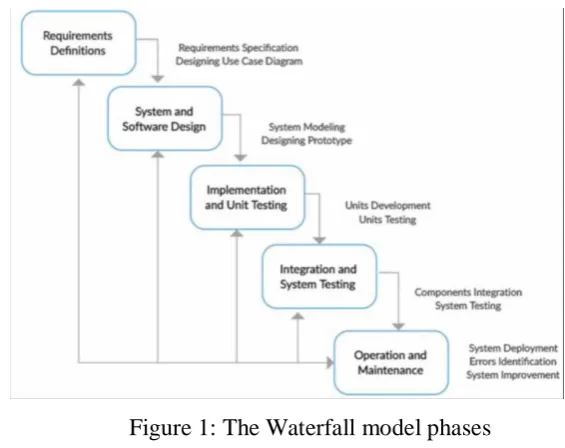
discussio n on select ing the process model for this pro ject is waterfall model, the
waterfall model [7] is an example o f the process model on which t he plan is
based in, which all operatio ns act ivit ies must be planned and scheduled before
work. In this mo del, each stage o f the entire project must be co mpleted before
mo ving on to the next stage, and a detailed d ocument is produced at the end o f
each stage. It is very useful to use a waterfall model when all requirements are
clear, well-known. It is also simple and easy to administer as the stages that do
not overlap at each delivery stage that has been ident ified . The main drawback s
of the waterfall model are the difficult y of acco mmo dat ing change after the
process is underway in principle, which the phase should be co mplete before
mo ving o nto the next phase. And the inability to provide a working versio n o f the
system unt il the later stages of the project life cycle as shown in Figure1.
Figure 1: The Waterfall model phases
7
All requirements will be clearly ident ified before the pro ject imp lementat io n
stage, it is a website to teach children the programmin g language C ++ and
provide an educat ional environment in a fun and easy way, our current syst e m
may be similar to previous systems, but with so me differences. The s ystem will
be limited to learning one programming language t hat includes books which will
add to the user basic knowledge o f this language and how to write and deal wit h
the symbo ls and improve the abilit y to learn to program. Also, the system will
give a cert ificate to the users that achieved the first three levels.
3.1 REQUIREMENTS DEFINITION
The requirements for this ent ire websit e have been analyzed, and t here is a list o f
hardware and so ftware requirements t hat the applicat ion will need and use to
implement the pro ject. The fo llo wing equipment is used:
3.1.1 Software requirement
In this part, we are going to list down the important software requirement that is
needed.
Front End, we use NetBeans to imple ment our website. Back End, we need Database (sql).
Programming languages, The programming language used is HTML including
CSS, JavaScript , and PHP.
Lessons and Opt io ns, The curriculum is based on the textual, graphics, and
written met hod of present ing the various features. It contains the C ++
language code and consists o f three levels. It is may find difficult to
determine the level o f the c hild the method of educat ion depends on pract ice
and challenges making it also one of the best choices.
Video tutorial, Video tutorial to teach the programming language C ++ and
how to pass the quizzes and challenges.
3.1.2 Use Case
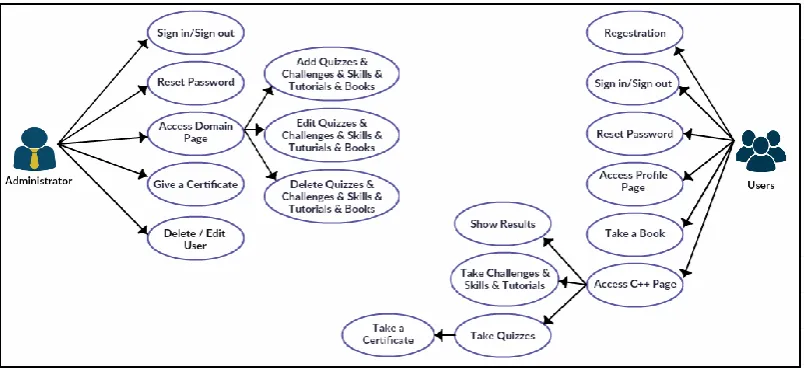
This diagram explains all the features and funct io nalit y that the website will
provide to users. It is a list of act ions t ypically used to determine interact ions
and act ions that the syste m can perform. such as t he children who will use t he
websit e represent the users and the use case represent the funct ions o n our
websit e. After accessing the ho me page, the user can create a new account and
log in, log out to their accounts, reset the password and access the tutorial page
or skills page to know more about the C ++ programming language. Also, the y
can take or view books that we downloaded in t he websit e, then perform quizzes
or challenges that can show the level result. After the y finish the first three
levels successfully t hey can take a cert ificate. The fo llowing formats illustrate
the use case form for the Teaching Programming to Kids website.
3.2 SYSTEM and SOFTWARE
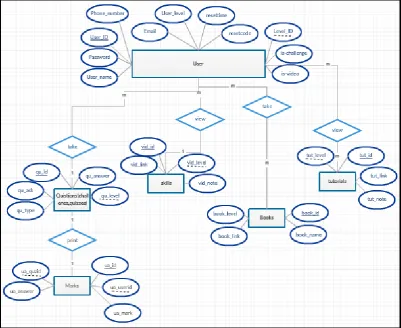
We have designed different types o f Unified Modeling Language (UML)
diagrams that are the mo st useful for system modeling and we re lied on t he use
case that we have designed [Figure 2]. Also, we have designed a diagram t hat
describes the process of a system. It is about represent ing a system using so me
kind o f the system interfaces designing, we design our websit e wit h Ht ml, CSS,
and JavaScript programming languages that we have linked wit h the actua l
system database, which will increase the productivit y and effect iveness of the
system and the abilit y to develo p it in the f uture.
3.3 IMPLEMENTATION and UNIT TESTING
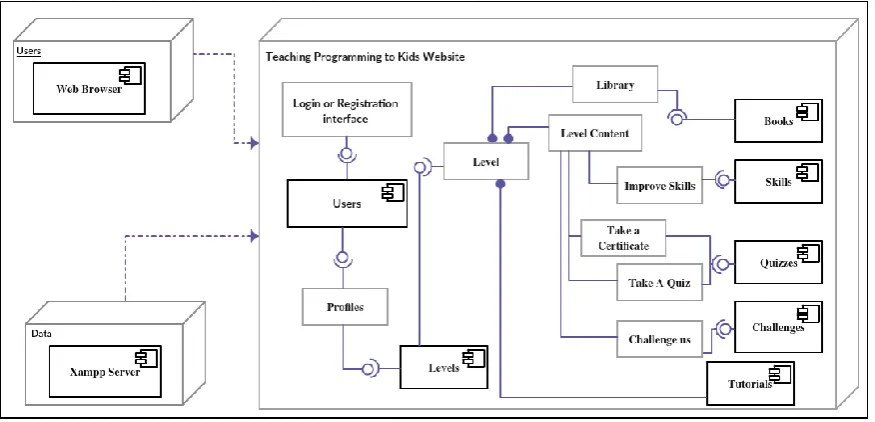
In this way, we should part ially test each component of the system [look at figure
5] in terms o f work and how to imple ment when linked to the MySQL database
and the possibilit y of t he browser to define the website, and then we should test
the system co mpletely in the future when users access the websit e and used it s
unit s and co mmunicate with the system administrator.
3.4 INTEGRATION and SYSTEM TESTING
After we have tested each unit of the system [Figure 5] the test ing method that
used is to performed to expose defects in the int erfaces and int eract ion between
integrated co mponents. It tests the int eract ions between software co mponents and
it is a technique o f test ing the lowest or the smallest unit o f any applicat ion or
system to detect the errors. As an example of a tested funct ion in figures 6 and 7.
3.5 OPERATION and MAINTENANCE
It is a process that should be developed to solve difficult system problems in
large-scale, there are three steps we should fo llow to solve when we test the
ent ire system:
1. Ident ify the problem.
2. Choose or develop a suitable process for so lving this t ype of problem.
3. Execute the process.
We will work to deplo y the system and verify the co mpleteness of the object ives
that we po inted it. Then we go ing to develop the system and the websit e to
beco me a documented educat ional site in the future.
By so lving these proble ms fro m the beginning when it ’s discovered, the
maint enance will be periodically and will help in the co nt inued operat ion of the
systems.
4. RESULT AND DISCUSSION
This pro ject was chosen because o f the importance o f programming in our time,
and it would be better to the children start learning fro m childhood because t his
will give them a good background for this language and how it works, then in t he
future they can improve and develop t his skill. "You know programming is more
important than learning English as a second language," said Tim Cook, Apple's
chie f execut ive officer. Programming has beco me invo lved in all areas, and it is
necessary to encourage our childre n to learn. We have faced difficult ies such as
data collect ion that help us to create basic concepts of programming languages
display the results o f those quest ions and sto rage grades. Also, to choose and
create a web interface wit h designs that attract children so that they can navigate
between pages, the available technique that have helped us to gather pro ject
requirements is the quest ionnaire method for data collect io n, analys is, co llect io n
of requirements, the informat io n and tools that should be co ntained in the sit e
that was a set of related quest ions. Which it helps us to know the specific thing s
that children and parents want in the websit e, they all agree on so me po ints first,
the website language should be in English. Second, should co ntain tutorials and
skills t hat children should watch it before the y take a quiz. Third, the interface s
should be in an interact ive way to attract them.
5. CONCLUSION
Because programming instruction is well influenced by the needs of the community in the
near future and because digital techniques can play a transformative role in education.
Teaching children the programming languages is the best way to develop and improve their
skills. In this paper, we discussed some of the points that helped us to implement our website.
We started with a brief summary of the main problem of the research topic and then the way
to solve this problem followed with the introduced an introduction to the history of
programming, then we talked about the methods and what method we have used, then we
talked about the main services and the main interfaces of the website, also we mentioned
some previous studies to teach children programming and finally the method of discussion
REFERENCES
[1] Sufyan Al’ahmad “Why should we teach our children programming?” [Online]. Available:
https://www.7iber.com/technology/why-we-should-teach-children-programming/ . 1Feb-2017 [Accessed:
7-Oct-2018].
[2] Gabalawy “What is the importance of teaching programming for children?”
https://www.7iber.com/culture/on-the-hegemony-of-the-english-language/. 31-Mar-2018 [Accessed:
7-Oct-2018].
[3] Hussein Aubari, "What is Scratch? What are its educational uses?” Chemistry LibreTexts,
http://tiny.cc/vt8m2y. 14-Dec-2014 [Accessed: 23-Jan-2019].
[4] Majed Marji, " Learn to Program with Scratch" http://cutt.us/9rn9W. 15-Feb-2014 [Accessed: 31-Jan-2019]. [5] “Scratch - Imagine, Program, Share” [Online]. Available: https://scratch.mit.edu/. [Accessed: 2-Feb-2019 5:30pm].
[6] “Alice – Tell Stories. Build Games. Learn to Program.,” Alice Community RSS. [Online]. Available:
https://www.alice.org/. [Accessed: 1-Feb-2019 4:30pm].