DID ALLOCATOR
USER AND INSTALLATION GUIDE
NEC America, Inc.
LIABILITY DISCLAIMER
NEC America reserves the right to change the specifications, functions, or features in this document at any time without notice. NEC America has prepared this document for use by its employees and customers. The information contained herein is the property of NEC America and shall not be reproduced without prior written approval from NEC America.
Copyright 1996
NDA-30047 Revision 5.0 Page i
DID Allocator User and Installation Guide CONTENTS
TABLE OF CONTENTS
Page
Chapter 1 - Introduction . . . 1
Here’s How it Works . . . 1
Installation. . . 1
Chapter 2 - Application Configuration . . . 5
Step 1: Application Characteristics . . . 5
Step 2: Primary Configuration Parameters . . . 6
Step 3: OAI Facilities . . . 6
Step 4: Secondary OAI Configuration Parameters . . . 7
Chapter 3 - Mat Assignments . . . 9
Page ii NDA-30047 Revision 5.0
NDA-30047 Revision 5.0 Page iii
DID Allocator User and Installation Guide FIGURES
LIST OF FIGURES
Figure Title Page
Page iv NDA-30047 Revision 5.0
NDA-30047 Revision 5.0 Page 1
DID Allocator User and Installation Guide Introduction
Chapter 1
Introduction
DID Allocator is a supplement to the Medical Center System (MCS) that makes it possible for hospital admitting personnel to retrieve DID telephone numbers from the MCS database. With DID Allocator, obtaining a DID number for a new patient
is a simple matter of pressing a function key on the Dterm. In response, DID
Allocator accesses the MCS database of DID numbers, retrieves the next available
one on the list, and displays it on the Dterm LCD panel. Admitting personnel have
only to accept the number and enter it into the patient’s record or to reject the number.
Once a DID number has been accepted, it is placed into “Offered and Accepted” status in the MCS database. Only after the DID number has been implemented by the PBX is it considered to be in “Active” status.
Here’s How it Works
Installation
This guide provides specific field entries that need to be made during the installation and configuration of DID Allocator. In addition to this guide, use instructions in the following manuals for this installation:
• Applications Manager (APM) Installation Manual — Contains step-by step
instructions for installing the software from the release media.
• Applications Manager (APM) Operations Manual — Explains how
applications like DID Allocator are configured in the APM environment using the entries and values provided in this chapter.
• NEAX2400 System Manuals — Give very detailed explanations about the
assignments that need to be made through the Maintenance Administration Terminal (MAT) commands on the NEAX2400.
Your Action Dterm Response
Press the Dterm function key that is assigned to DID
Allocator.
An available DID number is displayed on the Dterm
LCD panel, followed by the notation “ACCEPT?”
• To accept the displayed DID number:
Press 1#. (Then enter the accepted DID number to the patient record.)
• To cancel the DID request:
Press 0#, the function key assigned to DID Allocator, or nothing. If you do not press a key, DID Allocator will time-out and reject the number.
If the number is accepted, DID Allocator marks it as offered and accepted. If the number is not accepted, the number remains available. After the
transaction, DID Allocator clears the Dterm display.
Page 2 NDA-30047 Revision 5.0
Introduction DID Allocator User and Installation Guide
The installation and set up of DID Allocator involves the following sequence of steps:
• Software Installation — DID Allocator software must first be loaded from the
release media. Log into the APM Platform Management Menu, select the Installation of Applications/Packages option, and follow the instructions provided in the APM Installation Manual to complete this part of the installation.
• Application Configuration — DID Allocator is internally supported by the
APM and must be configured in the APM environment. Application
Configuration provides the information that must be entered into this APM configuration file. Use the instructions provided in the APM Operations
Manual to make the entries contained in this section.
Note: DID Allocator version 1.2 uses the autocfg (autoconfiguration) APM utility pro-gram to automatically configure DID Allocator under the APM platform. This program runs upon installation. If you have previously installed DID Allocator, the autoconfiguration utility enables you to overwrite the previous configuration information.
• MAT Assignments — Several data settings must be assigned at the NEAX2400
Maintenance Administration Terminal (MAT) before DID Allocator will
function. Mat Assignments specifies the necessary commands and the values
at which they are to be set. Use the instructions provided in the NEAX2400
NDA-30047 Revision 5.0 Page 3
DID Allocator User and Installation Guide Introduction
Software
Application Characteristics Primary Parameter Configuration OAI Facilities (Optional)
OAI Configuration Parameters (Optional) User-Defined Parameters
NEAX2400 IMS
Maintenance Administration Terminal (MAT) Assignments
ASYD (Assignment of System Data) AOKC (Assignment of OAI Key Codes)
AKYD (Assignment of Dterm Function Key) DID ALLOCATOR
INSTALLATION REQUIREMENTS
Introduction
Mat Assignments Application Configuration
Discussed in chapter: Instructions in:
APM Installation
Manual
NEAX2400 IMS
System Manuals APM Installation
Introduction DID Allocator User and Installation Guide
Page 4 NDA-30047 Revision 5.0
NDA-30047 Revision 5.0 Page 5
DID Allocator User and Installation Guide Application Configuration
Chapter 2
Application Configuration
DID Allocator is configured into the APM system using the Add function of the Application Configuration on the APM System Administration Menu.
• Enter the APM option from the APM Platform Management Menu.
• Enter the System Administrator password at the APM password screen.
• Enter the Application Configuration option from the System Administration
menu.
This section contains the information that should be entered to the configuration file for DID Allocator. For specific instructions on what these parameters mean and how to make these entries, use the APM Operations Manual.
Note 1: DID Allocator version 1.2 uses the autocfg (autoconfiguration) APM utility pro-gram to automatically configure DID Allocator under the APM platform. This program runs upon installation. If you have previously installed DID Allocator, the autoconfiguration utility enables you to overwrite the previous configuration information.
Note 2: Entries for parameters that are marked with an asterisk (*) should be made ex-actly as they are shown; all other entries in this section serve as examples only.
Step 1: Application Characteristics
In adding DID Allocator to the APM Application Configuration file, define
it as follows:
Parameter Entry Description
OAI Application* Y(es) Indicates whether or not (Yes or No) DID
Allocator communicates with the NEAX2400 using OAI processes.
CRT Application* N(o) Indicates whether or not (Yes or No) DID
Allocator requires a terminal screen that is of the same type as the one used by the APM.
Communication Queue* N(o) Indicates whether or not (Yes or No) this
Page 6 NDA-30047 Revision 5.0
Application Configuration DID Allocator User and Installation Guide
Step 2: Primary Configuration Parameters
On the APM Configuration Entry screen, make the entries indicated below for each DID Allocator parameter.
Step 3: OAI Facilities
According to instructions in the APM Operations Manual, designate the following NEAX2400 facilities for DID Allocator using the Facilities command on the Configuration Entry screen.
MRFI Mode Release (I) MRFR Mode Release (R)
MSF OAI Mode Set NTF Number Transfer
TCFD Terminal Control (D) TCFI Terminal Control (I)
Note: The same MSF Op-Code that is specified here in the APM must be assigned to DID Allocator the NEAX MAT. For more information, see Mat Assignments.
This code defaults to 130 with the autoconfiguration utility.
Parameter Entry Description
Application Name DID_Allocator Specifies the name to be displayed in the
APM menus. This name is displayed however it is entered here; i.e., capital letters, lower case, etc.
Executable Filename* /oai/app/mcs/bin/
didalloc
Indicates the path name of the executable file.
Group* (make no entry) Indicates that DID Allocator does not
belong to a group.
Response Mode* I(gnore) Indicates the action that the APM is to take
with DID Allocator should a member of the group terminate.
Initialization Batch Y(es) Indicates whether or not (Yes or NO) DID
Allocator is to be initialized automatically when the OAI system is initialized.
Termination Mode* M(essage) Indicates how the APM is to notify DIID
Allocator to terminate.
Standard Output /dev/null Indicates where any output is sent.
Number of Restarts 10 Indicates how many times the APM may
NDA-30047 Revision 5.0 Page 7
DID Allocator User and Installation Guide Application Configuration
Step 4: Secondary OAI Configuration Parameters
Using the OAI-Conf command on the APM Configuration Entry screen, make the entry shown for each of the following parameters. Use the instructions provided for this option in the APM Operations Manual:
This completes the configuration of DID Allocator in the APM. Now go to
Mat Assignments to make the necessary MAT assignments.
Parameter Entry Description
Database Name #1 (make no entry)
Database Name #2 (make no entry)
Timeout Value #1 30 Indicates the length of time, in seconds, that
DID Allocator waits for a response to a displayed message.
Timeout Value #2 1
Tenant Number 1 Specifies the number of the tenant that DID
Allocator serves.
Source Link Name OAI1TCP Identifies the port on the source side of the
communication link.
Destination Link Name PBX1TCP Identifies the port on the destination side of
the communication link.
Association Recovery 30 Designates the number of seconds DID
Application Configuration DID Allocator User and Installation Guide
Page 8 NDA-30047 Revision 5.0
NDA-30047 Revision 5.0 Page 9
DID Allocator User and Installation Guide Mat Assignments
Chapter 3
Mat Assignments
This guide assumes that data settings that affect the operation of all OAI software on a system-wide basis have already been assigned on the NEAX Maintenance Administration Terminal (MAT). Such settings include, for instance, system index values and assignment of Interface I/O Port Data in the Interface Processor (IP). For more information about these system data settings and the MAT commands described below for DID Allocator, refer to the OAI Module Installation Manual
for the NEAX2400 IMS, the NEAX2400 IMS Command Manual, the NEAX2400 IMS Job Specification Manual, and the NEAX2400 IMS Programming Manual.
Function Key Assignment
A function key on every Dterm that is to be used to access DID Allocator must be
assigned to the Mode Set Facility number (Op-Code) that was configured for DID
Allocator in the APM (Application Configuration).
1. ASYD SYS1 Index 4 bit 4=1
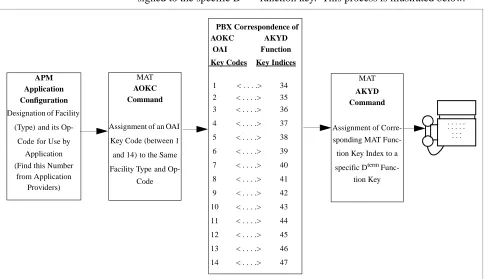
2. The MSF facility and its Op-Code are assigned to one of the 14 OAI Key Codes in the MAT using the AOKC command. Second, each of these OAI Key Codes corresponds to an AKYD Function Key Index (FKI) value which is then
as-signed to the specific Dterm function key. This process is illustrated below.
Figure 3-1 OAI Function Key Assignment
APM Application Configuration
Designation ofFacility
(Type)and its
Op-Codefor Use by
Application (Find this Number
from Application Providers)
MAT
AOKC Command
Assignment ofan OAI
Key Code(between 1
and 14)to the Same
Facility Typeand Op-Code
MAT
AKYD Command
Assignment of Corre-sponding MAT
Func-tion Key Index to a
specific Dterm Func-tion Key
. . . . . . . . . . . . . . . . PBX Correspondence of
AOKC AKYD OAI Function Key Codes Key Indices
1 < . . . .> 34 2 < . . . .> 35 3 < . . . .> 36
4 < . . . .> 37
5 < . . . .> 38
6 < . . . .> 39
7 < . . . .> 40
8 < . . . .> 41
9 < . . . .> 42
10 < . . . .> 43
11 < . . . .> 44
12 < . . . .> 45
13 < . . . .> 46
Page 10 NDA-30047 Revision 5.0
Mat Assignments DID Allocator User and Installation Guide
A knowledge of the Dterm stations in the NEAX system and which ones will be set
up to access DID Allocator is necessary for using these two commands:
AOKC COMMAND: (Assignment of OAI Key Codes)
This command is first used to associate the MSF facility and its Op Code that was configured in the APM for DID Allocator to one of the OAI Key Codes in the MAT.
(a) Select an unused OAI Key Code, from 1 to 14. To determine what Key Codes are available for assignment, use the LOKC command to list the AOKC Key Codes that are already assigned.
(b) Enter the type of facility using the value that designates the MSF.
(c) Enter the same MSF Op-Code that was configured for DID Allocator in the APM. Retrieve it using the Providers command on the APM Configuration Entry screen.
AKYD COMMAND: (Assignment of Dterm Function Key)
(a) Enter the same tenant number that is configured for the application in the
APM Application Configuration option (Tenant #1, page 7).
(b) Enter the station number of the Dterm on which the function key is being
as-signed.
(c) Enter a Dterm function key to the MAT Function Key Index that in turn
cor-responds to the previously assigned OAI Key Code.
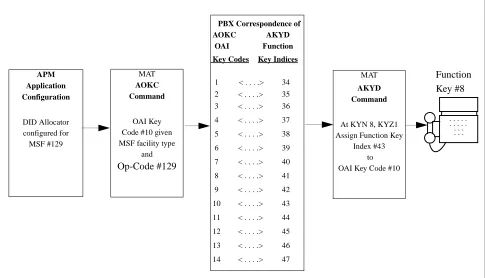
Figure 3-2 OAI Function Key Assignment Example
APM Application Configuration DID Allocator configured for MSF #129 MAT AOKC Command OAI Key Code #10 given MSF facility type
and
Op-Code #129
MAT
AKYD Command
At KYN 8, KYZ1 Assign Function Key
Index #43 to OAI Key Code #10
. . . . . . . . . . . . . . . . PBX Correspondence of
AOKC AKYD OAI Function Key Codes Key Indices
1 < . . . .> 34 2 < . . . .> 35 3 < . . . .> 36
4 < . . . .> 37
5 < . . . .> 38
6 < . . . .> 39
7 < . . . .> 40
8 < . . . .> 41
9 < . . . .> 42
10 < . . . .> 43
11 < . . . .> 44
12 < . . . .> 45
13 < . . . .> 46
14 < . . . .> 47
NDA-30047 Revision 5.0 Page 11
DID Allocator User and Installation Guide Mat Assignments
In the OAI Function Key Assignment example (Figure 3-2 on page 10), the MSF
was selected in the APM Application Configuration and its Op-Code was
determined to be #130. MSF #130 is assigned through the AOKC command to an OAI Key Code. The Key Code to which it is assigned in this example is #10. The
Dterm function key that is to be used to access DID Allocator is configured as
function key #8. Since OAI Key Code #10 corresponds in the PBX to MAT
Function Key Index #43, Dterm function key #8 is assigned to Function Key Index
#43 using the AKYD command. Thus, whenever a phone user presses function key
#8 on any assigned Dterm, MSF 130 initiates communication with DID Allocator
for display of the next available number.
Mat Assignments DID Allocator User and Installation Guide
Page 12 NDA-30047 Revision 5.0