Simulation and Analysis for Activities in Image
Recognition Using MATLAB
®
Thabit Sultan Mohammed1, Ahmmed Saadi Ibrahim2
1ECE Department, College of Engineering, Dhofar University, 211 Salalah, P.O Box. 2509, Sultanate of Oman 2Chemical Engineering Department, Dhofar University, 211 Salalah, P.O Box. 2509, Sultanate of Oman
Copyright © 2015 Horizon Research Publishing All rights reserved.
Abstract
This paper considers a fact that solutions to problems in the field of digital image processing require lots of experimental work involving software simulation and testing with large sets of sample images. A short overview of the fundamental steps of digital image processing is presented. The layout and the operation of an experimental software system that has been developed and implemented using MATLAB® is introduced. A user friendly GUI is developed and two alternative methods for image acquisition are implemented. Few algorithms based on mask operators for image edge detection are studied, programmed, simulated, and evaluated. The paper also includes an analysis and a software implementation for an image matching technique.Keywords
Image Recognition, Image Processing, Edge Detection; Smoothing, Matching; Mask Operators
1. Introduction
In image processing, which is any form of signal processing, the input is an image, such as a photograph or video frame; while the output may be either an image or a set of characteristics or parameters related to the image. Most image-processing techniques involve treating the image as a two-dimensional array and applying standard signal-processing techniques to it. Application areas behind the interest in digital image processing methods are so varied and can be listed into two main categories (namely, improvement of pictorial information for human interpretation; and processing of image data for storage, transmission, and representation for machine vision.). Space applications, medical imaging, remote earth resources observations, and astronomy are examples of those applications, where improvement of pictorial information for human interpretation is apparent. Studying pollution patterns from aerial and satellite imagery, image enhancement and restoration procedures to process degraded images of unrecoverable objects are two further applications that can basically serve geographers and archeologists respectively.
In machine vision applications, interest focuses on procedures for extracting information from an image in a form suitable for computer processing.
Another way, by which one can possibly develop a basic understanding of the extent of image processing applications is to categorize images according to their sources. Images based on radiation from the Electro-Magnetic spectrum are the most familiar, especially images in the X-ray and visual bands of the spectrum. Images from other sources include acoustic imaging, electron microscopy, and synthetic (computer-generated) imaging.
The digital image processing involves a number of fundamental steps (e.g. image acquisition, image enhancement and preprocessing, edge detection and segmentation, representation and description, and matching and recognition). The output of these steps is either an image or an image attribute.
2. Literature Survey
An extensive body of literature including books, journal papers, technical reports and research thesis can be found addressing the subject of digital image processing. Books are normally covering all, or most of the given fundamental steps of image processing [1], [2]. In addition to text and reference books, published work on edge detection, segmentation, and classification can also be found in tens of journal papers. [3] - [7]. With regard to the theory and methods related to the step of matching and recognition, literature and research work is extensive too [8] -[12]. The development of image processing software that is based on well-known professional packages can be found in the work presented in [13], where G. Sharma et al developed a software that is based on LabVIEW functions for image and video processing.
Image matching may be the most difficult task among the steps of image processing, where images of the same scene may be different due to the sensor motion and intensity changes.
are used in solving the problem of image matching, namely; region-based and features and/or curve fragments based techniques. Region-based techniques utilize correlation between the intensity patterns in the neighborhood of a pixel in the left image and those in the neighborhood of a corresponding pixel in at the right image. It is also preferred since using points or lines as matching primitives may lead to too many computational loads. For images of simply structured scene and of man-made object, segmented regions are preferable primitives for matching.
Decision about the image matching results may require a powerful tool for making the proper decision. Neural networks, for example, may be adopted for such decision making [14] – [16].
An important characteristic in the design of systems is the level of testing and experimentation that is normally required before arriving at an acceptable solution and hence obtaining a feasible system implementation. This characteristic is applied to the field of digital image processing, where extensive experimental work involving software simulation and testing with large sets of sample images is generally required to offer solutions to problems.
In the next section of this paper, some of the fundamental steps of image processing and analysis are briefly presented. Most of the algorithms and methods being implemented as software programs in this paper are basically related to the theory described in this section. In section 4, the developed software is described in terms of its basic architecture and operation. Experimental examples are used to illustrate the main functions performed by the software, and section 5, is dedicated for presenting results of those experimental examples with one input image being considered to form a case study. Obtained output images are tabulated under two headings to show the performance of different mask operators used for image edge detection. Further, in this section a discussion of the results is presented as well as performance evaluation. Section 6 includes concluding remarks about the material presented in this paper. Lastly, a list of references is given.
3. Fundamental Steps in Image
Processing
The field of digital image processing is referring to processing digital images using a digital computer. Whereas, a digital image is composed of a finite number of elements, each of which has a particular location and value. These elements are referred to as picture elements, image elements, or pixels.
Before going to processing an image, it is converted into a digital form. Among the many and variant possible processing and analysis steps performed on a digital image, we, in this paper, are more interested in image edge detection and segmentation, and image matching and recognition processes.
A. Edge detection
Edge detection is a type of image segmentation techniques, whose main task is to determine the presence of an edge or a line in an image and outlines them in an appropriate way. Applying edge detection leads to simplifying the image processing, whereas the amount of data that is of most concern is minimized. Generally, an edge is defined as the border between two image regions, where large changes in intensity occur. The detection operation begins with the examination of the local discontinuity at each pixel element in an image. Amplitude, orientation, and location of a particular region in the image that is of interest, are essentially important characteristics of possible edges. Based on these characteristics, the detector has to decide whether each of the examined pixels is an edge or not.
A widely used method for first order derivative edge detection, which is adopted in this paper is based on evaluating the gradients generated along two orthogonal directions.
According to this method, an edge is judged present if the gradient exceeds a defined threshold value, t = T.
For a location (x,y), the gradient can be computed as the derivatives along both orthogonal axes:
G(x, y) = ∂F(x,y) ∂x cos θ +∂F(x,y) ∂y sin θ (1) The gradient is estimated in a direction normal to the edge gradient. The spatial average gradient can be written as:
G(j, k) = �[GR(j, k)]2+ [GC(j, k)]2 (2) In equations (1) and (2), F(x, y) is the original input image, whereas G(j, k) refers to the output differential image. A simplest discrete row and column gradients (GR and GC) are given by:
GR (j,k) = F(j,k) – F(j,k-1) (3) GC (j,k) = F(j,k) – F(j+1,k) (4) Based on equations (3) and (4), Roberts proposed an operator for edge detection by evaluating gradients and the directions, for image pixels, using a [2x2] array, which is referred to as mask operators. The elements of the Roberts mask operators are:
Roberts mask operators
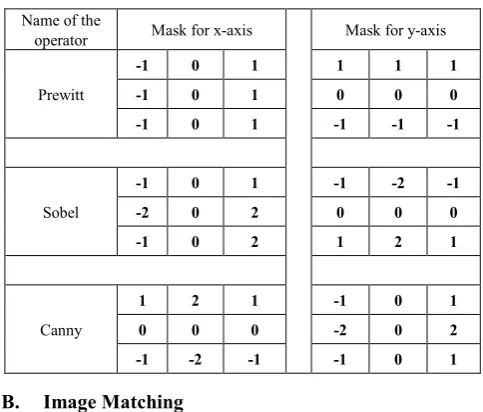
Prewitt, Sobel, and Canny have developed other edge detector operators, whose mask operators for both x, and y axis are tabulated in Table I. The mask operators are [3x3] arrays.
Table 1. MASK OPERATORS FOR THREE EDGE DETECTOR OPERATORS
Name of the
operator Mask for x-axis Mask for y-axis
Prewitt
-1 0 1 1 1 1
-1 0 1 0 0 0
-1 0 1 -1 -1 -1
Sobel
-1 0 1 -1 -2 -1
-2 0 2 0 0 0
-1 0 2 1 2 1
Canny
1 2 1 -1 0 1
0 0 0 -2 0 2
-1 -2 -1 -1 0 1
B. Image Matching
The matching process is refereeing to finding a correspondence between various data sets. The data sets can represent images, photographs, maps or any other form of object model. Matching has always been a challenging problem in the area of image research and development. Some factors, which can pose problems in image matching includes, but not limited to; changes in the image content, plane rotation, change in scale, change in illumination, and differences caused by electronic noise. The basic principle of matching is to search through all the pixels for the right area which is identical to a given template image. However, because images are normally having huge amount of pixels, it’s not realistic from the performance point of view to apply a complete search in the image space. For this specific reason, proposed image matching algorithms are improved to reduce searching time and having an optimized performance. Another fact that need to be considered as well is existence of various number of image matching algorithms tailored to suit specific applications such that no general algorithm is available that is optimized for all variety of uses.
Image matching algorithms are categorized as; area based, feature based, transformation model, direct methods, spatial domain methods, frequency domain methods, and image nature based methods. For the experimental and simulation purposes, in this paper, a relatively simple matching algorithm is proposed and adopted. Our algorithm depends on the basic principle of image matching, where all image space is considered as a region of interest (ROI) and corresponding pixels of the two input images (original and target) are compared. A condition is that both images are of the same dimensions. If all pixels are found identical then input images are considered matched. The algorithm however, may accept some differences between corresponding pixels and still consider a matching decision for input images, if the user fixes a threshold value for such acceptable differences.
C. MATLAB® and digital image processing
MATLAB is a high-performance language for technical computing. It integrates computation, visualization, and programming in an easy-to-use environment where problems and solutions are expressed in familiar mathematical notation. The basic data element in MATLAB, which is an interactive system, is a matrix. This allows finding solutions to many technical computing problems, especially those involving matrix representations, in a relatively short time compared to the time required to write a program in a scalar non-interactive language such as C.
MATLAB is complemented by a family of appli-cation-specific solutions called toolboxes. The Image Processing Toolbox is a collection of MATLAB functions (called M-functions or M-files) that extend the capability of the MATLAB environment for the solution of digital image processing problems. The toolbox supports four types of images: ( Gray-scale, Binary, Indexed, and RGB images). The toolbox provides specific functions that perform converting images from one class to another.
Edges of an image are considered a type of crucial information that can be extracted by applying detectors with different techniques. The Image Processing Toolbox includes a group of edge detectors through its edge function. This functionality allows one to specify any of the derivative (gradient) filters discussed in the preceding section. The edge function accepts an intensity image and returns a MATLAB binary image, where pixel values of 1 indicate where the detector located an edge and 0 otherwise.
4. The Software Description and
Operation
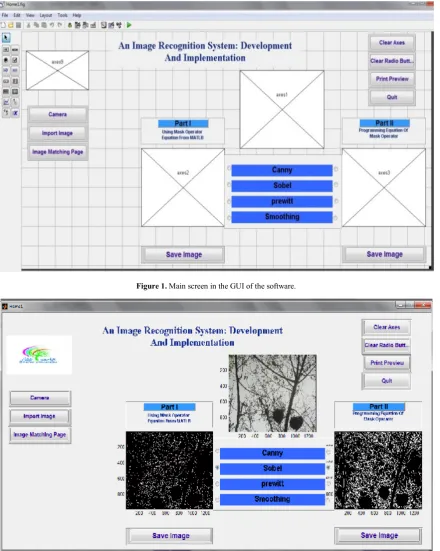
Since a graphical user interface (GUI) has been created, the software runs by typing “guide” at the MATLAB command prompt. This command displays the GUIDE Quick Start dialog box. This is followed by selecting to open an existing GUI, whose main page looks as in Fig. 1.
In Fig.1, it can be noticed that the GUI is being programmed to perform a number of functions that are serving the objectives of the software. At the left side, two push buttons are referring to the two alternatives offered for image acquisition (namely; importing an image from a file or initializing an online camera).
At the middle of the GUI screen is a list of edge detection mask operators (namely; Canny, Sobel, Prewitt) that may be applied to the acquired input image. In the GUI screen, the input image will be placed at the square above the list of operators. Note also a push button named “smoothing” . A smoothing operation may be applied to an input image for its edges to be both detected and smoothed.
[image:3.595.56.298.93.299.2]of functions, as shown in Fig. 2.
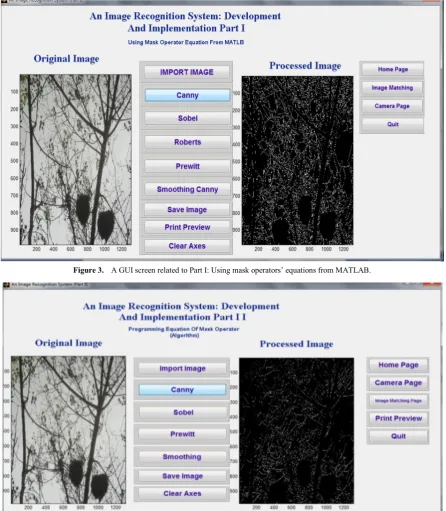
On the other hand, pushing either of buttons Part I or Part II will cause a new GUI screen to be opened. GUI screens related to Part I and Part II are shown in Fig. 3 and 4 respectively. The GUI screen shown in Fig. 3 is displayed when the user choice is part I, as per Fig. 1. Fig. 3 has a list of functions appearing on seven push buttons. After an input,
[image:4.595.88.529.177.729.2]image is acquired by pushing the button “Import Image”. This image is then displayed in the left box, and from the list of other functions, a mask operator can be chosen to be applied to it. Fig. 2 shows that “Canny” operator was the choice. The software will have the input image analyzed and its edges are detected. The output image is displayed in the right hand side box.
Figure 1. Main screen in the GUI of the software.
Figure 3. A GUI screen related to Part I: Using mask operators’ equations from MATLAB.
Figure 4. A GUI screen related to Part II: Programmed equations of mask operators.
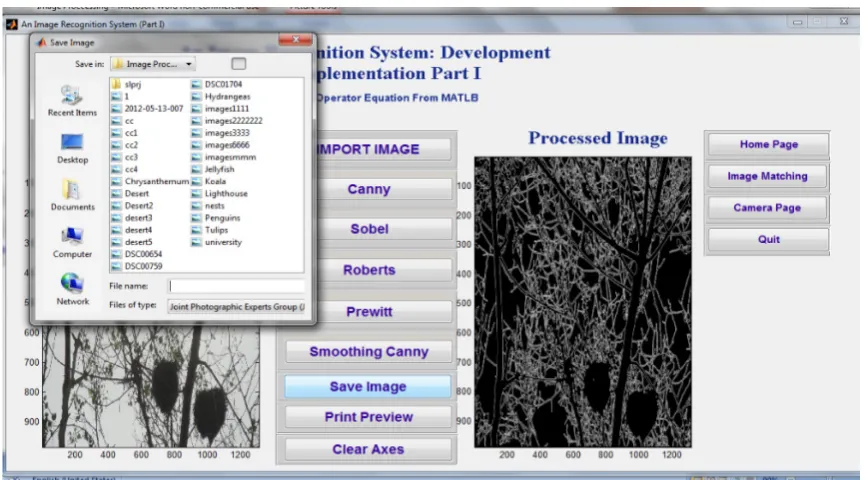
Both the input and output images can be saved at a file, which the user has to choose. Other functions, including other mask operators, can be applied to the same or a different image. The online camera, whose push button is appearing at the right of the GUI screen can be activated, a still image captured, saved on a file, and hence being ready to be imported.
It should be noted that all what is described about Fig. 3 is simply applied to Fig. 4. Fig. 5, shows how images can be saved on a chosen file.
In the next section, the results comprising output images,
for both parts with all the mask operators and the smoothing function have been applied are presented. The same input image is used such that a case study is offered for the results to be discussed and hence the methods adopted are evaluated.
[image:5.595.82.529.76.588.2] [image:5.595.86.526.340.596.2]programmed to contain the difference between the content of the one to one corresponding pixels. In Fig. (6.a), since the same image is used as the input, no difference is found, and the matching algorithm displays a message telling that both images are the same. In Figure (6,b), however, the second input image looks slightly different. The matching algorithm,
after analysis, also displays that images are the same. That’s because we fix a threshold representing the allowed difference ( here ≥ 266085 pixels = 12.8%). If the threshold value is decreased then the images will be considered as not matching.
Figure 5. A GUI screen showing the saving of an output image.
[image:6.595.89.522.159.399.2](b)
Figure 6. A GUI screen demonstrating an image matching algorithm. Images of (2.075 Mpixels each)
Figure 7. The image (nests.jpg) is used as the input for experimentation.
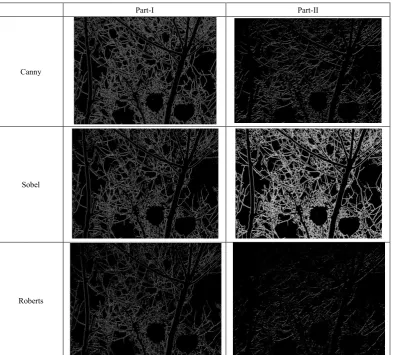
Part-I Part-II
Canny
Sobel
[image:7.595.110.504.387.742.2]Prewitt
[image:8.595.108.503.73.313.2]Smoothing Canny
Figure 8. Edge detected output images for different mask operators with various methods adopted.
5. Experimental Results and Discussion
In the previous section, few experimental results were shown and further results will be included in this section. Experimentation on image edge detection is divided up into two parts. Part I is intended to use the built in MATLAB functions for the image detectors. Part II, on the other hand, depends on executing m-files that are developed based on the theory presented in section 2 of this paper.
To formulate a case study, one input image as shown in Fig. 7 is adopted. The outputs for performing edge detection methods using four different mask operators (Canny, Sobel, Roberts, and Prewitt) with the concepts of both Parts I and II are presented in Fig. 8. The last row of Fig. 8 shows how detected edges can be further thinned in a smoothing process.
To develop a performance criteria and methods to evaluate the effectiveness of each edge detector, two factors are considered crucial. These factors are; locating a real edge pixel and finding the edge slope angle and its spatial
orientation. According to this, the probability of correct edge detection against probability of false detection can make a comprehensive comparison of several edge detectors.
As a general observation of the results shown in Fig. 8, Sobel can be considered as the best among the set of operators used. This is followed by the Canny operator as the second in performance. Prewitt followed by Roberts operators can be ranked as the third and the fourth within the levels of evaluated performance.
6. Conclusions
Basic concepts and the importance of digital image processing in our life applications are briefly presented in this paper. Some of the fundamental steps in processing of an image are also summarized. The paper further mentioned that MATLAB is a high-performance language for technical computing.
Among the many processing and analysis practices that may be performed on a digital image, the edge detection concepts and techniques are investigated. A software system is developed allowing for a comparison between various edge detection methods. MATLAB with its programming language is used for designing and implementing a graphical user interface (GUI) and for writing the necessary code. Many experimental examples are used in evaluating the performance of the adopted edge detectors. The image matching issue is also being addressed in this research, where a matching algorithm is proposed and implemented. Examples on the operation of the algorithm have illustrated that it can successfully do recognition for images, whose differences are within an acceptable threshold fixed by the user.
[image:8.595.64.292.525.700.2]the system and hence controlled by the software via its push button appearing on the GUI screen. Having the camera as an input device gives our experimental system, a practical feature of being a standalone system.
In addition to the reasonable flexibility of the system, where its possible to expand in the functions being studied (e.g. more edge detection operators or more matching algorithms), most of the functions presented in this paper can be further investigated and their performance improved.
REFERENCES
[1] R. C. Gonzalez and R. E. Woods, “Digital Image Processing”. Gatesmark Publishing, 2008.
[2] R. C. Gonzalez, R. E. Woods, and S. Eddins, “Digital Image Processing Using Matlab”. Gatesmark Publishing , 2009. [3] J. J. Ding, S. C. Pei, J. D. Huang, G. C. Guo, Y. C. Lin, N. C.
Shen, and Y. S. Zhang, “Short response Hilbert transform for edge detection,” CVGIP, 2007.
[4] S. C. Pei and J. J. Ding, “Improved Harris’ algorithm for corner and edge detections,” ICIP 2007.
[5] Thabit Sultan Mohammed and Nidal Ibrahim al-Tataie, “Artificial Neural Network as a Decision- Makers for Stereo Matching”, GSTF- International Journal on Computing Vol. 1, No. 3, pp (89 – 94), August 2011.
[6] T.H. Lee, “Edge Detection Analysis”, National Taiwan University, technical report 2008.
[7] J. Canny, “Finding Edges and Lines in Images,” Massachusetts Institute of Technology, Cambridge, Massachusetts, USA, Tech. Rep. no. 720, 1983.
[8] R. Makkar, “Study of Image Matching Techniques”, M.Sc. Thesis, Punjabi University, 2008.
[9] V. N. Radhika, B. Katikeyan, “Robust Stereo Image Matching for Space borne Imagery”, IEEE Transactions on geosciences and remote sensing, vol. 45, No. 9, Sep. 2007. [10] Thabit Sultan Mohammed, Nedhal Ibrahim Al-Taie,
“Applying a Neural Network Framework for Stereo Matching”, Annual Int. Conf. on Control, Automation and Robotics (CAR 2011), Singapore - 2011.
[11] Z. Guoqing, Y. Bao~onga nd T. Xiaofaiig, “A Software Package of Stereo Vision”, ICSP ' 1996.
[12] D. Anastasia and Y. Andreopoulos, “Software Designs of Image Processing Tasks with Incremental Refinement of Computation”, Signal Processing Systems, 2009. SiPS 2009. [13] G. Sharma, S. Sood, G. Singh, and N. Gupta," Image
Recognition System using Geometric Matching and Contour Detection", Internal Journal of Computer Applications, Vol. 51, No. 17. August 2012.
[14] T. S. Mohammed, N. I. Al-Taie, “Artificial Neural Networks as Decision-Makers for Stereo Matching”, GSTF International Journal on Computing, Vol.1, No. 3, August- 2012.