The Role of Connectivity in Supporting
Context-Sensitive Applications
Keith Cheverst, Nigel Davies, Keith Mitchell and Adrian Friday
Distributed Multimedia Research Group, Department of Computing,
Lancaster University, Lancaster, LA1 4YR.
e-mail: kc,nigel,mitchelk,[email protected]
Abstract. This paper considers the role of network connectivity in supporting
context-sensitive applications. A range of context-sensitive applications are analysed with respect to connectivity. Following this analysis a design space is constructed which enables the positioning of context-sensitive applications depending on their reliance on network connectivity and their reliance on local storage. Further consideration of the role of connectivity is achieved through a study of the GUIDE system which has been developed to provide context-sensitive information to visitors to the city of Lancaster. The current GUIDE system utilises a cell-based wireless network infrastructure to provide both location information and dynamic information to mobile GUIDE units. However, coverage throughout the city is not complete and this raises a number of design implications, including how to maintain a visitor’s trust in the system when outside of cell coverage.
1
Introduction
Context-sensitive applications [1][2] utilise contextual information, such as location, display medium and user profile, to provide tailored functionality. For example, the PARCTab [3] developed by Xerox utilises a user’s location to trigger events such as notifying the user to collect a document when walking past the printer room. Context-sensitive systems, such as the PARCTab, tend to be personal and therefore highly mobile devices. This paper focuses on context-sensitive systems that are designed for use in a mobile environment, in which the user’s location is a significant and dynamic factor affecting the information presented to the user.
contextual information (e.g. location information or weather forecasting information) via the network. This information could be in addition to context information sensed locally but not necessarily so. Furthermore, the context information required by the system could be received by polling some kind of remote sensor and/or received via some form of context notification server [4]. The third reason is that the system may need to receive dynamic information. For example, information on a recently opened attraction may need to be downloaded by a context-aware tour guide or a restaurant’s ‘specials’ menu may need to be received.
Mobile context-sensitive systems that receive information from a remote source do so via some form of wireless communications channel. Unless ubiquitous network connectivity is available, the fact that users are mobile implies that they are likely to roam into and out of areas of network connectivity. This paper considers the role of network connectivity in supporting context-sensitive applications and the implications that arise from systems that must tolerate intermittent connectivity. In particular, this paper studies the implications that arise in the context-sensitive GUIDE system.
1.1 A Design Space for Modelling the Role of Connectivity in Context-Sensitive
Systems
Analysing the current range of location-aware context-sensitive systems reveals interesting differences in reliance on network connectivity. For example, the functionality of the Hummingbird wearable device [5] relies absolutely on the role of connectivity. Hummingbird is designed to provide members of a group with an aural awareness when other group members are nearby. In the current system, the term nearby depends upon tweaking the range of the unit’s radio transceiver which can vary between 20 and 200 metres. Connectivity with another Hummingbird’s transceiver implies that its wearer is nearby whilst no connectivity implies that its wearer is at a distance.
The PARCTab device is another example of a system that relies strongly on network connectivity in order to provide useful functionality. The PARCTab utilises the Olivetti Active Badge infrastructure for obtaining positioning information and for the transmission of data, such as e-mail. Without connectivity the PARCTab can do little more than provide simple note-taking functionality (using its built-in Unistrokes handwriting recognition software) or allow the browsing of files (e.g. e-mail messages) previously downloaded from the network and stored in its relatively small 128 Kb memory. For this reason, the intended operating environment for PARCTabs is within a suitably configured office building that provides ubiquitous connectivity.
The Cyberguide system, is a location-aware tour guide system that has been developed by the Future Computing Environments (FCE) group at the Georgia Institute of Technology. The initial Cyberguide system [7] did not utilise two-way wireless communications and thus provided no support for sharing information or context. However, the indoor version of this system did utilise wireless transmissions to detect a tourist’s position and orientation using a collection of IR beacons. These beacons transmitted unique IDs that could then be translated into a map location and orientation. Alternatively, the outdoor version of the system utilised Global Positioning System (GPS) data directly. The fact that mapping information (for the small area covered) was stored locally allowed the system to offer touring functionality even when the system’s wireless networking capability was not available. A later version of the Cyberguide system (referred to as Cyberguide II) [8] was developed to support demonstration days. This system utilises wireless connectivity in order to enable users to observe the location of other users in the local area and to share comments with them.
The Conference Assistant application [4] also developed by the FCE group is designed to support conference attendees by providing them with appropriate context-aware information and collaborative tools via a PDA or wearable computer. The conference assistant was developed using a distributed architecture that relies on fully connected operation in order to communicate changes in context and presentation information between the various components of the architecture. The application is thus designed to operate in a fully connected environment, i.e. a conference building with RF connectivity and location sensors in every room. Given this environment, the application provides users with context-sensitive information as they navigate conference rooms. In addition, when wishing to ask a question regarding a particular slide, the application enables the user to control a presenter’s display via his or her own PDA.
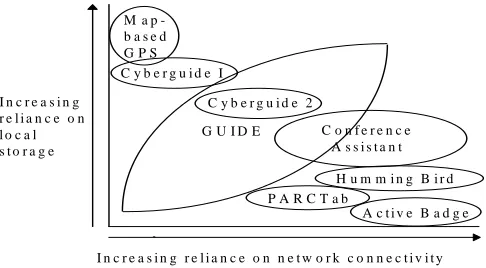
By considering the reliance of the aforementioned context-sensitive systems on both local storage and network connectivity the systems can be placed in the design space as shown below in figure 1.
Fig. 1. A design space for considering the role of connectivity in context-sensitive systems.
Consideration of the design space raises some interesting questions. For example, is a standard GPS, i.e. one that simply displays a user’s current geographic co-ordinates in reaction to the unit’s location, a context-sensitive application? However, the classification becomes substantially easier when one introduces information into the system. For example, Magallen have recently released a GPS compass (the GPS 320 model) [11] that can store map-based information and allows its current position to be displayed on an appropriate map. In common with many of the car navigation systems currently available, this type of compass can certainly be considered as context-sensitive and is shown positioned in the design space. In this case, the compass has no reliance on network connectivity for receiving information but has an absolute reliance on its local storage (and local sensor) to display context-sensitive information. For this reason, it is positioned in the top left of the design space.
2.
The Guide System
This section describes the GUIDE system with particular emphasis on the role of connectivity in GUIDE and the way in which the system has been designed to support wireless connectivity.
2.1 Overview
The GUIDE system has been developed to provide visitors to the city of Lancaster with context-sensitive information tailored to their particular interests and needs. The application requirements for GUIDE were obtained through an extensive requirements capture exercise [9] which involved observing activity in the city’s Tourist
I n c r e a s i n g r e l i a n c e o n n e t w o r k c o n n e c t i v i t y I n c r e a s i n g
r e l i a n c e o n l o c a l s t o r a g e
G U I D E
H u m m i n g B i r d P A R C T a b
M a p -b a s e d G P S C y b e r g u i d e I
A c t i v e B a d g e C y b e r g u i d e 2
Information Centre (or TIC) and conducting one-to-one, semi-structured, interviews with members of staff. In summary, the key application requirements for the GUIDE system were: i) the need for a flexible and tailored tourist guide, ii) the need to support dynamic information and iii) the need to support interactive services.
To use the GUIDE system, city visitors are required to carry portable GUIDE units. In terms of hardware, GUIDE units currently comprise a Fujitsu TeamPad 7600 [12] tablet PC coupled with a WaveLan PC Card [13] for network connectivity. The use of WaveLAN is an intrinsic part of the GUIDE infrastructure (described in section 2.4) and enables GUIDE units to receive beacons indicating the visitor’s location and also enables parts of the GUIDE information model (described in section 2.3) to be downloaded.
[image:5.595.181.434.325.514.2]The GUIDE system is web-based and each unit runs a customised web browser constructed using the HotJava HTML component. An example of the user-interface to GUIDE is shown in figure 2.
Fig. 2. The user-interface to GUIDE.
A large central area of the user interface is reserved for displaying HTML based information to the city visitor. In the screen-shot shown above, the visitor is being presented with information about the historic gateway to the city’s castle and hypertext links are available should the visitor wish to find out more information on, for example, the Duke of Lancaster.
providing the visitor with an awareness of their current state of connectivity (described further in section 3.1).
2.2 Functionality
The GUIDE system provides city visitors with a range of functionality. In more detail, a visitor can request the GUIDE unit to either: i) provide tailored (context-sensitive) information regarding a specific location in the city, ii) recommend a tour of the city, iii) provide access to interactive services, iv) enable browsing of the world wide web or v) send and receive textual messages.
The Provision of Context-Sensitive Information. By pressing the ‘Info’ button a
[image:6.595.180.434.364.558.2]visitor is presented with the set of options shown below in figure 3. The first two options present information based on the visitor’s current location. By selecting the first option, when standing nearby the castle gateway, the page of information shown in figure 2 would be displayed.
Fig. 3. The GUIDE Information Page.
they used the system to tour a limited area of the city. During the trials, visitors would, on occasion, became frustrated when the system did not provide the specific hypertext link for accessing specific information. For this reason, we modified the system to include the ability for users to search for information using a keyword, to view an ordered list of all information held on the system, or to take a step back and receive an overview of the city.
On a more general point, our experience with this aspect of the GUIDE system has taught us that designers of this kind of context-aware system should be careful not to be over zealous when deciding how to constrain or scope the information provided by the system based on certain pieces of context.
Recommending a Tour of the City. When creating a tour tailored to the
requirements of a visitor, the GUIDE system utilises a variety of contextual information, such as the visitor’s interests, the approximate time that the tour should last, the time of day, the opening hours of the city’s attractions and other factors, such as the average length of time spent at a particular attraction. A ‘Guide Tour Wizard’ is provided to enable visitors to quickly and easily select those attractions that they particularly wish to visit.
Note that a subset of the contextual information listed above is actually dynamic and requires updating from a remote source. The obvious example is the weather but the opening hours of the city’s attractions is also liable to change. This is especially the case in Lancaster because part of the city’s castle is actually used as a courtroom and therefore its opening times vary depending on the length of any scheduled trials.
Providing Access to Interactive Services. During the requirements study, it was
found that visitors would often return to the TIC in order to make use of its booking services, e.g. the booking of hotel accommodation or travel. By providing remote access to these services, visitors can save time by making bookings via their GUIDE unit. In addition to providing remote access to those services provided by the TIC, the GUIDE system also enables access to other services, such as enabling visitors to query those films on show at the city’s cinema and enabling visitors to book seats at the cinema remotely.
One of the future directions for GUIDE is to increase the diversity of support for interactive services and our plans for achieving this are described in section four.
Enabling Access to the World Wide Web. The GUIDE system has been designed to
enable visitors to receive other remote sources of HTML based information, such as the WWW. By providing access to the web, visitors are provided with enormous potential for pursuing information that is not contained within the GUIDE information model.
Provision of a Messaging Service. To take full advantage of the network connectivity
may have separated in order to visit different attractions in the city, to keep in touch and also enables visitors to request information from staff at the TIC.
2.3 Information Model
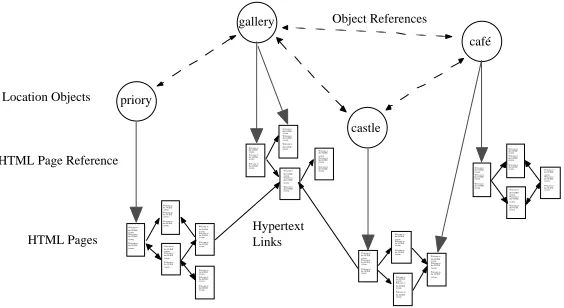
[image:8.595.166.448.294.448.2]The information model used by the GUIDE system represents various types of information, including: i) geographic information, ii) hypertext information, iii) active components and iv) information that can react to events, e.g. it is five p.m. and it is raining. The fact that no existing models can adequately represent all of the aforementioned information types necessitated the design of a purpose built information model (as shown in figure 4.)
Fig. 4. The Guide Information Model.
The information model manages the requirement for representing geographic information by including special navigation point objects. These can be used in conjunction with location objects for determining the best route between a source and destination location. One example of a location object is the city’s castle. This object contains state representing various attributes, such as opening times and tour costs, and also contains hypertext links to related information.
Each GUIDE unit is able to locally cache parts of the information model and is therefore able to operate even when disconnected from the network. However, during periods of disconnection the cached information model can become stale. If, for example, the opening times for the city’s castle changed then the information model would become inconsistent with the server’s information model and, as a result, incorrect information could be given to the visitor.
The GUIDE system has adopted an optimistic approach towards the management of potentially stale caches. If a pessimistic approach had been adopted then no functionality would have been available to visitors when out of cell coverage. The optimistic approach does, however, raise some interesting issues. For example, how can the system make the visitor aware that the information being presented to them could be out-of-date or that timely information might not be displayed because no
castle café gallery priory Welcome to the GUIDE system. Welcome to the GUIDE system. Welcome to the GUIDE system. Welcome to the GUIDE system. Welcome to the GUIDE system. Welcome to the GUIDE system. Welcome to the GUIDE system. Welcome to the GUIDE system. Welcome to the GUIDE system. Welcome to the GUIDE system. Welcome to the GUIDE system. Welcome to the GUIDE system. Welcome to the GUIDE system. Welcome to the GUIDE system. Welcome to the GUIDE system. Welcome to the GUIDE system. Welcome to the GUIDE system. Welcome to the GUIDE system. Welcome to the GUIDE system. Welcome to the GUIDE system. Welcome to the GUIDE system. Welcome to the GUIDE system. Welcome to the GUIDE system. Welcome to the GUIDE system. Welcome to the GUIDE system. Welcome to the GUIDE system. Welcome to the GUIDE system. Welcome to the GUIDE system. Welcome to the GUIDE system. Welcome to the GUIDE system. Welcome to the GUIDE system. Welcome to the GUIDE system. Welcome to the GUIDE system. Welcome to the GUIDE system. Welcome to the GUIDE system. Welcome to the GUIDE system. Welcome to the GUIDE system. Welcome to the GUIDE system. Welcome to the GUIDE system. Welcome to the GUIDE system. Welcome to the GUIDE system. Welcome to the GUIDE system. Welcome to the GUIDE system. Welcome to the GUIDE system. Welcome to the GUIDE system. Welcome to the GUIDE system. Welcome to the GUIDE system. Welcome to the GUIDE system. Welcome to the GUIDE system. Welcome to the GUIDE system. Welcome to the GUIDE system. Location Objects HTML Pages HTML Page Reference
Hypertext Links
network connectivity is available. Section three of this paper addresses these issues and describes our proposed solution for giving feedback to the user regarding the state of their connectivity.
2.4 Infrastructure
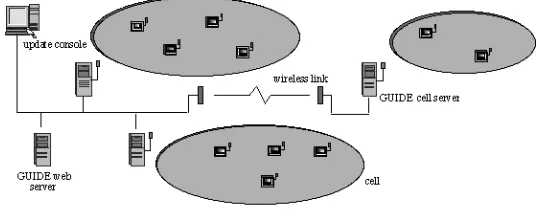
[image:9.595.172.443.267.372.2]The dissemination of the information model to GUIDE units is achieved using the cell-based wireless communications infrastructure shown below in figure 5.
Fig. 5. The GUIDE Infrastructure.
The city contains a number of strategically positioned WaveLAN cells, each providing a shared bandwidth of 2 Mbit/s and supported by a GUIDE server. The fact that WaveLAN cells can be relatively large (up to 300 m in diameter depending on the layout of buildings) means that GUIDE servers may have to support a potentially large number of GUIDE units. This raises some important implications for the way in which information is disseminated to the GUIDE units contained in a cell.
The most significant implication concerns the mean time for a cell server to service a client’s request for data. The medium access protocol used by WaveLAN is based on CSMA/CD, which means that before transmitting on the carrier a unit will listen to detect whether another transmission is currently taking place. If another transmission is heard then a random back-off will occur before another attempt to transmit is made. The implication of this is that, if a point-to-point communications method is used between a cell server and each GUIDE unit within a cell, the response times to requests would be inversely proportional to the number of GUIDE units per cell.
3. The Implications of Disconnected Operation
Context-aware systems with a strong reliance on network connectivity, such as the Conference Assistant, are severely affected by network disconnections. However, such systems are generally intended for operation in fully connected indoor environments where disconnection is unlikely. One could argue that, in the future, fully connected environments will be commonplace in outdoor as well as indoor environments. However, it seems unlikely that the problem of excessive power consumption, caused by fully connected operation, will disappear in the near future. For this reason, it is dangerous to simply assume that one can ignore the problems of connectivity when considering the future role of mobile context-aware systems.
The approach adopted by GUIDE has been to design a system that: 1) utilises a broadcast protocol to minimise power consumption and 2) caches information locally in order to tolerate occasional disconnection. There are, however, a number of implications that arise from adopting this approach. In particular, one needs to consider how disconnected operation might affect the visitor’s trust of GUIDE given that the system relies on connectivity for the messaging service, access to interactive services, such as ticket booking, the reception of dynamic information and location information. One approach would have been to hide the issue of connectivity from the user completely. Given this approach, only when the visitor performed some action which explicitly required connectivity, such as booking a cinema ticket, would the visitor be informed that the service was currently unavailable. The problem with this approach is that the behaviour of the system would, given the anticipated switching between connected and disconnected operation, seem unpredictable and inconsistent. Predictability is a key requirement for the usability of interactive systems [15] not least because it affects the system’s perceived reliability.
Clearly, if visitors perceive GUIDE as unreliable and lack trust in the system then it is unlikely to be used to its potential, if at all [16]. To help alleviate this problem, the user interface to GUIDE has been designed to encourage the user to form a suitable mental model [15] of the system, i.e. one in which the functionality of the system is not static but dependant on whether or not wireless connectivity is currently available. This is achieved by providing the user with an appropriate level of mobile-awareness [17] in order to enable them to appreciate the affect of changes in connectivity on system functionality.
The user interface effectively supports two modes of operation, one for connected operation and the other for disconnected operation. In general, modes represent hidden information and can, when poorly designed, confuse the user. However, in GUIDE we believe that we have satisfied the general principle suggested in [15] for choosing to use modes because: 1) there is sufficient reason and 2) the user is given sufficient information to tell the modes apart.
3.1 Use of a Metaphor to Provide Connectivity Feedback
[image:11.595.162.426.275.317.2]A metaphor, that was both familiar and relevant, was required for providing visitors with feedback regarding the current state of connectivity and encouraging them to associate this with available functionality. To arrive at a suitable metaphor, we considered how connectivity feedback is provided on mobile phones. The user of a mobile phone is given feedback of their connectivity in the form of ‘bars of connectivity’ and when a user receives no bars of connectivity they expect limited functionality, i.e. the inability to send or receive calls. The ‘bars of connectivity’ metaphor has been incorporate into the user interface as illustrated in figure 6.
Fig. 6. Utilising the ‘bars of connectivity’ metaphor.
3.2 Disabling the ‘Ticket Booking’ Icon in Disconnected Mode
The user interface to GUIDE is based on the direct manipulation paradigm (although icons cannot actually be moved) and so only icons that actually allow some action to be completed should be displayed as active. For this reason, we chose to ‘grey-out’ the ticket booking icon when the facility is unavailable due to disconnection.
3.3 Modification of the ‘Send Message’ Dialogue Box
We had considered disabling the messaging icon when operating in disconnected mode, but instead chose to modify the messaging dialogue box (figure 7) to state that the message being composed would not be sent until on-line operation was resumed.
[image:11.595.199.402.530.676.2]This approach was chosen because of the anticipated usage of the messaging component, i.e. sending informal messages to companions, and we felt that it would be most convenient for a visitor to be able to compose a message while sitting in a café even if no network connection was available therein.
3.4 Showing the Status of Location Updates
The availability of up-to-date positioning information would not always be available regardless of whether the GUIDE system received its positioning information via GPS or the coverage afforded by WaveLan cells. For example, when using GPS in a city environment the position of tall buildings can prevent the GPS system from ‘seeing’ a sufficient number of satellites to obtain a fix on location.
It is not necessary for the user to realise that the GUIDE system receives location information and communicates with remote services via the same wireless link. Indeed, location information could be received via DGPS, when the technology matures. In this case, a situation could arise in which location information could be received but network connectivity was unavailable or vice versa.
For this reason we have tried to encourage visitors to form a mental model in which the reception of location information and access to network based services are not inextricably linked. To this end, we chose to include a location status window in the user interface in addition to the ‘bars of connectivity’.
The location status window keeps the user informed of the ongoing reception of location information by the system. When location information has not been received for a short while, the visitor is shown the time (in whole minutes) that has elapsed since the last location update was received. This information allows the visitor to backtrack to the point where location information (and in the current implementation, network connectivity) was available. Alternatively, the user could continue on their current course but in the knowledge that the system does not know (and has not known for x minutes) their location.
3.5 Using the Visitor’s Assistance to Ascertain their Location
Fig. 8. Using the visitor’s assistance to ascertain their location.
4. Future Directions
Our current direction for developing the GUIDE system is to extend the role of connectivity in GUIDE by supplementing the existing GUIDE infrastructure with the latest low-power, micro-cellular, wireless technologies, such as Bluetooth [18]. This will enable GUIDE to support communications within buildings. In addition, the use of micro-cellular wireless communications systems will enable us to determine users’ locations with greater accuracy, without requiring bulky differential GPS equipment, and thus enhance the navigational capabilities of the system.
A further benefit of using micro-cellular wireless technologies is that the use of low-power communications devices will enable more compact end-systems (e.g. the increasingly popular PDAs, such as the palm pilot) to be used with the GUIDE system for extended periods of time.
We also plan to significantly increase the diversity of context-sensitive interactive services supported by GUIDE. Examples of such services will include: ordering a taxi or requesting the location of the nearest cash point. In both cases the system will use information about the user (taxi company preferences or bank details) and contextual information, such as the user’s location and the time of day, to negotiate with the service provider on the user’s behalf. Another service which we hope to provide is an awareness of others, e.g. friends, currently in the city.
changes to underlying GUIDE protocols. In more detail, the current approach used for information dissemination and for obtaining location information relies on the network being comprised of non-overlapping cells. While such an approach has proved ideal for constructing the current GUIDE system, it is clearly unsuitable when we are aiming to provide ubiquitous access to context-sensitive services over heterogeneous networks. As a result, we will need to redesign the underlying GUIDE protocols to address these new requirements without impinging on the original GUIDE aims of providing scalable and low-power access to context-sensitive information.
In addition to modifying the protocols used in GUIDE, we will also need to provide application level components which enable context-sensitive interactions between mobile data users and local service providers, such as restaurants and taxi firms. To reduce the cost of deploying the system we are proposing that one of these components will be a generic gateway which will liaise with service providers using a range of communications techniques including synthesised speech.
5. Conclusions
This paper has considered the role of connectivity in supporting context-sensitive applications, and presented a design space that enables the positioning of context-sensitive applications depending on their reliance on network connectivity and their reliance on local storage.
The GUIDE system described in this paper occupies a central area in this design space because, although the system requires network connectivity to receive both positioning and dynamic information, the system has been designed to continue operating as a useful guide (albeit at a reduced level of functionality) even when disconnected from the network. The key design choice for enabling disconnected operation was the decision to have each GUIDE unit cache at least some portion of the information model in local memory.
However, use of this strategy alone is insufficient to solve the other problems that can occur from disconnected operation. Indeed, additional strategies were required in order to maintain the visitor’s trust of the system when network communications is unavailable. In particular, the user interface was designed to encourage users to adopt a suitable mental model for using the system in both connected and disconnected modes of operation. We chose to utilise a ‘bars of connectivity’ metaphor in order to provide visitors with a suitable analogy for understanding at least some of the issues concerning connectivity and therefore allow the visitor’s expectations of the system to be tempered by the level of connectivity available.
References
1. Schilit, B., Adams, N., Want, R.: Context-Aware Computing Applications. Proc.
Workshop on Mobile Computing Systems and Applications, Santa Cruz, CA, U.S. (1994)
2. Brown, P.J., Bovey, J.D., Chen, X.: Context-aware applications: from the laboratory to
the market place. IEEE Personal Communications, Vol. 4, No. 5 (1997) 58-64
3. Want, R., Schilit, B., Adams, N., Gold, R., et al: The ParcTab Ubiquitous Computing
Experiment, Technical Report CSL-95-1, Xerox Palo Alto Research Center (1995)
4. Dey, A.K., Salber, D., Futakawa, M., Abowd, G.D.: An Architecture To Support
Context-Aware Applications. Georgia Tech, Technical Report GIT-GVU-99-23 (1999)
5. Holmquist, L.: Supporting Group Collaboration with IPAD:s - Inter-Personal Awareness
Devices. Proc. Workshop on Handheld CSCW, ACM CSCW’98 Conference on Computer Supported Cooperative Work, Seattle, Washington. (1998) 37-43
6. Want, R., Hopper, A., et al. :The Active Badge Location System. Olivetti Research
Laboratory, ACM Transactions on Information Systems, Vol. 10, No. 1. (1992) 91-102
7. Long, S., Kooper, R., Abowd, G.D., Atkeson, C.G.: Rapid Prototyping of Mobile
Context-Aware Applications: The Cyberguide Case Study. Proc. 2nd ACM International Conference on Mobile Computing, Rye, New York, U.S., ACM Press (1996)
8. Pinkerton, M.D.: Ubiquitous Computing: Extending Access To Mobile Data, Master’s
Thesis, GVU Technical Report GIT-GVU-97-09 (1997)
9. Cheverst, K., Davies, N., Mitchell, K., Blair, G.S.: The Design of an Object Model for a
Context-Sensitive Tourist Guide. Proc. Interactive Applications of Mobile Computing (IMC’98), Rostock, Germany (1998) 25-29
10. Davies, N., Mitchell, K., Cheverst, K., Friday, A.: ’Caches in the Air’: Disseminating Tourist Information in the Guide System. Proc. 2nd IEEE Workshop on Mobile Computing Systems and Applications, New Orleans, U.S. (1999) 11-19
11. Magellan: GPS Home Page. http://www.magellangps.com/frames/frame2.htm (1999)
12. Fujitsu: TeamPad Technical Page. http://www.fjicl.com/TeamPad/teampad76.htm (1999)
13. Lucent Technologies: WaveLAN Home Page. http://www.wavelan.com/ (1999)
14. Franklin, M., Zdonik, S.: Dissemination-based Information Systems. IEEE Data Engineering Bulletin, Vol. 19, No. 3 (1996)
15. Thimbleby, H.: User Interface Design. Addison-Wesley Longman Ltd, ISBN 0-201-41618-2. (1990)
16. Sommerville, I.: Software Engineering. Third Edition, Addison-Wesley Longman Ltd, ISBN 0-201-17568-1. (1989)
17. Cheverst, K., Davies, N., Friday, A., Blair, G.: Supporting Collaboration in Mobile-aware Groupware. Proc. Workshop on Handheld CSCW: ACM CSCW’98 Conference on Computer Supported Cooperative Work, Seattle, Washington (1998) 59-64