
© 2017, IRJET | Impact Factor value: 5.181 | ISO 9001:2008 Certified Journal | Page 1730
Architecture and Analytical Study of Magento
Mr. Dashrath Mane
1, Mr. Onkar Prakash Ghadi
21
Professor in Department of MCA, V.E.S Institute of Technology, Mumbai, India
2MCA Final year Student, V.E.S. Institute of Technology, Mumbai, India
---***---Abstract -
In recent years there is lot of development ine-commerce sector. Developing and managing a web store is critical part of such development. Today there are many e-commerce development platforms like WooCommerce, Big Commerce, Magento etc. In this paper we will be discussing about magento system. To the extent of our knowledge, this paper is the first one describing how to set up a web store and some important features of magento. Magento is an open source platform that was initially suitable for large retailers. Retailers or organizations who are involved in e-commerce need affordable and easily maintainable system. Magento is designed to meet these needs. The store can be customized according to the business needs. This paper suggests how magento can improve in analytics
Key Words: analytics, caching, e-commerce, magento,
module
1.INTRODUCTION
Over couple of years use of online shopping has been increased and it has become a part of our day to day life. Managing e-commerce website takes a lot of efforts. However with platforms like magento one can manage their website with minimal efforts. Magento is an open source e-commerce platform. It is exclusively written in PHP. Magento uses Zend framework which is based on object oriented programming and MVC architecture [4]. For database magento uses MySQL. The system comes with lot of built-in features required for creating and managing the store. There are two versions of magento; community edition and enterprise edition. Magento community edition if free of charge but the latter is not. Enterprise edition offers services such as magento support which offers 24*7 professional technical support and scalability which allows you to grow your website without any limit.
2. SETTING UP MAGENTO
Main requirement for Magento is LAMP (Linux, Apache, MySQL, and PHP). Install all the softwares using following commands [5][9]:
APACHE: sudo apt-get install apache2 MySQL: sudo apt-get install mysql-server
PHP: sudo apt-get install php libapache2-mod-php
Apt-get is the powerful linux command to install and upgrade software packages.
Magento installation is pretty easy. After you installed the prerequisite softwares, download and install it graphically. You can add a theme suitable to your business from magento admin panel.
3. MAGENTO STRUCTURE
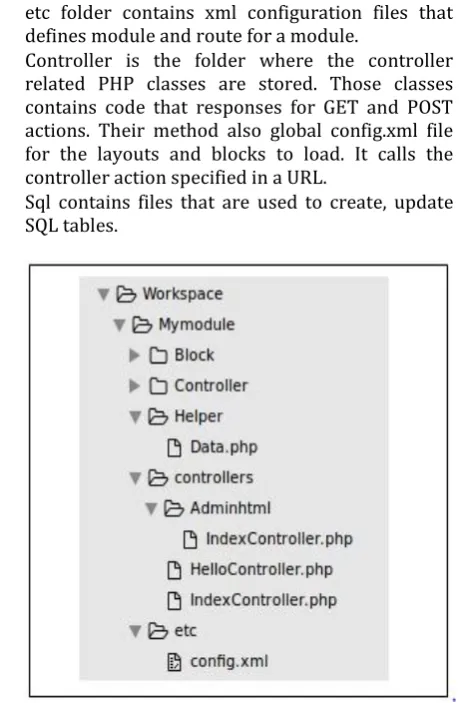
Each Magento project consists of follows below structure [1].
Block contains files that are used to display data in template files.
Files inside Model folder contain business logic of a module and database interactions.
etc folder contains xml configuration files that defines module and route for a module.
Controller is the folder where the controller related PHP classes are stored. Those classes contains code that responses for GET and POST actions. Their method also global config.xml file for the layouts and blocks to load. It calls the controller action specified in a URL.
[image:1.595.332.562.359.711.2] Sql contains files that are used to create, update SQL tables.
Fig - 1. Folder structure of Magento Module
© 2017, IRJET | Impact Factor value: 5.181 | ISO 9001:2008 Certified Journal | Page 1731
changes will be overwritten on a system magento upgrade.Therefore one must create module inside community or local code pool only. Local code pool is project specific. You can create a module inside community folder if you want to share your code to magento community. You can also download the modules developed by third party magento programmer through Magento Connect. These third party modules reside inside community pool.
4. MODULE DEVELOPMENT
[1] In fig. 1 Workspace is the namespace for the module. The namespace should be unique e.g. your company name; which uniquely identifies your module over the web. ‘Mymodule’ is the name of our module. Next, we need to create a file inside app/etc/modules directory. This directory contains configuration file for all the modules inside project. The file should follow naming convention <namespace>_<moduleName>.xml i.e. in this case Workspace_Mymodule.xml. This file tells magento about location of our module.
<?xml version=”1.0”?>
<config>
<modules>
<Workspace_Mymodule>
<active>true</active>
<codePool>local</codePool>
<Workspace_Mymodule>
<modules>
<config>
True in an <active> tag enables magento module and <codePool> should contain name of code pool within which your module resides. Now when you open admin panel, you must able to see your module under System -> Configuration -> Advanced ->Advanced-> Disable module output list. Here you can enable or disable the listed modules.
Fig - 2. Enabling Magento Module
Create config.xml file under /Mymodule/etc with following content.
<?xml version=”1.0”?>
<config>
<modules>
<Workspace_Mymodule>
<version>0.1.0</version>
</Workspace_Mymodule>
</modules>
<frontend>
<routers>
<mymodule>
<use>standard</use>
<args>
<module>
Workspace_Mymodule
</module>
<frontName>
mymodule
</frontName>
</args>
</mymodule>
</routers>
</frontend>
</config>
First is <module> tag which tells name and version of a module. Module version keeps upgrading as and when you update your module. <frontend> and <router> tag specifies how the magento access the module using routing mechanism. We use name specified in the <frontName> tag inside the URL like
yoursite.com/index.php/frontName/controllerName/met hodName. Create HelloController.php inside
app/code/local/Workspace/Mymodule/controllers with following content.
<?php
class Workspace_Mymodule_IndexController extends
Mage_Core_Controller_Front_Action{
public function greetAction(){
echo “Hello Welcome to Magento”;
}
}
Fig - 3. Frontend Module
Open the URL
© 2017, IRJET | Impact Factor value: 5.181 | ISO 9001:2008 Certified Journal | Page 1732
index controller and index action. Therefore if you enterURL as site.com/index.php/mymodule magento will try to load index controller and search for indexAction inside it.
5. CREATING ADMIN ROUTE
All admin panel menus are inserted in same config.xml file but inside a new <admin> tag. Backend admin panel menus are also configured from this file. [6]
<admin>
<routers>
<mymodule>
<use>admin</use>
<args>
<module>Workspace_Mymodule</module>
<frontname>admin_mymodule</module>
</args>
</mymodule>
<routers>
<admin>
<global>
<helper>
<mymodule>
<class>
Workspace_Mymodule_Helper
</class>
</mymodule>
</helpers>
</global>
<adminhtml>
<menu>
<mymodule translate=”title”
module=”mymodule”>
<title>Demo Menu</title>
<sort_order>50</sort_order>
<children>
<mymodule module=”mymodule”>
<title>Submenu 1</title>
<sort_order>0</sort_order>
<action>
admin_mymodule/adminhtml_index/index
</action>
</mymodule >
<children>
</demo>
</menu>
</adminhtml>
Create IndexController.php in AdminHtml to perform action on click of “Submenu1” which follows same structure as that of frontend controller but extends
Mage_Adminhtml_Controller_Action. Also create Helper classe which is used to display menu in admin panel. It do not contain any method. Create Data.php in Helper directory with following content.
<?php
[image:3.595.308.560.212.344.2]class Workspace_Mymodule_Helper_Data extends
Mage_Core_Helper_Abstract { }
Fig - 4. Magento Admin Module
Magento uses <title> for displaying menu text. <action> node tells the route URL while <sort_order> determines sorting order of the menu with respect to other menus. The <children> tag is sub menu of parent menu. It follows similar structure as that of main menu. In this example we have created Demo Menu as the top level menu and only sub menu ‘Submenu 1’. Here you can configure your own admin site options.
6. MAGENTO ARCHITECTURE
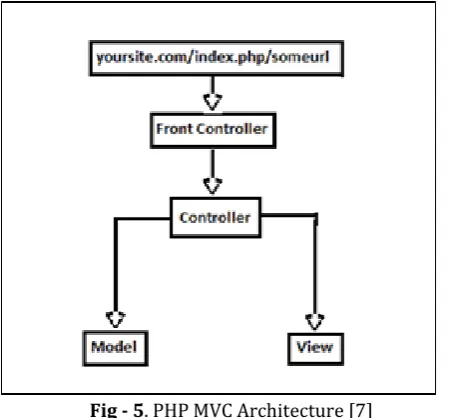
Magento MVC architecture is little different from PHP MVC architecture. In a typical MVC pattern the flow of an application is something like following figure.
[image:3.595.325.554.556.765.2]© 2017, IRJET | Impact Factor value: 5.181 | ISO 9001:2008 Certified Journal | Page 1733
1. There is main entry point index.php. The URL isintercepted by some rules and page is redirected to Front Controller.
2. Based on routing mechanism and requested URL pattern the Front Controller calls specific Controller class and its intended method
3. Controller’s action method instantiates Model which are used for data manipulation.
4. After retrieving data from Model, Controller prepares the view for a data in PHP file.
Magento MVC architecture adds some more layers of functionality such as layout, blocks. The view part is divided into Blocks and Template files.
1. The main entry point to the application remains index.php file. It instantiates the magento application by calling Mage::app().
2. The config.xml file is at the core of magento application. It is also called as Front Controller. <router> tag inside <frontend> contains module and frontend name. The frontend name will be checked against the url. If a match is found, appropriate Action Controller class and its method will be called.
3. The controller’s action method instantiates Model for data manipulation.
4. Each Action Controller is responsible for loading and rendering layout using method loadLayout() and renderLayout().
5. Each request will have different layout handles, such as default layout. The layout will be searched in layout xml file; such as
<layout version=”0.1.0”>
<default>
<block type=”page/html” name=”root”
output=”toHtml”
template=”mymodule/hello/sample.phtml” />
</default>
[image:4.595.320.561.77.388.2]</layout>
Fig - 6. Magento MVC Architecture [8]
6. Block references model and passes control to template file for view
7. Template file is a phtml file; phtml file is nothing but html file with PHP content.
7. MEMCACHED & REDIS
© 2017, IRJET | Impact Factor value: 5.181 | ISO 9001:2008 Certified Journal | Page 1734
performance improvement a website should have goodand robust caching mechanism. Hence redis is suitable option for magento.
8. ANALYTICS
The internet has changed competition, product, and even markets. It’s democratization gives power to consumers [3]. The most important thing to consider in success of your web store is to know your customers and their tendency to use web. Unless you don’t know your target audience you cannot build a successful ecommerce website. Magento provides analytical and report generating tools to measure performance of your store. Magento sales report provides data about information about the sales over a period of time. There are other type of reports such as invoicing, shipping report which shows you a number of orders placed with specific time. Other important type of report that magento provides is products in carts and abandoned carts. The first one generates report about customers who have products in their cart. The later one shows report about customer who discarded product from their cart. The business analyst panel must think about what went wrong after customer inserting the product into cart. You must be your own customer to feel which aspect your store needs improvement.
The business owner or project manager must know about probable competitors, their market strategies, revenue, visitors and the final conversion rate. Analytical tools such as Google Analytics are available to make better decision on where to invest, your website traffic, how much time a probable customer spends time on particular web page. The ABC of analytics is acquisition, behavior, conversion. The acquisition suggests what are the different sources that causes increased traffic at your site. The traffic can be generated by directly typing keywords by virtue of which the search engine provides your website in search list. Another way is by which your bloggers post links in some of their blogs. You must also know the customer behavior. The amount of time he spends on specific product page, which pages are frequently searched by customers. The ultimate aim of such a lengthy process is the conversion of customer searches into revenue. If a customer spends some amount of time on product page but he did not buy it; this means there is something which is less appealing. Therefore one thing that needs to be improved in magento is to create an extension or plugin that performs analytical study of your’s and your competitior’s webstore with some set of stakeholder. The tool is to provide report on how users search over the web with some keywords; recent trends in market, what users are tend to search; after user searches for a product on different websites how much time user spends on product specification,how much time he takes to insert a product into cart. Finally the tool must be able
to find best user practices and which website users liked the most. It will give fair idea on how to improve your business; which part of a website must be focused more on; which are the keywords through which SEO can be improved etc.
CONCLUSION
In this paper we have just had a brief idea of how to develop a module with both frontend and admin panel. This article also shows how a magento analytical tool can be improved to give make your website customer focused which will causes more number of e-commerce companies to get attracted towards using magento for gaining large revenue and increasing a customer base.
REFERENCES
[1] Magento Developer’s Guide, Branko Ajzele [2] Magento Search Engine Optimization, Robert Kent. [3] Dr. Shanet Ambat, Jerry Agbayani, Kirk Alvin Awat,
Jesus Paguigan, Theodore Donald Valerio, “Analyzing Business Marketing Strategy Using Google Analytic”, Internation Journal Journal of Advanced Research in Computer Science and Software Engineering, Volume VI, issue IV, April 2016.
[4] https://en.wikipedia.org/wiki/Magento
[5] https://www.digitalocean.com/community/tutorials/ how-to-install-linux-apache-mysql-php-lamp-stack-on-ubuntu-16-04
[6] https://code.tutsplus.com/tutorials/magento-custom-module-development--cms-20643 [7]
http://alanstorm.com/2009/img/magento-book/php-mvc.png
[8] http://alanstorm.com/2009/img/magento-book/magento-mvc.png
![Fig - 6. Magento MVC Architecture [8]](https://thumb-us.123doks.com/thumbv2/123dok_us/8161294.805801/4.595.320.561.77.388/fig-magento-mvc-architecture.webp)
