Social Networking Teaching Tools:
A Computer Supported Collaborative Interactive Learning Environment for K-12
by
Curtis Clifford Cain
A thesis submitted to the Graduate Faculty of Auburn University
in partial fulfillment of the requirements for the Degree of
Master of Science Auburn, Alabama August 9, 2010
Keywords: Computer Supportive Collaborative Work (CSCW), Content Management System, Social Networking, Interactive Education, Online Learning Environment, KXNN
Copyright 2010 by Curtis Clifford Cain
Approved by
Cheryl D. Seals, Chair, Associate Professor of Computer Science and Software Engineering Wei-Shinn Ku, Assistant Professor of Computer Science and Software Engineering John A. Cook, Extension 4-H, FYFL Project Leader, Assistant Professor of Agriculture
ii Abstract
Computer Supported Collaborative Work (CSCW) is a broad area which, is to investigate using technology to facilitate collaboration. This research is to investigate and develop a collaborative educational environment as a tool to aid teachers in grades K-12 in the STEM, Science, Technology, Engineering and Mathematics, disciplines.
The resulting model will be used as a component of a larger learning environment that will remove the social networking taboo stigma currently associated with social networking sites. The model will extend beyond that of traditional social networking by supplementing class lectures in a fun, engaging and thought provoking manner instead of the typical classroom lectures. The final product will be a web-based collaborative educational tool for online interactive tool development.
Surveys were used to analyze the perceived effectiveness and receptiveness to the proposed educational tool as determined by K-12 teachers. This paper seeks to gauge teacher’s receptiveness and willingness to utilize an online educational forum to supplement traditional classroom lectures.
iii
Acknowledgments
I would like to express my thanks to Dr. Cheryl D. Seals for being receptive to becoming my advisor after Dr. Gilbert left Auburn and for being a great mentor and advisor for the past year. Not only this, her guidance has been truly appreciated and helpful along my journey here at Auburn University. I would also like to express my sincere thanks to my committee members Dr. John Cook and Dr. Wei-Shinn Ku. Your time and participation as a committee member is greatly appreciated in this study. Dr. Cook, special thanks goes out to you for your innovation and leadership in exploration of educational learning environments. A special thanks to Justus Nyagwencha for your interest and assistance in formulating the grounds for this research and Albanie Bolton for your continuous support and guidance throughout this process.
Finally, I would like to thank my God, Mom, Debra Everett, Dad, Robert Cain, Grandmother, Ethel Cain, Aunt, Rocile Cain, and my immediate family for all their continuous prayers and inspiration throughout these years. Without them, I know that none of this would have ever been possible. I am truly blessed that each of them are here today to share yet another experience with me down this road called life.
iv
Table of Contents
Abstract ... ii
Acknowledgments ... iii
List of Tables ... viii
List of Figures ... ix Chapter 1 Introduction ... 1 1.1 Problem Statement ... 2 1.2 Research Justification ... 4 1.3 Research Purpose ... 5 1.4 Hypotheses ... 5 1.5 Document Review ... 5
Chapter 2 Literature Review ... 7
2.1 Computer Supported Collaborative Work ... 7
2.1.1 CSCW Overview ... 7 2.1.2 Importance of CSCW Today ... 9 2.2 Examples of CSCW ... 9 2.2.1 Synchronous CSCW Environments ... 9 2.2.1.1 Text-based Chat ... 10 2.2.1.2 Graphics-based Chat ... 10 2.2.1.3 Shared White-Boards ... 11
v
2.2.2 Asynchronous CSCW Environments ... 11
2.2.2.1 Message Systems ... 11
2.2.2.2 Shared File Systems ... 11
2.2.3 What I Know Is (Wiki) ... 12
2.2.4 Swiki ... 14
2.3 Social Networking Communities ... 14
2.3.1 Facebook ... 15 2.3.2 Twitter ... 17 2.3.3 YouTube ... 18 2.3.4 MySpace ... 19 2.3.5 LinkedIn ... 19 2.3.6 Elgg ... 20
2.4 Online Educational Environments ... 20
2.4.1 Modular Object-Oriented Dynamic Learning Environment ... 21
2.4.2 Blackboard ... 21
2.4.3 Microsoft SharePoint ... 22
2.4.4 LogiCampus ... 22
2.4.5 ATutor ... 23
2.4.6 TappedIn ... 23
2.5 Kids Extension News Network ... 24
2.5.1 What is KXNN ... 24
2.5.2 KXNN Motivation ... 25
vi
Chapter 3 Methodology ... 26
3.1 Initial Workspace ... 26
3.1.1 Using wiki for Content Management ... 27
3.1.2 Problems with wiki for Educational Environments ... 27
3.2 Planned Educational Environment ... 28
3.2.1 KXNN Cloud Computing ... 29
3.2.2 KXNN Modeling and Life Process ... 30
3.2.3 KXNN Use-Case Scenario ... 36
3.2.4 Testing Educational Environment ... 38
3.3 Hypertext Preprocessor ... 39
3.3.1 Hypertext Preprocessor Bulletin Board ... 39
3.4 Description of Initial Study ... 40
3.4.1 Test Environment and Experiment ... 40
3.4.2 Hypotheses and Variables ... 41
3.4.3 Setup of Experiment ... 42
3.4.4 Experimental Procedure ... 42
Chapter 4 Implementation ... 44
4.1 PHPBB Implementation ... 44
4.1.1 Domain Registration and Hosting ... 44
4.1.2 MySQL Database Setup ... 45
4.1.3 Email Server Setup ... 46
4.1.4 Scripting for Content Support ... 47
vii
4.1.6 Google Analytics ... 51
Chapter 5 Results and Discussion ... 53
5.1 Information Gathered from Pre-Questionnaire ... 53
5.2 Results from KXNN Environment Experiment ... 54
5.3 Study Participants Comments ... 59
Chapter 6 Future Work and Conclusion ... 61
6.1 Future Work ... 61
6.2 Conclusion ... 62
References ... 63
Appendix A Approved IRB Form... 67
Appendix B For Youth, For Life: Logic Model ... 68
Appendix C Electronic Information Form ... 69
Appendix D KXNN Study Pre-Questionnaire ... 71
Appendix E KXNN Study Participant Task List ... 76
Appendix F KXNN Study Post-Questionnaire ... 77
Appendix G Prototype KXNN Home Page ... 81
Appendix H Prototype KXNN Captivate Lesson ... 82
viii List of Tables
Table 1: Pre-Questionnaire Results ... 55
Table 2: Educator Perception of Online Educational Tools ... 55
Table 3: Educator Reception to Educational Forum ... 56
Table 4: Post-Questionnaire User Experience and Satisfaction Results ... 56
Table 5: Post-Questionnaire Usefulness Results ... 57
Table 6: Post-Questionnaire Combined Results ... 58
ix List of Figures
Figure 1: Computer Supported Collaborative Work Matrix ... 7
Figure 2: Sample Internet-based Chat - Internet Relay Chat (IRC) ... 10
Figure 3: Sample Graphics-based Chat – Avatar Chat ... 11
Figure 4: Simplified KXNN Illustrative Model ... 24
Figure 5: For Youth, For Life – Social Learning Environment ... 25
Figure 6: Initial KXNN Workspace ... 26
Figure 7: Minimalistic KXNN Hardware/Software Model ... 28
Figure 8: KXNN Context Diagram ... 30
Figure 9: The Prototyping Model ... 31
Figure 10: KXNN Domain Model ... 32
Figure 11: KXNN Use-Case Diagram ... 33
Figure 12: KXNN System Sequence Diagram – Login ... 34
Figure 13: KXNN System Sequence Diagram – View Available Forum Topics ... 35
Figure 14: KXNN Survey Flowchart ... 43
Figure 15: Prototype KXNN Home Page ... 44
Figure 16: Prototype KXNN Instant Chat ... 48
Figure 17: Prototype KXNN Agriculture Lesson ... 49
Figure 18: Adobe Captivate Support within KXNN Environment ... 50
x
1
CHAPTER 1: INTRODUCTION
With the expanding power of computers and the recent growth of information technologies, such as the Internet, it is possible for large numbers of people to have direct access to a wide array of information sources and services. An increase in Internet usage, inevitably, causes a growing concern of Internet usage to facilitate the transfer of educational information. The Internet, since its acceptance into homes, has always been heralded as the last place for true freedom without limits. As with all things limitless also comes lawlessness and recklessness, which is a growing concern for educators. According to the U.S. Department of Commerce, in 2003, about 61.8% of households in the United States owned a personal computer and approximately 54.7% of these households had Internet access. In the United States today, the questions are not, does the household own a computer and are equipped with Internet access but rather how many computers and how fast is the Internet. In order to truly embrace the limitless capabilities of the Internet, educators must not only be open to use the Internet as a method of supplementary and cooperative education but also learn to use the strengths of the Internet to their advantage.
Along with the technology expansion is also the reach of this technology to youth. There has never been a time where the youth of today may know more about the technology than those trained to use it and certainly more than educators. In this regard, the youth have an upper hand when it comes to deployment of the Internet for educational use; the youth can either embrace the technology or revolt against it. The youth know that the popular Internet search engine Google completes and holds more than 60% of today’s market share for Internet queries such
2
that any question they have can be answered, simply by “Googling It!” Such that is has become iconic, thus when you are searching for any information we simply “Google It!”
There are also newer technologies called social networking which encompass Facebook and Twitter which most educators see as taboo in educational environments however Facebook, the world’s largest social networking site, has over 350 million registered users. It is impossible to deny the reach and impact of these sites; they surround each and every move that we make today. Facebook not only is free, but anyone can register and instantly be put in touch with those whom they had to acquire a calling card in the past to reach. With technology expansion to youth and the overwhelming reach of social networking sites, educators face an uphill battle of how to embrace these newer technologies and more techno-savvy and intelligent youth [23].
1.1 PROBLEM STATEMENT
There are many different methods of attempting to engage the learner through online learning environments however many of them are for older learners outside of elementary and middle school aged children. Many of these technologies are structured in such a way that younger learners lose interest relatively easily and miss concepts that should have been learned. This lack of technology utilization places younger adolescents at a disadvantage when compared to their older counterparts. This also places educators at a disadvantage resorting back to older teaching methods for teaching material to younger students. There is also pressure for educators to integrate new technology into their class to provide greater intrinsic motivation for younger students to engage in material. Technology holds great potential for improving the quality of education to younger students, however, if the technology created is not designed with a user centered approach it will inevitably fail to achieve the desired effect. In general, the younger
3
students are more acclimated to technology, this is primarily due to age and the environment in which they grow up, however, this is not always true for all younger learners. It is hard to gauge a young learner’s comfort level and ability to navigate and comprehend technology, which likely is directly correlated to the environment in which they grow up. The National Association for the Education of Young Children states, “Technology plays a significant role in all aspects of American life today, and this role will only increase in the future. The potential benefits of technology for young children’s learning and development are well documented. As technology becomes easier to use and early childhood software proliferates, young children’s use of technology becomes more widespread. Therefore, early childhood educators have a responsibility to critically examine the impact of technology on children and be prepared to use technology to benefit children” [26] [27]. There is substantial evidence which suggests elementary aged students brains are significantly more developed than those of the previous generation; researchers contribute this enhancement directly to technology and having access to information which significantly dwarfs the previous generation in both depth and breadth [28].
To spread the information technology to educators and engage the young learners, not only should the current tools available be easy for educators to use but also the technology must engage and interest the younger learners. Although there are many educational tools available, none are specifically focused on younger populations. Furthermore, educators are not well versed in Hypertext Markup Language, HTML. This project will focus on the faults of these technologies as well as an implementation of older technology that will combine various factors to increase the likelihood that it appeals to educators as well as young learners thus eliminating a gap that has existed since the inception of educational tools.
4
Due to several limitations of traditional classroom environments, educational institutions are moving away from traditional approaches and attempting to find alternative ways to engage the learner. The costs to build, develop, deploy and train educators to use these tools may put a strain on already stretched educational budgets. The problem with many of these environments is they are not designed for younger learners. The learning environments are organized in a very structured manner making them reminiscent to traditional classrooms, which do not engage younger learners with interactive learning. Many educational institutions budget are already being strained by shortcomings in funding, the cost incurred to train, build and develop custom software to suit educational tools would usually exceed the allotment for information technology. Therefore, the purpose of this study was to develop an educator friendly and youth oriented learning environment centered on ease of use and interactive technology for the educator and with the learner as the focus of the learning environment.
1.2 RESEARCH JUSTIFICATION
The growth of online learning communities emerged as a byproduct of the rapid growth of the Internet and related media. Data and information are now being created at a rate far faster than most experts can convert this information into forms of knowledge that can be communicated effectively to teachers, students, and the general public. Social networks, depending on their usage, can address this problem by providing entertainment for people to connect and learn from others through collaboratively participating in the construction of new knowledge. In addition, social networking communities address the needs of their members such as interests, imagination and transactions.
5
Research in the cognitive and learning sciences has demonstrated that different people learn in various ways and have distinct learning needs at various times in their lives [29]. These differences in learning can be address with social learning communities. Such communities allow members and trainees to control their teaching and learn at their own pace, which can supplement information previously learned which is excellent for younger learners.
There have been few studies of younger learners that actively seek to understand their learning capacity using online learning environments. Computers and information technologies hold the tools necessary to increase the knowledge base of younger learners. However, the successful use of the technology is based on whether the systems can support the educators as well as the learners in a capacity that they easy to use, challenging and engaging.
1.3 RESEARCH PURPOSE
The primary objectives of this research were to:
1. Design an educational learning environment to provide educators and younger learners the ability to use an online system that is interactive and open to younger learners and easy for educators to use to post their content.
2. Investigate educational tools currently available to facilitate and supplement traditional classroom learning for their effectiveness.
3. Determine if the educational prototype environment will improve the effectiveness of educators.
6 1.4 HYPOTHESES
The main hypotheses of this study is that teachers embrace computer aided learning that is interactive in a setting inside and outside of the traditional classroom and educators would use the environment if it engaged students and was not difficult for them to use and required no technical programming skill. Another hypothesis is that an informal learning environment better supports students as opposed to structural educational environments.
1.5 DOCUMENT REVIEW
The rest of this thesis is organized as follows: Chapter 2 consists of a literature review, which discusses computer supported collaborative work, social networking communities and online educational communities; their strengths and weaknesses in regards to younger learners as well as an overview of the Kids eXtension News Network (KXNN). Chapter 3 provides a description of the initial KXNN workspace, problems that exist within the current framework, a description of the planned framework that addresses the issues with the existing framework and a description of hypertext preprocessor. Chapter 4 goes over detailed implementation of the framework that has been built to alleviate the issues of the initial framework. Chapter 5 discusses the details of the KXNN project and analysis of the deployed Google Analytics data on the KXNN project. Chapter 6 concludes the thesis with the results of the project along with the future work to come.
7
CHAPTER 2: LITERATURE REVIEW
2.1 COMPUTER SUPPORTED COLLABORATIVE WORK (CSCW)
2.1.1 CSCW Overview
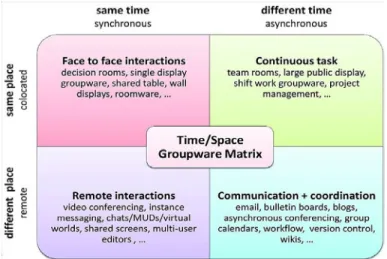
Computer Supported Collaborative Work (CSCW) was first derived by Irene Greif and Paul M. Cashman in 1984. CSCW addresses how collaborative activities and their coordination can be supported by means of computer systems [4]. Essentially, CSCW deals primarily with design and how tools can be designed and suited to the user and a particular task or set of tasks. CSCW tools can be synchronous, asynchronous as seen in Figure 1. CSCW extends beyond that of traditional thinking as well and includes aspects of psychological, social and organization effects. Researchers in CSCW have divided the area into 3 core dimensions which include Awareness, Articulation and Appropriation.
Figure 1: Computer Supported Collaborative Work Matrix. (Source: Johansen, R. 1988 “Groupware: Computer Support for Business Teams” The Free Press.)
8
CSCW Awareness deals with user’s ability to work together with others for educational gain and knowledge about each other. For example, this is often best demonstrated without computer aid, in meetings as a form of introduction where users are paired up into groups and a set of questions are asked that allow users to get to know each other. On a larger scale, with computer aid, users from all over the world can participate and learn useful information about each other that could build relationships and strengthen ties [5].
CSCW Articulation is how individuals group together for a task and must manage to divide the task amongst them, complete the divided parts and reintegrate the parts. For example, classroom group projects, in which classmates divide the project into smaller parts, complete the smaller parts individually and come together to pull each individual part into one large group project. Articulation of work can remain the same on a larger scale in which the total project is only as good as the sum of its parts from individuals. The same concept works in industry as it does in academia with software development, programming code in which software is used to track individual progress and work as well as compilation.
CSCW Appropriation deals with how a group or individual adapts technology for their own situation; the technology may be used for a different use than what was intended by designers. When technology is used for an alternative purpose than it was initially designed this is normally be attributed to the designer’s point of view as opposed to the users. For example, in human computer interaction, a good design is when the users mental model, which is how the user feels a system works, and the designers conceptual model, an mockup or prototype of how the system is to be designed, match the design is considered to be very structured and that the user and designers agree about the requirement model. When there is an inconsistent mapping between user and developer models this will create problems with the product. Designers and
9
engineers may blame the user for the failure, while not realizing that they too share in the failure [6].
2.1.2 Importance of CSCW Today
CSCW plays an integral in product development today, as it is the focus point of collaborative learning. In order for collaborative environments to grow and thrive they must be designed and engineered in a fashion that nurtures the learner as an individual, but adds the element of collaborative work using the three core attributes of awareness, articulation and appropriation to accomplish goals. Unlike other areas of Computer Science, CSCW, is interdisciplinary in nature, the perspective of some backgrounds from the sciences and others from the arts, makes for a rather diverse culmination of ideas and thought processes but also yields problems with the understanding and synthesizing of information. CSCW plays an important role, especially in the development of our youth. There is no denying the fact that information technology plays a vital role in the lives of young learners and the impact will not decrease, but rather grow as time passes. As information technology becomes more sophisticated, CSCW provides access to groups with little access to technology in the past. CSCW allows communication and collaboration across a broad spectrum of information technology areas, which are vital to the ever diversifying nature of education and collaboration.
2.2 EXAMPLES OF CSCW
2.2.1 Synchronous CSCW Environments
Synchronous Environments are similar to all other methods of synchronous communication. One definition of synchronous communication is direct communication in which all parties are involved [11]. Synchronous typically refers to time; therefore to be in sync
10
all parties must be available at the same time. Synchronous environments have evolved over time to include certain methods of asynchronous communication, but still retain their synchronous characteristics, for example a phone call is made but the user does not answer, while the phone call is direct communication therefore synchronous the voicemail system that the caller will be transferred to is not synchronous.
2.2.1.1 Text-based Chat
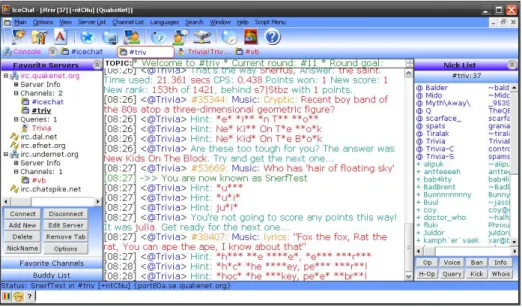
The most prevalent communication systems on the web are basic Internet-based chats. Internet-based chats that are the midpoint in between UNIX talk applications and Internet Relay Chat (IRC). Most of these type systems are written in Java.
Figure 2: Sample Internet-based Chat - Internet Relay Chat (IRC)
2.2.1.2 Graphics-based Chat
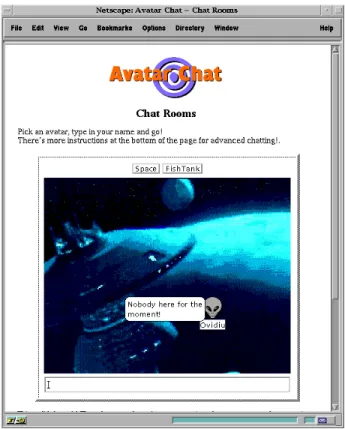
Graphic- based chat is similar to text based chats but adds some graphical capabilities of the Internet. An example would be Avatar Chat as pictured below.
11
Figure 3: Sample Graphics-based Chat – Avatar Chat
2.2.1.3 Shared White-Boards
Shared white-boards are currently being deployed in many smart classrooms where the instructor has access to the primary white-board, but students can also use their computers to manipulate the same white-board. This form of learning allows students the ability to enter input and show their strategies to other students who may be sharing similar concerns and questions.
2.2.2 Asynchronous CSCW Environments
Asynchronous Environments are the opposite of synchronous environments in which parties do not collaborate at the same time. Often these type systems revolve solely around messaging, which allows the initial user to leave a message and the recipient can check the
12
message at their earliest convenience and respond. Asynchronous communication rarely leads to synchronous communication while often synchronous communication does support asynchronous communication, as in the phone call to voicemail example. Messaging systems, however, are not the only form of asynchronous communication; email and file sharing systems are too, just to name a few.
2.2.2.1 Message Systems
Messaging systems may be the most prolific method of asynchronous communication. Users compose, edit and send messages to other users and groups, those users and groups receive the message and respond at their convenience. These styles of messaging systems include cellular text messaging as well as online messaging systems.
2.2.2.2 Shared File Systems
Shared files systems are another method of asynchronous form of communication. File sharing systems such as Microsoft SharePoint are repositories for information as they allow a user to save information to a server and other users, whom have access, can also login to the server and view and modify the content at their convenience.
2.2.3 What I Know Is (Wiki)
Wiki’s have gained traction over recent years as a viable information repository. A wiki is a website that allows the easy creation and editing of any number of interlinked web pages via a web browser using a simplified markup language [13]. By far the most popular wiki found on the web is the Wikipedia, the free encyclopedia. Wikipedia has shown the strengths and weaknesses of using wiki software. Among some of the strengths are the ability for users to
13
navigate through wiki’s with relative ease and usually wiki’s are easy to setup. Weaknesses are, utilizing wiki’s still require some level of understanding markup language, depending on the triggers set within the wiki software, pages can be edited by users, which can either add useful information to discussions or add controversial information to subjects as well as issues with security and the handling of users [8].
In educational environments where the student is more mature and self directed and the teacher has time to learn a bit of markup language a wiki is a useful collaborative tool. The problem with the wiki is where do students go to ask questions about content; they may be confused and do not wish to add or edit content but rather ask a question and the wiki does not provide a workspace for that type of feedback. However, in more structured environments the wiki has been used as an educational tool and quite successfully.
At many institutions there have been courses taught using the wiki as a course website. Biology 414/614: Eukaryotic Genetics and Molecular Biology taught at the University of Maryland Baltimore County, PY55 Introduction to Sleep at Brown University, PY111 Personality and Clinical Assessment at Brown University, English 15 at The Pennsylvania State University and The Collaborative Writing Project at SUNY were all taught using wiki’s as a content management and collaborative educational tool.
The problem at hand for this research to leverage and redesign wiki’s is an obvious one; the audience that a wiki is catered to is not younger learners. The reason why wiki’s have become so successful is the capacity for learned individuals to add their knowledge to the discussion. This is not the case for younger students, particularly students whom have not reached high school age. The wiki environment constrains the user to learn a new programming
14
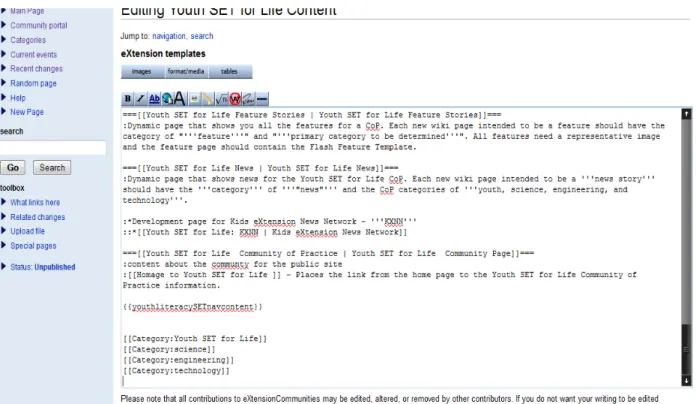
language to converse in this discourse, which is prohibitive for an informal learning environment. Furthermore, to use a wiki effectively, the administrator of the wiki must know, to a reasonable degree, HTML, if the educator does not know HTML it is hard to format the wiki and content correctly [14].
2.2.4 Swiki (Squeak + Wiki)
Swiki was developed after wiki; it was implemented by Mark Guzdial at the Georgia Institute of Technology in the Collaborative Software Laboratory. Swiki is written in Squeak and is most commonly used by the Georgia Institute of Technology’s College of Computing as collaborative group web pages. Squeak is a free open-source implementation of the object-oriented programming language smalltalk. Swiki has been used in K-12 education and had been used successfully with 4th graders and higher. A valuable feature of Swiki is that you can choose to password protect certain web pages and can lock certain pages to prevent users from changing existing content which is a feature the standard wiki is lacking [15]. Swiki never really reached its full potential of use; it is still used by Georgia Tech today in the College of Computing but rarely used outside of the institution.
2.3 SOCIAL NETWORKING COMMUNITIES
Sociologist define a social network as a social structure made of individuals or organizations called “nodes,” which are tied by one or more specific types of interdependency, such as friendship, kinship, financial exchange, dislike, sexual relationships, or relationships of beliefs, knowledge or prestige [16]. Regardless of the formal definition of social networks it is impossible to deny the fact that as early as February 1, 2010; the social networking site Facebook announced through their Chief Operating Officer, Sheryl Sandberg that some 175 million users
15
log into Facebook every day. That is the equivalent of 1 in 5 people in the world that are on the Internet visiting Facebook. Sociologist may have never thought of a social network including forms of collaborative education, as evident by education missing from the formal definition of social network, but education can definitely be leveraged into social networking for collaborative use.
Many social networking sites, blogs, web applications, video-sharing sites and blogs are forms of Web 2.0 styled tools. Contrary to its name, Web 2.0 does not constitute any change in revision to the Internet but rather a change in the way software is developed and end-users use the Internet [18].
2.3.1 Facebook
When thinking about social networking communities, Facebook is the first to come to mind. Facebook since its creation in 2004 has been a hub for communication with its more than 400 million registered users. The Facebook platform seems basic to the user, but the components supporting it are very complicated and complex. Facebook has extended beyond just a place for social gathering and has become a collaborative tool. Facebook integrates games, applications and quizzes which can be used in groups to share information. As of February 2010, Facebook became the second most popular site in the U.S., drawing nearly 134 million unique visitors in January, 2010. However, social networking has not been well received as a tool for educational use. Facebook was not built to become an educational tool and what some in education find difficult is to adjust to a tool that was not built with their interests in mind. The philosophy of Facebook also alarms educators and security experts, users of the Facebook system are not
16
customers but products and the customers are the advertisers and marketers who place their ads on Facebook so user data becomes what Facebook sells to bring in advertisers.
Facebook has setup an environment for teachers to utilize; there are two approaches that a teacher may use. The first is to simply create an account, setup a profile and allow friends, co-workers and family to connect in a generalized fashion to them. The second approach, perhaps the best approach, is to create a page specifically for class. This type of page is in addition to the typical Facebook page. After the page is created, all that is left is to invite the students to become “fans” of the page, essentially students, parents and other teachers could become fans of the class. After becoming a fan students can post homework questions and receive feedback from other students and the teacher. Teachers also communicate with other teachers about homework load, upcoming events and schedule conferences with parents. The teacher creates class specific events and receives RSVP’s from parents and the teacher also prepares quizzes for the class. Facebook has mechanisms in place for opening up to the educational institutions.
Facebook however is not without its faults; using Facebook in this manner is asynchronous with little control in place, for parents or teachers, to monitor when students talk to while on Facebook. There are also no parental controls on Facebook. Some parents do not allow their younger children to access social networking sites and therefore is a potential problem for teachers looking to incorporate Facebook as a part of their teaching plan.
The vision of Facebook was not intended to be open to the general public. The original incarnation of Facebook was for college students only, had it remained this way educators might not have felt as reluctant to use the site for educational purposes. However, there is no denying that the hands of Facebook stretch far and it happens to build social capital for students, which
17
are an integral part of building long lasting relationships and connecting students of diverse backgrounds so that they may relate to aspects that they consider important [17].
2.3.2 Twitter
Twitter is another Web 2.0 technology. Twitter is a combination of a social networking site as well as a microblogging site. It is known as a microblogging site because posts on the site or “tweets” are restricted to the character limit in a standard short message service (SMS) or “text” message which is 140 characters. Like other blogging sites and other social networking sites these tweets can be open to only friends or openly accessible. The number of Twitter users has climbed to 75 million, however, unlike Facebook the growth of new users is slowing and a lot of current Twitter users are inactive [19].
Since its creation in 2006, Twitter has been met with mixed reviews from casual users to those in academia. Studies by Stirling University psychologist Dr. Tracy Alloway, finds that Twitter actually lowers the human IQ. Dr. Alloway states, “Those using longer and more creative sentences showed fewer signs of memory loss. It isn't the programme Facebook itself that is helpful, but its letting people meet in person which improves memory.” However, that information does not stop educators from choosing Twitter as the social application of choice. Marquette University associate professor Gee Ekachai uses Twitter to discuss what she's teaching in class with students and connect them with experts in the field of advertising and public relations. Instructor Linda Menck, who also teaches at Marquette, encourages students to include social media as a strategy in marketing campaigns for clients.
Twitter receives mixed reviews from educators and also receives its fair share of criticism from average users. The Wall Street Journal wrote that social-networking services such as
18
Twitter "elicit mixed feelings in the technology-savvy people who have been their early adopters. Fans say Twitter is a good way to keep in touch with busy friends. But some users are starting to feel 'too' connected, as they grapple with check-in messages at odd hours, higher cell phone bills and the need to tell acquaintances to stop announcing what they're having for dinner" [20]. Twitter has managed to take the idea of updating the world of your every move to a new level; some manage to use the tool constructively while some use it to update their every move. This concept works in environments with college aged students who are well aware of the risks around them but in younger environments this can be seen as a potential security risk and one that cannot afford to be poorly managed. Twitter like Facebook has no parental controls, which makes the site even more dangerous for younger users.
2.3.3 YouTube
YouTube emerged on the Internet in February 2005, since its birth it has the global repository for videos on the web. YouTube has the potential to be used for educational purposes by allowing educators to show videos that relate to lessons in class. However, YouTube is not without its faults, most videos on YouTube are not educational and many are controversial such that many educators would like to keep beyond the reach of their students. YouTube can be used in conjunction with other environments with its ability to embed videos into other pages which allow YouTube videos to be viewed by access to the main YouTube site restricted which plays quite well into the hands of cautious educators. YouTube allows users to upload content in various formats, for example, one could upload a PowerPoint, make comments, use the voice over feature as well as highlight important concepts for distribution through YouTube as opposed to email. Users could also use the translation feature to translate videos from a foreign language to one more they could understand. The ability to skip through a video seamlessly and
19
jump to key points is also a benefit of YouTube. Using YouTube as a repository also alleviates the need for huge amounts of disk space as users are not limited in their storage space on YouTube. YouTube alone cannot stand as an educational tool, but can supplement other tools to enhance their multimedia reach to students.
2.3.4 MySpace
In 2006, MySpace was the leader of social networking sites, but was surpassed in 2008 by Facebook. MySpace was never known for its innovation in the realm of education, nor does its layout promote education usage. MySpace has always been known for a type of personal website but that does not mean it cannot be used as a type of educational tool. MySpace can be used effectively in the design realm, users can create free accounts then look at sample pages, those that follow good design and those that do not. Users could also look at pages that employ a good color scheme and those that do not. Next users could learn how to modify background colors and text colors, then explorer web safe fonts and readable fonts. Then the user could learn to use boxes, borders and experiment with divisions. The culmination of the aforementioned topics results in a well designed MySpace page since MySpace is essentially a personal HTML editor. Not only does the user learn the basics of web site design but the MySpace page, if wanted, is an added bonus by accomplishing two tasks at once [23].
2.3.5 LinkedIn
LinkedIn is the most professional of all the aforementioned social networking sites as it is a business-oriented social networking site. The goal of the site is primarily for professional networking. The site does not use the multimedia components of other sites; there are not individual HTML pages, there are no videos and there are no games to be found on LinkedIn.
20
The site is contact list driven; meaning that a network is built by making a connection to someone and those connections can branch off into second-degree and third-degree connections; i.e. meeting someone though a mutual friend. LinkedIn carries no obvious use in the educational realm; the demographics of LinkedIn are well out of grade school.
2.3.6 Elgg
Unlike the aforementioned communities, Elgg is not a site but rather software. Elgg is open source social networking software developed at the University of Brighton, which has been specifically designed with academic uses in mind. Students, tutors and researchers receive a profile page, a blog, photo sharing capabilities and friend’s lists, and they can create and join on-site discussion committees. Elgg represents a shift from aging, top-down classroom technologies like Blackboard to what come call personal learning environments. "The virtual learning environment model used by nearly all universities these days is based on the traditional tutor-led, course-structured mode of learning and doesn't easily allow for significant participation by students or for crossing course boundaries," said Stan Stanier of the University of Brighton [23].
2.4 ONLINE EDUCATIONAL ENVIRONMENTS
Online educational environments, learning management system and virtual learning environment all share a singular concept, the concept of course management systems (CMS). The main purpose of an online educational environment is to manage the content such that it is accessible and usable. Online educational environments pave the future of classroom lectures. Examples of these environments are found in a variety of different places and used in many different ways. Much like CSCW they can be asynchronous and synchronous. While many of the online environments embody the same traits there are differences, which make them unique.
21
Content management systems are great tools for universities and educators, their structured nature do not make them ideal for use with younger audiences.
2.4.1 Modular Object-Oriented Dynamic Learning Environment (Moodle)
Moodle is likely the most used open source content management system available. It can run on many different platforms though it is recommended to run in a Unix/Linux environment. As of January 2010, Moodle has a user base of over 45,000 registered and verified sites serving over 32 million users in 3 million courses. Moodle’s interface supports many plug-ins for activities, question types, graphical themes, enrollment methods and content filters. The philosophy of Moodle includes a constructivist and social constructivist approach to education, emphasizing that learners and not just teachers can contribute to the educational experience. By Moodle being open source, it poses one problem that many academics have an issue with, when there is an issue, who do you go to for support? As the case with most open source applications, there is no central repository for direct help. While the software may be free, it does cost money to support and if the cost to support runs over the cost of other proprietary systems, then the savings of using open source software have evaporated [21].
2.4.2 Blackboard
Blackboard is a software company; their content management system is the Blackboard Learning System. Blackboard is the preferred content management system for many universities in the United States. Blackboard’s main purpose is to be used in conjunction with traditionally face-to-face taught courses to deliver content such as lectures, assignments, quizzes and tests. Blackboard also has features that allow discussion on a posted topic. Blackboard went public in 2004 and is now a publicly traded company on the NASDAQ stock market. Blackboard unlike
22
Moodle is proprietary and to use Blackboard costs average sized universities is in excess of $160,000 per year. It is important to realize that the Blackboard Learning System can never be bought, it can only be rented. However, while the software is rented it is also fully supported (i.e. less people need to be trained at the university level to troubleshoot the system. A call to Blackboard should resolve potential issues). The cost analysis of utilizing a proprietary system versus open source should be taken into effect prior to deploying either system.
2.4.3 Microsoft SharePoint
Microsoft’s SharePoint is also a CMS with integrated functionality developed by Microsoft that allows users to work in a web-based collaborative environment. SharePoint is not a single tool, but a collection of products and software that include web browser collaboration functions, process management modules, search modules and a document management platform. SharePoint is not widely used, as developers have not grown to enjoy developing for SharePoint. SharePoint is often criticized for its lack of well integrated tools for developers and its complex software architecture that differs significantly from other web based applications. However, SharePoint does have its benefits, for example it includes all the tools necessary to run and host collaborative communities without the need for additional software but its usefulness is limited because it lacks developer support.
2.4.4 LogiCampus
LogiCampus is another open source course management system that is designed specifically to fit the needs of distance learners. LogiCampus provides built-in master calendars and textbook requisitions. LogiCampus provides tools that are found in other content management systems such as the ability to create online courses, process assignments, make tests
23
and stay in contact with students. LogiCampus is not as widely used as the aforementioned content management systems.
2.4.5 ATutor
ATutor is an open source learning content management system that prides itself as being the only content management system to be fully accessible. ATutor is currently the only CMS that complies with the software evaluation criteria established by The American Society for Training and Development. A few of the accessibility features of ATutor are text alternatives for all visual elements and keyboard access to all elements of the program. ATutor is also formatted to run on a wide variety of technologies such as cell phones, personal data assistants and text-based web browsers. The system allows for increased adaptability in design principle, themes, privileges, tool modules and groups [22].
2.4.6 Tapped In
Tapped In breaks away from the typical content management system, developed by researcher at the Stanford Research Institute; Tapped In is a teacher professional development online tool. Research has shown that student achievement is directly attributed to teacher quality therefore Tapped In seeks to link teachers with other teachers and professionals while providing a framework to foster and nurture professional growth. Tapped In is a virtual environment that simulates the ongoing process of professional development throughout teacher’s careers. Tapped In features customized virtual buildings with public, group and personal rooms, group creation and management, event rooms with registration, calendar systems, job banks, text-based chat and private messaging, threaded discussion boards, conversation transcripts and asynchronous messaging. Tapped In is a tool that has the potential to help teachers become better content
24
managers. The environment provides instruction and guidelines about good content management practices before permitting teachers to distribute information through Tapped In to students. It has the potential to teach the teacher how to teach, what information is usable to share with students and how the teacher may facilitate that information being shared.
2.5 KIDS EXTENSION NEWS NETWORK (KXNN)
2.5.1 What is KXNN
KXNN is a process by which to develop content that is used to educate youth across a broad range of ages. KXNN is a network of interconnected subject areas that can be utilized in education to engage and facilitate information to share their story to a youth audience. Key components of KXNN include:
• Service learning opportunity for college students contributing their time, enthusiasm, and creativity to a production team working with pre‐college youth
• Use of pre‐college students as news reporters and as part of the production team – kids sharing the news with kids
• Learning forums on topics presented via KXNN moderated by faculty and students.
Figure 4: Simplified KXNN Illustrative Model: Copyright © 2009 Auburn University, Alabama Cooperative Extension System (Dr. John A. Cook)
25 2.5.2 KXNN Motivation
KXNN is only a small part of a larger concept, the eXtension For Youth, For Life FYFL model. This model is best displayed illustratively. KXNN is a subset of the For Youth, For Life concept, which is modeled in Appendix A as a series of users and events and their respective outputs. The logic model below best illustrates the need and motivation driving the KXNN movement as well as the other segments of the FYFL project.
2.5.3 Overall KXNN Project
The overall KXNN project is a series of two parts, one being an educational learning concept and the other being a social learning concept. Figure 5 illustrates how the social learning environment can be created as a series of flow charts and diagrams depicting users, groups and groups of users. In the diagram, learning starts with the individual learner, but can be extended to the collaborative learning environment. This model can be used as a basis of software design and implementation to be catered to the specifications of users.
Figure 5: For Youth, For Life – Social Learning Environment: Copyright © 2009 Auburn University, Alabama Cooperative Extension System (Dr. John A. Cook)
26
CHAPTER 3: METHODOLOGY
3.1 INITIAL WORKSPACE
There is no industry standard for the initial workspace; it is usually determined during the early planning stages however the initial workspace can vary vastly. The National eXtension Initiative was designed using a wiki for content management and creation. Wiki offers a platform that works well for many types of online learning environments, however for younger learners and for use as an educational tool with a primary audience of youth wiki is not the best content management system to use.
27 3.1.1 Using Wiki for Content Management
Using wiki technology for content management works very well for certain, mature, audiences. Content is generally added by those who have a firm understanding of designing web pages using HTML but with a wiki content editing can be done by everyone. Sites such as Wikipedia utilize an open content management system, where any registered user can edit content on the wiki pages. Since the site is peer managed content can often times change to suit views that are not centralist. Much of the content on Wikipedia has disclaimers, which range from the content needing to be better citied to content being based purely on opinion with no citation present. For this reason Wikipedia is not considered to be a site to be used for factual information; it may provide a general understanding but for users whose opinions can be swayed easily, such as younger learners, Wikipedia is not a site for them to use. Many of the wiki styled sites found on the Internet follow the same approach as Wikipedia.
3.1.2 Problems with Wiki for Educational Environments
Using wiki technology for educational environments works for many institutions, however, their use for youth learners can be problematic. As previously discussed in Chapter 2, wiki environments allow users to change information as they see fit, which can be both constructive and destructive. Modifying content is constructive if it adds to the topic, has references for the material added and is neutral in position; content is destructive if it is opinionated, not referenced and is persuasive. Using a wiki in collegiate classrooms has the potential to be beneficial, but using it in grade school could lead to some problems. Typically in grade school classrooms teachers are attempting to convey factual information to their students, not particularly looking to add new content to the subject. Furthermore, grade school students are
28
more susceptible to persuasion than their older collegiate counterparts, thus making the wiki unreliable as an educational tool.
3.2 PLANNED EDUCATIONAL ENVIRONMENT
The planned educational environment consists of a learning environment that is centered on a forum style structure. The forum is a tool for learning that is structured to a certain degree, but at the same time open to more social communication utilizing chat. KXNN was the initial model to be used for this style of social learning environment. The planned environment is poised to replace the initial environment by allowing teachers to use an environment in which they can host their lessons easily without knowing the details behind HTML and for students to comment on the lessons as well as the teacher respond directly to the student’s questions in a way that benefits the entire community opposed to individually. However, teachers can respond directly to individual students by sending them a message to their inbox.
29
In figure 7, the method of design for the KXNN structure is described. The KXNN domain is split into two parts, an educational forum and a social network centered on education. This project is specifically concerned with the implementation and development of the educational forum.
3.2.1 KXNN Cloud Computing
To delve further into detail of the minimalistic KXNN model displayed in figure 7, the KXNN model is based on components of cloud computing. Cloud computing is Internet-based computing, whereby shared resources, software and information are provided to computers and other devices on-demand, like the electricity grid. It is a paradigm shift following the shift from mainframe to client–server that preceded it in the early 1980s. Details are abstracted from the users who no longer have need of, expertise in, or control over the technology infrastructure "in the cloud" that supports them [1]. Cloud computing describes a new supplement, consumption and delivery model for IT services based on the Internet, and it typically involves the provision of dynamically scalable and often virtualized resources as a service over the Internet [2][3]. It is a byproduct and consequence of the ease-of-access to remote computing sites provided by the Internet [24].
The term "cloud" is used as a metaphor for the Internet, based on the cloud drawing used in the past to represent the telephone network [25] and later to depict the Internet in computer network diagrams as an abstraction of the underlying infrastructure it represents [25]. Typical cloud computing providers deliver common business applications online which are accessed from another web service or software like a web browser, while the software and data are stored on servers.
30
Most cloud computing infrastructure consists of reliable services delivered through data centers and built on servers. Clouds often appear as single points of access for all consumers' computing needs [25].
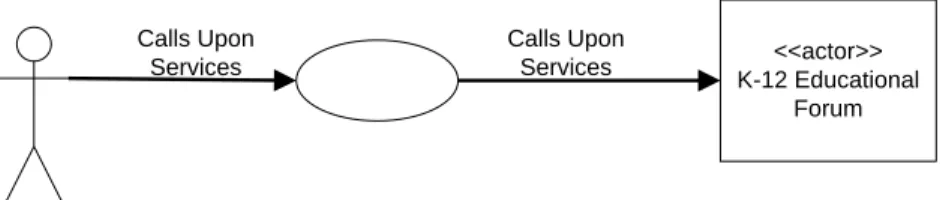
The KXNN educational forum is the first phase of the cloud computing applications that can be used with the system. The KXNN system will provide services to the users and also collaborate with other systems as indicated in figure 8 below.
<<actor>> K-12 Educational Forum Actor Calls Upon Services Calls Upon Services
Figure 8: KXNN Context Diagram 3.2.2 KXNN Modeling and Life Process
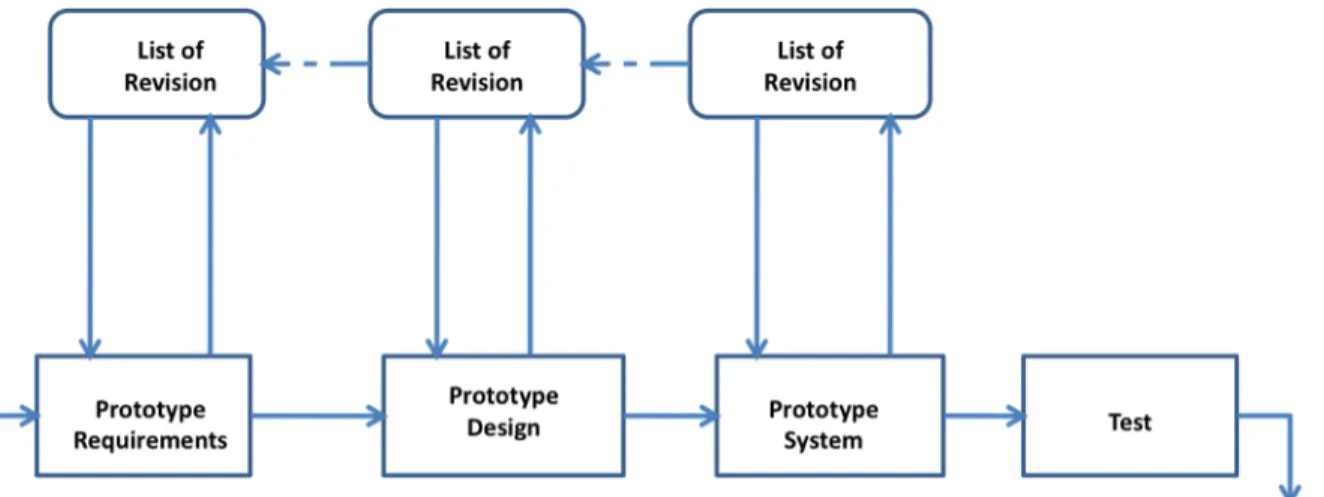
In this project, we employed Evolutionary Prototyping (EP); whose main goal is to build a very robust prototype in a structured manner and constantly refine it. Thus an evolutionary prototype is the foundation of the main system whereas the new system is a product of improvements of the initial system based on new requirements and changes from users. This process allows a continuous refinement of the system and is based on an acknowledgement that designers don’t understood all the requirements and will build on those well understood requirements while add features as they understand the requirements more.
One advantage with EP is that it can implement most of the features a user wants to integrate but on an interim basis with minimal functionality until the system is delivered. At the
31
same time, it allows developers to develop parts of the system that they better understand without the need to worry about those they understand less (i.e. developing a holistic system).
The partial system is sent to users for testing. When users work with the system they find missing features and make requests through feedback to the developers. The developers then use the feedback/requests along with their expertise to employ sound configuration-management practices to change and update the requirements, update the design, recode and retest.
Figure 9: The Prototyping Model
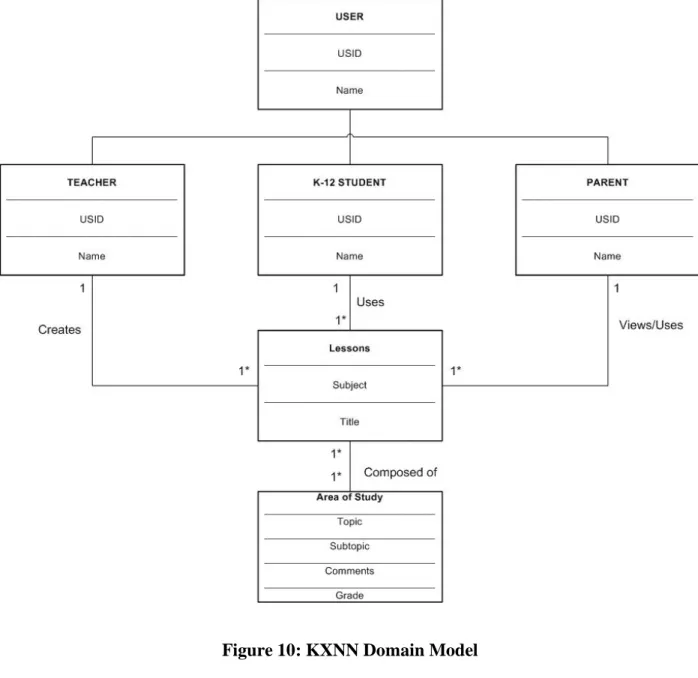
The prototype system is based on actors, currently; these actors consist of K-12 students, parents and teachers. How each actor or group interacts with the system, or domain, varies based upon what the system allows the actors to perform. A detailed diagram of how actors can interact with the system is shown in the KXNN Domain Model, Figure 10; this model serves as the basis for implementation of the prototype system, however, actions may be modified and rights given to individual actors or groups administratively as the system requirements change in later
32
iterations of the design process. The main objective of the domain model is to relate objects in the system domain to each other, physical objects to abstract concepts.
Figure 10: KXNN Domain Model
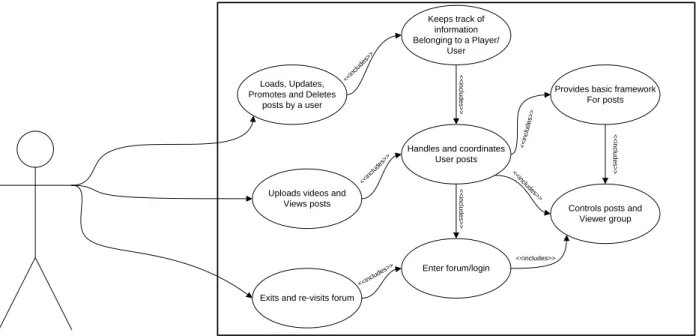
The user or actor may interact with the system, as shown in figure 8, in a variety of different ways. A few of these interactions in figure 11 are demonstrated in a use-case diagram. A use-case diagram in the Unified Modeling Language (UML) is a type of behavioral diagram
33
defined by and created from a Use-case analysis. Its purpose is to present a graphical overview of the functionality provided by a system in terms of actors, their goals (represented as use cases), and any dependencies between those use cases. The main purpose of a use case diagram is to show what system functions are performed for which actor. Roles of the actors in the system can be depicted.
Loads, Updates, Promotes and Deletes
posts by a user
Keeps track of information Belonging to a Player/
User
Uploads videos and Views posts
Handles and coordinates User posts
Provides basic framework For posts
Exits and re-visits forum
Enter forum/login
Controls posts and Viewer group <<includes >> <<includes>> << includes >> << includes >> << includes >> << includes >> << includes >> <<includes >> <<includes >>
Figure 11: KXNN Use-Case Diagram
An important aspect of the system is how, if working appropriately, the system responds to tasks. There are many ways to illustrate how a system should respond to tasks if the system is running effectively and optimally. A System Sequence Diagram is a sequence diagram that for a particular scenario of a use-case, the events that external actors generate, their order and possible system events. Figures 12 and 13 are system sequence diagrams for login to the system as well as viewing the available list of forum topics, respectively.
34
35
36 3.2.3 KXNN Use-Case Scenarios
CONCISE USE CASE SCENARIO
A. Visit KXNN Forum
Primary Actor: User / Student/Parent/Teacher
Secondary Actor(s): None
Description: The user will login, instantiate a new session and chooses a topic from the provided list of topics/choices to either view the lesson or posts a lesson material in any allowed media format accordingly with respective to the topic under discussion.
Name: Play or post video instance of a science lesson on the KXNN forum
Scope: KXNN server system
Level: User-goal
Primary actor: Player
Secondary actor: None
Stakeholder Interests:
Player: Wants to successfully view the available lesson, post comments and a score and
post their own lessons prepared successively in a form of video or text avoiding pitfalls and errors. The system will allow the user to edit and update any changes in the selected data as it relates the user’s personal account as well as comments on other users’ posts.
37
Lesson server: Provides general requirements and lesson regulations for all users who
login to view and post lesions and comments.
Pre-conditions: The users should have a valid user name and password to the cloud server
system and a client to login from before that supports Internet browser before he/she view and post comments and lessons in the cloud.
Post-conditions: A list of the last 10 players, together with their respective scores can be
displayed on the screen when necessary.
Basic Flow:
1) The user signs up for an account on the cloud/forum or login to the KXNN host server
2) The user selects topic interest from the menu; - FYFL – Get SCIENCE, Water, Transpiration
3) The system plays a list of topics on the science forum and the user to selects a topic of interest.
4) User chooses post lesson option from the provided features.
5) User posts lesson as text or video depends on the prepared material
6) System acknowledges successive post through a screen message to the user
7) The system/game adds and saves the lessons to the available list
8) The user test the post and sets parameters to allow her peers to view lesson
38
Extensions: (External Flow):
The user does not enter an available view or post command:–
1. The system displays an error message.
2. The system returns the user to the lesson selection menu.
Open Issues:
1) System provides the functionality of deleting a post and corresponding comments from the list if needed
Technology of data variation list: video, text, flash, html, adobe captivate
Frequency of occurrences: Continuous.
Special Requirements:
1. The screen colors must be standard across the system.
2. The font should be formal and size should be standard across the system.
3. Text fields for entering data. If there are constraints in number of characters to be entered then it should be explicitly mentioned on screen or on the user manual.
4. Submission of data should be through “enter” key. Or click “submit”
3.2.4 Testing Educational Environment
Testing the educational environment is planned with the use of an online survey to K-12 teachers. The surveying would be done with teachers that have experience using any of the
39
online educational tools aforementioned in Chapter 2. The teachers recall their experience using any of the online educational tools and experiment with the designed educational environment and provide feedback based on their experience. The results from this survey are illustrated as graphs and models and conclusions presented in Chapters 5 and 6.
3.3 HYPERTEXT PREPROCESSOR
Hypertext Preprocessor, php, is a widely used scripting language that was originally designed for web development to produce dynamic web pages. PHP was originally created by Ramsus Lerdorf in 1995 and has been continuously developed since. PHP is embedded into HTML source code and is interpreted by a web server with a php processor module, which in turn generates what you see on the web pages. PHP is the primary scripting language, aside from static HTML, that was used to create our test educational environment.
3.3.1 Hypertext preprocessor bulletin board, phpBB
phpBB is a open source bulletin board software that is written entirely in PHP. phpBB is the base code that was used for the testing environment, it has basic security features embedded and forum style structure. In its most basic form phpBB does not offer all the functionality required to achieve the task of using as an educational tool, certainly not the functionality required for usage as an interactive learning environment for teachers and not that of KXNN. However, with the basic forum style learning environment software installed, this provided a baseline environment to make changes. Some modifications were implemented in the new software, still encompassing the major PHP code, which will be discussed in further detail in Chapter 4.
40 3.4 DESCRIPTION OF INITIAL STUDY
The goals of the study were to (a) enhance the skills of computer users, (b) familiarize the users with a new educational environment and (c) teach new skills to all computer users. The areas that were targeted for the study were the learning of a new educational environment in comparison to other environments, comprehension and computer technology. Prior to the study, data was gathered from the teacher population to find if the planned study was the right fit for the test group. The researcher created a broad array of questions that needed to be answered by each of the testing participants. All of the participants identified themselves as either being good with computers or computer literate.
The testing participants were given a series of tasks to perform at their leisure and once the task was completed, the participants were asked to complete a detailed, but brief survey of their experiences.
3.4.1 Test Environment and Experiment
Before the emergence of online educational learning environments, students were forced into traditional learning methods such as lectures. It is known that there are a variety of different learning styles based upon the type of learner and each student is different. There have been many environments created that cater to structured learning but none have been catered to younger learners or designed with a loose structure that gives students the ability to express themselves in a way that is comfortable for them to do so. While teachers know that there is more than one way to teach a class, many are relegated to teach the class the way it was taught to them instead of implementing new technology that can us used inside the classroom, in learning labs and at home. Therefore, this information provided the motivation for the study.
41 3.4.2 Hypotheses and Variables
The main hypotheses of this study is that teachers embrace computer aided learning that is interactive in a setting inside and outside of the traditional classroom and educators would use the environment if it engaged students and was not difficult for them to use and required no technical programming skill. Another hypothesis is that an informal learning environment better supports students as opposed to structural educational environments. In order to test these hypotheses, the researcher configured a set of variables. For the study, the independent variables were determined to be the phpBB forum software being used and the group being investigated which were K-12 teachers. The software that was chosen for this experiment was the open source phpBB version 3. Initially the study was to be opportunistic sampling; however, later the researcher realized that they had enough data to be statistically significant, greater than 30 teachers participated out of the 50 that were invited.
To test the hypotheses, pre and post-questionnaire were given using a Likert-type scale. The surveys were given online using Survey Monkey. A Likert scale is a psychometric scale commonly used in questionnaires, and is the most widely used scale in survey research. When responding to a Likert questionnaire item, respondents specify their level of agreement to a statement using a bi-polar questioning structure. Likert generally corresponds to five possible ratings on the scale. The surveys used for this experiment are Likert-type because they keep the odd number of possible ratings on the scale but use seven and nine point ratings as opposed to five. The types of surveys given to participants were the Computer Understanding and Experience, Perceived Usefulness and Ease of Use and the Questionnaire for User Interaction Satisfaction; all validated surveys.
42 3.4.3 Setup of Experiment
In order to perform an experiment and collect data, an educational environment using the phpBB software needed to be created to perform some tasks. phpBB was acquired for free and additional setup and configuration steps are defined and explained in Chapter 4.
The test environment for all subjects was their personal computer with Internet capabilities through any web browser of their choice. The specifications of the machines were not a concern, as phpBB does not require anything more than the minimum specifications that the browser is able to render HTML pages. The test subjects consisted of three main groups. The first group were veteran teachers, who have been teaching for over 7 years and certified to teach in their respective states, the second group were Teach for America teachers who graduated within the past 5 years and certified to teach in their respective states, the third group were new college graduates whose major was Education and are certified to teach or planning to be certified to teach within in next 3 months. In hopes of having a diverse population, teachers were not filtered because of age and each must have had some basic computer knowledge as determined by the pre-questionnaire.
3.4.4 Experimental Procedure
Since the experiment was set up using the Internet, the participants were encouraged to visit the site at their leisure to complete the study. The experiment included three major sections: (1) Pre-questionnaire, (2) KXNN phpBB site, and (3) Post-questionnaires. Figure 8 shows a flowchart describing the benchmark tasks the participants were to complete.
43 (1) Pre-questionnaire
(2) KXNN phpBB site
(3) Post-questionnaire
44
CHAPTER 4: IMPLEMENTATION
4.1 PHPBB IMPLEMENTATION
As mentioned in Chapter 3, phpBB is open source. This chapter discusses the details behind successfully configuring our KXNN test environment. phpBB required some essentials which are discussed in the remaining sections of this chapter.
Figure 15: Prototype KXNN Home Page
4.1.1 Domain Registration and Hosting
Prior to phpBB being installed we first had to register the domain name and secure a host. A domain name is an identification label that defines a realm, for our environment that realm is kxnnetwork.org, based on the Domain Name System (DNS). The domain name resolves to an