The Fluency User-Interface Builder
James Bennett(Department of Computer Science, Indiana University [email protected])
Gregory Rawlins
(Department of Computer Science, Indiana University [email protected])
Abstract: Today, computer use is growing ever more widespread while, to most users, computers themselves are growing ever more irrelevant. They are commodities. It's the interface that they present to their users that matters as that's the main thing that most users really notice. Over the past fifty years the cost and size of computers has declined exponentially while many backend problems have been solved for most common user applications (mail, messaging, surfing, and so on). Further, as costs decreased and basic usability increased, both user populations and networking exploded. There is no longer such a thing as a `typical' user. Software must now fit a wide range of needs, machines, and environments. Thus the problem that most software shops face today is developing suitable user interfaces for their applications. But human-computer interfaces are hard to get right, and they are consuming ever more of the software development dollar. This paper describes a new tool that helps reduce that cost. Keywords: Software Engineering, Software Design, Design Patterns, End-User Development, Rapid Prototyping, RAD Tools, User-Interface Builder, User-Interface Toolkit, Widget Categories: D.1.7, D.2.1, D.2.2, D.2.3, D.2.10, H.1.2, H.5.2, H.5.3
1
The Problem of User-Interface Development
Once upon a time user interfaces were mere afterthoughts tacked on an application; the important thing was to do the computation---user interfaces were simply the control knobs for that computation. However, by the 1990s, nearly half of all corporate programming effort was devoted to user interfaces [Myers 1995]. Today, for many applications, user interface development absorbs most of the time and money. With networking proliferating, user populations exploding, multimedia growing, and handheld platforms expanding, user interface development is growing ever more demanding [Stephanidis 2003]. Of course, corporations are hardly unaware of the problem. The standard solution is to hire user-interface designers. They first talk with end-users, then structure the necessary interactions, and then tell programmers what's desired. Programmers then wire it all up. But that process often fails [Wagner 2007]. About one in three large projects fail or are abandoned outright because of cost overruns, delays, and reduced functionality [Ewusi-Mensah 2003]. Every year, corporations and government agencies pour millions of dollars down the software development rat hole.
There are many reasons for this problem. One is that programmers are the ones at the coalface, so they usually get to decide how the coal is to be mined, regardless of what the designers say, or what the user might wish. Thus, programmers can
sometimes foul the development cycle by interjecting their uninformed user-interface ideas [Cooper 1999, Cooper 2003]. Designers can do little about that except complain, since they usually can't program [Kazman 2003]. And managers often don't have the skill to evaluate one design over another; in fact they often choose patronizing, debilitating, and user-excluding options [Schuler 1993]. But the real problem is users. Once they actually get their hands on the finished user interface (and to them a program is just that) they often realize that it's not right---either because:
It wasn't what they agreed to, or
What they agreed to wasn't what they really wanted, or Their needs changed between design and programming, or
The new interface's capabilities prompt them to ask for new capabilities that they hadn't thought of before.
Programmers then have to rip apart and rebuild the user interface. The cycle then repeats, frustrating everyone as costs mount and bugs proliferate.
The essential problem is two-fold. First, despite a move toward more agile software development since the late 1990s [Larman 2003], many of our software development processes are still oriented to an era when computers were rare, expensive, and could only be operated by a highly trained elite. Human effort didn't matter relative to the enormous cost of machine effort. The second contributor to the problem is the common double assumption that for any application area there is a `perfect' user interface, and that software development ends with its first release. Much development time is spent trying to refine a user interface based on such assumptions. The idea was (and mostly still is) that the problem of developing a particular piece of software is as static and well-defined as building a bridge to cross a river. Thus older development protocols first try to capture the problem in a series of documents, and then build a structure embodying those documents. However, in today's world of fast, cheap, small, widespread, and networked computers, often there is no such thing as a static and well-defined problem. Detailed advanced planning often fails thanks to fast-changing functional requirements, schedules, budgets, and even underlying technologies.
A user-interface builder that's usable by non-programmers might take some of that burden off programmer and designer shoulders. By letting non-programmers meaningfully alter their own computing experiences, it might reduce costs, stress, and time-to-market. Of course, that isn't a new idea [Cypher 1993]. However, all the tools built to help solve the problem have problems of their own. For example, perhaps the closest thing to such a builder today is Apple's Interface Builder [NeXTSTEP 1988]. It, though, is still largely only for programmers. It's also not portable off Macs, not open-source, uses proprietary files, an uncommon language (Objective-C), and development on it has ceased. Some open-source builder or toolkit projects, like Luxor and XPToolkit [Bullard 2001], make user-interface appearance editable (with style sheets modifying XML files) while others like OpenAmulet (now defunct), allow easy widget interaction [Myers 1997], and yet others, like UBit (only available for Unix platforms) allow easy widget recombination [Lecolinet 2003]. All of them, however, plus all builders and toolkits, like Glade, GTK, Qt, wxPython, and so on, plus all commercial builders, like Visual Studio, Delphi, CodeWarrior, IntelliJ,
JBuilder, and others, are all aimed at programmers---the people least likely to have any real idea how a user interface for non-programmers should be laid out or should function. So far, the one successful open-source builder, Eclipse (and to a lesser extent, NetBeans), is also aimed squarely at programmers [D'Anjou 2005, Boudreau 2003]. Today, some non-programmers, particularly game- and web-designers, finally do have some RAD tools---like 3D-RAD, ColdFusion, DreamWeaver, and so on---but their functionality is limited, their domains are restricted, they're proprietary, and they're expensive [Leffingwell 2007].
Of course, the idea of supporting end-user programming isn't new---in fact it's at least 35 years old [Edmonds 1974]---but except in specialized areas of dataflow programming [Johnston 2004], attempts to solve the general problem have so far failed to become widespread. Perhaps that's because a solution has always been seen as having to be a monolithic, pre-designed, and unevolvable program that users interact with to `do visual programming.' That seems to be far too hard a problem given the present state of the art. Giving non-programmers the power to program arbitrarily also seems to be too hard a problem. Despite some progress in the last few years (for example, see [Costabile 2009]), only visual programming environments that significantly narrow what users can do have succeeded. (For example, the Game Maker program [Habgood 2006] or the Alice visual programming environment [Herbert 2006].)
In sum, today there seems to be a serious misalignment in our division of labor when building user interfaces. Users are the experts on their domains and problems. Programmers are the experts on computers and programming. Neither is expert in the other's domain. Designers are the glue between the two, but they frequently lack enough competence on the programmer end to work well with both groups, and with current user interface development tools there's no way for the three groups to more equitably and profitably share their expertise to then create flexible and useful user interfaces quickly and cheaply.
This paper sketches the design of a new graphical user-interface builder called Fluency. It is free, open-source, cross-platform and useable commercially. Fluency's goals are to let communities of programmers and non-programmers work together to evolve complex and flexible user interfaces.
2
Reimagining Widgets
One of the principal ideas behind Fluency is to allow a new division of labor between programmers, designers, and end-users. Programmers should be left to code numerous low-level things, while designers or end-users should be left to visually specify how those things should combine and recombine, Further it should be easy for the three groups to be in constant communication with each other, exchanging actual working code not just documents, so that they can clearly express what they'd most like to see happen next, while sharing and copying and mutating each other's work. Early (and non-scientific) tests suggest that that is a less stressful, more equitable, more profitable, and more evolvable division of labor than our present way of developing user interfaces. In such a world, programmers are left to do what they do best---talk to computers---and end-users are left to do what they do best---solve their problems. The question is how to do it.
A survey of the software design literature might at first suggest that the problem is already well-solved with MVC, the Model-View-Controller design pattern, but that's false. MVC dates back 30 years [Krasner 1988], which makes it the oldest design pattern known [Gamma 1995]. MVC and its modern variants (MVP, PAC, HMVC, PV, and PM) do a good job of decoupling the Model (data manager) from the View (visual display) and Controller (response strategy) [Marinilli 2006, Beaudouin-Lafon 2003]. It doesn't, however, decouple the View and Controller, thereby failing to help programmers with complex user interfaces. It's common for both user-interface toolkits and user-interface programmers to mix code to control what a button looks like (its presentation), how it behaves internally (its logic), how its set of actions changes over time (its dynamics), and how it interacts with other components (its configuration). All the call backs, handoffs, and special cases lead to hard-to-debug and hard-to-change user-interface code.
To re-imagine user-interface development we must first re-imagine both user interfaces and their most fundamental parts: widgets. Today, user-interface programming begins when the programmer selects a user-interface toolkit. Normally that's done for the programmer via the choice of programming language or builder. For example, in Java, programmers have a choice of three toolkits: AWT, SWT, or Swing, and several builders, including Eclipse's Visual Editor, IntelliJ, JBuilder, and so on. There are also various combinations. Swing, for example, is both a toolkit and a framework, but not a builder or a language. Similarly, Visual Studio is a builder and perhaps a framework, but not a toolkit or a language. In many development environments, such toolkits or frameworks or RAD tools can also depend on lower-level toolkits produced for each platform. Almost all toolkits and frameworks and builders are proprietary and contain a set of widgets made to look and act similarly.
In all such tools the fundamental unit is a widget---a button, checkbox, frame, canvas, and so on. Each widget is a sealed (and usually proprietary) box containing its logic (how it reacts, and what it reacts to), and its presentation (what visual and aural representations it displays on the screen or over the speakers). Today's user-interface toolkits expose each widget's functionality with an API (a list of public functions) and an event hierarchy (a set of events that the widgets react to or produce). Programmers then wire up widgets by writing source code that:
Adds event handlers to the widgets, thus specifying how they should interact with other widgets in the user interface; and
Stuffs one widget into another, thus specifying widget containment relationships, and indirectly, widget layout, hit detection, event propagation, and screen repainting.
Thus, today's user-interface programmers must decide everything before compile time. They can't easily mock-up a partial but working user interface for discussion with end-users. They also can't alter a running user interface short of editing its source code and recompiling. That makes programmers indispensable. It also forces every decision to be premeditated because, once made, programmers must then set it in source-code concrete. (Then the programmers must jack-hammer the concrete and repour when users inevitably change their minds.)
In the most general sense, a graphical user interface exists to support a language made up of widget switch-flipping sequences. The user `flips widget switches' by entering text in a text area, moving the mouse over a menu, clicking the mouse on a button, and so on, and the application `flips widget switches' by greying out a menu item, putting up a dialog box, beeping, or whatever. Those two actors are `speaking' to each other via their shared user interface. To create any graphical user-interface builder, then, we must create a computer program that a human being can use to help build graphical grammars. Each such grammar specifies what each possible sequence of `widget switch-flips' would mean in terms of widget state changes, thus defining a switch-flip-sequence language for use by both a user and an application. Every graphical user interface, then, sets up a language between a human being and an artificial being, with the intent of letting them jointly solve a problem that neither could solve separately.
Such user interfaces can quickly become quite complex. For example, a disabled button may need to become enabled when an editable field's text changes, which may allow selection in a list, which may change the contents of a popup menu, which may enable other buttons or menus. In general, when building a sophisticated user interface today, programmers may have to do any of the following:
1. Add (or delete) an instance of any widget.
2. Add that widget instance to (or remove one from) a container widget instance.
3. Move, size, color, label, or specify layout for that widget instance.
4. Specify how events generated by that widget instance will trigger widget actions on other widget instances (example, add an event handler).
5. Conditionally create new widget actions based on the current actions of any other widget instances (example, dynamically add an option to a menu).
6. Conditionally turn on or off some widget action of some widget instance (example, to disable or re-enable a button or menu or text area).
7. Create compound widget actions from simpler ones (example, to make a dynamically changing menu).
8. Create widget actions that can conditionally create new widget instances (example, to trigger a popup menu, dialog box, or login window).
To make possible the building, testing, and sharing of user interfaces by a community of programmers and non-programmers alike, a builder should help programmers do all those things plus:
9. Always make every user interface runnable, even if it's unfinished.
10. Allow the import and export of user interfaces to and from non-proprietarily formatted files, so that they can be shared among, and edited by, multiple people.
Of those actions, today's user-interface builders only help programmers with the first three: widget creation, containment, and visual properties. Then they convert everything into generated source code. Programmers must then edit the source code to do any of the remaining things---which is all the hard stuff. Further, because everything is converted to source code, not even programmers can test a partly built
user interface before it's compilable. Nor can they share the user interface with end-users for further editing. Finally, building everything directly into source code locks out non-programmers from user interface creation or editing.
Thus, a more fluid user-interface builder must first get rid of the necessity to manually edit source code. To do that it must make the programmer's work both more uniform and more undoable. And to do that we need a new idea. Today, nearly all widgets are visual in nearly all user-interface toolkits, frameworks, and builders. They've been so since the very first graphical user interface in 1973 [Hiltzik 1999]. But nothing requires that every widget be visible in a running user interface. Non-visual widgets are widgets with no visible representation in a running user interface. They can still, however, have visible effects---via links to visual widgets. For example, a database doesn't have a graphical representation in a user interface, but its effects can still be mirrored in dynamically changing menu options or text fields displaying search results, and so on.
In an advanced graphical user interface, widget inputs could come from:
Remote computers networked to the one hosting the user interface (example, server results);
A network that the computer hosting the user interface is on (example, network congestion);
The operating system that the user interface is running on (example, disk failures);
The application that the user is presently `talking to'; The human being (example, by moving the mouse); and Other widgets (example, ``I've been clicked'').
We can use non-visual widgets to uniformly model all of those ways that widgets can be influenced with just the last one: widgets linked to each other. For example, a graphical user interface could use a non-visual widget to represent a network that the computer hosting the user interface is on. The network thus functions as the internals of that non-visual widget's `box.' As the network changes state, visual widgets linked to the non-visual network widget might also change state. In this way, any graphical user interface becomes a multi-graph of visual and non-visual widgets. Instead of editing source code, programmers can then edit the multi-graph. Next we'll see how to make all such editing operations uniform and undoable.
3
Widgets in Fluency
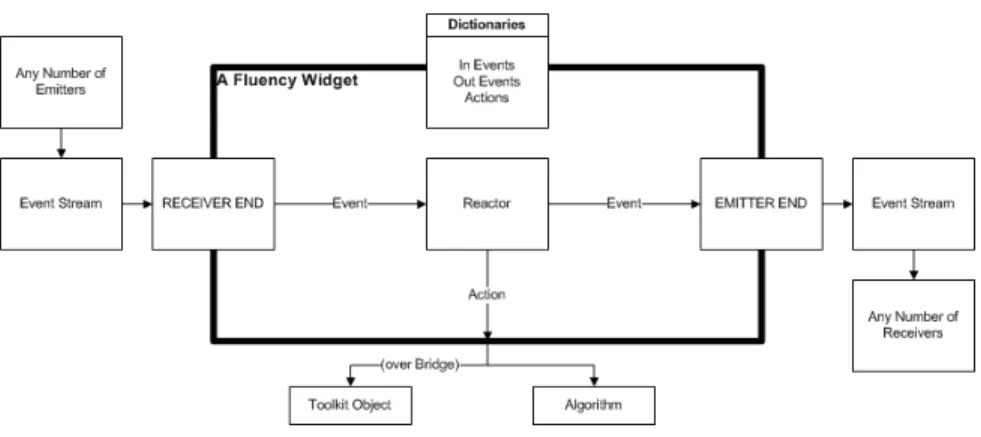
In Fluency, a Widget is any program, whether it's visible in the running interface or not, that can receive Events, emit Events, and execute Actions. An Event is a passive information-bearing object whose type indicates what information it bears. It's an encapsulation of Widget state change. An Action is an active information-altering object whose name indicates what it does. It's an encapsulation of a (traditional) method invocation (or function call, depending on the underlying language). In Fluency, Actions are implemented with the Command design pattern, and compound
Actions are built out of other Actions (whether simple or compound) with the Composite design pattern.
Fluency Widgets are of two main types: visual and non-visual. A visual Widget executes Actions with visual (or aural, for example, a dialog box's beep) consequences in the running interface. Often it delegates many (or all) such Actions to some underlying object from some user-interface toolkit. (At present, Fluency is built on top of Swing, but the toolkit is, in general, irrelevant as Fluency can make such toolkits interchangeable with the Abstract Factory and Bridge design patterns.) A non-visual Widget, on the other hand, executes Actions on behalf of some other object in the running interface. Normally it, too, delegates such Actions to an underlying algorithm---a file reader, compression algorithm, sorting algorithm, video codec, music player, database, network monitor, whatever. In either case, a Widget is an object that other Widgets might ask to execute Actions or receive or emit Events, and that is all. Fluency places no other constraints on what a Widget can be.
Fluency has two states. During buildtime, its user can build or edit a user interface by editing the Widget multigraph. Then during runtime, that user interface might itself edit the same multigraph (by creating, deleting, linking or unlinking Widgets) to, for example, populate a dynamic menu. Fluency's user can flip between those two states at any time. To make such editing uniform across both build and run time, Fluency handles Widget creation with the Factory Method and Abstract Factory design patterns.
There are really two `users' now: users of Fluency as a builder and users of the user interface built with Fluency. For the rest of this paper we use the term author to mean the user of Fluency as a builder. We leave the term `end-user' to its traditional meaning---the user of the running user interface thus built. Fluency must let its author link Widgets, so each Widget must advertise what Actions it can do, what Events it can understand, what Events it can emit. Every Fluency Widget thus implements the following Actor, Receiver, and Emitter Java interfaces.
public interface Actor
public ActionDictionary getActions() // Actions it can do public interface Receiver
public void receive(Event) // Accept an Event public EventDictionary getInEvents() // Events it can notice public interface Emitter
public void register(Receiver) // Accept a Receiver public void unregister(Receiver) // Delete a Receiver public EventDictionary getOutEvents() // Events it can emit
Thus, a Fluency Button, say, would have a Dictionary of Actions, containing, say, SetLabel, ChangeBackgroundColor, Resize, Fill, Beep, Disable, Hide, and so on, plus String keys describing what those Actions do. To allow Widget linkage without forcing the author to write source code, Fluency uses the Observer design pattern. Also, each of a Widget's three advertised Dictionaries (for Actions, InEvents, and OutEvents) could be empty. For example, a Widget may honor no Actions, in which
case it’s returned Actions Dictionary is empty. A Fluency Widget has no necessary relation between any of its three possible behaviors. A Timer, for example, or, more generally, any Widget running in its own thread of control, needn't receive an Event before emitting one, nor need it receive an Event after emitting one. Further, a Widget may emit no Events (example, a clickable image), it may receive no Events (example, a static label), and it may have no Actions (example, a progress bar). Further, even when a Widget both emits Events and executes Actions, it needn't emit an Event or execute an Action after receiving an Event (example, a clipboard), nor need it emit only a single Event, or execute only a single Action, at a time (example, a database).
Figure 1: Inside a Fluency Widget
At first glance, that design either seems too simple or too baroque to get the job done but it evolved into its present form over a number of years of trial and error. It embodies several tradeoffs intended to please each of the stakeholders that Fluency supports---authors, programmers, and designers.
First, it might seem inefficient or unwise---or both---to allow any Widget to be linked to any other Widget (even including itself!). For example, the author might choose to let a Widget send Events to another Widget that doesn't have those Events in its advertised InEvents (in Section 5 we'll see how Fluency avoids such problems). Fluency doesn't bother trying to second-guess its author. It leaves `correct' linkage choices up to evolution among various author's user-interface choices rather than trying to be smart and work against any author's choices. Authors can link anything to anything and so learn from mistakes faster and with less pain rather than feeling like they have to fight the builder all the time. Further, by letting the author switch, at any time, between editing the user interface and running it, Fluency encourages experiment. The author can thus test every choice immediately, as web browsers do for website creators. This choice can lead to inefficiency, especially by beginner authors, but better that than to frustrate or waste the time of the author. To please its authors, Fluency's entry requirements need to be as low as possible, as HTML and HTTP and ViewSource made the early web [Shirky 1998a], and as was an important factor in the success of Quake rather than VRML [Shirky 1998b]. Fluency aims to allow nearly anything an author might want to do, even if seemingly `wrong.'
Second, it might seem wasteful and overly complicated to allow both Events and Actions. Both of them carry information between Widgets, so either could be used alone to do everything required. However, Fluency supports both to please programmers. Different populations of programmers have different expectations of how visual and non-visual objects should work. The usual way to work with a visual object, like a button, is via end-user action, not programmer linkage. Thus, programmers typically see a button as a Receiver and Emitter, and not as an Actor. A button expects a MouseClicked Event rather than a request to execute its clicked() method. Conversely, the usual way to work with a non-visual object, like a database, is via programmer linkage, not user action. Thus, programmers usually see a database as an Actor (albeit, with Actions implemented with direct method invocations or function calls), and not as a Receiver or Emitter. A relational database expects a SQLQuery whose parameters carry the information to search for and whose return value contains the search results. It doesn't expect a SQLQueryEvent containing the information to search for and a place to put the search results. Further, several complex user-interface toolkit objects, like Swing's JTextPane, both act (with methods) and can receive and emit events. Fluency can absorb all variations and thus get as wide a range of programmers as possible to write Fluency Widgets. Fluency can't function well unless programmers supply it with a lot of Widgets, especially non-visual ones.
Third, it might seem both wasteful and baroque to use Dictionaries instead of APIs and event hierarchies. Fluency could expose them to the author just as easily as Actions and Events and cut out all that programming bother and builder inefficiency. The problem though is that Dictionaries give many advantages that APIs lack, all of which make the human factors aspect of Fluency more attractive to designers:
With Dictionaries, as opposed to APIs, any Widget can dynamically change what Actions or Events it honors. New Actions and Events can even be loaded at runtime, from the web.
Dictionaries make widely disparate visual and non-visual Widgets, like buttons and databases, all work the same way, thus making them easy to absorb into, and all uniformly treatable inside, Fluency.
An author can organize a dictionary or the dictionary could even organize itself.
Actions, as opposed to methods or functions, can more easily support logging, rollback, ACID transactions, changeable security policies, access controls, and robots for demoing and functional tests.
Actions and Events are objects so they can support tool tips, helps, and wizards to aid the author. Those aids can even be active content, like demos, as well as dynamically-loadable offsite web pages
4
Actions in Fluency
At first glance, Widget Actions might appear simple---Check or Uncheck a CheckBox, or Enable or Disable a Button. Such Actions are really the same as Events and could just as easily be replaced by CheckEvent, UnCheckEvent, EnableEvent, DisableEvent. But Actions that might need parameters, perhaps even from multiple
Widgets, and that might need to return results, perhaps even to multiple other Widgets, are more complicated. Finding a clean and extensible way to support them isn't trivial.
For example, consider a method call on a textarea object that we want to convert to a Fluency Widget, a TextArea:
public int setText(String text, int bufferLocation)
Suppose that this means: Take the given String and insert it into the toolkit object's currently selected text buffer, then return the new location of the end of that text buffer as an int. (What it actually may mean isn't important here.)
There could be up to five steps involved in the execution of any complex Action: 1. reception of any needed parameters,
2. acknowledgement that all needed parameters have been received, 3. triggering of Action execution,
4. acknowledgement that the Action was executed without exception or error, 5. emission of any produced return results.
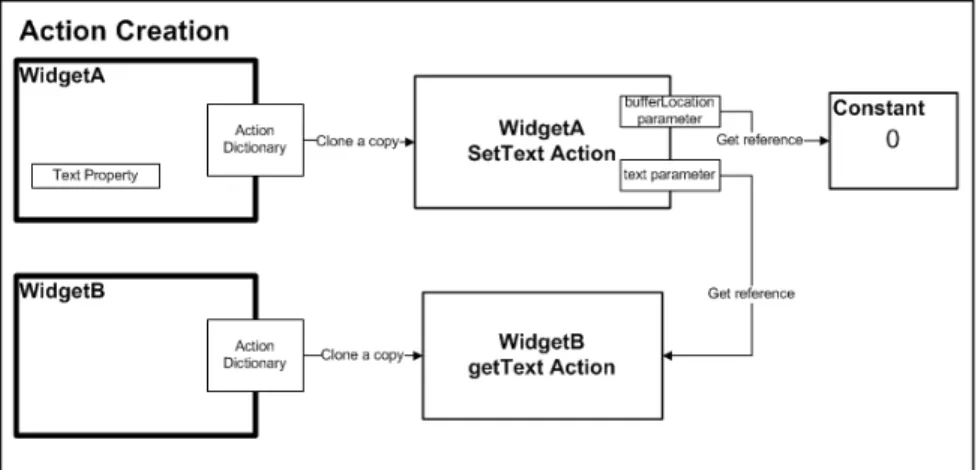
Putting all that parameter marshalling and unmarshalling into each Action would overload them with extraneous detail and boilerplate. To make Actions flexible, simple to program, and uniform, Fluency implements them using Java reflection. When a Widget instance is created and registered inside Fluency it has an Action Dictionary listing all the Actions it knows how to do. Those Actions are Command objects proxying for methods on the Widget's delegated class. Those underlying methods are invoked when the delegating Action is performed. For example, using Swing as the underlying toolkit, a Fluency TextArea Widget instance would delegate to a Swing JTextArea instance that it keeps internally. The Fluency TextArea's SetText Action might then proxy for the Swing JTextArea's setText() and getCaretPosition() methods.
In Fluency, parameters can be passed to an Action in one of two ways. First, the author can pass in a constant to the Action. In the setText example, the user may wish to pass in a value of zero for the bufferLocation to thus always insert the given String at the beginning of the buffer. Alternately, the author can (implicitly) specify another Action that on execution will return a value that will then be used as a parameter for the Action that will be performed. For example, in the setText() method above, suppose we also have a getText() method that returns some String from another Widget. When Fluency creates a SetText Action, the author specifies that the method's first parameter is a Widget GetText Action that delegates to the getText() method on some other Widget. Then when that SetText Action executes it first checks all of its parameters to see if any are Widget Actions. If any are, it performs them, then it takes the return values of those Actions and makes them the parameters that are then given to its delegated method (or methods). Thus, our SetText Action would essentially mean: ``Set the text of WidgetA to the text value of WidgetB starting at buffer location [whatever].''
Since Actions can take other Actions as inputs, Fluency can build complex Actions recursively. For instance, Fluency might replace the above direct method call to a parameter-free GetText Action with a Action that takes multiple arguments and concatenates them. Such an Action could then perform yet other Actions to get its parameters, and so on. (Currently, Fluency only allows either constants or parameter-free Actions to be passed as arguments to other Actions. Letting the author nest arbitrary Actions arbitrarily deep is powerful, but so far we've failed to find a simple way to help non-programmers understand how to use such power.)
Figure 2: Setting Up Links for an Action with Two Parameters
5
Linkage in Fluency
Since Fluency uses the Observer design pattern, an author can link any Widget to any number of Widgets, letting them all receive all its emitted Events. An author can also link any number of Emitters to any Widget for it to receive all of their emitted Events. Thus, an author can daisy-chain any number of Widgets in any order, like LEGO-bricks. (Somewhat similar to Qt's `Signals and Slots' mechanism, except visually instead of using source code [Dalheimer 2002].) No Widget ever has to know whether it's being linked to---or even that any other Widgets exist. Since no Widget has to know anything except how to do its own thing, no Widget is affected if it's linked---or unlinked. Every Widget acts as if it’s alone in the user interface. That in turn makes it possible to always have a runnable user interface. No compile step is needed.
It may seem that such arbitrary linkage can only work if all Widgets share a common understanding of what their Events and Actions mean. For example, a Button can't send a ClickedEvent to a Checkbox unless the Checkbox already understands what a ClickedEvent is supposed to mean. In normal user-interface development that's not a problem because that understanding sits inside the user-interface programmers' heads. First, user-user-interface toolkit programmers produce widgets with specific events and methods (or functions). Then, user-interface programmers read all the various APIs and event hierarchies and link widgets directly in source code with handmade event-handlers attached to each widget, thus specifying what that widget should do on receipt of particular events. Fluency, though, can't rely on source-code editing. It faces similar, but simpler, problems to those faced by CORBA v3.0.3 components [Hamid 2008]--except that its Widgets don't need to discover each other; that's handled by the author. Fluency, instead of forcing its authors into source code, lets them dynamically and visually make and unmake Widget links with Pipes. (An application of the Mediator design pattern; for contrast see the similar `Interactors' mechanism in OpenAmulet [Myers 1997].) Such mediators can sit between any two sets of Widgets and thus translate any behaviors of one set of Widgets into behavior requests that the other set of Widgets can understand. The author doesn't have to understand anything of how they work---or even that they exist.
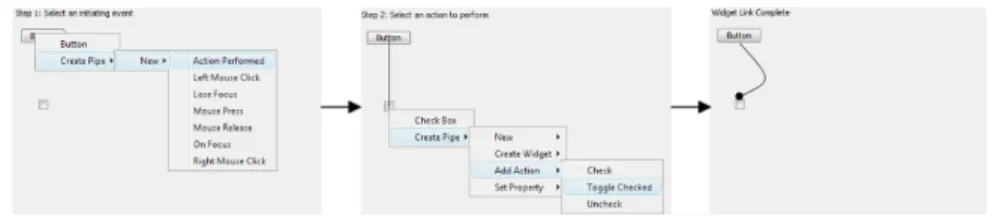
For example, suppose the author wants to link a Button and a CheckBox. The author wants the Button's ClickedEvent to make the CheckBox check itself. However, the CheckBox doesn't understand ClickedEvents, it only understands CheckEvents (or CheckActions, it doesn't matter). When the author links the two Widgets, Fluency creates a Pipe behind the scenes that on receipt of a ClickedEvent from the Button converts it into a CheckEvent and passes that to the CheckBox, which causes the CheckBox to execute its CheckAction. Alternately, Fluency may create a Pipe, then create an instance of the CheckBox's CheckAction (which is a Command object) and store that in the Pipe for execution whenever the Pipe receives a ClickedEvent from the Button. Which option Fluency chooses depends entirely on the selection the author makes while linking the two Widgets. The author doesn't have to care.
The two sets of Widgets that a Pipe links needn't be mutually exclusive. That is, a single Pipe could link any set of Widgets to themselves, plus other Widgets. (A Widget can even link to itself with a Pipe; in fact that's how Widget Properties are presently implemented.) Also, a Pipe with its own thread of control can even link to itself. A Pipe is thus similar to a single line in a condition-action reactive program (a
rule or production system, as used in expert systems, classifiers in genetic algorithms, and in Prolog, CLIPSs, OPS5, and similar logic programming languages). Thus, when linking or unlinking Widgets in Fluency, a non-programmer author is really programming a reactive production system---but visually. (Note: Pipes are presently more limited than that. We don't yet support threaded Pipes, nor does the visual builder yet support 1-many, many-1, or many-many Pipes. However, present limitations are easy to remove.)
Because a Pipe can hold dynamic and arbitrary Action instances, it can be tasked to do anything at all---including compound Actions (built with the Composite design pattern) with Fluency itself as a target. This gives Fluency enormous power. For example, persistence in Fluency is handled just that way. A compound Action that saves state from each of the Widget instances presently registered in the current Fluency instance executes whenever the author chooses to exit Fluency. There is no need for a special and separate persistence layer in Fluency. Other capabilities can be added to Fluency as time permits. (In particular, one future design goal is to `write Fluency in Fluency;' that is, express Fluency's own user interface entirely with Fluency Widgets and Pipes, so that Fluency's user interface can itself be changed by Fluency.)
Pipes can come and go. An author can cause them to be created or deleted at any time, even during runtime in response to some stored Action that the author put there during build time. Such transient Pipes can be used to, for example, let any Receiver monitor any Emitter's Events for a time, then stop caring depending on some condition, then, depending on some other condition, start caring again later, but perhaps for a different subset of the Emitter's Events. Note that Fluency can create multiple Pipes to establish some particular link as directed by its author. Fluency's power is limited solely by the number of different kinds of Pipes it natively understands. All the author ever sees, though, is at most one (labelled) arrow between the two sets of Widgets that the author has chosen to link. The author never has to care about linkage implementation details. This makes Fluency much more like a service-oriented or component-based programming environment, rather than a procedural, object-oriented, or library-based programming environment, much like CORBA, EJB, OSGi, CCM, .NET, or Web services [Wang 2005].
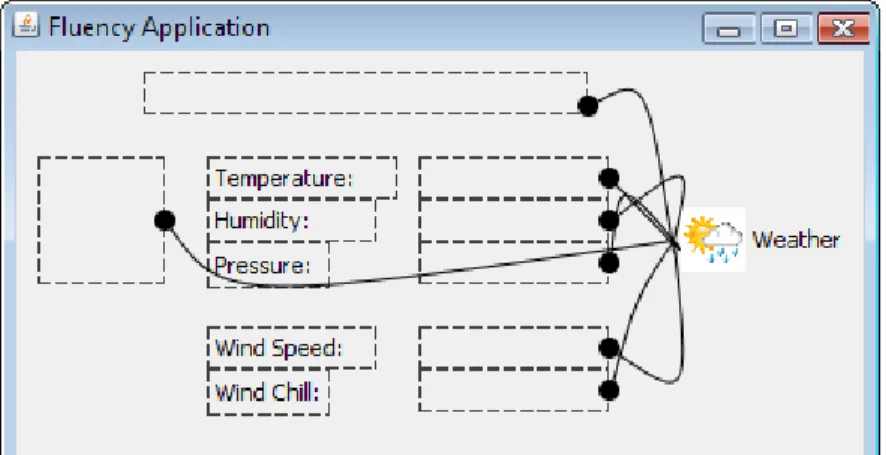
Figure 5: Editor View of a Web-Services Weather Application as It's Being Built
Figure 6: Fluency while the Author is Building a Web-Services Weather Application
6
Containment in Fluency
Every user-interface toolkit lets programmers build compound widgets out of simpler ones. A compound widget consists of a container widget and component widgets that function as a unit. Widgets in such a compound all share something---usually location---and they all work together inside their container widget to accomplish some
subtask within the user interface---a control panel, tool bar, button bank, or whatever. For example, a Font family chooser, a Font style chooser, and a Font size chooser can come together in a FontManager. Compounds, like Swing's JTextPane, can be more complex, too---a text editor, web browser, spreadsheet, mail reader. All user-interface toolkits force programmers to use visual widgets as containers (a window, pane, frame, panel, canvas, dialog, or their analogs). That then forces every widget to belong to exactly one container. That then forces all widgets into a containment tree, exactly as with files and folders on desktops. That then simplifies event propagation among widgets, widget layout, and display refresh when widget screen areas are damaged.
Those design choices aid programmers to do some things, but they also create multiple problems for programmers when trying to build complex user interfaces. They also create multiple problems when trying to build a user-interface builder that doesn't need programmers.
Containers usually carry special-purpose code to handle any non-visual components that their compounds need. For example, a menu whose items are populated from a database usually has database-related code stuffed into it as well as code to handle its true responsibility, which is menu management. Containers usually mix their visually related code with code to control the
visual appearance of their component visual widgets. For example, many toolkits force containers to handle layout and hit detection for their component widgets, while those same containers must also handle their own visual code. Containers usually handle all the group behavior of their contained widgets,
since group responsibilities can't be split up because the toolkit forces them to be attached to one object---the visual container widget.
In complex user interfaces, visual and non-visual objects often need to be linked in ways not easily mappable onto a tree (as we've seen, the general case is a multigraph). Also, visual widgets in particular can't always be easily grouped contiguously (for example, in tab or screen or multi-function user interfaces). This forces added burdens on the programmer to keep track of everything.
Sophisticated compounds are thus tricky to build and even trickier to change. Creating a user interface today is thus much like programming in an object-oriented language while relying on a hierarchical database for storage [Zdonik 1990, Elmasri 2006]. Authors must keep the `real' widget multigraph in their heads while pretending that it can be forced into a simple containment tree. That impedence mismatch forces them to spend most of their time mentally translating back and forth between two different abstractions [Beaudouin-Lafon 2006]. The resulting code is thus often poorly refactored, buggy, and fragile.
To support a more flexible widget containment scheme, Fluency breaks the traditional link between visibility and containerhood. Fluency only uses non-visual Widgets as containers. That lets authors build visually editable compound Widgets without programmer aid and without resorting to editing source code. In Fluency, any Widget, visual or non-visual, can belong to any number (including zero) of non-visual Widget containers simultaneously, with each container potentially handling just one
responsibility for its particular group of Widgets, whether they're visual or non-visual. This is similar to AspectJ's idea of `cross-cutting responsibilities' [Miles 2004].
In Fluency, toolkit objects that normally function as containers---frame, panel, canvas, and so on---are merely the delegates of visual Widgets whose screen areas can be overlaid with the screen areas of other visual Widgets. They don't handle those overlaid Widgets' display tasks: sizing, color, positioning, bounds, insets, borders, layout, painting, hit detection, and such. They also don't handle logical relationships between overlaid Widgets, like event propagation and Widget linkage.
Fluency supports containment solely by manipulating Widget Event streams. A Fluency container Widget must support three things:
It must be able to emit Events to, and receive Events from, its contained Widgets;
It must let its contained Widgets emit Events to, and receive Events from, Widgets external to itself; and
It must be able to take precedence in Event-propagation cases affecting whatever group behavior it cares about by overriding some Events that external Widgets may emit to its contained Widgets. (Note: This is not yet supported in the current version of Fluency, but we know how to do it cleanly.)
Fluency's linkage machinery (Observer links and Pipes) already allows all three capabilities, but it's convenient to have a separate type of Widget taking care of the boilerplate so that authors don't have to be bothered with such details. It's also convenient inside Fluency's codebase itself, because support for containment intersects with keyboard and mouse monitoring and screen updates (for focus change, hit detection, event propagation, and screen repainting).
Containers in Fluency function as decorators, as in the Decorator design pattern, since they each can have only one responsibility and they all manipulate exactly the same thing: Event streams. Thus, in Fluency, an author may have one (visual) Widget controlled by several independent (non-visual) containers, each one handling one or more responsibilities---say, one to control background color, one to control resizing, one to control default layout algorithm, and so on. Further, to create containers with apparently arbitrary compound behaviors, the author can put one container into one (or more) containers, then stuff Widgets into the innermost one. The outermost container will then appear to the author to enforce each behavior on all the innermost Widgets. Fluency containers thus let authors mix and match Widget behaviors, yet, as with Pipes, each container could be single-purpose, and thus easy to program in the first place. (For contrast see the `Instance Graph Inheritance' mechanism in UBit [Lecolinet 2003]. The effect is somewhat similar to Cascading Style Sheets [Schmitt 2005].)
As with Pipes, Fluency uses Observer for container-related links, so authors can flip Widgets into and out of any container Widget at any time, (conceivably even at runtime). Also, all that happens without any visual change in the running user interface. (Of course, the editor's view of the user interface changes.) Container Widgets in Fluency can thus relate any set of visual or non-visual Widgets, spatially, visually, behaviorally, or even temporally, so that they, transiently or permanently, jointly function as a group.
Since Fluency uses non-visual widgets as containers, a user interface can have bizarre and creative properties. For example, a single (compound) Widget can look to the end-user like many separate (visual) Widgets, each of which can even be visually discontinuous in the user interface they're a part of. An author might choose to separately move those components anywhere on the screen without in any way changing the functioning of the compound Widget that they jointly compose. Further, any of those component Widgets might themselves be compound Widgets, and so on recursively. Finally, the entire user interface that the author is building needn't be enclosed in one window, as is the norm today. In Fluency, a tearoff menu, say, is just as easy to make as a pulldown menu. Thus, in Fluency, not only is there no requirement that a Widget be visual, but even if some of its parts are visual, there's no requirement that those visual parts be contiguous in the user interface, or even appear all on one screenful of the overall user interface.
7
Conclusion
From a software design point of view, Fluency breaks with MVC tradition. It atomizes the monolithic View, exploding it into as many (visual) Widgets as are needed to compose the View. It also atomizes the monolithic Model, exploding it into as many (non-visual) Widgets as the user interface needs to store and manipulate its data. Most importantly though, it atomizes the monolithic Controller, exploding it into as many (non-visual) Widgets and mediators (pipes) as needed, each of which links some set of other Widgets together to encapsulate either a triggering or containment relationship. In Fluency, the entire Widget multi-graph is the Controller. Each Widget is independent inside the user interface, unaware that any other Widget exists. Widgets exchange state change with each other via Events and Actions instead of direct method calls or explicit knowledge of method (or function) APIs or event hierarchies, thus making every Fluent user interface, however partial, always runnable. Further, in Fluency, nearly anything can be represented by a Widget, including `Models,' `Views,' `Controllers,' remote computers, multiple networks, the operating system, other applications, the author, the user, multiple users, the user interface, and (eventually) the user-interface builder itself.
From a software engineering point of view, Fluency shares power more equably between end-users, designers, and programmers. Instead of authors telling programmers what they think they want, then having programmers building static links in source code on top of other programmers building large, monolithic Widgets in source code, programmers code up simple Widgets plus generic Widget mediators and containers, then authors combine and recombine them to produce the user interfaces they desire. Further, authors are able to test, edit, and share partial user interfaces at any time. Fluency might thus free programmers from much of the drudgery of software development. By opening up user interface development, Fluency lets authors evolve their own user interfaces, effectively reprogramming their computers, without programmer aid and without any software company having to first decide whether some change is good or bad.
From a user-interface design point of view, Fluency lets authors work together more easily. When authors can share their runnable user-interface ideas with each other, they can more quickly leverage each other's work. Any Fluent user interface
could be open to inspection and alteration, with its level of editability varying depending on the author's interests, just as today's web is an outgrowth of millions of people with widely varying interests. Web evolution is rapid because everyone is always able to see everyone else's work, understand it, steal it, change it, and republish it as their own. That evolutionary style of development leads to many mistakes; it also leads to many foolish choices in both content and design; plus the computational inefficiency is extreme. But, as the history of bad web ideas like the BLINK and MARQUEE tags show, the more rapidly they spread, the more rapidly they become unattractive, and so the more rapidly do improvements spread [Cailliau 2000]. Fluency might enable the same rapidity of change for programming in general.
Currently, software is going through an agglomeration phase, perhaps because of the mismatch between the cost of writing an application and that of writing a usable user interface for that application. Since user interfaces are so much harder to get right, and since they are so much more computationally expensive to run than many applications, applications are growing more and more bloated as they try to allow for every possible way that they could be used. Class API's now routinely contain hundreds of methods to support all that variety. For example, the current Javadoc library of APIs lists over 35,000 methods in 4,100 classes. Most of those options, however, go unused by the vast majority of users, adding only confusion and frustration. Fluency might act to break up today's giant applications since, for example, if you want word count functionality added to your editor you needn't add it as yet one more option in some menu three levels deep, instead you could have a programmer write a simple word counter as a non-visual Widget that takes a character stream, then you could create a connector from it to a visual Widget, say, a label, then glue that to the editor application's user interface with a Pipe and bond the whole thing inside a container. Potentially, all of today's special-purpose options might be washed away in the river of use until all users have whatever subsets they need.
Of course, one objection to all Fluency's flexibility and power is that it's too expensive. Pressure to make a `compiler' version of Fluency has persisted across the years of its development. The idea is not only for computational efficiency but also for security, commercializability, and easier technical support. However, even if Fluency's user interface one day grows too piggy for daily practical use, authors could still use it to evolve prototype user interfaces of what they really want, and then present those to programmers for the traditional hand-coded implementation. The difference between that world and today's world is that a more reasonable division of labor would have been achieved---authors would do what they do best, and programmers would do what they do best.
Finally, while Fluency is less computationally efficient than the hard-coding way we do things today, the `efficient' way that we do things today is actually even more expensive. Traditional programming works well only when the problem is both static and well-defined. That's not true when developing a new user interface today. There, nearly every decision is a work in progress. Thus, finding fast computers with lots of memory and lots of disk space is no longer the bottleneck to creating applications. Fluency could give authors control over some of their computational experiences and take some of the burden off programmer shoulders. That alone should significantly reduce frustration with today's user interfaces, both in their use and in their development.
Fluency still has a long way to go. Its widgets are still few, its own user interface is still crude, it still lacks basic pieces of functionality (including a `compiler' version, a functional testing framework, and a security model), its user population is still tiny, and it hasn't yet been evaluated from a human factors point of view, but even so, its design seems to avoid many of the basic problems that user-interface programmers and designers face today.
Acknowledgements
There is more to Fluency, both in its design and in its rationale, than there is space to outline here. It is currently (as of June 2009) in early beta and is the result of the work of dozens of students over several years. A very partial list follows: Mark Christensen, Dennis Hostetler, Matthew Farrellee, Bryan Dawson, Gordon Murphy, Nate Johnson, Allen Lee, Alek Slominski, Eric Westfall, James Ellis, Nathan Deckard, Jason Baumgartner, Bruce Herr, Josh Bonner, Raja Thiagarajan, Joseph Tucker, Abhijit Borude, Amit Balode, Ben Peters, Alex Berry, Valkryie Savage, Carrie Ganote, Chathura Herath, Chintan Tank, Francis Fernandez, Geoff Rodgers, Girish Subramanian, Jeffrey Cox, Scott Jensen, Joseph Biberstine, Micah Linnemeier. For further information see http://fluency.knownspace.org/.
References
[Beaudouin-Lafon 2003] Beaudouin-Lafon, M., Mackay, W., ``Prototyping Tools and Techniques,'' in Jacko, J. A., Sears, A. (editors), The Human-computer Interaction Handbook: Fundamentals, Evolving Technologies and Emerging Applications, pages 1006-1031, Lawrence Erlbaum Associates, 2003.
[Beaudouin-Lafon 2006] Beaudouin-Lafon, M., ``Human-Computer Interaction,'' in Goldin, D. Q. Smolka, S. A., Wegner, P. (editors), Interactive Computation: The New Paradigm, Springer-Verlag, 2006.
[Boudreau 2003] Boudreau, T., Glick, J., NetBeans: the Definitive Guide, O'Reilly, 2003.
[Bullard 2001] Bullard, V., Smith, K. T., Daconta, M. C., Essential XUL programming, Wiley, 2001.
[Cailliau 2000] Cailliau, R., How the Web was born: the story of the World Wide Web, Oxford University Press, 2000.
[Cooper 1999] Cooper, A., The Inmates Are Running the Asylum, Sams, 1999. [Cooper 2003] Cooper, A., Reiman, R., ``About Face 2.0: The Essentials of Interaction Design,'' Wiley, 2003.
[Costabile 2009] Costabile, M. F., Mussio, P., Provenza, L. P., Piccinno, A., ``Supporting End Users to be Co-designers of their Tools,'' in Pipek, V., Rosson, M. B., De Ruyter, B. (editors), End User Development, pages 70-85, Springer-Verlag, 2009.
[Cypher 1993] Cypher, A. (editor), Watch What I Do: Programming by Demonstration, MIT Press, 1993.
[D'Anjou 2005] D'Anjou, J., Shavor, S., Fairbrother, S., Kehn, D., Kellerman, J., McCarthy, P., The Java Developer's Guide to Eclipse, Addison-Wesley, 2005. [Dalheimer 2002] Dalheimer, M. K., Programming with Qt, O'Reilly, Second Edition, 2002.
[Edmonds 1974] Edmonds, E. A., ``A process for the development of software for non-technical users as an adaptive system,'' General Systems, XIX:215-218, 1974. [Elmasri 2006] Elmasri, R., Navathe, S., Fundamentals of Database Systems, Addison-Wesley, Fifth Edition, 2006.
[Ewusi-Mensah 2003] Ewusi-Mensah, K., Software Development Failures: Anatomy of Abandoned Projects, MIT Press, 2003.
[Gamma 1995] Gamma, E., Helm, R., Johnson, R., Vlissides, J., Design patterns: Elements of Reusable Object-Oriented Software, Addison-Wesley, 1995.
[Habgood 2006] Habgood, J., Overmars, M. H., The Game Maker's Apprentice: Game Development for Beginners, 2006.
[Hamid 2008] Hamid, B., Radermacher, A., Lanusse, A., Jouvray, C., Gérard, S., Terrier, F., ``Designing Fault-Tolerant Component Based Applications with a Model Driven Approach,'' in Brinkschulte, U., Givargis, T., Russo, S. (editors), Software Technologies for Embedded and Ubiquitous Systems: 6th IFIP WG 10.2 International Workshop, SEUS 2008, Anacarpi, Capri Island, Italy, October 1-3, 2008, Revised Papers, Springer-Verlag, 2008.
[Herbert 2006] Herbert, C. W., An Introduction to Programming Using Alice, Course Technology, 2006.
[Hiltzik 1999] Hiltzik, M. A., Dealers of Lightning: Xerox PARC and the Dawn of the Computer Age, HarperCollins, 1999.
[Johnston 2004] Johnston, W. M., Hanna, J. R. P., Millar, R. J., ``Advances in Dataflow Programming Languages,'' ACM Computing Surveys, 36(1):1-34, 2004.
[Kazman 2003] Kazman, R., Bass, L., Bosch, J., ``Bridging the Gaps Between Software Engineering and Human-Computer Interaction,'' Proceedings of the 25th International Conference on Software Engineering, pages 777-778, 2003.
[Krasner 1988] Krasner, G. E., Pope, S. T., ``A Cookbook for Using the Model-View-Controller User Interface Paradigm in Smalltalk-80,'' Journal of Object Oriented Programming, 1(3):26-49, 1988.
[Larman 2003] Larman, C., Basili, V. R., ``Iterative and Incremental Development: A Brief History,'' IEEE Computer, 36(6):47-56, 2003.
[Lecolinet 2003] Lecolinet, E., ``A Molecular Architecture for Creating Advanced GUIs,'' Proceedings of the Sixteenth Annual ACM Symposium on User Interface Software and Technology, pages 135-144, 2003.
[Leffingwell 2007] Leffingwell, D., Scaling Software Agility: Best Practices for Large Enterprises, Addison-Wesley Professional, 2007.
[Marinilli 2006] Marinilli, M., Professional Java User Interfaces, Wiley-India, 2006. [Miles 2004] Miles, R., AspectJ Cookbook, O'Reilly, 2004.
[Myers 1995] Myers, B. A., ``User Interface Software Tools,'' ACM Transactions on Computer-Human Interaction (TOCHI), 2(1):64-103, 1995.
[Myers 1997] Myers, B. A., McDaniel, R. G., Miller, R. C., Ferrency, A., Borison, E., Faulring, A., Mickish, A., Doane, P., Klimovitski, A., ``The Amulet User Interface Development Environment,'' CHI'97 Conference Companion: Human Factors in Computing Systems, pages 214-215, 1997.
[NeXTSTEP 1988] Apple Computer Inc., Interface Builder User Guide, http://developer.apple.com/documentation/DeveloperTools/Conceptual/IB_UserGuid e/IB_UserGuide.pdf
[Schmitt 2005] Schmitt, C., Trammell, M., Marcotte, E., Orchard, D., Dominey, T., Professional CSS: Cascading Style Sheets for Web Design, John Wiley and Sons, 2005
[Schuler 1993] Schuler, D., Namioka, A. (editors), Participatory Design: Principles and Practices, Lawrence Erlbaum Associates, 1993.
[Shirky 1998a] Shirky, C., ``View Source... Lessons from the Web's massively parallel development,'' http://www.shirky.com/writings/view_source.html
[Shirky 1998b] Shirky, C., ``Playfulness in 3D Spaces -- Why Quake is better than VRML, and what it means for software design,'' http://www.shirky.com/writings/quake.html
[Stephanidis 2003] Stephanidis, C., Savidis, A., ``Unified User Interface Development,'' in Jacko, J. A., Sears, A. (editors), The Human-computer Interaction Handbook: Fundamentals, Evolving Technologies and Emerging Applications, pages 1069-1089, Lawrence Erlbaum Associates, 2003.
[Wagner 2007] Wagner, E. L., Piccoli, G., ``Moving Beyond User Participation to Achieve Successful IS Design,'' Communications of the ACM, 50(12):51-55, 2007. [Wang 2005] Wang, A. J. A., Qian, K., Component-Oriented Programming, John Wiley and Sons, 2005.
[Zdonik 1990] Zdonik, S. B., Maier, D. (editors), Readings in Object-Oriented Database Systems, Morgan Kaufmann, 1990.