1
Using Activities to Simplify Interaction with
Mobile Services
Michael Harding
(1), Oliver Storz
(1), Adrian Friday
(1)and Stefano Salsano
(2)(1)
Computing Department, Lancaster University, UK
(2)University of Roma “Tor Vergata”, Italy
E-mail: {hardingm, oliver, adrian}@comp.lancs.ac.uk,
[email protected]
Abstract
Mobile data service use remains low compared with existing services such as text messaging and voice calls. We believe an important limiting factor is the effort demanded of the user to discover and parameterise services with information relating to their current activity against more pressing situational demands. Limited input and output facilities on mobile devices typically make service interactions inherently cumbersome. We describe an approach for using activity and context to streamline the discovery and use of mobile services. Specifically, we outline how to carry, re-use and share information across contexts comprising an activity to reduce the need for data entry and interactions when using mobile services while mobile. We involve the user in offsetting these
interactions to the desktop; a more natural context for activity preparation. Using a service browser in which listed services proactively provide snippets of information derived from the user’s context and by allowing users to pre-discover and pre-filter their preferred services for a given context, we reduce the need for user interaction at the point of use. We report on feedback gathered using a working prototype called ‘the Context Clipboard’ that we have demonstrated at a major conference and in a small-scale formative user study.
Keywords
Activity Modelling, Context-Awareness, Mobile HCI, Mobile Internet Services, Offsetting Interaction
1
Introduction
Mobile phone subscriptions worldwide exceeded over 2.1 billion in 2005 [1], yet the recent uptake of mobile data services has remained comparatively low. In Finland, a leading market for advanced mobile technologies, mobile data services accounted for only 26% of revenue generated by all mobile services in 2004.
2
of users find the mobile web browsing experience “very dissatisfying” or “somewhat dissatisfying” with only 13% of users “somewhat satisfied” with their mobile browsing experience [4].
We believe a key factor in limiting the use of mobile services while actually mobile is the mismatch between the effort demanded of the user to discover and parameterise services with information relating to their current activity against the opportunity afforded by other more pressing demands necessitated by their current activity: someone rushing to catch a plane for example, has little time to spare to search for and interact with a mobile service (e.g. entering their airport, reservation number etc.). Ultimately, we anticipate the user has a limited budget of time for locating and using such services; and this must be balanced against the complexity, cost and value associated with the service when used. Typical interactions with mobile devices on the move can be as short as 4-8 seconds [3]; clearly, mobile services for such contexts must deliver value to the user with the minimum of extraneous interaction.
User interaction is more difficult and time consuming on a mobile device due to the well-known physical limitations and resource constraints of the device. Thus, the searching and browsing
metaphors so successful when using the web from a desktop computer requires cumbersome and time-consuming entry of search keywords on keypads and navigation of the resulting pages on limited screen real estate. Several interactions may be required to find the services or information the user is looking for, if indeed they exist at all. The increased latency, reduced bandwidth and associated costs of data services act as further barriers.
One of the successes of the web is the ability to leverage interaction with the user who is able to take information from one web site and use this to seed another site with information (e.g. finding a delivery address then visualising this on a map). Using the clipboard, a user is able to copy & paste to ‘glue together’ one service with another: effectively creating composite services from simpler more specialised ones to fit the task at hand. Assuming the mobile device or application offered a clipboard facility (atypical), the inherent input and output limitations of mobile devices make such fine-grained navigation and manipulation tasks difficult, effectively isolating services from one another and preventing the compound effect we witness on the web. To date we have not benefited from the open environment and uptake seen in the traditional non-mobile web as a result of these factors. In our work we address the above issues by offering a framework allowing users to offset when they discover, select and provide parameters and contextual information to services. By associating services and information with user-defined ‘activities’ and for use in associated contexts, we ensure that when the situation and affordances of the system allow, the information and services are already known and correctly parameterised for the user, streamlining their interaction with a minimum need for additional interaction and data entry.
We illustrate the challenges faced by a typical mobile service user using a simple travel based activity scenario in section 2 and develop this in section 3 to highlight how our framework might be used to address these challenges. We then outline our prototype implementation − the Context Clipboard −
3
2
Scenario
John needs to travel to Rome for a meeting. As part of his preparations, he uses his office workstation to book flights and a hotel room using a number of popular travel websites. Upon his arrival at Manchester airport, John uses his mobile phone to locate the check-in desk, confirm his estimated departure time and, realising he has sufficient time, to find his favourite coffee shop. On arrival in Rome, he uses mobile services to locate some good Italian Espresso, and to find out how to get from the airport to his hotel.
There are a number of challenges facing John as he attempts to use existing services on his mobile device to support his travel activity:
1. On-the-Fly Data Entry. Upon arrival, the ‘check-in desk locator’ service needs John’s flight information and possibly also his current location. This requires input from John when his attention is necessarily focused on his potentially imminent departure.
2. Information Traversing Contexts. Despite having made preparations for this activity in advance, John is still burdened with the task of explicitly carrying the information from the initial trip-booking context to the context in which he now uses the service, so that he has the information to hand to parameterise it (e.g. by entering data into a web form).
3. Actions in Context. In order to use the ‘check-in desk locator’ and ‘coffee shop finder’, John must actively locate the services and parameterise them individually, despite the fact that by preference he always wants to use these two services whenever he travels. Furthermore, both of these services could potentially share parameters such as whether he is airside and his check-in status from the same context.
3
Insight
We believe that many of the above issues can be addressed by recognising that, particularly while using mobile devices, users are often engaged in activities that span interactions across devices over time, i.e. long-running contexts punctuated by sporadic service use that in concert enable the overarching activity. For example, John’s trip to Rome is an activity that comprises several interactions with online services both at the planning and travel stages; this activity is made up of numerous interactions in different places and times (physical contexts), but also using whatever device and interaction modality that is convenient. We believe that there are many activities that follow this kind of interaction pattern. For example, a field engineer repairing a faulty piece of equipment also engages in a similar pattern of activity: starting when he is notified about the fault; while at the depot he uses his workstation to decide the tools and parts he will need and how long the repair work is estimated to take; as he leaves the depot his navigation system in his car guides him to the correct site; on site, he uses information from his mobile device to locate and repair the faulty equipment. For the sake of brevity, we only consider the travel scenario in this paper.
4
explicitly express their preferences for the services they will need ahead of time (avoiding the need to browse for services later when they may be under more time pressure). Furthermore, they have the knowledge that the services exist before they enter the environment where they will use them, increasing confidence that time would not be wasted browsing for services that might not exist (e.g. using a ‘browse for nearby services’ type metaphor). Our insight can be broken down into several design considerations:
Information Traversing Contexts
Long-running Sessions
A ‘long-running session’ describes the notion that the user is engaged in an activity that spans individual interactions with a service or services (potentially across devices and in different
contexts). Associating information with the whole activity, such as flight information can free users from having to re-enter information that already exists in an electronic format. Realising this requires common formats for representing the information in a flexible way, and interfaces for exchanging this information between services (this is analogous to the clipboard in desktop environments). Crucially, the information must be made seamlessly available across devices. The same concept can be used for exchanging information between users, creating a framework for community-based, collaborative use of services and mobile workflows.
Actions in Context
User Mediation of Activity Context
We allow the user or system to tag services with activity and contextual attributes. Services can be filtered and ranked according to their relevance to the user’s current sensed context, enabling them to find services more quickly when they are on the move. For example, the check-in locator is only relevant to John when he needs to check-in. Tagging this with airport locale or the time check-in opens allows the system to present this to John only when it becomes relevant.
We may be able to determine the relevance of services and information automatically from the information associated with the activity, such as by parsing locations, times and the identities of fellow travellers from e-ticket confirmations, without requiring user involvement. However, we believe the user ultimately ‘knows best’ and that tools should be provided to enable them to
explicitly associate selected pieces of information and services with specific activities and contexts.
Activity Overriding
Similarly, automatically recognising the activities users engage in is known to be error-prone [5]. Users should be given the option of overriding whatever information the system has automatically inferred, including the activity the system assumes they are currently involved in. Users must be able to speculatively change activity and context ‘virtually’ to enable them to look ahead to future contexts or affirm past arrangements (e.g. virtually travelling to the hotel check-in context to confirm the right information will be available).
Reducing the Need for Data Entry and Interaction on the Mobile Device
Offsetting Information Entry
5
utilise richer editing facilities, such as those provided by a PC), and when they have the time to do so, e.g. during the preparation phase of a trip.
Streamlined Services and Predictive Service Information
We do not advocate a web browsing metaphor. Instead, we believe that services designed for mobile use should be streamlined single function entities (c.f. ‘widgets’ popularised by Apple and Google desktops). In our model, services might be passive pieces of information or active entities
(applications) that are stand alone or acting as a proxy to Internet based sources and Web services. On the mobile, icons representing services should be grouped into a ‘dashboard like’ service browser containing the most relevant services for the selected activity and context. Each service should offer a short summary of the most important information that the user is likely to be seeking proactively given the current context (e.g. the departure gate and time, weather here and now, etc.). This enables users to obtain the information ‘at a glance’ just by looking at the entries in their service browser without having to explicitly interact with the service in question. This summary also illustrates clearly to the user the underlying function of the service.
The above concepts are more clearly explained by describing our demonstrator prototype.
4
Approach
We have constructed a prototype − the Context Clipboard − to explore these concepts in a form
that we can demonstrate and elicit feedback from the community. Where necessary we adopted a Wizard-of-Oz approach to supplement our ability to automatically sense context (especially
location). In this section we describe the purpose and function of the prototype and summarise early feedback from demonstrating the application at the MobiSys 2007 conference and a small scale formative user study.
The Context Clipboard Prototype
6
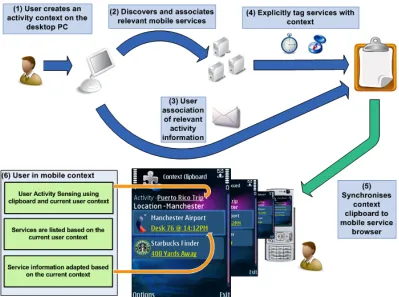
Figure 1: Core concepts in the Context Clipboard Framework. Step 6 is an actual screenshot of the mobile application part of the prototype.
The web application (developed in ASP .NET) supports creation of a ‘context clipboard’ for each user, which is a virtual container for the user’s activities and supporting context information. Specifically, activity, context and related information are represented using a self-describing
hierarchical format (currently XML), organised by activity and then context. The mobile application is a service browser that can adapt the list of services presented to the user based on the clipboard and current context. A web interface ‘wizard’ allows the user to choose information and services they would like to use and optionally limit these to appear in particular contexts of the activity. We currently support both location and time as these can be reliably sensed using the capabilities built into the phone. Mobile services can be filtered and prioritised based on their relevance to the current context.
The features currently implemented in the prototype are:
• Offsetting Context Preparation – the activities can be defined and prepared using the
desktop system for use on the mobile.
• Context Synchronisation – the context clipboard is easily synchronised between the
desktop and mobile systems (currently using XMPP as a transport).
• Automated Context Elicitation – context information can be parsed from electronic
7
• Activity and Service Sensing – the activity is automatically selected using a heuristic based
on the currently sensed context and the tags in the clipboard in order to adapt the services presented to the user.
• Activity Override – the user can switch between activities and override the automatic
choice.
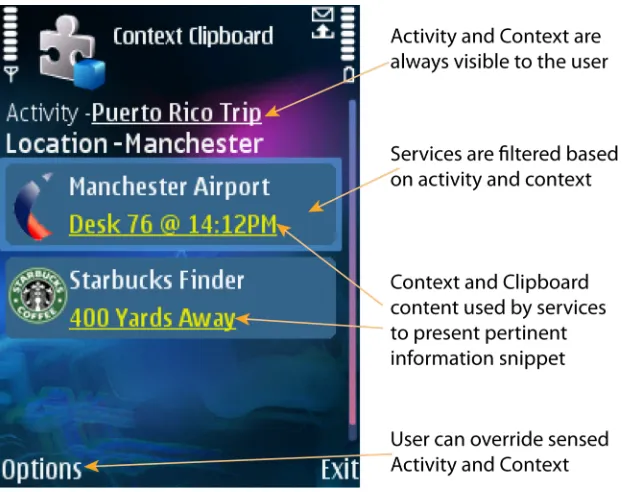
• Service Information Snippet – each service displays a short piece of information and an
[image:7.612.161.472.210.456.2]icon generated from the current sensed context and information associated with the selected activity (see screenshot in figure 2).
Figure 2: Most relevant services are listed first; services are automatically parameterised and offer ‘at a glance’ information snippets
Using the scenario from section 2 we describe how these concepts are applied in the context clipboard prototype in order to understand how user interaction with the services is affected.
Creating the ‘Meeting in Rome’ Activity
After receiving his confirmation email from the travel website, John opens the context clipboard web site. He logs-in, selects ‘Create Activity’ and enters the title “Meeting in Rome” adding the new activity to his context clipboard. John is able to attach general documents and text that might be useful to this activity. He opens his email inbox and copy/ pastes the text from his e-ticket
confirmation into the web form. The application extracts any context information it recognises and associates it with the activity context model. Next, John is able to search for mobile services using a search engine linked to a mobile service repository. Based on the information extracted from the e-ticket the ‘Manchester Airport’ service is automatically added to the activity. John manually adds the ‘Coffee Shop Finder’ and ‘Transport Finder’ that he often uses while travelling. John can
8
any explicit tags to the Coffee Shop Finder, as he wants it to be applicable across all the contexts in this activity. Happy with the current set of services and contextual attributes, John selects
‘Synchronise’ to update the clipboard on his mobile phone.
Interacting with the Service Browser in Context
Upon arrival at Manchester Airport John looks at his mobile phone and sees the list of services. Indicated at the top of the screen he notices the ‘Meeting in Rome’ activity is selected and that the Manchester Airport and other services have been filtered and prioritised to fit his current context. After checking in, John wishes to know the boarding time and gate number of his flight. Glancing at his phone he sees that the Manchester Airport service is displaying, “BA122 boards gate 9 @ 12.20PM”. The parameters for the service come from the clipboard and John did not need to interact explicitly to gain some value from it. The Coffee Shop Finder is indicating a coffee shop 400 yards away and he decides to head there to relax before his flight. Clicking the Coffee Finder, activates a map and directions to help him navigate.
D
ISCUSSION OFF
EEDBACKMobiSys 2007 Demonstration
The Context Clipboard prototype was demonstrated at MobiSys 2007. The features the application demonstrated generated excitement in many users confirming that the desire for simple access to services while mobile. Despite this enthusiasm, the design of our web-based interface was seen as needing improvement if the system were to be adopted. More specifically, several audience members found the web interface less intuitive than the mobile application. One member observed, “it felt more of a process than a simple interaction”. We believe this was in part due to the structured ‘wizard’ like organisation of the interaction and lack of an ‘undo’ feature. Our audience thought that they might prefer to apply tasks in a non-linear fashion, for example, creating an activity but not associating services to that activity at that point in time.
The service-generated information snippet feature was noted as important for reducing the clicks required to attain value from a particular service. Suggestions for further improvement included the ability to run the service browser on the mobile phone as a default application that would always stay in the foreground (avoiding the need to navigate to it), and the ability to receive audible notifications from the system if significant events took place, such as a change of flight times.
The association and automatic recognition of the Expedia e-ticket confirmations was seen as a highly desirable feature to avoid the need for human extraction and mark-up of context from data sources. Audience members noted the time saving aspects of ‘context inheritance’ – i.e. taking information from one context for use in another: another term for the offsetting concept we described earlier.
Formative User Study
9
had a web capable mobile phone with 4/7 (57.1%) using the web from their phone 1-5 times per week (only 1 participant used the mobile web daily). The most popular uses were browsing (4/4), email (3/4), blogging (2/4) and chat (1/4). 8/10 used the web from a desktop computer on a daily basis. We found that all our participants made between 2 and 50 trips per year (median 10) and all but one organised their travel online. All of the participants said they were likely to print out their itinerary to take with them (80% said very likely).
Using a 5 point Likert scale (where 5 is strong agreement), we found that 9/10 agreed that having the trip information available on their mobile would be useful (mean 4.3). In terms of functionality, 7/10 thought the information snippets for ‘at a glance’ interaction would be useful or very useful (mean 4); all participants thought that adjusting the list of services presented based on the activity and context sensed and being able to attach items to specific activities and contexts was useful or very useful (means 4.2 and 4.3 respectively); 8/10 participants said they’d find the ability to specify the services they wanted ahead of time useful or very useful (mean 3.9). The two remaining participants cited ‘not knowing what services they’d want ahead of time’ as a reason why they thought this was ‘somewhat un-useful’, one of them also thought they may not have the time as they tended to leave their trip planning to the last minute. Overall, 70% said they would probably or definitely use the context clipboard, with 8/10 saying they’d be likely to include the activity preparation editor into their regular trip preparation. Two of the participants remarked that they liked being able to guarantee the services they’d like in a context ahead of time. We found explaining the concepts were more difficult with the non-technical users who had not experienced mobile web use (perhaps accounting for the relatively low agreement score, mean 3.3, that the concepts were easy to understand initially).
5
Related Work
We have witnessed the emergence of specialised information applets or ‘widgets’ that users can assemble (e.g. Apple’s dashboard and iGoogle) to provide ‘at a glance’ summaries of web derived information without the need for browsing. Given the power and connectivity afforded by current high-end phones, it is unsurprising that this feature is migrating to the mobile context: the iPhone [6] widgets dashboard and recently announced ‘Yahoo Go’ [12] are examples of this streamlined interaction with Internet based information sources. This supports our argument that more streamlined approaches are needed to simplify interaction with web based services and information sources. We advocate the extension of this approach so that widgets can be primed with information from the context clipboard allowing them to adapt content based on the requirements defined by the user and their current activity. In our approach, displaying key information on the item representing the service further reduces the need for interaction to derive value from the service.
10
narrowband networks such as GPRS or EDGE. We advocate avoiding the need to browse on the phone through the use of single function applets that offer streamlined interactions with Internet based services (like widgets). We also advocate offsetting the discovery and selection of these services across contexts and devices using the context clipboard. The concept of offsetting data entry – using devices that offer richer editing capabilities at times when users have the time to do so – is already widely used to simplify use of mobile calendars and address books. Users typically update information using workstations and laptops, then synchronize with the phone. We build on this concept.
Typical web pages do not adapt well to the small low-resolution displays. This forces users to rely on scrolling and zooming to focus on content that is relevant. Through context-aware customisations it is possible to adapt webpage content to the relevance of the user context and the size of the display. PageTailor [8] represents one example of a customisation approach using the Windows Mobile based Minimo web browser [9] where users are supported to adapt and prioritise the layout and content of popular websites by removing and re-positioning page elements. The enhanced browser is able to save changes in context for future website visits. Although time taken to adapt a webpage by the user on average can be up to 10 minutes using the mobile device. Similarly, CMo [10] attempts to customise webpage interaction by only displaying a relevant segment of a webpage based on context. CMo infers context from text surrounding a hyperlink. Thus when a user selects the link, the destination page is adapted to show one segment of the page based on the context of the previous page. We aim to avoid the need to conduct interactive browsing by partitioning the interaction, so users interact with the services on the phone which may update in the background. Round trip delays are incurred where the user clicks on a service that accesses network information or services in real-time, however.
The context-aware map tailor (CAMT) is a mobile map application that is able to adapt map information based on user activity [11]. CAMT supports an activity context model and uses a dialogue with the user to disambiguate the current context and inferences drawn from it. The user can manually specify context parameters when prompted during an activity and this in turn leads to ideally more relevant updates to the map. The CAMT and context clipboard applications both use the notion of activity as a means of unifying information and context that is then used as a platform for adapting the content presented to the user. Unlike CAMT, where the user definition of context occurs during the activity, with our approach it is essential that this preparation can be offset to a more convenient time and place (e.g. from the mobile onto the desktop).
6
Conclusions and Future Work
In this article, we describe an approach for attaching information and services to activities and contexts to streamline the discovery and use of mobile services. Specifically we outline how to carry, re-use and share information across contexts comprising an activity to reduce the need for data entry and interactions when using mobile services while mobile.
11
ongoing activities, termed ‘long sessions’, from sporadic interactions with simpler more focused services.
On the mobile device we advocate creating a service browser containing short snippets of
information generated by each service based on the context clipboard. This enables users to engage in “0-click interactions” with services; deriving some value from mobile services possibly without further interaction.
We recognise that the process of determining user activities based on sensor context is non-trivial, although the inability to sense a given activity reliably is not viewed as a limitation in our approach, since users are free to explicitly define activities that are meaningful to them, and can simply select to override the activity sensed by the system. This can be used intentionally to explore other contexts or change activity proactively.
We have implemented the Context Clipboard prototype based on the design insights described in section 4 to explore their potential to simplify mobile service interactions, and have demonstrated the prototype at a well known conference and conducted a small scale formative user study to gather feedback on our ideas. While initial user feedback has been largely positive (with 70% of participants in our study indicating that they would use the system), we have recognised the need to perform a longer-term study in more naturalistic conditions to validate these early findings in practice. To support such a study we expect to need to simplify our current prototype to avoid the reliance on Wizard-of-Oz sensing, and offer a reduced but fully functioning set of services that can be deployed. Based on feedback on the activity creation process, we expect to require a tighter integration
between the process of activity creation into the workflow of our users, e.g. by enabling them to drag and drop snippets of information and context items to associate them with an activity. We are planning to address the suggestions for improvement to the mobile client received so far by investigating how to integrate the service browser into the phone’s home screen and plan to add notifications to the system in the form of audible and tactile alerts.
Acknowledgment
We acknowledge the generous support of the European Union (EU) under grant IST 2006 034620: the Simple Mobile Services (SMS) project. We also take this opportunity to thank our colleagues in SMS for their contributions to discussions leading to the concepts described in this paper.
References
[1] Central Intelligence Agency. The World Factbook 2007. Website:
https://www.cia.gov/library/publications/the-world-factbook/geos/xx.html#Comm, accessed
20.9.2007.
[2] H. Bouwman, C. Carlsson, F.J. Molina-Castilla and P. Walden. Barriers and drivers in the adoption of current and future mobile services in Finland. Telematics and Information Technology, 24(2), May 2007, 145-160
.
12
[4] comScore. Measuring the Digital World. Mobile Web Metrix, Japan Report. Website:
http://www.comscore.com/request/mobile_web_metrix.asp, accessed 21.9.2007.
[5] F. Albinali, N. Davies, and A. Friday, “Structural learning of activities from sparse datasets,” Fifth Annual IEEE International Conference on Pervasive Computing and Communications (PerCom’07), pp. 221–228, 2007.
[6] Apple Inc. iPhone. Website: http://www.apple.com/iphone/, accessed 1.10.2007.
[7] G. Grassel, R. Geisler, E. Vartiainen, D. Chauhan, A. Popescu. The Nokia Open Source Browser. Website: http://www.research.att.com/~rjana/MobEA-IV/PAPERS/MobEA_IV-Paper_3.pdf. [8] N. Bila, T. Ronda, I. Mohomed, K. N. Truong, and E. de Lara. PageTailor: Reusable end user
customization for the mobile web. In Proceedings of the Fifth International Conference on Mobile Systems, Applications, and Services, June 2007, San Juan, Puerto Rico.
[9] Mozilla Foundation. Minimo Web Browser. Website: http://www.mozilla.org/projects/minimo/, accessed 24.3.2008.
[10] Y. Borodin, J. Mahmud and I.V. Ramakrishnan. “ Context Browsing with Mobiles - When Less is More" , 5th International Conference on Mobile Systems, Applications and Services,
ACM/USENIX MobiSys 2007, 11-14 June 2007, San Juan, Puerto Rico.
[11] G. Cai, Y. Xue. Activity-oriented Context-aware Adaptation Assisting Mobile Geo-spatial Activities. In Proceedings of the ACM IUI 2006: International Conference on Intelligent User Interfaces. 2006, Sydney, Australia: 354-56.