Rise Up: An Augmented Reality Application
Niranjan Deepak Gawli
Subject Matter Expert Hadapsar, Pune 411 013, IndiaSnehal Laxman Bhilare
Subject Matter Expert Hadapsar, Pune 411 013, IndiaABSTRACT
Rise up is a location-based mobile application developed on the android operating system using the MARS [Mobile Augmented Reality System] technology. It is an android application that uses the user’s location for discovering information about the world around the user. Using Augmented Reality it displays the digital information around the user in the form of tags in a user camera view. The application calculates user’s current positions by using the Global Positioning System (GPS), a compass, and an accelerometer and accesses the data set to provide geographic information.
General Terms
Keyhole Markup Language (KML), ARML, GPS, Augmented Reality.
Keywords
Augmented Reality, Mobile Augmented Reality, Artificial Intelligence, Augmentation.
1.
INTRODUCTION
Augmented Reality (AR) is one of the most prominent topics in research fields and the ingenious interface design of mobile learning application system development. Augmented Reality which is a subset of Mixed Reality, adds virtual information to a real image/representation of the world in order to enhance, or augment, the information the user receives. Augmented reality technology goes well beyond the domains of sight and sound and immerses into haptic sciences. At the application level the trinity comprises of a global positioning system (GPS) for locating the co-ordinates by the triangulation method, a tilt-compensated digital compass direction and a tri-axial accelerometer to determine orientation. AR requires much more accurate position tracking that when combined with precise orientation tracking, can provide a compelling user interface, for example, with robust contents display in location-aware user environment, and interacts directly with the electronically embellished world around us.
Mobile Augmented Reality System is the implementation of Augmented Reality on the mobile devices. Mobile Augmented Reality System (MARS) applies the AR interface concept to the world of mobile technology [1]. Mobile devices with the help of built-in GPS receiver are becoming more and more efficient and prominent.. Exploiting the mobile device’s
instruction to innovatively designed personalized user interface to interact with the real mobile environment [5] [6].
2.
CONCEPT
Imagine, you're walking down the street for an evening ramble with your family and you discover an ATM outlet on the roadside corner, and as you direct your mobile camera towards it, the screen elucidates the education loan scheme and debit card offers from the bank. And then focusing your camera to a distant hotel drops the menu of the Day and The Family discounts on the screen, giving enough information on the prices, so that you can have a check at your wallet before entering the edifice for a grand feast! Possible!
There are many social issues in India that are being ignored to a certain extent, resulting in these serious problems becoming rather dominant ones that threaten the peaceful existence of our country. A person in a society today is not aware of what is happening in his locality and as a result he can’t help the society to rise up from the cycle of vicious social evils. People need to be aware, because information about society and its issues makes them more responsible for the society. A socially conscious person tends to be empathetic towards others regardless of race, gender, ethnicity, disability, class, or sexual identity.
The thought of presenting the information to the user in an interactive way and based on his location in his camera view was underway. Searching for the solution to a problem through a location is more helpful and convenient than searching a string in the Google. The awareness about the social events happening in our locality can be obtained by the sorting the incidents and events according to their GPS location. Now this information can be viewed on the map or in the users camera view. Hence the idea of using augmented reality for social awareness was initiated. User can also use it to tag places where the bribe is being taken as awareness against corruption.
The application calculates users' current positions by using the Global Positioning System (GPS), a compass, and an accelerometer and accesses the data set to provide geographic information (e.g. longitude and latitude), history, and contact details of points of interest. [7]
GPS (Global Positioning System) and Digital Magnetic Compass to obtain a location and direction information from user. Two magnetic field effect sensors of Digital Magnetic Compass calculate the azimuth of user. Each of sensors is located on a circuit board at 90 degree angle that calculates magnetic north using the difference of the values of sensor outputs. GPS consists of 24 satellites which can be used to accurately locate a user’s device almost anywhere on the earth’s surface.[11] The device must have a clear line of sight to at least four satellites for the successful positioning; when it does, it retrieves information about its latitude, longitude, elevation and the precise time. Obtaining a valid GPS fix may take (more or less) from two to five minutes, depending on surroundings (e.g., urban area), weather conditions, and available satellites.
3.2 Six Degree of Freedom
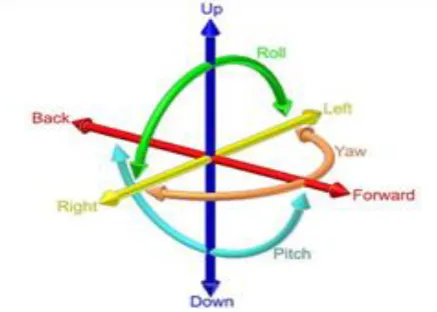
[image:2.595.64.283.389.545.2]The Client site application is installed and run on a Mobile Phone with Android OS 3G or up. The reason of using Android OS is that the mobile device has the built-in hardware to be able to sense the six–degree-of-freedom (6DOF) of its camera’s lens. [13]By sensing the position in x, y, and z, and the orientation in roll, pitch, and yaw angles of the camera lens on the mobile device, the system will able to know about what pre-defined location-based learning content for the real world could be rendered on the screen. Furthermore, with the sensory data, the system is also able to instruct users to complete activities and tasks among POI and to provide location based adaptation in the mobile learning environment.
Fig 1: Six Degree of Freedom
The 6DOF sensing ability is the essential functionality that enables the AR interaction in the system. The 6DOF information is shown in Fig. 1. First, the system gets the data from the built-in GPS to read longitude, latitude and elevation to obtain the position data of the mobile phone, and represented the X, Y and Z coordinates of the 6DOF while the digital compass and accelerometer are used to sense the mobile device’s orientation roll, pitch, and yaw angles. The X corresponds to Roll, or rotation around the axis; Y represents the Pitch, horizontally and mentally draw a horizontal line about half-way down the screen. That's the axis around which the Y value rotates. [16]Values go from 0.5 (the headphone jack straight down) to -0.5 (the headphone jack straight up), and the values vary from 0.5 (rolled all the way to the left) to -0.5 (rolled all the way to the right). [26]And the Z represents the Face up and Face down. Actually, the Z value does not correspond to the yaw [7].
It refers to whether mobile is face up (-0.5) or face down (0.5). When placed on a side, both the side with the volume controls and ringer switch, or the side opposite, the Z value equates to 0.0.
Furthermore, the complete network accessing ability with 3G and Wi-Fi and the animation ability by OpenGL ES [14] Framework are also the important factors of choosing Android as the client mobile device for the RISEUP system.
3.3 User Modeling
Application modeled several properties of a user’s as follows.
• Coordinates: user’s absolute geographic location (Variable name: x, y)
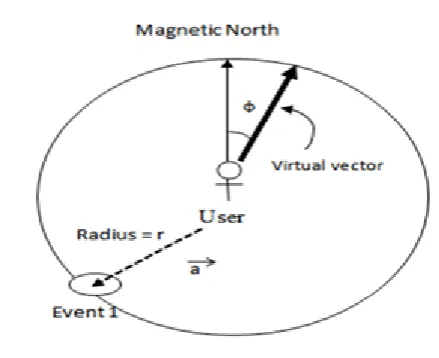
• Sight Range: Application defines range which is similar human’s sight range. This range is used to determine which event will be triggered. (Range)
• User’s Direction: User’s direction is obtained by digital magnetic compass sensor. (Direction)
3.4 Event Triggering Algorithm
Fig 2: Events Triggering Example
The algorithm consist two concurrent processes:
Process #1: Obtain the users location
1. Gets the user’s location from GPS and direction from digital magnetic sensor
2. Get a direction vector and distance from location information
3. Look-up POI’s for nearest tags
Process #2: Real-time processing
1. Copy data to the buffer
2. Apply a filter for each POI’s
3. Output the information in the form of adaptive tags to display in mobile’s user interface
4. If a filter changed from process 1, apply it.
3.5 Keyhole Markup Language
Keyhole Markup Language (KML) is an XML-based markup language for representing geographic annotation and visualization within Internet-based, two-dimensional maps and three-dimensional [27] Earth browsers. KML was first developed for use with Google Earth, which was originally named Keyhole Earth Viewer. KML is an international standard of the Open Geospatial Consortium. Google Earth was the first program able to view and graphically edit KML files.
The structure of this file is as follows:
• An XML header: This is the first line in every KML file. Nothing can appear before this line. Not even the spaces.
• A KML namespace declaration: This is second line in every KML.
<?xml version="1.0" encoding="UTF-8"?>
<kml xmlns="http://www.opengis.net/kml/2.2">
<Placemark>
<name>Placemark example</name>
<description>US Pizza, Now get 50% off for orders above 500
.</description>
<Point>
<coordinates>-122.082265876825683,37.422268866140251,0</coordinates>
</Point>
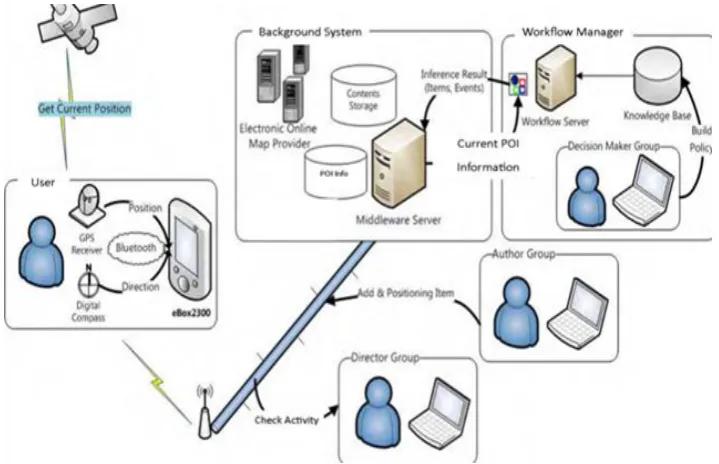
Fig 3: Overall architecture and relationship in the implementation
3.6 Augmented Reality Markup Language
Any special tags for a phone number, the address of the POI etc. cannot be implemented through KML. It was simply not designed for AR use. The use of pure KML in AR applications does not permit the developer to access this data in a standardized way. [8]
An ARML file consists of two parts. In one, information is provided about the Content Providers, [9] which are the provider of sets of POIs (e.g. Google). The content provider part holds all information about a single Content Provider, like the name, a description, a logo, the web link, etc.
An ARML document must comprises the following tags:
<?xml version="1.0" encoding="UTF-8"?>
<kml xmlns="http://www.opengis.net/kml/2.2"
xmlns:ar="http://www.openarml.org/arml/ext/2.2"
xmlns:wikitude=
"http://www.openarml.org/arml/ext/2.2">
<Document>
</Document>
</kml>
The content provider part consists of all the information that a provider provides. The provider shares this information with all the POIs which it delivers. The example is given as below:
<ar:provider id="IBGR01 ">
<ar:name>Indian Burger</ar:name>
<ar:description>
Delecious Burgers
</ar:description>
<riseup:providerUrl>
http://IGBR.com/
</riseup:providerUrl>
<riseup:tags>
any tags of the CP
</riseup:tags>
<riseup:logo>http://logoUrl.com</wikitude:logo>
<riseup:icon>http://iconUrl.com</wikitude:icon>
</ar:provider>
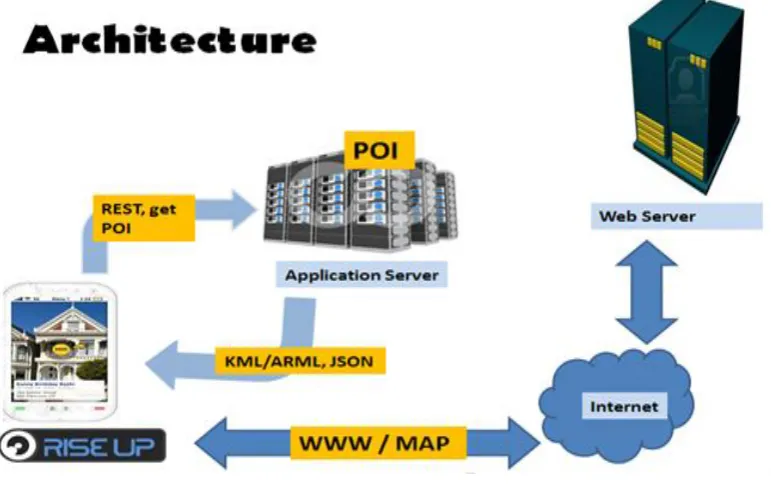
Fig 4: Working of the application
3.7 JavaScript Object Notation
JSON (JavaScript Object Notation) is a lightweight data-interchange format. JSON is built on two parts:
• A name/value pairs collection. This is realized as an object, record, struct, dictionary, hash table, keyed list, or associative array in various languages.
• An ordered list of values. This is realized as an array, vector, list, or sequence in most languages.
3.8 REST
The REST protocol is a HTTP-based protocol that enables you to contact the message broker through a Web browser. You can contact the message broker by navigating to appropriately formatted URLs or by posting HTML forms.
3.9 POI
POI, as the name suggest is location of the user that someone may be interested in it. It consist of the latitude, longitude and description. The database that stores the information of POIs at the application site can now be prepared. MySQL database is used with phpMyAdmin at the application server site.
<?php
"lng": "73.04256",
"elevation": "0",
"title": "Artist Village",
"distance": "9.756",
"has_detail_page": "1",
"Appbpage": "http://www.airoots.org/2008/09/an-artist-village-stands-in-mumbabylon/"
},
{
"id": "0002",
"lat": "19.018335",
"lng": "73.038933",
"elevation": "10",
"title": "CBD Rly Station",
"distance": "9.771",
"has_detail_page": "1",
"webpage":
"http://en.wikipedia.org/wiki/CBD_Belapur"
"has_detail_page": "1",
"webpage": "http://www.itshop.in/"
}
]
}';
?>
4.
BLOCK DIAGRAM AND WORKING
PRINCIPLE
The GPS system get the position of the user in the form of latitude and longitudes while the compass and accelerometer helps to get the direction and the orientation of the mobile
device. [24] The current user position is then sent to the application server where the POI’s are stored. The GET method calls for the list of POI’s using the REST services. Now according to the parameters the POIs are decided that are to be sent according to the range of vision of the mobile device.
POI’s are sent back to the user encapsulated in the form of JSON objects to the mobile device. [18] If the tags are hyperlinked, user can also click on the tags to retrieve the html pages. This request is sent to the webserver from were the web pages can be retrieved. If this tagged information is to be displayed on map, KML is used to get those details on Google map.
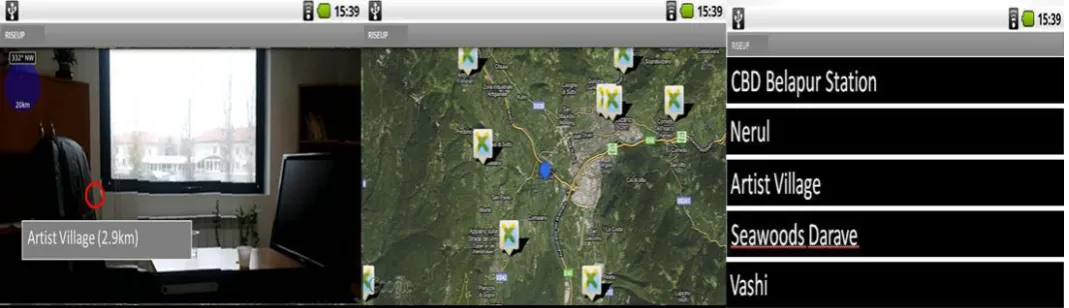
Fig 5: (Left to Right) Rise Up: Augmented Reality View, Map View and List view
5.
IMPLEMENTATION
The application is built on an android platform. It provides user a number of options in the form menu items to select the views in which the users want POI’s information to get displayed. Also the user can change its range of vision by changing the radius on a seek bar. Also application provides a number of data sources from where the user can retrieve the POI’s. User can also add the data source of his choice. Fig. 5 shows the implementation of application in AR view, Map View and List View respectively.
6.
FUTURE SCOPE
As per Juniper Research report, it is estimated that annual revenues from mobile AR applications may reach to $732 million, up from less than $1 million in 2009. [19] The mobile software and application developers and gaming console developers are banking on MARS to be the technology that might turn out to be the new endorser for digital economy. It is rated amongst the top 10 disruptive technologies for 2008-2012 by Gartner, Inc., augmented reality comes at par with technologies like cloud computing, virtualization computing and ubiquitous computing for the coming years.
7.
APPLICATION
• Tourism: Riseup application can be used in travelling new. Traveler can just hold his mobile on particular place and he will get all the information what he wants. This would be easier for him too. Hence Riseup can be used for tourism.
• Event Listing: Using Riseup, user will be able to see neighboring places with the tags displaying what events
are going on there. Hence Riseup can be implemented for event listing.
• E-marketing: Companies can provide offers on their product which can also be included in tags. This will help retailer to market his product electronically. Hence Riseup can be applied in E-marketing methodology.
• Journalism: It is also simple for a user that he can hold his mobile device in hand with his camera view on and then he can search for incidents happening around just like reading a newspaper. Hence Riseup can work for journalism.
8.
LIMITATIONS
Although it provides a good MARS system, there are many technical issues that will need to be addressed for commercial versions of such systems to become practical:
Quality of tracking: Although we believe that approximate tracking can be extremely useful, there are many applications that require precise tracking. [22] Better outdoors position tracking can be addressed through real-time kinematic GPS systems, which can achieve centimeter- level accuracy.
Loss of tracking: GPS satellite signals are weak and are blocked by intervening buildings and even foliage. While our system works on a large portion of our campus, there are far too many areas in which it does not provide GPS tracking, including outdoor sites shaded by trees and nearby buildings, and most indoor sites.
[image:6.595.36.571.246.400.2]of our earlier work on using augmented reality to present hidden architectural infrastructure.
9.
CONCLUSION
In this paper, a detail description of how application explores GPS-based location positioning system that uses the augmented reality technique for navigation is provided. This system automatically recognizes a location through GPS and compass taken from user environments. Location-related information is displayed by identifying related location from a database. Application provides information to the user in an interactive way on his camera view. It is also simple for a user that he can hold his mobile device in hand with his camera view on and then he can search for incidents happening around just like reading a newspaper. Application can also be used to tag places where the bribe is being taken as awareness against corruption. Further all events are happening around us can be explored with the use of application.
In conclusion, this framework will be useful to travelers who like to visit new places. This framework provides several utilities such as Navigation and Path Finding, Tourism, Journalism, Event listing, E-marketing.
In Future, application domain would be extended to include 3D models of infrastructure, in the spirit of the earlier work on using augmented reality to present hidden architectural infrastructure.
10.
REFERENCES
[1] Tobias Hans Hollerer, “User Interfaces for Mobile Augmented Reality Systems,” Columbia University New York, NY, USA, pp. 2–25, 2004.
[2] Qing Tan, Yueh-Min Huang and Yu-Lin Jeng “Location-Based Dynamic Grouping Algorithm in Mobile Learning Environment”, 2009.
[3] B. Patten, I. A. Sanchez, & B. Tangney., “Designing collaborative, constructionist and contextual applications for handheld devices,” Computers & Education, Vilume: 46, pp. 294–308, 2006.
[4] M. Michie., “Factors influencing secondary science teachers to organize and conduct field trips,” Australian Science Teacher’s Journal, Volume: 44, Issue: 4, 1998.
[5] Doswell, J.T., “Augmented Learning: Context Aware Mobile Augmented Reality Architecture for Learning,” Proceedings of the Sixth International Conference on Advanced Learning Technologies (ICALT'06), pp. 1182–1183, 2006.
[6] Doswell, J.T., “Context-Aware Mobile Augmented Reality Architecture for Lifelong Learning,” Proceedings of the Sixth International Conference on Advanced Learning Technologies (ICALT'06), pp. 372–374, 2006.
[7] Rainer Simon, Harald Kunczier and Hermann Anegg,
[9] Martin Lechner, Markus Tripp and Hermann Anegg, ”ARML: An Augmented Reality Standaed,” Perey Mobile AR Summit, Section III, 279-290, 2007.
[11] Reitmayr, G., & Schmalstieg, D. (2004). Collaborative augmented reality for outdoor navigation and information browsing. Proceedings of the Second Symposium on Location Based Services and TeleCartography (pp. 53-62). TU Wien.
[13] Schmalstieg, D., & Wagner, D. (2007). Experiences with Handheld Augmented Reality. Mixed and Augmented Reality, 2007. ISMAR 2007. 6th IEEE and ACM International Symposium (pp. 3-18). IEEE.
[14] Simon, R., Kunczier, H., & Anegg, H. (2007). Towards Orientation-Aware Location Based Mobile Services. In G. Gartner, & K. Rehrl, Location Based Services and Telecartorgaphy Lecture Notes in Geoinformation and Cartography (pp. 279-290). Springer.
[15] Tan, Q., & Kinshuk. (2009). Client Mobile Software Design Principles for Mobile Learning Systems. International Journal of Interactive Mobile Technologies (iJIM), 3(1), pp. 32-37.
[16] Tan, Q., Huang, Y.-M., & Jeng, Y.-L. (2009). Location-Based Dynamic Grouping Algorithm in Mobile Learning Environment. Journal of Education Technology.
[17] Virvou, M., & Alepis, E. (2005, January). Mobile educational features in authoring tools for personalized tutoring. Computers & Education, 44(1), pp. 53-68.
[18] Wagner, D., & Barakonyi, I. (2003). Augmented Reality Kanji Learning. the Second IEEE and ACM International Symposium on Mixed and Augmented Reality (ISMAR ’03) (pp. 335-336). IEEE
[19] Al-Mekhlafi, K., Hu, X., & Zheng, Z. (2009). An Approach to Contextaware Mobile Chinese Language Learning for Foreign Students. Eighth International Conference on Mobile Business (pp. 340-346). IEEE.
[20] Anastassova, M., Burkhardt., J. M., & Mégard, C. (2007). User-Centred Design and Evaluation of Augmented Reality Systems for Industrial Applications: Some deadlocks and breakthroughs. S. Richir (Editor), VRIC'07, 9th International
[21] Conference on Virtual Reality (pp. 215-224). Laval, France: IEEE. Azuma, R. T. (1997). A Survey of Augmented Reality. Teleoperators and Virtual Environments, 6(4), pp. 355-385.
[22] Azuma, R., Baillot, Y., Behringer, R., Feiner, S., Julier, S., & MacIntyre, B. (2001). Recent advances in augmented reality. Computer Graphics and Applications, 21(6), pp. 34-47.
Computing, 7(2), pp. 85-89. Benford, S., Rowland, D., Flintham, M., Drozd, A., Hull, R., Reid, J., . . . Facer, K. (2005). Life on the edge: supporting collaboration in location-based experiences. CHI 2005 (pp. 721-730).
[26] Portland: ACM Press. BenMoussa, C. (2003). Workers on the move: new opportunities through Mobile
commerce. IADIS International Conference e-Society 2003, (pp. 251-256).