FORTRAN IV LANGUAGE MANUAL
PDP-9
PREFACE
This manual describes the FORTRAN IV language for the PDP-9. It
provides users with the necessary information for writing FORTRAN programs for
compilation and execution in the PDP-9 ADVANCED Software System.
Operating instructions ,wi
II
be given in later publications. In paper tape systems, the compiler along with an Input/Output Monitor is loaded frompaper tape. In larger systems with a bulk storage device such as DECtape, the
Keyboard Monitor accepts direct console commands to load the compiler in an
I/O device independent environment.
Several excellent texts are available for a more elementary approach
to FORTRAN programming. "A Guide to FORTRAN Programming, II by Daniel D.
McCracken (published by John Wiley and Sons, Inc.) is recommended.
This is essentially the language of USA Standard FORTRAN (X3.9-1966)
Chapter
1 • 1
1 • 1 • 1
1 .1 .2
2
2.1
2.1 .1
2.1 .2
2.1 .3
2.1
.4
2.1 .5
2.2
2.2.1
2.2.2
2.2.3
2.2.4
2.3
2.3.12.3.2
2.3.3
2.4
2.4.12.4.2
2.4.3
2.5
3 44.1
4.24.3
CONTENTSINTRODUCTION ••••••••••••••••••••.••.••••••.••••.••...••...••...••••
FORTRAN •.•••••.•••••••••.••••..•.••••.••..•••..•.••••....•••....•
Card Format ••••••••.•.••.•••.•••••••••.•••....•..••..•••••••.•
Paper Tape Format •.•••.••.•.•••.•••••••.•••••.••..•...•..••...•
ELEMENTS OF THE FORTRAN LANGUAGE
Constants • . . . 0 • • • • • • • • • • • • • • • • • • • • • • • • • • • •
Integer Constants ••••••.•••••••••••••••••••••••.••••.••••.•••••••
Real Constants (6-decimal-digit accuracy) ••••.•.•••••••.•••••••••.
Double-Precision Constants (9-decimal-digit accuracy) ••.•••..••••••
log j c a I Constan ts . . . • . . .
Hollerith Constants ••••••••••.•••••••••••••••.••.••••.••.•••••••
Variables ... e
Variable Types •••••••••••••••••••••••••••.••.••••..••••.•••.•••
Integer Variables •... ~ ... e.a
Real Variables •...•...
Double-Prec ision and Log ical Variables •••••••..••••••••••••••••••
Arrays and Subscripts •••••••••••••••••••••••••••••••••••••••••••••••
Arrangement of Arrays in Storage ••••••.••••••••••••••.•••.•••••••
Subscript Expressions ••••••••.•••••••••••••••••••.••••.••••••••••
Subscripted Variables •••.••••••••••••••••••••.•••••••••.••••..••
Expressions ...•
Arithmetic Expressions
Re lational Expressions ••••••••••••••••••••••••••••••.••••••••.••
Log ical Expressions ••••••••••••••••••••••••••.••••.•••••••••••••
Statements . . . , . . . .
ARITHMETIC STATEMENTS ••••••••••••••••••••••••••••••••••••••••••••••
CONTROL STATEMENTS •••••••••••••••••••••••••••••.•••...••.•.••.••••
Unconditional GO TO Statements •.•••••••••••••••••..•••.••...••.•.•
ASSIG N Statement ••••••••••••••••••••••••••••••••.••••.••••.••••••
Assigned GO TO Statement ••.•••••••.••••••••••••••..•••...•..••...•
Chapter
4.4
4.5
4.6
4.7
4.8
4.9
4.104.11
55.1
5.1 .1
5.1 .2
5.1 .3
5.2
5.2.1
5.2.2
5.2.3
5.2.4
5.2.5
5.2.6
5.2.7
5.2.8
5.3
5.3.1
5.3.2
5.3.3
6 6.16.2
6.3
6.4
PDP-9 FORTRAN IV
CON TEN T S (continued)
Computed GO TO Statement •••••.•••••••••.•••••••••..••..••.• 0 0 0 0 0 0
Arithmetic IF Statement •• 0 0 • 0 0 • • • • • • • • • • 0 • • 0 • • • • • • • 0 • 0 • 0 • 0 • • • • • • • • • • •
Log iccl IF Statement •••••••••••••.•••••••••••••••••••••••••••.••••••
DO Statemen t •••••••••••••••••••••••••••••••••••••••••••••••••••••
CONTINUE Statement •.• 0 • • • 0 0 0 • • • • • • • • • • • 0 • 0 • • • • 0 • • • 0 • • • • 0 • • • • • • • •
P AU SE Statemen t • 0 • • • • • • • • • • • • • • • • • • • • • • • • • • • • • • • • • • • • • • • • • • • • • • • • •
STOP Statement •••••••••••••••••••••••••••••••••••••••••••••••••••
END Statement ••••••••••••••••••••••••••••••••••••••••••••••••.•••
INPUT/OUTPUT STATEMENTS •••••••.•••••••••••••••••••••••••••.•••••••
General I/O Statements •••••••••••••••••••••••••••••••• 0 • • • 0 • • • 0 • • • •
Input/Output Argument Lists •• 0 • • • • • • • 0 • • • • • • • • • • • • • 0 • • • • • • • • • • • •
READ Statement •.••••••••••.••••••••••••••••••••••••••..•••••••
WRITE Statement ••• 0 • • • • • • • • • • • • • • 0 • • • • 0 0 0 0 0 • • 0 • • • • • • • • 0 • • • • • • •
FORMAT Statements o . 0 0 • • 0 • • • • • • • • • • • • 0 • 0 0 0 0 0 0 0 • • • • • • • • • • • • • • • • • • • •
Specifying FORMAT 0 • • • • • • • • • • • • • • • • 0 • • • • • • • • • • • • • • • • • • • • • • • • • •
Conversion of Numeric Data •..••.••••• 0 • • • • • • • • • • • • • • • • • • • • • • • • •
P-Scale Factor •.••••• 0 0 0 0 0 0 0 • • 0 0 • 0 0 0 0 0 0 • 0 0 0 • • • 0 • • • 0 • • • • 0 • 0 • • 0 0 0
Conversion of Alphanumeric Data 0 • • • 0 0 0 0 • • • • • • • • • • • • • • • • • • • • • • • • 0
Logical Fields, L <:onversion 0 • • • • • • • • • • • • • 0 0 • • • • • • • • • • • • • • • • • • • •
Blank Fie Ids I X Conversion 0 0 • • • • 0 0 • • 0 • • • • • 0 • ' • • • 0 0 • • 0 • 0 • • 0 . 0 • 0 • 0
FORTRAN Statements Read in at Object Time . 0 . 0 0 0 • • • • • • • • • • • • • • • •
Printing of a Formcltted Record •.••••••• 0 0 • • • • • " • • • • • • • • 0 0 . 0 • • • • • •
Auxiliary I/O Statements 0 • • • • • • • • 0 • • • • • • • • • 0 • • • • • " • • • 0 • • 0 • • • • • • • • • • •
BACKSPACE Statement •.••••••• 0 . . . 0 0 • • • • •
REWIND Statement •••••••••••••••••••••••••• l) • • • • • • • • • • • • • • • • • •
ENDFILE Statement ••. 0 . 0 • • • • • • • • • • • • • • 0 0 0 0 0 . " • • • • • • • • • • • • • • • • • •
SPECIFICATION STATEMENTS ••••••••••••••••• 0 . . . 0 . 0 0 . 0 0 . 0 • • 0
Type Statements •••••••••••••••••••••••••••••••• 41 • • • • • • • • • • • • • • • • • •
DIMENSION Statement •••••••••••••••••••••••••• 411 • • • • • • • • • • • • • • • • • •
COMMON Statement . . . .
E QUIVALE NCE Statement 0 0 0 0 • 0 • 0 • 0 • • • • 0 0 o • • 0 • 0 • • • ' • 0 • • 0 • 0 0 • • • • 0 • 0 • 0 •
Chapter
6.5
6.6
7
7. 1
7.2
7.3
7.4
7.5
7 .5.1
Appendix
2
Table
2
CON TEN T S (continued)
EXTERNAL Statement ••••••••••••••••••••••••••••••••••••••••••••••••
DATA
Statement •.•••••••••••..•..•.••.•••••••..•.•••.••..••••.•.•••SUBPROGRAMS ..••••...
Statement Functions •••.••••..•••.••••••••••••••••••••••..•.••••••.••
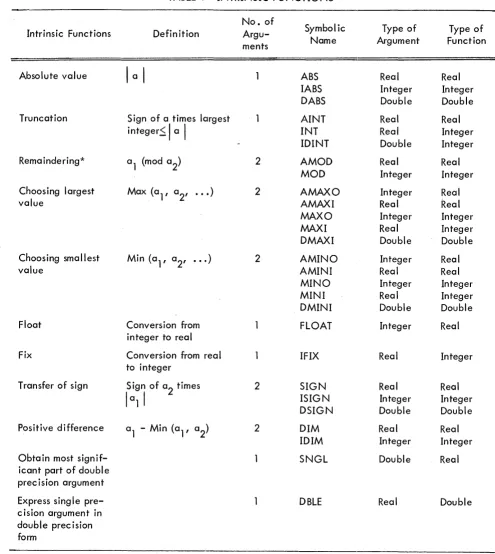
Intrinsic or Library Functions •••••••••••••••••••••••.••••.•.•••••.••••
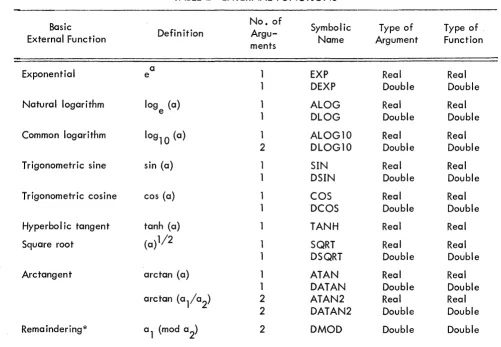
External Functions •••••••••••••••.•••••••••••••••••••..•...•••••..••
Subroutines . . . ~ . . . • . . .
Block Data Subprogram ••••.••••••••••.••••••••••••.•••.•...•...••
Example of BLOCK DATA Subprogram ••••••••.••.••••..••••••••.••
SUMMARY OF PDP-9 FORTRAN IV ST ATEME NTS ••••••••••••••.•.•••••••.•
A NOTE ON USA STANDARD FORTRAN IV ... .
TABLES
Intrinsic Functions
External Functions
35
36
37
37
38
40
41
43
43
45
47
39
CHAPTER 1
INTRODUCTION
T.1 FORTRAN
FORTRAN (for FORmula TRANslation) is the most widely used programming language for
engineering and scientific applications. It consists of precise procedures for expressing numerical
compilations.
The FORTRAN character set consists of the 26 letters:
A, B, C, D, E, F, G, H, I, J, K, L, M,
N, 0, P,
Q,R, 5, T, U, V, W, X, Y, Z
the 10 digits:
0,1,2,3,4,5,6,7,8,9
and 11 spec ia
I
characters:1. 1. 1
Blank Equals
Plus
+
Minus
Asterisk
*
Slash /
Left Parenthesis (
Right Parenthesis )
Comma Decimal Point
Dollar Sign
$
Card Format (IBM Model 029 Keypunch codes)
The FORTRAN source program is written on a standard FORTRAN coding sheet, which consists
of the following fields: statement number field,
I
ine continuation field, statement field, and identifica-tion field.The FORTRAN statement is written in columns 7-72. If the statement is too long for one line, it can be continued in the statement field of as many lines as necessary if column 6 of each continuation
line contains any character other than blank or zero. There are two exceptions to this rule: (1) the DO
PDP-9 FORTRAN IV
For one statement to be referenced by another, a statement number is placed in columns
1-5
of the first line of that statement. This number is made up of digits only, and may contain one to five
digits. Leading zeros and all blanks in this field are ignored. The stabement numbers are used for
identi-fication only, and they may be assigned in any order.
The FORTRAN compiler ignc)res the last eight columns (columns 73-80) which may be used
for program identification, sequencing, or any other purpose desired by the user. Comments may be
included in the program by putting a
"e"
in column 1 of each line cont1aining a comment (or continuation of a comment). The compi ler ignores these comments except for printing them.Blanks may be used to aid readability of a FORTRAN stateme!nt, except where indicated in this
manual.
1 .1.2
Paper Tape FormatWhen FORTRAN source program statements are prepared on paper tape, the sequence of
char-acters is exactly the same as for card input, and each
I
ine is terminated with a carriage return,I
ine feed sequence.A statement number (all digits) may be written as the first five characters, or a "C" may be the
first character to indicate a comment line or a continuation of a comment line. For statement continuation
lines, any character other than blank or zero is written as the sixth character. The seventh character
be-gins the statement and must be alphabetic. E'Jch line is terminated with a carriage return, line feed.
The TAB key can increase the speed of writing FORTRAN statements on paper tape. A TAB
followed by an alphabetic character begins the statement in column 7. A TAB followed by a digit places
the digit in column 6, indicating a statement continuation line. A stat'ement number less than five digits,
CHAPTER 2
ELEMENTS OF THE FORTRAN LANGUAGE
2.1 CONSTANTS
There are five types of constants a II owed in the FORTRAN source program: integer, rea
I,
double-precision, logical, and Hollerith.
2. 1 . 1 Integer Constants
An integer constant is a number written without a decimal point, consisting of one to six
decimal digits. A + or - sign preceding the number is optional. The magnitude of the constant must 17
be less than or equal to 131071 (2 -1). Example:
+97
o
-2176 576
If the magn itude
>
217 -1, an error message wiII
be output. Negative numbers are represented in 21s complement notation.
2.1.2 Real Constants (6-decimal-digit accuracy)
A real constant is an integer, fraction, or mixed format number and may be written in the
following forms:
a. A number consisting of one to six significant decimal digits with a decimal point
inc luded someplace with in the constant. A + or - sign preceding the number is optiona
I.
b. A number followed by the letter E, indicating a decimal exponent, and a 1- or 2-digit
constant with magnitude less than 76*indicating the appropriate power of 10. A + or - sign
may precede the scale factor. The decimal point is not necessary in real constants having
a decimal exponent. Example:
352. +12.03 -.0054 5.E-3 +5E7
PDP-9 FORTRAN
IV
Real constants are stored in two words in the following formclt:
o
LOW ORDER MANTISSA
89
EXPONENT (2'S COMP.)
17
SIGN OF
+
MANTISSA .... _ " ' - -_ _ _ _ _ _ _ . _ _ _ H_IG_H_O_R_DE_R_M_A_NT_IS_S_A _ _ _ _ _ _ _ _ _ _ _ --'
o 17
Negative mantissae are indicated with a change of sign.
2. 1.3 Double-Prec ision Constants (9-dec ima I-digit accuracy)
A double-prec ision constant is written as a rea I number followed by a decima I exponent,
in-dicated by the letter D and a 1- or 2-digit constant with magnitude not greater than 76. A + or - sign
may precede the constant and maya I SCI precede the sca Ie factor. A decima I point with in the constant is
optiona
I.
A double-precision constant is interpreted identica Ily to a n~a I constant, the only difference be ing that the degree of accuracy is greater. Example:-3.0DO
987.6542D15 32. 123D+7
Double-precision constants are stored in three PDP-9 words:
EXPONENT (2'S COMP.)
0
SIGN OF
+
MANTISSA _ HIGH ORDER MANTISSA
0
LOW ORDER MANTISSA
0
2. 1 .4 Logical Constants
17
NEGATIVE MANTISSAE ARE. INDICATED WITH A CHANGE 17 OF
SIGN
17
The two logical constants are the words TRUE and FALSE, eClch both preceded and followed
by a decimal point •
2.1.5 Hollerith Constants
A Hollerith constant is written as an unsigned integer constant, whose value, n, must be equa I
to or greater than one and less than or equal to five, followed by the letter H, followed by exactly n
characters, wh ich are the Hollerith data. Any FORTRAN character, including blank, is acceptable.
The Hollerith constants are used only in CALL and DATA statements and must be associated with real
variable names. The Hollerith constants are packed in 7-bit ASCII, five per two words of storage with
the righmost bit a Iways zero. Examples:
1HA
4H A$C
2. 2 VARIABLES
A variable is a symbolic representation of a numeric quantity whose values may change during
the execution of a program either by assignment or by computation. The symboPs representation, or name,
of the FORTRAN variable consists of one to six alphanumeric (alphabetic and numeric) characters, the
first of which must be alphabetic. Example:
2.2. 1
X=Y+10.
TEST GAMMA X 12345
Variable Types
Both
X
and Yare variables;X
by computation, and Y by assignment in some previous statement.Variables in FORTRAN may represent one of the following types of quantities: integer, real,
double-precision, or logical. This corresponds to the type of constant the variable is supposed to represent.
2.2.2 Integer Variables
Variable names beginning with the letters I,
J,
K, L, M, or N are considered to be integervariables. If the first letter is not one of the above letters, it is an integer variable only if it was named in a previous integer type specification statement.
2.2.3 Real Variables
Variable names beginning with letters other than I,
J,
K, L, M, or N are considered to be realPDP-9 FORTRAN IV
2.2.4 Double-Precision and Logical Variables
A type specification statement' is the only way to assign a variable value to one of these two
types. This is done with either a double precision statement or a 10giceJI statement.
2.3 ARRAYS AND SUBSCRIPTS
An array is an ordered set of data identified by a symbolic nl:lme. Each individua I quantity
in th is set of data is referred to in terms of its position with in the array" This identifier is ca lied a
sub-script. For example,
A (3)
represents the third element in a one-dimensional array named A. To gleneralize further, in an array A
with n elements, A (I) represents the Ith element of the array A where I
=
1, 2, .•• , n.FORTRAN allows for one-, two-, and three-dimensional arr1oys, so there can be up to three
subscripts for the array, each subscript separated from the next by a comma. For example,
B (1, 3)
represents the va lue located in the first row and the th ird col umn of a two-dimensiona
I
array named B. A dimension statement defining the size of the array (i.e.,
the maximum values each of its subscripts can attain) must precede the array in the source program.2.3.1 Arrangement of Arrays in Storage
Arrays are stored in column order in ascending absolute storage
Ie
cations. The array is storedwith the first of its subscripts varying most rapidly and the last varying least rapidly. For example, a
three-dimensional array A, defined in a DIMENSION statement as A(2,r 2, 2) will be stored sequentially in th is order:
A( 1, 1, 1) A(2, 1, 1) A(l ,2, 1 ) A(2, 2, 1) A(l, 1 ,2) A(2, 1,2) A(l, 2, 2) A(2, 2, 2)
2.3.2
Subscript ExpressionsSubscripts may be written in any of the following forms:
V
C
V
+k
V-k C*V C*V+k
C
*
V - kwhere C and k represent unsigned integer constants and V represents an unsigned integer variable. Example:
2.3.3
I 13
IMOST + 3 ILAST - 1 5 * IFIRST
2
*
J+
9 4*
M1 - 7Subscripted Variables
A subscripted variable is a variable name followed by a pair of parentheses which contain
one to three subscripts separated by commas. Example:
A (1)
B
(I,
J - 3)BETA (5 * J
+
9, K+
7, 6 * JOB)2.4 EXPRESSIONS
An expression is a combination of elements (constants, subscripted or nonsubscripted variables,
and functions) each of which is related to another by operators and parentheses. An expression represents
one single value which is the result of the calculations specified by the values and operators that make
up the expression. The FORTRAN language provides two kinds of expressions: arithmetic and logical.
2.4. 1 Arithmeti c Expressions
An arithmetic expression consists of arithmetic elements joined by the arithmetic operators +,
-, *,
I,
and **, which denote addition, subtraction, multiplication, division, and exponentiation, respectively. An expression may consist of a single element (meaning a constant, a variable, or afunction name). An expression enclosed in parentheses is considered a single element. Compound
PDP-9 FORTRAN IV
2.4. 1 . 1
Mode of an Expression - The type of quantities making up an expression determine its mode;i • e., a simple expression consisting of an integer constant or an integer variable is said to be in the
integer mode. Similarly, real constants or variables produce a real mode of expression, and
double-precision constants or variables produce a double-double-precision mode. The mode of an arithmetic expression
is important because it determines the accuracy of the expression.
In general, variables or constants of one mode cannot be combined with variables or constants
of another mode in the same expression. There are, however, exceptions to this rule.
a. The following examples show the modes of the valid arithmetic expressions involving
the use of the arithmetic operators +, -, *, and
I.
I, R, and D indicate integer, real,and double-precision variables or constants. A + is used to Indicate anyone of the four
operators:
I
+
IR+R
R+D~
D+R D+D
Integer resu I t
Real result
Double-prec ision resu I t
b. When raising a value to a power, the mode of the power may be different than that of the value being raised. The following examples show the modes of the valid
arith-metic expressions using the aritharith-metic operator **. As above, I, R, and D indicate
integer, real, and double-precision.
1**1
R**I R**R
~::~}
D**R D**D
Integer result
Real result
Double-precision result
The subscript of a subscripted variable, which is a Iways an integer quantity, does not
affect the mode of the expression.
2.4.1.2
Hierarchy of Operations - The order in which the operations of an arithmetic expression areto be computed is based on a priority rating. The operator with the higlhest priority takes precedence
over other operators in the expression. Parentheses may be used to detE~rmine the order of computation.
a. Function reference b. ** (Exponentiation) c. Unary minus evaluation
d. * and /(multiplication and division) e. + and -(addition and subtraction)
Within the same priority, operations are computed from left to right. Example:
FUNC + A*B/C-D(I,J) + E**F*G-H
interpreted as,
FUNC+ ((A*B)/C)-D(I,J) + (EF*G)-H
2.4. 1 .3 Rules for Constructing Arithmetic Expressions
-2.4.2
a. Any expression may be enc losed in parentheses.
b. Expressions may be preceded by a + or -- sign.
c. Simple expressions may be connected to other simple expressions to form a compound
expression, provided that:
(1) No two operators appear together.
(2) No operator is assumed to be present.
d. Only valid mode combinations may be used in an expression (described under Mode
of an Expression, section 2.4.1.1).
e. The expression must be constructed so that th~ priority scheme determines the order
of operation desired (described in section 2.4. 1 .2, Hierarchy of Operations).
Examples of arithmetic expressions follow:
3
A
(I)B
+
7.3C*D
A + (B*C) - D**2 + E/F
Re lationa
I
ExpressionsA relational expression is formed with the arithmetic expressions separated by a relational
operator. The result value is either true or false (depending upon whether the condition expressed by
the relational operator is met or not met. The arithmetic expressions may both be of the integer mode
or they may be a combination of real and/or double-precision. No other mode combinations are legal.
Examples:
2.4.3
• LT • .LE.
.EQ.
• NE. .GT. .GE.
N • L T.5
PDP-9 FORTRAN IV
Less than
«)
Less than or equa
I
to (S)Equal to (=)
Not equa
I
to (1=)Greater than ~»
Greater than or equa
I
to (»DELTA
+
7.3 .LE. B/3E7 (KAPPA+
7/5 .NE. IOTA 1 • 736D-4. GT. BETA X. GE. y* Z**2Logica
I
ExpressionsA logical expression consists of logical elements joined by logical operators. The value is
either true or false. The logical operator symbols must be preceded and followed by a decimal point.
They are:
.NOT.
.AND.
.OR.
Logical negation. Reverses the state of the logical quantity that follows.
Logical AND generates a logical result (TRUIE of FALSE) deter-mined by two logical elements as follows:
T .AND. T generates T T .AND. F generates F F .AND. T generates F F .AND. F ~~enerates F
Logical OR generates a logical result determiined by two logical elements as follows:
T • OR. T generates T T • OR. F generates T F • OR. T generates T F • OR. F generates F
2.4.3.1 Rules for Construction Logical Expression
a. A logical expression may consist of a logical constant, a logical variable, a reference
to a logical function, a relational expr~ssion, or a complex logical expression enclosed
in parentheses.
b. The logical operator. NOT. need only be followed by a logical expression, while
c. Any logica I expression may be enc losed in parentheses. The logica I expression
following the logical operator. NOT. must be enclosed in parentheses if it contains
more than one quantity.
d. No two logica
r
operators may appear in sequence, not separated by a comma or parenthesis unless the second operator is • NOT. In addition, no two decimal pointsmay appear together, not separated by a comma or parenthesis, unless one belongs
to a constant and the other to a relational operator.
2.4.3.2 Hierarchy of Operations - Parentheses may be used as in normal mathematical notation to
specify the order of operations. Within the parentheses, or where there are no parentheses, the order
in which the operations are performed is as follows:
a. Eva luation of functions
b.
**
(Exponentiation)c. Evaluation of unary minus quantities
d.
*
and /(multiplication and division)e.
+
and -(addition and subtraction)f. • LT., • LE. , • EO., • NE., • GT., .GE. g . .NOT.
h. • AND. and .OR.
.
= Replacement operatorI .
Unlike an arithmetic expression where sequence of elements of the same priority (i.e.,
opera-tions being performed from left to right) is important for the end result of the expression, the order of
operation within the same priority in logical and relational expressions is unimportant.
2.5 STATEMENTS
Statements specify the computations required to carry out the processes of the FORTRAN
program. There are four categories of statements provided for by the FORTRAN language:
a. Arithmetic statements define a numerical calculation.
b. Control statements determine the sequence of operation in the program.
c. Input/output statements are used to transmit information between the computer
and related input/output devices.
d. Specification statements define the properties of variables, functions, and arrays
CHAPTER 3
ARITHMETIC STATEMENTS
An arithmetic statement is a mathematical equation written in the FORTRAN language which
defines a numerical or logical calculation. It directs the assignment of a calculated quantity to a given
variable. An arithmetic statement has the form
V
=E
where V is a variable (integer, real, double-precision, or logical, subscripted or nonsubscripted) or any
array element name;
=
means replacement rather than equivalence, as opposed to the conventional math-ematical notation; and E is an expression.In some cases, the mode of the variable may be different from that of the expression. In such
cases an automatic conversion takes place. The rules for the assignment of an expression E to a variable
V are as follows:
V Mode E Mode Assignment Rule
Integer Integer Assign
Integer Real Fix and assign
Integer Double-precision Fix and assign
Real Integer Float and assign
Real Real Assign
Real Double-precision Double-precision
eval-uate and real assign
Double- Integer Double-prec ision float
precision and assign
Double- Real Doul:-Ie-prec ision eva
1-precision uate and assign
Double- Double-prec ision Assign
precision
Logical Logical Assign
Mode conversions involving logical quantities are illegal unless the mode of both V and E
is logical. Examples of an assignment statement:
ITEM = ITEM
+
1A(I) = B(I) = ASSIN (C (I) ) V
=
.FALSE.X =A.GT.B .AND. C .LE. G
CHAPTER 4
CONTROL STATEMENTS
The statements of a FORTRAN program normally are executed as written. However, it is
frequently desirable to alter the norma I order of execution. Control statements give the FORTRAN user this capability. This section discusses the reasons for control statements and the ways in which they may
be used.
4.1 UNCONDITIONAL GO TO STATEMENTS
The form of the unconditional GO TO statement is
GO TO n
where n is a statement number. Upon the execution of th is statement, control is transferred to the
state-ment identified by the statestate-ment number, n, which is the next statestate-ment to be executed. Example:
GO TO 17
4.2 ASSIGN STATEMENT
The general form of an ASSIGN statement is
ASSIGN n TO i
where n is a statement number and i is a nonsubscripted integer variable name which appears in a
sub-sequently executed assigned GO TO statement. The statement number, n, is the statement to wh ich
control will be transferred after the execution of the assigned GO TO statement. Example:
ASSIGN 27 TO ITEST
4.3 ASSIGNED GO TO STATEMENT
Assigned GO TO statements have the form
where i is an nonsubscripted integer variable reference appearing in a previously executed ASSIGN
state-ment, and n
1, n2, ..•• , nm are the statement numbers which the ASSIGN statement may legally assign to i. Examples:
ASSIGN 13 TO KAPPA
GO TO KAPPA (1, 13, 72, 100, 35)
There is no object time checking to ensure that the assignment is one of the legal statement
POP-9 FORTRAN IV
4.4 COMPUTED GO TO STATEMENT
The format of a computed GO TO statement is
GO TO (n l' n
2, •••• , nm), i
where n l ' n
2, •••• , nm are statement numbers and i is an integer vari<:Jble reference whose va lue is greater than or equal to 1 and less than or equal to the number of statement numbers enclosed in
paren-theses. If the value of i is out of this range, the statement is effectively a CONTINUE statement. Example:
GO TO (3, 17, 25, 50, 66), ITEM
If the value of ITEM is 2 at the time this GO TO statement is executed, the statement to which control is transferred is the statement whose number is second in the series, i.e., statement number 17.
4.5 ARITHMETIC IF STATEMENT
The form of the arithmetic
IF
statement iswhere e is an arithmetic expression and n
1, n2, n3 are statement numbers. The IF statement evaluates
the expression in parentheses and transfers control to one of the referenc:ed statements. If the value of the expression (e) is less than, equal to, or greater than zero, control is transferred to n
l'
n2
,
or n3respectively. Example:
IF (AUB (I) - B*O) 10, 7, 23
4.6 LOGICAL IF STATEMENT
The general format of a logical IF statement is
IF (e) s
where e is a logical expression and s is any executable statement other than a DO statement or another
logical IF statement. The logical expression is evaluated, and different statements are executed
de-pending on whether the expression is true or false. If the logical expres:sion e is true, statement s is executed and control is then transferred to the following statement (unless the statement s is a GO TO
statement or an arithmetic IF statement, in which cases control is transferred as indicated; or the
state-ment s is a CALL statestate-ment, in which case control is transferred to the n(;!xt statestate-ment after return from
IF (L
l)I
=I
+
1
IF (L.LE.k) GO TO 17
IF (LOG.AND. (.NOT.LOGl)) IF
(X)
3,5,54.7
DO STATEMENTThe DO statement is a command to execute repeatedly a specified series of statements. The
general format of the DO statement is
or
where n is a statement number representing the termina
I
statement or the end of the "range"; i is a non-subscripted integer variable known as the II index"; and ml'
m2
,
and m3 are unsigned nonzero integerconstants or nonsubscripted integer variables, which represent the "initial, II "final, II and "increment"
values of the index. If m3 is omitted, as in the second form of the DO statement, its value is assumed to be 1.
The DO statement is a command to execute repeatedly a group of statements following it up to
and including statement n. The initial value of i is m
1 (m1 must be less than or equal to m2). Each suc-ceeding time the statements are operated, i is increased by the value of m
3• When i is greater than m2, control passes to the statement following statement number n.
The range of a DO statement is a series of statements to be executed repeatedly. It consists
of all statements immediately following the DO, up to and including statement n. Any number of
state-ments may appear between the DO and statement n. The terminal statement (statement n) may not be a
GO TO (of any form), an arithmetic IF, a RETURN, a STOP, a PAUSE, or a DO statement, or a logical
IF statement containing any of these forms.
The index of a DO is the integer variable i wh ich is controlled by the DO statement in such a
way that its initial value is set to m
1 ' and is increased each time the range of statements is executed by m
3, until a further incrementation would cause the va lue of m2 to be exceeded. Throughout the range of the DO, the index is available for computation either as an ordinary integer variable or as the variable
of a subscript. However, the index may not be changed by any statement within the DO range.
The initial value is the value of the index at the time the range is executed for the first time.
The final value is the value which the index must not exceed. When the condition is
PDP-9 FORTRAN IV
The increment is the amount by which the index is to be incrElased after each execution of
the range. If the increment is omitted, a value of 1 is implied. Examplle:
DO 72 I
=
1, 1 0, 2 DO 15K=
1, 5 DO 23 I=
1, 11, 4Any FORTRAN statement may appear with in the range of a DO statement, inc luding another
DO statement. When such is the case, the range of the second DO musl" be contained entirely within
the range of the first; i.e., it is not permissible for the ranges of DOs tel overlap. A set of DOs
satis-fying this rule is called a nest of DOs. It is possible for a terminal statement to be the terminal statement
for more than one DO statement. The following configuration, where brackets are used to represent the
range of the DOs, indicates the permissible and i lIega
I
nesting procedures.PERMISSIBLE , . . - - - DO
ir-=°O
LL
oO
ILLEGAL , . . - - - DO
, . . - - - DO
Transfer of control from within the range of a DO statement tC) outside its range is permitted
at any time. However, the reverse is not true; i.
e.,
control cannot be "transferred from outside therange of a DO statement to inside its range. The following examples show both valid and invalid transfers.
VALID
~
INVALID3
statement which is used for terminating DO loops when the last statement would otherwise be an illegal
terminal statement (i
.e.,
GO TO, arithmetic IF, RETURN, STOP, PAUSE, or DO I or a logical IFcon-taining any of these forms). The form consists of the single word
CONTINUE
4.9
PAUSE STATEMENTA PAUSE statement is a temporary halt of the program at run time. The PAUSE statement has
one of the two forms
PAUSE
or
, PAUSE n
where n is an octal integer whose value is less than 777777
8• The integer n is typed out on the console
Teletype for the purpose of determining which of several PAUSE statements was encountered. Program
execution is resumed by operator intervention, starting with the first statement following the PAUSE
statement.
4.10 STOP STATEMENT
The STOP statement is of one of the forms
STOP
or
STOP n
where n is an octa I integer whose va lue is less than 777777
8• The STOP statement is placed at the logical end of a program and causes the computer to type out on the console Teletype the integer nand
then to exit back to the Monitor. There must be at least one STOP statement per main program I but
none are allowed in subprograms.
4. 11 END STATEMENT
The END statement is placed at the physical end of a program or subprogram. The form
con-sists of the single word
PDP-9 FORTRAN IV
I
The END statement is used by the compiler and generates no code. It signals the compiler
that the processing of the source program is complete.
CHAPTER 5
INPUT/OUTPUT ST_ATEME NTS
The input/output (I/O) statements direct the exchange of data between the computer and I/O
devices. The information thus transmitted by an I/O statement is defined as a logical record, wh ich may
be formatted or unformatted. A logical record, or records, may be written on a device as one or more
physical records. This is a function of the size of the logical record(s) and the physical device used.
The definition of the data which comprises a user's optimum physical record varies for each
I/O device, as fol lows:
Unit or Device
Typewriter
(input and output)
Line printer
Cards
(input and output)
Paper tape
(input and output)
Magnetic tape
Disc/drum/ DECtape
Formatted Physica
I
Record Definition
One line of type is terminated by a carriage return. Maximum of 72 printing characters per line
One line of printing. Maximum of 120 characters per line
One card. Maximum of 80 char-acters
One line image of 72 printing characters
One line image of 630 characters
One line imag
r
of 630 charactersUnformatted (Binary) Physica
I
Record Definition
Undefined
Undefined
50 words
50 words
252 words
252 words
Each I/O device is identified by an integer constant which is associated with a device
as-signment table in the PDP-9 Monitor. This table may be modified at system generation time, or just
before run time. For example, the statement
READ (u,f) list
requests one logical record from the device associated with slot u in the device assignment table.
The statement descriptions in this section use u to identify a specific I/O unit, f as the
PDP-9 FORTRAN IV
5.1 GENERAL I/O STATEMENTS
These statements cause the transfer of data between the computer and I/O devices.
5. 1 . 1 Input/Output Argument Lists
An I/O statement which calls for the transmission of information includes a list of quantities
to be transmitted. In an input statement this list consists of the variables to which the incoming data is
to be assigned; in an output statement the list consists of the variables whose values are to be transmitted
to the given I/O device. The list is ordered, and the order must be that in which the data words exist
(input) or are to exist (output) in the I/O device. Any number of items may appear in a single list. The
same statement may transmit integer and rea
I
quantities. If the data to be transmitted exceeds the items in the list, only the number of quantities equaI
to the number of items in the list are transmitted. The remaining data is ignored. Conversely, if the items in the list exceed the data to be transmitted,suc-ceeding superfluous records are transmitted until all items specified in the list have been transmitted.
5. 1 • 1 • 1 Simple Lists - The list uses the form
C
1'C2' •... ,Cn
where each C. is a variable, a subscripted variable, or an array identifier. Constants are not allowed
I
as list items. The list reads from left to right. When an array identifier appears in the list, the entire
array is to be transmitted before the next item in the list. Examples of Simple Lists:
Y,Y,Z
A, B (3), C, D (I
+1 , 4)
5. 1 .1.2 DO-Implied Lists - Indexing similar to that of the DO statement may be used to control the
number of times a group of simple lists is to be repeated. The list elements thus controlled, and the
index control itself, are enclosed in parentheses, and the contents of the parentheses are regarded as
a single item of the I/O list. Example:
W, X (3), (Y (I), Z
(I,
K), I = 1, 10)5.1.2 READ Statement
The READ statement is used to transfer data from any input device to the computer. The
gen-eral READ statement can be used to read either BCD or binary information. The form of the statement
5. 1 .2. 1 Formatted READ - The formatted READ statements have the genera I form
READ (u,f) list
or
READ (u, f)
Execution of this statement causes input from device u to be converted as specified by format statement f,
the resulting values to be assigned to the items specified by list, if any.
5. 1 .2.2 Unformatted READ - An unformatted READ statement has the general form
READ (u) list
or
READ (u)
Execution of this statement causes input from device u, in binary format, to be assigned to the items specified by
list. If no
I
ist is given, one record wiII
be read, but ignored. If the record contains more information words than the list requires, that part of the record is lost. If more elements are in the list than are in one record, additional records are read until the list is satisfied. Example of READ:5.1.3
READ (3,13) A,B,C
READ (2,10) A, (B (I), 1=1,5) READ (1,3)
READ (5) I,J,K READ (8)
WRITE Statement
The WRITE statement is used to transmit information from the computer to any I/O device.
The WRITE statement closely parallels the READ statement in both format and operation.
5. 1 .3. 1 Formatted WRITE - The formatted WRITE statement has the genera I form
WRITE (u,f) list
or
WRITE (u, f)
Execution of this statement causes the list elements, if any, to be converted according to format state-ment f, and output into device u.
5. 1 .3.2 Unformatted WRITE - The unformatted WRITE statement has the genera I form WRITE (u) list
Execution of this statement causes output onto device u, in binary format, of all words specified by the
PDP-9 FORTRAN IV
If the list elements more than fill one rE~cord, successive records are written until all elements of the list are satisfied, the last record padded with blanks if necessary. Examples of WRITE:
WRITE (1,10) A, (B (I), (C (I,J), J=2,10,2), 1=1,5) WRITE (2,7) A,B,C
WRITE (5) W ,X(3), Y(I
+
l,4),Z5. 2 FORMAT STA TEME NTS
These statements are used in conjunction with the general I/O statements. They specify the
type of conversion which is to be performed between the internal machine language and the external
notation. FORMAT statements are not executed. Their function is to supply information to the object
program.
5.2.1 Specifying FORMAT
The general form of the FORMAT statement is
FORMAT (Sl' S2' •••• , Sn)
where S 1 •••• Snare data fie Id descripf'ions. Break ing th is format down further, the basic data field
descriptor is written in the form
nkw.d
where n is a positive unsigned integer indicating the number of successive fields for which the data
con-version will be performed according to the same specification. This is ellso known as the repeat count.
If n is equal to 1, it may be omitted. The control character k indicates which type of conversion will be performed. This character may be I,E,F,D,P,L,A,H, or X. The nonzero integer constant w specifies
the width of the field. The integer constant d indicates the number of digits to the right of the decimal
point.
Six of the nine control characters listed above provide for data conversion between internal
mach ine language and externa
I
notation.Internal
Integer variable
Real variable
Rea
I
variable Double-precision variableLogical variable
E
F
D
L
External
Decimal integer
Floating-point, scaled
Floating-point
Floating-point, scaled
The other three control types are spec ia I purpose control characters:
Type
P
x
H
Purpose
Used to set a sea Ie factor for use with E, F, and D conversions.
Provides for skipping characters in input or speci-fying blank characters in output.
Designates Hollerith fields
FORMAT statements are not executed and therefore may be placed anywhere in the source
program. Because they are referenced by READ or WRITE statements, each FORMAT statement must be
given a statement number.
Commas (,) and slashes (/) are used as field separators. The comma is used to separate field
descriptors, with the exception that a comma need not follow a field specified by an H or X control
character. The slash is used to specify the termination of formatted records. A series of slashes is also
a field separator. Multiple slashes are the equivalent of blank records between output records, or
records skipped for input records. If the series of n slashes occurs at the beginning or the end of the FORMAT specifications, the number of input records skipped or blank lines inserted in output is n. If
the series of n slashes occurs in the middle of the FORMAT specifications, this number is n-l. A comma
may precede and/or follow a slash, but is not necessary. An integer value cannot precede a slash.
For all field descriptors (with the exception of H and X), the field width must be specified. For those descriptors of the w.d type (see next page), the d must be specified even if it is zero. The
field width should be large enough to provide for all characters (including decimal point and sign)
neces-sary to constitute the data va lue as we II as blank characters needed to separate it from other data va lues.
Since the data value within a field is right ju.stified, if the field specified is too small, the most
signifi-cant characters of the va lue wi II be lost.
Successive items in the I/O list are transmitted according to successive descriptors in the
FORMAT statement, until the entire I/O list is satisfied. If the I ist contains more items than descriptors in the FORMAT statement, a new record must be begun. Control is transferred to the preceding left
parenthesis where the same spec ifications are used again unti I the I ist is complete.
Field descriptors (except H and X) are repeated by preceding the descriptor with an unsigned
integer constant (the repeat count). A group repeat count is used to enable the repetition of a group of
field descriptors or field separators enclosed in parentheses. The group count is placed to the left of the
parenthesis. Two levels of parentheses (not including those enclosing the FORMAT specification) are
PDP-9 FORTRAN IV
The field descriptors in the FORMAT must be the same type as the corresponding item in the
I/O list; i.e., integer quantities require integer (I) conversion; real qucmtities require real (E or F)
con-version, etc. Example:
FORMAT (17, FlO. 3)
FORMAT (13, I7/E10.4, E10.4) FORMAT (214, 3(15, D 1 0.3))
5 .2.2 Conversion of Numeric Data
5.2.2.1 I-Type
Conversion-Field descriptor: Iw or nIw
The number of characters specified by w is'converted as a decimal integer.
On input, the number in the input field by w is converted to a binary integer. A minus sign
indicates a negative number. A plus sign, indicating a positive number, is optional. The decimal point
is illegal. If there are blanks, ,they must prece'de the sign or first digit. All imbedded blanks are inter-preted as zero digits.
On output, the converted number is right justified. If the nUlmber is sma lIer than the field w allows, the leftmost spaces are filled with blanks. If an integer is too I,arge, the most significant digits are truncated and lost. Negative numbers have a minus sign just preceding their most significant digit
if suffic ient spaces have been reserved. No sign indicates a positive number. Examples (b indicates blank):
Format Descriptor
15
13
18
5.2.2.2 EType Conversion
-bbbbb
-b5
bbb12345
Field descriptor: Ew. d or nEw. d
Internal
+00000
-05
+12345
Output
bbbbO
b-5
bbb12345
The number of characters specified by w is converted to a floating~point number with d spaces
reserved for the digits to the right of the decimal point. The w includes field d, spaces for a sign, the
decimal point, plus four spaces for the exponent (written E ± XX) in addition to space for optional sign
The input format of an E-type number consists of an optiona I sign, followed by a string of
digits containing an optiona I decima I point, followed by an exponent. Input data can be any number of
digits in length, a Ithough it must fa II within the range of 0 to ± 1 0±39.
E output consists of a minus sign if negative (blank if positive), the digit 0, a decima I point,
a string of digits rounded to d significant digits, followed by an exponent of the form E ±
XX.
Examples:Format
Descriptor Input
E10.4 00.2134E03
E9.4 0.2134E02
E10.3 bb-23.0321
5.2.2.3
F-TypeConversion-Field descriptor: Fw.d or nFw.d
Interna I 213.4 21.34 -23.0321 Output 0.2134E+03 .2134E+02 -0.230E+02
The number of c~aracters specified by w is converted as a floating-point mixed number with d
spac~s reserved for the digits to the right of the decimal point.
Input for F:"'type conversion is basica IIy the same as that for E-type conversion, described
above.
The output consists of a minus sign if the number is negative (blank if positive), the integer
portion of the number, a decimal point, and the fractional part of the number rounded to d significant
digits. Examples:
Format Descriptor F6.3 F6.3 F9.2 F7.2
5.2.2.4 DType Conversion
-b13457
313457
-21367.
-21367.
Field descriptor: Dw.d or nDw.d
Internal 13.457 313.457 -21367. -21367. Output 13.457 13.457 -21367.00 1367.00
The number of characters specified by w is converted as a double-precision floating-point
PDP-9 FORTRAN IV
The input and output are the same as those for E-type conversion except that a D is used in
place of the E in the exponent. Examples:
Format
Descriptor Input Interna I Output
D12.6 bb+21 345 D 03 21.345 0.213450D+02
D12.6 b+3456789012 3456.789012 0.345678D+04
D12.6 -12345 .6D-02 -123.456 O. 123456D+03
5.2.3 P-Sca Ie Factor
Field descriptor: nP or -nP
This scale factor n is an integer constant. The scale factor has effect only on E-, F-, and
D-type conversions. Initially, a scale factor of zero is implied. Once a P field descriptor has been
processed, the scale factor established by n remains in effect for all subsequent E, F, and D descriptors
within the same FORMAT statement until another scale factor is encountered.
For F, E, and D input conversions {when no exponent exists in the external field} the scale
factor is defined as externa I quantity
=
interna I quantity x 1 On •The scale factor has no effect if there is an exponent in the external field.
The definition of sca Ie factor for F output conversion is the same (lS it is for F input. For E
and D output, the fractional part is multiplied by 10n and the exponent is reduced by n. Examples:
Format Scale
Descriptor Input Factor Internal
F6.3 123456 -3 +123456.
E12.4 123456 -3 +12345.6
D10.4 12.3456 +1 +1 .23456
5.2.4 Conversion of Alphanumeric Data.
5.2.4. 1 AType Conversion {7Bi't ASCII, Handled As REAL Variables}
-Field descriptor: Aw or nAw
Output
23.456
bbO.0001E+08
1.2345D+00
The number of alphanumeric characters specified by w is transmitted according to list
spec ifications.
If the field width specified for A input is greater than or equal to five {the number of
For A output, if w is greater than five, w-5 leading blahks are output followed by.five
alpha-numeric characters. Ifw is less than or equal to five, the leftmost w characters are output.
5.2.4.2 HField Descriptor (7Bit ASCII)
-Field descriptor: nHa
1 a2a3 ••• an
The number of characters specified by n immediately following the H descriptor are transmitted
to or from the external device. Blanks may be included in the alphanumeric string. The value of n must
be greater than
o.
On Hollerith input, n characters read from the external device replace the n characters
fol-lowing the letter H.
Examples:
5.2.5
o
for F.In output mode, the n characters following the letter H, inc luding blanks, are output.
3HABC
17H THIS IS AN ERROR 16H JANUARY 1, 1966
Logical Fields, L Conversion
Field descriptor: Lw or nLw
The external format of a logical quantity is T or F. The internal format is 7777778 for T or
On L input, the first nonblank character must be a T or F. Leading blanks are ignored. A
nonblank character is illegal.
For L output, if the internal value is 0, an F is output. Otherwise a T is output. The For T is preceded by w-1 leading blanks.
5.2.6 Blank Fields, X Conversion
Field descriptor: nX
The value of n is an integer number greater than
o.
On X input, n characters are read but ignored. On X output, n spaces are output.5.2.7 FORTRAN Statements Read in at Object Time
FORTRAN provides the facility of including the formatting data along with the input"data.
This is done by using an array name in place of the reference to a FORMAT statement label in any of
the formatted I/O statements. For an array to be referenced in such a manner, the name of the variable
PDP-9 FORTRAN IV
The statements have the genera I form:
READ (u, name) READ (u, name) list
WRITE (u, name) WRITE (u, name) list
The form of the FORMAT specification which is to be inserted in the array is the same as the source
pro-gram FORMAT statement, except that the word FORMAT is omitted and the nH field descriptor may not
be used. The FORMAT specification may be inserted in the array by usiing a data initialization statement:
or by using a READ statement together with an A format.
For example, this fac i lity can be used to specify at object time the format of a deck of cards to be
read. The first card of the deck wou Id contain the format statement,
1 '10
(I7,FIO.3)
the subsequent cards would contain delta in the general form,
7
(
xxDIMENSION AA (10)
13 FORMAT (10A5)
17
xxxx
READ (3, 13) (AA(I) , I
.
= 'I, 10)READ (3,AA) JJ,BOB
With the card reader assigned to device number 3, the first READ places the format statement
from the first card into the array AA, and the second READ statement cCluses data from the subsequent
cards to be read into JJ and BOB with format specifications 17 and FlO. 3 respectively.
5.2.8
Printing of a Formatted RecordWhen formatted records are prepared for printing, the first character of the record is not
printed. The first character is used instead to determine vertical spacing as follows:
Character
Blank
o
1
+
Vertical Spacing Before Printing
One line Two lines
Skip to first
I
ine of next page No advance5.3
AUXILIARY 1/0 STATEMENTSThese statements manipulate the 1/0 file oriented devices. The u is an unsigned integer
constant or integer variable specifying the device.
5.3.1
BACKSPACE StatementThe BACKSPACE statement has the general form
BACKSPACE u
Execution of this statement causes the 1/0 device identified by u to be positioned so that the record
which had been the preceding record becomes the next record. If the unit u is positioned at its initial point, execution of th is statement has no effect.
5.3.2
REWIND StatementThe REWIND statement has the genera
I
form REWIND uExecution of this statement causes the I/O device identified by u to be positioned at its initial point.
5.3.3
E NDFILE StatementThe ENDFILE statement has the general form
ENDFILE u
CHAPTER 6
SPECIFICATION STATEMENTS
Specification statements are nonexecutable because they do not generate instructions in the
object program. They provide the compiler with information about the nature of the constants and
vari-ables used in the program. They also supply the information required to allocate locations in storage for
certain variables and/or arrays. All SPECIFICATION statements, with the exception of the DATA
statement, must appear before any executable code generating statement. They must appear in this
order: type statements, DIMENSION statements, COMMON statements, and EQUIVALENCE
state-ments. EXTERNAL statements may appear anywhere after all type statements and before the executable
code generat i ng statements. The DATA statements may appear anywhere in the source program.
6.1 TYPE STATEMENTS
The type statements are of the forms
INTEGER a, b, c REAL a, b, c
DOUBLE PRECISION a, b, c LOGICAL a, b, c
where a, b, and c are variable names which may be dimensional or function names. A type statement
is used to inform the compiler that the identifiers listed are variables or functions of a specified type,
i.e., INTEGER, REAL, etc. It overrides any implicit typing; i.e., identifiers which begin with the
letters I,
J,
K, L, M, or N are implicitly of the INTEGER mode; those beginning with any other letterare impl ic itly of the REAL mode. The type statement may be used to supply dimension information.
The variable or function names in each type statement are defined to be of that specific type
through-out the program; the type may not change. Examples:
INTEGER ABC,
UK,
XYZREAL A (2, 4), I,
J,
KDOUBLE PRECISION ITEM, GROUP LOGICAL TRUE, FALSE
6.2 DIMENSION STATEMENT
The DIMENSION statement is used to declare arrays and to provide the necessary