A Framework for Android and J2ME
Bluetooth Communication
Sundeepsingh Neerunjun
Computer Science & Engineering Department,
University of Mauritius, Réduit, Mauritius
Chervine Bhiwoo
Computer Science & Engineering Department,
University of Mauritius, Réduit, Mauritius
Leckraj Nagowah
Computer Science & Engineering Department,
University of Mauritius, Réduit, Mauritius
ABSTRACT
Mobile applications development is attracting more and more developers recently due to the emergence of new mobile platforms such as Android; which is making application development easier as well as its’ marketing. All new smartphones now support Bluetooth, a popular communication medium for mobile phones. However, cross-platform Bluetooth communication between mobile applications is something uncommon at application level. Traditionally, sharing of media files such as mp3 and pictures between various mobiles of different platforms is simple. However, at application level communication is more complex. For instance a multiplayer game using Bluetooth can communicate only when the game is installed on devices with similar platforms like J2ME. The aim of this paper is to elaborate cross-platform mobile applications with similar architecture that will communicate between Android and Java Micro Edition (J2ME) using a Bluetooth Framework. Therefore, a set of classes have been implemented in Android and J2ME to support this cross-platform communication and has been grouped to form a framework. The key advantage of this solution is that, it is completely re-useable and any programmer wishing to develop such applications can use it. Moreover, two applications have been developed using this framework to demonstrate Bluetooth communication between Android and J2ME.
General Terms
Mobile Application Development, Bluetooth
Keywords
Bluetooth Framework, Android, J2ME, Cross-Platform application development
1.
INTRODUCTION
In this new era, Mobile phone is one of the most important needs for human beings; around 87% of the world populations are mobile subscribers [1]. Smartphone has shown the highest growth since the last few years in the mobile development industry.
Mobile applications development is the process of designing and developing software to be deployed on mobiles and smart phones. Mobile applications are becoming more popular not only because the price of smartphones are going down but also because nowadays there are more proper and better mobile platforms and Application Programming Interfaces (APIs) than there were ten years back. Some of these new platforms are Android, IPhone Operating System (iOS), Windows Mobile and Java ME. These platforms provide the necessary development frameworks, APIs and documentation for mobile application development.
In-line with the expansion of mobile platforms, Bluetooth, a wireless communication medium, has also grown in popularity. Today, all new mobile phones support Bluetooth and it is widely used to share media files between mobile devices. However, there are very few applications that allow cross platform Bluetooth communication at application level. In order to clearly illustrate the problem, here is a scenario:
Assume that user A has to send a media file to user B; both users will just have to switch on their Bluetooth on their devices and allow the file sharing, which is occurring at a very low level in the Bluetooth architecture. But when it comes to an application level, communication occurs at the RFCOMM layer or OBEX layer; application would be able to communicate only when the platform is similar, but when the platforms differ, this communication process becomes very complex.
To our knowledge, there is no framework that enables Android and J2ME to communicate via the Bluetooth standard at an Application Level. Thus the main aim of this paper is to develop a framework enabling communication between cross-platform mobile applications notably Android and J2ME. Also, the framework will be reusable and extensible.
In order to demonstrate the functionalities of the framework in Android and J2ME, two applications have been implemented, namely an Anonymous Voting System and a Meeting Scheduler Application.
2.
Related Work
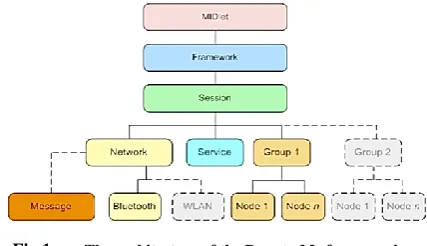
This section of the document elucidates other existing frameworks related to the field of Bluetooth communication and also some Bluetooth applications developed recently. Peer2Me, a mobile peer-to-peer framework [2] supports mobile collaboration utilizing Bluetooth and Java ME. The framework runs on standard Java ME-enabled mobile phones and it enables rapid development of various kinds of collaborative peer-to-peer applications. It is a high-level programming framework enabling developers to use simple primitives and methods to manage the complexity of peer-to-peer mobile ad hoc networks and is based on MIDP 2.0. The Peer2Me architecture is based on a layered architectural pattern where each layer is assigned with its own responsibility. The different layers are shown in Figure 1.
Fig 1: The architecture of the Peer-to-Me framework
Alf Inge Wan, Michael Sars Noru and Carl-Henrik Wolf Lun [3] have developed another framework for Bluetooth communication. It is mostly used to develop mobile collaborative applications in J2ME. The framework consists of three protocols, namely, the handshake protocol, routing protocol and disconnection protocol. The handshake protocol illustrates the signals used during the communication process. Figure 2 shows the handshake signals used in the peer-to-me framework.
Fig 2: The handshake protocol
The routing protocol specifies how messages will be transferred among the nodes connected in the network. All messages go through master mode first, as shown in Figure 3.
Fig 3: The routing protocol
The disconnection protocol detects when a connection to another node goes down and handles the disconnection. Alf Inge Wang, Carl-Fredrik Sørensen and Thomas Fossum [4] elaborated the experiences from creating a prototype for spontaneous collaboration, supported through the appliance of peer-to-peer applications on wireless mobile devices with the ability to form ad-hoc wireless networks. The paper mainly highlights an application named ProMoCoTo. The document shows how the application would promote collaboration by using peer-to-peer technology and the challenges faced when implementing it. As such mobile peer-to-peer technology is used to promote spontaneous collaboration. The ProMoCoTo was developed and executed on the Java Platform in order to
enable portability. The document also states about the peer-to-peer frameworks like JXTA, JXME, Proem, and RockyRoad. Concerning Bluetooth applications, Fluid Nexus
[5]
, an application for mobile phones that is primarily designed to enable activists or relief workers to send messages and data amongst themselves independent of a centralized cellular network was analyzed. The idea is to provide a means of communication between people when the centralized network has been shut down, either by the government during a time of unrest, or by nature due to a massive disaster. Fluid Nexus works by using Bluetooth to connect to nearby devices and automatically share messages (or other data). This means that messages can still be passed even when there is no external network connectivity.Artemisa [6] is an efficient driving assistant that uses the features of the smartphone to accurately model the driver’s driving style from the point of view of energy consumption and generate eco-driving tips to correct the bad driver’s driving habits. As such the solution is based on the use of mobile devices running the Android OS where the eco-driving assistant is executed. A Bluetooth module is used to connect to the vehicle’s diagnostic port. Thus the Bluetooth module allows the sending of the vehicle telemetry to the mobile devices. The information transmitted is used to accurately model the driver’s driving style in order to save energy.
3.
Design Issues
The Design Issues section shows the issues that might crop up and how they have to be addressed. It also caters for problems that need to be considered while developing the applications to be used to demonstrate the usability of the framework.
1.1
Networking Framework
The issues that should be addressed while designing the communication framework are categorized in the following:
1.1.1
Bluetooth
One main issue that has to be taken into consideration while designing the framework is the distance at which a Bluetooth device can operate. Theoretically, it is about 10 meters (Mobile phones) but this distance is reduced along with the obstacles forming barriers between the communication processes [7]. The Bluetooth medium itself is limited; only 7 slaves can communicate with the master but in practice this number is reduced depending on the phone capabilities. While designing the protocol, the biggest issue will be to find a way where the communication interpretation occurs in the same way in both the Android platform and the J2ME platform.
1.1.2
Reusability
The framework shall be designed such a way that any application being developed can use it to communicate via Bluetooth standard – J2ME to J2ME, Android to Android, J2ME to Android and Vice-versa. More precisely, any application being developed can use this framework for communication process between Android and J2ME inclusively.
1.1.3
Extensibility
Another challenge in designing the framework is to make it extensible; the framework should be able to include new communication protocol like for iOS without affecting the other routing protocol. Hence, the framework should be able to accommodate new communication protocols like for iOS, Bada OS, Windows Mobile OS.
S S
S
M
1. Route Message 2. Application Message
2. Application Message S
1.Node Joined
M S
2.Service Inq
3.Service Ack
4.Group Desc
[image:2.595.66.280.71.194.2] [image:2.595.54.288.315.401.2] [image:2.595.56.283.454.609.2]1.2
Mobile Application Development
This section evaluates the design issues that need consideration when developing the two applications used to test the framework.
1.2.1
GUI components
The two applications which are going to be developed should be identical in the working structure and also to a very large extent in the GUI. Android offers a very good autonomy when designing GUI components; but for J2ME it is very restricted, hence the design layouts shall be made such that it can be implemented on both platforms.
1.2.2
Testing
While designing the applications, testing will be a very important aspect to be forecasted; this is because while developing the Bluetooth functionalities in J2ME, the application can be tested in the Sun Java Wireless Toolkit 2.2.5 emulator. This emulator enables Bluetooth functionalities to be tested. Functionalities working on the emulator may eventually not work on a mobile device, thus all the functionalities should be tested in a live environment. As for the Android applications, there is no emulator to test Bluetooth functionalities; but the Android Software Development Kit and the Android Mobile Device provides a debugging mode. Hence the Bluetooth functionalities can be run directly on the mobile device using the debugging mode. All the components of the applications should be independent of each other, for example GUI components.
4.
System Architecture
This section of the document illustrates the architecture of the different components of the framework to be implemented and how communication is done. The Bluetooth communication classes shall be implemented as a framework so as to cater for re-usability issues. That is, it shall be designed in such a way that it could be used in any application using Bluetooth in J2ME and Android.
Therefore, the framework shall act as a completely abstract layer in any application, providing communication between the cross-platform applications being developed. In this paper, two applications shall be developed, the Anonymous Voting System and a Meeting Scheduler Application. Both applications shall use the Bluetooth framework for communication processes. Figure 4 shows the structure of the Bluetooth framework. The framework will have the implementation of the Bluetooth classes for communication between the two platforms inclusively. That is communication between Android to Android, J2ME to J2ME and Android to J2ME (vice-versa). The framework shall access the platform layer and the application layer. The framework supports the Radio Frequency Protocol (RFCOMM) communication protocol for the Bluetooth communication which is a simple set of transport protocols [8], made on top of the Logical link control and adaptation protocol (L2CAP) protocol, providing emulated RS-232 serial ports.
The framework would be of type peer-to-peer architecture; which means a device can act as a client or server depending on the availability of the service; but in some cases it will not be automated; it would be run either as client or server by the application itself.
Fig 4: High Level Architecture Diagram
The steps the framework performs for making Android to J2ME Bluetooth communication are illustrated using the below scenarios.
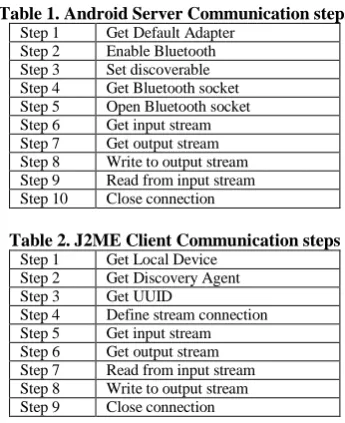
[image:3.595.312.538.74.279.2]Scenario 1: Assume that the server in running on an Android device and the client is running on a J2ME device. Using the steps from Table 1 and Table 2, the framework will enable the communication process. Figure 5 shows this stepwise communication establishment process.
Table 1. Android Server Communication steps Step 1 Get Default Adapter
Step 2 Enable Bluetooth Step 3 Set discoverable Step 4 Get Bluetooth socket Step 5 Open Bluetooth socket Step 6 Get input stream Step 7 Get output stream Step 8 Write to output stream Step 9 Read from input stream Step 10 Close connection
Table 2. J2ME Client Communication steps Step 1 Get Local Device
Step 2 Get Discovery Agent Step 3 Get UUID
Step 4 Define stream connection Step 5 Get input stream Step 6 Get output stream Step 7 Read from input stream Step 8 Write to output stream Step 9 Close connection
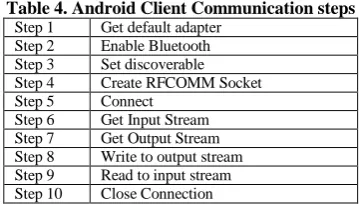
Scenario 2: Assume that the server is running on a J2ME device and the client is running on an Android device. Using the steps from Table 3 and Table 4, the framework will enable the communication process. Figure 6 shows this stepwise communication establishment process.
BluetoothFramework
Bluetooth
+Bluetooth() +closedown()
Server
+server() +getDate +sendData() +run() +close()
ConnectedClientThread
+getDate +sendData() +run() +close()
Client
+Client() +getData() +sendData() +run() +close()
Bluetooth Functions
+checkBluetoothSupport() +enableBluetooth() +getPairedDevices() +setBluetoothDiscoverable() +getDataInputStream() +getDataOutputStream()
J2ME Android
[image:3.595.338.511.390.602.2] [image:3.595.341.510.517.600.2]Fig 5: Communication between Android server and J2ME client
Fig 6: Communication between J2ME server and Android client
Table 3. J2ME Server Communication steps Step 1 Get local device
[image:4.595.335.515.73.181.2]Step 2 Create UUID Step 3 Create URL Step 4 Set discoverable Step 5 Get Stream Connection Step 6 Open stream connection Step 7 Accept stream connection Step 8 Open input stream Step 9 Open output stream Step 10 Read to input stream Step 11 Write to output stream Step 12 Close connection
Table 4. Android Client Communication steps Step 1 Get default adapter
Step 2 Enable Bluetooth Step 3 Set discoverable Step 4 Create RFCOMM Socket Step 5 Connect
Step 6 Get Input Stream Step 7 Get Output Stream Step 8 Write to output stream Step 9 Read to input stream Step 10 Close Connection
5.
System Implementation
This part consists of the implementation phases of the framework. There are two versions of the communication protocol that have been grouped to form the framework; they are the Android version and the J2ME version.
The most important thing in the Bluetooth protocol is to set the UUID, however the Android and the J2ME UUID interpretation differs.
Android version
UUID uuid = UUID.fromString ("0BAE0D0C-0B0A-0009-5570-605040302011");
Fig 7: Android UUID Sample Code
J2ME version
UUID uuid = new
UUID("BAE0D0C0B0A00095570605040302011",false);
Fig 8: J2ME UUID Sample Code
3.1
Bluetooth Package
The Bluetooth package is divided into 5 classes: 1. Bluetooth.java
2. BluetoothFunctions.java (available only for Android) 3. Server.java
4. ConnectedClientThread.java 5. Client.java
[image:4.595.64.273.75.619.2]Table 5 quotes out the main methods available in the mentioned classes along with a short description.
Table 5. Classes and Methods
Classes & Methods Description
Bluetooth
Bluetooth() Constructor
closeDown() Close all connection BluetoothFunctions
checkBluetoothSupport() Check if device support Bluetooth enabledBluetooth() Switch on the Bluetooth getPairedDevices() Return a Set of paired devices setBluetoothDiscoverable() Enable the Bluetooth to be seen by
other devices
getDataInputStream() Return DataInputStream for reading data
getDataOutputStream() Return DataOutputStream for sending data
Server
Server() Constructor – create server socket setDataToSend() Set the data to send to the clients
Client
Client() Constructor – create client socket Common Functions in class Server, ConnectedClientThread and
Client
getData() Get the data captured by the DataInputStream object sendData() Send data via the
DataOutputStream object run() Loops and captures receiving data
at the same time
close() Close the connection socket Close connection
J2ME Server Android Client
Steps 1 - 4
Search service using UUID
Accept connection request + send ACK
Steps 1 - 3
Step 5 Step 4
Step 6 Step 5
Connect using UUID
Steps 7 - 9 Steps 6 - 7
Step 10 Step 8
Send message to server
Step 11 Step 9
Send message to client
Step 10
Step 12 Close connection Android Server J2ME Client
Steps 1 - 4 Steps 1 - 3
Connect using UUID
Accept connection request + send ACK
Step 5 Step 4
Step 6 - 7 Step 5 - 6
Step 8 Step 7
Send message to client
Step 9 Step 8
Send message to server
Step 9 Server close
connection
Step 10
[image:4.595.307.545.506.767.2]3.1.1 Server.java
This class implements Runnable and thus is run on a thread. For each client requesting a connection it creates a separated thread for managing the particular connected client – ConnectedClientThread.java.
Figure 9 below shows the sample code where the server creates a socket to listen and accept incoming connections from clients.
public void run(){ try{
serverSocket =
bluetoothAdapter.listenUsingRfcommWithServiceRe cord(serviceName, uuid);
socket = serverSocket.accept(); …
Fig 9: Server Sample Code
3.2
Application of the framework
[image:5.595.342.503.70.371.2]This section will discuss how the two applications will use the particular framework to communicate. Figure 10 below shows the communication process of the applications. Meeting scheduler application and Anonymous Voting System, both Android and J2ME versions use the same communication Framework to communicate.
Fig 10: Cross-Platforms application using the framework
The two applications were developed firstly in Android and then in the J2ME. Below Figure 11 and Figure 12 show the screenshots of the two applications.
At the application level, the service is hosted and made available online using the server socket. The server is initialized by using the constructor of the Bluetooth class –
Framework.Bluetooth.Bluetooth (“Server”)
The client is initialized by using the constructor of the same Bluetooth Class –
Framework.Bluetooth.Bluetooth (“Client”)
[image:5.595.68.268.327.417.2]Some signals that are used are described in Table 6.
Fig 11: Anonymous Voting System
Fig 12: Meeting Scheduler Application
Table 6. Bluetooth Message Signals Signal Description Signal Symbol Anonymous Voting System AAVS Meeting Scheduler AMS
Start SS
End SE
Element Separator ,
Container Open (
Container Close )
PollName AAVSPN
Description AAVSPD
Options AAVSPO
Results AAVSPR
Choice AAVSPC
Time Frame AMSTF
Free Slots AMSFS
Meeting Date AMSMD
3.2.1 Meeting Scheduler
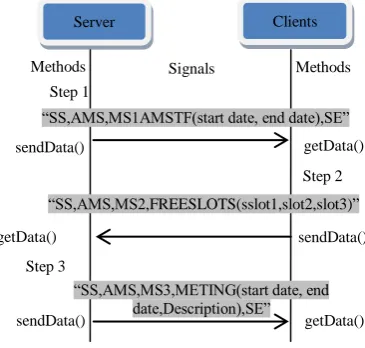
[image:5.595.336.519.519.693.2]The server sets the timeframe of the meeting and sends it to all connected clients using the method sendData() from the framework (step 1). The client uses the method getData() from the framework to get the signal. It then loop in its local calendar to get all the dates on which it is free, builds its signal string and sends it to the server (step2). The server gets all the free slots from the client using the method getData() and then determines the meeting date. It then sends it to all the clients which save the date to their calendar as a reminder using the sendData() method (step 3). The above scenario is described in Figure 13.
Fig 13: Meeting Scheduler Bluetooth Message Signals
3.2.2 Anonymous Voting System
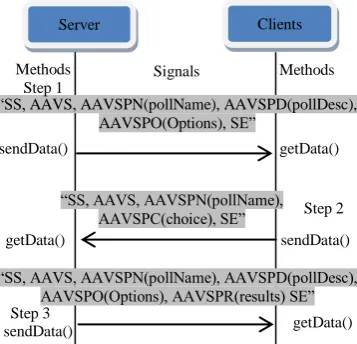
In this application, the server accepts connection from clients which requested for the particular service. Once connected, the server send a signal holding the poll information to the client
Server Clients
“SS,AMS,MS1AMSTF(start date, end date),SE”
“SS,AMS,MS2,FREESLOTS(sslot1,slot2,slot3)”
“SS,AMS,MS3,METING(start date, end date,Description),SE” sendData()
sendData()
sendData()
getData()
getData()
getData()
Methods Signals Methods
Step 1
Step 2
Step 3 Bluetooth Framework
J2MEAnonymous Voting
Android Anonymous Voting Android Meeting Scheduler
[image:5.595.89.240.582.705.2]using the sendData() method (Step 1). At the client side, the data is retrieved using the getData() method and is represented in a GUI by the application itself. Each user votes for the poll, the users being as clients send back the choice signal to the server (Step 2) using the sendData() method of the client class. After receiving all the clients’ choices using the getData() method, the server computes the result, displays it and sends it to all the clients using again the sendData() method (Step 3). The above scenario is illustrated in Figure 14.
Fig 14: Anonymous Voting System Bluetooth Message Signals
6.
Discussions and Evaluation
The objectives of the framework have been accomplished; the framework allows cross-platform communication between Android and J2ME. Furthermore, it is completely reusable, that is any developer can use just the framework to implement the communication part in their application. The framework is also extensible; meaning that it can lodge new routing protocols for other cross-platform communications like Android to iOS, J2ME to Bada OS and so on.
In order to demonstrate the usability of the framework, two applications have been successfully developed, namely the Anonymous Voting System and the Meeting Scheduler Application.
However the framework has some limitations. One limitation is that the Bluetooth API developed works only for Android and J2ME platforms. Another limitation is that the Bluetooth connection uses RFCOMM standards, thus it is like TCP, Connected Oriented; this reduces the number of nodes that can be connected to the server device, theoretically it is 7 slaves [9], but in practice, only 4 can be connected.
[image:6.595.88.267.172.344.2]The two applications have been thoroughly tested on mobile devices to check whether the framework is working according to the functionalities required. The applications have been tested on the following devices (See Table 7).
Table 7. Mobile Devices used for Testing
Status Device
Server Android (S5830) Client A J2ME (Nokia 5800) Client B J2ME (Nokia C5) Client C J2ME (Nokia N70)
Figure 15 shows a graph illustrating the time taken by particular devices to connect to the server using the Bluetooth Framework; taking in consideration the distance from the server.
Fig 15: Bluetooth Connection Distance-Time Graph
7.
Conclusion and Future works
The objective of this paper was to provide a brief description about the communication protocol used to make two platforms, Android and J2ME communicate via the Bluetooth standard. Many issues were mentioned and their solutions were provided to tackle them. According to our knowledge, this type of framework enabling Android and J2ME to communicate did not exist earlier; hence this is a very promising area for others to focus as it is according to us the first framework achieving this cross-platform communication.
The Bluetooth framework currently supports only Android and J2ME. Hence a forthcoming work can be to add additional platform’s Bluetooth routing protocol in this framework to make it platform independent; thus devices with different platforms like Windows Mobile and iOS will also be able to use it.
Concerning for the communication, if Bluetooth Protocol is the only protocol to be used then a solution can be that the communication process does always stay connected, the connection can be halted and reconnected at certain time interval when needed; similar to a connectionless-oriented protocol. Hence, another future work can be to integrate a WIFI network in the bundle, thus more devices would be able to connect to the network.
However, it is not possible to group these two package version together to form only one because J2ME uses the JAR type and Android uses APK. [10] But in the upcoming years new ways will certainly crop up to group several platforms applications. In addition may this paper be a plus point for others working in the field of communication. Especially mobile collaboration and will entice others to explore this area in more details.
8.
References
[1] MobileThinking, 2012. Global mobile statistics 2012. Available: http://mobithinking.com/mobile-marketing-tools/latest-mobile-stats. accessed 22nd April 2012. [2] Wan, A.I., 2009. “Mobile Peer-to-peer Collaborative
Framework and Applications”. Dept. of Computer and Information Science, Norwegian University of Science and Technology.
[3] Wang, A.I., Norum, M.S., Lund, C.-H.W. 2006. “A peer-to-peer framework for mobile collaboration”, Proceedings of the 10th IASTED International Conference on Software Engineering and Applications.
[4] Wang, A.I. Soerensen, C.-F. Fossum, T., 2005. “Mobile Peer-To-Peer Technology Used To Promote Spontaneous Collaboration”, CTS'05 Proceedings of the 2005
Server Clients
“SS, AAVS, AAVSPN(pollName), AAVSPD(pollDesc), AAVSPO(Options), SE”
sendData()
sendData()
sendData()
getData()
getData()
getData()
Methods Signals Methods
Step 1
Step 3
“SS, AAVS, AAVSPN(pollName), AAVSPC(choice), SE”
“SS, AAVS, AAVSPN(pollName), AAVSPD(pollDesc), AAVSPO(Options), AAVSPR(results) SE”
[image:6.595.100.243.654.708.2]international conference on Collaborative technologies and systems, pp 48-55.
[5] Knouf, N. 2008. “Fluid Nexus for the Android Platform” [6] Magaña, V. C. and Organero, M. M., 2011. “Artemisa:
Using an Android device as an Eco-Driving assistant”, Cyber Journals: Multidisciplinary Journals in Science and Technology, Journal of Selected Areas in Mechatronics (JMTC), June Edition
[7] Huang, A. S. And Rudolph, L., 2007. “Bluetooth Essentials for Programmers”, Cambridge University Press; 1st ed.
[8] Rathi, S., 2000. “Bluetooth Protocol Architecture”, Dedicated Systems Magazine, pp.28-33.
[9] Newton, H., 2011. “Newton's Telecom Dictionary: Telecommunications, Networking, Information Technologies, The Internet, Wired, Wireless, Satellites and Fiber”, Flatiron Publishing; 26th ed.