Object
Serialization: A Study
of
Techniques
of
Implementing
Binary
Serialization in C++
,
Java
and
.
NET
Clarence J M Tauro
Centre for Research,Christ University Hosur Road, Bangalore,
India
N Ganesan
Director (MCA), RICMBangalore, India
Saumya Mishra
Dept. of ComputerScience Christ University
Anupama Bhagwat
Dept. of Computer ScienceChrist University
ABSTRACT
The process of converting a data structure or object state into a storable format is referred to as serialization. The resurrection of the stored data in the same or another computer environment is referred to as deserialization. Binary Serialization is converting the object in binary format and being able to store it in a storage medium. Many programming languages provide interfaces for serializing which can be implemented by our object classes that we want to serialize. Serialization and deserialization can hence be attained by writing codes for converting a class object into any format which we can save in a hardware and produce back later in any other or the same environment.
This paper describes how serialization is performed in different programming languages. It gives a clear picture on how to create classes and objects which need to be serialized implementing the different build-in interfaces provided within languages. Binary Serialization is one of them. In this paper we explain how binary serialization of objects is done in C++, Java and .NET.
1.
INTRODUCTION
We often find ourselves in a situation where we need to store the state of an object beyond the life of the application in which it is used. To accomplish this goal, we use a technique called as object serialization. During this process, the name of the class, the public and private fields of an object, the assembly containing the class, are converted to a stream of bytes, which is then written to a data stream [1]. This is serialization of an object to a storage medium. This object may be deserialized when and where required; when deserialized, it produces the exact clone of the object that was created. Serialization helps encrypt data and transmit it through a network. For example, there are algorithms proposed for RSA cryptography.Cookies, after being serialized into binary array and encrypted with RSA, may be transmitted in the Web Service framework [1].
Binary serialization means the state of the object is stored on storage medium in binary format. While serializing of an object, the details of the object are converting into binary format which hence contains a stream of bytes. This stream of bytes can be stored on some storage media like disks or sent through the network to another system. The object may be later required to be created in a different environment or a different computer, the same binary bit stream, at this point, may be converted back on the basis of some logic and used to create a replica of the same object. This process of serializing an object
may also be known as marshaling or deflating. The process of extracting a data structure from a series of bytes is deserialization [2]. The basic mechanism of binary serialization is hence to flatten the object(s) into a one-dimensional stream of bits and turn this stream of bit back to recreating a clone of the same object. Different programming frameworks have implemented and provided different serialization techniques.
When you apply the Serializable custom attribute to a type, all instance fields of the class (public, private, protected) are serialized automatically. When we serialize a class, the objects of the references to other classes that are contained in this class are also serialized if they are marked as serializable. All members are serialized, including public, private or protected members. Furthermore, even circular references are supported by binary serialization.
The two most important reasons are, to persist the state of an object to a storage medium so an exact copy can be re-created at a later stage, and to send the object by value from one application domain to another.
2.
PROGRAMMING LANGUAGE
SUPPORT
There are several programming languages which directly support serialization. Few of such languages are Ruby, Java, C#, C++, Objective-C, Python, Smalltalk, .NET families of languages, and PHP. These different languages may have different ways of implementing serialization in their class objects. They may get it implemented by providing predefined interfaces for serialization and deserialization which may be re-used and inherited from the new classes that user creates for the objects to be serialized. There may be some other ways of implementing serialization/deserialization in programming languages.
2.1
Binary Serialization in .NET
.NET Framework provides a robust mechanism of implementing serialization and also important features which allow a user to customize the process according to his/her needs.
classes and their members[9]. The name of the class, the assembly, all the data members of the class instance are written to storage upon serialization of an object. We may create object of classes which has dependencies i.e. it has references to other instances in member variables; hence there is a serialization engine which tracks all the referenced objects to ensure that the same object is not serialized twice. The only requirement is that the object should be marked as
Serializable
.
For a class to be serializable it must have the attribute
SerializableAttribute set and all its members must
also be serializable, except if they are ignored with the attribute
NonSerializedAttribute
.
However, the private andpublic members of a class are always serialized by default.
The SerializationAttributeis only used for binary
serialization. The code in Figure 1 shows the usage of
SerializableAttribute
[2].
Figure 1: Class SClass Serializable
If this attribute is not set in the class and we try to serialize it, the CLR throwsSerializationException
.
The code snippet in Figure 2 shows how an object can be serialized in binary format.
Figure 2: Serialization of object sobj
Serialization may be:
Binary Serialization SOAP Serialization XML Serialization [8]
The code snippet in Figure 2 shows an example ofBinary
Serialization
.
It uses class BinaryFormatter to dothe binary serialization. We need tocreate instances ofStream and Formatter that we want to use and then call „Serialize‟ method on the formatter. We need to pass the stream and object to be serialized as parameters to this method call. All member variables of the object are serialized including the private members into binary form.
The BinaryFormatter class provides support for
serialization using binary encoding. The
BinaryFormatter class is responsible for binary
serialization and is used commonly in .NET's remote technology.
Code snippet in Figure 3 shows deserialization of the same example
.
Figure 3: Deserialization
If we need to decide what fields to serialize and how the serialization actually occurs, we may implement the interface
ISerializable in our class. We need two things to do
that.
1. Constructor that is overridden and can handle the Deserialization process
2.
GetObjectmethod that tracks about which data isserialized
[2].
The code snippet in Figure 4 illustrates this.
Figure 4: Use of Constructor and GetObject method
WhenGetObjectDatais called during serialization, we
would be responsible for populating
the SerializationInfoobject provided with the method
call. Both GetObjectDataas well as the special constructor should be implemented
whenISerializableis added to a class.
2.2
Binary serialization in Java
Java has built-in mechanisms for serialization and deserialization of objects in binary format. In Java, we can serialize and deserialize any object that implements the java.io.Serializable interface [3]. Java provides a set of interfaces and classes for carrying out binary serialization and deserialization of objects.Java serialization is primarily used to write an object into a stream, which can easily be
[Serializable] public class SClass { public int a = 0;
public String str = null; }
SClass sobj = new SClass(); sobj.a = 1;
sobj.str = "String";
IFormatter formatter = new BinaryFormatter(); Stream stream = new FileStream("MyFile.bin", FileMode.Create, FileAccess.Write,
FileShare.None);
formatter.Serialize(stream, sobj); stream.Close();
IFormatter formatter = new BinaryFormatter();
stream1 = new FileStream("MyFile.bin", FileMode.Open, FileAccess.Read,
FileShare.Read); SClass sobj2 =
(SClass)formatter.deserialize(stream1); stream1.Close();
public class Employee :ISerializable {
private int emp_no; private string name;
protected TestData(SerializationInfo info,StreamingContext context) {
this.emp_no = info.GetInt32("emp_no"); this.name = info.GetString("name"); }
void ISerializable.GetObjectData(Serializat ionInfo info, StreamingContext context) {
info.AddValue("emp_no", this.emp_no); info.AddValue("name", this.name); }
transported through a network after being serialized so that it can be rebuilt again.
Java API provides us with the below tools needed to serialize and deserialize an object as follows :
Interface Serializable
Class ObjectOutputstream
Class ObjectInputStream
In order to serialize an object in Java, the marker interface
Serializableshould be implemented by the class of the
object or it should inherit a Serializable class
.
Serializable interface does not have any methods or
attributes. It is used to identify the class which implements it as a Serializable class.[7]
While serializing an object, the class
ObjectOutputStream should be implemented as this
[image:3.595.53.284.329.455.2]allows an object to be serialized in binary form using the methodwriteObject()
[4]
Figure 5: Implementation of Serializable Interface
The code snippet in Figure 5 creates a class Employee with attributes name and id .The class Employee implements the interfaceSerializable
[6].
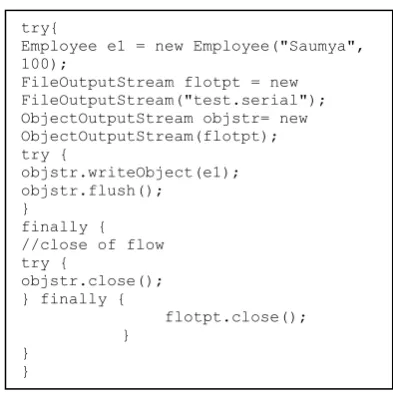
[image:3.595.67.264.547.744.2]The Code in Figure 6 serializes an object of classEmployee in binary form
.
Figure 6: Serialization of object e1
Here, serialization is being done in the file test
.
serial. The method writeObject() of ObjectOutputStream class writes the Serializable object e1 to binary data stream.Deserialization is also as easy to implement. We need to use the method readObject() in class
ObjectInputStream
.
To deserialize the object frombinary stream to the object instance, we need to create an object ofObjectInputStream
. [3]
Figure 7: Deserialization from test.serial file
We would then assign the values to a new object e2 created as shown in above figure.
Java provides a simple method to serialize and deserialize objects if knowing the correct approach and can be easily included in their code by developers.
Serialization is also supported in an object oriented Java processor like jHISC. The relevance of serializing an object confines to situations when an object has to be sent over network or stored as a persistent object. Serialization may also be attained in applications of mobile devices [5].
2.3
Binary Serialization in C++
In C++, the binary serialization is done by using objects of ifstream class. Binary Serialization in C++ is not supported by standard classes, like in Java and .NET [9]. So it is a bit complicated using C++. Here we are storing the value of attribute Rollno in a file in binary format using ofstream object and then retrieving the value in another object. This is shown in the program below[2].
Figure 8: Defining serializable class import java.io.Serializable;
public class Employee implements Serializable {
static private Final long serialVersionUID = 6L;
private String name; private Integer id;
public Employee(String name,Integer a) { this. name = name;
this. a = a;
} }
Employee e2;
FileInputStream flinpstr = new FileInputStream("test.serial")
ObjectInputStream objinstr= new ObjectInputStream(flinpstr);
e2 = (Employee) objinstr.readObject();
try{
Employee e1 = new Employee("Saumya", 100);
FileOutputStream flotpt = new FileOutputStream("test.serial"); ObjectOutputStream objstr= new ObjectOutputStream(flotpt); try {
objstr.writeObject(e1); objstr.flush();
}
finally { //close of flow try {
objstr.close(); } finally {
flotpt.close(); }
} }
#include <iostream> //iostream
#include <fstream> //fstream #include <string> //string
using namespace std; class TestBinary { private:
int rollno;
public:
TestBinary(int rno) : value(rno) { } TestBinary () {
rollno = 0;
}
int getRollno() {
return rollno;
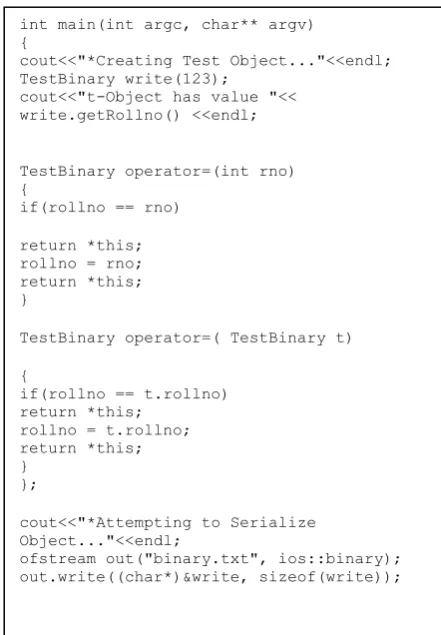
We have declared a class calledTestBinary with private attribute rollno and constructors. In the main function below we are creating object of the class TestBinary by passing value to the constructor. We display the value using
[image:4.595.55.276.146.464.2]getRollno ()function
Figure 9: Main function to serialize object write
We create object of class ofstream and open the file
binary.txtfor output in binary mode.We then write the
value to the file using write () function of ofstream class.
This way we can store the value of attributes in a file and if needed store it on storage device or sent through the network to another system.
Figure 10: Closing the file
Once we serialize the object, the file needs to be closed using
close() function ofofstreamclass
.
In order to deserialize, we read the value from binary.txt file using read() function of ifstream class and then displaying it using getRollno() function of
TestBinaryclass.
In this way we can retrieve the stored value of attributes into the object and use it in our programs. This is illustrated in the code snippet in Figure 11.
Figure 11: Deserialization of object write
3.
CONCLUSION
Object Serialization using the technique binary serialization proves to be an effective mechanism of flattening objects of classes into binary streams in order to communicate them to a different system/network. Binary serialization is much more efficient than any other form of serialization because it saves memory and bandwidth and also the system processing time. It is much more compact. The facility of serialization and deserialization of an object has been provided in different languages using implementation of various built-in interfaces and classes defined for serialization and deserialization.Languages like C++, ASP.NET and Java provide simple interfaces and classes to serialize objects.
4.
ACKNOWLEDGMENTS
We are heartily thankful to Prof. Jibrael Jos and Prof. Joy Paulose, Department of Computer Science, Christ University, without whose support and supervision this task would have been very difficult. We would also like to thank our friends and family members who helped us a great deal by giving useful suggestions and timely support.
5.
REFERENCES
[1] Guanhua Wang;, “Application of serialization enhanced SSO system” 2011 IEEE International Conference on Computer Science and Automation Engineering (CSAE).
[2] MicrosoftTM Developers Network
“http://msdn.microsoft.com/en-us/library/72hyey7b(v=vs.71).aspx” (accessed on Feb 10, 2012)
[3] Opyrchal, L.; Prakash, A.; ,"Effective Object Serialization in Java", 19th IEEE International Conference on Distributed Computing Systems Workshops on Electronic Commerce and Web-based Applications/Middleware, 1999.
[4] Java™ObjectSerialization Specification, Revision 1.4.4, http://java.sun.com/j2se/1.4/pdf/serial-spec.pdf.
(accessed on Feb 14, 2012)
[5] Ross, J.C.; Chandran, P , “Object Serialization support for object oriented java processors” International Symposium on Information Technology, 2008. ITSim 2008.
[6] Oracle Sun Developer Network(SDN) "http://java.sun.com/developer/technicalArticles/Program ming/serialization/” (accessed on Feb 14, 2012)
cout<<"*Closing File Stream...n"<<endl; out.close();
cout<<"*Attempting to Read Object From File..."<<endl;
TestBinary read(1);
ifstream in("binary.txt", ios::binary); in.read((char*)&read, sizeof(read)); cout<<"t-Object has value "<<
read.getRollno() <<endl;
}
int main(int argc, char** argv) {
cout<<"*Creating Test Object..."<<endl; TestBinary write(123);
cout<<"t-Object has value "<< write.getRollno() <<endl;
TestBinary operator=(int rno) {
if(rollno == rno)
return *this; rollno = rno; return *this; }
TestBinary operator=( TestBinary t)
{
if(rollno == t.rollno) return *this;
rollno = t.rollno; return *this; }
};
cout<<"*Attempting to Serialize Object..."<<endl;
[7] Kazuaki Maeda; " Comparative Survey of Object Serialization
Techniques and the Programming Supports”, World Academy of Science, Engineering and Technology 60 2011
[8] C Sharp Corner "http://www.c-sharpcorner.com/interviews/Answer/499/
what-is-serialization-in-net-types-of-serialization-and-wh” (accessed on Feb 20, 2012)