ISSN(Online): 2320-9801
ISSN (Print) : 2320-9798
I
nternational
J
ournal of
I
nnovative
R
esearch in
C
omputer
and
C
ommunication
E
ngineering
(An ISO 3297: 2007 Certified Organization)
Vol. 4, Issue 3, March 2016
An Interactive Web Portal Design and
Implementation for Students at HCL CDC
Soumya Bharadwaj1, Eesha Patil2, Sharayu Shetty3, Shreta Shinde4, S.N.Gujar5
UG Students, Dept. of Information Technology, SKN College of Engineering, Pune, Maharashtra, India1,2,3,4 Assistant Professor, Dept. of Information Technology, SKN College of Engineering, Pune, Maharashtra, India5
ABSTRACT: In this paper we present a web portal for HCL Career Development Centre (CDC) for keeping a progress record of students working on sponsored projects and training provided by the company. The HCL CDC portal helps connect the Project manager and the prospect students to develop a web society for submitting, retrieval, searching and monitoring of student's project growth. Different modules including the test module, milestone module, profile and more are used to achieve the goal. Interactivity within the system is provided by the chat modules to resolve queries of students. Also, the system helps in knowledge transfer where the information available is personalized and customized. This article provides an overview of the portal, including its benefits and its modules along with the core functions of the portal.
KEYWORDS: Web Portal, HCL CDC portal, Interactivity, Knowledge Transfer. I. INTRODUCTION
A portal represents a website that provides a single point of access to applications and information. From an end user perspective, a portal is a web site with pages that are organized by tabs or some other form of navigation. Each page contains a nesting of sub-pages, where individual windows that display anything from static HTML content to complex web services [1].Portals thus form a network of links present at a single site which acts as a node, and this node creates a medium for information transfer and retrieval.
A portal is a software module which can run on any device with internet connectivity with it. It can run on the web browser of a computer or a phone. The major benefits of a portal are that user can configure, customize and personalize the contents within it.
In the current context, the educational portals have the highest dominance to serve varied needs [2]. These portals have different modules to accomplish goals which enhance the user experience and create better understanding between diverse minds. Student portals contain information about courses offered, transcripts, e-mail programs, timetables and exam schedules. This portal also provides links to useful web resources like research tools and online journals. Online students’ portal makes the environment easier for staff and students to access important information from anywhere, at any time. These Portals happen to be used in colleges and universities where precise information and necessary updates must be readily available to a large number of students.
The HCL Career development centre (CDC) Portal is developed to act as the gateway to support and connect two particular individuals, students and faculty members of centre mainly the Project Manager. This portal makes the communication between the two more effective and efficient than the traditional approach.
The HCL CDC Portal is functionally constructed to serve the students through front end providing them sufficient resources and at the back end the project manager, admin and mentor by analysis of student’s performance for tracking of their project growth.
II. RELATED WORK
ISSN(Online): 2320-9801
ISSN (Print) : 2320-9798
I
nternational
J
ournal of
I
nnovative
R
esearch in
C
omputer
and
C
ommunication
E
ngineering
(An ISO 3297: 2007 Certified Organization)
Vol. 4, Issue 3, March 2016
portal. He also elaborated on concepts regarding the understanding of the portal development and integrating application into WebLogic Portal. The author further explained user interface development with look and feel features, enabling visitor tools along with details regarding managing and maintaining a portal. In [2] the author used deep evaluation methodology for thorough evaluation such as walkthrough. It defines a university portal by adding social computing elements such as the possibility to create study groups, comment on lectures, user's activity, and chat, publish information and developed a system called Noppa 2.0. This system also helped in the real-time analysis as it lets lecturer get instant feedback from a student during the teaching session. In [3] author described a framework of a university portal as one step client-oriented website that personalizes the portal's tool and information to specific needs. It defined following components as service and content at the system utility zone, application and integration at business zone and interaction and delivery at user zone. Each region is further divided into various functionalities including security, system metrics, user credentials and many more. In [4] author uses waterfall model to define a web portal architecture. This portal was developed using tools such as WAMP packages where the windows platform is the operating system on which portal runs, Apache as a server, MySQL as database and PHP as the scripting language. Also, it includes different modules such as students, syllabus, courses, and study material. In [6] author empowers to enhance the design and development of human resource application by allowing it with efficient and innovative communication channel. The system is developed on windows os, using HTML5, CSS at front –end and PHP, JAVASCRIPT at the back end. The front end system provides three main modules to the students as application management, content management and advanced search.
III.HCLCDCPORTAL
In A smooth way to incorporate standard tools, information, resources and a user-friendly platform is by integrating them in a single pool called as a portal.
Here in the HCL CDC Portal there are present a number of benefits such as:
A. One Place to Report
The student does not have the need to wander around he can directly use the portal.
B. Global Access to Information
For gaining the access to the portal and associated tools, only a web browser is required. A person can be present anywhere in the world and still obtain the information they need. [3]
C. Interactive Sessions.
The best functionality of this portal is the feature of interactive chat sessions which provides a gateway for knowledge sharing.
D. Personalized and Customized Information
The Personalized information is available at the portal. Also, this person can then customize this information further to suit his or her individual tastes [3].The further modifications can be provided through various modules enabling a user to prepare a personalized profile.
E. Considers Each User’s Perspective
The view of each contributor in the system provides a precise description.
1) Admin’s perspective: When a student has registered and appeared on a test then admin will check their performance in the test. The individual level will judge the performance. Admin can add test question through using his dashboard. He can also schedule tests. Admin will also create a task sheet which will specify scheduled task for every milestone. The students and project manager gets the task sheet.
2) Mentor’s perspective: Mentor provides training to the students and also answers their queries through the chatmodule.
ISSN(Online): 2320-9801
ISSN (Print) : 2320-9798
I
nternational
J
ournal of
I
nnovative
R
esearch in
C
omputer
and
C
ommunication
E
ngineering
(An ISO 3297: 2007 Certified Organization)
Vol. 4, Issue 3, March 2016
4) Project manager’s perspective: When admin assigns a project manager and provides the task sheet then the project manager will encounter a direct association with the students. Task sheet will help the project manager to track the whole project. Respective dates for each task given at the milestone helps the project manager to monitor the growth. Profiles will is used by the project manager to check the completion of the allotted work. According to the performance of each project manager will create a performance report. If the fulfilment of the students is right, then that individual student is offered company recruitment
IV.SYSTEM DESIGN AND ANALYSIS
A. Existing System Analysis
In the current regime, there is no any provision on the management side of the HCL Career development centre (CDC) for maintaining and managing student’s record, attendance and growth in their respective projects. Also, there was no platform for the students to interact with the faculty members at the centre.
B. Proposed System Analysis
Distribution of the proposed system in different modules:
1) Dashboard Module: This module contains a facility of dashboard provided to the students, admin and the project manager. Each dashboard provides various links which transfer the control over to particular module requested by the end user.
• Admin’s Dashboard includes four modules, add test question, task sheet module/event calendar, chat module and schedule test.
• Student’s Dashboard include four different modules which are profile module, scheduled test, attempt test and milestone module.
• Project manager’s Dashboard includes profile module and milestone module.
2) Login Module: This module provides a front end modularity for the end users to log into the system using the user credentials. For project manager and mentor, a static log in is provided.
3) Registration Module: The registration module lets the students register but before that a test is taken to judge the knowledge of the group of pupils applying for the sponsorship. Registration module allows the group mates add their project details regarding their project domains, the platform they are working on, knowledge and skills of each.
4) Test Module: This module takes a test based on questions on four different technical module including • The front end coding consisting of HTML and CSS.
• The back-end coding consisting of various database modelling language like MySQL, MongoDB. • Testing.
• Basic java and core java concepts.
5) Chat Module: This module provides an interactive platform for the student to reach directly the tutor or mentor for asking any query without the need of physically coming to mentor at the HCL Career development centre (CDC).
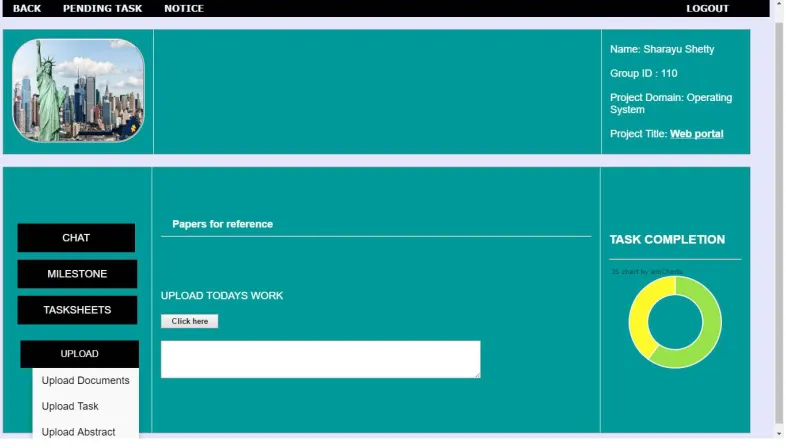
6) Profile Module: This module provides tabs to different modules of specific functionality. At this module, the student can upload and submit their completed work done. The students are also provided with necessary study material and paper references if any needed. Each student profile contains the name and details of the project manager.
7) Milestone Module: This module provides the project manager feature of generating milestone of each task and thereby calculate the growth and progress of each student. Whereas the students have to attempt the given task for completing a milestone. A planned start and planned end date for each milestone are assigned.
8) Event Calendar: This module provides various events organized by the company and also include different tasks with their planned start date.
9) Work Upload /Submission Module: In this module, the students can upload their job. It can upload files and images of several formats.
10) Performance Report: A performance report is generated using the milestone modules from where the sincerity and dedication towards the project of each student are shown.
ISSN(Online): 2320-9801
ISSN (Print) : 2320-9798
I
nternational
J
ournal of
I
nnovative
R
esearch in
C
omputer
and
C
ommunication
E
ngineering
(An ISO 3297: 2007 Certified Organization)
Vol. 4, Issue 3, March 2016
C. System Design
Division of System design in stages:
• Logical design: This is concerned with object-oriented modelling of the system analysis [4]. • Physical design: The construction of the real system is involved at this level [4].
In the object-oriented analysis and design, Unified Modelling Language will be used to model the system where a model is an act of drawing one or more graphical representations of a system with modelling being the process of abstracting and organizing significant features of part of the real world[3].
The system design includes the development of front end and back end system.
D. Design Model Describing Behaviour and Structure of System
1) Use Case Diagram: A use case captures the behaviour of the system, subsystem, class as it appears to an outside user.A use case describes the interactions with the actors as a sequence of messages within the system and actor [5].Where the actor is the user of the scheme.
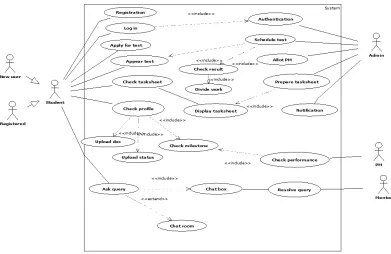
The use case diagram of the proposed system involves two different students one as the new user and other as registered user. Here both the user are the primary actors in the system. The system is maintained by the admin so that admin will be the secondary actor of the system. The student is given different features like to register, login, apply for the test, appear for the trial, check task sheet, verify and update profile. The student is also provided with additional functionality to ask queries from the mentor. Login by the student is authenticated by the admin using the include stereotype. Admin is given features which include schedule test, allocate project manager, prepare task sheet and check test result. Further Project Manager as an actor of the system can monitor the performance of the student.
Fig 1. Use case diagram of the proposed system
V. IMPLEMENTATION
ISSN(Online): 2320-9801
ISSN (Print) : 2320-9798
I
nternational
J
ournal of
I
nnovative
R
esearch in
C
omputer
and
C
ommunication
E
ngineering
(An ISO 3297: 2007 Certified Organization)
Vol. 4, Issue 3, March 2016
VI.RESULTS AND DISCUSSIONS
A. Student’s end
Step1: Student can log on to HCL CDC portal online using a web browser. The first page appears on the home page. This page shows the information about the company, their ongoing projects and also the courses offered.
Step2: Interested students for sponsorship or training from the company can register using the portal. It includes entering of details of group members, project domain.
Step 3: Students can use the user credentials to log in the system for more functionalities. The login page provides the facility of forget password also.
Step 4: After successful login the student is presented with his dashboard. Step 5: Student can schedule test according to his/her time.
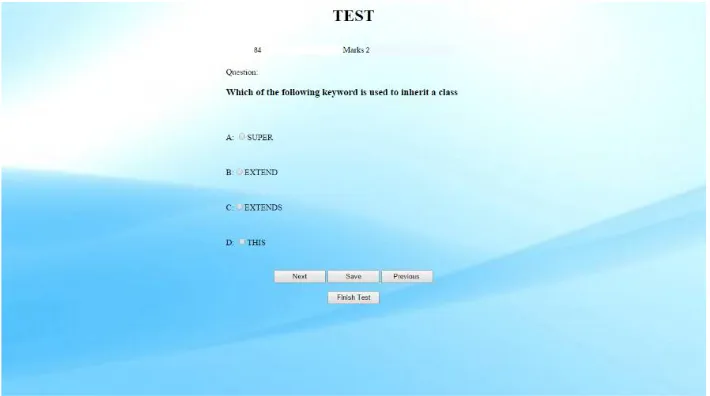
Step 6: Student attempts the test. Based on the score the project work is divided among the group mates. The test module contains questions regarding four different fields including HTML, CSS as front end coding, SQL queries for database connectivity, testing, core and advanced JAVA concepts. Each issue is given four options as it is multiple choice questions type. Admin schedules the test first which can later be modified or choose by the student. A student can plan his test according to his convenience and can attempt the test at the given time.
Fig 3. Student Attempts Test
ISSN(Online): 2320-9801
ISSN (Print) : 2320-9798
I
nternational
J
ournal of
I
nnovative
R
esearch in
C
omputer
and
C
ommunication
E
ngineering
(An ISO 3297: 2007 Certified Organization)
Vol. 4, Issue 3, March 2016
Fig 4. Profile Page
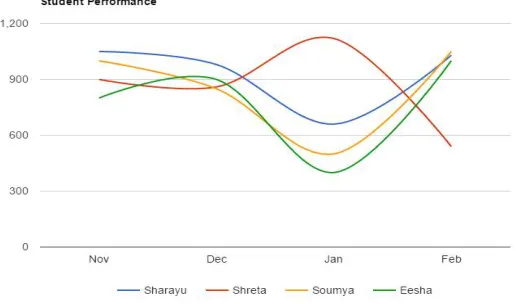
Step 8: Each Student along with its group has to complete the milestones. Each milestone is marked with a date of start and end. Milestones show the level of completion of a student and also displays the utter sincerity and contribution of the student towards the project. These helps in generating a performance report which shows grading of students in line chart format. Each end is marked with a date and if the task is not finished on time a sleeping count is generated. Milestones are given to the students, at first, to identify the different stages of their project and then theses milestones are set by the project manager and the admin in the described form in the figure.
Fig 5. Milestone Module
Step 9: Students can view the task sheet/event calendar for upcoming events and tasks assigned to them. Step 10: Student when assigned a task to have a submission of it through the portal’s upload task module.
ISSN(Online): 2320-9801
ISSN (Print) : 2320-9798
I
nternational
J
ournal of
I
nnovative
R
esearch in
C
omputer
and
C
ommunication
E
ngineering
(An ISO 3297: 2007 Certified Organization)
Vol. 4, Issue 3, March 2016
Fig 6. Chat Module
B. Admin’s end
Step 1: Admin has a dashboard to manage all his function in a systematic manner. Step 2: Admin can log in and update or add test question in the database.
Step 3: Admin is responsible for scheduling the test.
C. Project manager’s end
Step 1: Project manager has a dashboard to manage his functions in an orderly manner.
Step 2: Project manager can check the performance report of students. This report is generated by taking into consideration the time adopted by the student in some days and quality of work done by them. Amcharts is a js file which is used to develop line charts that will show individual students performance. Under this, all the group member performance is embedded in one chart giving the project manager a view on each contribution.The project manager will check the work submitted by the student and review it in four categories good, excellent, poor and redo. Depending on these reports students’ performance will be measured.
ISSN(Online): 2320-9801
ISSN (Print) : 2320-9798
I
nternational
J
ournal of
I
nnovative
R
esearch in
C
omputer
and
C
ommunication
E
ngineering
(An ISO 3297: 2007 Certified Organization)
Vol. 4, Issue 3, March 2016
VII. CONCLUSIONS
In this paper, we proposed an approach for implementation and design of an interactive web portal for students at HCL Career development center. The proposed portal provides a platform for knowledge sharing with interactive and user-friendly modules for increasing productivity and saving the user time. It enables students to interact with the user interface to manage and customize their information, share and search useful resources within the portal and also to interact with the faculty at HCL CDC through chat options. Each user has its set of functional and management capabilities like the Project manager can access the performance report and give opportunities to the deserving students by offering recruitment at the company.
.
A. Benefits
Firstly, it provides a platform to all those students who are living in distant areas, giving them the advantage to using the portal and the tools with global access. It helps the project manager and faculty at HCL Career development Center (CDC) to track the student’s project growth easily in an ordered fashion including milestones and performance reports.
Secondly, it helps the students to reach the faculty member for asking doubts and queries through interactive chat modules directly.
Lastly, it speeds up the process and gives a fair evaluation of each’s contribution towards the assigned projects
B. Limitations
Since the system is a web application, it requires an internet connection to connect with the portal [6].
C. Future Scope
The proposed system has a broad scope and can be improved with several modules and functionalities in future providing more availability of resources can be an inventive aspect of this project where we can create a resource pool using cloud provider [7].
REFERENCES
1 BEAWebLogic Portal-Portal development guide, bea[online] Version 10.2,February 2008 Available at:https://docs.oracle.com/cd/E13155_01/wlp/docs103/pdf/portals.pdf
2 Irina Todoran,“Embedding Interactivity into a University Study Portal by Using Social Computing”, IEEE 2010
3 Fengchun Zhu, Aihua Wang, YanbingJu, "A Framework to Develop A University Information Portal," in Proc. of 2004 International Conference on Information Acquisition
4 Ofoegbu E. O., Fayemiwo M. A., Omisore M. O., Olanrewaju P. O.,“A Web Portal Architectural Design And Implementation For Private Universities In Nigeria’’, International Journal of Scientific and Research Publications, Volume 4, Issue 9, September 2014.
5 James Rumbaugh, Ivar Jacobson, Grady Booch,“The Unified modelling language reference manual”, Addison-Wesley,2nd Edition, 2004, pp 97-98.
6 Jada Kittivaraporn, JiratChokdeeanan, TeerapongYaophrukchai, Thanwadee T. Sunetnanta, “HRM Portal, Human Resource Management”, presented at the Third ICT International Student Project Conference, 2014.