An Error Analysis Tool for Natural Language Processing and Applied
Machine Learning
Apoorv Agarwal
Department of Computer Science Columbia University New York, NY, USA
Ankit Agarwal
NextGen Invent Corp. Shrewsbury, MA, USA
Deepak Mittal
NextGen Invent Corp. Shrewsbury, MA, USA
Abstract
In this paper we present a simple to use web based error analysis tool to help computational linguists, researchers building language applications, and non-technical personnel managing de-velopment of language tools to analyze the predictions made by their machine learning models. The only expectation is that the users of the tool convert their data into an intuitive XML format. Once the XML is ready, several error analysis functionalities that promote principled feature engineering are a click away.
1 Introduction
A typical machine learning (ML) pipeline involves conversion of examplesinto a structured represen-tations, followed by training a model on these examples, followed by testing the model. Most Natural Language Processing (NLP) tasks involve (broadly) two types of structured representations: feature vec-tors (in which examples are represented as vecvec-tors inRn) and abstract representations such as strings and trees. Classification models assign each test example an integer, corresponding to the predicted class. Regression models assign each test example a real number. Throughout this process, frequently asked questions include: is there a bug in the code that converts text into a feature vector or structured repre-sentation, which models (trained using different learning algorithms) make the right prediction on what kind of examples? Which models trained on which set of features/structures make the right prediction on what kind of examples? Is a pair of models statistically significantly different? Answers to these ques-tions give us a deeper understanding of the learning process, which in turn results in principled feature engineering and model selection.
We spend a lot of time writing quick and dirty scripts to make connections between different aspects of the learning process (features, structures, predictions, models). These scripts are often task dependent and need to be re-written for each task. More time is spent in compiling a report so our findings may be shared with other collaborators. Frustrated with this day-to-day and repetitive script writing, we decided to design and implement an easy-to-use error analysis tool that helps in answering the aforementioned questions in a few clicks. The following are the two main contributions of this work:
1. Design: the tool provides a common framework for performing error analysis of a wide range of NLP tasks. In designing and implementing this tool, we had to abstract away from specific task definitions, feature representations, and structure representations in order to bring different aspects of a task into a unified interface.
This work is licensed under a Creative Commons Attribution 4.0 International Licence. Page numbers and proceedings footer are added by the organisers. Licence details: http:// creativecommons.org/licenses/by/4.0/
2. Web based: the tool is web-based, meaning that users can access a URL and upload files to access the functionalities of the tool. Each user can optionally generate an identifier, which can be shared with other users, enabling other users to access the same error analysis session.
2 The Tool
[image:2.595.72.526.187.453.2]In the following sub-sections, we give details of the basic functionalities of the tool, followed by details of a few advanced functionalities. We explicate the functionalities using the ACE relation extraction task as a running example.
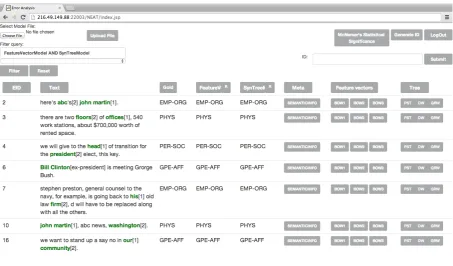
Figure 1: A screenshot of the tool loaded with ACE relation extraction task data.
Figure 2: Screenshots of pop-ups on sample ACE data. The first pop-up shows the gold class distribution. The second pop-up shows evaluation metrics for one of the models.
2.1 ACE Relation Extraction
[image:2.595.73.510.501.658.2]entities), the goal is to detect a relation between the two entities (relation detection), and if a relation exists, to identify the type of the relation (relation classification). There is a pre-defined list of relations for the ACE relation extraction task: ART, DISC, EMP-ORG, GPE-AFF, PER-SOC, PHYS, OTHER. Researchers have developed a wide range of features for the task (Kambhatla, 2004; Zhao and Grishman, 2005; Zhang et al., 2006). There is also a large body of work that has explored the space of tree structure representations (Zelenko et al., 2003; Culotta and Sorensen, 2004; Zhou et al., 2007; Nguyen et al., 2009; Agarwal and Rambow, 2010; Agarwal et al., 2014). Relation extraction is a complex task, with features ranging from simple bag-of-words to more complex semantic features, and with tree structures ranging from simple parse trees to more complicated tree structures.
2.2 Basic Functionalities
Figure 1 presents a screenshot of the tool loaded with the ACE relation extraction data. The column labeledEIDis the example identifier assigned to each example, the column labeledTexthas the example in text format, the column labeledGoldhas the gold class of each example (may be a real number for regression type tasks), the columns labeled FEATUREVECTORMODELand SYNTREEMODELhave predictions of respective models. The column labeledFEATUREVECTORS has the different types of feature vector representations, and the column labeled TREEShas the different types of tree structure representations for each example. Note that the number of columns and their names are not hard-coded. The number of columns, their names and their order is automatically inferred from the XML input specified by the user (section 2.4).
The column labeled Text in Figure 1 shows the sentence with the target entities highlighted. The relations may be directed from one target entity to the other. The numbers next to the highlighted entities specify the direction of the relation (from entity marked as [1] to entity marked as [2]). Highlighting certain parts of input text with a tag (in this case target identifiers) is a general feature of the tool. There are other popular NLP tasks in which this functionality may come in handy. For example, for parts-of-speech tagging and named entity recognition tasks, features are extracted with respect to part of a text, which may be highlighted to understand the input example.
The column labeledGoldin Figure 1 shows the gold label for each example. Clicking on the column label pops up a window with a histogram that shows the distribution of the gold class (Figure 2).
The column labeled FEATUREVECTORMODEL shows the predictions made by a model that was trained only on feature vectors. The column labeledSYNTREEMODELshows the predictions made by a model that was trained only on syntactic tree structures. There is an icon next to the column name, marked asR. Clicking on this icon pops up a window with a result table that summarizes the performance of that model (Figure 2). Built-in metrics include precision, recall, and F1-measure (with respect to each class), alongside the macro- and micro-F1 measures and percentage accuracy. This list of metrics may be easily extended in the code.
The way in which a user specifies the predictions per model is simple – the user is required to create a two column file (EID, prediction) and load the file into the tool using the “Browse” and “Upload File” buttons (upper left corner of Figure 1). The tool uses the EID to assign each prediction a row and therefore the predictions may be specified in any order.
In section 2.3 we discuss an advanced functionality of the tool that allows the user tofilterthe loaded set of examples based on boolean queries on the correctness of predictions of various models.
The column labeledMetacontains meta-data associated with each example. In our research, we are currently experimenting with features and tree structures derived from the output of a semantic frame parser called Semafor (Chen et al., 2010). Semafor labels the input text with frame information – frame evoking elements, frame elements, their spans and types. The output of a Semafor parse is quite complex. Visualizing the annotations produced by Semafor, along with other features and dependency trees, is helping us design novel features and tree structures for the task of relation extraction. The user of the tool has full control over the type of meta-data, and the number of types of meta-data that (s)he might want to upload in the error analysis interface.
a task. Clicking one of the feature vector types pops up a window that shows the value of features for a particular example. For instance, clicking “BOW1” for the first example will show a pop-up that contains the following: “some:0.2 administration:0.6”. These are words (and their tf-idf scores) that appear in the text between the start of the sentence and the occurrence of the first target.
The column labeledTREESshows the different types of tree structures that a user may design for a task. Clicking on a particular type of tree (button) will bring up a picture of the tree. Note – we do not require the user to provide the pdf with the tree diagram. The tool converts a tree specified in a standard text format, such as this “(ROOT (A B))”, into a dot file, which is automatically converted into a pdf file.
2.3 Other Functionalities
Notice the text box labeled “Filter Data” in Figure 1. Users of the tool may specify complex queries to filter out the examples that do not satisfy the filter. For example, a query such as “FEATUREVECTORMODELAND NOTSYNTREEMODEL” will filter out examples that do not sat-isfy the following condition: examples that FEATUREVECTORMODELpredicted correctly but SYN
-TREEMODELpredicted incorrectly. Similarly a query such as “FEATUREVECTORMODELORSYN
-TREEMODEL” will filter out examples that both the models predicted incorrectly. We have implemented two binary operations (AND and OR) and a unary operation (NOT). These operations may be combined with model names to form complex queries. The tool automatically saves the past 10 filter conditions, which may be accessed through a drop down menu under the filter text box.
Notice the button labeled “McNemar’s Statistical Significance” in Figure 1 (upper right corner). Click-ing this button pops up a window that shows, in tabular format, the McNemar’s statistical significance p-value for all pairs of models loaded in the interface.
Notice the “Generate ID” button on the top right corner of Figure 1. If a user of the tool wants to share his/her session (and analysis) with other collaborators, the user can generate a unique identifier by clicking this button. This identifier may be shared with other collaborators who may visit the tool website, enter the identifier in the text box labeled “ID” and gain access to the same session. Of course, a user might want to save the generated identifier for him/her-self for returning to an older session. The web service handles concurrent requests.
2.4 Input XML Representation
Figure 3: XML format to be specified by the user.
Figure 3 shows the input XML schema expected from the user. Each example may be specified within the XML tag “example”. Example identifier and its gold class may be specified as attributes of the element “example”. Each example may have associated text, and a number of “Meta”, “Feat”, and “Tree” prefixed tags. We use this prefix to determine how to render the content of each element. For example, the content of the tag prefixed by “Meta” and “Feat” is shown as is on the interface, whereas the content of the tag prefixed by “Tree” is converted to a pdf with a picture of the tree.
3 Related Work
tool we present in this paper is different. The goal of our tool is to replace the day-to-day, quick and dirty script writing process (required to make connections between different aspects of an NLP task) by a web based user friendly solution. The design of this tool is novel, and to the best of our knowledge there is no such publicly available web based error analysis tool.
4 License and Contact Information
The error analysis tool is available1for free for research purposes under the GNU General Public License as published by the Free Software Foundation.
Acknowledgements
We would like to thank Jiehan Zheng and Aakash Bishnoi for contributing to the user interface code. We would also like to thank Caronae Howell for her insightful comments.
References
Apoorv Agarwal and Owen Rambow. 2010. Automatic detection and classification of social events. In Pro-ceedings of the 2010 Conference on Empirical Methods in Natural Language Processing, pages 1024–1034, Cambridge, MA, October. Association for Computational Linguistics.
Apoorv Agarwal, Sriramkumar Balasubramanian, Anup Kotalwar, Jiehan Zheng, and Owen Rambow. 2014. Frame semantic tree kernels for social network extraction from text. 14th Conference of the European Chapter of the Association for Computational Linguistics.
Desai Chen, Nathan Schneider, Dipanjan Das, and Noah A. Smith. 2010. Semafor: Frame argument resolution with log-linear models. InProceedings of the 5th International Workshop on Semantic Evaluation, pages 264– 267, Uppsala, Sweden, July. Association for Computational Linguistics.
Aron Culotta and Jeffrey Sorensen. 2004. Dependency tree kernels for relation extraction. InProceedings of the 42nd Meeting of the Association for Computational Linguistics (ACL’04), Main Volume, pages 423–429, Barcelona, Spain, July.
G. Doddington, A. Mitchell, M. Przybocki, L. Ramshaw, S. Strassel, and R. Weischedel. 2004. The automatic content extraction (ace) program–tasks, data, and evaluation. LREC, pages 837–840.
A. El Kholy and N. Habash. 2011. Automatic error analysis for morphologically rich languages. InMT Summit XIII, September.
Nanda Kambhatla. 2004. Combining lexical, syntactic, and semantic features with maximum entropy models for extracting relations. InProceedings of the ACL 2004 on Interactive poster and demonstration sessions, page 22. Association for Computational Linguistics.
Truc-Vien T. Nguyen, Alessandro Moschitti, and Giuseppe Riccardi. 2009. Convolution kernels on constituent, dependency and sequential structures for relation extraction. Conference on Empirical Methods in Natural Language Processing.
Sara Stymne. 2011. Blast: A tool for error analysis of machine translation output. InProceedings of the ACL-HLT 2011 System Demonstrations, pages 56–61, Portland, Oregon, June. Association for Computational Linguistics. Dmitry Zelenko, Chinatsu Aone, and Anthony Richardella. 2003. Kernel methods for relation extraction. The
Journal of Machine Learning Research, 3:1083–1106.
Min Zhang, Jie Zhang, Jian Su, and Guodong Zhou. 2006. A composite kernel to extract relations between entities with both flat and structured features. InProceedings of COLING-ACL.
Shubin Zhao and Ralph Grishman. 2005. Extracting relations with integrated information using kernel methods. InProceedings of the 43rd Meeting of the ACL.
GuoDong Zhou, Min Zhang, DongHong Ji, and QiaoMing Zhu. 2007. Tree kernel-based relation extraction with context-sensitive structured parse tree information. InProceedings of EMNLP-CoNLL.