© 2016, IJCSMC All Rights Reserved
241
Available Online at www.ijcsmc.com
International Journal of Computer Science and Mobile Computing
A Monthly Journal of Computer Science and Information Technology
ISSN 2320–088X
IJCSMC, Vol. 5, Issue. 1, January 2016, pg.241 – 247
A Scalable Morphological Algorithm for
Motion Detection in Surveillance System
Mr. Dilish Babu.J
1,
Ms.
Upasana Mahajan
2¹
M.Tech Student,
Department of Computer Science and Engineering, New Horizon College of Engineering,
Bangalore, India
²
Assistant Professor,
Department of Computer Science and Engineering, New Horizon College of
Engineering, Bangalore, India
1[email protected]; 2[email protected]
Abstract—
The main objective of motion tracking is to detect and track moving objects through a sequence of images.
In this paper, we propose a novel method for detecting the motion of a particular object being observed. Through the
study and Evaluation of products and methods, we propose a Motion Tracking Surveillance system which has its own
Graphical User Interface (GUI) and scalable methods for motion detection. Various algorithms for motion detection
are found efficient in one way. But there exits some limitation in each of them. In our proposed system we have
omitted the disadvantages of those algorithms and combined the use of best methods to create a new motion detection
algorithm for our motion tracking survival system. The proposed system is well suited for modern surveillance system
architecture, which offers more convenient, efficient uses for both office and homes.
Keywords— Morphological filtration, Video Compression, Image denoising, Motion Sensitivity, Audio Compression,
Email Alert
I. Introduction
Surveillance systems now days are becoming very popular and an essential part of any organizations around the world. In some cases it‟s used in home security purpose as well. In all of these systems the main concept behind the scene is motion tracking.
© 2016, IJCSMC All Rights Reserved
242
for Infrared motion detectors that most people find suitable and useful everyday situations like Driveway alarms, Yard alarms, Burglar alarms and Door announcers. Web Cam Monitor keeps watch over your home, office, or any location. It detects motion, and triggers customizable Alerts that can record video and audio of the incident, notify you by e-mail or text message, or sound an audible alarm. It can also begin recording at pre-set intervals to maintain a record of events. It's as simple as connecting a camera to your PC. Using the configuration wizard, your surveillance system can be up and running in minutes. Using multiple cameras, it's easy to monitor large areas from a single PC. Web Cam Monitor is a complete video security solution, with both multiple camera support and remote monitoring.
Web Cam Monitor goes far beyond traditional video security systems, with an astounding combination of power and flexibility. It is the perfect way to turn your PC into a sophisticated monitoring and surveillance system. Video can also be streamed live over the Internet, letting you monitor events from any computer with an Internet connection. Your surveillance system is on guard 24 hours a day or you can use the powerful built-in Scheduler to activate and deactivate monitoring on a daily, weekly, or custom timetable. When motion or noise is detected, you can see a snapshot from your PC.
The task of a Motion Tracking Surveillance system is to detect a motion present in “region of awareness”. The region of awareness or the field of view is defined as the “Portion of Environment (or) surrounding being monitored” [1]. The motion of moving objects is the activity of the portion of environment may be represented as Region of interest. The system captures images only when the motions exceed a certain threshold that is present in system. Thus the scalability is achieved since the volume of data that needs to be reviewed and is therefore a more convenient way of monitoring the environment, especially with the increasing demand for Multi-camera. Also, it helps to save Data space by not capturing static images which usually do not contain the object of interest.
There are two Main components that concern basic Motion Tracking Surveillance software, (i.e) GUI and method for Motion Detection. As part of the literature review, we evaluated 4 popular motion detection surveillance products that are currently available in market. We considered about the terms of format and their features which are based on features that are required of a Surveillance system and the additional features that are required for purpose of motion detection. The four products, namely „Active Webcam‟ by py software [2], „Watcher‟ by Digi-Watcher [3], „FG Engineering Surveillance 4 cam Basic‟ by FG Engineering [4], and „Supervision Cam‟ by Peter Kirst [5] are chosen by considering users feedback.
Also in the literature review, the existing methods for motion detection are discussed. They include some of popular methods, such as Temporal Difference[1][6] and background modelling [1][6][7][8]; as well as methods that are not so widely used due to certain constraints eg. Optical flow [9][10] and Spatio-Temporal entropy[11].
II. MOTION DETECTION
Methods for motion detection can be categorized into 2 Main classes, i.e Region-based and pixel-based algorithm [8]. The former, based on Spatial dependencies of neighbouring pixel colours to provide results more robust to false alarms. The later is a simple model often used in real-time application. It is based on binary difference by employing local or pixel-based model of intensity.
Some of the famous Motion detection algorithms and their features are discussed below:
2.1 Optical Flow:
It is the 2-D velocity field induced in an image due to projection of moving objects onto the image plane. An optical flow shows velocity of each pixel in image. Most optical flow techniques assume that uniform illumination is present. However only small movements can be accurately detected in gradient technique.
2.2 Spatio-Temporal Entropy:
It works on assumption that pixel state change brought about by noises would be in small range while those brought about by motion would be large.
© 2016, IJCSMC All Rights Reserved
243
2.3 Temporal Difference:The consecutive frames are compared on basis of pixel by pixel basis for calculating motion sequence and a threshold is applied for classification of objects in stationary or in motion. But when there is motion in objects, the image intensities are not varied in a short time interval; so that motion is detected only in boundaries. Also it makes more false alarms as they don‟t show relationship of pixel with neighbourhood.
2.4 Background Modelling:
Background modelling methods are classified into two types namely pixel-based and region-based models .Background subtraction is often used in case of pixel-based. An image of the stationary background is generated by averaging the image sequence over a period of time of time on mixture of Gaussian distribution. With the help of Gaussian density the likelihood of each incident pixel colour is computed .On the deviation between the two pixels, they will be labelled as foreground pixels and detected as motion. Krumm et al[14] has done an excellent analysis on this method.
There are two popular methods for region-based background modelling, the three tiered algorithm which process image at the pixel, region and frame level[14] , and the eigen-space decomposition method[8].
III.PROPOSED METHOD
We propose a method that uses both temporal difference and optical flow methods together with morphological filter for the purpose of motion detection. Figure 1 gives a flowchart of the proposed motion detection process.
3.1 Reducing the number of pixel using Temporal Difference Method
The initial image frame is provided as the input for our proposed method. The image frame with reduced number of pixel is obtained as output.
First of all, the temporal difference method is used to obtain an initial coarse image so as to reduce the number of pixels that a downstream tracking algorithms have to process. It is used despite its shortcomings as it is a cheap and simple method. No knowledge of the background is required as in background subtraction where training periods in the absence of foreground are required for bootstrapping [14]. Also, the method‟s inability to detect the entire shape of objects of interest does not act as a serious obstacle considering the fact that the system is for simple office and home uses.
3.2 Image Denoising using optical flow method
The image frame with reduced number of pixels is given as the input. Noise pixels are removed in the output. The optical flow method is then used to further analyze the detected motion area to reduce noises such as movements of trees and the capturing device. Tian et al [15] mentioned that objects of interest tend to have consistent moving directions over time. Mittal et al [16] also stated that persistent motion characteristics are shown by most objects of interest. Therefore, optical flow is a suitable method in this aspect as it is able to estimate the direction and speed of moving objects to reduce false alarms incurred by undesirable external factors like oscillating fans and trees.
3.3 Morphological filtration
© 2016, IJCSMC All Rights Reserved
244
The algorithm of our proposed method of motion detection is shown clearly in the flowchart described in Figure 1.
yes
Fig 1.Algorithm block diagram
Capture the image frame
Obtain the threshold value
Image input frame
Reducing the pixels by temporal difference method
Image denoising by optical flow detection
Morphological filtration
Compare with the defined threshold
value
Motion > Threshold
Motion detected
Storing the
motion and
creating
alarm
The consecutive
frame is set as
input and the
process is
continued
© 2016, IJCSMC All Rights Reserved
245
IV. GUI
One guiding principle in designing the GUI of commercial software is user-friendliness. This is most of the times determined by two factors, format and the features. Clear and neat formatting makes it easier for users to access necessary features in the system gives rise to neat formatting.
Two basic formats of GUI are used to design the format of GUI. Type 1 is the GUI in which users can easily switch from capture panel to log panel for monitoring and reviewing. Type 2 is the GUI is the more conventional GUI design whereby users have to click on the menu bar every time for another window to appear.
4.1 Proposed GUI
We aim to create a simple and neat GUI that allows users to easily familiarize with other system. As a result, Type 1 GUI is employed in our proposed GUI. The „Settings‟ function is shown on the main panel together with the „Camera‟ and „Log‟ functions. It is in consideration of the fact that „Settings‟ is one of the most frequently used functions. Such design thus allows users to access more easily to it. Thus, one of the key differences of our proposed GUI is that the traditional menu bar typical of most software has been abandoned entirely. Figure 2-5 displays samples of our proposed GUI.
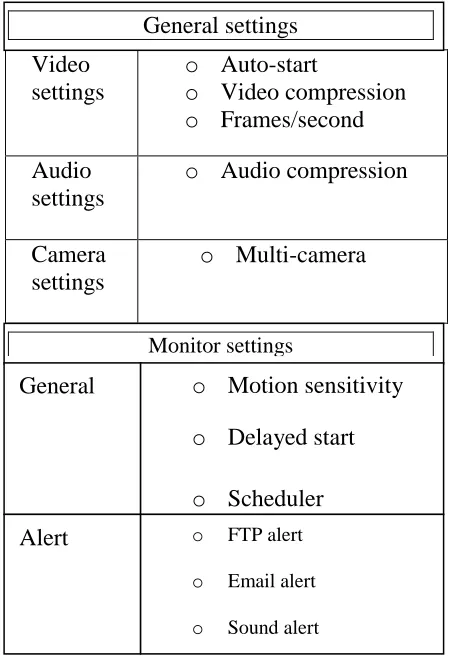
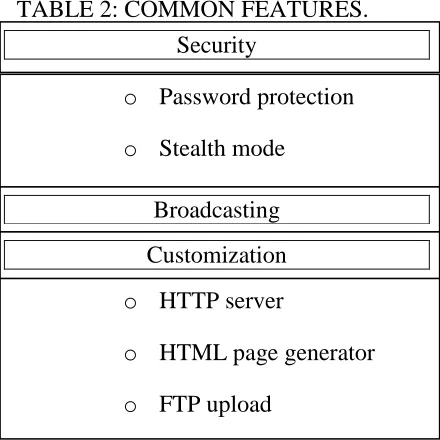
The “Camera” panel displays the capturing devices that are monitoring at any time. Users can click on a camera for close-up view of the scene under monitoring. Being a motion detection software, it allows capturing device that has just detected motions to automatically pop up on the main window for close monitoring. The “Log” panel displays the images saved by the system. It is sorted by date of capturing as well as by titles as given by the users. These two ways of retrieving data provide more choices for users and make the process easier. The “Settings” panel consists of eight subcategories, namely “Video Settings”, “Audio Settings”, “Camera Settings”, “General Settings”, “Alert Settings”, “Security Settings”, “Broadcasting” and “Customization”. Type 1 GUI is again employed here, making it easy for users to switch from one option to another. Where the initial three settings represents the general features of the process. The monitor settings is provided by the general monitor and alert settings. The final three represents their own features.
Figure 2 gives the common features of the proposed GUI.
Video
settings
o
Auto-start
o
Video compression
o
Frames/second
Audio
settings
o
Audio compression
Camera
settings
o
Multi-camera
General settings
Monitor settings
General
o
Motion sensitivity
o
Delayed start
o
Scheduler
Alert
o FTP alerto Email alert
© 2016, IJCSMC All Rights Reserved
246
TABLE 2: COMMON FEATURES.
Fig 2.Features of proposed GUI
The proposed architecture of our smart surveillance system is shown in Figure 3.
Fig 3.Architecture of Surveillance system
V. CONCLUSION
An efficient and convenient motion detection surveillance is proposed in this work. The system captures images only when the motions exceed a certain threshold that is present in the system. It thus reduces the volume of data that needs to be reviewed and is therefore a more convenient way of monitoring the environment, especially with the increasing demand for multi-camera. Also, it helps to save data space by not capturing static images which usually do not contain the object of interest. It is applicable for both office and home uses.
Security
o
Password protection
o
Stealth mode
Broadcasting
o
HTTP server
o
HTML page generator
o
FTP upload
o
© 2016, IJCSMC All Rights Reserved
247
REFERENCES