Quad BRI/U Module
User Manual
Part Number 1200315L1
901 Explorer Boulevard P.O. Box 140000 Huntsville, AL 35814-4000
(256) 963-8000
© 2000 ADTRAN, Inc. All Rights Reserved.
Affidavit Requirements for Connection to Digital Services
• An affidavit is required to be given to the telephone company whenever digital terminal equipment without encoded analog content and billing protection is used to transmit digital signals containing encoded analog content which are intended for eventual conversion into voiceband analog signals and transmitted on the network.
• The affidavit shall affirm that either no encoded analog content or billing information is being transmitted or that the output of the device meets Part 68 encoded analog content or billing protec-tion specificaprotec-tions.
• End user/customer will be responsible for filing an affidavit with the local exchange carrier when connecting unprotected customer premise equipment (CPE) to 1.544 Mbps or subrate digital ser-vices.
iv
Affidavit for Connection of Customer Premises Equipment
to 1.544 Mbps and/or Subrate Digital Services
For the work to be performed in the certified territory of ________________________(telco name)
State of ________________
County of ________________
I, _____________________________ (name), __________________________________(business address),
____________________ (telephone number) being duly sworn, state:
I have responsibility for the operation and maintenance of the terminal equipment to be connected to 1.544 Mbps and/or ________ subrate digital services. The terminal equipment to be connected com-plies with Part 68 of the FCC rules except for the encoded analog content and billing protection speci-fications. With respect to encoded analog content and billing protection:
( ) I attest that all operations associated with the establishment, maintenance, and adjustment of the digital CPE with respect to analog content and encoded billing protection information continu-ously complies with Part 68 of the FCC Rules and Regulations.
( ) The digital CPE does not transmit digital signals containing encoded analog content or billing information which is intended to be decoded within the telecommunications network.
( ) The encoded analog content and billing protection is factory set and is not under the control of the customer.
I attest that the operator(s)/maintainer(s) of the digital CPE responsible for the establishment, mainte-nance, and adjustment of the encoded analog content and billing information has (have) been trained to perform these functions by successfully having completed one of the following (check appropriate blocks):
( ) A. A training course provided by the manufacturer/grantee of the equipment used to encode analog signals; or
( ) B. A training course provided by the customer or authorized representative, using training mate-rials and instructions provided by the manufacturer/grantee of the equipment used to encode analog signals; or
( ) C. An independent training course (e.g., trade school or technical institution) recognized by the manufacturer/grantee of the equipment used to encode analog signals; or
( ) D. In lieu of the preceding training requirements, the operator(s)/maintainer(s) is (are) under the control of a supervisor trained in accordance with _________ (circle one) above.
I agree to provide ______________________ (telco’s name) with proper documentation to demonstrate compliance with the information as provided in the preceding paragraph, if so requested.
_________________________________Signature
_________________________________Title
_________________________________ Date
Transcribed and sworn to before me this ________ day of ________, ________
__________________________________________ Notary Public
FCC regulations require that the following information be provided
in this manual to the customer:
1. This equipment complies with Part 68 of the FCC rules. The required label is affixed to the bottom of the chassis.
2. An FCC-compliant telephone cord and modular plug is provided with this equipment. This equip-ment is designed to be connected to the telephone network or premises wiring using a compatible modular jack which is Part 68-compliant. See Chapter 2, Installation, for details.
3. If your telephone equipment (Octal BRI/U Module) causes harm to the telephone network, the tele-phone company may discontinue your service temporarily. If possible, they will notify you in ad-vance. But if advance notice isn’t practical, you will be notified as soon as possible. You will be advised of your right to file a complaint with the FCC.
4. Your telephone company may make changes in its facilities, equipment, operations, or procedures that could affect the proper operation of your equipment. If they do, you will be given advance notice to give you an opportunity to maintain uninterrupted service.
5. If you experience trouble with this equipment (Octal BRI/U Module), please contact ADTRAN at (256) 963-8000 for repair/warranty information. The telephone company may ask you to discon-nect this equipment from the network until the problem has been corrected or until you are sure the equipment is not malfunctioning.
6. This unit contains no user-serviceable parts.
7. The following information may be required when applying to your local telephone company for leased line facilities.
Federal Communications Commission (FCC) Radio Frequency
Interference Statement
This equipment has been tested and found to comply with the limits for a Class A digital device, pur-suant to Part 15 of the FCC Rules. These limits are designed to provide reasonable protection against harmful interference when the equipment is operated in a commercial environment. This equipment generates, uses, and can radiate radio frequency energy and, if not installed and used in accordance with the instruction manual, may cause harmful interference to radio frequencies. Operation of this equipment in a residential area is likely to cause harmful interference in which case the user will be required to correct the interference at his own expense.
Shielded cables must be used with this unit to ensure compliance with Class A FCC limits.
Service Type REN/SOC FIC USOC
Basic Rate ISDN 6.0N 02IS5 RJ-48C
vi
Canadian Equipment Limitations
Before installing this equipment, users should ensure that it is permissible to be connected to the facil-ities of the local telecommunications company. The equipment must also be installed using an accept-able method of connection. In some cases, the company's inside wiring associated with a single line individual service may be extended by means of a certified connector assembly (telephone extension cord). The customer should be aware that compliance with the above conditions may not prevent deg-radation of service in some situations.
Repairs to certified equipment should be made by an authorized Canadian maintenance facility desig-nated by the supplier. Any repairs or alterations made by the user to this equipment, or equipment malfunctions, may give the telecommunications company cause to request the user to disconnect the equipment.
Users should ensure for their own protection that the electrical ground connections of the power util-ity, telephone lines and internal metallic waterpipe system, if present, are connected together. This precaution may be particularly important in rural areas.
The Load Number (LN) assigned to each terminal device denotes the percentage of the total load to be connected to a telephone loop which is used by the device, to prevent overloading. The termination on a loop may consist of any combination of devices subject only to the equipment that the total of the LNs of all devices does not exceed 100.
The ringer equivalence number (REN) assigned to each terminal adapter is used to determine the total number of devices that may be connected to each circuit. The sum of the RENs from all devices in the circuit should not exceed a total of 5.0.
Warranty and Customer Service
ADTRAN will replace or repair this product within five years from the date of shipment if the product does not meet its published specification, or if it fails while in service. For detailed warranty, repair, and return information, refer to the ADTRAN Equipment Warranty and Repair and Return Policy Proce-dure (see the last page of this manual).
A return material authorization (RMA) is required prior to returning equipment to ADTRAN.
For service, RMA requests, or more information, see the last page of this manual for the toll-free contact number.
The Industry Canada Certification label identifies certified equipment. This certification means that the equipment meets certain telecommunications network protective, operational, and safety requirements. The Department of Commerce does not guarantee the equipment will operate to the user's satisfaction.
Limited Product Warranty
ADTRAN warrants that for five (5) years from the date of shipment to Customer, all products manu-factured by ADTRAN will be free from defects in materials and workmanship. ADTRAN also war-rants that products will conform to the applicable specifications and drawings for such products, as contained in the Product Manual or in ADTRAN's internal specifications and drawings for such prod-ucts (which may or may not be reflected in the Product Manual). This warranty only applies if Cus-tomer gives ADTRAN written notice of defects during the warranty period. Upon such notice, ADTRAN will, at its option, either repair or replace the defective item. If ADTRAN is unable, in a rea-sonable time, to repair or replace any equipment to a condition as warranted, Customer is entitled to a full refund of the purchase price upon return of the equipment to ADTRAN. This warranty applies only to the original purchaser and is not transferable without ADTRAN's express written permission. This warranty becomes null and void if Customer modifies or alters the equipment in any way, other than as specifically authorized by ADTRAN.
EXCEPT FOR THE LIMITEDWARRANTY DESCRIBED ABOVE, THE FOREGOING CONSTITUTES THE SOLE AND EXCLUSIVE REMEDY OF THE CUSTOMER AND THE EXCLUSIVE LIABILITY OF ADTRAN AND IS IN LIEU OF ANY AND ALL OTHER WARRANTIES (EXPRESSED OR IMPLIED). ADTRAN SPECIFICALLY DISCLAIMS ALL OTHER WARRANTIES, INCLUDING (WITHOUT LIM-ITATION), ALL WARRANTIES OF MERCHANTABILITY AND FITNESS FOR A PARTICULAR PUR-POSE. SOME STATES DO NOT ALLOW THE EXCLUSION OF IMPLIEDWARRANTIES, SO THIS EXCLUSION MAY NOT APPLY TO CUSTOMER.
Table of Contents
List of Figures ... xi
List of Tables...xiii
Chapter 1 Introduction... 1-1
Quad BRI/U Module Overview ... 1-1 Functional Description... 1-1 Features ... 1-2 Quad BRI/U Module Specifications ... 1-2 Physical Description ... 1-3
Chapter 2 Installation... 2-1
Before Installing the Quad BRI/U Module... 2-1 Shipping Contents ... 2-1 Installing the Quad BRI/U Module ... 2-1 Wiring ... 2-3 Power Up and Initialization ... 2-3 Failed Self-Test ... 2-3 Operation Alarms ... 2-3
Chapter 3 Operation ... 3-1
Table of Contents
x Quad BRI/U Module User Manual 61200315L1-1
Assembly Revision ... 3-4 Alarm ... 3-5 Prt ... 3-5 Alarms ... 3-5 Channel Status... 3-5 Prt ... 3-5 Cha ... 3-5 Performance Current ... 3-5 Configuration ... 3-5 Test ... 3-5 Module Alarms... 3-5 Test Activity ... 3-5 ATLAS Features Used with Quad BRI/U Module Options ... 3-6 Factory Restore ... 3-6 Run Selftest... 3-6
Appendix A Dial Plan Configuration ... A-1
List of Figures
List of Figures
List of Tables
List of Tables
Chapter 1
Introduction
QUAD BRI/U MODULE OVERVIEW
The Quad BRI/U Module is a member of the ATLAS 550 family of integrat-ed access products, providing four Basic Rate ISDN (BRI) U interfaces, each capable of operating in either NT or LT mode. Any port can deliver timing for the system.
The Quad BRI/U Module combines with the ATLAS 550 Base Unit and other ATLAS 550 modules to support requirements calling for multiple BRI circuits. As many Quad BRI/U Modules can be installed in a system as can be physically accommodated in the ATLAS 550 chassis. Figure 1-1 shows a sample application using the Quad BRI/U Module.
Figure 1-1. Quad BRI/U Module System
When combined with the ATLAS 550 Base Unit and, optionally, one or more Dual T1/PRI Modules (P/N 1200314L1), the Quad BRI/U Module can im-plement an ISDN access switch, combining multiple BRI circuits into one or more Primary Rate ISDN (PRI) circuits.
Functional Description
The Quad BRI/U Module installs in any available option slot in the ATLAS 550 chassis. You can view the status of the module itself, as well as the cir-cuits to which it interfaces, via the terminal menus, accessible through either a VT-100 terminal connected to the ATLAS 550 control port or via a Telnet session established through the Base Unit’s Ethernet port. Use the terminal menu to configure the Quad BRI/U Module and to download application software. PBX T1/PRI Module BRI Module PRI BRI BRI BRI POWER REMOTE ERRORTEST OK TEST ONLINE STATUS ERROR TEST OK CRAFT ACO ALARMALARM 1 2 NETWORK
1 2 3 4
MODULES SYSTEM
ETHERNET
ATLAS 550
Chapter 1. Introduction
1-2 Quad BRI/U Module User Manual 61200315L1-1
Features
The following list describes the features of the Quad BRI/U Module:
• Four BRI U Interfaces
• Near-end and far-end block error monitoring
• Can use any port as a timing source for the entire system • Hot swappable
• NT and LT mode support • Maximum distance of 18,000 feet
QUAD BRI/U MODULE SPECIFICATIONS
Each port of the Quad BRI/U Module conforms to the following specifica-tions:
• Line rate
160 kbps data rate (80 kbaud signaling +/-5 ppm)
• Line codes
2B1Q
• Framing options
Framing per ANSI T1.601-1992
• Clock source
Allows any Quad BRI/U Module port operating inNETWORKTERM
mode to be the master timing source
• Tests
Circuit self-test loopback (internal toward network or user equipment)
• BRI switch support
Provides support for the following switches: - AT&T 5ESS (NT or LT)
- Nortel DMS-100 (NT or LT)
- National ISDN-1
• Line performance data
Reported via SNMP in RFC1406 format
• Connectors
Chapter 1. Introduction
PHYSICAL DESCRIPTION
The Quad BRI/U Module (see Figure 1-2) plugs into any available option slot in the rear of the ATLAS chassis.
Figure 1-2. Quad BRI/U Module
The label over each RJ-45 connector refers to the port on the Quad BRI/U Module.
The four Option slots (labeled 1 — 4) only accept Option Modules, and the Network Interface slots (labeled Network 1 and Network 2) only accept Network Interface Modules. (See the ATLAS 550 in Figure 2-1 on page 2-2.)
1 2 3
4
ISDN BRI U INTERFACE
Chapter 1. Introduction
Chapter 2
Installation
BEFORE INSTALLING THE QUAD BRI/U MODULE
Carefully unpack and inspect the Quad BRI/U Module for shipping damag-es. If you suspect damage occurred during shipping, file a claim immediate-ly with the carrier and then contact ADTRAN Technical Support (see the last page of this manual for pertinent information). If possible, keep the original shipping container for returning the Quad BRI/U Module for repair or for verification of shipping damage.
Shipping Contents
The ADTRAN shipment includes the following items:
• Quad BRI/U Module
• Quad BRI/U Module User Manual (insert into the ATLAS User Manual) • Four RJ-45-to-RJ-11 cables, ADTRAN P/N: 3125M007
INSTALLING THE QUAD BRI/U MODULE
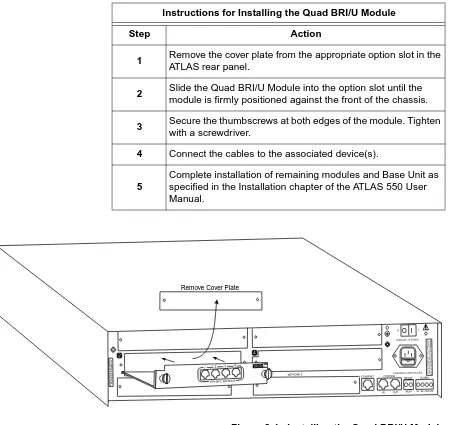
Figure 2-1 on page 2-2 represents the actions required to properly install the Quad BRI/U Module, as described in the step/action table on page 2-1.
Chapter 2. Installation
2-2 Quad BRI/U Module User Manual 61200315L1-1
Figure 2-1. Installing the Quad BRI/U Module Instructions for Installing the Quad BRI/U Module
Step Action
1 Remove the cover plate from the appropriate option slot in the
ATLAS rear panel.
2 Slide the Quad BRI/U Module into the option slot until the
module is firmly positioned against the front of the chassis.
3 Secure the thumbscrews at both edges of the module. Tighten
with a screwdriver.
4 Connect the cables to the associated device(s).
5
Complete installation of remaining modules and Base Unit as specified in the Installation chapter of the ATLAS 550 User Manual. NETWORK 2 2 4 ETHERNET CONTROL IN OUT RELAY ALARM O I
FUSE RATING: 2A/250V SLO-BLO 90-240VAC, 2A, 50/60Hz
NC NO COM GND
A LL E M PT Y S L O TS M U S T B E C O VE R E D W IT H B LA N K P A N E LS C A U T IO N : F O R C O N TIN U E D P R O TE C T IO N AG A IN S T R ISK O F F IR E , R E P LA C E O N LY W IT H SA M E T Y P E A N D R A TIN G O F F U S E . MON
Remove Cover Plate
I O
1 2 3 4
ISDN BRI U INTERFACE
500 Ser 500 Ser
ies
Chapter 2. Installation
WIRING
Each module port uses a single RJ-45 jack to connect to a U interface circuit. Table 2-1 shows the network pinout connection. The required wiring con-nection follows:
POWER UP AND INITIALIZATION
The Quad BRI/U Module requires no initialization input during the power-up sequence, as described in the ATLAS User Manual. Any previously con-figured setting for the Quad BRI/U Module is automatically restored upon power-up.
Failed Self-Test
If the Quad BRI/U Module fails self-test, a message will be displayed on the terminal menu self-test log. See the ATLAS User Manual for details.
Operation Alarms
The red ALARM LED (located with the Module LEDs on the front panel) il-luminates when an alarm condition is detected. An interface alarm is shown for each port in the Alarm Menu of the Quad BRI/U Module.
Connector Type (USOC) RJ-45
Table 2-1. Network Pinout Connection
PIN NAME DESCRIPTION
1, 2, 3, 6, 7, 8 Unused —
4 Ring Ring to and from the Network Interface
Chapter 2. Installation
Chapter 3
Operation
OVERVIEW
You can control and configure the Quad BRI/U Module from a variety of sources, including the following:
• The terminal menus (both VT-100 and Telnet sessions), allowing de-tailed configuration, status, and diagnostics
The remainder of this section describes the menu items presented when managing the Quad BRI/U Module via the terminal menu.
Access the terminal menu using either a VT-100 terminal attached to the ATLAS Base Unit’s control port or a Telnet session established through the Base Unit’s Ethernet port. The ATLAS User Manual provides detailed instructions on the operation of each of these management approaches.
TERMINAL MENU STRUCTURE
ATLAS uses a hierarchical menu structure to provide access to all of its fea-tures. The top-most menu level leads to submenus which are grouped by functionality. All menu items display in the terminal window. To access the Quad BRI/U Module, activate theMODULESmenu. The following sections describe the menu items for theMODULESmenu.
To edit items in the terminal menu, you must have the appropriate password level. Each menu description in this section indicates the password level required for write and read access. See “Access Passwords” in the ATLAS User Manual for detailed information on working with passwords. Security level 0 users can view and edit every available field. Security level 5 users can view any field but cannot edit.
Chapter 3. Operation
3-2 Quad BRI/U Module User Manual 61200315L1-1
M
ODULES
M
ENU
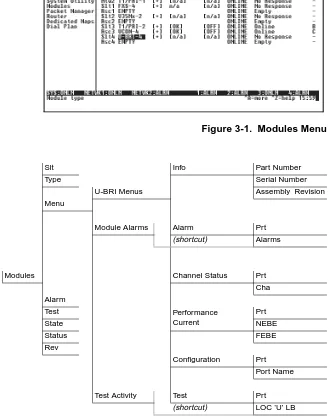
The ATLAS system controller automatically detects the presence of theQuad BRI/U Module when it is installed in the system. To see the menus for the Quad BRI/U Module via the terminal menu, use the arrow keys to scroll to theMODULESmenu and pressEnterto access the module choices. Figure 3-1 shows theMODULESmenu (see also the menu tree in Figure 3-2). The fol-lowing sections describe all of theMODULESmenu options.
Figure 3-1. Modules Menu
Figure 3-2. Menu Tree for Quad BRI/U Modules Menu
S
LT
Read security: 5Displays the number of the available slots in the ATLAS chassis. Slot 0 refers to the ATLAS unit. This field is read-only.
Slt Info Part Number
Type Serial Number
U-BRI Menus Assembly Revision
Menu
Module Alarms Alarm Prt
(shortcut) Alarms
Modules Channel Status Prt
Cha Alarm
Test Performance
Current
Prt
State NEBE
Status FEBE
Rev
Configuration Prt
Port Name
Test Activity Test Prt
Chapter 3. Operation
T
YPE
Write security: 3; Read security: 5Displays the type of module actually installed in the slot or the type of module you plan to install in the slot. If a Quad BRI/U Module is installed, the Type field automatically defaults to U-BRI (the Quad BRI/U Module). You can use this field to preconfigure a system before actually installing modules by simply specifying the module that you want to install in each slot.
M
ENU
Displays additional status and configuration menus for the selected module. (To access the submenus for this item, use the arrow keys to scroll to the Menu column for the module you want to edit, and pressEnter.) For detailed information on each submenu item, see the section Quad BRI/U ModuleMenus on page 3-4.
A
LARM
Read security: 5Displays an alarm condition on the Quad BRI/U Module. PressEnterin this field to activate the menu.
T
EST
Read security: 5Displays test name if the Quad BRI/U Module is executing a test. Press
Enterin this field to activate the menu. This menu can activate a local loop-back toward the U-interface (LOC "U" LB) for each port (PRT). The
loop-back options includeB1 LOOPBACK,B2 LOOPBACK, orALL.
S
TATE
Displays module status as eitherONLINEofOFFLINE. Even though a module is physically installed, it must be marked as online for it to be considered an available resource. This parameter allows an installed module to be marked as offline, which may be useful in system troubleshooting. If you choose to mark a module as offline, the module will not be in alarm condition, but will displayOFFLINE.S
TATUS
This read-only field provides status information on the Quad BRI/U Module.The following messages may display:
ONLINE The module is enabled, and is responding to the system controller’s status
polls. This is the normal response of the system.
TYPEautomatically displays the name of an installed module. If you
want to preconfigure the slot for a different type of module, you must set this field toEMPTYbefore selecting another module type.
Chapter 3. Operation
3-4 Quad BRI/U Module User Manual 61200315L1-1
NORESPONSE The module is enabled, but is not responding to the system controller’s
sta-tus polls. This response indicates either a problem in the system or that the module is not installed.
EMPTY The system controller has not detected the presence of a module in the slot, nor has a module been manually enabled for this option slot.
OFFLINE The module is installed, but has been taken Offline by a user. The module is
still responding to controller polls.
OFFLINE/NO
RESPONSE
The module is installed, but has been taken Offline by a user. The module is not responding to polls.
R
EV
This read-only field displays the assembly revision of the Quad BRI/U Module.QUAD BRI/U MODULE MENUS
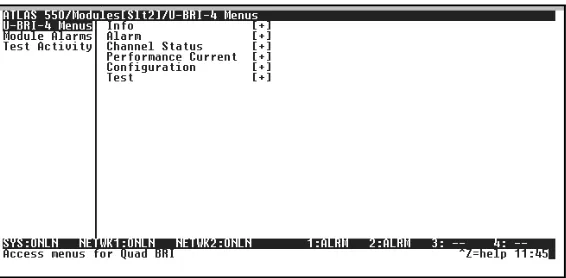
Figure 3-3 shows the menu options available for the Quad BRI/U Module (see also the menu tree in Figure 3-2 on page 3-2). The following sections de-scribe these options.
Figure 3-3. Quad BRI/U Module Menu Options
U-BRI M
ENUS
Accesses additional submenus.I
NFO
Provides information about module part number, serial number, and assem-bly revision.PARTNUMBER Displays the part number of the module (read only).
SERIALNUMBER Displays the serial number of the module (read only).
Chapter 3. Operation
A
LARM
Displays port number and alarms.PRT Indicates the port number.
ALARMS Lists the alarms.
C
HANNEL
S
TATUS
Displays the status of each of the Quad BRI/U Module ports.PRT Displays the port number.
CHA (Channel) Displays the status of individual channels. The following symbols may display:
P
ERFORMANCE
C
URRENT
The Performance Current field displays a count of Near-End Block Errors (NEBE) and Far-End Block Errors (FEBE) for each port (PRT).
C
ONFIGURATION
Allows the user to personally identify each port (PRT) with an appropriatename (PORTNAME). The default for all ports is Quad BRI/U Module.
T
EST
Activates a local loopback toward the U interface (LOC “U” LB) for each port (Prt). The loopback options includeB1LOOPBACK,B2LOOPBACK, orALL.M
ODULE
A
LARMS
Provides a shortcut to theALARMmenu (see Alarm on page 3-5).T
EST
A
CTIVITY
Provides a shortcut to theTESTmenu (see Test on page 3-5).-
Unallocated channel.
Inactive channelB Active B channel
Chapter 3. Operation
3-6 Quad BRI/U Module User Manual 61200315L1-1
ATLAS FEATURES USED WITH QUAD BRI/U MODULE OPTIONS
Two additional ATLAS menu items can operate in conjunction with the Quad BRI/U Module:FACTORYRESTOREandRUNSELFTEST.
F
ACTORY
R
ESTORE
You can restore the factory default settings for an Quad BRI/U Module by pressingFeither while the cursor is over theSLTnumber (this action
re-stores the factory settings for all of the module options) or while the cursor is over an individual field (this action restores factory settings only for the particular field).
R
UN
S
ELFTEST
RUNSELFTEST, a submenu of the ATLAS main menu itemTEST, executesboth the Quad BRI/U Module internal test and the ATLAS internal test. For additional information onRUNSELFTEST, see the ATLAS User Manual.
WhenRUNSELFTESTdisplays, place the cursor on it and pressEnterto
Appendix A
Dial Plan Configuration
DIAL PLAN OVERVIEW
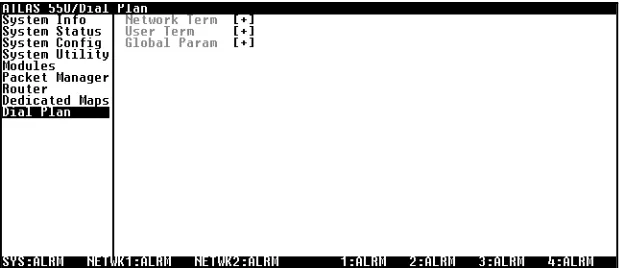
TheDIALPLANmenu (see Figure A-1) sets configuration parameters for each switched endpoint. These parameters vary by the type of port selected. The following sections describe the configuration options available for the Quad BRI/U Module. TheDIALPLANmenus are only accessible when using a VT-100 or Telnet session. To access these options, selectDIALPLANfrom the top level menu.
Figure A-1. Dial Plan Menus
QUAD BRI/U MODULE CONFIGURATION
This section describes theNETWORKTERMINATIONandUSERTERMINATION
configuration settings for the Quad BRI/U Module when using theDIAL
PLANmenus.
Appendix A. Dial Plan Configuration
A-2 Quad BRI/U Module User Manual 61200315L1-1
Quad BRI/U Module: Network Termination
The Quad BRI/U Module can interface directly with the network (PSTN) and should be configured in theNETWORKTERMsection of theDIALPLAN ac-cordingly. When you are working in theNETWORKTERMsection of theDIAL
PLANmenu, andSLTis defined asU-BRI-4, the following interface configu-ration options are available:
S
WITCH
T
YPE
Write security: 3; Read security: 5Defines the ISDN switch protocol, provided by the PSTN on the connected port.
SPID L
IST
Write security: 3; Read security: 5To properly operate with a network (PSTN) ISDN switch, the BRI interface must have Service Profile Identifiers (SPIDs) and phone number(s) that match the SPID(s) and phone number(s) programmed into the ISDN switch for this line. Each BRI may have one or more phone numbers and SPIDs. TheSPID LISTsubmenu defines these parameters to ATLAS.
P
HONEN
UMBER The phone number(s) assigned to this BRI phone line.SPID N
UMBER This entry must match the SPID number(s) which have been set in thenet-work’s ISDN switch (or in the PBX) for this BRI line. A SPID must be entered for each phone number.
C
ALLS The number of calls (1 or 2) which can be received or sent on this number/ SPID.D64, D56, A
UDIO,
S
PEECHAppendix A. Dial Plan Configuration
S
TRIP
MSD
Write security: 3; Read security: 5Strips a selected quantity (choose fromNONE,1,2, and3) of the Most Signif-icant Digits (MSD) of a dialed number prior to being forwarded out of the port.
EXAMPLE:
A network port could be set to accept all calls beginning with 9 (9$), and then withSTRIPMSDset to1, all digits would be sent toward the network except the leading 9.
S
OURCE
ID
Write security: 3; Read security: 5Simplifies the creation of aDIALPLANin applications where the criterion for
switching calls to a certain endpoint is a function of which endpoint origi-nated the call.
• Default value = 0. The default ID for all endpoints is 0 and all accept numbers is 0. With default values, all calls are routed based only on the dialed number.
• Multiple endpoints can have the sameSOURCEID.
• When creating theCALLACCEPTlist, specify aSOURCEID(s) as well as a dialed number or range of dialed numbers to accept.
EXAMPLE:
An application requires that all calls that originate from Port 1 of the Quad BRI/U Module in Slot 1 be switched to Port 2 of that same module. Assign a unique Source ID (e.g. 7) to Port 1 of the module, and then configure Port 2 to only accept calls from that unique Source ID (7).
Quad BRI/U Module: User Termination
While interfacing to user equipment (terminal adapters), the Quad BRI/U Module acts like the network and should be configured in theUSERTERM
section of the Dial Plan accordingly. When you are working in theUSER
TERMsection of theDIALPLANmenu andSLTis defined asU-BRI-4, the fol-lowing interface configuration options are available:
Appendix A. Dial Plan Configuration
A-4 Quad BRI/U Module User Manual 61200315L1-1
S
WITCH
T
YPE
Write security: 3; Read security: 5Defines the ISDN switch protocol to be emulated on the selected port. If connected to another ATLAS, both need to be set to the same type. Choices includeLUCENT5E,NORTHERNDMS 100, andNATIONAL-ISDN.
S
PID
L
IST
Write security: 3; Read security: 5The port, acting as the network, must use a SPID and a phone number in order to satisfy the ISDN connection protocol expected by the user’s Termi-nal Adapter (TA).
P
HONEN
UMBER The phone number(s) assigned to this BRI phone line.SPID N
UMBER Defines the SPID number(s) used for this BRI line. Although the value of theSPID is not significant, a SPID must be entered for each phone number.
C
ALLS The number of calls (1 or 2) which can be received or sent on this number/ SPID.D64, D56, A
UDIO,
S
PEECHThese options reflect bearer capability provisions for this SPID. If this is changed from default, then the call type must match the services supported.
S
TRIP
MSD
Write security: 3; Read security: 5Strips a selected quantity (choose fromNONE,1,2, and3) of the Most
Signif-icant Digits (MSD) of a dialed number prior to being forwarded out of the port.
EXAMPLE:
A network port could be set to accept all calls beginning with 9 (9$), and then withSTRIPMSDset to1, all digits would be sent toward the user
equipment except the leading 9.
The Quad BRI/U Module does not support autoSPID detection software which some terminal adapters offer.
STRIPMSDdoes not affectCALLACCEPTcriteria. All of the digits
Appendix A. Dial Plan Configuration
S
OURCE
ID
Write security: 3; Read security: 5Simplifies the creation of aDIALPLANin applications where the criterion for switching calls to a certain endpoint is a function of which endpoint origi-nated the call.
• Default value = 0. The default ID for all endpoints is 0 and for all accept numbers is 0. With default values, all calls are routed based only on the dialed number.
• Multiple endpoints can have the sameSOURCEID.
• When creating theCALLACCEPTlist, specify aSOURCEID(s) as well as a dialed number or range of dialed numbers to accept.
EXAMPLE:
Appendix A. Dial Plan Configuration
Index
A
ATLAS features used with Quad BRI/U 3-6 ATLAS menus and submenus
Alarm 3-3
Factory Restore 3-6 Menu 3-3
Modules 3-2 Rev 3-4
Run Selftest 3-6 Slt 3-2 State 3-3 Status 3-3 Test 3-3 Type 3-3
C
circuit wiring 2-3 clock source tests 1-2 connectors 1-2 customer service vi
D
description of the Quad BRI/U module 1-1
F
factory restore 3-6 failed self-test 2-3 FCC statement v framing options 1-2
I
installing the Quad BRI/U module 2-1 introducing the Quad BRI/U module 1-1
L
limited product warranty vii line codes 1-2
line rate 1-2
N
network pinouts 2-3
network termination on the Quad BRI/U A-2
O
operating the Quad BRI/U module 3-1 operation alarms 2-3
P
physical description of the Quad BRI/U 1-3 pinouts 2-3
power up 2-3
R
RMA requests vi
S
scrolling through the menus 3-2 service vi
specifications for the Quad BRI/U module 1-2
T
terminal menu structure 3-1
U
U-BRI menus and submenus Alarm
Alarms 3-5 Prt 3-5
Channel Status 3-5 Cha 3-5 Prt 3-5 Configuration 3-5 Performance Current 3-5
SPID List (network termination) A-2 SPID List (user termination) A-4 Switch Type (network termination) A-2 Switch Type (user termination) A-4 user termination on the Quad BRI/U A-3
W
Index
Product Support Information
Pre-sales Inquiries and Applications Support
Please contact your local distributor, ADTRAN Applications Engineering, or ADTRAN Sales:
Post-Sale Support
Please contact your local distributor first. If your local distributor cannot help, please con-tact ADTRAN Technical Support and have the unit serial number available.
Repair and Return
If ADTRAN Technical Support determines that a repair is needed, Technical Support will coordinate with the Custom and Product Service (CAPS) department to issue an RMA number. For information regarding equipment currently in house or possible fees associ-ated with repair, contact CAPS directly at the following number:
Identify the RMA number clearly on the package (below address), and return to the follow-ing address:
ADTRAN Customer and Product Service 6767 Old Madison Pike
Building #6 Suite 690 Huntsville, Alabama 35807
RMA # _____________
Applications Engineering (800) 615-1176
Sales (800) 827-0807
Technical Support (888) 4ADTRAN