Cloud Resource Management for Image and Video
Analysis of Big Data from Network Cameras
Ahmed S. Kaseb, Anup Mohan, Yung-Hsiang Lu
School of Electrical and Computer Engineering, Purdue University, West Lafayette, IN, USA {akaseb, mohan11, yunglu}@purdue.edu
Abstract—With the existence of millions of public network cameras capturing countless events around the world, there is a need for a system to retrieve, save, and analyze the tremendous amount of visual data from the cameras. The knowledge from the data will ultimately help better understand the world. Such a system needs to allocate and manage significant amounts of resources in order to meet the analysis requirements. In order to reduce the overall analysis cost, this paper presents a cloud resource manager that allocates cost-effective cloud instances, monitors and automatically scales the cloud resources. The paper presents a system that uses the proposed resource manager for image and video analysis of the big data from global network cameras. Our experiments show that the resource manager can lead to 13% reduction in cost. The experiments use four analysis programs which represent different workloads in terms of CPU and memory. The experiments show that different cloud instances are more cost-effective for different analysis programs. One experiment analyzes data streams from 1026 cameras simultaneously for six hours using different analysis programs at different frame rates. The experiment analyzes 5.5 million images, totalling 260GB data.
Index Terms—Resource Allocation, Resource Management, Cloud Computing, Big Data Analysis, Image and Video Analysis
I. INTRODUCTION
Millions of public network cameras capture countless events around the world. If the data streams of these cameras are analyzed, they could help better understand the world. However, these tremendous amounts of visual data is lost due to the lack of systems to retrieve, save, and analyze the data. A major challenge in such systems is the ability to allocate and manage the resources to analyze thousands of data streams simultaneously. Analyzing a single image (assuming 100KB per image) every one minute from 70,000 cameras means analyzing 9TB of visual data per day. Using the cloud for this big data analysis is important due to the elasticity of resources. Cloud vendors offer many instance types with different CPU, memory, and network capabilities. Choosing the right instance type for the analysis can be more cost-effective than other instance types. The right instance type depends on both the capabilities of the instance and the requirements of the analysis. This paper addresses these issues to enable cost-effective resource allocation and management.
This paper presents a cloud resource manager aiming at reducing the overall cost of analyzing image and video streams from network cameras. The resource manager allocates cost-effective cloud instances based on evaluating the resource
requirements of analysis programs and assessing the effective cost of using different cloud instances. The resource manager continuously monitors the resource utilization of the cloud instances. It automatically scales the cloud resources as needed in order to maintain the utilization in a predefined range, i.e. it allocates more instances when the analysis programs needs more, and deallocates some instances when the analysis programs needs fewer. The resource manager migrates analysis programs between instances based on a set of migration policies. If the same user executes multiple analysis programs at different times, the resource manager can reuse the running instances to reduce the overall analysis cost.
To evaluate the proposed resource manager, we use CAM2 [1], [2] (Continuous Analysis of Many CAMeras), which is a system for large-scale analysis of the data from 70,000 public network cameras. Our experiments use four analysis programs that represent different workloads in terms of CPU and memory: (1) image archival, (2) motion estima-tion, (3) moving objects detecestima-tion, and (4) human detection. The experiments show that different cloud instances are more cost-effective for different analysis programs. One experiment analyzes data streams from 1026 cameras simultaneously for six hours using different analysis programs at different frame rates. The experiment analyzes 5.5 million images (260GB data), and costs $12.77. Without using the proposed resource manager, this experiment costs $14.63. In other words, the proposed resource manager leads to a 13% reduction in cost. This paper has the following contributions: (i) It evaluates the resource requirements of executing different analysis pro-grams on the image and video streams from network cam-eras, and assesses the effective cost of using different cloud instances for the analysis. (ii) It presents a cloud resource man-ager aiming at reducing the overall analysis cost by allocating cost-effective cloud instances, monitoring and automatically scaling the cloud resources. Our experiments show that the resource manager can lead to a 13% reduction in cost. (iii) The resource manager is implemented on Amazon EC2, together with CAM2for image and video analysis. To our knowledge, CAM2is the first and the only open system that enables users to simultaneously analyze real-time image and video streams from thousands of network cameras. Readers interested us-ing CAM2 can register at https://cam2.ecn.purdue.edu/ and become users.
II. RELATEDWORK
The usage of cloud resources to perform image and video analysis is gaining popularity. Zhu et al. [3] explain the ben-efits of using cloud resources for executing image processing applications. They do not consider the cost of performing the analysis on cloud resources. In this paper, we consider performing image and video analysis on cloud resources at low cost. Resource allocation for video surveillance applications with the goal of minimizing the number of cloud resources used is explained in [4]. In this paper, we present a resource manager that is applicable for a wide range of applications. Vi-jaykumar et al. [5] introduce an optimal dynamic resource al-location algorithm to minimize the overall cost of using cloud resources for data streaming applications primarily based on the CPU utilization of the resources. In this paper, we consider CPU, memory, and network resources, and aim at reducing the overall analysis cost. There are several papers on cloud resource management for streaming data applications [6] [7] which use cloud resources as servers to stream dataout ofthe cloud resource. In this paper, we consider a different problem altogether of streaming datainto the cloud resource.
CAM2 is partially inspired by AMOS [8]. CAM2 is ca-pable of retrieving image (and video) at much higher rates than AMOS. AMOS has retrieved more than 700 millions since 2006. Our experiments have demonstrated the ability to retrieve more than 5.5 million images within 6 hours.
In our previous work, we introduced CAM2as a system for
large-scale image analysis of online cameras [1]. Then, we fo-cused on how to use the website [9] and the API of CAM2[2].
Hacker and Lu [10] presented CAM2 as an educational tool to teach students big data analytics. In addition, we presented an Android application that uses CAM2 to enable users to watch the camera live feeds and to plan their routes [11]. This paper is different from our previous work because it proposes a resource manager aiming at reducing the overall analysis cost. Moreover, the paper presents CAM2as a video analysis platform, in addition to images.
III. CLOUDRESOURCEALLOCATION
This paper presents a resource manager for executing anal-ysis programs of the visual data from network cameras. The ultimate goal of our study is to reduce the overall cost for the scientific community to analyze large amounts of visual data using cloud. The resource manager allocates cost-effective cloud instances as presented in this section, and monitors and automatically scales the cloud resources as presented in Section IV.
Cloud vendors offer many cloud instance types with dif-ferent capabilities in terms of numbers of cores, memory sizes, network performance, storage capacities, geographical locations, etc. With these options, this paper answers a number of questions that arise, e.g.
1) How much resources does one analysis program need? 2) How many data streams can one cloud instance analyze? 3) What is the most cost-effective cloud instance to use for
a given analysis program?
4) How many instances are needed for executing a program that analyzes many (perhaps thousands) data streams at a desired frame rate?
We assume no prior knowledge about analysis programs. Programs can be as simple as image (or video) archiving: downloading the individual images of a data stream without any analysis. Programs can be much more complex—any Python program. This is important for a flexible system that can be used for a wide range of applications. Due to the flexi-bility and hence the lack of prior knowledge about the analysis programs, we need to estimate the resource requirements of different analysis programs experimentally before determining which cloud instances are more cost-effective.
A. Models of Resource Requirements
To answer the first question “How much resources does one analysis program need?”, we estimate the resource re-quirements of executing an analysis program at a given frame rate on a particular cloud instance. We monitor the resource utilization of the cloud instance while executing the analysis programs using the data from two different numbers of cam-eras. Consider the following settings:
• p: an analysis program
• f: a desired frame rate
• i: a type of cloud instance
The CPU utilization per camera (assuming a linear model) is denoted by CPU∗i,p,f, and can be estimated as
CPU∗i,p,f =
CPUmi,p,f−CPUni,p,f
m−n , (1)
where CPUmi,p,f and CPUni,p,f are the CPU utilization for analyzing the data frommandncameras respectively. Simi-larly, the per camera memory utilization can be estimated as
Mem∗i,p,f = Mem m
i,p,f −Mem n i,p,f
m−n . (2)
Equations (1) and (2) consider a constant frame rate f. The second question is “How many data streams can one cloud instance analyze?”. To answer this question, we consider the effect of f. We define a performance metric as the ratio between the actual analysis frame rate and the desired frame rate. The analysis performance of a camera c is denoted by ηc, and can be calculated as
ηc= f c a
f , (3)
where fc
a is the actual analysis frame rate of the camera c,
andf is the desired frame rate. The resource manager aims at maintaining the overall analysis performance above 90% for all data streams analyzed by one instance:
η =fa f = 1 N N P c=1 fc a f ≥90%, (4)
wherefais the average actual frame rate for all the cameras,
Satisfying the performance metric is tightly coupled with the resource utilization. Our experiments show that maintaining the CPU utilization under a threshold CPUH = 90%and the
memory utilization under a threshold MemH= 90%generally
leads to meeting the performance requirements. Hence, the maximum number of streams a cloud instance of type i can analyze is estimated as Ni,p,f =min( CPUH CPU∗i,p,f, MemH Mem∗i,p,f) (5) B. Costs to Analyze Many Data Streams
The next question is “What is the most cost-effective cloud instance to use for a given analysis program?” We can com-pare the cloud instances in terms of how cost-effective they are while executing different analysis programs. We define the effective cost ECi,p,f of a cloud instanceias the price of
analyzing one million images using a given analysis program pat a frame rate f. The effective cost can be estimated as
ECi,p,f =
ci∗106
Ni,p,f∗f∗3600
, (6)
where ci is the hourly cost of an instance type i. Hence,
the most cost-effective cloud instance i∗ is the one which minimizes the effective cost, and is defined as
i∗= argmin i
ci
Ni,p,f∗f
, (7)
and to answer the last question, the number of needed cloud instances to analyze the data from N cameras is
N Ni∗,p,f
, and the overall analysis cost would be
N Ni∗,p,f
ci∗.
C. Resource Allocation Procedure
Our proposed resource manager uses the following proce-dure to allocate cost-effective cloud instances for executing a program analyzing the data from many network cameras at a specified frame rate:
Offline Stage: It aims at determining the most cost-effective cloud instance type for the given analysis. This stage is performed once, and can be used for future executions of the same analysis.
1) Execute the analysis program at the specified frame rate on cloud instances with different types using the data from two different numbers of cameras. Estimate the per camera resource utilization as shown in (1) and (2). 2) Estimate the maximum number of data streams that each
cloud instance type can analyze as shown in (5). 3) Estimate the effective cost of each cloud instance type
as shown in (6), and determinte the most cost-effective cloud instance type as shown in (7).
Online Stage - Allocation:
1) If the same user already has analysis programs running, reuse the currently running instances so that the added cost is zero. If the running instances are unable to handle the additional load, go to step 2.
2) Allocate the appropriate number of cloud instances of the most cost-effective instance type as shown in (7). IV. CLOUDRESOURCEMONITORING ANDSCALING This section describes the need for continuous resource monitoring and migration of analysis programs, defines when the analysis programs are migrated and a set of migration policies, and presents a resource manager that monitors and scales the cloud resources in order to reduce the overall analysis cost while taking into consideration the quality of the analysis results.
The resource requirements of an analysis program may change due to many factors, for example,
• The frame rates from a network camera may change over time due to network conditions and concurrent access from multiple users.
• The content of the data may affect the execution time and the amount of memory running an analysis programs. For example, detecting the moving objects in a highly dynamic scene would consume more resources than a static scene.
This urges the need for continuous monitoring of the resource utilization of the cloud instances and automatic scaling of the cloud resources (allocating more instances when the analysis programs needs more, and deallocating some instances when the analysis programs needs fewer.) Migration of analysis programs between cloud instances is essential in this process, but it negatively affects the quality of the analysis results for many reasons: (i) When migration is performed, the analysis programs are interrupted and there will be a time gap in the analysis results. (ii) If the analysis programs maintain temporal information such as background models, this information will be lost and have to be rebuilt on the new cloud instances. This will negatively affect the quality of the results after migration.
Our proposed resource manager migrates analysis programs from a cloud instanceiwhen its resources are overutilized, i.e. when
CPUi>CPUH or Memi >MemH, (8)
where CPUi and Memi are the current CPU and memory
utilization of the cloud instancei, and CPUH and MemH are
the high thresholds that set an upper bound on the permissiable CPU and memory utilization. In addition, the resource man-ager considers deallocating a cloud instance when its resources are underutilized, i.e. when
CPUi<CPUL and Memi<MemL, (9)
where CPULand MemLare the low thresholds that set a lower
bound on the acceptable CPU and memory utilization. The following set of migration policies defines which anal-ysis programs the resource manager should migrate from an overutilized cloud instance:
1) Migrate image analysis programs first before migrating video analysis programs because image analysis pro-grams do not keep temporal information across frames.
2) Migrate analysis programs with lower frame rate to reduce disruption.
3) Migrate analysis programs that require more resources so that fewer data streams are needed for migration. 4) Migrate analysis programs that started more recently to
prevent disruption of long-running programs.
Our proposed resource manager uses the following pro-cedure to monitor and scale cloud resources in order to perform image and video analysis of the big data from network cameras:
1) When a user starts a new analysis program, use the allocation procedure in Section III.C to estimate and allocate the appropriate number of cloud instances. 2) Continuously monitor the resource utilization of all the
cloud instances.
3) If the resources of a cloud instance are overutilized as defined in (8), immediately migrate some data streams from the instance. Choose the cameras to migrate based on the abovementioned migration policies. Suspend the analysis of the chosen data streams, and use the allocation procedure to allocate new resources.
4) If the resources of a cloud instance are underutilized as defined in (9) for a period of time, the instance is a candidate to be deallocated. Use the allocation procedure to estimate the hourly price of the proposed cloud in-stances if all the analysis programs are migrated from the underutilized instance. Deallocate the instance and migrate its analysis programs if this price is less than the hourly price of the instance.
There is a tradeoff between the analysis cost and the quality of the analysis results. To maintain the quality of the analysis results, our proposed resource manager may incur higher cost. For example, the resource manager considers deallocating only the underutilized cloud instances.
V. CAM2FORANALYSIS OFVISUALBIGDATA FROM
NETWORKCAMERAS
CAM2 is a system for the analysis of the visual big data
from network cameras. To our knowledge, CAM2 is the first
system that enables users to simultaneously analyze real-time image and video streams from thousands of network cameras. Our previous work [1] introduced CAM2as an image analysis platform. This paper extends the previous work by adding video analysis using the same CAM2 API. CAM2tackles the following challenges:
1) The cameras are heterogeneous in many ways: (i) The cameras have different types: IP cameras whose IP ad-dresses are known, and non-IP cameras for which some websites provide periodic snapshots. (ii) The IP cameras have different brands with different ways to retrieve the data. (iii) The cameras provide their live streams in vari-ous formats, e.g. JPEG for images, and MJPEG or H.264 for videos. (iv) The cameras have different resolutions and frame rates. CAM2 handles the heterogeneity of the cameras. Users do not need to know about the different camera types, or the different data formats.
2) Users need to be able to easily port their existing anal-ysis programs to the system. CAM2 provides auniform
API [2] for both image and video analysis. The API of CAM2is event-driven, i.e. the system invokes the analysis programs when new frames arrive. The API enables users to analyze the data streams from all the cameras with only slight changes to their existing analysis programs. The API is flexible such that it allows users to execute analysis programs for a wide range of applications, such as traffic monitoring, surveillance, etc.
3) Analyzing the data from thousands of cameras requires significant amount of resources. Users define the analysis requirements, such as the number of cameras and the analysis frame rate. CAM2 allocates and manages cloud
resources in order to meet the analysis requirements. VI. EXPERIMENTS
In order to evaluate the proposed resource manager, we conduct experiments using six types of cloud instances and four analysis programs. The cloud instances have different CPU and memory capabilities, and the analysis programs represent different workloads in terms of CPU and memory: image archival, motion estimation, moving objects detection, and human detection.
A. Experimental Setup
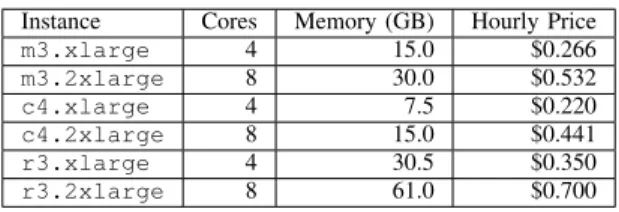
Table I compares the six Amazon EC2 cloud instance types that are used in our experiments: two general purpose instances
(m3.xlarge and m3.2xlarge), two compute optimized
instances (c4.xlargeandc4.2xlarge), and two memory optimized instances (r3.xlarge and r3.2xlarge). The processor of the compute optimized instances is Intel Xeon E5-2666 v3 clocked at 2.9 GHz, and it is Intel Xeon E5-2670 v2 clocked at 2.5 GHz for all the other instances.
Instance Cores Memory (GB) Hourly Price
m3.xlarge 4 15.0 $0.266 m3.2xlarge 8 30.0 $0.532 c4.xlarge 4 7.5 $0.220 c4.2xlarge 8 15.0 $0.441 r3.xlarge 4 30.5 $0.350 r3.2xlarge 8 61.0 $0.700
TABLE I: The CPU, memory, and hourly price of different Amazon EC2 cloud instances.
This paper uses four analysis programs implemented using OpenCV [12]. The first three analysis programs are used in the experiments for both image analysis at 0.2 FPS (Frames Per Second) and video analysis at 10 FPS. The fourth program is used for image analysis only because it is very compute intensive and cannot keep up with the video.
IA - Image Archival: This program downloads the individ-ual images of an image or video stream, without any further analysis. This program is useful if users wish to keep the images for offline analysis.
ME - Motion Estimation: This anlaysis program estimates the amount of motion in an image or video stream. The
program detects the foreground of an image using the back-ground subtraction method proposed by KaewTraKulPong and Bowden [13]. Then, the amount of motion is defined as the percentage of the foreground pixels to the total number of pixels in the image. The program saves the input images and the corresponding foreground masks.
MOD - Moving Objects Detection: This analysis program detects the moving objects in an image or video stream using the following procedure: (i) Detect the foreground using the background subtraction method proposed by Zivkovic [14]. (ii) Remove the noise in the background and the foreground using the morphological erosion and dilation operations respectively. (iii) Find the contours of the foreground mask. Each contour corresponds to a moving object. The program saves the input images and the corresponding images annotated with the detected objects.
HD - Human Detection: This analysis program detects humans in the individual images of an image stream using the human detection method proposed by Dalal and Triggs [15]. The program saves the input images and the corresponding images annotated with the detected humans.
B. Resource Requirements and Effective Cost
To estimate the number of streams an instance can analyze as well as the resource requirements of an analysis program, we conduct experiments executing the four analysis programs in Section VI-A on the six cloud instances in Table I. The experiments monitor the resource utilization as well as the analysis performance as defined in (4).
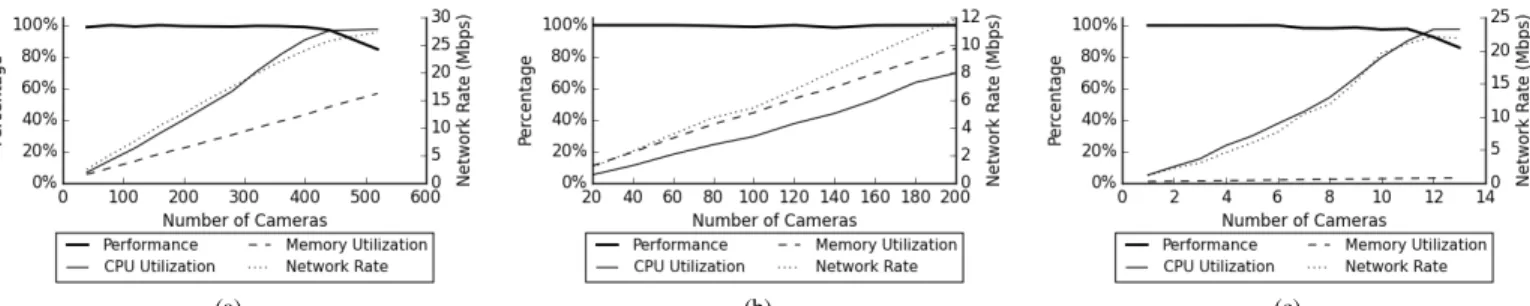
Figure 1 shows the resource utilization and the analysis performance of executing different image and video analysis programs using different cloud instances. The figure shows that while increasing the number of cameras increases the resource utilization, the analysis performance can gradually decrease after the CPU resources are used up or suddenly drops after the memory resources are used up. Our experiments show that CPU and memory resources are used up faster than network resources, and the CPU and memory utilization should be maintained below 90% in order to satisfy the performance metrics as defined in Section III.
Many factors determine whether the CPU or the memory resources will be the barrier to increase the number of data streams being analyzed: (i) The CPU and memory capabilities of the cloud instances. For example, the same analysis program for moving objects counting uses up the CPU resources faster on the m3.2xlarge cloud instance (30GB memory) as shown in Figure 1(a), but uses up the memory resources faster on the c4.xlarge cloud instance (7.5GB memory) as shown in Figure 1(b). (ii) The resource requirements of the analysis programs. Compute intensive analysis programs such as human detection use up CPU resources faster, and memory intensive analysis programs such as motion estimation use up memory resources faster. (iii) The analysis frame rate. The higher the analysis frame rate is, the higher the CPU requirements of the analysis. Figure 1(c) shows that executing the analysis program for motion estimation at 10 FPS uses up
the CPU resources much faster, and the memory resources are highly underutilized.
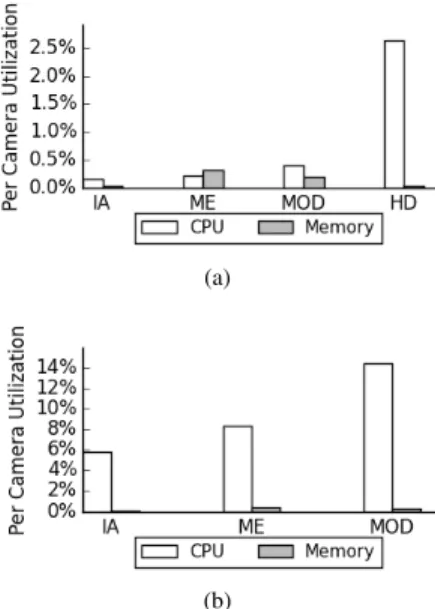
These experiments enable us to estimate the maximum numbers of data streams that can be analyzed using different analysis programs on different cloud instances. Figure 2 shows the maximum number of data streams for image analysis at 0.2 FPS, and a similar figure can be shown for video analysis. The experiments also enable us to estimate the per camera CPU and memory utilization as defined in (1) and (2). Figure 3 shows the per camera CPU and memory utilization for different analysis programs using them3.xlargecloud instance. For image analysis at 0.2 FPS, human detection is the most compute intensive analysis program, and motion estimation is the most memory intensive analysis program. Image archival is the least compute and memory intensive. For video analysis at 10 FPS, CPU resources becomes much more vital than memory resources.
(a)
(b)
Fig. 3: Per camera CPU and memory utilization for different analysis programs using the m3.xlarge cloud instance in the cases of: (i) Image analysis at 0.2 FPS. (ii) Video analysis at 10 FPS.
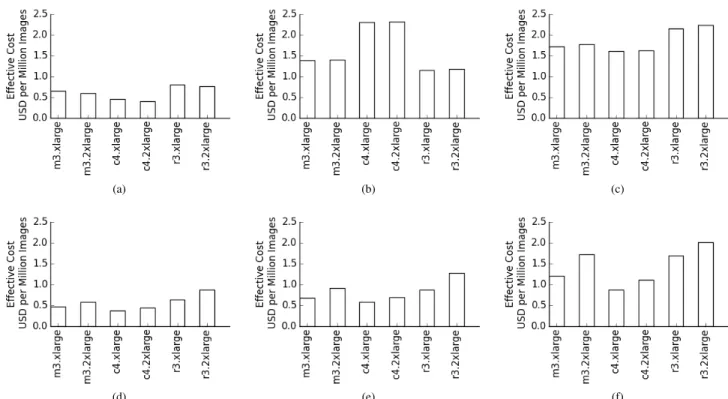
Figure 4 and Figure 5 show the effective cost of different cloud instances for executing different analysis programs. The figures show the following:
1) There is no clear winner. Different cloud instances are more cost-effective than others for some analysis pro-grams. Choosing the right cloud instance for an analysis program can save half on the analysis cost. This ob-servation motivates our research for cost-based resource allocation and management.
2) For image analysis at 0.2 FPS, compute optimized cloud instances (c4.xlarge and c4.2xlarge) are more cost-effective for moving objects detection and human de-tection. Memory optimized cloud instances (r3.xlarge
(a) (b) (c)
Fig. 1: The resource utilization and the analysis performance, as defined in (4): (a) Moving objects counting at 0.2 FPS using m3.2xlarge. (b) Moving objects counting at 0.2 FPS usingc4.xlarge. (c) Motion estimation at 10 FPS using an
r3.xlarge cloud instance. The left vertical axis represents the percentage of the CPU utilization, the memory utilization, and the analysis performance.
Fig. 2: The maximum numbers of data streams that can be analyzed at 0.2 FPS using different analysis programs and different cloud instances.
and r3.2xlarge) are more cost-effective for motion
estimation.
3) For video analysis at 10 FPS, compute optimized cloud instances are always more cost-effective than the other instances. That’s because video analysis consumes CPU resources much more than memory resources as we showed earlier.
4) Although the xlarge instances provide half the CPU and memory resources of the2xlargeinstances for half the price as shown in Table I, thexlargeinstances are often more cost-effective than the 2xlarge instances. This recommends using smaller instances instead of larger ones.
C. Cloud Resource Allocation and Management
To evaluate our proposed resource manager, we conduct a 6-hour large-scale experiment that uses CAM2 to analyze the data from 1026 cameras using different analysis programs at different frame rates as shown in Table II. The experiment analyzes 5.5 million images, totalling 260GB data. Figure 6 shows sample analysis results.
In this experiment, the resource manager considers a cloud instance overutilized if the utilization is above 90% and underutilized if the utilization is below 40%, and targets a 70%
Fig. 5: The effective cost as defined in (6) for executing the human detection program at 0.2 FPS.
Program Start Time Duration (Hours) Cameras Frame Rate
ME 0:00 4.50 1000 0.2
HD 1:15 4.75 10 0.2
MOD 1:30 4.50 16 10.0
TABLE II: The analysis programs of the 6-hour large-scale experiment.
utilization when allocating new resources. A cloud instance has to remain underutilized for 5 minutes before an action is taken by the resource manager. Figure 7 shows the CPU
(a) (b) (c)
(d) (e) (f)
Fig. 4: The effective cost as defined in (6) of different cloud instances for executing different analysis programs: (a-c) at 0.2FPS. (d-f) at 10 FPS. (a, d) Image archival. (b, e) Motion estimation. (c, f) Moving objects counting.
(a) (b) (c) (d)
Fig. 6: Sample results of the experiment shown in Table II: (a, b) Motion estimation for a camera in Czech Republic. (a) A sample input image. (b) The corresponding foreground mask. The amount of motion in this image is 5%. (c) Moving objects detection for a camera in the USA. The moving objects are enclosed by green boxes. The image shows eight moving cars, two groups of moving pedestrians, and two traffic lights considered moving due to changing from yellow to red. (d) Human detection for a camera in England. Humans are enclosed by green boxes. The program successfully detects four humans in the image, and misses one.
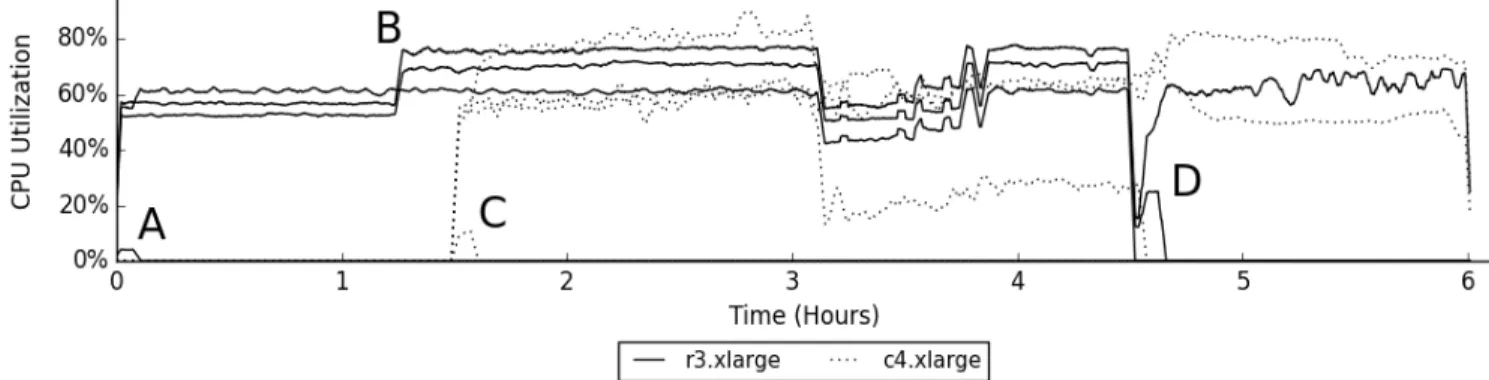
utilization of the cloud instances during experiment. The figure does not show the memory utilization because it does not affect any resource management decisions in this experiment. The figure shows the following events:
1) At 0:00, four memory-optimizedr3.xlargeinstances are allocated to handle the memory-intensive ME analysis program.
2) At 0:05, one r3.xlarge instance is deallocated after migrating its analysis programs to the other three running instances as shown by the marker A.
3) At 1:15, two of the currently running instances can handle the additional load of the second analysis program as
shown by the marker B; as a result, the added analysis cost is zero.
4) At 1:30, four compute-optimizedc4.xlargeinstances are allocated to handle the CPU-intensive MOD program. 5) At 1:35, one c4.xlarge instance is deallocated after migrating its analysis programs to the other three running
c4.xlargeinstances as shown by the marker C.
6) At 3:10, the CPU utilization of some cloud instances drops, which can be due to unexpected network condi-tions.
7) At 4:30, the execution of the first analysis program ends, which causes oner3.xlargeto be deallocated and the
Fig. 7: The CPU utilization of the cloud instances while analyzing the data from 1026 cameras using different analysis programs at different frame rates as shown in Table II.
other two r3.xlargeinstances are underutilized. 8) At 4:35, two of the three underutilized instances are
deallocated after migrating their analysis programs to the third instance as shown by the marker D.
9) At 6:00, the execution of all the analysis programs ends. Based on the lifetime of the cloud instances in Figure 7 and their prices, the experiment costs $12.77. If our pro-posed resource manager is not used, and the general-purpose
m3.xlargeinstances are used for all the analysis programs, this experiment needs five, one, and five m3.xlarge in-stances to handle the three analysis programs respectively. The overall analysis cost is $14.63 in this case. This means that our resource manager leads to a 13% reduction in the overall analysis cost.
VII. CONCLUSION
This paper presents a cloud resource manager aiming at reducing the overall cost of analyzing thousands of image and video streams from network cameras. The paper evaluates the resource requirements of different image and video analysis programs, and assesses the effective cost of using different cloud instances. The paper presents CAM2as a video analysis platform, in addition to images. CAM2 uses the proposed resource manager to allocate and scale cloud resources in order to meet the CPU and memory requirements of the analysis. Our experiments show that the proposed resource manager can lead to a 13% reduction in the overall analysis cost.
ACKNOWLEDGMENTS
The authors would like to thank Amazon for providing the cloud infrastructure, and the organizations that provide the camera data. A complete list of the data sources is avail-able at https://cam2.ecn.purdue.edu/acknowledgements. This project is supported in part by National Science Foundation ACI-1535108, CNS-0958487, and IIP-1530914. Any opinions, findings, and conclusions or recommendations expressed in this material are those of the authors and do not necessarily reflect the views of the sponsors.
REFERENCES
[1] A. S. Kaseb, E. Berry, Y. Koh, A. Mohan, W. Chen, H. Li, Y.-H. Lu, and E. J. Delp, “A system for large-scale analysis of distributed cameras,” inIEEE Global Conference on Signal and Information Processing, Dec 2014, pp. 340–344.
[2] A. S. Kaseb, E. Berry, E. Rozolis, K. McNulty, S. Bontrager, Y. Koh, Y.-H. Lu, and E. J. Delp, “An interactive web-based system using cloud for large-scale visual analytics,” inImaging and Multimedia Analytics in a Web and Mobile World, Feb 2015, pp. 94 080E–94 080E–11. [3] W. Zhu, C. Luo, J. Wang, and S. Li, “Multimedia cloud computing,”
IEEE Signal Processing Magazine, vol. 28, no. 3, pp. 59–69, 2011. [4] M. S. Hossain, M. M. Hassan, M. A. Qurishi, and A. Alghamdi,
“Resource allocation for service composition in cloud-based video surveillance platform,” inIEEE International Conference on Multimedia and Expo Workshops, 2012, pp. 408–412.
[5] S. Vijayakumar, Q. Zhu, and G. Agrawal, “Dynamic resource provision-ing for data streamprovision-ing applications in a cloud environment,” in IEEE Second International Conference on Cloud Computing Technology and Science, 2010, pp. 441–448.
[6] F. Wang, J. Liu, and M. Chen, “Calms: Cloud-assisted live media stream-ing for globalized demands with time/region diversities,” inProceedings IEEE INFOCOM, 2012, pp. 199–207.
[7] Y. Wu, C. Wu, B. Li, X. Qiu, and F. Lau, “Cloudmedia: When cloud on demand meets video on demand,” in International Conference on Distributed Computing Systems, 2011, pp. 268–277.
[8] N. Jacobs, N. Roman, and R. Pless, “Consistent temporal variations in many outdoor scenes,” in IEEE Conference on Computer Vision and Pattern Recognition, June 2007, pp. 1–6.
[9] “CAM2Website,” https://cam2.ecn.purdue.edu/.
[10] T. Hacker and Y.-H. Lu, “An instructional cloud-based testbed for image and video analytics,” inIEEE International Conference on Cloud Computing Technology and Science, Dec 2014, pp. 859–862. [11] A. S. Kaseb, W. Chen, G. Gingade, and Y.-H. Lu, “Worldview and
route planning using live public cameras,” inImaging and Multimedia Analytics in a Web and Mobile World, Feb 2015, pp. 94 080I–94 080I–8. [12] G. Bradski, “The OpenCV library,” Dr. Dobb’s Journal of Software
Tools, vol. 25, no. 11, pp. 120, 122–125, 2000.
[13] P. KaewTraKulPong and R. Bowden, “An improved adaptive background mixture model for real-time tracking with shadow detection,” in Video-Based Surveillance Systems. Springer US, 2002, pp. 135–144. [14] Z. Zivkovic, “Improved adaptive gaussian mixture model for background
subtraction,” inInternational Conference on Pattern Recognition, vol. 2, Aug 2004, pp. 28–31 Vol.2.
[15] N. Dalal and B. Triggs, “Histograms of oriented gradients for human detection,” inIEEE Computer Society Conference on Computer Vision and Pattern Recognition, vol. 1, June 2005, pp. 886–893.