First Edition
Published 2007-02-12 19:20:14
This document is a copyright work and is protected by local copyright, civil and criminal law and international treaty. The information provided is disclosed solely for the purpose of it being used in the context of the licensed use of Syspro Ltd. computer software products it relates to. Such copyright works and information may not be published, disseminated, broadcast, copied or used for any other purpose. This document and all portions thereof included, but without limitation, copyright, trade secret and other
intellectual property rights subsisting therein and relating thereto, are and shall at all times remain the sole property of Syspro Ltd.
No part of this book may be copied, photocopied, or reproduced in any form or by any means without permission in writing from Syspro Ltd.
SYSPRO™ is a trademark of Syspro Ltd.
All other trademarks, service marks, products or services are trademarks or registered trademarks of their respective holders.
SYSPRO™ is produced under license by Syspro Ltd..
Syspro Ltd. reserves the right to alter the contents of this book without prior notice. While every effort is made to ensure that the contents of this book are correct, no liability whatsoever will be accepted for any errors or omissions. This book and all materials supplied to the student are designed to familiarize the customer, reseller or student with the subject.
This book is written to SYSPRO Version 6.0 Issue 010. For use with Microsoft™ Windows™.
Introduction ... 1–1 1.1. Audience ... 1–1 1.2. Objectives ... 1–2 1.3. Requirements ... 1–2
Defining e.net solutions ... 2–1 2.1. Business Objects ... 2–2 2.2. COM Object ... 2–4 2.3. Web Services ... 2–6 2.4. XML Schemas ... 2–7 2.5. SYSPRO Web Based Applications ... 2–8 2.6. .NET and e.net solutions ... 2–9 2.6.1. What is .NET? ... 2–9 2.6.2. SYSPRO ERP integrated with .NET ... 2–12 2.7. Service Oriented Architecture (SOA) ... 2–13 2.8. Net Express and other Programming Tool environments ... 2–14
Getting Started with e.net solutions ... 3–1 3.1. The Structure of Program ... 3–1 3.1.1. The Basic Model ... 3–1 3.1.2. The Abstraction Model ... 3–4 3.2. Your First e.net solutions program ... 3–7
Programming Tools ... 4–1 4.1. SYSPRO Software Development Kit (SDK) ... 4–1 4.2. e.net Diagnostics Suite ... 4–1 4.2.1. Install Procedure ... 4–2 4.2.2. Menus and Buttons ... 4–11 4.2.3. Status Bar ... 4–16 4.2.4. Other Menu Items ... 4–17 4.3. Using the e.net Diagnostics suite's Harness ... 4–20
4.3.1. Customizing XmlIn ... 4–25 4.3.2. Wrapping XmlIn ... 4–25
The Class Library Reference ... 5–1 5.1. Utilities Class ... 5–4 5.1.1. Utilities.Logon ... 5–4 5.1.2. Utilities.Logoff ... 5–6 5.1.3. Utilities.GetLogonProfile ... 5–7 5.1.4. Utilities.Run ... 5–8 5.2. Query Class ... 5–10 5.2.1. Query.Query ... 5–10 5.2.2. Query.Browse ... 5–14 5.2.3. Query.Fetch ... 5–17 5.2.4. Query.NextKey ... 5–20 5.2.5. Query.PreviousKey ... 5–23 5.3. Setup Class ... 5–26 5.3.1. Setup.Add ... 5–26 5.3.2. Setup.Update ... 5–32 5.3.3. Setup.Delete ... 5–35 5.4. Transaction Class ... 5–37 5.4.1. Transaction.Post ... 5–37 5.4.2. Transaction.Build ... 5–41
More Advanced Options ... 6–1 6.1. Transforming XML ... 6–1 6.1.1. What is XSLT ... 6–1 6.1.2. The Process of Transforming ... 6–3 6.1.3. Transforming XML to HTML with XSLT ... 6–5 6.1.4. The XSLT Language ... 6–8 6.2. Advanced ASP.NET Notes ... 6–12 6.2.1. Codebehind ... 6–12 6.2.2. Codebehind in an Non Visual Studio .NET environment ... 6–13 6.2.3. Pre-Compilling the Codebehind ... 6–13 6.2.4. Planning ... 6–14 6.2.5. Coding ... 6–16 6.2.6. Testing ... 6–16
Processes ... 7–1 7.1. Sales Order Processing ... 7–1 7.2. Sales Order Processing - Billing ... 7–4 7.3. Sales Order Processing - With Back Orders ... 7–4
8.1.1. Licensing Model ... 8–1 8.1.2. License to Named users or Specific Operator Codes ... 8–2 8.1.3. Concurrency Issues ... 8–5 8.1.4. Installing and Configuring License.xml ... 8–7 8.1.5. Evaluation Licensing ... 8–15 8.2. Installing and Apportioning ... 8–15
Troubleshooting ... 9–1 9.1. Error Handling ... 9–1 9.2. General Troubleshooting ... 9–5
Sample Applications ... 10–1 10.1. Simple ASP.NET logon ... 10–1 10.2. Submitting XmlIn and getting XmlOut ... 10–3 10.3. Using the Data in XmlOut ... 10–7 10.3.1. Simple Xml Data Usage ... 10–7 10.3.2. Using XSL to Transform XML Data ... 10–15 10.4. Building the Basic Blocks of an Application ... 10–19 10.4.1. Setting up the environment ... 10–19 10.4.2. Creating Method Functions ... 10–20 10.4.3. Calling the Method Functions ... 10–40 10.5. Sample Business Logic Subroutines ... 10–48 10.5.1. Prerequisite XSL Formating ... 10–48 10.5.2. Price Query Subroutine ... 10–49 10.5.3. Sales Order Query Subroutine ... 10–52 10.5.4. Putting it all together ... 10–54
Building from Here ... 11–1 11.1. e.net solutions Classes and Methods ... 11–1 11.2. Dealing in XML ... 11–1 11.3. Building Your Application ... 11–2
Installing the SYSPRO Web Services ... A–1 A.1. Prerequisites ... A–1 A.2. Installation ... A–1
Installing the SYSPRO Web Based Applications ... B–1 B.1. Requirements ... B–1 B.2. The Installation Procedure ... B–1 B.2.1. Installation ... B–1 B.2.2. Installing e.net Solutions DCOM Remote Client ... B–3
Installing and Apportioning Licenses ... C–1 C.1. Instructions to install License.xml ... C–1 C.2. Importing the License.xml file ... C–1 C.3. Updating an existing SYSPRO company License ... C–1 C.4. Adding a new SYSPRO company ... C–2 C.5. Importing and apportioning an e.net License ... C–2
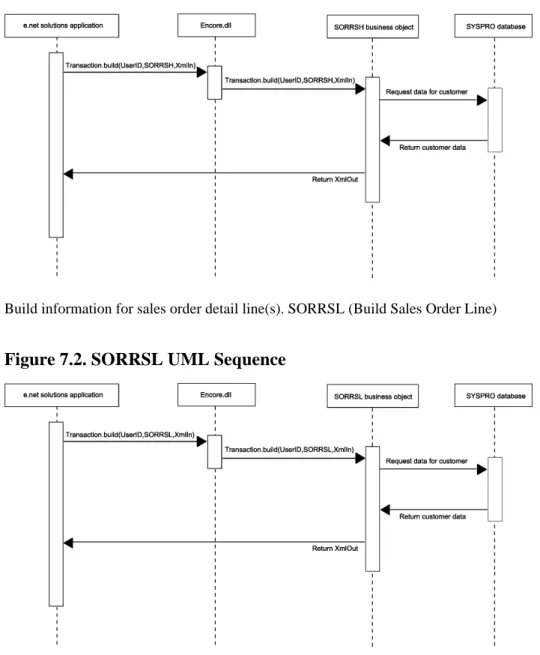
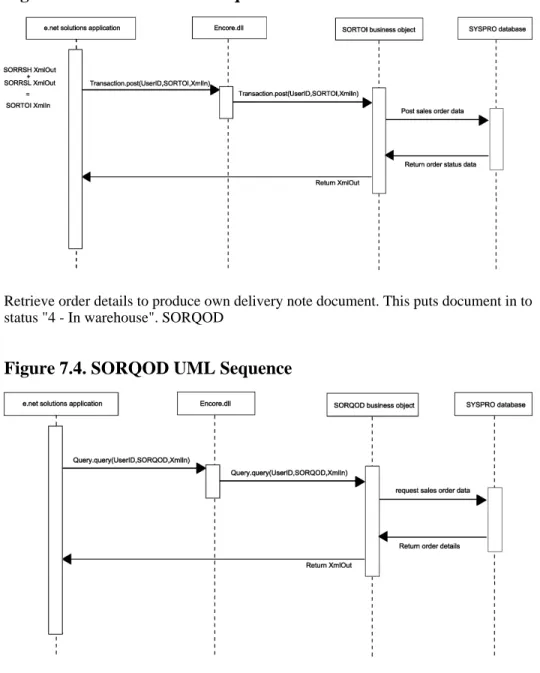
2.3. .NET Framework ... 2–12 3.1. Basic Program Structure ... 3–3 3.2. Abstracting e.net solutions framework ... 3–6 5.1. The COM Object ... 5–1 6.1. The XSLT transformation process. ... 6–3 7.1. SORRSH UML Sequence ... 7–2 7.2. SORRSL UML Sequence ... 7–2 7.3. SORTOI UML Sequence ... 7–3 7.4. SORQOD UML Sequence ... 7–3 9.1. e.net solutions Log Text ... 9–6
9.2. Error Handling Message Files ... 9–4 9.3. e.net solutions Trace File ... 9–7
5.3. ASP.NET C# codebehind for Utilities.Logon ... 5–6 5.4. ASP.NET Visual Basic codebehind for Utilities.Logoff ... 5–7 5.5. ASP.NET Visual Basic codebehind for Utilities.GetLogonProfile ... 5–7 5.6. ASP.NET C# codebehind for Utilities.GetLogonProfile ... 5–8 5.7. ASP.NET Visual Basic codebehind for Utilities.Run ... 5–9 5.8. ASP.NET Visual Basic codebehind for Query.Query ... 5–12 5.9. ASP.NET C# Sample Code for Query.Query ... 5–13 5.10. XmlIn with Query.Browse (COMBRW.XML) ... 5–14 5.11. ASP.NET Visual Basic codebehind for Query.Browse ... 5–16 5.12. XmlIn with Query.Fetch (COMFCH.XML) ... 5–18 5.13. ASP.NET Visual Basic codebehind for Query.Fetch ... 5–19 5.14. XmlIn with Query.NextKey (COMKEY.XML) ... 5–20 5.15. ASP.NET Visual Basic codebehind for Query.NextKey ... 5–22 5.16. XmlIn with Query.PreviousKey (COMKEY.XML) ... 5–23 5.17. ASP.NET Visual Basic codebehind for Query.PreviousKey ... 5–25 5.18. ASP.NET Visual Basic codebehind of Setup.Add ... 5–28 5.19. ASP.NET C# codebehind for Setup.Add ... 5–30 5.20. ASP.NET Visual Basic codebehind for Setup.Update ... 5–33 5.21. ASP.NET Visual Basic codebehind for Setup.Delete ... 5–36 5.22. ASP.NET Visual Basic codebehind for Transaction.Post ... 5–38 5.23. ASP.NET C# Sample Code for Transaction.Post ... 5–39 5.24. ASP.NET Visual Basic codebehind of Transaction.Build ... 5–42 6.1. Simple XML ... 6–2 6.2. Transformed Simple XML ... 6–2 6.3. Chapter.xml ... 6–5 6.4. Chapter.xsl ... 6–6 6.5. ASP.NET C# using the XslTransform Class ... 6–7 6.6. XSL Simple Stylsheet File ... 6–9 6.7. Simple Codebehind Page ... 6–15 9.1. Error: Unexpected Parameter Sent ... 9–1 9.2. Message Number ... 9–3 10.1. Code Sample for logon.aspx in VB.NET ... 10–1 10.2. ASP.NET code for using COMFND.aspx ... 10–4 10.3. ASP.NET code for ARSQRY.aspx ... 10–7 10.4. SORRSH.aspx ... 10–11 10.5. SORRSH.xsl ... 10–15 10.6. Import .NET Namespaces in ASP.NET VB ... 10–19 10.7. Import .NET Namespaces in ASP.NET C# codebehind ... 10–19 10.8. Query.Query Method in ASP.NET VB codebehind ... 10–20 10.9. Query.Query Method in ASP.NET C# codebehind ... 10–21 10.10. Transaction.Build Method in ASP.NET VB codebehind ... 10–22 10.11. Transaction.Build Method in ASP.NET C# codebehind ... 10–23 10.12. Transaction.Post Method in ASP.NET VB codebehind ... 10–24 10.13. Transaction.Post Method in ASP.NET C# codebehind ... 10–25
10.14. Setup.Add Method in ASP.NET VB codebehind ... 10–26 10.15. Setup.Add Method in ASP.NET C# codebehind ... 10–27 10.16. Setup.Update Method in ASP.NET VB codebehind ... 10–28 10.17. Setup.Update Method in ASP.NET C# codebehind ... 10–29 10.18. Setup.Delete Method in ASP.NET VB codebehind ... 10–30 10.19. Setup.Delete Method in ASP.NET C# codebehind ... 10–31 10.20. Query.Fetch Method in ASP.NET VB codebehind ... 10–32 10.21. Query.Fetch Method in ASP.NET C# codebehind ... 10–33 10.22. Query.Browse Method in ASP.NET VB codebehind ... 10–34 10.23. Query.Browse Method in ASP.NET C# codebehind ... 10–35 10.24. Query.NextKey Method in ASP.NET VB codebehind ... 10–36 10.25. Query.NextKey Method in ASP.NET C# codebehind ... 10–37 10.26. Query.PreviousKey Method in ASP.NET VB codebehind ... 10–38 10.27. Query.PreviousKey Method in ASP.NET C# codebehind ... 10–39 10.28. Creating the Transform Function in ASP.NET VB codebehind ... 10–41 10.29. Creating the Transform Function in ASP.NET C# codebehind ... 10–42 10.30. Calling the Query Method in ASP.NET VB codebehind ... 10–43 10.31. Calling the Query Method in ASP.NET C# codebehind ... 10–44 10.32. Calling the Build Method in ASP.NET VB codebehind ... 10–46 10.33. Calling the Build Method in ASP.NET C# codebehind ... 10–47 10.34. Price Query Code in ASP.NET VB codebehind ... 10–49 10.35. Price Query Code in ASP.NET C# codebehind ... 10–50 10.36. ASP.NET .aspx Form Sample ... 10–51 10.37. Sales Order Query Code in ASP.NET VB codebehind ... 10–52 10.38. Sales Order Query Code in ASP.NET C# codebehind ... 10–53 10.39. ASP.NET .aspx Form Sample ... 10–54
Introduction
This book is written to introduce you to the concepts involved when programming with SYSPRO e.net solutions. It will help you learn and utilize the power of SYSPRO's e.net solutions in building your own custom applications and integrating SYSPRO with other applications. This book cannot tell you everything about SYSPRO e.net solutions, nor can it provide you with all the tools that you will need to successfully program your own application with SYSPRO e.net solutions. It can only teach you about what SYSPRO e.net solutions is and how to apply the functionality of the system to your applications. In a sense, this book will provide you with the basic tool box and parts that you will be able to use to assemble a powerful, integrated, SYSPRO e.net solutions enabled application. It remains up to you to do the assembly, and to learn to use the tools.
There are many reasons for learning the concepts and programming logic of SYSPRO's e.net solutions. All the various reasons given, however, will typically relate to one of the following basic reasons:
• The ability to create your own custom application
• The ability to extend the SYSPRO core system to a Web based system • The ability to add custom content and processes to the SYSPRO system • The ability to integrate the core SYSPRO system with another system
Whatever your reasons for learning and using the methods and functions of programming with e.net solutions, this book will help you realize your own potential and the potential of your company or enterprise as you create new applications, extend specific functionality, and integrate your SYSPRO system with other applications and services.
1.1. Audience
This book is written for system programmers. We assume that you already know the basic structures of programming in Visual Basic or C#, and are familiar with ASP.NET. You do not need to be an expert in these languages to understand the logic and examples presented in this book, you only need to be familiar enough with them so that you can see the processes involved (most programmers are able to look at any object oriented
programming language and follow the process, even if the syntax is different). As you will find out later in this book, e.net solutions based applications can be programmed using any COM or Web Service enabled language, so you are not limited to the language examples given in this book. We have used these languages as they have been the most commonly used to date.
This book also assumes that you know and understand the basics of the SYSPRO system. What SYSPRO is, an ERP core application that is extended using COM and .NET to provide SOA capabilities. What a SYSPRO system does, Accounts Receivable, Bill of Material, etc., and how to connect to a SYSPRO application server (basic networking knowledge). If you do not have access to a SYSPRO application server then you will not be able to utilize the information provided in this book.
1.2. Objectives
The main objective of this book is to provide an overview of the classes and methods of the SYSPRO e.net solutions environment so that the reader is able to create a custom application or integrate a SYSPRO process within their current system. Each chapter is written with a specific objective in mind, so that by the end of the book the reader has been exposed to the concepts of e.net solutions, has been shown specific examples of the classes and methods of e.net solutions, and has seen a sample application created using these examples as a foundation.
By the time that you have finished working through this book you will understand the interaction of the e.net solutions package with the core SYSPRO product. You will also be able to create, modify, and troubleshoot e.net solutions programs yourself. This book will provide the foundation knowledge for building an integrated and extended ERP system.
1.3. Requirements
Programming and deploying enterprise level applications through e.net solutions requires the following:
• Previous programming experience in Visual Basic (VB) or C#, and familiarity with ASP.NET
• SYSPRO 6.0 server with e.net solutions installed (this book was written using Issue 010) and running on Windows Server 2000/2003
(For ASP.NET applications this book assumes the use of IIS 4.0 or higher as the installed web server.)
• The .NET 1.1 Framework (This is not needed for VBScript but is recommended for using this book as we deal with both VBScript, COM, and .NET programming examples)
• Microsoft Internet Explorer 6.0 or higher • Microsoft XML 3.0 or higher
It is highly recommended that you request a SYSPRO 6.0 Issue 010 Evaluation Version from your local SYSPRO VAR and install it on a test server. On this test server also install the supplied Sample Data and the SYSPRO Web Applications. We will be using the Sample Data within the code examples of this book. It is also highly recommended that you install the e.net Diagnostics suite (see Section 4.2, “e.net Diagnostics Suite” [4–1]). If you do not have .NET programming experience please take time to read Chapter 2, Defining e.net solutions [2–1] so that you understand the relationship between e.net solutions, COM, and Microsoft's .NET
Framework. After reading the chapter, do an introductory ASP.NET course, either online, at a training institution, or from a 'Teach Yourself .NET' type of book. This book will teach you how to use e.net solutions with the .NET Framework, and as such the programming knowledge of .NET is assumed to be known.
Defining e.net solutions
Objectives - The objective of this chapter is to expose you to the concepts behind
SYSPRO e.net solutions. At the end of this chapter you will know about SYSPRO business objects, the Component Object Model (COM), SYSPRO Web Services, XML Schemas, SYSPRO Web Based Applications, and the relationship between e.net solutions and Microsoft's .NET Framework.
Before learning how to program with e.net solutions it is essential to understand what e.net solutions is. Simply defined, e.net solutions provides a Component Object Model (COM) interface that allows VB, C++, C#, Java, JBOS, ASP 3.0 and ASP.NET developers to access SYSPRO functionality via an object model. For this reason, any COM or Web Services enabled language or application can use the e.net solutions object model (for simplicity we focus on VBScript, ASP.NET C# and VB examples in this book). Component-based concepts and principles permeate throughout the entire design of the SYSPRO system, particularly the e.net solutions functionality that is part of the core system.
At the high-level, the SYSPRO e.net solutions framework is comprised of four components:
• Business Objects - proprietary SYSPRO technology, a business object is an executable piece of code that implements an area of business logic or functionality that is inherent to the SYSPRO ERP.
• A COM Object - A Component Object Model (COM) object is basically a black box that can be used by applications to perform one or more tasks. COM objects are commonly implemented as a dynamic-link library (DLL). Like a conventional DLL, COM objects expose methods that an application can call to perform any of the supported tasks.
• Web Services - Preconfigured web based services that extend the full functionality of the SYSPRO system to an Internet type environment.
• XML Schemas - An XML Schema is an XML file that uses the XML Schema
Definition (XSD), a language, to describe the structure of an XML document.
As shown in Figure 2.1, “e.net solutions Framework Architecture” [2–2], the COM and business object components are implemented as separate interfaces. The fourth
component, XML Schemas, are used by developers to validate XML instances passed between the e.net solutions applications and the business objects. We will discuss this a little later in more detail. Combined, these components provide:
• A component architecture that simplifies integration development around the SYSPRO environment.
• A standard way of directly accessing the business functionality within SYSPRO without compromising the business rules or security of the system.
Figure 2.1. e.net solutions Framework Architecture
2.1. Business Objects
Proprietary SYSPRO technology, a business object is an executable piece of code that implements an area of business logic or functionality that is inherent to the SYSPRO ERP. A default part of the SYSPRO installation, business objects abstract the business logic or
At time of writing there were 177 business objects as compared to 1200 programs. These business objects implement approximately 45% of the business logic and functionality inherent within the 31 SYSPRO modules. The SYSPRO modules are briefly listed below. We have purposely not listed the business objects associated with each module. The reason for this is that knowing their names is, at this introductory stage, of little importance or value. It is sufficient to understand that they exist, and that the business objects are organized by these modules.
• System Manager • Accounts Payable • Accounts Receivable • Cash Book • General Ledger • Assets Register • Inventory • Purchase Orders • Sales Analysis • Sales Orders • Bill of Materials • Quotations • Requirements Planning • Lot Traceability
• Report Writer / SYSPRO Reporting Services • Work in Progress
• Office Automation • Interface/EDI • Screen Customization • Electronic Funds Transfer • Project & Contracts • Activity Based Costing • Landed Cost Tracking • Counter Sales
• Blanket Sales Orders and Releases • Return Merchandise System
• Product Configurator • Factory Documentation • Engineering Change Control
• Inventory Optimization (Forecasting) • SYSPRO Analytics
SYSPRO will also be releasing these two modules in the near future: • Contact Management
• Trade promotions
In order to invoke the functionality of a business object with an e.net solutions based application or one of the e.net solutions web-based applications shipped with SYSPRO, the business object module must be licensed. The only exception to this is the e.net solutions Document Flow Manager (DFM) which by default is able to invoke the functionality of any business object regardless of licensing constraints.
Business objects are called and passed information using a text-based format called XML. When a business object accepts this XML it is known as “consuming” it. The business objects also return information in XML format. The deviation from this is when the supplied XML contains incorrect information, in which case the business object may "throw an exception".
To ensure data integrity, each business object is designed to check that the XML instance passed is in a form and structure that is acceptable for processing. If the XML is
acceptable, processing continues and the result is returned to the e.net solutions application as a new XML instance, otherwise an exception is raised.
An exception is a program execution error which in context of the e.net solutions
framework is trapped by the COM service provided by the operating system. An exception typically results in the abrupt termination of a program. To help developers avoid
exceptions an XML Schema is provided for each business object. The XML Schemas enable developers to validate the XML strings constructed by their e.net solutions applications.
In SYSPRO e.net solutions the COM object is implemented as a Dynamic Linked Library (DLL) calledENCORE.DLL. In case you're wondering where this name came from, it is a legacy carry-over from the days when the SYSPRO product was called Encore. As to the reasons why the filename was not changed when the product was re-branded, they will soon become apparent.
When SYSPRO e.net solutions is installed on a SYSPRO application server,
ENCORE.DLLis installed to the SYSPRO base folder and registered to expose a number of interfaces as Public Objects. Each of these objects is essentially a class that categorizes methods according to the class function.
As shown in Figure 2.2, “The COM Object” [2–5], the COM interface is extremely simple and compact. The classes and methods provided are also designed to be as abstract or generic as possible. The implication of this is that the COM Object will rarely, if ever, need to be modified. For developers, this means that the integrity of the interface on which their e.net solutions applications are built is more or less guaranteed to remain unchanged, regardless of the version number of the underlying SYSPRO application.
If you are still wondering whyENCORE.DLLhas not been renamed, consider what would happen to e.net solutions web-based applications if the Encore COM object was renamed toSYSPRO.DLL. The COM object interface would be broken and e.net solutions would not be serviceable. This backward compatibility is essential for the smooth transition of upgrades and updates.
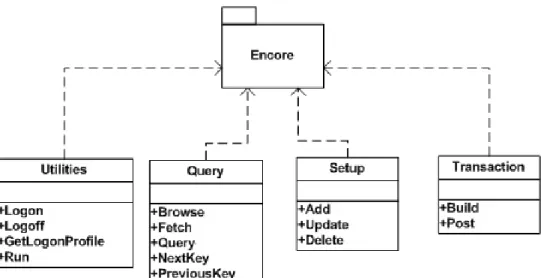
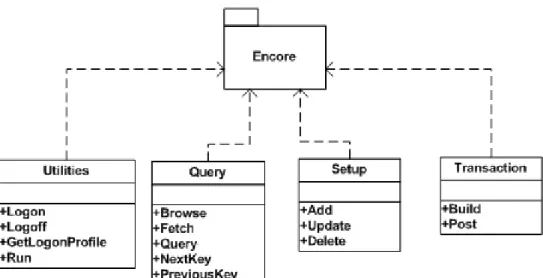
Each class is a purposeful interface with methods that can be used to perform operations, as follows:
• Utilities, this class provides methods for authentication, profile retrieval and running of Net Express programs, including:
• Logon
• Logoff
• GetLoginProfile
• Run
• Query, this class provides methods to query data in a generic way, including: • Browse
• Fetch
• Query
• NextKey
• PreviousKey
• Setup, this class provides methods that can be used to modify information contained in the database, the SYSPRO data structures.
• Add
• Update
• Delete
• Transaction, this class provides methods that can be used to build and post transactions, including:
• Build
• Post
At run-time, e.net solutions creates copies or new instances of these objects. Once this is done, information can be dynamically passed using an XML string that is defined by the method called. This information is passed to the business object interface where further processing takes place.
2.3. Web Services
Web Services extend all the core functions of the SYSPRO system to a Web interface. The Web Services enable the core SYSPRO ERP system to support direct interactions with other software applications using XML-based messages. These messages are typically exchanged via Internet based protocols (such as HTTP , FTP, and SMTP). In other words the Web Services deliver the core SYSPRO ERP application in an integrated and cohesive way across a variety of different protocols to almost any client device.
By using the SYSPRO Web Services you enable other web applications and programs to access and utilize the functionality of your SYSPRO system. This is where SYSPRO becomes the core functioning system of an SOA (see Section 2.7, “Service Oriented Architecture (SOA)” [2–13]).The core functionality of the SYSPRO system is made
hosted on a different network. If an Internet Service Provider (ISP) is hosting the SYSPRO application server then it is easier to connect to the Web Services than to connect through DCOM (mainly due to firewall issues). The Web Services are also used when a custom application has been created that is being used on different operating systems and at different locations within the enterprise controlled network.
The Web Services are not part of a default SYSPRO install and so will need to be installed separately (see Appendix A, Installing the SYSPRO Web Services [A–1]).
2.4. XML Schemas
An XML Schema is an XML file that uses the XML Schema Definition (XSD), to describe the structure of an XML document. All XML documents have to conform to the W3C Schema specification in order to be considered true XML. These XML documents are said to be "well-formed". Any document that does not conform to the standard cannot be read or processed as an XML document and will return an error. The following four
requirements of a well-formed XML document are where most of the XML mistakes occur:
1. All attribute values must be enclosed in single or double quotation marks 2. All elements must have both begin and end tags (unless they are empty).
3. All empty elements must contain an empty element identifier (/) at the end of the begin tag.
4. Elements must be nested properly.
While discussing XML it is important to also mention that the W3C has produced XML specifications for XML versions 1.0, and 1.1 (and is due to release specifications for 2.0 in the near future). SYSPRO e.net solutions and the associated business objects require the use of XML 1.0.
Previously we mentioned that business objects can be passed information in the form of XML strings and that the structure of these XML instances must be acceptable to the business object in order to continue processing. The XML Schemas shipped with
SYSPRO enable developers to check that the form and structure of XML instances created by their e.net solutions applications, making sure that they are acceptable to the business object which is being invoked to perform an operation. In XML terms this is called "Validation".
The process of validation is performed by an XML Parser. An XML Parser is a processor that reads an XML document and determines the structure and properties of the data. It breaks the data up into parts and provides them to other objects or components. When reading an XML document the parser checks that the document is well-formed and validates the structure of the document against the XML Schema (XSD).
As SYSPRO e.net solutions is designed to operate on the Microsoft Windows operating system, the Microsoft XML Parser (which has now been renamed Microsoft XML Core Services) is the processor of choice.
For each business object within SYSPRO there are corresponding XML Schemas (XSD) that are specifically designed for use with only that business object. Setup and Transaction class business objects utilize two XML inputs (what we will later call XmlIn and Xml Parameters). Each of the XML inputs has its own corresponding schema. To validate their XML instances, developers can pass their XML, which they have constructed for
consumption by a specific business object, to the MSXML Parser together with the XSD provided for the target business object. The parser will check that the XML is well-formed and that its structure conforms to the rules defined in the XSD. Assuming that the XML is acceptable, it can then be passed to the designated business object with the peace of mind that an exception will not be returned because of incorrect XML structure (there could be exceptions due to other errors - i.e. the if a Query Key is invalid) and that a new XML instance will be generated once processing is completed.
When the core SYSPRO ERP is installed, the complete XML Schema Library is copied to thebase\schemasfolder.
2.5. SYSPRO Web Based Applications
SYSPRO have developed a set of web based applications that utilize the business objects through an ASP.NET programmed interface. In this book we will be using some similar programming structures and XSL formatting ideas as the web based applications. As we have already mentioned in the requirements section of the previous chapter, we highly recommend that you obtain the evaluation version of SYSPRO 6.0 Issue 010 (or higher) and install the SYSPRO Application Server, the SYSPRO Web Applications, and the Sample Data on a test or development system.
2.6. .NET and e.net solutions
Although the name 'e.net' implies a close connection between the system and the .NET Framework, we cannot assume that everyone knows what .NET is and what the
relationship between .NET and the SYSPRO system is. In this section of the introduction we will briefly discuss what .NET is and what the major components are. In the next section we will examine the relationship between the SYSPRO system and .NET through e.net solutions.
2.6.1. What is .NET?
For many people learning e.net solutions, one of the most pressing questions at this juncture may be "What is .NET?". The simplest answer is: “.NET is a Framework in which Windows applications may be developed and run”. I agree that this answer does not tell much, as true a definition as it is. In order to truly understand .NET we must go back in time and follow the development of Windows and the advent of Windows
programming.
The historical framework and working definitions of .NET used in this section are based on the information presented in the codeproject
[http://www.codeproject.com/dotnet/dotnet.asp] introductory article on .NET written by Kashif Manzoor.
2.6.1.1. The Road to .NET
The Windows operating system provides programmers with various functions - called API (Application Programming Interfaces). Starting from the earliest version of Windows on the commercial market to the most recent version of WindowsXP, APIs are the basic tools that let the operating system know what you want it to do. If you want to create a Dialog Box you need to call a specific API provided by Windows. Creating a button requires another API call. And so the list goes on. As new and updated GUIs appeared on the scene, new APIs were introduced in Windows. But using these native APIs became a very challenging task. Making a simple Window that prints "Hello World" could take more than hundred lines of code. Compare this to the 5 lines of a "Hello World" program in DOS. Due to this difficulty, Windows programming was considered something better left to the experts. Microsoft and other commercial organization's were aware of this trend, and started marketing Visual Tools that made the programmer's life easier. Using Visual C++, Visual Basic, Borland's C++ and other such IDEs, it became much simpler to make Windows programs.
Microsoft also realized that applications needed a solid way to talk to each other. This realization resulted in the introduction of Object Linking and Embedding (OLE). OLE was an extremely useful concept, but it had two major flaws : it was notoriously difficult to program, and it was very limited in its scope - i.e. it only did a few things like drag and drop, clipboard sharing, OLE client, OLE server, etc. Microsoft addressed (or at least tried to address) both of these problems. They upgraded OLE to COM. COM was much more
capable than OLE, and it introduced other new concepts, like ActiveX controls. These could directly compete with Java Applets. As for the difficulty of programming
OLE/COM; Microsoft expanded the MFC (Microsoft Foundation Classes) and VBRun to take care of most of the dirty work. Although making an ActiveX application still was slightly tricky in Visual C++, developing an ActiveX application in Visual Basic was extremely easy. For this reason Visual Basic became the foremost ActiveX development media.
The Internet revolution then posed new problems and challenges. C/C++ (which was the tool of programming champions) was not suited or ready for Web Development. Microsoft tried expanding MFC, and included several network oriented classes - like CSocket, CASyncSocket, and several HTTP based classes. By using these classes a programmer could very quickly develop a distributed application, but it took considerable effort. These applications were also always customized and targeted to the specific task. The developers had to take care of the gory network communication details themselves. By now
object-oriented analysis and development had started becoming ubiquitous. Although technologies like Remote Procedure Call (RPC) was a great help to the programmers; it was limited in its scope. For programmers following Object-Oriented development, RPC was not much help at all as it did not allow the passing of objects as parameters. This major issue was addressed by the introduction of industry agreed upon standards, like CORBA, IIOP, RMI, DCOM etc. All these standards used customized protocols to transmit an object over the network. They also required a tight coupling between the server and the client - i.e. the client needed to be fully aware of how to talk to the server. Due to this tight client-server coupling all these protocols needed considerable deployment efforts in order for distributed applications to function properly. Sun did come up with another layer on top of RMI - the famous Enterprise Java Beans (EJB). The EJB container provided lot of services for free - all that a programmer had to do was to extend (inherit) from an appropriate EJB base class, and there you have it - a fully functional distributed application. EJB made programmer's lives considerably easier; but it did not eradicate the client-server coupling issue.
Microsoft realized that upgrading their existing technologies would not work. What was needed was a complete change in their philosophy. Historically, OLE was upgraded to COM - and it was welcomed by all. COM was then upgraded to COM+. Microsoft addressed the distributed programming issue with the introduction of DCOM. Although COM/COM+/DCOM were all good technologies, they all required a significant learning curve. Sun on the other hand was making things easier and so a majority of developers were turning towards Java based technologies for distributed enterprise applications. Microsoft got their programming gurus together and asked them to reflect back on their Windows DNA and to come up with a future vision. This group came up with so many new and great ideas that Microsoft realized that no amount of up upgrading or extending of their MFC/VBRun/WFC, COM/COM+/DCOM, ASP, APIs etc. would even come
2.6.1.2. Major Components of .NET
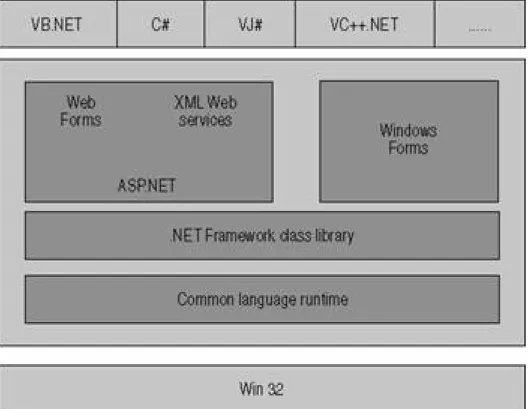
At the core of The .NET Framework is a component called the Common Language Runtime (CLR). The CLR can be thought of as a separate operating system that runs within the context of another operating system (such as Windows XP or Windows 2000). This idea is not something new. We have seen this with the Java Virtual Machine, as well as the environments of many interpreted languages such as BASIC and LISP which have been around for decades. The purpose of a middleware platform like the CLR is simply that a common OS like Windows is often too close to the hardware of a machine to retain the flexibility or agility required by software targeted for business on the Internet.
Software running on the CLR (referred to as Managed Code) has the needed flexibility and is exceptionally agile.
Unlike interpreted languages, managed code runs in the native machine language of the system on which it is launched. In short, this is how the .NET process works:
1. Developers write their code in a .NET enabled language.
2. The compiler generates binary executable software in a p-code format called Common Intermediate Language (or CIL for short).
3. When the software is launched, the CLR re-compiles or JIT-compiles (Just In Time) the CIL into native code such as x86 machine language.
4. Then the code is then executed at full speed.
Another component of the .NET Framework is the massive library of reusable object-types called the Framework Class Library or FCL. The FCL contains hundreds of classes that perform tasks ranging from file reads and writes to advanced cryptography and web services.
The CLR is intrinsically object-oriented; even its CIL (the p-code, which can be viewed as a virtual assembly language) has instructions to manipulate objects directly. The
Framework Class Library reflects the platform's object-oriented nature. For most programmers, the FCL is the most extensive and extendable class library that they will have ever worked with.
Finally, the .NET Framework contains a collection of tools and compilers that help to make programming productive and enjoyable. Up until now we have not mentioned much about C# (pronounced See-Sharp) or Visual Basic.NET (we'll be programming in these languages later). The reason is that the real core of .NET is the CLR. However, over twenty language compilers are currently being used in the .NET Framework, including the original five .NET languages from Microsoft: Visual Basic, C#, C++, JavaScript and CIL. The CLR and the .NET Framework have been designed in such a way that code written in one language can not only seamlessly be used with another language, but it can also be naturally extended by code written in another programming language. This means that
(depending on the needs of a project’s work-force) developers will be able to write code in the language in which they are most comfortable.
Figure 2.3. .NET Framework
2.6.2. SYSPRO ERP integrated with .NET
SYSPRO e.net solutions is based on the Windows Distributed Network Architecture (DNA) model, which in turn is based on the Component Object Model (COM). As we have seen, COM is basically a black box that can be used by applications to perform one or more tasks. Like a conventional DLL, COM objects expose methods that an application can call to perform any of the supported tasks. SYSPRO have taken the business logic of the SYSPRO ERP system and programmed it into individual executable pieces of code called business objects. These business objects are available through the COM (or DCOM)
identity and transaction capabilities that are required in order to enable the efficient management of interactions across a service-orientated architecture (SOA).
SYSPRO e.net solutions is a component architecture that gives authorized individuals the ability to interact with SYSPRO data over the Web as well as from remote devices, including PDAs and cell phones. SYSPRO e.net solutions provides a standard way of directly accessing the business functionality within the SYSPRO system while maintaining the software's built-in business rules and security. In addition to enabling such functions as
remote purchase order entry and inventory status determination, SYSPRO e.net solutions
also facilitates the integration of other best-of-breed applications with the SYSPRO software. The .NET integration within SYSPRO's e.net solutions COM architecture opens the whole application to collaborative networks and Web based interaction.
In order to utilize the .NET Framework capabilities of e.net solutions presented in this book you will need to already understand programming in .NET (particularly ASP.NET). You will also need to learn and know the functions of the business objects that are part of SYSPRO e.net solutions. This book will introduce you to the concepts needed in order to create programs that interact effectively with the business objects. The Business Object
Library of the Section 4.2, “e.net Diagnostics Suite” [4–1] lists the many business objects
that are currently available. The SYSPRO online Support Zone provides a more extensive in the e.net solutions Business Objects Reference Library section. The Business Objects Reference Library also provides greater detail about each business object and is updated with any new business object or information about a business object. Remember that the business objects are available through the COM interface as well as through the web-based applications that are written in ASP.NET. So if you only know Visual Basic Scripting and only want to program your application through the COM interface then you will not need to know .NET programming. In this book we will provide you with the foundational information that will allow you to do both. Many of the sample applications through out this book will however be presented in ASP.NET.
2.7. Service Oriented Architecture (SOA)
One of the key features of SYSPRO's e.net solutions is the extension of the core SYSPRO ERP system to the wider network, including the Internet. This capability creates the functionality required for a Service Oriented Architecture (SOA).
SOA capability is becoming increasingly sought after and utilized in the business software arena. Using SOA brings increased flexibility and agility to your system, resulting in greater information exchange, reduced programming expenditure and increased return on investment. The concept underlying the architecture is based on the principles behind object oriented programming, but extended to deal with the whole system or architecture. The central feature of SOA is the creation of re-usable objects of code defined as services. Each service is dynamically discoverable (i.e. you can perform a search for it, and for the type of service that it performs), network enabled (usually web based), and part of a larger group of services that together form components or modules.
through e.net solutions web-based and COM based applications. The business objects exposed through a web-based application and through the web services are the core SOA services that create the extension of the SYSPRO ERP. The COM/DCOM system is also part of the extension of the core SYSPRO ERP. Your custom built e.net solutions
application will use the SOA functionality present within SYSPRO, and could become the core SOA enablement of the enterprise that you are programming for (depending on your enterprises SOA goals and management strategies).
For more information on SOA and the use of SYSPRO within an SOA please contact your local SYSPRO VAR office and request a copy of the book: SYSPRO on SOA.
2.8. Net Express and other Programming Tool environments
Many of the programmers at SYSPRO and within their customer base use Net Express as their Integrated Development Environment (IDE). The SYSPRO Forums at
support.syspro.com [http://www.support.syspro.com] has a specific development forum for these users.
There are other IDEs that are available for the .NET Framework. Microsoft offers Visual Studio 2005 as its core .NET IDE, and offers related free products, known as 'Express Editions' (Visual Web Developer 2005 Express Edition, Visual Basic 2005 Express Edition, and Visual C# 2005 Express Edition). It is possible to use these tools to develop your enterprise level applications, or any another IDE that is integrated with the .NET Framework.
Getting Started with e.net solutions
Objectives - In this chapter we will introduce the basic structure of programming with
e.net solutions. We will demonstrate the capabilities of programs that interact with the e.net solutions framework by using two different models: the Basic model, and the Abstraction Model. By the end of this chapter you will have created your first program, sending and receiving information from the SYSPRO application server through the e.net solutions framework.
3.1. The Structure of Program
Having seen what SYSPRO e.net solutions is comprised of, and how SYSPRO is accessible to COM and .NET programming through e.net solutions, we now turn our attention to the concepts of programming that will access the e.net solutions framework. Development of e.net solutions based applications requires the programmer or
development team to consider questions of programming organization and structure. As we consider programming with e.net solutions, there are two development models that we can use to define our development methods and application structure:
• The Basic Model • The Abstraction Model
3.1.1. The Basic Model
The Basic Model is centered around the e.net solutions COM interface. As such it requires that an application will, for each interaction with SYSPRO, call a method, a business object if required, and pass/receive parameters or data as XML strings. The Basic Model, while simple, enables rapid development of rich and fully functional applications. Understanding of the Basic Model provides the foundation for developers that wish to structure their application using the The Abstraction Model.
As with any application development, developers need to have a clear understanding of their business's or customer's requirements in order to design an application that will provide the required functionality. If this objective is clear, the basic structuring and functionality of an e.net solutions application is easily described using Unified Modeling
Language (UML) Sequence-Diagramming.
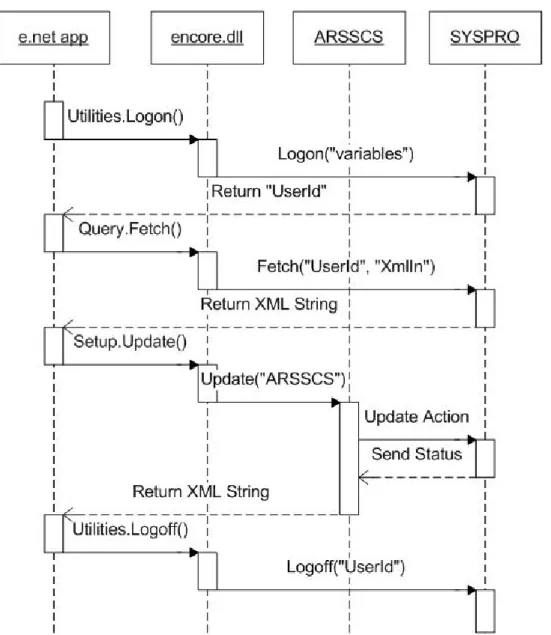
The application shown in Figure 3.1, “Basic Program Structure” [3–3] illustrates the use of the e.net solutions framework and business object components to create an application
that will enable a user to 'Update a Customer Record'. The application is comprised of four components:
• The e.net solutions web-based application. The application that will enable Customer Records to be updated.
• ENCORE.DLL. The e.net COM interface.
• ARSSCS. The Accounts Receivable Customer Maintenance business object that provides the functionality to add, update or delete customer records.
• SYSPRO. A SYSPRO application server with support for SYSPRO e.net solutions.
The application assumes that the user already has knowledge of a valid Customer ID.
We have oversimplified the content of this diagram so that it is easy to see the process. Other UML sequence diagrams will contain more information when used later in this book.
Our "Customer Record Update" application first enables users to authenticate themselves. In so doing a UserID is obtained, this will be used to authenticate the session. Having obtained a UserID, the application enables the user to input a known Customer ID and uses theQuery.Fetchmethod to retrieve the record containing the Customer Details. The Customer ID is passed to SYSPRO in an XML string by way of theXmlInvariable. It is the value for theQuery.Fetch <Key>element of the XML input within the above example. Don't worry if you don't yet know what a<Key>element is, you will be introduced to the XML input requirements of the business objects as you continue reading and applying what you learn from this book.
SYSPRO returns the record details of the specified Customer ID as an output XML string to the e.net solutions application where the information is displayed on screen and can be modified by the user. When the user has finished modifying the details, the changes must be updated on SYSPRO. The e.net solutions application would provide a Save or Update button that will enable the user to instruct the application to save the changes back to SYSPRO.
TheSetup.Updatemethod is then used to call the ARSSCS business object. The
Setup.Updatemethod requires that two XML strings are passed to it:
XmlParameters(ARSSCS.XML) andXmlIn(ARSSCSDOC.XML). SYSPRO returns the operation status back to ARSSCS which returns an XML string to the e.net application (ARSSCSOUT.XML).
The e.net solutions application then enables the user to repeat the operation on another Customer or to Logoff from the application.
This is a simple e.net solutions application. In this case it has served to illustrate the principle of the Basic Model that can be used to describe and structure e.net solutions applications. While it is a fully functional, self-contained application, it can be included as a functional part of a much larger application.
3.1.2. The Abstraction Model
The Abstraction Model is really a natural extension to The Basic Model described in the previous section. The Abstraction Model employs the ability of Object Orientated programming to abstract away lower-level or complex programming functionality to produce a simpler API.
API can be simplified and tailored to better describe the application. It also enables extended functionality to be developed in layers within the application.
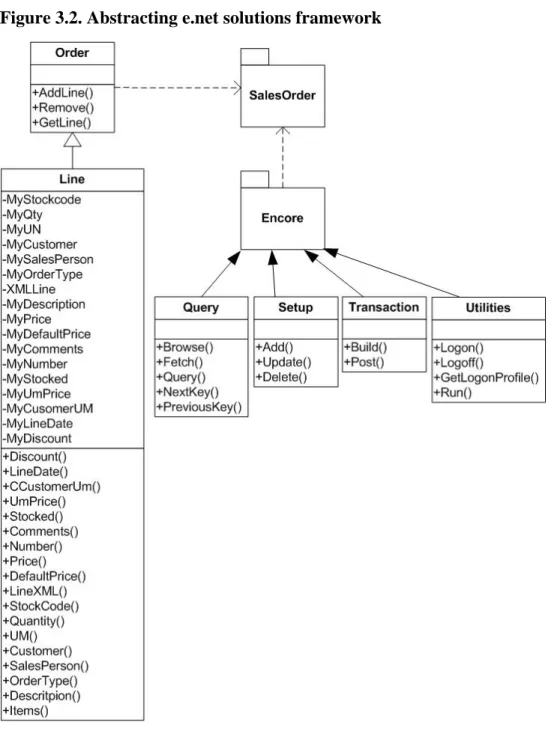
A simple example of how the e.net solutions framework may be abstracted is shown Figure 3.2, “Abstracting e.net solutions framework” [3–6]. This abstraction defines a new class library package calledOrderthat contains theEncoreclasses and one new class calledLines. TheSalesOrderclass abstracts the standard interaction used to interact with the Sales Order business object (SORTOI) and extends the functionality of Sales Order functionality within the application.
3.2. Your First e.net solutions program
It's now time to put the knowledge that you have just gained into use. Using the Basic Program Structure mentioned earlier in this chapter we will now create our first e.net program together. We will be creating a simple logon script using Visual Basic Scripting... 1. Open the Programming Editor that you are most comfortable with (or just open the
Windows Notepad)
2. Declare the variables that will be used for the Logon: • UserID
• Encore
To do this we type in the following code:
Dim UserID, Encore
3. We next set the Encore variable to the Encore.Utilities class Type in the following code:
Set Encore = createobject("Encore.Utilities")
4. We will now perform the e.net solutions logon function, using the Utillities.Logon method
Type in the following code:
UserID = Encore.Logon("ADMIN", "password", "0", " ", 5, \ 0, 0, " ")
Where you see \ at the end of a line of code and the next line indented, this means that the text was too long for the page size of this book but the indented text belongs of the code line above.
(for your logon string change ADMIN to your SYSPRO operator code, change
number [0 is the company number of the evaluation version's The Outdoors
Company], and the following " " to your SYSPRO company password)
5. Now we need to display the logon details that the previous method created in the SYSPRO system.
Type in the following code:
msgbox UserID, , "This is the User ID created by \ logon"
6. Finally, we need to logoff of the SYSPRO system. To do this we will use the Utilities.Logoff function.
Type in the following code:
Encore.logoff(UserID) Set Encore = Nothing
7. Now that you have entered the text, save the file as Logon.vbs. You can now execute the script and receive the UserID results from the e.net solutions SYSPRO
application server.
Congratulations! You have now successfully created your first e.net solutions program. This example is created in Visual Basic Scripting, but other examples and sample code sections will be presented in Visual Basic or C#. We have also provided sample ASP.NET code later in the book to illustrate the functions in use.
While you might not yet fully understand everything that you did in the previous
procedure, you already know enough to be able to look at more sample code and work out what function the program is performing. Relax, we will not ask you to do that. Instead we will discuss some tools that will help you as you explore e.net solutions and create applications for yourself before we delve more deeply into the e.net solutions Classes and Methods.
Programming Tools
Objectives - In this chapter we will equip you with specific tools that will enable you to
understand and build e.net solutions applications faster and with greater ease. We will discuss the Software Development Kit (SDK) and the e.net Diagnostics suite.
You now have a better idea of what e.net solutions programming requires. Before we examine the various classes and methods available in e.net solutions, we need to introduce a few tools that will greatly assist your learning of and programming with e.net solutions. Most of this chapter will be focused on the e.net Diagnostics suite that can be installed as an add-on to the core SYSPRO 6.0 system, from Issue 010 and onwards.
4.1. SYSPRO Software Development Kit (SDK)
One of the biggest programming resources already produced by SYSPRO for
programmers and developers is the Software Development Kit Documentation. This is accessible from within the SYSPRO program (click on help, then click on SYSPRO
SDK). This will load the SDK documentation help file, which is full of information and
resources related to programming and development in e.net solutions. To access the latest version of the SDK from the online SupportZone, use the
"Developers" link from the Key Topics drop down list and select Open/Download: SDK
Documentation
The SDK documentation will be more useful to you once you have finished reading this book. It is an excellent reference resource and we encourage you to make full use of it as part of your learning process.
4.2. e.net Diagnostics Suite
With the release of SYSPRO 6.0 Issue 010 comes a great diagnostic and programming tool, the e.net Diagnostics suite. This is a stand alone addition to the SYSPRO system that will aid you in using e.net solutions business objects and creating and testing code your own applications.
In the following sections we will be referring to use of the e.net Diagnostics suite, particularly in regard to forming XmlIn and XmlOut statements and testing particular custom Xml statements. It is also a useful tool for familiarizing yourself with the business objects available for programming with e.net solutions.
If you configure e.net solutions to point to your live data and post anything (with aSetuporTransactionclass business object) the posting will affect your LIVE data.
The e.net Diagnostics suite can be downloaded from the online SYSPRO SupportZone for use with issue 010 or other SYSPRO issues.
4.2.1. Install Procedure
This installation procedure assumes that you have already installed e.net solutions with all the other required software.
1. Insert the SYSPRO Version 6.0 Issue 010 CD into your CD ROM drive. Inserting the CD initiates the Autorun.exe. If this does not occur, select the Autorun application on the CD drive.
The SYSPRO 6.0 setup window is displayed.
2. Select Install Product to begin the installation. The Install SYSPRO 6.0 window is displayed.
3. Select Core Product. If SYSPRO 6.0 Issue 010 has already been installed without the e.net Diagnostics suite do not worry about it, your core installation will not be overwritten during this procedure. The InstallShield Wizard window is displayed.
5. Read the license agreement terms, then select I accept the terms of the license
agreement. The Next button becomes enabled once you accept the terms.
6. Select Next to continue. You will now see the Setup Type window is displayed.
7. We have selected the Network option, but you may select whatever setup type describes your particular installation requirement. The Parent folder displays the default path to where the software will be installed. It is suggested that you always install SYSPRO to this default path.
8. Select Next to continue. The Select Features window is displayed. 9. De-select Core Product and select SYSPRO e.net Diagnostics instead.
10. Select Next to continue The Start Copying Files window is displayed, showing the program files and directories that will be copied to your computer.
11. Select Next to continue. The SYSPRO 6.0 e.net Diagnostics install file is now being copied to your machine.
12. Select Finish to complete the installation.
You now need to run the e.net Diagnostics Install program that has been saved onto your harddrive.
13. Using Windows Explorer, browse to the\toolsfolder of your SYSPRO 6.0 installation and double click on EnetDiagnosticsSetup.msi,
14. Click 'Next' on the 'Welcome to the SYSPRO e.net Diagnostics Setup Wizard' install screen.
15. Select 'Everyone' if other users will be utilizing the e.net Diagnostics suite or leave
'Just me' selected if you will be the only one using it.
17. Click on 'Close' on the 'Installation Complete' screen
4.2.1.1. Installing the Error Message Handler
If you are using Microsoft Visual Studio 2005 (or higher) or Microsoft SQL 2005 (or higher), the error handling program will already be installed on your machine. If you are not using the above products, then you will need to install the error message handling program.
1. Using Windows Explorer, browse toc:\Program Files\SYSPRO\SYSPRO e.net Diagnostics\and double click on MessageBox.msi.
Box' install screen.
3. Select the I accept the terms of the license agreement option. 4. Click the Next button to continue with the installation.
5. Enter your Name and Company information, then click the Next button to continue with the installation.
6. Click on the Install button to install the Microsoft Exception Message Box program.
8. Once the install wizard has finished copying the necessary files it will display the
4.2.2. Menus and Buttons
The default screen of the e.net Diagnostics suite contains a menu bar, an icon-menu bar, and a status bar (set at the bottom of the window). In this introduction to the e.net
Diagnostics suite we will briefly go through the icon-menu bar and explain the function of each button. Then we will mention some of the other pertinent options available from the top drop-down menu.
4.2.2.1. Global Log On
This tool allows the user to input one operator username and company for all the debugging activities, rather than entering these details each time a new programming or XML sequence is loaded or edited. In order to use this feature you will need your Operator Code and password, as well as the Company Code and Password. If you are using the sample data supplied with the evaluation distribution of SYSPRO then the Company Code will be '0' and the password box will remain blank.
4.2.2.2. New Harness
The harness is the main e.net solutions programming diagnostics/debugging tool. The business objects used in e.net solutions programming are of three different Classes: Query, Setup, and Transaction. Various business objects within these Classes are available for each of modules of the core SYSPRO system. Once you have selected which type of Class
you are dealing with you can click on the business object browse button and load the business object library which lists each business object available for each SYSPRO module (System Manager, Accounts Receivable, etc.).
We will go into the usage of the Harness in greater detail in Section 4.3, “Using the e.net Diagnostics suite's Harness” [4–21].
4.2.2.3. System Analysis
The System Analysis button gives a report of all the basic SYSPRO and database directories, as well as various registry entries and settings. It is used to check that all the SYSPRO basics are installed and correctly identified before deeper troubleshooting a SYSPRO system. It would be useful to familiarize yourself with the basics of the SYSPRO system from this report before attempting to change anything in the system.
4.2.2.4. Parser Checker
This tool checks the XML parsing capabilities of your Windows installation. It will present an HTML report identifying the XML version in use, as well as the XML mode, the various ProgIDs used by the XML installation, the Microsoft Data Access (MDAC) version, and the Window's system database drivers.
4.2.2.5. Check Dataset Compliance
Some enterprises create custom solutions or utilize legacy systems using the SYSPRO base system and use dataset definitions to access the SYSPRO data. The XML structure of the datasets may not be fully recognized by 3rd party applications. This tool may be used to test a dataset's compliance. It is usually more useful to use XSL functions within SYSPRO, alleviating the need for datasets.
4.2.2.6. Check Machine Availability
It is often useful to be able to test whether another machine is present on the network that you are working on. For this reason the 'check machine availability' tool has been included in the e.net Diagnostic Utility. You will need to enter the network name or IP address of the computer that you are trying to connect to.
4.2.2.7. Register e.net Solutions
There are some situations that require the Encore.dll file to be registered or unregistered within the Windows System Registry. This tool automates the process. If you need to re-register the Encore.dll simply click on the menu item 'register Encore.dll', and it will be registered for you.
4.2.2.8. Text Editor
This tool will load your default text editor. If you have not changed the setting within the 'tools - settings' option then this will load 'notepad'. You can change this to WordPad, or an editor of your choice.
4.2.2.9. Registry Editor
In some programming situations it is useful to be able to quickly edit a property within the Windows registry. This tools loads the Windows regedit application.
4.2.2.10. Command Prompt
Many programmers have their own command line scripts or are more comfortable using command line interfaces. This tool opens a command prompt window.
4.2.2.11. DCOM Configure
4.2.2.12. Windows Explorer
This button will load Windows Explorer in a new window.
4.2.3. Status Bar
The status bar at the bottom of the e.net Diagnostics screen presents the following information:
4.2.3.1. COM/DCOM or Web Services
This reports the connection to the e.net solutions server. You can change the type of connection from the settings options on the 'tools' menu.
4.2.3.2. Session ID
The session ID only appears in the status bar if this was a global logon. For normal logons and quick logons it appears at the top of each individual instance of the harness.
4.2.3.3. Profile
The 'Profile is made up of three parts:
• Operator - This reports the logon name of the user (in this example it is ADMIN). • Company ID - This reports the company name that is logged into (in this example The
Outdoors Company with Company ID 0).
• Instance - This reports which instance of e.net solutions the operator is logged on to. In a test / demo environment it is quite common for there to be more than one instance of e.net solutions installed on a machine. The operator may need to be able to logon to these different instances of SYSPRO. This can be configured in the registry against the e.net solutions section. When the operator logs on they can specify which instance they
4.2.3.4. Version
This reports the version of e.net Diagnostics that you are running.
Using the status bar you can instantly see your logon details and the status of your connection with the SYSPRO application server.
4.2.4. Other Menu Items
There are two other menu options under the 'options' menu that are not present in Icon-Menu bar. You can locate them by clicking on 'Options' icon the main menu bar.
4.2.4.1. Business Object Library
The Business Objects Library will open the list of business objects organized within the module areas of the SYSPRO ERP system. Within each module folder is a list of all the business objects that pertain to that module's business logic with a brief description of the object, a class identification (Query, Transaction, or Setup), and a method identification (Browse, Query, Fetch, NextKey, PrevKey, Post, Add, Delete, Update, Build). You can expand the modules to see the functional areas. When you select a functional area it will show just the business objects associated with it.
4.2.4.2. Settings
The settings options are found under the Options menu. Simply click on Options and then click on Settings.
The first window contains the System tag, and contains options that control how you connect to the SYSPRO application server, where the XML Schema files are located, the default text editor used, and various other system settings:
Within the Communication method settings box you are able to choose between connecting via COM/DCOM or via the SYSPRO Web Services. If you are using the Web Services then you will need to enter the URL of the SYSPRO Web Services server.
The next option box contains the Schema/XML path settings. These are set to the assumed default path installed by the SYSPRO installation. If you have installed SYSPRO to a different directory or have your own XML Schema files that you need to use then change the path from SYSPRO Samples to Custom Defined.
editor other than those proved with the Windows operating system then enter the command path to the executable file for that text editor in the space provided.
At the bottom of the system settings tab are the recent items, favorites, and the auto load
XML and validate business objects options. They are fairly self explanatory. In the recent items box you are able to set the number of recent options and the number of days
until recent items expire. In the favorites box you are able to select and remove specific business objects, or clear the whole list. The auto load XML and validate business
objects options are simple check boxes.
Within the harness section you are able to enter and save logon details. This is useful if you are the only user of the e.net Diagnostics on the machine, or if you share logon details with other members of your development team. Filling in these items sets the default logon option fields (Operator Code, Operator Password [if auto logon in enabled], Company Code and Company Password). Within the harness section you are also able to set the language, instance, debug level, behavior, and history settings.
Within the Email options box you are able to set the default email settings: SMTP server,
default 'TO' and 'FROM' options, and set a default message.
The final section of the Logon/Email tab are the auto logon settings. Setting this option to
4.3. Using the e.net Diagnostics suite's Harness
The previous section introduced the functions within the e.net Diagnostics suite. In this section we will examine the process of selecting a business object, viewing the sample XmlIn, processing the sample XmlIn and viewing the XmlOut results. We will then deal with customizing the XmlIn. The e.net Diagnostics suite's Harness will become a useful testing ground for your custom XmlIn as you develop your own e.net solutions
applications.
Procedure 4.1. The Process of XML In and Out
1. Selecting a business object
As we saw in the previous section, selecting a business object is very easy. You may either use the business object library and select the required object from the
alphabetical listing, or select the e.net Class and Method from the tool bar and select the object from the dropdown menu.
Do not worry if you are not yet familiar with the Class and Method types of e.net solutions, as we have a whole chapter devoted to discussing them later in the book (see Chapter 5, The Class Library Reference [5–1]).
2. Getting the Sample XmlIn
Each business object requires an input sting with specific data to process (and those in the Setup & Transaction Classes require two - XmlIn and XmlParameters). We pass the relevant information to the business object through the XmlIn string. The e.net diagnostics application provides an example XmlIn for each of the business objects (and sample XmlParams when needed). Once you have selected the business object you can click on the Load XML
and the sample XmlIn for that business object will be displayed in the window area beneath the Business Object Input tab.

![Table Table 6.1, “XSLT Elements” [6–10] contains a list of the elements defined in version 1.0 of the XSLT specification](https://thumb-us.123doks.com/thumbv2/123dok_us/1439792.2692833/119.810.174.733.391.877/table-table-elements-contains-elements-defined-version-specification.webp)