Security Services Security Services
Metatron
Metatron
Security Services Security ServicesMetatron
Metatron
Security Target
Version 0.8
September 19, 2012
Prepared for:
Imperva Inc.
3400 Bridge Parkway, Suite 200
Redwood Shores, CA 94065
United States
Prepared by:
Document Version Control Log
Version Date Author Description
Version 0.1 April 15, 2011 Nir Naaman Initial draft.
Version 0.2 April 29, 2011 Nir Naaman Updated ST in relation to ASE ETR comments.
Version 0.21 May 1, 2011 Nir Naaman Additional pre-iVOR updates.
Version 0.3 June 6, 2011 Nir Naaman Post-iVOR updates: clarified security claims for
different appliance models included in TOE.
Version 0.31 July 26, 2011 Nir Naaman Additional post-iVOR updates: defined single
configuration for the TOE, with no statements of optional security-relevant functionality.
Version 0.4 December 6,
2011
Nir Naaman Updated to SecureSphere 9.0 including Virtual
Appliances in the TOE.
Described new SecureSphere 9.0 administrator roles and authorisations model. Added support for Kerberos authentication for administrators.
Version 0.5 February 23,
2012
Nir Naaman Changed TOE identification to 9.0.0.1_0.
Key generation algorithm is FIPS 186-2 instead of X9.31 (see RNG Cert. #389).
Version 0.6 July 5, 2012 Nir Naaman Changed TOE identification to 9.0.0.3_0.
Version 0.7 August 30,
2012
Nir Naaman Moved list of non-TOE components supported
by the TOE to Appendix A
Version 0.8 September 19,
2012
Table of Contents
1. ST Introduction ... 8 1.1. ST Reference ... 8 1.2. TOE Reference... 8 1.3. Document Organization ... 9 1.4. TOE Overview ... 101.4.1. Usage and Major Security Features of the TOE ... 10
1.4.2. TOE Type... 11
1.4.3. Non-TOE Hardware/Software/Firmware Required by the TOE ... 11
1.5. TOE Description ... 12
1.5.1. Introduction... 12
1.5.2. Physical Scope and Boundaries of the TOE ... 13
1.5.3. Logical Scope of the TOE... 20
1.5.4. Functionality Excluded from the TOE Evaluated Configuration ... 30
1.5.5. Non Security-Relevant Functionality Included in the TOE... 30
2. Conformance Claims ... 32
2.1. CC Conformance... 32
2.2. Assurance Package Conformance ... 32
2.3. PP Conformance... 32
2.4. Conformance Rationale... 32
2.4.1. Introduction... 32
2.4.2. Consistency of the Security Problem Definition ... 32
2.4.3. Security Objectives Conformance ... 32
2.4.4. Security Functional Requirements Conformance ... 33
2.4.5. Security Assurance Requirements Conformance... 34
3. Security Problem Definition ... 35
3.1. Threats... 35
3.1.1. TOE Threats... 35
3.1.2. IT System Threats ... 35
3.2.1. Intended Usage Assumptions... 36
3.2.2. Physical Assumptions ... 36
3.2.3. Personnel Assumptions... 36
3.3. Organizational Security Policies ... 37
4. Security Objectives ... 38
4.1. Security Objectives for the TOE ... 38
4.2. Security Objectives for the Operational Environment ... 39
4.2.1. IT Security Objectives for the Environment ... 39
4.2.2. Security Objectives for the Environment Upholding Assumptions... 39
4.3. Security Objectives Rationale ... 39
4.3.1. IT Security Objectives Rationale ... 39
4.3.2. Non-IT Security Objectives Rationale... 40
5. Extended Components Definition... 41
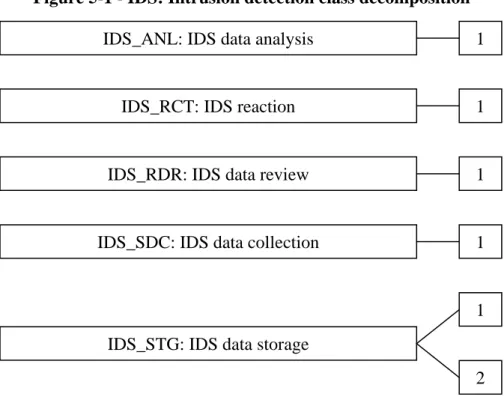
5.1. Class IDS: Intrusion Detection... 41
5.1.1. IDS data analysis (IDS_ANL) ... 42
5.1.2. IDS reaction (IDS_RCT) ... 43
5.1.3. IDS data review (IDS_RDR) ... 43
5.1.4. IDS data collection (IDS_SDC)... 44
5.1.5. IDS data storage (IDS_STG) ... 45
6. IT Security Requirements ... 47
6.1. Security Functional Requirements ... 47
6.1.1. Security Audit (FAU) ... 49
6.1.2. Cryptographic support (FCS)... 51
6.1.3. Identification and authentication (FIA) ... 52
6.1.4. Security Management (FMT) ... 52
6.1.5. Protection of the TSF (FPT) ... 54
6.1.6. Trusted path/channels (FTP)... 54
6.1.7. IDS Component Requirements (IDS) ... 54
6.2. Security Assurance Requirements... 57
6.3. Security Requirements Rationale ... 58
6.3.1. Security Functional Requirements Rationale... 58
6.3.3. Dependency Rationale ... 60
6.3.4. Identification of Standards... 63
7. TOE Summary Specification ... 64
7.1. SFR Mapping ... 64
7.1.1. Security Audit (FAU) ... 64
7.1.2. Cryptographic support (FCS)... 66
7.1.3. User identification and authentication (FIA) ... 67
7.1.4. Security Management (FMT) ... 67
7.1.5. Protection of the TSF (FPT) ... 69
7.1.6. Trusted path/channels (FTP)... 69
7.1.7. Intrusion Detection (IDS) ... 69
7.2. Protection against Interference and Logical Tampering ... 74
7.2.1. Domain Separation... 74
7.2.2. Reference Mediation... 74
7.2.3. Time Synchronization... 74
7.2.4. Content Update Verification ... 74
7.3. Protection against Bypass... 75
7.3.1. Inline Configuration... 75
7.3.2. Defragmentation ... 75
8. Supplemental Information ... 76
8.1. References ... 76
8.2. Conventions... 78
8.2.1. Security Environment Considerations and Objectives ... 78
8.2.2. Security Functional Requirements... 78
8.2.3. Other Notations... 79
8.2.4. Highlighting Conventions... 80
8.3. Terminology ... 81
8.3.1. Glossary ... 81
8.3.2. Abbreviations... 84
List of Tables
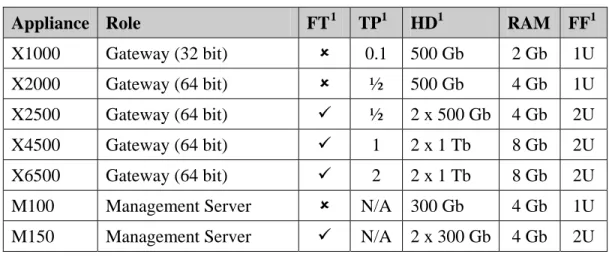
Table 1-1 - SecureSphere Appliances... 8
Table 1-2 - SecureSphere Products... 21
Table 2-1- References to Guidance on the Interpretation of Claimed PPs ... 34
Table 6-1 – Security functional requirement components... 47
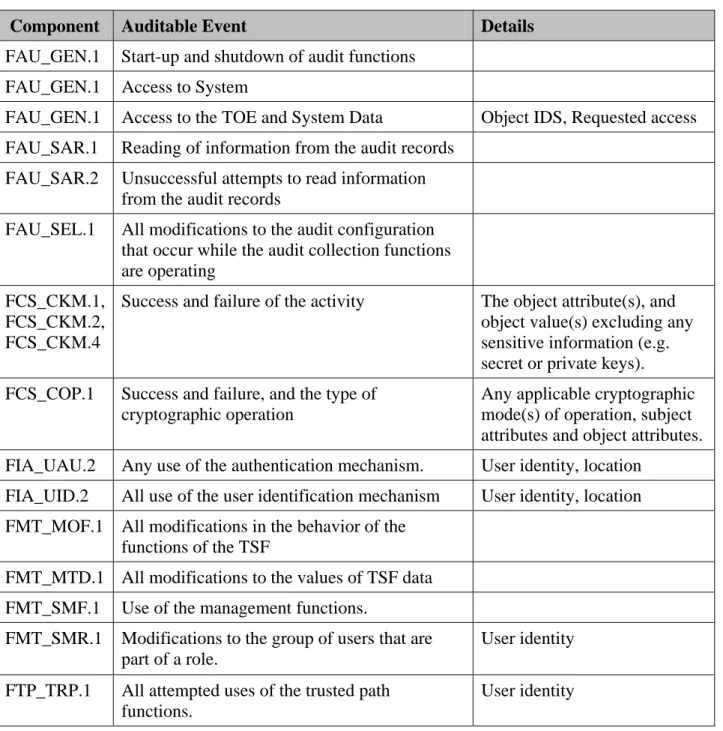
Table 6-2 - Auditable Events ... 49
Table 6-3 - Cryptographic Operations ... 51
Table 6-4- Specification of Management Functions... 53
Table 6-5 - System Events ... 54
Table 6-6 - IDS Analysis Functions... 55
Table 6-7- TOE Security Assurance Requirements... 57
Table 6-8 - Tracing of SFRs to security objectives for the TOE ... 59
Table 6-9- Security Requirements Dependency Mapping... 60
Table 6-10- Cryptographic Standards and Method of Determining Compliance... 63
Table 7-1 - TOE Summary Specification SFR Mapping... 64
Table 7-2- TSS Mapping for FAU_GEN.1 ... 65
Table 7-3- Management Functions ... 68
Table 7-4- Recorded Information Mapping to IDS_SDC.1... 72
Table 8-1- SFR Highlighting Conventions ... 80
Table 8-2 - Non-TOE Components Supported by the TOE ... 86
List of Figures
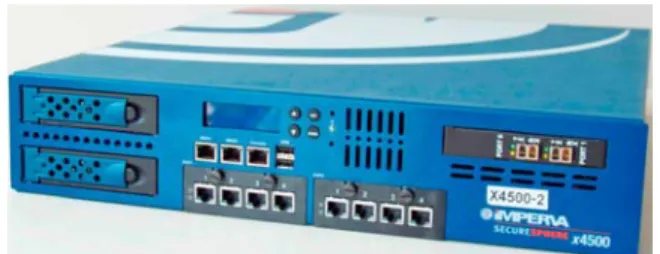
Figure 1-1 - SecureSphere Gateway Appliance... 13Figure 1-2- Physical Scope and Boundaries of the TOE ... 14
Figure 1-3 – Sample Virtual Appliance Deployment ... 15
Figure 1-4- Example Inline Topology ... 16
Figure 1-5- Example Sniffing Topology – via SPAN (mirror) Port... 17
Figure 1-7 - Management NIC on 2U Appliances... 17
Figure 1-8 – TOE Guidance... 19
Figure 1-9 – Intrusion Analysis and Reaction ... 25
1. ST Introduction
1.1. ST
Reference
Title: Imperva SecureSphere 9.0 Security Target
ST Version: 0.8
ST Date: September 19, 2012
Author: Nir Naaman
CC Version: Common Criteria for Information Technology Security Evaluation, Version 3.1 Revision 3, July 2009
Evaluation Assurance Level:
EAL 2, augmented with ALC_FLR.2 (flaw reporting procedures). Protection Profile conformance:
U.S. Government Protection Profile Intrusion Detection System System for Basic Robustness Environments, Version 1.7, July 25, 2007
Keywords: IDS/IPS, Web application firewall, database security gateway, Web Services security, file security, intrusion detection, dynamic profiling
1.2. TOE
Reference
TOE Identification: Imperva SecureSphere 9.0 (version 9.0.0.5_0) software running on two or more of the Imperva appliances listed below, including one or more Management Servers and one or more Gateways:
Table 1-1 - SecureSphere Appliances
Appliance Role FT1 TP1 HD1 RAM FF1
X1000 Gateway (32 bit) 8 0.1 500 Gb 2 Gb 1U
X2000 Gateway (64 bit) 8 ½ 500 Gb 4 Gb 1U
X2500 Gateway (64 bit) 9 ½ 2 x 500 Gb 4 Gb 2U
X4500 Gateway (64 bit) 9 1 2 x 1 Tb 8 Gb 2U
X6500 Gateway (64 bit) 9 2 2 x 1 Tb 8 Gb 2U
M100 Management Server 8 N/A 300 Gb 4 Gb 1U
M150 Management Server 9 N/A 2 x 300 Gb 4 Gb 2U
1
FT = Fault Tolerant: dual hot-swap hard drives, power supplies, and fans. TP = Throughput: measured throughput for mediated Web and Database traffic in Gbps. File security products can typically handle four times the identified throughput. HD = hard drive capacity in Terabyte. FF = Form Factor.
In addition, the identified software is provided in the form of Virtual Appliance images that are run on a VMware ESX/ESXi Hypervisor. The VMware Hypervisor and
underlying hardware is considered to be outside of the boundaries of the TOE.
1.3. Document
Organization
Section 1 provides the introductory material for the security target, including ST and TOE references, TOE Overview, and TOE Description.
Section 2 identifies the Common Criteria conformance claims in this security target Section 3 describes the security problem solved by the TOE, in terms of the expected
operational environment and the set of threats that are to be addressed by either the technical countermeasures implemented in the TOE or through additional environmental controls identified in the TOE documentation.
Section 4 defines the security objectives for both the TOE and the TOE environment. Section 5 is intended to be used to define any extended requirements claimed in this
security target that are not defined in the Common Criteria
Section 6 gives the functional and assurance requirements derived from the Common Criteria, Parts 2 and 3, respectively that must be satisfied by the TOE.
Section 7 explains how the TOE meets the security requirements defined in section 6, and how it protects itself against bypass, interference and logical tampering.
Section 8 provides supplemental information that is intended to aid the reader, including highlighting conventions, terminology, and external references used in this security target document.
Appendix A summarizes the components in the Information Technology (IT) environ-ment supported by the TOE including identification of supported versions.
1.4. TOE
Overview
1.4.1. Usage and Major Security Features of the TOE
SecureSphere 9.0 provides protection from attacks against database, file, Web, and Web Services assets, both within the organization (insider attacks) and from without. Installed on the network as a reverse Hypertext Transfer Protocol (HTTP) proxy, a transparent inline bridge or as an offline network monitor (sniffer), a SecureSphere 9.0 Gateway monitors application-level protocols for attacks, and reacts by blocking the attacks and/or reporting them to a centralized management server.
The product is deployed as one or more Gateway appliances controlled by a MX (Management Server) appliance. In multi-tier management configurations, one or more MX Management Servers may in turn be managed by a SecureSphere Operations Manager (SOM) Management Server.
Administrators connect to the Management Server using a standard Web browser (outside of the Target of Evaluation). They are required to authenticate their identity before being allowed any further action.
The different appliance models all run the same SecureSphere 9.0 software and provide all claimed security functionality, but may differ in throughput and storage capacity. SecureSphere 9.0 software (including management and/or Gateway components) may alternatively be installed on a Virtual Machine (VM) hosted by a VMware ESX/ESXi Hypervisor. The Virtual Machine emulates the SecureSphere 9.0 appliance hardware. The VMware Hypervisor and underlying hardware is considered to be outside of the boundaries of the Target of Evaluation.
Imperva's Dynamic Profiling technology automatically builds a model of legitimate application behavior that is used by the product to identify illegitimate traffic. In addition, attack signatures are preconfigured into the product and can be periodically updated from an external Application Defense Center (ADC). The ADC also provides ADC Insights – these are pre-packaged security policy rules and reports for commonly used applications. The product’s comprehensive application auditing capability is augmented by a discovery and assessment capability that scans databases and file servers for known vulnerabilities and policy violations, identifies sensitive data, and enables automatic aggregation and review of user rights across the organization. The product can also integrate information from external sources such as web vulnerability scanners.
1.4.2. TOE Type
Imperva SecureSphere 9.0 protects file, Web and database servers by analyzing network traffic flowing to and from protected servers and applications, detecting requests that may be indicative of intrusion, and reacting by reporting the events and/or blocking the
suspected traffic. In addition, SecureSphere 9.0 provides a Database Discovery and Assessment (DAS) capability for scanning databases for vulnerabilities and policy violations.
In this Security Target, the Target of Evaluation is categorized as an IDS/IPS product. SecureSphere 9.0 meets the requirements of the IDS System Protection Profile (IDSSPP). The IDSSPP defines an Intrusion Detection System (IDS) as a set of one or more Sensors and/or Scanners, and optionally one or more Analyzers. Sensors collect data about events as they occur on an IT System (e.g. a network), whereas Scanners collect static
configuration information about an IT System. Analyzers receive data from identified Sensors and Scanners, process it to make intrusion and vulnerability determinations, respectively, and provide a response capability.
1.4.3. Non-TOE Hardware/Software/Firmware Required by the TOE
1.4.3.1. Web Browser for the SecureSphere GUI Management Interface
SecureSphere 9.0 is managed using a standard Web browser that includes an Adobe Flash plug-in (version 9 or 10). SecureSphere supports the following browsers:
• Microsoft Internet Explorer versions 7, 8 and 9
• Firefox versions 3, 3.6 and 4
• Safari version 3.2
1.4.3.2. VMware Hypervisor if Deploying a SecureSphere Virtual Appliance
SecureSphere 9.0 management and/or Gateway software can be installed on a Virtual Machine hosted by a VMware ESX/ESXi Hypervisor. VMware ESX/ESXi versions 3.x and 4.x are supported. Minimum requirements for each Guest SecureSphere Virtual Appliance are:
• 2 CPUs
• 4 GB memory
• 80 GB disk space
1.4.3.3. Secure Wiping Tool for Persistent RSA Keys
SecureSphere 9.0 creates persistent RSA keys that are stored on the appliance’s hard disk. TOE evaluated configuration guidance provides the administrator with instructions for secure wiping of TOE appliances' disks using third-party tools in the IT environment.
1.5. TOE
Description
1.5.1. IntroductionSecureSphere 9.0 provides a broad range of services, features and capabilities. This ST makes a set of claims regarding the product's security functionality, in the context of an evaluated configuration. The claimed security functionality is a subset of the product's full functionality. The evaluated configuration must be established in accordance with the evaluated configuration guidance.
This part of the ST describes the physical and logical scope and boundaries of the Target of Evaluation (TOE). This description effectively partitions product functionality into three classes:
• Claimed security functionality that is evaluated in the context of this ST;
• Other functionality that is in the TOE but is not evaluated in the context of this ST
except for the determination that it cannot compromise any claimed security func-tionality;
• Excluded functionality that is not available in the TOE's evaluated configuration.
The TOE Description consists of the following subsections:
• Physical Scope and Boundaries of the TOE – describes hardware and software components that constitute the TOE and their relationship with the product. • Logical Scope and Boundaries of the TOE – describes the IT security features
offered by the TOE.
• Functionality Excluded from the TOE Evaluated Configuration – describes the product features excluded from the evaluated configuration.
• Non Security-Relevant Functionality Included in the TOE – identifies product functionality that is included in the evaluated configuration but not claimed as security functionality.
1.5.2. Physical Scope and Boundaries of the TOE
1.5.2.1. TOE Hardware, Firmware, and Software
The Target of Evaluation (TOE) includes the following components:
• One2 MX Management Server appliance; and
• One or more Gateway appliances; and optionally:
• One SecureSphere Operations Manager (SOM) Management Server appliance.
Figure 1-1 - SecureSphere Gateway Appliance
All appliance hardware and software is included in the TOE, with the following exceptions:
• HSM and SSL Accelerator Cards: SecureSphere 9.0 Gateway appliances may be purchased with an internal Hardware Security Module (HSM) or Secure Sock-ets Layer (SSL) accelerator PCI card that offloads key storage and cryptographic operations used for network traffic deciphering from the appliance CPU. These functions are not claimed security functionality. The cards may be used in the evaluated configuration but are considered to be part of the IT environment of the TOE. Gateway appliances can also be configured to interface with network-connected HSMs in the IT environment for the same purposes.
• Active Modules: SecureSphere 9.0 includes an Active Module software engine that is used to distribute value-added insights and capabilities generated by ADC, including the features Track Value Changes and Change Tracking, and the legacy Web Vulnerability Scanner (from WhiteHat Sentinel). Active Modules are dis-tributed as Java .jar files as part of the ADC Content Updates mechanism. These features are not used in the evaluated configuration.
• Apache Reverse Proxy: Imperva supports a reverse proxy implementation for HTTP traffic based on public domain Apache Web server software, which can be installed on SecureSphere gateways. Such an installation is not included in the evaluated configuration. SecureSphere 9.0 provides an alternative
high-performance Imperva kernel-based proxy infrastructure that is included in the evaluated configuration.
2
Onebox mode (where both the SecureSphere management server and SecureSphere gateway are integrated in a single machine) is not included in the evaluated configuration.
• SSH: SecureSphere 9.0 appliances can support local console access and remote access to appliance operating system-level installation and configuration Com-mand Line Interface (CLI) over the Secure Shell (SSH) protocol. Once an appli-ance is correctly configured and operational, all management is performed via the SecureSphere GUI. Evaluated configuration guidance instructs the administrator to restrict physical access to appliances and to disable remote user access to SSH in the evaluated configuration.
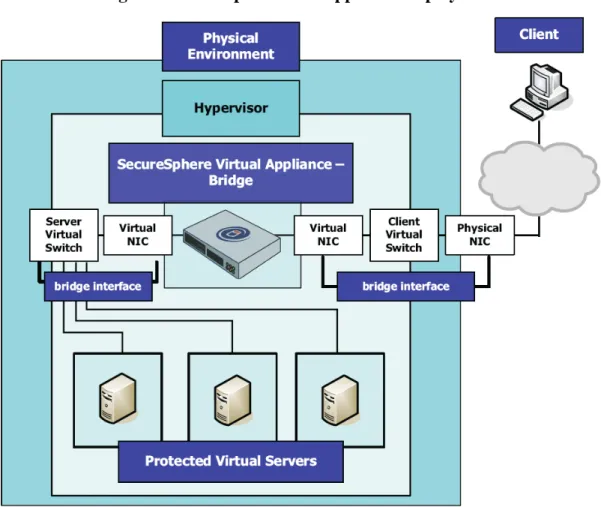
As a supported alternative to a physical appliance, each of the TOE components may be installed as software running on a Virtual Appliance hosted on a VMware hypervisor. The VMware ESX/ESXi server software and hardware are outside the boundaries of the
TOE. The Imperva SecureSphere 9.0 software assumes3 that the hypervisor provides
complete separation for all Virtual Machine resources allocated for SecureSphere 9.0 components, as would be the case with a physical appliance.
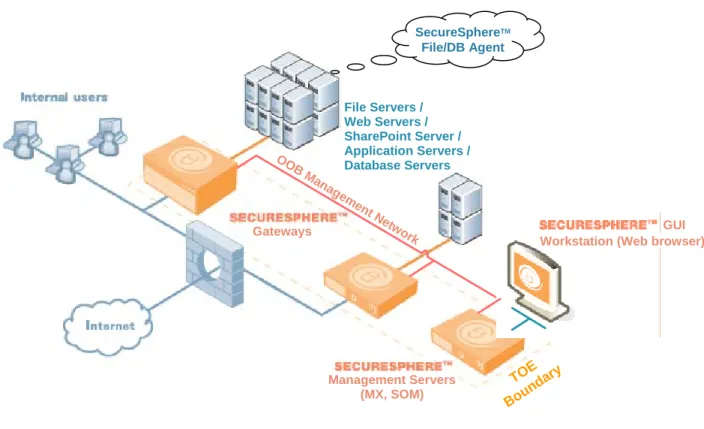
Figure 1-2 below depicts the TOE protecting file, Web, Web Services and database
assets4. SecureSphere 9.0 gateways are installed in front of the protected resources. They
are connected to the Management Server using dedicated out of band (OOB) manage-ment network interfaces, so that the communication between the gateways and the Management Server is not exposed to any internal or external users.
Figure 1-2- Physical Scope and Boundaries of the TOE
TOE Boun dary Gateways OO B M ana gem ent Ne tw
ork Workstation (Web browser)GUI File Servers / Web Servers / SharePoint Server / Application Servers / Database Servers SecureSphereTM File/DB Agent Management Servers (MX, SOM) 3
Supported VMware ESX/ESXi servers versions 3.5, 4.0 Update 1, and 4.1 have all been certified to EAL4. See
http://www.commoncriteriaportal.org/products for additional information on these evaluations.
4
SharePoint assets are protected using an Imperva SharePoint application-specific configuration of file, Web, Web Services, and database protections.
Figure 1-3 below depicts a sample deployment where the Gateway is installed on a Virtual Appliance, protecting servers installed on other Virtual Machines hosted by the same VMware hypervisor. Note that the Management Server(s) may be installed on separate Virtual Machines on the same or other hypervisor, or on physical appliances. The boundary of the TOE in Figure 1-3 includes only the SecureSphere 9.0 software; the hypervisor, virtual switches, protected servers, and physical environment are all
considered to be in the IT environment of the TOE.
Figure 1-3 – Sample Virtual Appliance Deployment
The browser (see also section 1.4.3 above), used to manage the TOE via the Secure-Sphere GUI Web interface, is also considered to be outside the boundary of the TOE. It is assumed that the environment will provide adequate access protection for administrator workstations and for the OOB management network.
The following Imperva software is considered to be outside of the TOE boundary: • SecureSphere DB and File Security Agents: Imperva sensor software agents
that run on the database or file server (outside the TOE), and transmit all access requests to the SecureSphere 9.0 gateway. This allows the gateway to analyze events that cannot be identified from network traffic, e.g. by applications running on the database or file server host itself.
1.5.2.2. SecureSphere Deployment Scenarios
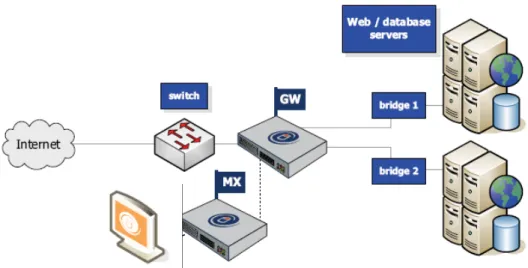
All SecureSphere 9.0 appliance models support both non-inline (sniffing) and inline gateways. An inline gateway is more invasive but provides better blocking capabilities. A sniffing gateway is totally noninvasive but provides less effective blocking capabilities. In the inline scenario, the gateway acts as a bridging device between the external network and the protected network segment. The gateway will block malicious traffic inline (i.e. drop packets). A single inline gateway protects one or two network segments. It has six network interface cards. Two of the cards are used for management: one to connect to the management server and the other is optional. The other four cards are part of two bridges that are used for inline inspection of up to two different protected network segments. Each bridge includes one card for the external network and one for the protected network.
Figure 1-4- Example Inline Topology
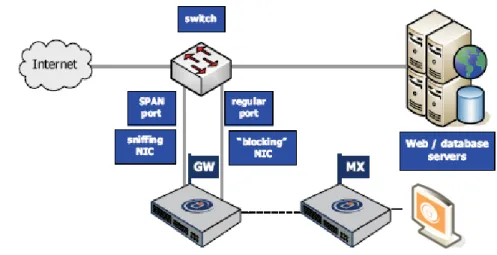
A sniffing gateway is a passive sniffing device. It connects to corporate hubs and switches and taps the traffic sent to and from protected servers, using a SPAN (Switch Port Analyzer) mirror port on the switch, or a dedicated TAP device. Traffic is copied to it instead of passing directly through it. Transmission Control Protocol (TCP) resets are transmitted over a “blocking” Network Interface Card (NIC).
Figure 1-5- Example Sniffing Topology – via SPAN (mirror) Port
1.5.2.3. Management Network
TOE guidance instructs the administrator to ensure that the SecureSphere 9.0 gateways connect to the SecureSphere Management Server through an out of band management network. In this configuration, all gateway-Management Server communication is carried encrypted over a dedicated and secure network that is completely separated from
production traffic. In both sniffing and bridging configurations (except for
non-transparent reverse proxy configurations), the gateways are further separated from the production network as all sniffing/bridging network interface cards have no Internet Protocol (IP) address.
Separation between the production traffic and the OOB management network is achieved by allocating a separate (onboard) NIC for this purpose on SecureSphere 9.0 gateways. As depicted below in Figure 1-6 and Figure 1-7, the Management NIC is clearly separated from other appliance NICs. The SecureSphere 9.0 gateway operating system does not bridge or route packets between production NICs and Management NICs.
Figure 1-6 - Management NIC on 1U Appliances
Figure 1-7 - Management NIC on 2U Appliances
Management NIC
Management NIC separation is also maintained on a SecureSphere 9.0 Virtual Appliance. The virtual management NIC is selected during initial configuration of the appliance.
1.5.2.4. TOE Guidance
The following Imperva guidance documentation is considered part of the TOE:
Figure 1-8 – TOE Guidance
Title Date
SecureSphere Administration Guide Version 9.0 November 2011 SecureSphere Web Application Security User Guide Version 9.0 (v2.0) January 2012 SecureSphere Database Security User Guide Version 9.0 November 2011 SecureSphere File Security User Guide Version 9.0 November 2011 SecureSphere SharePoint Security User Guide Version 9.0 November 2011 SecureSphere Virtual Appliance VMware ESX Configuration Guide Version
9.0
November 2011
SecureSphere Operations Manager User Guide Version 1.0 November 2011 Imperva SecureSphere 9.0 Common Criteria Evaluated Configuration Guide July 2012
1.5.3. Logical Scope of the TOE
1.5.3.1. Summary of TOE Security Functionality
IDS Component
Imperva SecureSphere 9.0 is an IDS/IPS that monitors network traffic between clients and servers in real-time, analyses that traffic for suspected intrusions, and provides a reaction capability. Reaction options include recording and monitoring suspected traffic and Intrusion Detection (ID) events, blocking traffic, and generating alarms containing event notifications. Database auditing allows you to record selected user database queries for audit purposes. Web and file server queries and responses can also be selectively recorded. In addition, monitored databases can be actively scanned to identify potential vulnerabilities.
Security Management, Identification and Authentication and Trusted Path
Administrators manage System configuration settings using the SecureSphere GUI, a Web-based interface provided by the Management Server. Administrators log in to the Management Server authenticated using a password or Kerberos authenticator. The server provides a trusted path for the management session using the Transport Layer Security (TLS) protocol. A role based scheme is used to define administrator authoriza-tions. Only designated authorized System administrators may modify the behavior of IDS System data collection, analysis and reaction capabilities. Other authorized administrators may only query System and audit data and modify other TOE data.
Security Audit
The TOE records TOE events related to ADC content updates, administrator logins, changes to configuration, activation of settings, building profiles, automatic profile updates, server start/stop, etc. in an audit trail. Administrators are provided with reporting tools to review audit trail and System data. The TOE provides protection against
modification and unauthorized deletion of audit records and System data, as well as storage exhaustion.
Protection of the TSF
The TOE protects itself and its data from tampering. Transfer of information between the gateways and the Management Server is physically separated from other information flows by the use of the dedicated OOB management network interface. Audit data that is stored on an archive outside of the TOE is cryptographically protected from disclosure or tampering. ADC content and ThreatRadar update authenticity and integrity is verified by the TOE before updates are applied.
Cryptographic Support
The TOE uses the RSA BSAFE Crypto-J 4.0 FIPS 140-2 validated cryptographic module for the implementation of the administrator trusted path, audit data protection, and
1.5.3.2. Imperva SecureSphere Products
SecureSphere 9.0 functionality is enabled by entering Imperva licenses for SecureSphere “products”. The following Imperva products are included in the evaluated configuration:
Table 1-2 - SecureSphere Products Category Product Name Acronym Description
Database Activity Monitoring
DAM Auditing and visibility into database data usage.
Database Firewall DF Activity monitoring and real-time protection for
databases. Discovery and
Assessment Server
DAS Vulnerability assessment, configuration
management, and data classification for databases.
User Rights Management for Databases
URMD Review and manage user access rights to sensitive
databases.
ADC Insights Pre-packaged reports and rules for SAP, Oracle
EBS, and PeopleSoft compliance and security. Database
Security
Database Agent Listener
Supports Gateway communication with remote agent software installed on protected servers. File Activity
Monitoring
FAM Auditing and visibility into file data usage.
File Firewall FF Activity monitoring and real-time protection for
critical file data. User Rights
Management for Files
URMF Review and manage user access rights to sensitive
files. File
Security
File Agent Listener
Supports Gateway communication with remote agent software installed on protected servers. Web Application
Firewall
WAF Automated protection against online threats.
Web
Application Security
ThreatRadar Reputation-based Web application security
1.5.3.3. TOE Logical Interactions with its Operational Environment The TOE supports the following logical interactions with its environment:
• Data Collection
o Sniffing – the TOE (when in sniffing topology) collects network frames and analyses them to identify suspicious traffic.
o Bridging – the TOE (when in inline topology) forwards frames between bridged segments.
o Proxying – the TOE (when in inline topology) when configured as a re-verse proxy for HTTP traffic.
o Enrichment – the TOE queries user directories for user information and DNS servers for host name resolution in order to store collected data with its human-readable source identification.
o DB and File Security Agents – the TOE supports event collection from SecureSphere agents that act as IDS sensors for database and file access events.
o Log Collectors – the TOE connects over the network to protected data-bases and collect event records from native database logs.
o Discovery and Assessment – the TOE performs remote file server and database scans for sensitive data discovery and user rights analysis. Data-base scans also support identification of known vulnerabilities and de-fined-policy violations.
• Analysis and Reaction
o Blocking – the TOE (when in inline topology) blocks frames that are sus-pect of being associated with malicious traffic.
o Resetting – the TOE (in sniffing topology) signals servers to reset TCP connections that are suspect of being associated with malicious traffic.
o Action Interfaces – the TOE reacts to system and security events by send-ing alarms, audit data, reports, and assessments to third-party analysis and reporting tools in the IT environment, enabling (Security Information and Event Management) SIEM/SIM (Security Information Management) tool integration.
• Security Management
o Management – authorized administrators manage the TOE and review audit trail and IDS System data via the SecureSphere GUI.
o Content Updates – the TOE imports updated ADC content updates in-cluding IDS attack signatures, database security assessment patterns, com-pliance policies, and predefined reports. An Imperva ThreatRadar service provides categorized reputation-based IP blocking lists in near real-time.
o Time Updates – the TOE synchronizes its clock with that of an external time server, using the Network Time Protocol (NTP).
1.5.3.4. Network Traffic Data Collection
1.5.3.4.1. Overview
SecureSphere 9.0 collects and records network traffic using either the sniffing or inline topologies described above. The traffic is analyzed using the TOE's ID functionality. In addition to its data collection role, the TOE may play an active role in ensuring network connectivity (inline topology). This section describes these different configurations.
1.5.3.4.2. Sniffing
When configured in sniffing topology, SecureSphere 9.0 gateways are configured with
one or more NICs in sniffing mode. Sniffing mode allows the gateway to read all frames
transmitted on the monitored network segment. Frames picked up from the network are then passed to the gateway's analysis and reaction logic.
1.5.3.4.3. Bridging
When configured in inline topology, SecureSphere 9.0 gateways can be configured to bridge pairs of NICs. When bridging, frames are picked up from one network segment, and if the destination MAC address belongs to the paired segment, and the frame is not blocked by the analysis and reaction logic, transmits it on the paired segment.
1.5.3.4.4. Reverse Proxy
When configured in inline topology, SecureSphere 9.0 gateways can be configured in Reverse Proxy mode. Transparent Reverse Proxy Mode is similar to bridging; however, instead of processing each individual frame, IP fragments are accumulated and the proxy processes complete messages. In non-Transparent mode, the gateway is assigned an IP address, and HTTP clients proxy traffic through the gateway. Reverse Proxy configura-tions are used to provide support for HTTP translation rules (e.g. URL rewriting).
1.5.3.4.5. Fail-Safe Modes
SecureSphere 9.0 Gateway appliances in inline topology can be configured to either block all traffic in the event of a software, hardware, or power failure, or to allow all traffic to pass transparently through the gateway.
1.5.3.5. DB and File Security Agents
SecureSphere 9.0 gateways provide support for SecureSphere agents, IDS sensors outside of the TOE that are installed on database or file servers. Agents extend the reach of the TOE to database and file events that would not be otherwise visible to the gateway. The agent monitors all database and file access request traffic, including both network traffic and local access on the database or file server, and transmits the traffic to a network
segment monitored by SecureSphere 9.0 gateways for IDS data collection and analysis. The gateway inspects this traffic just like regular database or file traffic collected by the gateway.
Imperva DB Agents are available for Windows, AIX, Linux, Solaris, AS/400, and z/OS operating systems. File Security Agents are available for Windows operating systems. Note that blocking and resetting capabilities are not available for agent traffic.
1.5.3.6. Log Collectors
SecureSphere 9.0 Gateways can be configured to collect native database logs over File Transfer Protocol (FTP) or Standard Query Language (SQL) network protocols. The log records are integrated with the database audit records collected by the Gateway from database access network activity.
1.5.3.7. Discovery and Assessment (DAS)
The SecureSphere 9.0 Management Server can be configured as a database client in order to perform database queries that scan the database for known vulnerabilities and for compliance with a suite of security policies, predefined by the Imperva ADC, and distributed together with the ADC content updates.
Both databases and file servers can be scanned for analysis of sensitive data and for user rights assessment (URMD and URMF products, respectively).
1.5.3.8. Analysis and Reaction
1.5.3.8.1. Overview
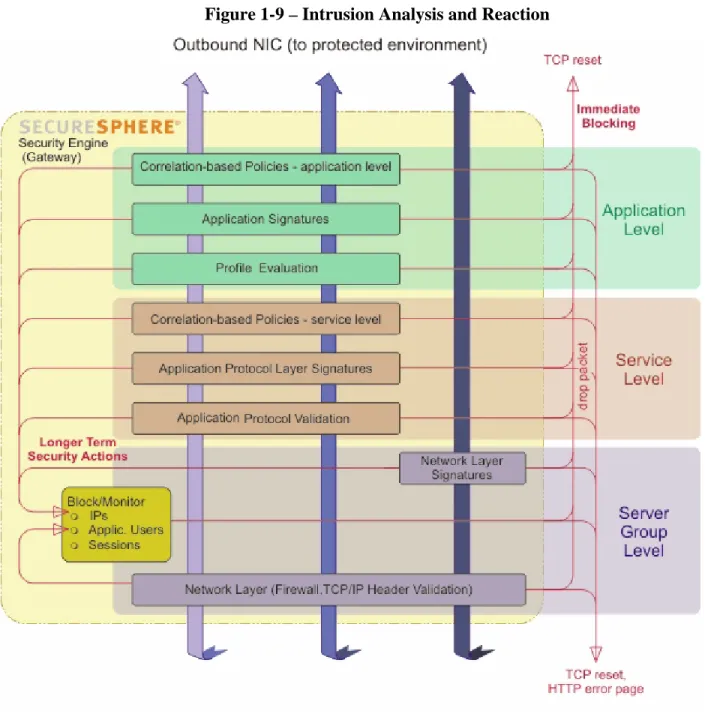
SecureSphere 9.0 applies different layers of intrusion detection logic to analyzed network traffic, as depicted below in Figure 1-9. Some of these layers are applicable to all
network traffic; some are relevant only for Web traffic and/or database access protocols. In addition, Imperva's Correlated Attack Validation (CAV) technology examines
sequences of events and identifies suspicious traffic based on a correlation of multiple analysis layers. Identified malicious traffic is blocked.
SecureSphere supports the following two blocking methods:
• TCP Reset (sniffing topology): SecureSphere can signal protected servers to
disconnect malicious users using TCP reset, a special TCP packet that signals TCP peers to close the TCP session. SecureSphere spoofs a TCP reset packet and sends it to the protected server. It is assumed that a standards-conformant server would immediately drop the attacker’s session on receipt of the TCP reset packet. Note: TCP reset is considered inferior to inline blocking (see below) because it does not actively block the malicious traffic from reaching the server; blocking depends on the server’s correct and timely session termination behavior.
• Inline Blocking: the gateway drops the packet, so that it doesn't reach its intended destination, and sends a TCP reset to the server.
Note: When SecureSphere 9.0 blocks a Web connection it can be configured to display an error page to the blocked user.
Figure 1-9 – Intrusion Analysis and Reaction
1.5.3.8.2. Network Firewall
When deployed in an inline topology, the administrator can define a firewall policy that can be described either as a white list (i.e. nothing is allowed except for specific rules) or as a black list (i.e. everything is allowed except for specific rules).
Rules are a combination of service (e.g. FTP, SMTP) and a source or destination IP address group. It is possible to define a different policy for each protected server group and for each traffic direction (inbound or outbound).
1.5.3.8.3. File Firewall
The File Firewall (FF) controls access to files based on user categorization and file classification. Classification can be performed via the SecureSphere GUI or by manually importing Comma Separated Value (CSV)-format classification files generated by third-party Data Leak Prevention (DLP) products.
1.5.3.8.4. Blocked IPs and Sessions
The Blocked IPs and Sessions engine consults a dynamic list of IP addresses and Session Identifiers that have been identified by the other ID layers as blocked traffic. Blocking can be configured by source IP address, or by Web session identifier. Session identifiers are stored either within session cookies or in the HTTP parameters. Blocking entries persist for a specified period of time.
Blocked IPs can also be introduced via Imperva's ThreatRadar service, which provides categorized lists of potentially malicious IP addresses.
1.5.3.8.5. Traffic Monitoring and Recording
SecureSphere 9.0 gateways can be configured to react to suspected intrusions events by recording all traffic from the identified source for a period of time. The recorded events can be reviewed by an administrator.
1.5.3.8.6. Signature-based Intrusion Prevention
SecureSphere provides Snort™-based signature detection to protect applications from worms (and other attacks) that target known vulnerabilities in commercial infrastructure software (Apache, IIS, Oracle, etc.). The Snort database is enhanced by Imperva’s Application Defense Center (ADC) with new signatures and content such as affected systems, risk, accuracy, frequency, and background information. The attack signature database can be updated automatically over the Web, or manually by the administrator. To easily use the signature database, SecureSphere includes the concept of Signature Dictionaries. A dictionary is a collection of signatures generated by applying a filter on the SecureSphere signature database. For example, you could easily define a filter of all high-risk, highly accurate, IIS 6 signatures.
SecureSphere comes with a predefined set of dictionaries, defined by the Imperva ADC. It is possible to select whether or not to use each dictionary with each one of the
protected server groups. When a certain dictionary is selected for a specific server group, SecureSphere will detect the signatures in the dictionary if they appear in a communica-tion to the protected server group.
SecureSphere’s Intrusion Prevention System also includes protocol compliance checks for Transmission Control Protocol (TCP), User Datagram Protocol (UDP) and Internet
Protocol (IP). Protocol-related violations such as bad checksum, bad IP addresses and bad options can be detected and blocked.
1.5.3.8.7. Protocol Violations
SecureSphere protocol compliance checks ensure that protocols meet Request for Comment (RFC) and expected usage requirements. By ensuring that the protocol meets guidelines, protocol compliance prevents attacks on both known and unknown
vulnerabilities in commercial Web server implementations.
Imperva has conducted comprehensive research and collected a group of protocol violations that usually indicate attack attempts. You can enable or disable each of these violations for each group of protected servers.
1.5.3.8.8. Universal User Tracking (UUT)
SecureSphere 9.0 gateways analyze both Web and database protocols to identify the user identity, using both direct user tracking where the user identity is included in the request and application user tracking which maps requests to a user session context, with user identity acquired by the gateway during session establishment (user authentication). A common pattern in Web/database deployments involves users accessing an application server using Web protocols, invoking application server logic that triggers database queries on the user’s behalf. In order to associate the correct user identity with database queries (instead of the application server’s identity, as seen by the database), Secure-Sphere correlates the Web and database requests, providing a Web to Database User Tracking capability.
1.5.3.8.9. Profile Violations
SecureSphere’s Web and database profiles represent a comprehensive model of all “allowed” interactions between users and the two key elements of the enterprise network: Web servers and database servers. The Web Profile includes legitimate Unified Resource Locators (URLs), HTTP methods, parameters, cookies, Simple Object Access Protocol (SOAP) actions, eXtensible Markup Language (XML) structures and more. The Database Profile includes all legitimate SQL queries per database user, valid IP addresses per database user, and more. The profiles are built automatically through a learning process and adapt to changes in the application environment over time by observing live traffic and applying SecureSphere’s Persistent Learning technologies. The profiles, therefore, require no manual configuration or tuning.
By comparing these profiles of “allowed behavior” to actual traffic, SecureSphere is able to identify and block potentially malicious behavior that does not necessarily match known attack signatures. Since SecureSphere profiles both Web and database behaviors, SecureSphere is able to detect Web-based attacks from the Internet as well as direct attacks on SQL database assets that originate from within the corporate network.
1.5.3.8.10. Correlated Attack Validation (CAV)
To identify complex attack patterns and reconnaissance activity, SecureSphere’s
Correlated Attack Validation (CAV) engine tracks low-level violations over time across the different SecureSphere protection layers to identify specific attack patterns.
For example, a signature violation such as the “union” string may indicate a SQL injection attack. On the other hand, the word “union” may be part of a legitimate URL. Therefore, rather than risk blocking a legitimate user, CAV will classify that user as “suspicious” and begin tracking his/her actions to validate true intent. When Secure-Sphere’s Web and Database Profiles subsequently identify “Unknown Parameter and “Unauthorized SQL Query” violations from that user, it becomes clear that the user in question should be blocked. By looking at a sequence of events, as opposed to a single event, CAV can accurately separate actual attacks from harmless low-level violations, without manual configuration or tuning.
1.5.3.9. Action Interfaces
An Action Set defines a set of actions and operations that can be executed when an identified event occurs (e.g. sending an alarm), or on a defined schedule (e.g. audit archiving). The administrator can define different Action Sets and use them for different events.
In addition to the blocking, resetting and monitoring actions described above, event notifications can be sent to defined action interfaces. The following types of interfaces are available for SecureSphere 9.0:
• Email: This interface allows sending an email over SMTP to a specific group of email addresses hosted on mail servers in the IT environment.
• SNMP Traps: An interface that sends Simple Network Management Protocol (SNMP) traps to a SNMP manager host in the IT environment.
• Syslog: This interface allows sending a Syslog message to a Syslog server in the IT environment.
• Audit Archiving: database and file audit records can be archived to an external IT entity, in order to free up storage on the Management Server. The audit records can still be displayed from the TOE, by issuing queries to the archive. The TOE encrypts and/or signs the archived records to prevent unauthorized disclosure or modification of the records outside the TOE’s scope of control.
• Operating System Command5: an interface to the SecureSphere Management Server operating system. This interface allows execution of an operating system command or a specific file on the Management Server.
5
Operating System (OS) commands can be defined as an Action, providing a highly flexible extension to the built-in Action mechanisms. Because it is not possible to reasonably enumerate all possible commands and provide assurance that they cannot adversely affect any SFRs in this ST, this mechanism was excluded from the evaluated configuration. TOE evaluated configuration guidance instructs the administrator not to define OS command Actions.
• Tasks: review or actionable tasks may be created as a follow up action for the event, assigned to a specified SecureSphere GUI administrator.
1.5.3.10. Management
The TOE is managed from the MX Management Server. Administrators use a standard Web browser (outside of the TOE) to connect to a Web-based SecureSphere GUI interface that is used for all management activities once the TOE is operational.
Configuration settings are downloaded from the Management Server to SecureSphere 9.0 gateways, and event information is uploaded from the gateways to the MX Management Server.
The TOE can optionally include a SOM Management Server. Administrators use the SecureSphere GUI to define policies that are applied to one or more MX servers that are registered with the SOM. The SOM queries the MX server for IDS System data for review by the SOM administrator. System Events can be configured to be automatically forwarded to the SOM for audit record review by the SOM administrator.
The TOE uses the NTP protocol to synchronize gateway clocks with that of the Management Server, providing reliable timestamps for audit and System data.
1.5.3.11. ADC Content Updates
SecureSphere 9.0 attack signatures are text strings that match known server vulnerabili-ties and attack patterns. SecureSphere 9.0 maintains a set of signatures based on the Snort database and Imperva’s Application Defense Center (ADC). The ADC (part of the TOE environment) tests each new Snort signature and makes sure it’s valid. It then classifies the signature according to different attributes such as the severity of the attack described by the signature, the accuracy of the signature (sensitivity to false positive scenarios), the systems that are affected by this attack (e.g. IIS Web server, Apache Web Server, Oracle database) and more. In addition to classifying the signature, ADC also documents it. Once the signature is verified, classified and documented, it is added to the Imperva Signature Database on the Imperva Web site from which it can be downloaded either automatically (if your SecureSphere Management Server has connectivity to the Internet) or manually by the authorized administrator.
ADC content updates can also include updated database security assessment patterns, compliance policies and predefined reports.
Each ADC content update is digitally signed by the ADC, and its authenticity and
integrity verified by the Management Server before it is applied. TOE administrators can use the ADC classifications and corresponding documentation to selectively enable signature matching for applicable signatures.
1.5.4. Functionality Excluded from the TOE Evaluated Configuration
All SecureSphere 9.0 functionality is included in the TOE Evaluated Configuration, with the following exceptions:
• Imperva SecureSphere 9.0 gateways and management servers can be installed in
high-availability (HA) modes, in which multiple gateways are deployed for a sin-gle information flow path, or multiple management servers are used in a failover configuration. HA is disabled in the evaluated configuration.
• Administrator authentication can also be configured to be performed using an
external user directory that supports the LDAP protocol, an external RADIUS server, or an external SQL database. These options are not included in the Evalu-ated configuration. In the evaluEvalu-ated configuration, administrators are always au-thenticated locally by the Management Server.
1.5.5. Non Security-Relevant Functionality Included in the TOE
This section discusses product functionality included in the evaluated configuration that is not being claimed in this ST as security functionality.
1.5.5.1. Compliance with Standards and Regulations
SecureSphere 9.0 helps organizations address many compliance regulations such as PCI, SOX, and HIPAA by satisfying technical requirements stated in those regulations. This is not being evaluated in the context of this ST. In addition to CC evaluation, Imperva relies on different third-party evaluation schemes such as NSS, ICSA, and others to attest to the effectiveness of its products.
1.5.5.2. Interoperability with Third-Party Products
SecureSphere 9.0 provides protections for a large number of third-party applications, such as SAP, Oracle, PeopleSoft, and others. Interoperability with proprietary third-party applications is not being evaluated in the context of this ST.
1.5.5.3. Non Security-Relevant Cryptographic Mechanisms
This ST makes a claim of compliance with the [IDSSPP]. The [IDSSPP] levies no cryptographic security requirements on the TOE; IDS is not considered a cryptographic function. Nevertheless, the SecureSphere 9.0 product does provide cryptographic mechanisms, implemented using different cryptographic libraries.
The subject of criteria for the assessment of the inherent qualities of cryptographic algorithms is not covered in the CC. The CC allows the definition of cryptographic security requirements by reference to a cryptographic standard (see also section 6.3.4). The approach taken in this ST is to define cryptographic mechanisms as security
functionality where they are directly supportive of a [IDSSPP] security requirement and where their correctness of implementation can be attested to by third-party assurances,
i.e. through reference to a NIST FIPS 140-2 certificate for the underlying cryptographic library.
The following cryptographic mechanisms included in the SecureSphere 9.0 product are not considered to be security-relevant in the context of this ST:
• Network traffic decryption – some of the network protocols collected and analyzed by the Gateway include encryption of protocol data. SecureSphere 9.0 Gateways can be configured to decrypt this data in order to be able to record and analyze the mediated network traffic. Such decryption can be achieved in the Gateway kernel (using cryptographic library functions), or using a HSM that is either installed as an add-on card in the Gateway appliance (see section 1.5.2.1) or is a network-connected HSM device.
Traffic decryption is considered to be an objective for the IT environment (OE.INTROP), and is therefore not claimed as a security function in this ST. Im-perva recommends the use of FIPS 140 validated HSMs for this purpose.
• Communication between the MX Management Server and Gateway – management communications between the MX and Gateway are encrypted. This encryption is not claimed as a security function. The protection of the communi-cation is achieved through the physical separation of management communica-tions from mediated traffic, as explained in section 1.5.2.3.
• Encryption of audit data stored on Gateways – the Gateway can be configured to encrypt stored IDS System data. Note that since the decryption key is stored on the gateway, this provides only partial protection. The data is protected because the Gateway prevents unauthorized access to the data, regardless of whether it is stored in encrypted or plaintext form.
• Web cookie signing – Web applications sometimes embed 'cookie' objects in responses sent to Web clients in order to maintain session state; the client is ex-pected to return the cookie in subsequent communications. SecureSphere 9.0 can be configured to apply a cryptographic mechanism that detects cookie tampering or cookie injection attacks. This protection is not claimed as a security require-ment.
• Parsing and verification of Kerberos authenticators – Kerberos is a crypto-graphic authentication protocol used in many environments, e.g. in a Microsoft Windows domain. SecureSphere 9.0 can be configured with appropriate keys that allow it to parse Kerberos protocol elements in order to extract user identification from mediated network traffic. In addition, administrator authentication to the SecureSphere 9.0 management servers can be configured to use Kerberos authen-ticators. Kerberos is not used by the TOE to cryptographically protect user data. Note that Kerberos uses non FIPS-Approved cryptographic algorithms.
2. Conformance Claims
2.1. CC
Conformance
The TOE is conformant with the following CC specifications:
• Common Criteria for Information Technology Security Evaluation Part 2:
Security functional requirements, Version 3.1, Revision 3, July 2009, CCMB-2009-07-002, extended (CC Part 2 extended)
• Common Criteria for Information Technology Security Evaluation Part 3:
Security assurance requirements, Version 3.1 Revision 3, July 2009, CCMB-2009-07-003, conformant (CC Part 3 Conformant)
2.2.
Assurance Package Conformance
The TOE is package-name augmented with the following assurance package:
• Evaluation Assurance Level (EAL) 2 augmented with ALC_FLR.2.
2.3. PP
Conformance
The TOE is Protection Profile Conformant with the following Protection Profiles:
• U.S. Government Protection Profile Intrusion Detection System System for Basic
Robustness Environments, Version 1.7, July 25, 2007
2.4. Conformance
Rationale
2.4.1. Introduction
This section is intended to demonstrate that the statements of the security problem definition, security objectives, and security requirements in this ST are consistent with the PP for which conformance is being claimed: [IDSSPP].
The claimed protection profile is a CCv3.1 PP that requires demonstrable PP confor-mance.
2.4.2. Consistency of the Security Problem Definition
The security problem definition in this ST is equivalent to the security problem definition of the claimed PP. This is established by reproducing all of the assumptions, threats, and OSPs defined in the claimed PP in this ST.
2.4.3. Security Objectives Conformance
The statement of security objectives in this ST is equivalent to the security objectives defined in [IDSSPP]. This is established by reproducing all of the security objectives for
the TOE and for the environment defined in the claimed PP in this ST, with the following exceptions:
• O.EXPORT - Omitted as per the guidance given by [PD-0097].
• OE.AUDIT_PROTECTION and OE.AUDIT_SORT were restarted in this ST as
TOE security objects,
2.4.4. Security Functional Requirements Conformance
This section demonstrates that the SFRs in the ST are equivalent or more restrictive than the SFRs in the PP. This means that all TOEs that would meet the SFRs in the ST would also meet the SFRs in the PP.
The TOE demonstrably meets and exceeds all security requirements of the claimed [IDSSPP], except for the FIA_AFL.1, FPT_ITA.1, FPT_ITC.1, and FPT_ITI.1 requirements that are inapplicable to the TOE.
All security requirements from the claimed PP have been restated in this ST, except for the SFRs listed above as exceptions. For some requirements, a hierarchical component was selected in place of one or more of the PPs' requirements; by definition a TOE meeting the hierarchical requirement would meet the original requirement as well. Similarly, requirements have been qualified, within the bounds set by the PPs. Permitted operations performed on PP security functional requirements are identified in Table 6-1. This ST claims additional SFRs that are not drawn from the claimed PP. Table 6-1
identifies these requirements. Section 6.3.1 provides rationale for the consistency of these SFRs with the claimed PP. The auditable events defined for the claimed basic level of audit have been added to Table 6-2 - Auditable Events.
The following subsections provide conformance rationale for individual SFRs that were omitted as exceptions or refined in respect to the claimed PP, clarifying the relationship of an SFR to the claimed PP.
2.4.4.1. FAU_STG.2
The [IDSSPP] FAU_STG.2 was refined to conform with CCv3.1 syntax. This is also consistent with [I-0422].
In FAU_STG.2.2, the selection is given as 'prevent' from the Firewall PPs as it is stronger than 'detect' given in [IDSSPP].
2.4.4.2. FIA_AFL.1
The [IDSSPP] FIA_AFL.1 Authentication failure handling requirement relates to external IT products that might authenticate to the TOE.
This SFR has been omitted as per the guidance given in [PD-0097], which states that this requirement was incorrectly included in the system PP.
2.4.4.3. FIA_UID.1 and FIA_UAU.1
This ST claims FIA_UID.2 and FIA_UAU.2, which are hierarchical to the corresponding [IDSSPP] FIA_UID.1 and FIA_UAU.1 SFRs.
2.4.4.4. FPT_ITA.1, FPT_ITC.1, and FPT_ITI.1
These SFRs have been omitted as per the guidance given in [PD-0097], which states that these requirements were incorrectly included in the system PP.
2.4.4.5. Applicable NIAP Precedent Decisions
The following precedent decisions have been used as guidance for interpreting demonstrable conformance with the claimed PP, in relation to claimed SFRs:
Table 2-1- References to Guidance on the Interpretation of Claimed PPs Reference Affected SFRs and objectives Description [PD-0097] O.EXPORT, FPT_ITA.1, FPT_ITC.1, FPT_ITI.1, FIA_AFL.1
Incorrectly included in the System PP – must be removed from the PP
[PD-0151] FCS_CKM.1, FCS_CKM.2, FCS_CKM.4, FCS_COP.1, FMT_SMF.1, FPT_ITT.1, FPT_STM.1, FTP_TRP.1
Additional features not required by the claimed PP may be added as long as the ST does not violate the "demonstrable conformance" definition.
2.4.5. Security Assurance Requirements Conformance
The assurance requirements in this ST are identical to the assurance requirements stated in the [IDSSPP].
3. Security Problem Definition
3.1. Threats
This section describes the threats that are addressed either by the TOE or the environment (identical to the set of threats described in [IDSSPP], provided here for the benefit of the reader of the ST):
3.1.1. TOE Threats
T.COMINT An unauthorized user may attempt to compromise the integrity of the data collected and produced by the TOE by bypassing a security mechanism. T.COMDIS An unauthorized user may attempt to disclose the data collected and
produced by the TOE by bypassing a security mechanism.
T.LOSSOF An unauthorized user may attempt to remove or destroy data collected and
produced by the TOE.
T.NOHALT An unauthorized user may attempt to compromise the continuity of the System’s collection and analysis functions by halting execution of the TOE.
T.PRIVIL An unauthorized user may gain access to the TOE and exploit system
privileges to gain access to TOE security functions and data.
T.IMPCON An unauthorized user may inappropriately change the configuration of the TOE causing potential intrusions to go undetected.
T.INFLUX An unauthorized user may cause malfunction of the TOE by creating an
influx of data that the TOE cannot handle.
T.FACCNT Unauthorized attempts to access TOE data or security functions may go undetected.
3.1.2. IT System Threats
T.SCNCFG Improper security configuration settings may exist in the IT System the TOE monitors.
T.SCNMLC Users could execute malicious code on an IT System that the TOE
monitors which causes modification of the IT System protected data or un-dermines the IT System security functions.
T.SCNVUL Vulnerabilities may exist in the IT System the TOE monitors.
T.FALACT The TOE may fail to react to identified or suspected vulnerabilities or inappropriate activity.
T.FALREC The TOE may fail to recognize vulnerabilities or inappropriate activity
T.FALASC The TOE may fail to identify vulnerabilities or inappropriate activity based on association of IDS data received from all data sources.
T.MISUSE Unauthorized accesses and activity indicative of misuse may occur on an
IT System the TOE monitors.
T.INADVE Inadvertent activity and access may occur on an IT System the TOE
monitors.
T.MISACT Malicious activity, such as introductions of Trojan horses and viruses, may
occur on an IT System the TOE monitors.
3.2. Assumptions
The following conditions are assumed to exist in the operational environment (identical to the set of assumptions made in [IDSSPP], provided here for the benefit of the reader of the ST):
3.2.1. Intended Usage Assumptions
A.ACCESS The TOE has access to all the IT System data it needs to perform its functions.
A.DYNMIC The TOE will be managed in a manner that allows it to appropriately address changes in the IT System the TOE monitors.
A.ASCOPE The TOE is appropriately scalable to the IT System the TOE monitors6.
3.2.2. Physical Assumptions
A.PROTCT The TOE hardware and software critical to security policy enforcement will be protected from unauthorized physical modification.
A.LOCATE The processing resources of the TOE will be located within controlled access facilities, which will prevent unauthorized physical access.
3.2.3. Personnel Assumptions
A.MANAGE There will be one or more competent individuals assigned to manage the TOE and the security of the information it contains.
A.NOEVIL The authorized administrators are not careless, willfully negligent, or
hostile, and will follow and abide by the instructions provided by the TOE documentation.
A.NOTRST The TOE can only be accessed by authorized users.
6
A.ASCOPE is an assumption that is upheld by the OE.INTROP objective for the environment. Per the guidance given in [PD-0118], this assumption is given in the wording used in [IDSSPP].
3.3.
Organizational Security Policies
The following OSPs are defined in [IDSSPP]. [IDSSPP] does not identify which
organization and which organizational security policy any of these OSPs are drawn from.
P.DETECT Static configuration information that might be indicative of the potential
for a future intrusion or the occurrence of a past intrusion of an IT System or events that are indicative of inappropriate activity that may have re-sulted from misuse, access, or malicious activity of IT System assets must be collected.
P.ANALYZ Analytical processes and information to derive conclusions about
intrusions (past, present, or future) must be applied to IDS data and appro-priate response actions taken.
P.MANAGE The TOE shall only be managed by authorized users.
P.ACCESS All data collected and produced by the TOE shall only be used for
authorized purposes.
P.ACCACT Users of the TOE shall be accountable for their actions within the IDS.
P.INTGTY Data collected and produced by the TOE shall be protected from
modification.
P. PROTCT The TOE shall be protected from unauthorized accesses and disruptions of TOE data and functions.
4. Security Objectives
4.1.
Security Objectives for the TOE
This section describes the TOE security objectives (identical7 to the set of TOE security
objectives described in [IDSSPP], provided here for the benefit of the reader of the ST): O.PROTCT The TOE must protect itself from unauthorized modifications and access
to its functions and data.
O.IDSCAN The Scanner must collect and store static configuration information that
might be indicative of the potential for a future intrusion or the occurrence of a past intrusion of an IT System.
O.IDSENS The Sensor must collect and store information about all events that are
indicative of inappropriate activity that may have resulted from misuse, access, or malicious activity of IT System assets and the IDS.
O.IDANLZ The Analyzer must accept data from IDS Sensors or IDS Scanners and
then apply analytical processes and information to derive conclusions about intrusions (past, present, or future).
O.RESPON The TOE must respond appropriately to analytical conclusions.
O.EADMIN The TOE must include a set of functions that allow effective management of its functions and data.
O.ACCESS The TOE must allow authorized users to access only appropriate TOE functions and data.
O.IDAUTH The TOE must be able to identify and authenticate users prior to allowing access to TOE functions and data.
O.OFLOWS The TOE must appropriately handle potential audit and System data storage overflows.
O.AUDITS The TOE must record audit records for data accesses and use of the
System functions.
O.INTEGR The TOE must ensure the integrity of all audit and System data.
O.AUDIT_PROTECTION
The TOE must provide the capability to protect audit information. O.AUDIT_SORT
The TOE must provide the capability to sort the audit information
7
[IDSSPP] security objectives omitted from this ST: O.EXPORT was omitted per the guidance given in [PD-0097]. O.AUDIT_PROTECTION and O.AUDIT_SORT were restated as TOE security objectives in this ST.
4.2.
Security Objectives for the Operational Environment
4.2.1. IT Security Objectives for the EnvironmentThe following security objective for the IT Environment is allowed in [IDSSPP] to support external time keeping. It is applicable for configurations that use the NTP protocol for synchronizing the TOE’s clock with that of an external time server.
OE.TIME The IT Environment will provide reliable timestamps to the TOE.
4.2.2. Security Objectives for the Environment Upholding Assumptions The assumptions made in this ST about the TOE's operational environment must be upheld by corresponding security objectives for the environment.
The following security objectives are intended to be satisfied without imposing technical requirements on the TOE. That is, they will not require the implementation of functions in the TOE hardware and/or software. Thus, they are intended to be satisfied largely through application of procedural or administrative measures.
OE.INSTAL Those responsible for the TOE must ensure that the TOE is delivered,
installed, managed, and operated in a manner which is consistent with IT security.
OE.PHYCAL Those responsible for the TOE must ensure that those parts of the TOE critical to security policy are protected from any physical attack.
OE.CREDEN Those responsible for the TOE must ensure that all access credentials are protected by the users in a manner which is consistent with IT security. OE.PERSON Personnel working as authorized administrators shall be carefully
selected and trained for proper operation of the System. OE.INTROP The TOE is interoperable with the IT System it monitors.
4.3.
Security Objectives Rationale
4.3.1. IT Security Objectives RationaleThe security problem description and security objectives in this ST are equivalent to the corresponding elements stated in the [IDSSPP], as established in sections 2.4.2 and 2.4.3 above. See section 6.1 of [IDSSPP] for the IT security objectives rationale.
The [IDSSPP] traces OE.AUDIT_PROTECTION and OE.AUDIT_SORT to P.ACCESS and P.ACCACT, respectively. In this ST, these objectives are restated as security
objectives for the TOE. O.AUDIT_PROTECTION supports P.ACCESS by providing protection for audit data. O.AUDIT_SORT supports P.ACCACT by allowing the administrator to sort audit data providing for user accountability.
![Table 2-1- References to Guidance on the Interpretation of Claimed PPs Reference Affected SFRs and objectives Description [PD-0097] O.EXPORT, FPT_ITA.1, FPT_ITC.1, FPT_ITI.1, FIA_AFL.1](https://thumb-us.123doks.com/thumbv2/123dok_us/9515218.2434759/34.918.109.820.431.776/references-guidance-interpretation-claimed-reference-affected-objectives-description.webp)