Software Engineering
Project Management
Faculty of Engineering & Surveying
Bachelor of Software Engineering
Study Book
Written by
Dr Wei Xiang BEng, MEng, PhD
Lecturer in Computer System Engineering Faculty of Engineering & Surveying
<http://www.usq.edu.au>
© University of Southern Queensland, 2005.2 (1st edn), 2007.2 (2nd edn).
Copyrighted materials reproduced herein are used under the provisions of the Copyright Act 1968 as amended, or as a result of application to the copyright owner.
No part of this publication may be reproduced, stored in a retrieval system or transmitted in any form or by any means electronic, mechanical, photocopying, recording or otherwise without prior permission.
The camera-ready PDF file is produced usingPDFLATEXby the author. Style file supplied by Ted Siebuhr,
DEC. The followingLATEX 2εpackages were utilized:hyperref(hyperlinking for Acrobat PDF format);tabularx
(tables);xcolor(table colors). AMS font system used for some mathematics,METAPOSTused for the EPS figure drawing.
CONTENTS
PAGE
Module 1 Software Engineering Project Management – Course Overview 0
Module 2 Introduction to Project Management 0
2.1 Introduction 2
2.2 What is a project 2
2.3 What is project management 4
2.4 How project management relates to other disciplines 8
2.5 History of project management 8
2.6 The Project management profession 9
2.6.1 Project management careers, research, certification and ethics 9
2.6.2 Project management software 9
Module 3 The Project Management and Information Technology Context 0
3.1 A system view of project management 2
3.2 Understanding organisations 3
3.3 Stakeholder management 3
3.3.1 The importance of top management commitment 5
3.4 Project phases and the project life cycle 6
3.4.1 Product life cycles 7
3.5 Context of information technology projects 8
4.3 Case study: JWD consulting’s project management intranet site project 5 4.3.1 Project initiation 5 4.3.2 Project planning 6 4.3.3 Project executing 7 4.3.4 Project controlling 8 4.3.5 Project closing 8
Module 5 Project Integration Management 0
5.1 What is project integration management 3
5.2 Project plan development 4
5.2.1 Project plan contents 4
5.2.2 Using guidelines to create project plans 6
5.2.3 Stakeholder analysis and top management support 6
5.3 Project plan execution 7
5.4 Integrated change control 8
5.4.1 The integrated change control process 8
5.4.2 Change control system 9
5.5 Using software to assist in project integration management 10
Module 6 Project Scope Management 0
6.1 What is project scope management 3
6.2 Project initiation: strategic planning and project selection 3
6.2.1 Methods for selecting projects 4
6.2.2 Project charters 7
6.4.3 Advice for creating a WBS 11
6.5 Scope verification and scope change control 11
6.5.1 Suggestions for improving user input 12
6.5.2 Suggestions for reducing incomplete and changing requirements 12
6.6 Using software to assist in project integration management 13
Module 7 Project Time Management 0
7.1 Importance of project schedules 2
7.2 Activity definition 4
7.3 Activity sequencing 4
7.3.1 Dependencies 4
7.3.2 Network diagrams 5
7.4 Activity duration estimation 6
7.5 Schedule development 7
7.5.1 Gantt charts 7
7.5.2 Critical path method 9
7.5.3 Critical chain scheduling 12
7.5.4 Program evaluation and review technique (PERT) 13
7.6 Controlling changes to the project schedule 13
8.3 Resource planning 3
8.4 Cost estimating 5
8.4.1 Types of cost estimates 5
8.4.2 Cost estimation tools, techniques and typical problems 6
8.5 Cost budgeting 8
8.6 Cost control 8
8.6.1 Earned value management 9
8.6.2 Project portfolio management 12
8.7 Using software to assist in project cost management 12
Module 9 Project Quality Management 0
9.1 What is project quality management 4
9.2 Quality planning 4
9.3 Quality assurance 5
9.4 Quality control 6
9.5 Tools and techniques for quality control 7
9.5.1 Pareto analysis 7
9.5.2 Statistical sampling 7
9.5.3 Six sigma 8
9.5.4 Quality control charts and the seven run rule 9
9.5.5 Testing 9
9.6 Modern quality management 11
9.7 Improving information technology project quality 13
9.7.1 Leadership 14
9.7.2 The cost of quality 14
9.7.3 Organisational influences, workspace factors, and quality 16
9.7.4 Maturity models 17
10.3 Keys to managing people 3
10.3.1 Motivation theories 4
10.3.2 Influence and power 5
10.3.3 Improving effectiveness 6
10.4 Organisational planning 8
10.4.1 Project organisational charts 8
10.4.2 Responsibility assignment matrices 9
10.4.3 Staff management plans and resource histograms 9
10.5 Project staff acquisition 9
10.5.1 Resource assignments 9 10.5.2 Resource loading 10 10.5.3 Resource levelling 10 10.6 Team development 11 10.6.1 Training 11 10.6.2 Team-building activities 11
10.6.3 Reward and recognition systems and general advice on teams 13
10.7 Using software to assist in human resource management 14
Module 11 Project Communications Management 0
11.1 The importance of project communications management 2
11.2 Communications planning 4
11.3 Information distribution 4
11.3.1 Using technology to enhance information distribution 5
11.3.2 Formal and informal methods for distributing information 5
11.6 Suggestions for improving project communications 9
11.6.1 Using communication skills to manage conflict 9
11.6.2 Developing better communication skills 10
11.6.3 Running effective meetings 10
11.6.4 Using e-mail effectively 11
11.6.5 Using templates for project communications 12
11.6.6 Developing a communications infrastructure 13
11.6.7 Using software to assist in project communications 13
Module 12 Project Risk Management 0
12.1 Importance of project risk management 3
12.2 Risk management planning 4
12.3 Common sources of risk on information technology projects 5
12.4 Risk identification 6
12.5 Qualitative risk analysis 7
12.5.1 Using probability/impact matrixes to calculate risk factors 7
12.5.2 Top ten risk item tracking 9
12.5.3 Expert judgement 10
12.6 Quantitative risk analysis 10
12.6.1 Decision trees and expected monetary value 10
12.6.2 Simulation 11
12.7 Risk response planning 11
12.8 Risk monitoring and control 12
12.9 Results of good project risk management 13
13.2.1 Procurement planning tools and techniques 5
13.2.2 Types of contracts 5
13.2.3 Statement of work (SOW) 6
13.3 Solicitation planning 8
13.4 Solicitation 9
13.5 Source selection 9
13.6 Contract administration 10
13.7 Contract close-out 11
1
SOFTWARE ENGINEERING
PROJECT MANAGEMENT –
COURSE OVERVIEW
This course ELE4402Software Engineering Project Management teaches you es-sential concepts, principles, and techniques relating to the project management as-pects of software engineering. Software project management is of paramount im-portance to the success of software development projects. As revealed by the 2004 CHAOS Report from US analysts the Standish Group <http://www.standishgroup. com>, there was US$55 billion in waste, US$38 billion in lost value and US$17 billion in cost over-runs for information technology projects in the U.S. in 2004. In Australia, as described in an article titled “Software Calamities Come at a High Price” inThe Aus-tralianon 30 Nov. 2004, the potential of software project failure due to improper project managment is formidable. For example, the National Australia Bank announced in Nov. 2004 that it would write off $409 million in value from its key information technology sys-tems. Earlier in 2004, Melbourne’s RMIT University announced that they would spend $11 million re-implementing a failed student enrolment system. If that is not enough, Sydney Water wrote off $61 million on its now-abandoned customer records system last year due to its failure to understand the complexity of its customer implementa-tion and billing service. All these data reveal one fact, that is, project management is tremendously important to the success of software development projects. That is the theme of this study book.
This study book introduces a well established framework for project management,i.e., the Project Management Body of Knowledge (PMBOK® Guide 2004) by the Project Management Institute (PMI). The study book focuses on the project management as-pects of software development projects of various sizes. It covers all nine project man-agement knowledge areas (project integration, scope, time, cost, quality, human re-source, communications, risk and procurement management), and five process groups (initiating, planning, executing, controlling, and closing).
The purpose of this study book is to serve as a study guide for students enrolled in ELE4402 Software Engineering Project Management. It consists of the following thir-teen modules. Each module except Module 1 (Course Overview) has the following components:
Ê
Objectives: this section describes the concepts and techniques you will learn in this section. It indicates what you should be able to do upon successful comple-tion of the module.Ë
Learning resources: this section provides required and recommended learning resources relating to the module.Ì
Module overview: this section provides an overview introduction to the module.Í
Activity: this section is the feature of the study book. Several activities are usually scattered in each module. The intention of the activities is to provide you with in-depth activities relevant to important topics in the modules to consolidate their understanding of principles. You should attempt all activities.Î
Reading: this section specifies which chapters/sections of the prescribed text or recommended texts you are required or recommended to read for each module. In order to fulfil the module’s objectives, you have to read the reading materials marked as ‘required’. In order to gain additional and better understanding onthe topics, you are encouraged to read the reading materials marked as ‘recom-mended’. However, you arenot disadvantaged in the examination of the course if you do not read the recommended materials.
Ï
Review questions: this section provides some review questions for you to self test whether you fulfill the module’s objectives.Ð
Exercises: this section provides some exercises relating to the topics covered in the module. It requires comprehensive understanding of the topics to complete the exercises.Ñ
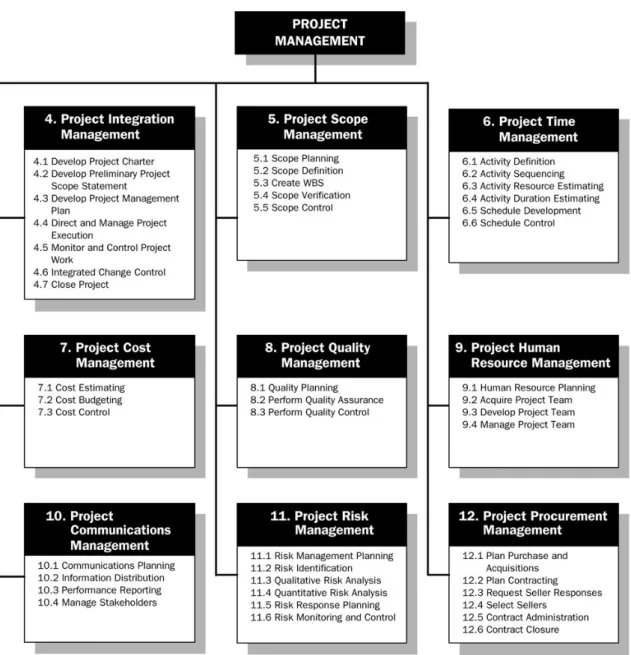
Minicase: at the end of modules 3–13, a minicase is provided as the case study of the module. You are encouraged to attempt all minicases.The overview structure of the modules covered in the study book is depicted in Fig-ure1.1. It is noted that the boxes numbered from one to nine in the figure correspond to Modules 5 to13 in the study book. You should refer to the study timetable in the
introductory book for the schedule to complete each module. You should attempt all activities as they are encountered, then complete all review questions and exercises at the end of each module.
This study book has several distinctive features. First, it features many activities through-out the study book to foster your problem-solving abilities in the real world of project management. Second, it emphasises the application of project management theories and principles to software development projects. Third, case studies are a large ele-ment of this study book. At the end of Modules 3–13, there are minicase assignele-ments for you to practise. Last, it encourages you to use various software tools to solve project management problems by having a dedicated section on this topic at the end of each module.
The prescribed text of this course isSchwalbe, K. 2006, ‘Information technology project management’, 4th edn, Thomson Course Technology. It is bundled with a 120-day free trial version ofMicrosoft Project® at no extra charge. The lecturer of this course
main-tains a course homepage at <http://www.usq.edu.au/users/xiangwei/teaching/ ELE4402.html>. The course homepage provides various additional resources relating to the course including the lecture notes, journal articles, etc. There are some other recommended texts, such as Hughes, B. & Cotterell, M. 2002, ‘Software Project Man-agement’, 3rd ed, McGraw-Hill, and Royce, W. 1998, ‘Software Project Management: A Unified Framework’, Addison-Wesley.
The study book is largely based on materials in the prescribed text. As a result, you should use it in conjunction with Schwalbe’s text. The study book presents essen-tial principles, techniques, and tools in relation to software project management in Schwalbe’s text in a concise and easy-to-understand way. Moreover, it provides many useful activities throughout the study book that expose you to practical software project management problems. Some extra materials not found in the prescribed text are also provided in the activities and selected readings. The structure of the study book is organised as follows:
Figure 1.1: Overview of project management knowledge areas (source: PMBOK ® Guide 2004, p. 11)
• Module1– Course Overview: provides the course overview of this course. • Module2– Introduction to Project Management: provides an overview of the field
project management, and an introduction to the project management profession. • Module3– The Project Management and Information Technology Context: pro-vides a context for project management in general and software development projects in particular.
• Module 4 – The Project Management Process Groups: describes the project management process groups,i.e., initiating, planning, executing, controlling, and closing. It also provides a matrix that relates the process groups to each knowl-edge area.
• Module 5 – Project Integration Management: covers the details of the project integration management knowledge area.
• Module6– Project Scope Management: covers the details of the project scope management knowledge area.
• Module 7 – Project Time Management: covers the details of the project time management knowledge area.
• Module 8 – Project Cost Management: covers the details of the project cost management knowledge area.
• Module9– Project Quality Management: covers the details of the project quality management knowledge area.
• Module 10 – Project Human Resource Management: covers the details of the project human resource management knowledge area.
• Module 11 – Project Communications Management: covers the details of the project communications management knowledge area.
• Module 12 – Project Risk Management: covers the details of the project risk management knowledge area.
• Module13– Project Procurement Management: covers the details of the project procurement management knowledge area.
2
INTRODUCTION TO
Objectives
On successful completion of this module, you should be able to:
À
understand the growing need for better project management, especially for infor-mation technology projectsÁ
explain what a project is and provide examples of information technology projectsÂ
describe what project management is and discuss key elements of the project management frameworkÃ
discuss how project management relates to other disciplinesÄ
understand the history of project managementÅ
describe the project management profession, including recent trends in project management research, certification, and software products.Learning resources
Text
Chapter 1, Schwalbe (4th edition)
Selected reading
Selected reading 2.1: Appendix A, Hughes and Cotterell (3rd edition)
Module overview
This module is the introduction to project management. It starts with the definitions of projects and project management, and then explains how project management relates to other disciplines. This module also reviews the brief history of project management. The current development of the project management discipline and profession are dis-cussed, including careers, research, certification, ethics, and the software of project management.
In the following sections, we briefly summarise the key concepts and principles con-tained in this module.
2.1
Introduction
Project management originated from, and primarily focused on providing services to the military and construction industries until the 1980s. Now, project management has widely spread into almost every industry including the software and information technology (IT) industries. The following statistics demonstrates the significance of project management in today’s society:
• the U.S. spends $2.3 trillion on projects every year that is equal to 1/4 of the nation’s GDP
• the world spends $10 trillion on projects out of its $40.7 trillion GDP • more than 6 million people regard project management as their profession • disappointingly, the overall success rate of IT projects wasonly 16.2%.
Many organisations claim that using project management provides the following ad-vantages:
• better control of financial, physical, and human resources • improved customer relations
• shorter development times • lower costs
• higher quality and increased reliability • higher profit margins
• improved productivity • better internal coordination • higher worker morale.
2.2
What is a project
A guide to the project development body of knowledge (PMBOK® Guide)2004 edition, published by the Project Management Institute (PMI), is an American national standard for project management. As defined in the PMBOK® Guide 2004, aproject is ‘a tem-porary endeavor undertaken to create a unique product or service’. A project normally exhibits the following attributes:
• A project is temporary
• A project requires resources, often from various areas • A project should have a primary customer or sponsor • A project involves uncertainty.
Thetriple constraint of projects refers to scope, time and cost:
Ê
Scope: What is the project trying to accomplish?Ë
Time: How long should it take to complete the project?Ì
Cost: What should it cost to complete the project?Managing the triple constraint involves making trade-offs between scope, time, and cost goals for a project. Moreover,quality as well ascustomer or sponsor satisfaction
also play significant roles. Quality, scope, time, and cost are sometimes referred to as thequadruple constraint of project management.
Activity 2.1
Australian institute of project management (AIPM)
The Australian Institute of Project Management (AIPM) has developed sets of competency standards, recognised as the Australian national standards, to support the certification of project managers. Visit the AIPM’s website at<www.aipm.com.au>, and find out what thenice func-tionscovered in the competency standards are and theirsimilaritiesand
Activity 2.2
PRINCE® 2 – an overview
Read through Appendix A, Hughes and Cotterell’s text (3rd edition). Un-derstand that PRINCE® 2 is the UK standard for project management initiated by the Central Computer and Telecommunications Agency (CCTA).
List all the components that PRINCE® 2 includes on the left side of blank paper, and list all the components thatPMBOK®Guide 2004on the right side of the same paper. Try toconnect the components included in the PRINCE® 2 to the 9 knowledge areas in thePMBOK®Guide 2004.
2.3
What is project management
Project management is defined as the application of knowledge, skills, tools, and tech-niques to project activities in order to meet project requirements.
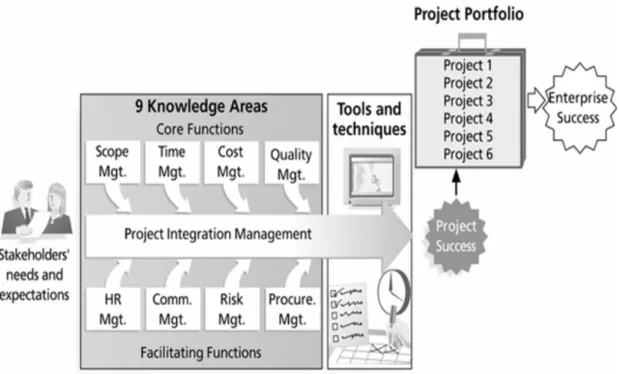
Figure 2.1illustrates the Project Management Framework as in the figure 1-2 of the textbook. As depicted in the framework, stakeholders are the people involved or af-fected by project activities and include theproject sponsor,project team,support staff,
customers,users,supplies, and evenopponentsto the project.
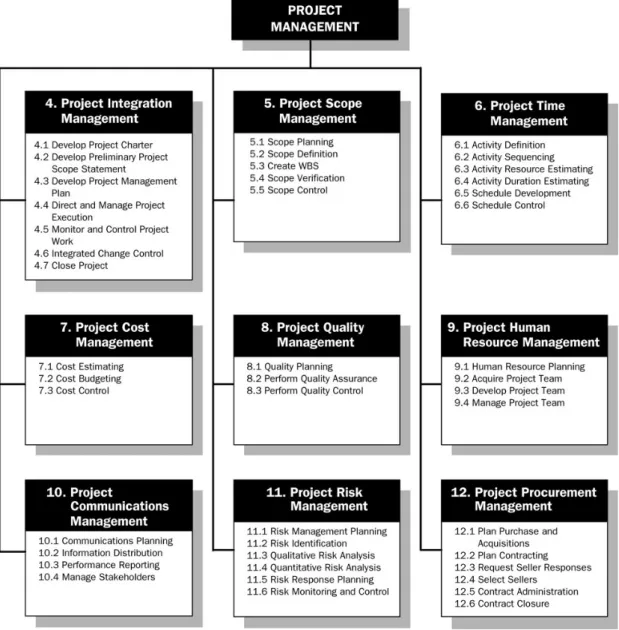
As outlined in the PMBOK® Guide 2004 and depicted in the project management framework in Figure 2.1, there are 9 project management knowledge areas, which describe project management knowledge and practice in terms of their component processes. Figure 2.2 illustrates the overview of project management knowledge ar-eas and project management processes. The four core knowledge areas are briefly described below:
Ê
Project scope management: involves defining and managing all the work re-quired to complete the project successfully.Ë
Project time management: includes estimating how long it will take to complete the work, developing an acceptable project schedule, and ensuring timely com-pletion of the project.Ì
Project cost management: consists of preparing and managing the budget for the project.Í
Project quality management: ensure that the project will satisfy the stated or implied needs for which it was undertaken.Figure 2.1: Project Management Framework (source: Schwable 2006, Fig. 1-2.) These are called core knowledge areas because they lead to specific project objec-tives. There are also fourfacilitatingknowledge areas of project management:
Ê
Project human resource management: is concerned with making effective use of people involved with the project.Ë
Project communications management: involves generating, collecting, dissemi-nating, and storing project information.Ì
Project risk management: includes identifying, analysing, and responding to risks related to the project.Í
Project procurement management: involves acquiring, procuring goods services for a project from outside the performing organisation.These are called facilitating knowledge areas because they are the processes through which the project objectives are achieved. The ninth knowledge area, called project integration management, is an overarching function that affects and is affected by all of the other knowledge areas.
Project portfolio management is an emerging business strategy, in which organisa-tions group and manage projects as a portfolio of investments that contribute to the entire enterprise’s success. Project portfolio management will be discussed in detail in
Module8(Project Cost Management).
Throughout each knowledge area, there are many commonly used tools and tech-niques to assist project managers and their teams in achieving project objectives. Ta-ble2.1lists some commonly used tools and techniques in the nine project management knowledge areas.
Figure 2.2: Overview of project management knowledge areas and project man-agement processes (source: PMBOK® Guide 2004, p. 11)
Table 2.1: Project management tools and techniques in 9 knowledge areas
Knowledge Area Commonly Used Tools and Techniques
Integration management Stakeholder analysis, Project plans, Project manage-ment software, Change control boards, Configuration management, Project review meetings, Work authori-sation systems, Project leadership, Executive sponsor-ship
Scope management Net present value, Return on investment, Payback, Weighted scoring models, Business cases, Project charters, Scope statements, Work breakdown struc-tures, Statement of work, Requirements analysis, Scope change control
Time management Gantt charts, Network diagrams, Critical path analy-sis, Program evaluation review technique, Critical chain scheduling, Crashing, Fast tracking, Milestone reviews Cost management Earned value management, Project portfolio manage-ment, Cost estimates, Cost management plan, Finan-cial software
Quality management Six Sigma, Quality control charts, Pareto diagrams, Fishbone or Ishikawa diagrams, Quality audits, Matu-rity models, Statistical methods
Human resource management
Motivation techniques, Empathic listening, Team con-tracts, Responsibility assignment matrices, Resource histograms, Resource loading, Resource leveling, Team-building exercises
Communications management
Communications management plan, Conflict manage-ment, Communications media selection, Communica-tions infrastructure, Status reports, Meetings, Virtual communications, Templates, Project web sites
Risk management Risk management plan, Probability/impact matrix, Risk ranking, Monte Carlo simulation, Top-ten risk item tracking
Procurement management Make-or-buy analysis, Contracts, Requests for pro-posals or quotes, Source selection, Negotiating, E-procurement
2.4
How project management relates to other
disciplines
The nature of projects lies in that projects areunique,temporary, and involvevarious resources. This nature distinguishes project management from general or operation management. A project manager must focus on integrating all the various activities required to complete the project, whereas most of the tasks performed by a general or operation managers arerepetitive,ongoing, and done asday-to-day activities.
This subject and thus this study book are focused on software and information projects, which include computer software, computer hardware, and telecommunications tech-nology. There are some differences between managing software and IT projects, but there are even moresimilarities.
2.5
History of project management
It has been commonly recognised that the modern concept of project management began with theManhattan Project, which was a U.S. military project for developing the atomic bomb. The project lasted three years and cost almost $2 billion in 1946.
In the early days of modern project management development, the military was the key industry behind the development of several project management techniques. Henry Gantt invented the famous Gantt chart in 1917, which is a standard format for dis-playing project schedule information by listing project activities and their corresponding start and finish dates in a calendar format. Network diagramswere first used by mem-bers of the Navy Polaris missile/submarine project in 1958. Details about Gantt charts and network diagrams will be discussed in Module7Project Time Management.
The military also pioneered using software to help manage large projects. Early soft-ware products for project management were expensive and hard to use. The sophis-tication and effectiveness of project management software have been significantly im-proved. Web-basedandenterpriseproject management software has emerged, which integrates information from multiple projects to show the status of active, approved, and future projects across an entire organisation and provides links to more detailed infor-mation.
Today, project management is used in some form in virtually all organisations and disciplines. The project managers’ challenge is to understand the concepts of project management and determine what tools and techniques should be applied on specific projects and in specific organisations.
2.6
The Project management profession
Project management has spread into almost every discipline including information tech-nology. Researchers and practitioners are continuing to develop the project manage-ment profession to respond to social and economic changes and to remain competitive.
2.6.1
Project management careers, research,
certifi-cation and ethics
The Project Management Institute (PMI, <www.pmi.org>) is an international profes-sional society for project managers. By early 2003, it has more than 100,000 members worldwide. Within PMI, there are Specific Interest Groups (SIGs) that enable mem-bers to share ideas about project management in their specific application areas. The PMI has SIGs for information systems, aerospace/defense, financial services, health-care, hospitality management, manufacturing, new product development, retail, urban development, and so on. TheInformation Systems SIGhas about 15,000 members. To deal with increased challenges of projects in the 1990s, many organisations be-gan creating theProject Management Office(PMO). A PMO is an organisational group responsible for coordinating the project management function throughout an organisa-tion.
Groups like the PMI and Standish Group are actively participating in the research of project management. The PMI holds its international research conference on project management, whereas the Standish Group holds itsCHAOS University to update and analyse information related to IT projects. The International Journal of Project Man-agement and other publications also publish research papers on project management. TheProject Management Professional(PMP) is a certification program provided by the PMI. Certified PMPs are supposed to have documented sufficient project experience and education, agreed to follow the PMI code of professional conduct, and demon-strated knowledge of the field of project management by passing a comprehensive examination. CompTIA’s IT Project+certification is another improtant project manage-ment certification program.
The PMI developed aPMP Code of Professional Conduct that all certified PMPs must agree to. PMP code of professional conduct lists responsibilities to both theprofession
andcustomers and thepublic.
2.6.2
Project management software
In 1999, the PMI published a Project Management Software Survey that described and compared more than 200 project management software tools. TheProject Man-agement Center <www.infogoal.com/pmc/pmcswr.htm> is a Web site that provides
an alphabetical listing of and links to hundreds of products that help manage projects. Based on functionality and price, project management software tools can be dived into the following three general categories:
Ê
Low-end tools: these tools provide basic project management features and gen-erally cost less than US$200 per user. Most of these tools allow users to cre-ate Gantt charts. Examples includeMilestones Simplicity by KIDASA Software, “How’s it going?” by LogicAbility.Ë
Midrange tools: these tools are designed to handle larger projects, multiple users, and multiple projects. Prices range from about US$200 to US$500 per user. All of these tools can produce Gantt charts and network diagram, assist in critical path analysis, resource allocation, project tracking, status reporting, and so on. The most popular tool in this category is Microsoft Project® 2003. Other examplesincludeArtemis,PlanView,Primavera,Welcom, and so on.
Ì
High-end tools: also referred to as enterprise project management software. These tools provide enterprise functions that summarise and combine individual project information to provide an enterprise view of all projects, intergrate with enterprise database management software, and are accessible via the Internet. Examples include Niku’s Workbench, Primavera’sTeamPlay, and Microsoft en-terprise version ofProject Server® 2003.Reading
• Read Schwalbe’s text Chapter 1.
Review questions
• Complete Discussion Questions 1–6 in Schwalbe’s text chapter 1 to fulfil the ob-jectives of Module2.
Exercises
Schwalbe, K 2006, Information technology project maangement, 4th edn, Thomson Course Technology.
Project Management Institution (PMI), 2004,Project management body of knowledge (PMBOK Guide 2004), Project Management Institution.
3
THE PROJECT
MANAGEMENT AND
INFORMATION
Objectives
On successful completion of this module, you should be able to:
À
understand the systems view of project management and how it applies to infor-mation technology projectsÁ
analyze a formal organization using the structural, human resources, political, and symbolic organizational framesÂ
describe the differences among functional, matrix, and project organizational structuresÃ
explain why stakeholder management and top management commitment are crit-ical for a project’s successÄ
understand the concept, development, implementation, and close-out phases of the project life cycleÅ
distinguish between project development and product developmentÆ
discuss the unique attributes and diverse nature of information technology projectsÇ
list the skills and attributes of a good project manager in general and in the infor-mation technology field.Learning resources
Text
Chapter 2, Schwalbe (4th edition)
Selected reading
Module overview
This module discusses the context for project management in general and information technology projects in particular. It describes the importance of taking a systems view when selecting and working on projects, understanding organizations and stakehold-ers, the project and product life cycles, the unique nature of information technology projects, and important skills and attributes for good project managers.
In the following sections, we briefly summarise the key concepts and principles pre-sented in this module.
3.1
A system view of project management
Systems are sets of of interacting components working within an environment. There are a few terms related to systems explained as follows:
Ê
System thinking: describes the holistic view of carrying out projects within the context of the organisation.Ë
System approach: emerged in the 1950s and describes a holistic and analytic approach to solving complex problems that includes using a systems philosophy, systems analysis, and systems management.Ì
Systems philosophy: is an overall model for thinking about things as systems.Í
Systems analysis: is a problem-solving approach that requires defining the scope of the system, dividing it into its components, and then identifying and evaluating its problems, opportunities, constraints, and needs.Î
Systems management: addresses the business, technological, and organisa-tional issues associated with making a change to a system.There are three spheres in the systems management model, namely,business, organ-isation, and technology. Refer to Figure 2-1 (Three-sphere model for systems man-agement) in the textbook for a graphical presentation.
Using a systems approach is critical to successful project management. Moreover, using a holistic approach helps project managers integrate business and organisational issues into their planning.
3.2
Understanding organisations
Organisationshave four different frames explained as follows:
Ê
Structural frame: deals with how the organisation is structured and focuses on the different groups’ roles and responsibilities in order to meet the goals and policies set by top management.Ë
Human resources frame: focuses on producing harmony between the needs of the organisation and the needs of the people.Ì
Political frame: addresses organisational and personal politics.Í
Symbolic frame: focuses on symbols and meanings.The organisational structures can be classified into three classes:
Ê
Functional organisational structure: the most common organisational structure in which functional managers or vice presidents report to the chief executive officer (CEO).Ë
Project organisational structure: also has a hierarchical structure in which project managers report to the CEO.Ì
Matrix organisational structure: represents the middle ground between functional and project structures. Personnel report to both a functional manager and one or more project managers.Figure3.1depicts the functional, project, and matrix organisational structures.
It can be concluded that project managers have the most authority in a pure project organisation and the least amount of authority in a pure functional organisation.
3.3
Stakeholder management
As stated in the Module2,project stakeholdersare the people involved in or affected by project activities. Stakeholders can be internal or external to the organisation:
• Internal project stakeholders: include the project sponsor, project team, support staff, and internal customers for the project, top management, other functional managers, and other project managers.
• External project stakeholders: include the project’s customers, competitors, sup-pliers, and other external groups potentially involved in or affected by the project, such as government officials or concerned citizens.
Because thepurposeof project management is to meet project requirements and sat-isfy stakeholders, it is critical for project managers toidentify,understand, andmanage
relationships with all project stakeholders.
3.3.1
The importance of top management commitment
The 2001 Standish Group study results revealed theten factors, in order of importance, that contributed most to success of information technology projects:
Ê
executive (top management) supportË
user involvementÌ
experienced project managerÍ
clear business objectivesÎ
minimised scopeÏ
standard software infrastructureÐ
firm basic requirementÑ
formal methodologyÒ
reliable estimates.It was clear that executive support or top management commitment was the impor-tant factor to the project success. There are several reasons why top management commitment is crucial to project managers:
• project managers need adequate resources
• project managers often require approval for unique project needs in a timely man-ner
• project managers must have cooperation from people in other parts of the organ-isation
• project managers often need to someone to mentor and coach them on leader-ship issues.
Organisation’s commitment to information technology in general is another factor af-fecting the success of IT projects.
3.4
Project phases and the project life cycle
Aproject life cycleis a collection of the following four project life phases :
Ê
Concept: Sample deliverables in this phase include themanagement plan, pre-liminary cost estimate, and3-level WBS.Ë
Development: Sample deliverables in this phase include the project plan, bud-getary cost estimate, and6+-level WBS.Ì
Implementation: Sample deliverables in this phase include thelast work package,definitive cost estimate,performance reports.
Í
Close-out: Sample deliverables in this phase include thecompleted work,lessons learned,customer acceptance.The first two phases are often referred to as project feasibility as they focus on plan-ning, while the last two phases are often referred to asproject acquisitionas they focus on delivering the actual work. Figure3.2depicts the framework for the four phases of a project life cycle.
Figure 3.2: Phases of the Project Life Cycle (source: Schwalbe 2006, Fig. 2-3.)
Activity 3.1
Life-cycle phases
Read through Chapter 5, Royce’s text. Compare the four life-cycle phases in Royce’s text to the phases of the project life cycle depicted in Figure3.2. Try to answer the following question:
What are the similarities and differences between the four life-cycle phases in Royce’s text and the phases of the project life cycle in Schwalbe’s text?
3.4.1
Product life cycles
Like projects, products also have a life cycle. Different types of products have different life cycles.
Software development projects are one subset of information technology projects. A
systems development life cycle (SDLC) is a framework for describing the phases in-volved in developing information systems. A SDLC includes the following popular life cycle model:
• Waterfall life cycle model: assumes that requirements will remain stable after they are defined.
• Spiral life cycle model: recognises the fact that most software is developed using an iterative or spiral approach rather than a linear approach.
• Incremental build life cycle model: provides for progressive development of oper-ational software, with each release providing added capabilities.
• Prototyping life cycle model: is used for developing software prototypes to clarify user requirements for operational software.
• Rapid Application Development (RAD) life cycle model: uses an approach in which developers work with an evolving prototype. Developers use RAD tools such as computer-aided software engineering (CASE), joint requirements plan-ning (JRP), and joint application design (JAD) to facilitate rapid prototyping and code generation.
The above life cycle models are referred to as predictive life cycle, meaning that the scope of the project can be clearly articulated and the schedule and cost can be accu-rately predicated.
On the contrary, theadaptive software development (ASD) life cycle model assumes software development follows an adaptive approach that projects are mission driven
and component-based using time-based cycles to meet target dates. Extreme Pro-gramming (XP) andScrumare two popular ASD life cycle models:
• Extreme Programming (XP): meets the needs of people developing software in rapidly changing environments. One unique feature of the XP life cycle model is that developers program in pair to promote synergy and increase productivity. Another unique feature of XP is that software developers must write the test code for their own code.
• Scrum: uses iterative development to address changing requirements, but the repetitions are referred to as sprints that normally last 30 days. Each day the entire team meets for a short meeting, called ascrum, where they decide to what to accomplish that day.
It is important to appreciate the difference between the project life cycle and product life cycle. The project life cycle applies to all projects independent of products being produced, while product life cycle models vary considerately based on the nature of the product.
3.5
Context of information technology projects
This section highlights some issues unique to software development and information technology projects, which include the nature of projects, the characteristics of project team members, and the diverse nature of technologies involved.
Information technology projects are very diverse. Some involve software development. Some are hardware-oriented projects. Others involve both software and hardware. Moreover, technologies used in IT projects change rapidly. As a result, people involved in IT projects come from very diverse backgrounds and possess different skill sets.
3.6
Suggested skills for a project manager
For project managers,soft skillsorpeople skillssuch as strong management, commu-nication, leadership, and political skills are important in achieving high performance on projects.
The following skills are desirable for all project managers:
• strong orgnisational skills • teamwork skills
• strong coping skills
• be flexible, creative, and patient • make effective use of technology.
For IT project managers, both technical and soft skills are important. Unfortunately, many people in information technology focus more on technical skills.
Reading
• Read Schwalbe’s text Chapter 2.
Review questions
• Complete Discussion Questions 1–7 in Chapter 2, Schwalbe’s text to fulfil the objectives of Module3.
Exercises
• Complete Exercises 1–5 in Chapter 2, Schwalbe’s text.
Minicase
Schwalbe, K 2006, Information technology project maangement, 4th edn, Thomson Course Technology.
4
THE PROJECT
MANAGEMENT PROCESS
GROUPS: A CASE STUDY
Objectives
On successful completion of this module, you should be able to:
À
describe the five project management process groups, the typical level of activity for each, and the interactions among themÁ
understand how the project management process groups relate to the project management knowledge areasÂ
discuss how organizations develop information technology project management methodologies to meet their needsÃ
review a case study of an organization applying the project management process groups to manage an information technology projectÄ
understand the contribution that effective project initiation, project planning, project execution, project control, and project closing make to project success.Learning resources
Text
Chapter 3, Schwalbe (4th edition)
Selected reading
Selected reading 4.1: Section 1.1, Royce
Module overview
This module describes the five project management process groups and how they relate to the nine knowledge areas. It also describes how organizations can develop their own information technology project management methodologies to help manage their own projects in their unique environments. A large part of this chapter describes a detailed case study to show how to apply the project management process groups (initiating, planning, executing, controlling, and closing) to an information technology
project. The case study uses many of the templates provided in Appendix D of the text.
In the following sections, we briefly summarise the key concepts and principles pre-sented in this module.
4.1
Project management process groups
Aprocess is a series of actions directed towards a particular result. Project manage-ment process groupsinclude the followingfiveprocesses:
Ê
Initiating processes: include actions to begin or end projects and project phases.Ë
Planning processes: include devising and maintaining a workable scheme to ensure the project addresses the company’s needs.Ì
Executing processes: include coordinating people and resources to carry out the project plans and produce the deliverables of the project or phase.Í
Controlling processes: ensure that the project team meets the project objectives.Î
Closing processes: include formalising acceptance of the phase or project and ending it efficiently.The project management process groups and how they relate to each other for each major phase of a project is shown in Figure4.1. As noted from this figure, the executing processes require themost resources and time, followed by the planning process. The initiating and closing processes require the least amount of resources and time. Note that Figure4.1can be applied either to each major phase of a project, namely, concept, development, implementation, and close-out as mentioned in Module 3, or an entire project.
The certaintasksaccomplished by each of the five project management process groups are summarised as follows:
Ê
Initiating processes: complete a business case and project charter, select the project manager and key team members.Ë
Planning processes: complete the work breakdown structure, scope statement, the project schedule, and the project budget.Ì
Executing processes: delivery the actual work of the project.Í
Controlling processes: complete the project successfully by delivering the agree-upon project scope within time, cost, and quality constraints.Î
Closing processes: formal acceptance of the work and creation of closing docu-ments, such as a final project report and lessons-learned report.Figure 4.1: Overlap of Process Groups in a Phase (source: Schwalbe 2006, Fig. 3-1.)
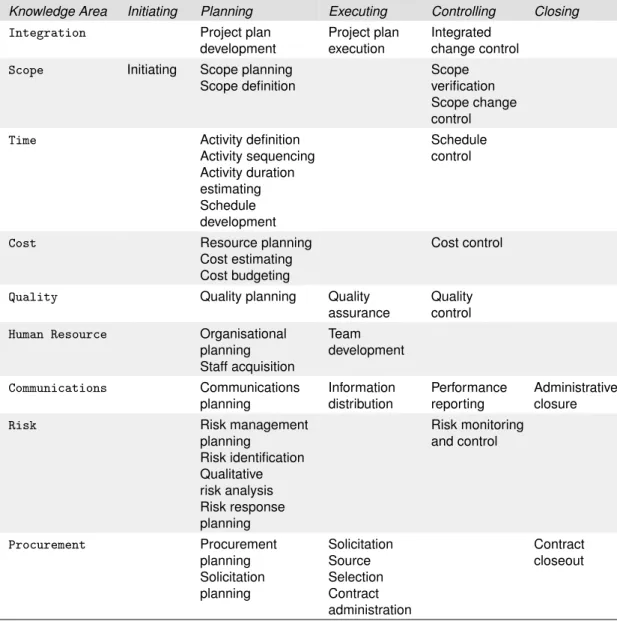
The mainactivitiesof each project management processes group can mapped into the nine project management knowledge ares. Table 4.1 (Table 3-1 in Schwalbe’s text) shows how39project management activities are fitted into the5 process groups, and the9knowledge areas.
4.2
Developing an information technology project
management methodology
Many organisations use the PMBOK® Guide 2004 as a basis of their internal infor-mation project management methodologies. However, the project team of a organisa-tion may realise that they would need to drop or deemphasize some processes in the
PMBOK® Guide 2004to cater for the organisation’s special needs. For example, in contrast to other industries where the overriding financial investment is in materials, the software development industry has salaries as its main financial investment. As a result, most of the procurement functions are absorbed into other processes, such as scope planning and definition, and resource planning.
On the other hand, the project team may also add additional processes. For instance, some project teams develop new processes such asproject book records,issue con-trol,work plan development andproject change control. These new processes com-bine several activities in thePMBOK®Guide 2004into one process, and are tailored
Table 4.1: Relationships among PM process groups and knowledge
Knowledge Area Initiating Planning Executing Controlling Closing
Integration Project plan development
Project plan execution
Integrated change control
Scope Initiating Scope planning Scope definition
Scope verification Scope change control
Time Activity definition Activity sequencing Activity duration estimating Schedule development Schedule control
Cost Resource planning Cost estimating Cost budgeting
Cost control
Quality Quality planning Quality assurance
Quality control
Human Resource Organisational planning Staff acquisition Team development Communications Communications planning Information distribution Performance reporting Administrative closure
Risk Risk management
planning Risk identification Qualitative risk analysis Risk response planning Risk monitoring and control Procurement Procurement planning Solicitation planning Solicitation Source Selection Contract administration Contract closeout
to the particular needs of organisations.
Activity 4.1
The waterfall model
The waterfall model is regarded as the classic conventional software management process. Read through Section 1.1 in Chapter 1, Royce’s text to understand what the ‘waterfall’ theory is and how the waterfall model works in practice.
4.3
Case study: JWD consulting’s project
man-agement intranet site project
This section illustrates the elements involved in managing an intranet project at JWD Consulating from start tofinish by applying the project management process groups. The JWD Consulating case comes originally from the Opening Case of chapter 3 in Schwalbe’s text.
4.3.1
Project initiation
Initiating is the process ofrecognisingandstartinga new project or project phase. The selection of right, meaningful, and important projects for initiating is crucial.
As indicated in Table4.1, thePMBOK®Guide 2004 listsproject scope management
as the only knowledge area associated with project initiation. The guide identifies the followingfour outputs:
Ê
project charterË
assignment of the project managerÌ
classification of constraintsÍ
a list of assumptions.As a comparison, to better suit the company’s own needs, the project manager at JWD Consulting decides to adopt five process groups and has the following slightly different outputs for project initiation:
Ê
project charter completed and signedË
project manager assignedÌ
key stakeholders identifiedÍ
business case completed.Abusiness caseshould include the following information:
Ê
introduction/backgroundË
business objectiveÌ
current situation and problem/opportunity statementÍ
critical assumptions and constraintsÎ
analysis of options and recommendationÏ
preliminary project requirementsÐ
budget estimate and financial analysis.Thebusiness casefor JWD Consulting’s intranet project is listed in Table 3-3 of Schwalbe’s text.
A project chart is preferably one or two pages in length, and should refer to other documents such as the business case, as needed. Table 3-4 in the text shows an example of JWD Consulting’s project charter. Note the items included in the project and thisshort length. For this particular project, the most important parts of a project charter were the signatures of key stakeholders and their individual comments.
4.3.2
Project planning
The main purpose of a project plan is to guide project execution. According to the
PMBOK®Guide 2004, Table 3-5 in Schwalbe’s text lists the outputs of project planning in different project management knowledge areas. As the PMBOK®Guide 2004 is a guide, so many organisations have different planning outputs based on their particular needs. For example, JWD Consulting’s intranet site project has the followingplanning documentsas the outputs:
Ê
a team contract (native to this project)Ë
a scope statementÍ
a project schedule, in the form of a Gantt chart with all dependencies and re-sources enteredÎ
a list of prioritised risks.A kick-off meeting is a good way to formally start the project. Its important function is to help the project team get to know each other. A team contract is part of the
PMBOK®Guide 2004, butnative to the intranet site project. The project manager in this project uses the team contract to help promote teamwork and clarify team com-munications. Table 3-6 in Schwalbe’s text gives an example on what a team contract looks like.
The next task would be to develop a scope statement and WBS. As shown in Table 3-7 in the textbook, thescope statementof the intranet site project includes theproject justification, theproduct characteristics and requirements, thesummary of project de-liverables, and theproject success criteria.
The work breakdown structure (WBS) is an important tool. It provides the basis for deciding how to do the work, and for creating the project schedule and performing earned value management for measuring and forecasting project performance. JWD Consulting’s intranet project uses the project management process groups as the main categories for the WBS, as shown in Figure 3-3 in the prescribed text.
The project team at JWD Consulting continues to develop a baseline schedule for the project. The project schedule can take the form of a Gantt chart or a network dia-gram. The two forms essentially represent the same information regarding the project schedule. Acost baselinewas then developed as part of the project cost management. The major cost was internal labor, which is common for many information technology projects.
Finally, the last deliverable of the planning process group is a list of prioritised risks. Table 3-8 in the text gives such an example.
4.3.3
Project executing
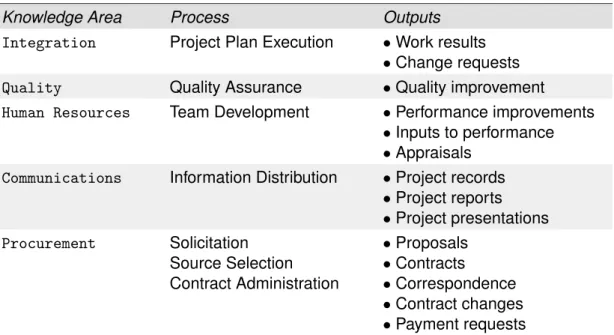
The execution process usually takes the most resources to accomplish. Table 4.2
(Table 3-9 in Schwalbe’s text) lists the major outputs of the project executing processes and their corresponding knowledge areas. It involves 5 out of 9 knowledge areas. As noted from the table,handling change requests is an important output.
The top management at JWD Consulting likes to see progress on the project through
milestone reports. A sample of a milestone report is provided in Table 3-10 of Schwalbe’s text.
During project execution, the project manager of the firm had to deal with human re-sources issues especially conflicts. Moreover, having effective communication skills and strong management support are essential to good project execution as we learned from the intranet project.
Table 4.2: Executing processes and outputs
Knowledge Area Process Outputs
Integration Project Plan Execution •Work results
•Change requests Quality Quality Assurance •Quality improvement Human Resources Team Development •Performance improvements
•Inputs to performance
•Appraisals Communications Information Distribution •Project records
•Project reports •Project presentations Procurement Solicitation Source Selection Contract Administration •Proposals •Contracts •Correspondence •Contract changes •Payment requests
4.3.4
Project controlling
Controlling is the process of measuring progress toward project objectives, monitoring deviation from the plan, and taking corrective action to match progress with the plan. It involves7 out of 9 knowledge areas as shown in Table 4.3(Table 3-11 of Schwalbe’s text).
An important tool for controlling processes isstatus reports. The project team at JWD Consulting had a practice of submitting weekly status reports.
In addition to status reports, project management software is another important tool for controlling the project. The project team of the intranet site project used the en-terprise version of Microsoft® Project 2003 to distribute, update and analyse project information via the Web.
4.3.5
Project closing
The major tasks in the closing process are to gain stakeholder and customer accep-tance of the final product and bring the project, or project phase, to anorderly end. It is not unusual that many information technology projects are concealed before comple-tion. Nevertheless, it is still important to formally close any uncompleted project and reflect on what can be learned to improve future projects.
It isalso important to plan for and execute a smooth transition of the project into the normal operations of the company.
Table 4.3: Controlling processes and outputs
Knowledge Area Process Outputs
Integration Integrated Change Control •Project plan corrective actions
•Lessons learned Scope Scope Verification
Scope Change Control
•Formal acceptance
•Scope changes
•Corrective actions
•Lessons learned
•Adjusted baseline Time Schedule Control •Schedule updates
•Corrective actions
•Lessons learned Cost Cost Control •Revised cost estimates
•Budget updates
•Corrective actions
•Estimate at completion
•Project closeout lessons learned Quality Quality Control •Quality improvement
•Acceptance decisions
•Rework
•Completed checklists
•Process adjustments Communications Performance Reporting •Performance reports
•Change requests Risk Risk Monitoring
and Control
•Workaround plans
•Corrective actions
•Project change requests
•Updates to the risk response plan
•Risk database
•Updates to risk identification checklists
Table 4.4(Table 3-13 of Schwalbe’s text) lists the outputs of project closing and their corresponding knowledge areas. As noted from the table, the project closing process only involves 2 knowledge areas.
Table 4.4: Closing processes and outputs
Knowledge Area Process Outputs
Communications Administrative Closure •Project archives
•Project closure
•Lessons learned Procurement Contract Close-out •Contract file
•Formal acceptance and closure In the example project, the project team prepared a final report, final presentation,
contract files, andlessons-learned report to close the project. In the lessons-learned report, the project team summarised lessons learned from the project such as the importance of having a good kick-off meeting, working together to develop a team contract, using project management software, and communicating well with the project team and sponsor.
Thefinal project reportprepared by the team at JWD Consulting included attachments for all the project management and product-related documents. The project manager also had the customer signed a client acceptance formbefore closing the project for-mally. The templates for the final project report and client acceptance form are available inAppendix Dof the prescribed text.
To summarise, the project management process groups, including initiating, planning, executing, controlling, and closing, provides a usefulframework along with the project management knowledge areas for understanding project management.
Reading
• Read Schwalbe’s text Chapter 3.
Review questions
• Complete Review Questions 1–5 in Chapter 3, Schwalbe’s text to fulfil the objec-tives of Module4.
Exercises
• Complete Exercises 1, 3, 4, 6 in Chapter 3, Schwalbe’s text.
Minicase
Schwalbe, K 2006, Information technology project maangement, 4th edn, Thomson Course Technology.
5
PROJECT INTEGRATION
MANAGEMENT
Objectives
On successful completion of this module, you should be able to:
À
describe an overall framework for project integration management as it relates to the other project management knowledge areas and the project life cycleÁ
describe project plan development, including project plan content, using guide-lines and templates for developing plans, and performing a stakeholder analysis to help manage relationshipsÂ
explain project plan execution, its relationship to project planning, the factors re-lated to successful results, and tools and techniques to assist in project plan executionÃ
understand the integrated change control process, planning for and managing changes on information technology projects, and developing and using a change control systemÄ
describe how software can assist in project integration management.Learning resources
Text
Chapter 4, Schwalbe (4th edition)
Module overview
This module provides detailed information on the first of the nine knowledge areas, project integration management. It describes project plan development, project plan execution, and integrated change control. This chapter again emphasizes the impor-tance of making sure projects fit into the big picture of an organization. It also highlights the need for new project managers to let go of doing detailed technical work and focus on project management.
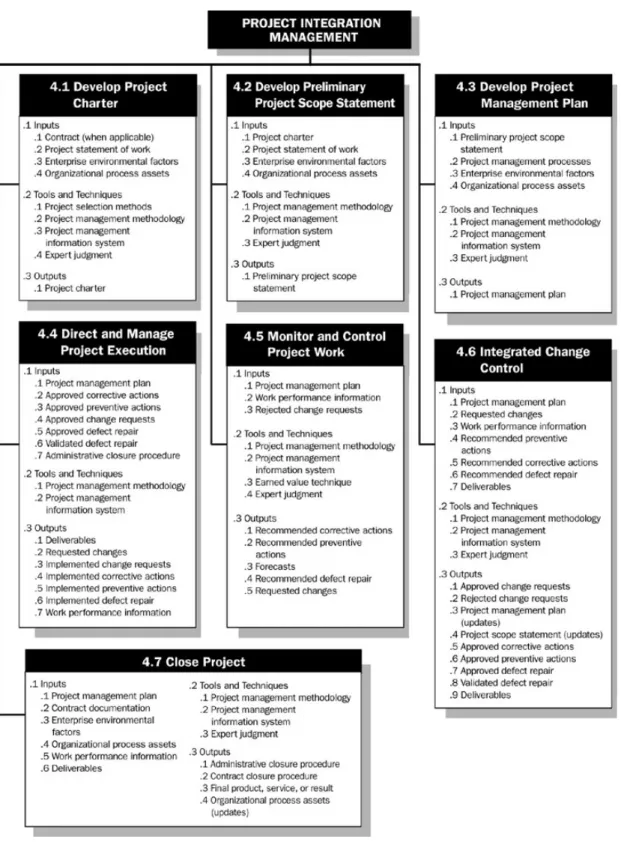
Figure 5.1 provides an overview as to what processes, inputs, tools and techniques, and outputs project integration management involve, based on the PMBOK® Guide 2004.
In the following sections, we briefly summarise the key concepts and principles pre-sented in this module.
Figure 5.1: Overview of Project Integration Management (source:PMBOK Guide 2004, p.79)
5.1
What is project integration management
Project integration management involves coordinating all of the other project manage-ment knowledge areas throughout a project’s life cycle.Threemain processes involved in project integration management are as follows:
Ê
Project plan development: involves putting the results of other planning pro-cesses into a consistent, coherent document, namely, the project plan.Ë
Project plan execution: involves carrying out the project plan by performing the activities included in it.Ì
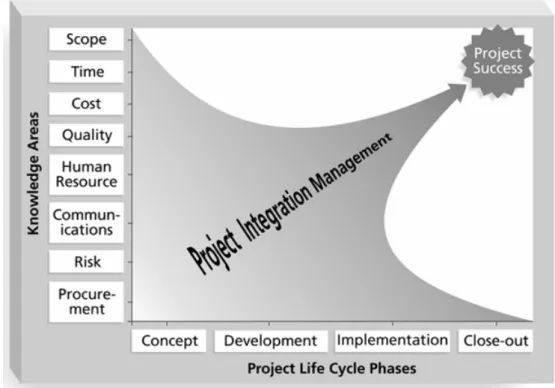
Integrated change control: involves coordinating changes across the entire project. Project integration management ties together all the other eight project management knowledge areas. As a result, it depends on the inputs from the rest of the knowledge areas. Figure 5.2 presents a framework as to how project integration management serves as the guiding force in project management. The x-axis of the figure represents the project life cycle phases, where as the y-axis represents the other eight project management knowledge areas. As can be seen from Figure 5.2, the project inte-gration management knowledge area is represented as an arrow that becomes more focused as the project processes through its life cycle. This indicates that project inte-gration management pulls everything together to guide the project toward successful completion.Figure 5.2: Framework of Project Integration Management (source: Schwalbe 2006)
Project integration management is regarded by many project management professions as the key to overall project success. What project integration management is really about is to integrate the work of all of the people involved in the project by focusing on good communication and relationship management. Project integration management includesinterface management, which involves identifying and managing the points of interaction between various elements of the project.
It is important to understand that project integration management must occur within the context of the entire performing organisation, not just within a particular project. In other words, the objectives of one particular project must be subject to the overall interests of the entire organisation.
5.2
Project plan development
Good project integration management starts from a good project plan. Aproject planis document used to coordinate all project planning documents and help guide a project’s execution and control.
5.2.1
Project plan contents
Project plans vary greatly depending on the size and nature of the projects. However, there arecommon elementsthat most project plans include:
Ê
an introduction or overview of the projectË
a description of how the project is organisedÌ
the management and technical processes used on the projectÍ
sections describing the work to be performedÎ
scheduleÏ
budget.The introduction or overview of the project plan should include, as a minimum, the following information:
Ê
the project nameË
a brief description of the project and the need it addressesÌ
the sponsor’s nameÎ
deliverables of the projectÏ
a list of important reference materialsÐ
a list of definitions and acronyms.Thedescription of how the project is organizedshould include the following information:
Ê
organisational chartsË
project responsibilitiesÌ
other organisational or process related information.The section of the project plan describing management and technical approaches
should include the following information:
Ê
management objectivesË
project controlsÌ
risk managementÍ
project staffingÎ
technical processes.Thesectionof the overall project plandescribing the work to be doneshould reference the scope management plan and summarise the following information:
Ê
major work packagesË
key deliverablesÌ
other work-related information.Theproject schedule information sectionshould include the following information:
Ê
summary scheduleË
detailed scheduleÌ
other schedule-related information.Thebudget sectionof the overall project plan should include the following information: