CLOUD BASED APPLICATION FOR EVENT
MANAGEMENT SYSTEM
Payal Bhuva, Sneha Dingre, Swati Jape, Manali Joshi
Prof. D. V. Medhane
Department of Information Technology
Sinhgad College of Engineering, Vadgaon Pune, India
Abstract: Cloud Computing is the evolution of Internet by means of which we can develop
applications to view, manipulate and share data. Cloud based applications provide access to data from anywhere, any time and from any device. Software as a Service (SaaS) is a cloud service in which the application is hosted by the cloud service provider and can be accessed by the customers over the Internet. SaaS uses a common code base which can be refined by the programmers to build a robust application. It does not involve client installation, just a browser and network connectivity; the user pays for the service depending on the contract. Every user can customize the software in their own way by choosing the components. A SaaS application for an event management system ensures efficient management by automating several tasks, tracking changes, increasing information accessibility and simplifying communication.
Keywords: Software as a Service,Multi-tenancy, Platform as a Service
1. INTRODUCTION
This is a multi-tenant Software as a Service application. Multi-tenancy is an architecture in which a single instance of a software application serves multiple customers & each customer is called a tenant [4]. It aims to provide successful event planning and management that can be used by various tenants i.e. colleges. The SaaS application will be able to customize according to varying functional requirements of individual tenants and provide them online software service. The end users of that tenant will be, students who wish to view the details like event schedule, registration fee, etc. of any event, register for an event; and coordinators who manage various events. The application is aimed at managing considerable amount of data pertaining to different events and generating statistical reports of the past data to facilitate decision making process.
This application is developed to cater the requirements of multiple tenants where requests from them are served concurrently by one or more instances of a hosted application. A
Journal homepage: www.mjret.in
single database is shared among tenants [1], with different set of tables (eg. institute_details, college_details, department_details, coordinator_details, participant_details, event_schedule) belonging to each of these tenants (Fig. 1). The SaaS application is developed using PHP and HTML/ CSS as frontend and a structured database, MySQL as backend.
Fig. 1 Shared Database
We have used RedHat’s Openshift Platform as a Service (PaaS) to develop and deploy our application on the Cloud[8]. Openshift supports several language environments including PHP. It also offers support for various databases like MongoDB, MySQL, PostgreSQL and Microsoft SQL Server. Openshift supports applications as web programming cartridges. Openshift provides cartridges to enable additional capabilities like databases, metrics, etc. In order to get the app up and running, Openshift requires the application code to be pushed on GitHub, a Web-based Git repository hosting service.
1.1 Background
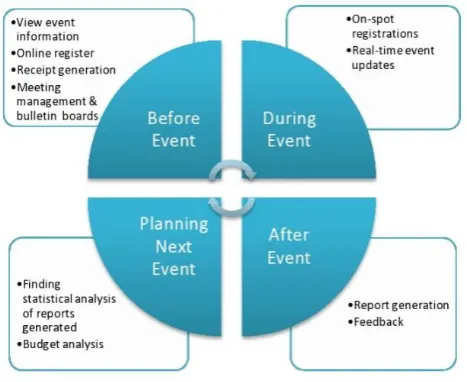
Fig. 2 Tasks involved in event management
1.2 Related Work
1.2.1 Platform as a Service
Deploying a PHP application on Openshift begins with choosing a web programming cartridge (here, we have used PHP 5.4) and specifying a domain name for our application, which appears as a public URL for the application [3].
Further, we can either provide a Git URL of our application source code or let Openshift create a default Git repository in the Cloud (which can later be cloned to our local machine). We install the Git Client for our operating system and execute the following commands to update the source code in the Git repository:
>git add .
>git commit –m “new commit”
>git push
The changes made in the source code will then be reflected on the application page.
1.2.2 Multi-tenant Database Schema
One of the approaches to develop multi-tenant database architecture involves providing separate tables for each tenant. This allows each tenant to have his own set of private tables, thereby fulfilling its specific business requirements [9].
Fig. 3 Private table for each tenant
2. SYSTEM ARCHITECTURE
Fig. 4 represents the overall architecture of the system with 3 layers namely- the cloud storage (GitHub), Platform as a Service (PaaS) and Software as a Service (SaaS).
3. PSEUDO CODE FOR CUSTOMIZATION
The institute coordinator will follow this pseudo code to register its organization:
i: institute, c: college, d: department, e: event
Begin
For each i
if(not register (i))
sign_up(i);
allocate_tenant_id(i);
end if;
else
login(i);
if(c==0)
add_college(c);
if(d==0)
add_department(d);
if(e==0)
add_event(e);
end if;
end if;
end if;
end;
4. MATHEMATICAL EXPRESSION
The tables 1, 2 and fig. 5 illustrate the inputs, outputs and functions involved in this system.
Sr. No
Description Design Observations
Let P be the Event Management System; such that P = {I, F,
O} where I is the set of inputs; I = { I1,I2,I3 }; I1 =
Coordinator information, I2 = participants information, I3 =
event information; F is a set of functions; F = { F1, F2, F3,
F4, F5, F6, F7, F8, F9, F10, F11, F12, F13, F14 }; F1 =
sign-up, F2 = sign-in, F3 = event details, F4 = view event
information, F5 = add event, F6 = update event, F7 = delete
event, F8 = schedule meetings, F9 = send invitations, F10 =
register for event, F11 = event updates,
F12 = give feedback, F13 = report generations, F14 =
budget analysis; O is a set of outputs; O1 = { O1, O2, O3,
O4, O5, O6, O7 }; O1 = registration details, O2 = successful
login, O3 = display event information, O4 = invitations sent
successfully,
O5 = registered for event, O6 = reports generated, O7 = exit.
P holds a list
of inputs,
functions and
outputs.
Table 1: Operation Table
Sr. No Function Name Description
1. Sign-Up Allows a new user to register with system.
2. Sign-In Allows the registered user to login with system
with different access rights.
3. Event Details Co-ordinators at different levels can view
information about events like number of
participants, sponsorship generated, budget of
each event, etc.
4. Event Information Provides information of events like schedule,
fees, venue, etc.0
5. Add event Co-ordinator can add a new event.
6. Update event Co-ordinator can update event details.
7. Delete event Co-ordinator can remove the event.
8. Schedule meetings Creating schedule of meetings and uploading.
Sending notification to members involved in
meeting.
11. Event Updates Conveying event updates like uploading a list of
winners, change in schedule, etc.
12. Give Feedback Participants can give feedback for events.
13. Report generation Statistical analysis and report generation.
14. Budget analysis Analyzing the funds generated through
sponsorships, events, etc.
Table 2: Function Table
I F F O
Fig. 5 I/O Function Mapping
5. CONCLUSION AND FUTURE ENHANCEMENT
In this paper, we have presented a multi-tenant SaaS application framework for managing events of various institutions and discussed the deployment of a SaaS application on a platform. We have presented the shared database approach to store every tenant’s data where each tenant holds a set of tables grouped into a schema.
Multi-tenancy is the direct path to reduce costs and get more from a cloud application. Higher the degree of multi-tenancy, the lower is the costs for customers. Of the three approaches to manage multi-tenant data viz. separate database, shared database and shared table, we propose to use the shared table approach to store multiple tenants’ data to further lower the hardware and backup cost.
REFERENCES
[1] Zhi Hu Wang, Chang Jie Guo, Bo Gao, Wei Sun, Zhen Zhang, Wen Hao An, “A Study and
Performance Evaluation of the Multi-Tenant Data Tier Design Patterns for Service Oriented Computing”,
IEEE International Conference on e-Business Engineering,2008.
[2] Ratna Kumari Challa, Kasunu Shrinivasa Rao, “Services of Cloud Computing”, International Journal of
Advance Research in Computer Science and Management Studies, Volume 2, Issue 2, February 2014.
[3] Mr. Nishant Kumar, Dr. Mayank Aggrawal, Dr. Raj Kumar, Mr. Spandan Singh, Mr. Chirag Goel, “An
Application Deployment to Openshift Cloud Using Existing Git Repository From Local Client”,
International Journal Of Engineering And Computer Science ISSN:2319-7242 Volume 4 Issue 1 January
2015.
[4] Li heng, Yang dan and Zhang xiaohong, “Survey on Multi-Tenant Data Architecture for SaaS”, IJCSI
International Journal of Computer Science Issues, Vol. 9, Issue 6, No 3, November 2012 .
[5] Cary Landis and Dan Blacharski, “Cloud computing made easy”, version 0.3
[6] Anthony T. Velte, Toby J. Velte, Robert Elsenpeter, “Cloud Computing A Practical Approach”, 1976.
[7] Red Hat Cloud Foundations: Cloud 101,
https://www.redhat.com/en/resources/red-hat-cloud-foundations-cloud-101
[8] The Power of PaaS, https://www.redhat.com/en/resources/power-of-paas.
[9] Li heng, Yang dan and Zhang xiaohong, “Survey on Multi-Tenant Data Architecture for SaaS”, IJCSI