ISSN Online: 2327-5227 ISSN Print: 2327-5219
SAP S/4HANA Embedded Analytics: An
Overview
Abani Pattanayak
SAP HANA Center of Excellence, SAP America, Dallas, USA
Abstract
Operational analytics is all about answering business questions while doing business and supporting business users across the organization, from shop floor users to management and executives. Therefore, business transactions and analytics must co-exist together in a single platform to empower business users to drive insights, make decisions, and complete business processes in a single application and using a single source of facts without toggling between multiple applications. Traditionally transactional systems and analytics were maintained separately to improve throughput of the transactional system and that certainly introduced latency in decision making. However, with innovation in the SAP HANA platform, SAP S/4HANA embedded analytics enables busi-ness users, busibusi-ness analysts, and management to perform real-time analytics on live transactional data. This paper reviews technical architecture and key com-ponents of SAP S/4HANA embedded analytics. This paper reviews technical architecture and key components of SAP S/4HANA embedded analytics.
Keywords
SAP HANA, In-Memory Computing, S/4HANA, Embedded Analytics
1. Introduction
SAP S/4HANA [1] is the next-generation SAP Business Suite application created exclusively for the SAP HANA Platform [2]. The main characteristics of SAP S/4HANA include simplification of business processes, significantly improved transaction efficiency (new simplified data model [3]); faster analytics (using a virtual data model based on Core Data Services [CDS]); an intuitive, modern user interface (SAP Fiori), and planning and simulation options in many con-ventional transactions.
With SAP S/4HANA, both transactions and analytics exist together in a single platform enabling business users to conduct business and perform real-time
How to cite this paper: Pattanayak, A. (2017) SAP S/4HANA Embedded Analytics: An Overview. Journal of Computer and Com- munications, 5, 1-7.
https://doi.org/10.4236/jcc.2017.59001
Received: June 8, 2017 Accepted: June 30, 2017 Published: July 3, 2017
Copyright © 2017 by author and Scientific Research Publishing Inc. This work is licensed under the Creative Commons Attribution International License (CC BY 4.0).
http://creativecommons.org/licenses/by/4.0/
analytics on live transactional data. SAP S/4HANA embedded analytics is a col-lection of analytics features and a set of predefined and prepackaged self-service data representations (i.e., virtual data models) to derive real-time, actionable in-sights from the data without worrying about the underlying data structure. SAP S/4HANA embedded analytics can be built directly into transactional business processes or can be consumed by standalone analytics applications.
2. SAP S/4HANA Embedded Analytics Architecture
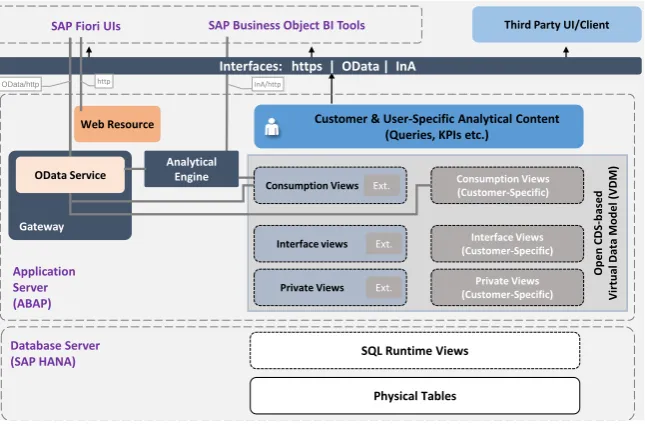
SAP S/4HANA embedded analytics as the name suggests are part of the standard SAP S/4HANA installation and is used to perform sophisticated real-time re-porting and analysis on live transactional data. The key architectural
compo-nents of SAP S/4HANA embedded analytics [4] include the SAP HANA
data-base, virtual data model, analytical engine (embedded SAP BW), OData service, and interfaces as illustrated in Figure 1.
2.1. Virtual Data Model Based on CDS Views
SAP introduced a set of domain-specific languages and services called Core Data Services (CDS) for defining and consuming semantically rich data models which are represented as CDS views. CDS also offers capabilities beyond the traditional data modeling tools, including support for conceptual modeling and relationship definitions, built-in functions, and extensions.
SAP provides a set of CDS views to serve as the functional representation of the operational data (includes both transactional and master data tables of SAP S/4HANA). These virtual data models are the foundation of the SAP S/4HANA system and used by both business process and analytics to access data from the underlying physical tables. These virtual data models are also used for extracting data from the SAP S/4HANA system to external systems like SAP BW.
[image:2.595.213.536.507.719.2]SAP-delivered CDS views can be extended, and new CDS views can be built to
Figure 1. SAP S/4HANA embedded analytics architecture.
Physical Tables O pe n C DS -ba se d Vi rt ual D at a Mo de l ( VD M) Private Views
Interface views (Customer-Specific)Interface Views
Private Views (Customer-Specific)
Gateway
Customer & User-Specific Analytical Content (Queries, KPIs etc.)
Ext.
Ext.
Third Party UI/Client
Consumption Views Ext. Consumption Views (Customer-Specific)
OData Service AnalyticalEngine
Interfaces: https | OData | InA SAP Fiori UIs SAP Business Object BI Tools
Application Server (ABAP)
Database Server
(SAP HANA) SQL Runtime Views
Web Resource
enhance the virtual data model. CDS views are developed, maintained, and ex-tended in the ABAP layer of the SAP S/4HANA system, so promotion of CDS views between systems can be managed by the standard SAP transport process.
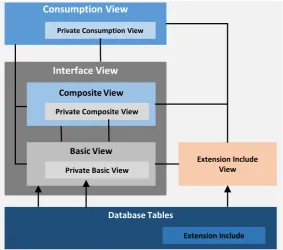
The key principle of the VDM is to build a semantic layer on top of the exist-ing SAP S/4HANA database model, hidexist-ing its technical details. Based on the provisioned content and reuse option, the CDS views of the VDM are classified as interface or consumption views as illustrated in Figure 2.
2.1.1. Private Views
These views are private in nature and not meant for end user consumption. Pri-vate interface views are technically driven auxiliary views and are introduced to facilitate transformation of the underlying data model towards the public view model. Technical names of private CDS views start with P_. It is not recom-mended to change or extend the private views.
2.1.2. Interface Views
Interface views are the most important constituent of the VDM. Theses consist of reusable entity views, which are defined with a focus on business semantics. Interface views are public, stable, and reusable views for any consumer. The structure of public interface views should not be affected due to corrections, patches, and upgrades.
There two types of interface views:
[image:3.595.208.492.461.711.2]Basic interface views represent core entities without data redundancy that is, with a single representation of each core entity (e.g., exactly one customer or sales order) and only with those fields that are dependent on the core entity itself and cannot be calculated from other fields. Basic views form the low-redundancy
Figure 2. SAP S/4HANA virtual data model.
Consumption View
Interface View
Private Consumption View
Composite View
Private Composite View
Basic View
Private Basic View
Database Tables
Extension Include Extension Include
model and simple projection on top of the SAP Business Suite database tables.
Composite Interface views are derived from multiple basic interface views and may offer associations, aggregations, and complex calculations. They can be spe-cific to a consumption domain or reusable by many and always expose redun-dant data by design. Depending on the use case, there may be multiple layers of composite interface views.
2.1.3. Consumption Views
As the name suggests, these views are exposed for end user consumption and created using one or more interface views. These are public domain-specific views for analytics, search, and transactional applications. The guiding principle of the VDM model is that database tables must not be accessed directly by con-sumer views of the VDM (bypassing the interface layer).
2.1.4. Extension Include Views
Extension include views are used to expose custom new fields created as part of customer project implementations. SAP-delivered extension includes views (for that matter, any views) can be extended to add additional fields. The customer extension include view is created and transported as a separate DDL source.
2.2. SAP HANA Database
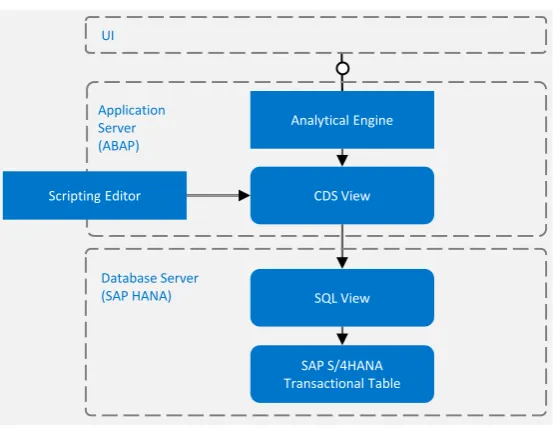
Although SAP S/4HANA embedded analytics is powered by the high-perfor- mance SAP HANA database, it’s essential for the computation to be pushed to the database layer to attain optimum performance. Therefore, during the activa-tion of CDS views (in the ABAP layer), the system generates SQL runtime views in the SAP HANA database to execute the data read and transformation inside the SAP HANA database layer as illustrated in Figure 3.
Please note, certain analytic features of CDS views are not (yet) supported in SAP HANA SQL runtime views; these features are computed by the analytical engine in the SAP S/4HANA ABAP application server.
The generated SQL runtime views in SAP HANA database views can also be used in native SAP HANA information views (like calculation views) for agile data mart reporting in the SAP HANA database.
2.3. OData Service
SAP Gateway exposes consumption CDS views as an OData service, allowing SAP Fiori, SAP BusinessObjects BI tools, and third-party UIs/clients to access the consumption views directly or via the analytical engine.
2.4. Analytical Engine
Figure 3. CDS views activation.
and the SAP HANA application process designer). It also compensates for func-tionalities (pivoting, hierarchies, aggregations, and formula execution) not (yet) available in SAP HANA.
Upon activating consumption CDS views, a transient provider or transient SAP BEx query is created in the embedded SAP BW system. SAP BusinessOb-jects BI tools (like SAP BusinessObBusinessOb-jects Design Studio) use these transient pro-viders to query data from the consumption CDS views.
2.5. Interfaces
SAP S4/HANA analytics provides data access using OData, SAP HANA InA, and Business Intelligence Consumer Services (BICS) interfaces, depending on the client tools. The frontend applications use mostly OData as the communica-tion protocol inside the SAP Fiori interface. There are some excepcommunica-tions, such as SAP Lumira, SAP Design Studio, and enterprise search, which uses SAP HANA InA protocols because they don’t yet have OData implementations.
3. Execution of SQL Queries on CDS Views
As discussed earlier, when a CDS view gets activated, a SQL-Runtime view is generated in the database. This SQL view contains all fields from the CDS view’s projection list (but not the associations and other CDS-specific metadata). Therefore, when we query a CDS view using standard SQL (such queries are translated one-to-one into an SQL statement on the SQL-Runtime view), addi-tional features such as associations and annotations are provided on the ABAP side and translated into pure SQL queries to the database.
4. Reporting & Visualizations
All SAP S/4HANA CDS views are automatically exposed as ODP transient Info-Providers (in the embedded BW system) and can be used to create custom SAP
Application Server (ABAP)
Analytical Engine
CDS View
SQL View
SAP S/4HANA Transactional Table UI
BEx queries. It’s recommended to create SAP BEx queries only on SAP S/ 4HANA CDS consumption/query views. SAP BEx queries created on the ODP transient providers can be transported through the SAP S/4HANA landscape, because a transient provider is generated with the same technical name in all systems. SAP BEx queries on ODP transient providers support SAP BEx features like variables, restricted key figures, exceptions and conditions, Currency con-version, report-to-report interface and SAP S/4HANA analytics privileges.
Also the generated SQL runtime views (for CDS views) are accessible by BI tools from SAP and other commercial vendors (e.g. Tableau, QlikView, IBM Cognos etc.) to create sophisticated visualizations.
These views can also be consumed in the native HANA platform using the in-built XS Server and XS Advanced framework.
5. SAP Best Practices for Analytics with SAP S/4HANA
SAP Best Practices for Analytics with SAP S/4HANA provides a comprehensive solution with guidance-supported by pre-built content to jump start embedded analytics within SAP S/4HANA. The scope covers tools for the SAP S/4HANA cloud, on-premise, and hybrid scenarios.
These best practices contents can be used for quick enablement of real-time operational reporting in the SAP S/4HANA system without any custom devel-opment. These contents can also be extended/enhanced to meet custom-er-specific requirements.
Best practices contents can be downloaded free of charge from the SAP Best Practices Explorer website [5].
6. Conclusion
As discussed, SAP S/4HANA embedded analytics empowers business users to carry out business transactions and derive insights in a single application using a single source of truth. These analytics features can also be integrated to core business processes (e.g. customer segmentation, explore cross-sell & up-sale op-portunity, make recommendations, planning & forecasting etc.) to make bet-ter-informed decisions. Finally, SAP S/4HANA embedded analytics can also take advantage of the underlying advanced analytics capabilities in the SAP HANA platform to look beyond historic facts and figures to forecasting the future.
Acknowledgements
I want to express my gratitude to Dhirendra Gehlot, Director and Robert Her-nandez Jr., Vice President, Digital Business Services, SAP America for their en-couragement and support in publishing this paper.
References
[1] SAP (2017) What Is SAP S/4HANA?
https://www.sap.com/products/s4hana-erp.html
https://www.sap.com/product/technology-platform/hana.html
[3] Elfner, S. (2016) TEC206: Architecture and Components of SAP S/4HANA-SAP TechEd Lecture of the Week.
https://blogs.sap.com/2016/01/03/tec206-architecture-and-components-of-sap-s4ha
na-sap-teched-lecture-of-the-week/
[4] Pattanayak, A. and Koppolu, R. (2016) Introducing SAP S/4HANA Embedded Analytics. Rheinwerk Publishing, Quincy.
[5] SAP (2017) SAP Best Practices for Analytics with SAP S/4HANA.
https://rapid.sap.com/bp/BP_S4H_ANA
Submit or recommend next manuscript to SCIRP and we will provide best service for you:
Accepting pre-submission inquiries through Email, Facebook, LinkedIn, Twitter, etc. A wide selection of journals (inclusive of 9 subjects, more than 200 journals)
Providing 24-hour high-quality service User-friendly online submission system Fair and swift peer-review system
Efficient typesetting and proofreading procedure
Display of the result of downloads and visits, as well as the number of cited articles Maximum dissemination of your research work
Submit your manuscript at: http://papersubmission.scirp.org/