Author: Sun Ok
Supervisor: Dr. lr. Oresti Banos
Critical Observer: Dr. Jelle van Dijk
Date: 15 July 2018
Abstract
In our daily life, there are brief periods of time that are triggered by different physical, physiological and mental responses. Some of these brief periods are memorable and carry importance for each individual. They can be defined as a special or personal moment and differ from person to person, which means every individual has a different way of experiencing the world and communicating differently. At the University of Twente, the Telemedicine Group focuses on researching, designing and testing novel smart technologies for remote monitoring, analysis and coaching of people in both clinical and daily life settings. The purpose of the SmartMoments project is to create a mobile application that allows tagging these special moments as well as passively monitoring the diverse sensor data potentially describing the physical, physiological and mental behaviour of the individual. The purpose behind this project is to research how smartphones can be used to tag these special moments in an individual’s life. In order to answer this question five sub questions will be investigated. These sub questions focus on the following; how they feel about tagging special moments, what they think about sharing personal information, passively being monitored by the smartphone sensors and how they perceive the overall information about their special moments provided by the application as well as the human factors that affect the participaction of the users in SmartMoments. The significance of this research project is to create a tool that enables tagging of these special moments. This project can further be used by the Telemedicine Group in order to analyze the collected moment data, and help clearly define what a special moment is, what are the physical, physiological and mental factors that affect it and whether there are common factors between different individuals. Understanding this significance can help to improve communication amongst each other. After the application has been developed a semi structured interview as well as system usability scoring is conducted. The interview and system usability scoring results show that the final product is usable and the users feel comfortable sharing personal information through the SmartMoments app. However there is room for improvement; such as improving the system usability score, improving interactivity and looking into more moment types besides visual moments and textual moments.
Acknowledgement
There are many people to thank; so here is my list;
I would like to start by thanking my supervisor Oresti Banos. Even though he moved to Spain right at the beginning of this project, I always felt like he supported me in every way that he can. Working with him was indeed a great experience. Without his input to SmartMoments I wouldn’t be able to build an application that I am proud say I made it from scratch.
I would like to thank Roy van der Veen, for giving me his support, feedback and encouragement in the past six months.
I would like to thank Jelle van Dijk for his critical questions, helping me to think about the challenges that I couldn’t.
I would like to thank every participant of the users tests, without your input I wouldn’t have my goals for future improvements.
Table of Contents
1. Introduction 6
1.1 Motivation 6
1.2 Goal and Challenges 7
1.3 The Research Questions 8
1.4 Approach 9
2. State of the Art 10
2.1 Literature Review 10
2.1.1 Introduction 10
2.1.2 Core 11
2.1.2.1 Healthcare Applications 11
2.1.2.2 Lifestyle Applications 13
2.1.2.3 Adapting models for sensors 14
2.1.3 Discussion 15
2.2 Competitor Analysis 17
2.2.1 The purpose of competitor analysis 17
2.2.2 The criteria for selecting application 17
2.2.3 The selected applications 17
Moment 18
Moments by Facebook 19
KYO 20
happyWe 21
reallifeChallenge 23
2.2.4 The findings from the competitor analysis 24
3. Ideation 25
3.1 Divergence Model 25
3.2 Stakeholders 26
3.3 iPACT 27
3.4 Design Inspiration 27
3.5 Convergence Model 31
4. Specification 32
4.1 FICS analysis 32
4.1.1 FICS analysis 32
4.1.1 User Scenario 34
4.2 Specifications based on challenges 35
4.3 Requirements from the user side 36
4.4 Requirements from the developer side 36
4.5 Activity Diagram 37
4.5.1 Register Activity Diagram 37
4.5.2 Add moment Activity Diagram 38
4.6 Early prototype of the SmartMoments application 39
5. Realisation 41
5.1 Android Development Process 41
5.1.2 Activities 42
5.2 Aware Framework 45
5.3 Firebase 46
5.3.1 The Realtime Database 46
5.3.2 The Cloud Storage 47
5.3.3 The Authentication Systems 49
5.3.4 The Final Version of the SmartMoments application 52
6. Evaluation 54
6.1 Functional Test 54
6.2 User Tests 56
6.2.1 Test Procedure 56
6.2.2 Interview Results 58
6.2.3 System Usability Scoring Results 58
7. Conclusion 59
7.1 Conclusion 59
7.2 Future Work 59
Appendix 60
References 61
1. Introduction
1.1. Motivation
In 2015 more than 165,000 health related smartphone applications were identified in Google Play Store and Apple iTunes. One year later automated telephone communications systems (ACTS) were defined as a technology platform through which health professionals can collect relevant information, deliver support, goal setting and coaching to consumers via smartphones, tablets, etc [1]. Smartphones are a mature technology that already have built in sensors that act as silent observers. They are usually supplied with sensors such as GPS receivers, gyroscopes, cameras and constant access to the Internet. These features have risen interest in how these devices can be used to achieve a healthier life. In this rushing world a lot of people do not have to time to pay attention to nutrition or regularly exercise [2]. However there are multiple situations in everyday life that trigger physical, physiological and mental responses. Some of these brief periods are memorable and carry importance for each individual. They can be defined as a special or personal moment and differ from person to person. The possibilities of how smartphones could be used to improve our life standards could improve the understanding of each individual and improve communication amongst each other.
The plurality of sensors in smartphones give each user a powerful, multi-feature computing entity. These devices can sense and react based on their environment, which makes them context aware. Many applications are built to deal with context, based on sensed data, through physical and virtual sensors. Examples for the physical sensors can be GPS sensors, accelerometers and WiFi sensors whereas an example for the virtual sensors can be the history of context where information is not collected directly but extracted by analyzing a set of collected data. [3] This means that smartphones can be used for investigating mental behaviour as well as investigation physical and physiological behaviour.
1.2. Goal and Challenges
Every individual has a different understanding and a feeling of what a special moment is. Any moment could be an special moment, and although while a moment is irrelevant to one individual it could be representing a remarkable moment for another. Specifically this is relevant to people suffering from mental disorders such as autism and schizophrenia. So unraveling how each individual perceive their moments and the world can help improve communication and help understand each other much better. Thus the application must collect any data that might help clearly define what a special moment is and what are the factors that affect special moments for each individual. Thus the first goal of the SmartMoments project is to enable the tagging of personal or special moments.
The system will continuously, unobtrusively and ubiquitously monitor diverse passive sensor data potentially describing the physical, physiological and mental behaviour of the individual. The sensors within the smartphone are constantly being monitored. So the second goal is to monitor this sensor data.
The first challenge is to make use the user’s personal and private information is protected. This means that the application should use encryption and authentication mechanisms in each step to prevent harmful exploitations. The second challenge is to make sure that the described mobile application is easy to use. The features should only be the necessary ones, they should be straight forward and not confuse the user in terms of actions. This way the users can grab the application and understand the flow of actions clearly.
The third challenge is to retrieve necessary permissions due to the use of sensors. SmartMoments should not use these sensors without informing the users and betraying their trust. The second challenge is to make sure that the use of these sensors does not drain the battery of the smartphones. Thus the power usage should be carefully adjusted.
Finally the interactivity of the user is highly important. The user should not be overwhelmed by the mobile application, such as receiving many notifications, having a complex and nonuniform user interface can draw the user away from using the application.
1.3. The Research Questions
The research questions regarding this project are as follows (Please note that the questions start from a general point of view and continue to narrow down):
RQ: How can smartphones be used to tag important moments in an individual's life?
SQ1: How do the users perceive being silently monitored through the smartphone sensors? SQ2: What are the human factors that affect the participation of users in mobile applications?
SQ3: How do users feel about tagging methods for sharing special moments through mobile application? SQ4: How do users feel about providing personal information about themselves through the mobile application?
The rest of this document will focus on the state of the art related to the given research questions and evaluate them in the Conclusion section.
1.4. Approach
This chapter will explain how the previously mentioned research questions will be understood, analyzed and answered throughout this report and the approaches that are being used to explain these processes.
In Chapter 2 state of the art will be conducted. This section consists of two parts, first is looking into literature and the second part is competitor analysis. The literature review will investigate relevant literature for applications that are used for healthcare and improving lifestyle. The purpose is to help understand and analyze the research problem and learn about the challenges that other projects have encountered. The results will be used to prove relevance of the research question in real life problems, look further into its importance and analyze different approaches to the solution.
Competitor research will be conducted to evaluate similar applications that are available in the App Store or the Google Play store to support the ideation, design and specification process. For each given application rating, number of users, key features and ranking will be given. These values will be used to support the decisions made in the ideation section.
Chapter 3 describes the ideation process for the SmartMoments application. After analyzing the state of the art and looking into the results of the competitor analysis, this section uses this information to finalize the concept of the graduation project.
Later in Chapter 4 the specifications will be explained. The functionalities of the SmartMoments application will be included in this section. The purpose is to finalize the functionalities that will be included in the first version of SmartMoments and explain them using activity diagrams.
Chapter 5 describes the realisation process. This section explains how the SmartMoment version was developed and what are the technologies that are being used.The selected features for SmartMoments will later be evaluated during the interview sessions by using a System Usability Scale. This scale is a way of measuring system usability by using ten questions and five response options. It can be used in small sample sizes to determine the usability and non usability of proposed systems.
In the Chapter 6, after the application has been built, a qualitative research will be performed for evaluation purposes. Firstly a functional test will be performed by the researcher in order to check the completeness of the specifications. Afterwards by conducting individual semi-structured interviews with a small number of respondents is used to learn the opinion of the participants on the SmartMoments application. The answers collected from the users will be used to answer and enlighten the sub research questions.
2. State of the Art
2.1. Literature Review
2.1.1.
Introduction
In 2015 more than 165,000 health related smartphone applications were identified in the Google Play Store and Apple App Store. One year later automated telephone communications systems (ACTS) were defined as a technology platform through which health professionals can collect relevant information, deliver support, set goals and provide coaching to consumers via smartphones, tablets, etc [1].
Smartphones are a mature technology that already have built in sensors that act as silent observers. The plurality of sensors in smartphones give each user a powerful, multi-feature computing entity. These devices can sense and react based on their environment, which makes them context aware. Many applications are built to deal with context, based on sensed data, through physical and virtual sensors. Examples for the physical sensors are GPS sensors, accelerometers and WiFi sensors whereas an example for the virtual sensors can be the history of context where information is not collected directly but extracted by analyzing a set of collected data [3] . This means that smartphones can be used for investigating mental behaviour as well as investigating physical and physiological behaviour.
These features have risen interest in how these devices can be used to achieve a healthier life and collect data that can be used for personal reflection. In this rushing world a lot of people do not have time to pay attention to nutrition, regularly exercise [2] or use self reflection to understand one another. However there are multiple situations in everyday life that trigger physical, physiological and mental responses. These responses differ for each individual and lead to remarkable moments. A moment can be redundant for one person but be special for another. The possibilities of how smartphones could be used to improve our life standards could improve the understanding of each individual and improve communication amongst each other.
SmartMoments is a graduation project that is being developed for the Telemedicine Group at the University of Twente. The motivation is using this application for self reflection to improve the quality of life. The goal of this project is to create an Android application in which users can add their remarkable moments and save the above mentioned data on the backend. Later the collected data will be analyzed by the Telemedicine Group to define what makes a remarkable moment, what the common and different factors that affect individuals are.
SmartMoments has similarities to applications that are in the healthcare and lifestyle categories. Keeping track of sensor data is a part of applications in these categories. Thus looking further into healthcare and lifestyle applications is important to understand the core of SmartMoments.
The goal of this paper is to investigate literature that answers the following questions and supports the research behind the SmartMoments graduation project;
Research Question: What are the differences between healthcare and lifestyle applications?
Sub Question 1: What are the uses of smartphone sensors in healthcare and lifestyle applications? Sub Question 2: What are the challenges raised from making use of the smartphone sensors for both categories?
The rest of this sections will investigate the related literature and later discuss the results in the discussion section.
2.1.2.
Core
2.1.2.1.
Healthcare Applications
The SmartMoments app has similarities to healthcare applications which are mainly used for keeping track of exercise and nutrition. Due to a busy life individuals lack focus on healthy nutrition, orderly fluid intake or regular exercise. Based on their weight, height, body fat, age and sex every individual has a certain amount of calories that they need to intake. This amount is also affected by how much they move and what type of work they do. Thus using a smartphone as a calorie counter can be used to achieve proper nutrition [2]. Hopeful Hearts is a mobile health care application for Android platform. This application motivates the user to follow an exercise routine, balanced nutritional diet and also gives feedback to the user about possible health risks according to the current condition of the body. The goal of the Hopeful Hearts is to provide guidance to its users because they their busy schedules affect when they are able to see their doctors [4] . This supports that healthcare applications can be helpful when doctors are not reachable.
Image 1: Achieved activity classification accuracies
The mortality rate of cardiovascular diseases, cancer and diabetes is about 68% for the world’s population. People who suffer from these chronic diseases need constant monitoring of their vital signals [6]. A smartphone can also be used in combination with other devices. An example is using sensors to measure how much liquid has left the user’s body. Especially for people with diabetes this combination can be used to update the necessary liquid intake of a person [2]. In combination with smart wearables heart rate, one of the most important vital factors, can be measured and analyzed through a mobile application. Al-Mardini has proposed a system that was able to measure biomedical signals such as ECG, blood pressure and body temperature with a total cost of 60 USD. This supports that smartphones can be used for chronic diseases where reaching a doctor is not always possible.
Obstructive Sleep Apnea (OSA) is a sleeping disorder which is caused by recurrent blockage of the upper airway, often resulting in oxygen desaturation. One of the standards for diagnosing OSA is polysomnography (PSG) an expensive overnight stay in a hospital with the user being wired to the PSG device. There are three physiological signals that PSG device measures, oxygen saturation, respiratory effect and body movement. Smartphone applications can be used for diagnosing OSA by using the smartphone’s built in microphone and accelerometer as an external oximeter. During the research of Al-Mardini and Aloul 100% of the subjects with OSA were correctly classified and 85.7% of the healthy subjects were correctly classified as not having OSA. This shows that using the smartphone sensors for detecting diseases is possible with high percentage of accuracy.
2.1.2.2.
Lifestyle Applications
Lifestyle applications can monitor smartphone sensor data to detect emotions. SmartMoments uses smartphone sensors to investigate the factors that affect remarkable moments. Comments and messages exchanged between individuals and a group of people on social networking platform embed a certain category of emotion [5]. That is why typing activity is one of the information sources used for emotion detection. In this article the authors propose analyzing a dataset containing message, contextual and environmental information. Message information consists of typing speed, time, key press count, touch count and mistake count. Context information consists of illuminance, current time zone, gender and discomfort index. Environmental information consists of current location information, geolocation temperature and weather information, rain volume, cloudiness and sun percentages. This means that besides sensor data monitoring behaviours such as texting can also contribute to SmartMoments application. This way moments that contain “happy” or “sad” can be used by the Telemedicine Group in classifying happy or sad moments.
The SmartMoments app will use a combination of input; these can be typing data as mentioned above or sensor information. Another example of a smart phone application is proposed by Bogomolov, Lepri and Pianesi [9] . They focus on detecting happiness through measuring three factors: activities of the individual, weather conditions and personality traits. The activity of the user includes the number of calls, SMS logs and regularities in the user behaviour. Weather conditions were included due to literature suggesting that it has an impact on emotions. Personality traits are included to measure interactivity of the user. As a result the proposed system has shown 80.81% accuracy in detecting when a user is happy [7]. The SmartMoments application depends on the interactivity of its users. Thus just like Bogomolov and others suggested personal traits can also support the research of the Telemedicine Group.
Remarkable moments can be triggered by activities and emotions. HappyHour is an application which not only detects user’s emotions but also suggests activities when negative emotions are detected. HappyHour is a system that tries to positively impact the user’s mood through walking exercises. Previous research has found evidence that moderate walking exercise and the change of environment can contribute to the improvement of mental health [10] . Another supporting smartphone application was used for students. For a month the students had to provide input their mood to the application, such as stress level, health and happiness. The behaviour model uses physiological data (stress level, the number of steps and activity level), survey data (questions related to academic activity, sleep, drug and alcohol use), phone data (number of calls, SMS and usage patterns) and finally location data (coordinated logged throughout the day) The model behind the emotion detection of this application is used to detect individuals who are at risk of depression and if an individual is detected to be at risk the application also suggests guidance to help them. As a result, this application has achieved %70 accuracy in classification accuracy of self-reported happiness on held-out test data [11]. This supports that using activity recognition as well as emotion recognition would add to the quality of research.
2.1.2.3.
Adapting models for sensors
In order to build a system that is accurate and efficient different models can be used. There are different factors that affect these models such as adaptive sampling, identifying ideal information sources, combining multiple data sources, energy constraints and privacy [12] . Constantly monitoring different sensors on a smartphone and analyzing this data requires a large storage capacity and high processing power, thus the applications need to work on with adaptive sampling to perform efficiently. Since individuals express different emotions through typing, monitoring typing activity can be seen as an ideal information source. Thus the models should focus on sensors that carry a relationship to emotions. It is important to make use of different sources such as typing activity and call history because each measurement is different. The models should also consider being energy efficient as well as protecting the user’s privacy. If an application can track emotions with the use of models, emotion aware recommendations can be given to the users as well as identifying frustration or confusion [7]. This means that a challenge arises, that is while SmartMoments is being developed the disadvantage of using sensors, such as battery efficiency should be considered.
Smartphones have physical sensors that help understand the physical world, however they are unable to develop insight about the user. This implementation of a mood sensor is the next step in enhancing context awareness of mobile devices. Today Netflix, Youtube and Spotify benefit from the results of mood sensing, by building preferences around the mood of the user these providers recommend different data. This action could also improve social networking, if we are aware of each other’s mood, then we can communicate easily and understand each other better. MoodScope is an application that specifically targets this goal. Initially it had accuracy of 66%, however after a two month personalized training period the accuracy was raised up to 93% [13]. This shows that using smartphone sensors is not enough. Since every individual is different the sensors that are being triggered also differ. Thus the final product must be trained for each individual. For example giving priority to certain sensors that an individual uses the most.
Regardless of the advantages of using a smartphone for healthcare, many researches also believe that there are critical issues related to usability, security and privacy of individuals. In addition, applications lack security measures while personal information is being collected [14] . According to the results of this assessment usability was found inversely proportional with security and privacy. This means that as the usability of an application increase the security and privacy factors decrease. As a result SmartMoments should use encryption to protect the personal information of its users.
2.1.3.
Discussion
There are more than 165,000 health care applications available in Google Play Store and Apple iTunes. Smartphones have built in sensors that can be used for achieving a healthier lifestyle. They can be used as activity trackers, calorie counters as well as emotion detection for self reflection. SmartMoments is an application that enables users to tag remarkable moments. At the same time it collects the smartphone sensor data to support the research of the Telemedicine Group. Thus it carries similarities to both healthcare and lifestyle applications.
The goal of this paper was to look into the differences between healthcare and lifestyle applications. Both types of applications are shown to use similar sensors, such as GPS and accelerometer.
SmartMoments will make use of smartphone sensors. However there are some challenges that arose due to this. As mentioned before using sensor data achieves accuracy. Looking into lifestyle applications, they made use of participant behaviour. This showed that using a combination of input improved accuracy. Thus the first challenge is to use a combination of data to support the research of the Telemedicine Group.
Using several sensors affects the battery life of the smartphone. The more sensors used the more power is used. An adaptive selecting model can be used to combat this problem. This means some sensors that are triggered more often or more rapidly can be prioritized. Making use of smartphone sensors is unfortunately is not enough for defining what a remarkable moment is. As mentioned before user behaviour is highly important. This means that since every individual is different the used sensors are also different. So besides adaptive sampling SmartMoments can use personal training to customize the use of sensors for each individual.
2.2. Competitor Analysis
This section explain how the competitor analysis will be conducted. This section focuses on the comparison of currently available mobile applications similar to SmartMoments. The purpose, criteria and the results will be discussed respectively.
2.2.1.
The purpose of competitor analysis
The purpose of competitor analysis is to;
1. Learn about similar applications available in the market. 2. Learn about the target group.
3. Learn about advantages and disadvantages of existing applications.
2.2.2.
The criteria for selecting application
The criteria applied while selection competitor applications is;
1. The applications must be available either in Google Play Store or App Store. 2. The applications must belong to Healthcare or Lifestyle category.
3. The applications must have a minimum rating of ⅘. 4. The applications must have user comments.
2.2.3.
The selected applications
Moment
Image 1: Screenshots from the Moment app
Ranking 70
Availability App Store
Rating 4.5/5
Category Health & Wellness
Number of Active Users 6.6K
Key Features: 1. Keeping track of active screen time automatically.
2. Keeping track of the applications that are being used.
3. Users can set a daily limit for themselves in order to find a balance between applications and screens.
4. Timeline feature.
Disadvantages: 1. Monitoring location continuously. This may lead to reducing battery life of
the smartphone.
and several reminders when user exceeds a limit on their phone usage time. Some users have suggested that while these applications are being used, such as Skype, Google Docs, etc. Moment app should not send reminders or count the application usage time.
3. Free version is limited, only the premium versions have access to many of the features.
[image:19.612.75.535.225.621.2]
Table 1: Information on the Moment app
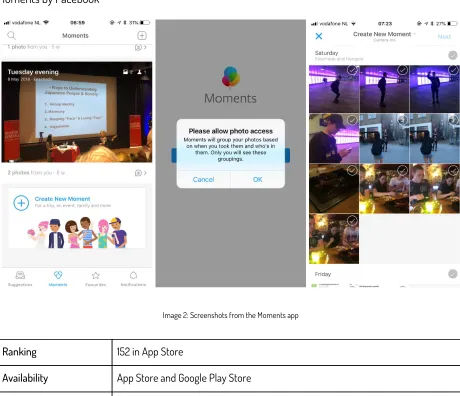
Moments by Facebook
Image 2: Screenshots from the Moments app
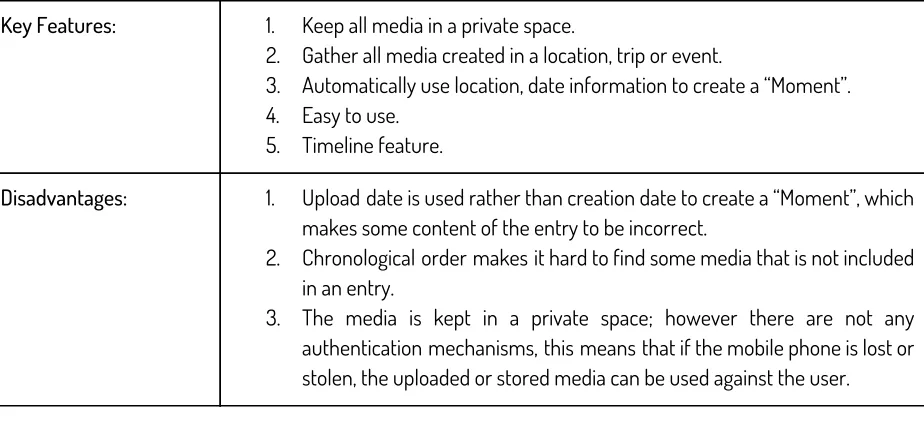
Ranking 152 in App Store
Availability App Store and Google Play Store
Rating 4.8/5 in App Store & 4.5/5 in Google Play Store
Category Photo and Video in App Store & Photography in Google Play Store
Key Features: 1. Keep all media in a private space.
2. Gather all media created in a location, trip or event.
3. Automatically use location, date information to create a “Moment”. 4. Easy to use.
5. Timeline feature.
Disadvantages: 1. Upload date is used rather than creation date to create a “Moment”, which
makes some content of the entry to be incorrect.
2. Chronological order makes it hard to find some media that is not included in an entry.
3. The media is kept in a private space; however there are not any authentication mechanisms, this means that if the mobile phone is lost or stolen, the uploaded or stored media can be used against the user.
[image:20.612.77.539.72.283.2]
Table 2: Information on the Moments app
KYO
Image 3: Screenshots from the KYO app
Ranking -
Availability App Store
Rating 4.2/5
Category Lifestyle
Number of Active Users 20
Key Features: 1. Able to add different types of data; media, text, recordings to each
entry.
2. Timeline feature.
3. Set individual reminders and questions.
Disadvantages: 1. Can’t add entries on a past date.
2. Free version is limited, only the premium versions have access to many of the features.
[image:21.612.79.534.416.684.2]
Table 3: Information on the KYO app
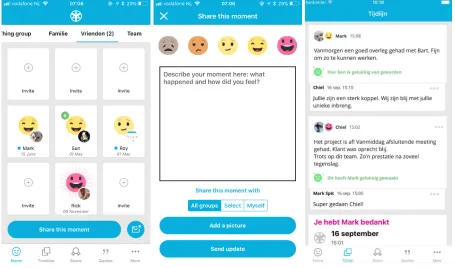
happyWe
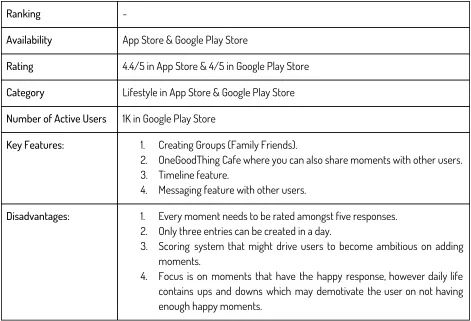
Ranking -
Availability App Store & Google Play Store
Rating 4.4/5 in App Store & 4/5 in Google Play Store
Category Lifestyle in App Store & Google Play Store
Number of Active Users 1K in Google Play Store
Key Features: 1. Creating Groups (Family Friends).
2. OneGoodThing Cafe where you can also share moments with other users. 3. Timeline feature.
4. Messaging feature with other users.
Disadvantages: 1. Every moment needs to be rated amongst five responses.
2. Only three entries can be created in a day.
3. Scoring system that might drive users to become ambitious on adding moments.
4. Focus is on moments that have the happy response, however daily life contains ups and downs which may demotivate the user on not having enough happy moments.
[image:22.612.71.542.71.392.2]
reallifeChallenge
Image 5: Screenshots from the reallifeChallenge app
Ranking -
Availability App Store
Rating 4.2/5
Category Health & Fitness
Number of Active Users 20
Key Features: 1. Event adding option; such as Experiences, Actions, Emotions, Decisions
and Discovery. 2. Timeline feature.
3. Events can be assigned high or low and positive or negative impact. 4. User data is kept private.
Disadvantages: 1. Majority of the options are only available in the premium version, which
is enabled after payment.
3. Authentication system does not exist, so if the smartphone is compromised user information can be exploited.
Table 5: Information on the reallifeChallenge app
2.2.4.
The findings from the competitor analysis
1. Timeline feature is the most common feature, the users want to be able to see all the entries they have added.
2. The users prefer manually added entries, not automatically generated entries; such as Moment by Facebook uses location data to automatically generate an entry.
3. There is a significant difference between free and premium versions in terms of design and available features.
4. Users dislike the idea of labeling entries as happy, sad, positive or negative. Some users state that if they keep adding sad or negative entries; the timeline affects their mood.
3. Ideation
This section focuses on how the concept of SmartMoments was created, where the inspiration has come and which questions were asked during the ideation phase. A divergence and convergence model was used to finalize the design choices. The Convergence phase is used to determine the important ideas after writing down all the opinions, likes and dislikes that were gathered during the divergence phase.
3.1. Divergence Model
Right after the Market Analysis the ideation phase has slowly started. After analysis, all the above mentioned applications were installed on an iPhone and Google Pixel, and they were used every two days to get the feel of the applications. Both iOS and Android platforms were chosen for this stage to make sure applications from different platforms were tested.
Some of the important notes that I made during this process as a user are;
1. The timeline feature is very effective. It gave me an overall look of all the entries I have created. It also shows personal growth and feelings of the user, which is very useful for self reflection.
2. I quite disliked the fact that some of the applications have only enabled limited features for the free versions, and honestly I am not a fan of paying for applications after a week of trial period.
3. As an everyday social media user, I have a Facebook, Instagram and Pinterest accounts. These applications is where I have majority of my media or shared entries. When it comes to personal journal or self growth applications, I prefer to be more conservative since they contain more private information. So for some of the applications such as happyWe even though I liked the group idea, sharing my moments on there did not interest me. In the end I can just create a WhatsApp group and share my media there as well.
4. At the same time having applications that do not require authentication is not a personal choice, I think if I am adding personal information to an account it should be kept secure.
5. Some of the applications such as realifeChange contain of too many different entry options. I find that to be confusing, because by the time I can decide on a category I do miss out in living in the actual moment.
After using similar applications I focused on the below design questions in order to determine what kind of an application SmartMoments should be.
1. Which Mobile App category do you wish to enter?
Health & Fitness or Health & Wellness categories I believe should contain more focus on the science behind the application. Such as if there is a weight loss application it requires cooperation with medical and fitness experts. Lifestyle applications rank four with with 8.32% in App Store for most popular applications [15]. There are currently 2 million applications, which means there are almost 167K lifestyle apps available on the App Store. On Google Play Store out of 35 categories Lifestyle has the 11th ranking in popularity. This also means that there are around 230K lifestyle apps available in the Google Play Store [16]. These numbers show that the competition is though.
2. What kind of app do you wish to make?
I believe that creating an application from scratch is impossible, mobile app development is a rapidly growing sector so the number of pioneer applications is quite low.
If we look at Facebook we had MySpace or hi5 before, so what Mark Zuckerberg did is to have an adaptive solution by adding unique features to Facebook such as Events or connecting to other social media platforms like Instagram.
2. Who are you targeting?
Looking at the statistics on Lifestyle category, it can be said that there is a high demand, because this category is in high rankings for both the App Store and the Play Store.
iOS development requires a lot of permissions and approval for an app release, however the Google Play Store is more open minded compared to Apple.
3.2. Stakeholders
The Stakeholders for the SmartMoments application are; Users, Developers and Decision Makers.
The Users; SmartMoment targets lifestyle application users that have an Android smartphone. These are all the users that have already shown interest in lifestyle applications similar to SmartMoments and will use the application on a regular basis. The users carry a high interest and a medium influence over the system.
The Developers; Sun Ok, the researcher will be developing the SmartMoments application. The researcher carries a high interest and a high influence over the system.
The Decision Makers; Sun Ok, the researcher is the first clear decision maker of this project. The supervisor Oresti Banos and the critical observer Jelle van Dijk are also decision makers. The used creative design process was proposed by Angelika Mader at the University of Twente, which also makes her a decision maker for SmartMoments. Similar to the developers, the decision makers also carry a high interest and a high influence over the SmartMoments project.
3.3. iPACT
The iPACT method is used to explain the system from a user’s perspective. iPACT stands for intentions, people, activities, context and technology.
Intention: SmartMoments is to be a mobile applications where users can add their remarkable moments. User: A possible user would be Sarah, a housewife that is 52 years old. She has always kept journals throughout her life, last events focusing on the developments in her family’s life.
Activities: The add moment activity in the SmartMoments application. As soon as a user adds a moment, the newly added entry will be shown on the timeline at the top. At the same time the percentages for the different types of data will be updated on the progress screen.
Contexts: The daily environment of the user because the smartphone is always present with its user. can be broken down into three main contexts: social, organizational and physical environment.
Technologies: Android development platform is being used for the SmartMoments application. In order to include the user of sensors the Aware Framework developed by the Telemedicine Group will be used. Fabric.io will be used to distribute the application to users and decision makers. Firebase mobile platforms is used for the backend purposes; authentication and storage. These technologies will be explained further in Chapter 5, Realisation.
Note that an example user scenario is provided later in the 4.1 FICS analysis section.
3.4. Design Inspiration
Image 6: Design inspiration 1 [17] Image 7: Design inspiration 2 [18]
Image 10: Design inspiration 5 [21]
After looking for the design inspirations I started making mock ups for the splash screen of SmartMoments. I find that the splash screens should capture the overall design of an application, so it is a good screen to start the creative process with. Below are some of the splash screens that were created during this process.
Image 11: Splash screen design 1
Image 12: Splash screen design iteration 1 Image 13: Splash screen design iteration 2
Image 14: Splash screen design iteration 3
Image 14: Splash screen design iteration 4
3.5. Convergence Model
In this stage all the above mentioned factors in the Divergence Model were narrowed and finalised. The goal is to find important design choices that stand out the most to continue with the Specification phase.
The SmartMoments application should;
1. Include only key features. The number and flow of actions could confuse the user. For example in SmartMoments adding a special moment or seeing all the added moment data in a timeline are key features. But if the add moment feature can be accessible through the profile screen rather than through the timeline screen, this would be confusing for the user.
2. It should be specific to an individual. This means that the application should be private and not another Social Media application.
3. The application must be in the Lifestyle category and it must be free. There several applications that have free and paid versions; this means that there are only a key number of features that are available for use, otherwise the users are limited unless they pay for the application. That is why SmartMoments should be free instead of paid and it should have all the features available for the free version rather than paid version.
4. SmartMoments should be an imitation application. There are applications that are quite similar to SmartMoments and carry similar functionalities, so it does not carry the feature of being a pioneer app, or even have a unique feature that makes it an adaptive solution.
5. Google Play store is more open to new applications compared to the App Store due to restrictions by the Apple application development standards. Thus the target group should be Android device owners. At the same time there more devices that support Android operating system, whereas iOS will only available for iPhones.
6. Every individual perceives the world differently, this means that every user has a different user experience expectation. Making sure that SmartMoments easy to use and straight forward should be the key to deciding on the features.
7. Having a minimalistic user interface, avoiding bright colors and bringing more attention to the content should be the main focus of the user interface design.
4. Specification
The SmartMoments application consists of three types of specifications. The first group are the specifications based on the challenges of the system, the second group is the requirements from the user side and finally the requirements from the side of the developers.
This section also includes initial user interface designs for the SmartMoments application concept.
4.1. FICS analysis
4.1.1.
FICS analysis
The FICS analysis is used to provide an overview of the system from the system’s point of view. FICS stands for Functions and Events, Interactions and Usability, Content and Structure and finally Style and Aesthetics.
Functions and Events; There are 4 main functions to the SmartMoments application. 1. Add moment
a. Add visual moment b. Add textual moment
c. Add moment with both visual and textual content 2. See the added moments in a timeline screen
3. See added profile information
4. See the percentage for the types of moment data added
Interactions and Usability; There are 2 types of interaction with the system.
1. The first is active, the user must click on the buttons to be able to move through different application screens
2. The second is passive, the monitored sensor data is saved whenever a moment is being added Content and Structure;
The users will start using the SmartMoments application with an empty timeline.
The add moment activity will save the moment data to the backend. After a successful add operation is completed, the user should be taken back to the timeline.
When a new moment is successfully added the percentages for visual and textual moment data will be updated.
Style and Aesthetics;
After looking into Design Inspirations in section 3.4 the graphical user interface will be simple. This is to lower the adaptation period of users to the SmartMoments application. The initial mockups can be seen later in section 4.6 Early prototype of the SmartMoments application.
4.1.2.
User Scenario
Sarah is a 52 year old housewife. She has been married for 27 years, has a daughter, 26, and a son, 23. Since she was little her mother encouraged her to keep journals. This way Sarah could always remember the events she has been through and help herself grow. In the past two decades she dedicated her life to her children, she does anything she can to support them. So her past journal always contains events or situations related to her children’s life.
Sarah loves to write in her journals, however the more she writes the more space for her journals she needs. So she asks her son who loves technology, if there is another possible option. She tells her son that, she needs a private desktop or mobile application where she can enter the remarkable moments in her life and that they are only available to her. After doing some research her son, Mark, suggest her mother to install an application named SmartMoments.
Since Sarah is not the best with technological developments, she asks for marks help. He downloads the application to her phone and tells her to fill in her email address, password, age and gender. After the completes the sign up procedure she can now add her moments.
The next day it is time for her to start using SmartMoments. She starts the app and sees an empty timeline screen, with a menu button. She clicks the menu button to see what other options she has; she finds the profile menu options and clicks on it. As soon as she clicks a new screen opens with her profile information she has entered during registration.
that out of all the posts she has added 100% of it is image moments. After she is done checking the progress she selects the log out option from the menu and logs out of her app safely.
4.2. Specifications based on challenges
1. The application must be easy to use
2. The application must protect user information 3. The application must retrieve permissions 4. The application must promote user interactivity
4.3. Requirements from the user side
1. The application must have a Login/Registration screen 2. The application must have a Add Moment screen
a. The application must allow users to add textual, visual or both types contents to the application 3. The application must have a Timeline screen
4. The application must have a Profile page
5. The application must include a Privacy Policy page that includes all the information regarding SmartMoments and its purpose
6. The application must have a Progress page, showing the percentages of types of moment data added. (Such as 50% Textual Moment data and 50% Visual Moment data)
4.4. Requirements from the developer side
1. There must be an authentication system
2. The Moment data must be separated into two types, visual or textual a. For textual moments the backend must store the included texts b. For visual moments the backend must store the included images 3. The Moment data must be stored securely
4. The application must use a sensor library
5. The Moment data should be saved with the active sensor information
4.5. Activity Diagram
Based on the scenario given in 4.1.2 an activity diagram has been given below. Note that in order to keep the activity diagrams clean and simple for “Registering” and “Add Moment” functions a different activity diagram has been created.
4.5.1.
Register Activity Diagram
4.5.2.
Add moment Activity Diagram
Image 16: UML Activity Diagram for “Add Moment” function
4.6. Early prototype of the SmartMoments application
Image 17: Splash screen mockup
Image 18: Main screen mockup
Image 19: Main screen mockup (Login button
Image 20: Login screen mockup
Image 21: Signup screen mockup
Image 22: empty Timeline screen mockup
Image 23: Timeline screen mockup
Image 24: Menu screen mockup
Image 25: Privacy Policy screen mockup
5. Realisation
This chapter describes the realization process for the SmartMoments application. The SmartMoments application is developed using the Android development process which will be explained throughout this chapter as well as used libraries and tools for the realization of this project.
5.1. Android Development Process
Android is an open source operating system for smartphones. These applications can be written using Java, Kotlin, Dart and C++ programming languages. For SmartMoments Java is chosen as the main programming language. [22] Android Studio is the set development environment for Android applications and this program includes the Android SDK (Software Development Kit) tools. These tools compile the application code along with different data and resource files in order to prepare Android packages known as apks. Each apk belongs to a certain mobile application and after they have been installed, the newly installed application can be seen in the app drawer.
Android Annotations is an open source library that is used within the SmartMoments application. The goal of this library is to improve writing and the maintenance of Android applications by improving readability and reducing "boilerplate code". Throughout the explanation of the application components some examples of how this library is used and the changes that are made will be explained.
There are four essential components that can be used within an Android application; these are activities, services, broadcast receivers and content providers. Each of these components have a different purpose and a different life cycle throughout the application. Activities are the components that are used throughout this application and will be explained in this section. Content providers are used through the Aware Framework and they will be explained in that section respectively. Note that for readability purposes only code snippets are provided instead of the complete code for activities.
Android Manifest files are used by the Android system to read and to start an application. All the app components, such as each activity, must be defined in this file in order to run the application. After explaining the activities, the purpose and the contents of the manifest file will also be given.
5.1.1.
Activities
An activity is the entry point of interactivity for a user and it is essentially a screen with a user interface [23]. For the SmartMoments application the key functionality were defined as “Add Moment”, “See Timeline”, “See Profile“ and “See Progress” in section 4.1.1. FICS analysis. This means that all of these functions will have their own activities, thus their screens. These activities are used to keep track of where the user is within the application and what is on the screen. Activities are independent from each other. However they can work together for a cohesive user experience, such as when a moment is added through add moment activity or the timeline activity is refreshed after a successful add operation. Each activity has its own lifecycle. That is shown in the image below.
Image 26: Android Activity Lifecycle
The events in the lifecycle of an activity within the SmartMoments application are [24];
● onCreate(): Called when the activity is created.
● onResume(): Called when activity starts interacting with the user.
● onDestroy(): Called before an activity is destroyed.
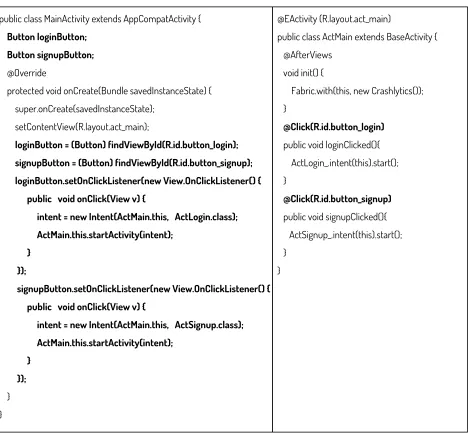
The below code shows the difference between a standard activity code and one that is created using android annotations. The right side uses AndroidAnnotations library, it is much shorter and cleaner. The class objects, such as the loginButton and signupButton are initialised manually on the right one however in the right one only one line of code is enough to process all the clicks.
public class MainActivity extends AppCompatActivity { Button loginButton;
Button signupButton;
@Override
protected void onCreate(Bundle savedInstanceState) { super.onCreate(savedInstanceState);
setContentView(R.layout.act_main);
loginButton = (Button) findViewById(R.id.button_login); signupButton = (Button) findViewById(R.id.button_signup); loginButton.setOnClickListener(new View.OnClickListener() { public void onClick(View v) {
intent = new Intent(ActMain.this, ActLogin.class); ActMain.this.startActivity(intent);
} });
signupButton.setOnClickListener(new View.OnClickListener() { public void onClick(View v) {
intent = new Intent(ActMain.this, ActSignup.class); ActMain.this.startActivity(intent); } }); } } @EActivity (R.layout.act_main)
public class ActMain extends BaseActivity { @AfterViews
void init() {
Fabric.with(this, new Crashlytics()); }
@Click(R.id.button_login)
public void loginClicked(){ ActLogin_.intent(this).start(); }
@Click(R.id.button_signup)
public void signupClicked(){ ActSignup_.intent(this).start(); }
}
[image:41.612.73.541.241.674.2]
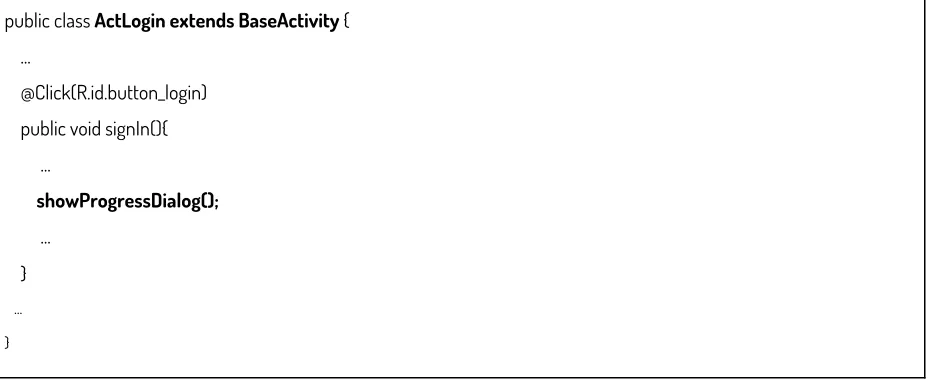
The SmartMoments app consists of ten activities. BaseActivity.java is the initially created activity for this project. The Base Activity does not have an interface however it contains the basic functions each activity should have. The purpose of this activity class is to ensure the reusability of certain code fragments or functions. These functions are showing and hiding progress dialogs, showing and hiding the keyboard. The progress dialogs are used when save or load operations are in progress. The keyboard operations are used enable or disable the keyboard, such as when a text field is clicked, it becomes active and the keyboard should be enabled or when the text field is not active the keyboard should be hidden. All the activities used in the SmartMoments application extend to BaseActivity in order to make use of these functions. For example when sign in action is being performed in the login activity, ActLogin, progress dialogs must be displayed. The code snippets from both classes can be seen below.
public class BaseActivity extends AppCompatActivity { ...
public void showProgressDialog() { if (mProgressDialog == null) {
mProgressDialog = new ProgressDialog(this);
mProgressDialog.setMessage(getString(R.string.loading)); mProgressDialog.setIndeterminate(true);
}
mProgressDialog.show(); }
public void hideProgressDialog() {
if (mProgressDialog != null && mProgressDialog.isShowing()) { mProgressDialog.dismiss();
} }
public void hideKeyboard(View view) {
final InputMethodManager imm = (InputMethodManager) getSystemService(Context.INPUT_METHOD_SERVICE); if (imm != null) {
imm.hideSoftInputFromWindow(view.getWindowToken(), 0); }
}
}
public class ActLogin extends BaseActivity { ...
@Click(R.id.button_login) public void signIn(){ ...
showProgressDialog();
... } ...
}
[image:43.612.75.539.74.264.2]
Table 8: ActLogin making use of reusable functions
5.2. Aware Framework
The SmartMoments application makes use of sensor data. Due to time limitations using a library to make use of the smartphone sensors was the best option. The Telemedicine Group has already developed a framework that is dedicated to instrument, infer, log and share mobile context information, for application developers, researchers and smartphone users. AWARE captures hardware-, software-, and human-based data. [25] using this plugin the sensor data can be stored locally or in this case the sensor data can be combined with a moment entry and saved to the database. Some of the sensors that can be tracked by the Aware Frameworks are; accelerometers, battery, bluetooth, location, screen, temperature, etc. Using Aware Framework each time a moment is added, the sensor data is also saved within that moment object for future research purposes.
In order to make use of the sensors through this framework Content Providers are used. Content providers are used to manage any stored data on the application system. For example if an application want to use a camera it doesn’t have to add the code of a camera app to itself but it can use the content provider from the already existing camera app to take pictures. The similar situation is with the sensors of the smartphones, using the content providers of Aware, the sensors can be used and tracked.
Android applications include an Android Manifest file. All the components should be declared here in order to start and run the app. This means that every activity or content provider used will be listed in this file. For example, for location tracking a location provider must be used. The below code shows how the content provider for this sensor is included in the manifest file. Note that in order to be able to read location data and write it later the content provider’s read and write permissions must be enabled.
<provider
android:name="com.aware.providers.Locations_Provider" android:authorities="${applicationId}.provider.locations" android:exported="true"
android:readPermission="com.aware.READ_CONTEXT_DATA" android:writePermission="com.aware.WRITE_CONTEXT_DATA"> </provider>
Table 9: AndroidManifest file content provider sample for location sensor
5.3. Firebase
The SmartMoments application uses Firebase as a backend service. Firebase started as a startup for “Backend as a Service”, BaaS, and it got acquired and expanded by Google Development platform [26]. Firebase allows developers to focus on the user experience rather than managing servers and data by providing a realtime database, cloud storage, authentication systems and application hosting. The Firebase console allows the developer to manage all the backend functionalities without coding and that is why this service is chosen for this application.
5.3.1.
The Realtime Database
Image 27: Firebase Realtime Database User Model
5.3.2.
The Cloud Storage
The cloud storage is where the moment entries as well as images attached to the moments are kept. The purpose of the cloud storage is to store data securely and with access management rules. Such as the image below shows an example of how a moment data is stored on the cloud storage. Note that the following images are for posts that were created for test purposes by the test user mentioned in section 5.3.1 The Realtime Database. The below image shows the structure of the Cloud Database on Firebase Web console.
Image 28: Firebase Cloud Database Post Data Table
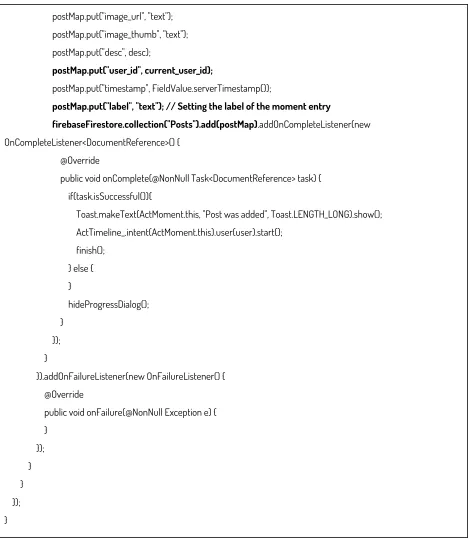
The content of the moment entries are created using uploadTextMoment or uploadImageMoment functions within the SmartMoments application. The UploadTask object provided by Firebase handles all the uploading tasks for these moments. The UploadTask has an onCompleteListener, this means that when the upload task is completed a task is being returned. If this task is successful then a Map object is created. This map object is used to match the labels of the moment entry and its value. For example when a text moment is being uploaded its label must be “text” and it should contain its user_id for referencing later. Afterwards this moment is added under the Posts collection of the firebase cloud storage.
private void uploadTextMoment(final String desc){
UploadTask filePath = storageReference.child("post_images").child("textFile" + ".jpg").putBytes(new byte[0]); filePath.addOnCompleteListener(new OnCompleteListener<UploadTask.TaskSnapshot>() {
@Override
public void onComplete(@NonNull final Task<UploadTask.TaskSnapshot> task) { if(task.isSuccessful()){
UploadTask uploadTask = storageReference.child("post_images/thumbs") .child("textFile" + ".jpg").putBytes(new byte[0]);
uploadTask.addOnSuccessListener(new OnSuccessListener<UploadTask.TaskSnapshot>() { @Override
postMap.put("image_url", "text"); postMap.put("image_thumb", "text"); postMap.put("desc", desc);
postMap.put("user_id", current_user_id);
postMap.put("timestamp", FieldValue.serverTimestamp());
postMap.put("label", "text"); // Setting the label of the moment entry
firebaseFirestore.collection("Posts").add(postMap).addOnCompleteListener(new OnCompleteListener<DocumentReference>() {
@Override
public void onComplete(@NonNull Task<DocumentReference> task) { if(task.isSuccessful()){
Toast.makeText(ActMoment.this, "Post was added", Toast.LENGTH_LONG).show(); ActTimeline_.intent(ActMoment.this).user(user).start();
finish(); } else { }
hideProgressDialog(); }
}); }
}).addOnFailureListener(new OnFailureListener() { @Override
public void onFailure(@NonNull Exception e) { }
}); } } }); }
[image:47.612.73.542.68.607.2]
Table 10: SmartMoments application uploadTextMoment function
5.3.3.
The Authentication Systems
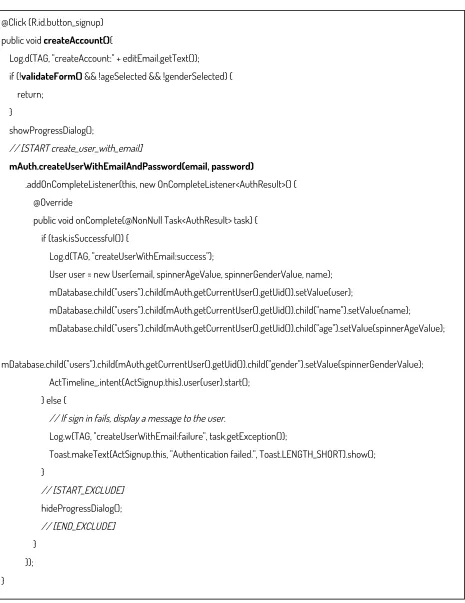
The SmartMoments application collects personal and private information from its users. That is why the authentication system is the most important part of this application. Firebase has a built in authentication system that uses email and password. This means that when a user signs up using her email and password, Firebase Authentication system encrypts this information and generates a user_id. The below image shows a single user entry that is stored within the authentication database.
Image 29: Firebase Authentication sample user entry
@Click (R.id.button_signup) public void createAccount(){
Log.d(TAG, "createAccount:" + editEmail.getText()); if (!validateForm() && !ageSelected && !genderSelected) { return;
}
showProgressDialog();
// [START create_user_with_email]
mAuth.createUserWithEmailAndPassword(email, password)
.addOnCompleteListener(this, new OnCompleteListener<AuthResult>() { @Override
public void onComplete(@NonNull Task<AuthResult> task) { if (task.isSuccessful()) {
Log.d(TAG, "createUserWithEmail:success");
User user = new User(email, spinnerAgeValue, spinnerGenderValue, name); mDatabase.child("users").child(mAuth.getCurrentUser().getUid()).setValue(user);
mDatabase.child("users").child(mAuth.getCurrentUser().getUid()).child("name").setValue(name);
mDatabase.child("users").child(mAuth.getCurrentUser().getUid()).child("age").setValue(spinnerAgeValue);
mDatabase.child("users").child(mAuth.getCurrentUser().getUid()).child("gender").setValue(spinnerGenderValue); ActTimeline_.intent(ActSignup.this).user(user).start();
} else {
// If sign in fails, display a message to the user.
Log.w(TAG, "createUserWithEmail:failure", task.getException());
Toast.makeText(ActSignup.this, "Authentication failed.", Toast.LENGTH_SHORT).show(); }
// [START_EXCLUDE] hideProgressDialog(); // [END_EXCLUDE] }
});
[image:49.612.76.541.62.665.2]}