An extensible administration and configuration tool for
Linux clusters
John D. Fogarty B.Sc
A dissertation submitted to the University of Dublin,
in partial fulfillment of the requirements for the degree of
Master of Science in Computer Science
Declaration
I declare that the work described in this dissertation is, except where otherwise stated, entirely my own work and has not been submitted as an exercise for a degree at this or any other university.
Signed: ___________________ John D. Fogarty
15th September, 1999
Permission to lend and/or copy
I agree that Trinity College Library may lend or copy this dissertation upon request.
Signed: ___________________ John D. Fogarty
Summary
This project addresses the lack of system administration tools for Linux clusters. The
goals of the project were to design and implement an extensible system that would
facilitate the administration and configuration of a Linux cluster. Cluster systems are
inherently scalable and therefore the cluster administration tool should also scale well to
facilitate the addition of new nodes to the cluster.
The tool allows the administration and configuration of the entire cluster from a single
node. Administration of the cluster is simplified by way of command replication across
one, some or all nodes. Configuration of the cluster is made possible through the use of a
flexible, variables substitution scheme, which allows common configuration files to
reflect differences between nodes. The system uses a GUI interface and is intuitively
simple to use.
Extensibility is incorporated into the system, by allowing the dynamic addition of new
commands and output display types to the system. Through the use of a menus
configuration file the system is easily extended to include additional commands. This can
be accomplished without reprogramming for the majority of commands. An API has been
provided to allow different types of component to be displayed on the main GUI panel.
The system thus exhibits extensibility in supporting different types of display
components such as text or graphics. This extensible scheme can then be used to support,
for example, graphical output.
Through the use of a configuration file for the nodes in the system, the system can scale
well. New nodes are easily added through a single entry in this configuration file.
Scalability is also incorporated into the design of the system, whereby as much work as
Acknowledgements
I would like to thank my supervisor Dr. Paddy Nixon for his advice and assistance
throughout the project. I would also like to express my appreciation to Dr. Simon Dobson
who also assisted me during this work. Stefan Weber was unstintingly generous with his
TABLE OF CONTENTS
CHAPTER 1 INTRODUCTION ... 1
INTRODUCTION... 1
MOTIVATIONS... 1
GOALS... 2
ROADMAP... 2
SUMMARY... 3
CHAPTER 2 BACKGROUND RESEARCH... 4
INTRODUCTION... 4
CLUSTER DEFINITION... 4
CLUSTER CHARACTERISTICS... 4
TYPES OF CLUSTERS... 5
Server farms ... 6
Failover clusters ... 6
Coupled clusters ... 6
shared nothing cluster ...6
shared memory cluster ...6
CLUSTER CONFIGURATIONS... 7
CLUSTER FORCES... 7
CLUSTER TAXONOMY... 9
Pile Of PCs ... 9
Cluster of Workstations (COW) ... 9
Network of Workstations (NOW) ... 10
Beowulf ... 10
Beowulf History...11
Advantages of a Beowulf ...11
D-Shared memory Clusters and SMPs... 11
NT-PC ... 12
CLUSTER EXAMPLES... 12
Beowulf class ... 12
Loki/Hygalc ...12
Avalon...13
Stone SouperComputer ...13
ASCI Red ...14
Other Examples...14
CAG Cluster... 14
Windows NT example... 15
CLUSTER SOFTWARE... 15
Operating system software... 15
Linux...15
Linux Modules ...16
Administration software... 17
SMILE ...18
Windows NT class cluster software ...20
SUMMARY... 21
CHAPTER 3 PROBLEM SPECIFICATION ... 22
INTRODUCTION... 22
GOALS... 22
REQUIREMENTS OF THE SYSTEM... 22
Command replication and configuration changes across multiple nodes. ... 22
Variable substitution... 23
Module management... 23
Shutdown & reboot of nodes and unloading of server software ... 23
Output comparison between nodes ... 23
SYSTEM CONSTRAINTS... 24
CORBA ... 24
Java... 24
Advantages of Java ...24
SUMMARY... 24
CHAPTER 4 CLUSTER MANAGER DESIGN ... 25
INTRODUCTION... 25
OVERVIEW... 25
Clusters ... 25
Cluster System Manager Overview... 26
Client Overview ... 26
Communications Overview ... 27
Server Node Operation Overview ... 27
CLUSTER MANAGER DETAILED DESIGN... 28
CLIENT... 28
Client GUI... 28
GUI Design ...28
Menus Generation... 29
Flexibility through Variable Text Substitution... 31
Scalability ... 32
Client StartUp ... 32
Node selection...32
Command Execution ... 33
Configuration File Management... 34
Editing a file...35
Saving a file ...35
CLIENT - SERVER INTERFACE... 35
Communication between nodes & cluster manager... 36
SERVER... 36
Command Execution Responses... 36
Command Execution ... 37
PP ...38
GP ...39
NP ...39
NPP ...39
Error messages ...39
MODULES... 40
SUMMARY... 40
CHAPTER 5 IMPLEMENTATION ... 41
INTRODUCTION... 41
CLIENT GUI... 41
Menus Generation... 43
Example ...44
VARIABLE TEXT SUBSTITUTION... 44
SCALABILITY – NODES CONFIGURATION FILE... 46
CLIENT STARTUP... 46
NODE SELECTION... 47
COMMAND EXECUTION... 49
Redesign... 49
ExecThreads... 50
SwingUtilities invokeLater() ... 51
SaveThreads... 51
‘Edit File’... 52
‘Save File’... 52
‘Cancel Edit’... 53
‘Cat File’ ... 53
Log Files ... 54
CLIENT – SERVER INTERFACE... 54
Communication between nodes & cluster manager... 54
SERVER... 55
Server Operation... 55
PP - Perl Script... 55
GP - Generic Parsing ... 57
NP - Perl but no parsing ... 58
NPP - No Perl, no parsing ... 58
NRP - No reply... 58
Error messages ... 59
MENUS IMPLEMENTED... 59
File... 59
System ... 59
Shutdown server daemon ...59
ShutDown / Reboot ...60
Modules... 60
Module Manipulation...61
‘Load Module’ ...61
‘Unload module’ ...62
System Statistics ...64
IMPLEMENTATION PROBLEMS... 64
SUMMARY... 64
CHAPTER 6 ANALYSIS... 65
INTRODUCTION... 65
REVIEW OF WORK... 65
ANALYSIS... 65
Goals... 66
Extensibility ... 66
Commands ...66
GUI components ...66
Scalability ... 67
Flexibility ... 67
Ease of use ... 68
Portability ... 68
Functional Requirements ... 68
Command replication across a number of nodes...68
Variable substitution ...68
Module management ...68
Formatted output from some menu commands ...69
Shutdown or reboot of nodes ...69
Comparison of nodal output...69
COMPARISON WITH OTHER TOOLS... 69
SMILE CMS ... 69
FUTURE WORK... 70
Provide a web interface ... 70
Extend the menus framework ... 70
Implement callbacks ... 71
Automatic on-line node checking ... 71
Build a dynamic Perl parser ... 71
Integrate with existing cluster tools ... 71
Personal Achievements ... ... 72
SUMMARY... 72
APPENDIX 1 LINUX MODULES ... 73
INTRODUCTION... 73
LINUX MODULES... 73
ADVANTAGES... 73
MODULE ELEMENTS... 74
IMPLEMENTATION... 74
Manual loading : Command line operation... 74
Automatic loading : kerneld... 75
COMPILING THE KERNEL... 75
SYSTEM CALLS SPECIFIC TO MODULES... 75
THE KERNEL DAEMON... 78
Table of Figures
Figure 1 : A Taxonomy of Parallel Computing ___________________________________________ 9 Figure 2 : The Smile Cluster Management system _______________________________________ 19 Figure 3 : Basic architecture of a cluster system_________________________________________ 25 Figure 4 : Cluster System Manager Architecture Overview ________________________________ 26 Figure 6 : Screenshot of the Cluster Manager Interface ___________________________________ 42 Figure 7 : Node selection___________________________________________________________ 48 Figure 8 : Client –Server Communication Implementation _________________________________ 50 Figure 9 : Output of the ‘mount’ command _____________________________________________ 57 Figure 10 : The Load Module list box __________________________________________________ 62 Figure 11 : The UnLoad Module list box________________________________________________ 63 Figure 12 : The xosview utility _______________________________________________________ 64
Table of Tables
Chapter 1 Introduction
Introduction
Clusters of computers, where a cluster is a group of independent systems that act and
appear as a single system, have become popular in both research establishments in need
of high performance computing power and in business organisations seeking high
availability from their computing resources. The popularity of clusters has arisen due to a
number of factors. Not least amongst these, particularly with regards to research
computing, has been the dramatic increase in price-performance of PC chips which has
shown much greater improvement vis a vis traditional supercomputer components. This
has led people to experiment with using commodity off the shelf components in building
their supercomputers out of clusters of PCs. Other factors that have reinforced the interest
in clusters include the fact that clusters scale well. They can grow very large,
accommodating a large number of nodes and also nodes can be added in a piecemeal
fashion.
Linux is the dominant operating system with regard to cluster systems. It is a popular
choice mainly because it is free, stable and full source code is available. Additionally
Linux implements a feature of operating system customisability whereby modules can be
loaded and unloaded on-demand. This is particularly important in relation to clusters,
where often, small kernels are desired in order to maximise performance. It also means
that different nodes in the cluster can run modified versions of the kernel if needed.
Motivations
Concomitant with the deployment of clusters, is the need for tools to facilitate their
administration. Administration in this context relates to the normal administrative duties
needed to effectively manage a single machine. The bulk of research effort related to
cluster software has up to now been devoted to the development of management tools to
aid parallel programming, job scheduling and load balancing. A lack of administration
tools continues to render the management, particularly of large scale clusters, more
Goals
The goals of the project were to design and implement an extensible system that would
facilitate the administration of a Linux cluster. Extensibility would allow new commands
to be easily added to the system – the system should easily accommodate commands that
return different types of output.
One of the features and main attractions of cluster systems is their scalability, which
allows nodes to be added incrementally and supports a large number of nodes. The
cluster administration tool should also scale well. In addition to these general design
goals, a number of specific requirements are demanded of the system.
Roadmap
A conventional thesis pattern is used. This chapter has given an introduction to the
project and the problem that is being addressed. The motivations & goals of the project
were described.
Chapter 2 reviews the field of cluster systems and cluster administration tools. It explains
the essential characteristics of clusters and describes the different classes of clusters. It
also gives examples of the major types of clusters in use today. The place of cluster
machines in the hierarchy of parallel computing machines is examined. The chapter then
turns its attention to the software that is used on these machines. Specifically a
description of available administration tools is also given.
Chapter 3 gives a detailed problem specification. The chapter details the goals of the
project and outlines the requirements of the system.
Chapter 4 details the design of the cluster management system. It explains how the
various goals and requirements of the system will be accomplished through the proposed
Chapter 5 describes the implementation of the system. It details how particular design
features were incorporated into the system. It also outlines any problems encountered
during the implementation.
Chapter 6 gives a detailed analysis of the cluster tool developed in this project. It reviews
the goals and requirements of the system and assesses the extent to which these have
been achieved. The chapter also suggests what future work might be carried out to extend
and improve the system.
Summary
A broad overview of the project has been given in this chapter. The problem under
consideration has been outlined along with the motivations and goals of the project. The
next chapter examines the field of cluster computing and examines the software tools
Chapter 2 Background Research
Introduction
The problem being investigated by this project is the design and implementation of a
Linux cluster administration tool. This chapter explains the essential characteristics of
clusters and examines the different types of clusters that are in use today. Contrasts are
made with other types of parallel machines such as SMPs (Symmetric Multi-Processors)
and NOWs (Network of Workstations). Examples of the different types of clusters are
used to illustrate the flexibility and power of this type of system.
The chapter concludes with an examination of the software that is used on these
machines. Specifically, software relating to system administration is detailed.
Cluster definition
Achieving a precise definition for a cluster is difficult, as evidenced by the inconclusive
and sometimes rancorous electronic submissions of the IEEE Task Force on Cluster
Computing [HREF1]. However a consensus of sorts was formed around the following
definition:
“$FOXVWHULVDW\SHRISDUDOOHORUGLVWULEXWHGV\VWHPWKDWFRQVLVWVRIDFROOHFWLRQRILQWHUFRQQHFWHG ZKROHFRPSXWHUVXVHGDVDVLQJOHXQLILHGFRPSXWLQJUHVRXUFH” [FIS97].
[Whole computer in this context is taken to mean a normal computer that can be used on
its own: i.e. contains processor(s), memory, I/O, OS, software subsystems and
applications.]
An alternative but similar definition given by Microsoft [HREF2]:
“$FOXVWHULVDJURXSRILQGHSHQGHQWV\VWHPVZRUNLQJWRJHWKHUDVDVLQJOHV\VWHP$FOLHQW LQWHUDFWVZLWKWKHFOXVWHUDVLILWZHUHDVLQJOHVHUYHU$QRGHLVDVHUYHULQWKHFOXVWHU.”
Cluster characteristics
Taking the loosest interpretation of this definition would allow that the PCs on a LAN,
can together be considered a form of cluster. In general though, clusters can be
interconnects (not always). Furthermore nodes in a cluster have a strong sense of
membership which generally nodes in a distributed system do not.
Other characteristics of a cluster include:
• it can be managed as a single system, reflecting the tight coupling • services are cluster wide
• it can tolerate component failure
• components can be added transparently to users
Types of Clusters
In general there are two broad categories of clusters in use today:
i) research machines comprising many compute nodes which are used for massively
complex computations such as weather forecasting or N-body particle
simulations.
ii) smaller >=2 clusters which are used in business as web servers, mail servers,
database servers etc. These might be classified as commercial clusters and are
popular as a preferred alternative to other forms of high availability technology
such as data mirroring, server mirroring and fault tolerant systems.
The former type of machine is generally found in academic institutions or government
installations and generally uses Linux or some other free Unix operating system
distribution to run the machine. On the other hand the latter is found in business and
frequently uses Windows NT as its operating system of choice. Both these types of
system are described in further detail below.
Within these two broad categories, a further classification of clusters can be made on the
Server farms
These are the oldest and simplest type of cluster whereby a cluster consists of a group of
compute nodes which demand work from a central server. This is well suited to
applications that require large amounts of processing and that need limited inter-node
communication. In this cluster, if a node fails, the server merely assigns its work to an
alternative compute node.
Failover clusters
The focus here is on availability rather than scalability. Typically there are two nodes,
one that serves as a primary the other as a backup and together they aim to provide
continuous service. This is the type of cluster often used by business for e-mail or web
servers.
Coupled clusters
These are essentially a combination of the features of the above two. They work closely
together and there is a considerable amount of inter-nodal communication –consequently
high-speed inter-nodal interconnect is extremely important. Availability is a group
responsibility so that failures can be handled gracefully by the cluster.
There are two types of coupled cluster, a shared nothing cluster and a shared memory
cluster.
shared nothing cluster
Each node has its own memory space. So the programming model must be smart
enough to know what nodes are in the cluster and what processes are running on
what nodes, so that recovery from failure can be accomplished.
shared memory cluster
All nodes share the same address space and an application running on this type of
cluster sees it as a single entity. Nodes communicate using the IEEE’s Scalable
Coupled clusters probably represent the future of this technology. They scale seamlessly,
handle nearly any kind of application, use commodity hardware and offer high
availability.
Cluster configurations
Various types of cluster configurations can be constructed [SHA97]. The ability to cluster
nodes together can be implemented in hardware, in software or in a combination of both.
In hardware, specialized interconnects facilitate cluster creation. Examples of this
include various storage area networks.
Both hardware, as described above and the Operating System can combine to form the
cluster. The IBM NetFinity or Dell Enterprise Server provide examples of this approach.
Components of the Operating System can communicate to form a cluster though there is
a blurring of distinction between this and distributed Operating Systems. Systems that
adopt this method include MSCS (Microsoft Scalable Cluster Server) and Solaris
Enterprise Cluster, AIX clusters & HP_UX clusters.
Another type of cluster allows middleware running over the Operating System to
implement the cluster functionality. The Beowulf class of clusters (see below) use MPI
and PVM to achieve this.
Finally some applications have internal code that allows them to create clusters with
other nodes running the same application, e.g. Oracle Parallel Server.
Cluster Forces
Supercomputing may be a small part of the computer industry, but yet is a segment worth
$2.2billion [POL99]. Supercomputing applications involve extremely complex
mathematical computations and thus require large amounts of computing power. Until
recently this computing power was sourced from specially constructed machines that
also by their relative cost. They were and remain very expensive and beyond the means
of most organizations.
Undoubtedly the rapid accelerated growth in computational performance has supported
the developing interest in clusters. In the last decade, a 3-order of magnitude increase in
the number of devices per chip has been achieved [RID97]. A similar increase in chip
speed has also been made. The much bigger economies of scale attainable in the PC
market has resulted in a major realignment of cost/performance ratios between PCs and
workstations. For example in the past four years PC microprocessors have had a
performance rate increase of approximately 200% per annum as against 50% per annum
for workstation microprocessors. This trend is even more pronounced when comparing
PC performance against mainframes and supercomputers. Due to the smaller sales
volumes of mainframe and supercomputer products, advances in these systems are
amortized over a smaller number and cost/performance ratio vis a vis that of PCs have
slipped considerably. It is this changing price performance ratio that is the major driving
force behind the cluster revolution [HAL99].
Furthermore clusters scale well, both absolutely and incrementally. This allows
organizations to achieve incremental growth and to match the growth of their
supercomputing facility to the extent of their budgets.
Despite the enormous advances achieved, the requirement for ever increasing
computational power remains. For example, the US Department of Energy’s ASCI
(Advanced Strategic Computing Initiative) has targeted a benchmark of 100 TeraFlops
per second by the year 2005 [GRE97]. Indeed many of the national agencies in the US,
DOE, NASA, DARPA, NSA have targeted Petaflop machines by 2010. These incredibly
Cluster Taxonomy
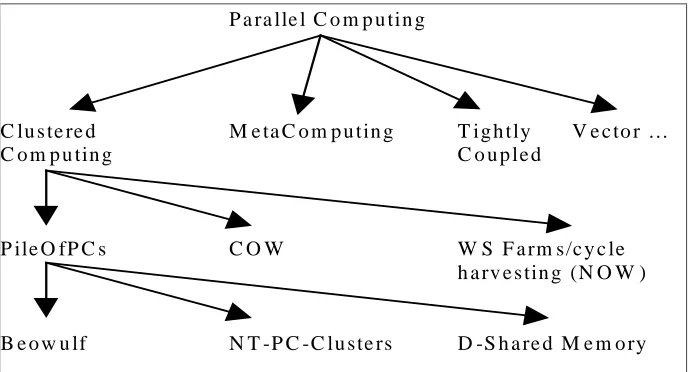
A taxononomy as given by Thomas Sterling of the NASA JPL [STE97], illustrates the
different classes of cluster computing and provides a useful depiction of the place of
clusters in the hierarchy of Parallel Computing.
P a ra lle l C o m p u tin g
C lu s te re d M e ta C o m p u tin g T ig h tly V e c to r …
C o m p u tin g C o u p le d
P ile O fP C s C O W W S F a rm s/c y c le
h a rv e s tin g (N O W )
[image:18.595.126.472.215.401.2]B e o w u lf N T -P C -C lu ste rs D -S h a re d M e m o ry
Figure 1: A Taxonomy of Parallel Computing
This taxonomical breakdown of cluster computing is discussed in detail and the
differences between the different elements of the Clustered Computing branch are
explained.
Pile Of PCs
The term, Pile Of PCs, is used to describe a loose ensemble of PCs working together on a
single problem. It is similar in concept to both Cluster of Workstations (COW) and
Network of Workstations (NOW) but emphasizes the following:
• Pile of PCs uses mass market components • dedicated processors
• private system area network
Cluster of Workstations (COW)
A cluster of workstations is a group of workstations that can be formed from existing
and hence is very attractive. Experience has shown that they perform many parallel tasks
effectively.
Network of Workstations (NOW)
The Network of Workstations [AND95] concept extends the COW concept by also using
idle workstation cycles even during normal working hours. This was done in response to
the finding that even during daylight hours in an electrical engineering lab, over 60% of
workstations are available 100% of the time.
The idea of using idle resources over the network is not new but a number of recent
technological advances has made it more feasible:
• high speed LAN interconnects such as ATM and Myrinet
• continued dramatic increases in workstation performance which means that the
harvesting of idle workstation cycles is more worthwhile than ever.
• while processor speeds have experienced dramatic increases, disk technology advances have been made mainly in terms of capacity, which inevitably will lead to
disk I/O being a retardant to overall performance increases. NOWs provide a way
around this by offering a huge pool of memory as a disk cache.
Beowulf
Perhaps one of the more important recent developments in the field of cluster computing,
Beowulf is a series of modifications to the Linux kernel and a message passing system,
that allows scaling of computers (not SMP), connected via a standard networking
medium [STE98]. Beowulf further refines the Pile of PC concept as defined above, by
stressing the following: • no custom components
• easy replication from multiple vendors • scalable I/O
Beowulf History
In 1994, two NASA researchers began investigating the use of commodity components to
build a functional cluster supercomputer to address problems associated with the large
data sets that are often encountered in Space science applications. They built a cluster
computer consisting of 16 DX4 processors connected by 10Mbit/s Ethernet (The
processors were too fast for a single Ethernet and Ethernet switches were still too
expensive. So the Ethernet drivers for Linux were re-written to build a "channel bonded"
Ethernet where the network traffic was striped across two or more Ethernets. As
100Mbit/s Ethernet and 100Mbit/s Ethernet switches have become cost effective, the
need for channel bonding has diminished.). They called their machine Beowulf. The
machine was an instant success and the idea of using COTS (Commodity Off The Shelf)
base systems to satisfy specific computational requirements quickly spread through
NASA and into the academic and research communities.
Advantages of a Beowulf
• no single vendor controls the product.
• since Beowulf systems are constructed from commodity components, this facilitates technology tracking – i.e. as new components become available they can be included
in the system. Consequently, Beowulfs are very flexible.
• the use of free software with available source code allows system software to be
customized for particular applications.
D-Shared memory Clusters and SMPs
Shared memory clusters have been mentioned previously as a type of coupled cluster.
This type of cluster presents four advantages over single larger machines such as SMPs:
Note that these advantages are shared by other classes of clusters [BRE97].
• absolute scalability, cluster can grow much larger than SMPs • incremental scalability, clusters enable pay-as-you-go growth
Several companies sell hardware optimized for shared-memory clusters (SMCs). These
machines simplify the porting of applications as they do not require re-coding. However
there are two disadvantages [HREF3]:
Firstly, partial failures on an SMC can be a problem, whereby the failure of even one
request typically causes the whole program to fail. It is possible to re-code the application
to circumvent this problem but this defeats the purpose of using SMCs. Secondly,
application performance varies by orders of magnitude depending on whether the data
requested resides in local memory or cache or if it must be called from another node.
NT-PC
Clustering applications for clusters that use Windows NT as their operating system are
still in their infancy as are the clusters themselves. Up to this point the clusters have been
really just failover devices used in business to provide a degree of fault tolerance. To
illustrate this point, Microsoft is preparing an update of its Windows clustering software
with a goal of demonstrating clusters of up to four servers by spring 2000 [GAR99].
These systems have not been used to any great extent in the research community where
Linux clusters have been predominant. The clustering tools for Windows NT are dealt
with in the software section.
Cluster examples
Some examples of existing clusters are given below. Architectural features (size and cost)
are used to illustrate the relative power and cost of these machines. The systems are being
used in a wide range of applications.
Beowulf class
Firstly due to the impact of the Beowulf class of machines, some examples of this type of
system are given.
Loki/Hygalc
As an example of a Beowulf class computer, these two machines are pretty representative
of the genre. They are considered together as they were constructed by the same research
1996 was $50,000-$60,000 but by Autumn 1997 because of continued dramatic
reductions in PC component costs, this had fallen to about $30,000 - and continues to
fall.
Loki is comprised of 16 Pentium Pro microprocessors connected by fast ethernet. The
whole machine contains 2 Gbytes of memory and 50 Gbytes of disk. This configuration
has attained sustained performance in excess of one Gigaflop [WAR97a].
The configuration of Hyglac is practically identical to that of Loki, the major difference
being the choice of network cards and network switches. Sustained performance is
approximately equivalent.
These two machines were joined at the Supercomputing ’96 conference for the first time
and recorded sustained performance of 2.19 Gigaflops [WAR97b]. The cost of the
combined system was $103k which gave a price/performance result of $47/Mflop.
Avalon
Avalon [WAR98] is an Alpha/Linux cluster that was the co-winner of the 1998 Gordon
Bell Price/Performance prize. Built by the same team responsible for the Loki system and
constructed entirely from commodity components and freely available software, Avalon
used 70 DEC Alpha processors (the same processors used in the Cray T3E series) to
achieve a 10 Gigaflop performance for a cost of $150k.
Stone SouperComputer
The Stone SouperComputer [HOF1] named after a children’s fictional story, is a
development of the Oak Ridge National Laboratory and was their first attempt at building
a Beowulf class computer. It is mentioned here as it exhibits the absolute flexibility of
Beowulfs and probably represents the low-end extreme of what is possible with regard to
Having grown tired of seeking funding to build a Beowulf machine, the proponents of the
SouperComputer used surplus personal computers donated by individuals and other
departments to build a parallel machine. They used public domain compilers and message
passing libraries to have a functional system, built at virtually no cost. The system is
already being used to do large scale computations on landscape analysis.
ASCI Red
This machine as winner of the 1997 Gordon Bell Performance prize and co-winner of the
1997 Gordon Bell Price/Performance prize, represents the cutting edge of clustered
supercomputers. The machine is built entirely out of commodity components leading
Intel to claim that “ 7KHV\VWHPZLOOEHWKHILUVWODUJHVFDOHVXSHUFRPSXWHUWREHEXLOWHQWLUHO\RI FRPPRGLW\ FRPPHUFLDO RIIWKHVKHOI &&276 FRPSRQHQWV ± WKH VDPH SURFHVVRUV PHPRU\
GLVNVDQGRWKHUPRGXOHVIRXQGLQPLOOLRQVRIGHVNWRS FRPSXWHUVDQGVHUYHUV”. The complete
machine consists of 4,360 compute nodes, each containing two 200 MHz Pentium Pro
processors. At the time of evaluation, only 3,400 nodes were available but these had a
theoretical peak speed of 1.36 Teraflops [WAR97b].
Other Examples
There are many other examples of Beowulf class machines which has proved extremely
popular as a means of achieving significant performance at affordable prices. A good
starting point is the Beowulf Project home page [HREF4].
CAG Cluster
The Computer Architecture Group at Trinity College Dubin maintains a cluster system.
Physically, it is divided into three sub-clusters: a cluster of 16 compute nodes each
running Linux, a storage cluster running Windows NT and a cluster of workstation nodes.
The sixteen compute nodes, CAGnode0 - CAGnode15, are ordinary Pentium II/450 PCs.
Further details are available on the CAG Cluster web page at [HREF12].
The CAG cluster has been constructed primarily as a platform to conduct systems
software experiments and systems performance analysis i.e. it is not used as a
normal cluster implementation, the fundamental problems of administering a cluster
remain.
Windows NT example
The National Center for Supercomputing Applications (NCSA) at the University of
Illinois created one of the world’s largest Windows NT based clusters [HREF5]. The
cluster consists of 128 dual processor Pentium II workstations and it is planned to
upgrade this to 512 processors within the next year.
In terms of performance this cluster compared with a Linux based cluster system from the
University of New Mexico. The tests were conducted on a 3D weather prediction model.
It should be noted though that as the number of processors being used increased, the NT
performance did not scale as well as the Linux system.
Cluster software
Two broad areas with regard to cluster software are examined now. A brief overview of
the issues important in operating system software for clusters is followed by a more
detailed examination of cluster administration tools.
Operating system software
Modern operating system (OS) designs have favoured modular microkernel approaches
instead of the traditional monolithic kernel design. Microkernel architectures can be
easier to tune for performance, reliability and customized for different uses. Improved
performance is achieved by allowing unnecessary functionality to be eliminated. This has
particular resonance for those with an interest in high-performance parallel computing
Linux
Linux is a popular choice of operating system in the field of cluster computing for a
number of reasons:
• it is free
• good near real-time scheduling • Linux uses Intel I/O port protection • can run DOS tools
Even though the trend of operating system design in recent years, as described above, has
been toward microkernels, LINUX has a monolithic kernel. As of version 2.0 of LINUX
for the Intel architecture, the kernel consisted of around 470,000 lines of C code and 8000
lines of Assembler [BEC98]. The assembler coding is principally used in emulating the
maths co-processor, booting the system and controlling the hardware. Of the C code,
approximately only 5% is concerned with what might be considered the core activities of
the operating system in a microkernel context i.e. process and memory management. The
remainder implements other aspects of the system such as file systems, device drivers and
network drivers. However within this monolithic architecture LINUX does present many
of the desirable features of microkernel design in its flexibility and customisability. The
feature of the kernel design which facilitates this is loadable modules, which are object
code that can be dynamically loaded and integrated fully with the kernel at run time.
Linux Modules
Modules are object code that can be dynamically loaded/unloaded and integrated fully
with the kernel at run time. This means that the modules do not run as separate processes
and do not affect the monolithic nature of the kernel. Mostly they are device drivers,
pseudo-device drivers such as network drivers or file systems. The idea of loadable
modules is not unique to LINUX and also exists in other UNIX implementations such as
Solaris albeit in a different form [CAR98]. The functions modules export to the kernel
are added to its symbol table and it is through this that they are invoked. When a module
is loaded into the kernel, it runs with the same rights as the kernel and runs in system
Advantages
• Small kernels can be built with other functions only being added as and when required and as mentioned this is of particular importance when trying to eke
maximum performance from a cluster of machines. • Easier to develop, test and debug modules
• If kernels that only differ slightly have to be built, it is much easier to build just one kernel and accommodate differences through loadable modules.
There is a slight memory and performance penalty associated with kernel modules.
Loadable modules are slightly longer than if they were coded directly into the kernel and
this and the extra data structures take a little more memory. There is also a level of
indirection introduced that makes accesses of kernel resources slightly less efficient for
modules. However this not withstanding, the advantages outlined above point to
continued use of loadable modules. A detailed description of loadable modules is given in
Appendix 1.
Extreme Linux
The Extreme Linux Society is a collaboration of industry, academic and government
concerns whose goal is to make Linux and software that runs on Linux more effective for
High Performance Computing. Extreme Linux [CHO98] is a Red Hat product that
merges the clustering technologies of NASA’s Beowulf project with Linux.
Administration software
A recurring theme in the literature is the need for software tools to more effectively and
efficiently manage clusters. Brewer [BRE97] notes the problem that the available tools
are relatively immature but that essentially they should be able to do two things. First,
they should ensure that all machines are functionally equivalent. Second, the tools should
be able to remotely monitor and configure all nodes – otherwise management entails
The bulk of the research effort, particularly in the Unix community has been towards
developing tools that facilitate the execution of parallel programs on clusters. These tools
are reviewed in [BAK95].
Development of tools to facilitate the normal system administration of a large number of
machines has not been pursued to any great extent. The notable exception to this is the
SMILE Cluster Management System, which was developed specifically to address this
problem.
SMILE
SMILE is a 16 node Beowulf cluster based at the Department of Computer Engineering
at Kasetsart University in Thailand [UTH98a]. The team responsible for building SMILE
also developed a cluster system administration tool. By its own claims it facilitates the
execution of a variety of tasks across a cluster. Repeated attempts to run and test this
system were unsuccessful.
Motivation
The motivation behind the development of this package was, as has been noted, the
difficulty in managing a cluster system due to the lack of a powerful resource monitoring
and management tool.
Key features
The following is a list of features that the system is purported to support [UTH98b]: • Statistics reporting, such as CPU load or memory usage, from any node or the whole
cluster
• Remote login and remote command execution from any node • Supports cluster wide parallel command execution
• Location transparent
• Shutdown or reboot any nodes
• APIs available for C, TCL/TK & Java to develop management applications
[image:28.595.85.433.172.340.2]System Architecture
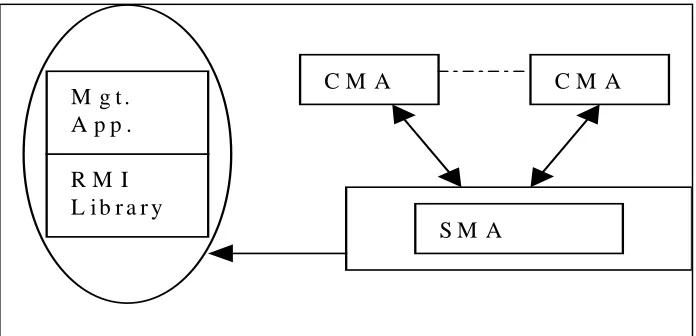
Figure 2: The Smile Cluster Management system
Each compute node has a CMA (Control and Monitoring Agent) that collects statistics on
that node continuously and reports them to the central SMA (system management agent).
Management information is presented to the user by a set of specific management
applications. A set of APIs called the Resource Management Interface (RMI) is provided,
to facilitate developers of management applications. These interfaces are available as a C
library, Java class library and TCL/TK. This interface is then used to develop
management applications and utilities.
System architecture justification
Using a centralised server increased the simplicity and efficiency of the system and
simplified the design of the SMA. It also reduces concern about an information
inconsistency and provides a uniform view of resources through an API.
However it does mean that there is a single point of failure. The intended solution to this
particular problem is to have a backup SMA A centralised server does not scale well - the
focus of the system is on a small to medium sized cluster (4 to 64 nodes).
R M I L i b r a r y
S M A
C M A C M A
Windows NT class cluster software
By way of comparison, a description of administration software available for Windows
NT based clusters is given.
Microsoft
Microsoft provides clustering software called MSCS (Microsoft Scalable Cluster server)
formerly called WolfPack in Windows NT [HREF6]. It currently provides for a simple
two-node failover system. The benefits are higher availability, better manageability and
scalability. MSCS can be remotely managed from any Windows NT workstation or NT
Server. It provides the following services: • a single system image
• audit status of all servers
• set up new applications, file shares, print queues etc.
• administer the recovery policies for applications and resources • take applications offline, online and move from one server to another
Though it is probably easier to administer, it tends not to perform as well as the free Unix
versions run on clusters, such as Linux, Free BSD & NetBSD [HREF7]. Further
information on using Windows NT for parallel computation can be obtained at the
Concurrent Systems Architecture Group at the University of Illinois who maintain the
Resources for High Performance Computing on Windows NT web page [HREF8].
Compaq
The Compaq Intelligent Cluster Administrator is the first industry standard cluster utility
providing web enabled cluster administration [HREF9]. It also provides a single point of
control for Microsoft Windows NT MSCS clusters. The design decisions underlying the
product were ease of use through an intuitive and consistent user interface and
extensibility. The benefits claimed are for reduced system management costs and
Others
Many other companies including IBM, HP and Tandem provide clustering products.
Information on these are available at these companies web sites [RUL97].
Summary
Clusters are being used extensively in both research and commercial installations. They
provide an improved price performance and viable alternative to supercomputers and
forms of high-availability such as data mirroring, server mirroring and fault tolerant
machines. This illustrates the flexibility and adaptability of cluster systems and ensures
ongoing interest in their development and application.
Linux is the dominant operating system with regard to cluster systems particularly in the
realms of research and supercomputing. Even on commercial clusters, Linux is a popular
choice because of its cost, flexibility and performance. A major research area, not just in
reference to cluster computing but also with respect to OS design, is microkernels. These
architectures can be made both small and flexible leading to improved performance for
targeted applications. Linux implements a form of microkernel design through the use of
modules, which can be loaded and unloaded on-demand and incorporated into the kernel.
A lack of administration tools for larger scale clusters renders their management more
difficult. This is the problem being addressed in this project. In the next chapter, a
detailed problem specification describes the goals and requirements of the system. It also
Chapter 3 Problem Specification
Introduction
Clearly the growing interest in cluster systems seems likely to persist given continued
improvements in price-performance ratios of cluster components and the rising
affordability of these systems. Concomitant with this interest is a large body of research
devoted to these systems. However to date the majority of research in software tools for
Unix based systems has been focussed on tools designed to assist programmers in parallel
programming paradigm. There remains a need for tools to facilitate the daily
administration of these systems.
Goals
Arising from this perceived deficit, the goals of this project are to design and implement
an extensible system to ease the administration of a Linux cluster. The essence of such a
system would allow command replication and configuration changes across multiple
nodes. Extensibility would allow new commands to be easily added to the system. In
general command output is textual however extensibility should allow the system to
easily accommodate commands that return different types of output.
One of the features and main attractions of cluster systems is their scalability, which
allows nodes to be added incrementally and accommodates a large number of nodes. The
cluster administration tool should also scale well.
Requirements of the system
The requirements of the system were developed from a review of what other similar
cluster administration tools offered. Also the requirements as specified by the cluster
system manager were included. From this the general requirements of the system can be
stated as:
Command replication and configuration changes across multiple nodes.
– the system should be capable of executing commands on one some or all nodes of
be able to easily select which nodes are to participate in the execution of the
command.
Variable substitution
- for maximum flexibility the system should support a scheme of variable substitution
whereby variables are replaced by their actual values (similar to the Unix scheme of
variable substitution).
A number of additional features were added as requirements to ensure a flexible system
implementation. These are listed below:
Module management
- the importance of microkernel architectures with respect to high performance
computing has been identified. Linux offers both manual and automatic loading as a
means of supplying operating system customisability. The system should incorporate
this functionality.
Formatted output from some menu commands
- output from commands should be formatted. This formatted output may be used for
display or used to dynamically create a list of selectable items from which the user
can select an items.
Shutdown & reboot of nodes and unloading of server software
- for changes in configuration to take effect it is often necessary to reboot the system
on which the change has occurred. The cluster manager should enable any or all
nodes in the cluster to be rebooted.
Output comparison between nodes
- this requirement is to handle scaling effectively. As the number of nodes increases it
becomes increasingly infeasible for the output of all nodes to be displayed on screen.
( and is of particular relevance to the situation in which nodal output is merely an
acknowledgement of successful execution of the command). It is anticipated that a
same from more than one node, then only one copy is displayed with an indication of
which nodes it is from.
System constraints
There were some constraints with regards to the design and implementation of the
system. Both CORBA and Java were to be used in the design of the system.
CORBA
The Common Object Request Broker Architecture (CORBA) [HREF10] is an open
distributed object computing infrastructure standardized by the Object Management
Group (OMG). CORBA automates many common network programming tasks and eases
the burden on the network programmer. It was pre-selected as the middleware to be used
for this project. Furthermore a free (for non-commercial use), publicly available CORBA
compliant ORB implementation, called ORBacus [HREF11], was used.
Java
Java was also a given of the system. It is a popular well-supported language and again
there are many sound technical reasons to support this choice. The Blackdown [HREF14]
implementation of the Java virtual machine was used.
Advantages of Java
• provides platform independence i.e. portable
• reduces development time - object oriented language which promotes reusable code • brings new levels of interactivity to web pages.
• has in-built facilities to promote the use of distributed systems.
Summary
This chapter outlines the problem that this project is addressing namely the design and
implementation of an extensible configuration and administration tool for Linux clusters.
It details the goals and the requirements of the system and the constraints under which the
system is to be developed. The next chapter describes the design of the system and
Chapter 4 Cluster Manager Design
Introduction
The last chapter defined the goals of the project as designing and implementing an
extensible configuration and administration tool for Linux clusters. The requirements of
such a system were also detailed. This chapter presents the high level and detailed design
of the essential features of the cluster management system. Specifically it highlights those
design features of the system that will enable extensibility, scalability and flexibility.
Overview
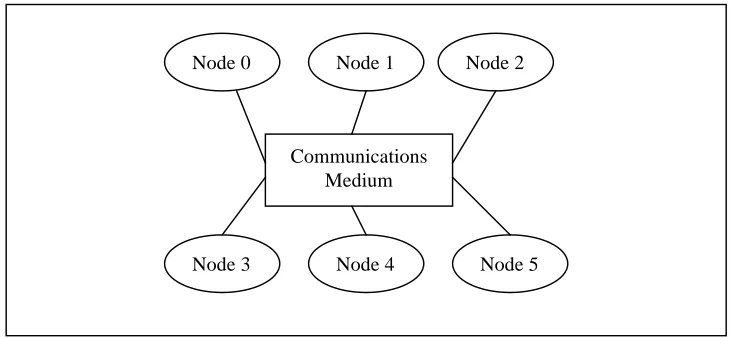
Clusters [image:34.595.111.478.335.504.2]The basic architecture of a cluster system is outlined in Figure 3 below:
Figure 3: Basic architecture of a cluster system
Nodes communicate with one another through a shared communications medium with
software to facilitate parallel programming. The Cluster Management System is designed
to facilitate the administration of a cluster of Linux machines. The normal administrative
duties associated with the administration of a single Linux machine must be replicated for
each machine in the cluster. The Cluster Management System should reduce the amount
of replication involved by automatically and transparently, replicating changes or
command invocations on one machine to some or all other machines in the cluster.
Generally changes will be reflected to all nodes so that a consistent image across the
cluster is maintained.
Node 0
Node 3
Node 1 Node 2
Node 4 Node 5 Communications
Cluster System Manager Overview
An overview of the general architecture of the cluster system manager is illustrated in
Figure 4 below. A client-server architecture forms the basis of the system. In this context,
the client side of the system represents that part of the system which presents the user
interface and through which the user issues command invocations. The server side is
represented by the nodes of the system i.e. each node in the system acts as a server on
[image:35.595.90.515.240.553.2]which commands are executed.
Figure 4 : Cluster System Manager Architecture Overview
Client Overview
In a cluster management system, the cluster manager (that is the client side presenting the
user interface) should be capable of being loaded on any of the nodes in the cluster. The
node on which it is loaded still remains as a functional part of the cluster and therefore
commands which are invoked on all nodes will also be invoked on the cluster manager
The cluster manager essentially accepts two inputs from the user of the system. The first
is the command that the user wants executed on the server node (plus any parameters to
the command) and the second is the list of nodes on which the command should be
executed. The system calls each node on the list of nodes and passes the specified
command to it. The cluster manager operates asynchronously, so it does not wait for the
command to execute before calling the next node on the list. As the nodes complete
execution of the command, they initiate a callback to the cluster manager to return the
response. The cluster manager takes the response and displays it on screen.
Communications Overview
The system uses Corba as its communication middleware. The user of the system chooses
which nodes a particular command is to execute on and the cluster manager connects to
these nodes and issues the command.
As mentioned, the cluster manager will operate asynchronously, i.e. it doesn’t wait for an
individual node to finish before invoking the command on another node. This improves
the overall functionality of the system at the cost of dealing with replies being slightly
more difficult. In single node command operation, or where the server node will reply
immediately, synchronous operation of the cluster manager might be more appropriate.
Certainly replies can be dealt with more efficiently.
On completion of their task, the nodes make a call back to the cluster manager, returning
the output of the command execution. The client implementation accepts the response
data from the node and displays it on the screen. In effect, this acts as a queuing
mechanism whereby the output of only a single node can be displayed at a time, which is
surely how output from a number of different sources should be displayed anyway.
Server Node Operation Overview
Each node in the cluster will run a cluster system management daemon, which can be
launched on node start-up. This daemon merely listens for connections from the cluster
manager through the CORBA interface. When a call from the cluster manager arrives, the
Cluster Manager Detailed Design
As mentioned, the cluster manager design follows a client-server architecture. There are
three elements in this relationship: • the client
• the server
• the client-server interface
A description of each of these elements is given below.
Client
The client side of the cluster manager system is that part of the system with which the
user interacts. This is done through a graphical user interface. Through this, the user
controls the system and issues command invocations to be run on the server nodes.
Extensibility and customisability are enshrined in the system through the use of a user
adaptable menus configuration file. Flexibility in command invocations is achieved using
a user defined variables configuration file. Easy scalability is incorporated in the system
by using a nodes configuration file in which new nodes can easily be added.
Client GUI
The requirement that the system be easy to use suggests the use of a graphical user
interface to interact with the user of the system.
GUI Design
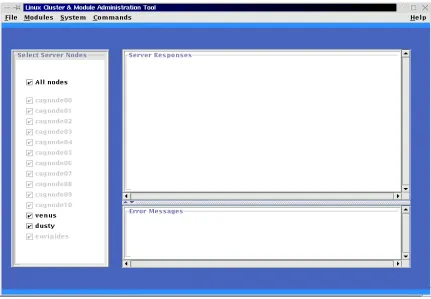
The GUI consists of a frame upon which other components may be drawn. It offers a
menu driven interface through which the user can choose commands to be executed. The
menu is constructed through parsing the menus configuration file as described later.
The GUI proper will contain two distinct areas:
1. a panel, that contains a list of selectable buttons that designate server nodes. From this
the user can choose the nodes that are to participate in the execution of a particular
2. a panel that is used to display the output from the execution of commands on server
nodes. In the most common case, two text areas will be visible on this panel, one on
which normal output is presented, the other being used to display error messages.
The most common case caters for the situation of a standard Unix command being
executed on the server nodes. Output from this command is plain text and can be
displayed on a text area component. However, the design of the GUI allows for easy
extensibility, so that other types of output can be displayed. For example if a statistics
program generated graphical output then the system should be flexible enough to deal
with this. To this end an API is provided to allow for the retrieval of the various display
components. If a different form of output is required, the visible components can be
hidden and the alternative component displayed.
Menus Generation
To give the system manager as much control as possible over the type of command
selection facility offered by the system, a flexible implementation of menu generation has
been implemented. A menus configuration file, is used to generate the menus that appear
on the GUI screen. The client reads this configuration file on start-up. From this a system
of menus and submenus can be generated. Each entry in the configuration file appears on
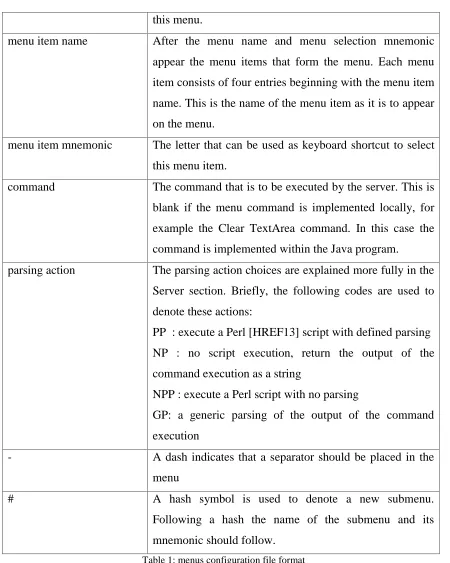
a separate line and the meaning of each entry is shown in Table 1 below. Effectively this
makes the entire system very flexible by allowing new utilities or commands to be added
to the system without any reprogramming or recompiling.
Menu entry/ symbol Meaning
* The appearance of an asterisk denotes the start of a new
menu. Note that the start of the menus configuration file
implicitly assumes the presence of an asterisk, i.e. the first
entry is assumed to be the name of a menu.
menu name On the line after an asterisk, the name of the menu should
appear.
this menu.
menu item name After the menu name and menu selection mnemonic
appear the menu items that form the menu. Each menu
item consists of four entries beginning with the menu item
name. This is the name of the menu item as it is to appear
on the menu.
menu item mnemonic The letter that can be used as keyboard shortcut to select
this menu item.
command The command that is to be executed by the server. This is
blank if the menu command is implemented locally, for
example the Clear TextArea command. In this case the
command is implemented within the Java program.
parsing action The parsing action choices are explained more fully in the
Server section. Briefly, the following codes are used to
denote these actions:
PP : execute a Perl [HREF13] script with defined parsing
NP : no script execution, return the output of the
command execution as a string
NPP : execute a Perl script with no parsing
GP: a generic parsing of the output of the command
execution
- A dash indicates that a separator should be placed in the
menu
# A hash symbol is used to denote a new submenu.
Following a hash the name of the submenu and its
[image:39.595.74.524.85.648.2]mnemonic should follow.
Table 1: menus configuration file format
The use of a configuration file allows the system manager to tailor and extend the menus
GUI to the uses to which the system is being put. This in effect means that there are just 2
1. make the command or utility available to users by adding it to the menus
configuration file
2. ensure that the command or utility is accessible from the server node
Flexibility through Variable Text Substitution
The flexibility of the system is further enhanced through the implementation of a variable
text substitution scheme. This scheme allows the user of the system to use a variable
which will be replaced with associated text. Checking for variable text substitution is
done at the following times:
i) on commands prior to their execution on server nodes.
ii) on file names prior to them being saved
iii) on the contents of files prior to their being saved
Two schemes are implemented for maximum flexibility and choice.
In the first scheme a simple direct variable substitution mechanism is used. In each of the
circumstances listed above, a search through the text of the command, file name or file
contents for the special variable $hostname is made. Each occurrence of it found is
replaced with the actual hostname of the server node on which the action is taking place.
So for example, the command "rm /dd/$hostname/file.txt" running on sever node
cagnode00 will be replaced by the command "rm /dd/cagnode00/file.txt" which is the
command that will be executed.
The previous scheme is merely a shortcut for what is probably a frequent substitution. In
the second scheme, a variables configuration file is used to allow flexible variable
substitution to be applied. The format of the file is the hostname of the server followed on
the next line(s) by a variable identifier and the text that is to be substituted into the
command, filename or file. The variable identifier is of the form $var-xxx where xxx is
replaced by any three letter identifier for the variable. If the text $var-xxx is found in a
command, file name or file, it is replaced with the associated text from the variables
The variables configuration file should be read on each command execution. So
effectively the configuration file can be amended between command executions so that
different textual substitutions can take place.
Scalability
One of the features of Linux based cluster systems is the ability to seamlessly increase
the number of nodes in the system. Consequently a cluster management system must also
be able to handle extra nodes being added to the system. This is accomplished in this
implementation through the use of a configuration file, which contains a list of all the
nodes that form the cluster. Note that this is not a list of all the active nodes in the cluster
but a list of all the nodes that may form the cluster at any time.
On client start-up, the client reads the nodes configuration file and uses this to draw part
of the GUI. A selectable list of nodes is placed on the main GUI screen from which the
user can choose which nodes are to participate in the execution of a command.
Client StartUp
On client startup, the client reads the list of nodes that form the cluster, from the nodes
configuration file. This list is used by the client to attempt to make contact with each of
the server nodes. It is a requirement of the system that all participating server nodes are
started prior to the client. The server nodes once started must store their ORB references
in a known location accessible by the client. ORBacus supports the storing of ORB
references in a shared file system or at a Web location. As the proposed solution does not
at this time incorporate a Web interface, it was decided to store ORB references in the
shared file system of the cluster. The client retrieves the reference and uses it as a basis to
assess whether a node is active or not. Once the client has built the list of nodes, it starts
building the client GUI.
Node selection
The user of the system should be able to execute commands on one, some or all nodes of
used by the client GUI to offer a list of selectable nodes. From this the user can select
which nodes are to execute a particular command.
Command Execution
The system is designed to provide both a menu-driven system through which various
commands can be invoked and also an open specification using a dialog box through
which free format text can be entered allowing any command or utility to be invoked.
On the menu system, there will be certain commands that are implemented locally and do
not require a call to a server node. Otherwise when a command is chosen, either from the
menu system or by entering it in the dialog box, the system establishes which nodes have
been selected to execute this command.
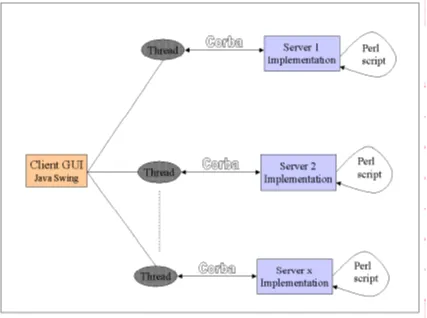
A thread is spawned to handle communication and command invocation on all of the
selected server nodes. The thread invokes the command on each server implementation in
turn. It does not wait for a reply but continues on to the next server to invoke the
command. In that sense it operates asynchronously.
When the server has completed the execution of the command, it initiates a callback on
the client implementation. It passes the output of the command execution to the call. The
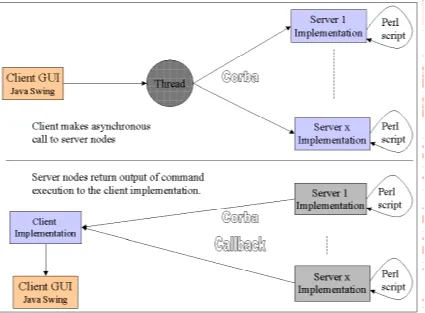
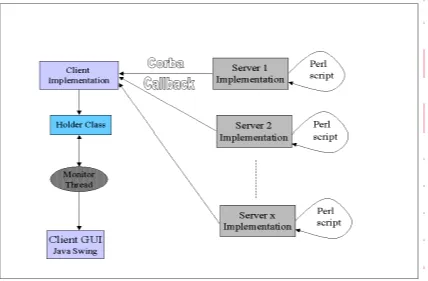
client displays this on its GUI. An extension to the original design is needed if the output
from the separate server nodes is to be compared. This revised design is shown in Figure
Figure 5: Revised design to handle output comparison
In this revised design, the client still calls the server nodes and in turn, the servers make a
call back to the client implementation, on completion of the execution of the specified
command. This is the same as the original design. However, now the client
implementation stores the command output in a Holder class. A monitor thread can
retrieve it from this class for normal command output. When output comparison is
required, the output of the different servers in the holder class can be compared and
displayed only if a difference exists.
Configuration File Management
The system supports the editing and saving of text files. This feature is useful in that
changes to configuration files can easily be accomplished particularly with the flexibility
offered by the variable text substitution. Both the editing and saving commands, are
Editing a file
When this option is selected, it begins the process of opening the file for display on the
GUI text area. This option represents a special case of command execution in that the
command should only be executed on one node, i.e. it is not suspected that the user might
want to edit more than one file simultaneously. Therefore the editing of files results in the
named file being opened on the local node only. It is intended that the contents of the
text area be saved prior to editing. These can then be restored once the editing session is
complete.
When the option is selected, a dialog box is opened through which the user enters the
name of the file to be edited. If the file exists, it is opened and its contents are displayed
in the text area. The file does not remain open and changes are not interactively written to
the file.
Saving a file
This option can be selected at any time. The result of choosing this option is that the
contents of the text area of the client GUI are saved to the named file. This means that not
only can file edits be saved but also normal text area contents so log files of sessions can
be constructed. It is worth noting that though the ‘Edit File’ option is implemented
locally, this option is effected on all selected server nodes, that is, the file is saved in the
specified location on all selected nodes.
On choosing the option, a dialog box is displayed that requests the filename (including
pathname) under which the file is to be stored. The contents of the text area are saved to
the file.
Client - Server Interface
The client-server interface describes the interface between the cluster manager and the
nodes of the cluster. It outlines how communication occurs between them and what kind
Communication between nodes & cluster manager
Communication between the cluster manager and nodes occurs using CORBA. It is
envisaged that each node in the cluster will run a cluster system management daemon,
which can be launched on node start-up. This daemon merely listens for connections
from the cluster manager through the CORBA interface. When a call from the cluster
manager arrives, the specified command is executed. The client thread does not wait for
the response from the server node. Instead the server initiates a callback to the client with
the output from the command execution. The list of nodes on which the command is to be
executed is selected through the cluster manager GUI.
Server
The server side of the cluster manager system is that part of the system that runs on each
node of the cluster as a daemon. The server implements a number of functions that the
client invokes. However the essence of the server can be summarised as a resource which
executes Unix commands and in most cases, formats the output of the command
execution for return to the client.
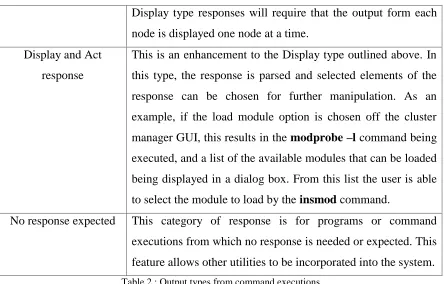
Command Execution Responses
Dependent on the command that is executed on a server node, the output that is produced
is potentially different. These different types of output have been classified into the
following broad categories of response in Table 2 below.
Type Explanation
Successful Status
Response
This category is for commands that have executed successfully
and from which there is no output, i.e. from a command line
invocation, successful execution would result in a return to the
command prompt. An example of this command is a successful
mount command, e.g. mount /export
Failure Status Response This is for commands that have generated an error in their
execution. The error is reported on STDERR.
Display only response This response will occur for commands whose result is a
Display type responses will require that the output form each
node is displayed one node at a time.
Display and Act
response
T