Voice based Mailbox System for Blind using Face
Recognition Technique
Pof. S. S Khatal1, Shilpa Sasikumar2, Lakshmi Rahim3, Prapti Lasunte4, Sindooja Gajam5
1, 2, 3, 4, 5
Dept. of Information Technology, Sinhgad Institutes of Technology, Lonavla, Maharashtra, India
Abstract: Visually or physically challenged people find very difficult to use communication technologies to use as it requires visual and touch perception. Nearly 25% of the world population has physical or visual disability.
So , we are developing an email system which will the facilitate the blind people to use emails just as a normal person does using speech-to-text and text-to-speech algorithms. Here we are using face detection technique to authenticate user. The user needs to capture their photo and then the system can use the system after authentication.
Keywords: Voice based Email, Android,Text-to-speech algorithms, Face Recognition, Authentication.
I. INTRODUCTION
Today, communication has become so easy due to the coordination of communication technologies with the internet. It can be seen that in 2015, the number of worldwide email users was nearly 2.6 billion. By the end of 2019, the number of worldwide email users will increase to over 2.9 billion making emails the most used form of communication. It is estimated that 285 million people globally are visually impaired 1 with 39 million blind and 246 million with low vision [5][6]. However, use of this technology is quite tough to utilize this technology to the physical or visual impaired people because of the fact that using them needs visual and touch perception [6]. The various system is designed to help visually impaired people such as navigation and location determination system for the blind using an RFID tag grid[8], a system in [9] helped many people who have difficulty in typing by speech recognition. An email has turned out to be a vital a part of formal communication in skilled world. For the people who can see, checking and giving reply to the mail is a normal thing, but the people who are not able to see, this emailing concept is a key concern. Thus for blinds, it is a tedious job to use the internet [7] and retrieve the information without any reference. So it is important to make internet facilities available for them too as the entire population now uses cell phones.
The increase of computation capability of mobile devices gives the inspiration to build up applications that can help visually impaired persons. With the ease of use of mobile devices, these people can help out by an additional method of identification i.e. image processing techniques. We are developing a system for visually challenged people to easily access their emails with a good confidential manner by using a face detection program.
II. LITERATURE REVIEW
Piotr Kardysi et al.[1] propose an android application supporting blind and partially sighted people in smartphone use. It helps them to call, send and receive text messages, make use of a “phone book” as well as of additional options such as positioning or battery monitoring, through voice commands. Shonal Chaudhry et al.[2] presents the design and implementation of face detection and recognition system for the visually impaired through the use of mobile computing. The face detection is done using a cascade classifier. Face detection is done using a temporary image of the detected face. Google Talkback was used to provide users with feedback on the operation of the application. This experiment results show high face detection accuracy and promising face recognition accuracy in suitable conditions. Payal Dudhbale et al. [3] describe the voice mail architecture used by blind people to access E-mail and multimedia functions of the operating system easily and efficiently. The system also reduces cognitive load taken by the blind to remember and type characters using the keyboard.ASR (Automatic speech recognizer) and TTS (text to speech) get used for converting speech to text and vice versa T. Shabana et al.[4] propose developing an email system that will help even a naïve visually impaired person to use the services for communication without previous The system will not let the user make use of keyboard instead will work only on mouse operation and speech conversion to text. Also, this system can be used by any normal person also, for example, the one who is not able to read. The system is completely based on interactive voice response which will make it user-friendly and efficient to use.
converted to text. Their will a small icon office on whose clicking the user had to speak and his/her speech will be converted to text format, which the naked people would see and read also.
X. Ding et al. [6] give a framework that focuses on customer reviews of products. The holistic lexicon-based approach is used to solving the problem by exploiting external evidence and linguistic conventions of natural language expressions. That allows the system to handle opinion words that are context dependent and deals with many special words, phrases and language constructs which have impacts on opinions based on their linguistics.
III. PROPOSED SYSTEM
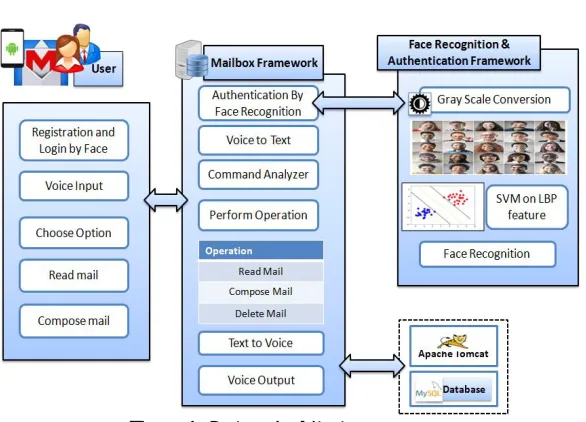
The proposed system helps to use the emails to people who are visually impaired and physically challenged or handicapped. The system provides easy and secure access to the email application of blind users. Below figure shows the architecture of the proposed system. The overall working is as follows:
A. User Authentication
1) Capture User Photo: Firstly user can capture their photo by voice command through their android phone.
2) Face Detection & Preprocessing: Apply the Haar cascade Classifier for the face detection in images. Once face are detected then apply the pre processing on input images like noise removal, normalization etc.
[image:2.612.161.454.330.541.2]a) RGB to Gray Scale Image: Convert the image into Gray scale by taking the average of the each pixel RGB. b) Local Binary Patterns Histograms
Figure 1: System Architecture
i) Divide the examined window into cells (e.g. 16x16 pixels for each cell). For each pixel in a cell, compare the pixel to each of its 8 neighbors (on its left-top, left-middle, left-bottom, right-top, etc.). Follow the pixels along a circle, i.e. clockwise or counter-clockwise.
ii) Where the center pixel's value is greater than the neighbor's value, write "0". Otherwise, write "1". This gives an 8-digit binary number (which is usually converted to decimal for convenience).
iii) Compute the histogram, over the cell, of the frequency of each "number" occurring (i.e., each combination of which pixels are smaller and which are greater than the center). This histogram can be seen as a 256-dimensional feature vector.
1. Optionally normalize the histogram.
2. Concatenate (normalized) histograms of all cells. This gives a feature vector for the entire window. iv) Feature set is then saved to a model for later matching process.
B. Mail Functionality
The following are the modules available in the application:
1) Sign-Up: This module is used for to register new user in application.
2) Sign-In: The existing user can sign-in in application by their face authentication. The user needs to capture their photo and then the system can authenticate the user.
3) Inbox: The user gets a notification of an email received and the application will allow the user to listen to the email.
4) Compose Mail: The user can compose an email just by speaking the content and the application will automatically convert it into text.
5) Delete: The user can delete unwanted emails and put it into the trash folder using this module.
IV. ALGORITHMS USED
A. Haar cascade Classifier for Face Detection
1) Haar Cascade is a classifier which is used for detecting a face from an image.
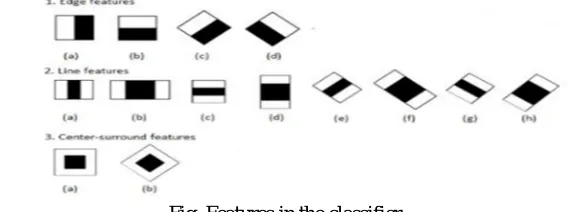
2) For training the classifier positive images which contain the wanted object i.e. face in the image and negative images which don’t contain the face are needed. The classifier scans the features on the positive images and creates specific target values by using the sum values of the black area and the white areas in the features
[image:3.612.164.449.294.400.2].
Fig. Features in the classifier
3) Classifier tries to create the most optimized target values for detecting and tracking the object by changing the sizes of the features. Features are the weak classifiers. Because they can’t be a correct classifier with alone.
4) In an object, there are many features and a place where they are collected contains the wanted object in the image. Using a lot of positive and negative images facilitates the detection of the object in the image.
5) Classifier runs as mentioned above basically. Its speed of finding the objects in the image depends on the training method of the classifier and the number of positive and negative images. Training the Classifier for training the classifier positive and negative images are used. We train the classifier by giving positive images separately according to their type. The positive images are resized to 24*24 pixels and converted to a vector file with a script. After them, the number of positive images that will be used in training is determined. For determining this number (x) Equation (1) is used.
6) In this equation, the number of stages indicates that in how many stages the classifier reaches to the result and the minhitRate indicates the minimum hit rate in every stage.
7) First of them represents the acceptable maximum false alarm rate for the training section of the object. The second one represents the memory allocated for training the classifier. After the training section, the XML files are created for each object types. By using these files the objects can be detected and tracked.
B. Support Vector Classification Algorithm
1) Support vector machine (SVM) proposed by vapnik and cortes have been successfully applied for gender classification problems by many researchers. An SVM classifier is a linear classifier where the separating hyper plane is chosen to minimize the expected classification error of the unseen test patterns.
3) SVM training algorithm built a model that predict whether the test image fall into this class or another.SVM require a huge amount of training data to select an affective decision boundary and computational cost is very high even if we restrict ourselves to single pose (frontal) detection.
4) The SVM is a learning algorithm for classification. It tries to find the optimal separating hyper plane such that the expected classification error for unseen patterns is minimized.
5) For linearly non-separable data the input is mapped to high-dimensional feature space where they can be separated by a hyper plane. This projection into high-dimensional feature space is efficiently performed by using kernels. More precisely, given a set of training samples and the corresponding decision values {-1, 1} the SVM aims to find the best separating hyper plane given by the equation WT x+b that maximizes the distance between the two classes.
C. Local Binary Patterns Histograms
The LBP feature vector, in its simplest form, is created in the following manner: 1) Divide the examined window into cells (e.g. 16x16 pixels for each cell).
2) For each pixel in a cell, compare the pixel to each of its 8 neighbors (on its left-top, left-middle, left-bottom, right-top, etc.). Follow the pixels along a circle, i.e. clockwise or counter-clockwise.
a) Where the center pixel's value is greater than the neighbor's value, write "0". Otherwise, write "1". This gives an 8-digit binary number (which is usually converted to decimal for convenience).
b) Compute the histogram, over the cell, of the frequency of each "number" occurring (i.e., each combination of which pixels are smaller and which are greater than the center). This histogram can be seen as a 256-dimensional feature vector.
c) Optionally normalize the histogram.
d) Concatenate (normalized) histograms of all cells. This gives a feature vector for the entire window.
The feature vector can now be processed using the Support vector machine, extreme learning machines, or some other machine-learning algorithm to classify images. Such classifiers can be used for face recognition or texture analysis.
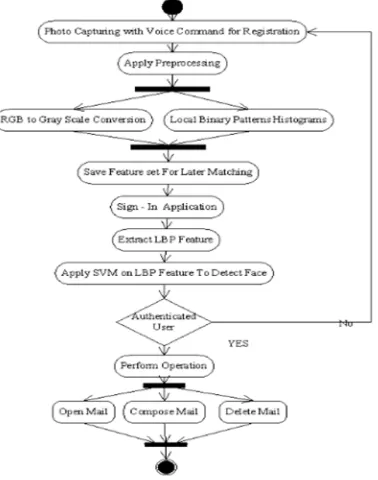
D. System Flow
[image:4.612.221.410.481.721.2]The overall flow of the proposed system is as follows.
V. IMPLEMENTATION
The proposed system is supported to android studio 3.5 which provides tools for Android development and debugging. Open source SDK used for mobile APP development like an android. Software programmer build application for mobile devices using JavaScript and HTML6. The GUI of the system is designed using JSP. The overall development is done in Eclipse 3.3 Indigo. For Database related operations we have used MYSQL GUI browser, which is a secure relational database and ideal for e-commerce sites that handle frequent online transactions and other susceptible data.
VI. ADVANTAGES
A. The system helps for Blind people to use service like E mail. B. System helps the persons suffering from arms disability.
VII. CONCLUSION
We propose a system Voice Based Mailbox System for Blind Using Face Recognition Technique. The proposed system can facilitate the visually impaired individuals to access email services efficiently by using the speech-to-text and text-to-speech algorithms. With the use of the system, the user can identify by their face. At the time of system use, when user signs in the application user face are captured and LBP features are extracted from the face. By using Support Vector Classification algorithm analysis on the LBP facial features can be done. If the user is authorized then he can perform the functionalities like compose an email and delete unwanted emails just by speaking the content.
REFERENCES
[1] Piotr Kardys, Adam Dabrowski Marcin Iwanowski, Damian Huderek,"A new Android application for blind and visually impaired people",IEEE. 2016.September 21-23rd, 2016, Poznan, POLAND.
[2] Payal Dudhbale , Prof. Jagruti S. Wankhade , Chetan J. Ghyar , Pallavi S. Narawade "Voice Based System in Desktop and Mobile Devices for Blind People", 2018 IJSRST | Volume 4 | Issue 8 | Print ISSN: 2395 - 6011 | Online ISSN: 2395 - 602X Themed Section: Science and Technology .
[3] T. Shabana, A . Anam, A. Rafiya and K. Aisha, " Voice based email system for blinds ", International Journal of Advanced Research in Computer and Communication Engineering Vol. 4, Issue 1, January 2015.
[4] Pranjal Ingle , Harshada Kanade , Arti Lanke"Voice based e-mail System for Blinds",International Journal of Research Studies in Computer Science and Engineering (IJRSCSE) Volume 3, Issue 1, 2016, PP 25-30.
[5] Shonal Chaudhry and Rohitash Chandra,"Design of a Mobile Face Recognition System for Visually Impaired Persons".
[6] Poonam Pate 1 , Zeeshan Tamboli 2 , Harsh Panchal 3 , Diksha Jain "V oice Based E - mail Application f or B lind /visually Impaired People",IJARIIE - ISSN(O) - 2395 - 4396.
[7] Nikhil V. Jagmalanie et al.,"Email System Based on Voice and Biometric Authentication", International Journal on Recent and Innovation Trends in Computing and Communication ISSN: 2321 - 8169 Volume: 5 Issue: 4.