
EXPLORATORY LEARNING FOR WIRELESS
NETWORKING
Thomas Sturgeon
A Thesis Submitted for the Degree of PhD
at the
University of St Andrews
2010
Full metadata for this item is available in
Research@StAndrews:FullText
at:
http://research-repository.st-andrews.ac.uk/
Please use this identifier to cite or link to this item:
http://hdl.handle.net/10023/1702
This item is protected by original copyright
Exploratory Learning for
Wireless Networking
A dissertation submitted in partial fulfilment of the requirements for the degree of
Exploratory Learning for
Wireless Networking
Thomas Sturgeon
A dissertation submitted in partial fulfilment of the requirements for the degree of
Doctor of Philosophy
of the
University of St Andrews
May 2010
School of Computer Science
University of St Andrews
St Andrews, Fife
KY16 9SX
Exploratory Learning for
Wireless Networking
Abstract
This dissertation highlights the importance of computer networking education and the challenges in
engaging and educating students. An exploratory learning approach is discussed with reference to
other learning models and taxonomies. It is felt that an exploratory learning approach to wireless
networks improves student engagement and perceived educational value.
In order to support exploratory learning and improve the effectiveness of computer networking
education the WiFi Virtual Laboratory (WiFiVL) has been developed. This framework enables
students to access a powerful network simulator without the barrier of learning a specialised systems
programming language. The WiFiVL has been designed to provide “anytime anywhere” access to a
self-paced or guided exploratory learning environment.
The initial framework was designed to enable users to access a network simulator using an HTML
form embedded in a web page. Users could construct a scenario wherein multiple wireless nodes were
situated. Traffic links between the nodes were also specified using the form interface. The scenario is
then translated into a portable format, a URL, and simulated using the WiFiVL framework detailed in
this dissertation. The resulting simulation is played back to the user on a web page, via a Flash
animation.
This initial approach was extended to exploit the greater potential for interaction afforded by a Rich
Internet Application (RIA), referred to as WiFiVL II.
The dissertation also details the expansion of WiFiVL into the realm of 3-dimensional, immersive,
virtual worlds. It is shown how these virtual worlds can be exploited to create an engaging and
educational virtual laboratory for wireless networks. Throughout each development the supporting
framework has been re-used and has proved capable of supporting multiple interfaces and views.
Each of the implementations described in this dissertation has been evaluated with learners in
undergraduate and postgraduate degrees at the University of St Andrews. The results validate the
efficacy of a virtual laboratory approach for supporting exploratory learning for wireless networks.
Acknowledgements
This PhD would never have been completed without the help from the following people. Firstly I
would like to thank my supervisors Dr Colin Allison and Dr Alan Miller, without whom this PhD
would not be possible.
Thank you to my mum for keeping me motivated and always supporting me during this long, long
process.
Thanks to everyone who has worked with me in the office, especially Iain and Kris who have helped
me with various problems over the years.
I am indebted to my beautiful Kate for listening to all my rants, keeping me going through the PhD and
Declarations
I, Thomas Sturgeon, hereby certify that this thesis, which is approximately 53,500 words in length, has
been written by me, that it is the record of work carried out by me and that it has not been submitted in
any previous application for a higher degree.
I was admitted as a research student in October 2005 and as a candidate for the degree of Doctor of
Philosophy in October 2006; the higher study for which this is a record was carried out in the
University of St Andrews between 2005 and 2010.
Date ………..….. Signature of candidate ………..
I hereby certify that the candidate has fulfilled the conditions of the Resolution and Regulations
appropriate for the degree of Doctor of Philosophy in the University of St Andrews and that the
candidate is qualified to submit this thesis in application for that degree.
Date ………..….. Signature of supervisor ……….
In submitting this thesis to the University of St Andrews we understand that we are giving permission
for it to be made available for use in accordance with the regulations of the University Library for the
time being in force, subject to any copyright vested in the work not being affected thereby. I also
understand that the title and the abstract will be published, and that a copy of the work may be made
and supplied to any bona fide library or research worker, that my thesis will be electronically accessible
for personal or research use unless exempt by award of an embargo as requested below, and that the
library has the right to migrate my thesis into new electronic forms as required to ensure continued
access to the thesis. I have obtained any third-party copyright permissions that may be required in
order to allow such access and migration, or have requested the appropriate embargo below.
The following is an agreed request by candidate and supervisor regarding the electronic publication of
this thesis:
Access to Printed copy and electronic publication of thesis through the University of St Andrews.
Date ………..….. Signature of candidate ……….
Contents
1 Introduction ... 1
1.1 Introduction ... 1
1.2 Thesis Statement ... 2
1.3 Technology Enhanced Learning ... 2
1.4 Overview of the WiFiVL ... 3
1.4.1 System Structure ... 7
1.5 Contribution of Dissertation ... 8
1.6 Selected Publications ... 8
1.7 Dissertation Roadmap ... 9
1.8 Summary ... 10
2 Approaches to Learning ... 11
2.1 Introduction ... 11
2.2 Learning Taxonomies ... 11
2.2.1 Bloom’s Taxonomy and Andersons Revisions ... 11
2.2.2 SOLO ... 14
2.2.3 ACM ITiCSE Taxonomy ... 14
2.3 Learning Models ... 15
2.3.1 Didactic Model ... 15
2.3.2 Collaborative Model ... 16
2.3.3 Problem-based Learning ... 16
2.3.4 Constructivist Model ... 17
2.3.5 Constructionism Model ... 18
2.3.6 Exploratory Learning ... 18
2.4 Conclusion ... 20
3 Related Work ... 22
3.1 Taxonomy and terms of reference ... 22
3.2 JASPER ... 25
3.3 EmuLab ... 25
3.5 CNet ... 26
3.6 WebLan Designer... 27
3.7 ReMLab ... 28
3.8 SENSASIM ... 28
3.9 iNetwork... 29
3.10 IREEL... 29
3.11 MASSIVE ... 30
3.12 Graphical Network Simulator 3 ... 31
3.13 PlanetLab ... 32
3.14 jFAST ... 33
3.15 Virtual Distributed Ethernet ... 33
3.16 Virtual Network System ... 33
3.17 Example Deployment of Learning Environments ... 34
3.18 Education through Virtual Worlds ... 35
3.19 Miscellaneous Related Work ... 38
3.19.1 PLATO ... 39
3.19.2 Grid Architectures for E-Learning ... 40
3.20 Summary ... 41
4 Technologies and Concepts ... 43
4.1 Types of Simulators ... 43
4.1.1 ns-2 the Network Simulator ... 44
4.2 Usability Factors ... 46
4.3 Servlet Technology ... 47
4.3.1 Apache Tomcat ... 48
4.4 Java Beans ... 48
4.5 XML ... 49
4.6 Flash with ActionScript ... 50
4.7 JavaScript ... 50
4.8 Rich Internet Application Frameworks ... 51
4.10 IEEE 802.11 Protocol ... 52
4.10.1 MAC Frame Formats ... 53
4.10.2 Media Access Protocol ... 54
4.10.3 Reassociation ... 55
4.10.4 Wireless Interference ... 55
4.10.5 Hidden and Exposed Terminal Problems ... 56
4.11 Multi User Virtual Environment (MUVE) ... 57
4.11.1 A Comparison of MUVEs, Massively Multiplayer Online Role-Playing Game and First Person Shooters ... 58
4.11.2 Linden Scripting Language ... 61
4.11.3 LSL as a new approach to programming ... 63
4.12 Summary ... 64
5 WiFiVL Design and implementation ... 66
5.1 WiFiVL Host Site ... 66
5.2 Components in WiFiVL ... 68
5.2.1 Scenario construction using HTML Form Elements ... 70
5.2.2 The WiFiVLServlet ... 75
5.2.3 jOBA – Java OTCL Build API ... 75
5.2.4 ns-2 Client and Daemon ... 79
5.2.5 NAM to XML Builder ... 79
5.2.6 Flash Animation ... 83
5.2.1 Education using Web 2.0 ... 84
5.3 Evaluation of WiFiVL ... 85
5.3.1 System Performance ... 88
5.4 Extension of WiFiVL to WiFiVL II ... 88
5.4.1 Motivation for developing WiFiVL II ... 89
5.5 Extension to jOBA ... 92
5.6 Graphical Representation of the Simulation Results ... 93
5.7 Supervised Evaluation Sessions for WiFiVL II ... 94
5.7.2 Supervised Laboratory Session of WiFiVL II ... 95
5.7.3 Example Student Report Using WiFiVL II ... 98
5.7.4 Second Supervised Laboratory Session of WiFiVL II ... 100
5.8 Conclusion ... 100
6 WiFiSL ... 103
6.1 Second Life and Open Simulator ... 105
6.2 Design Considerations ... 106
6.3 Educational Scenarios ... 107
6.4 Architecture ... 108
6.4.1 Node ... 110
6.4.2 All Seeing Orb ... 110
6.4.3 WiFi Constructor and Simulator ... 111
6.4.4 Process Description ... 112
6.5 Visualisation Considerations for Wireless Transmissions ... 112
6.6 User Interface Design ... 115
6.6.1 Console Interface for Power Users ... 122
6.6.2 Scope of Simulations ... 122
6.6.3 Traffic Implementation ... 123
6.7 Animation Controller ... 125
6.7.1 Broadcast Response ... 125
6.7.2 Broadcast Census ... 126
6.7.3 HTTP Gateway and Modifications to WiFiCS ... 127
6.7.4 Execution Scheduler ... 129
6.8 Evaluation and Methodology ... 132
6.9 WiFiSL Evaluation ... 134
6.9.1 First Evaluation Session ... 135
6.9.2 Second Evaluation Session ... 138
6.9.3 Third Evaluation Session ... 139
6.10 Implementation Issues and Limitations ... 141
6.11 Transposition of WiFiSL to WiFiOS ... 145
6.12 WiFiOS Design ... 146
6.13 WiFiOS Evaluation Session 1 ... 150
6.13.1 Observer Notes ... 151
6.13.2 Structured Feedback... 151
6.13.3 Informal Unguided Interview... 154
6.14 WiFiOS Evaluation Session 2 ... 154
6.14.1 Observer Notes ... 155
6.14.2 Structured Feedback... 155
6.15 Summary ... 157
7 Conclusion ... 158
7.1 Introduction ... 158
7.2 Future Work ... 159
7.3 Conclusion ... 160
1 Appendix ... 161
1.1 Virtual World Glossary ... 161
1.2 Laboratory Exercise sheet provided to Master students at the University of St Andrews... 162
1.3 Laboratory Exercise sheet provided to CS3102 students at the University of St Andrews .... 163
1.4 Document provided to students to enable the use of the new interface ... 164
1.5 Questions from the System Usability Scale ... 165
1.6 Questions from the Educational Questionnaire ... 166
1.7 Task List ... 166
1.8 Laboratory Exercise sheet provided to Master students at the University of St Andrews... 167
1.9 Worksheet for Wifi OpenSim ... 168
1.10 WiFiVL User Guide for use in Open Simulator ... 169
1.11 Open Feedback Form ... 172
List of Figures
Figure 1: Screenshot of a section of the form based input for scenario description ... 4
Figure 2: Screenshot of the WiFiVL Flash binary animating two expanding RTS signals ... 5
Figure 3: Screenshot of a scenario constructor and animator for WiFiVL II ... 6
Figure 4: Screenshot of the island developed in Open Simulator (WiFiOS) ... 6
Figure 5: UML sequence diagram of WiFiVL ... 7
Figure 6: Representation of the Zone of Proximal Development ... 17
Figure 7: Screenshot of JASPER animating a protocol [61] ... 25
Figure 8: The CNet simulation model [64] ... 27
Figure 9: Screenshot of the WebLan Designer [65] ... 28
Figure 10: Architecture of IREEL [88] ... 30
Figure 11: Distribution of the Planet Lab service TCP Live around the world ... 33
Figure 12: Locations of the VNS server and client during an experiment... 34
Figure 13: Screenshot of a simulator to enable students to learn how a CPU works... 39
Figure 14: Structure of SELF [153] ... 41
Figure 15: OTcl code fragment that defines a range of node properties ... 45
Figure 16: OTcl code fragment for defining a TCP Agent ... 46
Figure 17: Code excerpt showing a simple Java Bean ... 49
Figure 18: Example JavaScript and Java illustrating dynamic typing ... 50
Figure 19: JavaScript example code demonstrating custom object creation in JavaScript ... 50
Figure 20: Interactions of the model-view-controller design pattern ... 52
Figure 21: Key interactions on an 802.11 network ... 55
Figure 22: The exposed terminal problem [194] ... 56
Figure 23: Details of an email received form a script within Second Life ... 62
Figure 24: Screenshot showing a flash animation explaining the hidden node problem, available on the WiFiVL host site [242] ... 67
Figure 25: Screenshot of an interactive hypermedia element explaining the RTS/CTS exchange ... 67
Figure 26: Model View Controller representation of WiFiVL ... 68
Figure 28: Screenshot of the WiFiVL way of specifying node locations, sensing range and traffic
configurations ... 71
Figure 29: JavaScript object code that describes a Node ... 71
Figure 30: JavaScript object representation of a time oriented traffic link in the users HTML configuration page ... 72
Figure 31: Screenshot of the HTML user interface; this section is contained in the Advanced area of the configuration page ... 72
Figure 32: An example of a URL generated by the scenario construction from HTML form elements 73 Figure 33: UML class diagram of WiFiVLServlet showing which packages are used ... 75
Figure 34: UML component diagram of the OTCL construction API ... 76
Figure 35: MAC protocol choices shown as an enumerated type... 77
Figure 36: UML class diagram of a traffic link in jOBA and the inherited components, file and time transfer links ... 77
Figure 37: UML class diagram of the Parameters class in jOBA ... 78
Figure 38: UML class diagram of the Build class in jOBA ... 79
Figure 39: The translation of NAM To XML through the population of a Java Bean ... 80
Figure 40: Example numbered output from the start of the NAM file ... 81
Figure 41: Sample of XML text representing a wireless scenario converted from NAM type to XML. This is used by the WiFiVL for animating the result from simulating a given scenario ... 82
Figure 42: Execution stack implemented in ActionScript 2.0 ... 83
Figure 43: Screen capture of original WiFiVL showing the results from a simulation of IEEE 802.11 84 Figure 44: Educational value (red) and the system usability (blue) ... 86
Figure 45: Graph showing the performance of students in an exam question on WiFi ... 87
Figure 46: Graph showing the relationship between the scores for WiFi and other questions in a 2006 networking exam ... 87
Figure 47: Model View Controller representation of the WiFiVL II architecture ... 90
Figure 48: Excerpt of the MXML file that defines the user interface and the resulting user interface ... 90
Figure 49: Screenshot of the new interface for constructing scenarios in WiFiVL ... 91
Figure 50: Screenshot of the revised interface for defining a traffic link between two nodes. The pop-up configuration takes the focus of the screen, which gives a faded background appearance ... 92
Figure 52: Chart showing the distribution of packet types. This is an example of the chart that is
generated by a user-configured scenario in WiFiVL and shows how students can alter variables
in the simulation to derive different statistical results ... 94
Figure 53: SUS and educational value in a laboratory session using the WiFiVL II. SUS average score was 61% and average educational value was 70% ... 95
Figure 54: Usage of WiFiVL II over the week preceding a laboratory submission date of 2359 on 11/11/2008 ... 96
Figure 55: Distribution of SUS and educational value questionnaire. Average score for SUS was 66% and for educational value 79% ... 97
Figure 56: Average rating from the students on the educational aspect of WiFiVL II ... 98
Figure 57: Example of a submitted student report ... 99
Figure 58: Results for the WiFiVL II System Usability Scale and Educational Value ... 100
Figure 59: Bar Comparison of SUS and educational value questionnaire results when using just a form (dark blue and red) and the laboratory sessions where WiFiVL II was available (lighter blue and red) ... 101
Figure 60: Screenshot of the Second Life viewer ... 105
Figure 61: Architectural signal-sequence diagram of the component interaction in WiFiSL... 109
Figure 62: Screenshot of a networking component in Second Life ... 110
Figure 63: Screenshot of the WiFiSL All Seeing Orb attached to the avatar’s left hand ... 111
Figure 64: Screenshot from Second Life of two wireless signals that have expanded to a set size with a transparent setting during a simulation animation ... 114
Figure 65: Screenshot from Second Life showing an explosion of particles from a central point ... 115
Figure 66: Screenshot from Second Life showing a representation animation of a wireless signal propagating from one network component to another ... 115
Figure 67: Screenshot of several wireless networking components in Second Life ... 116
Figure 68: State transitions diagram representing the changes in a node due to user touch events ... 118
Figure 69: Signal sequence diagram with a matching state transition machine detailing the actions a user performs to construct a traffic scenario in the WiFiSL and the state changes ... 119
Figure 70: Signal sequence diagram showing the signals used during a collaborative scenario traffic construction ... 120
Figure 71: A signal sequence diagram showing the construction of two concurrent traffic communications between Node A and Node B ... 121
Figure 73: LSL construction of a networking component in WiFiSL - key aspects of code used and
interface definitions ... 124
Figure 74: Screenshot of the traffic connection between two nodes as created by the avatar when constructing a scenario ... 125
Figure 75: Scripting language structure for constructing a gateway that supports scenario collection and
execution scheduling ... 126
Figure 76: Typical NAM sample, 1202 characters ... 127
Figure 77: Compressed scenario trace from NAM, 79 characters ... 127
Figure 78: LSL scripting constants used to access information from the compressed scenario trace in
Figure 77 ... 127
Figure 79: LSL sample showing the Execution Scheduler and Scenario Collector in the Gateway
communications to gather more simulation results from the WiFiCS Servlet ... 128
Figure 80: Advanced settings available to the user in Second Life ... 129
Figure 81: Operations of the execution scheduler developed in Second Life ... 129
Figure 82: A sample of LSL code used to split the compressed NAM results into a manageable format
... 130
Figure 83: A sample of LSL code used to index into an event using the constants specified in Figure 78
... 130
Figure 84: LSL example code from the Execution Scheduler component in WiFiSL ... 130
Figure 85: Sample code from the Execution Scheduler showing the selection of events to execute for a
given maximum simulation time ... 131
Figure 86: Sample code from the Execution Scheduler showing how events are transmitted to listening
networking components on the island ... 131
Figure 87: Node A and B can only communicate with node C and not with each other due to an
obstruction ... 142
Figure 88: An object creating a projectile and targeting another object followed by a collision... 143
Figure 89: An object creating a projectile and targeting another object with the collision occurring at an
obstruction indicating no line of sight between the two nodes ... 143
Figure 90: Screenshot of the WiFiOS island Aeolus ... 147
Figure 91: Screenshot of the lecture theatre with a range of lectures available for selection by the
avatar ... 148
Figure 93: Example demonstration of the interactive education display for the Exposed Node Problem
List of Tables
Table 1: Revision to Bloom's taxonomy without a strict hierarchical format... 13
Table 2: Bloom's revised two-dimensional taxonomy and example verbs ... 13
Table 3: A representation of the ACM ITiCSE working group for a revision of Bloom's taxonomy for Computer Science ... 15
Table 4: A reconstruction from the ITiCSE working group showing the 2-dimensional matrix taxonomy for a student with theoretical competency only [33] ... 15
Table 5: A reconstruction from the ITiCSE working group showing the use of the 2-dimensional matrix displaying a student who is unable to progress past a trial and error approach [33] ... 15
Table 6: Related work and key features of systems with the potential for use in exploratory learning . 24 Table 7: A comparison of technologies used in WiFiVL I, WiFiVL II, WiFiSL and WiFiOS ... 43
Table 8: Comparison of three rich internet applications ... 51
Table 9: Example MAC frame format ... 53
Table 10: Comparison of typical MMORPGs, MUVEs and online real time first person shooters ... 59
Table 11: Comparison of learning resources ... 68
Table 12: A mapping of the numbered items in Figure 27 and the chapter heading and number that discusses that concept in detail ... 70
Table 13: A description of the protocol used to describe a scenario as it is passed using a URL ... 74
Table 14: Results of the System Usability Score for WiFiVL ... 86
Table 15 Summary of evaluation methodology for WiFiVL I ... 88
Table 16: Results from re-running the scenarios requested by students during an evaluation session ... 88
Table 17 Summary of evaluation methodology for WiFiVL II ... 102
Table 18: Summary of the key elements involved in the Node component ... 110
Table 19: Summary of the key elements involved in the All Seeing Orb component ... 111
Table 20: Summary of the features of alternative approaches to representing a wireless signal ... 114
Table 21: Task results – bottom data for first evaluation session ... 136
Table 22: SUS results from the first evaluation session, the score for this response is 52.5% ... 137
Table 23: Task results - bottom data from the second evaluation session ... 138
Table 24: SUS score for the second evaluation session is 95% ... 139
Table 25: Task results - bottom data from the third evaluation session ... 140
Table 27 Summary of the evaluation methodology and results obtained during the WiFiSL evaluation
... 141
Table 28: Full System Usability Scale results showing the question and individual student response
where 1 is strongly disagree and 5 is strongly agree ... 152
Table 29: Summary of the results from an evaluation session using the System Usability Scale, the
average score was 81% ... 152
Table 30: Full perceived educational value responses from individual students where 1 is strongly
disagree and 5 is strongly agree ... 153
Table 31: Summary of the feedback from users on the Perceived Educational Value, the average score
was 90% ... 153
Table 32: Example open feedback from students ... 154
Table 33: Selection of user feedback to Question 4 on the open feedback form ... 154
Table 34: Results from the perceived educational value from 10 students. The average score was 81%
... 155
Table 35: Summary of the results from students on the usability of WiFi Open Simulator, the average
score was 77.1%... 156
Table 36: User feedback to the open-ended question 1 on aspects of the system they particularly liked
... 156
Table 37: User feedback to the open-ended question 2 on anything they found difficult to do in the
system ... 156
Table 38 Summary of the evaluation methodology and results obtained during the WiFiOS evaluation
... 157
1
1 Introduction
1.1
Introduction
Computer networks are an integral part of modern day life, from mobile phones to Internet access.
Governments, academic institutions, banks and many other sectors depend on networks for
communications. As such it is hard to overstate the importance of computer networking education.
Networks have a rich dynamism with complex and challenging interactions which should result in
learning about them to be an incredibly exciting topic. However, while there is no shortage of good
networking textbooks [1-4], the traditional teaching modes of lectures and exercises often fail to
engage students taking computer network modules, especially in the crowded curriculum. In network
education there is often a rift between learning about protocols from lecture slides and exploring and
explaining protocol interactions in a realistic environment. Exploring a protocol gives a better
understanding to the student and as such can enable creation and evaluation of knowledge in the area
(see section 2.3.6).
There are unique challenges to learning and visualising networks. Network protocols are invisible to
the naked eye and for some this can be a difficult and abstract notion. Networks also operate at such a
rapid pace that it is impossible to follow an exchange in real time.
Networks can be explored and experimented with in several ways, e.g. simulation, emulation and
network-level programming. Simulation is attractive for educational purposes. For example, scenarios
can be created that would be infeasible in a computer laboratory, e.g. a several thousand node network
with random file transfers between each node. In addition the provision of dedicated hardware
facilities can be costly and does not scale with class size. Advanced network simulators, such as ns-2
[5], however, are large, complex pieces of software. They require the comprehension of specialised
computer languages and the ability to interpret traces in a specialised format before users are able to
focus on learning about a specific networking topic. Another mode of educational network interaction
involves programming on a real infrastructure to create packets to observe protocol interactions; a
problem with this approach is the steep learning curve required to become a competent network
programmer - the student must first attain a high level of proficiency in a system programming
language. These barriers may be overcome by dedicated students but will serve to discourage weaker
students from the development of a lasting understanding.
The importance of exploratory learning is demonstrated in this dissertation through reference to
educational theory. This dissertation details the design and implementation of a set of interactive
learning resources, the WiFi Virtual Laboratory (WiFiVL) which is designed to provide anytime
anywhere access to a self-paced or guided exploratory learning environment. Whilst the focus is on the
2
1.2
Thesis Statement
The thesis of this dissertation is that the provision of an exploratory learning environment can engage
and enhance a student’s learning experience in wireless networking. Evidence in support of this thesis
has been shown in:
• Domain of theory – This dissertation discusses educational theory which indicates an
exploratory and open-ended approach to learning is important for a detailed grasp of a topic.
• Feasibility – This dissertation details the feasibility of designing and implementing a system
capable of meeting the requirements for exploratory learning about wireless networking.
• Demonstration of validity – This dissertation has outlined that the system designed and
implemented was successfully deployed and tested. The validity was further shown through
the feedback and evaluation with various cohorts of students.
1.3
Technology Enhanced Learning
Technology Enhanced Learning (TEL) provides educational resources through the application of
technology. A Technology Enhanced Learning Environment (TELE) uses virtual and physical
technology to provide a space where learning can take place [6]. The use of technology for enhancing
education is increasing, as is evidenced by organisations such as the Technology Enhanced Learning in
Science (TELS) [7], journals such as Transactions on Computing Education [8] and special e-learning
programmes such as those funded by the Joint Information Systems Committee [9].
The use of computers was initially limited to advanced government research laboratories. Moore’s law
predicts that the density of transistors that can be fitted on a chip will double approximately every two
years [10]. With this ever increasing capability of CPUs and low cost manufacturing, availability of
powerful information and communication technology has improved. Computers are becoming more
and more ubiquitous with increasingly cheaper and smaller models available to many more people.
Everyday life is now dominated by computers in the developed world.
Human-computer interfaces can be categorised as 1, 2 or 3-dimensional. An example of a
1-dimensional interface is the Command Line Interface (CLI). The CLI is a simple though abstract way
of interacting with a computer. The CLI allows users to enter commands which are then executed by a
command line interpreter. An early example of which is the teletypewriter machines which were
connected to mainframe computers enabling a range of commands to be executed [11]. Seminal
operating systems such as Unix [12] were originally controlled by the user solely through a CLI.
While modern operating systems have removed the need for a CLI, it is recognised how powerful they
are for advanced users [13] and as such have evolved alongside the Graphical User Interface (GUI).
Current operating systems such as Windows Vista [14], Ubuntu [15] and Mac OS X [16] all include the
3
Virtual environments were also possible through a 1-dimensional interface. The first virtual
environment, Adventure, was entirely text based. Users were presented with a description of their
environment and from that they could choose options such as “Left”, “Right” or “Run”. The use of
such a virtual environment was expanded to support multiple users where online chat and role-playing
missions were provided in the form of text. An early example of which was named Multi User
Dungeon (MUD or MUD1) [17] and inspired a genre of games named after it. Examples of MUDs
include MIST [18], DikuMUD [19] and SHADES [20].
As operating system capabilities have evolved so has the user interface. The invention of the mouse
and addressable frame buffers enabled a 2-dimensional way for users to interact with the computer. An
often cited early example is the Xerox Star Workstation which provided a GUI desktop and was the
precursor to icons and pop-up boxes. It was used at Xerox and in many universities [21]. The
advancement of such interfaces further enabled environments for multiple users and collaborative
learning. Examples of 2-dimensional interfaces being used for collaboration can be found in many
popular Web 2.0 applications such as wikis, blogs, social networking and bookmarking software.
These all enable easy sharing of information from multiple sources and assign meaning and context to
user-generated information.
With expanding hardware and software capabilities new immersive environments have been made
possible, an example of which is the 3-dimensional Multi User Virtual Environment (MUVE). The
concept of a MUVE, as shown by text-based MUDs, has existed long before hardware and software
developments could provide us with a 3-dimensional representation.
This dissertation describes the use of 2 and 3-dimensional virtual environments to host a virtual
laboratory. The virtual laboratory allows the exploration of the IEEE 802.11 protocol.
1.4
Overview of the WiFiVL
The WiFi Virtual Laboratory (WiFiVL) is an exploratory environment where students can create a
scenario in which nodes communicate with each other using IEEE 802.11 as implemented in the
4
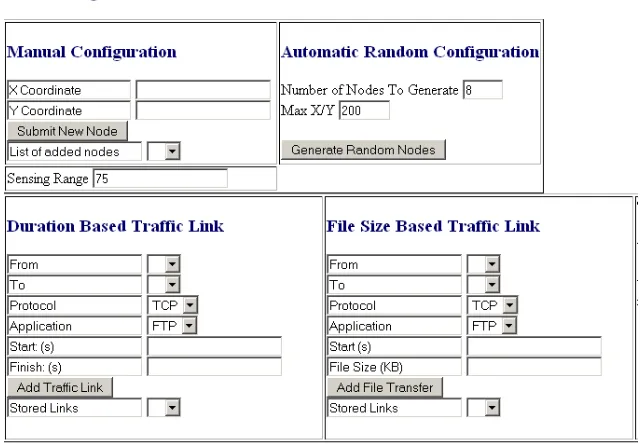
Figure 1: Screenshot of a section of the form based input for scenario description
Initial experiments with creating a wireless virtual laboratory involved the users describing a scenario
using a web form as shown in Figure 1. There are form elements for node positioning and traffic link
construction. When a user submits the form a URL describing the scenario is generated and submitted
to a Java Servlet. The system detailed in this dissertation translates the URL into an OTcl script [22],
which is then executed by ns-2. Once executed, the system translates the results into a format (XML)
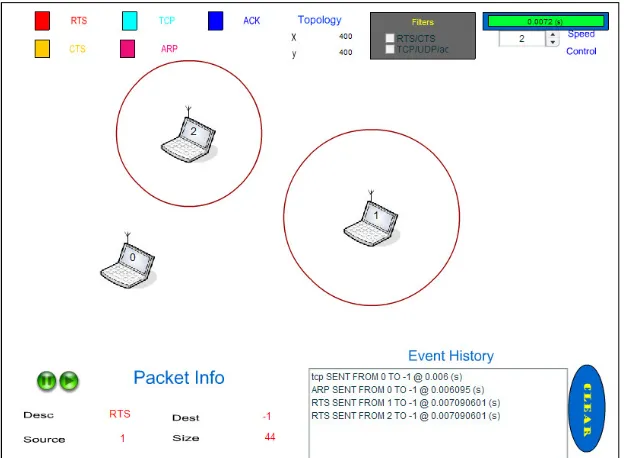
that can be read by a Flash binary (XML) and is then animated to the user. Figure 2 shows the
interface created for scenario playback with controls for time dilation, pausing, and a textual trace of
events in the network. The animation uses expanding concentric circles and colour codes to represent
different signal types and patterns. The duration that the ring remains at its maximum diameter is
5
Figure 2: Screenshot of the WiFiVL Flash binary animating two expanding RTS signals
Whilst some users provided high usability scores when using the web-form for inputting a scenario, for
others it was too abstract. A container, WiFiVL II, was designed allowing students to construct a
scenario using a point and click interface. The same container is used to view the results. WiFiVL II
was designed using a Rich Internet Application (RIA) framework (see section 4.8); an example
screenshot is shown in Figure 3. When the user constructs a scenario a URL is generated (in the same
way as in the previous version of WiFiVL) that is unique to that scenario. This URL is used to
interface with the same supporting system as WiFiVL I, allowing extensive code re-use. This means
that one can construct a scenario in WiFiVL I or WiFiVL II and review the results in either. This
flexible feature allows students to use identical laboratory worksheets then construct and review
scenarios in the version that is most suited to them. WiFiVL I and WiFiVL II received positive
feedback from undergraduate and postgraduate students in the School of Computer Science at the
6
Figure 3: Screenshot of a scenario constructor and animator for WiFiVL II
To research novel interfaces the realm of a Multi User Virtual Environment (MUVE) was explored.
The use of MUVEs in education, whilst expanding, is still limited. Educational use is often focused on
attempts to replicate conventional teaching methods such as lecturing to a class, providing a slide show
on a topic or holding a tutorial discussion (albeit round an interestingly drafted camp fire). The use of
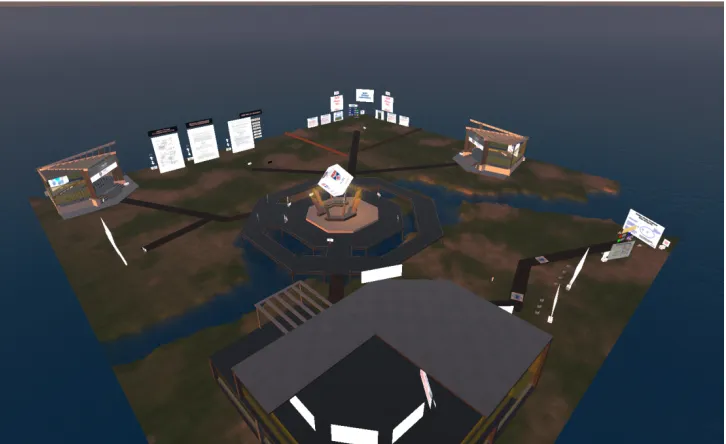
virtual worlds for education has been advanced through the development of WiFiVL. A version of the
WiFiVL was created in Second Life named WiFi Second Life (WiFiSL) and in Open Simulator named
[image:24.595.118.481.447.669.2]WiFi Open Simulator (WiFiOS). A screenshot of the island developed in Open Simulator is shown in
Figure 4.
Figure 4: Screenshot of the island developed in Open Simulator (WiFiOS)
An exact translation of WiFiVL I, e.g. a webpage from a browser into a virtual world where an avatar
7
WiFiSL enables students to place networking components from their inventory into the virtual world. Once placed in the virtual world, traffic links are constructed between them. When a user has finished
constructing traffic links the scenario is described using a URL. This URL is the same type of URL
used by both WiFiVL I and WiFiVL II. The results from the users’ scenario are displayed back to
them using the visual capabilities of the virtual world. An interesting feature of the WiFiSL that was
outside the reach of WiFiVL I and II is the use of collaboration. Students can collaboratively create
and review a scenario in a MUVE from a variety of perspectives.
1.4.1
System Structure
The system implemented for WiFiVL generates a URL schema which describes a scenario. An
[image:25.595.191.404.268.481.2]overview of the systems interactions are demonstrated in Figure 5.
Figure 5: UML sequence diagram of WiFiVL
Each input interface constructs a URL specifying a node location and any traffic links between the
nodes. The URL is translated by a Servlet that constructs a Java object which describes the scenario.
The Java OTcl Build API (jOBA) was developed for WiFiVL and enables a scenario to be converted
from a Java object instantiation into an OTcl script. An ns-2 daemon was developed to manage the
execution of the OTcl script in ns-2 and to return the results.
Once the results have been returned from the ns-2 daemon another component translates this into XML
which can be read by the Flash binary. There are alternative outputs which enable the results to be
streamed to a bandwidth limited environment such as Second Life. The system is discussed in detail in
8
1.5
Contribution of Dissertation
• This dissertation reports on the design, implementation and evaluation of a framework that supports exploratory learning for wireless networks. The framework provides realism,
collaboration and a space in which students can explore, hypothesise, experiment and evaluate
wireless protocols through scenario construction.
• A review of related work of virtual laboratories and network simulators that may support
exploratory learning has been carried out, summarised. A comparison is also provided.
• The key educational points of the IEEE 802.11 standard, such as those commonly addressed
in text books are identified. Their relevance is demonstrated within the WiFiVL framework.
• When a simulator is used it is often either too simplistic to be realistic or too realistic to be
useful. The WiFiVL framework strikes a balance between realism and complexity to provide
a usable, engaging and educational environment. This dissertation details an implementation
that enables ns-2 or future alternative network simulators to be used in a virtual world or in a
simple webpage without requiring detailed knowledge of specialised programming languages.
• The WiFiVL framework has been written and tested in Java with detailed documentation
provided. Supporting materials include a description of the technologies used to create,
maintain and test the WiFiVL. Extending from this framework are four comprehensive
applications: WiFiVL I, WiFiVL II, WiFi Second Life (WiFiSL) and WiFi Open Simulator
(WiFiOS). The source code that implements the architecture is structured,
component-oriented and designed for reusability.
• Students at various levels of University education have used and evaluated the software.
Formal evaluation techniques have been used such as interviews and questionnaires about
perceived educational value and usability. The resulting evaluations have been reviewed and
discussed. The use of these evaluation techniques has indicated that the development of the
WiFi Virtual Laboratory, from web forms to virtual worlds, has provided increased usability,
greater engagement and greater perceived educational value to students.
• The user evaluation of the virtual worlds showed a positive response and the publications
demonstrate an interest from the wider academic community.
1.6
Selected Publications
A WiFi Virtual Laboratory. Sturgeon T., Miller A., Allison C. In Proc.7th Annual Conference of the Higher Education Academy Subject Centre for Information and Computer Sciences, Dublin, pp 207-211, 2006.
Exploratory Learning for Computer Networking. Allison, C., Miller, A., Getchell, K., and
Sturgeon, T., in ICWL 2007, Lecture Notes in Computer Science, vol. 4823/2008, pp. 331-342, 2008.
9
Exploring 802.11: Real Learning in a Virtual World. Sturgeon T., Allison C., Miller A. In: Proc. 39th IEEE International Conference on Frontiers in Education, San Antonio, Texas, pp 907-912, 2009.
1.7
Dissertation Roadmap
Chapter 2 provides an overview of learning models including exploratory learning. Chapter 2 also
provides a review of learning taxonomies and their applicability to Computer Science. The use of
exploratory learning, its importance and how it relates to WiFiVL is provided in the summary.
A review of related work is provided in Chapter 3 along with terms of reference. The terms of
reference are used to categorise the various educational tools available. The first section in related
work focuses on educational tools, their usage, structure, similarities and differences relating to this
work. A taxonomy is provided for tools that are in use in the computer networking education domain.
Further sections explore other areas of study that have used exploratory learning tools. The related
work chapter also details educational projects that have made use of a Multi User Virtual Environment
(MUVE).
Chapter 4 contains a description of the technologies used to create the WiFiVL. Different types of
simulation techniques and implementations are discussed. A summary of the usability heuristics is
provided. These are referenced throughout this dissertation when discussing the design of the WiFiVL.
The implementation of WiFiVL utilised Servlet technology and a mixture of other programming
languages. The work detailed in this dissertation focused on an educational exposition of the IEEE
802.11 protocol and as such a clear description of the key features of the protocol is provided. Whilst
IEEE 802.11 is the focus in this instantiation of the framework, the system is designed in such a way
that other wireless protocols could be taught about and experimented with using this virtual laboratory
approach.
Chapter 5 provides details on the infrastructure created to support WiFiVL I. Details of the system
architecture and implementation are provided. An alternative user interface was created using a RIA
and its design is also detailed in this chapter. User evaluation techniques, results and analysis are
provided for both WiFiVL I and WiFiVL II.
Chapter 6 details the progression from 2-dimensional interfaces to 3-dimensional interfaces that make
use of virtual worlds. A range of educational scenarios provides information on the types of activities
that a virtual world can take advantage of. The architecture for enabling a virtual laboratory in-world is given through the decomposition of its components. Because of the novel interface a discussion is
provided on both visualisation considerations in 3-dimensions as well as user interface design for
scenario construction. Several evaluation sessions took place with a virtual laboratory in Second Life.
The results are discussed along with the suitability of Second Life. The instantiation of the WiFiVL in
Open Simulator (WiFiOS) is then evaluated using Computer Science undergraduate students at the
10
1.8
Summary
This chapter has highlighted the importance of learning about wireless networking. The limitations of
conventional teaching methods and materials have been listed, and the barriers to supporting an
exploratory approach have been identified. These barriers include the learning curve required to access
a modern network simulator, the disengaging use of textbooks and the difficulty in learning a
programming language to a high level of proficiency required for network programming. An
overview of the dissertation has been provided giving a description of the main work conducted during
the study period. The main work has involved the creation of a framework which supports exploratory
learning for wireless networks in several environments. Selected publications and a summary of
11
2 Approaches to Learning
2.1
Introduction
This chapter provides a review of some taxonomies and models that have been constructed to classify
and characterise the learning process. The classification of learning provides an approach to
structuring a course where the student is expected to attain a high level of proficiency. A taxonomy
can also be used to show a student’s achievement in the topic area and the path to the final goal. This
chapter includes the classification of learning that has been used across several domains of learning.
There are a range of models for how a student can achieve the learning goals outlined in a taxonomy.
Section 2.3.6 provides a formal definition for a variety of learning models. These models range from
didactic, where the learner is instructed by a teacher, to the situation where the learner acquires the
knowledge through guided or unguided exploration.
2.2
Learning Taxonomies
A taxonomy is an ordered classification system that provides a way of comparing different items and
ordering in a meaningful way. It provides a meta-description for “understanding about understanding”
[23]. An example of a successful taxonomy is the Linnaean Taxonomy [24] created in 1760; it has
undergone large changes but is still the predominant way of classifying living organisms in biology.
2.2.1
Bloom’s Taxonomy and Andersons Revisions
Learning taxonomies have been created to help define not only what the student should learn from an
exercise but also what cognitive level should be achieved. At the lower end, learners can be at a stage
where they can recite but not understand something. At the higher end the student can defend, expand
upon and apply the knowledge in novel situations. This is evident in Bloom’s taxonomy, which splits
learning into affective, cognitive and psychomotor domains [25].
• Affective – Emotional skills and growth, ability to empathise etc. (attitude). There are several
differing levels of achievement.
o Receiving – The student is willing to pay attention
o Responding – The student is stimulated by the material and provides reaction and
input on topics
o Valuing – The student attaches value to the topic of learning
o Organizing – The student can compose varied values and ideas, incorporating these
into their understanding and building upon what has been instructed and learnt
12
• Cognitive – This is the most widely used and quoted aspect of Bloom’s taxonomy and refers
to knowledge acquisition, comprehension and expansion to provide the learner with a full
understanding of the problem domain.
o Knowledge – The act of recall, the student has memorized by rote a particular piece
of information and is able to recall it when required. This is seen as the lowest step
in learning. However, Bloom’s taxonomy can be seen as ordered steps to learning
and as such each step is important.
o Comprehension – Demonstration of understanding the material. This is a clear step
up from the simpler recall level of knowledge. A requirement here is the ability to
show an understanding. Such activities would include paraphrasing and giving
examples.
o Application – The ability to bring to bear knowledge of previous domains and apply
it in a new situation. This step can involve the novel application of an understood
theorem in a different unanticipated domain.
o Analysis – The capacity to deconstruct the information and provide insight into the
principles underpinning the information. Analysis also involves recognising
relationships between information and the inference of related material or ideas.
o Synthesis – Development of wholly new ideas derived from the understanding of all
the previous levels. An example of synthesis is developing a new theorem, which
would require detailed understanding of the domain, other knowledge available and a
grasp of the underlying principles.
o Evaluation – The ability to provide a judgement on a set of information and be able
to defend and explain that judgement.
• Psychomotor – Bloom intended this domain to focus on the physical manipulation of objects
but did not complete the work. There are various proposed structures for this domain [26-27].
Below is an example structure by Dave [28].
o Imitation – Observation and repetition
o Manipulation – Certain autonomous actions
o Precision – Cultivation of previous stages and reduction of mistakes
o Articulation – Coordinating several actions
o Naturalisation – Fluid movements without error and which appear to flow naturally
13
Bloom describes learning using the above three domains and implies that the use of higher levels
requires the understanding and command of the lower levels. As such, it can be seen that Bloom’s
taxonomy can be used for structuring the design of a curriculum.
Critics of Blooms cognitive taxonomy view learning as not requiring a strict hierarchical format.
Anderson, a student of Bloom, proposed revisions where the lower levels of learning are retained but
the higher three (analysis, synthesis and evaluation) can be attained in no fixed order and as such are
parallel rather than hierarchical [29]. An additional revision to Bloom’s taxonomy is the reordering of
evaluation and synthesis and the use of verbs rather than nouns for each level. The revised taxonomy
proposed is summarised in Table 1.
Analyzing Evaluating Creating Applying
Understanding Remembering
Table 1: Revision to Bloom's taxonomy without a strict hierarchical format
Anderson viewed Bloom’s taxonomy as having a one-dimensional view of learning [29]. Anderson
proposes a two-dimensional view of learning with the first being the knowledge dimension, defined as
the type of material to be learned. The second dimension is the way in which that material is learned,
that is the revised list provided for cognitive learning (remembering, understanding etc.). The
knowledge dimensions introduced are [30]:
• Factual – Building blocks of learning, the basic elements of a domain of learning.
• Conceptual – Interrelationships of the building blocks.
• Procedural – How to do something, the techniques required in the given domain and the
appropriate application.
• Meta-Cognitive – Self-awareness of knowledge, e.g. the learner recognising their own strengths and weaknesses in a domain.
This is represented in Table 2 [30].
Knowledge
Dimension
Cognitive Process Dimension
Remember
Understand
Apply
Analyse
Evaluate
Create
Factual
List Summarise Classify Order Rank CombineConceptual
Describe Interpret Experiment Explain Assess PlanProcedural
Tabulate Predict Calculate Differentiate Conclude ComposeMeta-Cognitive
Appropriate Use
Execute Construct Achieve Action Actualise
14
An example of this revised taxonomy can be seen in the educational journal Theory into Practice [31].
In [32] an English and History course entitled “Western Culture” was revised and constructed using
Anderson’s revised version of Bloom’s taxonomy. The conclusions were that the use of the revised
Bloom’s taxonomy helped communication between differing fields. The use of Bloom’s revised
taxonomy also enabled a revised outlook for assignments and assessments, allowing students to
operate and display more complex levels of thinking.
2.2.2
SOLO
The Structure of the Observed Learning Outcome [23] (SOLO) taxonomy provides a set of categories
which analyses the student’s answers to the topic material rather than the material itself. The different
SOLO levels are:
• Pre-structural – Misunderstanding of the area; answer is unrelated to the area
• Uni-structural – Simple response showing superficial understanding of an area
• Multi-structural – Lacking consistency and an underlying understanding though provides a
selection of responses technically correct
• Relational – Understands the concepts involved and is capable of applying this knowledge in a
familiar setting
• Extended abstract – In-depth understanding of the area and is capable of applying this in unfamiliar and new settings
Knowledge and use of the SOLO taxonomy is expanding as more evaluation results are published
[33-35].
2.2.3
ACM ITiCSE Taxonomy
Computer Science has differing requirements from the arts community where critique may be valued
higher in certain areas, such as classical reading.
A working group at ITiCSE (Innovation and Technology in Computer Science Education) published a
paper on the weaknesses of the previously discussed taxonomies in this chapter and an approach to a
better design [33]. This working group focused on the construction of a learning taxonomy specifically
for Computer Science as it has some unique requirements. The working group highlights a common
problem where students can understand code but cannot write or debug a program. A proposed
revision of Bloom’s taxonomy was described to differentiate between reading and writing code giving
15 Create
Apply
None
[image:33.595.110.492.332.577.2]Remember Understand Analyse Evaluate
Table 3: A representation of the ACM ITiCSE working group for a revision of Bloom's taxonomy for Computer Science
The ideal for a student is to progress from the bottom left hand corner of “remembering and none” to
the “evaluate and create” top corner. As this is a 2-dimensional approach, it recognises that students
learn in different ways and as such there are different routes to the ideal of create and evaluate or
“Higher Application”. This approach satisfies a criticism of Bloom’s taxonomy that it is too rigid in its
hierarchical approach to learning.
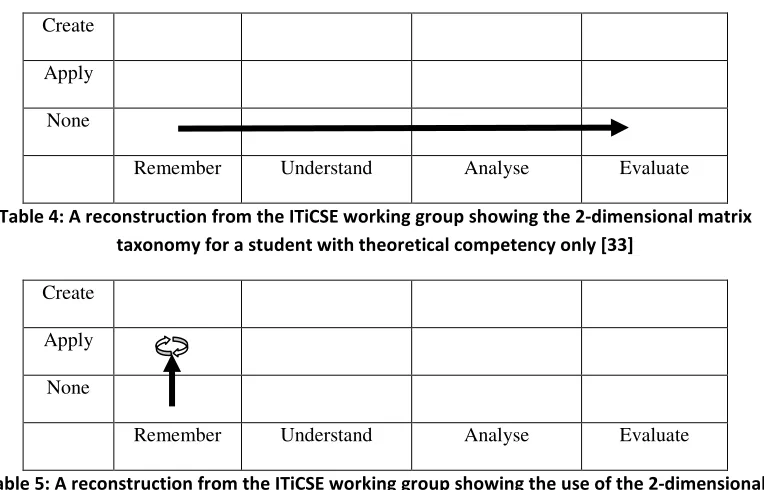
Table 4 and Table 5 are taken from [33] and show examples of the 2-dimensional matrix highlighting
various learning paths of students.
Create
Apply
None
Remember Understand Analyse Evaluate
Table 4: A reconstruction from the ITiCSE working group showing the 2-dimensional matrix taxonomy for a student with theoretical competency only [33]
Create
Apply
None
Remember Understand Analyse Evaluate
Table 5: A reconstruction from the ITiCSE working group showing the use of the 2-dimensional matrix displaying a student who is unable to progress past a trial and error approach [33]
2.3
Learning Models
2.3.1
Didactic Model
The didactic model of learning is a traditional one in which there is a teacher and a student. The
teacher has the expert knowledge and imparts this to the student. This model of learning is focused on
the lower levels of Bloom’s learning taxonomy which involves remembering, understanding and
16
2.3.2
Collaborative Model
The collaborative model of learning is when a group of learners combine their efforts and attention
with the aim of completing a common goal. There are many activities where collaborative learning can
be used, e.g. writing and programming. The wide variety of new communication methods available
online provide a tool for many geographically remote groups to collaborate in a common goal. A key
example of online collaboration is Wikipedia [34]. There have been 13 million articles written on
Wikipedia by using a simple web browser text editor and mark-up language by a group of volunteers.
The Wikimedia Foundation [35] has organised its contributors through self-policing to avoid
defacements and other attacks. These strategies construct an environment of group efforts but with
individual accountability. Other Web 2.0 tools such as blogs provide a central location for a writer to
publish work which can then be easily commented on by readers and syndicated.
Social bookmarking services Delicious [36] and Reddit [37] allow users to bookmark sites of interest
and provide tags that describe the information. Tags and site-friendships can be used to explore similar
areas of interest, providing a collaborative environment. Other prevalent tools available are the use of
joint whiteboards [38], instant messaging and video-conferencing [39-40].
A generic name for the use of online resources for collaboration is Computer-Supported Collaborative
Learning (CSCL). Communities can be established around such collaborative efforts and provide an
environment of achieving a common goal. The self-evaluation that each participant performs before
submitting their own work and when reviewing that of others facilitates the development of critical
thinking [41]. The use of the collaborative learning model reflects the constructivist approach
discussed later in this section.
There are many techniques using the collaborative model out with CSCL such as the Think-Pair-Share
approach [42]. A leader assigns a question to a group of learners, the learners divide into pairs and
reflect on the question and provide joint answers. Learners using this approach reported lower anxiety
when attempting to solve a task as they could discuss it with a peer privately first. Even through such a
simple example it is clear that there are many benefits to be had in reducing anxiety and enabling
critical collaborative thought.
2.3.3
Problem-based Learning
An example of problem-based learning is where a group of learners are given a task, and through
collaboration with and guidance from a helper, they arrive at a solution. There is a range of support
available to the helper and this may range from zero to full coaching. Some studies show that where
minimum guidance is provided the learning is ineffective and inefficient [43]. Initial guidance may be
high, then decrease as the students gather a more thorough understanding of the problem domain [44].
The cognitive load a learner encounters may interfere in the primary goal of learning during problem
solving [45]. The cognitive process of recognising the current state, the goal state, the steps to get there
17
may inhibit the development of expertise in the topic. However, problem solving has been shown to be
an effective means of learning but may require some modification.
2.3.4
Constructivist Model
The constructivist theory proposed by Piaget [46], Glasersfeld [47] and Kant [48] is one in which
students can gain knowledge through experience. This knowledge does not have to be gained through
the didactical process between learner and teacher commonly associated with education.
Constructivism is about how learning occurs and proposes active learning as an important and
over-looked approach.
In [49], studies are shown that children grasp substantial knowledge of their surrounding physical
world before it would be possible to learn such things from their social and cultural community.
Vygotsky gives an example of a child wanting to ride a horse but who is unable to do so. A child over
a certain age is capable of imagination and can use a stick to represent the horse, enabling the child to
ride the horse in their mind. Through play their imagination is realised and is how they understand the
world. Interestingly it may be said that “children’s play is imagination in action can be reversed: we
can say that imagination in adolescents and schoolchildren is play without action” [50].
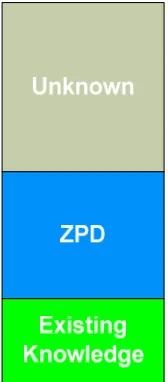
Vygotsky constructed the idea of the “Zone of Proximal Development” (ZPD). ZPD is defined as “the
distance between the actual development level as determined by independent problem solving and the
level of potential development as determined through problem solving under adult guidance or in
[image:35.595.256.340.436.627.2]collaboration with more capable peers” [50].
Figure 6: Representation of the Zone of Proximal Development
As more guidance is given by the teacher to the student the ZPD is able to expand and enable the
student to reach more of the unknown problem domain. Figure 6 shows that the student has an
18
section is beyond reach. With guidance and knowledge, expansion the whole ZPD section can become
existing knowledge and is subsequently understood by the student.
2.3.5
Constructionism Model
Constructionism is an extension of constructivism and theorises that effective learning happens through
the creation of tangible objects in the real world. In [51] Papert detailed research where children would
program in the Logo language and that the mathematical ideas were as natural as learning French.
Papert envisioned a revolution in the way that education was thought of and advocated the
advancement of micro computing as a catalyst enabling educational aspiration. A recent example of
enabling constructionism is the LEGO Mindstorms Robotics Invention System [52]. Students learn
through experiential learning and experimentation. This kit enables students to design, create and
attempt to solve various problems with bricks to make a tangible object in the world.
Constructionism and constructivism appear at first glance to be overlapping in their ideas. Both Papert
and Piaget are constructivists in their view that children build a model of the world through interactions
and that this is a logical and “right” view of the world. As children experiment with their interactions
with the world, knowledge is constructed and reconstructed. Both ideas are developmentalist in that
knowledge acquisition is incremental and both are interested in how and when a learner will modify
their view of the world and build a deeper understanding of it. It can be viewed that Piaget is more
focused on the construction of a stable internal view of the world while Papert concentrates on the
dynamics of change [53].
2.3.6
Exploratory Learning
This section explores the varying definitions and examples of exploratory learning in networking
education and its wider application. In [54] an experiment is constructed to define exploratory learning
and any benefits. Their initial definition of exploratory learning states that “Information is not given to learners in an expository way but an open learning environment is offered in which learners have to formulate themselves: principles, procedures, or higher order skills. By means of inquiry, scientific discovery, problem solving, inductive reasoning and so forth, learners have to acquire their knowledge in an active, constructive way.”
The test subjects were students in mechanical engineering and control theory at the Eindhoven
University of Technology. The subjects were put in groups of two, with half of the subjects receiving
the original guided assignment and the other half receiving a modified, unguided assignment. Data was
collected using thinking aloud1 protocols, notes made by the tutor, system log analysis of program
input and output. These experiments guided Njoo & Jong to defining the exploratory learning process
as consisting of four main categories: transformative, regulative, operative and general. The
1

![Figure 7: Screenshot of JASPER animating a protocol [61]](https://thumb-us.123doks.com/thumbv2/123dok_us/8696888.380835/43.595.214.383.229.426/figure-screenshot-jasper-animating-protocol.webp)
![Figure 9: Screenshot of the WebLan Designer [65]](https://thumb-us.123doks.com/thumbv2/123dok_us/8696888.380835/46.595.178.418.70.330/figure-screenshot-weblan-designer.webp)
![Figure 10: Architecture of IREEL [88]](https://thumb-us.123doks.com/thumbv2/123dok_us/8696888.380835/48.595.126.462.79.299/figure-architecture-of-ireel.webp)

