Complex Systems Informatics and Modeling Quarterly (CSIMQ) eISSN: 2255-9922
Published online by RTU Press, https://csimq-journals.rtu.lv Article 94, Issue 16, September/October 2018, Pages 36–60 https://doi.org/10.7250/csimq.2018-16.03
Structured Shared Spaces as a Basis for Building Business Process
Support Systems: A Generic Model and Analysis of Examples
Ilia Bider*, Paul Johannesson, and Erik Perjons
Departmentof Computer and System Sciences of Stockholm University, Stockholm, Sweden
[email protected], [email protected], [email protected]
Abstract. Though the concept of shared spaces had been known in Groupware and Computer Supported Cooperative Work (CSCW) for quite a while, it did not become popular until the arrival of the Internet and social software. Implicitly, the concept of shared spaces has penetrated many IT-areas, including the area of Business Process Management. Though shared spaces are used in many systems and tools, like Google Drive and Projectplace, there is a lack of research investigating this usage in a generic way. The article aims to fill this gap by introducing a generic model of a Business Process Support (BPS) system based on shared space that supports the comparison, analysis and design of BPS systems. In addition, the article goes in more details on one design issue – the structuring of shared spaces. This is done by analyzing and comparing two different BPS systems that exploit the concept of shared spaces, though implicitly. These systems use different approaches to shared space structuring. The first one organizes the information by grouping similar types of items without regard to the flow of activities in a business process, while the other organizes the information around groups of activities that are usually completed as a block. Which model to choose in a particular situation depends on the characteristics of the business process and its participants. In order to facilitate this choice, the article offers a number of guidelines derived from the experience of using the two BPS systems in practice. The article also discusses in what circumstances BPS systems with shared spaces are preferable to traditional workflow BPS systems.
Keywords: Business process management, BPM, Business process support, Shared space.
1
Introduction
The concept of shared spaces has been developed in the area of Groupware and Computer Supported Cooperative Work (CSCW) quite a long time ago, see for instance [1]. However, this
*
Corresponding author
© 2018 Ilia Bider et al. This is an open access article licensed under the Creative Commons Attribution License (http://creativecommons.org/licenses/by/4.0).
Reference: I. Bider, P. Johannesson, and E. Perjons, “Structured Shared Spaces as a Basis for Building Business Process Support Systems: A Generic Model and Analysis of Examples,” Complex Systems Informatics and Modeling Quarterly, CSIMQ, no. 16, pp. 36–60, 2018. Available: https://doi.org/10.7250/csimq.2018-16.03
37 concept remained mostly unknown outside the research in Groupware and CSCW until the coming of the Internet era when shared spaces became widely used in both business and private life. In business, it was the concept of cooperative editing that became widespread due to support provided by platforms like Google Docs and later Google Drive. In private life, shared spaces are an intrinsic part of social software. A blog, personal journal, and even a photo album are all examples of shared spaces, as all these things are aimed to be shared with others and be commented by them.
Cooperative editing and social software are examples of systems that support relatively unstructured processes. Besides this usage, shared spaces are also used in practice for supporting more structured business processes. A typical example of such systems is support for conducting projects, like Projectplace [2]. Another example of using shared spaces for supporting structured processes is combining shared spaces with a workflow engine, as it is done in Microsoft SharePoint. Such a combination, for instance, can be used for routing a document through the whole organization. Though shared spaces are implicitly used in Business Process Support (BPS) systems, there are few studies that deal with the topic of using shared spaces in BPS systems. Searching Google Scholar on "business process" + "shared space" or "workflow" + "shared space" does not produce any papers that consider using shared spaces in BPS in a generic way*. This article is aimed at bridging this gap by providing a generic view on BPS systems based on shared spaces and analyzing some examples of such systems.
The article has three goals, one primary and two secondary ones that are related to the primary goal. The first and primary goal of the article is to introduce a generic model of a Business Process Support (BPS) system based on shared spaces that can be used for the comparison, analysis and design of BPS systems. This is done by defining a number of concepts (in the form of a conceptual model) and a generic algorithm of BPS system functioning. The main idea here is that a BPS system based on shared spaces creates a shared space for each new instance of a business process and manages invitations to process participants to (virtually) come to the shared space to check its state, and, possibly, introduce changes. Besides giving a general view on a BPS system based on shared spaces, the article introduces a list of so-called design choices, i.e. issues that should be resolved when implementing a particular BPS system. To these issues belong, for instance, structuring shared spaces and invitation management.
The second goal of the article is to consider one of the design issues in more details. More exactly, it considers the issue of structuring shared spaces. For this end, we analyze two examples of BPS systems based on shared spaces with completely different ways of structuring shared spaces. The first system uses so-called topic-based structuring, the other one – so-called
situational structuring. Both examples were taken from our own practice. It gave us access to information related to all aspects of system design and organizational implementation. In particular, we had access to system logs, opinion of the end-users, developers and other stakeholders. Both systems were in operation for a number of years (one of them is still in operation) and they were used by people having different roles in the organization, which offered us a possibility to study the appropriateness of particular solutions for specific kinds of business activities. Based on the available information on the actual usage of both systems, we identified areas of suitability for these two ways of structuring shared spaces and suggested guidelines for choosing between them.
The third goal of the article is to analyze in which situations BPS systems based on shared spaces are preferable to traditional workflow BPS systems. This is done in respect to the enterprise world (for-profit organizations) based on the framework suggested in [3]. According to this analysis, BPS systems based on shared spaces are suitable for the growth phase of a company, or its particular products or services. Besides that, this kind of BPS can be used in knowledge intensive and decision-making processes that are not dependent on the phases of a company or in product/service development.
38 The rest of the article is structured as follows. Section 2 introduces the fundamentals of business processes and BPS systems to the reader not familiar with this domain. Section 3 presents an overview of the literature devoted to the related topics. Section 4 presents the general model of a BPS system derived from specific systems by abstracting from their details. Section 4 gives an overview of the cases studied in the article. It includes some information on the system vendor, scientific principles used when building the systems and business environments for which the systems have been developed. Sections 6 and 7 analyze the structure of shared spaces used in each system under study and present details on organizational implementation of the systems including user feedback on system performance. Section 8 presents guidelines on the areas of applicability of each of the identified ways of structuring, which have been created based on the information on their usage. Section 9 discusses the areas of applicability for BPS systems with shared spaces. Section 10 contains concluding remarks and plans for future work.
The ideas developed in this article originated from an earlier workshop paper presented at BPMDS 2010 [4], which been written from another point of view and lacks many details included in the current article. For instance, Sections 2, 3, 4, 5, 8, and 9 are essentially new, and Sections 6, 7 are substantially extended with details about the usage of the systems in practice.
2
Introduction to Business Processes and Support Systems
2.1 Basic Notions
There are many definitions of the notion of business process, each of them highlighting different aspects of collaborative work [5]. The most common view on business processes is the workflow view, where a process is considered as a partially ordered sequence of operations/activities aimed at reaching some goal. This view serves as a basis for workflow-based BPS systems [6]. However, the workflow view cannot offer a proper basis for other types of BPS systems, for instance, case-handling systems [7], and especially those belonging to the new paradigm of Adaptive Case Management [8].
In this section, basic concepts of business processes and BPS systems used in the rest of the article are introduced. These concepts are generic, meaning that they are compatible with different types of BPS systems.
The term business process encompasses two distinct concepts, business process instance
(sometimes referred to as a case or run) and business process type:
A business process instance (BPI)is a business situation handled according to some common template or procedure associated with the given type of business situations.
A business process type (BPT) denotes the set of BPIs (in the past, present and future) aimed at dealing with a given type of business situations.
For instance, regarding the sales process, BPT means the sales process in general, while BPI means dealing with a specific customer while trying to strike a deal regarding a specific product/services (or a set of a products/services). Note that in the literature, the qualifiers type
and instance are often omitted when referring to a business process, as the meaning of the term “business process” can be understood from the context. In this article, the term “business process” without a qualifier refers to BPT, while a reference to a business process instance always includes the qualifier “instance” or “case” (unless abbreviation BPI is used).
39 A situation that warrants application of the template, i.e. a situation that triggers the creation
of a new instance,
A goal to reach,
Sub-goals and an order in which they could or should be achieved (goal decomposition),
Operations/actions/activities that should be completed for achieving goals/sub-goals and the order in which they should be completed (operation decomposition),
Rules of responsibility and participation (both for sub-goals and operations),
Rules of collaboration and communication between participants pursuing common goals.
As an illustration of the above concepts, consider a situation of developing a customized software system for a particular customer. A general plan for handling this situation can be presented as a simplified flowchart in Figure 1*. To this flowchart, any number of details can be added, e.g., the first step in Figure 1 should be carried out by requirements engineers, the second step should produce a class diagram of the major information elements, or the third step should use Java as a programming language. The more details are added, the more rigid the process will be. For instance, setting the requirement that all programming should be done in Java will force the developers to use this language even in cases where it is suboptimal, e.g. for the development of operating systems.
Figure 1. A plan/template for handling a situation when there is a need to develop a customized software system
Information/knowledge associated with EXT related to a given process type can reside in any combination of the following†:
In the heads of staff members who participate in the instances of the business process type (tacit knowledge). This knowledge informs the process participants about what actions are permitted, obliged, and/or prohibited, without them reflecting on it.
In written documents, including process maps and other kinds of process descriptions (explicit knowledge) stored on paper or electronically, e.g. in the form of web-based hypertext. These documents contain explicit instructions of what is permitted, obliged, and/or prohibited.
In software systems used to support running process instances (embedded or built-in knowledge). The usage of such systems forces process participants to carry out some actions in a certain way and/or in a certain order.
2.2 Business Process Support Systems
A Business Process Support (BPS) system is defined as a software system that facilitates the participants of business process instances following the EXT defined for the given business process type. This can be done by imposing compliance to the rules included in EXT (e.g. reject any code not written in Java) and/or helping to execute some activities. It can, for instance, automate certain operations or support coordination and collaboration between workers who participate in one process instance‡.
*
This plan follows the so-called "waterfall" software development. The model is highly criticized, which is not essential for this paper as we used it only as an illustrative example.
† See also a similar discussion around work systems in [10] and knowledge retention in [11].
‡ Note that using a BPS system for supporting a process does not imply that the whole process definition needs to be built-in into
40 To comply with its role, a BPS system needs to incorporate, at least part of, the corresponding EXT inside its code or internal structure, which corresponds to the known theorem of Contant and Ashby that any regulator should be a model of a system its regulates [12]. The most popular way of incorporating EXT in a BPS system is by viewing an EXT as a set of activities to be executed in a certain order by people assuming certain roles, which constitutes a workflow view on business process. In addition to the list and the order of activities, the structure of information objects passing through the activities is defined. This view can be formalized as a workflow diagram using, for instance, BPMN. Such a diagram then can be interpreted in runtime by a BPM suite, such as Appian, iBPMS, and Oracle BPM Suite.
Note that a system built based on the workflow view realizes a kind of a conveyor belt for a process instance. It identifies the next activity(s) to be carried out and assigns a person (with a suitable role) to carry it (or them) out. This can be done automatically according to some algorithm or with the help of a person responsible for this process instance. The person who gets the assignment sees, on his/her screen, the activity and all information he/she needs to carry the activity out, completes it, and awaits another assignment.
The conveyor belt BPS systems have become widely accepted as part of the concept of Business Process Management Systems (BPMS) – a management technology that is able to support a broad range of management tasks in organizations [13]. BPMS technology has attracted much attention in industry as well as academia due to its claim to integrate support of resource allocation, information distribution, planning, authorization, accountability allocation, monitoring, controlling, and evaluation [14]*. While conveyor belt BPS systems are thus widely accepted, they have a number of shortcomings, especially when applied to knowledge intensive and semi-structured work tasks [15]. Such shortcomings include a lack of flexibility, difficulties to include all relevant stakeholders, and heavyweight installations.
Summarizing the discussion above, we can conclude that though the conveyer belt BPS systems are useful for some tasks, e.g. process optimization, they could be counterproductive for others, e.g. helping in processes relying on adaptation to the changing environment. This article is exclusively devoted to investigating BPS systems that do not follow the conveyor belt metaphor.
3
Shared Spaces in Computer Systems – History and State of the Art
Computer Supported Cooperative Work (CSCW) is a field of study that addresses how collaborative and cooperative activities can be coordinated and supported by means of ICT [16], [17], [18]. Within the CSCW field, it has been studied how ICT systems and solutions, often called groupware, can be used to support awareness, articulation, appropriation, sharing and other features needed for effective collaboration. One solution for achieving these features is the shared space, which is an information space that can be accessed by multiple users, discussed in [1]. An early attempt to investigate the concept of shared space in depth can be found in [17] where a shared space is seen as an alternative to workflow-type solutions for cooperative work. The authors’ focus, though, is on constructing a common meaning of the information added in the shared space in order to support the users’ interpretations. According to [17], it is difficult to construct a common meaning in shared spaces, since added information items can have different origins and context, and these are not always explicitly stated. Moreover, [19] show that different work settings influence the design of shared spaces. That is, shared spaces, termed common information spaces in the paper, are constituted differently in different work settings. To better understand how different work settings require different ways of structuring the shared information space is a major focus in our article as well, although in our case the shared space is part of a BPS system.
*
41 From the late 1990s, shared spaces have become ubiquitous in social media sites, including blogs and wikis, as well as Facebook, Twitter, and Google+. Social media support individuals and communities to create, share, and modify user-generated content, including text, pictures and videos. In order to build social media sites, there is a need for social software that enables people to design and implement blogs, wikis, messaging and chat forums, systems for collaborative writing, etc. Thus, social software, though built on the same technology as groupware, target broad and open audiences, while groupware typically focuses on dedicated groups of people, such as work teams in a company. As a consequence, social software has reached huge audiences and is now used by almost everyone, in private as well as in work life. This means that many people now are familiar with the use of social software technologies.
A key design principle of several social software tools is the shared information space. In addition to providing a common area for joint activities, the shared information space can also offer activity streams, i.e. recordings and notifications when content has been created or modified.
In order to address the issues with conveyor belt BPS systems discussed in Section 4.2, social software has been proposed as a complementary technology, [20]. The solutions developed under this direction, referred to as social BPM, offer a set of functionalities that can improve collaboration, inclusion and flexibility, including self-identification, transparency, signing, open modification, logging, discussion, and banning. As argued in [21], these mechanisms are well suited for addressing most management tasks with the exception of controlling. A key issue in the use of social software for BPM is the embedding of business processes into a social context to overcome the drawback usual for many BPS systems, where users have a very limited view of the processes in which they participate (often only seeing an in-tray as the interface). Social BPM aims to provide the users access to a wider context of the processes including information about other people that may contribute to the processes as well as histories of previous process executions. The two systems analyzed in this article follow this trend.
4
A Generic Model of a BPS System with Shared Spaces
In this section, we present a generic model of a BPS system based on shared spaces as a means for collaboration and communication, ensuring information supply for all actions completed by participants engaged in the same process instance/case. The model was built based on the analysis of the systems that use shared spaces, such as Projectplace [2], including the ones that are discussed in Sections 6 and 7*. Analysis was aimed at finding commonalities in these systems, making it possible to present them in a unified way on a higher level of abstraction. Section 6 and 7 give an example of how this abstract level can be implemented in specific BPS systems.
The generic model consists of a list of interrelated concepts to be implemented in a specific system, (see Section 4.1), and a generic algorithm for running process cases in a BPS system with shared spaces (see Section 4.2). In addition, Section 4.3 discusses design choices to be made by the system designer to realize a BPS system with shared spaces.
4.1 Conceptual Model
Below we give working definitions for a number of abstract concepts to be realized in a BPS system with shared spaces†:
* Note that the system analyzed, including the ones from Sections 6 and 7, often do not use the concept of shared spaces
explicitly in their documentation.
† Under conceptual model, we understand an interrelated set of concepts to be implemented in a system of a certain kind. The set
42 Process instance shared space, or shared space for short, is a structured information storage accessible for all participants of a given process instance/case. The shared space is used for storing all information related to the process instance. This includes information on the instance’s goals and subgoals, events, plans for the next actions, list of participants involved, assessment of the current state, reports on the events in the frame of the process instance, etc.
Shared space visualization is a way a shared space is presented to its end-users, i.e. process participants. It can be a two-dimensional set of folders to keep all information in the form or documents, or a 3-dimensional virtual space, presenting the shared space as a blackboard [22], or as a room. The user has no direct access to the physical storage of the shared space, but can manipulate it through the visualization.
Intra-space navigation is a mechanism for a user to navigate through a particular shared space finding the information needed, or a place where to put new information, or change the existing one. This can include navigating through a hierarchy of folders, or walking through a three-dimensional space that consists of a number of rooms.
Inter-space navigation is a mechanism through which the user can find a shared space related to a particular process instance. One way to identify a needed shared space could be via information about actors involved in a process, time of creation or modification, events completed, etc. Some shared spaces could also be interconnected by using links or pointers.
Access control is a system of rules that determines which user can access which shared space. This can also include what parts of the given shared space are visible to a particular user and what actions he/she is allowed to perform, e.g. read information, add new information, or modify existing information. For instance, a shared space can be defined as public, private or restricted. If public, any user can visit the space to see what is going on and leave some traces of his/her visit, e.g. personal comments. If private, only the owner and members of the process instance team have access to the space. If restricted, the access is controlled by rules specifying who can enter and who can read, create and modify information in the shared space. The rules are based on the position a person holds inside the organization, and/or the role he/she plays in a particular process instance.
Invitation is a message or signal received by a user asking him to visit a particular shared space. Such a message can be very simple – just visit a space, or it may include details on when it should be done, what part of the space is of particular interest, whether the visit is mandatory or voluntary, and what the user is expected to do during the visit. The way an invitation is expressed can differ from system to system, for instance, it can be presented as an activity planned by a manager or a colleague, or a message stating that the shared space of the process instance in which the user is engaged has been changed in a particular way. An invitation can be issued manually by a process instance participant who considers that somebody else’s engagement in the process instance is required, or automatically based on changes occurring in the shared space. The way of forwarding the invitation to the user can vary, e.g. pop-up message, SMS, e-mail, etc.
4.2 Functioning of a BPS System with Shared Spaces
Suppose all concepts identified in the previous section have been implemented in a BPS system. Then, running a process instance from the beginning to the end, while utilizing support from such a system, can be described in the following manner:
When a new process instance starts, a new shared space is created and filled with information available at the start of the instance; e.g. it can receive a unique name, an owner responsible for the instance, possibly, a team to work on this instance, and some tasks to be completed in the frame of this instance.
43
organizational learning, and for providing information for new instances related to the closed ones, e.g. those that concern the same customer. These are made accessible through the inter-space navigation mechanism.
Any update of a shared space, be it creation of a new space or adding information to an existing space, can result in issuing an invitation to some people to visit the shared space and do some work there. This invitation can be done explicitly by the person who makes changes in the shared space, or automatically by means of triggering rules. The invitation could be sent to the visitor him-/herself, e.g. when he/she needs to do some more work in the frame of the process instance at a later time.
There are several scenarios when a user can go to a particular shared space to make some changes:
The user receives an invitation to visit the shared space. It can be an invitation sent through the system, or forwarded by another means, facto-face, phone conversation, e-mail, etc.
An external event happens, e.g. e-mail is received, that needs to be answered. The user who observes the event (e.g. discovers a new mail in his e-mail box) finds the right shared space via the inter-space navigation mechanism.
A user browses through the shared spaces via the inter-space navigation mechanism in some systematic or ad-hoc manner, and finds a shared space of a process instance to which he/she can contribute.
Independently of the reason to visit the space, a user may make changes to the shared space, decide to close it, or issue new invitations for others or him/herself to visit/revisit this space.
The functioning of a BPS system with shared spaces as above can be summarized in the flowchart presented in Figure 2.
Figure 2. Simplified flowchart that explains functioning of a BPS with shared spaces
Create a new shared space External event
Find an existing relevant shared
space
Invitation received
Go to the shared space to which
invited
Browsing through to see where help
might be needed
Identify the space to work on
Introduce changes in the space if needed
Does the instance reached its
goal Yes
Issue invitations to others or to him-/herself if
needed No
End the current interaction cycle Close the shared
44 4.3 Design Choices to be Made
Design choices that needs to be done when building a BPS system with shared spaces are related to the implementation of the concepts listed in Section 5.1. More exactly, design choices on the following issues should be made:
1.Internal structure of shared spaces storage to hold information relevant to process instances. This should ensure effectiveness of the intra- and interspace navigation so that the user can quickly move to the relevant shared space and the part of it that is of interest. It should also ensure that information needed for completing activities can be found and presented in a proper way.
2.External shared space structuring*– a way of visualizing shared spaces for the user and user navigation inside them. In a BPS system based on the shared spaces architecture as described in Section 4.1 and 4.2, there is no information flow. A person is invited to visit a shared space and complete a task in it with the assumption that all information he/she needs is already there. In a normal business environment, a worker participates in many process instances and often in parallel. For the above scheme to work efficiently, he/she needs to understand the situation at a glance in the shared space she is visiting. This leads us to the requirement that each shared space should be highly structured, as nobody can work efficiently in unstructured shared spaces. More important, shared spaces that belong to the same process type should be structured in the same way. The structure should make it easy to identify the state of a process instance and allow a person to quickly find (navigate to) all information related to the task at hand.
3.Inter-step navigation – a way for a user to quickly find a relevant shared space based on known parameters, such as time, process type, state of the instance open/closed, participants, etc., or through direct links established between the shared spaces.
4.Invitation technique. Invitations should offer process participants clear reasons why they have been invited and what they are expected to do in each shared space. Note that invitations to visit shared spaces in BPS systems have a different meaning from that of social software in private life. In the latter, invitations are not binding; a person invited may not visit the shared space at all. In a BPS system, however, an invitation needs to be followed, if it is defined as mandatory; otherwise the whole communication/collaboration scheme may break down†.
To make a BPS system with shared spaces work, appropriate design choices need to be made for all the issues listed above; otherwise it would be difficult to introduce such a BPS in practice. In this article, however, we mainly address the second issue – external shared space structuring. More exactly, in Sections 6 and 7, we analyze two BPS systems, paying most attention to the shared space structuring, though touching other issues on the list above where appropriate. For each system, we first present its technical and architectural solution and then experiences of its usage in practice. The two systems under study use two rather different approaches to shared space structuring. We refer to the first one as topic-based structuring, and to the second one as situational structuring. In Section 8, we analyze the practical experience of using these two types of structuring shared spaces and suggest preliminary guidelines on the areas of applicability for each type of the structuring.
*
Shared space structuring concerns both shared space visualization and intra-space navigation introduced in Section 4.1.
45
5
Overview of Examples Analyzed
5.1 Short Description of the Systems Vendor
The vendor of the two BPS systems studied in the two cases presented in this article is a small Swedish software consulting company, called IbisSoft [24], for which one of the authors was a co-founder. The company has been in operation since 1989 and has development of customized software systems for its customers as its primary business. Normally, relations with a customer continue for many years after building a system. The company does not only develop software, but also maintains and further develops it, as well as provides technical, and, if needed, end-user support, and training.
These long-term relations with the customers give a possibility to follow up each developed system through its entire life-cycle. The company receives constant feedback from its customers (especially when something does not work), and has a possibility to observe how they use the system. Usually, the customers give their consent for the developer to log into the system and browse its content, at least when it is not confidential.
As a rule, a system developed by IbisSoft is unique for a specific customer. Some attempts to resell the system to another customer are sometimes made, but they are rarely successful, as each system is adjusted to the needs of a particular customer, and might not be adequate for others. This offers limited possibilities to compare the usage of the same system in different places.
Some of the systems are tested and used in the organizational practice of IbisSoft itself. This provides a possibility to compare how the system is used by two entirely different groups of users: one that knows the system principles well and another that needs to learn them.
5.2 Theoretical Background – State-Oriented View on Business Processes
IbisSoft used a so-called state-oriented view on business processes when developing the systems under study. As this is not a standard view, we here give a brief overview of its underlying concepts and principles as suggested in [25].
The origin of the state-oriented view on business processes lies outside the business process domain. It is based on Mathematical System Theory [26] and especially the theory of hybrid dynamical systems [27]. In essence, the state-oriented view on business processes is an application of the theories and mechanisms worked out for modeling and controlling physical processes to the domain of business processes.
The main concept of the state-oriented view is a state of the process instance that is defined as a position in some state space. A state space is considered multidimensional, where each dimension represents some key parameter (and its possible values) of the business process. Each point in the state space represents a possible result of the execution of a process instance. If a time axis is added to the state space, then a trajectory (curve) in the space-time will represent a possible execution of a process instance in time. A process type is defined as a subset of allowed trajectories in space-time.
As an example, consider an order process from Figure 3. Its state space can be presented as a set of numeric dimensions from Figure 4 defined in the following way:
First, there are a number of pairs of product-related dimensions <ordered, delivered>, one pair for each product being sold. The first dimension represents the number of ordered items of a particular product. The second one represents the number of already delivered items of this product. The number of such pairs of dimensions is not fixed but is less than or equal to the size of the company’s product assortment.
In addition, there is a pair of numeric dimensions concerning payment: invoiced (the amount of money invoiced) and paid (the amount of money already received from the customer).
46
the process instance trajectory in the space state). A state that satisfies these conditions is called a final state of the process. The set of final states for the process in Figure 4 can be defined as follows: (a) for each ordered item Ordered = Delivered; (b) To pay = Total + Freight + Tax; (c) Invoiced = To pay; (d) Paid = Invoiced. These conditions define a surface in the state space of this process type.
Figure 3. Example of a process state as a mockup screen
The process instance is driven forward through activities executed either automatically or with human assistance. Activities can be planned first and executed later. A planned activity records such information as type of action (e.g. goods shipment, compiling a program, sending a letter), planned date and time, deadline, name of a person responsible for an action, etc.
Figure 4. State space dimensions as axes
All activities planned and executed in the frame of the process should be aimed at diminishing the distance between the current position in the state space and the nearest final state. The meaning of the term ‘distance’ depends on the business process in question. Here, the term is used informally. For instance, activities to plan for the process in Figure 3 can be defined in the following manner:
If for some item Ordered >Delivered, shipment should be performed, or
If To pay >Invoiced, an invoice should be sent, etc.
47 process, the plan being an “active” part of it. The plan plays the same role as the derivatives in the formalisms used for modeling and controlling physical processes in Mathematical systems theory. The plan shows the direction (type of action) and speed of movement (deadlines), just as first derivatives do in a continuous state space.
Using the concept of process plan, the control over a process instance can be defined in the following manner. First, an activity from the plan is executed and the position of the process instance in the state space is changed. Then, depending on the new position, the plan is corrected, i.e. new actions are added to the plan and some existing ones are modified or removed from it. Correction of the plan can be done manually by the process participants, automatically by a system that supports the process, or in a mixed fashion (more details on this topic see in [28]). The iterations continue until the instance reaches its goal.
5.3 Example 1 – ProBis a BPS System for a Non-Profit Organization
ProBis [29] was developed for a regional office of a non-profit interest organization, called the Association of Tenants, Region West Sweden (in Swedish: Hyresgästföreningen, Region Västra Sverige), abbreviated to HGF. HGF organizes more than 60 000 tenants and the purpose of the regional office, which has about 60 employees, is to guard the interests of its members. This is done in a number of areas, such as offering legal and practical advice to its members, conducting rent negotiation on behalf of its members, and lobbying. The ProBis project was initiated in 2002, after a successful implementation into HGF's organizational practice of a system called
ReKo [30] to support recruiting activities in the organization. ProBis was developed to extend
ReKo in providing support for several other HGF processes, such as processing feedback from their local offices, support for these offices, and lobbying (influencing the decisions of others).
The ProBis architecture, which is described in more details in Section 6, tightly followed the ideas of the state-oriented view on business processes (see Section 5.2) and realized the idea of dynamic collaborative planning. Dynamic planning means planning only several steps ahead instead of devising a full plan from the beginning; and collaborative planning means planning for each other.
5.4 Example 2 – BBiC a BPS System for a Municipality
BBiC is a system developed to support a process in the social office of the municipality of Jönköping (Sweden). BBiC stands for Child Needs in Center (“Barnens Behov i Centrum” in Swedish) and deals with investigation, decision making, and following up decisions in cases of suspected child abuse, or families that cannot take care of their children. The guidelines for this process were drawn by the National Board of Health and Welfare, and they were strongly recommended for Swedish municipalities to follow. The guidelines for the BBiC process were not presented as workflow diagram of the process, but as a package of forms (i.e. templates) mandatory to be used in the handling of cases. Each municipality that licensed the process was free to choose their own way of implementing the forms. They could use the forms as RTF or Word templates, or incorporate them in their case-handling or business process support systems, with or without the help of their ordinary system vendors or integrators.
state-48 oriented view has still been used as a theoretic basis, the system on the surface looks completely different from ProBis described in the previous section. To conduct a comparative analysis of
ProBis and BBiC, an abstract model is needed that can describe the behavior of both systems in general. The level of abstraction should be sufficiently high for identifying the common core, but also detailed enough for recognizing the differences. We will be using the model presented in Section 4 for this end.
6
ProBis – Topic-Based Structuring of Shared Spaces
In this section we provide details on the BPS system ProBis developed for Association of Tenants, Region West Sweden, which has already been introduced in Section 5.1. Section 6.1 gives an overview of the architecture of the system, paying special attention on structuring the shared spaces. Section 6.2 reports on the experience of introducing this system in HGF and experiences of its usage in this organization. Section 6.3 reports on the experience of the usage of ProBis internally at IbisSoft.
6.1 System Architecture
In ProBis, a shared space is structured according to a principle that we call topic-based structuring. The shared space is presented to the end-user as a form or window separated in several areas by using the tab dialogues technique, see Figure 5. As a minimum, there are two different tabs, where one reflects the structure of the underlying state space, and another the process plan and history, see the Tasks tab in Figure 5. If the state space is complex, several tabs are used to represent it. The principle of division in a topic-based structuring is as follows. On the same tab, similar (and sometimes related) attributes and links are gathered, for instance, all documents on one tab, all participants attached to the process on another tab, etc. (see Figure 5). Such an organization makes it possible to introduce standard tabs, i.e. tabs that are independent of the business process type. This makes it easier for a person who participates in different process types to navigate the system. The Tasks tab contains two lists (see Figure 5, in which the Tasks tab is selected and, thereby, visualized): A to-do list that includes tasks planned for a given process instance, and a Done list that includes tasks completed in the frame of it. In ProBis, the planned task serves as a mechanism for issuing invitations to attend a particular shared space. If a user wants to invite his/her colleague to a given process instance, she needs to plan a task and assign it to this colleague. ProBis includes a configurable list of tasks for planning from which a user picks the one that suits his/her needs. This list also contains special pseudo-tasks for pure communication purposes, e.g., Help, Attention, Question, etc.
All “invitations” (i.e. activities planned for a particular user) from all process instances for a user are shown in the user’s personal calendar, see Figure 6. From the calendar, the user can visit any shared space to which he/she was invited in order to inspect, change, or execute a task planned for him/her. In case of a change in the user’s planned tasks, e.g. when a new task is added to some process instance and assigned to his/her, a pop-up window appears to inform him/her about the change. If the user is not on-line, an e-mail message is sent advising him/her to log in and view the changes.
49
Figure 5. A topic-based structure of a shared space employed in ProBis
When a user visits the shared space to complete a planned task, the following information is available for his/her:
Task description, which includes the name of a task and its parameters, e.g. a document to read (see the highlighted task in Figure 6).
Reference to the event from the Done list that has caused this task to be planned.
Current position in the state space, i.e. values of various attributes, documents attached to the process instance, etc.
Done list – full log on what has happened in the frame of the instance.
To do list – what is planned to happen.
Full historical information (all previous values of all attributes and links).
50 The user visiting the shared space decides for himself/herself how much of the available information he/she needs for completing the task at hand, such as just looking at the task description or scrutinizing the whole history of the process instance.
6.2 Organizational Implementation in HGF
As was already mentioned in Section 5.3, the ProBis project was initiated in 2002. The project was ambitious and included support for several key HGF processes, such as processing feedback from their local offices, support for these offices, and lobbying. Expectations were high, mainly due to the success of ProBis's predecessor ReKo that helped the organization to achieve recruiting members much more efficiently.
Approximately one year after the system introduction, it became clear that the high expectations had not been fulfilled. The project experienced problems in two dimensions – the user interface, and the introduction of a process-oriented way of working in the organization. The first problem was corrected by a major revision of the user interface [29], but the attempts to solve the second problem were only partially successful, support for some processes has never been used by their participants, see more on that in [32].
ProBis was set into operation in October 2004, and has continued to operate up to the end of 2012, long after IbisSoft discontinued its support for the product (in 2010). Last time the state of this system was analyzed*, the ProBis database contained 1686 completed process instances and 783 active ones (some of the later were actually completed but not formally archived). The database also contained 6148 documents, 393 organizations, 1528 contact persons, and 18193 events registered for all processes.
During the time IbisSoft actively worked with HGF, its management supported a non-authoritative work environment in which employees were not ordered to use the system, only encouraged to do so. At different times, HGF tried to use ProBis for supporting several different types of processes. However, only for two processes, the system was used in practice from the moment of its introduction to the end of the lifetime of the system:
1.The first process type supported negotiations for and usage of financial funds donated by property owners by local HGF offices. The process consisted of gathering initial requests from local offices (approximately 300 offices), negotiating the funds with property owners on behalf of them, processing payments, and gathering reports from the local offices. The main bulk of work was done by two or three employees from the financial department who gathered and registered all information. Other participants were (a) negotiators who got summaries of requests to be used for negotiating funds with property owners, and (b) other members of HGF staff who needed to know the state of affairs at a particular local office. The people from the financial department that worked with this process were quite satisfied with the system; they were proficient in using the system and were most active when providing feedback and sending support questions. This was not surprising considering that they needed to handle 400–600 process instances that ran in parallel.
2.The second process type concerned arranging and following up management meetings. The participants in this process were the CEO, all middle managers and the secretary. The usage of ProBis for this process, which had not been included in the initial plan, was initiated by the CEO who wanted to make the work of management more effective. The feedback regarding the use of ProBis was positive from both the CEO and the secretary. The CEO mentioned time saving for preparing and running meetings, while the secretary appriciated the opportunity not to be present at each meeting. The latter was explained in the following way: "Now, after working with ProBis for a while I understand why it is needed; they managed to have a meeting while I enjoyed my vacation in Africa thanks to everything they needed was in the system". This process was still in use to the end of the ProBis lifecycle,
51
even after the change of the CEO who retired, and IbisSoft discontinuing its support for
ProBis.
The data presented in this section have been obtained from system logs and from the feedback provided by users during meetings, and when answering their support questions via e-mail and telephone.
6.3 Organizational Implementation in IbisSoft
At the same as HGF started using ProBis, IbisSoft installed a version of this system in its own office and started using it for internal administration. The system was used to support sales, project management, customer support, purchase, and miscellaneous ad-hoc processes in the office. The system was in the use up to the end of 2012. In June 2012, the system database contained 309 archived process instances, 102 active process instances, 1622 documents, 250 organizations, 477 contact persons, 7907 events registered in all process instances. On the whole, the experience was satisfactory due to the possibility to use the system for all possible processes. Using the system by themselves gave IbisSoft staff a better understanding of the problems that end-users, especially less technically experienced ones, could encounter.
Note. The data presented in this section have been obtained from system logs and from reflections of one of the authors on his own experience of using ProBis.
7
iPB – Situational Structuring of Shared Spaces
In this section, we give details on the iPB tool that has been used for developing the BBiC system introduced in section 5.4. As was already mentioned, BBiC was developed for the municipality of Jönköping where it helps to conduct investigations of suspected child abuse. Section 7.1 overviews the architecture of an iPB-based system, while paying special attention to structuring the shared spaces. Section 7.2 reports on experiences of introducing and using this system in the social office of municipality of Jönköping. Section 7.3 reports on an unsuccessful attempt to introduce an iPB-based system internally in IbisSoft. As the BBiC process is fairly complex, we do not use it when explaining the shared space structuring in an iPB-based system; instead, screen dumps from a simpler process are used for illustrations.
7.1 System Architecture
In an iPB-based system, a shared space is structured according to the principle that we call
situational structuring. The latter means that elements of a shared space are grouped according to their usage in activities performed by process participants. The basic ideas for the situational structuring of shared spaces are as follows:
The total process shared space is split into a number of subspaces called process steps. The steps are graphically represented to the end-users as boxes. Subspaces may or may not intersect.
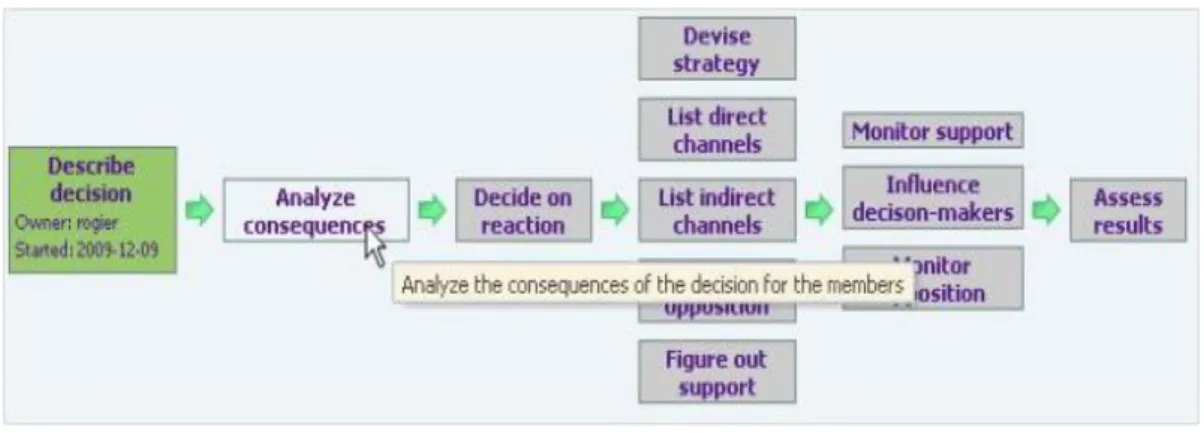
The steps are ordered in a two-dimensional matrix that defines a recommended strategy of their usage. The steps are used starting from the top leftmost one and continuing in the top down, left to right order. However, the matrix itself does not prohibit other ways of moving through the subspaces. For instance, it allows parallel movements in several subspaces. The matrix is presented to the end-users in the form of a process map, like the one in Figure 7. Note that the process map in iPB is a map over the structure of the process shared space, not a map of the activities executed in the process.
52
field(s). Usually, in this case, the intersecting fields can be changed only in one form; they are made read-only in other forms.
The restrictions on movement through the subspaces are defined with the help of business rules. Such a rule, for instance, may require that movement in one subspace should be finished before movement in another one can be started.
Figure 7. A process map representing a situational structure
Figure 8.A step form for the first step from Figure 7
Each process instance gets its own copy of the map that serves as a table of contents for its shared space. The map is used for multiple purposes: as an overview of the instance, guidelines for handling the instance, and a menu for navigating the shared space, see Figure 9.
53 checkboxes, as well as more complex fields. The form may also include “static” texts that provide instructions on what to do before some fields can be filled.
Figure 9. The map used for structuring the shared space of a process instance
The progress in filling the step forms is reflected in the map attached to the shared space via steps coloring. A white box means that the step form is empty but can be filled. A step with a half-filled form is colored green, and additional information is inserted in the step-box on the start time by the person responsible for the step. A step with a fully filled form is colored blue, and it contains information on the finishing date. Gray boxes represent steps that cannot be handled yet according to the business rules. Clicking on a gray box results in a message that explains why the box is unavailable, e.g. that some other box should be started first.* In this scheme the main way of inviting a person to visit a particular shared space is by assigning him/her to become an owner or co-owner of a particular step. Such an assignment results in an e-mail message being delivered to this person, and the process appearing in his/her list of My processes. When visiting a process shared space, a person can see directly on the map what step(s) are assigned to him/her.
There are no special means for representing planning or history. However, these concepts can be represented by adding special kinds of journal fields to step forms, see Figure 10.
Figure 10. Example of a journal widget
7.2 Organizational Implementation of BBiC in Municipality of Jönköping
IbisSoft's role in theBBiC project was more technical in comparison with the ProBis project. In this project, IbisSoft provided a tool (iPB) that facilitated the customer's own IT department to build support for the BBiC process. This was done by one support person at the IT department, who continues to provide end-user support and develops the system further having constant second-tier support from IbisSoft.
*
54 The system went through several major revisions where the complexity of the process map had been increased. The check of the BBiC system state made at the same time as the check of
Probis at HGF* revealed that it had approximately 266 active users, including 80% of heavy users who worked with the system on a daily basis, and 20% of occasional users who worked with it rarely and completed only a few operations. The system handled approximately 1800 process instances per year. At the moment of the last check, the number of process instances registered in the database was 7764, from which 1166 were active, and the number of active documents was 9920.
Both heavy and occasional users handle the system without major problems and are quite satisfied. The evidence for this is as follows:
1.There is only one person who supports all 266 end-users, and he does it only part time, as he has one more system to support. He is responsible for further development and maintenance of these two systems. He reports that he receives a very small number of requests for support by end-users in comparison with similar IT systems in the municipality.
2.Some time ago, one of the most critical end-users of the BBiC system, who used to complain about it, moved to another municipality and got the same kind of a job, but with another kind of a system that supported the work. He called the BBiC support person in Jönköping, and told him that the BBiC system at Jönköping was exceptionally good in comparison to the system he had to use in his new job.
3.In case of lack of staff to handle BBiC cases, for instance during summer, the municipality of Jönköping hires so-called consultants – people who can handle cases when the load is too high. The consultants work not only for the Municipality of Jönköping but for other neighboring municipalities as well. The latter use different kinds of systems to support the
BBiC process. According to the consultants, Jönköping's system is superior to other system they have used, and it is fun working with it (according to their own words translated from Swedish).
4.After introducing support for BBiC, iPB has been used for developing support for other processes in the social office. Around 10 processes have already been introduced up to the day of writing. This development is coordinated with the end-users, and they have never requested a solution that is not based on iPB.
The data presented in this section have been obtained from system logs and from interviews with IT staff that maintains and supports the system in the municipality of Jönköping.
7.3 Unsuccessful Attempt of Organizational Implementation at IbisSoft
IbisSoft has a tradition of testing any general purpose system it develops in its own practice. iPB
has not been an exception from this rule. It was decided to test iPB for providing support for customers. A simple map for the support process had been drawn that included four boxes, and four corresponding forms were designed. Despite its simplicity, the system was not used, as it required spending additional time on internal documentation, to which the programmers objected.
8
Comparative Analysis of Shared Space Structuring
Based on the feedback from the users of the systems described in Section 7 and reflections on our own experience of using them, we can conclude that both models for structuring shared spaces have their own strong and weak points. That is, it is not the case that one is superior to the other for all possible processes and environments. Which model to prefer in a specific situation depends on the structure of the processes the BPS system is to support as well as the
*
55 characteristics of the users participating in these processes, in particular their level of experience and authority. With regard to structure, two kinds of processes can be distinguished:
1.Loosely-structured processes, i.e. processes for which there is no predefined way for handling each instance; instead, the processing depends on the events occurring in the systems environment.*
2.Structured processes, i.e. processes for which it is possible to identify steps and control the order in which to execute them.†
With regard to experience and authority, four kinds of users can be distinguished:
1.Highly specialized users that are capable and/or have rights to handle only a specific part of the processes.‡
2.Highly universal users that are able to take any role in the processes.§ 3.Occasional users that visit shared spaces only from time to time.** 4. Novices that just started to become users of kind 1 or 2.††
Strengths and weaknesses of both models, with respect to the above kinds of processes and users, are summarized in Table 1.
The table can be summarized as follows:
The topic-based structure is most suitable for loosely-structured processes conducted by highly universal workers who are routinely using the system in most of processes in which they are involved.
The situational structure is most suitable for structured processes conducted by specialized users who know their part of work in each process, but are not required to know in details other parts. It suits well both routine users and occasional ones.
One solution for intermediate cases would be a possibility to switch between the two different models of structuring depending on the kind of processes and/or user. This can be achieved by having different default settings on the kind of users, process type, and particular process instance. This issue, however, requires additional theoretical and experimental investigation.
9
Areas of applicability of BPS System Based on Structured Shared Spaces
In this section, we discuss one example of the application areas where the usage of a BPS system based on structured shared spaces is appropriate and beneficial. Taking only one example in this section, however, does not mean that we do not see other areas of applicability for this type of systems. Examples presented in the previous section, which are not related to the discussion below, hint to other possible application areas.
The discussion considers both the external and internal environment of an organization. It is limited to for-profit organizations, and it is based on the framework suggested in [3] for identifying the right level of flexibility for a business process dependent on the process context. This framework introduces four different categories of contexts, called Marketing Positions (MPs), in which a business process is run, see Figure 11:
MP1: Exploration: Entering a new market, e.g. with a new product, or with an old product but in a new geographical location.
MP2: Standardization: Growing with an expanding market.
MP3: Optimization: Functioning in an existing competitive market. MP4: Freezing: Control exit from a declining market.
*
This is typical for IbisSoft's practice
† This is the case with the BBiC system in Jönköping ‡ Some users at both HGF and Jönköping
§Some users at IbisSoft, HGF, and Jönköping ** Some users at HGF and Jönköping
56
Table 1. Comparison of two types of shared spaces structuring
Process Topic-based structure Situational structure
Loosely-structured
Strength:
The topic-based structure provides a minimum structure to loosely structured processes, which should not be forced to follow a pre-specified set of steps. Instead, the topic-based structure differentiates between attributes/links, plan and event log.
Weakness:
The situational structure may differentiate too many steps, each of which can be of use only in some instances of a loosely structured process. This can create confusion for the user.
Structured Weakness:
The topic-based structure provides poor visualization of the process instance dynamics. A user needs to go through the log of all events to fully understand what is going on in the process instance.
The topic-based structure does not arrange information around specific steps, thus a user might need to jump between several tabs when completing the work in the frame of a particular step.
The topic-based structure makes it difficult to set constraints to control the order in which things are being done. For some attempts of introducing order through automatic planning, see [28].
Strength:
The situational structure provides good visualization of the process instance dynamics through step boxes coloring. Colored map gives a good overview of what has already been achieved and what needs to be done. The situational structure provides the user who
works with a particular step all information he/she needs at hand. Via intersecting, the information from the previous steps can be made available without the user having to access other steps.
The situational structure provides a flexible and simple way of introducing constraints on the order in which actions are performed through business rules.
Users
Universal Strength:
The topic-based structure allows a highly universal user to quickly register many similar things at one place.
The topic-based structure provides standard tabs which makes it easier for a highly universal user to navigate through different types of processes.
Weakness:
The situational structure makes it difficult for a highly universal user to complete actions that include changes in several steps. This will require him/her jumping between the steps when registering results of his/her actions and issuing invitations.
Specialized Weakness:
The topic-based structure requires specialized users jumping between different tabs when completing their tasks. The topic-based structure forces the
specialized user to see too many details that do not concern him/her, which may be confusing and distract his/her attention. The topic-based structure makes it difficult
to control what each category of users can see and do.
Strength:
The situational structure gathers all information that concerns a specialized user’s job in one place; he/she does not need to jump between different steps.
The situational structure supports the hiding of all details that are of lesser importance, but these can be easily available if needed (via opening another step).
The situational structure makes it easy to introduce information and action control dependent on the user category.
Occasional/ Novice
Weakness:
The topic-based structure requires full understanding of the principle on which the system has been built. The occasional or novice users may not consider the system as intuitive.
Strength:
57
Figure 11. Marketing positions that defines a type of context for a business process [3].
The framework also identifies four categories of processes in relation to flexibility dependent on the amount of hard rules – prohibitions and obligations, and soft rules – recommendations, both positive (the line of action is recommended, but the process participants are not obliged to follow it), and negative (the line of actions is not recommended, but can be followed if needed). These four categories are defined as follows:
1.Loose – some obligations and prohibitions, but not much of recommendations (either negative or positive)
2.Guided – some obligations and prohibitions, and many recommendations (both negative and positive)
3.Restricted – many obligations and prohibitions, and some recommendations (both negative and positive)
4.Stringent – many obligations and prohibitions, and (almost) none recommendations
These categories correspond to the MP contexts as follows. In the exploration context (MP1), the loose category is most appropriate. MP2 requires process standardization to cope with grows, but need to retain flexibility when needed. Here guided processes fit the best. MP3 requires even more standardization to create optimized processes in order to compete in a stable market. Still, in this context, some flexibility is required to deal with deviating customer needs. Restricted processes fit this context best. In the MP4 context, such flexibility is not required and the process can be quite stringent.
Establishing the needs for a certain level of flexibility, [3] investigates how to align the internal environment of the business process to the level of flexibility required by the external environment, i.e. the type of context in which the process is run. The investigation takes a socio-technical perspective [33], [34] on the internal environment prescribing alignment between all four parts of the socio-technical system, people, structure, tasks and technology. This investigation shows that a BPS system based on structured shared spaces suits best the guided
business processes. A structured shared space can help to introduce soft recommendations without much enforcing whether they are followed or not. For instance, using iPB, this can be done by placing various steps in recommended order without enforcing it by steps start rules. For the loose processes, a system with (relatively) unstructured shared spaces, like wiki, forum, and shared documents could suffice. For restrictive and stringent processes, a workflow that produces a virtual conveyor belt could be appropriate.