Faster, Safer Oracle Data Migration
Using VERITAS Storage Foundation portable data containers to
move Oracle data between unlike platforms faster, more safely, and
with less disruption
by
Tillmann Reusse
Vesna Vrdoljak
VERITAS Software Corporation
Contents
The Need for Data Migration ...5
Cross-Platform Data Sharing Technology ...6
The Disk Format for Portable Data Containers...7
File System Portability ...7
Migrating File Systems on PDC-Based Volumes ...8
Checking a VxFS File System for Potential Conversion Problems ...8
Converting a VxFS File System ...9
Recovering a Converted File System ...10
Using A Converted File System ...10
Time and Resource Savings with CDS Technology ...10
Converting File Systems on Volume Snapshots ...12
Hardware Requirements for Portable Data Containers ...12
Using Portable Data Containers to Migrate Oracle Databases ...13
Logical Migration...13
Physical Migration...13
Roles in Oracle Database Migration...14
Migrating Oracle Data Using exp/imp...15
Oracle exp/imp Migration with Portable Data Containers...15
Step 1: Exporting Database Data to an Export Dump File...16
Step 2: File System Pre-Check and Conversion...17
Step 3: Moving Data to the Target Platform ...17
Step 4: Importing Migrated Data into an Oracle Database ...17
Step 5: Verifying the Correctness of the Migration ...18
Data Migration and Oracle Upgrades...18
The Benefit of Cross-Platform Data Sharing Technology ...18
Oracle 10g Transportable Tablespaces ...21
Transportable Tablespaces ...21
Using Transportable Tablespaces with CDS Technology...22
Oracle Tablespace Transportability Considerations...22
Resynchronization: An Important Aspect of Periodic Data Migration ...23
Moving Transportable Tablespaces Between Oracle 10g Databases ...25
Steps in Migrating Data by Transporting Tablespaces...26
Step 1: Verifying Tablespace Self-Containment ...26
Step 2: Creating a Transportable Tablespace Set...27
Step 3: Converting the Transportable Tablespace Set for Use on the Target Platform ...31
Step 4: Migrating the Transportable Tablespace Set...32
Step 5: Inserting Transportable Tablespace Set Data into the Target Database...33
Benefits of Using Transportable Tablespaces to Migrate Data...34
Using TTS and CDS Technologies to Migrate Entire Databases Between Unlike Platforms ...37
Preparing a Skeleton Database on the Target Platform...37
Faster, Safer Oracle Data Migration
Failing Clients Over to Target Database ...37
Migrating an Entire Database Using Transportable Tablespaces and Portable Data Containers ...38
Summary Conclusion: Using VERITAS Storage Foundation CDS Technology to Simplify Oracle Database Migration...40
Appendix 1: Big and Little Endian Formats ...41
Appendix 2: Migration-Induced Data Inconsistency ...43
The Need for Data Migration
Whether for permanent change to a new environment, or for the operational convenience of “off-host” processing, the ability to move data between computing platforms1 of dif-ferent types increases the flexibility of enterprise information technology operations sig-nificantly. But the complexity of moving data between unlike platforms has been a bar-rier to exploiting data assets in this way. Different platforms have incompatible
• volume (virtual storage device) metadata formats
• file system metadata formats
• data formats in application files
To transfer data between platforms, IT departments have had to choose between:
• network (FTP) copies
• copying data to tape on the source platform and restoring tapes on the target platform Both of these options consume significant time and resources. As a result, many IT de-partments continue to run applications on less-than-optimal platforms because migration to more suitable environments is believed to be too resource-intensive. Others forego the business benefits of off-host backup, data mining, and testing with live data because they believe that copying large data sets would result in unacceptable application downtime. In effect, each data set becomes captive to the server platform that processes it.
Because so much enterprise data is stored in relational databases, an ability to move data-bases between unlike platforms would be especially beneficial. But consider, for exam-ple, the case of copying of an Oracle database on a Solaris platform to a Linux one. The Linux platform cannot interpret Solaris volumes’ metadata. The two platforms’ file sys-tem formats are also incompatible. Finally, the platforms’ endian formats (the way in which multi-byte data items are interpreted) differ, so Oracle instances on the two plat-forms cannot interpret each others’ data formats. To migrate a database from a Solaris host to a Linux one, an administrator would have to:
• Stop application processing on the Solaris platform and shut down the database (so that a business-consistent database image is available)
• Export data from the Oracle database into disk or tape files
• Copy the exported data from Solaris to Linux, either by FTP or by tape exchange
• Create an empty “receiver” database on the Linux platform
• Import the exported data into the receiver database on the Linux platform
Making a business-consistent (unchanging) copy of a large database can mean hours of application idle time. It’s not surprising that IT departments are reluctant to adopt opera-tional procedures that include moving databases between unlike platforms, despite poten-tial business benefits.
1
In this paper, the term platform is used to denote the combination of a server architecture and an operating system. A Sun server running the Solaris operating system is a platform, as is an Intel server running Linux.
Faster, Safer Oracle Data Migration
VERITAS Cross-Platform Data Sharing (CDS) technology reduces the time and re-sources required to move data between unlike platforms by eliminating the copy step. CDS technology creates portable data containers (PDCs), building blocks for virtual vol-umes that make it possible to transport the volvol-umes between unlike platforms. When combined with Oracle data mobility features, portable data containers further reduce the time required to move databases between unlike platforms, either permanently or periodi-cally for off-host processing. This paper describes the use portable data containers to move Oracle databases or tablespaces within them between any combination of Solaris, HP-UX, AIX, and x86 Linux platforms.
Cross-Platform Data Sharing Technology
Introduced with Version 4.0 of the VERITAS Storage Foundation (VSF) software, cross-platform data sharing (CDS) technology addresses the need for faster movement of large data sets between major UNIX server platforms (Solaris, HP-UX, AIX, and x86 Linux) by implementing portable data containers (PDCs). Fundamentally, portable data contain-ers are platform-independent virtual volume building blocks that make it possible for volumes to be deported from the platform on which they were created, and imported and accessed on other platforms of different types.
Also introduced in Version 4 of the VSF software is a universal file system metadata lay-out. PDC-based volumes now make it possible unmount a VxFS file system from the UNIX platform on which it was created (the source platform), and mount it on another of a different type (the target platform).2 Applications running on a target platform can ac-cess the data in such a migrated file system under certain circumstances:
• If their file data formats are platform-independent (e.g., ASCII or JPEG), applications can process data in migrated VxFS file systems directly.
• If they are capable (as Oracle is) of translating data written on one UNIX platform for use on another, applications can translate data in a migrated file system directly, eliminating the need to copy it from the source platform.
The larger the data set, the greater are the time and resource savings gained by logically moving storage devices between platforms rather than copying data in bulk. The ability to use a single file system on multiple UNIX platforms has two powerful advantages:
• Operational flexibility. If the best data mining tools run on AIX, a Solaris transaction database can be mined on an AIX platform. If Linux platforms are the most cost-effective or readily available, data can be moved to them from Solaris for report gen-eration, and so forth. The flexibility to run applications and utilities on any UNIX or Linux platform increases overall utilization of a data center’s computing resources
• Platform flexibility. Reducing the downtime required to migrate data between unlike platforms lowers the barrier to changing platform architecture. Very large data sets
2
A file system metadata conversion step, described later in this paper, is required if source and target platform endian formats differ.
can be migrated from AIX to Linux, for example, without lengthy copying and the at-tendant downtime. Snapshot-based migrations (described later) incorporate a built-in rapid “fall back” capability that can be invoked if a migration doesn’t go well. With CDS technology, enterprises can exploit their data assets more fully by processing snapshots of data “off-host” on platforms of different types while applications process live data on the primary platform.3 Moreover, with faster, easier data migration to differ-ent types of platforms, it becomes easier to migrate data permandiffer-ently from one platform to another for business reasons.
The Disk Format for Portable Data Containers
Portable data containers use a unique VERITAS Volume Manager (VxVM) Version 4.0 (and later) disk metadata format called cdsdisk (for cross-platform data sharing disk).
The cdsdisk format is common to VxVM implementations for the Solaris, HP-UX,
AIX, and Linux platforms. Disk groups whose disks use cdsdisk format exclusively can be imported, and the volumes they contain accessed by any of these platforms.
The cdsdisk format may be specified as the default when a disk group is created, as il-lustrated in Dialog 1.4 Alternatively, individual disks can be converted to cdsdisk for-mat by running the vxcdsconvert utility.
sol# vxdg init ora_dg cds=on
Dialog 1: Creating a cdsdisk Disk Group5
A cds disk group (a group in which all disks use cdsdisk format) can be deported from the platform on which it was created and imported by another platform of a different type.6 Just as a conventional VxVM disk group, a cds disk group may be private, shared, or distributed, but cds disks cannot be root or swap disks, nor can they be encapsulated. A platform’s system I/O block size (VOL_BSIZE in VxVM terminology) determines both the alignment (offset from disk sector 0) of volume blocks and the smallest unit for disk data transfers for that platform. To be accessible by all supported platforms, VxVM ob-jects in a cdsdisk disk group must use a system I/O block size that is appropriate for all platforms. Disks in a cdsdisk disk group have a VOL_BSIZE of 8 kilobytes, which al-lows VxVM running on any UNIX platform to access their metadata and user data.
File System Portability
VxFS file systems that use Version 6 (or later) disk layout are similarly, but not identi-cally, portable between unlike platforms. Older file system disk layouts are easily
3
The capabilities described in this paper are predicated upon an assumption that storage devices are connected to a network so that both source and target platforms can access data on them.
4
Only VxVM disk groups that use disk format version 110 or later and have 8K alignment can be converted to cdsdisk format. Older disk group formats and other alignments cannot.
5
The dialogs reproduced in this paper show the minimum script necessary to make the point of the surrounding text. VERITAS Storage Foundation documentation contains additional background, and should be consulted before performing any of the procedures discussed herein.
6
Faster, Safer Oracle Data Migration gradeable to Version 6, as Dialog 2 illustrates.
sol# mount -F vxfs /dev/vx/dsk/ora_dg/ora_vol /ora_fs sol# vxupgrade -n 6 /ora_fs
Dialog 2: Converting a VxFS File System to Version 6 Disk Layout
A Version 6 disk layout VxFS file system created on one platform can be mounted and accessed by VxFS on another, provided that the two platforms use the same endian for-mat7 to express multi-byte binary data (e.g., integers). For VxFS running on a little en-dian platform like Linux to access files in a file system created on a big enen-dian platform, binary numbers in the file system’s metadata must be converted to little endian format by the fscdsconv utility.
Migrating File Systems on PDC-Based Volumes
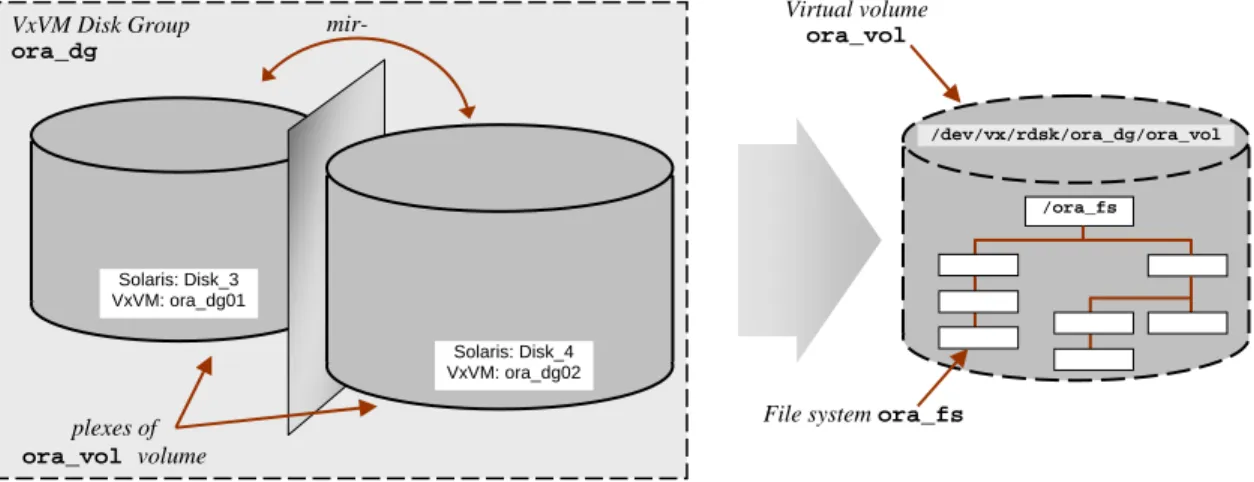
This section describes conversion of a file system created on a PDC-based volume by a (big endian) Solaris platform on for use on a (little endian) Linux platform. Figure 1 illus-trates the key details of the configuration.
Figure 1: A Simple Volume and File System Configuration
In Figure 1, volume ora_vol occupies the two disks that comprise disk group ora_dg
(ora_dg01 and ora_dg02). VxVM mirrors these and presents them to VxFS as virtual volume ora_vol, on which file system ora_fs is formatted.
Checking a VxFS File System for Potential Conversion Problems
Minor operating system differences may prevent exact file system conversion between two platforms. Maximum file system sizes, file sizes, file name lengths, directory tree depths, and user and group ID numbers differ from platform to platform. The VxFS
fscdstask script examines a file system and reports any potential problems that would result from migration to a given target platform type. As an example, Dialog 3 illustrates the use of fscdstask to identify potential problems that might arise if the /ora_fs file
7
Appendix 1 describes big and little endian binary integer formats. Dialog 11 on page 25 lists the endian formats of the platforms between which Oracle supports data migration.
VxVM Disk Group ora_dg plexes of ora_vol volume Solaris: Disk_3 VxVM: ora_dg01 mir-Solaris: Disk_4 VxVM: ora_dg02 /dev/vx/rdsk/ora_dg/ora_vol /ora_fs Virtual volume ora_vol
system created by a Solaris platform were to be mounted AIX. sol# fscdstask validate AIX /ora_fs
Size UID GID Inode Filesetname 2174407704576 0 1 5 primary The files shown above exceed one or
more limits for these operating systems: AIX
The issues with these files should be resolved before migrating this filesystem. For example by changing uid/gid ownership; or by changing their file size by spliting the file into smaller files, if appropriate for the data.
vxlsino command can be used to find the filenames corresponding to the inode numbers displayed above. sol# vxlsino 5 /ora_fs
/ora_fs/test sol# ls -l
total 4251317056
-rw-rw-rw- 1 root other 2266480640 Nov 11 16:07 huge_file drwxr-xr-x 2 root root 96 Nov 11 15:54 lost+found -rw-rw-rw- 1 root other 2174407704576 Nov 12 22:08 test
Dialog 3: Examining a File System for Potential Migration Problems As Dialog 3 indicates, the /ora_fs Solaris file system cannot be used directly by AIX because the size of file /ora_fs/test is greater than the maximum size file supported by VxFS on the AIX platform. When incompatibilities like these have been resolved, the file system can be used on the specified target platform (if its endian format is the same as that of the source platform) or converted for use (if its endian format is different).
Converting a VxFS File System
When source and target platforms use different endian formats, the file system is un-mounted, and the fscdsconv utility program is run (on the source platform) to convert its metadata to the target platform’s endian format. Dialog 4 illustrates conversion of the Solaris (big endian) ora_fs file system for use on the (little endian) Linux platform. sol# fscdstask validate Linux /ora_fs
sol# umount /ora_fs
sol# fscdsconv -f /rcvy/recovery.dat /dev/vx/rdsk/ora_dg/ora_vol
UX:vxfs fscdsconv: INFO: V-3-21842: Do you wish to commit to conversion? (ynq) y
sol# vxdg deport ora_dg
Dialog 4: Converting VxFS File System Metadata Endian Format
Prior to conversion, the fscdstask script should be run to detect any potential converti-bility problems. The fscdsconv command specifies the volume that holds the (un-mounted) file system to be converted. The –f /rcvy/recovery.dat option specifies creation of a recovery file that can be used to restore the original file system in case of a system crash or administrative error. After conversion, the disk group containing the
con-Faster, Safer Oracle Data Migration
verted file system’s volumes is deported for transfer to the target platform.
Recovering a Converted File System
File system conversion can fail, for example, if a power failure or other type of system crash occurs during conversion. Administrative errors, such as converting the wrong file system, are also possible. In either case, fscdsconv can recover the original file system by “playing back” the recovery file, reversing any changes made during conversion. Dialog 5 illustrates the use of the /rcvy/recovery.dat recovery file from Dialog 4 to restore the ora_fs file system for a conversion retry or other use by Solaris.
sol# fscdsconv -r -f /rcvy/recovery.dat /dev/vx/rdsk/ora_dg/ora_vol
Dialog 5: Recovering a VxFS File System from a Failed Conversion
Using A Converted File System
After file system conversion, the deported disk group is imported on the target platform. The commands in Dialog 6 import the ora_dg disk group on the target Linux platform, start its single volume, and mount the ora_fs file system for use.
Lnx# vxdg import ora_dg
Lnx# vxvol -g ora_dg startall
Lnx# mount -t vxfs /dev/vx/dsk/ora_dg/ora_vol /ora_fs
Dialog 6: Importing and Mounting a VxFS File System on a Target Platform At this point, VxFS running on the target Linux platform can interpret the file system’s metadata correctly, so that applications’ file operations (e.g., open, close, extend, read, write, etc.) execute successfully. Data within the files has not been altered, however. For data in a converted file system’s files to be usable by target platform applications, either the data must be platform-independent (as, for example, JPEG or PDF files), or applica-tion-specific data conversion is required.
Time and Resource Savings with CDS Technology
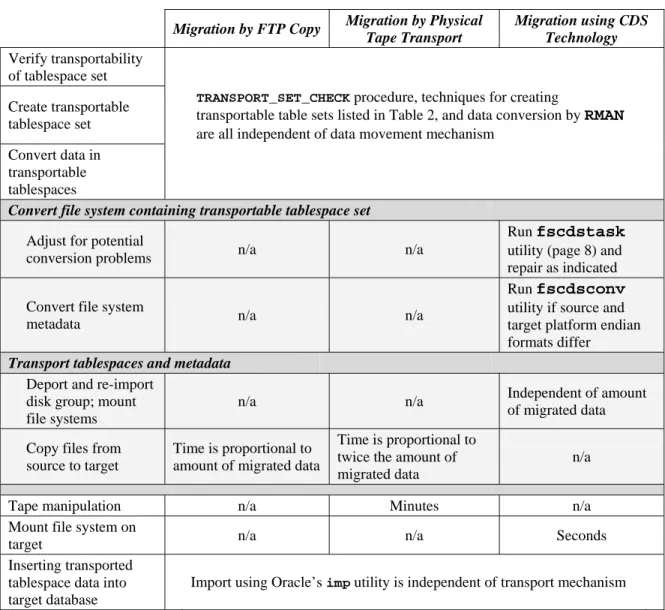
The time and resource savings from using VERITAS Storage Foundation CDS technol-ogy to migrate a file system between unlike platforms can be considerable, particularly for large file systems. Table 1 summarizes the time and resource elements in three types of inter-platform data migration.
Migration by FTP Copy Migration by Physical Tape Transport
Migration using CDS Technology
Adjustment for potential conversion problems
Manual—no assist from file system
Manual—no assist from file system
Run fscdstask
utility and make changes as indicated
Convert file system metadata
n/a n/a Run fscdsconv
utility. Elapsed time is proportional to number of files rather than to amount of data Deport disk group and
re-import on target
n/a n/a Elapsed time is negligible (seconds) Copy files from source
to target
Elapsed time for copy is proportional to amount of data migrated
Elapsed time for writing and reading tape is proportional to amount of data migrated
n/a
Tape manipulation n/a Time to mount,
unmount, transport, and re-mount tapes
n/a
Mount file system on target
n/a n/a Elapsed time is negligible (seconds) Application-specific
user data conversion
Same for all methods
Table 1: Comparison of File System Migration Techniques
As is evident from Table 1, data copying time and bandwidth requirements predominate for larger file system migrations. Since migration of file systems on PDC-based volumes does not copy data, it is essentially independent of how much data is migrated, and the benefit is therefore proportionally greater for larger file systems.
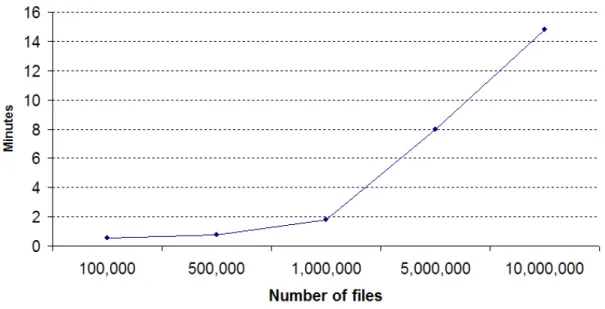
Figure 2: fscdsconv Conversion Time as a Function of Number of Files The time to convert file system metadata endian format using fscdsconv does depend
Faster, Safer Oracle Data Migration
to some extent on the number of files in the file system. Figure 2 charts conversion time as a function of number of files in the converted file system. Most database file systems contain much smaller numbers of files than this (dozens to hundreds is typical), so file system conversion time should almost always be negligible.
Converting File Systems on Volume Snapshots
Some data migrations between unlike platforms are permanent—enterprises move appli-cations from one platform to another for cost, performance, or other business reasons. In other cases, data is migrated to alternate platforms for certain types of off-host processing such as backup, software testing, and data mining. VxVM full-size volume snapshots, in combination with CDS technology, make it possible to process copies of data on unlike platforms while the live data remains in use on the primary platform.
Snapshots are mirrors of virtual volumes that have been split from their parents at suit-able instants (e.g., when no transactions are in progress) and made into separate volumes. The procedure outlined in the preceding section can be used to make a file system on a volume snapshot available for use on an unlike platform. Using snapshots rather than “live” file system data for off-host processing is a good practice for two reasons:
• Concurrent processing. Data in a volume snapshot can be mined, backed up, or tested off-host while applications continue to process live data. With CDS technol-ogy, platforms used for off-host processing need not be of the same architecture as the primary platform. This can be particularly useful in cases where backup, data mining, or software development tools are licensed for platforms other than the ones used for production.
• Fallback for permanent migrations. Moving snapshots of file system volumes to unlike platforms simplifies permanent platform conversion, for example, from enter-prise UNIX to Linux. When an important data set is converted for use on an alternate platform, a fallback plan is needed in case the conversion does not go as planned. Tape backup is one type of fallback strategy, but it requires lengthy restore from tape if a migration fails. Migrating a snapshot leaves original data intact on the source platform, ready for instant reversion if circumstances require it.
Thus, while snapshots may not be an absolute requirement for either periodic or perma-nent migration, migrating snapshots rather than live data both improves application avail-ability, and moreover is a prudent practice during permanent migrations.
Hardware Requirements for Portable Data Containers
Obviously, to migrate file systems on PDC-based volumes, both source and target plat-forms must have access to the storage devices that hold them. Disks and logical units (LUNs) connected to a storage network may be in a common zone, or may be zoned so that source and target platforms have access to them at the appropriate times (VERITAS CommandCentral Storage can be used to manage device accessibility). In small configu-rations, parallel SCSI disks and LUNs can be connected to both source and target plat-forms and used to transfer ownership of portable data containers between the two.
Using Portable Data Containers to Migrate Oracle
Databases
Although analysts’ estimates differ, it is generally agreed that half or more of enterprises’ structured data is stored in databases, much of it managed by Oracle. If one considers only data that is important or critical to the conduct of business, the percentage is almost certainly higher.
By their nature, databases are application-independent. A single database can be proc-essed in different ways by many applications—transaction processing, data mining, and software testing to name three. Thus, because of their prevalence in enterprises, the im-portance of the data in them, and the multi-faceted nature of their usage, databases are likely candidates for data migration between unlike platforms.
Logical Migration
Because Oracle implementations for different platforms use different internal data for-mats, migrating Oracle data is more complicated than simply using the technique de-scribed in the preceding section to migrate files that contain tablespaces. Either logical or physical migration techniques can be used to move Oracle data between unlike platforms. Logical migration techniques essentially consist of replicating data in a live database to a passive (read-only) database on a target platform at the Oracle level, freezing source plat-form updates momentarily for consistency, discontinuing replication, and using the target database. While this technique minimizes the downtime attributable to migration, it re-quires both special tools and extensive planning and preparation, and typically rere-quires application modifications, and in some cases database modifications as well.
Physical Migration
Physical techniques for migrating Oracle databases essentially consist of moving copies of data containers (files) from source platform to target, performing any necessary format conversion along the way. Oracle provides two techniques for physical data migration:
• Export/import. Oracle has long included exp and imp utilities that move data from one database to another in two steps. Exporting data from a database copies it to a disk file or tape image in a universal format that can be read by any Oracle implemen-tation on any supported platform. The disk file or tape image is moved to the target platform, and the data in it is imported by the imp utility.
• Transportable Tablespaces. With Version 8i, Oracle introduced transportable table-space (TTS) technology that converts tabletable-spaces “in place” for use with different Oracle implementations. Oracle 8i supports tablespace transportation between data-bases that run on platforms of the same type and use the same database blocksize. With Oracle 9i, TTS technology was enhanced to support tablespace transportation between databases on platforms of the same type, but using different blocksizes. With Oracle 10g, TTS technology was further enhanced to support transportation of table-spaces between databases running on unlike platforms.
Faster, Safer Oracle Data Migration
Both of these techniques deal with converting the format of Oracle data in the tablespace data files, not with moving them from source platform to target. Whether in the form of exported files or in the form of a transportable tablespace set, Oracle data has historically been moved between platforms either by network copy (FTP) or by backup to tape on the source platform and restoration to disk on the target.
In addition, both of these techniques migrate user data from one database to another. Both require pre-existing target databases into which data or tablespaces can be imported. VxFS file systems on PDC-based volumes can be migrated and used directly by unlike platforms with the same endian format, or converted for migration and use on platforms of opposite endian format. Thus, with CDS technology, the copying of files containing Oracle data from source platform to target can be eliminated. VxVM volumes containing Oracle export dump files or transportable tablespace sets can be deported from a source platform and imported on a target, making data instantly accessible for conversion by Oracle utilities on the target platform.
With the exp and imp utilities (Oracle versions prior to 10g), conversion occurs during the export and import processes. Transportable tablespace technology includes utilities that convert database data in place, either on the source platform or on the target. The re-mainder of this paper describes these two Oracle data migration techniques and how they can be combined with VERITAS Storage Foundation CDS technology to reduce the time and resources required to migrate Oracle data between platforms.
Roles in Oracle Database Migration
The examples that follow illustrate physical migration of Oracle data in both exp/imp
and transportable tablespace scenarios. Although the procedures require both storage management and database administration functions and skills, they are illustrated primar-ily from the physical data migration point of view, with most database administrative de-tails omitted or summarized briefly.
For example, prior to exporting or importing Oracle data, the variables ORACLE_BASE,
ORACLE_HOME and ORACLE_SID must be set so that commands invoke the correct
Ora-cle version and instance on both source and target platforms. Additionally, the exp and
imp utilities must be run by administrators with the EXP_FULL_DATABASE and
IMP_FULL_DATABASE roles respectively. Oracle provides the CATEXP.SQL and
CATALOG.SQL one-time scripts to make these assignments and perform other common
administrative operations that are beyond the scope of this paper, but that may be prereq-uisites for some of the storage management operations described herein.8
All database management operations, including migration, must be planned carefully with the assistance of experienced database administrators who also have the enterprise knowledge to ensure that availability, accessibility, security, and above all, data integrity requirements are met throughout the process.
8
The names CATEXP.SQL and CATALOG.SQL are Solaris-specific. Different Oracle implementations use different names, which are given in Oracle’s platform documentation.
Migrating Oracle Data Using
exp
/
imp
Oracle’s exp and imp utility programs move database objects or even entire databases between unlike platforms or between different versions of Oracle.9
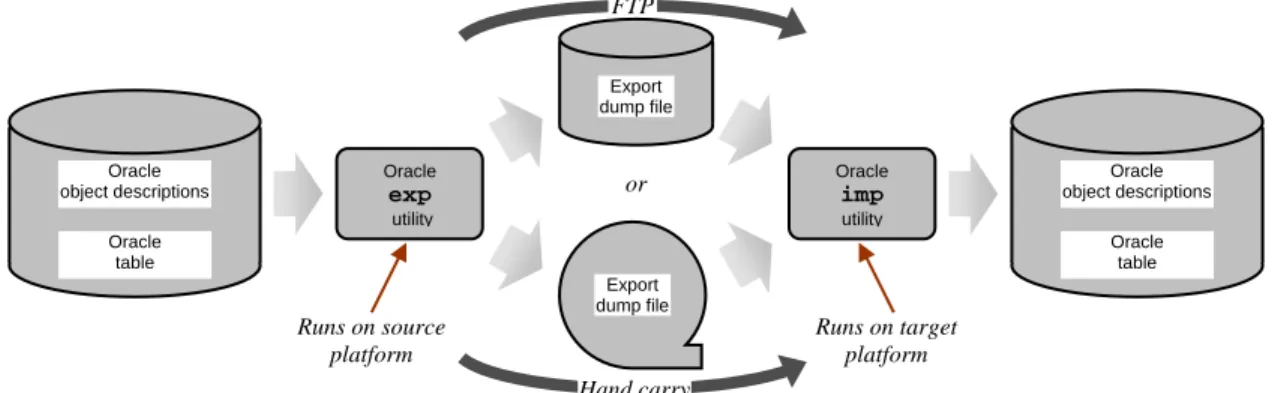
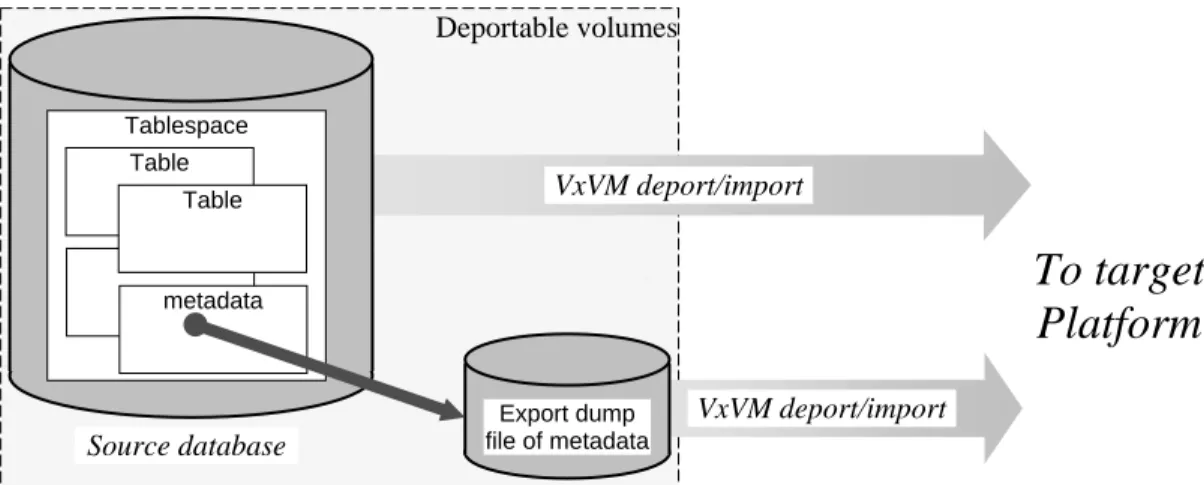
The exp utility extracts object definitions and data from a database on the source plat-form and copies them to an export dump file on disk or tape storage. Historically, export dump files have been transferred using FTP or tape backup and restore. On the target platform, the imp utility reads object definitions and data from export dump files and in-serts data into local databases according to the object definitions. Figure 3 illustrates the options for moving database data to an alternate platform using exp/imp.
Figure 3: Using exp/imp to Migrate an Oracle Database
The number of potential reasons for database migration (backup, data mining, software testing, platform conversion disaster recovery, …) suggests that frequent data migration is likely. Thus, it seems worthwhile to explore techniques for optimizing the migration of Oracle database data. VERITAS Storage Foundation CDS technology significantly re-duces the time and resources required to migrate Oracle data between unlike platforms.
Oracle
exp
/
imp
Migration with Portable Data ContainersVERITAS Storage Foundation file systems on PDC-based volumes eliminate the need to copy or physically transport Oracle export dump files between source and target plat-forms. Moving Oracle data between unlike platforms using CDS technology consists of:
1. Export. Run the Oracle exp utility to extract the data to be moved to an export dump file in a VxFS file system on a PDC-based volume
2. Convert. Run the VSF fscdstask utility to ensure that the file system contain-ing the export dump file is compatible with the target platform, and if necessary, the fscdsconv utility to convert file system metadata endian format.
3. Transfer. Deport(a VxVM operation)the VSF disk group that contains the ex-port dump file’s file system from the source platform, imex-port (a VxVM operation) it on the target platform and mount the file system.
9
Until the release of Oracle Version 10g, EXPORT/IMPORT was the only means of moving data between Oracle databases with different characteristics.
FTP Runs on source platform Oracle table Oracle object descriptions Oracle exp utility Export dump file Export dump file or Oracle imp utility Oracle table Oracle object descriptions Runs on target platform Hand carry
Faster, Safer Oracle Data Migration
4. Import. Run the Oracle imp utility to import data from the export dump file into a pre-existing “receiver” database on the target platform
5. Verify that migration succeeded using an application-dependent procedure. The sections that follow describe these steps in more detail.
Step 1: Exporting Database Data to an Export Dump File
The first step in an exp/imp data migration is to run Oracle’s exp utility to extract ob-ject definitions and data from the source database. Dialog 7 illustrates the export of a full database (i.e., including all schemas) to an export dump file.
sol# exp system/manager FILE=/exp_fs/ora9i.exp FULL=y DIRECT=y CONSISTENT=y Export: Release 9.2.0.4.0 - Production on Wed Sep 15 11:32:10 2004
Copyright (c) 1982, 2002, Oracle Corporation. All rights reserved.
Connected to: Oracle9i Enterprise Edition Release 9.2.0.4.0 - Production With the Partitioning, OLAP and Oracle Data Mining options
JServer Release 9.2.0.4.0 – Production
Export done in WE8ISO8859P1 character set and AL16UTF16 NCHAR character set
About to export the entire database ... . exporting tablespace definitions . exporting profiles
. exporting user definitions . exporting roles
. exporting resource costs
. exporting rollback segment definitions . exporting database links
. exporting sequence numbers . exporting directory aliases . exporting context namespaces
. exporting foreign function library names . exporting PUBLIC type synonyms
. exporting private type synonyms . exporting object type definitions
. exporting system procedural objects and actions . exporting pre-schema procedural objects and actions . exporting cluster definitions
. about to export SYSTEM's tables via Direct Path ... . exporting database links
. ...lines omitted...
. about to export SYSTEM's tables via Conventional Path ... . . exporting table AQ$_INTERNET_AGENTS 0 rows exported
...lines omitted...
. . exporting table SQLPLUS_PRODUCT_PROFILE 0 rows exported . exporting synonyms
...lines omitted... . exporting statistics
Export terminated successfully without warnings.
In the exp command of Dialog 7, the FILE parameter specifies the path to the export dump file. Upon completion of this command, the /exp_fs/ora9i.exp file contains the data to be migrated.
Step 2: File System Pre-Check and Conversion
A file system that contains export dump files should reside in a dedicated disk group so that it can be deported to the target platform without disrupting other applications. It is good practice to run the fscdstask utility prior to deportation to verify that no platform difference-related problems will be encountered. The first line of Dialog 8 illustrates con-version pre-check.
sol# fscdstask validate Linux /exp_fs sol# umount /exp_fs
sol# fscdsconv -f /recovery/exp_rcvr.dat /dev/vx/dsk/oracledg/exp_fs UX:vxfs fscdsconv: INFO: V-3-21842: Do you wish to commit to conversion? (ynq) y
sol# vxdg deport oracledg
Dialog 8: Pre-Checking and Converting a File System Containing an Export Dump File Because the target platform (Linux) uses the opposite endian format from the source (So-laris), the fscdsconv utility is run to convert its metadata endian format. In this exam-ple, recovery information is stored in /recovery/exp_fs_rcvr.dat so that the con-version can be reversed if necessary.
Step 3: Moving Data to the Target Platform
After the conversion, the oracledg disk group is deported by the source platform, as Dialog 8 illustrates, making it available for import by the Linux target platform (assum-ing of course that there is a physical connection such as a storage network).
Next, the disk group containing the export dump file is imported on the target platform. Its volumes are started, and the file system is mounted at /exp_fs. Dialog 9 illustrates the VSF commands that perform these actions.
Lnx# vxdg import oracledg
Lnx# vxvol -g oracledg startall Lnx# mkdir /exp_fs
Lnx# mount -t vxfs /dev/vx/dsk/oracledg/exp_fs /exp_fs
Dialog 9: Importing Disk Group Containing Converted File System
Step 4: Importing Migrated Data into an Oracle Database
Importing data into an Oracle database must be done from an account that has the
IMP_FULL_DATABASE Oracle administrative role. Dialog 10 illustrates importation of data into a receiver database on the target platform.
Faster, Safer Oracle Data Migration
$Lnx imp system/manager FILE=/exp_fs/ora9i.exp FULL=y commit=y ignore=y Import: Release 9.2.0.4.0 - Production on Wed Sep 15 13:19:19 2004 Copyright (c) 1982, 2002, Oracle Corporation. All rights reserved.
Connected to: Oracle9i Enterprise Edition Release 9.2.0.4.0 - Production With the Partitioning, OLAP and Oracle Data Mining options
JServer Release 9.2.0.4.0 - Production
Export file created by EXPORT:V09.02.00 via direct path
import done in WE8ISO8859P1 character set and AL16UTF16 NCHAR character set . importing SYSTEM's objects into SYSTEM
...lines omitted…
. . importing table "EMP" 16384 rows imported
. . importing table "SQLPLUS_PRODUCT_PROFILE" 0 rows imported About to enable constraints...
Import terminated successfully with warnings.
Dialog 10: Importing an Oracle Database—Abbreviated Dialog
Running the Oracle imp utility completes database migration. At this point, the database containing the migrated data can be used by applications, whether for off-host processing or as a replacement for the original. The database on the target platform has a separate identity from that of its parent (which may still exist and be in use on the original plat-form if a snapshot was migrated), and most important, a different log sequence number. The migrated database cannot, therefore, be used to recover a corrupted or destroyed source database from the latter’s archive logs.
Step 5: Verifying the Correctness of the Migration
Even though a migrated database is ready for use as soon as Oracle imports it on the tar-get platform, it is good practice to verify the correctness of the migration before data is used by applications. Correctness of a migration can be verified in any number of ways, all of which are application and business practice-related. For example, one might exe-cute queries against one or more of the tables in the migrated database and compare the results with those from the same query run on the source database immediately prior to the migration.
Data Migration and Oracle Upgrades
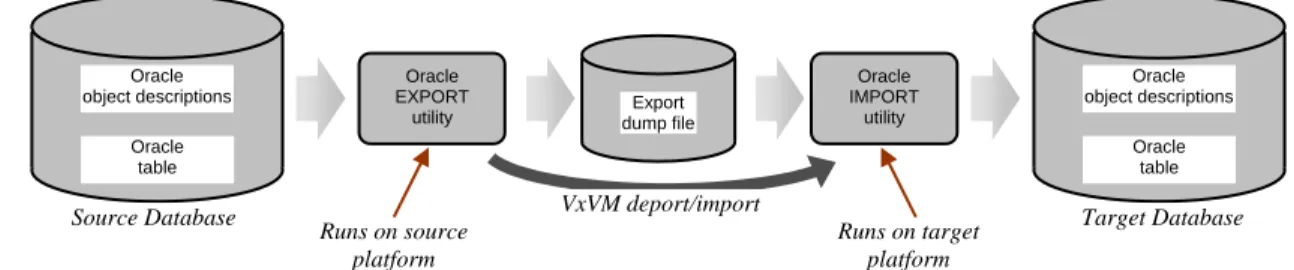
The database migration procedure outlined in this section and summarized in Figure 4 would typically be used to move data from Oracle 9i and earlier databases between unlike platforms. Transportable tablespaces, discussed in the following section, are the preferred technique for migrating Oracle 10g data. For enterprises planning both upgrade to Oracle 10g and implementation of data migration procedures, it is generally preferable upgrade to Oracle 10g first, and implement migration procedures based on transportable table-spaces after the upgrade.
The Benefit of Cross-Platform Data Sharing Technology
The fundamental benefit that VERITAS Storage Foundation CDS technology delivers to
exp/imp Oracle data migration is the elimination of any export dump file copying or backup and restore. Even with portable data containers, it is still necessary to export data
to the export dump file on the source platform and import it into a database on the target, both of which are copy operations whose duration is proportional to the amount of data being migrated. With CDS technology, however, data movement between platforms is essentially independent of the amount of data being moved, so the larger the database, the greater the benefit of using CDS technology.
Figure 4: EXPORT/IMPORT Migration Using Portable Data Containers
Runs on source platform Oracle table Oracle object descriptions Oracle EXPORT
utility dump fileExport
Oracle IMPORT utility Oracle table Oracle object descriptions Runs on target platform VxVM deport/import
Oracle 10g Transportable Tablespaces
By eliminating the need to copy export dump files between platforms, VERITAS Storage Foundation CDS technology reduces the time and resources required to migrate Oracle database data between unlike platforms. The data itself, however, must still be converted before it can be meaningfully processed on the target platform. Endian format differences in Oracle metadata and internal format differences between Oracle versions must both be resolved before target platform applications can process migrated data meaningfully. The
exp and imp utilities perform these conversions, but in essence, export and import themselves are data copy operations. Thus, while the technique outlined in the preceding section eliminates the copying of data between platforms, it remains necessary to copy (exp) data from the database to the export dump file on the source platform and copy (imp) it again from the export dump file to a receiver database on the target platform. Portable data containers reduce the time and resources required to move data between platforms, but they do not completely eliminate data copying. In fact, for large databases (hundreds of gigabytes), the time required by the exp and imp steps may make data migration to an unlike platform impractical, even if portable data containers are used.
Transportable Tablespaces
In Version 8i, Oracle introduced the concept of Transportable Tablespaces (TTS), a se-ries of changes to tablespace internal formats that makes it possible to convert data in place for use on different platforms and with Oracle versions. With the technology intro-duced in Version 8i, tablespaces can be transported only between platforms of the same type that use the same database blocksize. With Oracle 9i, migration between databases with different blocksizes (but still on like source and target platforms) platforms became possible. With Oracle 10g, the technology has been further enhanced to support migration of tablespaces between unlike platforms. Transportable tablespaces make it easier to move data between databases, and to migrate entire databases between platforms, be-cause they replace the exp and imp copy operations with in-place data conversion. Transportable tablespaces eliminate the export and import data copying steps, but they themselves do not convert file system metadata or move data files from source platform to target. The conventional techniques for migrating transportable tablespace files would still be FTP and physical tape transfer. File system metadata conversion would occur in the TCP/IP stack (with FTP) or in the backup and restore utilities. As with the exp/imp
technique for earlier Oracle versions, copying large amounts of data between platforms can take a long time and consume large amounts of network or I/O bandwidth.
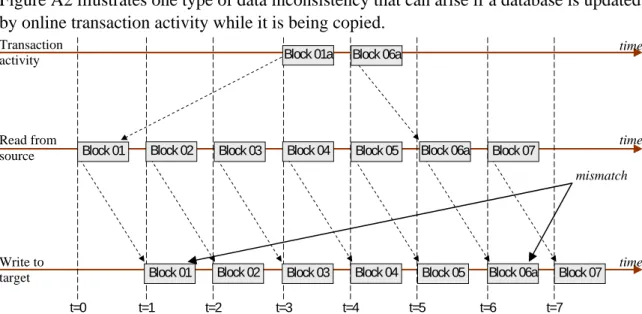
What is perhaps worse is that if a database is updated while the files that contain its table-spaces are being copied, the copy is likely to be inconsistent from a business standpoint.10 In most cases, updates to data being migrated must be blocked while the data is copied. Migrating a large amount of database data can therefore be operationally awkward, or in
10
Appendix 2 gives an example of how updating data in a table during migration can introduce inconsistency.
Faster, Safer Oracle Data Migration
extreme cases, unfeasible, because the source database must either be operated in read-only mode or stopped entirely while tablespace files are copied.
Thus, even though it may be desirable from a business standpoint to process a database off-host on an unlike platform, and even though Oracle transportable tablespaces elimi-nate the export and import steps in data migration, the time required to copy tablespace files from one platform to another limits the applicability of this technique, especially for large databases.
Using Transportable Tablespaces with CDS Technology
VERITAS Storage Foundation portable data containers and split-mirror volume snap-shots solve this problem by making it possible to move Oracle transportable tablespaces between unlike platforms without copying large amounts of data and without significant database downtime. The procedure is as follows:
1. Create a transportable tablespace set. Meaningful migration requires both a set of tablespace files that are internally consistent with each other and an export dump file of metadata that accurately describes the data in them.
2. Convert file system metadata if necessary. If source and target platform endian formats differ, the fscdsconv utility is run to convert the endian format of the file system containing the transportable tablespace set. Conversion time is related to the number of files in the file system (usually small for databases), rather than the amount of data, and so is relatively independent of the amount of data being migrated. Conversion of a file system that contains only a few dozen tablespace files takes only a few seconds.
3. Transport data. PDC-based volumes containing the converted file systems are deported from the source platform and imported on the target. “Moving” data from source platform to target in this way takes at most a few tens of seconds. 4. Convert data in tablespaces. Oracle’s RMAN utility scans the transported
table-space files and converts database metadata to the format required by the target platform. The scan is done at the database block level, and is significantly faster than exporting and importing, which copy data at the row level.
The Oracle metadata conversion step can also be performed on the source plat-form (prior to step 2) if resources are more available there.
The sections that follow describe these steps in more detail. Two important scenarios are discussed:
• Periodic migration of a set of tablespaces for off-host processing (backup, software testing, or data mining). In this case, a receiving database may be presumed to exist and be populated with data.
• Converting a database for permanent use on a different platform while maintaining a “fallback” strategy in case the conversion must be reversed.
Oracle Tablespace Transportability Considerations
re-ceiving database must at least be as high as that of the source database. Moreover, source database data file headers must identify the platform to which they belong. In databases with compatibility level 10.0.0 or higher, this identification can be inserted by making data files read/write at least once (after which they can be returned to read-only mode if applications or operating procedures require that).
Even when database compatibility levels support migration, other characteristics of data may prevent tablespaces from being transportable:
• Character sets: If the source and target databases do not use the same character set and national character set, migration will fail (For the examples that follow, both source and target databases are assumed to use the AL16UTF16 national character set and the AMERICAN_AMERICA.WE8ISO8859P1 character set.)
• SYS objects: Oracle does not support transportation of SYSTEM tablespaces or objects owned by user SYS.
• Application objects: Objects such as PL/SQL, Java classes, callouts, views, syno-nyms, users, privileges, dimensions, directories, and sequences cannot be transported. They must be created in the target database before transported data can be used.
• Duplicate tablespace names: A tablespace cannot be transported to a target database that already contains a tablespace with the same name. One of the two must be re-named before transporting.
Additionally, certain data types can be transported, but require special consideration on the target:
• Advanced queues. Oracle Version 8.0-compatible advanced queues with multiple re-cipients transport successfully, but do not work correctly after migration. (Advanced queues with only a single recipient can be transported with no loss of function.)
• Opaque Types.Data types that are opaque to Oracle (e.g., RAW, BFILE, and
AnyTypes) as well as database objects that use them, migrate successfully, but nei-ther Oracle nor VSF software actually alters them in any way. If these data types are not platform-independent, they must be converted by the target applications that use them.
Resynchronization: An Important Aspect of Periodic Data Migration
Periodic data migration (e.g., for data mining or software testing), requires database snap-shots rather than a live database. Migrating snapsnap-shots allows a database to remain in use while migrated data is processed off-host. An often-neglected component of snapshot-based off-host processing is the time and bandwidth required to resynchronize snapshot storage devices with their parent volumes after they have been processed. VSF FastRe-sync technology minimizes this overhead by tracking changes in parent volumes with ac-tive snapshots, and resynchronizing only blocks that actually change. With FastResync, resynchronization time is related to the amount of change during the life of a snapshot, not to the size of the volume. For snapshots of large volumes with short lifetimes (a day or two), VSF software typically eliminates 99% or more of resynchronization time.
Moving Transportable Tablespaces Between Oracle 10g
Databases
Oracle transportable tablespaces can be used in conjunction with VERITAS Storage Foundation portable data containers and Database FlashSnap to migrate data from a source platform to an unlike target without copying it, and more importantly, with almost no source database downtime. The possibility of rapid, non-disruptive data migration cre-ates opportunities for off-host processing, data publication, and more frequent backup. While there are minor internal structural differences between Oracle databases on differ-ent platforms, the major consideration in migrating data between unlike platforms is the platforms’ endian formats.11 For tablespaces to migrate between two platforms, both must be listed in Oracle’s v$transportable_platform view. The endian format of one or more platforms hosting an Oracle database can be determined by querying the view. Dialog 11 illustrates queries that return the endian format of 64-bit Solaris and the entire contents of the view (effectively listing all platforms for which Oracle transportable ta-blespaces are supported).
SQL> select d.platform_name, endian_format
from v$transportable_platform tp, v$database d where tp.platform_name = d.platform_name;
PLATFORM_NAME ENDIAN_FORMAT --- --- Solaris[tm] OE (64-bit) Big
SQL> col platform_name for a40
SQL> select * from v$transportable_platform order by 1;
PLATFORM_ID PLATFORM_NAME ENDIAN_FORMAT --- --- --- 1 Solaris[tm] OE (32-bit) Big
--> 2 Solaris[tm] OE (64-bit) Big 3 HP-UX (64-bit) Big 4 HP-UX IA (64-bit) Big 5 HP Tru64 UNIX Little --> 6 AIX-Based Systems (64-bit) Big 7 Microsoft Windows IA (32-bit) Little 8 Microsoft Windows IA (64-bit) Little 9 IBM zSeries Based Linux Big 10 Linux IA (32-bit) Little 11 Linux IA (64-bit) Little 12 Microsoft Windows 64-bit for AMD Little 13 Linux 64-bit for AMD Little 15 HP Open VMS Little 16 Apple Mac OS Big 15 rows selected.
Dialog 11: Endian Formats of Platforms That Support Oracle Transportable Tablespaces
11
Faster, Safer Oracle Data Migration
Steps in Migrating Data by Transporting Tablespaces
Migrating Oracle tablespaces between unlike platforms using VERITAS Storage Founda-tion portable data containers and (opFounda-tionally) split-mirror snapshots (Database
FlashSnap) consists of the following steps:
1. Verify transportability. Run Oracle-supplied utilities to verify that the tablespaces selected for transportation are self-contained
2. Create a transportable tablespace set. An internally consistent transportable ta-blespace set of files for migration is created, either using live data, Oracle scripts, or VSF Database FlashSnap snapshots
3. Convert tablespaces. Tablespaces in the transportable set are converted to the get platform’s Oracle metadata format (alternatively, this can be done on the tar-get platform after data is moved)
4. Move data. The transportable tablespace set (a collection of files) is moved to the target platform by deporting the disk group on which the transportable tablespace files are stored and re-importing it on the target platform
5. Insert data into target database. Data in the transported and converted table-spaces is inserted into the target database
The paragraphs that follow describe these steps. (Throughout the discussions, it is as-sumed that dialog commands are issued by users connected to the database as SYS.
Step 1: Verifying Tablespace Self-Containment
To be transportable, a set of Oracle tablespaces must be self-contained; that is, they must not contain references to tablespaces that are not part of the set. Contents that might pre-vent a tablespace or set of tablespaces from being transportable include:
• Indexes to tables that are not in tablespaces belonging to the transportable set.12
• Some, but not all, partitions of a partitioned table. Partitioned tables must be migrated in their entirety. A subset of a table’s partitions may be transported if the subset is first transformed into a full table stored entirely within tablespaces in the set.
• Referential integrity constraints that refer to tables outside the set. Referential integ-rity constraints in tablespaces to be transported may be ignored, but if they are not, they must refer to tables within the set.
• Large object (LOB) columns that point to large objects stored outside the set. In the dbms_tts package, Oracle supplies a transport_set_check procedure that can be invoked from the EXECUTE_CATALOG_ROLE role to determine whether a set of tablespaces is self-contained, and therefore transportable.
Inputs to the transport_set_check procedure are the list of tablespaces to be checked for transportability and the positional parameter TTS_FULL_CHECK, which specifies whether referential integrity constraints should be checked. Dialog 12 illustrates the use of the transport_set_check procedure to verify that tablespaces tts_data01 and
12
tts_data02 are self-contained.
SQL> execute dbms_tts.transport_set_check('tts_data01, tts_data02', true); PL/SQL procedure successfully completed.
SQL> select * from transport_set_violations; no rows selected
Dialog 12: Determining that a Set of Tablespaces is Self-Contained (Transportable)
The transport_set_check procedure in Dialog 12 determines that tablespaces
tts_data01 and tts_data02 are self-contained, including with respect to referential integrity constraints (indicated by the true value of the second parameter). Executing the procedure populates the transport_set_violations view, which can be queried to determine specific violations, as Dialog 12 also illustrates. If this view is empty, the ta-blespaces are self-contained, and can be transported.
Any violations identified by rows in the transport_set_violations view must be resolved to make the selected tablespaces transportable. For example, referential integrity constraint violations can be eliminated either by ignoring them (and instead recreating them in the target database after migration) or by including all data referenced by the constraints in the transportable set.
Step 2: Creating a Transportable Tablespace Set
Oracle 10g migrates transportable tablespace sets that consist of tablespaces (data files that contain user data) and a dump file containing Oracle metadata that describes the user data to be migrated. Either Oracle’s exp utility or the newer, more capable “data pump” utility (expdp) can be used to extract metadata to an export dump file that becomes part of the transportable tablespace set.13
Data in a transportable tablespace set must be consistent with the metadata in the export dump file, and moreover, must not change during migration. Effectively, both data in the tablespaces to be transported and the metadata that describes it must be frozen at the same point in time. There are four basic techniques for creating consistent transportable tablespace sets:
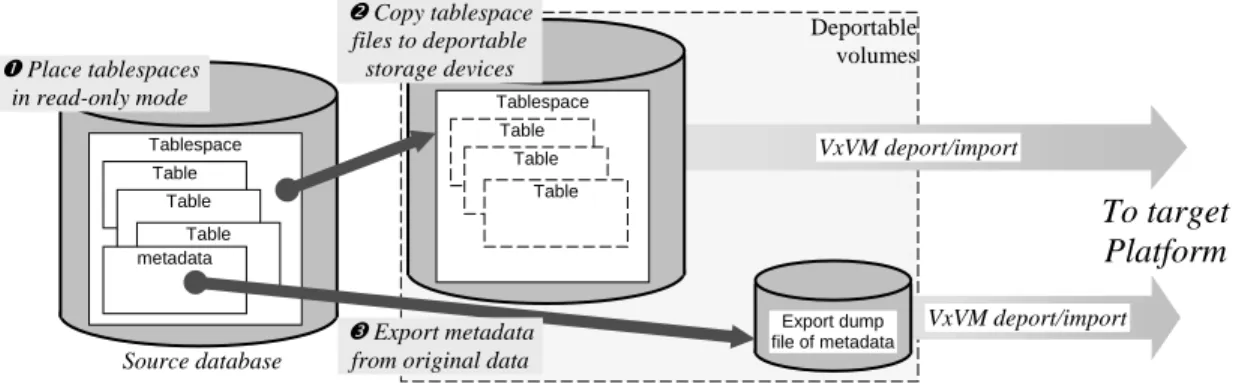
• Use live data. Tablespaces to be migrated are placed in read-only mode while their metadata is extracted to a dump file, and then either dropped or taken offline so that the file system that contains them can be migrated.14
With this technique, the tablespace data files to be migrated must be located on stor-age devices that can be deported from the source platform and imported on the target. Usually this implies a dedicated disk group.
The transportable tablespace set in this case consists of original data files and an ex-port dump file of metadata, as Figure 5 illustrates.
13
The expdp (export data pump) utility extracts metadata faster then exp, and also handles BINARY_FLOAT and BINARY_DOUBLE data types, which cannot be handled by exp.
14
When tablespaces are dropped in this scenario, the INCLUDING DATAFILES clause should not be specified. If it is, tablespace data files are deleted and migration becomes impossible.
Faster, Safer Oracle Data Migration
Figure 5: Using Original Data in a Transportable Tablespace Set
The application impact of this technique is very high—because original data is mi-grated, no application access is possible during or after migration. This technique lacks a fall-back strategy in case something goes wrong during migration, and is therefore generally not recommended.
• Use duplicates of tablespaces. User-defined SQL scripts duplicate the data in table-spaces designated for migration while the database is in use. Duplication produces new tablespaces whose names do not conflict with those of the corresponding live ta-blespaces used by applications. When copying is complete, the duplicates are placed in read-only mode, and their metadata is exported to a dump file that becomes part of the transportable tablespace set.
With this technique, tablespace duplicates must be located on deportable storage de-vices.
In this case, illustrated in Figure 6, the transportable tablespace set consists of files that contain the duplicate tablespaces and the dump file of their metadata.
Figure 6: Using SQL-Based Duplicates in a Transportable Tablespace Set This technique can have an impact on application performance if both copying and applications access the same data during duplication. Moreover, depending on how applications use data, it may be necessary to place tablespaces in read-only mode for the duration of the copy. Thus, this method can have a significant impact on the
Deportable volumes VxVM deport/import Source database
To target
Platform
VxVM deport/import Export dump file of metadata Tablespace Table Table Table metadata To target Platform Deportable volumes VxVM deport/import Source database VxVM deport/import Export dump file of metadata Tablespace Table Table Table metadata Tablespace Table Table Table n Duplicate data using SQL script oPlace duplicates in read-only mode p Export metadata from duplicatesavailability of data to certain types of applications.
• Use copies of tablespace data files. Tablespaces designated for migration are placed in read-only mode while their data files are copied to deportable storage devices. Copying files is typically much faster than SQL-based duplication, but copying large tablespace files can require significant elapsed time.
With this technique, illustrated in Figure 7, the tablespace data file copies are not part of the database, so metadata is exported from the original tablespaces, either during copying or afterward, but before the tablespaces are returned to read-write mode. The transportable tablespace set in this case consists of tablespace data file copies and a dump file of metadata exported from the original tablespaces.
Figure 7: Using Tablespace File Copies in a Transportable Tablespace Set The application impact of this technique can be significant, because original table-spaces must remain in read-only mode for the duration of the file copy and during metadata export.
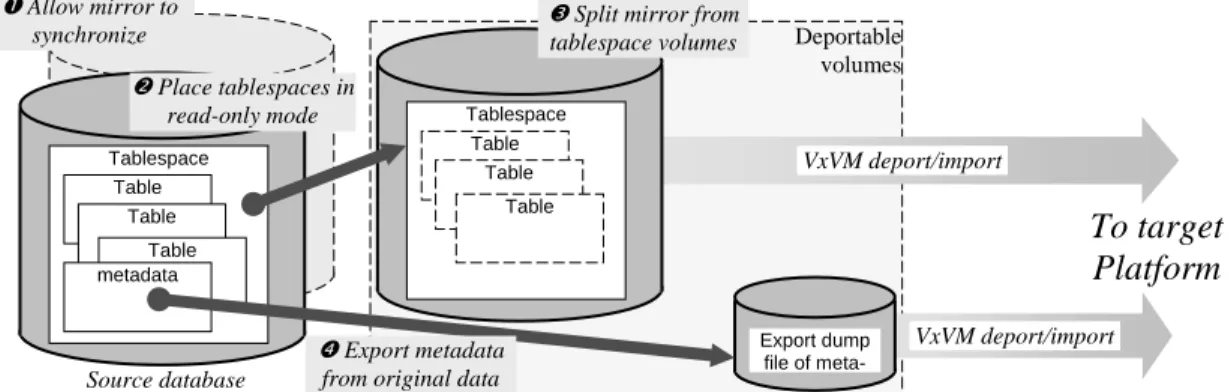
• Use split mirrors of virtual volumes containing tablespaces. Virtual volumes con-taining tablespaces to be migrated are mirrored by Database FlashSnap. When the mirrors are completely synchronized, original tablespaces are placed in read-only mode while metadata is exported from the original tablespaces and the mirrors are split from their parent volumes. The split mirrors are deported from the source plat-form, and imported by the target.
With this technique, illustrated in Figure 8, the transportable tablespace set consists of copies of tablespace data files located on the split mirror devices and a dump file of metadata exported from the original tablespaces (usually in the same file system).
To target Platform Deportable volumes VxVM deport/import Source database VxVM deport/import Export dump file of metadata Tablespace Table Table Table Tablespace Table Table Table nPlace tablespaces in read-only mode metadata o Copy tablespace files to deportable storage devices p Export metadata from original data
Faster, Safer Oracle Data Migration
Figure 8: Using Split Mirrors in a Transportable Tablespace Set
The application impact of this technique is significantly lower than that of any of the others. Tablespaces must be in read-only mode for the duration of the mirror split (seconds) and the metadata export (typically tens of seconds; possibly minutes for very complex databases). As with all but the first technique described, an additional “cost” of this technique lies in the storage capacity required for the copy.
Table 2 summarizes the important properties of these four techniques for instantiating consistent sets of tablespaces to be migrated and export dump files containing metadata that corresponds to them.
Description Transportable Tablespace
Set Sources
Application Impact on using the Database
Original tablespaces are transported. (possible only if application access to migrated data is not required)
Data: original tablespace files on deportable storage devices
Metadata export: original tablespaces
Availability: Migrated data unavailable during and after migration
Performance: n/a SQL copy data to separate
tablespaces with unique names. Metadata exported from tablespace copies
Data: duplicates of data in alternate tablespaces on deportable storage devices
Metadata export: tablespace copies
Availability: Migrated data is read-only while metadata is exported
Performance: Possibly significant if applications access data as it is being copied
Tablespaces placed in read-only modewhile the files that contain them are copied.
Metadata exported from original tablespaces while they are in read-only mode
Data: copies of tablespace files on deportable storage devices
Metadata export: original tablespaces
Availability: Migrated data is read-only while files are copied and metadata exported
Performance: Possibly significant if applications read data as it is being copied
Mirrors are added to virtual volumes containing tablespaces. When mirrors are synchronized, tablespaces are placed in read-only mode while mirrors are split and metadata is extracted from original tablespaces
Data: copies of tablespace data files on deportable split mirrors.
Metadata export: original tablespaces
Availability: Migrated data is read-only while metadata is exported and mirrors are split
Performance: Some application impact is possible during mirror synchronization
Table 2: Summary of Techniques for Creating Transportable Tablespace Set All four of the techniques summarized in Table 2 require that metadata describing the user data in the tablespaces to be migrated be exported to an export dump file, The
table-n Allow mirror to synchronize To target Platform Deportable volumes VxVM deport/import Source database VxVM deport/import Export dump file of meta-Tablespace Table Table Table Tablespace Table Table Table oPlace tablespaces in read-only mode metadata q Export metadata from original data
pSplit mirror from tablespace volumes
space images (whether original or copies) that correspond to exported metadata must not be altered between the time at which they are created and the time at which metadata is exported from them. Dialog 13 illustrates the use of the Oracle exp utility to export metadata for tablespace tts_data to file tts_data.dmp.
SQL> alter tablespace tts_data read only; Tablespace altered.
$ export NLS_LANG=AMERICAN_AMERICA.WE8ISO8859P1 $ exp TRANSPORT_TABLESPACE=y TABLESPACES=tts_data \ > file=tts_data.dmp log=tts_data.log
Export: Release 10.1.0.2.0 - Production on Thu May 20 19:59:08 2004 Copyright (c) 1982, 2004, Oracle. All rights reserved.
Username: / as sysdba
Connected to: Oracle Database 10g Enterprise Edition Release 10.1.0.2.0 - 64bit Production
With the Partitioning, OLAP and Data Mining options
Export done in WE8ISO8859P1 character set and AL16UTF16 NCHAR character set Note: table data (rows) will not be exported
About to export transportable tablespace metadata... For tablespace TTS_DATA ...
. exporting cluster definitions . exporting table definitions
. . exporting table WAIT_OBJECTS . exporting referential integrity constraints . exporting triggers
. end transportable tablespace metadata export Export terminated successfully without warnings.
Dialog 13: Exporting Tablespace Metadata from an Oracle Database
Step 3: Converting the Transportable Tablespace Set for Use on the Target Platform
Oracle database data is converted for use by a different platform in two steps:
• If source and target platform endian formats differ, the fscdsconv utility is run on the source platform to convert the metadata endian format of the file system contain-ing the transportable tablespaces. If source and target platforms use the same endian format, this step is not required.
• Oracle’s RMAN utility is run to convert database metadata and data within the migrated tablespaces. This conversion may be done on the source platform, prior to file system conversion, or it may be done on the target, after the storage devices containing the transportable tablespace set have been imported there.
Use of the RMAN utility for transportable tablespace set format conversion does not imply that RMAN must be used for backup, or that the database must be registered in an RMAN
catalog. Dialog 14 illustrates the use of Oracle RMAN running on Solaris to convert a ta-blespace for use by an AIX platform. This conversion takes place prior to data migration. The %U in the target path specification directs RMAN to create a unique name for the con-verted tablespace file.